Canary Releases for Voice Agents: Watching a Prompt or Model Change on a Slice of Calls
On this page
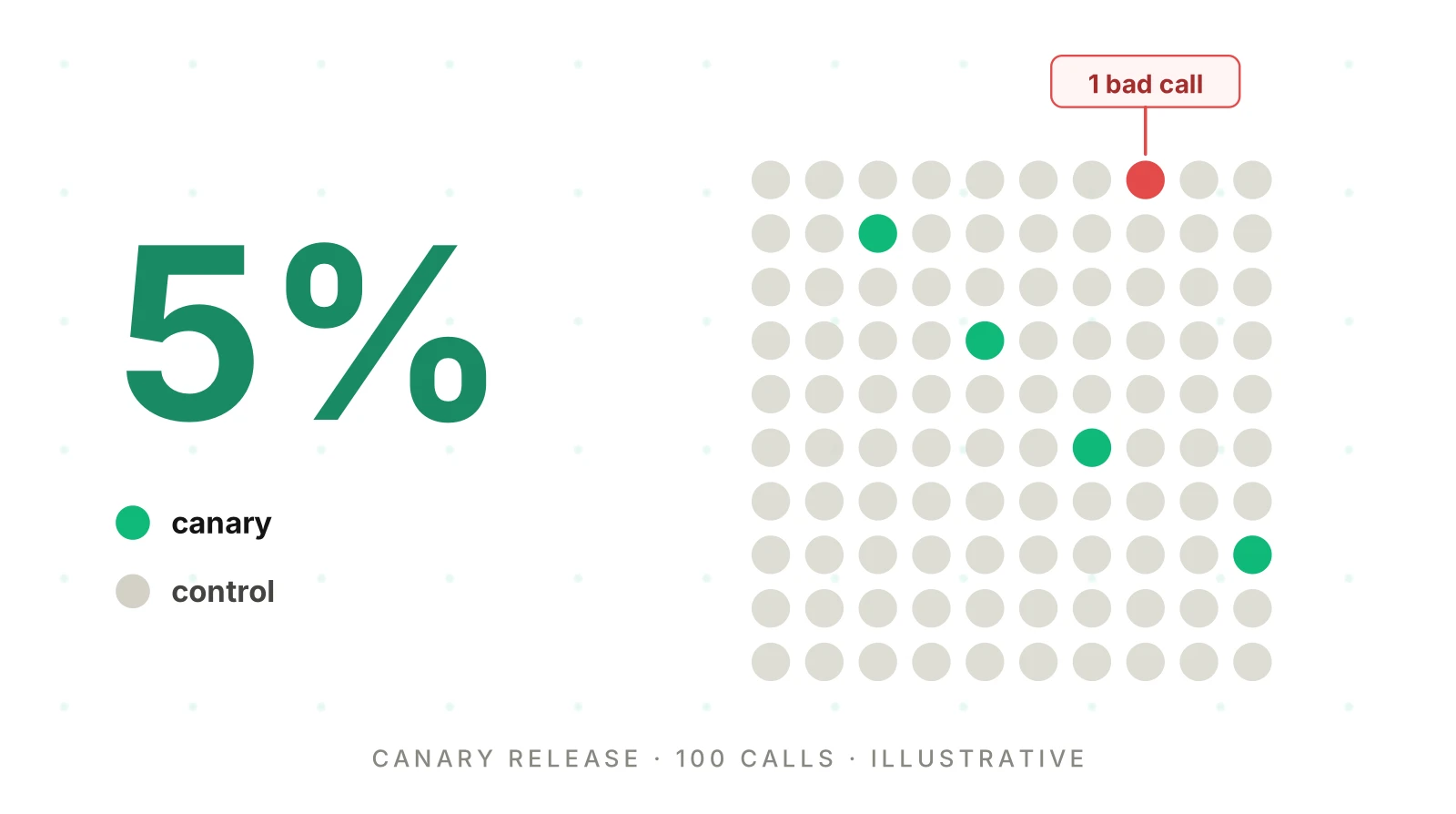
A prompt change passes your test suite. You ship it to every caller at once. Two days later, a customer tells you the agent could not reschedule. A voice agent canary release exists to stop that story. It limits who the change can hurt while you find out whether it works.
This post covers the monitoring half of a canary: what you compare, when you judge, and what you decide at each stage. It does not repeat the release plumbing. For versioning, per-call pinning and sample-size math, see shipping voice agent prompt changes safely. For the zero-exposure option, see voice agent shadow testing. For flags and cohorts, see the kill switch post. Every number below is labelled illustrative. Your limits must come from your own baseline.
What a voice agent canary release is, and what it is not
Google's SRE Workbook chapter on canarying defines the idea well: "We define canarying as a partial and time-limited deployment of a change in a service and its evaluation." Martin Fowler's page calls it a technique to reduce the risk of introducing a new version in production. Both stress two parts: a small exposure and an evaluation. Many teams do the first and skip the second.
In a canary release for voice agents, the canary is the new prompt, model, tool schema or flow. A small share of real callers talk to it. Everyone else keeps talking to the current release, which becomes your control. The comparison is the whole point.
Three neighbours get confused with it.
- Shadow testing is the other half of canary vs shadow testing. It mirrors calls to a candidate that callers never hear. It is safe, but it cannot show two-way turn-taking. A canary can. Our shadow testing guide covers that boundary.
- A voice agent staged rollout that nobody measures is just a slow rollout. Without a comparison, a canary gives comfort, not evidence.
- Monitoring is the standing watch on all calls. A canary is a time-boxed experiment inside it. The monitoring overview covers the standing watch.
Sources were checked on November 19, 2026.
Why a voice canary is mostly a measurement problem
Starting a canary is easy. Reading it is hard, for three reasons.
Outcomes arrive late. A web request fails or succeeds in milliseconds. A call takes minutes, and its real result may be a record written after hang-up. A booking can look fine in the transcript and still be wrong in the calendar. Judge only finished calls, and write-back results, not calls in progress.
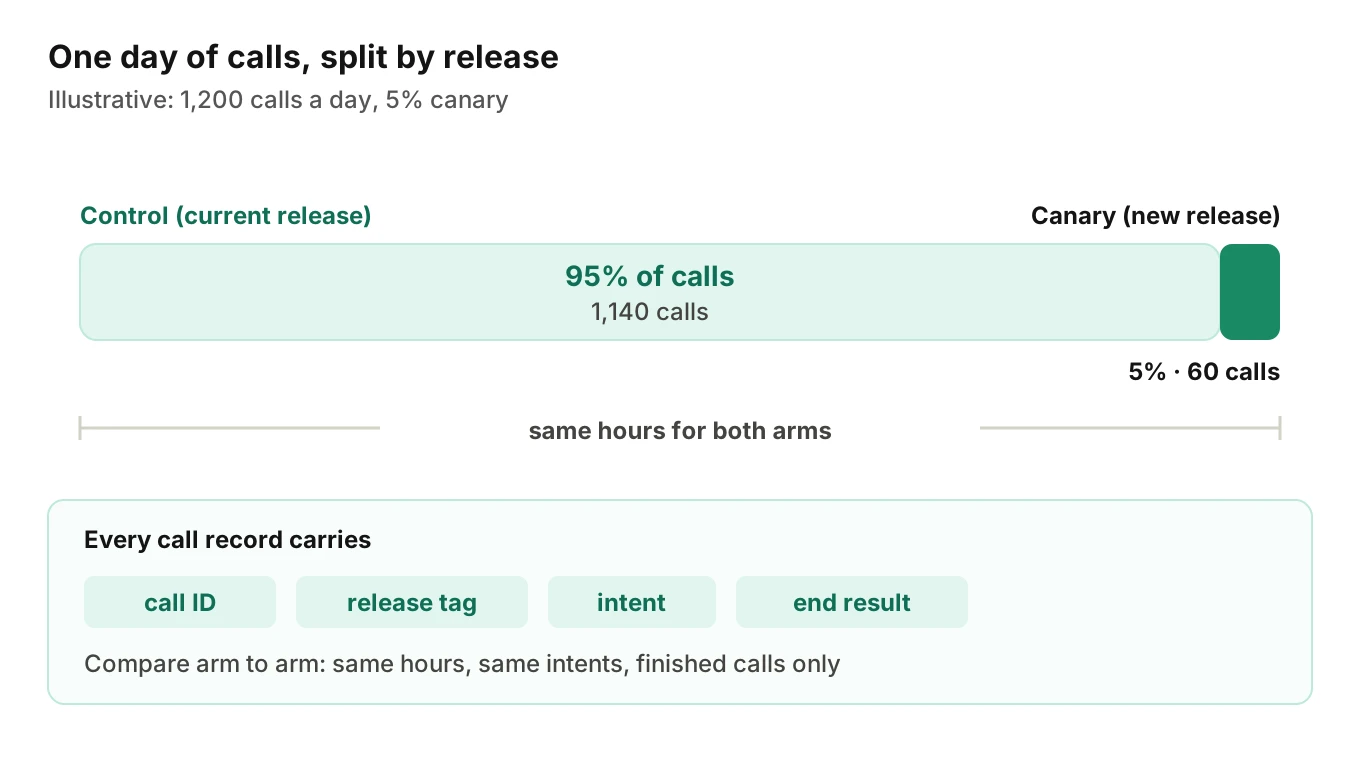
The slice is small. At 1,200 calls a day, a 5% canary sees about 60 calls. Rare intents may see two or three. The question is not "is the average fine" but "is there enough data to say anything."
The caller cannot opt out. A bad canary call is a real customer's bad call. That is why the first stage must be small. The SRE Workbook says of a first stage: "In the first stage, we have no confidence or knowledge about the behavior of this release," and so "We therefore want to use a small stage in order to minimize negative impact."
The blast radius post shows how reach and detection time multiply. A canary limits reach. Your watch shortens detection.
Compare the canary to a concurrent control, not to last week
The most common canary mistake is a before-and-after chart. Ship at noon, then compare Thursday's numbers with Wednesday's. Time itself moves your metrics. The SRE Workbook says so directly: "Because time is one of the biggest sources of change in observed metrics, it is difficult to assess degradation of performance with before/after evaluation."
Its alternative is to compare the canary with the control population at the same moment. It also notes that "Canarying is effectively an A/B testing process."
Voice adds time effects: caller mix shifts by hour, campaigns bring new callers, and carrier faults hit everyone. A concurrent control absorbs all of these.
Google Cloud and Waze go one step further in their canary lessons post: "Don't compare the canary to production instances." Their reasons include "cache warmup time." They compare against a baseline matched on time of deployment, instance count, and type and amount of traffic. Kayenta, the open canary analysis tool from Google and Netflix, does the same. Its announcement says a new baseline "helps minimize startup effects."
The prompt cache is a voice-specific startup effect
A new prompt starts with a cold cache. OpenAI's prompt caching guide says "Cache reuse requires the entire rendered prefix to match." So a changed system prompt cannot reuse the old prefix. The same guide says retention depends on the model. For earlier models, entries "typically remain active for around 5 to 10 minutes of inactivity, up to one hour." Newer models use a 30-minute default time to live. It also warns that caching "does not guarantee that every request reuses stored KV tensors or has lower latency."
Now picture 60 canary calls spread over a working day. Gaps between them can outlast the retention window. The canary pays full prefill on many calls, while the busy control keeps its cache warm. You then blame the prompt for slower time to first audio. Check your own provider's current retention before you trust a latency gap. For latency definitions, see what to measure for voice agent latency.
Choose the unit of exposure: call, caller or tenant
You must decide what gets assigned to the canary. The choice changes what you can learn.
| Unit | How it is assigned | Good for | Watch out for |
|---|---|---|---|
| Call | Random per call | Fast, even coverage | One caller can hear both versions across calls |
| Caller | Hash of a caller key | Reminders, callbacks, collections | Needs a stable, non-sensitive key |
| Tenant or number | Whole tenant or line on one release | Multi-tenant products, easy rollback | Tenants and lines differ, so the control is weak |
Random per-call assignment gives the cleanest comparison. Where one person may call several times, use a sticky key. Do not hash the raw phone number into a log. Our PII redaction post explains why a hashed or tokenised key is the safer choice. The kill switch post has more on cohorts. The SRE Workbook also advises "running only one canary deployment at a time," because overlapping canaries make failures hard to attribute.
Keep the disclosure and consent wording identical in both arms. If your change touches the opening lines, review AI disclosure for voice agents first.
What to watch: guardrails first, outcomes second
The metrics to watch during a canary fall into two groups. Split your guardrail metrics from the rest. Guardrails are signals that must not break, and they can stop a canary early. Outcome metrics show whether the change helped, and they need more calls to read.
| Group | Signal | Why it belongs | Speed to read |
|---|---|---|---|
| Guardrail | Tool-call failure rate | Counted at the step, before the call ends | Fast |
| Guardrail | Policy and PII flags | One bad call is enough to review | Fast |
| Guardrail | Hard errors and dropped calls | Direct caller harm | Fast |
| Guardrail | Repeated tool calls or loops | Visible inside the call | Fast |
| Outcome | Task success or resolution | The reason you made the change | Slow |
| Outcome | Escalation rate | Can rise or fall for good or bad reasons | Medium |
| Outcome | Early hangups and abandonment | Needs an end reason | Slow |
| Outcome | Call length (median and tail) | A change may shorten or lengthen calls | Medium |
| Outcome | Latency percentiles | Cache and load effects apply | Medium |
Pick four to six signals before you start. More than that and something will look odd by chance. The metric thresholds post and the metric drift post cover how to set limits from a baseline. See also escalation rate, abandonment rate and silent tool failures.
Evalgent's production call monitoring works on call recordings that customers push in. It transcribes them, maps them to test scenarios and judges them. It flags tool-call failures, PII leakage, latency spikes and policy failures, with fix recommendations. Those flags are per call. If your own call records carry the release tag, you can split flagged calls by arm and see whether the canary draws more of them. The tag and the split live in your data, not in a setting Evalgent supplies.
Ramp stages and the decision at each one
A canary is a ladder, not a switch. The SRE Workbook describes a "gradual canary" with several stages, each judged before the next. For voice, write the ladder down before the first call.
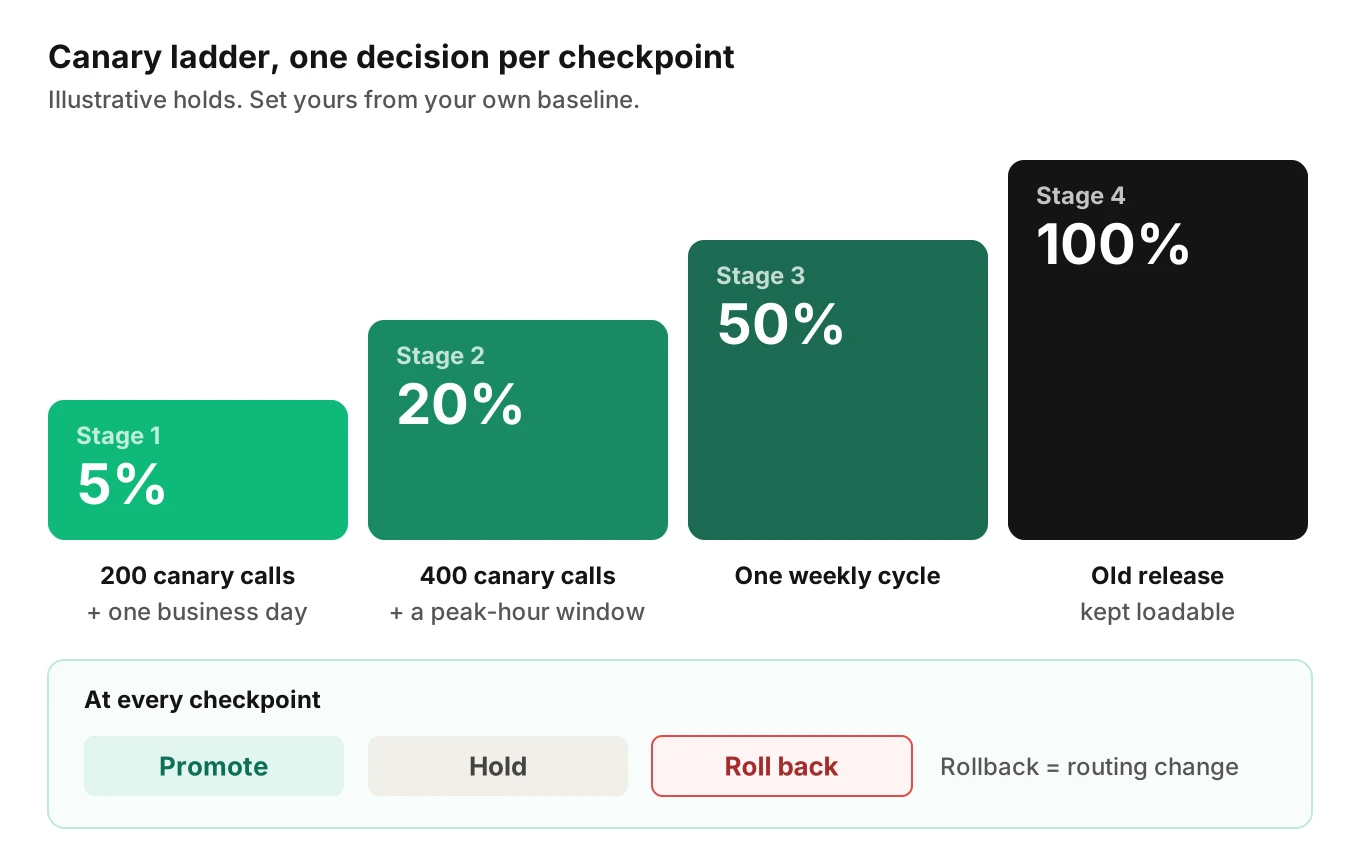
| Stage | Share of new calls | Hold until (illustrative) |
|---|---|---|
| 1 | 5% | 200 canary calls and one full business day |
| 2 | 20% | 400 canary calls and a peak-hour window |
| 3 | 50% | One full weekly cycle |
| 4 | 100% | Old release kept loadable |
Each stage ends in one of three decisions:
- Promote. The guardrails held, and enough calls and bad events were seen to trust the comparison.
- Hold. Not enough data, or a marginal result. Stay at the same share and keep collecting.
- Roll back. A guardrail broke, or an outcome metric moved the wrong way beyond your limit.
The middle state matters. Kayenta's judge returns a score that is classed as "success," "marginal," or "failure." In its description, a marginal score "can trigger a human approval path." Do the same. A marginal reading goes to a person who reads sample calls, not to an automatic promotion.
Release cadence caps canary length. The SRE Workbook puts it plainly: "If you release daily, you can't let your canary last for a week while running only one canary deployment at a time." If volume is too low to judge a change in a few days, that is a finding. Those changes need stronger pre-release testing. The shipping post has the sample-size math.
Rollback must be a routing change. Fowler notes that "the rollback strategy is simply to reroute users back to the old version." The rollback actions post covers what to undo besides routing.
A worked example (illustrative)
Every number here is invented to show the method.
Assume 1,200 calls a day. The control's tool-call failure rate is 2.0%. You ship a new prompt to a 5% canary, about 60 calls a day.
Day one. Sixty calls give an expected 1.2 failures. Under a 2% rate, five or more failures happens by chance about 0.7% of the time. So "five failures in the first 60 calls" is a reasonable hard stop. Fewer than five tells you nothing yet. You hold.
Day four. You now have about 240 canary calls, past your 200-call minimum. The canary shows 7 failures, 2.9%. The control shows 2.0%. Escalation reads 11.0% in the control and 11.7% in the canary, 28 of 240 calls. That gap is also well inside the noise at this count. Under a 2% rate, 240 calls expect about 5 failures. Eleven or more would occur by chance about 1% of the time. Seven is inside the noise. You do not roll back, and you do not claim a win. You hold or promote on the other signals.
The slice. Reschedule calls are 15% of traffic, so about 9 canary calls a day. After four days, about 36. Your change touched the reschedule flow. Thirty-six calls cannot support a verdict, so the sheet shows that cell as "too few calls." Say "undetermined." Do not fill the gap with the overall number.
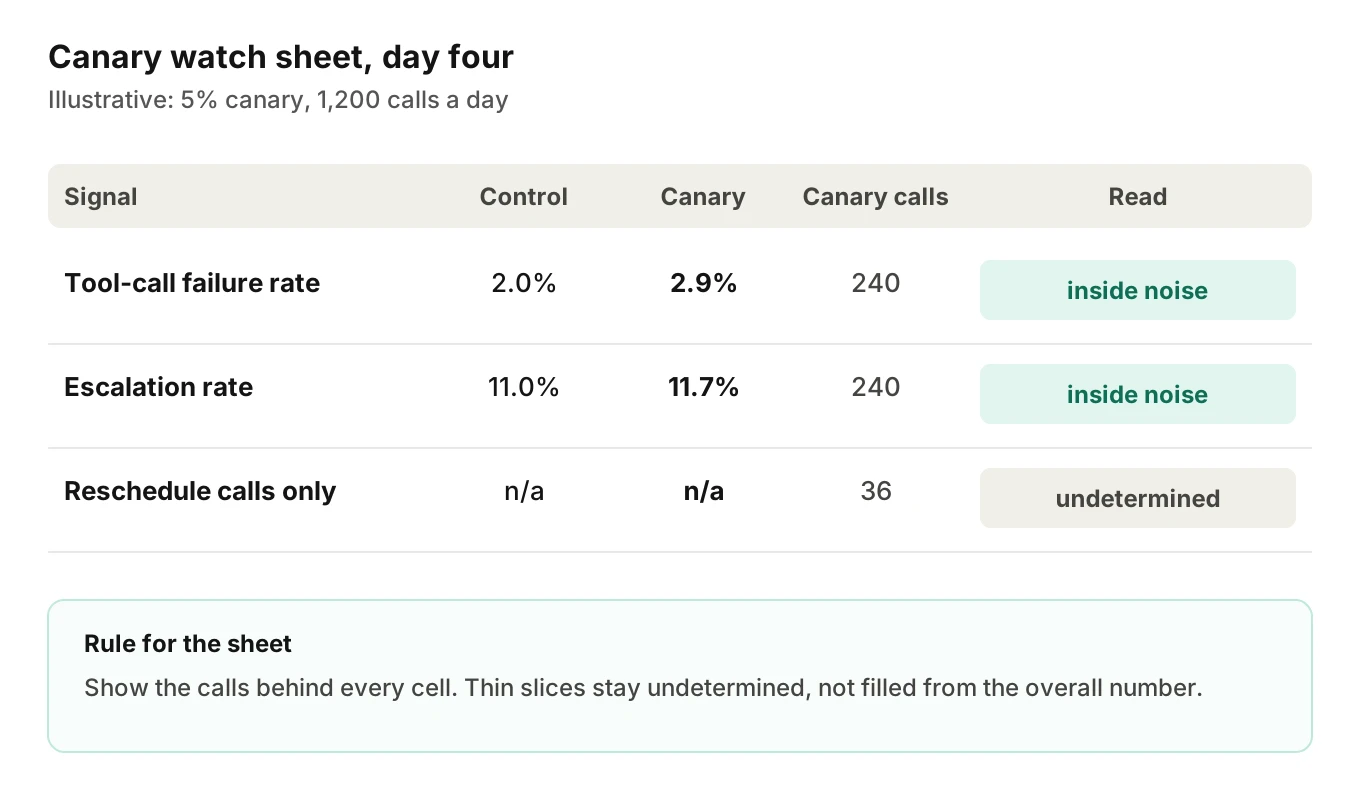
The regression monitoring post shows how one slice hides inside an average. A canary sheet must show the calls behind every cell.
Do not peek until the checkpoint
A canary dashboard invites constant checking. Each look is a chance for noise to look like a signal. Evan Miller's classic essay states it: "Repeated significance testing always increases the rate of false positives." In his example, you stop as soon as a 5% test shows significance, or after 150 observations. The false positive rate becomes 26.1%, "more than five times what you probably thought the significance level was."
You face the same trap on a canary. Check hourly and you will eventually see a bad-looking hour. So split your rules in two, hard stops and checkpoints:
- Hard stops can fire at any time. They cover severe, rare, clearly harmful events such as a wrong-record write or a policy breach. Set them so that a healthy release almost never trips them.
- Soft judgments happen only at fixed checkpoints, after the minimum calls. Outcome metrics live here.
The alerting hub explains what deserves a page and what waits for a ticket.
Confounders to rule out before you blame the change
When the canary looks worse, check these before you roll back. Each one can fake a regression.
- Cold cache. Covered above. Latency gaps early in a stage may be cache, not prompt.
- Different intent mix. If the canary happened to get more hard intents, its average falls. Compare by intent, not only overall.
- Different hours. A canary that ran only at peak looks worse than a control that ran all day.
- Call length bias. Finished calls over-represent short ones when you judge early. Long calls finish later. Judge after the tail has landed.
- Missing tags. A call with no release tag is invisible. Track the share of untagged calls and treat a rise as a defect.
OpenTelemetry defines a service.version attribute as "The version string of the service component," and marks it stable. It adds that "The format is not defined by these conventions." So you choose the label. Use a release bundle id that covers prompt, model, tool schema and flow, so a model swap is not blamed on a prompt. Our call logging guide lists what else belongs on the record.
How to run a voice agent canary release
Use this procedure for any voice agent prompt change rollout, model swap, tool change or flow change. Adjust the placeholders to your own baseline.
1. Write the hypothesis and the rollback rule - State what the change should improve and which guardrail would stop it. Put both in the release note before any call is routed.
2. Pass the pre-release gate - Run your scenario suite and a regression check first. See regression testing after model updates. A canary should confirm a change, not discover basic defects.
3. Tag every call with its release - Stamp the bundle id at call start and keep it for the whole call. Add intent to the record too. Alert on untagged calls.
4. Run an A-A canary once - Send a canary slice to the same release as the control. Google Cloud's guide says such a test should always pass. If it fails, your comparison is too noisy to trust.
5. Pick the unit and the first slice - Choose call, caller or tenant. Start small enough that a bad result is tolerable, and large enough to reach your minimum calls in a day or two.
6. Set the checkpoints and minimum counts - Fix the times you will judge and the number of calls and bad events needed first. Add hard stops for severe events only.
7. Compare against the concurrent control - Read the canary and control side by side, same hours, same intents. Show the number of calls behind every cell. Mark thin slices as undetermined.
8. Decide promote, hold or roll back - Send marginal results to a person who reads sample calls. Roll back by changing routing, then keep the old release loadable.
9. Record the result - Run one canary at a time. Log the decision and the reason.
Testing before and during a canary
Before real callers hear a change, you can test it on simulated ones. Evalgent generates test scenarios from the agent's prompt and flows, then runs simulated calls against your agent. Caller Profiles cover seven parameters: interruption level, speech pace, language, response delay, behaviour, accent and background noise. The same runs can measure uptime and latency percentiles.
When a flagged call needs a closer look, Reviews replay a test call with audio and transcript together and show the exact tool payloads. That helps when you reproduce a canary failure as a test. Setup help for a first agent is sales-led. If you want to talk it through, you can book a meeting. For how testing, monitoring and observability divide the work, see the comparison post. The synthetic monitoring post covers scheduled test calls that run beside a canary.
Frequently asked questions
What is a voice agent canary release?
A voice agent canary release routes a small share of live calls to a changed prompt, model, tool schema or flow. The rest stay on the current release as a control. You compare the two groups at the same time, then promote, hold or roll back. It limits how many callers a bad change can reach.
How much traffic should a voice agent canary get?
Pick a canary traffic percentage small enough that a failure is tolerable, and large enough to reach your minimum call count within a day or two. At 1,200 calls a day, 5% gives about 60 calls. The SRE Workbook says a canary should be "sizeable and last long enough to be representative."
How long should a canary run?
Long enough to reach your minimum calls and cover a representative mix of hours. The SRE Workbook warns that if you release daily, a one-week canary cannot work with one canary at a time. Your release cadence therefore caps canary length. Low volume means stronger pre-release testing, not a longer wait.
What is the difference between canary and shadow testing for voice agents?
Shadow testing runs a candidate on mirrored calls that callers never hear, so it carries no caller risk but cannot test two-way turn-taking. A canary lets real callers talk to the candidate, so it exposes some people but shows live behaviour. Most teams run shadow first, then a canary.
How do you roll back a voice agent canary?
Change the routing so new calls return to the current release. Fowler describes the strategy as rerouting users back to the old version. Keep the old release loadable, and let calls already in progress finish on their pinned release. Decide the rollback rule before launch so nobody debates it during an incident.
Which metrics should a canary watch?
Pick four to six. Use fast guardrails such as tool-call failures, policy flags and hard errors, and slower outcome metrics such as task success, escalation and early hangups. Judge guardrails continuously for severe events. Judge outcome metrics only at fixed checkpoints, after a minimum number of calls.
Can you canary a model change the same way as a prompt change?
Yes, but give it more care. A model change can move latency, wording, tool use and cost at once, and the prompt cache starts cold. Tag the release as a bundle so you can tell which part moved. Expect a longer, more cautious ramp than for a small wording edit.
Why compare a canary to a control group instead of last week?
Time changes your metrics on its own. Caller mix, hours, campaigns and carrier problems all shift results. A concurrent control sees the same conditions as the canary, so the difference is more likely due to the change. The SRE Workbook says before and after evaluation makes degradation hard to assess.
The bottom line
A voice agent canary release only protects callers if you compare the slice to a control handled at the same time and judge it at checkpoints you set in advance. Write the rollback rule before the change ships, show the call count behind every number, and treat thin data as undetermined.
Related Articles
How to automate voice agent testing: synthetic callers vs manual QA
Learn how ai test automation replaces manual QA for voice agents. Compare synthetic callers vs human testers, with a 5-step framework to scale without hiring.
Read more
AI Agent Testing vs Voice Agent Testing: What General Tools Miss for Voice
AI agent testing measures text outputs. Voice agent testing measures behaviour through an acoustic pipeline. Five failure categories general tools miss.
Read more