How to Detect Silent Tool Failures in Voice Agents
On this page
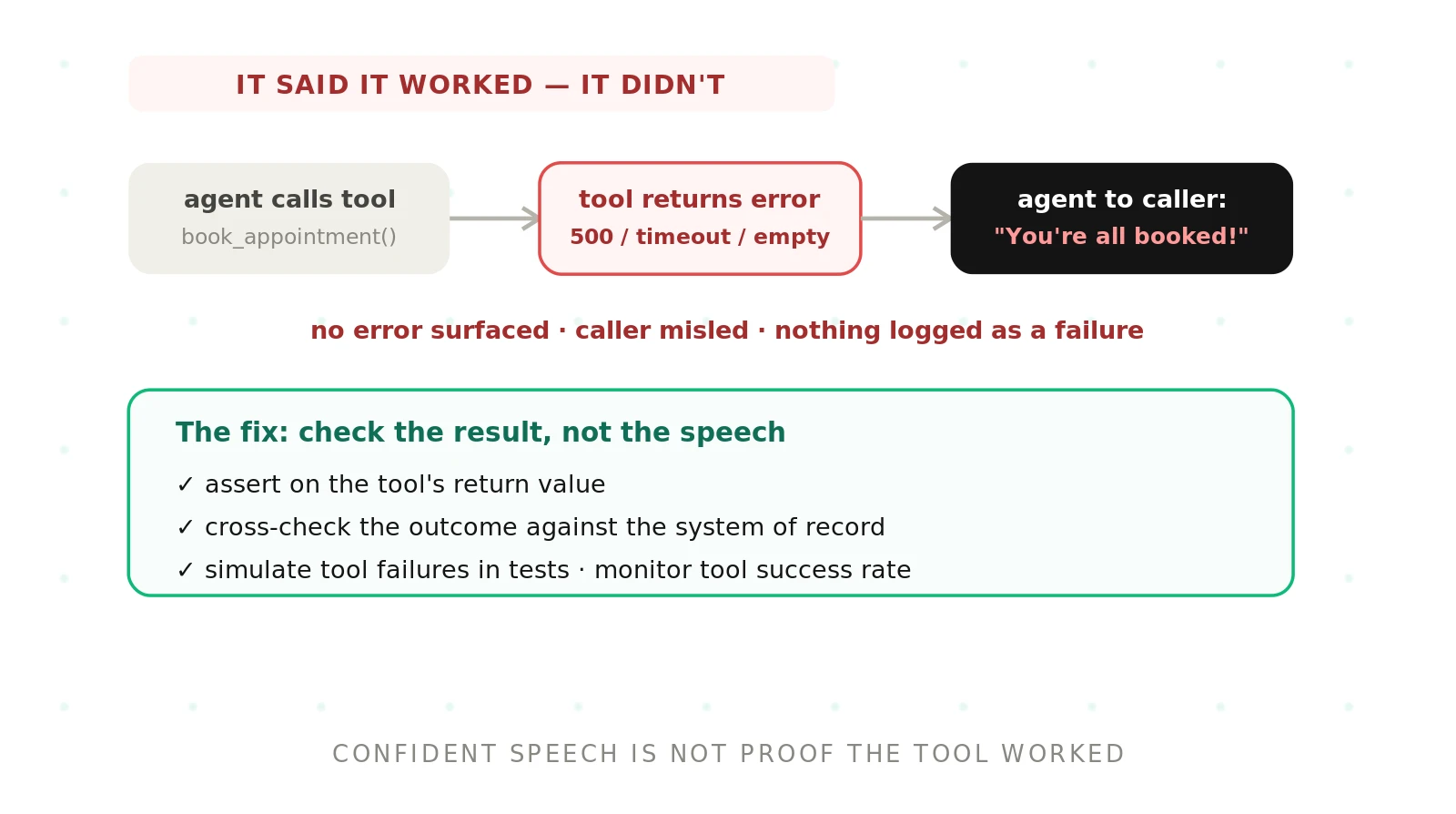
A voice agent calls a tool. The tool fails. The agent keeps going anyway. It tells the caller "You're all set." Nobody sees an error. The appointment was never booked.
This is a silent tool failure. It is one of the most dangerous failure modes in production voice AI. The call sounds perfect. The transcript reads clean. Yet the real-world action never happened.
This guide shows how to detect these failures. It covers what they look like, why they hide so well, and the four checks that catch them. We build our platform around exactly this problem, so we will be specific.
What a silent tool failure is
> Silent tool failure: a tool call that errors, times out, or returns nothing, while the agent proceeds as if it succeeded. The action fails, but no error surfaces to the caller or the logs the team watches.
A voice agent does more than talk. It calls tools. It books appointments, checks balances, and updates records. These calls hit a webhook or an API.
Any of those calls can fail. The endpoint returns a 500. The request times out. The response comes back empty. This is normal in distributed systems. Good software plans for it.
The problem is what the agent does next. A well-built agent reads the failure and recovers. A silent-failure agent ignores it. It assumes success and moves on. The caller hears a confident confirmation for an action that never happened.
Note the scope here. This post is about execution, not extraction. It is not about whether the agent passed the right arguments. That is a separate problem. Here, the call itself fails, and the agent hides it.
Why silent tool failures are so dangerous
Most failures are loud. The agent stumbles. The caller repeats themselves. Someone hangs up. You can hear the problem in the recording.
Silent tool failures are the opposite. They produce clean, fluent calls. The caller leaves happy. Your dashboards stay green. The damage shows up days later.
A caller thinks their prescription was refilled. It was not. A customer believes their payment posted. It did not. A patient expects a callback that was never scheduled. Each one erodes trust and creates support load.
These failures also skip your normal safety nets. Standard error handling assumes errors propagate. Here they do not. The agent swallowed the error and spoke over it. Your uptime monitor never fired.
That is why detection has to be deliberate. You cannot wait for the failure to announce itself. It will not. You have to go looking for the gap between what the agent said and what actually happened.
The failure modes, what the caller hears, and how to catch them
Silent failures come in a few recognizable shapes. Each one has a distinct symptom. Each one has a specific check. The table below maps them.
| Silent failure mode | What the caller hears | How to catch it |
|---|---|---|
| Webhook returns a 500 | "You're all set, it's booked." | Assert on the response status, not the transcript |
| Tool call times out | "One moment... done, that's confirmed." | Fail the test if no success payload arrives before the deadline |
| Empty or null result | "I found it, your balance is zero." | Require the expected fields in the payload, not just a 200 |
| Tool never called at all | "I've updated your address." | Verify the call exists in the trace, not just in speech |
| Partial or failed write | "Your order is placed." | Reconcile the claimed record against the system of record |
| Stale cached read | "Your latest invoice is paid." | Compare data freshness against the source timestamp |
Read the middle column again. Every line sounds like success. That is the trap. The caller has no way to know. Your team has no way to know either, unless the checks in the right column run automatically.
Why agent speech is never proof of success
The most common mistake is testing on the transcript. A team writes a test that checks the agent said "your appointment is booked." The test passes. Everyone relaxes.
But that assertion proves nothing about the booking. It only proves the agent talked. The language model generates fluent confirmations whether or not the tool worked. It is trained to sound helpful, not to verify reality.
This is the core of the problem. Speech and outcome are two different layers. You have to check both. Our guide on transcript versus audio evaluation covers a related gap in what a transcript can prove.
So the rule is simple. Never treat the agent's words as evidence that a tool ran. Assert on the tool result itself. Assert on the record that should now exist. The words are the least reliable signal you have.
How to test for silent tool failures in voice agents
Testing for silent failures means forcing the failure, then checking the agent's response. You cannot rely on the tool failing on its own during a test. You have to make it fail. Then you assert on what should be true.
1. Assert on tool outputs, not agent speech. For every action, write a check on the tool's response. Confirm the status code, the payload, and the required fields. Ignore what the agent said.
2. Inject failures into the tool layer. Mock the tool to return a 500, a timeout), and an empty body. Use one scenario per failure mode. This is fault injection.
3. Check the agent's recovery. A correct agent should not claim success on a failed call. It should retry, escalate, or tell the caller the truth. Assert on that behavior.
4. Cross-check against the system of record. After the call, query the real database or scheduler. Confirm the claimed record exists and matches. A missing record is a failure.
5. Set a hard fail for false confirmations. When the agent claims success and no matching tool result exists, the test must fail. No partial credit. This is your most important gate.
6. Run these scenarios on every release. Add the failure cases to your regression suite. Models drift and prompts change. A fix today can regress next week.
This sequence turns an invisible risk into a repeatable test. For more on how tools fit into an agent's design, see our guide on tool calling in voice agents. For the broader testing picture, start with AI voice agent testing.
Cross-checking against the system of record
Assertions on the tool response catch most silent failures. Cross-checking catches the rest. The two work together.
Your system of record is the source of truth. It is the scheduler, the CRM, or the billing database. It holds the real state after the call. That is where you confirm the action.
The check is direct. The agent said it booked a 3pm slot. Query the scheduler. Is there a 3pm slot for that caller? If yes, the action succeeded. If no, you found a silent failure.
Design these checks to be repeatable and safe. Use read-only queries where you can. Where you must write, make the operation idempotent, so a retry does not create duplicates. Idempotence keeps your reconciliation clean.
This step is what separates a real evaluation from a shallow one. Anyone can read a transcript. Confirming the outcome in the system of record is harder and far more valuable. It proves the call did what it claimed.
Monitoring tool success rate in production
Tests catch known failure modes before release. Production catches the ones you did not predict. You need both. Real callers and real endpoints behave in ways no test covers.
The core production signal is tool success rate. For each tool, track the share of calls that return a valid, complete result. A drop is an early warning. It often moves before task completion or customer satisfaction does.
Instrument the whole path to see this. Emit a trace for every tool call. Record the status, the latency, and whether the payload had its required fields. This is the observability) layer for tool execution.
Then alert on the gap. Compare success claims in the conversation against confirmed tool results. When the agent says "done" but the tool did not succeed, flag that call. Watch for spikes in specific status codes, like the 500s in the HTTP status code list.
Our guide on how to monitor AI voice agents in production covers the wider metric set. Tool success rate belongs near the top of it, because a failed tool call breaks the actual outcome the caller wanted.
Why independent evaluation matters here
Silent tool failures are easy to miss when the same team builds and grades the agent. The happy-path tests pass. The demo sounds great. The failure hides in the calls nobody replayed.
An independent evaluator has no stake in the agent looking good. Evalgent is a third-party platform built to find these gaps. We assert on tool results, inject failures, and reconcile against the system of record, so a false confirmation cannot slip through.
We also grade with methods you can audit, not vendor-reported numbers. If you are weighing this, our post on independent voice AI evaluation explains the approach. This kind of scoring pairs well with an LLM-as-a-judge rubric held to a fixed standard.
The payoff is confidence you can defend. You can run the same failure scenarios across vendors and compare results. Our guide on benchmarking voice agents on your own data shows how to do that on cases that match your traffic. Ready to see it on your agent? Book a demo.
The bottom line
A silent tool failure happens when the agent claims success on a tool call that failed. You detect it by asserting on tool results, cross-checking the system of record, injecting failures in tests, and monitoring tool success rate.
Frequently asked questions
How do you detect silent tool failures in a voice agent?
Detect silent tool failures by asserting on the tool's actual result, not the agent's speech. Confirm the status code and required fields in the response. Cross-check the claimed outcome against your system of record. In production, monitor tool success rate and flag any call where the agent claims success without a matching tool result.
What is a silent tool failure in a voice agent?
A silent tool failure is when a voice agent's tool call errors, times out, or returns nothing, but the agent proceeds as if it worked. The caller hears a confident confirmation, such as "your appointment is booked," while the real action never happened. No error surfaces to the caller or the standard logs.
Why does a voice agent say something worked when it failed?
The language model generates fluent, helpful responses by default. It is trained to sound cooperative, not to verify that a tool succeeded. If the agent does not read and act on the tool's failure, it fills the gap with a confident confirmation. The speech layer and the execution layer are separate, so words are not proof.
How do you test a voice agent for tool failures?
Test by forcing failures, then asserting on behavior. Mock each tool to return a 500, a timeout, and an empty body. Run one scenario per failure mode. Confirm the agent does not claim success. Query the system of record to verify the action. Set a hard fail whenever a success claim has no matching tool result.
What is the difference between tool argument errors and silent tool failures?
Argument errors are about extraction. The agent passes the wrong value, such as the wrong date or name, and the tool runs with bad input. Silent tool failures are about execution. The call itself errors, times out, or returns nothing, and the agent hides it. This post covers execution failures, not argument accuracy.
How do you simulate a webhook failure in a voice agent test?
Simulate a webhook failure by mocking the endpoint the agent calls. Configure the mock to return an HTTP 500, to delay past the timeout, or to send an empty payload. Run the test call and let the agent hit the mock. Then assert that the agent recovers or escalates, and never tells the caller the action succeeded.
How do you monitor tool call success rate?
Monitor tool call success rate by emitting a trace for every tool call in production. Record the status code, the latency, and whether the payload contained its required fields. Compute the share of valid, complete responses per tool. Alert when the rate drops or when specific error codes spike, since a decline often precedes lower task completion.
How do you cross-check a voice agent against the system of record?
Cross-check by querying the source of truth after the call. If the agent said it booked a 3pm slot, look for that slot in the scheduler. Confirm the record exists and matches the claim. Use read-only queries where possible, and make any writes idempotent so retries do not create duplicates. A missing record is a silent failure.
Related Articles

Why AI voice agents fail in production: 9 failure layers, how to detect each, and how to prevent them
Voice agents fail in production across 9 layers, from 8 kHz audio to silent tool errors. Symptoms, root causes, alerts, and fixes in one master table.
Read more
Voice agent regression testing: how to detect regressions from model updates you don't control
Voice agent regression testing for changes you don't control: pin each layer, run a nightly pinned-vs-latest canary, and use paired stats to detect drops.
Read more