Voice agent regression testing: how to detect regressions from model updates you don't control

On this page
Most voice agent regression testing advice assumes the regression came from you: a prompt edit, a new tool, a refactor. Those are the easy ones. You know when they happened, and you can diff them.
The harder regressions come from changes you never shipped. A provider moves an alias to a new snapshot. An STT model gets a quiet accuracy refresh. A TTS model ID you call "latest" starts pausing differently. A deprecation forces you onto a replacement model on the vendor's schedule. Your code is identical, your prompt is identical, and your booking flow breaks on Tuesday.
This guide is about catching both kinds. It covers what the research says about model drift, how each vendor in a typical in-house stack actually versions its models, a pinning strategy per layer, a two-loop detection setup, the statistics that tell you whether a drop is real, a triage flow for "which layer changed?", and a scheduled job you can adapt.
If your main concern is gating your own prompt edits, start with how to ship voice agent prompt changes safely. If you are still testing by dialing in yourself, replacing manual test calls covers the scenario runner this guide assumes you have.
What the research says about model drift
Three findings matter for anyone running a voice agent on hosted models.
The "same" model changes. Chen, Zaharia and Zou (2023) evaluated the March 2023 and June 2023 versions of GPT-3.5 and GPT-4 on the same tasks. GPT-4's accuracy at identifying prime versus composite numbers fell from 84% to 51%, which the authors partly attribute to a drop in how well it followed chain-of-thought prompting. GPT-3.5 moved the other way on the same task. GPT-4 also became less willing to answer some question types, and both models made more formatting mistakes in generated code. The authors point to a decline in instruction following as a common factor.
For a voice agent, that last point is the one that bites. Your system prompt is a stack of instructions: "confirm the date before booking," "never read the full card number," "keep replies under two sentences." A model update that shifts instruction following does not show up as a crash. It shows up as an agent that skips the confirmation step 8% of the time.
Newer and better can still break specific cases. The MUSCLE paper (Echterhoff et al., EMNLP 2024 Findings) studies "negative flips": instances the old model got right that the updated model gets wrong, even when the updated model scores higher on average. Their whole method exists because aggregate gains hide per-instance regressions during LLM updates. The practical lesson: track per-scenario flips, not only the overall pass rate. A suite that goes from 90% to 91% can contain ten scenarios that broke and eleven that got fixed.
Your baseline is noisy before anything changes. Atil et al. ran five LLMs configured to be deterministic across eight tasks for 10 runs each and saw accuracy vary by up to 15% across runs, with no model giving repeatable accuracy on every task. Sclar et al. (ICLR 2024) found meaning-preserving prompt formatting changes moved few-shot accuracy by up to 76 points on LLaMA-2-13B, and that format sensitivity only weakly correlates between models. So a prompt that is robust on one model is not evidence it will be robust on its replacement.
Put together: models drift, upgrades break specific cases while improving averages, and single runs are noisy. Your regression process has to handle all three.
How each layer in your stack is actually versioned
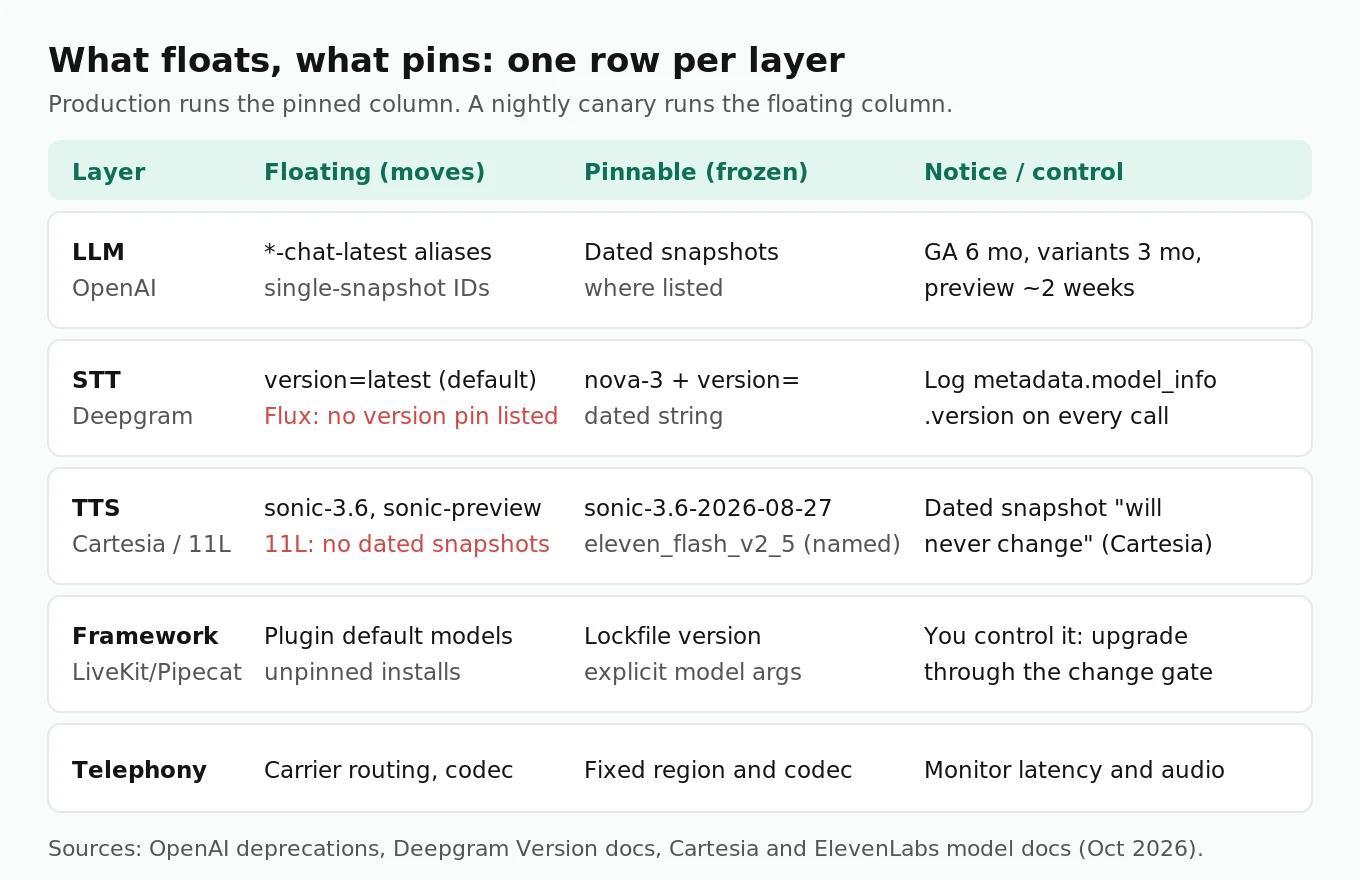
An in-house stack built on LiveKit or Pipecat usually calls three to five external models. Each vendor versions differently, and the defaults often float.
LLM and speech-to-speech (OpenAI as the example)
OpenAI's model pages say snapshots "let you lock in a specific version of the model so that performance and behavior remain consistent." Some model IDs are aliases that move, such as the `*-chat-latest` family. Others are dated snapshots that don't.
The OpenAI deprecations page sets minimum notice before retirement: at least 6 months for generally available models, at least 3 months for specialized variants such as `gpt-5.1-chat-latest`, and as little as 2 weeks for anything with `preview` in the name. OpenAI says it does not recommend preview models for business-critical production workloads unless you can migrate on short notice.
Voice teams have a lot of migrations already scheduled. As of this writing, that page lists:
| Shutdown date | Models | Listed replacement |
|---|---|---|
| Jan 6, 2027 | `tts-1`, `tts-1-hd`, `gpt-4o-mini-tts-2025-03-20`, `gpt-4o-mini-tts-2025-12-15` | `gpt-realtime-2.1-mini` |
| Jan 20, 2027 | `gpt-realtime`, `gpt-4o-realtime`, `gpt-realtime-mini`, `gpt-4o-mini-realtime` | `gpt-realtime-2.1` or `gpt-realtime-2.1-mini` |
| Feb 26, 2027 | `whisper-1`, `gpt-4o-transcribe`, `gpt-4o-mini-transcribe`, `gpt-4o-transcribe-diarize` | `gpt-live-transcribe` or `gpt-transcribe` |
Each of those is a forced model change. Most in-house voice teams on OpenAI will hit at least one in the next five months. A deprecation is the best kind of regression risk, because you get a date. Run the replacement through your suite now, not in the week before shutdown.
Gotcha: some models list only one snapshot. The gpt-realtime-2.1 model page currently lists `gpt-realtime-2.1` as both the default and the only snapshot. You can't pin finer than that, so log what you called and canary it.
Speech-to-text (Deepgram as the example)
Deepgram's `version` parameter defaults to `latest`. If you send `model=nova-3` and nothing else, you get whatever Nova-3 version is current that day. You can pin a dated version string from the Deepgram changelog (the docs example is `version=2021-03-17.0`).
Two gotchas. First, the Version page lists support for pre-recorded and Nova streaming. It does not list Flux streaming. If you use Flux for end-of-turn detection, plan on detecting changes rather than preventing them. Second, every response carries `metadata.model_info` with `name`, `version` and `arch` fields (see model metadata). Log the `version` on every call. It is the cheapest drift detector you will ever build: when it changes, you know the date and the layer.
Text-to-speech (Cartesia and ElevenLabs)
Cartesia documents three tiers explicitly. `sonic-3.6-YYYY-MM-DD` is snapshotted and "will never change." `sonic-3.6` "will be updated to point to the most recent stable snapshot." `sonic-preview` is beta and can change without notice. Cartesia's own table says dated snapshots are for "customers who want to run internal evals before any updates." That is the pinning strategy in one line.
ElevenLabs model IDs are named generations such as `eleven_flash_v2_5`, `eleven_multilingual_v2` and `eleven_v3`. The models page does not list dated snapshots under those IDs, so you cannot pin below the named model. It does mark `eleven_turbo_v2_5` and `eleven_turbo_v2` as deprecated, describing them as functionally equivalent to the Flash models with higher average latency. If you still call a Turbo ID, that is a migration on your list.
Framework and telephony
Your orchestration framework is also a vendor. Upgrading LiveKit Agents or Pipecat can change defaults and class names. Pipecat renaming `PipelineTask` to `PipelineWorker` is the visible kind of change. The invisible kind is a plugin whose default model argument moves on upgrade. Pin framework versions in your lockfile and always pass model IDs explicitly instead of relying on plugin defaults.
A pinning strategy per layer
Pinning does not stop change. It moves change from the vendor's schedule onto yours. The rule is simple: production runs pinned IDs, and a canary runs the floating IDs so you see what is coming.
| Layer | Production setting | Canary setting | What to log per call |
|---|---|---|---|
| LLM | Dated snapshot where one exists | The alias or newest snapshot | Returned `model` field, prompt hash |
| STT (Deepgram Nova) | `model=nova-3` plus pinned `version` | `version=latest` | `metadata.model_info.version` |
| STT (Flux) | No documented version pin | Same, plus fixed-audio replay | Model name, turn-event timings |
| TTS (Cartesia) | `sonic-3.6-2026-08-27` style dated ID | `sonic-3.6` | `model_id` sent |
| TTS (ElevenLabs) | Explicit named `model_id`, never a deprecated one | Next generation you plan to adopt | `model_id`, voice settings |
| Framework | Locked version | Next release in a branch | Package versions at deploy |
| Telephony | Fixed region and codec | Not usually canaried | Carrier, codec, region |
Where you cannot pin (Flux, ElevenLabs within a model ID, single-snapshot LLMs), the canary and the production monitors carry the full load. That is why the next section has two loops, not one.
For the call-level fields worth capturing, see what to log on every voice agent call.
Detecting regressions: two loops and a tripwire
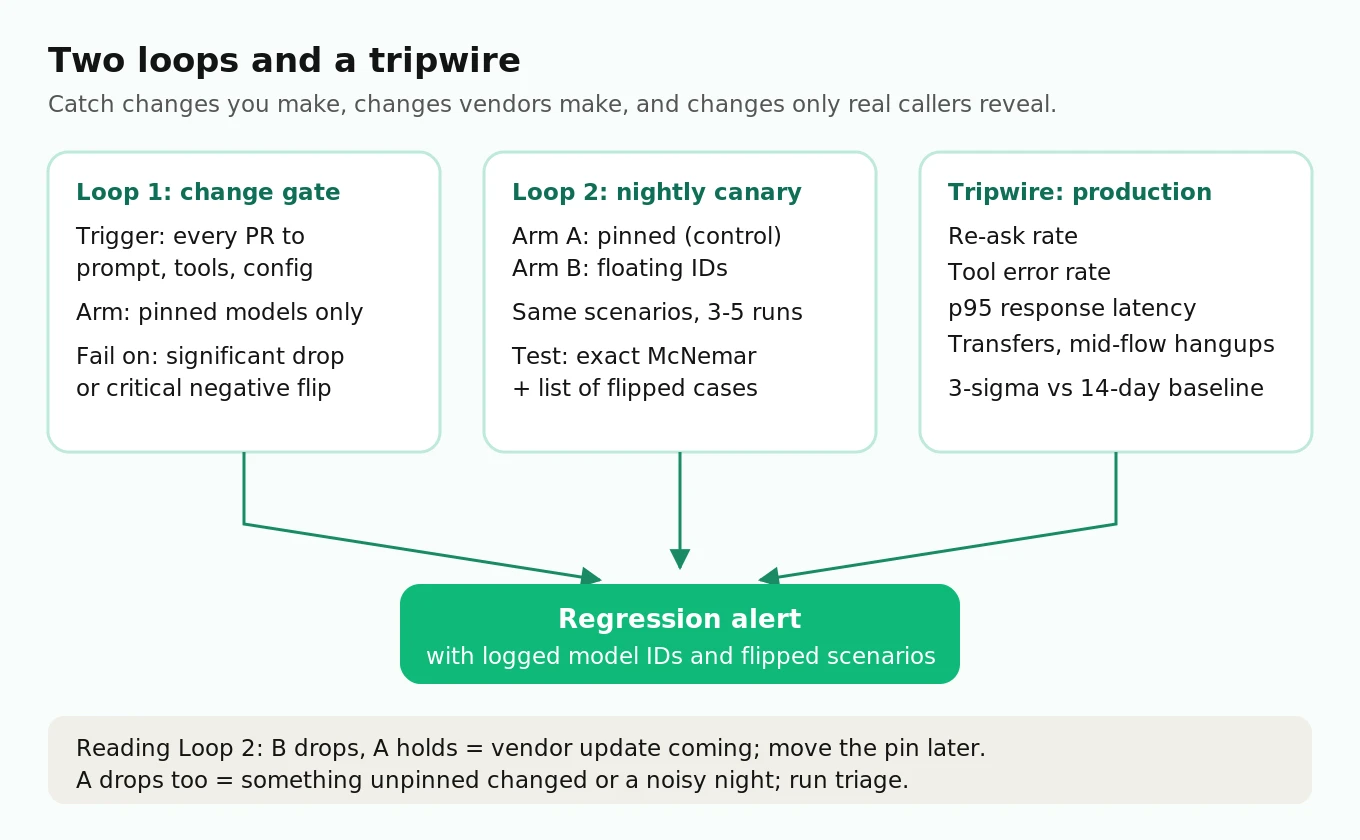
Loop 1: the change gate (things you control)
Every prompt edit, tool change, config change or framework bump runs the full scenario suite before it merges. Same scenarios, same pinned models, so the only variable is your change. This is the loop covered in depth in the prompt-change guide, so here is just the requirement: fail the merge on a statistically significant drop or on any negative flip in a scenario tagged critical (payments, identity, consent, emergency routing).
Loop 2: the nightly canary (things you don't control)
Every night, run the same suite twice: once on your pinned production configuration (arm A) and once with each floating identifier swapped in (arm B). Arm A is your control. If arm A moves, something changed that you did not pin, or the infrastructure is noisy that night. If arm B drops and A holds, a vendor update is coming your way, and you have time to adapt before you move the pin.
Running arm A nightly matters more than it sounds. Without a control arm you can't tell "the vendor shipped something" from "tonight's run was unlucky."
The tripwire: production drift monitors
Some regressions only appear on real callers: new accents, a carrier codec change, a traffic mix shift. Track a short list of daily rates with control limits from a 14-day baseline:
- Re-ask rate: share of calls where the agent asks for the same slot twice, or says a repeat-request phrase. This is the earliest STT and turn-taking signal.
- Tool error rate: failed or malformed tool calls per call. The first thing to move when an LLM update changes argument formatting.
- p95 response latency: end of user speech to first agent audio. Watch the tail, not the mean.
- Transfer and hang-up-mid-flow rates: outcome signals that lag but confirm.
For a rate, a simple three-sigma limit works. Worked example with assumed numbers: baseline tool error rate 2%, 500 calls per day. The standard error is sqrt(0.02 × 0.98 / 500) ≈ 0.63%, so the upper limit is about 2% + 3 × 0.63% ≈ 3.9%. A day above 3.9% is an alert. Pair every alert with the logged model versions: if `model_info.version` changed on the same day, you already know where to look. Monitoring voice agents in production goes deeper on alerting.
The statistics: is this drop real?
A voice agent scenario suite produces pass/fail outcomes. You want to know whether arm B's pass rate is lower than arm A's by more than noise. Two designs, very different sample sizes.
Unpaired: two-proportion z-test
If the two arms ran on different scenario sets (for example, two weeks of production calls), use a two-proportion test. Sample size per arm to detect a drop from p1 to p2 at two-sided alpha 0.05 and 80% power:
n = [1.96 × sqrt(2 × p̄ × (1 − p̄)) + 0.84 × sqrt(p1(1 − p1) + p2(1 − p2))]² / (p1 − p2)²
Plug in p1 = 0.90, p2 = 0.85, p̄ = 0.875: n ≈ 686 per arm. To detect 90% to 87%, you need about 1,774 per arm. That is why "we made 20 test calls and it seemed fine" detects almost nothing.
Paired: McNemar on the same scenarios
Your canary is not two random samples. It is the same scenarios run on two versions. That pairing removes scenario difficulty from the comparison, and only the discordant scenarios (pass on one arm, fail on the other) carry information.
Sample size for a paired test, where p10 is the share of scenarios that pass on A and fail on B (negative flips) and p01 is the reverse:
n = [1.96 × sqrt(p10 + p01) + 0.84 × sqrt((p10 + p01) − (p10 − p01)²)]² / (p10 − p01)²
Assume a true 5-point drop made of 7% negative flips and 2% positive flips: n ≈ 280 scenarios. That is the same 5-point drop that needed 686 per arm unpaired. Pairing cuts the work by more than half, and the paired design gives you the list of flipped scenarios for free, which is exactly the MUSCLE-style view you want.
Worked example: 200 scenarios, each run 3 times per arm (600 runs per arm). Arm A passes 540 (90%), arm B passes 516 (86%). An unpaired z-test on 600 vs 600 gives z ≈ 2.13, but that treats repeats as independent, which overstates confidence. Collapse each scenario to a majority outcome instead. Suppose 22 scenarios flipped pass-to-fail and 7 flipped fail-to-pass. The exact McNemar test (binomial on 7 of 29 at p = 0.5) gives p ≈ 0.008. That is a real regression, and you have the 22 scenarios to read.
Repeats and clustering
Because of the run-to-run variance Atil et al. measured, run each scenario 3 to 5 times per arm. Then analyze at the scenario level, either majority vote for McNemar or per-scenario mean pass rate with a paired difference. Miller's "Adding Error Bars to Evals" recommends exactly this: treat questions as drawn from a larger population, compare models with paired differences on the same questions, and use clustered standard errors when items are grouped. Counting 600 runs as 600 independent trials is the most common way teams fool themselves.
Two thresholds to set before you look at results: a significance level for the whole suite (0.05 is fine), and a zero-tolerance rule for negative flips on critical scenarios regardless of significance. A single flip on "agent reads back full card number" is a block, not a statistic. For broader experiment design, see A/B testing voice agents.
Regression triage: which layer changed?
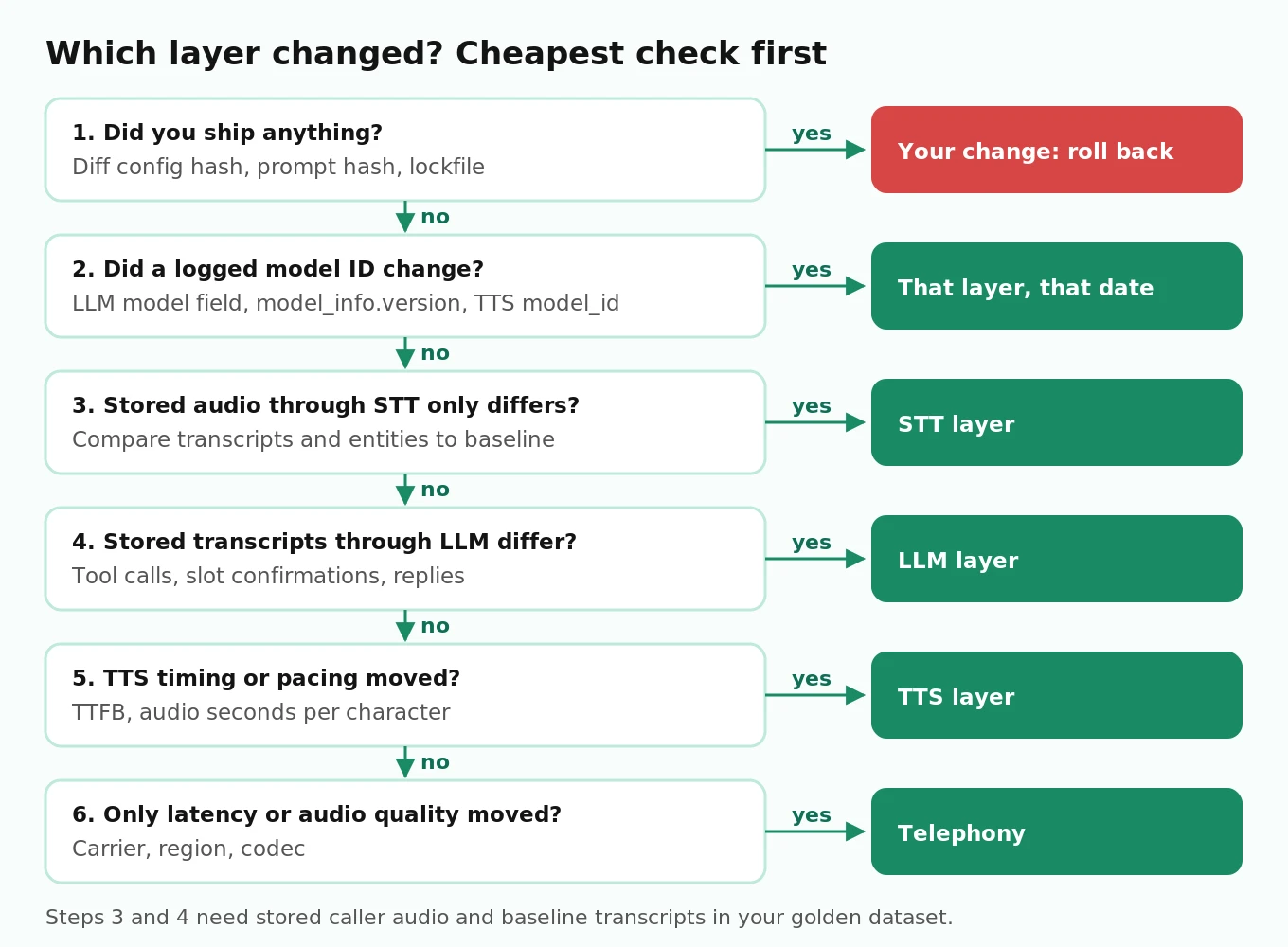
When an alert fires, you need the layer before you need the fix. Work through it in this order, cheapest check first.
1. Did you ship anything? Diff the deployed config hash, prompt hash and package lockfile against the last good day. If yes, roll back first and investigate second.
2. Did a logged model identity change? Compare the LLM's returned `model` field, Deepgram's `model_info.version`, and the TTS `model_id` against the last good day. A changed field on the alert date is your prime suspect.
3. Replay fixed audio through STT only. Run your stored test audio through the current STT and compare transcripts and entity accuracy to the stored baseline transcripts. If they differ, it's STT.
4. Replay fixed transcripts through the LLM only. Feed the baseline transcripts as text into the current LLM with the current prompt. If tool calls or slot confirmations differ, it's the LLM.
5. Check TTS and timing. If text output is unchanged but re-ask or barge-in rates moved, compare TTS time-to-first-byte and audio duration per character. Changed pacing changes when callers start talking.
6. Check telephony. If only latency or audio quality moved and all models are unchanged, look at carrier, region and codec.
Steps 3 and 4 are why you keep stored audio and stored baseline transcripts in your golden dataset. Isolated replays turn a vague "calls got worse" into one layer in under an hour. For STT-specific replay methods, the Deepgram STT testing guide has the details.
How to set up nightly pinned-vs-latest regression testing
1. Freeze a scenario suite. Start with 150 to 300 scenarios drawn from real call types, each with a pass rule you can score automatically (slot captured correctly, tool called with correct arguments, required disclosure spoken). Tag critical scenarios.
2. Store fixed inputs. For each scenario keep caller audio (for STT replay) and a baseline transcript (for LLM replay), so you can isolate layers later.
3. Define two configurations. Arm A uses every pinned ID. Arm B swaps in the floating IDs: `version=latest` for Deepgram Nova, `sonic-3.6` instead of the dated snapshot, the LLM alias or newest snapshot.
4. Run each scenario 3 to 5 times per arm on a schedule, at the same hour each night, to keep infrastructure load comparable.
5. Score and compare at the scenario level. Exact McNemar on majority outcomes, plus a list of every negative flip.
6. Alert on two conditions. p below 0.05 on the suite, or any negative flip on a critical scenario.
7. Act on the alert. If arm B regressed, fix prompts or handling before you move the pin. If arm A regressed, run the triage flow above.
8. Move pins deliberately. When a new snapshot passes the canary for several consecutive nights, update the pin in a normal change that goes through Loop 1.
Here is a simplified scheduled job for steps 4 to 6. `run_scenario` is your own harness (simulated caller plus scorer, as described in the synthetic callers guide); everything else is standard Python and SciPy.
# nightly_canary.py  (simplified, illustrative)
# Run with cron or a CI schedule, e.g. "0 3 * * *"
import json, os, statistics
from concurrent.futures import ThreadPoolExecutor
from scipy.stats import binomtest
import requests

from harness import run_scenario, load_scenarios  # your code: returns {"passed": bool, "model_ids": {...}}

REPEATS = 3
ALPHA = 0.05
SLACK_WEBHOOK = os.environ["SLACK_WEBHOOK_URL"]

ARM_A = {  # pinned production config
    "llm_model": os.environ["LLM_PINNED"],
    "stt": {"model": "nova-3", "version": os.environ["DG_VERSION_PINNED"]},
    "tts": {"provider": "cartesia", "model_id": "sonic-3.6-2026-08-27"},
}
ARM_B = {  # floating identifiers
    "llm_model": os.environ["LLM_LATEST"],
    "stt": {"model": "nova-3", "version": "latest"},
    "tts": {"provider": "cartesia", "model_id": "sonic-3.6"},
}

def majority_pass(scenario, config):
    runs = [run_scenario(scenario, config) for _ in range(REPEATS)]
    passes = sum(r["passed"] for r in runs)
    return passes * 2 > REPEATS, runs[-1]["model_ids"]

def main():
    scenarios = load_scenarios("suite/")
    with ThreadPoolExecutor(max_workers=8) as pool:
        a = list(pool.map(lambda s: majority_pass(s, ARM_A), scenarios))
        b = list(pool.map(lambda s: majority_pass(s, ARM_B), scenarios))

    neg_flips = [s for s, (pa, _), (pb, _) in zip(scenarios, a, b) if pa and not pb]
    pos_flips = [s for s, (pa, _), (pb, _) in zip(scenarios, a, b) if pb and not pa]
    n_disc = len(neg_flips) + len(pos_flips)
    # Exact McNemar: under H0, flips are equally likely in each direction
    p_value = binomtest(len(pos_flips), n_disc, 0.5, alternative="less").pvalue if n_disc else 1.0

    critical = [s["id"] for s in neg_flips if s.get("critical")]
    rate_a = statistics.mean(pa for pa, _ in a)
    rate_b = statistics.mean(pb for pb, _ in b)
    report = {
        "pass_rate_pinned": round(rate_a, 3),
        "pass_rate_latest": round(rate_b, 3),
        "negative_flips": [s["id"] for s in neg_flips],
        "positive_flips": len(pos_flips),
        "p_value": round(p_value, 4),
        "model_ids_latest": b[0][1],  # what the floating IDs actually resolved to
    }
    json.dump(report, open("reports/canary.json", "w"), indent=2)

    if p_value < ALPHA or critical:
        text = (f"Regression canary: latest {rate_b:.1%} vs pinned {rate_a:.1%}, "
                f"p={p_value:.3f}, {len(neg_flips)} negative flips, critical: {critical}")
        requests.post(SLACK_WEBHOOK, json={"text": text}, timeout=10)

if __name__ == "__main__":
    main()
Two details worth keeping if you adapt it. The one-sided `alternative="less"` asks specifically whether positive flips are rarer than negative ones, which is the regression question. And `model_ids_latest` records what the floating identifiers resolved to that night (the LLM's returned `model` field, Deepgram's `model_info.version`), so a change in the report history tells you the date a vendor shipped.
Where independent evaluation fits
Everything above can be built in-house, and the job is about 80 lines. The hard parts are the suite and the scorer: realistic simulated callers over real telephony audio, scoring rules that stay consistent night to night, and enough scenarios to clear the sample sizes above. A team of three building a scheduling agent usually does not have time to maintain that alongside the product.
That is the slot for an independent evaluator. Evalgent can run a pre-migration audit when a deprecation date is coming (the January and February 2027 OpenAI shutdowns are good examples), run vendor bake-offs when you are choosing a replacement model, and run the nightly pinned-versus-latest regression suite against your agent from outside your infrastructure, so the thing doing the testing is not the thing being tested. If you are weighing whether a swap is worth it at all, swapping voice agent providers and the voice agent metrics scorecard are good next reads.
Frequently asked questions
How do I detect voice agent regressions?
Run a fixed scenario suite on every change you make, and nightly against both pinned and floating model versions for changes you don't make. Compare the two arms with a paired test on the same scenarios and list every negative flip. In production, watch re-ask rate, tool error rate and p95 latency against control limits from a 14-day baseline.
What is voice agent regression testing?
It is re-running a fixed set of scored call scenarios after any change to the agent or its models, then checking whether pass rates dropped beyond noise or any specific scenario broke. Good regression testing compares against a control run, uses repeats per scenario, and reports per-scenario flips, not only an overall score.
Why does my voice agent break when I didn't change anything?
Something upstream changed. Common causes: an LLM alias moved to a new snapshot, Deepgram's default `version=latest` picked up a new model version, a floating TTS ID like `sonic-3.6` moved to a new snapshot, or a forced migration off a deprecated model. Log model identities per call so you can see the date it happened.
How do I run regression tests every time my voice agent prompt changes?
Make the scenario suite a required CI check on any change to prompt files or agent config. Run it on pinned models so the prompt is the only variable, use 3 to 5 repeats per scenario, and fail the merge on a significant paired drop or any negative flip in a critical scenario.
How many test calls do I need to detect a regression?
It depends on design. Unpaired, detecting a drop from 90% to 85% at 80% power needs about 686 calls per arm. Paired on the same scenarios, with assumed flip rates of 7% and 2%, about 280 scenarios suffice. Twenty manual test calls cannot reliably detect a 5-point drop.
Should I pin model versions in production?
Yes, wherever the vendor allows it: dated LLM snapshots, Deepgram `version` strings, Cartesia dated model IDs. Pinning moves change onto your schedule. It does not remove it, because pinned models get deprecated, so pair pins with a nightly canary on the floating versions to see what is coming.
What is a negative flip in model updates?
A negative flip is a case the old model handled correctly that the new model gets wrong. Research on LLM updates, including the MUSCLE paper, shows updated models can improve on average while still producing negative flips. For voice agents, track flips per scenario, because one flipped payment or consent scenario matters more than a 1-point average gain.
How do I tell which layer caused a regression?
Check your own changes first, then compare logged model identities to the last good day. Then isolate: replay stored audio through STT only, replay stored transcripts through the LLM only, then check TTS timing and telephony. Whichever isolated replay differs from baseline is the layer that changed.
The bottom line
Most voice agent regressions you will face next year come from model updates and deprecations you did not choose, so pin what you can, canary what you can't, and log the model identity on every call. Then let a paired, repeated scenario suite decide whether a drop is real, and let per-scenario flips tell you exactly what broke.
Related Articles

Why AI voice agents fail in production: 9 failure layers, how to detect each, and how to prevent them
Voice agents fail in production across 9 layers, from 8 kHz audio to silent tool errors. Symptoms, root causes, alerts, and fixes in one master table.
Read more
The Voice Agent Stack: Every Layer, the Latency Budget and the Real Cost (2026)
Every layer of a voice agent stack, from SIP and codecs to turn detection and evals, with an 800 ms latency budget and verified per-minute costs.
Read more