Open door for builders.
Voice Agent Prompt Versioning: Shipping Prompt and Flow Changes to an In-House Voice Agent Without Breaking Live Calls
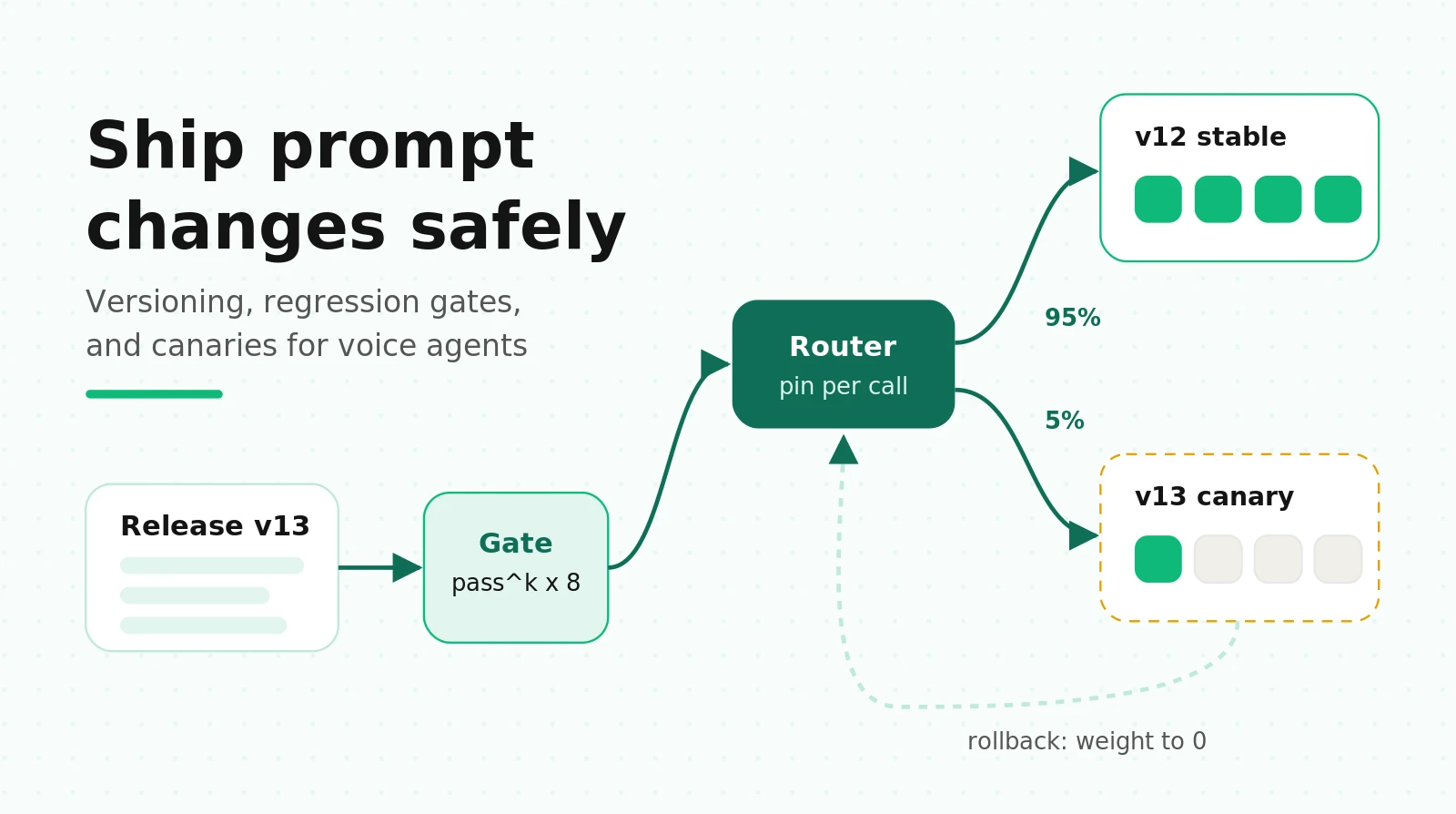
On this page
If you run a voice agent in-house, you know this moment. Someone edits one line of the system prompt to stop the agent from over-apologizing. It ships at 2 p.m. By 4 p.m. the agent has stopped confirming appointment times, because the deleted sentence also anchored the read-back step. Nobody notices until a customer complains on Thursday.
There's no QA team between your Git push and a caller's ear. Testing is three engineers making test calls from their phones. Every change, however small, ships to live callers.
This guide is the release process that fills that gap. It covers why voice changes are riskier than chat changes, a taxonomy that tells you how hard to test each kind of change, versioning code for LiveKit and Pipecat, a four-gate pipeline, the math for sizing a canary, a CI regression gate, and rollback design. It assumes you build on LiveKit Agents or Pipecat and run your own telephony.
Why a voice prompt change is riskier than a chat prompt change
In chat, a bad prompt change produces a bad message. The user rereads it, rephrases, and moves on. In voice, the same change hits five surfaces at once, and the caller can't scroll back.
The model reacts to wording you think is cosmetic
Sclar et al. tested meaning-preserving formatting changes, such as separators, casing, and spacing, across open models. They found accuracy swings of up to 76 points on LLaMA-2-13B. The sensitivity stayed when they scaled the model up, added few-shot examples, or used instruction tuning. They also found that which format works best correlates only weakly between models.
Two things follow for your agent. A "cosmetic" edit is a behavioral change until a test says otherwise. And a prompt tuned for one model isn't tuned for the next, so a model swap and a prompt edit are never independent changes.
Long prompts drop rules, and they drop them quietly
Voice prompts grow. Every incident adds a rule: "never read the card number back," "spell email addresses," "if the caller says agent twice, transfer." The IFScale study gave models up to 500 simultaneous instructions. Even the best frontier models reached only 68% accuracy at 500 instructions. The dominant failure was omission: the model doesn't break a rule, it forgets it.
That's the worst kind of regression for a phone agent. Adding rule 41 can silently weaken rule 12. You won't see it in a demo call. You'll see it in the 3% of calls where rule 12 mattered.
Tool schemas are a contract with your backend
A tool's name, description, and parameter schema are part of the prompt. Rename a parameter from `date` to `appointment_date` and two things change. The model's behavior changes, because descriptions steer when tools get called. And your backend now receives a different payload. A prompt edit becomes an API migration, with all the version-skew problems that implies. See tool call accuracy for how to score the model side.
Spoken output has its own failure modes
Text that reads fine can sound wrong. A prompt that asks for "a short summary" can produce a bulleted list. The TTS reads it as one breathless run, or it pronounces the asterisks. Dates, currency, and confirmation codes need spoken formatting. A change that makes replies 30% longer also makes every turn 30% longer for the caller, and it raises the odds they barge in mid-sentence. Our voice prompt engineering guide covers the formatting side.
Prompt length moves latency through the cache, not just token count
OpenAI's latency guide says cutting your prompt in half may improve latency by only 1–5%. Output tokens dominate total generation time. But a voice agent cares about time to first token, and there the prompt cache matters more than raw length.
Caching is prefix-based. OpenAI's guide says reuse "requires the entire rendered prefix to match". Changing tool names, descriptions, schemas, or ordering breaks the prefix. Anthropic's cache follows tools, then system, then messages, and modifying tool definitions invalidates the entire cache.
Three gotchas follow:
- Every release cold-starts the cache. The first calls after a prompt or tool change pay full prefill. If your canary runs at low volume, it may never warm up at all. OpenAI keeps a cached prefix for 30 minutes after last use on GPT-5.6 and later. Anthropic's default is 5 minutes. A 5% canary on a quiet line can see uncached time to first token all day, and you'll blame the prompt for latency the cache caused.
- Dynamic text near the top kills caching for everyone. Put the caller's name or today's date in the first line of the system prompt and no two calls share a prefix. Keep stable instructions first and per-call facts last.
- Short prompts don't cache at all. OpenAI's minimum cacheable prompt is 1,024 tokens on GPT-5.6 and later. Trimming a 1,100-token prompt to 950 can make time to first token worse.
Measure time to first audio at p50 and p95 for every release, with warm and cold caches reported separately.
The "same" model can change under you
Chen, Zaharia, and Zou compared the March and June 2023 versions of GPT-4 on the same tasks. Accuracy on identifying prime numbers fell from 84% to 51%, and they report evidence that instruction following declined. If your config says a floating model alias, your agent can change without a commit. Pin dated model snapshots, and treat an alias bump as a release. Our guide to LLM update regressions covers vendor-driven changes in depth. This post covers the ones you make yourself.
A change taxonomy: six kinds of change, six blast radii
Not every change needs the same release process. Retuning a greeting doesn't need a week-long canary. Swapping the STT model does. Here's a taxonomy you can copy into your release policy.
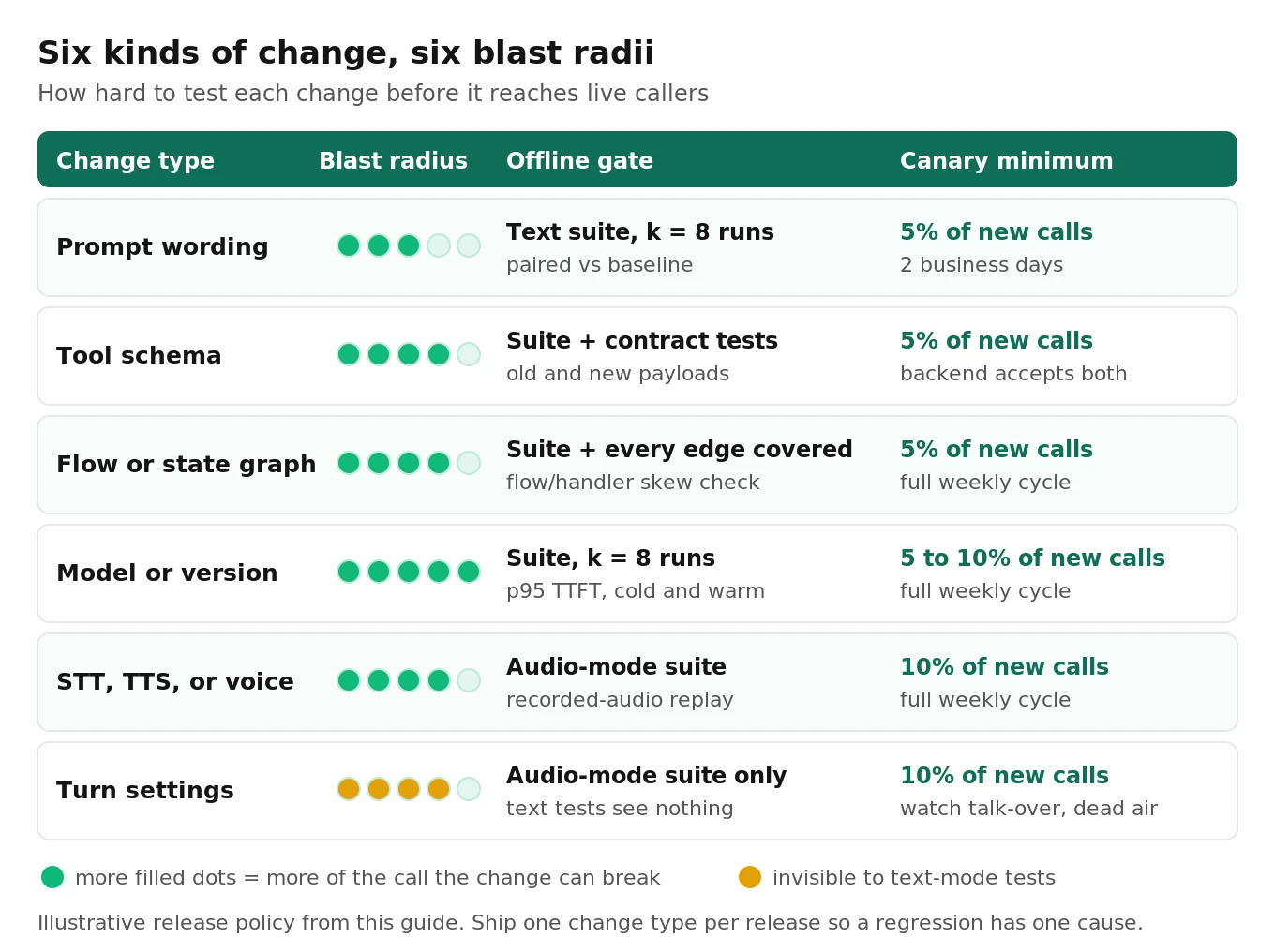
| Change type | Examples | What usually breaks | Blast radius | Offline gate | Canary minimum |
|---|---|---|---|---|---|
| Prompt wording | Tone, a new rule, a reworded step | Dropped rules, longer replies, missed read-backs | Medium | Full scenario suite, k=8 | 5% for 2 full business days |
| Tool schema | Renamed parameter, new tool, new description | Wrong or missing calls, backend rejects payload | High | Suite plus contract tests on both schemas | 5%, backend accepts old and new payloads |
| Flow or state graph | New node, changed transition, new state key | Dead ends, loops, skipped confirmation | High | Suite plus a path-coverage check on every edge | 5% for a full weekly cycle |
| Model or version | New snapshot, new provider | Everything, including latency and cache | Very high | Suite, k=8, plus latency at p95 | 5% to 10% for a full weekly cycle |
| STT, TTS, or voice | New STT model, new voice, new speed | Entity errors, pronunciation, barge-in rate | High | Audio-mode suite plus recorded-audio replay | 10% for a full weekly cycle |
| Turn settings | Endpointing delays, turn detector, interruption rules | Talk-over, dead air, premature cutoffs | High, and invisible in text tests | Audio-mode suite only | 10%, watch interruption and silence rates |
Read the table as a test-depth contract
The bottom two rows are where in-house teams get hurt most. Text-mode tests skip STT and TTS entirely, so they say nothing about a voice or turn-setting change. You need audio-mode scenarios, real or synthesized speech through the actual pipeline, for those. See our guide to end-of-turn detection for what to measure there.
Also, never bundle change types if you can help it. A release that changes the prompt and the model is two experiments with one result. If it regresses, you won't know which change caused it. Split them across two releases a few days apart.
Versioning mechanics: pin every call to one release
The single most important rule: a call never changes version mid-call. The version is chosen once, at call start, and travels with the call to the end. Everything else in this post depends on it.
Define a release as a bundle, not a file
"The prompt" isn't the unit of release. The unit is everything that shapes behavior. Write it down as one manifest with content hashes:
# releases/v13.yaml (illustrative release bundle manifest)
release: v13
parent: v12
change_type: prompt_wording          # from the taxonomy table
prompt:
  system: prompts/v13/system.md      # sha256 recorded at build time
  greeting: prompts/v13/greeting.md
flow: flows/v13/flow.yaml            # Pipecat Flows config, if used
tools_schema: tools/v4.json          # unchanged from v12
llm: { provider: openai, model: "<dated snapshot, never an alias>" }
stt: { provider: deepgram, model: nova-3 }
tts: { provider: cartesia, voice_id: "<pinned id>" }
turn_handling: turn/v2.yaml          # unchanged from v12
owner: "@dana"
rollback_to: v12
Log `release` on every call record, next to the call ID. Without it, no metric can be split by version, and canary analysis is impossible. Our call logging guide lists the other fields worth keeping.
LiveKit: explicit dispatch, deployments, and per-call pins
LiveKit gives you two levers. Pick based on what changed.
Code changes need separate agents. The dispatch name is the `agent_name` on `@server.rtc_session()`. With it set, the agent only joins rooms when explicitly dispatched. You can run `support-v12` and `support-v13` as two agents and choose per call. For outbound calls, that choice is one argument:
# outbound.py (simplified): dispatch one outbound call to a pinned release
import json
from livekit import api

async def dispatch_call(room: str, phone: str, release: str) -> None:
    async with api.LiveKitAPI() as lkapi:
        await lkapi.agent_dispatch.create_dispatch(
            api.CreateAgentDispatchRequest(
                agent_name=f"support-{release}",  # e.g. support-v13
                room=room,
                metadata=json.dumps({"release": release, "phone": phone}),
            )
        )
Inbound SIP is harder. SIP dispatch rules name their agents in a static `room_config.agents` field. There's no weight, so a rule can't send 5% of calls to a new agent. You can split by phone number or trunk, but that splits by caller population, not at random.
Prompt, flow, and model changes can ship as config inside one agent. For those, keep one `agent_name` and pick the release bundle inside the entrypoint. This gives you a weighted, random canary on inbound SIP:
# agent.py (simplified): one agent, release bundle chosen per call
import hashlib, json
from livekit import agents
from livekit.agents import (Agent, AgentServer, AgentSession, JobContext,
                            TurnHandlingOptions, inference)
from releases import load_bundle, current_weights  # your code: reads releases/*.yaml

def pick_release(sticky_key: str, weights: dict[str, int]) -> str:
    bucket = int(hashlib.sha256(sticky_key.encode()).hexdigest(), 16) % 100
    acc = 0
    for release, pct in weights.items():   # e.g. {"v12": 95, "v13": 5}
        acc += pct
        if bucket < acc:
            return release
    return next(iter(weights))

class SupportAgent(Agent):
    def __init__(self, bundle) -> None:
        super().__init__(instructions=bundle.system_prompt, tools=bundle.tools)

server = AgentServer()

@server.rtc_session(agent_name="support-agent")
async def entry(ctx: JobContext):
    meta = json.loads(ctx.job.metadata or "{}")
    # Dispatch metadata wins (outbound, tests); otherwise hash a sticky key.
    release = meta.get("release") or pick_release(
        meta.get("caller_number", ctx.room.name), current_weights()
    )
    bundle = load_bundle(release)  # frozen for the life of this call
    session = AgentSession(
        stt=inference.STT(model=bundle.stt_model, language="en"),
        llm=inference.LLM(model=bundle.llm_model),
        tts=inference.TTS(model=bundle.tts_model, voice=bundle.voice_id),
        turn_handling=TurnHandlingOptions(turn_detection=inference.TurnDetector()),
    )
    ctx.log_context_fields = {"release": release}  # attach to every log line
    await session.start(room=ctx.room, agent=SupportAgent(bundle))

if __name__ == "__main__":
    agents.cli.run_app(server)
Note the sticky key. Hash the caller's number, not the room, when your use case spans several calls: reminders, collections, callbacks. A patient who hears v13's wording on Monday and v12's on Wednesday gets an inconsistent experience. You also lose the clean "one caller, one arm" split that the canary math assumes. Pass `caller_number` in dispatch metadata, or read it from the SIP participant's attributes.
LiveKit Cloud gotchas that bite release processes
LiveKit Cloud's non-production deployments look like a canary tool. They're a staging tool. The docs list several differences:
- No drain. Redeploying a non-production deployment "immediately disconnects active sessions." Production redeploys drain, giving live sessions up to an hour.
- No metrics. Only the `production` deployment emits to Agent Observability today. A canary on a non-production deployment is invisible on your dashboards.
- Cold starts. Non-production deployments scale to zero when idle and cold-boot on the next request.
- Old SDKs leak into production. Agents on `livekit-agents` older than 1.6.0 don't register under their deployment name. They register as production, and that worker "serves production traffic." Your staging build can answer real callers.
- Plan limits. Non-production deployments need the Ship plan or higher, with two per agent on Ship and five on Scale.
Use deployments for pre-release testing against real infrastructure. Use per-call bundles or separate agents for the live canary.
On production, `lk agent rollback` restores the previous image without a rebuild, and it drains the same way a deploy does. Instant rollback needs a paid plan. A new version also gets 5 minutes for its health check to pass before old instances stop taking traffic. Keep `prewarm` well under that. If you self-host on Kubernetes, the same drain logic applies to pod termination. See LiveKit agents on Kubernetes.
Pipecat: the Stream URL is the pin, and the flow is data
With Twilio Media Streams, the TwiML your webhook returns decides where the call's audio goes for its whole life. Our Pipecat deployment blueprint shows a full router that hashes the `CallSid` into a weighted release table. For prompt and flow releases inside one fleet, you don't even need separate hostnames. Pass the release as a stream parameter:
<Response><Connect>
  <Stream url="wss://voice.example.com/ws">
    <Parameter name="release" value="v13"/>
  </Stream>
</Connect></Response>
Twilio delivers the `Parameter` values in the stream's start message. Pipecat's `parse_telephony_websocket()` exposes them as `call_data["body"]`.
Pipecat Flows makes the flow itself versionable data. A flow config is a YAML or JSON document with nodes, messages, tools, and transitions. It's joined at runtime to a Python module of handlers. The docs say this "puts a seam between the graph and the bot," so a flow "can be loaded per session and changed without a deploy":
# bot.py (simplified): load the pinned flow version per call
import handlers
from pipecat.flows import Flow, FlowConfig, FlowManager
from pipecat.runner.utils import parse_telephony_websocket

async def bot(runner_args):
    transport_type, call_data = await parse_telephony_websocket(runner_args.websocket)
    release = call_data["body"].get("release", "v12")
    config = FlowConfig.from_file(f"flows/{release}/flow.yaml")
    flow = Flow(config, handlers=handlers)  # raises FlowReferenceError on skew
    # ... build transport, pipeline, worker, llm, context_aggregator ...
    flow_manager = FlowManager(
        worker=worker, llm=llm, context_aggregator=context_aggregator,
        transport=transport, global_functions=flow.global_functions,
    )
    flow_manager.state.update({"release": release})

    @transport.event_handler("on_client_connected")
    async def on_connected(transport, client):
        await flow_manager.initialize(flow.initial_node)
The Pipecat Flows trap: flow and handler version skew
The seam that makes flows easy to ship creates a new failure. Handlers ship with the code. Flows ship as data. So the code you deploy today must work with every flow version still in use.
Here's how it breaks. You rename the handler `check_availability` to `check_slots` in the v14 code deploy. Flow v12, still serving 95% of calls, references `check_availability`. Pipecat catches this when the `Flow` is constructed. It raises a `FlowReferenceError` that lists every unresolved tool and handler at once. But if construction happens at call start, the error hits a live caller.
The fix is a CI check. On every code change, construct a `Flow` for every flow version that has nonzero traffic weight, against the candidate handlers module. Fail the build on any `FlowReferenceError`. It runs in seconds with no API keys, and it removes a whole class of production incidents.
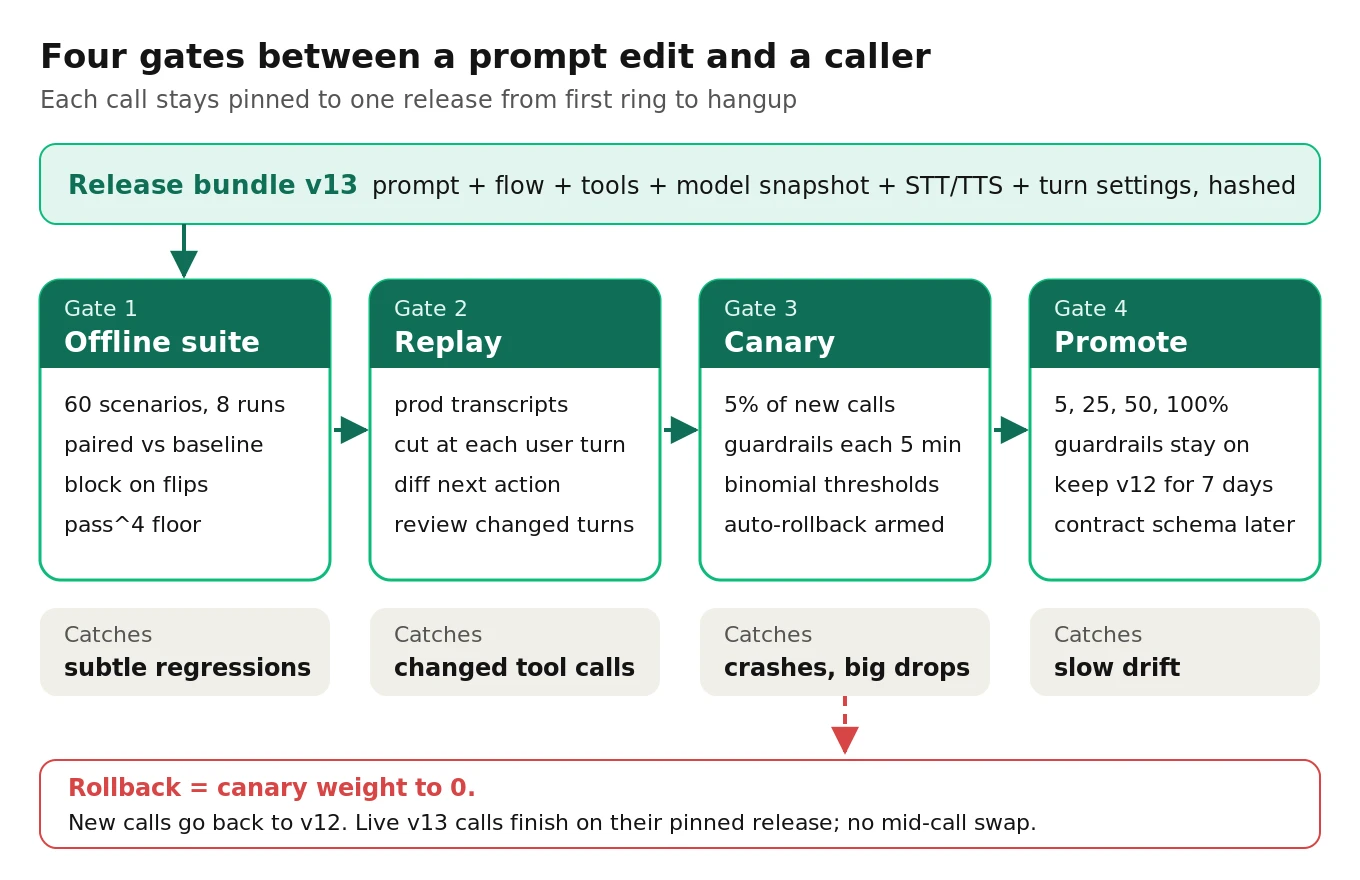
The release pipeline: four gates
Every change type from the taxonomy flows through the same four gates. What changes is the depth at each gate.
Gate 1: an offline regression suite scored with pass^k
The offline suite is a fixed set of scenarios, scripted and simulated, run against the candidate and the current release. Build it from real calls, weighted toward the cases that matter most: the top intents, every compliance rule, every tool, and every past incident. Our golden dataset guide covers composition. A practical starting size for a single-purpose agent is 40 to 80 scenarios.
Run each scenario more than once. The tau-bench paper by Yao et al. introduced pass^k: the chance that all k independent trials of a task succeed, averaged over tasks. If a task ran n times with c successes, its estimate is C(c,k) / C(n,k). In their results, gpt-4o succeeded on about 61% of retail tasks on a single try. But pass^8 fell below 25%.
Pass^k matters for phone agents because every caller is a fresh trial. A scenario that passes 7 of 8 times will fail one caller in eight, forever. It also amplifies regressions in a useful way. Worked example: if every scenario has the same success rate, a drop from 90% to 87% per call is a 3-point drop in pass^1. In pass^8 it's a drop from 43% to 33%, ten points. The reliability lens turns a change you'd shrug at into one you'd notice.
Both frameworks support repeats. Pipecat's simulated scenarios take a `runs:` field, and every run must pass. A suite's `--repeat` flag turns the sweep into a measurement and reports pass rates. LiveKit's test framework runs turns with `session.run()`. You can assert exact tool calls with `is_function_call(name=..., arguments=...)` and judge replies with `judge(llm, intent=...)`. Wrap a test in a loop or a pytest parametrize to get k trials.
Mock your tools in the offline suite. LiveKit has `mock_tools()`; in Pipecat, point handlers at fakes. Deterministic tool outputs mean a failure is the agent's fault, not your staging database's.
Gate 2: replay and shadow without fooling yourself
"Shadow testing" a voice agent is harder than it sounds. You can't run the candidate in parallel on a live call and compare whole conversations. After the first turn, the caller responds to the live agent, so the candidate's second turn answers a conversation it didn't have.
What works is turn-prefix replay. Take recent production transcripts. Cut each one at every user turn. Feed the candidate the exact production history up to that point, and compare its next action with what production did: the tool call, its arguments, and whether it transferred or ended. Every comparison is valid because both versions saw the same input.
Score the deltas, not the absolute numbers. Flag turns where the candidate calls a different tool, drops a required argument, or ends the call where production continued. Those flagged turns are your review queue, usually a few dozen per release rather than hundreds.
For STT or voice changes, replay recorded caller audio through the new STT and compare entity errors on names, dates, and numbers. For more on what shadow and replay can and can't tell you, see shadow testing voice agents.
Gate 3: a canary with guardrails and automatic rollback
Shift a small share of new calls to the candidate. Live calls stay on their pinned release. The canary has two jobs, and they need different rules.
Guardrails catch breakage fast. These are metrics where a big jump means something broke: hard errors and exceptions, tool-call failures, calls that end in under 20 seconds, transfer rate, dead-air events, and p95 time to first audio. Check them every few minutes, and roll back automatically when one crosses its threshold.
Set the thresholds with a binomial bound, not a gut feeling. Worked example: if the baseline hard-error rate is 1%, then after 200 canary calls you'd expect 2 errors. Getting 9 or more by chance has a probability of about 0.02%. So "roll back if errors ≥ 9 in the first 200 calls" almost never fires on a healthy release, and it fires fast on a broken one.
The evaluation decides promotion. That's the slow job: did task success, containment, or booking completion move? It needs the sample-size math in the next section, and it must not be decided by peeking.
Gate 4: promote, drain, and keep the old release warm
Promotion raises the canary weight in steps, such as 5%, 25%, 50%, and 100%. Each step is a new decision with guardrails still running. After 100%, keep the previous release deployable and its bundle loadable for at least a week. Rollback should be a weight change, not a rebuild.
Canary math: how many calls to see 90% fall to 87%
This is the section most release guides skip. They say "canary at 5% and watch the metrics." But how long do you watch, and what can you actually see?
The formula
To detect a drop from rate p₁ to p₂ in a two-proportion comparison, with significance α and power 1 − β, the classic per-arm size is:
n = (z₁₋α + z₁₋β)² × [p₁(1 − p₁) + p₂(1 − p₂)] / (p₁ − p₂)²
Worked example: baseline task success is 90%, and you want to detect a fall to 87%. Use a one-sided test at α = 0.05 (z = 1.645) and 80% power (z = 0.842):
- (1.645 + 0.842)² = 6.18
- 0.90 × 0.10 + 0.87 × 0.13 = 0.090 + 0.113 = 0.203
- (0.03)² = 0.0009
- n = 6.18 × 0.203 / 0.0009 ≈ 1,395 calls per arm
A two-sided test at the same power needs about 1,771 per arm.
Unequal arms change the picture
A canary isn't a 50/50 split. With a 5% canary, the control arm is huge and its variance is tiny. Rework the formula for a split where a fraction f of daily volume V goes to the canary, and solve for days d:
d = (z₁₋α + z₁₋β)² × [p₂(1 − p₂) / f + p₁(1 − p₁) / (1 − f)] / (V × δ²)
Plug in the same 90% to 87% case:
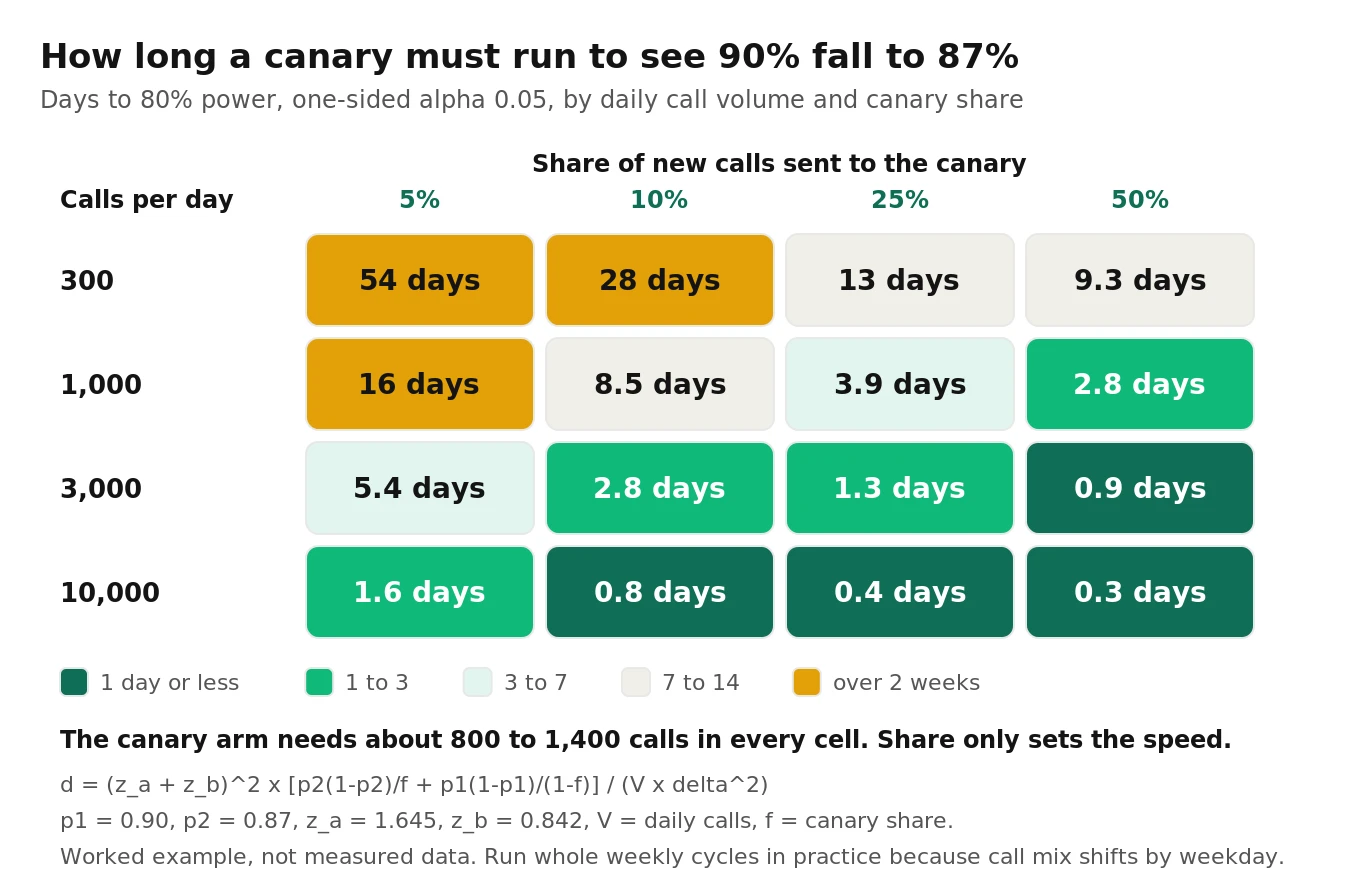
| Daily calls | 5% canary | 10% canary | 25% canary | 50% canary |
|---|---|---|---|---|
| 300 | 54 days | 28 days | 13 days | 9.3 days |
| 1,000 | 16 days | 8.5 days | 3.9 days | 2.8 days |
| 3,000 | 5.4 days | 2.8 days | 1.3 days | 0.9 days |
| 10,000 | 1.6 days | 0.8 days | 0.4 days | 0.3 days |
Two things in that table aren't obvious.
First, the canary arm needs about 800 calls no matter how small the split. At 5%, the canary sees about 809 calls by the time you have the answer. At 10%, about 846. A smaller canary doesn't need fewer canary calls. It just takes longer to collect them. The canary percentage is a speed dial, not a risk dial for the measurement.
Second, most in-house agents can't detect a 3-point regression at canary at all. At 1,000 calls a day and a 5% canary, you'd wait over two weeks. By then three more releases have shipped. Add the fact that call mix shifts by weekday, so you should run whole weekly cycles anyway, and the conclusion is plain. The canary catches big breaks: a 90% to 80% drop shows up at a 10% canary on 1,000 daily calls in about a day. Subtle regressions must be caught offline, before release.
Don't peek at the promotion metric
Checking a fixed-horizon p-value every hour and stopping when it crosses 0.05 inflates false positives badly. Johari et al. found that even with 10,000 samples, the false-positive probability "can easily be inflated by 5-10x." They also showed that if you stop the first time the p-value crosses α, the false-positive probability approaches 100% as data grows.
Use one of two disciplines. Either fix the sample size up front and decide once, or use always-valid sequential methods built for continuous monitoring. For guardrails, which you do check continuously, use a strict per-look threshold like the 0.02% bound above. Even across dozens of looks, the combined false-alarm rate stays low.
The offline suite has statistics too
Sixty scenarios run eight times each is 480 trials, but it isn't 480 independent observations. Trials of the same scenario are correlated. Evan Miller's paper on adding error bars to evals makes three recommendations that apply directly:
- Cluster by scenario. Miller found clustered standard errors can be over 3x larger than naive ones. Treating 480 trials as independent makes your suite look three times more precise than it is.
- Compare paired differences. Run baseline and candidate on the same scenarios and analyze per-scenario differences. When the two versions agree on which scenarios are hard, pairing is "a 'free' reduction in estimator variance." With a correlation of 0.5, it cuts variance by a third.
- Repeats help, up to a point. In Miller's example with 198 questions, raising repeats from 1 to 10 shrank the minimum detectable effect from 13.2% to 7.5%. Beyond some K, more repeats stop helping. More scenarios help more.
So a 60-scenario suite won't statistically prove a 3-point average drop either. What it does well is catch scenario flips: a scenario that went from reliable to broken. With 8 runs per side, a scenario that passed 8 of 8 on baseline is a significant regression (one-sided Fisher exact test, p < 0.05) if the candidate passes 4 or fewer. With 10 runs, 6 or fewer. That's the gate's core rule.
A regression gate for CI
Here's a gate that runs the baseline and the candidate in the same sweep, then decides. It uses Pipecat's suite runner, because its output format is documented. The decision logic works the same on LiveKit pytest results if you write them to JSONL.
First, the manifest. Two entries run the same bot with different releases passed as runner body data:
# evals/manifest.yaml
concurrency: 4
scenarios_dir: scenarios
spawn: "{python} {bot} -t eval --port {port}"
repeat: 8                      # every (entry, scenario) pair runs 8 times
suite:
  - bot: bot.py
    name: baseline
    runner_body: { data: { release: v12 } }
    scenarios: [scripted/booking, scripted/reschedule, simulated/booking_callers]
  - bot: bot.py
    name: candidate
    runner_body: { data: { release: v13 } }
    scenarios: [scripted/booking, scripted/reschedule, simulated/booking_callers]
Pipecat's docs point out that a repeated sweep is "attempt-major." Every entry's first attempt runs before any entry's second, so both releases meet the same machine and provider conditions. They also warn that a repeated sweep always exits 0, so "the threshold is yours to choose: read `results.jsonl` and decide." This script is that decision:
# gate.py (illustrative): fail the build on scenario flips or a paired regression
import json, sys
from collections import defaultdict
from math import comb, sqrt
from statistics import mean, stdev
from scipy.stats import fisher_exact

CRITICAL = {"scripted/booking", "scripted/reschedule"}  # never allowed to flip
K = 4                     # pass^k horizon reported for critical scenarios
MIN_PASS_K = 0.60         # candidate pass^4 floor on critical scenarios
MAX_MEAN_DROP = 0.02      # tolerated average per-scenario drop

def load(path):
    runs = defaultdict(lambda: defaultdict(list))  # entry -> scenario -> [bool]
    for line in open(path):
        r = json.loads(line)
        if r.get("error"):              # errored runs say nothing; exclude
            continue
        passed = bool(r.get("passed"))  # check field names for your Pipecat version
        runs[r["name"]][r["scenario"]].append(passed)
    return runs

def pass_hat_k(c, n, k):
    return comb(c, k) / comb(n, k) if n >= k else float("nan")

runs = load(sys.argv[1])
base, cand = runs["baseline"], runs["candidate"]
failures, diffs = [], []

for scen in sorted(base.keys() & cand.keys()):
    b, c = base[scen], cand[scen]
    bc, cc = sum(b), sum(c)
    diffs.append(cc / len(c) - bc / len(b))
    # Flip test: is the candidate significantly worse on this scenario?
    p = fisher_exact([[bc, len(b) - bc], [cc, len(c) - cc]], alternative="greater")[1]
    pk = pass_hat_k(cc, len(c), K)
    print(f"{scen:40s} base {bc}/{len(b)}  cand {cc}/{len(c)}  p={p:.3f}  pass^{K}={pk:.2f}")
    if p < 0.05:
        failures.append(f"flip: {scen} ({bc}/{len(b)} -> {cc}/{len(c)})")
    if scen in CRITICAL and pk < MIN_PASS_K:
        failures.append(f"reliability: {scen} pass^{K}={pk:.2f} < {MIN_PASS_K}")

# Paired, scenario-clustered comparison (one difference per scenario)
d_bar = mean(diffs)
se = stdev(diffs) / sqrt(len(diffs)) if len(diffs) > 1 else 0.0
upper = d_bar + 1.645 * se      # one-sided 95% upper bound on the change
print(f"mean paired change {d_bar:+.3f} (SE {se:.3f}), upper bound {upper:+.3f}")
if upper < 0:
    failures.append(f"paired regression: upper bound {upper:+.3f} < 0")
if d_bar < -MAX_MEAN_DROP:
    failures.append(f"mean drop {d_bar:+.3f} exceeds {MAX_MEAN_DROP}")

if failures:
    print("BLOCKED:\n  " + "\n  ".join(failures))
    sys.exit(1)
print("PASSED")
And the CI step, on every pull request that touches prompts, flows, tools, or release bundles:
# .github/workflows/voice-regression.yml (excerpt)
- name: Check flow/handler skew for every live flow version
  run: python scripts/check_flows.py --weights releases/weights.yaml
- name: Run paired regression sweep
  run: uv run pipecat eval suite evals/manifest.yaml -n pr-${{ github.event.number }}
- name: Gate
  run: python gate.py eval-runs/pr-${{ github.event.number }}/results.jsonl
A few design notes. The flip test runs per scenario, so with 60 scenarios you'll see up to about three false flips at p < 0.05 on a healthy release. That's acceptable for a gate that asks a human to look, and too noisy for one that blocks forever. Either tighten the threshold for non-critical scenarios, or re-run only the flipped scenarios with more repeats before blocking.
The judge matters too. Pipecat's eval judge runs on a local Ollama model by default, and it can point at any LLM or a classifier. Jev, a classifier that's highly consistent across repeated checks, costs $0.042 per million input tokens and answers in 70–500 ms. Whatever you use, freeze the judge version along with the suite, or a judge change will look like an agent regression. For the broader workflow, see eval-driven development and prompt comparison.
Rollback design: what's stateful mid-call
Rollback is easy to say and hard to do in voice, because a call in progress carries state. Here's what lives where, and whether you can touch it mid-call.
| State | Where it lives | Safe to change mid-call? | Rollback behavior |
|---|---|---|---|
| Chat history | Agent session context | No: the new prompt meets an old conversation | Call finishes on its pinned release |
| Flow node and `flow_manager.state` | Flow manager | No: node names and state keys may not exist in the old flow | Call finishes on its pinned release |
| Committed tool side effects | Your backend | Already happened | Must stay readable by both releases |
| Voice and TTS settings | Session | No: the caller hears a different person | Call finishes on its pinned release |
| Turn and endpointing settings | Session | Technically yes, but it changes the call's rhythm | Call finishes on its pinned release |
| Prompt cache | Provider | N/A | Rollback cold-starts the old prefix if it expired |
| Cross-call memory (callbacks, retries) | Your database | Spans releases | Write formats must be readable by both |
The pattern is clear. Rollback means "stop routing new calls to the bad release." It doesn't mean changing a live call. On LiveKit Cloud production, `lk agent rollback` drains existing sessions. On your own router, set the canary weight to 0, and the next webhook sends calls to the old release.
Use expand and contract for tool and state schemas
The hardest rollbacks involve data. Say v13 adds a `preferred_time_window` argument to `book_appointment` and writes it to the booking record. If you roll back to v12 mid-canary, v12 must still handle bookings that v13 created. A callback agent on v12 might read that record tomorrow.
Borrow the database-migration discipline:
1. Expand. Deploy the backend so it accepts both the old and new tool payloads, and so new fields are optional on read. Ship this first, with no agent change.
2. Canary. Ship the agent release that uses the new schema. Both releases now work against the same backend.
3. Contract. Only after the old release has had zero traffic for a full drain window (at least an hour on LiveKit Cloud) and your rollback window has passed, remove support for the old payload.
The same applies to Pipecat Flows state keys and anything else written during a call and read later.
Keep a kill switch that isn't a hot swap
Sometimes a release is actively harmful, like quoting the wrong price. Waiting for live calls to drain isn't acceptable then. Don't swap the prompt mid-call. Build a release-level kill switch that, at the next turn boundary, plays a short apology and transfers to a human or ends the call. It's crude, but it's a known path, and you can test it ahead of time.
The one-page release checklist
Print this, or paste it into your pull request template.
Before merge
- Release bundle manifest written, with change type, parent, owner, and `rollback_to`
- Model pinned to a dated snapshot; no floating aliases
- One change type per release, or a written reason why not
- Stable prompt text first, per-call facts last (cache-friendly prefix)
- Flow and handler skew check passes for every flow version with traffic
- Tool schema changes: backend already accepts old and new payloads
Gate 1: offline
- Paired sweep, baseline vs candidate, k ≥ 8 per scenario
- No significant flips on critical scenarios; pass^4 above floor
- Paired mean change within tolerance
- Audio-mode scenarios run if STT, TTS, voice, or turn settings changed
- p95 time to first audio within budget, cold and warm cache
Gate 2: replay
- Turn-prefix replay on recent production transcripts
- Every changed tool call or early end reviewed by a human
Gate 3: canary
- Canary weight set, sticky by caller when calls span sessions
- Guardrail thresholds computed from baseline rates and armed for auto-rollback
- Promotion sample size and duration fixed in advance (whole weeks)
- `release` tag visible on every call record and dashboard
Gate 4: promote
- Weight raised in steps with guardrails active
- Previous release kept deployable for 7 days
- Contract step scheduled after the rollback window closes
How to test a prompt or flow change before it reaches callers
This is the minimum viable process for a team with no QA function. It takes about a day to set up and minutes per release after that.
1. Pick 40 to 80 scenarios from real calls. Weight toward top intents, every tool, every compliance rule, and every past incident. Write each as a scripted test where the input must be exact, or a simulated caller where the goal matters more than the wording.
2. Mock every tool deterministically. Use LiveKit's `mock_tools()` or Pipecat handler fakes, so failures are the agent's and not your staging data's.
3. Run baseline and candidate in one paired sweep, 8 times each. Use the manifest pattern above, or a parametrized pytest loop in LiveKit.
4. Gate on flips, pass^k, and the paired mean. Block on significant flips in critical scenarios, pass^4 below your floor, or a paired upper bound below zero.
5. Add audio-mode runs for any change below the LLM. STT, TTS, voice, and turn settings are invisible to text-mode tests.
6. Replay 200 recent production transcripts turn by turn. Review every turn where the candidate's next action differs from production's.
7. Canary new calls with armed guardrails. Compute rollback thresholds from baseline rates. Fix the promotion sample size before you start, and don't peek.
8. Re-score the release independently. Have someone outside the team that wrote the change, or an external evaluator, score a sample of canary and baseline calls blind to version.
That last step is where in-house teams most often cut corners, and where independent evaluation pays off. The engineer who wrote the prompt is the worst-placed person to judge whether it regressed. Evalgent runs a fixed scenario suite against every release candidate, scores production calls by release tag, and reports pass^k and paired deltas with error bars, so a prompt edit gets the same scrutiny as a code change. If you're replacing ad hoc phone testing, start with replacing manual test calls. For live A/B experiments that go beyond release safety, see A/B testing voice agents.
Frequently asked questions
What is voice agent prompt versioning?
Voice agent prompt versioning means treating everything that shapes agent behavior as one versioned release bundle: the prompt, flow, tool schemas, model snapshot, STT, TTS, voice, and turn settings. Each call is pinned to one bundle at call start and keeps it until hangup. The version is logged on every call so metrics can be split by release.
Should I store prompts in code or in a database?
Store them in Git, with each release bundle as a manifest and content hashes, so every change is reviewed and diffable. Load the active weights from a config store at runtime so you can canary and roll back without a deploy. Pipecat Flows configs and LiveKit job metadata both support loading a pinned version per call.
How do I canary a prompt change on LiveKit inbound SIP calls?
SIP dispatch rules name agents statically, with no traffic weights. To split at random, keep one agent name and choose the release bundle inside the entrypoint by hashing a sticky key, such as the caller's number. For code changes that need separate agents, split by phone number or trunk, or use explicit API dispatch for outbound calls.
How many test runs per scenario do I need?
Use at least 8 runs per scenario per version for release gating. With 8 runs, a scenario that passed 8 of 8 on baseline is a significant regression if the candidate passes 4 or fewer. Repeats help detect flakiness, but adding scenarios improves aggregate precision more than adding repeats once you're past about 8 to 10.
What is pass^k and why does it matter for voice agents?
Pass^k, from the tau-bench paper, is the probability that all k independent trials of a task succeed. Every phone caller is a fresh trial, so pass^k measures reliability, not best-case ability. In tau-bench retail, gpt-4o passed about 61% of tasks on one try, but pass^8 fell below 25%.
How long should a voice agent canary run?
Long enough to reach the sample size you computed before starting, and in whole weeks, because call mix changes by weekday. Detecting a drop from 90% to 87% task success needs about 800 canary calls. At 1,000 calls a day and a 5% canary, that's over two weeks, so catch subtle regressions offline instead.
Can I roll back a prompt change in the middle of a call?
No. Mid-call, the conversation history, flow node, state keys, and voice all belong to the pinned release. Swapping the prompt mid-call creates a hybrid that neither version was tested for. Roll back by routing new calls to the previous release and letting live calls finish. For harmful releases, use a kill switch that transfers to a human.
Do shorter prompts make my voice agent faster?
Usually only slightly. OpenAI says halving a prompt may improve latency by only 1–5%, because output tokens dominate. For time to first token, prompt caching matters more. Keep a stable prefix with dynamic text at the end, and remember that prompts under the cache minimum, 1,024 tokens on recent OpenAI models, aren't cached at all.
The bottom line
A prompt change to a voice agent is a production release, and it deserves a release bundle, a per-call version pin, a repeated offline suite, and a guarded canary. Most in-house traffic is too small to catch subtle regressions at canary, so the work that protects callers happens before release, in a paired, repeated, independently scored test suite.
Related Articles

How to automate voice agent testing: synthetic callers vs manual QA
Learn how ai test automation replaces manual QA for voice agents. Compare synthetic callers vs human testers, with a 5-step framework to scale without hiring.
Read more
AI Agent Testing vs Voice Agent Testing: What General Tools Miss for Voice
AI agent testing measures text outputs. Voice agent testing measures behaviour through an acoustic pipeline. Five failure categories general tools miss.
Read more