How to Monitor Voice Agents in Production: Tool Failures, Latency Spikes and Dead Air
On this page
Most voice agent incidents never show up as a 500. The tool call that books the appointment times out, the LLM apologizes, and the call "completes." The LLM provider's tail latency doubles for twenty minutes, and the average barely moves. The agent goes quiet for six seconds while a synchronous database call blocks the event loop, and the caller says "hello?" twice and hangs up.
This guide is for the team that builds and runs its own agent on LiveKit or Pipecat, with Deepgram, Cartesia, ElevenLabs or OpenAI behind it and Twilio or Telnyx in front. It covers the monitoring stack layer by layer, the exact framework events to tap, how to monitor tool-call failures and latency spikes, how to detect dead air, alert rules with real windows and thresholds, a runbook for the six incidents you will actually get, and a small aggregator you can run today.
The voice agent monitoring stack in five layers
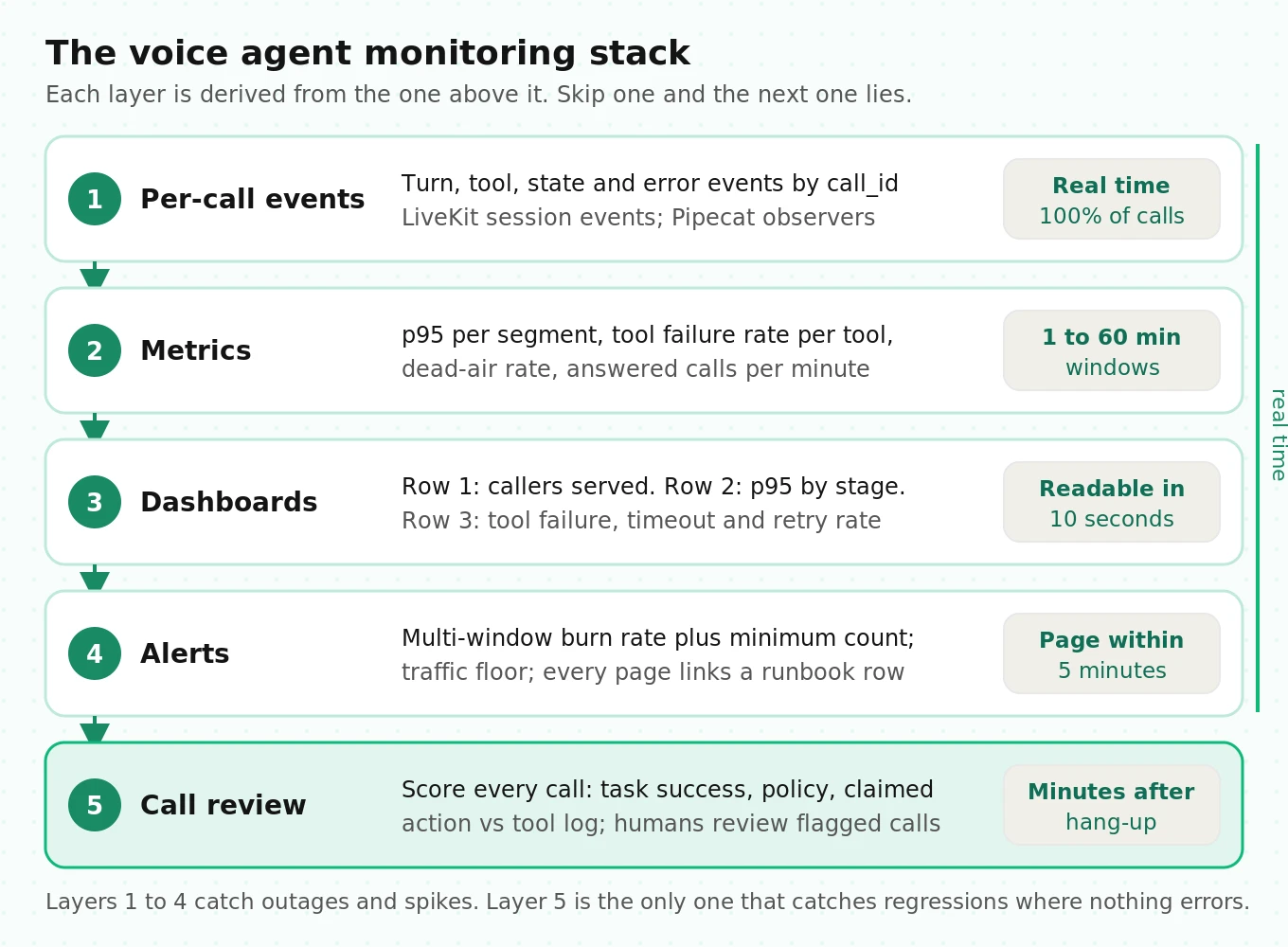
Production monitoring for a voice agent is five layers, and each one feeds the next. Skipping one is how teams end up with dashboards nobody trusts.
1. Per-call events. One structured record per turn, per tool call, per state change, keyed by call ID. This is the raw material. Everything else is derived from it.
2. Metrics. Events rolled up into rates and percentiles over time windows: p95 latency per segment, tool failure rate, dead-air rate, calls per minute.
3. Dashboards. A small number of panels that answer "are callers being served right now?" first, and "which stage is broken?" second.
4. Alerts. Rules that page a human only when callers are being hurt fast enough to justify waking someone up.
5. Call review. After the call: scoring every transcript for task success and policy, plus a human listening to a targeted sample.
The first four layers are real-time and cheap. The fifth is where you learn what "good" means for your agent, and it is the only layer that catches failures where every metric is green. We cover the event schema in depth in what to log on every voice agent call, so here we focus on what to derive from it.
What to instrument at each layer, and where to get it
Both frameworks already measure most of what you need. The work is knowing which surface is current, which is off by default, and which one lies.
| Signal | LiveKit Agents (1.8.x) | Pipecat (1.12.x) | Outside the agent |
|---|---|---|---|
| Per-turn latency | `ChatMessage.metrics` via `conversation_item_added`: `end_of_turn_delay`, `llm_node_ttft`, `tts_node_ttfb`, `e2e_latency` | `UserBotLatencyObserver` (`on_latency_breakdown`) plus `MetricsFrame` TTFB data | Dual-channel call recording |
| Tool calls | `function_tools_executed` (`FunctionCallOutput.is_error`) and `tool_execution_updated` (`ToolCallEnded.status`) | `FunctionCallObserver` (`on_function_call_event`) | Your backend's own API logs |
| Errors | `error` event (`ErrorEvent.source`), `close` event (`CloseReason`) | `ErrorObserver` (`on_error`) | Provider status pages |
| Turn-taking | `user_state_changed`, `agent_state_changed`, `agent_false_interruption` | `UserStartedSpeakingFrame`, `BotStartedSpeakingFrame` and siblings | Recording |
| STT gaps | `user_transcription_timeout` (off by default) | `on_user_turn_stop_timeout` | n/a |
| Telephony quality | n/a | n/a | Twilio Voice Insights tags; SIP response codes |
| Export | OpenTelemetry histograms such as `lk.agents.turn.e2e_latency` | `enable_tracing` spans | Your metrics backend |
Five gotchas from the source and changelogs that the quickstarts skip:
- LiveKit's session-level `metrics_collected` event is deprecated. The data hooks docs point to per-turn `ChatMessage.metrics` instead. Per-plugin `LLMMetrics.ttft` and `TTSMetrics.ttfb` return -1 when nothing was produced, so filter sentinels before computing a percentile or your p95 will look better than reality.
- LiveKit 1.8.4 exports OpenTelemetry histograms you may not know about. `lk.agents.turn.e2e_latency`, `lk.agents.turn.llm_ttft`, `lk.agents.turn.tts_ttfb` and `lk.agents.event_loop.blocked_duration` are created in `telemetry/otel_metrics.py`. The last one is your best early warning for dead air, covered below.
- Pipecat metrics are off by default. `enable_metrics` and `enable_usage_metrics` on `PipelineParams` both default to `False`, and `enable_tracing` on `PipelineWorker` quietly becomes false if the OpenTelemetry packages are missing. See our Pipecat latency guide for the full flag table.
- Twilio's quality data is a lagging signal. The Call Summary resource says a partial summary is available within ten minutes and a complete one takes up to half an hour, and it requires Voice Insights Advanced Features. Use its `silence`, `high_jitter` and `high_packet_loss` tags for daily triage, not for paging.
- Keep labels low-cardinality. Tag metrics with agent version, tool name, provider and region. Never with call ID or phone number. Call ID belongs in the event log, where you join back to it.
Monitoring tool-call failures in production
Tool calls are where a voice agent does something rather than says something, and they leave the least trace. A tool call can end in six ways, and only one of them is good.
| Outcome | What it looks like | How to detect it |
|---|---|---|
| Completed, correct | Booking exists in your system | Backend confirms the write |
| Hard failure | Handler raised, API returned 4xx or 5xx | Framework error flag |
| Timed out | Handler ran past its deadline | Framework timeout outcome, or your own wrapper |
| Cancelled | Caller barged in, call moved on | Cancel outcome; normal at low rates |
| Silent failure | "Success" with an empty or wrong payload | Payload validation in your handler |
| Never called | The LLM said "you're booked" without calling the tool | Post-call check: claimed action vs tool log |
In LiveKit, subscribe to `function_tools_executed`. Each event carries parallel lists `function_calls` and `function_call_outputs`, and `zipped()` pairs them. `FunctionCallOutput.is_error` is your hard-failure flag. The newer `tool_execution_updated` event gives a `ToolCallEnded` update whose `status` is `done`, `error` or `cancelled`. There is no per-tool timeout argument on `function_tool` in 1.8.4, so wrap slow backends in `asyncio.wait_for` and return a clear error string when it fires.
In Pipecat, add `FunctionCallObserver`, added in 1.9.0. It reports every call as `function_call_started`, `function_call_in_progress`, then one of `function_call_completed`, `function_call_failed`, `function_call_timed_out` or `function_call_cancelled`. The in-progress event carries `started_at`, so you get queue wait for free. That matters because calls run one at a time unless the service runs them in parallel, and the pull request notes that a call still queued when the conversation moves on is dropped without a result frame.
Two Pipecat changelog entries should change your config today. Since 1.0.0, `LLMService.function_call_timeout_secs` defaults to `None`, which means a hung tool has no deadline unless you set one. And until 1.11.0, a tool that reported progress with `is_final=False` disarmed its own timeout. Set `function_call_timeout_secs` explicitly, and upgrade if you use progress updates.
Then track five rates per tool name, per agent version:
- Hard error rate = failed / started.
- Timeout rate = timed out / started. Track it separately; timeouts and errors have different fixes.
- Silent failure rate = calls marked completed but failing your payload check / completed.
- Retry rate = calls with the same tool name and arguments twice in one call / calls. A rising retry rate often comes before an error spike, because the LLM is quietly working around a flaky backend.
- Tool p95 duration, from in-progress to settled.
Silent failures need code in the handler, not in the dashboard. Validate the response shape and the business result ("slot_id present, status confirmed"), and emit `empty_result: true` when it fails. We go deeper on this class in detecting silent tool failures.
Monitoring latency spikes: p95 per segment, not averages
An average hides a spike because most turns are fine. Worse, callers do not experience your average turn. They experience their worst turn.
Here is the arithmetic. If each turn independently has a 5% chance of landing above your p95, the chance that a call of n turns contains at least one such turn is 1 - 0.95^n. For a 4-turn call that is 19%. For a 12-turn scheduling call it is 46%. The p95 turn is not a rare event at the call level; nearly half of longer calls hit it. This is the voice version of the fan-out effect Dean and Barroso describe in The Tail at Scale, where rare slow responses become common at the request level once enough of them are combined.
So monitor the tail, and monitor it per segment. A single end-to-end number tells you that something is slow. Per-segment p95 tells you what:
| Segment | LiveKit field | Pipecat source | Example p95 limit (starting point) |
|---|---|---|---|
| End of turn | `end_of_turn_delay` | Breakdown `user_turn_secs` / STT TTFB | 0.9 s |
| Your hook (RAG) | `on_user_turn_completed_delay` | n/a, it is your code | 0.3 s |
| LLM first token | `llm_node_ttft` | LLM `TTFBMetricsData` | 1.0 s |
| Tool execution | your tool events | `FunctionCallObserver` durations | 2.0 s |
| TTS first audio | `tts_node_ttfb` | TTS `TTFBMetricsData` | 0.5 s |
| End to end | `e2e_latency` | `on_latency_measured` | 2.5 s |
The limits above are illustrative starting points, not benchmarks. Set yours from two weeks of your own baseline: take the p95 per segment on a normal week and alert at roughly 1.5 times it.
Three rules keep percentile alerts honest:
1. Require a minimum count. A p95 from 100 turns could be anywhere from the 91st to the 99th sample by the binomial approximation. Use a 15-minute window and require at least 200 turns before paging on it. At lower volume, widen the window.
2. Separate the first turn. The greeting has cold connections and no endpointing. Track it as its own series, or a spike in calls per minute will look like a latency regression.
3. Segment by provider and region. When a provider degrades, it often degrades in one region. A global p95 dilutes it.
For per-hop debugging once an alert fires, use our LiveKit latency debugging guide.
Detecting dead air in voice agent calls
Dead air is silence where the agent owes the caller a response. The definition matters, because "silence" alone is mostly normal: callers think, read card numbers, and talk to someone else in the room.
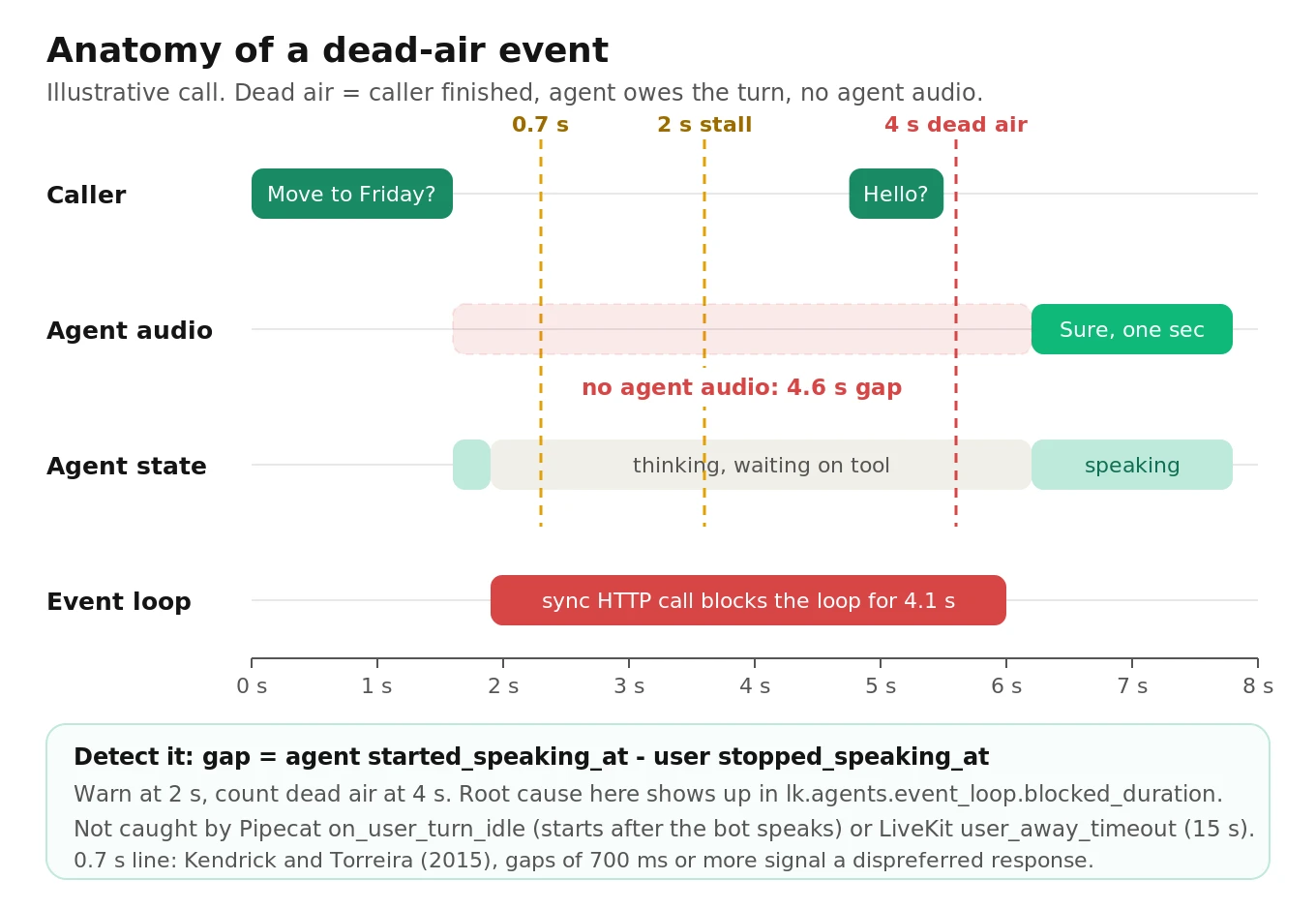
The research gives you thresholds. Stivers et al. (PNAS, 2009) measured turn transitions across 10 languages and found the most common gap is 0 to 200 ms. Kendrick and Torreira (2015) analyzed 195 responses in telephone corpora and found that only for gaps of about 700 ms or more were dispreferred responses (refusals, problems) clearly more common than preferred ones. Listeners read a long gap as a sign of trouble. For an agent, 700 ms is where silence starts to carry meaning, 2 seconds is clearly a stall, and 4 to 5 seconds is where callers start saying "hello?"
A practical dead-air rule: the caller finished a turn, and no agent audio started within T seconds, with T = 2.0 s for a warning event and 4.0 s for a dead-air event. Count a call as "dead-air affected" if it has at least one dead-air event.
You can compute it three ways, from cheapest to most truthful:
- From turn timestamps. LiveKit's `MetricsReport` carries `stopped_speaking_at` on the user message and `started_speaking_at` on the assistant message. The difference is the agent's response gap. In Pipecat, pair `VADUserStoppedSpeakingFrame` (the moment the caller actually went quiet) with the next `BotStartedSpeakingFrame` in an observer; `UserStoppedSpeakingFrame` fires later, when the turn is released, so it hides the endpointing wait. Also flag turns where the user stopped and the agent never started before the next user turn: those are the worst kind, and they do not have an `e2e_latency` at all.
- From agent state. A LiveKit `agent_state_changed` to `thinking` that stays there for more than 4 seconds is a stall in progress, which you can catch live and cover with a filler line.
- From the recording. A dual-channel recording gives the caller-side truth, including network delay the agent cannot see. Build a speech mask per channel, find gaps where neither side speaks, and attribute each gap to whoever spoke last. Our call recording guide has a mask function you can reuse.
Two framework timers look like dead-air detectors but are not. Pipecat's `on_user_turn_idle` timer starts on `BotStoppedSpeakingFrame`, so it measures the caller's silence after the bot spoke. LiveKit's `user_away_timeout` (15 s by default) fires only when both sides are silent. Both are useful for reprompting. Neither measures the agent failing to answer.
Watch for two root causes. The first is a blocked event loop: a synchronous HTTP call or heavy JSON parse inside a tool stops audio frames from flowing. LiveKit logs blocks above `LIVEKIT_AGENTS_LOOP_BLOCK_WARN_MS` (100 ms by default) and exports `lk.agents.event_loop.blocked_duration`; alert on its p99. The second is phantom turns. Koenecke et al. (Careless Whisper, FAccT 2024) found about 1% of Whisper transcriptions contained hallucinated phrases absent from the audio, more often for speakers with longer non-vocal stretches. A model that invents words in silence can make the agent answer a caller who said nothing, which then looks like an interruption storm. Our silence rate guide covers the call-level metric.
Alert rules: thresholds, windows and burn rates
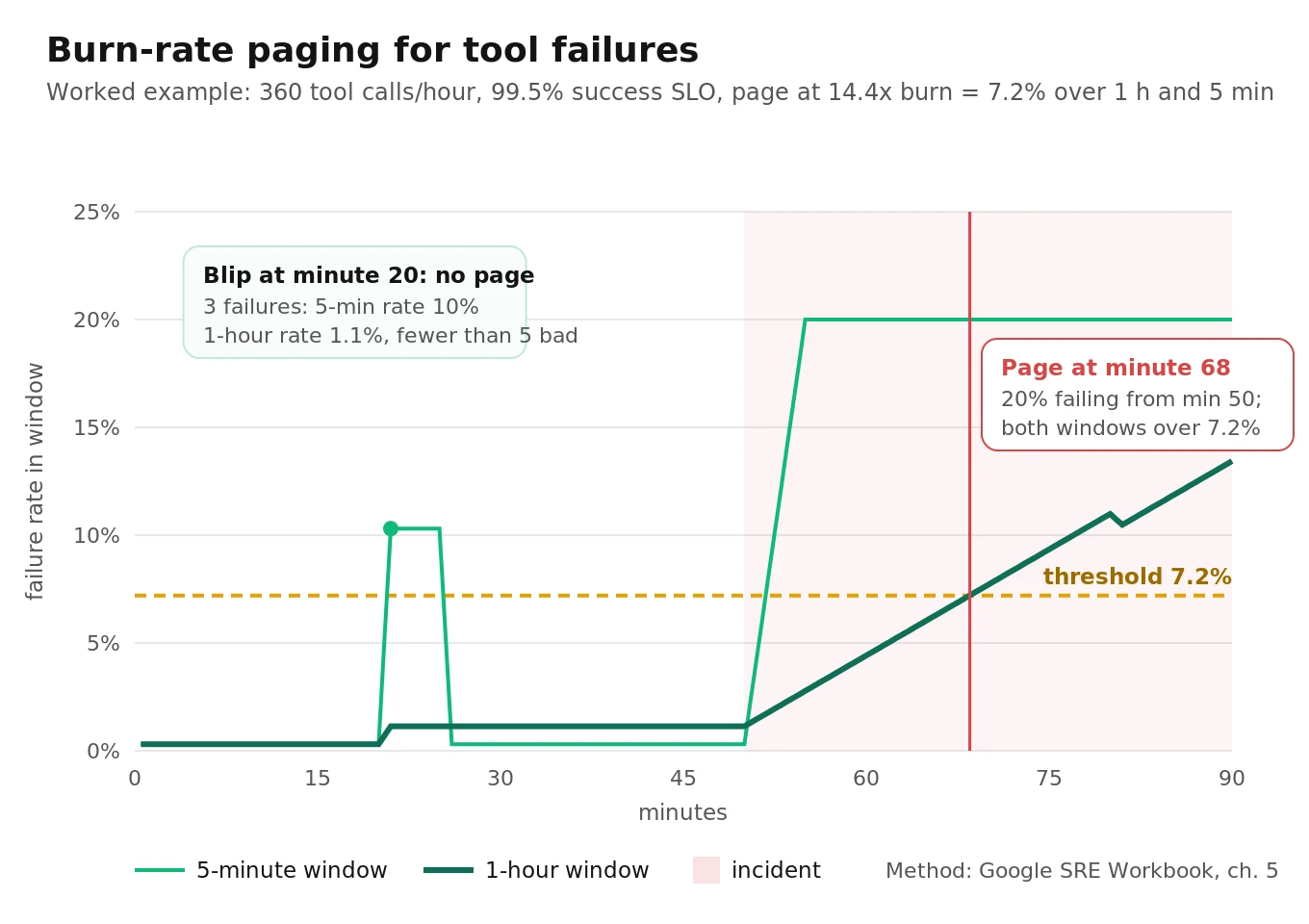
Static thresholds page you for every blip or miss slow burns. Google's SRE Workbook chapter on alerting on SLOs recommends multi-window, multi-burn-rate alerts. Burn rate is how fast you spend the error budget relative to the SLO. The recommended starting point for a 30-day window is to page when the 1-hour and 5-minute burn rates both exceed 14.4 (2% of budget spent), page when the 6-hour and 30-minute rates both exceed 6 (5%), and ticket when the 3-day and 6-hour rates both exceed 1 (10%). The short window makes the alert stop firing within minutes of recovery.
Adapting it to a voice agent takes three changes.
Define SLIs per event, not per request. Good examples: a tool call succeeded (not failed, timed out or silently empty); a turn was answered within 2.5 s; a call had no dead-air event.
Do the threshold math. With a 99.5% tool-success SLO, the budget is 0.5%. A 14.4x burn means a failure rate above 7.2% over both the last hour and the last 5 minutes. A 6x burn means above 3% over both 6 hours and 30 minutes.
Add a minimum-count guard for low traffic. The workbook warns that low-traffic services page on noise. A mid-size team's agent is low-traffic by SRE standards. As a worked example, assume 120 calls per hour with 3 tool calls each: 360 tool calls per hour, or 30 per 5 minutes. A single failure in a 5-minute window is a 3.3% rate. Three failures is 10%, which crosses 7.2% on the short window alone. Require at least 5 bad events in the short window before paging. At night, when volume drops to a few calls an hour, switch to ticket-only or use synthetic test calls to generate signal, which the workbook also suggests.
A starting rule set:
| Alert | Condition | Severity |
|---|---|---|
| Tool failure fast burn | Failure rate > 14.4x budget over 1 h and 5 min, at least 5 bad | Page |
| Tool failure slow burn | Failure rate > 6x budget over 6 h and 30 min | Page |
| E2E latency tail | p95 `e2e_latency` > limit over 15 min, at least 200 turns | Page |
| Segment latency | p95 of any one segment > limit over 15 min | Ticket, names the segment |
| Dead air | Dead-air-affected calls > 2x baseline over 1 h and 10 min | Page |
| Traffic floor | Zero answered calls for 10 min in business hours | Page |
| Error events | `close` with `CloseReason.ERROR` > 1% of calls over 30 min | Page |
| Carrier quality | Share of calls with `high_packet_loss` tag > 2x baseline, daily | Ticket |
The traffic-floor rule catches the incident every other rule misses: when the agent is down, there are no bad events to count. For provider outages and fallback chains, see voice agent provider outage and failover.
A small aggregator that turns per-turn events into alerts
The code below is illustrative and uses only the standard library. It reads one JSON event per line, keeps a 6-hour sliding window, and once a minute evaluates the burn-rate rules for tool failures and the p95 rules per segment. Run it against a log tail or a queue consumer.
# monitor_agg.py - illustrative, stdlib only. One JSON event per line on stdin.
import json, math, sys
from collections import deque

SEGMENTS = ("end_of_turn", "llm_ttft", "tool", "tts_ttfb", "e2e")
P95_LIMIT_S = {"end_of_turn": 0.9, "llm_ttft": 1.0, "tool": 2.0, "tts_ttfb": 0.5, "e2e": 2.5}
TOOL_SLO = 0.995                      # 99.5% of tool calls succeed
RULES = [(3600, 300, 14.4, "page"),   # (long_s, short_s, burn, severity)
         (21600, 1800, 6.0, "page")]
MIN_BAD = 5                           # never page on fewer than 5 bad calls
MIN_TURNS_FOR_P95 = 200               # below this the p95 is too noisy to page on

def p95(values):
    if not values:
        return None
    s = sorted(values)
    return s[min(len(s) - 1, math.ceil(0.95 * len(s)) - 1)]   # nearest rank

class Aggregator:
    def __init__(self, horizon_s=21600):
        self.horizon = horizon_s
        self.turns = deque()          # (ts, {segment: seconds})
        self.tools = deque()          # (ts, ok, name, outcome)

    def add(self, ev):
        ts = ev["ts"]
        if ev["kind"] == "turn":
            seg = {k: v for k, v in ev["segments"].items()
                   if isinstance(v, (int, float)) and v > 0}   # drop -1 / 0 sentinels
            self.turns.append((ts, seg))
        elif ev["kind"] == "tool":
            ok = ev["outcome"] == "completed" and not ev.get("empty_result", False)
            self.tools.append((ts, ok, ev["name"], ev["outcome"]))
        for q in (self.turns, self.tools):
            while q and q[0][0] < ts - self.horizon:
                q.popleft()

    def _window(self, now, window_s):
        rows = [r for r in self.tools if r[0] >= now - window_s]
        return sum(1 for r in rows if not r[1]), len(rows)

    def check(self, now):
        alerts, budget = [], 1 - TOOL_SLO
        for long_s, short_s, burn, sev in RULES:
            bad_l, n_l = self._window(now, long_s)
            bad_s, n_s = self._window(now, short_s)
            if not n_l or not n_s:
                continue
            limit = burn * budget
            if bad_l / n_l > limit and bad_s / n_s > limit and bad_s >= MIN_BAD:
                top = {}
                for ts, ok, name, outcome in self.tools:
                    if ts >= now - short_s and not ok:
                        top[f"{name}:{outcome}"] = top.get(f"{name}:{outcome}", 0) + 1
                alerts.append({"severity": sev, "alert": "tool_failure_burn",
                               "window": f"{long_s // 60}m/{short_s // 60}m",
                               "rate_long": round(bad_l / n_l, 4),
                               "rate_short": round(bad_s / n_s, 4),
                               "threshold": round(limit, 4),
                               "top": sorted(top.items(), key=lambda x: -x[1])[:3]})
        recent = [seg for ts, seg in self.turns if ts >= now - 900]   # 15-minute p95
        if len(recent) >= MIN_TURNS_FOR_P95:
            for name in SEGMENTS:
                v = p95([s[name] for s in recent if name in s])
                if v is not None and v > P95_LIMIT_S[name]:
                    alerts.append({"severity": "page" if name == "e2e" else "ticket",
                                   "alert": f"p95_{name}_high", "p95_s": round(v, 3),
                                   "limit_s": P95_LIMIT_S[name], "turns": len(recent)})
        return alerts

if __name__ == "__main__":
    agg, last = Aggregator(), 0.0
    for line in sys.stdin:
        ev = json.loads(line)
        agg.add(ev)
        if ev["ts"] - last >= 60:     # evaluate once a minute of event time
            last = ev["ts"]
            for a in agg.check(ev["ts"]):
                print(json.dumps(a))
Feed it from the framework. In LiveKit, the simplified adapter below emits tool events from `function_tools_executed` and turn events from assistant messages. In Pipecat, map `FunctionCallObserver` events the same way, using `event.kind` and `event.function_name`.
# LiveKit adapter, simplified. Call inside your entrypoint after creating the session.
import json, time

def attach_monitoring(session, emit=lambda e: print(json.dumps(e))):
    @session.on("function_tools_executed")
    def _tools(ev):
        for call, out in ev.zipped():
            emit({"ts": time.time(), "kind": "tool", "name": call.name,
                  "outcome": "failed" if out.is_error else "completed"})

    @session.on("conversation_item_added")
    def _turn(ev):
        item = ev.item
        if getattr(item, "role", None) != "assistant":
            return
        m = item.metrics or {}
        emit({"ts": time.time(), "kind": "turn", "segments": {
            "llm_ttft": m.get("llm_node_ttft"), "tts_ttfb": m.get("tts_node_ttfb"),
            "e2e": m.get("e2e_latency")}})
The LiveKit adapter is intentionally partial: `end_of_turn_delay` lives on the user message, so join the pair by order if you want that segment, and add your timeout wrapper's outcome as `timed_out`. Swap stdout for your metrics backend once the rules prove useful. The OpenTelemetry guide shows how to ship the same events as spans.
On-call runbook for the six incidents you will actually get
Every page should link to this table and to the five worst calls in the window. An alert that does not name a first action is a notification, not a page.
| Incident | Detecting signal | First 5 minutes | Mitigate | Follow up |
|---|---|---|---|---|
| 1. Tool backend failing | Tool failure burn, one tool name dominates | Group failures by tool and error text; check the backend's status and auth expiry | Switch the tool to a "take a message" fallback; disable the tool via flag | Add a payload contract test; set explicit timeouts |
| 2. LLM tail latency spike | p95 `llm_node_ttft` over limit, other segments flat | Check the provider status page; split by region and model | Fail over to the backup model or region | Record the provider and time in your vendor log |
| 3. Dead-air surge | Dead-air calls over 2x baseline; event-loop block p99 up | Check `lk.agents.event_loop.blocked_duration` and tool p95; listen to two calls | Roll back the last deploy if it touched tools; add filler speech on slow tools | Move sync code off the loop; add a dead-air test |
| 4. STT degradation | `user_transcription_timeout` rate up; reprompts up; end-of-turn p95 up | Split by provider, codec and carrier; check STT status | Fail over STT; widen endpointing temporarily | Re-run your noisy-audio test set |
| 5. Telephony trouble | Answered calls drop; SIP 4xx/5xx up; `close` errors up | Check trunk status, number routing and agent server capacity | Route to the human queue; scale agent servers | Add a synthetic call every 5 minutes |
| 6. Silent regression after deploy | Infra green; post-call task success down; retry rate up | Diff the prompt, tools and model versions; compare scores by version | Roll back the version | Turn the failing calls into regression tests |
Incident 6 is the expensive one. It is invisible to layers 1 to 4, because nothing errors. Only post-call scoring by agent version catches it, which is why the fifth layer is not optional. Our guide to leading and lagging voice agent metrics explains which signals move first.
Sampling vs scoring every call
Real-time metrics run on 100% of calls; they are cheap. The question is what to do with post-call judgment: task success, policy adherence, the claimed-action-without-tool-call check.
Sampling has a hard limit. To see at least one example of a failure that happens in 1% of calls with 95% probability, you need n = ln(0.05) / ln(0.99), or about 298 sampled calls. For a 0.2% failure, it is about 1,500. A team listening to 20 calls a week will not see rare failures for months.
Scoring every call is now cheap enough to be the default. As a worked example, a 3,000-token transcript at $0.042 per million input tokens (TypeSafe's published price for Jev, a highly consistent classification model) costs about $0.000126 per call, or roughly $0.25 a day at 2,000 calls. A general LLM judge costs more and drifts more between runs, but even then it usually beats human sampling for coverage. The split that works:
- Every call: deterministic checks (tool outcome, dead air, transfer reason) plus automated scoring for task success and policy.
- Targeted sample: humans review calls the scorer flagged, plus a small random slice to audit the scorer itself.
More on both sides in sampling live calls, why to score every call, not a sample, and Jev for call monitoring.
How to set up voice agent monitoring in production
1. Emit events. Add the adapter for your framework. Log one record per turn and per tool call with call ID, agent version, provider and region.
2. Turn on what is off. In Pipecat set `enable_metrics=True` and add `FunctionCallObserver`. In LiveKit enable `transcription_timeout`. In both, set explicit tool timeouts.
3. Validate tool results. Add payload checks in every handler that writes something, and emit `empty_result` on failure.
4. Record a baseline. Run two normal weeks. Write down p95 per segment, tool failure rate per tool, and dead-air rate.
5. Set SLOs and alerts. Start with the rule table above; derive burn thresholds from your SLOs; add the minimum-count guard.
6. Build three dashboard rows. Callers served (answered calls, task success, dead-air calls); stages (p95 per segment); tools (failure, timeout and retry rate per tool).
7. Write the runbook. Copy the six incidents, add your owners and fallback switches, and link each alert to its row.
8. Score every call. Run post-call scoring by agent version, and route flagged calls to human review.
9. Review weekly. Delete alerts that fired without action. Add a rule for any incident that reached callers without paging.
Testing your monitoring before you need it
A monitoring stack you have never seen fire is a hypothesis. Test it the way you would test the agent.
- Fault injection in staging. Make one tool return 500 for 10% of calls, add 3 seconds of sleep to another, and block the event loop for 4 seconds on a third. Confirm each produces the expected alert within the expected window and names the right tool or segment.
- Synthetic callers against production. Place a scripted call every few minutes through the real phone number. It tests the traffic-floor rule and gives the burn-rate rules signal at night.
- Replay a bad day. Pipe last month's event log through the aggregator and check that it would have paged for the incidents you remember, and not for the ones you did not care about.
An independent evaluator helps here because it does not share your assumptions. Evalgent places realistic test calls with slow and failing tools, background noise and long pauses, scores every call, and shows which failures your alerts caught and which they missed. Teams use that before launch, before switching providers, and as a regression gate on every release. For how this fits with observability, read voice agent testing vs monitoring vs observability, and for slow quality decay, see voice agent metric drift.
Frequently asked questions
How do I monitor tool call failures and latency spikes in production?
Emit an event for every tool call with its outcome (completed, failed, timed out, cancelled) and every turn with per-segment latency. Compute failure rate per tool and p95 per segment over sliding windows. Page on multi-window burn rates for tool failures and on p95 end-to-end latency with a minimum sample count. Averages and uptime checks will miss both.
What is the best way to monitor voice agents?
Build five layers: per-call events, metrics, dashboards, alerts and post-call review. Use the framework's own hooks, such as LiveKit's `function_tools_executed` and Pipecat's `FunctionCallObserver`, for real-time signals. Score every call after it ends for task success. Real-time metrics catch outages; post-call scoring catches the regressions where nothing errors.
How do I detect dead air in voice agent calls?
Measure the gap between the caller finishing a turn and agent audio starting. Flag 2 seconds as a stall and 4 seconds as dead air. Use turn timestamps such as LiveKit's `stopped_speaking_at` and `started_speaking_at`, or Pipecat speaking frames. Confirm with dual-channel recordings, which include network delay the agent cannot see.
Why use p95 instead of average latency?
Averages hide tail spikes because most turns are fast. Callers remember their worst turn. If each turn has a 5% chance of exceeding p95, a 12-turn call has a 46% chance of containing at least one. Track p95 per segment, require at least 200 turns per window, and separate the greeting turn.
What alert thresholds should a voice agent use?
Derive them from SLOs. With a 99.5% tool-success SLO, page when the failure rate exceeds 7.2% over both one hour and five minutes, or 3% over both six hours and 30 minutes. Require at least five bad events before paging. Set latency limits at about 1.5 times your own two-week p95 baseline.
Does Pipecat time out hung tool calls by default?
No. Since Pipecat 1.0.0, `function_call_timeout_secs` defaults to `None`, so a hung tool has no deadline unless you set one globally or per tool. Before 1.11.0, a tool that sent a progress update with `is_final=False` also disarmed its timeout. Set the timeout explicitly and track timed-out calls separately from errors.
Should I sample calls or score every call?
Score every call automatically and sample for human review. Catching a 1% failure with 95% confidence takes about 298 sampled calls, so small manual samples miss rare failures for months. Automated scoring costs a fraction of a cent per call with a classification model, and humans then review the flagged calls.
Can Twilio Voice Insights detect dead air?
Partly. Voice Insights tags calls with `silence` when a stream is missing or fully silent, which catches broken media, not a slow agent. Complete summaries take up to 30 minutes and need Advanced Features. Use it for daily carrier triage and detect agent dead air from your own turn timestamps.
The bottom line
Monitoring a voice agent in production means tracking tool outcomes, per-segment p95 latency and dead air from per-turn events, then paging only on burn rates that show callers are being hurt. Score every call afterward, because the most expensive regressions are the ones where every real-time metric stays green.
Related Articles
Why AI voice agents fail in production: 9 failure layers, how to detect each, and how to prevent them
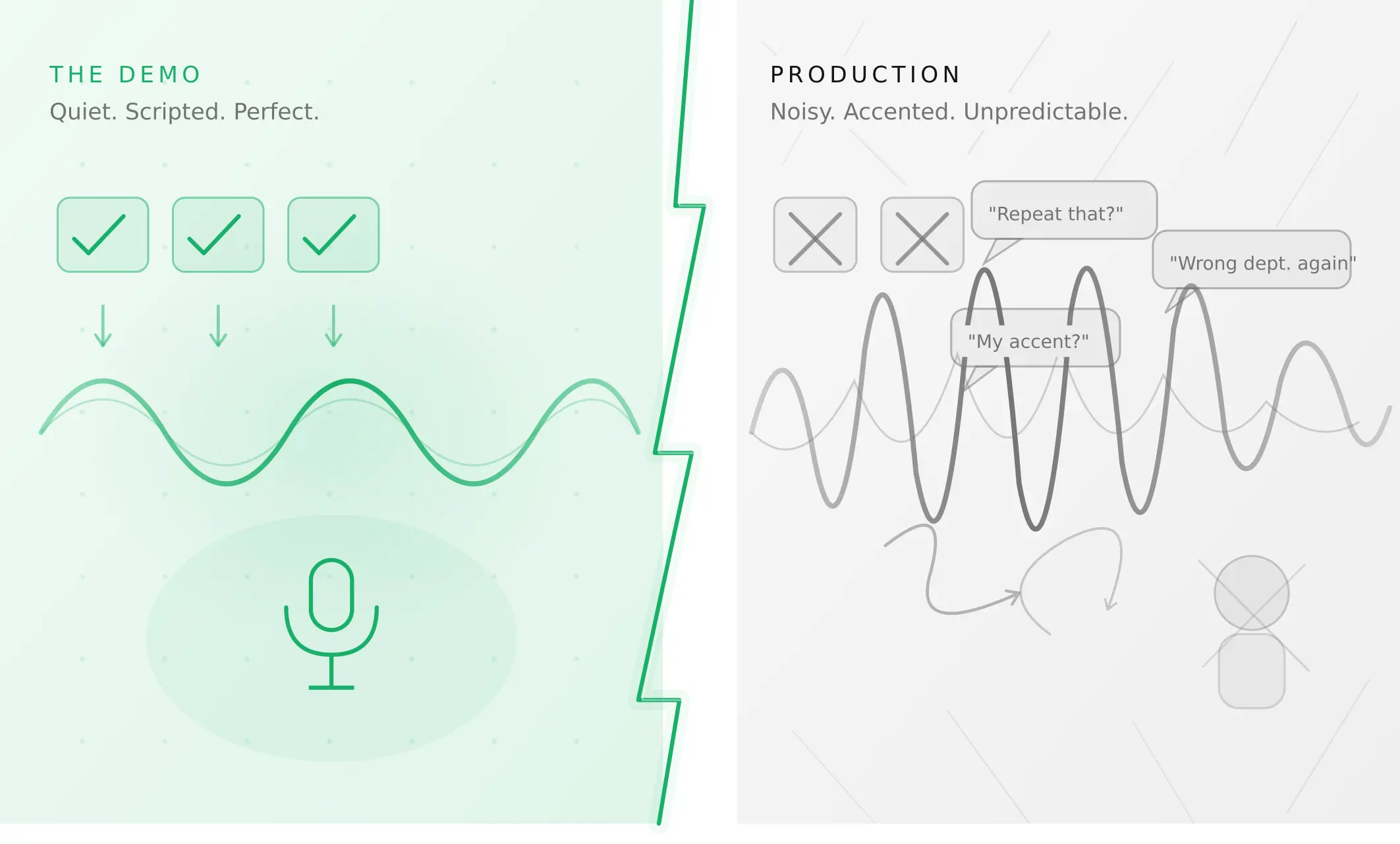
Voice agents fail in production across 9 layers, from 8 kHz audio to silent tool errors. Symptoms, root causes, alerts, and fixes in one master table.
Read more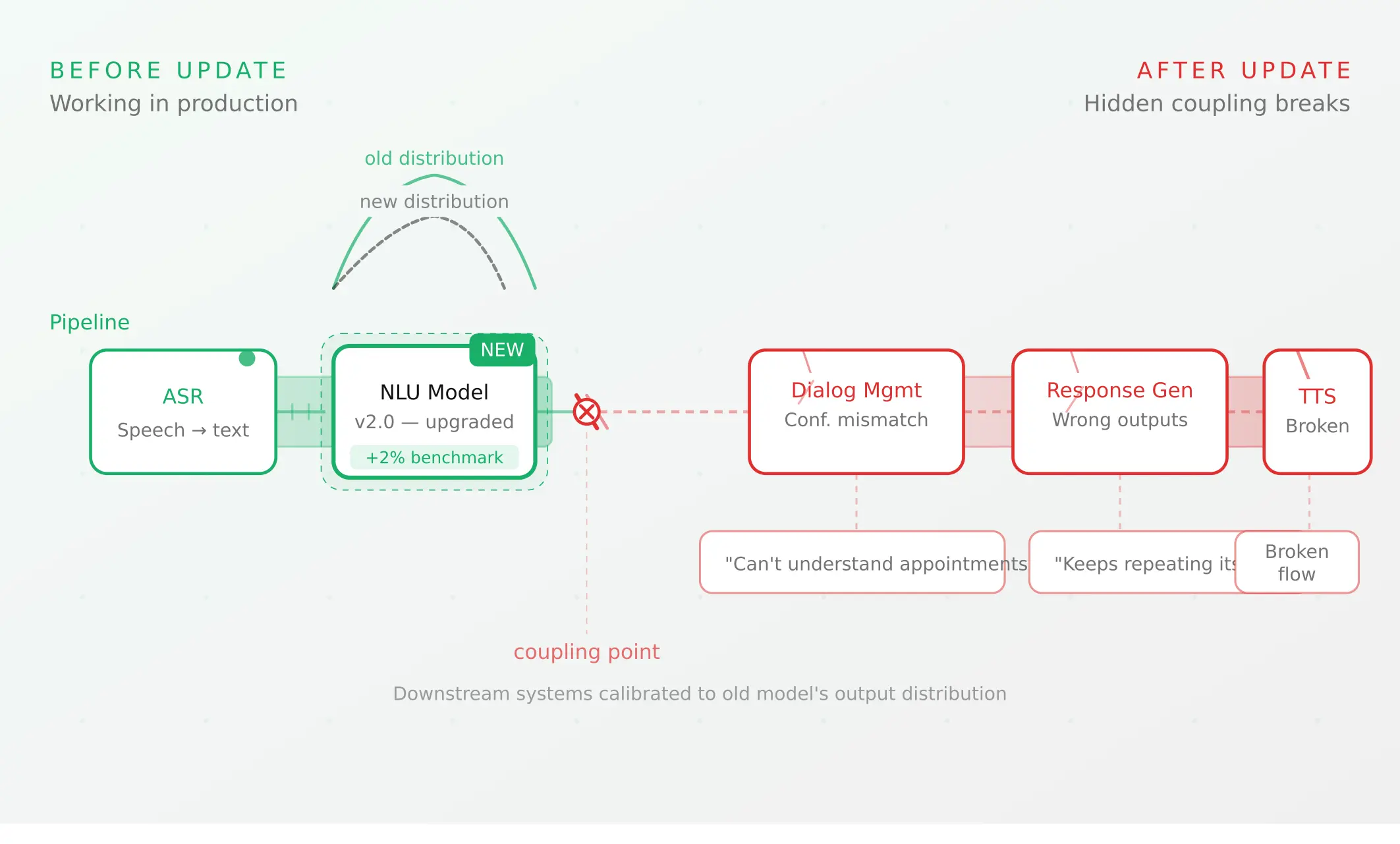
Voice agent regression testing: how to detect regressions from model updates you don't control
Voice agent regression testing for changes you don't control: pin each layer, run a nightly pinned-vs-latest canary, and use paired stats to detect drops.
Read more