What Is a Good Escalation Rate for an AI Voice Agent?
On this page
Teams keep asking what escalation rate voice agent programs should aim for. The honest answer starts with what the number counts. Then it moves to what the number hides.
This post gives you a way to set a range for your own calls. It defines the metric, splits it into parts you can act on, and shows how to check handoff quality. It does not give a benchmark, because none that we could verify exists. It links to the posts on containment rate and escalation accuracy rather than repeating them.
What escalation rate means for a voice agent
Escalation rate: the share of calls the agent hands to a human, or tries to hand to a human, out of all calls the agent handled.
The formula is simple: escalated calls divided by agent-handled calls. Amazon Connect defines its AI handoff rate the same way, as AI handoffs divided by AI-involved contacts, in its metrics reference. Different platforms use different names for the same idea.
| Term you will see | What it usually means | Watch out for |
|---|---|---|
| Escalation rate | Calls passed to a human, over agent-handled calls | Does it count failed transfers? |
| Handoff rate | Same idea, often from platform dashboards | May include handoffs to another bot |
| Transfer to human rate | Calls where a transfer was triggered | May count the trigger, not the pickup |
| Containment rate | Calls never reaching a human | Counts hang-ups as contained |
| Resolved-call rate | Calls where the caller's goal was met | Needs a label, not a log field |
Escalation rate and containment rate are close to mirror images. Containment is roughly one minus escalation, plus the hang-ups. That gap matters. See containment vs resolution for the longer version.
Three definition choices change your number before the agent does anything differently.
1. Trigger or pickup. Count a call when the agent starts a transfer, or when a human answers. A transfer that rings out is an escalation attempt that failed.
2. Caller-requested or agent-decided. A caller who says "agent" is different from an agent that gives up. Track both.
3. Scope. Count only live-human handoffs, or also callbacks, voicemail and ticket creation. State which.
Write the definition in one sentence on your dashboard. Every number after that depends on it.
Is there a good escalation rate for an AI voice agent?
Searches for a good escalation rate AI voice agent teams can copy return opinions, not data. As of November 17, 2026, we looked for a published range with a primary source, a named population and stated conditions. We did not find one.
What we did find:
- Vendor and consultancy blog posts quote ranges. None that we opened disclosed the call mix, the definition of escalation, or how the data was gathered.
- The Gartner survey cited above reports customer demand for human access. It states no benchmark rate. Gartner, August 4, 2026.
- Platform documentation defines the metric but sets no target.
So any single "good" number you read should be treated as an opinion. If a source gives one, ask four questions. Which calls? Which definition? Which period? Who measured it?
Why numbers do not transfer between companies:
- Call mix. A line that mostly answers order-status questions can safely escalate less than one that mostly handles billing disputes.
- Risk. Some calls must reach a person by policy, whatever the agent could do.
- Caller population. Distress, language and accent change how often callers ask for a human.
- Human availability. If nobody answers the transfer, callers learn to stop asking.
- Agent maturity. A new agent with narrow scope escalates more, on purpose.
The useful question is not "what is the average". It is "what is the right escalation rate for an AI voice agent on our calls, and are we inside it for the right reasons".
Why a low escalation rate can be bad
A low rate is easy to celebrate and easy to produce. Make the agent harder to leave and the rate falls. The callers do not disappear. They go elsewhere.
The US Consumer Financial Protection Bureau described this pattern in chatbots on June 6, 2023. It called them "doom loops": continuous loops of unhelpful responses without an offramp to a human. It also warned that deficient chatbots that prevent access to live, human support can lead to law violations. That report covers consumer finance chatbots. The mechanism applies to any agent that will not let go. This is not legal advice.
A low rate comes from one of these causes. Only the first is good.
| Why the rate is low | What it looks like in the data | Real outcome |
|---|---|---|
| The agent resolves most calls | High resolved-call rate, low repeat calls | Good |
| Callers hang up before asking | Short calls, high abandonment, no transfer | Hidden failure |
| The agent loops or refuses to transfer | Repeated "I can't help with that" turns | Trapped caller |
| The transfer path is broken | Trigger logged, no pickup | Silent failure |
| The prompt discourages handoff | Agent argues with "agent please" | Policy risk |
| The call mix is easy this week | Rate dips, then returns | Noise |
Two of those rows show up as "contained" in a naive containment dashboard. That is why raw containment is a vanity metric when read alone.
The same logic cuts the other way. A high rate is also not proof of a problem. Billing disputes, complaints and safety calls should escalate. An agent that escalates easy calls wastes the staff it was meant to relieve. Neither direction tells you much until you split the number.
Split the rate: required, avoidable, appropriate, failed
One rate hides four different groups of calls. Label each reviewed call on two questions. Should this call have reached a human, under your policy? Did it?
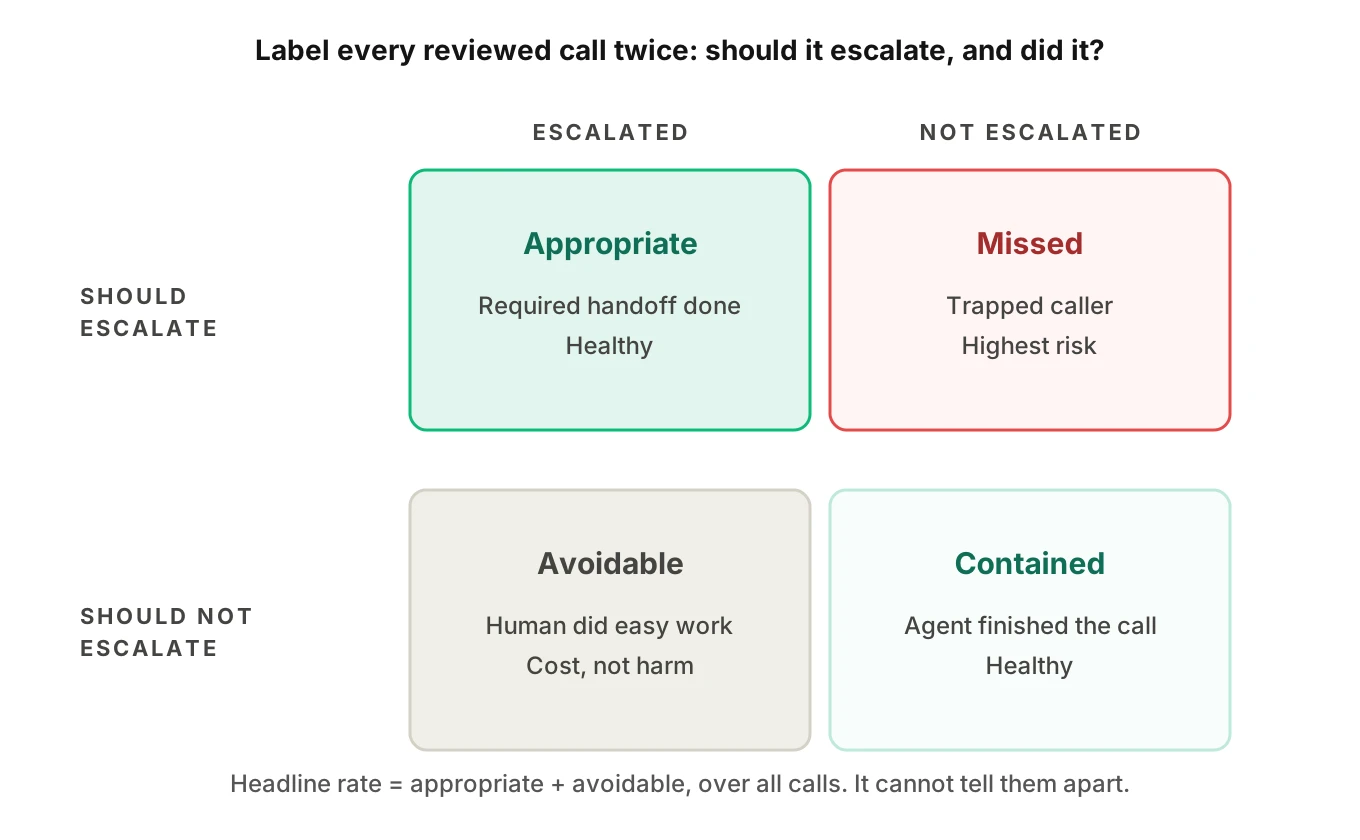
| Escalated | Not escalated | |
|---|---|---|
| Should escalate | Appropriate escalation | Missed escalation (trapped caller) |
| Should not escalate | Avoidable escalation | Correct containment |
Four rates follow from the grid. Let N be the labeled calls.
- Required share = (appropriate + missed) / N. This comes from your policy and call mix, not the agent.
- Missed-escalation rate = missed / (appropriate + missed). This is the dangerous one.
- Avoidable-escalation rate = avoidable / (avoidable + correct containment). This is the cost one.
- Appropriate-escalation rate = appropriate / (appropriate + missed). It is the mirror of the missed rate.
These map to recall and precision on the escalate decision. The escalation accuracy post goes deeper on precision and recall and on timing. Here the point is simpler. The headline rate is the sum of appropriate and avoidable escalations, divided by all calls. It cannot tell you which one you have.
Here is a small, simplified script that turns reviewed calls into those numbers.
from collections import Counter

def escalation_report(calls):
    """calls: dicts labeled in review.
    should_escalate: policy requires a human
    escalated: a transfer was triggered
    connected: a human actually picked up
    """
    c = Counter((x["should_escalate"], x["escalated"]) for x in calls)
    n = len(calls)
    appropriate, missed = c[(True, True)], c[(True, False)]
    avoidable, contained = c[(False, True)], c[(False, False)]
    pickups = sum(1 for x in calls if x["escalated"] and x["connected"])
    attempts = appropriate + avoidable
    return {
        "headline_rate": attempts / n,
        "required_share": (appropriate + missed) / n,
        "missed_rate": missed / max(appropriate + missed, 1),
        "avoidable_rate": avoidable / max(avoidable + contained, 1),
        "pickup_rate": pickups / max(attempts, 1),
    }
The pickup_rate line matters. It separates a logged transfer from a transfer that reached a person.
Set a range from your own call mix
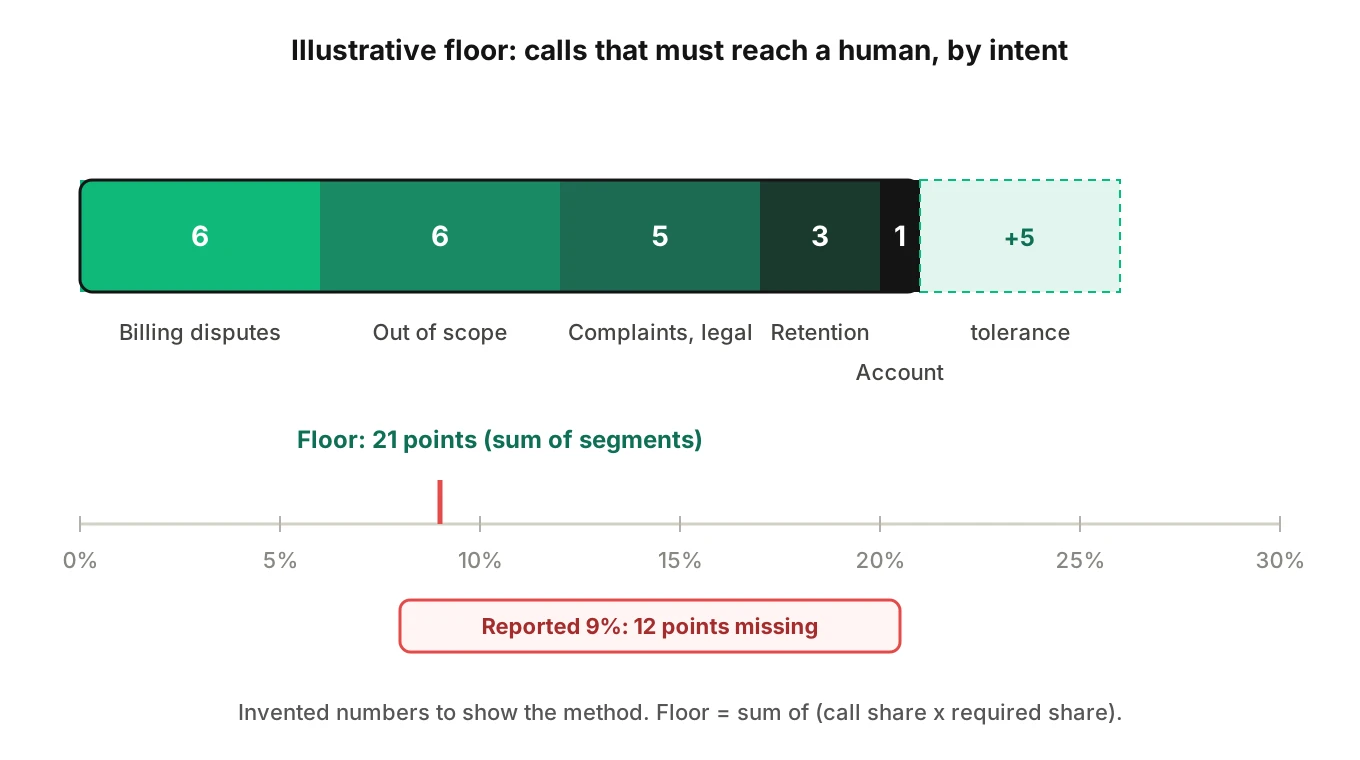
You can estimate a floor before you have any production data. The floor is the share of calls that must reach a human no matter how good the agent is.
Expected floor = sum over intents of (share of calls × share of that intent that policy says must escalate).
Here is an illustrative support line. The numbers are invented to show the method, not to benchmark anything.
| Intent | Share of calls | Share that must escalate | Contribution to floor |
|---|---|---|---|
| Order status | 40% | 0% | 0.0 pts |
| Account access | 20% | 5% | 1.0 pts |
| Billing disputes | 15% | 40% | 6.0 pts |
| Cancellation and retention | 10% | 30% | 3.0 pts |
| Complaints, legal, safety | 5% | 100% | 5.0 pts |
| Out of scope or unclear | 10% | 60% | 6.0 pts |
| Total | 100% | 21.0 pts |
In this example the floor is 21 percent. Add a tolerance for avoidable escalations, say five points while the agent is new. The working range is 21 to 26 percent.
Now read the dashboard against the range. A reported rate of 9 percent in this example is not a success. At least 12 points of required escalations are not happening. Either the agent traps callers, callers give up, or the required shares were set wrong. Each is worth finding out.
Three rules keep this honest.
- Set each required escalation share from policy, not from agent behavior. Use the written rules: legal, safety, fraud, high-value, regulated topics, caller request.
- Tier by risk. Make the floor for high-risk intents close to 100 percent, and treat any miss there as an incident.
- Move the range as the agent matures. Lower the tolerance as the agent gets better, never the required floor.
Revisit the table monthly, and after every change to the prompt, tools or call mix.
Handoff quality: the part the rate never shows
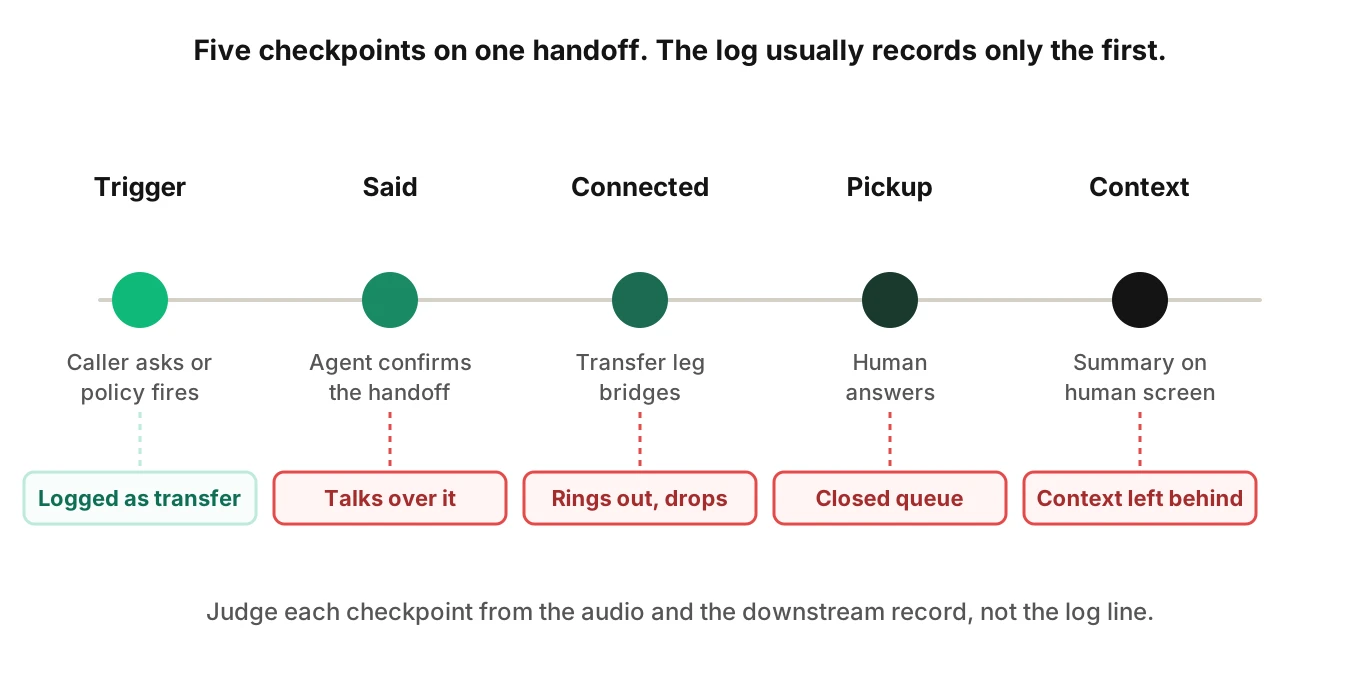
A transfer is not a good transfer just because it happened. Check five things on every reviewed escalation.
1. Timing. How many turns passed between the trigger (a caller request or a policy condition) and the offer of a human?
2. What the agent said. Did it confirm the handoff, avoid promising outcomes it cannot guarantee, and avoid arguing with the request?
3. Connection. Did a human actually pick up, within your target wait?
4. Context. Did the human receive the reason, the caller's identity, what was already tried and the data already collected?
5. No repeat. Did the human start by asking the caller to repeat the basics?
A human handoff payload can be small. Here is an illustrative shape, not a specific product's schema.
{
  "reason": "caller_requested_human",
  "intent": "billing_dispute",
  "verified_identity": true,
  "summary": "Disputes a 41.20 charge dated Oct 3. Refund policy checked; amount is above agent limit.",
  "collected": {"account_id": "A-1042", "charge_date": "2026-10-03"},
  "attempted": ["lookup_charge", "explain_policy"],
  "caller_sentiment": "frustrated"
}
If the human sees none of this, the context handoff failed. In that case the escalation moved the caller without moving the problem. Cold transfers make this worse. LiveKit documents cold transfer through its TransferSIPParticipant API, which uses SIP REFER. It points to a separate guide for a warm transfer, where the agent briefs the receiving party. For the telephony side, see ending and transferring calls in LiveKit and Pipecat.
Where handoffs break without anyone noticing
Most handoff failures are invisible in a transcript. The log says a transfer happened. The caller heard silence.
- Logged, not connected. The agent fires the transfer, the destination does not answer, the call drops. The dashboard counts an escalation.
- Event fired, nothing listens. In Dialogflow CX, a flow can end with
END_FLOW_WITH_HUMAN_ESCALATION, which raises theflow-failed-human-escalationevent, per Google's flow handler documentation. The page does not say how the human is connected. That wiring is yours to test. - Said, not done. The agent says "connecting you now" and keeps talking. Only the audio shows the overlap.
- Wrong queue or closed hours. The transfer goes to a line that is closed, and the caller hears a recording.
- Context stays behind. The handoff completes, but the summary never reaches the human screen.
Each one looks like a healthy escalation in the rate. This is why the handoff loop test exercises the transfer path end to end.
What a low or high rate costs
The escalation rate is one of three buckets. Every call ends as resolved by the agent, escalated, or failed without reaching a human (hang-up, wrong answer, loop). A low rate with a low resolved-call rate means the third bucket is large.
Here is an illustrative comparison per 1,000 calls. Assumptions: agent cost 0.80 dollars per call, 6.00 dollars per human-handled call, and every failed call comes back as a human-handled call later. These are made-up figures to show mechanics.
| Agent A | Agent B | |
|---|---|---|
| Resolved by agent | 700 | 600 |
| Escalated | 250 | 90 |
| Failed, no handoff | 50 | 310 |
| Escalation rate | 25% | 9% |
| Human-handled calls | 300 | 400 |
| Total cost | 800 + 1,800 = 2,600 | 800 + 2,400 = 3,200 |
| Cost per resolved call | 3.71 | 5.33 |
Agent B looks better on the escalation rate and costs more per resolved call. The formula and its assumptions are in the post on cost per resolution. The resolved-call rate is the input that lets you compute this for your own agent.
How to set an escalation rate range for your voice agent
1. Write the definition — State whether you count triggers or pickups, which handoffs are in scope, and how callbacks and tickets are treated.
2. List must-escalate conditions — From policy, list the intents and triggers that require a human: legal, safety, fraud, regulated topics, explicit requests, high-value accounts.
3. Estimate the floor — Multiply each intent's call share by its required share, then sum. Use real call-type counts from a few weeks of logs.
4. Set a tolerance — Add points for avoidable escalations. Make it wider for a new agent and narrower over time.
5. Label a sample — Review calls with the two questions: should it have escalated, did it. Include a stratified slice for each intent.
6. Size the sample — For a rate near 25 percent and a 3-point margin at 95 percent confidence, n is about 1.96 squared times 0.25 times 0.75, divided by 0.03 squared, or roughly 800 calls. See the binomial confidence interval for the method.
7. Test the rare, high-risk misses — If you see zero missed escalations in 100 labeled must-escalate calls, the rule of three puts the 95 percent upper bound near 3 percent, not zero.
8. Score handoff quality — Check timing, connection, spoken confirmation and context on every escalated call in the sample.
9. Alert on the band — Alert when the rate leaves the range in either direction, and when the pickup rate drops.
10. Re-baseline — Recompute after each prompt, tool or policy change.
Testing and monitoring escalation behavior
You can test escalation before launch. Evalgent generates test scenarios from the agent's prompt and flows, including hard constraints and policy triggers. For escalation, build two sets.
- Must escalate. An angry caller, an explicit request for a person, an out-of-scope request, a policy trigger, a hard constraint that forbids the agent to act.
- Must not escalate. Routine intents the agent should finish, phrased the ways real callers phrase them, with accents, interruptions and noise.
Judging has to use the audio. A transcript can show "transferring you now" and miss that the caller heard dead air or that the agent talked over the human's greeting. Evalgent evaluates calls from the audio and reports evidence for each verdict, with human review of verdicts.
In production, customers push call recordings. Calls are transcribed, mapped to scenarios and judged, and policy failures are flagged. A missed escalation is such a failure. See call monitoring with Jev and how confidence gates drive escalation. Because calls are mapped to scenarios before they are judged, results can be read by scenario, not only as one blended rate. Put the results on your KPI dashboard as guardrails next to resolution rate.
Frequently asked questions
What is a good escalation rate for an AI voice agent?
There is no verified universal number. A good rate sits between a floor and a ceiling for your own call mix. The floor is the share of calls policy says must reach a human. The ceiling adds a tolerance for avoidable transfers. Judge the rate against that range, then check handoff quality on the calls inside it.
Escalation rate vs containment rate: what is the difference?
Escalation rate counts calls passed to a human. Containment rate counts calls that never reached one. They are near mirror images, but containment also counts callers who hung up in frustration. Use escalation rate to see handoff behavior, and pair containment with resolution so abandoned calls are not scored as wins.
Is a low escalation rate always good?
No. A low rate can mean callers are trapped in loops, hang up early, or hit a broken transfer path. The CFPB has described chatbot doom loops without an offramp to a human. Read a low escalation rate for an AI voice agent next to the resolved-call rate, abandonment and repeat-call rate before celebrating.
Is a high escalation rate a bad sign?
Not by itself. Billing disputes, complaints and safety calls should reach a person. A high rate is a problem when the extra transfers are avoidable, such as routine calls the agent could finish. Split the rate into appropriate and avoidable escalations to see which one you have.
How to measure the escalation rate for a voice agent?
Divide escalated calls by agent-handled calls over a fixed period. Decide first whether you count the trigger or the human pickup. Then label a sample for whether each call should have escalated. That lets you separate missed, appropriate and avoidable escalations instead of reporting one blended figure.
What is the difference between handoff rate and transfer to human rate?
They are usually the same idea under different names. Handoff rate is common in platform dashboards and may include handoffs to another bot. Transfer to human rate should count calls that reached a person. Check each tool's definition, because the trigger and the pickup can differ.
What is a missed escalation?
A missed escalation is a call that policy says needed a human, which the agent kept. Examples are a caller who asked for a person, a safety concern, or a case above the agent's authority. It is the costliest error because the caller is stuck. Track the missed-escalation rate separately from the headline rate.
How many calls do I need to review to trust the rate?
For a rate near 25 percent, about 800 randomly sampled calls give a margin of roughly 3 points at 95 percent confidence. Per-intent estimates need their own samples. For rare high-risk misses, zero found in 100 calls still leaves an upper bound near 3 percent.
The bottom line
There is no verified universal good escalation rate, so set a range from your own call mix, with a floor for calls that must reach a human. A low rate is only good when the resolved-call rate is high and every handoff connects with context.
Related Articles
How to automate voice agent testing: synthetic callers vs manual QA
Learn how ai test automation replaces manual QA for voice agents. Compare synthetic callers vs human testers, with a 5-step framework to scale without hiring.
Read more
AI Agent Testing vs Voice Agent Testing: What General Tools Miss for Voice
AI agent testing measures text outputs. Voice agent testing measures behaviour through an acoustic pipeline. Five failure categories general tools miss.
Read more