AI Voice Agent Integrations: What to Connect and What Breaks
On this page
Last verified November 5, 2026, against the RFCs, the MCP 2026-07-28 specification and the vendor pages linked below. Vendor limits change, so re-check them before you rely on a number.
A voice agent is rarely the product. It is the front door to a workflow. The caller speaks, the agent captures a few facts, and then it writes to a calendar, a CRM, a payment processor or a helpdesk. If you built the agent inside your own product, you own every one of those writes. You also own the day one of them quietly stops working.
This is the pillar post for our series on AI voice agent integrations. It maps what an in-house agent connects to, the five patterns for connecting it, and the faults that recur across all of them. Each sibling post then takes one system apart. We keep vendor claims scoped to pages we opened, and we say so when a page is silent.
What a voice agent actually connects to
Not every connection is the same kind of thing. Some systems hold the truth. Others only carry a message. Mixing them up is the first design error.
A system of record is where a fact lives after the call ends. Your CRM holds the lead. Your scheduling tool holds the appointment. Your payment processor holds the charge. A channel only moves a message, such as SMS or email. A channel tells you a message left. It does not tell you the customer saw it.
The table groups the common targets. The last column links to the sibling post for that system.
| Target | Kind | What the voice agent writes or reads | Deep dive |
|---|---|---|---|
| Calendar | System of record for time | Free slots, new events, reschedules | Google Calendar |
| Booking page | System of record for time | Event types, invitee details | Calendly |
| CRM | System of record for people | Contacts, leads, call notes | HubSpot, Salesforce, Follow Up Boss |
| Payments | System of record for money | Payment links, charges, refunds | Stripe |
| Helpdesk | System of record for cases | Tickets, status, comments | Zendesk, Freshdesk |
| Telephony and SMS | Channel | Transfers, confirmation texts | Twilio error 30034 |
| Vertical software | System of record for the trade | Jobs, orders, rooms, patients, candidates | Jobber, Square, hotel PMS, Cloudbeds, Shopify, Open Dental, Bullhorn |
Rate limits cut across all of them, so they get their own post: voice agent API rate limits.
For AI voice agent integrations, a good rule is to connect the fewest systems that let the call finish. Every extra connection adds a credential, a failure mode and a blast radius. Our voice agent blast radius post shows how to size that radius, and voice agent permissions covers least-privilege scopes.
Five patterns for AI voice agent integrations
You have five ways to wire a system in. Most production agents mix two or three.
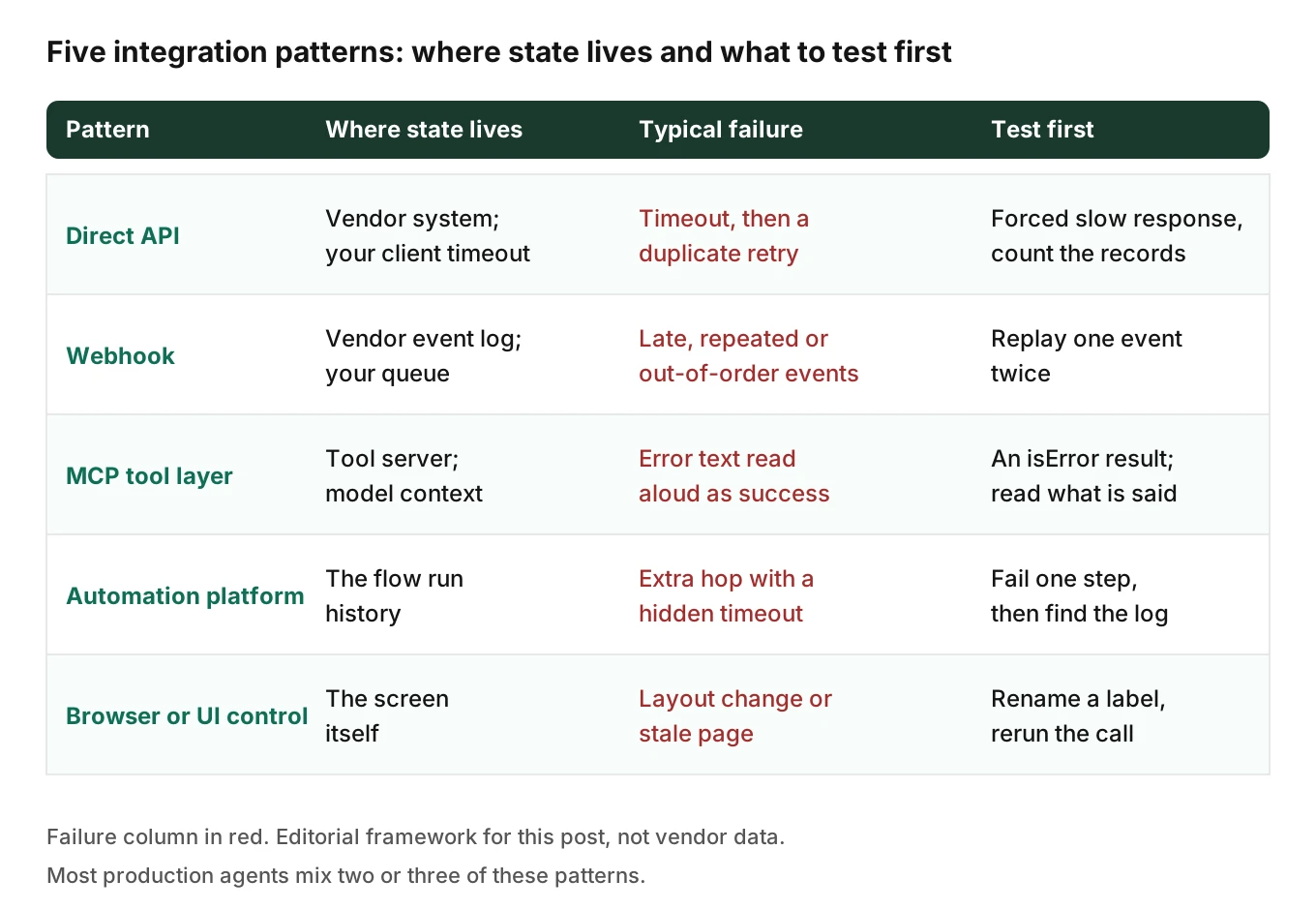
Direct API. This is the plainest voice agent API integration. Your agent code calls the vendor's REST endpoint during the call. You control the payload and the timeout. You also own auth, retries and version upgrades. This is the default for a team with engineers and a stable target.
Webhook. A voice agent webhook is a callback. The vendor calls you when something changes, or your agent calls an outbound hook. Webhooks suit asynchronous events, such as a payment that settles after the call. They arrive late, twice and out of order.
MCP tool layer. A voice agent MCP integration uses the Model Context Protocol, which exposes tools that a model can call through a standard interface. The revision we checked is 2026-07-28. It describes tools as "Functions for the AI model to execute." The tools page splits errors in two. Protocol errors cover things like an unknown tool. Tool execution errors report API failures and business logic errors, and are returned with `isError: true` so the model can self-correct. That matters on a phone call. Tool calling is only as honest as the error the model reads. A model that reads a failure as text may read it aloud as a success. For the tool side of this, see voice agent MCP server testing.
Automation platform (iPaaS). A no-code or low-code flow sits between your agent and the system. It is fast to build. It also adds a hop with its own timeout, its own retry rules and its own audit log, which you must find and test.
Browser or UI control. The agent drives a screen when no API exists. It reaches legacy tools, but it breaks on layout change. See voice agent browser control and voice agent web form filling.
Pick by one question. Where does the state live when the call drops halfway? If the answer is "nowhere you can read", pick a different pattern.
What breaks at the boundary
The same faults recur across systems. Each is tied to a page we opened, except the last, which is our own judgement.
Expired or narrowed OAuth tokens
An OAuth token authorizes your agent to act on a customer's account. It expires, is revoked, or loses a scope. RFC 6749 says "Refresh tokens are credentials used to obtain access tokens." It defines the `invalid_grant` error for a grant or refresh token that is invalid, which includes the expired and revoked cases.
The failure is quiet in a voice agent. The next tool call returns an auth error. The model may say "I have booked that" anyway. Nobody sees it until a customer arrives for a slot that does not exist.
RFC 9700, the OAuth security best current practice, adds two points. It says "Refresh tokens for public clients MUST be sender-constrained or use refresh token rotation" for public clients. A server-side agent is usually a confidential client, so that line may not bind you. It also says access token privileges "SHOULD be restricted to the minimum required".
Where a vendor rotates refresh tokens, make refresh one shared step so two parallel calls cannot race. That is engineering judgement, not a quoted rule. Test it: revoke a token mid-suite and confirm the agent tells the caller the truth.
Rate limits and 429s
RFC 6585 defines 429: "The 429 status code indicates that the user has sent too many requests in a given amount of time ("rate limiting")." Vendors apply it differently. Salesforce's REST error-code page says "If the error code is REQUEST_LIMIT_EXCEEDED, you’ve exceeded API request limits in your org." It lists that under HTTP 403, not 429. Your retry code must handle both.
HubSpot publishes numbers. As of November 2026, its usage guidelines list private apps at 100 calls per 10 seconds per app on Free and Starter, and 190 on Professional and Enterprise. They also say apps exceeding limits "will receive a `429` error response for all subsequent API calls." The daily limit is shared across all apps within the same HubSpot account, so a busy integration can use up the budget your agent needs.
A phone call has a patience budget of seconds. A retry loop with a 10-second back off turns a rate limit into dead air. More in voice agent API rate limits.
Retries that create duplicate records
This is the costly one. A write hits an API timeout. The agent retries. The first write had landed. Now there are two records.
Stripe documents the guard. Its idempotent requests page says "Retries with the same key return the saved response, including `500` errors" for API v1, and that keys are up to 255 characters. The idempotency layer "compares incoming parameters to those of the original request and errors if they’re not the same." Key reuse is protected against accidental misuse.
Not every system offers that. HubSpot's contacts guide says "email address is the primary unique identifier to avoid duplicate contacts in HubSpot." So a duplicate contact is shaped by whether the agent captured the email correctly. A misheard email becomes a new contact, not a failed write. That is a speech error turned into a data error. See voice agent alphanumeric capture.
Webhooks: late, repeated, out of order
Stripe's webhook docs are the clearest norm on this. They say "Stripe attempts to deliver events to your destination for up to three days with an exponential back off in live mode." They also say "Webhook endpoints might occasionally receive the same event more than once" and "Stripe doesn’t guarantee the delivery of events in the order that they’re generated." Their advice is to log event IDs you have processed, which makes webhook retries safe.
For a voice agent, that means the post-call write cannot assume order. A "payment succeeded" event may arrive before your "booking created" write finished. Store events, then reconcile. Our post-call write-back testing post shows how to compare the record against the call.
Time zones and ambiguous dates
Every voice agent calendar integration meets this fault. Callers say "tomorrow at 3". Your system needs an instant plus a zone. Google's Calendar API docs say "Include a time zone offset in the `dateTime` field" and "For recurring events, you must always specify a single time zone to expand the recurrences of the event." An event without the right zone lands an hour off, or a day off at midnight.
Test with callers in a different zone from the business. Test the daylight saving boundary. Test "next Friday" on a Friday.
Status that means less than it sounds
A channel reports acceptance, not arrival. Twilio's Message resource page says `sent` means "The nearest upstream carrier accepted the outbound message." It says `delivered` needs confirmation from the carrier. A voice agent that says "I've texted you" when the status is `sent` has promised too much. For a failed confirmation text, see Twilio error 30034.
Schema drift and silent partial writes
Two more faults have no single vendor page. Schema drift is when a field you write is renamed, made required or given a new picklist value. A partial write is when three of five fields land and the call returns success. Both show up as a record that looks fine in the list view and wrong in the detail view.
We label this section as our own engineering judgement. No quote supports it. It is why the test plan below reads the record back field by field.
A risk map for your integrations
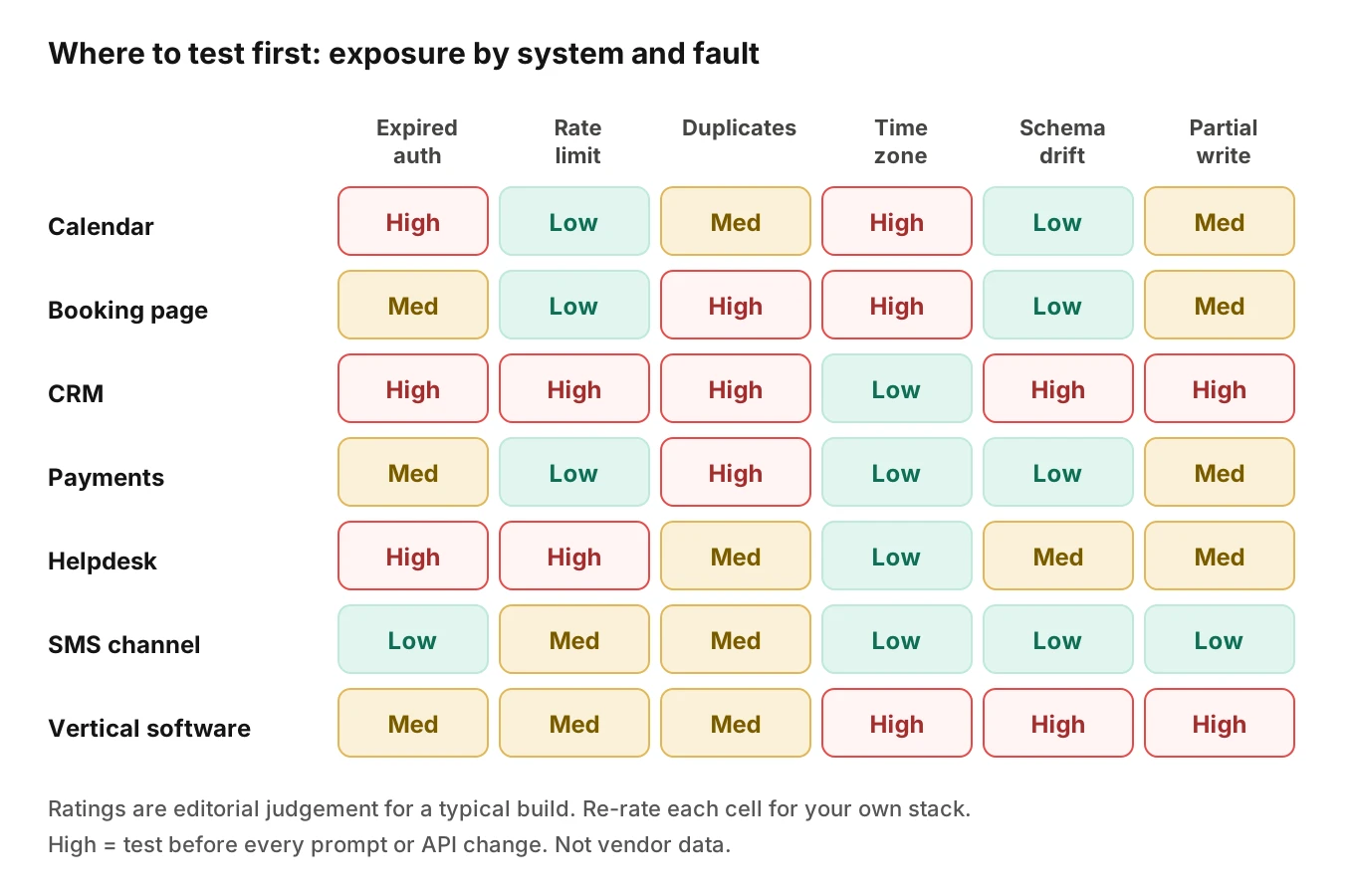
Use this table to rank where to test first. The ratings are our editorial judgement, not vendor data. Rate each cell for your own stack.
| Fault | Highest exposure | Why | First test |
|---|---|---|---|
| Expired auth | CRM, helpdesk, calendar | Per-customer OAuth grants that customers revoke | Revoke a token, call, check the spoken answer |
| Rate limit | CRM, helpdesk | Shared per-account budgets | Burst past the vendor's published per-account limit in a sandbox |
| Duplicates | CRM, payments, booking | Retries after a timeout | Force a slow response, confirm one record |
| Time zone | Calendar, booking, hotel | Caller and business in different zones | Book across a DST boundary |
| Schema drift | Vertical software, CRM | Custom fields and picklists change | Rename a field in a sandbox, rerun |
| Partial write | Everything with multi-step writes | Several calls per booking | Fail the second call, read the record |
One timeout, two records: a worked example
This example is illustrative. The timings are assumptions, not measurements.
A caller books a Thursday cleaning. The agent calls the booking API. Its client timeout is 8 seconds. The vendor takes 9 seconds to commit. The agent sees a timeout and retries. The vendor now holds two bookings. The caller hears one confirmation.
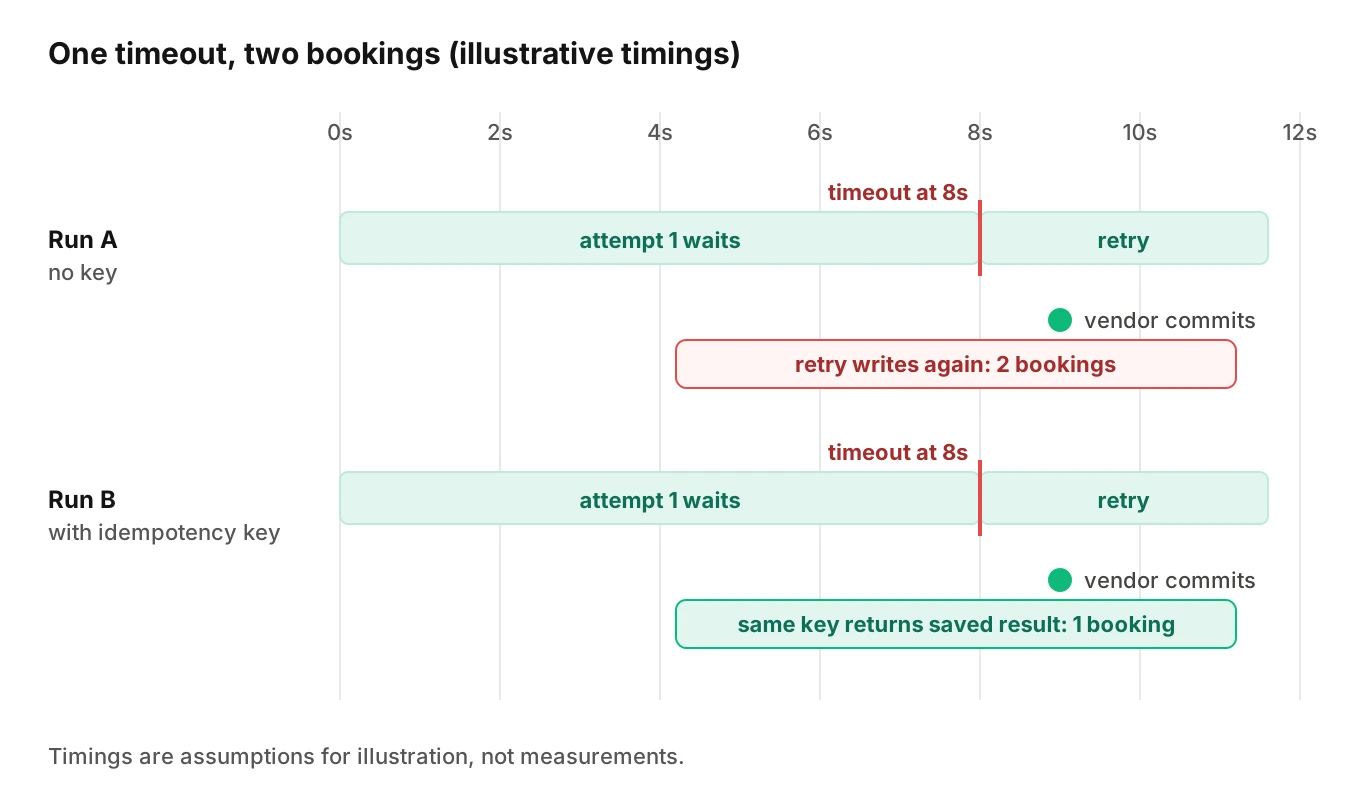
The fix is a stable key per intended action, not per attempt. Derive it from the call and the slot, so a retry sends the same key.
# Simplified sketch: one deterministic key per intended action.
import hashlib, requests

def action_key(call_id: str, tool: str, slot_iso: str) -> str:
    raw = f"{call_id}|{tool}|{slot_iso}"
    return hashlib.sha256(raw.encode()).hexdigest()[:48]

def book(call_id, slot_iso, payload, url, token):
    headers = {
        "Authorization": f"Bearer {token}",
        "Idempotency-Key": action_key(call_id, "book", slot_iso),
    }
    return requests.post(url, json=payload, headers=headers, timeout=8)
Stripe's docs show the `Idempotency-Key` header in a curl example. Check whether your target honours it. Many systems do not, and then you need a lookup before the write: search by call ID in a field you control, and create only if nothing matches.
How to test AI voice agent integrations before they ship
Treat this as a repeatable plan. It matches the approach in voice agent integration testing and voice agent workflow testing.
1. List every write. For each call type, list each system the agent reads or writes, the fields, and the scope it holds. Cut anything the call does not need.
2. Give each write an owner and an oracle. The oracle is how you know the record is right: a field-by-field read-back, not a "200 OK".
3. Use a sandbox per system. Never run fault tests against a customer's live account. Seed it with known duplicates and edge dates.
4. Inject the six faults. For each integration: expired token, 429 or 403 limit, slow response past your timeout, wrong time zone, a renamed field in the sandbox, and a failed second call in a multi-step write.
5. Script the caller, not just the API. Vary accent, pace, interruption and noise, because a misheard name, email or date is itself a fault. Evalgent generates scenarios from the agent's prompt and flows and runs caller profiles over phone, SIP or WebRTC.
6. Judge the audio and the record together. Check what the agent said and what the system stored. Evalgent evaluates from the audio, not only the transcript, because a deaf referee misses what callers actually said.
7. Add a rollback path. Decide what undoes each write, and test it. See voice agent rollback actions and voice agent kill switch.
8. Gate every prompt change on the suite. A prompt edit can change which tool the model calls. Rerun before it reaches customers.
9. Monitor production. Push call recordings so calls are transcribed, mapped to scenarios and judged. Evalgent flags tool-call failures, PII leakage, latency spikes and policy failures, with fix recommendations. Evalgent tests the agent's behaviour. It does not connect to your CRM or calendar.
Add an audit log of every tool call with its arguments and result. The MCP specification lists "Log tool usage for audit purposes" among client recommendations, and it applies to every pattern.
Where the MCP specification helps and where it stops
The tools page of revision 2026-07-28 is useful as a checklist even if you never use MCP. It says servers MUST "Rate limit tool invocations" and "Validate all tool inputs". It says clients SHOULD "Implement timeouts for tool calls". Among AI voice agent integrations, the human-approval rule fits poorly. The same page says "there SHOULD always be a human in the loop with the ability to deny tool invocations."
On a live phone call, the caller is the only human. You cannot pause for an approval screen. Replace that line with a confirmation turn for risky writes: read back the date, the amount or the record, and wait for a clear yes. A confirmation turn is a test target too, because callers say "yeah, uh, no wait".
Frequently asked questions
What integrations does an AI voice agent need?
Only the ones the call must finish with. Most agents need one system of record, such as a CRM, calendar or helpdesk, plus one channel such as SMS. Add payments or vertical software only when the call creates money or a job. Each extra connection adds a credential and a failure mode.
How does an AI voice agent connect to a CRM?
A voice agent CRM integration usually runs through the CRM's REST API with an OAuth grant, called as a tool during or after the call. Some teams use a webhook or an automation platform. Whichever you pick, match on a stable key, write after confirmation, and read the record back to verify.
Should a voice agent use webhooks or MCP?
They solve different jobs. Webhooks carry events from a vendor to you, often after the call. MCP exposes tools the model calls during the call. Many agents use both. Most AI voice agent integrations end up as a mix. Use MCP or direct API for actions, and webhooks for asynchronous results.
How do you stop a voice agent from creating duplicate records?
Send a stable idempotency key per intended action where the vendor supports one. Otherwise search before you create, using a call ID in a field you control. Log processed event IDs for webhooks. Then force a timeout in testing and confirm only one record exists.
What happens when a voice agent API call times out?
The write may still have landed. A blind retry can duplicate it. A good agent checks state or reuses its idempotency key, then tells the caller what it knows. If it cannot confirm, it should say so and hand off or schedule a callback.
How do you handle API rate limits in a voice agent?
Cap parallel calls per customer account, use short bounded retries, and fail honestly when the budget is gone. A long back off is dead air to a caller. Watch for both 429 and vendor-specific limit errors, as Salesforce documents under 403.
Why do voice agent integrations break after launch?
Tokens expire, customers change fields, limits tighten and vendors update APIs. The agent often keeps talking as if nothing changed. Production monitoring of tool-call failures and a scheduled regression run catch drift before customers do.
How do you test voice agent integrations?
Use a sandbox per system and inject faults: expired auth, rate limits, slow responses, wrong time zones, schema changes and partial failures. Judge the call audio and the stored record together. Rerun the suite on every prompt, model or API version change.
The bottom line
AI voice agent integrations fail at the boundary between what the caller said and what the system stored. Connect the fewest systems you can, and test every write against the record, not the transcript.
Related Articles
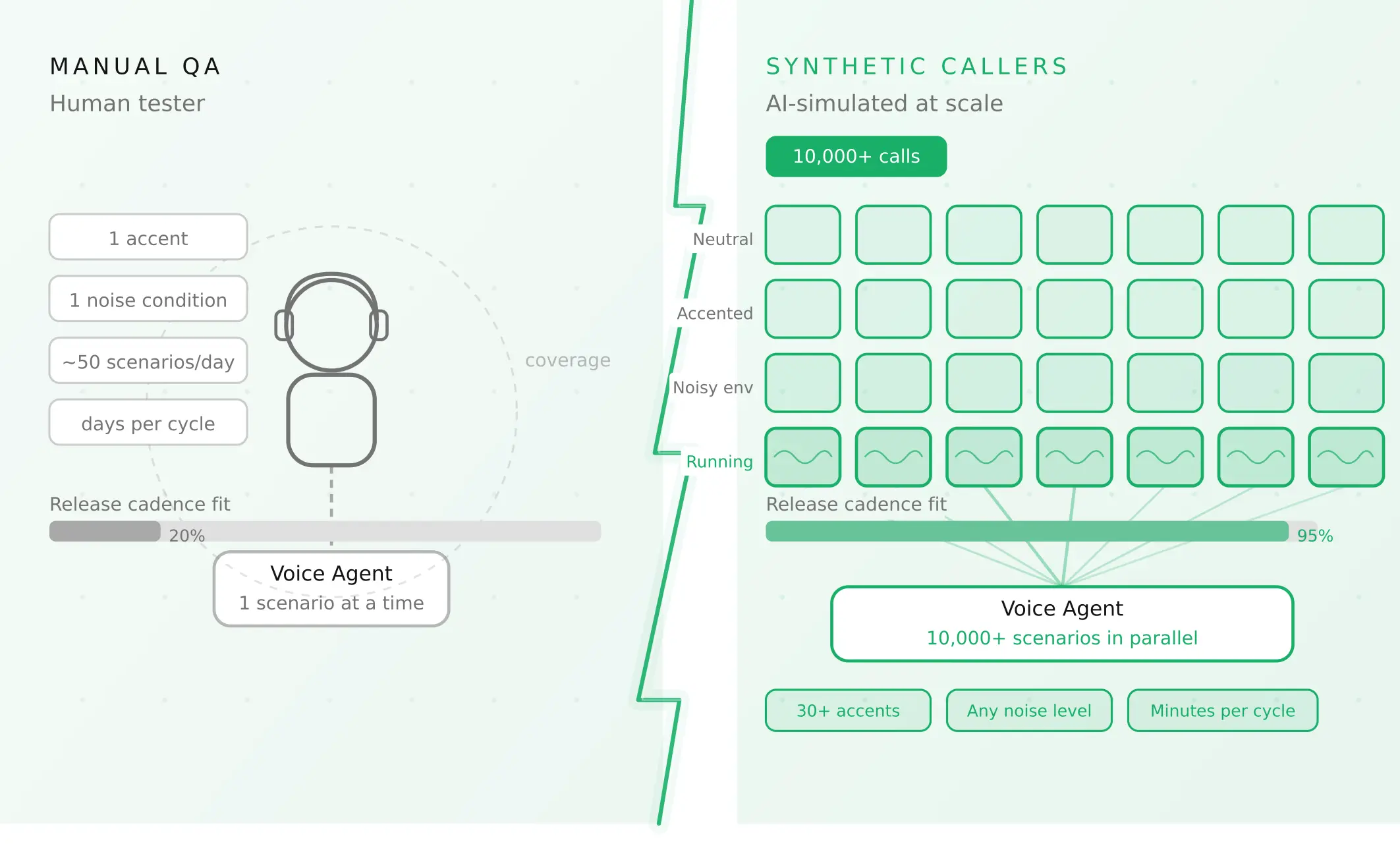
How to automate voice agent testing: synthetic callers vs manual QA
Learn how ai test automation replaces manual QA for voice agents. Compare synthetic callers vs human testers, with a 5-step framework to scale without hiring.
Read more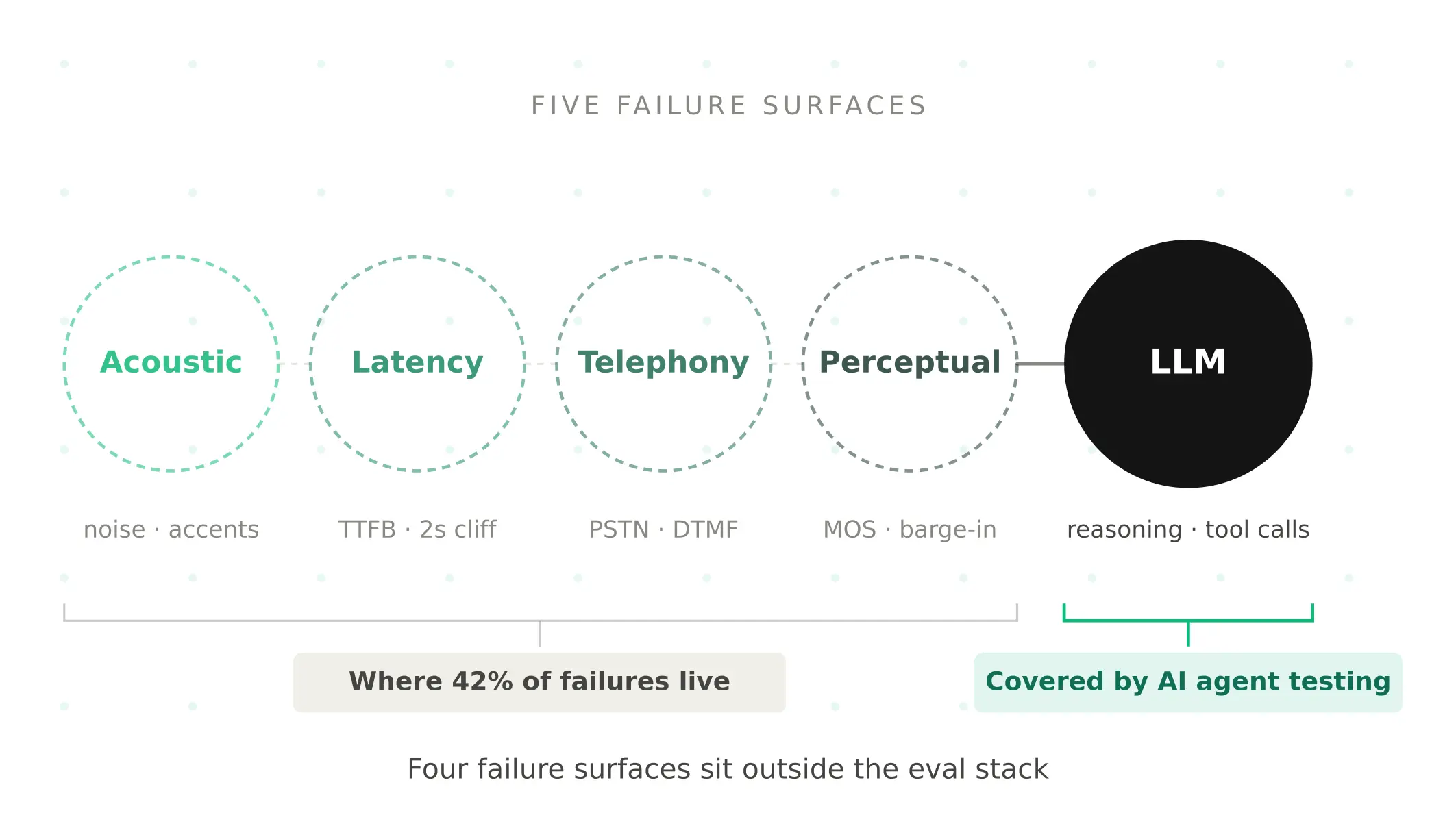
AI Agent Testing vs Voice Agent Testing: What General Tools Miss for Voice
AI agent testing measures text outputs. Voice agent testing measures behaviour through an acoustic pipeline. Five failure categories general tools miss.
Read more