Shopify AI Phone Agent: Orders, Returns and API Limits
On this page
Last verified November 5, 2026, against Shopify's Admin GraphQL API reference, version 2026-10. Shopify releases a new API version every three months, so recheck field names before you copy any code.
Most pages on this topic are merchant roundups. This one is for the team that built its own Shopify AI phone agent and calls the Admin API from it. You own the agent, the prompt and the API calls. It may serve many merchants' stores, or only your own.
The call is the front door to a small workflow: capture an order number, match an order, read a status, sometimes create a return or refund. Each step can fail without an error. The agent just says something confident and wrong.
This post walks that workflow field by field, using Shopify's own docs. For generic testing, see our integration testing guide and the series pillar on voice agent integrations.
What a Shopify AI phone agent touches in one call
A caller's intent maps to a handful of Admin API objects. Each has its own scope, its own failure and its own silent-wrong answer.
| Caller says | Shopify object | Scope the docs list | Silent failure |
|---|---|---|---|
| "Where is order 1001?" | `orders` query, `Order` | `read_orders` | Order older than 60 days returns nothing |
| "Has it shipped?" | `displayFulfillmentStatus`, `Fulfillment` | `read_orders` | Statuses flattened into one phrase |
| "I want to return this" | `returnRequest`, `returnCreate` | `write_returns` | Return opened without merchant review |
| "Refund me" | `refundCreate` | An orders scope (see the refundCreate page) | Duplicate refund on a retry |
| "It's under my phone number" | `customers` query | `read_customers` | Redacted phone comes back as `null` |
The scopes come from each object or mutation page. The returns mutations list `write_returns` or `write_marketplace_returns`.
Two rules cut across all five rows. Every sentence the agent speaks should come from a field you can name. Every write should carry a key that makes a retry safe.
How a Shopify AI voice agent matches the order
This is the first place voice and Shopify disagree. The caller says "ten oh one A". Shopify has several identifiers, and they are not interchangeable.
Order name: The label merchants and customers see, such as "#1001". The Order object page says it "isn't unique across multiple stores". Stores can add a prefix or suffix.
Order number: An integer used to build the name. The same page says it "isn't guaranteed to follow a consecutive integer sequence".
Order id: A globally unique identifier for API follow-up calls. Callers never say it.
Confirmation number: A customer-facing random alphanumeric string. The docs say it is not guaranteed to be unique across orders.
So the agent hears a name and must search for it. The `orders` query documents a `name` filter, with `name:1001-A` as its example. A lookup looks like this (simplified):
query FindOrder($q: String!) {
  orders(first: 5, query: $q) {
    edges {
      node {
        id
        name
        email
        phone
        displayFulfillmentStatus
        returnStatus
        cancelledAt
        customer { id }
      }
    }
  }
}
Variables: `{"q": "name:1001-A"}`. Every field in that selection appears on the Order object page for 2026-10. The docs examples post to `/admin/api/2026-10/graphql.json`.
The key point is that `orders` is a search, not a fetch. It returns a list. The `query` argument is described as terms, connectives, modifiers and comparators. A search can return zero rows, one row or several.
A Shopify community thread from August 2025 shows the risk. A developer reported that a REST name search for `118665-1` returned `#118665-2`. A member suggested fuzzy matching. No Shopify staff replied and the thread is unresolved, so treat it as unconfirmed. The defensive rule is cheap anyway: never trust the first row.
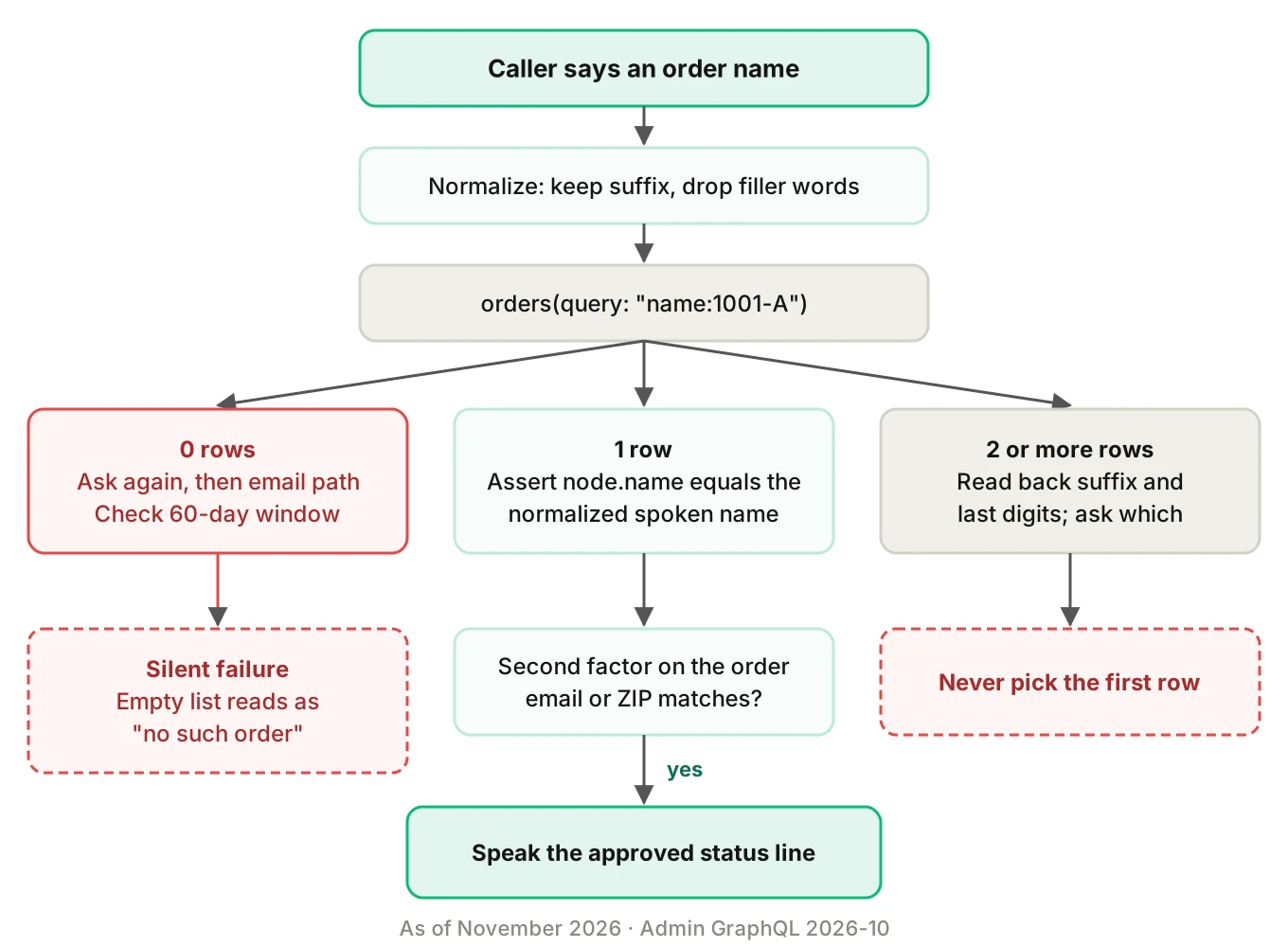
The ladder in the diagram has four rules:
1. Normalize the spoken value before searching. Keep suffixes and drop filler words. See alphanumeric capture for how letters and digits get mangled.
2. Assert the name. After the search, compare `node.name` to the normalized value in code. Do not let the model eyeball it.
3. Handle counts. Zero rows means ask again, then switch to the email path. Several rows means read back the suffix and last digits. Never pick the first.
4. Check a second factor from the order itself, such as the email on file, before reading any status.
For the zero-row case, remember the 60-day window. The Order and `orderByIdentifier` pages both say only orders from the last 60 days are accessible by default. Older orders need all-orders access, which means adding the `read_all_orders` scope. Shopify grants it on approval.
An agent without that access tells a caller "I can't find that order" about an order that exists. Your logs show a clean, empty result.
Finding the caller by phone or email
Callers often do not have the order number, so your Shopify AI phone agent needs a second path. They offer a phone number or an email. Here Shopify's data model has more traps.
For a Shopify order status phone agent the lookup often starts here. The `customers` query documents a `phone` filter with the example `phone:+18005550100`. The page does not state a required format, so normalize the caller's number to that shape and test it. The page says email fields are tokenized, so exact matches need a phrase query.
Three facts from the docs shape the logic, and they set which access scopes you must request:
- `Order.phone` is the phone from checkout. It is `null` if none was provided.
- `Order.customer` is `null` for guest checkouts without customer authentication.
- The Customer object page marks the older `phone` and `email` fields as deprecated. It also lists `defaultPhoneNumber` and `defaultEmailAddress`, but it does not say they replace the old fields, so check before you migrate.
None of that says the caller's number matches the phone on the order. Caller ID tells you the line the person called from. The order holds the number typed at checkout. Those often differ. That is reasoning, not a Shopify claim, but it is why phone match should raise a candidate, not confirm identity.
Use a simple rule. Phone lookup narrows to candidate customers. The agent then asks one more fact that lives on the order, such as the shipping ZIP. For permissions and recording rules, see voice agent permissions and recording consent.
Protected customer data can turn into silence
Shopify treats name, address, phone and email as protected customer data at Level 2. Its protected customer data page describes what happens when an app lacks approval. Approved fields come back. Unapproved fields are redacted and return `null`. A GraphQL request to an unapproved type or field returns HTTP 200 with an entry in the `errors` array. The page's example error message begins "This app is not approved to access the Customer object".
An HTTP 200 does not mean the lookup worked. If your tool wrapper only checks the status code, a redacted phone reads as "no phone on file". The agent then asks the caller for something Shopify holds.
The same page says public apps need review at both levels. Apps installed only on development stores do not need a review submission. That gives you a safe place to test.
What a Shopify AI phone agent may say about fulfillment status
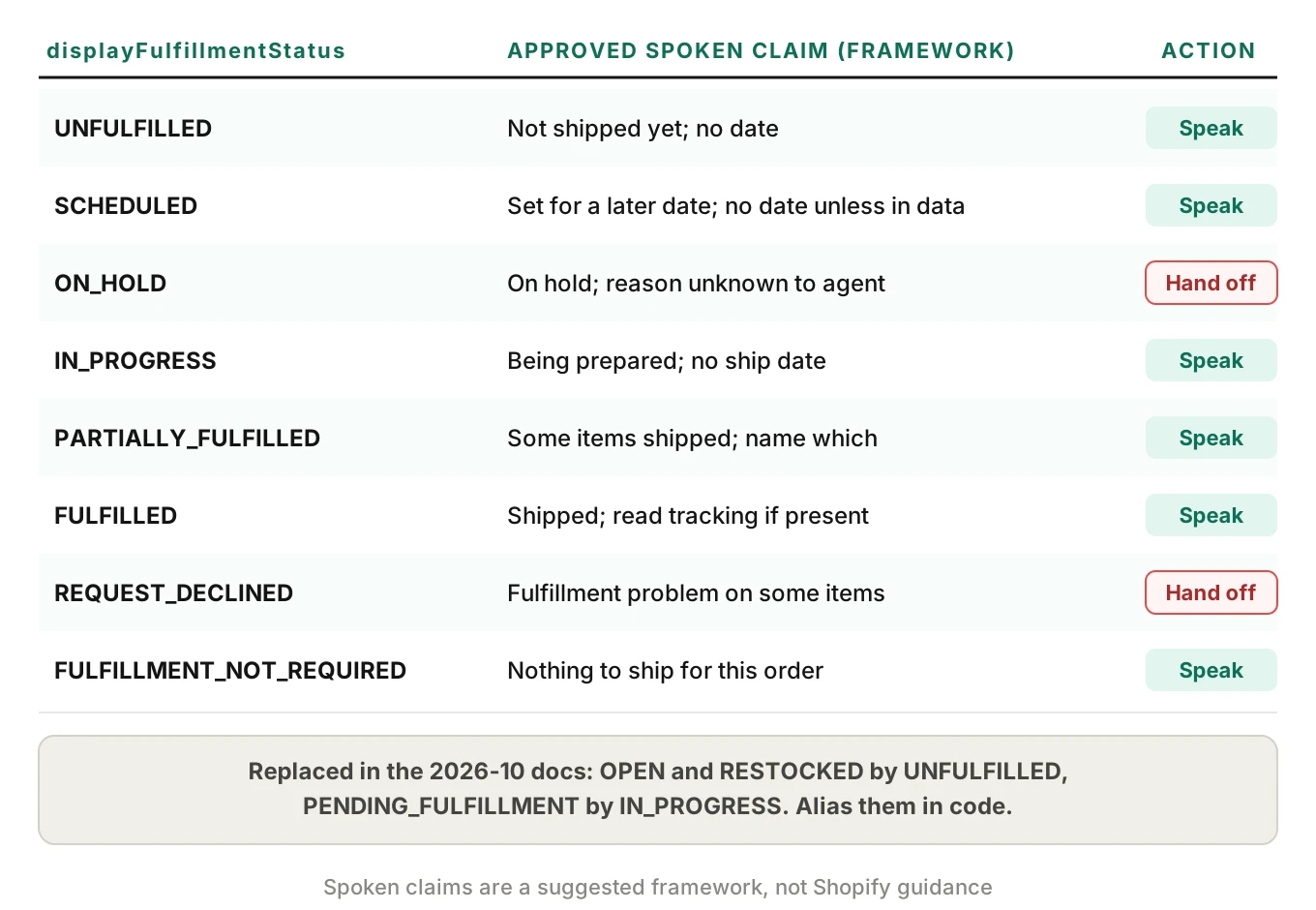
The display fulfillment status, `displayFulfillmentStatus` in the API, is the field most voice agents read aloud. The Order page describes it as the status shown to merchants in the admin, and says to use FulfillmentOrder for detail. As of the 2026-10 reference, the enum has 11 values.
| Value | Status in the 2026-10 docs |
|---|---|
| `UNFULFILLED` | Current. None of the items fulfilled |
| `OPEN` | Replaced by `UNFULFILLED` |
| `RESTOCKED` | Replaced by `UNFULFILLED` |
| `PENDING_FULFILLMENT` | Replaced by `IN_PROGRESS` |
| `IN_PROGRESS` | Current |
| `SCHEDULED` | Current. Unfulfilled items set for later |
| `ON_HOLD` | Current. All unfulfilled items on hold |
| `PARTIALLY_FULFILLED` | Current |
| `FULFILLED` | Current |
| `REQUEST_DECLINED` | Current. Some items rejected by the fulfillment service |
| `FULFILLMENT_NOT_REQUIRED` | Current |
Three things matter for a phone script.
First, your code may still see replaced values. Handle `OPEN`, `RESTOCKED` and `PENDING_FULFILLMENT` the same as their replacements. An unhandled enum value is a classic way to make an agent say nothing.
Second, several states have no "shipped" meaning at all. `ON_HOLD`, `SCHEDULED` and `REQUEST_DECLINED` each need a different sentence. A prompt that says "if not fulfilled, say it hasn't shipped yet" flattens all three. An on-hold order is not "on its way".
Third, the vocabulary differs between places. The `orders` filter documents `fulfillment_status` values such as `unshipped`, `shipped`, `partial` and `request_declined`. Those are not the enum names. Do not reuse one list for both.
For shipment detail, go one level down. `Fulfillment` has `trackingInfo`, `estimatedDeliveryAt`, `deliveredAt` and `inTransitAt`. Its `displayStatus` enum has 18 values, including `DELAYED`, `ATTEMPTED_DELIVERY` and `READY_FOR_PICKUP`. The reference lists them without definitions. So the carrier meaning of a value like `DELAYED` is not documented there. Have the agent read what the data says and avoid inventing a date. Our WISMO guide covers delivery promises.
A practical rule: the model picks a sentence from an approved list keyed to the status. It does not write one.
Shopify voice agent returns: three mutations, three states
Returns are where a wrong guess costs money. For a Shopify AI voice agent, the question is who approves. Shopify's docs split the job across several mutations, such as `returnRequest` and `returnCreate`, and the difference is about who approves.
| Mutation | What the docs say | Resulting state |
|---|---|---|
| `returnRequest` | Creates a return request that "requires merchant approval before processing" | `REQUESTED` |
| `returnCreate` | Creates a return from an order with a fulfilled, unrefunded line item; assumes approval | `OPEN` |
| `refundCreate` | Creates a refund so you can return money to customers | Refund object |
The `ReturnStatus` enum has five values: `REQUESTED`, `OPEN`, `CLOSED`, `DECLINED` and `CANCELED`. The `returnRequest` page also names `returnApproveRequest` and `returnDeclineRequest` for the merchant step. The order-level `returnStatus` is a separate six-value enum.
For a voice agent, the choice follows policy. If a human reviews each return, the agent should call `returnRequest`. If your policy auto-approves inside the return window, `returnCreate` fits. Calling `returnCreate` by default skips the review step the merchant may expect. The caller then hears "your return is set up" about a record the warehouse will treat as approved.
Here is a simplified `returnRequest` call. The page's examples show `orderId` and `returnLineItems`, with `fulfillmentLineItemId`, `quantity` and a reason on each line:
mutation RequestReturn($input: ReturnRequestInput!) {
  returnRequest(input: $input) {
    return { id name status }
    userErrors { field message }
  }
}
Both return mutations need the `write_returns` scope (or the marketplace variant). Check `userErrors` on every response. The pages describe it as the list of errors from executing the mutation, and they do not list specific codes. So your wrapper cannot rely on a code table. Log the `field` and `message` pair.
The line item id is a trap for voice. The caller says "the blue jacket". The mutation wants a `fulfillmentLineItemId`. Your code must resolve the spoken item to one fulfilled line, and ask when two lines match. Our returns and exchange guide covers window and refund policy errors. Here we cover only the API edge.
Refunds need an idempotency key
The `refundCreate` page has a precise note. As of API version 2026-01 the idempotency key is optional. As of 2026-04 it is required: "the idempotency key is required and must be provided using the `@idempotent` directive." The directive shape on Shopify's idempotent requests page looks like this:
refundCreate(input: $input) @idempotent(key: "<uuid>") {
  refund { id }
  userErrors { field message }
}
Voice calls retry in ways web forms do not. A caller asks "did that go through?" and the agent re-runs the tool. Or the orchestrator replays a timed-out call. Without a stable key, a replay can mean two refunds.
Build the key from the call, not from a fresh random value on each attempt. A simplified version:
import uuid

def refund_key(call_id: str, order_id: str, action: str) -> str:
    # Same call + order + action always yields the same key.
    return str(uuid.uuid5(uuid.NAMESPACE_URL, f"{call_id}|{order_id}|{action}"))
Shopify's page recommends a random UUID, so a name-based one is your design choice. The page does not say how long keys are kept or what happens when a key is reused with different parameters. Test both cases on your own store. For the general pattern, see rollback and undo actions and post-call write-back testing. For card payments taken on the call, see our Stripe phone payments guide.
The refund page's visible examples show no email-notification option, and its input field list is collapsed, so check the `RefundInput` schema yourself. Do not tell the caller "you'll get an email" unless you confirmed that on your own store.
Shopify GraphQL rate limits: a worked example
Shopify's GraphQL Admin API, the base of any Shopify admin API voice agent, uses calculated query cost. The rate limits page says "Every field in the schema has an integer cost value assigned to it." Scalars and enums cost 0, objects cost 1, and mutations default to 10 points. Connections are sized by `first` and `last`. The page lists 100 points per second for Standard, 200 for Advanced Shopify, 1,000 for Shopify Plus and 2,000 for Shopify for enterprise. It also says "A single query may not exceed a cost of 1,000 points, regardless of plan limits." The bucket must hold the requested cost before the query runs, and Shopify refunds the difference to actual cost afterward. Each response carries `extensions.cost` with `requestedQueryCost`, `actualQueryCost` and `throttleStatus`.
The page gives each app and store pair its own bucket. A multi-merchant agent has one bucket per store, so one merchant's sale day drains only that merchant's bucket.
Here is a worked example with illustrative numbers for an ai phone agent for ecommerce on a busy day. Assume a Standard store at 100 points per second. Assume each call makes three lookups of 12 points each, so 36 points per call. The 12 is an assumption. Run your own query and read `actualQueryCost`. Assume the bucket starts full at 1,000 points. The docs example shows `maximumAvailable: 1000`, but the page does not state a bucket size per plan.
| Calls per second | Points demanded per second | Net change per second | Time to empty bucket |
|---|---|---|---|
| 2 | 72 | +28 | Never drains |
| 3 | 108 | -8 | 125 s |
| 5 | 180 | -80 | 12.5 s |
Now take a 60-second sale spike at 5 calls per second. That is 300 calls and 10,800 points demanded. Capacity is 100 x 60 = 6,000 restored, plus 1,000 in the bucket, so 7,000. The shortfall is 3,800 points, about 35% of demand. In that window, roughly one lookup in three hits a throttle.
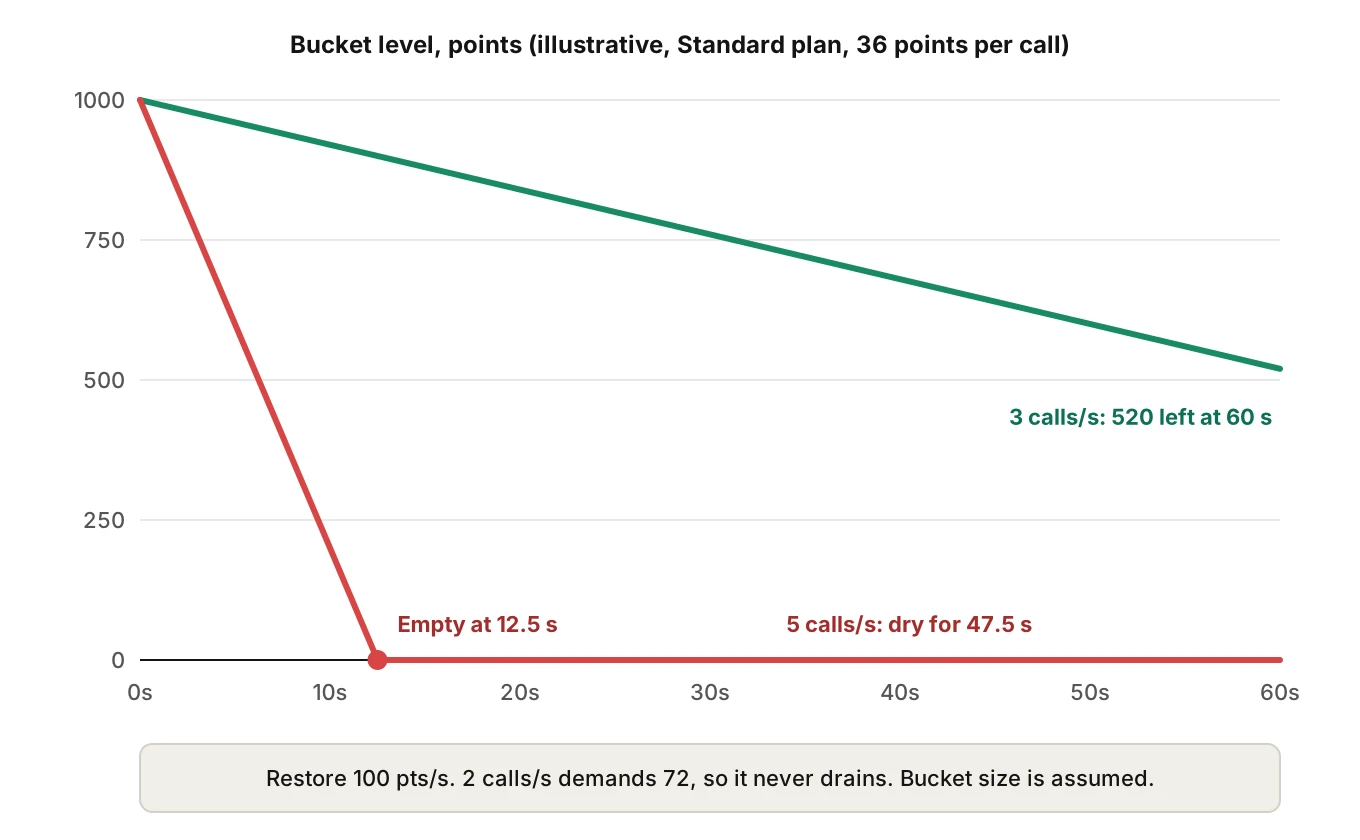
The voice problem is the wait. A caller hears dead air. So read `throttleStatus.currentlyAvailable` before sending, and have a spoken fallback ready: "One moment while I check." The docs also advise keeping average cost below the restore rate and fetching fewer objects per page. Our API rate limits post covers the broader pattern.
One more version note. Shopify's versioning page says that a request to a retired version is served by the oldest accessible stable version: "Shopify falls forward and responds using the oldest accessible stable version." Always pin a version. Log the `X-Shopify-API-Version` response header, which the page says shows the version used.
Where voice errors become Shopify errors
Every failure above returns a valid API response. A transcript review shows none of them as errors. The wrong order, status or refund only shows up in the store. So the checks below assert on the store, not on what the agent said.
How to test a Shopify AI phone agent before it ships
Run this protocol before every prompt, model or tool change.
1. Build a fixture store. Use a development store. Shopify's protected-data page says apps installed only on development stores do not need a review submission. Seed orders that cover each case: suffixed names, two near-identical names, guest checkout, no checkout phone, as many fulfillment statuses as you can create, and one order older than 60 days.
2. List the intents. Write each caller goal as a scenario: status by name, status by email, a wrong digit, a return, a refund, and "I don't know my order number". Include cases where the right outcome is a hand-off to a human.
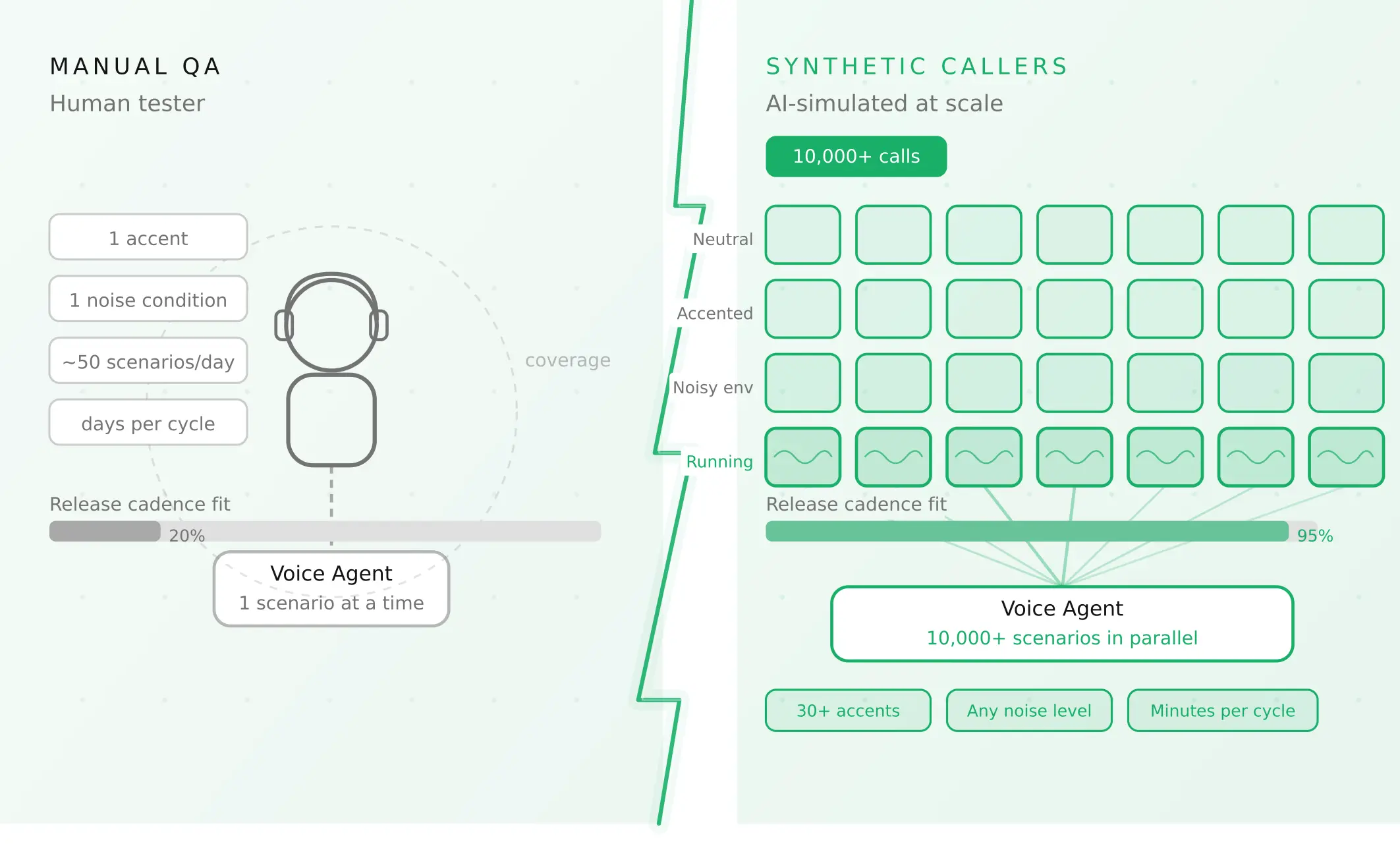
3. Vary the caller, not just the words. Speak order numbers with different accents, speeds, interruptions and background noise. Spoken digits and letters are where matching starts to fail. Evalgent generates scenarios from your agent's prompt and flows, and its caller profiles cover accent, pace, interruption, delay and noise. The simulator reaches your agent over phone, SIP or WebRTC. It tests your agent's behavior. It does not connect to Shopify.
4. Assert on the store, not the transcript. After each call, query the fixture store. Check that no refund doubled, no return opened in the wrong state, and the status read matches the status stored. This is the write-back check from our workflow testing guide.
5. Score from the audio. A transcript can show "1001 A" when the caller said "1001 8". Evalgent evaluates from the audio, with an LLM plus Jev as the judge, and returns evidence for each verdict. Human review confirms the verdicts you will act on.
6. Replay under load. Fire concurrent calls at the fixture store above your assumed restore rate. Record `requestedQueryCost`, `actualQueryCost` and what the agent said while throttled.
7. Gate the release. Set thresholds before you test. Examples: zero wrong-order reads in the fixture set, zero duplicate refunds, and every status mapped to an approved sentence. Treat any miss as a release block.
8. Monitor production. Real callers differ from fixtures. Push recordings into production monitoring. Evalgent transcribes them, maps them to scenarios, judges them, and flags tool-call failures, latency spikes and policy failures with fix recommendations.
Re-run the set when Shopify ships a new API version. Also test one store with restricted scopes. That is the fastest way to catch the redacted-data trap.
Frequently asked questions
How does a Shopify AI phone agent look up an order?
It captures the spoken order name, then calls the Admin GraphQL `orders` query with a `name` filter. That query returns a list, so the agent must check the row count and compare the returned name to what the caller said. It should also confirm a second detail, such as the order email, before reading any status.
Can an AI voice agent check Shopify order status?
Yes, through the Admin API. It reads the display fulfillment status on the Order, and `Fulfillment` fields such as tracking info for shipment detail. The risk is in the wording. Statuses like on hold, scheduled and request declined each need their own approved sentence, not a general "not shipped yet".
What is the difference between a Shopify order name, number and id?
The name is the label customers see, such as #1001, and is not unique across stores. The number is the integer behind the name and is not guaranteed to be consecutive. The id is the globally unique API identifier. Callers speak the name, so the agent searches by name and then uses the id.
What do Shopify fulfillment statuses mean?
The 2026-10 enum includes unfulfilled, in progress, scheduled, on hold, partially fulfilled, fulfilled, request declined and fulfillment not required. Open, restocked and pending fulfillment are marked as replaced. These are admin display statuses. Shopify points to FulfillmentOrder for detail, and Fulfillment display status for shipment events.
Can an AI phone agent process Shopify returns and refunds?
It can call the return and refund mutations if the app has the right scopes. Use returnRequest when a merchant must approve, and returnCreate when policy already approves the return. For refunds, the refundCreate page says an idempotency key is required from API version 2026-04, so retries cannot double refund.
Does a Shopify voice agent need protected customer data access?
If it reads customer name, address, phone or email, yes. Shopify's page puts those fields at Level 2. Without approval, those fields come back as null and GraphQL returns HTTP 200 with an errors entry. Your tool wrapper must read the errors array, or the agent will treat missing data as absent data.
What are Shopify GraphQL API rate limits for a voice agent?
The limits use calculated query cost. Shopify's page lists 100 points per second on Standard and 1,000 on Plus, and caps one query at 1,000 points. Limits apply per app and store pair. A caller waiting on a throttled query hears silence, so check throttle status first and keep a spoken fallback.
How do you find a Shopify customer by phone number?
The `customers` query documents a phone filter, with the example `phone:+18005550100`. Treat the result as a candidate, not proof. The number a caller dials from may differ from the one typed at checkout, and a checkout phone can be null. Confirm with one more fact stored on the order.
The bottom line
A Shopify AI phone agent fails quietly at the boundary: a dropped suffix, a flattened status, an empty result or a replayed refund. Each failure returns a valid API response, so only a test that checks the store and the audio will catch it.
Related Articles
How to automate voice agent testing: synthetic callers vs manual QA
Learn how ai test automation replaces manual QA for voice agents. Compare synthetic callers vs human testers, with a 5-step framework to scale without hiring.
Read more
AI Agent Testing vs Voice Agent Testing: What General Tools Miss for Voice
AI agent testing measures text outputs. Voice agent testing measures behaviour through an acoustic pipeline. Five failure categories general tools miss.
Read more