Square AI Phone Ordering: Why Unpaid Orders Never Show
On this page
Last verified November 5, 2026, against Square's Orders API, Payments API, Catalog API, Sandbox and webhook pages (reference pages show API version 2026-09-16). Re-check before you ship.
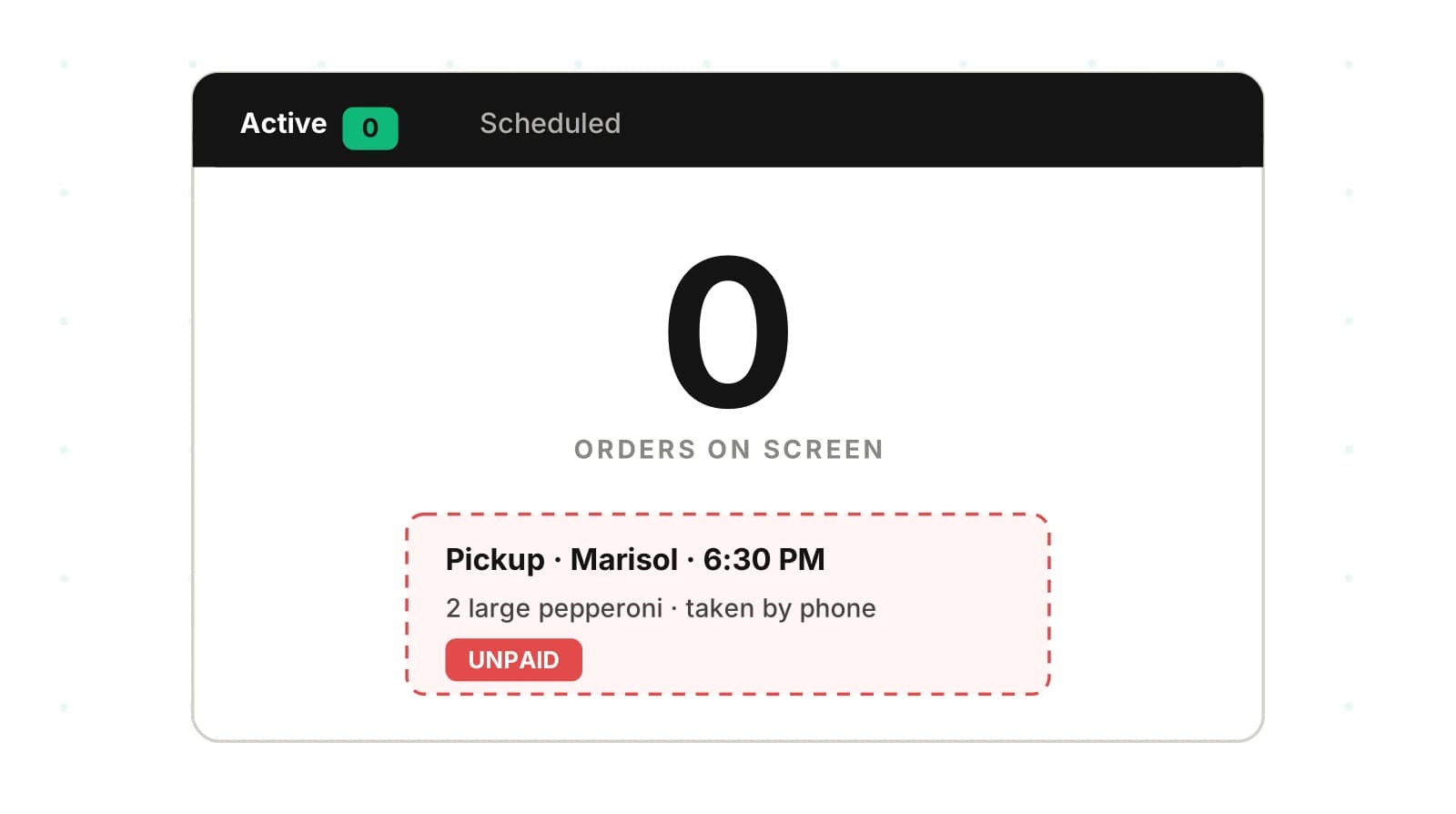
Your voice agent takes a pickup order and writes it to Square. The call ends with "you're all set, see you at 6:30." The kitchen never hears about it.
That failure is not a speech error. The transcript looks perfect. The order exists in Square. It just isn't on a screen anyone watches. This post on Square AI phone ordering covers that gap, plus pickup details, catalog IDs, retries, webhooks and sandbox testing. Every Square behaviour below comes from a Square page I opened. Where the docs are silent, I say so.
For the general pattern, see voice agent integration testing. For the series overview, see AI voice agent integrations. This post stays on Square.
Why Square AI phone ordering fails silently
A voice order passes through four steps. The caller speaks. Your agent builds a cart. Your server calls Square. Staff see a ticket. Speech errors hit step one. Most Square-specific failures hit steps three and four, where no one is listening.
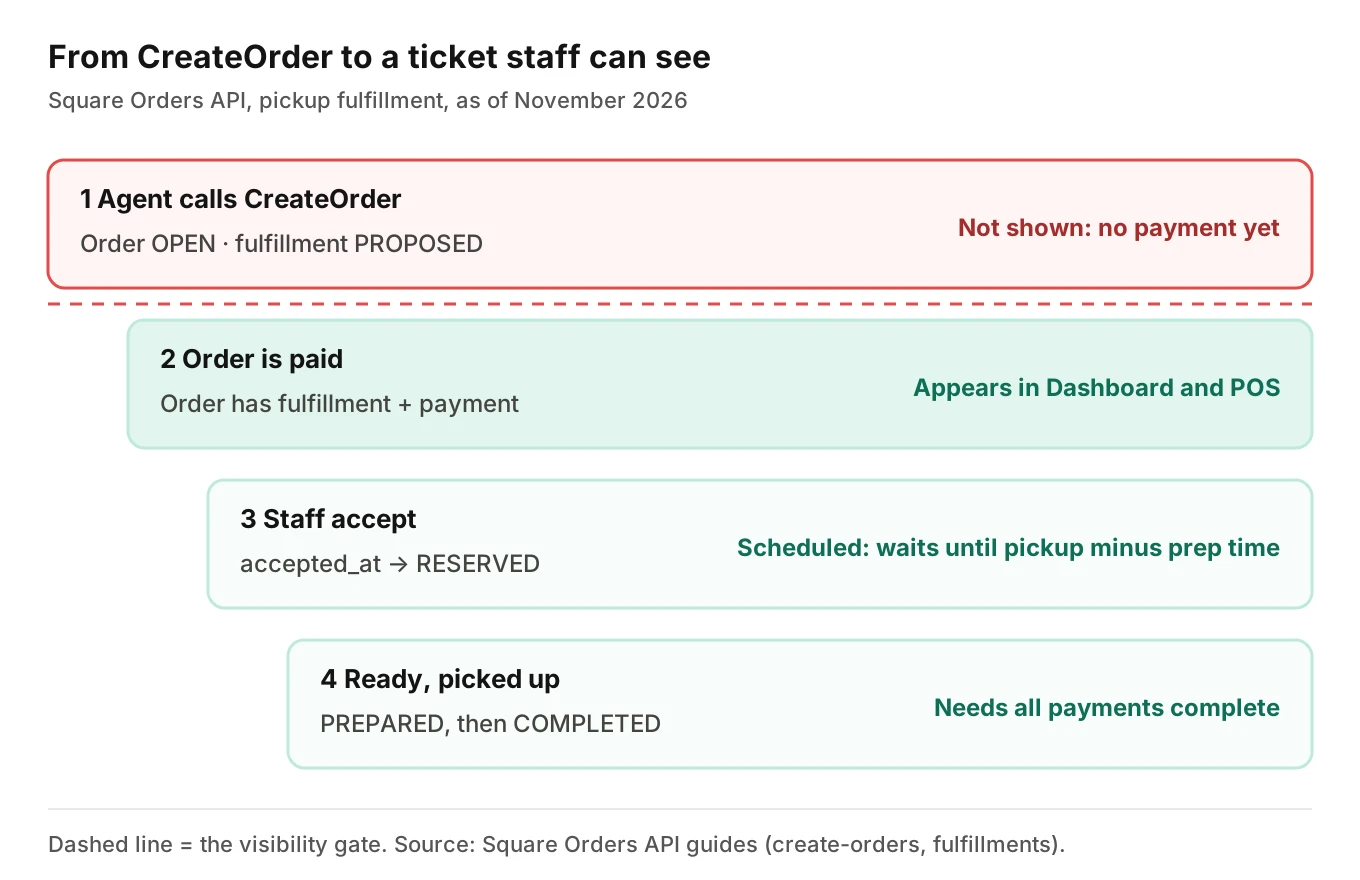
Square's Orders API guide says: "The CreateOrder endpoint by default sets the `state` of the order it creates to `OPEN`." An OPEN order "can be fulfilled and payment can be processed." So a successful API response only proves Square stored an order. It does not prove a cook can see it.
The same guide gives the visibility rule. An order appears in the Square Dashboard or Square products such as Point of Sale if two conditions hold. The order includes fulfillment, and the order is paid. The fulfillments page repeats it: orders with fulfillments appear on Square products "only after they're paid for."
Your agent's logs show a 200 response and a confirmed cart. Your dashboards stay green. The restaurant calls you on Friday night.
What Square staff said about the same gap
A developer on Square's developer forum described a dine-in ordering app. Guests placed unpaid orders, and staff could not see them in Square for Restaurants. A Square staff reply on August 11, 2026 said: "yes, this is still a limitation of the platform." It suggested the Terminal API checkout flow, which makes the order visible in POS, or having the customer pay at the table through your configured app.
That thread is about dine-in QR orders, not phone pickup, and it is a forum, not the API reference. But it matches the Orders guide. Confirm the behaviour on a real location before you rely on it.
Three ways to handle the unpaid-order gap
| Option | What happens | What to test |
|---|---|---|
| Take payment on the call | Order is paid, so it can appear in Square products | Payment amount equals order total; card capture is safe (see AI voice agent payments) |
| Caller pays later through your own link or app | Order appears after the caller pays | Caller never pays; order never shows; agent already said "confirmed" |
| Route to staff another way | Your own ticket or SMS to the store, outside Square | Duplicate entry; Square reports miss the order |
The second row is the dangerous one. The agent's confirmation line must depend on payment state, not on the create call. Say "your order is placed" only after Square shows it paid.
If you take cards by voice, read Stripe AI phone payments for the capture side.
What the fulfillment object has to hold
Pickup is where voice meets structured data. Square's fulfillments page lists the types as DELIVERY (Beta), IN_STORE (Beta), PICKUP and SHIPMENT (Beta). A new fulfillment starts out proposed: "Initially, the fulfillment state is `PROPOSED`."
For pickup, the page says "The `pickup_at` and `recipient.display_name` fields are the only" pickup_details fields required when creating a fulfillment. It also has two scheduling rules:
- With `schedule_type` set to `SCHEDULED`, "`pickup_at` is required."
- With `schedule_type` set to `ASAP`, "`prep_time_duration` or `pickup_at` is required."
For a voice agent, two spoken things become required fields: a time and a name. Both are classic speech-error zones.
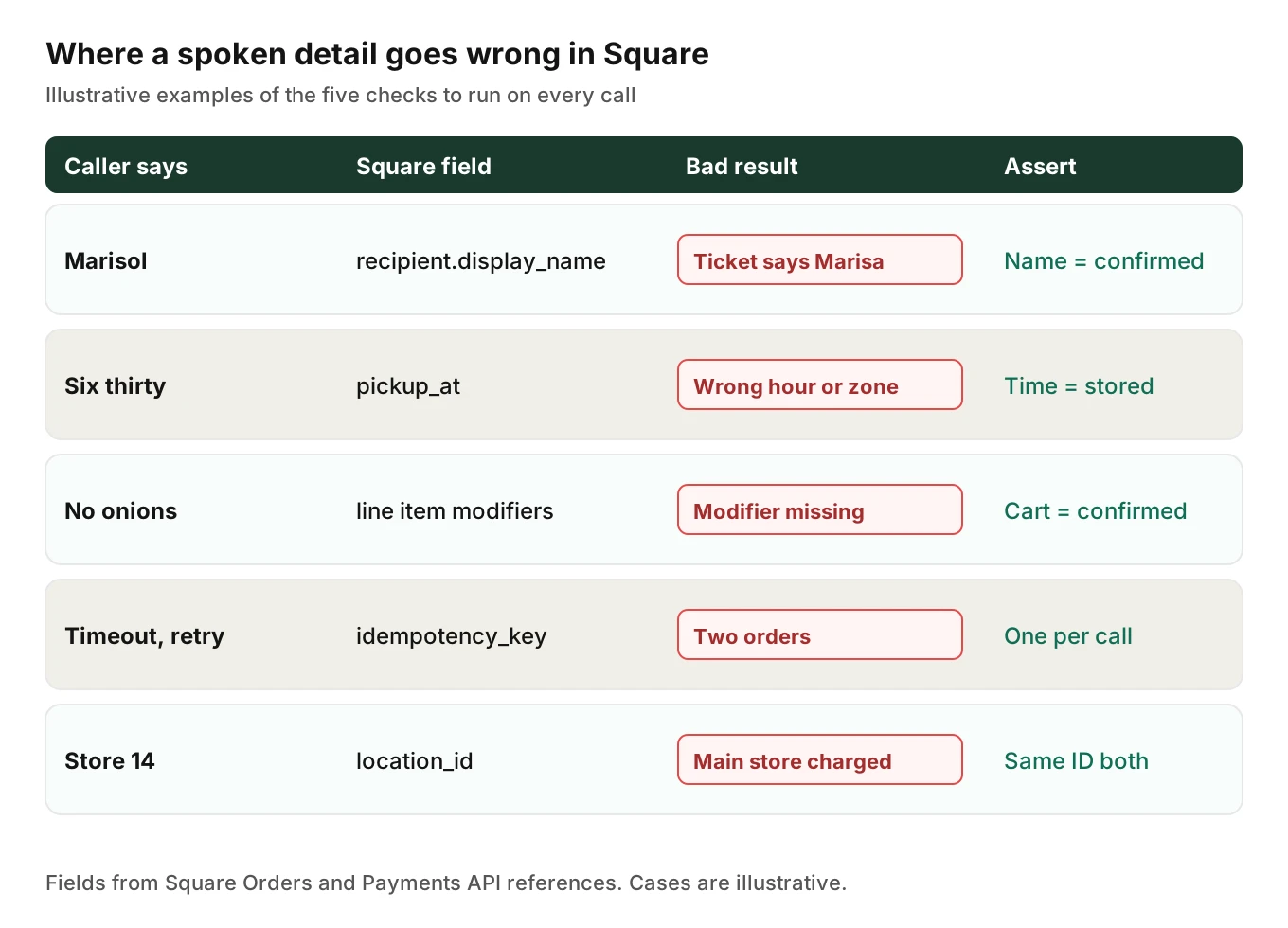
- Name. "Marisol" becomes "Marisa" or "Mari Sol." The display name prints on the ticket and the counter shelf. A wrong name means a lost pickup, with no error anywhere.
- Time. "Six thirty" is a clock time. The field wants a timestamp. Your server picks AM or PM, the date and the zone. Square's Locations examples show zones such as `America/Los_Angeles`. Convert in the store's zone.
- Scheduled vs ASAP. "In twenty minutes" is ASAP. "Tonight at seven" is scheduled. The wrong choice changes when the kitchen sees it.
On that last point, Square says a scheduled order does not move to the Active tab in Order Manager until pickup time minus prep time. After that it can "show up on a KDS or print from kitchen printers." If a prep time is set, a 7 p.m. order will not appear on the line at 5. With no prep time, Square activates it immediately. Your agent must not promise "they've started on it."
The page also says some fields, including `prep_time_duration` and `schedule_type`, can only be changed while the fulfillment `state` is `PROPOSED`. Get them right on the first write.
One more rule: to set a fulfillment to `COMPLETED`, all payments on the order must already be complete, per the same page.
Square catalog IDs, modifiers and ad hoc line items
Square's CreateOrder page describes two kinds of line item. Catalog item variations are "Strongly recommended" because they inherit the catalog price and quantity unit. Ad hoc line items take price and unit "at time of order." Square adds: "If you create ad hoc line items, you cannot apply catalog rule-based discounts to those line items."
So the agent needs a speech-to-ID map. "Large pepperoni" must resolve to one catalog object ID. Ambiguity ("the usual," "a Coke") must become a question, not a guess. Falling back to an ad hoc line with a made-up price is worse: the order succeeds, but price, discounts and reporting are wrong.
Modifiers are the next trap. Square's modifier guide says a modifier list sets "The minimum number of modifiers that must be selected" and "The maximum number of modifiers that can be selected (0 means no limit)." An item can override those values. A caller can ask for a fourth topping on a list that allows three. Check limits in code before the API call, not after.
One scoping rule matters for multi-location customers. The same page says: "Individual modifiers in a list always appear at all locations — you cannot restrict them to specific locations." Different modifiers per location need separate modifier lists. The docs I opened do not say how sold-out state behaves per location. If your agent serves many stores, test each catalog separately.
For the speech side, see half-and-half pizza orders and allergy and add-on errors.
Location IDs
Square's Locations page says locations "represent the sources of orders and fulfillments for businesses." For endpoints such as CreatePayment it says: "If none is specified, the main location will be used." The Payments API reference says the same for `location_id`.
That default is a trap for multi-store customers. An agent for store 14 that omits `location_id` on a payment may charge the main location. Pass the location explicitly, from the called number, on every write, and assert that order and payment match.
Square idempotency key rules: lengths and retries
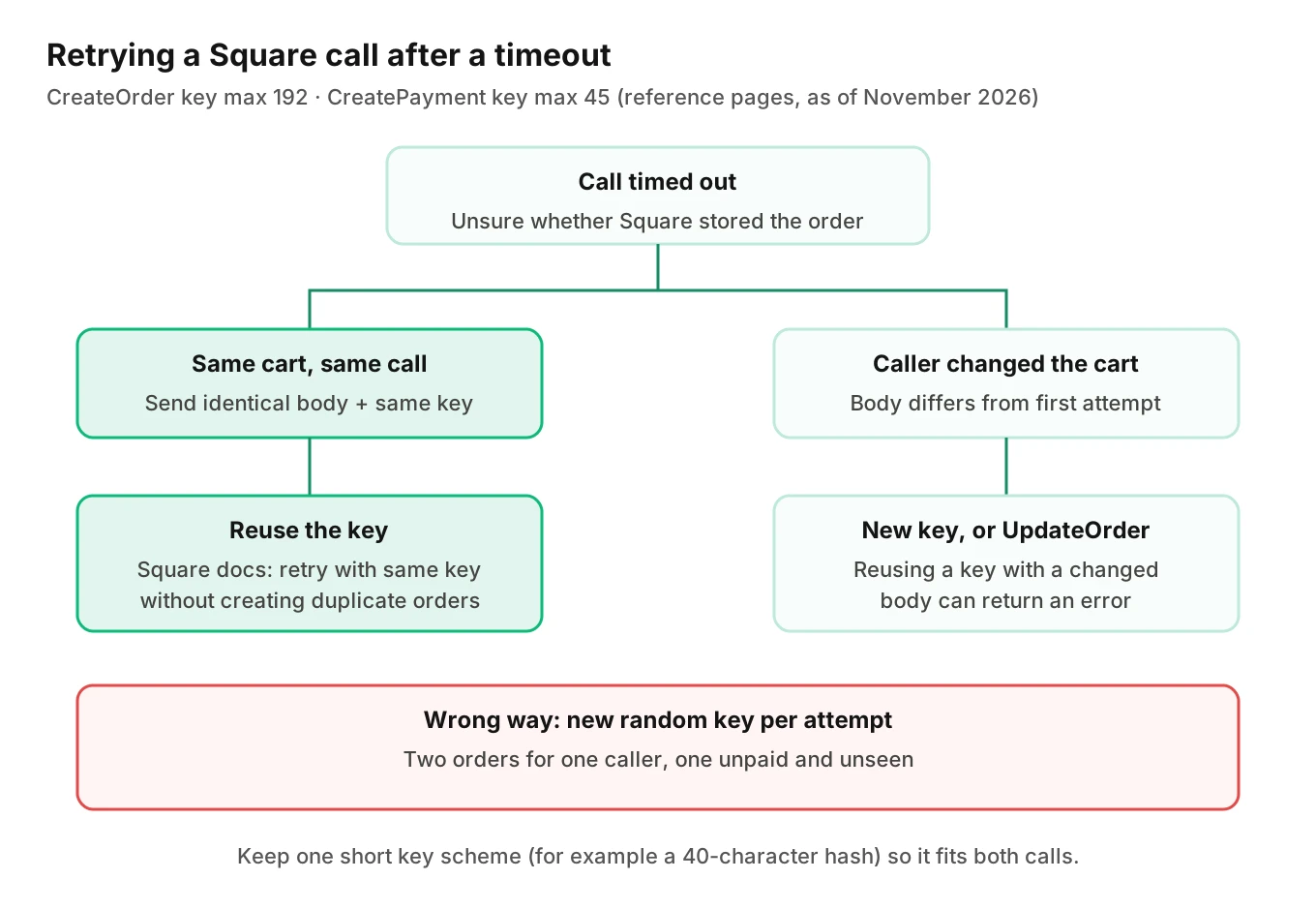
A tool call times out and your framework retries it. Without idempotency you get two orders. Square's idempotency page says keys "can be anything, but they need to be unique." It also warns that reusing a key with a changed CreatePayment request, "for example, specify a different payment amount," gives an error. It adds that "this behavior might vary depending on the API."
The CreateOrder reference describes the key as "A value you specify that uniquely identifies this order among orders you have created." It lists a maximum length of 192. The CreatePayment reference lists 1 to 45 characters, and notes multi-byte characters may reduce the number allowed.
That mismatch is a real gotcha. A key like `call_2026-11-05_CAa1b2c3d4e5f6a7b8c9d0e1f2a3b4c5_order_v2` is 57 characters. It works for orders and fails for payments. Build one short key scheme that fits both limits. A hash of call ID plus cart version, cut to 40 characters, is enough.
The rule for the key:
- Same cart, same key. A retry after a timeout sends the identical body and key. Square can treat it as the same order.
- Changed cart, new key. The caller adds a drink after the first create. That is a different order body. Reusing the key risks an error. Better still, update the open order rather than creating a second one.
- Never a fresh random key per attempt. It defeats the feature.
Here is a simplified order-then-payment sketch. It follows Square's CreateOrder and CreatePayment reference pages and the fulfillments guide, version 2026-09-16. The `pickup_at` value and token handling are placeholders; check the field formats against the reference before you use it.
import hashlib, requests

BASE = "https://connect.squareup.com"   # sandbox: https://connect.squareupsandbox.com
HEADERS = {
    "Square-Version": "2026-09-16",
    "Authorization": "Bearer ACCESS_TOKEN",
    "Content-Type": "application/json",
}

def key(call_id: str, cart_version: int, step: str) -> str:
    raw = f"{call_id}:{cart_version}:{step}"
    return hashlib.sha256(raw.encode()).hexdigest()[:40]   # fits the 45-char payment limit

def create_pickup_order(call_id, cart_version, location_id, cart, name, pickup_at):
    body = {
        "idempotency_key": key(call_id, cart_version, "order"),
        "order": {
            "location_id": location_id,
            "line_items": cart,   # [{"catalog_object_id": ..., "quantity": "1", "modifiers": [{"catalog_object_id": ...}]}]
            "fulfillments": [{
                "type": "PICKUP",
                "pickup_details": {
                    "recipient": {"display_name": name},
                    "pickup_at": pickup_at,
                    "schedule_type": "SCHEDULED",
                },
            }],
        },
    }
    r = requests.post(f"{BASE}/v2/orders", json=body, headers=HEADERS, timeout=10)
    r.raise_for_status()
    return r.json()["order"]   # state is OPEN; not yet visible to staff

def pay_order(call_id, cart_version, location_id, order, source_id):
    body = {
        "idempotency_key": key(call_id, cart_version, "pay"),
        "source_id": source_id,
        "location_id": location_id,
        "order_id": order["id"],
        "amount_money": order["total_money"],   # must match the order total
    }
    r = requests.post(f"{BASE}/v2/payments", json=body, headers=HEADERS, timeout=10)
    r.raise_for_status()
    return r.json()["payment"]
For a single payment, Square's pay-for-orders guide says "The `CreatePayment` request must include an order ID" and "The payment amount must match the order total (the `total_money` in the `Order` object)." So read the total from Square's response, not from your own cart math. If your total and Square's total differ, stop and ask. That difference is a catalog or tax bug worth catching before the caller hears a price.
Two more lines from that guide, both in its multiple-payment (Orders API) flow. It says "You cannot set the `fulfillment.state` of any order fulfillment to `COMPLETED` until after you call `PayOrder`." And for cash, the order "isn't paid until you call the `PayOrder` endpoint" with the cash payment's ID.
Webhooks and the write-back check
Square sends webhooks when orders change. Two matter here, and both pages are labelled Beta as of November 2026.
The order.updated page says it is "Published when an Order is updated," triggered "by the UpdateOrder endpoint call, Order Manager, or the Square Dashboard." The order.fulfillment.updated page says it is published when an order fulfillment is created or updated, and adds: "This event is triggered only by the UpdateOrder endpoint call." Its example payload carries `old_state` and `new_state` for each fulfillment update.
The fulfillment page says its event fires only for UpdateOrder calls, so a staff member accepting a ticket in Order Manager may not emit it. The order.updated page does name Order Manager as a trigger. To learn when staff accepted a phone order, test which event actually arrives.
Use webhooks as a second witness. After the create call, wait for an order event or poll the order, then compare four things to what the caller heard:
1. Order ID, location ID and version match your record of the call.
2. Line items and modifiers match the confirmed cart.
3. Fulfillment name, time and type match.
4. Payment is complete before the agent says "placed."
That is the post-call write-back pattern applied to one vendor. If the comparison fails after the call ends, you need an undo path; see voice agent rollback actions. Who may cancel or edit an order is a permissions question.
Sandbox and production are different worlds
Square's Sandbox overview calls it "a free, isolated server environment." The base URL is `https://connect.squareupsandbox.com`, while production uses `https://connect.squareup.com`. "Account credentials and resources from one environment cannot be used with or accessed from the other." Square says a token that is not valid for production gives an `UNAUTHORIZED` error when you switch to production.
The limits matter for this use case:
- "Square hardware, such as a POS terminal, cannot be used in the Sandbox."
- The Sandbox Dashboard "provides only a limited subset of the features" of production.
- "Don't keep any PII (personal identifiable information) in a Sandbox environment." Use fake names and numbers.
- You can create up to 10 test accounts beyond the default one.
Square's orders guide adds that Sandbox orders appear in the Square Dashboard for the account you're testing with. So you can test the paid-and-visible rule in the Sandbox. You cannot test a kitchen printer or a KDS there, because no Square hardware is in the loop. That last mile needs a pilot store with a real device and a real cook watching.
A brief note on Clover and other POS systems
Some customers run Clover, not Square POS. Clover's docs describe a different model. Its atomic order guide says to "make a single API call to build an order cart and then complete the order." It also says to manually recalculate the total if you adjust the amount after creating the order. Clover's orders overview describes order state with values such as "open, closed, voided."
I did not find a Clover equivalent of Square's paid-before-visible rule in the pages I opened, so I won't claim one. The lesson transfers: read each vendor's visibility and total rules, then test with a real call. An agent tested on one POS is untested on another.
Square's own voice ordering
Restaurant Dive reported on October 8, 2025 that "Square is adding automated voice ordering for phone calls." That is a separate path from the one in this post. If you built your own agent, your QA question is whether its orders land correctly in the customer's Square account.
Worked example: what a small miss rate costs
These numbers are illustrative assumptions, not measurements. Say your agent serves 20 stores at 45 phone orders a day each. That is 900 orders a day. Assume 1.5% of them hit a silent write-back fault: wrong name, wrong time, missing modifier or unpaid-and-invisible. That is about 13.5 bad orders a day, or roughly 95 a week. No one is told about them.
Now the test side. Run 200 calls and see zero faults. The "rule of three" puts the 95% upper bound on the fault rate at about 3 divided by 200, or 1.5%. So 200 clean runs cannot show the rate is lower than that. Design cases from the fault list, not at random.
How to test a Square phone-order agent
1. Build a fault table from the Square rules. A Square AI phone ordering agent has its own failure list. Start with the five faults in the grid above: name, time, modifier, retry, location. Add unpaid-and-invisible, wrong total, and fulfillment completed before payment.
2. Write scenarios for each fault. Include a caller who changes the order after the create call, a caller who hangs up before paying, and a caller who corrects their name.
3. Vary the caller. Use accents, fast speech, interruptions, kitchen noise and a Spanish-speaking caller. Names and times fail first.
4. Run in the Sandbox first. Use fake names and numbers, a test account per scenario family, and the sandbox base URL. Assert the order state, fulfillment fields and payment on every run.
5. Check visibility explicitly. For each run, assert the order is paid before the agent confirms. Log what the caller was told and what Square held at that moment.
6. Inject failures. Time out the create call, then retry. Return a 5xx on the payment. Confirm one order exists, not two, and the key stays under 45 characters.
7. Pilot one store with real hardware. Watch a ticket print or hit the KDS. Test a scheduled order and an ASAP order. Confirm the time shown on the ticket matches the call.
8. Monitor production. Compare each call to the Square order afterward and flag mismatches.
Evalgent, a testing and monitoring platform for voice agents, covers steps 2, 3 and 8 from the agent's side. It generates scenarios from the agent's prompt and flows, and it simulates callers with set accents, pace, interruptions and background noise. It judges from the audio, not only the transcript, so a mis-heard name shows up as a name error. For production, customers push recordings and Evalgent flags tool-call failures and policy failures. Evalgent doesn't connect to Square. Your team still has to compare the call to the Square record.
The metrics to track on every run:
| Metric | Pass condition | Why |
|---|---|---|
| Name match | Caller-confirmed name equals `display_name` | Wrong name loses the pickup |
| Time match | Spoken time equals stored time in store zone | AM/PM and zone errors |
| Cart match | Line items and modifiers equal the confirmed cart | Mishears and limit errors |
| Paid before confirm | Payment complete before "placed" line | Invisible unpaid orders |
| Duplicate orders | Exactly one order per call and cart | Retry safety |
| Location match | Order and payment share the called store's ID | Main-location default |
Tie these to a release gate. For fleet-scale rollout, see QA for drive-thru voice AI across 500 stores. For wider cases, see the 2026 QA playbook. For order-status callers, see pizza where's-my-order calls.
Frequently asked questions
Does a Square phone order show up in the kitchen right away?
Not necessarily. Square's Orders API guide says orders with fulfillments appear in Square products only after they're paid for. A scheduled order also waits until pickup time minus prep time before it moves to the Active tab. Test both on a real device.
Why is my AI phone order created in Square but not visible to staff?
The usual cause is an unpaid order. CreateOrder sets state to OPEN, and Square's guide says an order appears in the Dashboard or Point of Sale only if it has fulfillment and is paid. A Square staff reply on its forum, dated August 11, 2026, called a similar unpaid-order gap a platform limitation.
What fields does a Square pickup order need?
For a pickup fulfillment, Square's fulfillments page says `pickup_at` and `recipient.display_name` are the only required pickup_details fields. Per the same page, a SCHEDULED order requires `pickup_at`, and an ASAP order requires `prep_time_duration` or `pickup_at`. Your agent therefore has to capture a name and a time reliably.
How do I stop duplicate Square orders when a call retries?
Send the same idempotency key with an identical body on retry. Square's CreateOrder reference says you can retry with the same key without creating duplicates. Use a new key, or update the open order, when the cart changes. Never generate a fresh random key per attempt.
Is the idempotency key the same length for orders and payments?
No. As of November 2026, Square's CreateOrder reference lists a maximum length of 192, while the CreatePayment reference lists 1 to 45 characters. A key that works for the order call can fail on the payment call. Use one short scheme that fits both.
Can I test a Square voice agent in the Sandbox?
Partly. The Sandbox is free and isolated, with separate credentials, and orders appear in the Sandbox Dashboard. But Square says its hardware cannot be used there, so kitchen printers and terminals need a pilot store. Keep real PII out of the Sandbox.
How do I map spoken modifiers to Square catalog items?
Resolve each spoken item to a catalog object ID, and each modifier to a modifier ID, before calling the API. Square recommends catalog items over ad hoc lines. Check each modifier list's minimum and maximum limits in code. Ask a question when speech is ambiguous instead of guessing.
What should I monitor after launch?
Compare every call to the order Square holds: name, time, cart, location, payment state and order count. Also watch order webhook events such as `order.updated`. Evalgent's production monitoring scores recordings for tool-call failures and policy failures, but the record comparison against Square is yours to build.
The bottom line
In Square AI phone ordering, an order Square stored is not the same as an order a kitchen can see, and Square's docs tie visibility to payment. Test the paid-before-confirm rule, the pickup name and time, catalog IDs, key lengths and the retry path on every release.
Related Articles
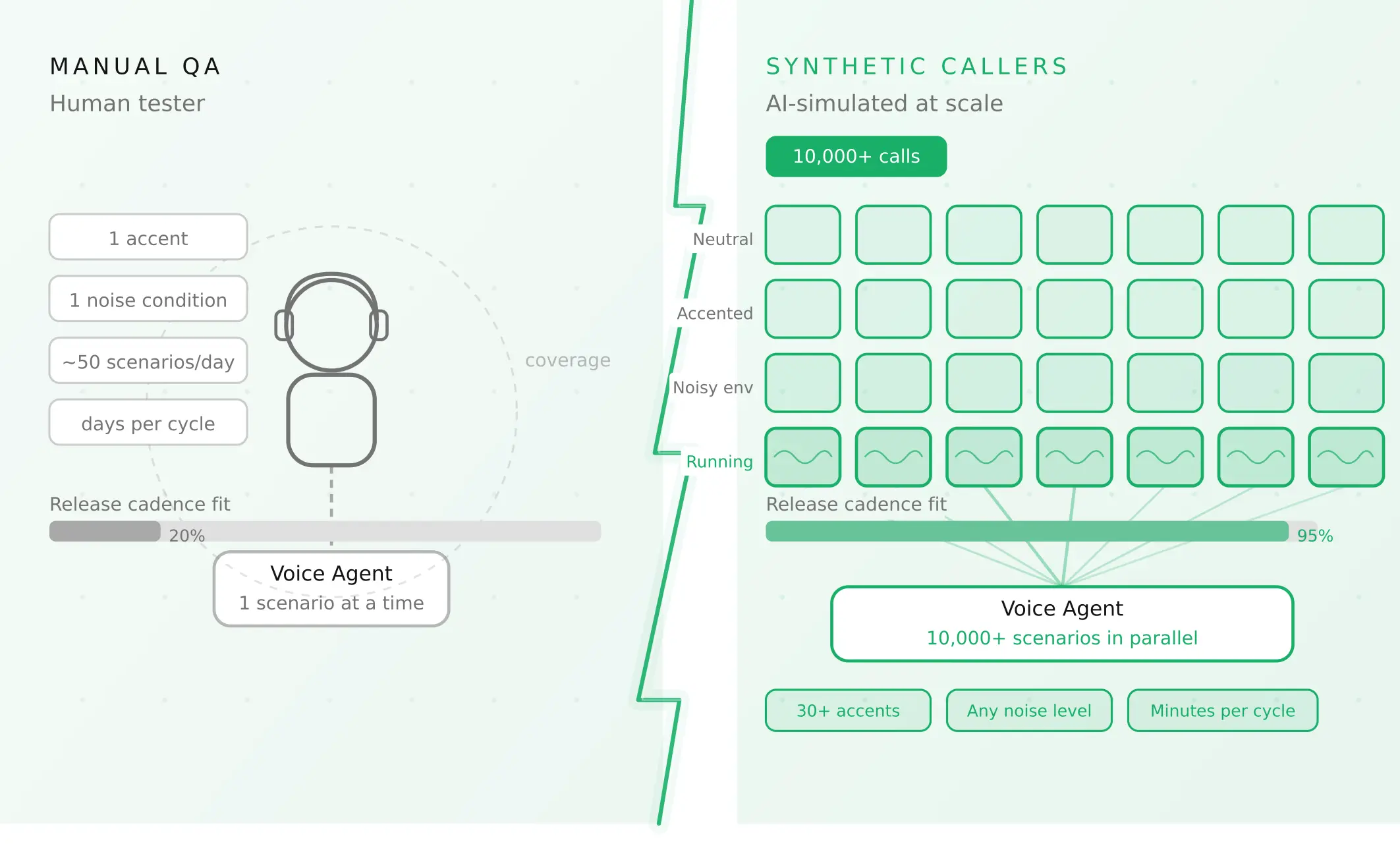
How to automate voice agent testing: synthetic callers vs manual QA
Learn how ai test automation replaces manual QA for voice agents. Compare synthetic callers vs human testers, with a 5-step framework to scale without hiring.
Read more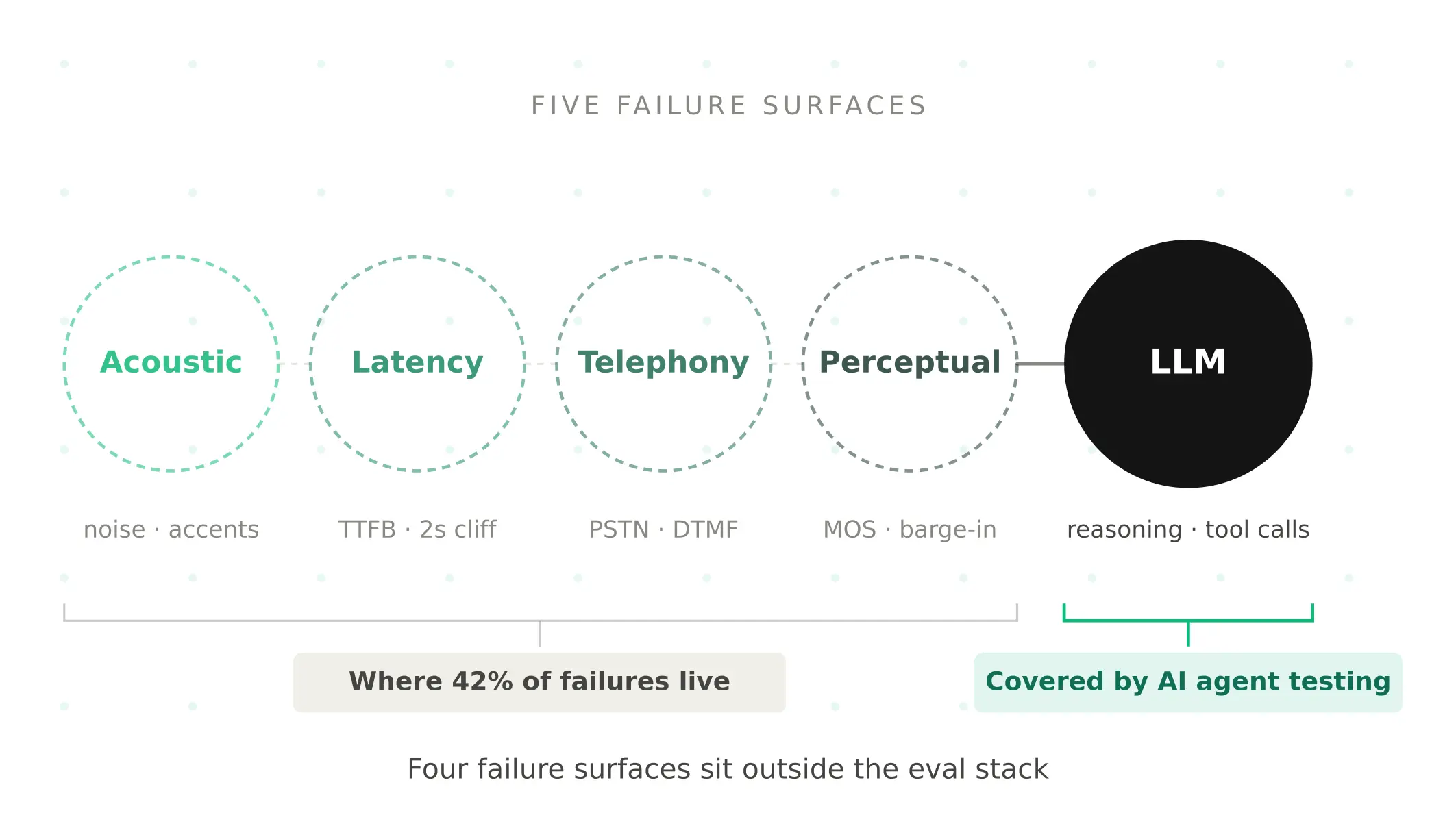
AI Agent Testing vs Voice Agent Testing: What General Tools Miss for Voice
AI agent testing measures text outputs. Voice agent testing measures behaviour through an acoustic pipeline. Five failure categories general tools miss.
Read more