Zendesk AI Voice Agent: What Breaks When It Files Tickets
On this page
Last verified November 5, 2026, against Zendesk's developer documentation for the Tickets, Users, Search and Rate limits pages and two Help Center articles. Behaviour is scoped to the Zendesk Support API (v2) and can vary by plan. This post does not cover Zendesk Talk or Zendesk's own AI agents.
Your Zendesk AI voice agent takes a call, confirms the problem, and a Zendesk ticket appears for a human to finish. The call feels like the hard part. It is not. The ticket is the record your customers' support teams will trust.
This post covers the Zendesk side of that write: what the API accepts, what it accepts silently, and where speech errors become wrong tickets. For the general method, see our guides on integration testing and post-call write-back testing. For the whole series, start with AI voice agent integrations.
Where a Zendesk AI voice agent touches the API
One call can trigger four kinds of Zendesk request. Each has its own failure mode.
1. Find or create the requester. A user lookup or a create-or-update call.
2. Upload evidence. A recording or file goes to the uploads endpoint and returns a token.
3. Create the ticket. One `POST /api/v2/tickets` with requester, priority, custom fields and a first comment.
4. Update the ticket. Later notes, a status change or a summary after the call ends.
The Zendesk reference says the only required property on ticket create is the comment. A ticket with a comment and nothing else is valid. Your agent can file one with no intended requester, priority or category and still get a clean `201 Created`.
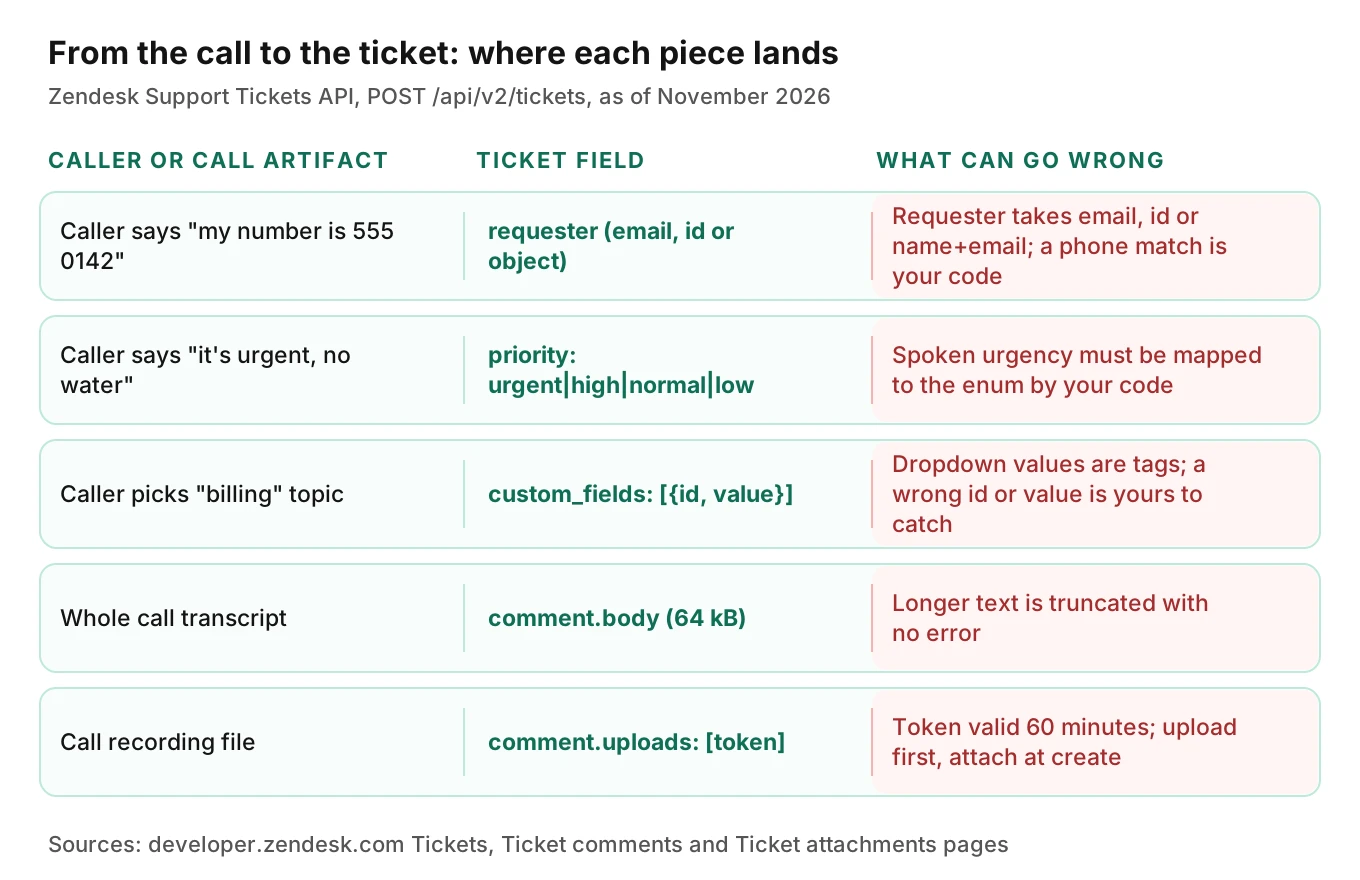
The diagram below maps what a caller says to the field it lands in, and what goes wrong there.
Requester matching: the quiet duplicate maker
The Zendesk requester decides who gets the replies and whose history the ticket joins. The ticket reference describes `requester` as an alternative to `requester_id`. It accepts an email, a user ID, or a user object. If both are sent, `requester_id` wins. It also says that when you create a ticket and the user does not exist, they "may be created automatically depending on account settings."
Read that as a voice team. A caller spells an email address aloud. The speech model hears "m" for "n". Your agent sends the wrong string as `requester`. Depending on account settings, Zendesk may create a brand new user for a mistyped address. The ticket is valid. The customer never sees the reply, because it went to a stranger's inbox. Our alphanumeric capture post covers why spoken emails fail and how to read them back.
Four ways to resolve who is calling
| Method | What the docs say | Voice failure to test |
|---|---|---|
| `requester` email string | Matches or may auto-create a user | Mis-heard address creates a new user |
| Create or update user | Matches by email or external ID, else creates | Wrong email makes a new record |
| External ID on the user | Unique per user, case-insensitive | Agent sends your ID in the wrong case or for the wrong tenant |
| Search by phone | Search is eventually consistent; the Search page does not describe phone matching | Search index lags; shared lines match the wrong person |
My recommendation for an in-house agent: use your own customer ID as the Zendesk `external_id`, and do not use the spoken email as the key. Your product already knows who the caller is. The Users page says create-or-update matches on email address or external ID. External ID lookups are case-insensitive. The same page notes that `show_many` accepts up to 100 values in `external_ids`.
Phone numbers are a weak key
The Users page says `phone` should be in E.164 format with a country code, for example `+15551234567`. It also separates two kinds of numbers. A direct line linked to one user has `shared_phone_number` set to false and can be an identity. A shared number linked to several users has it set to true and cannot be an identity. The identities page says phone number identities must be a direct line, not a shared number.
A Zendesk community feature request from November 2023 says calls on shared numbers are tied to the user who first had the number as a direct line. That is a user report, not a Zendesk spec, and the thread shows no released fix as of its latest reply in September 2025. Treat it as a reason to test, not as documented behaviour.
The index lag trap
Search is a convenient way to find a user. The Search page says it "can take up to a few minutes for new tickets, users, and other resources to be indexed for search." Picture one caller who rings twice in three minutes after a dropped call. On call one the agent creates the user. On call two it searches by phone, finds nothing yet, and creates a second user. Two users now hold one person's history.
The docs I opened do not say whether `show_many` by external ID shares that lag. Do not assume. Test two quick calls and count users. Our permissions post covers what an agent may create at all.
Idempotency: retrying a ticket without making two
Voice agents retry. A create call times out at the telephony layer, the function-call wrapper retries, and Zendesk has already made the ticket. Without protection you get two tickets for one call.
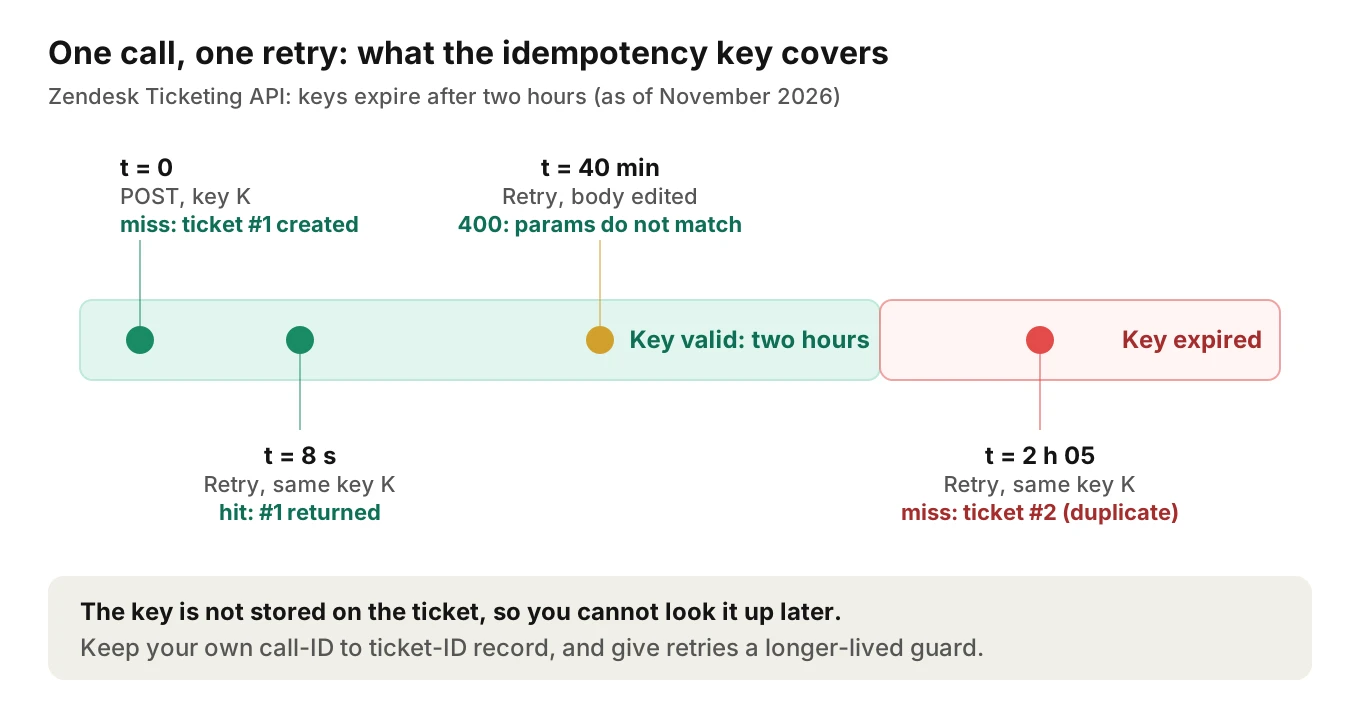
Zendesk's Ticketing API has an answer, the Zendesk idempotency key. The Ticketing API introduction says it "lets you specify an idempotency key that allows you to retry a ticket creation request." Send `Idempotency-Key: {unique_key}` on the request. If you repeat the same body with the same key, no second ticket is created and the first response comes back. The first response carries `x-idempotency-lookup: miss`. The repeat carries `x-idempotency-lookup: hit`.
Four details decide whether this saves you.
- Scope. The page describes it for ticket creation only. Do not assume updates or user creation have it.
- Body must match. Reusing a key with a different body returns a 400 with "Request parameters don't match the given idempotency key."
- Two-hour life. "Keys expire after two hours." A retry after that creates a new ticket.
- Not visible later. The key is not stored on the ticket, so you cannot look it up afterwards.
A note on standards. The IETF draft for an Idempotency-Key header (draft-ietf-httpapi-idempotency-key-header-08, updated October 22, 2026, not an RFC) says a server "SHOULD reply with an HTTP 422 status code" when a key is reused with a different payload. Zendesk returns 400. If you wrap several vendors in one client, do not write a retry layer that expects 422 from all of them.
A retry-safe create, simplified
This sketch is simplified. Authentication follows Zendesk's authentication docs and is left out. Check field IDs against your own account.
import requests

PRIORITY = {"emergency": "urgent", "same_day": "high", "routine": "normal"}

def create_ticket(call, requester_id, base_url, headers):
    summary = call["summary"].encode()[:60_000].decode(errors="ignore")
    payload = {"ticket": {
        "requester_id": requester_id,
        "external_id": call["call_id"],          # link back to your call record
        "priority": PRIORITY.get(call["urgency"], "normal"),
        "type": "incident",
        "custom_fields": [{"id": TOPIC_FIELD_ID, "value": call["topic_tag"]}],
        "comment": {"body": summary, "public": False},
    }}
    h = {**headers, "Idempotency-Key": f"call-{call['call_id']}-ticket"}
    r = requests.post(f"{base_url}/api/v2/tickets", json=payload, headers=h, timeout=10)
    if r.status_code == 429:
        wait = int(r.headers.get("Retry-After", "5"))
        raise RetryAfter(wait)                   # caller sleeps, then retries same key
    r.raise_for_status()
    return r.json()["ticket"]["id"], r.headers.get("x-idempotency-lookup")
Three choices matter. The key comes from your call ID, so every retry reuses it. The body is built once and never edited between retries, or Zendesk returns the 400. And you log the `miss` or `hit` header, so a test can prove a retry made no second ticket. Because the key dies after two hours, also store the ticket ID against the call ID and check it before any late retry.
Priority, type and Zendesk custom fields
The ticket reference lists `priority` values of "urgent", "high", "normal" or "low", and `type` values of "problem", "incident", "question" or "task". It lists no `urgency` field. Callers do not speak in enums. They say "it's flooding the kitchen" or "whenever is fine." Your mapping code owns that translation, and Zendesk will not catch a wrong one.
Custom fields are an array of objects, each with a field `id` and a `value`. The ticket fields page says `tagger` (single-select dropdown) and `multiselect` values are tags from the field's options, each option having a `name` label and a `value` tag. It also says "The use of tags isn't validated and can prevent editing in the future." So the safe move is to load valid option values from your account at startup and reject anything else in code.
One more trap from the same pages:
- Tags overwrite. The ticket reference says that unless you specify otherwise, "the set tag behavior is used, which overwrites and replaces existing tags." A post-call update that sends tags can wipe tags a human or a trigger added.
A mapping table to adapt
This table is illustrative. The urgency labels belong to your own classifier.
| Agent classification | Zendesk `priority` | Zendesk `type` | Check in code |
|---|---|---|---|
| Safety or total outage, caller confirmed | urgent | incident | Needs explicit caller confirmation |
| Same-day impact | high | incident | Topic value is in the account's option list |
| Routine request | normal | question or task | Default if the classifier is unsure |
| Caller unsure or call dropped | normal | question | Add an internal note, never guess "urgent" |
Service-request lines live or die on this mapping. See property management answering, wrong work orders from AI maintenance calls and utility outage and billing calls.
Triggers and automations fire on what you write
Zendesk's Help Center says "Ticket triggers within Support run every time a ticket is created or updated." A second article says "Automations run every hour on all your tickets that are not closed." The two articles word triggers slightly differently, so check your own account. The "Ticket | Is | Created" condition, the articles say, makes a trigger fire once, at the start of the ticket's life.
Your ticket is therefore an input to someone else's logic. A customer's admin may have a trigger that emails the requester, routes by priority, or assigns a group by tag. Those rules were written for web forms and human agents. Illustrative example: a trigger sends an acknowledgement to the requester on creation. If the requester is wrong, it reaches the wrong person, possibly with the caller's issue text.
Rules that read `priority` or tags will act on your mapping errors. An "urgent" ticket might page an on-call team. Hotel lines have the same shape: see hotel guest requests routing. Across many customer accounts you cannot see their triggers, so blast radius matters. Keep a fast way to correct a ticket; our rollback actions guide covers the design.
Comments, transcripts and attachments
The comments page gives the limits that bite a voice agent.
- 64 kB per comment body. Text past the limit is truncated silently, with no error. A long call transcript can lose its ending, which is often the resolution.
- `body` vs `html_body`. Send only `body` or `html_body`. `html_body` is the least sanitized option, so check how line breaks render in a sandbox before relying on them. Do not send `plain_body`; it is removed on create.
- `public` carries over. If you do not change it, the value from ticket creation applies to later comments. A first note marked public makes the next one public too.
For recordings, the attachments page describes two steps. `POST /api/v2/uploads` with a `filename` returns a token. The token is valid for 60 minutes. You attach it only by creating or updating a ticket with a comment that lists the token in `uploads`. Until then, the page says an uploaded file is visible to any authenticated user at its `content_url`, even with private attachments enabled. For call audio holding names and account numbers, that is a window to keep short. Upload right before creating the ticket and delete orphans with `DELETE /api/v2/uploads/{token}`.
The comments page also mentions voice comments. It says they are created through the Tickets API with a different JSON object, and it warns that a `recording_url` may be hosted externally, so you should not send Zendesk credentials to third-party hosts. It does not describe a transcript field for them, so this post stops there.
One channel note. The via types reference lists `api_phone_call_inbound` with ID 45 and "Ticket created by" value `api`. The ticket reference marks `via` read-only and `via_id` write-only, but neither page says which values the API accepts on create. Test it in a sandbox before building reports on channel.
Rate limits: when many callers hit at once
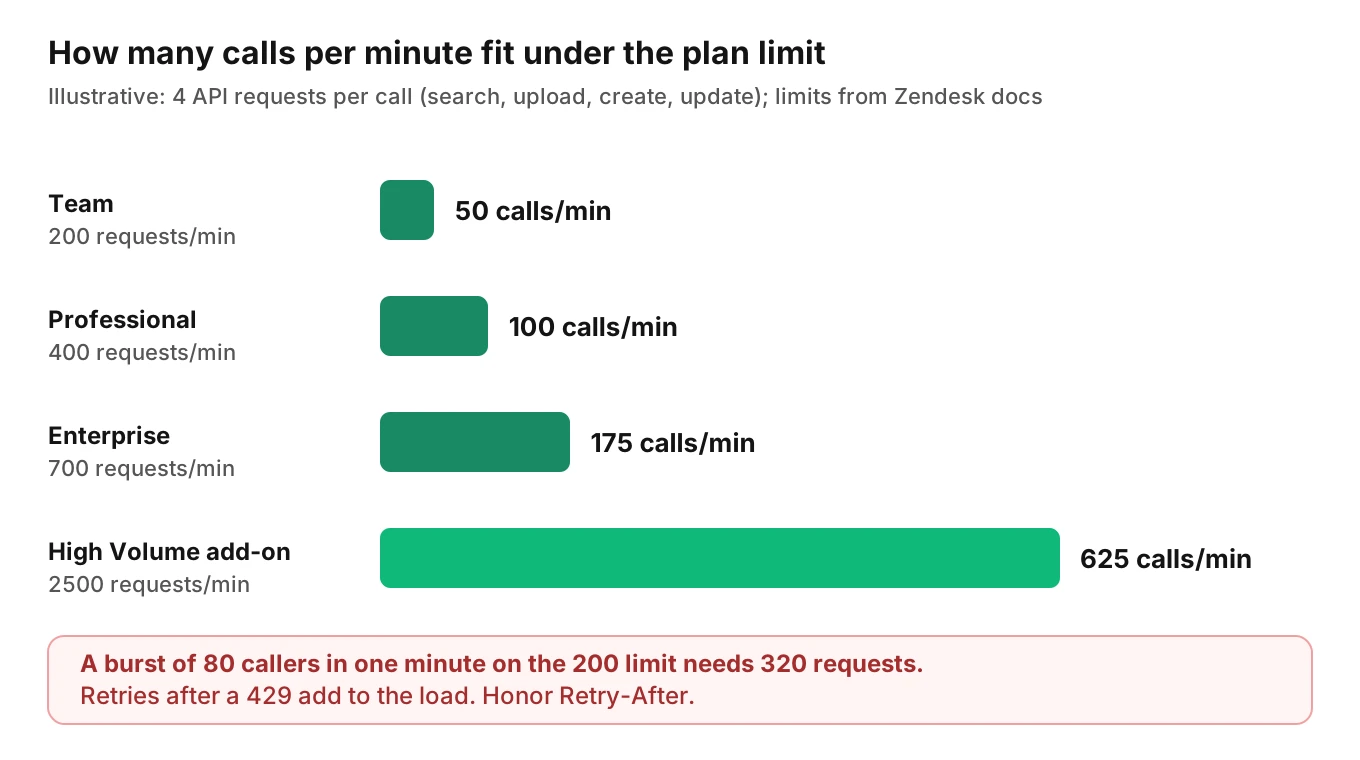
The Zendesk rate limits page gives Support API limits per minute by plan, as of November 2026: Team 200, Professional 400, Enterprise 700, and 2,500 with the High Volume API add-on. The Suite table also lists Growth at 400 and Enterprise Plus at 2,500. The add-on "increases a qualifying plan's limit to 2500 requests per minute." Past the limit, the API returns 429 with a Retry-After header. The page tells you to wait that long before retrying.
Create ticket is not listed in the page's endpoint table. Other limits are:
- Update ticket: "30 updates per 10 minutes per user per ticket", plus 100 requests per minute per account.
- Update user and create or update user: 5 requests per minute per user.
- Search: the Search page gives its own limit of 2,500 requests per minute per account, including accounts with the High Volume add-on, and 1,000 results per query.
Worked example (illustrative)
Say each call makes four requests: a user search, a file upload, a ticket create and a ticket update. On a plan with 200 requests a minute, that is 50 calls a minute before you reach the limit. A burst of 80 callers in one minute needs 320 requests, and the excess gets 429s. Retries add load.
Now the per-ticket limit. If an agent updates one ticket every 15 seconds during a call, that is 40 updates in 10 minutes. The documented ceiling is 30. Write once at the end of the call, not at every turn.
Honor `Retry-After`, queue writes behind a worker, and treat a 429 as a delay the caller never hears about. Our voice agent SLO post covers ticket-write targets.
How to test a Zendesk AI voice agent before each release
Run these tests on your Zendesk AI voice agent in a sandbox account, not a customer's. Read each ticket back through the API after the call and compare it with what the caller said.
1. Write the expected record for each scenario. For each call, define the user, priority, custom field value, comment text and ticket count that Zendesk should hold when the call ends.
2. Cover requester cases. A new caller, a returning caller, a mis-heard email, a shared phone line and two calls within three minutes. Count users and tickets after each.
3. Inject faults between your agent and Zendesk. Time out the first create, return a 429 with `Retry-After`, and delay a user lookup. Assert one ticket and a `hit` on the retry.
4. Test the two-hour edge. Replay a retry past the key window in a test double. Confirm your own call-to-ticket record blocks the duplicate.
5. Check field fidelity. Compare priority, type and custom field values with the caller's words. Add cases where the caller is vague, changes their mind, or says "not urgent, but today."
6. Test long calls. Send a transcript above 64 kB and confirm your code splits or summarises it, rather than trusting the API to complain.
7. Rerun the suite after every prompt, model or mapping change.
This is where audio-level testing earns its place. Evalgent generates test scenarios from your agent's prompt and flows, and plays them with caller profiles that vary accent, pace, interruptions, background noise and language over phone, SIP or WebRTC. It judges from the audio, not only the transcript. A spoken email that reads fine in a transcript can still be heard wrong. Custom metrics can run on every call, so "ticket count per call equals one" can become a gate. The Zendesk read-back stays in your own harness. Evalgent tests the agent's behaviour; it does not connect to Zendesk here.
After launch, Evalgent's production monitoring takes call recordings your team pushes, transcribes them, maps them to scenarios and judges them. It flags tool-call failures, policy failures and PII leakage, with fix recommendations. Pair that with a daily count of Zendesk tickets that share a call ID. For support metrics beyond the write, see customer support voice agent metrics. For returns and ecommerce flows, see AI returns and exchange calls. If your customers also use another helpdesk, the Freshdesk post covers its differences.
Frequently asked questions
Can an AI voice agent create Zendesk tickets?
Yes, through the Support Tickets API. `POST /api/v2/tickets` takes a ticket object, and the docs say the only required property is `comment`. That makes it easy to create tickets that are valid but wrong. Validate the requester, priority and custom fields in your own code before the call.
How do I stop my voice agent creating duplicate Zendesk tickets?
Send an `Idempotency-Key` header on ticket creation, built from your call ID, and keep the body identical on retries. Zendesk returns the first ticket instead of making a new one. Keys expire after two hours, so also record the ticket ID against the call in your own database.
How does Zendesk match a caller to a requester?
The ticket takes `requester_id`, or a `requester` email, ID or name-and-email object. Create-or-update user matches on email or external ID. Phone is weaker: shared numbers cannot be identities. Using your own customer ID as `external_id` is the most reliable key for an in-house agent.
What Zendesk API rate limits affect a voice agent?
As of November 2026, plan limits run from 200 to 700 requests a minute, or 2,500 with the High Volume add-on. Updates are capped at 30 per 10 minutes per user per ticket. Over the limit, you get a 429 and a `Retry-After` header. Queue writes and honor the wait.
How do I map caller urgency to Zendesk priority?
Map your classifier's output to the four allowed values: urgent, high, normal or low. Zendesk has no urgency field in the ticket reference. Default to normal when unsure, require caller confirmation before urgent, and keep the original spoken words in an internal comment for the human who picks it up.
Can a voice agent attach call recordings or transcripts to a ticket?
Yes. Upload the file to `/api/v2/uploads`, then pass the token in the comment's `uploads` array when you create or update the ticket. The token lasts 60 minutes. Comment text is limited to 64 kB and is truncated silently, so split or summarise long transcripts.
Do Zendesk triggers fire on tickets created by the API?
Zendesk's Help Center says triggers run every time a ticket is created or updated. It does not single out API tickets in the articles I opened. Assume customer triggers will act on your priority, tags and requester, and test with realistic trigger rules in a sandbox account.
How do I test a Zendesk AI voice agent before release?
Use a sandbox account. Replay scripted calls, read the tickets back through the API, and compare them with the expected record. Include shared phone lines, mis-heard emails, retries, 429 responses and long transcripts. Rerun the suite after every prompt or mapping change.
The bottom line
A Zendesk AI voice agent is only as accurate as its ticket, and the ticket is only as accurate as your requester match, idempotency, field mapping and rate-limit handling. Test each of those against a sandbox account before every change, because Zendesk will accept a wrong ticket without complaint.
Related Articles
How to automate voice agent testing: synthetic callers vs manual QA
Learn how ai test automation replaces manual QA for voice agents. Compare synthetic callers vs human testers, with a 5-step framework to scale without hiring.
Read more
AI Agent Testing vs Voice Agent Testing: What General Tools Miss for Voice
AI agent testing measures text outputs. Voice agent testing measures behaviour through an acoustic pipeline. Five failure categories general tools miss.
Read more