Google Calendar AI Voice Agent: What Breaks and How to Test
On this page
Verified in November 2026 against Google's Calendar API v3 pages, Google's OAuth 2.0 docs, RFC 3339 and Python's datetime docs. Where a page is silent, this post says so.
A caller says "book me tomorrow at three." Your agent says "done." Between those lines, a phrase became a timestamp and an HTTP call wrote to a calendar. Each step can be wrong without any error. The caller still hears a confident voice.
This post is for teams that built their own voice agent and write to Google Calendar, their own or their customers'. It follows one booking through the API. For the wider picture, see our guide to AI voice agent integrations.
What a Google Calendar AI voice agent actually does
A Google Calendar AI voice agent is a phone agent that reads and writes a Google Calendar during the call. It is the shape behind an AI receptionist for Google Calendar, an AI phone agent with calendar booking, or AI appointment booking inside a product. Teams build it as a voice agent Google Calendar integration. The API's overview lists events, calendars, calendar lists, settings and ACLs as core resources. A booking touches availability, the event and the calendar's default time zone.
A booking is a short workflow.
1. Hear the request and resolve it to an exact start and end.
2. Ask Google which times are busy.
3. Offer a slot and get a clear yes.
4. Create the event, possibly with an attendee.
5. Read it back and confirm, then handle the push or poll that tells you a human changed it.
Voice errors enter at steps 1 and 3. API behaviour matters at steps 2, 4 and 5. Our post on testing appointment scheduling covers the conversation. This one covers the calendar.
Time zones: where "tomorrow at 3" becomes a timestamp
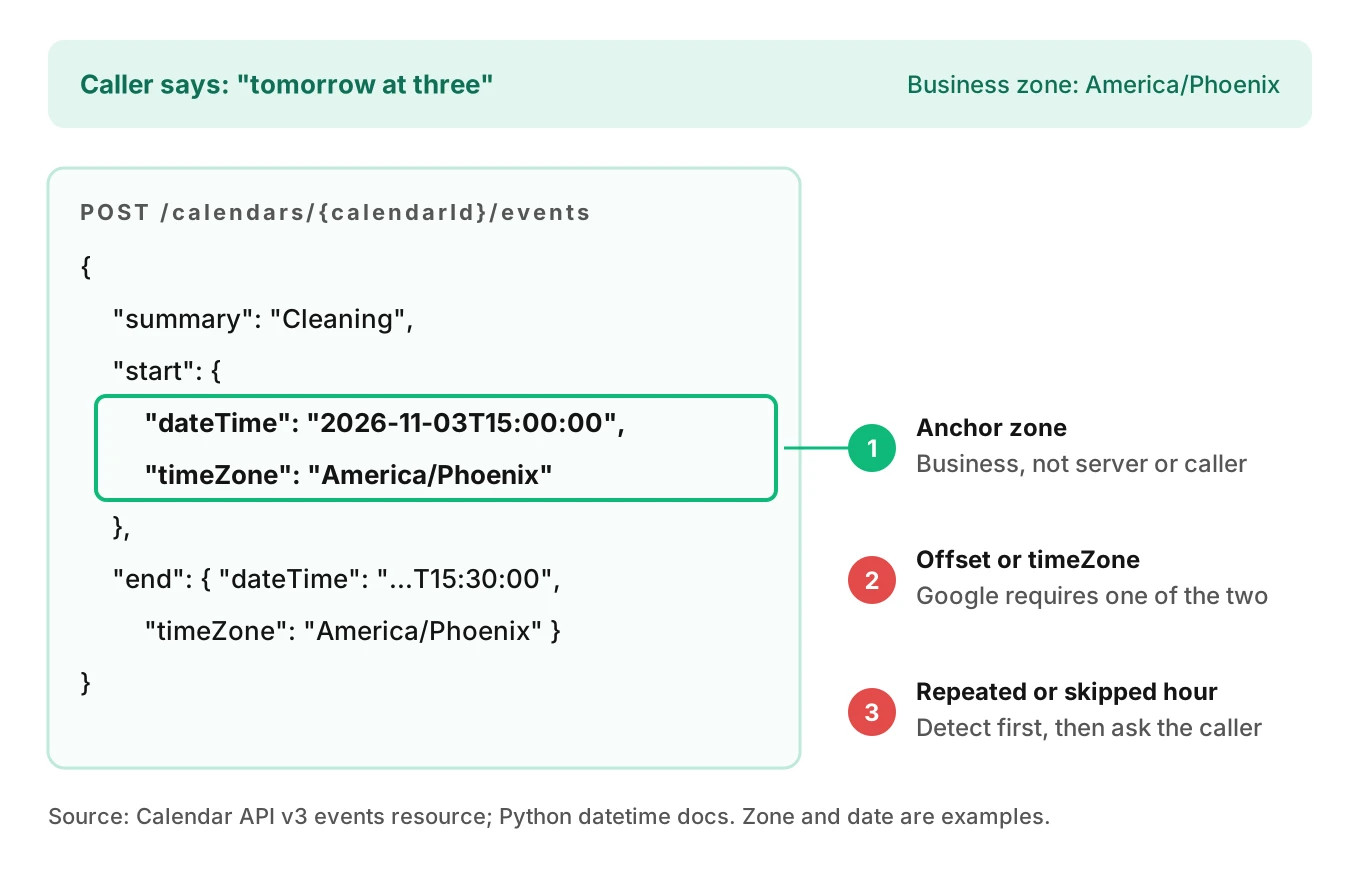
The events resource says how a timed event is stored. For `start.dateTime` and `end.dateTime`: "A time zone offset is required unless a time zone is explicitly specified in `timeZone`." For recurring events, the zone field "is required and specifies the time zone in which the recurrence is expanded."
That gives three legal ways to write one moment. They are not equal for voice:
| Payload shape | What it stores | Voice risk |
|---|---|---|
| `dateTime` with offset, e.g. `-08:00` | One fixed instant | Offset can be wrong after a daylight saving change |
| `dateTime` without offset, plus `timeZone` | Wall time in a named zone | Zone name may be the caller's, not the business's |
| `dateTime` in UTC (`Z`) | One fixed instant | Reads fine in the API, wrong in the staff's head |
RFC 3339 is clear about its limits. Section 4.1 says "This specification does not cater to local time zone rules." An offset like `-08:00` records one moment. It does not know the same zone will be `-07:00` in March.
Whose "tomorrow"?
The caller may be in Denver and the business in Phoenix. "Tomorrow at 3" has two readings. Pick the anchor zone on purpose. A workable rule for a business booking line:
- Interpret relative dates and clock times in the business's zone, taken from your own location record.
- Say the zone aloud when it differs from the caller's area code or stated location: "three p.m. Mountain, that is two p.m. your time."
- Store `timeZone` as an IANA name such as `America/Phoenix`, never a three-letter abbreviation.
Compute "tomorrow" from the business zone's local date. A server in UTC gets it wrong at 8 p.m. Pacific.
Daylight saving: two failure shapes
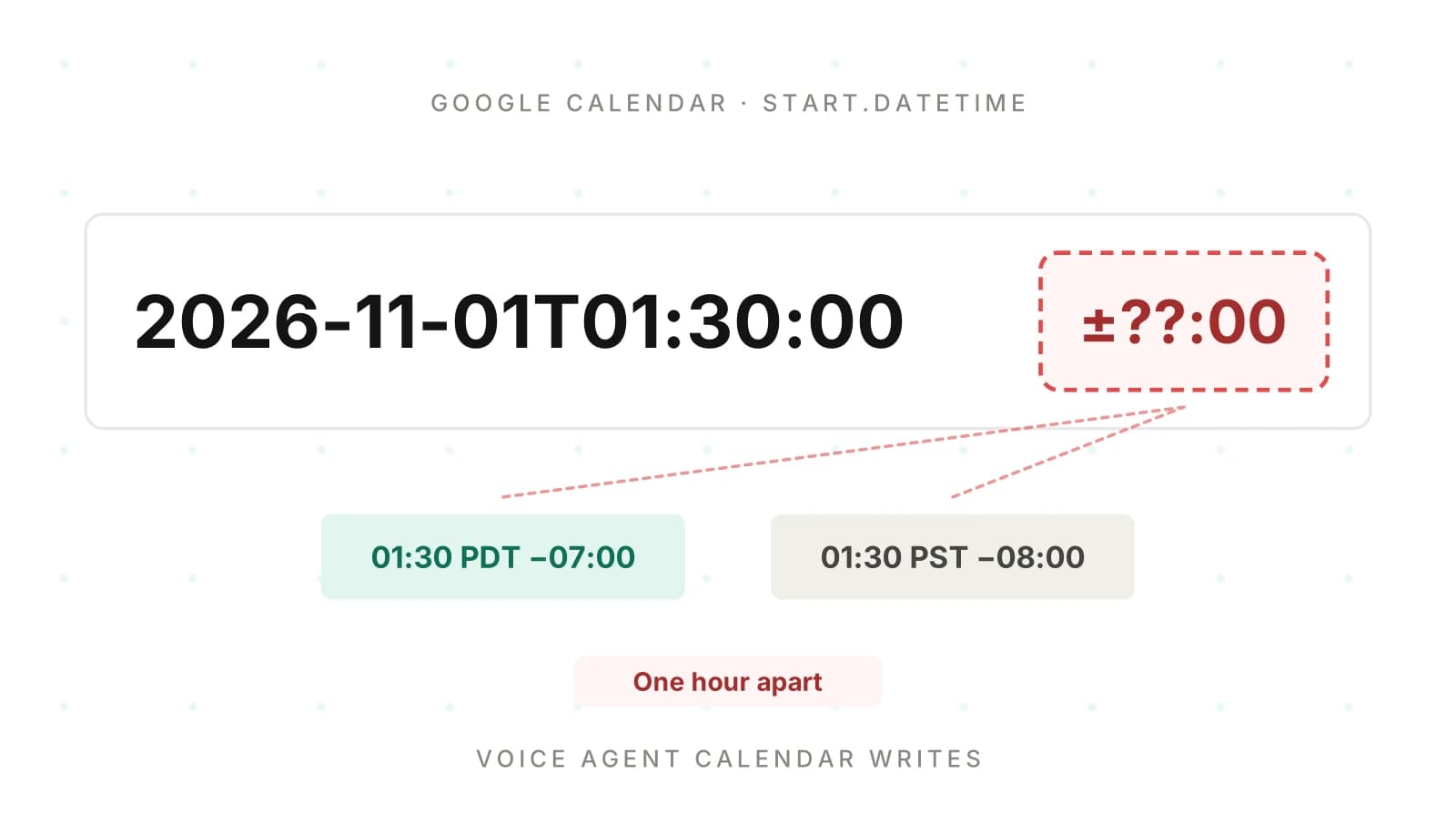
US clocks fall back on November 1, 2026, so 1:30 a.m. happens twice. In March, 2:30 a.m. does not happen at all. Python's datetime documentation covers the first case with `fold`, "Used to disambiguate wall times during a repeated interval." Values 0 and 1 mean "the earlier and later of the two moments."
The Calendar pages I opened do not say how the API treats a skipped or repeated wall time sent as `dateTime` plus `timeZone`. The concepts page never mentions daylight saving. Do not assume. Test it and record what you see.
The bug also shows outside midnight hours. "Same time next week" drifts by an hour if code adds 7 days of seconds, not 7 calendar days in the zone.
Here is a small resolver that refuses to guess. It uses only the standard library.
# Simplified: resolve a spoken local time without guessing.
from datetime import datetime
from zoneinfo import ZoneInfo

def resolve(local_naive: datetime, tz_name: str):
    tz = ZoneInfo(tz_name)
    a = local_naive.replace(tzinfo=tz, fold=0)
    b = local_naive.replace(tzinfo=tz, fold=1)
    round_trip = a.astimezone(ZoneInfo("UTC")).astimezone(tz).replace(tzinfo=None)
    if round_trip != local_naive:
        return {"status": "nonexistent"}   # clocks skipped this wall time
    if a.utcoffset() != b.utcoffset():
        return {"status": "ambiguous", "options": [a.isoformat(), b.isoformat()]}
    return {"status": "ok", "start": a.isoformat(), "timeZone": tz_name}
When the status is `ambiguous`, the agent asks a plain question: "Do you mean the first 1:30 or the second?" When it is `nonexistent`, the agent says that time does not exist that day and offers the nearest valid slot. Never let the model pick silently.
All-day events and the date/dateTime split
The concepts page says "The start and end of the event must both be timed or both be all-day," and for all-day events "the timezone field has no significance." The events reference gives `transparency` a default of `opaque`, which "does block time on the calendar," and a `transparent` value that does not. Your availability logic must handle both.
Event `end` is exclusive ("The (exclusive) end time of the event."). A 3:00 to 3:30 slot and a 3:30 to 4:00 slot do not overlap. Use half-open intervals.
Availability: free/busy, and what it does not tell you
The reference describes `freeBusy` as "Returns free/busy information for a set of calendars." The request is `POST https://www.googleapis.com/calendar/v3/freeBusy` with `timeMin`, `timeMax`, an optional `timeZone` and an `items` array of calendar IDs. Five details matter.
1. Default zone is UTC. The reference says "Time zone used in the response. Optional. The default is UTC." Pass the business zone, or parse the offsets you get back.
2. Busy ranges are half-open. The response's `busy[].start` is inclusive and `busy[].end` is exclusive.
3. Errors can sit beside results. A calendar can return `errors[]`: "Optional error(s) (if computation for the calendar failed)." Reasons include `notFound` and `internalError`. An empty `busy` list plus an `errors` entry means unknown, not free.
4. Limits exist. `calendarExpansionMax` has a maximum of 50 and `groupExpansionMax` a maximum of 100.
5. Scopes are separable. The page accepts `calendar.readonly`, `calendar`, `calendar.events.freebusy` and `calendar.freebusy`. If your agent only needs availability, ask for a free/busy scope, not full calendar access. Our post on voice agent permissions explains why narrow scopes shrink the blast radius.
Free/busy answers "is this person busy?" It does not say whether a chair, van or room is free. Query each resource calendar and require all to be free. See why an HVAC AI books the wrong tech and dental AI scheduling errors.
The Calendar pages I opened do not say how `outOfOffice`, `focusTime` or `workingLocation` event types affect free/busy results. The events reference lists those types. Test them against a real calendar before you promise anything about them.
Double booking: the insert call does not ask permission
`events.insert` is documented as "Creates an event." The request body requires only `start` and `end`. The create-events guide says "The only two required fields are the start and end times." Neither page describes a conflict check, and the guide's only pre-check is confirming write access by reading `accessRole` from the calendar list entry.
That does not prove conflicts are impossible. It means the pages I opened describe no protection. Assume `insert` succeeds on a taken slot and build the protection yourself.
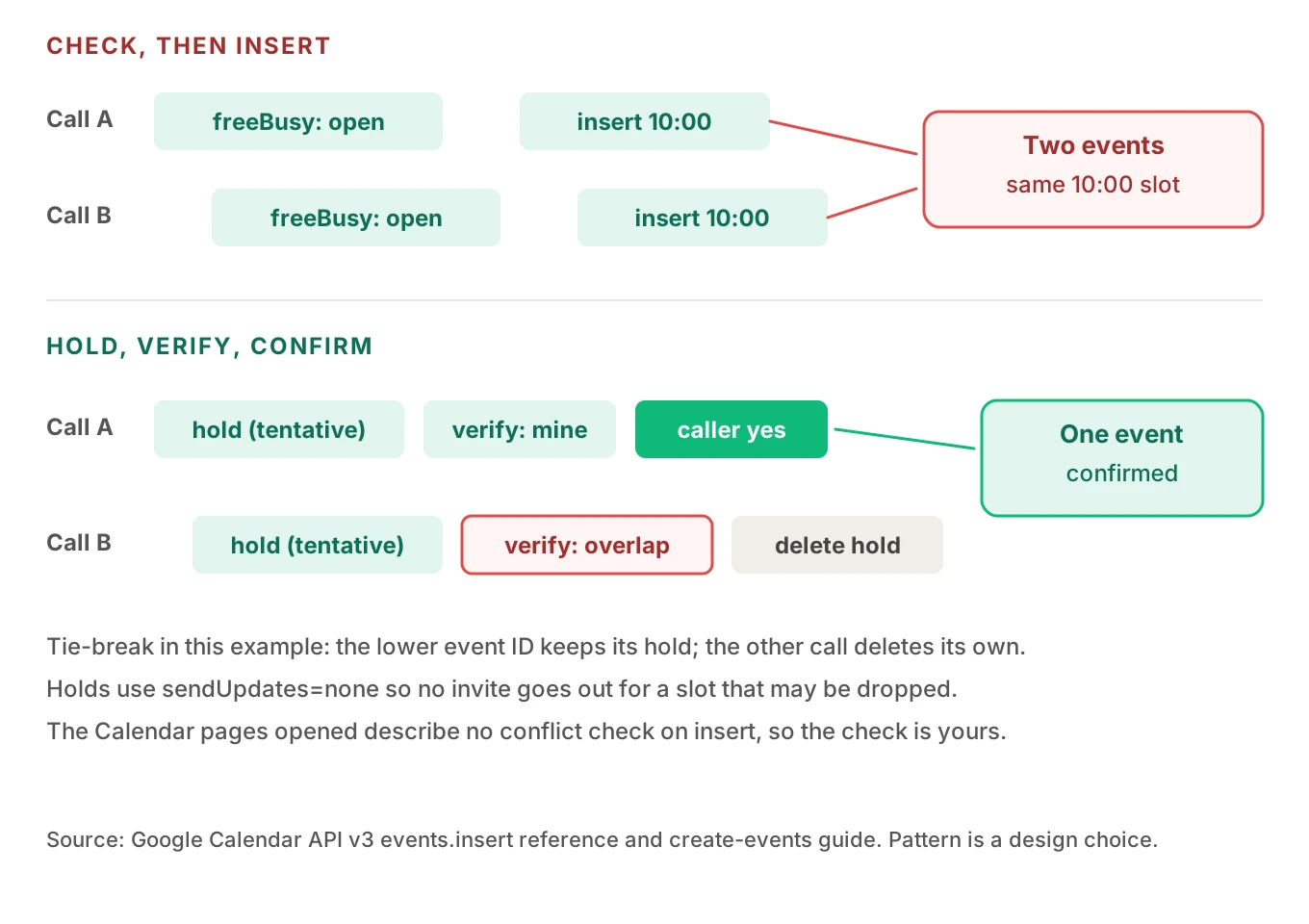
The failure is a check-then-act race. Two callers hear "10:00 is open." Both agents see an empty range, and both insert. Google now holds two events at 10:00.
A hold, verify, confirm pattern
This is a named, copyable pattern. Call it hold, verify, confirm.
1. Lock per calendar in your own system. If every booking goes through your agent, a short lock keyed on the calendar ID removes most races. It does not cover humans editing the calendar by hand.
2. Insert a hold. Create the event with `status: "tentative"`. The reference lists `tentative` as "The event is tentatively confirmed." Its `transparency` defaults to `opaque`, so it blocks time. Use `sendUpdates=none` on the hold so nobody gets an email for a slot that may be dropped.
3. Verify. Query the window again. If another opaque event overlaps your hold, you lost the race. Use a fixed tie-break, such as the lower event ID wins, so both agents reach the same answer. The loser deletes its hold and offers another time.
4. Confirm with the caller. Read back date, time, zone and name. Wait for a clear yes.
5. Promote. Update the event's status to `confirmed`, then send attendee notifications.
The tie-break is a design choice, not Google behaviour. The pages I opened do not say whether a tentative event shows in free/busy output. Your verify step reads events directly, so it does not depend on that.
Use your own event ID as an idempotency key
The create-events guide says you can supply your own ID, and that this "prevents duplicate event creation if the operation fails" part-way through. The events reference sets the format: "characters allowed in the ID are those used in base32hex encoding, i.e. lowercase letters a-v and digits 0-9," between 5 and 1024 characters, and "unique per calendar." The errors page lists a `409` with reason `duplicate` and the message "The requested identifier already exists."
Derive the ID from the call, so a retry cannot create a second event.
# Simplified: idempotent hold insert against Calendar API v3 (REST).
import base64, hashlib, requests

def event_id(call_id: str, slot_start_utc: str) -> str:
    digest = hashlib.sha1(f"{call_id}|{slot_start_utc}".encode()).digest()
    return base64.b32hexencode(digest).decode().lower().rstrip("=")  # a-v, 0-9

def insert_hold(token, calendar_id, call_id, start, end, tz):
    body = {
        "id": event_id(call_id, start),
        "status": "tentative",
        "summary": "HOLD - phone booking",
        "start": {"dateTime": start, "timeZone": tz},
        "end":   {"dateTime": end,   "timeZone": tz},
    }
    r = requests.post(
        f"https://www.googleapis.com/calendar/v3/calendars/{calendar_id}/events",
        params={"sendUpdates": "none"},
        headers={"Authorization": f"Bearer {token}"},
        json=body, timeout=3)
    if r.status_code == 409:      # same ID already exists: our own retry
        return "already_held"
    r.raise_for_status()
    return r.json()["id"]
A 409 on your own ID is success on a retry. A 409 on a different call's ID, which should not happen with a hash, is a bug to log.
Attendees and notifications: a spoken email address is an outbound email
The insert reference lists `sendUpdates` values: `all` ("Notifications are sent to all guests"), `externalOnly` ("Notifications are sent to non-Google Calendar guests only") and `none` ("No notifications are sent"). The create-events guide says the event "appears on all the primary Google Calendars of the attendees" you include, sharing the same event ID.
For voice, every captured email is an outbound message. A wrong address puts an event on a stranger's calendar. Our post on alphanumeric capture covers read-back. Add one rule: no attendee until the read-back is confirmed, and holds stay at `sendUpdates=none`.
The events reference also warns that "Service accounts need to use domain-wide delegation of authority to populate the attendee list." A booking agent running on a service account with no delegation may fail when it adds attendees even though the bare event succeeds. Test both paths.
Quotas and errors: budget the minute, not the day
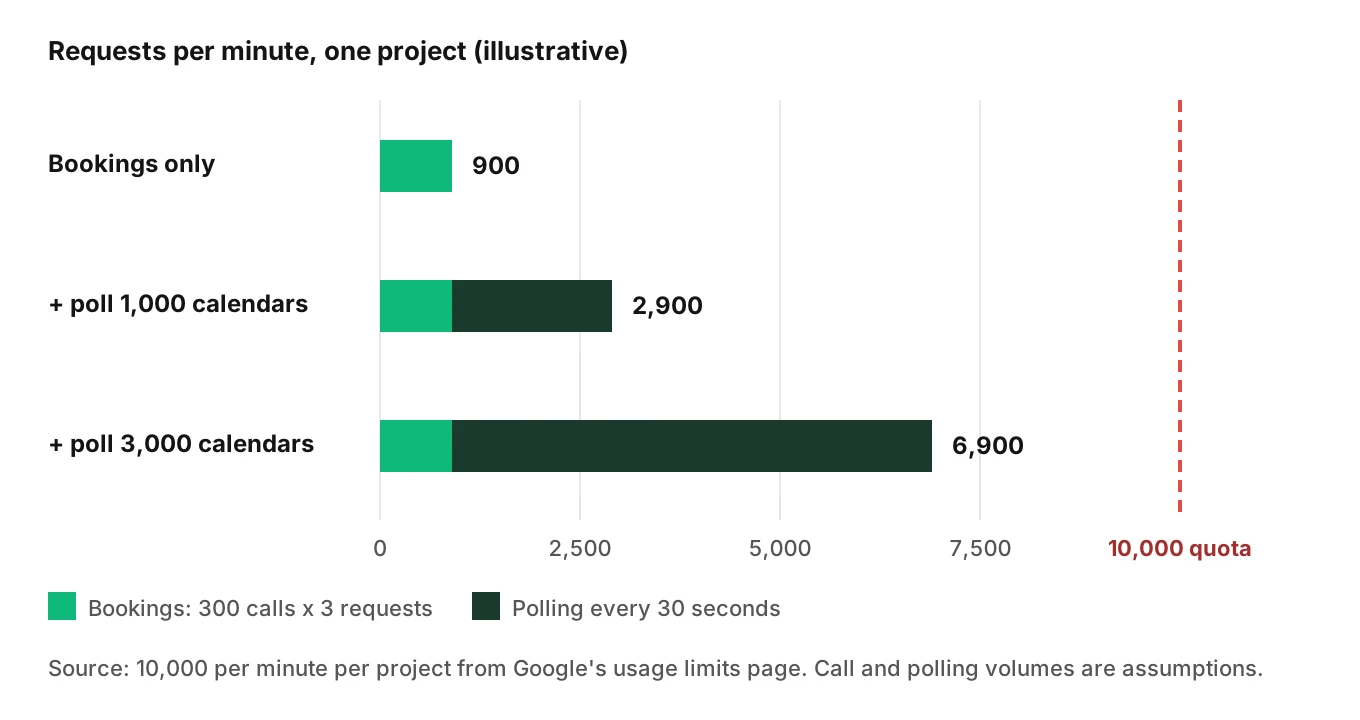
Google's usage limits page, as of November 2026, lists 10,000 requests per minute per project and 600 per minute per user per project. Quotas are "calculated per minute using a sliding window." The daily project threshold is 1,000,000 requests, the point above which charges apply, and the page says "You cannot request an increase on this daily threshold limit." The page also notes that operational limits can apply when many writes hit one calendar in quick succession.
Here is a worked example. The numbers are illustrative assumptions, not Google data.
- Peak: 300 booking calls per minute across all customers. Each makes 3 requests: free/busy, insert, verify. That is 900 per minute.
- Polling 1,000 calendars every 30 seconds adds 2,000 per minute. Total 2,900, or 29% of 10,000.
- Polling 3,000 calendars adds 6,000. Total 6,900, or 69%, before retries.
- Retries multiply load. Three retries per failed call can quadruple the traffic from those calls.
Google recommends push notifications over polling and randomized sync times. For domain-wide delegation, the quota page says the service account's per-user quota is charged. It suggests the `quotaUser` parameter or `x-goog-quota-user` header to attribute usage to the impersonated user.
Error handling on a live call
The errors page maps codes to actions. A condensed version for a phone agent:
| Code and reason | Page says | Voice agent action |
|---|---|---|
| 400 empty time range | Permanent, do not retry | Fix the resolver; apologize and offer a callback |
| 401 `authError` | Get a new access token with the refresh token | Refresh once; if that fails, stop and escalate |
| 403 or 429 `rateLimitExceeded` | Use exponential backoff | Back off within the call budget, then defer |
| 403 `userRateLimitExceeded` | Raise the per-user quota | Back off; page an engineer if it repeats |
| 403 `quotaExceeded` | "Calendar usage limits exceeded." | Stop writing to that calendar for a while |
| 409 `duplicate` | Identifier already exists | Treat as success if it is your own ID |
| 410 `fullSyncRequired` | Sync token no longer valid | Re-sync, then re-run the availability check |
The quota page describes backoff as about 2^n seconds plus up to 1,000 ms of random delay, capped near 32 to 64 seconds. That suits a background job, not a live caller. Set a call budget instead, for example two retries inside 3 seconds. Then say "I could not confirm that. I will text you once it is booked," and queue a retry. Never say "you're booked" before insert returns 200 and verify passes.
Tokens and scopes: the failure that looks like a Tuesday outage
Google's OAuth 2.0 documentation lists why a refresh token stops working. For an external user type, a "Testing" publishing status gets a token "expiring in 7 days," unless the app asks only for basic name, email or profile scopes. Others: the token "has not been used for six months," the user "has revoked your app's access," and a cap of "100 refresh tokens per Google Account per OAuth 2.0 client ID."
The 7-day rule is the dangerous one. A pilot works for a week, then fails on every call. If the agent reads a token failure as "no availability," it tells callers the calendar is full. Treat `401` as an outage, not a scheduling answer.
The insert reference accepts `calendar`, `calendar.events`, `calendar.app.created` and `calendar.events.owned`. Pick the narrowest that works. Keep scopes identical in staging and production.
Push notifications: catching the human who edits the calendar
The push guide has you `POST` to a resource's `watch` method with a channel `id`, `type` of `web_hook` and an HTTPS `address`. Three statements shape your design:
- "These messages do not contain specific information about updated resources," so you must call the API after each notification.
- "Currently, there's no automatic way to renew a notification channel." You must create a new channel before the old one expires.
- "Notifications are not 100% reliable," so keep a periodic sync.
Use push to invalidate cached availability, not to replace the free/busy check. Re-check right before you offer a slot. If you keep sync tokens, expect `410` with `fullSyncRequired`. The events list reference requires an offset on `timeMin` and `timeMax`, defaults `singleEvents` to false and pages at 250 events.
How to test a Google Calendar voice agent before it ships
Scripted calls against a sandbox calendar catch most of this. The generic method is in our guides to integration testing and post-call write-back testing. The calendar-specific cases are below.
1. Create a dedicated test calendar and test Google account. Never test against a customer's calendar. Record its default time zone.
2. Build a time-phrase matrix. Cover "tomorrow at three," "next Tuesday morning," "the first of the month," "same time next week," and "three" said as "free." Run each from a caller zone that differs from the business zone.
3. Add daylight saving dates. Include the fall-back Sunday, the spring-forward Sunday, and the week around each. Record what the API does with an ambiguous or skipped wall time, since the docs are silent.
4. Check the stored payload, not the speech. After each call, read the event back and assert `start.dateTime`, `timeZone`, and that no `date`-only event was created by mistake.
5. Force a conflict. Pre-book 10:00, then ask for 10:00. Then run two simultaneous calls for the same slot. Pass means one event, one apology.
6. Break the plumbing. Return 429 and 403 `quotaExceeded`, expire the token, return a free/busy `errors[]` entry. Pass means no false "booked" claim.
7. Repeat the booking call. Replay a call after a dropped connection. Pass means no second event.
8. Check the attendee path. Give a misheard email and confirm no invite goes out before the read-back.
9. Run it many times. Voice runs vary, so repeat each scenario and track pass rates.
Evalgent generates test scenarios from an agent's prompt and flows. Its caller profiles vary accent, speech pace, interruptions, background noise and language, which is where "three" versus "free" starts. Evalgent evaluates from the audio, not only the transcript, and runs custom metrics on every call, such as "stored start time equals the confirmed time." It does not connect to Google Calendar. Your harness reads the event.
For production, call monitoring flags tool-call failures and policy failures on recordings you push in. Pair it with a daily job that compares confirmed calls with calendar events. For metrics, see appointment scheduling voice agent metrics.
When this applies
This fits teams that write to Google Calendar directly, such as salon booking AI or interview scheduling. If you book through a scheduling product, see Calendly AI voice agent. For undoing bad writes, read voice agent rollback actions. Check Google's current documentation before relying on any limit, since quotas can change.
Frequently asked questions
How does an AI voice agent connect to Google Calendar?
It authenticates with OAuth 2.0 or a service account, then calls the Calendar API v3. A booking uses a free/busy query to find open times and events.insert to create the event. The agent needs narrow scopes, a stored refresh token, and handling for errors and expired tokens.
Does the Google Calendar API prevent double booking?
The insert and create-events pages I opened describe no conflict check, so assume it does not. Two simultaneous inserts for the same time can both succeed. Use a per-calendar lock, insert a tentative hold, verify no overlap, and then confirm. Test it with two concurrent calls.
How should a voice agent handle time zones in Google Calendar?
Resolve spoken times in the business's zone, say the zone aloud when it differs from the caller's, and send `dateTime` with `timeZone` as an IANA name. Google requires an offset unless `timeZone` is set. Compute "tomorrow" from the business's local date, not the server's UTC date.
What happens with daylight saving time in a Google Calendar booking?
The Google pages I opened do not describe how the API handles a repeated or skipped wall time. Detect both in your code before calling the API, ask the caller to choose, and test the November and March change dates against a real calendar to record actual behaviour.
How do I check availability with the Google Calendar API?
Call `POST /calendar/v3/freeBusy` with `timeMin`, `timeMax`, the business `timeZone` and the calendar IDs. Busy ranges are start-inclusive and end-exclusive. Check each calendar's `errors[]` entry, because a failed computation is unknown, not free.
What are the Google Calendar API rate limits for a voice agent?
As of November 2026, Google lists 10,000 requests per minute per project and 600 per minute per user per project, using a sliding window. There is also a daily threshold of 1,000,000 requests per project that cannot be raised. Use backoff with a short call budget, and push notifications instead of polling.
Why does my Google Calendar voice agent stop working after a week?
If your OAuth consent screen is in Testing status, Google's documentation says the refresh token expires in 7 days. Revoked access and six months of disuse also end a token. Move the app out of Testing, handle 401 errors as faults, and never turn a token failure into "no availability."
How do I test a Google Calendar AI voice agent?
Use a dedicated test calendar and scripted calls. Cover time phrases across zones, daylight saving dates, forced conflicts, simultaneous callers, 429 and 401 responses, retries and misheard attendee emails. After each call, read the stored event and compare it with what the agent confirmed aloud.
The bottom line
A Google Calendar voice agent fails in the gap between what the caller heard and what Google stored. Resolve times with an explicit zone, build your own conflict protection, budget quotas per minute, and treat token failures as outages rather than answers.
Related Articles
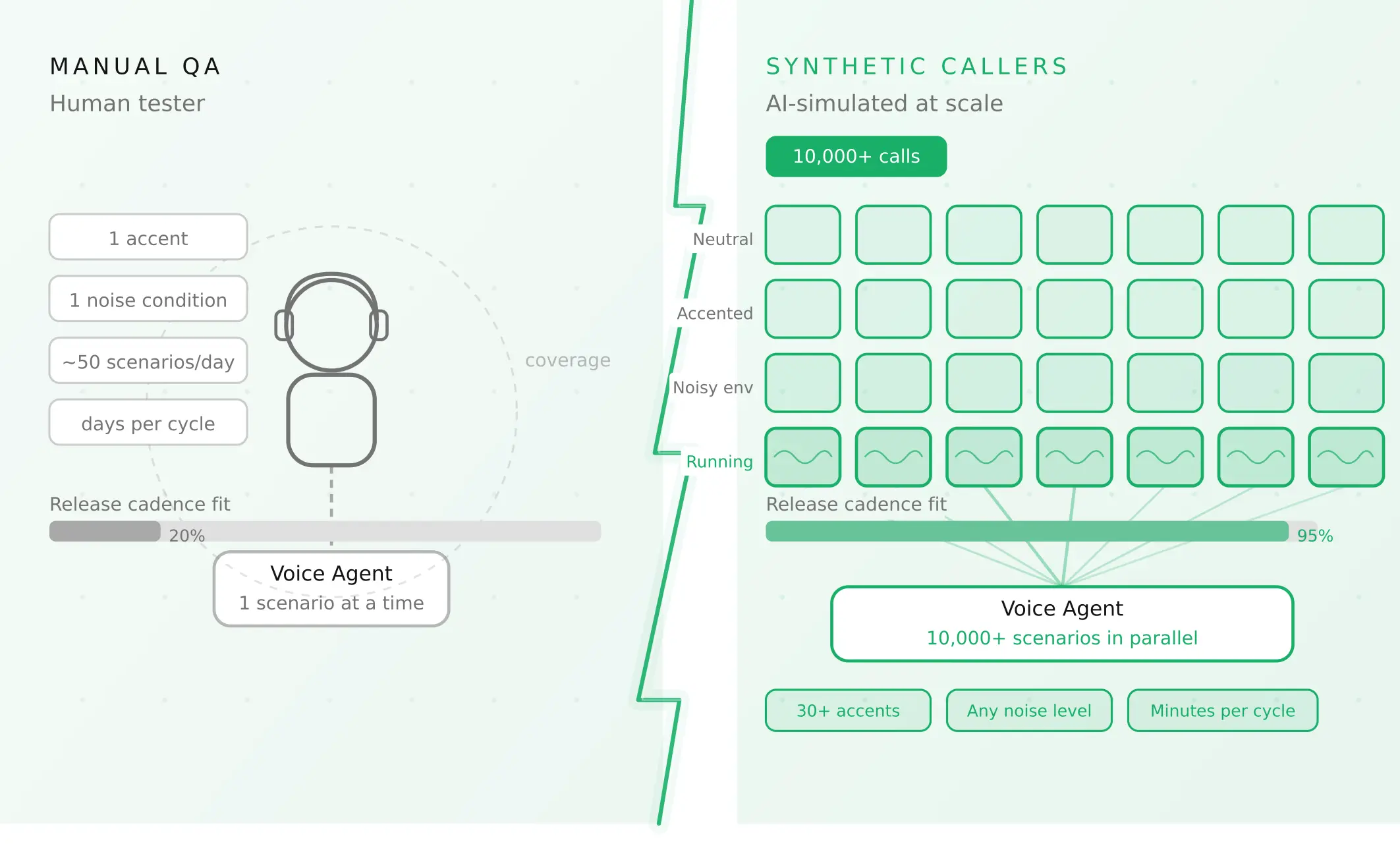
How to automate voice agent testing: synthetic callers vs manual QA
Learn how ai test automation replaces manual QA for voice agents. Compare synthetic callers vs human testers, with a 5-step framework to scale without hiring.
Read more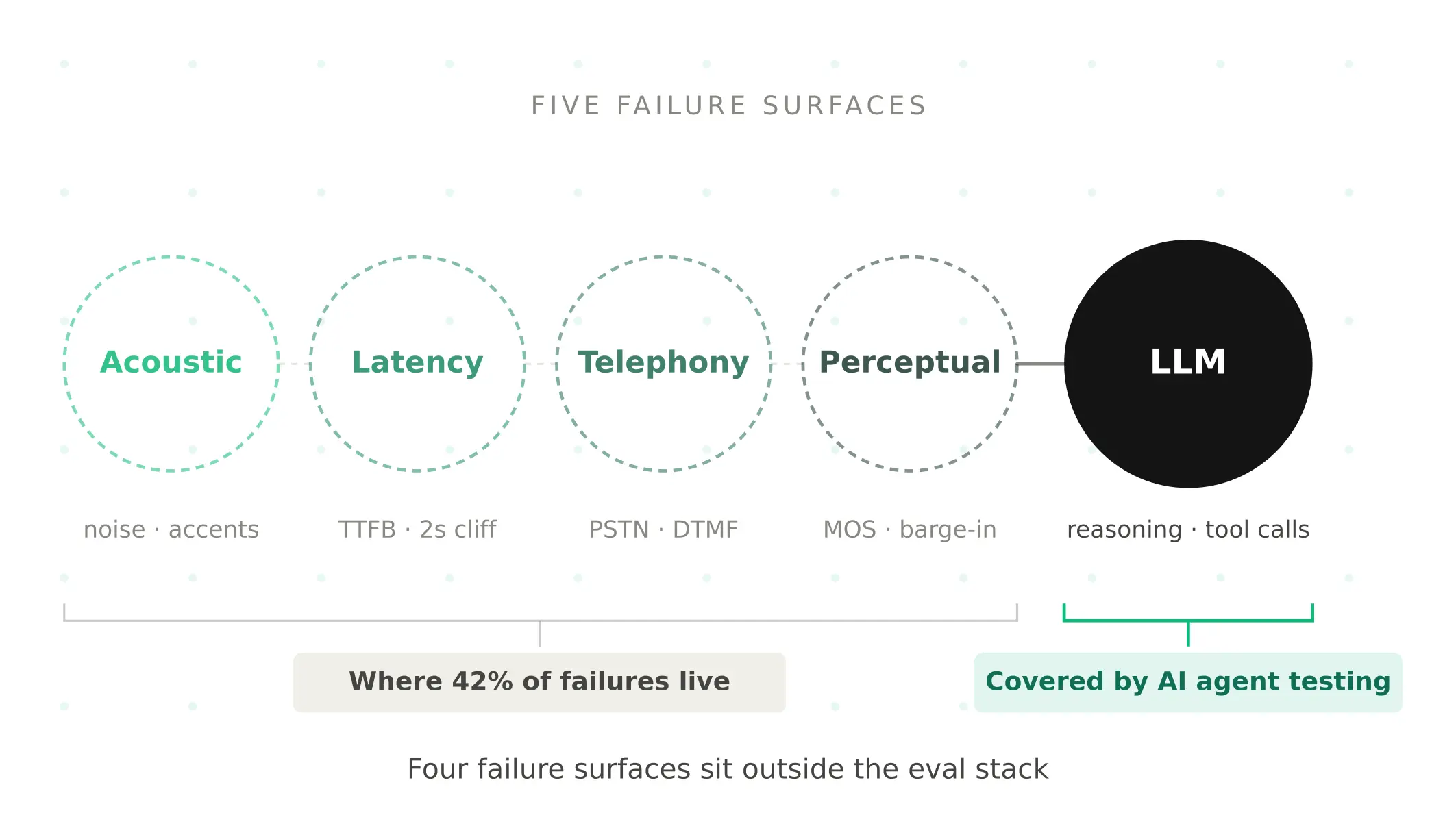
AI Agent Testing vs Voice Agent Testing: What General Tools Miss for Voice
AI agent testing measures text outputs. Voice agent testing measures behaviour through an acoustic pipeline. Five failure categories general tools miss.
Read more