Salesforce AI Voice Agent: Duplicates and API Limits
On this page
Last verified November 2026 against Salesforce's REST API Developer Guide (v67.0 pages unless noted), its API limits page and Help articles. Code is simplified.
This post is for teams that built their own voice agent and now write to Salesforce, usually the customer's org. Salesforce also sells Agentforce Voice, which it describes as spoken conversations across phone, web and mobile. This post does not cover it. It covers a custom Salesforce AI voice agent that calls the REST API. Any Salesforce voice agent integration of this kind is a CRM integration with a live caller attached.
The call is the easy part. The hard part is what Salesforce does with the fields your agent heard. Each gate below can refuse, rewrite or reroute a record, and the agent often never learns which one fired. For the generic pattern, read voice agent integration testing, post-call write-back testing and the series pillar on AI voice agent integrations.
What a Salesforce AI voice agent writes
Map the call to the records first. A Salesforce AI voice agent on a typical inbound call makes four writes:
1. Find the caller: a query by phone or email.
2. Create or update the person: a Lead or a Contact.
3. Log the call: a Task or similar activity record.
4. Route it: an owner, queue or follow-up.
Each write can fail alone. A bad person record also sends the Task and the owner rule to the wrong place.
The voice twist is the input. A web form gives you typed text and a browser that can show a duplicate warning. A phone call gives you speech-to-text output. Names, emails and company names are the fields speech recognition gets wrong most. See evaluating STT for names and entities and alphanumeric capture for the mechanics.
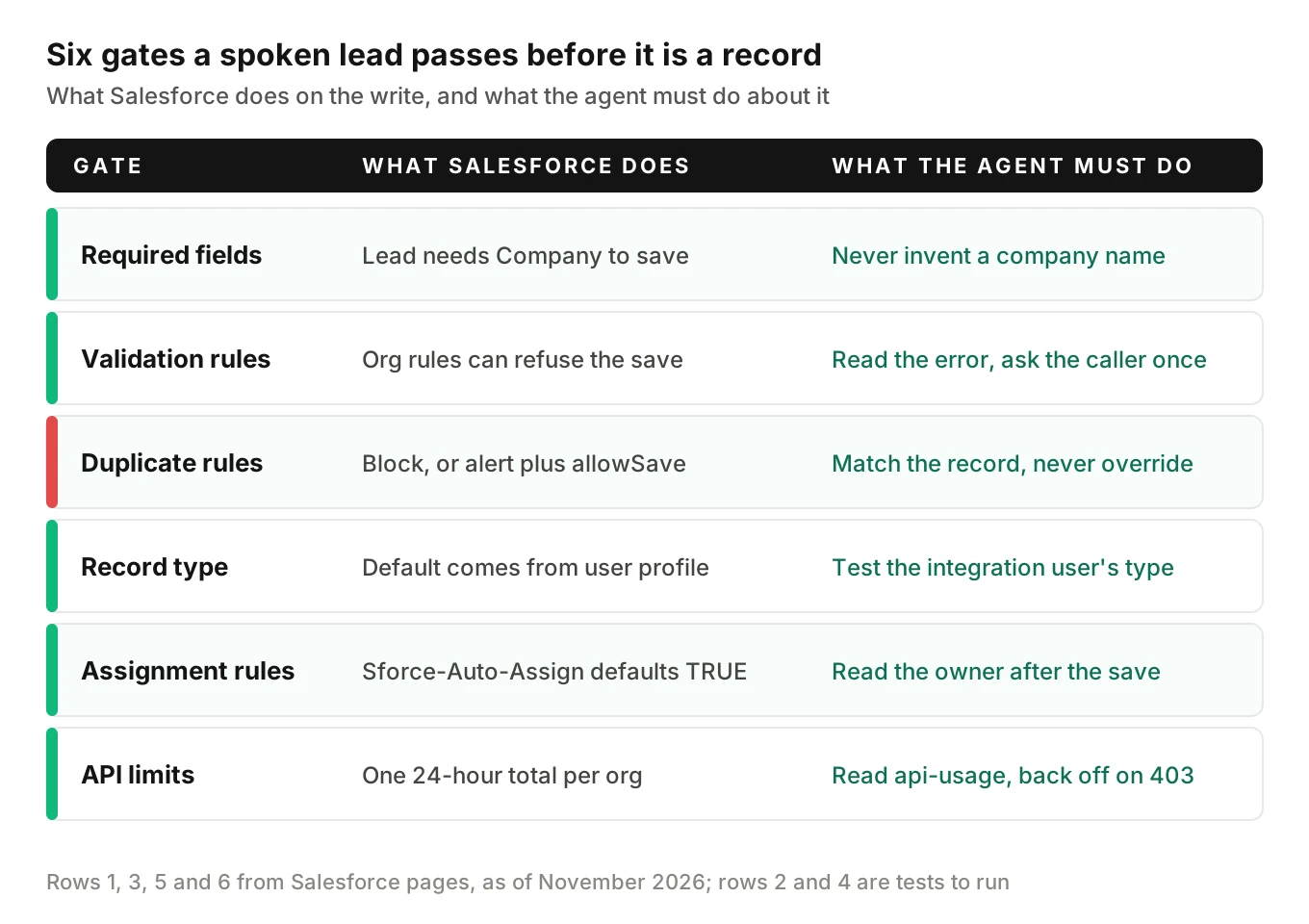
The diagram lists the six gates. For validation rules and record types, treat the row as a test to run, because I found no page stating their API behaviour.
Duplicate rules: block, alert and allowSave
Salesforce duplicate rules decide what happens when a new record looks like an existing one. Matching rules decide what "looks like" means. Salesforce Help says standard duplicate rules for business accounts, contacts and leads are active by default. Setting the Standard Lead Duplicate Rule to Block prevents duplicate leads from being saved (Stop Users from Creating Duplicate Records). If the rule allows duplicates, reps see an alert and can still save.
An API client has no rep to click through. The REST API guide handles this with a request header, `Sforce-Duplicate-Rule-Header`. It covers records that are created, updated or upserted. It is "available in API version 52.0 and later" (Duplicate Rule Header). It has three options:
- `allowSave`: lets the caller acknowledge the alert and save the duplicate. It applies only when an alert is enabled for the action.
- `includeRecordDetails`: returns all fields of the duplicate rather than just its ID.
- `runAsCurrentUser`: applies the current user's sharing rules instead of system sharing.
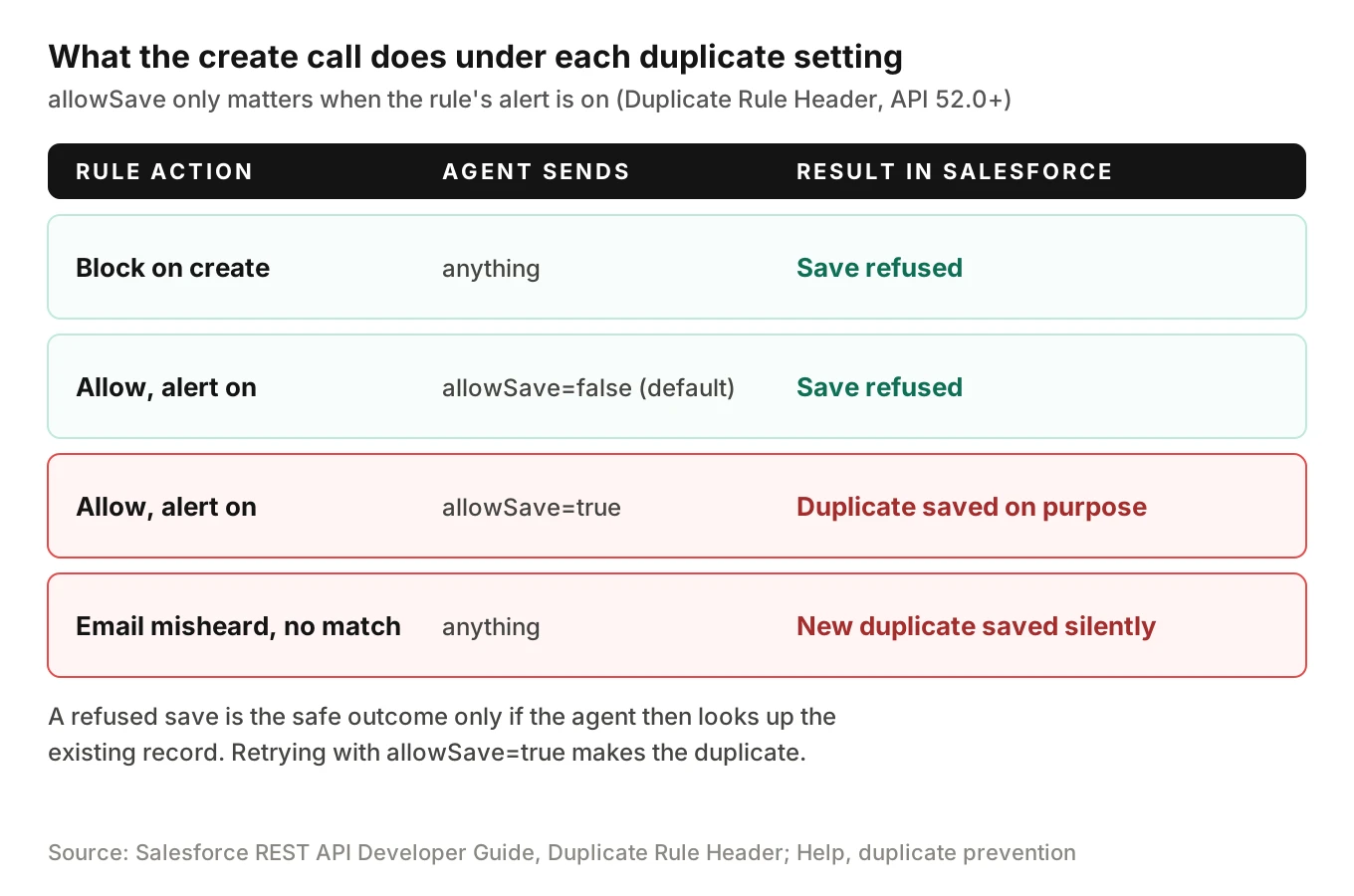
Every option defaults to false. So with no header, an alert-style rule blocks your agent's save. The Apex reference for the same options says to set `allowSave` to false to prevent duplicates. It says to use `runAsCurrentUser = true` when converting leads to contacts (DMLOptions.DuplicateRuleHeader).
The three ways a voice agent gets duplicates
1. The agent forces the save. A developer sees a refused create, adds `allowSave=true` and the error vanishes. So does the protection. Treat `allowSave=true` as a code-review flag.
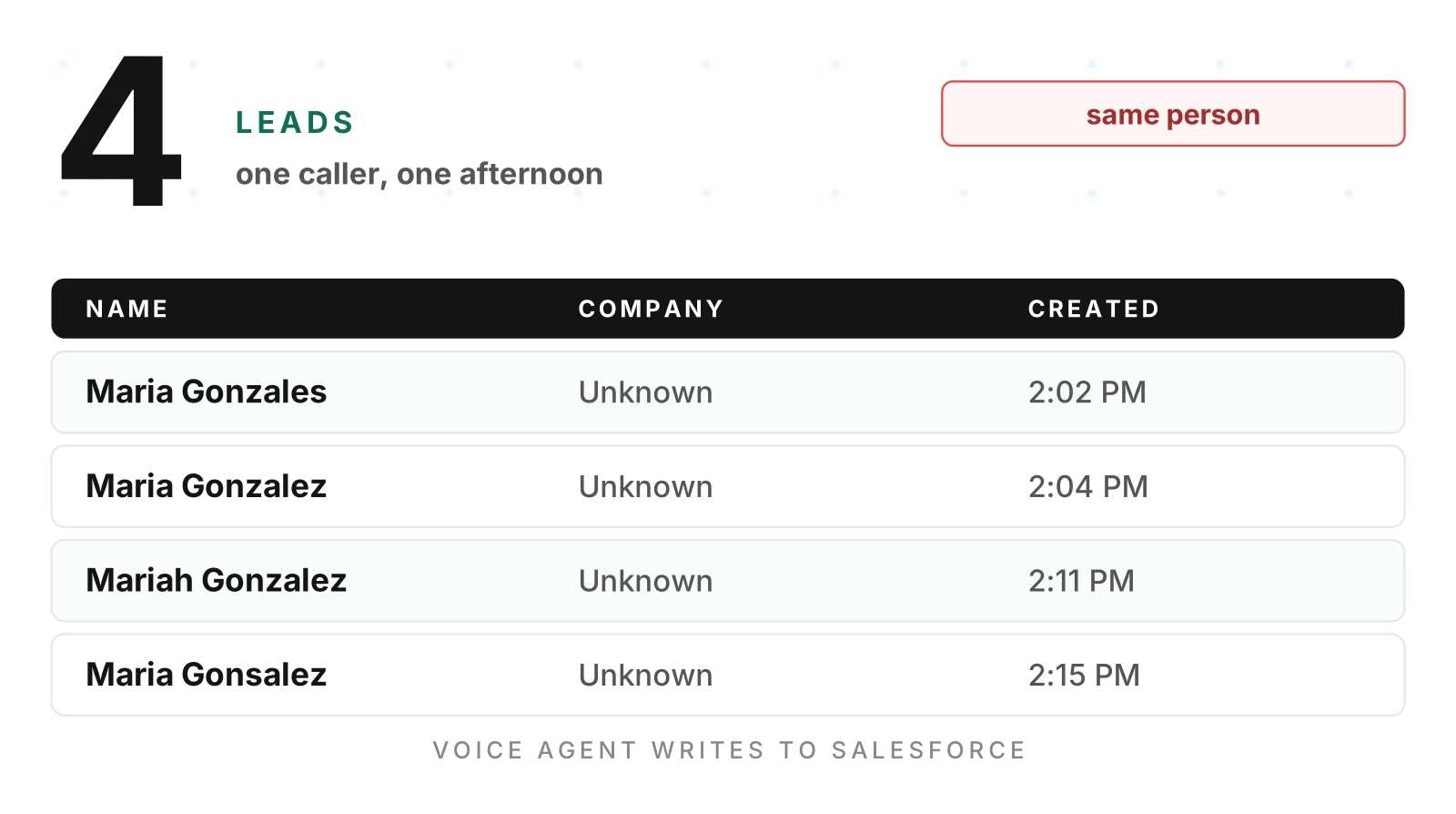
2. The match fails because the transcript is wrong. A Salesforce voice agent integration can only compare what it sends. Duplicate detection can only compare what you send. "maria.gonzalez" heard as "mariah.gonzales" matches nothing, and the save succeeds. This is the worst case because no error fires. The record looks healthy. It is also the case the hero image shows: one caller, four leads. The exact matching logic is the org's. I found no Salesforce page listing it. Test your own rules with spoken variants. Do not assume fuzzy matching will rescue you.
3. The agent hits a rule built for humans. Salesforce documents a close parallel for Web-to-Lead. A Help article says it "operates as an automated process and cannot display the duplicate alert dialog to a user for confirmation." Submissions are blocked by default, even with the rule set to Allow. The submitter sees "You're creating a duplicate record. We recommend you use an existing record instead." (Web-to-Lead blocked by matching rules). That article is about Web-to-Lead, not the REST API. It is a useful warning anyway: an unattended process meets alert-style rules differently from a rep.
What the blocked response looks like
Here the docs are thin. The Duplicate Rule Header page I opened shows the request header only, with no sample error body. The SOAP DuplicateError object holds `duplicateResult`: "The details of a duplicate rule and duplicate records found by the duplicate rule" (DuplicateError). A Help article on blocked imports shows message text beginning "DUPLICATES_DETECTED: Use one of these records?". The text is set in the active duplicate rule (import blocked by duplicates).
So do this. In a sandbox, trigger a blocked create under your real rules. Save the raw response as a fixture. Write your parser against that fixture, not against a blog post. The REST error format in general is a JSON array of objects with `message` and `errorCode`, per the status codes page.
What the Salesforce AI voice agent does after a refused save
Do not retry. Look up the match, then decide.
- If the matched record is the same person, update it and log the call against it.
- If you cannot tell, create nothing and queue a human task with the transcript and recording link.
- Tell the caller "I have you on file" only when the match is confirmed.
Never read a duplicate's fields back to an unverified caller. `includeRecordDetails` can return the other record's data. See voice agent permissions.
Upsert with an external ID
Upsert with an external ID is the right default for a retrying Salesforce AI voice agent. The REST guide's upsert page shows a `PATCH` to `/services/data/v67.0/sobjects/Account/customExtIdField__c/11999` (Upsert a Record). The behaviour, from that page:
- No record matches: the record is created, HTTP 201.
- One record matches: it is updated, HTTP 200 in API v46.0 and later (204 with no body in v45.0 and earlier).
- More than one match: HTTP 300, nothing is created or updated, and the matches are listed.
- `?updateOnly=true` with no match: creation is prevented.
- Wrong external ID field name: `NOT_FOUND`.
From v46.0 the response also carries a `created` flag, true for inserts and false for updates.
Two design choices follow. Both are ours, not Salesforce's.
Key on the call, not the person. Add a custom external ID field such as `Voice_Call_Id__c` and set it to your telephony call ID. A network retry then updates the same record instead of creating a second. A caller who phones again is a new key, so duplicate rules still do their job for person matching.
Do not key on a spoken value. If the external ID is a phone number or email the agent heard, an upsert updates whichever record matches. A misheard digit overwrites a real customer's fields. The update path has no duplicate alert to stop it, because there was nothing duplicated, only a wrong match. The header page says it also covers upserts, so test both paths.
Treat HTTP 300 as an alarm. It means your key is not unique. The record was not saved, so the caller's data is lost unless you queue it.
Required fields, Lead versus Contact, and conversion
Salesforce Help says a user creating a Lead may see an error that the Company Name field is required. It suggests a placeholder such as "Unknown" when the company is unknown. It also notes the Company Name becomes the Account Name on conversion (Company required on Lead).
That is a trap for a voice agent. Residential and sole-proprietor callers have no company. If your prompt fills "Unknown" to get past the error, converted leads can create Accounts named Unknown. Pick a deliberate convention, for example the caller's full name, and write it down. Then test conversions, not just creates.
Lead conversion has its own rules. The `convertLead` API turns a Lead into an Account and Contact, and optionally an Opportunity. If you pass an existing contact, only empty fields in the target are overwritten and existing data is not. The docs show the client searching for matching contacts with SOQL or SOSL before converting (convertLead). A voice agent should run that search before it calls anything.
Lead versus Contact matters more on calls than on forms. Your agent meets it on every inbound call. A returning customer is a Contact. An agent that creates a Lead per call duplicates your own customers. Look up Contact first, then Lead, and create only when both miss. Trade versions appear in mortgage lead qualification and real estate lead qualification. Metrics are in lead qualification voice agent metrics. For work-order style requests, see wrong work orders from AI maintenance calls.
Validation rules, record types and assignment rules
Validation rules. Your customer's admin can add rules that refuse a save on any condition. A rule might demand a phone number in a certain format, or a picklist value. I found no Salesforce page documenting the REST error body for a validation failure, so I do not state its shape. Capture it in a sandbox, like the duplicate error. The principle is the same: read the error, ask the caller for the one missing item, and never loop.
Record types. Salesforce Help says a user's default record type is set in the profile. You cannot set a default in a permission set (How is record type access specified). The page does not mention the API. Our inference is that the integration user's profile and permission sets decide which record types it can use. Test it: create a lead as the integration user and read back the record type. Different customers' orgs will differ.
Assignment rules. Lead assignment rules run on the API too. The Assignment Rule header, `Sforce-Auto-Assign`, applies to Accounts, Cases and Leads. Salesforce says "If the header is not provided in the request, the default value is `TRUE`." Active assignment rules then run (Assignment Rule Header). A rule ID applies that rule to created records. The header can also apply when a REST call indirectly changes a record, such as an Apex trigger that updates a Case.
So the owner is a function of fields your agent heard. If any assignment rule criterion is a spoken field, such as state, a heard value picks the rep. Read the owner back after the save and compare it with the expected one. This is a downstream-routing error the transcript never shows. Speed-to-lead teams should treat it as a first-class metric.
Salesforce API request limits: one org total
Salesforce API request limits are not per integration. Salesforce enforces "Limits and allocations ... against the aggregate of all API calls made to the org in a 24-hour period." For Enterprise, Professional, Unlimited and Performance orgs the total is:
"100,000 + (number of licenses x calls per license type) + purchased API Call Add-Ons" (API Request Limits and Allocations). Developer Edition is listed at 15,000.
A second limit is easy to miss. Requests lasting 20 seconds or longer are capped at 25 concurrent in production orgs and sandboxes. The cap is 5 in Developer Edition and Trial orgs. Past the cap, the API "returns a `REQUEST_LIMIT_EXCEEDED` exception code." Log REQUEST_LIMIT_EXCEEDED separately from other failures.
Worked example, illustrative numbers
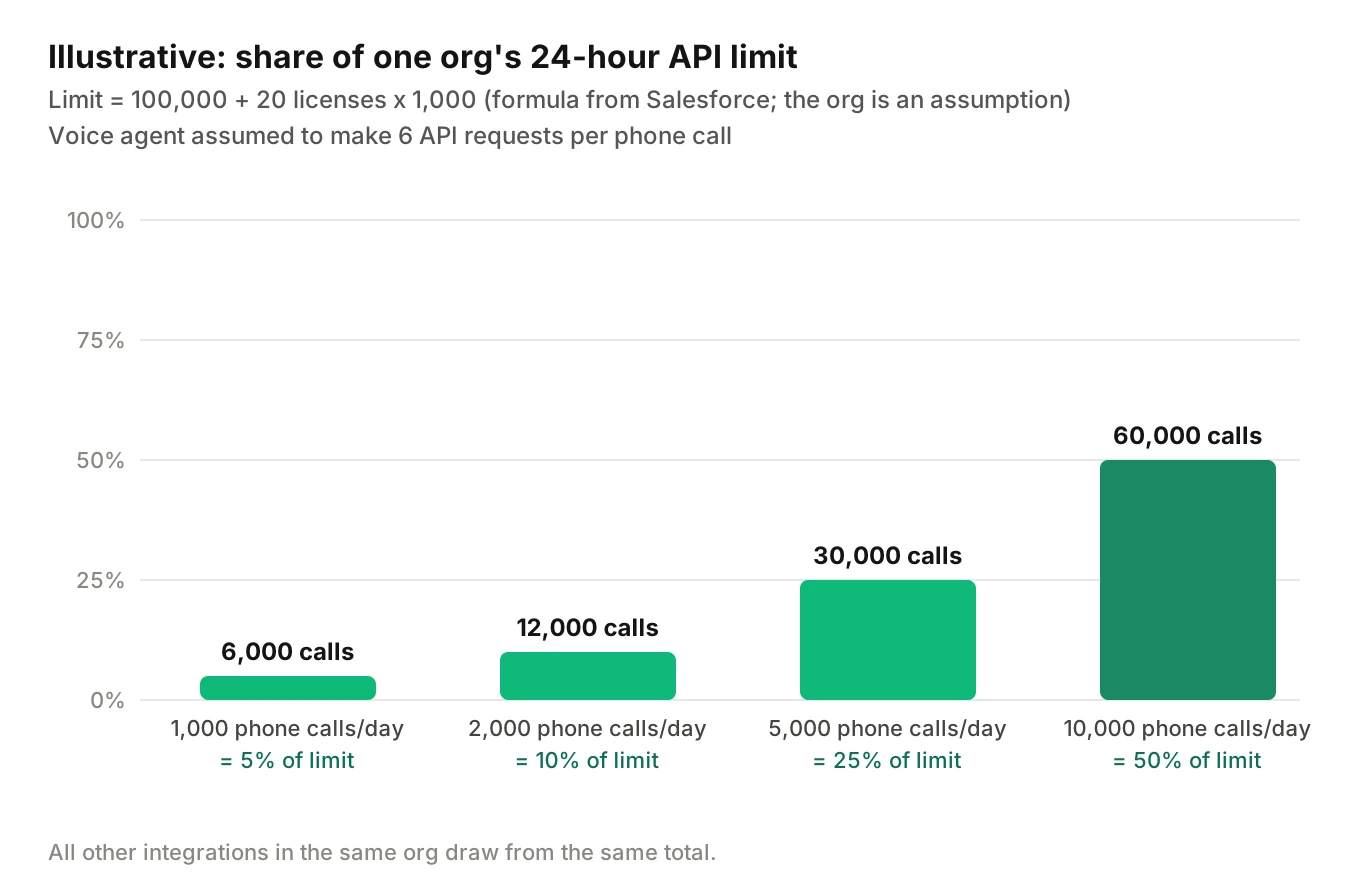
Assume a customer org on Enterprise with 20 Salesforce licenses at 1,000 each. The formula gives 100,000 + 20 x 1,000 = 120,000 requests a day. Assume six requests per phone call: two lookups, an upsert, a Task, an owner read and a retry margin. At 2,000 calls a day that is 12,000 requests, or 10 percent. At 10,000 calls a day it is 60,000, or half the org's budget, before anyone else's integration runs.
Because the limit is the customer's, your agent spends your customer's quota. A retry loop can starve their other integrations. Add three controls:
- Read the Sforce-Limit-Info header. It reports usage like `api-usage=10018/100000` on REST responses (Limit Info Header).
- Back off past a threshold you set, such as 80 percent, and queue writes for after the call.
- Cap retries per call at two, with jitter.
One inconsistency to plan around. The status codes page says a 403 with `REQUEST_LIMIT_EXCEEDED` means the org hit its API request limit. The limits page ties that code to the concurrent long-running limit and names no code for the 24-hour total. Handle any 403 with that code as "stop and queue."
A caller waits in silence, so keep in-call round trips short and move non-urgent writes to after the call.
Field-level security and the integration user
The API respects permissions, so a Salesforce AI voice agent inherits the integration user's limits. Salesforce's security page says "All API calls respect the sharing model." A user needs the "API Enabled" permission to make calls. Some fields are read-only, so client apps cannot set them in create or update calls (Security and the API).
Give the agent its own user. Salesforce's developer blog describes an Integration user license. Its "Minimum Access - API Only Integrations" profile "both enables API access and restricts the user to only API access." The license grants no permissions by itself. You assign a permission set, one per integration (Integration User and OAuth Client Credentials). Grant create on Lead, Task and the fields the agent writes, read on Contact, and nothing else. That is least privilege applied to a phone line. Our post on voice agent permissions goes deeper.
Test what happens when the agent sends a field the integration user cannot edit. I found no page saying whether it errors or is ignored. Check, and fail loudly either way.
A write contract for a Salesforce AI voice agent (simplified code)
This sketch upserts on the call ID, forces no duplicate save and reads the limit header. Confirm the duplicate `errorCode` string against your sandbox fixture.
import requests

API = "https://MyDomainName.my.salesforce.com/services/data/v67.0"

def write_lead(token, call_id, lead):
    r = requests.patch(
        f"{API}/sobjects/Lead/Voice_Call_Id__c/{call_id}",
        headers={
            "Authorization": f"Bearer {token}",
            "Content-Type": "application/json",
            "Sforce-Duplicate-Rule-Header": "allowSave=false",
            "Sforce-Auto-Assign": "TRUE",
        },
        json=lead,
        timeout=4,
    )
    usage = r.headers.get("Sforce-Limit-Info", "")  # e.g. api-usage=10018/100000
    if r.status_code in (200, 201):
        return {"outcome": "saved", "usage": usage}
    if r.status_code == 300:
        return {"outcome": "key_not_unique", "usage": usage}
    errors = r.json() if r.content else []
    codes = {e.get("errorCode") for e in errors}
    if "DUPLICATES_DETECTED" in codes:  # verify string in sandbox
        return {"outcome": "duplicate_refused", "usage": usage}
    if "REQUEST_LIMIT_EXCEEDED" in codes:
        return {"outcome": "queue_for_later", "usage": usage}
    return {"outcome": "failed", "status": r.status_code, "codes": sorted(codes)}
Every outcome except `saved` needs a defined caller line and a defined follow-up. "Failed" is not a caller line.
How to test a Salesforce voice agent before it writes to production
Run these in a sandbox that mirrors the customer's duplicate, validation and assignment rules. Use the integration user, not an admin.
1. List the gates. For each customer org the Salesforce AI voice agent serves, export the active duplicate, matching, validation and assignment rules. Add the integration user's record types. Differences between orgs are the test matrix.
2. Seed known records. Create a Contact and a Lead with known names and emails, including one pair a duplicate rule should catch.
3. Script spoken scenarios. Cover a returning contact, a returning lead, a new caller and a caller with no company. Add a commonly misspelled name, a spelled-out email and a hang-up mid-capture.
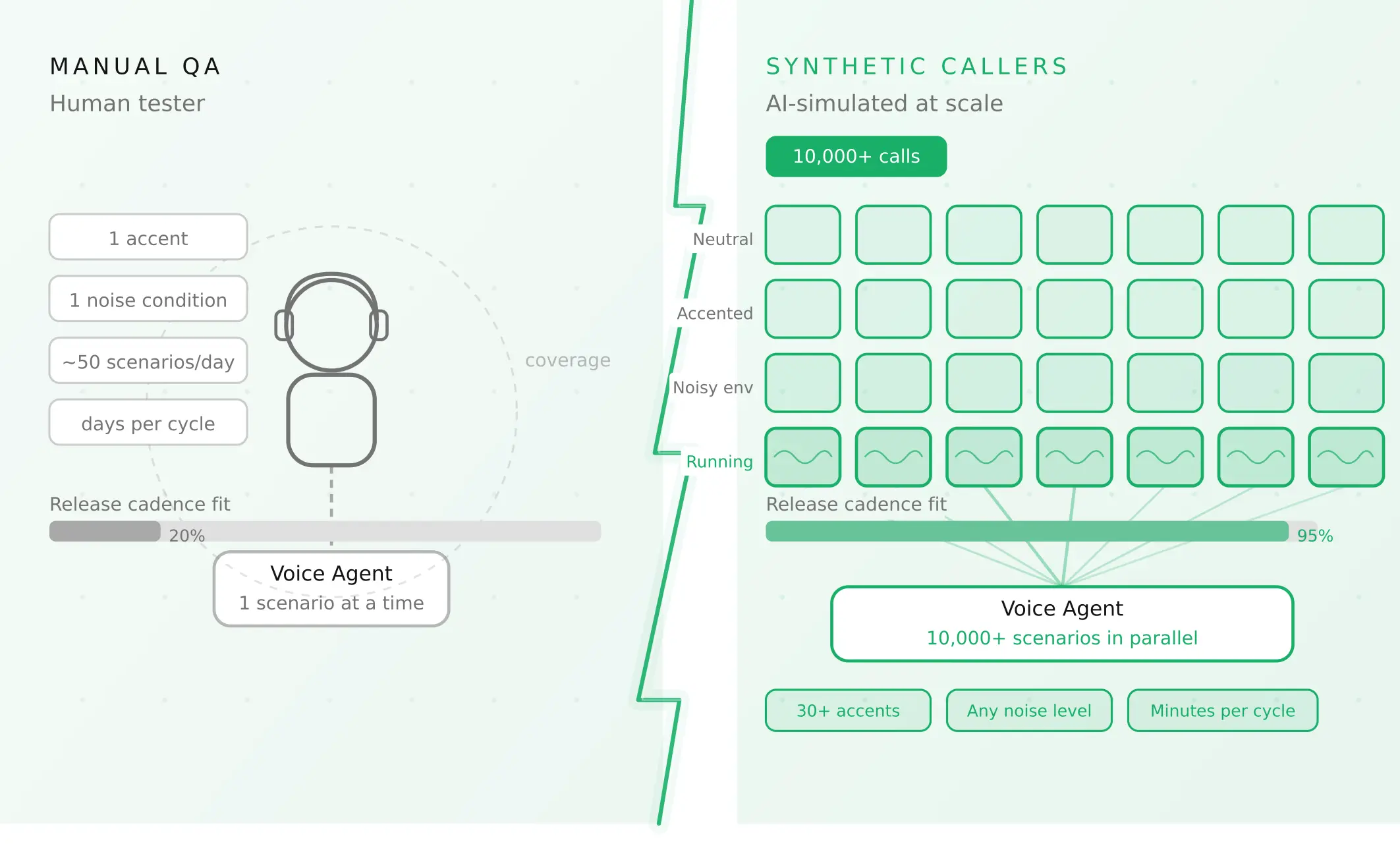
4. Add speech conditions. Vary accent, pace, interruptions and background noise, since those drive the misheard fields. Evalgent generates scenarios from the agent's prompt and flows and applies caller profiles for accent, pace, interruption and noise. It judges from the audio, not only the transcript, so a misheard email shows up as a failure. Evalgent tests the agent's behaviour. It does not connect to Salesforce, so your own script reads the record afterward.
5. Assert on the record, not the call. After each scenario, query Salesforce. Check Lead and Contact counts, Company, owner, record type, Task link and duplicates.
6. Inject failures. Force a duplicate refusal, a validation refusal, a 300 and a 403. Check the caller line and the queued human task.
7. Load test against the budget. Replay a day's call volume with your six-request pattern. Check `Sforce-Limit-Info` and the 25-request long-running cap.
8. Gate releases. Re-run the matrix on every prompt, model or field change. See voice agent workflow testing and rollback actions.
In production, the same checks apply to your Salesforce AI voice agent. Evalgent's monitoring takes call recordings, transcribes them, maps them to scenarios and judges them. It flags tool-call and policy failures with fix recommendations. Pair that with a daily query for Leads created in the same hour with near-identical names. For what a bad write can reach beyond one record, see voice agent blast radius. Related tests for another CRM are in the HubSpot AI voice agent post.
Frequently asked questions
Can an AI voice agent create leads in Salesforce?
Yes. A Salesforce AI voice agent can create leads in Salesforce through the REST API as an integration user. The risks are in the write: duplicate rules, the required Company field, assignment rules and API limits. Upsert on a call-scoped external ID, read every response, and test the failure paths in a sandbox first.
How do Salesforce duplicate rules affect API inserts?
A rule set to Block refuses the save. A rule that alerts also refuses an API save unless the request sets `allowSave` to true. Every header option defaults to false. A rule only matches what you send, so a misheard email creates a duplicate with no error.
What does allowSave do in Salesforce?
It is an option in the `Sforce-Duplicate-Rule-Header`, available from API version 52.0. When true, the caller can acknowledge a duplicate alert and save anyway. It applies only where the rule's alert is enabled. For a voice agent, leave it false and resolve duplicates by lookup.
How many API calls does Salesforce allow per day?
It depends on the org. Enterprise, Professional, Unlimited and Performance orgs get 100,000 plus license allowances plus add-ons, across all API calls in 24 hours. Developer Edition is listed at 15,000. Check your customer's number, and read `Sforce-Limit-Info`.
How to avoid duplicate leads from a voice agent in Salesforce?
Look up Contact and Lead before creating. Upsert on a call-scoped external ID so retries update one record. Never force allowSave. Treat a refused save as a lookup task, and queue a human review when the match is uncertain. Then test with misspelled names and emails.
What permissions does a Salesforce integration user need?
At minimum, the API Enabled permission plus create and edit access to the objects and fields the agent writes. Salesforce describes an API-only integration profile and a separate permission set per integration. Grant nothing broader, and remember sharing still applies to API calls.
How to test a voice agent that writes to Salesforce?
Use a sandbox with the customer's rules. Seed known records. Script spoken scenarios with accents, noise and spelled emails. After each call, query Salesforce and assert on the records, owner and duplicates. Inject duplicate, validation and limit errors, then re-run the matrix on every change.
Should a returning caller be a lead or a contact in Salesforce?
A returning customer is a Contact. Search Contact before Lead, and create a Lead only when both miss. Creating a Lead per call duplicates your own customers. Converting later has its own rules, and the convertLead docs show searching for a matching contact first.
The bottom line
A Salesforce AI voice agent is only as good as the record it leaves behind, and Salesforce's duplicate, required-field, assignment and limit rules decide what that record looks like. Test every gate with spoken edge cases in a sandbox, and read the record after every call.
Related Articles
How to automate voice agent testing: synthetic callers vs manual QA
Learn how ai test automation replaces manual QA for voice agents. Compare synthetic callers vs human testers, with a 5-step framework to scale without hiring.
Read more
AI Agent Testing vs Voice Agent Testing: What General Tools Miss for Voice
AI agent testing measures text outputs. Voice agent testing measures behaviour through an acoustic pipeline. Five failure categories general tools miss.
Read more