Voice Agent API Rate Limits: 429s, Backoff and Spike Tests
On this page
Last verified November 5, 2026, against the vendor and standards pages listed in the sources section. Limits change without notice, so re-check each page before you size anything.
Most post-mortems start with the model, the speech stack or the carrier. A quieter failure sits one hop later. The call went fine, the caller got a confident confirmation, and the CRM, calendar or helpdesk answered `429 Too Many Requests`. Nothing was written. Nobody noticed until a customer asked about their booking.
This post on voice agent API rate limits is for teams that built their own agent inside a larger product and connect to many customers' systems. It covers what several vendors publish about their limits, how to turn calls per minute into API calls per minute, how to retry without making things worse, and how to spike-test the whole path. Every vendor figure below comes from a page I opened for this post. Where a page was silent, I say so.
What vendors actually publish about rate limits
Each system does API rate limiting in its own way. The unit, the window and the scope all differ. The table below lists what I read as of November 2026. Treat it as a snapshot.
| System | Documented limit | Scope | What you get when throttled |
|---|---|---|---|
| Clio Manage API v4 | 50 requests per minute during peak usage hours | Per access token | 429 with a `Retry-After` header |
| Zendesk Support API | 200 (Team), 400 (Professional), 700 (Enterprise) requests per minute; 2,500 with the High Volume API add-on | Per plan | 429 with a `Retry-After` header |
| Mews Connector API | 200 requests per AccessToken within 30 seconds | Per AccessToken | 429; `Retry-After` is the main signal |
| HubSpot (public OAuth apps, marketplace-distributed) | 110 requests every 10 seconds, excluding the CRM Search API | Per installing account | 429; page lists `X-HubSpot-RateLimit-*` headers |
| HubSpot (private apps) | 100 (Free, Starter) or 190 (Professional, Enterprise) per 10 seconds; 250,000 to 1,000,000 per day | Per app (burst), per account (daily) | 429 for all subsequent calls |
| Jobber GraphQL API | 2,500 requests per 5 minutes, plus a query-cost point budget | Per app and account | 429, or a `THROTTLED` error in the response body |
| Google Calendar API | 10,000 per minute per project; 600 per minute per user per project | Project and user | 403 or 429 with reason `usageLimits` |
Sources: Clio rate limits, Zendesk rate limits, Mews environments and request limits, HubSpot usage guidelines, Jobber API rate limits, Google Calendar quota guide.
A few details matter more than the headline numbers.
Scope decides who gets hurt. Jobber says its limit "is implemented on a per app/account basis, instead of being based on IP address." Clio limits by access token. Mews limits by AccessToken. If your agent holds one token per customer, a surge at one restaurant or law firm throttles only that customer. If it shares one credential across customers, they all throttle together.
Windows differ. Mews uses a sliding window of 30 seconds, HubSpot 10 seconds, Clio 60. A burst limit is the trap: 120 calls in five seconds can break a 110-per-10-seconds limit while the per-minute average looks calm. The Google quota page makes the same point in its own words: "A rapid burst of traffic that exceeds your per-minute quota during one minute" leads to rate limiting.
Some limits are not request counts. Jobber also meters GraphQL query cost. Its docs say "All fields have a default value of 1 except for the edges, nodes and node connection fields which have a value of 0" and that connection fields return up to 100 nodes by default. A greedy query can cost more than ten small ones. The Jobber page says nothing about rate-limit HTTP headers. Throttle status arrives in the response body, in the `extensions` key.
Some limits sit on one action. Zendesk's page lists "30 updates per 10 minutes per user per ticket" for updating a ticket. An agent that appends to the same ticket on every turn can hit that cap fast. This is the Support API's documented limit for that endpoint as of November 2026. The same page says nothing about a separate create-ticket limit.
Some pages are silent. The HubSpot usage page lists the CRM Search API among APIs whose limits are different from or stricter than the general limits, but does not state the numbers. It also says responses from the search endpoints "will not include any of the rate limit headers." That means your client cannot read its remaining budget there. Plan for blind 429s on search.
Clio says limits "may change without notice." Mews says the same about its count and window. Do not hard-code the number.
Your own customers' vendors may differ from this list. For system-specific write behavior, see our posts on Zendesk, HubSpot, Google Calendar and Jobber. The pillar on AI voice agent integrations maps the series.
Why voice agent API rate limits bite harder than in a web app
A web app can show a spinner. A phone call cannot. Four properties of voice change the problem.
1. Calls arrive in bursts. A storm, an outage notice or a tax deadline sends callers at the same minute. Load is correlated across callers, not spread out.
2. One call is many API calls. Look up the caller, check availability, create the record, write a note, update a status. Five or six requests per call is ordinary.
3. The caller is waiting in real time. A web client can wait 30 seconds for a retry. A caller starts to notice silence within a couple of seconds, which is my working assumption.
4. A failed write is silent. The model already said "you're all set." The 429 happened in a tool call the caller never sees.
That last point is the dangerous one. A throttled read is a visible delay. A throttled write that nobody retries is a lost booking with a confirmation attached. Our post-call write-back testing guide covers how to prove the record landed. Rate limits are one reason it might not have.
Call capacity inside your own stack is a different problem, covered in concurrency failure in voice agents. This post is about the downstream APIs.
Voice agent concurrency math: calls per minute times API calls per call
Start with one formula for voice agent API rate limits.
API requests per minute = calls per minute x API requests per call x (1 + retry factor)
Then divide by the tenant's documented limit. Here is a worked example. The number of requests per call (six) is an illustrative assumption, not a measured value. Retries are ignored, so real headroom is smaller.
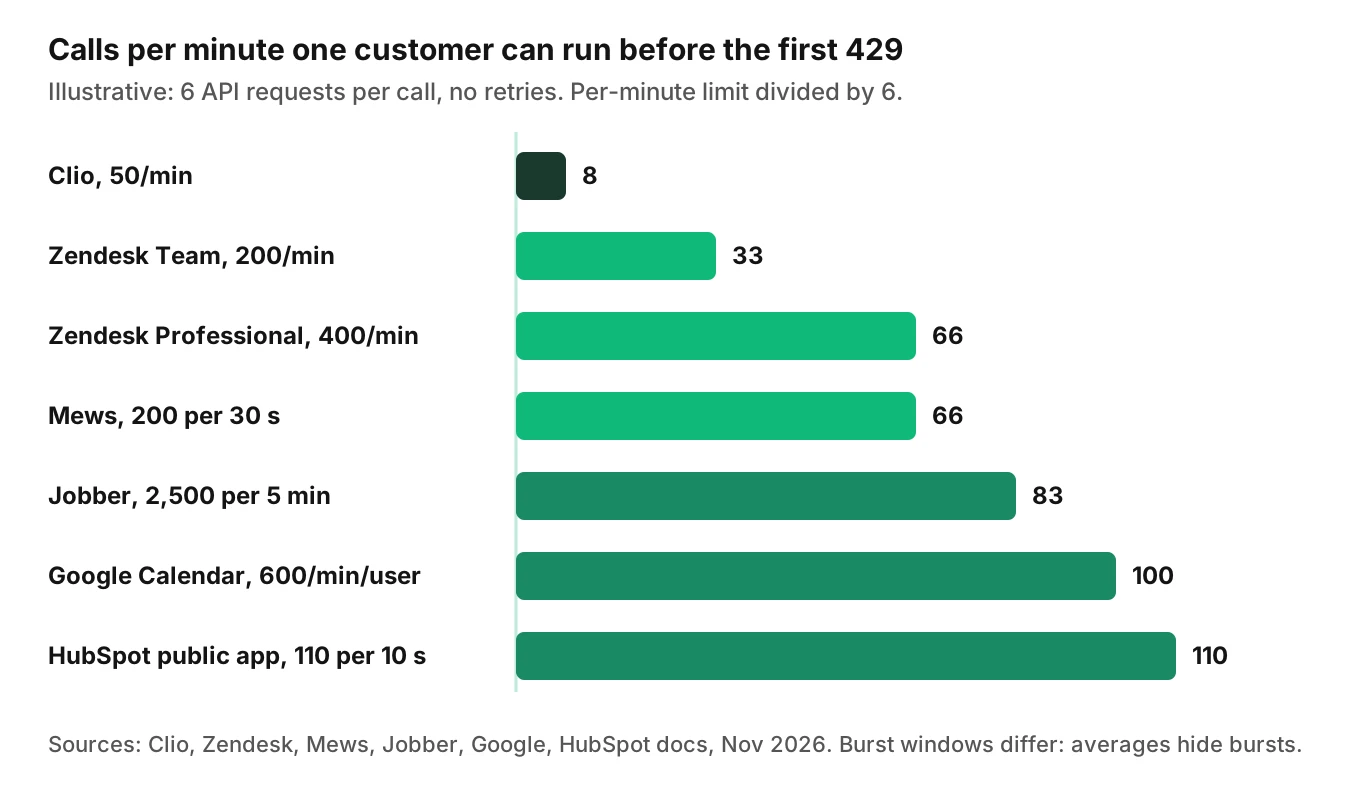
Two things stand out. First, the tightest limit sets capacity for that customer. At Clio's documented default of 50 per minute, six requests per call allows about eight calls per minute before the first 429. Second, converting a burst window to a per-minute average hides the burst. HubSpot's 110 per 10 seconds is 660 per minute on paper. It is still only 110 in any single 10-second window.
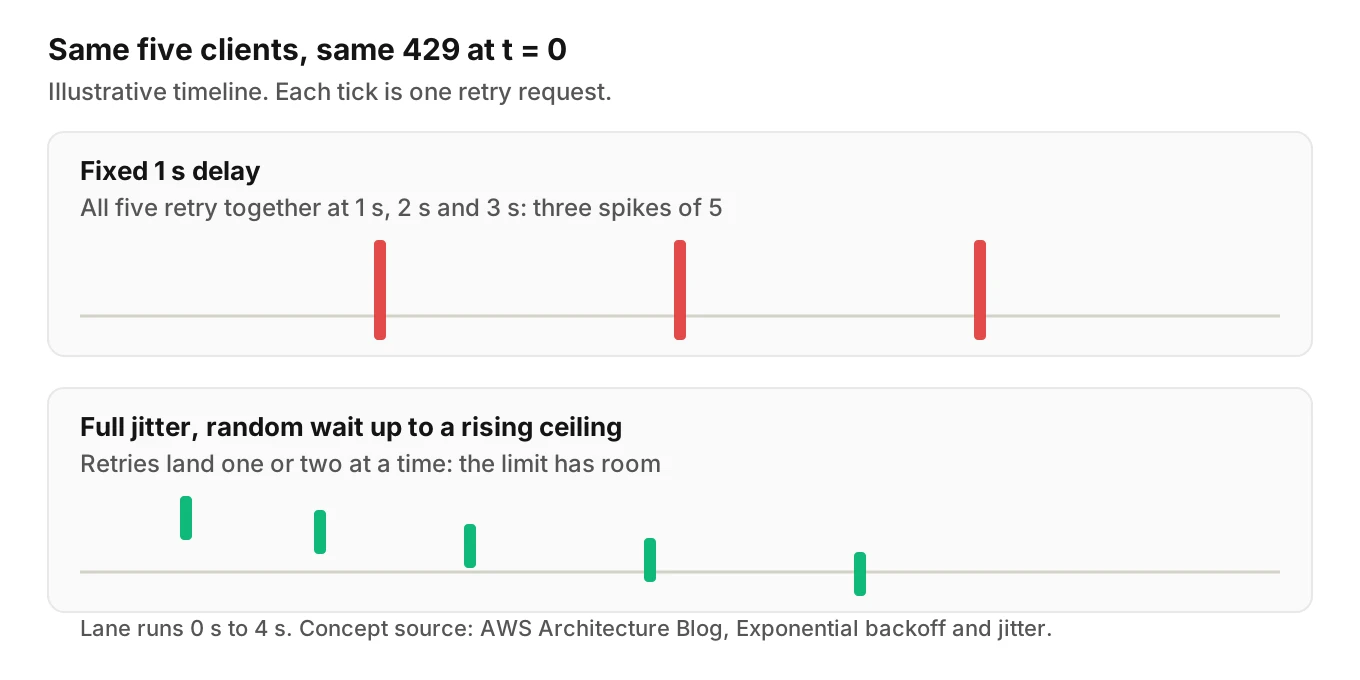
Now add retries. Say 20 callers hit a 429 in the same second, and your client retries three times with a fixed one-second delay. That is 20 original requests plus up to 60 retries, 80 in total, concentrated in four seconds. The retries are the load. This is also why the vendors warn against fixed waits. Mews's request guidelines say "Pausing for a fixed amount of time is never recommended."
Use this checklist to size each tenant:
- Read the tenant's plan and limit from the vendor page.
- Count requests per call by tracing real calls.
- Take that tenant's 95th-percentile calls per minute in a busy week.
- Reserve 20 to 30 percent of the limit for retries and other integrations.
- Alert when projected use passes 70 percent.
The 20 to 30 percent reserve and the 70 percent alert are starting points I suggest, not vendor guidance. Tune them with your own traces.
The 429 contract: what to read and what to trust
When a vendor starts API throttling, HTTP gives you the signal.
RFC 6585 says a 429 response "MAY include a Retry-After header indicating how long to wait before making a new request." The word is MAY. Vendors differ in whether they send it.
According to MDN, `Retry-After` takes one of two forms: an `
What each page I read says:
- Zendesk: "The response also has a `Retry-After` header that tells you how many seconds to wait before retrying API requests." It also documents `X-Rate-Limit-Remaining` and, on ticketing endpoints, `ratelimit-remaining` and `ratelimit-reset`.
- Clio: a `Retry-After` header "will be supplied in the `429` response," plus `X-RateLimit-Remaining` and `X-RateLimit-Reset` on all responses.
- Mews: "The `Retry-After` header should be the primary signal for backoff timing," with exponential backoff when it is missing.
- HubSpot: documents `X-HubSpot-RateLimit-Remaining` and related headers. I did not see `Retry-After` mentioned on the page I read. It also says the daily headers are not included for OAuth-authorized requests.
- Jobber: throttle state lives in the response body, with a `THROTTLED` error code and fields such as `currentlyAvailable`.
- Google Calendar: the page recommends "truncated exponential backoff". I did not see a `Retry-After` header described there.
The practical rule: read the remaining-budget header when it exists and slow down before you hit zero. Honor `Retry-After` when it exists. Fall back to backoff with jitter when it does not.
Backoff with jitter, and a deadline for voice
Backoff spaces out retries. Jitter randomizes the spacing so clients do not retry in lockstep. Marc Brooker's AWS Architecture Blog post puts it plainly: "The solution isn't to remove backoff. It's to add jitter." He also writes that "Of the jittered approaches, 'Equal Jitter' is the loser," and that the choice between Decorrelated and Full Jitter "is less clear."
Google's quota page gives a concrete formula: `min(((2^n)+random_number_milliseconds), maximum_backoff)`. It says `maximum_backoff` is typically 32 or 64 seconds. That is fine for a nightly sync. It is useless inside a phone call.
A voice agent needs two clocks:
- The caller clock. How long the caller will tolerate silence. Budget about 1.5 to 2 seconds of tool time per turn as a working assumption, and measure your own.
- The record clock. How long the write can safely wait. For a booking note, minutes. For a payment, much less.
Reads run on the caller clock. Writes can often move to the record clock. This simplified Python honors `Retry-After`, uses full jitter, and gives up at a deadline instead of a retry count.
import asyncio, random, time
from email.utils import parsedate_to_datetime
import httpx

def retry_after_seconds(resp):
    """Parse Retry-After as delay-seconds or HTTP-date. None if absent."""
    v = resp.headers.get("Retry-After")
    if v is None:
        return None
    if v.isdigit():
        return float(v)
    try:
        return max(0.0, parsedate_to_datetime(v).timestamp() - time.time())
    except (TypeError, ValueError):
        return None

async def call_with_deadline(client, method, url, deadline_s, base=0.25, cap=8.0, **kw):
    """Retry 429/503 until the deadline. Returns (response|None, reason)."""
    t_end = time.monotonic() + deadline_s
    attempt = 0
    while True:
        resp = await client.request(method, url, **kw)
        if resp.status_code not in (429, 503):
            return resp, "ok"
        hinted = retry_after_seconds(resp)
        # full jitter: random wait between 0 and the exponential ceiling
        ceiling = min(cap, base * (2 ** attempt))
        wait = hinted if hinted is not None else random.uniform(0, ceiling)
        if time.monotonic() + wait >= t_end:
            return None, f"deadline (hinted={hinted})"
        await asyncio.sleep(wait)
        attempt += 1
The key line is the deadline check. If the vendor says "wait 30 seconds" and the caller has 1.5 seconds, retrying is the wrong move. Return `None` and take the degraded path below. The function adds jitter only when no hint exists. If many clients get the same hint, add a small random offset on top.
Do not retry timed-out writes blindly. Check whether the record exists first. I did not verify idempotency-key support for any vendor above, so do not assume it.
Queue the writes, degrade the reads
When the deadline passes, the agent needs a plan that is honest with the caller. The decision depends on what the request was.
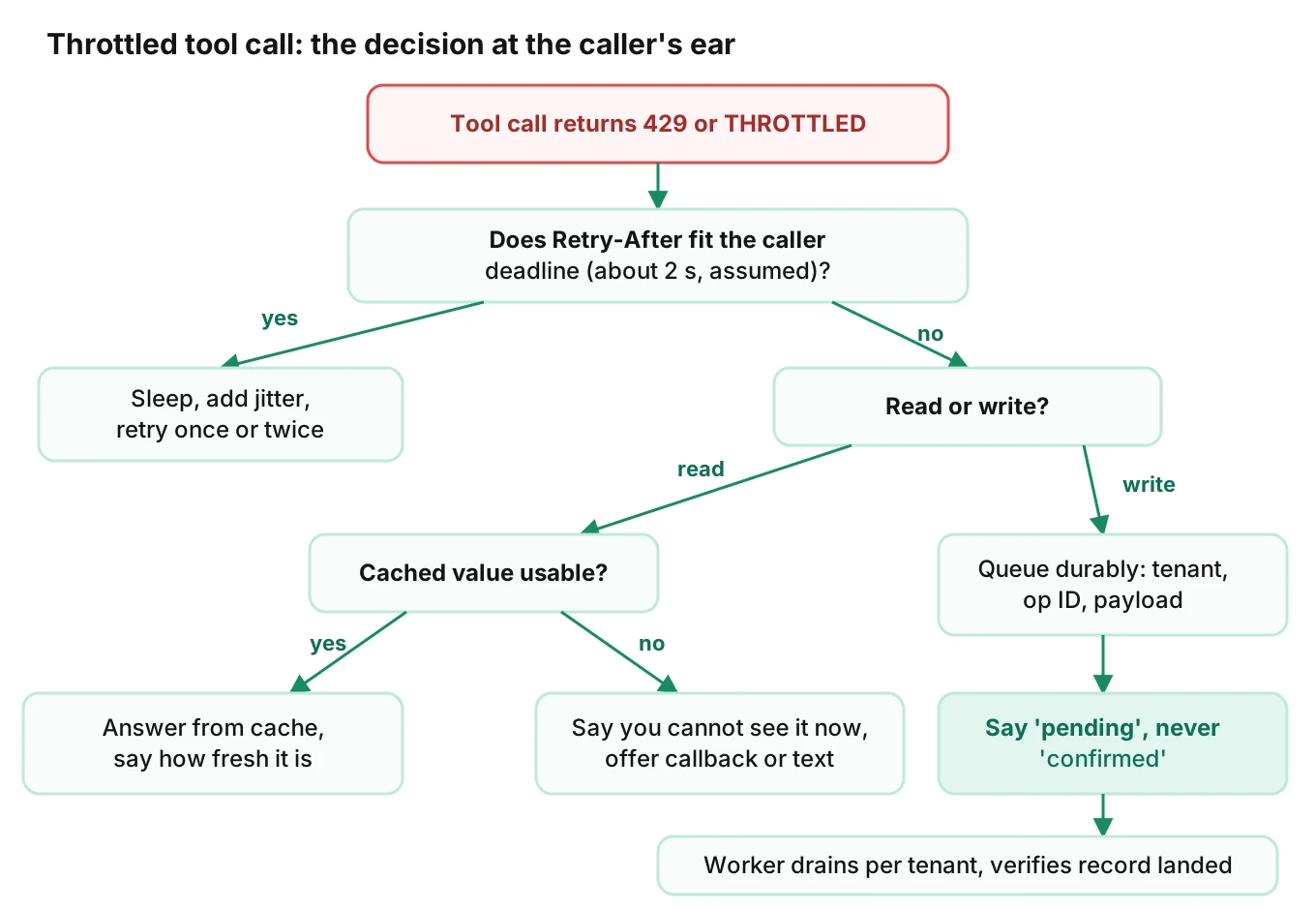
Reads. Cache what rarely changes: business hours, service lists, staff. Prefetch the caller's record once at call start. If a live read is needed and throttled, say so: "I can't see the schedule right now." Offer a callback or text. Do not guess.
Writes. Put them in a durable queue, not memory. Each item carries a tenant ID, an operation ID, the payload and an attempt count. A worker drains each tenant's queue under that tenant's limit. The agent should say "I've noted that and it will be confirmed shortly," not "it's booked."
Confirmation wording is the control. The harm is a promise the system has not kept. Tie the spoken phrase to the write's state: pending, written or failed. Test that the agent never says "confirmed" while it is pending.
Degraded mode and the kill switch. When a tenant's queue grows past a threshold, switch that tenant's agent to a reduced mode: take messages instead of booking. Our kill switch guide covers how to cut a capability without taking the whole agent down. If an item must be undone later, see rollback actions.
The same idea applies to speech and model providers; see fallback and failover.
Per-tenant fairness
Rate limits are mostly per tenant, so per-tenant rate limiting in your own system is the matching control. Without per-tenant control, the loudest customer eats the shared worker pool, and everyone's writes queue behind theirs.
- One token bucket per tenant, sized below that tenant's documented limit with the reserve from earlier.
- Separate lanes for reads and writes, so a backlog of note-writes never blocks a live availability check.
- Weighted draining. Take a few items from every tenant's queue each round.
- Shared-credential check. If many tenants run as one Google user in one project, they share that user's 600-per-minute quota, as I read the page's per-user definition. Prefer per-tenant credentials where allowed.
- A per-tenant circuit breaker. After repeated 429s, pause that tenant's writes for the hinted time and alert on-call.
This is blast-radius thinking applied to throughput. See voice agent blast radius for how to bound the damage of one tenant's problem. Our permissions guide covers scoping credentials, which also helps here.
Surges to rehearse
Rate limits fail on the days that matter. Three surge shapes are worth a named rehearsal:
- Weather. Storms bring inbound waves and outbound follow-ups. See storm follow-up AI calls and roof inspection scheduling.
- Deadlines. Tax season concentrates calls into a few days. See accounting firm AI answering service.
- Outages. Everyone calls at once. See utility company AI voice agent.
In each, load is correlated: many callers per tenant, all in the same hour. Per-token and per-account limits punish exactly that. Outbound runs such as HVAC reminder calls can spike your API traffic on your own schedule.
How to run a spike test against rate limits
A voice agent spike test targets behavior around the limit, not the vendor's servers. Do not load-test a customer's production system. Use a stub or sandbox you control that returns 429 the way the vendor documents it.
1. Write the limit table. For each system, record the documented limit, window, scope and throttle signal, with the page URL and date.
2. Trace requests per call. Run ten real calls and count the API requests each makes. Record the median and the maximum.
3. Build a throttling stub. It enforces the documented window (sliding or fixed) per token and returns 429 with a `Retry-After` header. Make a second mode that omits the header. Make a third that returns `THROTTLED`-style errors in the body.
4. Define the ramp. Start at normal volume. Step up to 2x, 5x and the tenant's computed ceiling. Hold each step for several windows. Add a burst: all calls inside 10 seconds.
5. Inject skew. Send 80 percent of load to one tenant. Check that the others still complete.
6. Run simulated callers. Place real calls over the phone, SIP or WebRTC with varied caller profiles, not scripted API replays. This catches what the agent says while a tool is throttled. Evalgent's call simulator reaches an agent over PSTN, SIP or WebRTC and scores the audio, so the spoken confirmation can be checked against what the stub recorded.
7. Score the outcomes. Measure lost writes, duplicates, confirmations spoken before a write landed, time to final write, retry volume, and per-tenant p95 latency.
8. Pass or fail. Suggested thresholds: zero lost writes, zero "confirmed" statements on pending writes, retry volume under 2x original volume, and non-targeted tenants within 10 percent of baseline latency. These thresholds are mine; set your own.
9. Repeat after changes. Re-run when you add a tool call, change a prompt, or when a vendor changes a limit. Fold these checks into the suites from the integration testing guide and workflow testing guide.
Most spike tests stop at the API layer. They prove the queue drains. They do not prove the caller was told the truth, which is why step 6 uses real calls.
In production, keep watching. Evalgent's production monitoring takes call recordings, transcribes and judges them, and flags tool-call failures and latency spikes, so a tenant whose writes are being throttled shows up in call review and not in a customer complaint. See also our guide to monitoring voice agents in production.
Frequently asked questions
What happens to a voice agent when an API returns 429?
The tool call gets a 429 Too Many Requests, and the model must decide what to say. Without handling, it may say the task succeeded or go silent. A good agent retries within a short deadline, then queues the write or offers a callback. It never confirms an action the record does not show.
How do you handle 429 errors during a live phone call?
Set a per-turn deadline of roughly two seconds. Retry with jitter while time remains. If the `Retry-After` value is longer than the deadline, stop retrying. Answer from cache for reads, and queue writes with an operation ID. Tell the caller the request is pending, not done.
Should a voice agent respect the Retry-After header?
Yes, when it is present. Zendesk, Clio and Mews all document it for 429 responses. It is a server-supplied schedule, so it beats a guess. Check it against your call deadline. If the wait is longer than the caller will tolerate, degrade instead of sleeping.
How do you calculate API calls per minute for a voice agent?
Multiply calls per minute by API requests per call, then add a retry factor. Trace real calls to get the requests-per-call number. Compare the result to each customer's documented limit and window. Check the burst window as well as the per-minute average.
What is exponential backoff with jitter for voice agents?
Backoff doubles the wait after each failure. Jitter randomizes it so many clients do not retry together. Marc Brooker's AWS post says the answer is not to remove backoff but to add jitter. For voice, cap the total retry time at the caller's patience, not at 32 seconds.
How do you stop one customer from using up a shared API limit?
Give each tenant its own token bucket and queue, sized below that tenant's limit. Use separate lanes for reads and writes. Drain queues in weighted rounds. Where the vendor allows it, use per-tenant credentials so quotas do not pool, as with Google's per-user limit.
How do you load test a voice agent against rate limits?
Use a stub that enforces the vendor's documented window and returns 429 with and without `Retry-After`. Ramp load, add bursts and skew traffic to one tenant. Run real simulated calls to check what the agent says. Score lost writes, duplicates and early confirmations.
Can a voice agent queue writes when an API is throttled?
Yes, and it should for non-urgent writes. Store each write durably with a tenant ID and operation ID. Drain per tenant under the limit. Check for an existing record before replay. Have the agent say the write is pending until the worker confirms it landed.
The bottom line
Voice agent API rate limits are a per-customer ceiling that your agent meets on the worst day, so size them from calls per minute times requests per call, not from averages. A voice agent that retries politely, queues writes and never says "confirmed" before the record lands turns a 429 into a short delay instead of a lost booking.
Related Articles
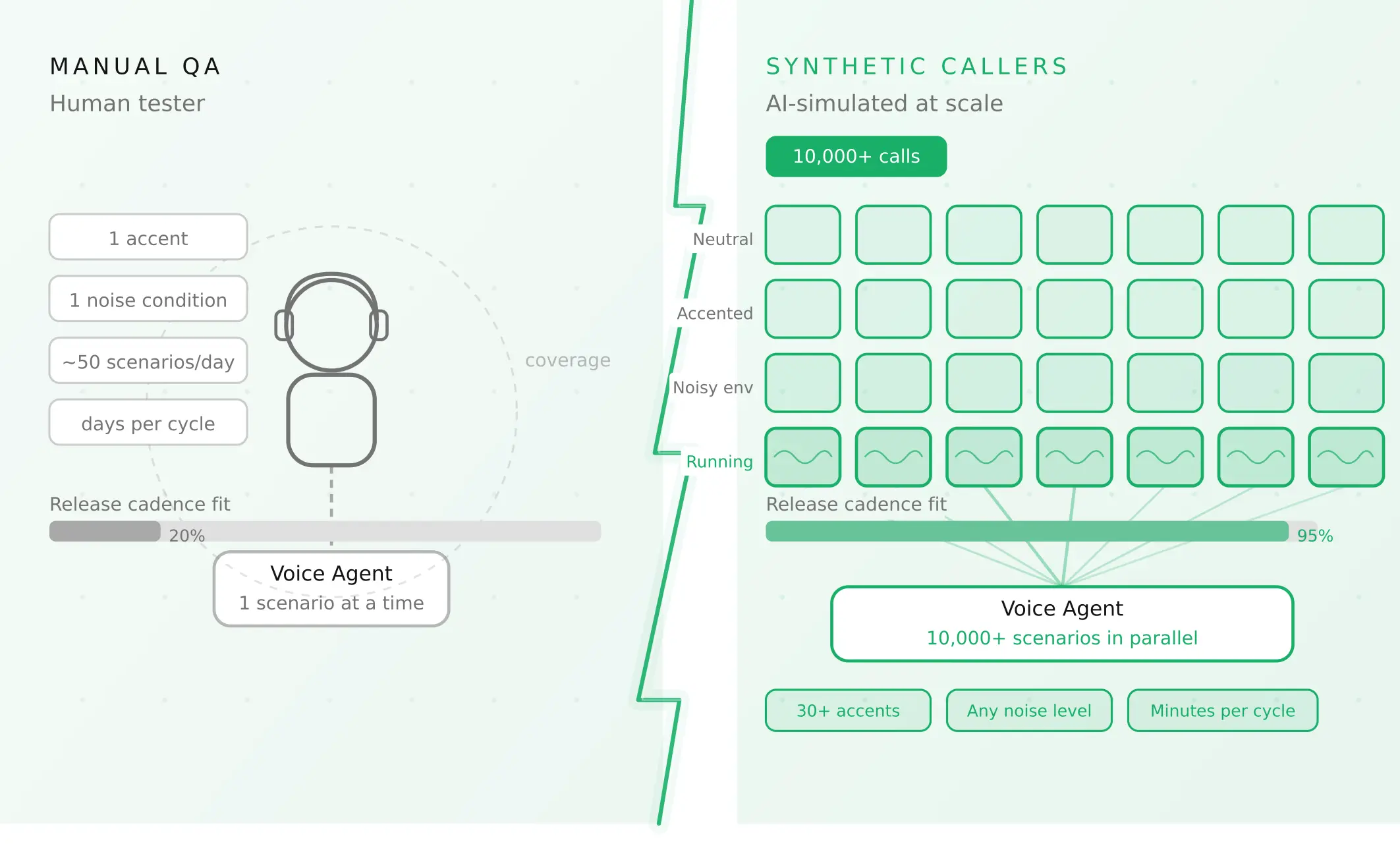
How to automate voice agent testing: synthetic callers vs manual QA
Learn how ai test automation replaces manual QA for voice agents. Compare synthetic callers vs human testers, with a 5-step framework to scale without hiring.
Read more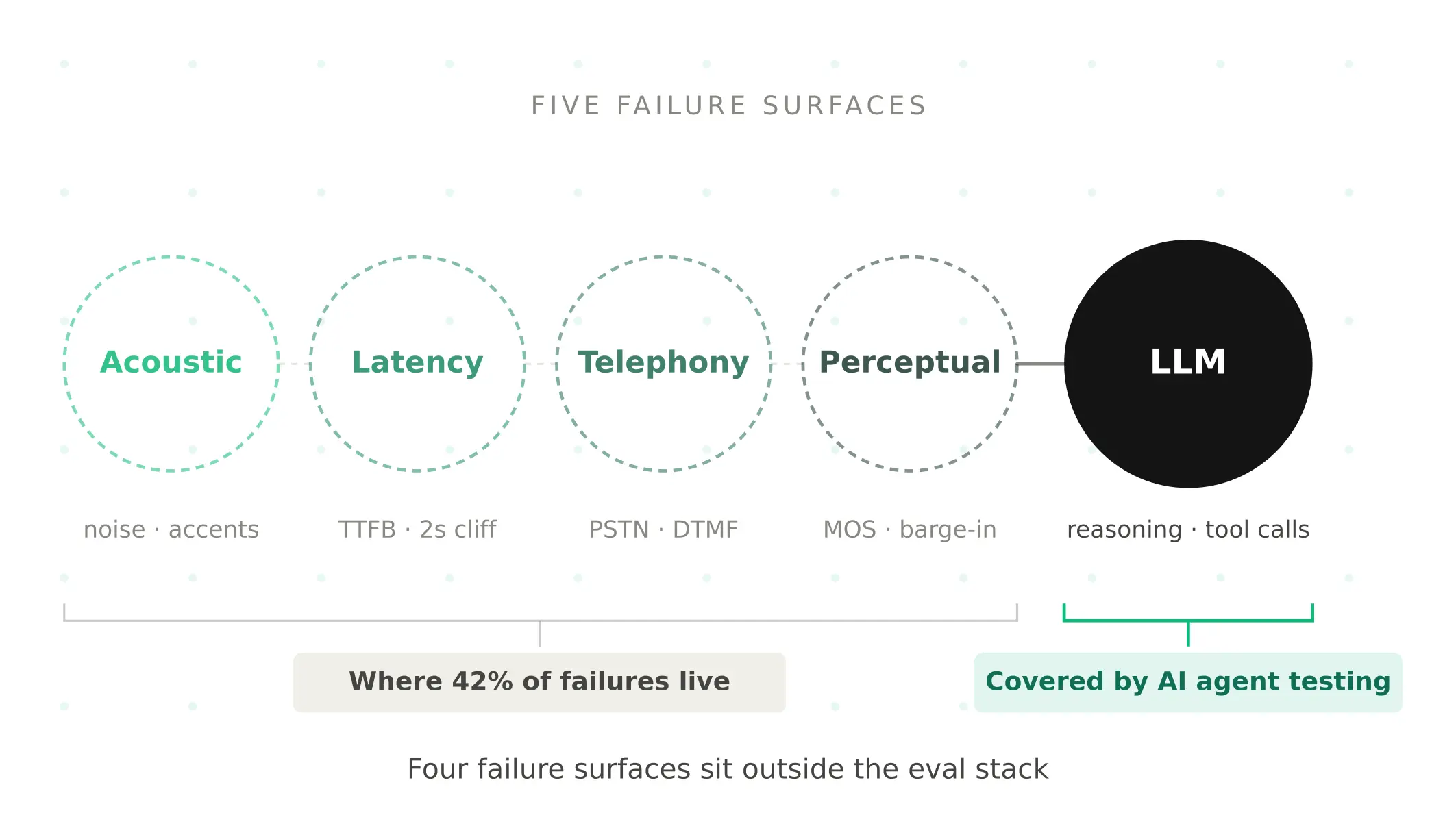
AI Agent Testing vs Voice Agent Testing: What General Tools Miss for Voice
AI agent testing measures text outputs. Voice agent testing measures behaviour through an acoustic pipeline. Five failure categories general tools miss.
Read more