Jobber AI Receptionist: What Breaks When Voice Writes to Jobber
On this page
Verified November 5, 2026 against Jobber's Developer Center and help center pages linked below. Where a page was silent, this post says so instead of guessing.
"Jobber AI receptionist" now means two things. Jobber sells a feature called Receptionist. Plenty of vertical-software and field-service teams also build their own phone agent that reads and writes Jobber for their customers. This post is for the second group, the teams that own a Jobber AI receptionist of their own. Think of it as a voice agent for field service software. It covers what that agent touches, where the Jobber docs are explicit, where they are silent, and how to test the gap.
Two meanings of Jobber AI receptionist
Jobber's Receptionist page says Receptionist "answers calls and texts 24/7, books visits, takes requests, and escalates to you when needed." When a message cannot be booked right away, it "creates a work request for you to review."
That is a first-party feature, and this post does not grade it. Everything below applies to a custom agent built on the API. It describes the other case, and the table shows the difference.
| Jobber's Receptionist | Your own voice agent using the API | |
|---|---|---|
| Who builds the agent | Jobber | Your engineering team |
| How it reaches Jobber data | Inside the product | GraphQL API with OAuth 2.0 |
| Who authorizes access | Not applicable | A Jobber admin on each customer account |
| Who owns rate limits and tokens | Jobber | You |
| Who tests prompt changes | Jobber | You |
If your product already ships its own Jobber AI receptionist, the right-hand column is your problem. Many sit inside home service software or field service management products. The integrations pillar post covers the shared pattern. This post stays inside Jobber.
Where a caller's words land in Jobber
A caller says one sentence. Your Jobber AI receptionist must store it across up to five record types: client, property, request, visit, and then quote or job. Jobber requests and visits are separate records, and the agent must pick the right one. The help center defines them, and the mapping decides what your agent must collect.
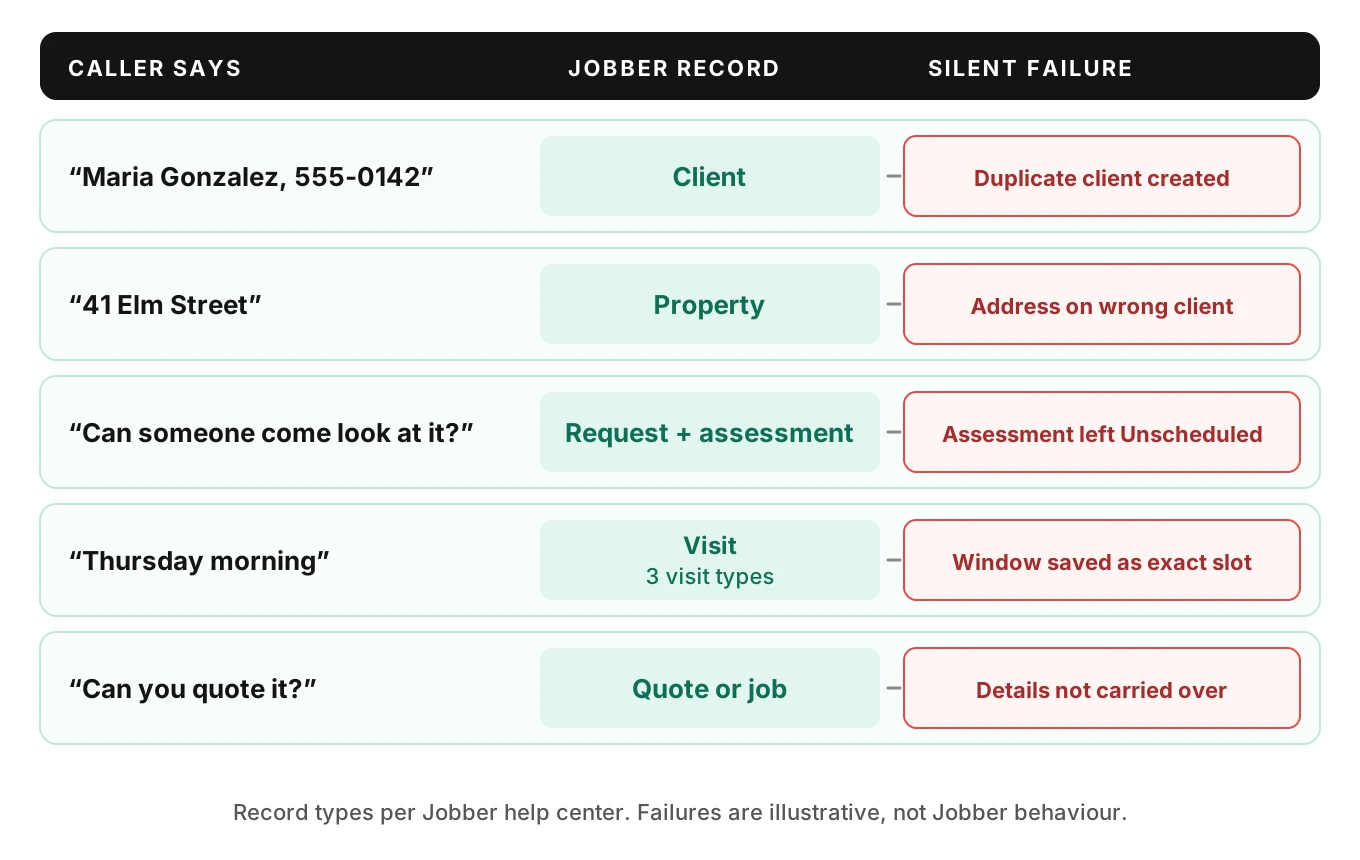
Jobber's request basics article describes a request as the starting point for new work. It is the inquiry before any pricing or scheduled work. A quote is created from a request. A job is the scheduled work. A request can convert straight to a job, and a converted request reaches a final Converted status.
Three details matter for voice.
- Assessments are a request feature. A request can be marked as needing an on-site assessment with a date, time and team, or left on "Schedule later." Request statuses include New, Unscheduled, Overdue, Assessment Completed, Converted and Archived.
- Nothing carries over on conversion. The conversion article says the request information "does not transfer into the line items or any part of the quote directly." Whatever the caller said stays on the request, and a person rebuilds the quote.
- Visits have three types. A scheduled visit has a date and time. An anytime visit has a date and no time. An unscheduled visit has neither.
These facts come from Jobber's help center, which describes the Jobber app. They are not API reference pages. I could not open an API page that lists request or visit fields, so check field names in GraphiQL before you map anything.
The "Thursday morning" problem
The caller says "Thursday morning." Your agent hears a time window. Jobber has no such object. You can book a scheduled visit with a precise time, an anytime visit on Thursday, or an unscheduled assessment on a request.
Each choice sends a different message to the dispatcher. A scheduled visit at 8:00 looks like a promise. An anytime visit looks like a route stop. A request in Unscheduled status looks like a callback task. Pick one rule per call type and write it in the prompt. A HVAC booking test and a plumbing booking test will show you which rule your agent actually follows.
The Jobber visits article does not cover time zones. The API pages I opened do not either. If your customers span time zones, test that explicitly rather than assuming.
Client matching and duplicate clients
Duplicates are the first real failure of any Jobber AI receptionist. A duplicate client is a second client record for the same person. A returning caller gives a name and a phone number. Your agent either finds the existing client or creates a new one.
Here is what Jobber documents:
- The queries and mutations page says nothing about duplicate detection on `clientCreate`. A duplicate client is easy to create. Do not assume the API blocks a second client with the same phone number.
- Merging is manual, from a client's profile or the Clients list. The merge article says "You can't undo a merge."
- Everything from the secondary client moves to the primary client, including jobs, visits, quotes, invoices, properties and contact details. Emails, phone numbers and tags are combined. Conflicting values resolve to the primary client's value.
- "A card on file never transfers during a merge."
- Connected apps such as QuickBooks or Zapier are not updated automatically. A later sync may recreate the client.
That last point is for you. If your own database stores a Jobber client ID, a merge in Jobber leaves you pointing at a deleted record. Subscribe to client events and reconcile.
Why speech makes duplicate clients worse
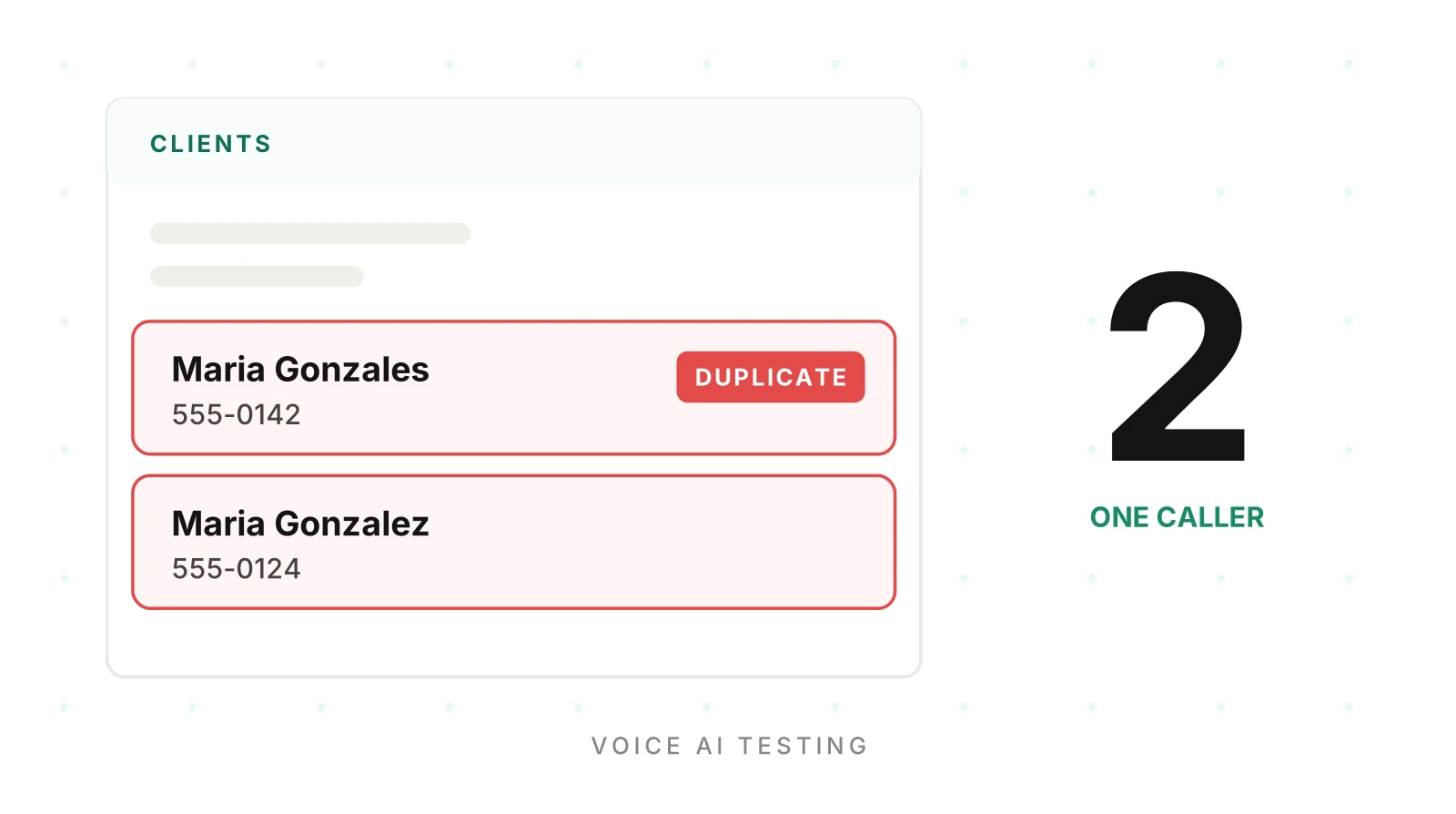
The agent does not read a phone number. It hears one. Transposed digits, a dropped area code or "oh" versus "zero" yield a number that matches no one. The agent then creates a second Maria Gonzalez, and Jobber accepts it.
Names do the same, so one caller's client record splits in two. "Gonzales" and "Gonzalez" sound identical. Our alphanumeric capture post covers the read-back protocol that catches digit errors before they reach a record.
I could not find a Jobber page that explains how the first-party Receptionist matches a caller. Jobber's Receptionist page gives only a demo tip: use your real phone number on the first call so Receptionist can recognize you when you call again. It does not describe the matching rules. Your agent needs its own explicit rule.
A match ladder you can copy
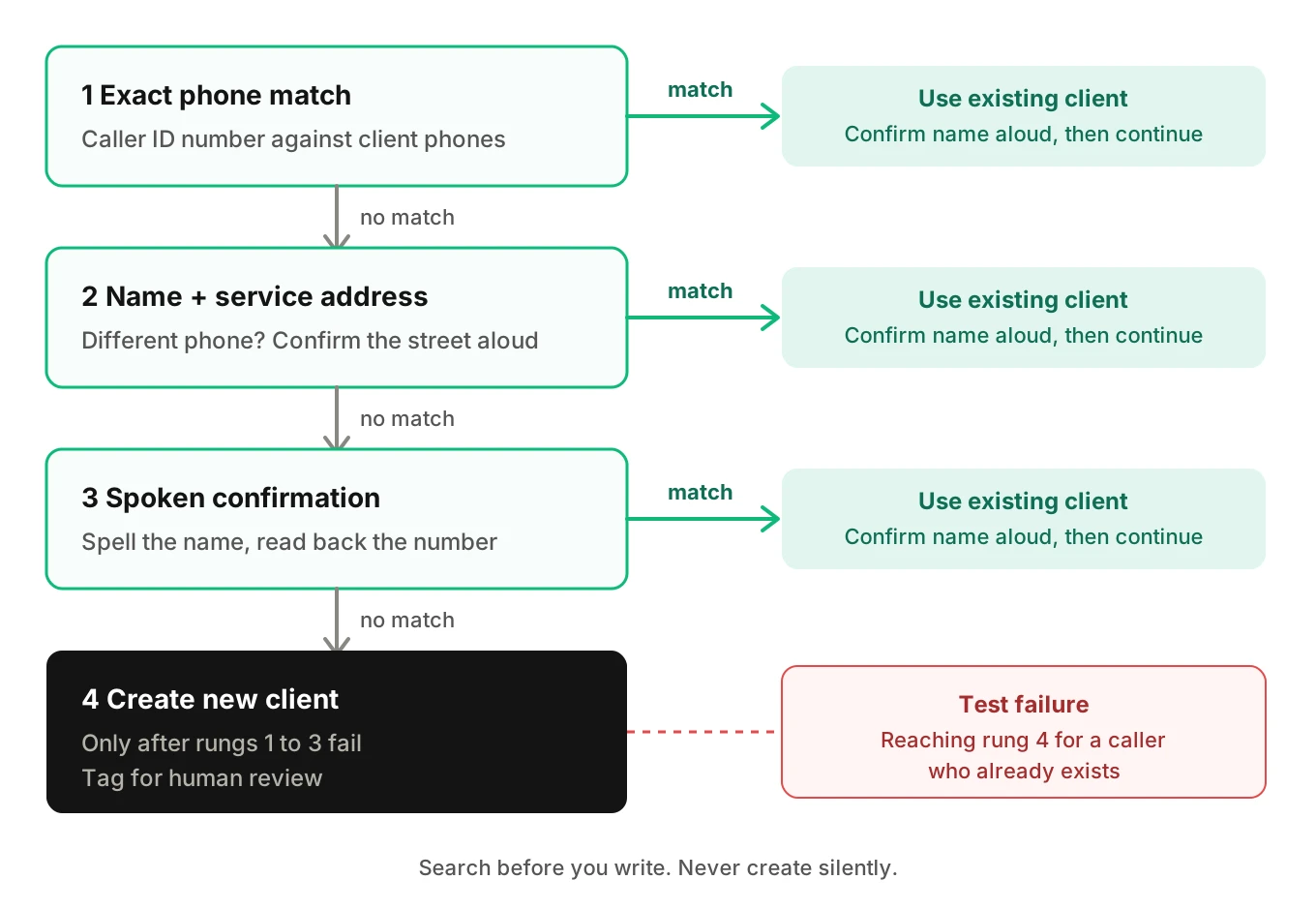
The rule is: search before you write, and never create silently. Four rungs:
1. Exact phone match on the caller ID number. Confirm the name aloud.
2. Name plus service address if the caller used a different phone. Confirm the street.
3. Spoken confirmation of a spelled name and read-back phone number.
4. Create a new client only after rungs 1 to 3 fail, and tag it for human review.
The test is whether the agent reaches rung 4 for a caller who already exists. Count those as duplicate-creation errors. Track the rate per 100 calls by accent and noise level.
Jobber API rate limits, with the arithmetic
A Jobber AI receptionist shares Jobber API rate limits with every other integration on the account.
Jobber's rate-limit page describes two limits. They behave differently.
Request limit. The page says Jobber limits clients to 2,500 requests per 5 minutes. That is about 8.3 requests per second. The limit applies per app and account pair, not per IP address. Exceeding it returns 429 Too Many Requests for that Jobber account.
Query cost. Each query spends points from a leaky bucket. Fields cost 1 by default. Edges, nodes and connection fields cost 0. A connection costs its `first` or `last` value times the requested fields. With no argument, the API assumes up to 100 nodes. Jobber's own example is `quotes(first: 10)` with five fields at 50 points, or 500 without `first`.
The throttle status sits under `extensions.cost`. It reports `requestedQueryCost`, `actualQueryCost`, `maximumAvailable`, `currentlyAvailable` and `restoreRate`. The docs' example shows 10,000 and 500. A query costing more than the maximum never resolves.
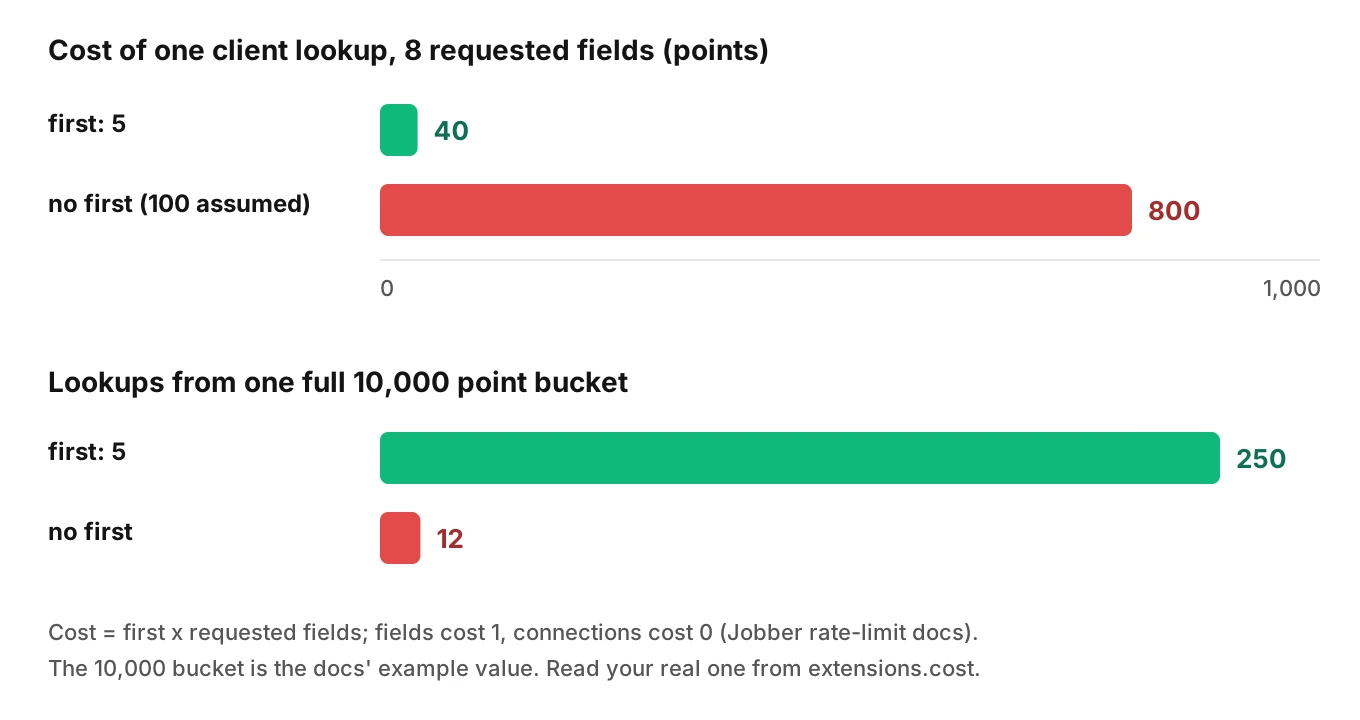
Illustrative worked example
These numbers use Jobber's cost formula and its example bucket. Your real values come from `extensions.cost`.
| Query | Calculation | Points | Lookups from a full 10,000 bucket |
|---|---|---|---|
| `clients(first: 5)`, 8 fields | 5 x 8 | 40 | 250 |
| `clients`, no `first`, 8 fields | 100 x 8 | 800 | 12 |
Nested connections multiply cost further. At the example restore rate of 500 points per second, an 800-point query refills in 1.6 seconds.
The shared bucket
The request limit is per app and account pair. Your nightly sync and your live agent share it. A backfill running at 10 requests per second on one busy customer will push that account over 8.3 per second. Your live agent then gets 429s while a caller waits.
That is an inference from the per-pair wording, not a documented incident. It is easy to test, so test it.
Also note the error shape. The queries page says top-level `errors` mean the request could not run, and the HTTP status is still 200. A throttled response carries the error code `THROTTLED`. Because top-level errors still return HTTP 200, a client that checks only the status code can read a failure as success.
import requests

JOBBER_GRAPHQL_URL = "..."  # the single endpoint from Jobber's docs
VERSION = "2025-04-16"      # the docs' example; pin the version you tested

def jobber_query(token: str, query: str, variables: dict) -> dict:
    r = requests.post(
        JOBBER_GRAPHQL_URL,
        json={"query": query, "variables": variables},
        headers={
            "Authorization": f"Bearer {token}",
            "X-JOBBER-GRAPHQL-VERSION": VERSION,
            "Content-Type": "application/json",
        },
        timeout=3,
    )
    if r.status_code == 429:
        raise RuntimeError("rate_limited_429")
    if r.status_code == 401:
        raise RuntimeError("token_invalid")
    body = r.json()
    if body.get("errors"):                       # HTTP 200 can still be a failure
        if "THROTTLED" in str(body["errors"]):
            raise RuntimeError("throttled")
        raise RuntimeError(f"graphql_error: {body['errors']}")
    print("cost", body.get("extensions", {}).get("cost"))  # log every call
    return body["data"]
This is simplified. It logs the cost block on every call, so you see budget trends before throttling starts. For mutations, also check `userErrors`. The docs say "An empty userErrors array indicates the mutation succeeded."
Tokens, scopes and who can connect
Authorization is where a multi-customer Jobber AI receptionist hits surprises.
- Only an admin authorizes. The OAuth page says the resource owner is the Jobber admin user. Your onboarding flow must reach that person, not the front-desk user.
- Access tokens last 60 minutes by default. After that, requests return 401. You can refresh at any time.
- Refresh token rotation. With rotation on, each refresh returns a new refresh token. The rotation page says "The same refresh token should never be sent to the API more than once."
- Concurrent refreshes break it. The page names two common causes: stale tokens held in memory, and concurrent background jobs that refresh at the same time. Voice agents have exactly that shape. Ten simultaneous calls on one account see an expired token together.
- Scope changes need re-authorization. Changing an app's scopes means connected accounts must re-authorize.
- Tokens can disappear. Disconnecting, account churn, plan downgrade, admin deactivation or rolling the client secret revokes them. A disconnect from the App Marketplace fires an `APP_DISCONNECT` webhook.
The fix is one refresher per account. Take a lock keyed by account, re-read the stored refresh token inside the lock, refresh once, write the new pair, release. Every other call waits and reuses the result.
The five-account ceiling
The custom integrations page matters if you plan to connect many customers. A custom integration in Draft state can run without app review. If it connects to more than 5 paying, non-tester accounts, API access is blocked and approval is required from Jobber. A voice agent live across many contractors needs that conversation early, before the sixth customer.
Custom fields for trade and urgency
A Jobber AI receptionist for contractors needs a place for trade and urgency. Callers give both. Custom fields are one option.
The custom fields page says they are configured at the account level and hold values at the object level. They apply to clients, properties, quotes, jobs and invoices. Key limits:
- One app can create only 5 configurations on any Jobber object.
- "An app cannot input or overwrite the values of any custom fields that were configured by another app."
- An app cannot delete or archive fields it created.
- Disconnecting archives the app's fields. Reconnecting unarchives them.
- The page recommends running `customFieldConfigurations` first, to avoid duplicate-configuration errors.
- Custom fields require the Connect plan or higher.
Fields are visible to Jobber users. Keep sensitive detail out of custom fields. The page says to use other mechanisms for anything that should stay hidden.
The voice risk is value drift. Urgency is a spoken judgement, not a clean enum. "My AC just died and it is 98 degrees" and "AC is a little weak" can map to the same value. Test the mapping with the trade posts that cover emergencies: plumbing, electrical, garage door and locksmith. The broader home services QA guide covers the shared failure modes.
Jobber webhooks and the echo problem
A Jobber AI receptionist that listens to Jobber webhooks must handle its own echoes.
Jobber webhooks are configured at the application level. They fire for accounts with an installation. You need the matching read scope. The page documents `CLIENT_CREATE`, `CLIENT_UPDATE` and `CLIENT_DESTROY` as examples and points to `WebHookTopicEnum` for the full list.
The rules that bite:
- One second. Respond within 1 second and process asynchronously.
- At-least-once. Duplicates happen. Deduplicate and make handlers idempotent.
- No retry schedule is documented. The page describes re-sending after failed delivery but gives no schedule or count.
- No alerts. Jobber does not alert you on non-2xx responses. Too many slow or failing responses may get your webhooks disabled.
- Version quirks. Apps created before April 11, 2022 receive form-encoded bodies. Apps created before December 8, 2023 get the field spelled `occuredAt`.
import base64, hashlib, hmac

def verify(raw_body: bytes, header_sig: str, client_secret: str) -> bool:
    mac = hmac.new(client_secret.encode(), raw_body, hashlib.sha256).digest()
    return hmac.compare_digest(base64.b64encode(mac).decode(), header_sig)

def handle(raw_body, headers, secret, seen: set, queue):
    if not verify(raw_body, headers["X-Jobber-Hmac-SHA256"], secret):
        return 401
    event = parse(raw_body)["data"]["webHookEvent"]  # confirm nesting against WebHookPayload
    key = (event["topic"], event["itemId"], event.get("occurredAt"))
    if key not in seen:           # at-least-once delivery
        seen.add(key)
        queue.put(event)          # work happens off the request path
    return 200                    # answer inside 1 second
This is simplified, and `parse` is your JSON or form parser. The verification steps follow the docs: HMAC-SHA256 over the raw payload with your client secret, base64-encoded, compared in constant time.
Here is the echo problem. Your agent creates a client. Jobber fires `CLIENT_CREATE` for it. Your handler treats it as a new lead and starts a follow-up. This is inference from the docs saying webhooks fire for accounts with an installation. It is not a documented case. Tag your own writes, for example by recording the item ID you just created, and skip them.
Pin the Jobber API version
Every request needs the `X-JOBBER-GRAPHQL-VERSION` header. The versioning page says versions are supported for a minimum of 12 months. Removed versions are automatically upgraded to the oldest supported one. The response reports the version actually used.
Changes can be breaking. The changelog lists 2024-11-12 as breaking: "Type for argument sort on field requests changed from RequestsSortInput to [RequestsSortInput!]". Pin the version you tested. Log `extensions.versioning.version` on every call, and alert if it differs from your pin.
How to test a Jobber AI receptionist
This applies to any voice agent that writes to Jobber. Use a Jobber developer test account. Jobber's getting-started page describes one with a 90-day trial. Never test against a customer's live account.
1. Seed the account. Create clients with near-identical names and transposed phone numbers, plus two with the same address. Seed one request in Unscheduled status and one anytime visit.
2. Build a scenario matrix. Rows are caller intents: new client, returning client, wrong number, urgent leak, quote request, reschedule. Columns are conditions: accent, speech pace, interruptions, background noise, language.
3. Run calls over your real telephony path. Evalgent can generate scenarios from your agent's prompt and flows, and simulate callers over PSTN, SIP or WebRTC. It judges from the audio, not only the transcript. It does not connect to Jobber, so you run step 4 yourself.
4. Verify state in Jobber, not in the transcript. After each call, query the test account. Count clients created, requests created, visit type, and custom field values. Compare to the expected record.
5. Inject faults. Force a 429, a `THROTTLED` response, an expired token, a revoked token and a duplicate webhook. Watch whether the agent recovers or goes silent.
6. Gate every change. Run the matrix before each prompt or schema change. Our integration testing and post-call write-back posts cover the harness.
Pass and fail thresholds
| Check | Count as failure when | Suggested gate |
|---|---|---|
| Duplicate creation | New client created for a seeded existing caller | 0 on seeded callers |
| Wrong record type | Visit created when a request was expected | 0 on the scripted set |
| Silent write failure | `userErrors` non-empty and the agent confirmed anyway | 0 |
| Throttle handling | Dead air longer than your latency budget after `THROTTLED` | Agent offers a callback |
| Duplicate webhook | Same event processed twice | 0 |
The gates are suggestions, not Jobber figures. Run each cell several times, because voice agents vary between runs. Use more runs for the cells that matter most.
For a live Jobber AI receptionist, Evalgent's call monitoring takes pushed recordings and flags tool-call failures, latency spikes and policy failures. That catches the call that went wrong on Tuesday, not the one you rehearsed. Pair it with permission checks and a rollback plan for bad writes. If sync load worries you, the rate limit post covers capacity in general.
Frequently asked questions
Does Jobber have an AI receptionist?
Yes. Jobber's page describes its AI receptionist, called Receptionist, which answers calls and texts, books visits, takes requests, and escalates to the owner. Separately, some teams build their own voice agent that talks to Jobber through the GraphQL API, which is a different engineering job.
Can an AI voice agent create requests in Jobber?
Jobber's own AI receptionist creates work requests when a message cannot be booked right away. For a custom agent, the API page I opened shows `clientCreate` as its mutation example. I could not open a page listing request fields, so confirm request mutations in GraphiQL for your API version.
How to prevent duplicate clients in Jobber?
For a custom Jobber AI receptionist, search before you create. Match on caller ID phone, then name plus address, then spoken confirmation, and create a new client only after those fail. Jobber's queries page says nothing about duplicate detection on create, and merges cannot be undone. Tag agent-created clients for review.
Does the Jobber API have rate limits?
Yes. Jobber documents a limit of 2,500 requests per 5 minutes per app and account pair, with 429 on excess. It also uses a leaky-bucket query cost. Throttled GraphQL responses carry the error code THROTTLED. Check the response body, because top-level GraphQL errors can arrive with HTTP 200.
How long does a Jobber access token last?
The default is 60 minutes, per Jobber's app authorization page. After that, requests return a 401. You can refresh at any time. With rotation on, each refresh returns a new refresh token, and the old one must be discarded.
How do Jobber webhooks work?
Jobber sends a POST to your URL when a subscribed topic occurs. The body includes topic, appId, accountId, itemId and occurredAt. Verify the X-Jobber-Hmac-SHA256 header, respond within 1 second, process asynchronously, and deduplicate because delivery is at-least-once.
What is the difference between a request and a job in Jobber?
A request is the initial inquiry, before pricing or scheduled work. A job is the scheduled work, made of visits. A request can convert to a quote or directly to a job. Per Jobber's help center, request details do not transfer into the quote or job line items.
How to test an AI receptionist that writes to Jobber?
Use a developer test account for your Jobber AI receptionist, seeded with near-duplicate clients. Run scripted calls with varied accents and noise, then query Jobber and compare the stored records to the expected ones. Inject throttling, expired tokens and duplicate webhooks. Count duplicate clients and wrong record types per 100 calls.
The bottom line
A Jobber AI receptionist fails at the boundary, in duplicate clients, wrong record types, throttled calls, stale tokens and echoed webhooks. Seed a test account with those traps, verify the stored records after every call, and gate each change on the result.
Related Articles
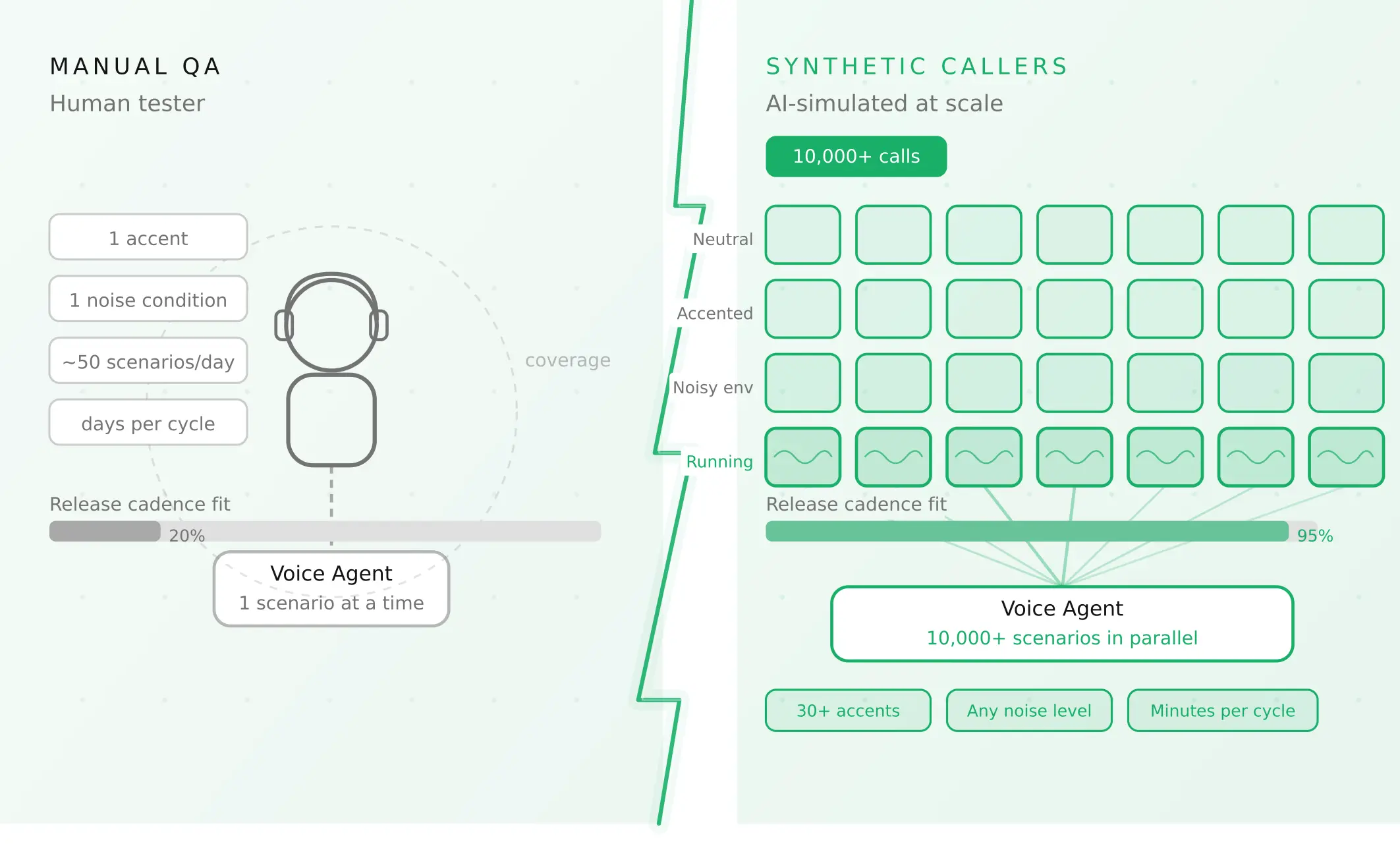
How to automate voice agent testing: synthetic callers vs manual QA
Learn how ai test automation replaces manual QA for voice agents. Compare synthetic callers vs human testers, with a 5-step framework to scale without hiring.
Read more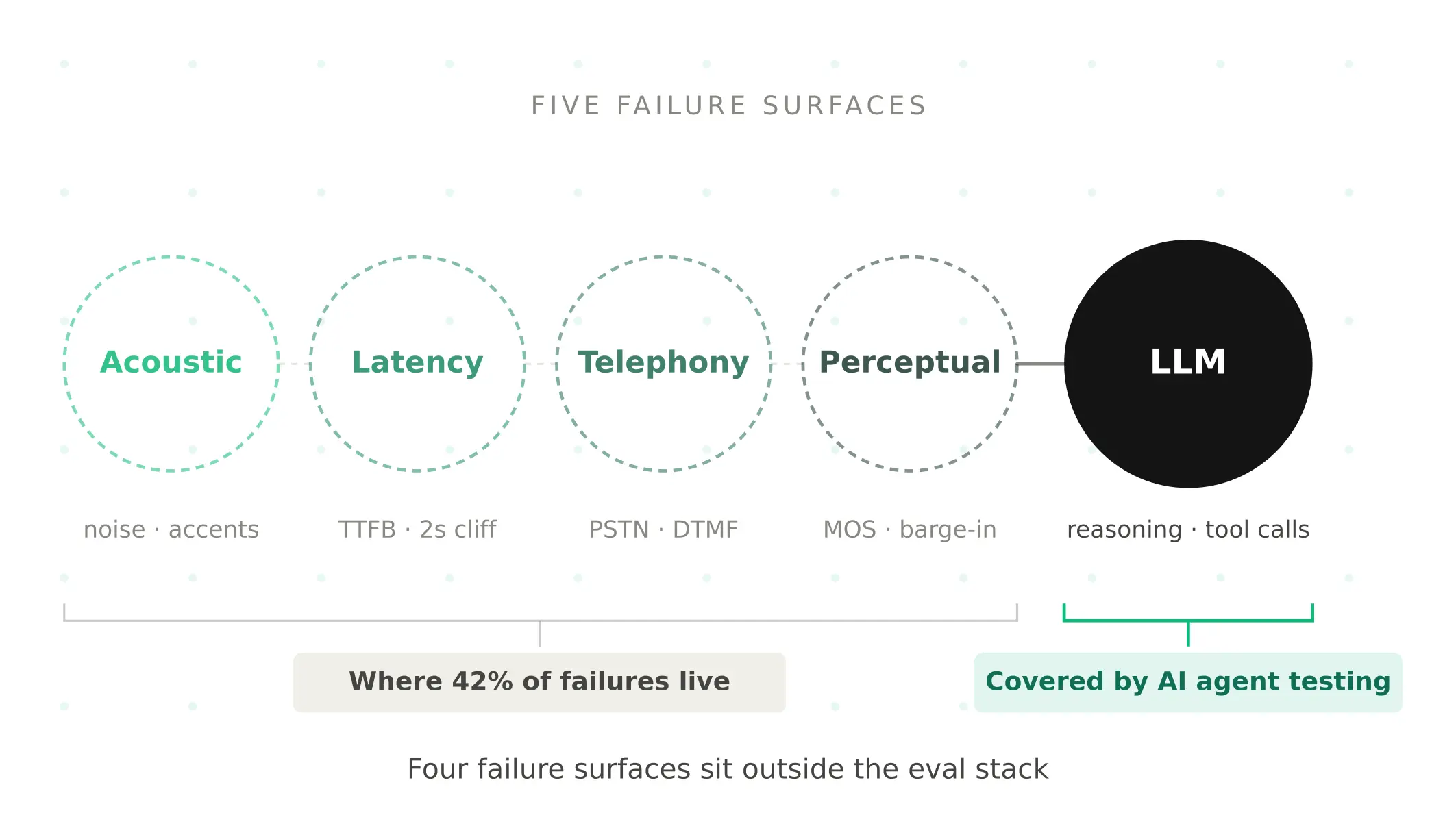
AI Agent Testing vs Voice Agent Testing: What General Tools Miss for Voice
AI agent testing measures text outputs. Voice agent testing measures behaviour through an acoustic pipeline. Five failure categories general tools miss.
Read more