Freshdesk AI Voice Agent: Priority, Contacts, Rate Limits
On this page
Last verified November 5, 2026, against Freshdesk's API v2 reference, its API rate limit article, its ticket creation rules article and its ticket fields article. Vendor behaviour changes, so recheck before you ship.
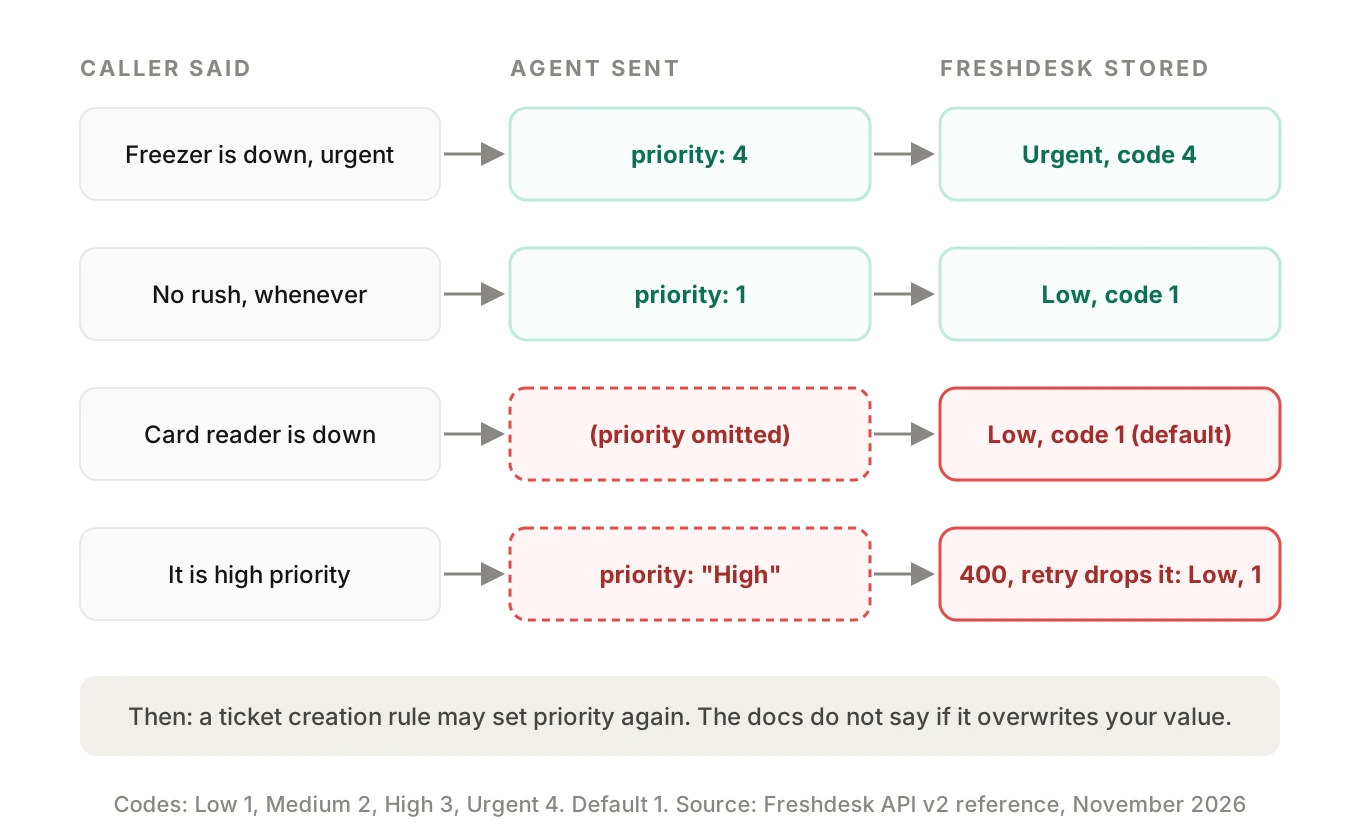
A caller says the walk-in freezer is down. Your Freshdesk AI voice agent hears it, agrees it is urgent and says "I have raised an urgent ticket." The Freshdesk record says priority Low. Nobody lied. A field was left out, and Freshdesk filled in its default.
This post is for teams that built a Freshdesk AI voice agent inside their own product and now write call outcomes into a customer's helpdesk. It covers the fields that decide what lands in the queue, how contacts get matched or duplicated, where rate limits bite, and how to test it. It is not a tour of Freshdesk's own features.
What a Freshdesk AI voice agent actually writes
A Freshdesk AI voice agent is a helpdesk voice agent: the voice call is the front door. Behind it sits a small workflow: capture the problem, identify the caller, create a ticket, add context, confirm to the caller. Each step writes to a different Freshdesk object.
| Step on the call | Freshdesk object | API v2 path (from the reference) |
|---|---|---|
| Identify caller | Contact | `/api/v2/contacts`, plus a beta filter endpoint at `/api/v2/search/contacts` |
| Record the problem | Ticket | `POST /api/v2/tickets` |
| Add transcript or summary | Conversation note | `/api/v2/tickets/[ticket_id]/notes` |
| Callback or correction | Ticket update | `PUT /api/v2/tickets/[id]` |
| Check for an open ticket | Ticket search | `GET /api/v2/search/tickets?query=` |
Every row is a place where a speech error becomes a silent record error. The call sounds fine. The helpdesk is wrong. Our post on post-call write-back testing covers the general pattern. Everything below, about a Freshdesk AI voice agent, is Freshdesk API v2 as documented in November 2026. Where Freshdesk's pages disagree, I say so.
The numeric codes your Freshdesk AI voice agent must send
Freshdesk stores priority, status and source as numbers. A language model speaks in words. The mapping layer between them is yours, and it is the first thing to break.
| Field | Values (Freshdesk API v2 reference) | Default |
|---|---|---|
| priority | Low 1, Medium 2, High 3, Urgent 4 | 1 |
| status | Open 2, Pending 3, Resolved 4, Closed 5 | 2 |
| source | Email 1, Portal 2, Phone 3, Chat 7, Feedback Widget 9, Outbound Email 10 | 2 |
Two defaults matter here. Priority defaults to 1, which is Low. Source defaults to 2, which is Portal. A ticket your agent creates without a source looks like a customer filled in the web form.
The reference marks priority, status and source as required on create, each with a default. It also describes a group of requester fields, where one must identify the caller: `requester_id`, `email`, `phone` and others. The page is inconsistent here. A footnote says any of five attributes is enough while the list shows six. The Errors section separately says creating a ticket needs `requester_id`. Treat that as a reason to test your exact payload in a sandbox account, not as a rule you can recite.
Why an urgent call lands as Low
There are four ordinary ways this happens. Each is a bug in your layer, not in Freshdesk.
1. The field never left your code. The agent's tool schema marks priority optional. The model skips it on short calls. Freshdesk stores the default, 1.
2. Words instead of numbers. The model sends `"urgent"` or `"High"`. Freshdesk's Errors section describes `datatype_mismatch` and `invalid_value` for wrong types and formats. Your wrapper may then catch the failure and retry without the field. Now you are back to the default.
3. The classification was wrong. The caller said "it's not a big deal, but the card reader is down and we're open in an hour." The model picked Low. The business impact is High.
4. An automation rule rewrote it. Freshdesk's ticket creation rules can set status, priority and type on new tickets. Its article points API-created tickets to the `/api/v2/tickets` endpoint but does not say outright whether they trigger these rules, or whether a rule overwrites a value you sent. Test both.
On rule order: by default Freshdesk runs only the first enabled rule whose conditions match, according to the article. A setting that executes all matching rules changes that. A broad rule sitting above your specific one can set priority to something you never intended. Tickets created through the outbound email endpoint do not trigger these rules, per the same article.
A safer priority contract
Do not let the model choose a number. Let it fill a small enum, then map in code.
# Simplified. Codes from Freshdesk API v2 reference, checked November 2026.
PRIORITY = {"low": 1, "medium": 2, "high": 3, "urgent": 4}
STATUS_OPEN = 2
SOURCE_PHONE = 3

def build_ticket(call):
    level = call.urgency  # enum from the agent tool schema, required
    if level not in PRIORITY:
        raise ValueError("urgency must be one of low|medium|high|urgent")
    return {
        "subject": call.subject[:255],
        "description": f"<p>{call.summary_html}</p>",
        "email": call.confirmed_email,
        "priority": PRIORITY[level],
        "status": STATUS_OPEN,
        "source": SOURCE_PHONE,
        "custom_fields": {"cf_call_id": call.call_id},
    }
Three design choices sit in that snippet. Urgency is a required enum, so the model cannot skip it. A bad value raises an error in your code, not a silent default in theirs. And the call ID goes into a custom field, which the reference describes as a dictionary of custom field names and values. Create that field in the account first and confirm its exact API name, since custom field keys can differ from the label. It lets you trace any ticket back to the recording.
The 255 cap on subject is my own guard, not a Freshdesk figure.
Source, subject, description and notes
Source 3 is Phone, and it describes the channel truthfully. Pair it with a custom field such as `cf_created_by = voice_agent` so reports can separate agent tickets from human-handled calls.
The `description` field takes HTML content, according to the reference. Responses also carry `description_text`, the plain-text version. Escape any transcript text, because stray angle brackets can read as markup. Long transcripts also bury the one sentence an agent needs. Put a three-line summary in the description and the full transcript in a note.
Notes live on their own endpoint, `/api/v2/tickets/[ticket_id]/notes`. I could not confirm from the pages I opened whether a note defaults to private or public. That matters: a public note can go to the requester. Check the Conversations section of the live reference and test with a throwaway contact before any real caller sees it.
Freshdesk contacts: where duplicates come from
When you create a ticket with an `email`, the reference says that if no contact exists with that address, Freshdesk adds one. That is convenient. It is also the mechanism that turns one misheard letter into a second customer record.
Say the caller spells `priya.raman@acme-foods.com`. The recognizer hears `priya.ramen@acme-foods.com`. No contact matches. Freshdesk creates a new contact and attaches the ticket. The real Priya's history stays on the real Priya. Her next caller-facing update goes to an address nobody reads.
How hard is email by voice? A paper on spoken entity extraction for virtual agents, E2E Spoken Entity Extraction for Virtual Agents, reports accuracy by entity type on production enterprise virtual agent data. In its table, email address is the weakest entity. The two-step ASR-then-extraction baseline scores 61.5 percent, the best end-to-end model 68.2 percent, and human annotators 73.6 percent. The authors note their human labels came from annotators working under time pressure, so treat the human figure as noisy. The test sets are small, from about 835 to 4,300 utterances. The takeaway is directional: email is the entity most likely to go wrong, even for strong systems.
Phone fails differently. If you store `5551234567` in one place and `+15551234567` in another, a lookup that works for one misses the other. Google's libphonenumber shows the pattern: parse with a region code, then format as E.164. Its `isPossibleNumber` check uses length only. Its `isValidNumber` check also uses prefix information. Neither tells you the number is in service or belongs to this caller.
Freshdesk's own rule for phone-only tickets: if phone is set and email is not, `name` is mandatory. So a call where the agent never got a name will fail validation. Decide what the agent does then: ask again, or use a fallback name and flag the ticket.
The 409 is a feature
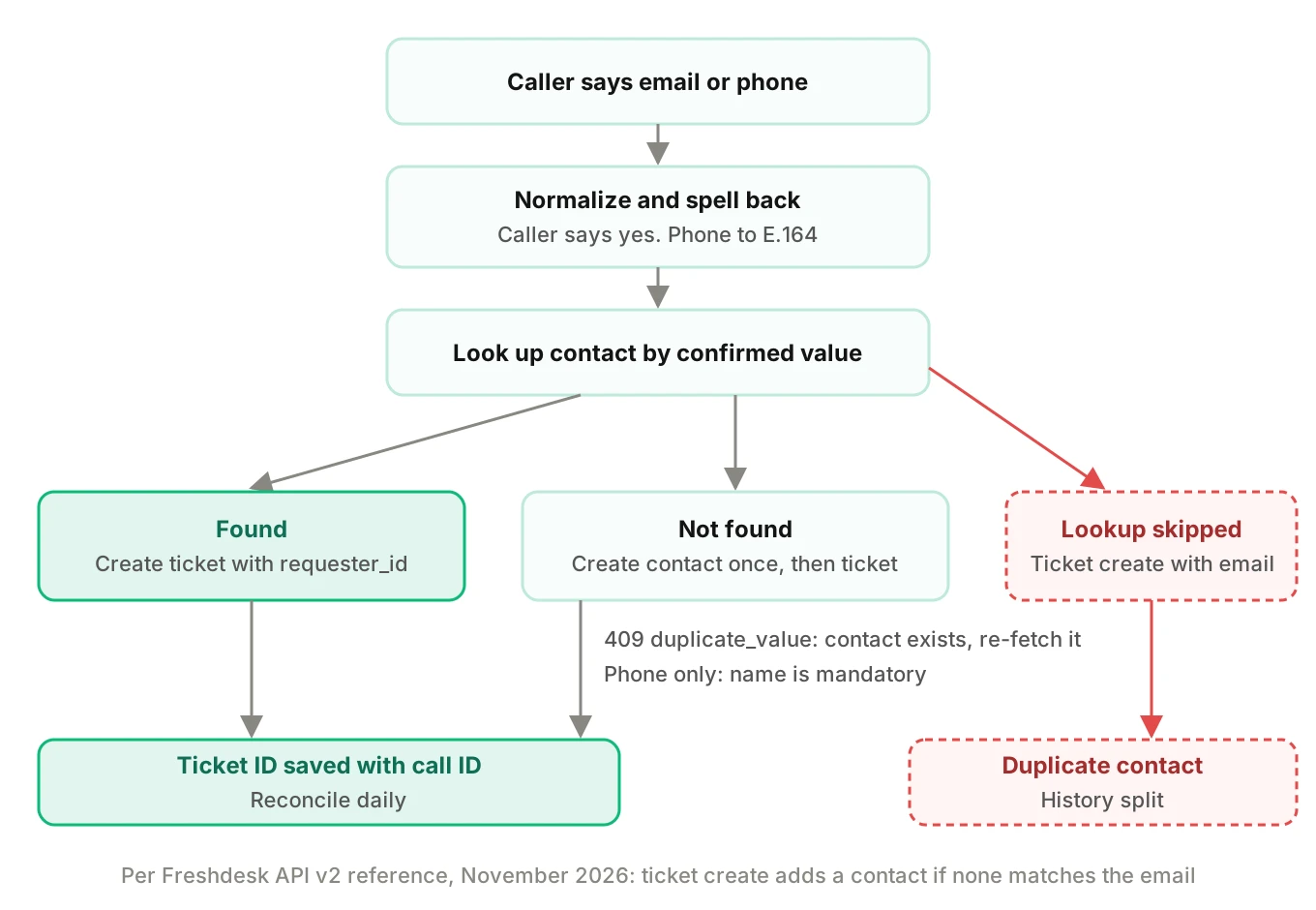
Creating a contact with an email already tied to an existing user returns HTTP 409, described in the Errors table as an inconsistent or conflicting state. The error code duplicate_value marks unique fields such as a contact's email. Do not treat 409 as a failure to retry. It means the contact exists. Fetch it and use its ID.
The reverse trap is the ticket-create shortcut. The reference documents no 409 on that path, because it creates the contact silently when none matches. So the safest sequence is explicit:
1. Normalize what the caller said. Spell it back and get a yes.
2. Look up the contact by the confirmed email or phone.
3. If found, create the ticket with `requester_id`.
4. If not found, create the contact, handle a 409 by re-fetching, then create the ticket.
Freshdesk also has a merge endpoint for contacts at `api/v2/contacts/merge`. The page I opened lists the path and a July 2018 changelog note but gives no request details. Check it before you build clean-up jobs. For the spoken side of this problem, see our post on alphanumeric capture.
Do not trust search right after create
A caller hangs up, redials and says "I called two minutes ago." Your agent searches for an open ticket and finds none. It creates another.
The reference says the ticket filter endpoint, `GET /api/v2/search/tickets?query=`, takes a URL-encoded query in double quotes of up to 512 characters. It returns 30 results per page with a total count, and the page number should not exceed 10. Archived tickets are not included. Recent updates take a few minutes to be indexed.
That last line is the trap. A ticket created 90 seconds ago may not appear in search. So keep your own record. Store the Freshdesk ticket ID against the caller and call ID in your database at create time. On a repeat call within a window, read your table first. Search second. Our integration testing guide explains why the vendor's index is never your source of truth.
Freshdesk rate limit: a budget, not a footnote
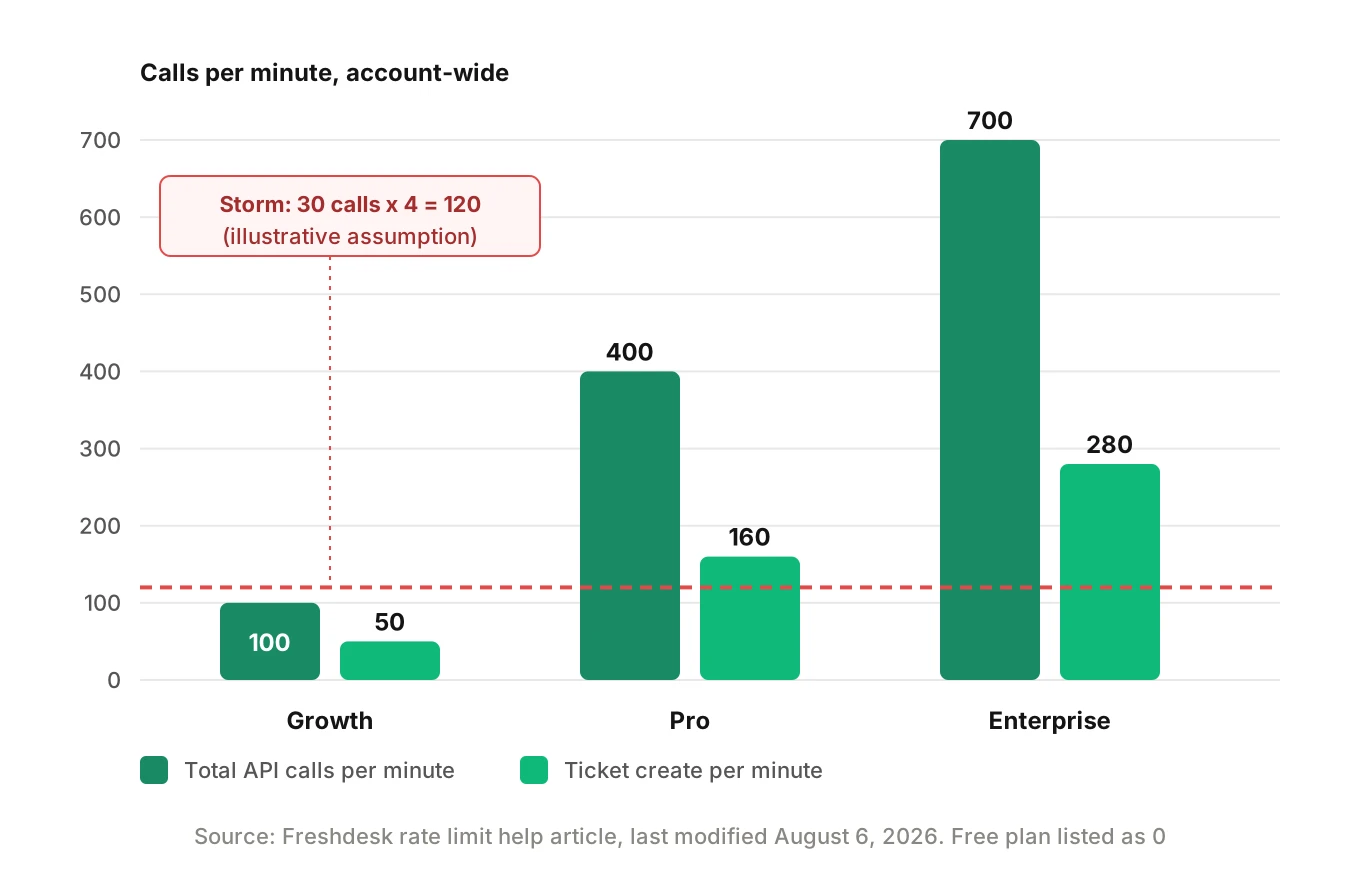
Freshdesk's rate limit article, last modified August 6, 2026, says the company is moving accounts from a per-hour limit to a per-minute limit in batches. It gives these per-minute figures, which it calls maximums for each endpoint:
| Plan | Total calls per minute | Ticket create | Ticket update | Tickets list | Contacts list |
|---|---|---|---|---|---|
| Free | 0 | 0 | 0 | 0 | 0 |
| Growth | 100 | 50 | 50 | 40 | 40 |
| Pro | 400 | 160 | 160 | 100 | 100 |
| Enterprise | 700 | 280 | 280 | 200 | 200 |
The same article says the limit applies to the whole account, no matter how many agents or IP addresses call. Trials are capped at 50 calls per minute. The developer reference adds that invalid requests also count. It lists response headers `X-RateLimit-Total`, `X-RateLimit-Remaining` and `X-RateLimit-Used-CurrentRequest`, and says `Retry-After` gives seconds to wait once you hit the limit, with HTTP 429.
The two pages are not fully aligned. The reference's plan table is labelled per hour while its text says per minute, and it lists older plan names. Read the headers on the actual account.
The limit is shared. Your agent competes with every other app on that customer's account, so you may not own the budget.
Worked example (illustrative)
Assume each finished call costs four API calls: one contact lookup, one ticket create, one note, one update. These are assumptions for the arithmetic, not Freshdesk figures.
| Plan | Total API calls per minute | Finished calls per minute if the agent has the whole budget | Same, if other apps use 40 API calls per minute |
|---|---|---|---|
| Growth | 100 | 100 / 4 = 25 | 60 / 4 = 15 |
| Pro | 400 | 400 / 4 = 100 | 360 / 4 = 90 |
| Enterprise | 700 | 700 / 4 = 175 | 660 / 4 = 165 |
Now picture a storm. A regional outage makes 30 callers ring in during one minute. That is 120 API calls. On Growth, the total is 100. Twenty of those API calls get a 429. If the wrapper retries immediately, invalid and rejected requests keep eating budget. The retry loop becomes the outage.
Build for it. Queue writes. Respect the Retry-After header. Never say "ticket created" before you hold a ticket ID. Our posts on voice agent API rate limits and post-call write-back go deeper on queues and idempotency.
# Simplified. Header names from the Freshdesk API v2 reference.
import time, requests

def post_ticket(domain, api_key, payload):
    url = f"https://{domain}.freshdesk.com/api/v2/tickets"
    for attempt in range(4):
        r = requests.post(url, json=payload, auth=(api_key, "X"), timeout=10)
        if r.status_code == 429:
            time.sleep(int(r.headers.get("Retry-After", "30")))
            continue
        r.raise_for_status()
        return r.json()["id"]
    raise RuntimeError("rate limited; queue for later")
The reference shows API key authentication with the key as username and any dummy password. The `X` above follows its curl example. Confirm the JSON content type against your own account before relying on this snippet.
Required fields and ticket form rules
Freshdesk's ticket fields article describes a ticket form with custom fields that can be required when submitting the form, or required when closing a ticket. The first applies to agents and customers. The second prompts agents at close. The article does not say how required fields behave for tickets created through the API. Your agent cannot see a form validation prompt, so you must learn the behaviour by testing: create a ticket missing a required custom field and read the response.
Also decide who owns the schema. If a customer admin adds a required field next week, your payload may start failing validation. An agent that fails to create a ticket and says nothing is worse than one that says it is transferring you. See escalation accuracy for testing that handoff.
If one agent serves many customers, treat each Freshdesk account as its own configuration: its own rules, required fields and plan limits. Our integrations pillar covers the pattern, and Zendesk is the closest sibling. For API key scope, see voice agent permissions.
How to test a Freshdesk voice agent before every release
Use a sandbox Freshdesk account with the same rules and required fields as production. Never point tests at a customer's live helpdesk.
1. Write the scenario matrix. Rows are intents: outage, billing question, callback, repeat caller, no-name caller. Columns are conditions: accent, speech pace, background noise, interruptions, spelled email, phone-only. Evalgent generates test scenarios from the agent's prompt and flows, which gives you the branch list to start from.
2. Place real calls. Evalgent's call simulator reaches an agent over PSTN, SIP or WebRTC with caller profiles for accent, pace, interruption level, response delay and noise. Run each cell several times, because speech errors are random.
3. Check the record, not the transcript. After each call, your harness reads the sandbox ticket: priority code, status, source, requester, custom field, note. Compare each to the scenario's expected value.
4. Score the contact. Count tickets whose requester is not the intended contact. Count new contacts created by calls that should have matched.
5. Replay a rate storm. Fire 30 simulated calls in one minute against a low-limit sandbox. Confirm queueing, `Retry-After` handling and that no caller hears "ticket created" without an ID.
6. Test rules and forms. Turn on a broad automation rule and a required custom field. Re-run. Note which values get overwritten and which creates fail.
7. Gate the release. Block shipping if priority mismatches, wrong-contact creates or phantom "created" claims exceed the thresholds you set. Our SLO guide shows how to pick them.
Evalgent judges from the audio, not only the transcript, which matters here because "fifteen" and "fifty" and "priya.raman" and "priya.ramen" can look plausible in text. The platform does not connect to your Freshdesk account. Your harness does that part.
What to measure
| Metric | How to compute | Why it matters |
|---|---|---|
| Priority match rate | Tickets with expected priority code / all tickets | Catches the Low default |
| Wrong-requester rate | Tickets on the wrong or new duplicate contact / tickets | Catches misheard email or phone |
| Phantom confirmation rate | Calls where the agent said "created" and no ticket ID exists / calls | Catches rate-limit and 400 failures |
| Duplicate ticket rate | Second tickets for the same issue within a window / tickets | Catches search lag |
| Rule overwrite rate | Tickets whose stored value differs from the payload / tickets | Catches automation rules |
Use confidence intervals, not single runs. If you run 20 calls per cell and see zero failures, you can still not rule out a failure rate of roughly 15 percent at 95 percent confidence, by the rule of three (3 divided by 20 is 0.15). Run more cells for the dangerous intents.
Monitor live calls too
Evalgent's production monitoring takes call recordings you push, transcribes them, maps them to scenarios and judges them, flagging tool-call failures, latency spikes and policy failures with fix recommendations. For this integration, a tool-call failure on `POST /api/v2/tickets` is the signal that matters most. Pair it with a daily reconciliation of your call log against Freshdesk tickets by call ID. Our after-hours maintenance answering post shows what a wrong priority costs at 2 a.m. See also customer support voice agent testing.
Frequently asked questions
How to create a Freshdesk ticket from a voice agent?
Send `POST /api/v2/tickets` with a subject, description, status, source and one requester identifier such as `requester_id` or `email`. Add explicit priority, because it defaults to 1. Wait for the returned ticket ID before telling the caller it exists. The reference is inconsistent on exactly which requester fields are mandatory, so test your payload.
What are the Freshdesk priority codes?
In Freshdesk API v2, a priority code is numeric: Low is 1, Medium is 2, High is 3 and Urgent is 4. Status codes are Open 2, Pending 3, Resolved 4 and Closed 5. Source codes include Email 1, Portal 2 and Phone 3. Map your Freshdesk AI voice agent's words to these in code, not in the prompt.
Why is my Freshdesk ticket priority always low?
Freshdesk's default priority is 1, which is Low. If your payload omits priority, or a wrapper drops an invalid value and retries, the default is stored. An automation rule can also set priority on new tickets. Make urgency a required enum in the tool schema and read the stored value back in tests.
Does the Freshdesk API create duplicate contacts?
Creating a ticket with an email that matches no contact adds a new contact, per the reference. A misheard email therefore creates a near-duplicate record. Creating a contact with an existing email returns a 409 with `duplicate_value`. Confirm the spelling with the caller, look up first, then create.
What is the Freshdesk API rate limit per minute?
Freshdesk's help article, last modified August 6, 2026, lists total calls per minute of 100 for Growth, 400 for Pro and 700 for Enterprise, with lower ticket-create sublimits. The limit is account-wide. The developer reference is inconsistent about per-hour versus per-minute, so read the rate limit headers on the actual account.
What source value should a phone ticket use in Freshdesk?
The API v2 reference lists Phone as source 3. The default is 2, which is Portal. Set 3 explicitly so reports show the channel correctly. Add a custom field if you also need to separate AI-created tickets from tickets created by human agents handling calls.
Should a voice agent write a note or the description in Freshdesk?
Put a short summary in the description, which takes HTML content. Put the full transcript in a note on `/api/v2/tickets/[ticket_id]/notes`. Check in the live reference whether notes default to private or public, because the pages I opened did not state it. Escape transcript text before storing it as HTML.
How do you test a voice agent that creates Freshdesk tickets?
Place simulated calls across accents, noise and spelling conditions against a sandbox account. Then read each created ticket and compare priority, source, requester and custom fields to expected values. Add a rate-limit storm and a required-field case. Judging from the audio, not only the transcript, catches misheard emails and numbers.
The bottom line
A Freshdesk AI voice agent fails quietly at three joints: the priority code, the contact match and the rate limit. Send explicit numbers, confirm the caller before you create a contact, and read every stored value back in a sandbox before each release.
Related Articles
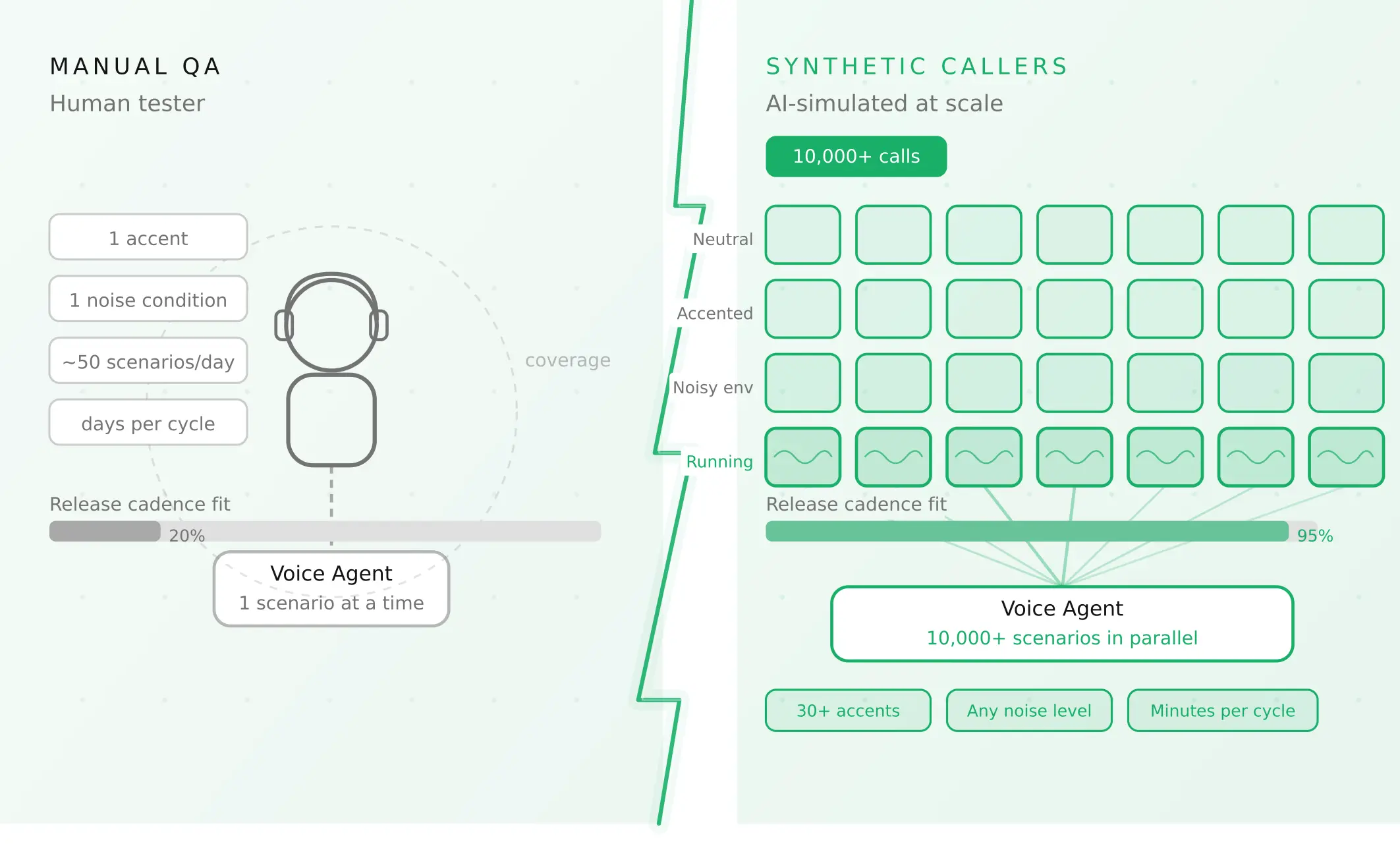
How to automate voice agent testing: synthetic callers vs manual QA
Learn how ai test automation replaces manual QA for voice agents. Compare synthetic callers vs human testers, with a 5-step framework to scale without hiring.
Read more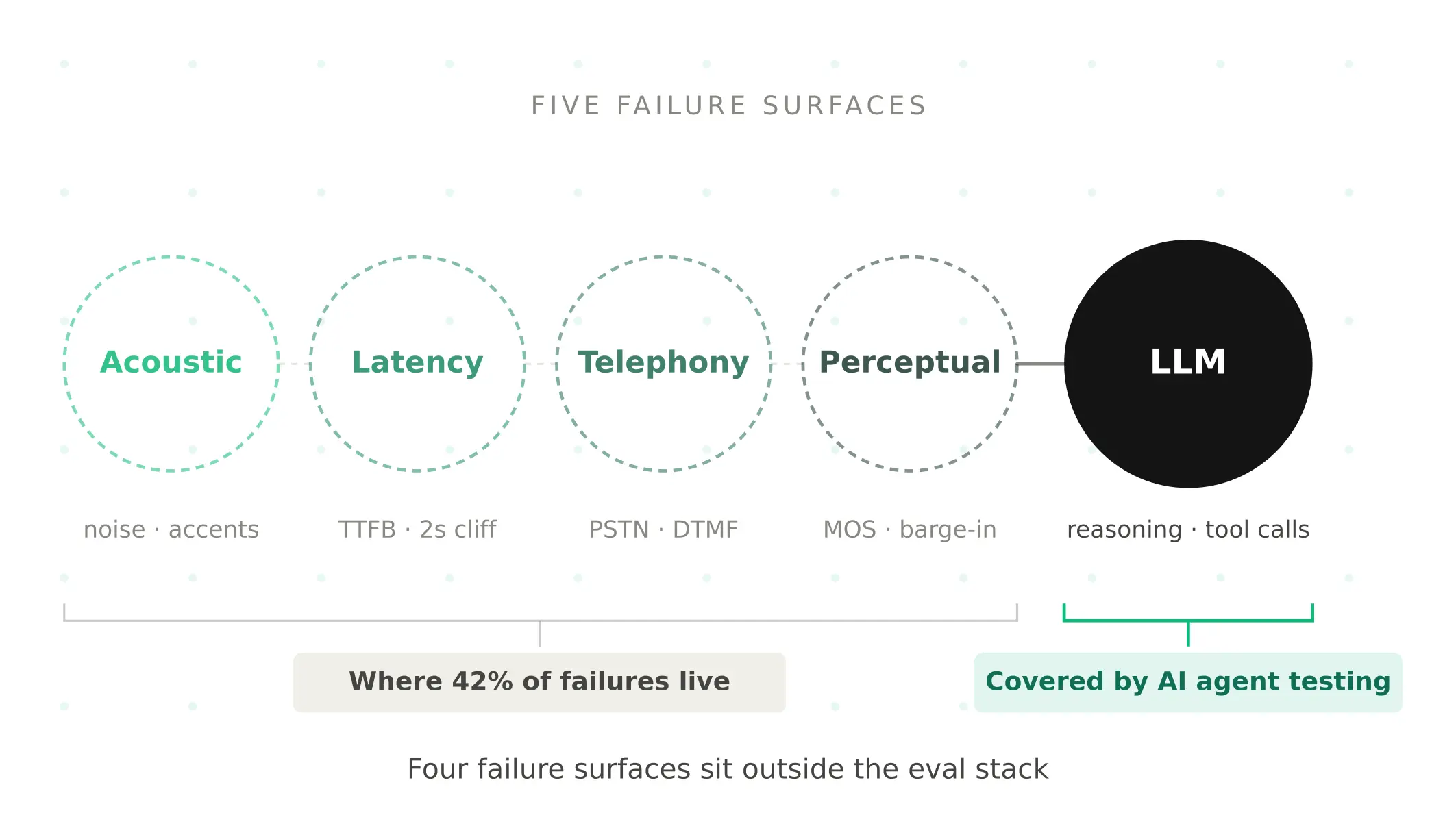
AI Agent Testing vs Voice Agent Testing: What General Tools Miss for Voice
AI agent testing measures text outputs. Voice agent testing measures behaviour through an acoustic pipeline. Five failure categories general tools miss.
Read more