Calendly AI Voice Agent: What Breaks at Booking
On this page
Last verified November 5, 2026, against Calendly's developer docs for API v2 and the Calendly Help Center. Calendly's docs change, so re-check the pages linked below before you ship.
If your product answers phone calls and your customers use Calendly, the hard part is not the call. It is the gap between what the agent said and what Calendly stored. A caller hears "you're all set." Calendly has no invitee. Nobody shows up, or the wrong person gets the confirmation email.
This post is for teams that built their own Calendly AI voice agent. It writes to a customer's Calendly account, and callers expect to book a Calendly appointment by phone. Any AI voice agent Calendly integration has this gap. The post stays on Calendly. For the general pattern, start with our guide to AI voice agent integrations. Every Calendly behavior below comes from a Calendly page I opened for this post, and I say so where the docs are silent or disagree.
What a Calendly AI voice agent can do through the API
Calendly's introduction to the API describes three APIs: API v2, an Embed API and a Webhook API. A phone agent has no web page, so two things matter: sending a link and calling the Scheduling API.
| Approach | What happens on the call | A booking exists when | What the docs say |
|---|---|---|---|
| Event type link (`scheduling_url`) | Agent texts the caller a link | The caller opens it and picks a slot | Each event type carries a booking link; available-times slots also carry a `scheduling_url` |
| Single-use link (`POST /scheduling_links`) | Agent texts a one-booking link | The caller picks a slot | Needs `scheduling_links:write`. `max_event_count` currently allows only `1`. The create scheduling link page describes no expiry |
| Scheduling API (`POST /invitees`) | Agent books during the call | The call returns `201 Created` with an Invitee | Needs `scheduled_events:write` |
Calendly's own guide on scheduling events with AI agents says the API lets agents "book meetings end-to-end." The Calendly Scheduling API flow it describes has four steps. Map the request to an event type, pick an available time, create the invitee, then show a confirmation with reschedule and cancel links.
A Calendly single-use scheduling link is fine for a follow-up text, but it is still rung 2 on the ladder below. Two access details are worth checking early.
Authentication. The AI agents guide says acting for other users needs an OAuth app. An organization owner or admin can use a personal access token for their own organization. The scopes page lists what each token may do. If your agent serves many of your customers' accounts, you are in OAuth territory.
Plans. The docs disagree. The developer FAQ says developers can call the API on behalf of a Calendly user on any subscription plan, including the free tier, with a few Enterprise-only endpoints. The AI agents guide says customers must be on a paid plan to use applications that call the API. Webhook subscriptions need a Standard, Teams or Enterprise plan, per the FAQ. The Create Event Invitee reference does not mention plans. Ask Calendly or test against a free account before you promise a customer anything.
The booking claim ladder
Many apparent double-booking complaints are really claim errors. The agent speaks a confirmation that the system never produced. I use a five-rung ladder. Each rung has one sentence the agent may say.
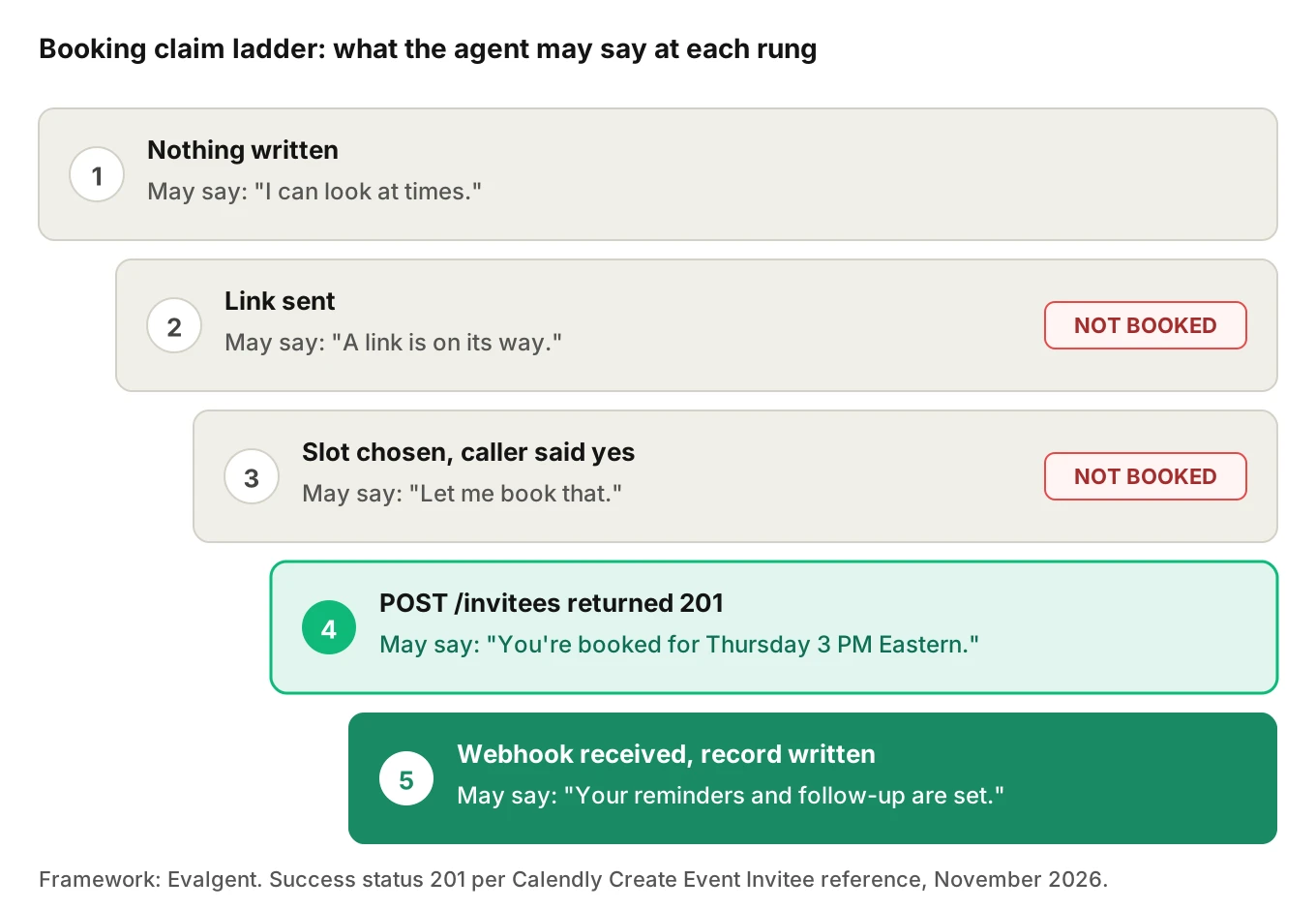
1. Nothing written. The agent may say it can look at times.
2. Link sent. The agent may say the link is on its way. It may not say anything is booked.
3. Slot chosen, caller said yes. Still not booked. The call has not been made yet.
4. `POST /invitees` returned 201. The agent may say "you're booked for Thursday at 3 PM Eastern." Read the time back from the response, not from memory.
5. `invitee.created` webhook received and your record written. Now the agent, or a text sent later, may promise reminders or a CRM follow-up.
The worst claim error is saying "booked" at rung 2 or 3. If the 201 never arrives, say so. A good fallback line is: "I couldn't confirm that time. I'll text you a link instead."
Reading availability without offering ghost slots
`GET /event_type_available_times` is the endpoint your agent should use to read open slots. It needs `availability:read`. The three query parameters are all required: `event_type`, `start_time` and `end_time`. The start cannot be in the past. The range cannot exceed 31 days. The endpoint does not support keyset pagination. Each of the available times carries `status`, `invitees_remaining`, `start_time` in UTC and a `scheduling_url`.
Three consequences for a voice agent.
Do not build your own slot list. Calendly's help center says it "checks your connected calendar in real time" and does not offer busy times to invitees. The available-times endpoint is how you inherit that behavior. If the agent computes free time from busy times itself, it can offer slots Calendly would hide.
Slots go stale during the call. The AI agents guide says "start_time must correspond to a valid open slot at booking time." A caller who takes 90 seconds to decide may lose the slot to a web booking. Re-read availability right before the booking call, or handle the failure. The guide says a 404 means event type or slot not found, and the agent should re-query and offer alternatives.
Offer few slots. Say two or three, not the 31-day list. Check `invitees_remaining` on group event types.
The docs do not describe double booking behavior for `POST /invitees` itself. Create Event Invitee is silent on duplicates. Treat "what happens if I post the same invitee twice" as an open test, not a known behavior.
Time zones: the quiet wrong-hour bug
The booking call takes `start_time` in UTC. The `invitee` object takes a required `timezone`. This Calendly invitee time zone field matters most. Calendly's invitee reference describes that field as the time zone "to use when displaying time to the invitee." The AI agents guide says to use IANA names such as America/New_York.
Three clocks are in play. The caller says "3 o'clock" in their head. The slot is stored in UTC. The invitee's display zone decides what the confirmation email shows. A bug in any step gives a booking that looks fine in your logs.
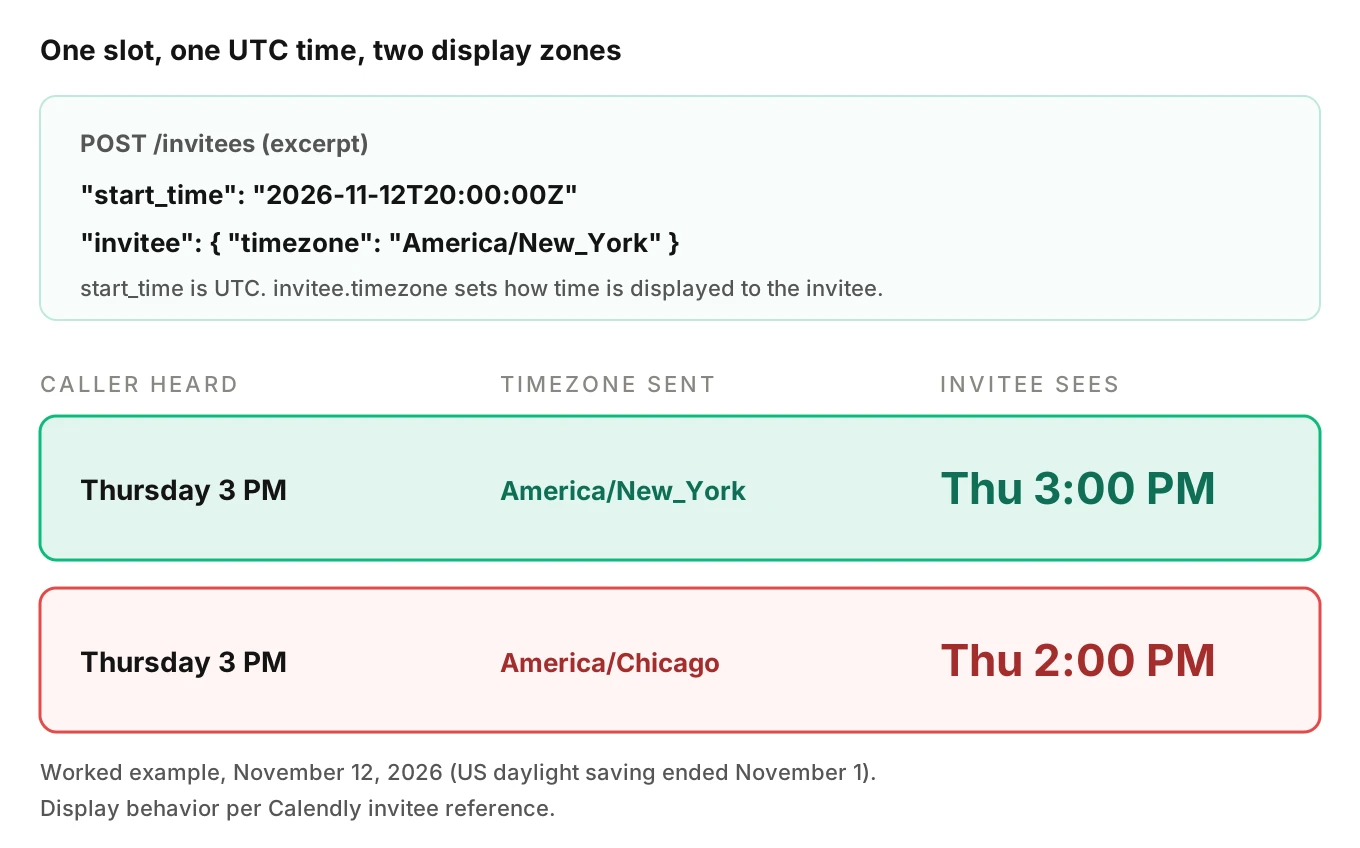
Here is a worked example. The US ended daylight saving time on November 1, 2026. A slot at `2026-11-12T20:00:00Z` is 3:00 PM in New York and 2:00 PM in Chicago.
from datetime import datetime
from zoneinfo import ZoneInfo

slot = datetime.fromisoformat("2026-11-12T20:00:00+00:00")
for tz in ("America/New_York", "America/Chicago"):
    print(tz, slot.astimezone(ZoneInfo(tz)).strftime("%a %I:%M %p"))
# America/New_York Thu 03:00 PM
# America/Chicago Thu 02:00 PM
If the agent speaks the time in the host's zone and sends the caller's zone as `timezone`, the caller hears one hour and receives another. Pick one zone for speech. Say the zone name aloud. Send that same zone in the payload.
Do not guess the caller's zone from their area code. That is my engineering judgment, not a Calendly rule. Ask once: "Is that Eastern time for you?"
What the invitee payload needs from a phone call
Here is the minimal body for `POST https://api.calendly.com/invitees`, per the Create Event Invitee reference. This is a simplified sketch.
import os, requests

body = {
    "event_type": "https://api.calendly.com/event_types/AAAAAAAAAAAAAAAA",
    "start_time": "2026-11-12T20:00:00Z",
    "invitee": {
        "name": "Dana Whitfield",
        "email": "dana@example.com",
        "timezone": "America/New_York",
    },
}
r = requests.post(
    "https://api.calendly.com/invitees",
    json=body,
    headers={"Authorization": f"Bearer {os.environ['CALENDLY_TOKEN']}"},
    timeout=8,
)
if r.status_code == 201:
    invitee = r.json()["resource"]   # speak "booked" only now
else:
    ...  # 400, 403, 404, 429: do not claim a booking
Each field has a voice-specific way to fail.
| Field | Calendly rule (Create Event Invitee reference) | How a phone call breaks it |
|---|---|---|
| `invitee.email` | Required | Misheard letters. The confirmation goes to a stranger or nowhere |
| `invitee.timezone` | Required | Spoken zone and sent zone differ |
| `invitee.name` or `first_name` | One of the two is required | A garbled name is stored as given |
| `invitee.text_reminder_number` | Optional, a valid phone number such as +14155551234 | Digits dropped or country code missing |
| `location` | Must match the event type. Omit for round robin pooling | Agent sends a location the host never configured |
| `questions_and_answers` | Required questions must be included. The question string must match exactly, and is case sensitive | A customer edits the form text in Calendly and the agent's saved string stops matching |
| `event_guests` | Maximum 10 | Caller lists attendees by voice and the agent adds the wrong one |
The page says notifications, calendar invites and workflows run as they would for a booking made in the Calendly UI. So a misheard email has a real consequence. A confirmation email goes to whatever address you sent. Read the email back letter by letter and wait for a yes. Our post on alphanumeric capture covers that read-back pattern.
The `questions_and_answers` row deserves the hardest test. Your customer owns the booking form. When they reword a question, your agent breaks with no change on your side. The reference does not say which error a mismatch produces, so record what you see.
Reschedule and cancel have no single endpoint
Callers say "move my appointment" constantly. Calendly's developer FAQ says: "At this time, there is no API endpoint that supports rescheduling an event or invitee." What exists is a cancel endpoint, `POST /scheduled_events/{uuid}/cancellation`, with an optional `reason`. It needs `scheduled_events:write`.
The cancel page lists three refusals: you are not allowed to cancel this event, the event is in the past, and the event is already canceled. The invitee resource carries a cancel URL and a reschedule URL (`cancel_url`, `reschedule_url`), so the agent can text the caller a link instead.
A Calendly AI voice agent that reschedules itself is making two calls. That is a transaction with no rollback. If it cancels first and the new booking fails, the caller has nothing. If it books first and the cancel fails, the caller has two slots. Book the new slot first, cancel the old one second, and alert on a failed cancel. Our rollback actions post covers the compensation logic.
One more detail matters downstream. For a reschedule done through Calendly's own link, Calendly's reschedule payload guide says both `invitee.canceled` and `invitee.created` fire. The canceled payload sets `rescheduled` to `true`. The docs define `false` as an invitee who canceled without rescheduling. An agent-made cancel plus create is not a reschedule in that model. I expect `rescheduled` to be `false` there, though no page I opened says so. Test it, because your CRM may read that flag.
Webhooks: the confirmation you should trust
The Webhook API is the second source of truth. Per the developer FAQ and the webhook subscription guide:
- Events include `invitee.created` and `invitee.canceled`. Routing form submissions have their own event, and that one allows only organization scope.
- Subscriptions with `organization` scope cover all scheduled events in the organization. Non-admin team members can only use `user` scope.
- The payload does not carry every invitee detail. Use the invitee URI with a GET request for the rest, for each scheduled event you track.
- If a user leaves the organization, user-scoped webhooks they created stop working.
Delivery has hard edges, from Calendly's webhook timeouts and webhook errors pages. The connection timeout is 10 seconds and the read timeout is 15 seconds. Any 3xx, 4xx or 5xx response counts as an error. Calendly retries for 24 hours with exponential back-off. After that, a webhook can be disabled and has to be recreated.
That last rule is a silent failure. Your agent keeps booking. Your CRM stops receiving rows. Nobody sees an error until a customer asks where the leads went. List your webhook subscriptions on a schedule, and alert when one is missing.
Verify the webhook signature. Per Calendly's signature page, Calendly sends a `Calendly-Webhook-Signature` header shaped `t=
import hmac, hashlib, time

def verify(header: str, raw_body: bytes, key: str, tolerance=180) -> bool:
    parts = dict(p.split("=", 1) for p in header.split(","))
    t, v1 = parts.get("t"), parts.get("v1")
    if not t or not v1:
        return False
    if abs(time.time() - int(t)) > tolerance:
        return False
    signed = f"{t}.".encode() + raw_body
    expected = hmac.new(key.encode(), signed, hashlib.sha256).hexdigest()
    return hmac.compare_digest(expected, v1)
Use the raw bytes, not re-serialized JSON.
Rate limits under a Monday burst
Calendly's rate limits page lists general limits of 500 requests per user per minute on paid plans and 50 on the free plan. Creating an invitee has tighter limits. A trial gets 5 requests per day. Paid non-Enterprise gets 10 per minute, 50 per hour and 100 per day. Enterprise gets 500 per minute. A 429 carries `X-RateLimit-Limit`, `X-RateLimit-Remaining` and `X-RateLimit-Reset`. The page says limits are enforced per user, so every call made for the same Calendly user draws from the same budget, whichever token or integration made it. Size your queue per customer account.
Here is an illustrative burst. It assumes one paid non-Enterprise Calendly user and 48 callers confirming a slot between 9:00 and 9:04 on a Monday. The per-minute demand is invented for the example.
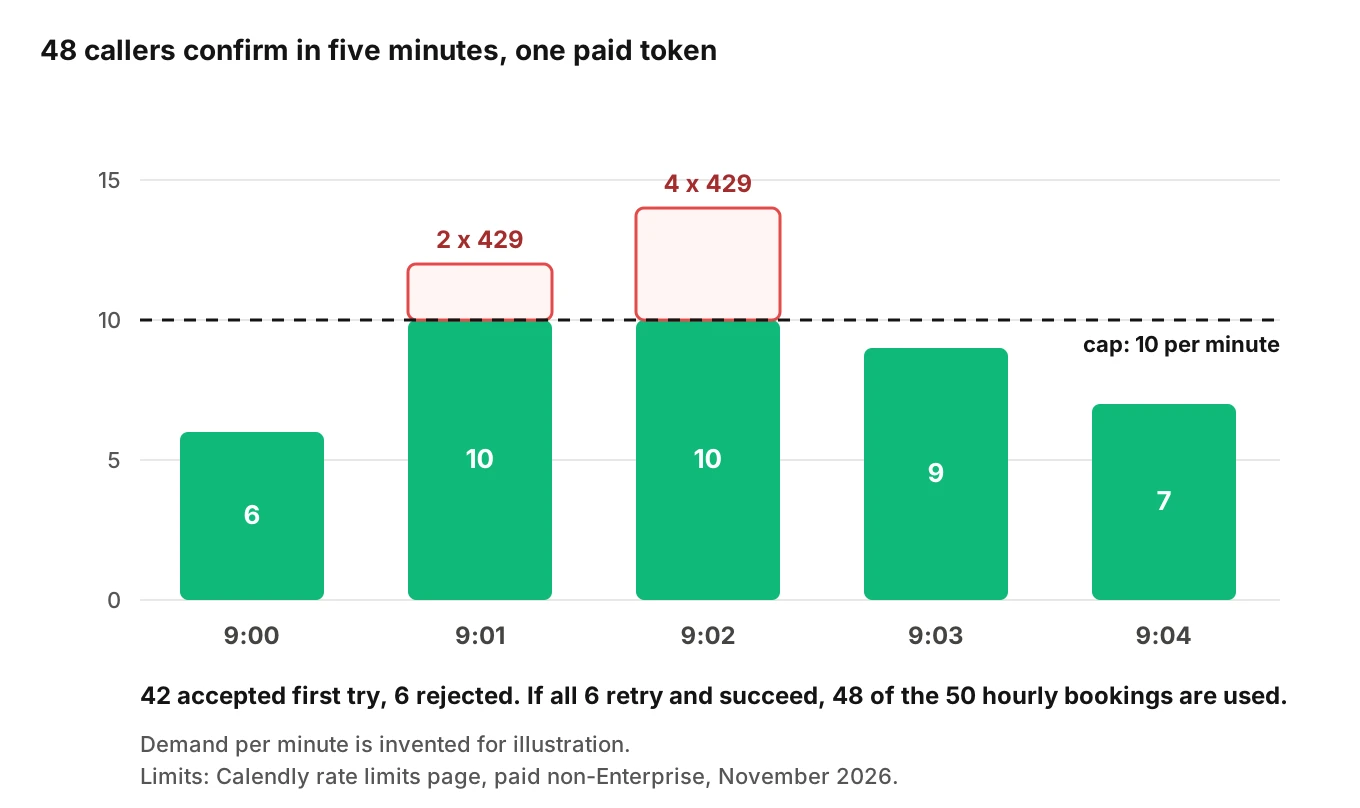
The 9:01 and 9:02 minutes exceed 10, so 2 and 4 requests are rejected. Six callers get a 429. The agent cannot make them wait 60 seconds. The hourly cap is the bigger problem. If all six retry and succeed, 48 of the 50 hourly bookings are gone by about 9:06. That user can only book two more people until the hour turns.
Design for this. Queue booking calls. Back off using `X-RateLimit-Reset`. Tell the caller the truth: "I'm having trouble confirming. I'll text you a link and a person will follow up." Our post on voice agent API rate limits covers the general pattern.
Routing forms and event type mapping
Calendly routing forms send respondents to an event type, an external URL or a custom message. The list routing form submissions reference describes those three result types and a `submitter` that is set only when the submission results in a scheduled meeting. The scope is `routing_forms:read`. The endpoint index I read lists only Get and List for routing forms. I found no create endpoint.
For a phone agent, that means the agent owns the routing. If your customer's form asks company size or state, the agent must collect those answers and choose the event type itself. A wrong event type books the wrong meeting length or the wrong host. Log the chosen event type URI on every call and compare it with what the caller said.
Where this shows up by trade
Event types map to real services, so the same API call carries different stakes.
- Legal intake. The wrong practice-area attorney wastes a slot. See AI legal intake QA.
- Accounting. Tax-season slots fill fast, so stale slots bite. See accounting firm AI answering.
- Recruiting. Candidate and hiring-manager time zones differ by design. See AI interview scheduling calls.
- Real estate. Showings depend on the right agent. See AI tour booking testing.
Related reading: appointment scheduling voice agent metrics, Google Calendar AI voice agent and HubSpot AI voice agent.
How to test a Calendly AI voice agent before launch
Run this against a Calendly sandbox account you own, never a customer's live calendar.
1. List the claims. Write every sentence your agent can say about a booking. Map each to a rung of the ladder. Any "booked" sentence not tied to a 201 is a defect.
2. Build a slot-staleness case. Offer a slot, book it from another session during the call, then let the caller confirm. The agent must re-query and offer alternatives, not claim success.
3. Run a time-zone matrix. Test callers in at least three zones, including one near a daylight saving change. Check the spoken time, the payload `timezone` and the confirmation email.
4. Test email and phone capture under noise. Use accents, fast speech, interruptions and background noise. Check the stored `email` against the intended one.
5. Break the form. Rename a booking question in Calendly. Record the error code and what the agent says next.
6. Force the failures. Return 400, 403, 404, 429 and 500 from a stub. None may produce "booked."
7. Check webhooks. Confirm `invitee.created` arrives, the signature verifies, a 500 from your handler triggers retries, and a missing subscription alerts.
8. Reconcile. For each test call, compare the transcript claim, the API response and the webhook record.
For a Calendly AI voice agent, Evalgent can generate test scenarios from the agent's prompt and flows, including its hard constraints, so a rule like "never say booked before a 201" becomes a scenario. Its caller profiles vary accent, speech pace, interruptions, background noise and language, which is the stress that breaks email capture. Evalgent evaluates from the audio as well as the transcript. It does not connect to Calendly, so you compare its verdicts with your own API and webhook logs.
After launch, Evalgent's production monitoring takes call recordings you push, transcribes them, maps them to scenarios and judges them. It flags tool-call failures, latency spikes and policy failures, with fix recommendations. Use that to catch a rising share of calls where the agent said "booked" and your webhook log shows no booking. For the surrounding method, see voice agent integration testing, post-call write-back testing and voice agent workflow testing.
Scope matters too. Request only the scopes you need. On my reading of the scopes page, a booking agent needs `availability:read` and `scheduled_events:write`, plus `event_types:read` to look up event types. It should not need webhook write or routing form scopes on the call path. See voice agent permissions.
Frequently asked questions
Can an AI voice agent book a Calendly appointment?
Yes, through the Calendly Scheduling API. The agent reads open slots, then calls `POST /invitees` with the event type, a UTC start time and the invitee's email and time zone. A 201 response means the booking was created. Texting a link is different: nothing is booked until the caller picks a slot.
Does the Calendly API let you create a booking?
Yes. Create Event Invitee, `POST /invitees`, needs the `scheduled_events:write` scope and returns 201 with an Invitee resource. Required fields are `event_type`, `start_time` and an invitee with `email` and `timezone`, plus a name. Calendly's reference page does not state plan requirements for this endpoint.
Do I need a paid Calendly plan to use the Scheduling API?
Calendly's docs are inconsistent. The developer FAQ says API access works on any plan, including Free, with some Enterprise-only endpoints. The AI agents guide says customers must be on a paid plan. Webhook subscriptions need a Standard, Teams or Enterprise plan. Confirm with Calendly or test on a free account.
How do Calendly webhooks work for booking confirmation?
You subscribe to events such as `invitee.created` and `invitee.canceled`. Calendly posts a payload to your URL with a `Calendly-Webhook-Signature` header. Your endpoint should answer 2xx quickly. Failed deliveries are retried for 24 hours with exponential back-off, after which the webhook may be disabled and need recreating.
Can the Calendly API reschedule an event?
Not directly. Calendly's developer FAQ says no API endpoint supports rescheduling an event or invitee. You can cancel with `POST /scheduled_events/{uuid}/cancellation`, create a new invitee, or send the invitee's `reschedule_url`. An agent doing cancel plus create needs failure handling, because the two calls are not atomic.
How does Calendly handle invitee time zones?
Start times are in UTC. The invitee's `timezone` is a required field used to display times to that invitee. Calendly's help center says it detects time zones automatically in its own UI. A voice agent has no such detection, so it must ask the caller and send an IANA name.
What are the Calendly API rate limits?
As of November 2026, Calendly lists 500 requests per user per minute on paid plans and 50 on free. Create Event Invitee is tighter: 5 per day on a trial, and 10 per minute, 50 per hour and 100 per day on paid non-Enterprise plans. Enterprise gets 500 per minute. A 429 includes `X-RateLimit-Reset`.
How do you test a Calendly voice agent before launch?
Use a sandbox Calendly account. Test stale slots, time zones near daylight saving changes, noisy email capture, renamed booking questions, forced 4xx and 5xx errors, and webhook delivery. Then reconcile each call's spoken claim against the API response and webhook record. A Calendly AI voice agent should never end a call with "booked" and no invitee.
The bottom line
A Calendly AI voice agent is only as honest as the status code behind its last sentence. Say "booked" after a 201, promise follow-ups after the webhook, and treat every other state as "link sent."
Related Articles
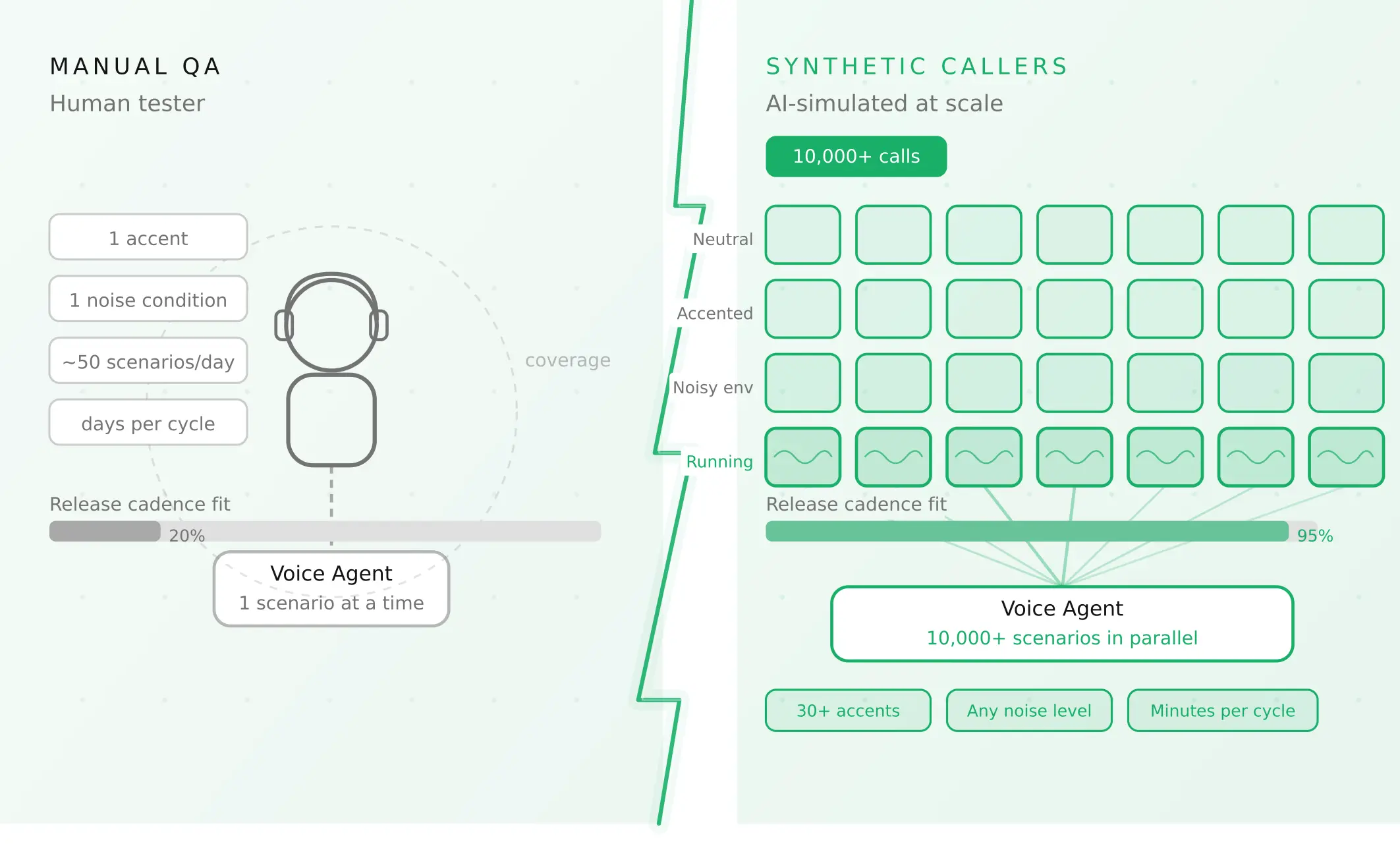
How to automate voice agent testing: synthetic callers vs manual QA
Learn how ai test automation replaces manual QA for voice agents. Compare synthetic callers vs human testers, with a 5-step framework to scale without hiring.
Read more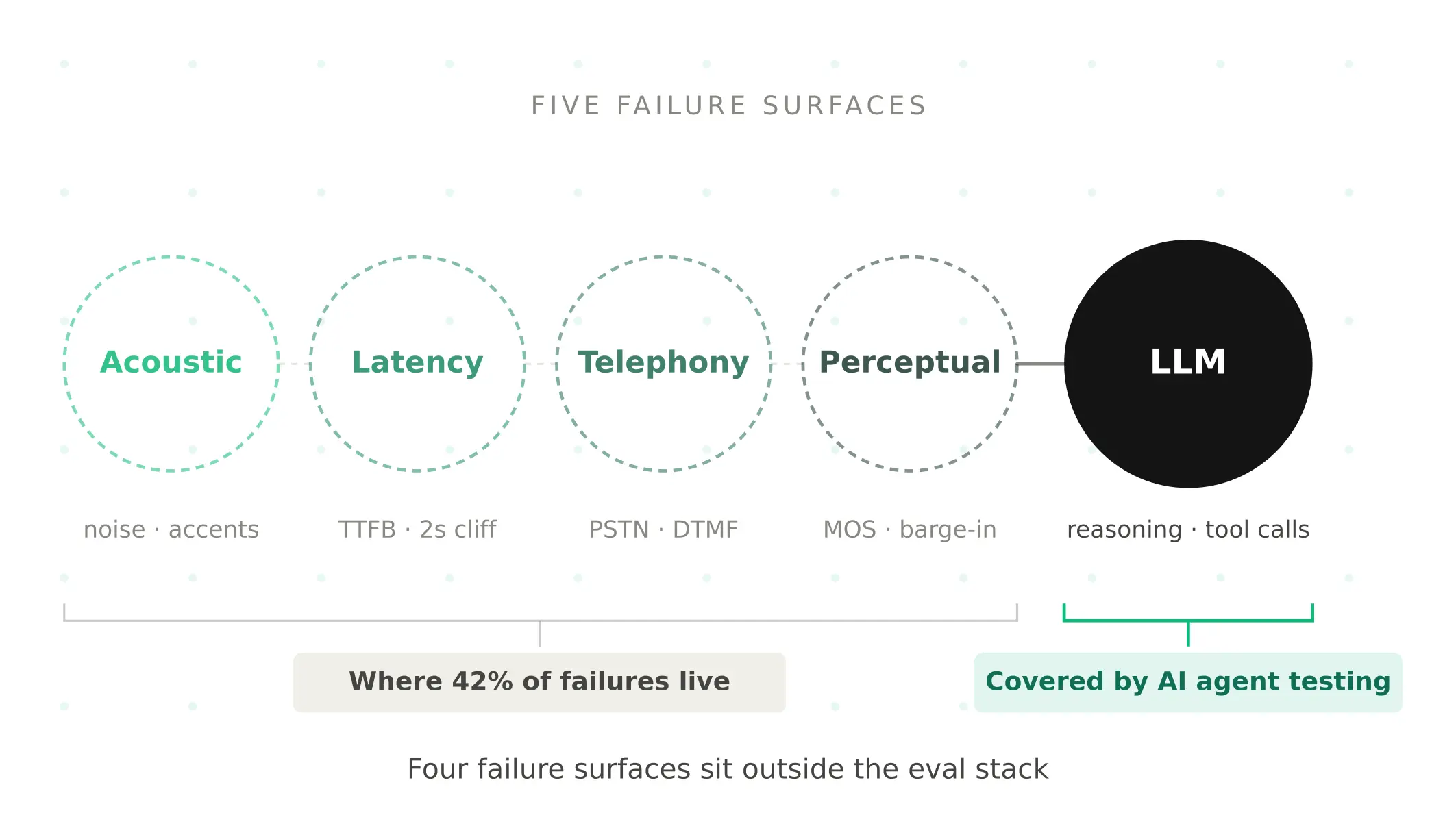
AI Agent Testing vs Voice Agent Testing: What General Tools Miss for Voice
AI agent testing measures text outputs. Voice agent testing measures behaviour through an acoustic pipeline. Five failure categories general tools miss.
Read more