Testing Voice Agents That Fill Web Forms During a Call
On this page
Last verified November 5, 2026, against the MDN, W3C and IETF pages linked below. The IETF Idempotency-Key document is still an Internet-Draft, not a standard. Nothing here is legal advice.
Your voice agent fills a web form while the caller talks. It may be your own scheduling form, a lender's application page or a customer's portal. The caller says a phone number, a value appears in a field, and the agent presses submit.
Nobody watches the field being filled. A person who mistypes a digit sees it on screen. The agent has no such feedback unless you build it. This post covers voice agent form filling end to end: how to test that path, field by field, before a prompt change reaches every customer.
Why voice agent web form filling breaks differently from a spoken answer
When an agent answers a question, a wrong word is heard by the caller. The caller can say "no, that is wrong." When an agent fills a form, the wrong value lands in a field. It may never be read back.
A form fill is a chain of six steps. Each one can change the value.
1. Speech to text. "Oh" becomes "zero," or "fifteen" becomes "fifty."
2. Text to slot. The model decides this is the phone number, not the callback number.
3. Slot to field. The value is reshaped for the input: a mask, a date picker, a dropdown.
4. Field to validation. The browser and your own scripts check it.
5. Submit to server. The request may fire twice, fail halfway or be rejected.
6. Server to record. Your CRM, ticket or POS gets the value.
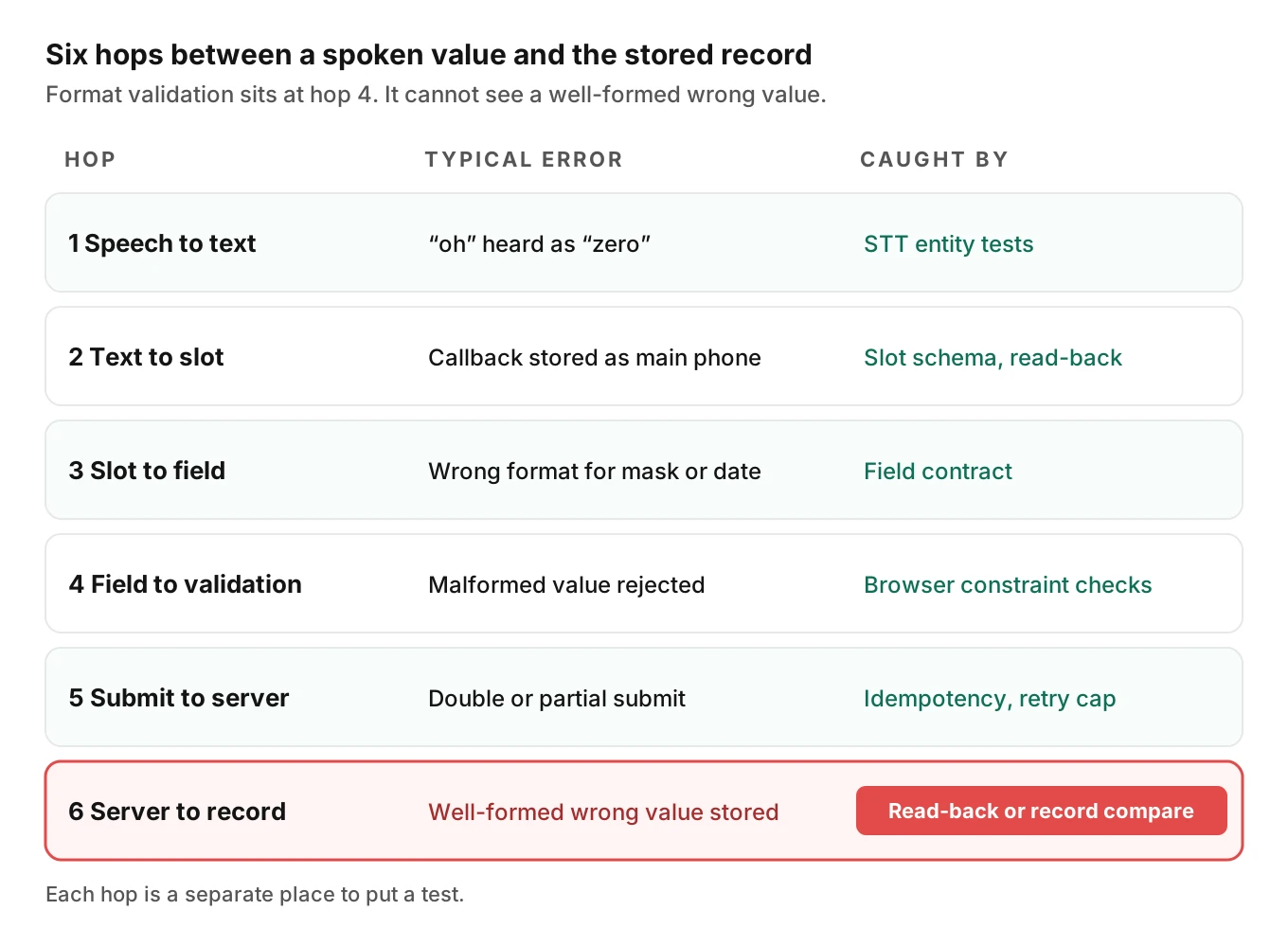
The key point is in the last column of that diagram. Format validation catches malformed values. It does not catch well-formed wrong ones. A phone number with two digits swapped is still a valid phone number.
The FormBharo paper shows the same shape at benchmark scale. Its authors built a voice agent that fills structured forms over phone calls. They report that completion fell by up to about 41 points when models received error-prone speech transcripts. They also report that the top model on clean transcripts did not top form completion. Component scores did not predict end-to-end results. The benchmark is Hindi and the agent is still in pilot, so do not copy the numbers. Copy the lesson: test the whole fill.
For digit-level capture, see alphanumeric capture. For speech-layer entity errors, see evaluating STT for names and entities. This post starts where those end.
Write a field contract for every input
Do not let the model decide how to type a value, including the phone number format or date format. Give each field a contract. The contract is a small table row that says what the caller says, what the field wants and who validates it.
| Field | Caller says | Field wants | Silent failure to test |
|---|---|---|---|
| Phone | "four one five, five five five, oh one nine two" | Digits in the pattern your mask expects | Mask rejects spaces or dashes, or the agent drops the leading digit |
| Date of birth | "March third, ninety-two" | `yyyy-mm-dd` for a date input | Two-digit year read as the wrong century |
| Appointment date | "next Tuesday" | A calendar date in the caller's time zone | Resolved against the server's date, not the caller's |
| ZIP code | "oh two one three nine" | Five characters, leading zero kept | Stored as a number, so the zero vanishes |
| Dropdown | "the large one" | One option value | Matches the wrong near-miss option |
| Consent checkbox | "yes, that is fine" | An explicit true, never inferred | Ticked because the caller was polite |
Three browser facts shape these contracts.
A telephone input does not check format. MDN says the value of `type="tel"` is not validated to a particular format, "because formats for telephone numbers vary so much around the world." Only the `pattern` attribute you add will enforce one. If your form has no pattern, any string passes.
A date input shows one format and stores another. MDN states that the displayed date follows the user's locale, while the parsed `value` is always `yyyy-mm-dd`. Your agent should write the stored format. Playwright's docs use `2020-02-02` for filling a date field. If your test harness types "02/03/2020" into a date control, you test the harness, not the agent.
The autocomplete attribute names what a field means. Tokens such as `tel`, `tel-national`, `postal-code` and `address-line1` tell software the purpose of an input. MDN defines `tel` as a full number with country code and `tel-national` as the number without it. That difference matters. If the agent sends a country code into a `tel-national` field, the input mask may reject it or truncate it. Read these attributes from the live page. Do not hard-code them in the prompt.
Dropdowns and radio sets with near-miss options
A dropdown has a worse failure than free text: every wrong answer is a valid answer. Think of a "Service type" list with "Repair," "Repair estimate" and "Repair follow-up." The caller says "repair." Which option is that? A model that picks the first substring match will pick one every time, and it will never raise an error.
MDN explains how a `select` works. Each option has a `value` that goes to the server, and the visible text is only a label. If `value` is missing, the text is sent instead. A placeholder option with an empty value blocks a required select from submitting. Two things follow for your tests.
- Assert on the submitted value, not the label the agent saw.
- Treat "no confident match" as a real outcome. The agent should read two or three candidate labels back and ask.
Build the near-miss set from the form's real option list. For each option, write the phrase a caller would use and check that it maps to that option alone. Add ambiguous phrases and check that the agent asks. A radio button group works the same way, with one more trap: some are pre-selected, so the agent must change the default.
Validation errors: read them, recover once, then escalate
Browsers validate in a defined way. MDN's constraint validation guide lists the main states a field can fail: `valueMissing`, `typeMismatch`, `patternMismatch`, `tooShort`, `tooLong`, `rangeUnderflow`, `rangeOverflow` and `stepMismatch`. Your own scripts can add custom messages with `setCustomValidity()`. Submitting the form triggers the interactive check.
The agent needs a policy for every one of those states. A single validation error should never end the call. Here are the rules that survive contact with real forms.
1. Read the message from the page. Do not guess why a field failed. WCAG 3.3.1 (Level A) requires that an automatically detected input error be identified and described to the user in text. That text is what the agent should read.
2. Retry once when the fix is a reformat. If a pattern wants dashes, add dashes and resubmit. Do not re-ask the caller for a value they already gave. WCAG 3.3.7 (Level A) has the same spirit for human users: do not make people re-enter information already provided in the same process, with limited exceptions.
3. Ask the caller when the fix needs new information. A pattern mismatch on a ZIP code may mean the caller said eight digits.
4. Never bypass validation. If the agent calls `form.submit()` or removes a constraint, it skips the checks. MDN notes that `form.submit()` never runs constraint validation, and `novalidate` disables the interactive check. A harness that does this hides the bug you are testing for.
5. Do not trust the client alone. MDN's guidance is direct: "you should always validate form data on the server side, consistent with what is done on the client side." Test the server's rejection path too, since an agent can be fully compliant with the browser and still be refused.
WCAG 3.3.3 (Level AA) adds a useful design test. When an error is detected and a correction is known, the page should suggest it. If your form does that, the agent can read the suggestion aloud.
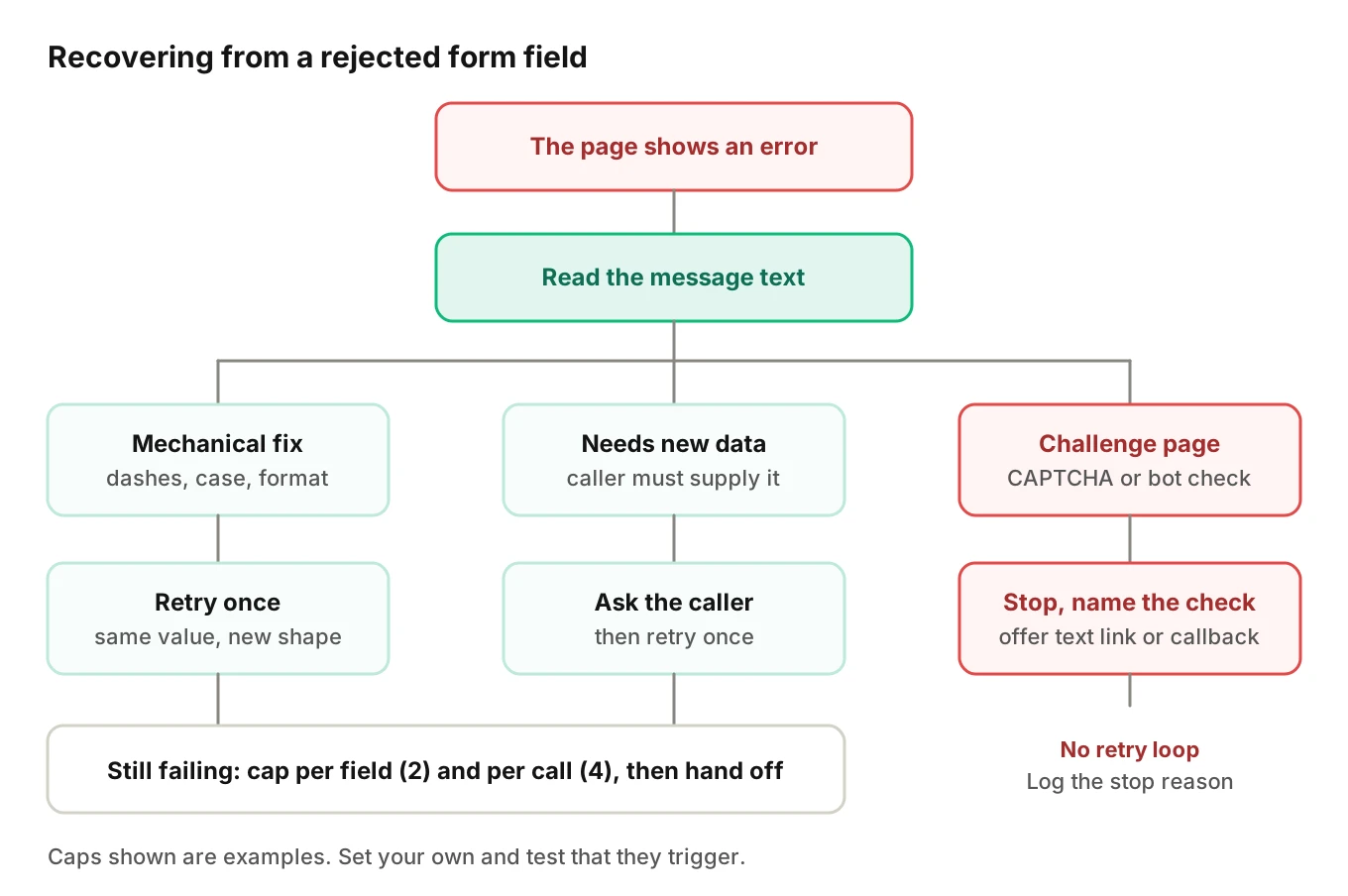
The tree has a cap on purpose. Without one, the agent loops while the caller waits in silence. Pick a limit and test that it triggers.
Required fields, partial save and the confirm step
A caller hangs up midway. What does the form hold? Each answer has a test.
- No partial save. The caller starts again. Test that nothing half-written reaches downstream systems.
- Partial save. The record exists with some fields missing. Test that a later reader, human or system, can tell it is incomplete. A half-filled record that looks complete is the worst case. Our post on post-call write-back testing covers what happens when the record outlives the call.
For forms that create legal or financial commitments, WCAG 3.3.4 (Level AA) asks for at least one safeguard. Submissions are reversible, the data is checked and can be corrected, or there is a way to review, confirm and correct before finalising. A voice read-back is a natural way to meet the third option. Read the values back in the same normalised form the field will store, ask for a yes, and only then submit.
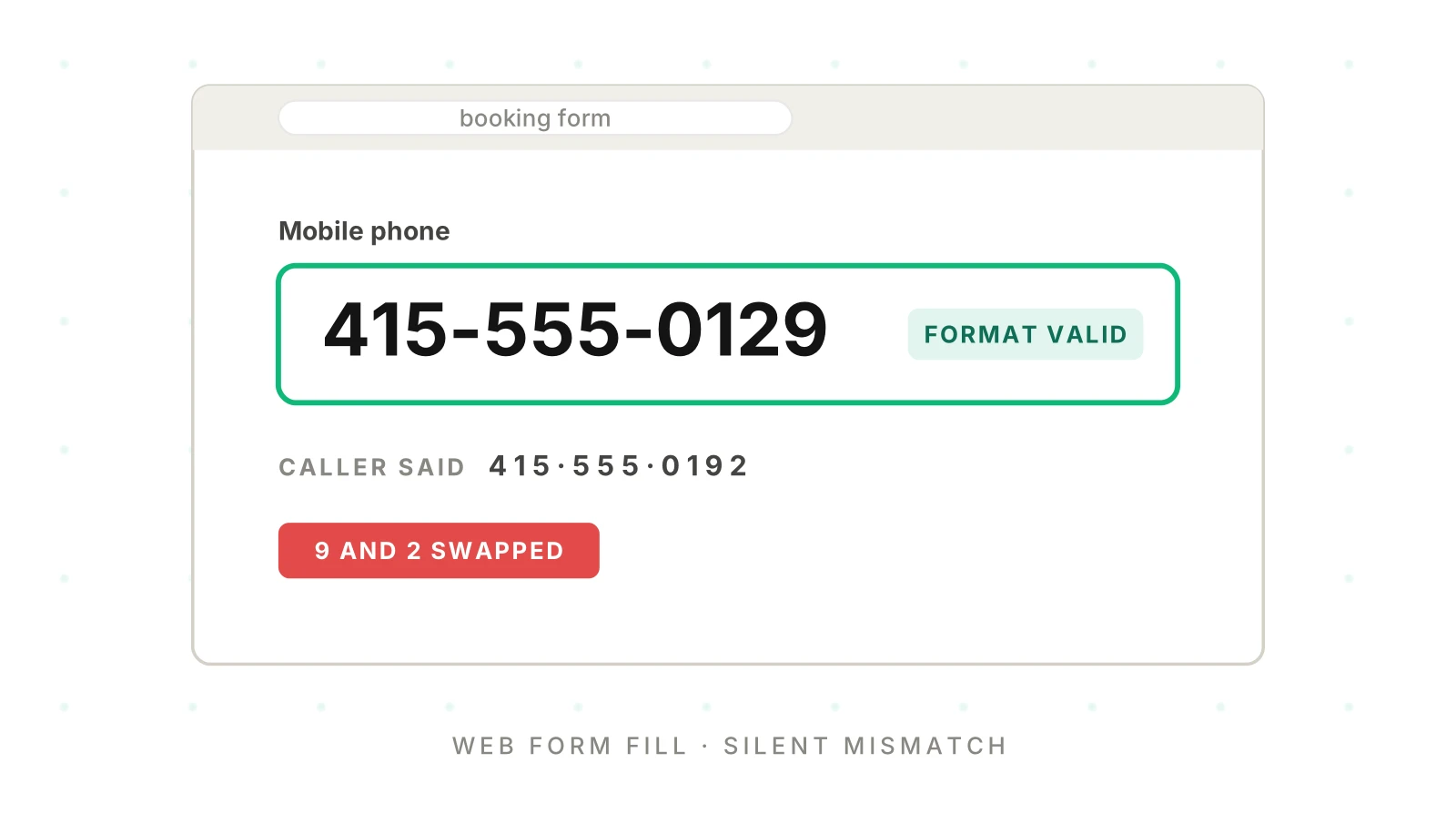
"I have your number as 415-555-0192" is checkable. "I have your details" is not. For consent boxes, require the caller to say the word. Politeness is not consent.
Double submits and idempotent submission
Submit buttons get pressed twice. The page is slow, the agent sees no confirmation, and it tries again. A double submit gives you two applications or two orders.
The defence belongs on the server. The IETF HTTPAPI working group has an Internet-Draft for an `Idempotency-Key` header. As of November 2026 the latest version is draft-08, dated October 22, 2026. It is a draft, not an RFC. Its abstract says the header can make `POST` and `PATCH` requests fault-tolerant. In that draft, a key reused with a different payload should get a `422` response. Treat that as the draft's wording, not a settled standard.
You do not have to use that header. The test idea is the same for any scheme:
- Submit once, then replay the same submit. Expect one record.
- Replay after a simulated timeout where the first request did succeed. Expect one record and a clear status for the agent.
- Reuse the key with changed data. Expect a refusal, not a silent overwrite.
- Make the agent's retry logic explicit. When it cannot tell whether a submit worked, it should check the record, not submit again.
Multi-step failures such as "form saved, CRM write failed" belong in workflow testing. Undoing a bad submit belongs in rollback actions.
CAPTCHA and bot defenses are a hard stop
A voice agent that drives a page is, to the page, automation. Bot defenses are built to stop it.
The W3C's note on the inaccessibility of CAPTCHA explains why these tests exclude many people with disabilities, and why they are an imperfect defence anyway. WCAG 3.3.8, Accessible Authentication (Minimum), at Level AA, limits cognitive function tests in sign-in steps and names object recognition as one exception. Those documents are about people. The practical reading for your agent is simple.
Treat a CAPTCHA as a hard stop for automation. Do not build workarounds or route challenges to a solving service. That defeats a control the site owner chose on purpose.
Instead, design the stop:
- Detect the challenge and name it in the call: "The site is asking for a check I cannot complete."
- Offer a path that skips the form: a text-message link, a callback from staff or another channel.
- Test that the agent does not retry the form in a loop after the challenge appears.
If the form is your own, you have another option. Give the agent an authenticated server route and skip the page. Later posts cover screen state drift and browser control approaches. For what the agent is allowed to submit at all, see voice agent permissions.
Payment fields stay out of the agent's hands
Card entry often sits in hosted fields or iframes. Do not design your agent to type a card number into the page. Our post on taking payments over the phone covers the safe patterns. Here, test one thing: at a payment field, the agent stops and hands off to the approved path, and no card number reaches a log, transcript or visible field.
The arithmetic of a whole form
Per-field accuracy hides the real number for voice agent form filling. A form succeeds only when every required field is right. If fields fail independently, the whole-form rate is the per-field rate to the power of the field count.
Here is a worked example. These figures are illustrative assumptions, not measurements. At 97% per field, 8 fields give 0.97^8, or 78.4%. At 99%, they give 92.3%.
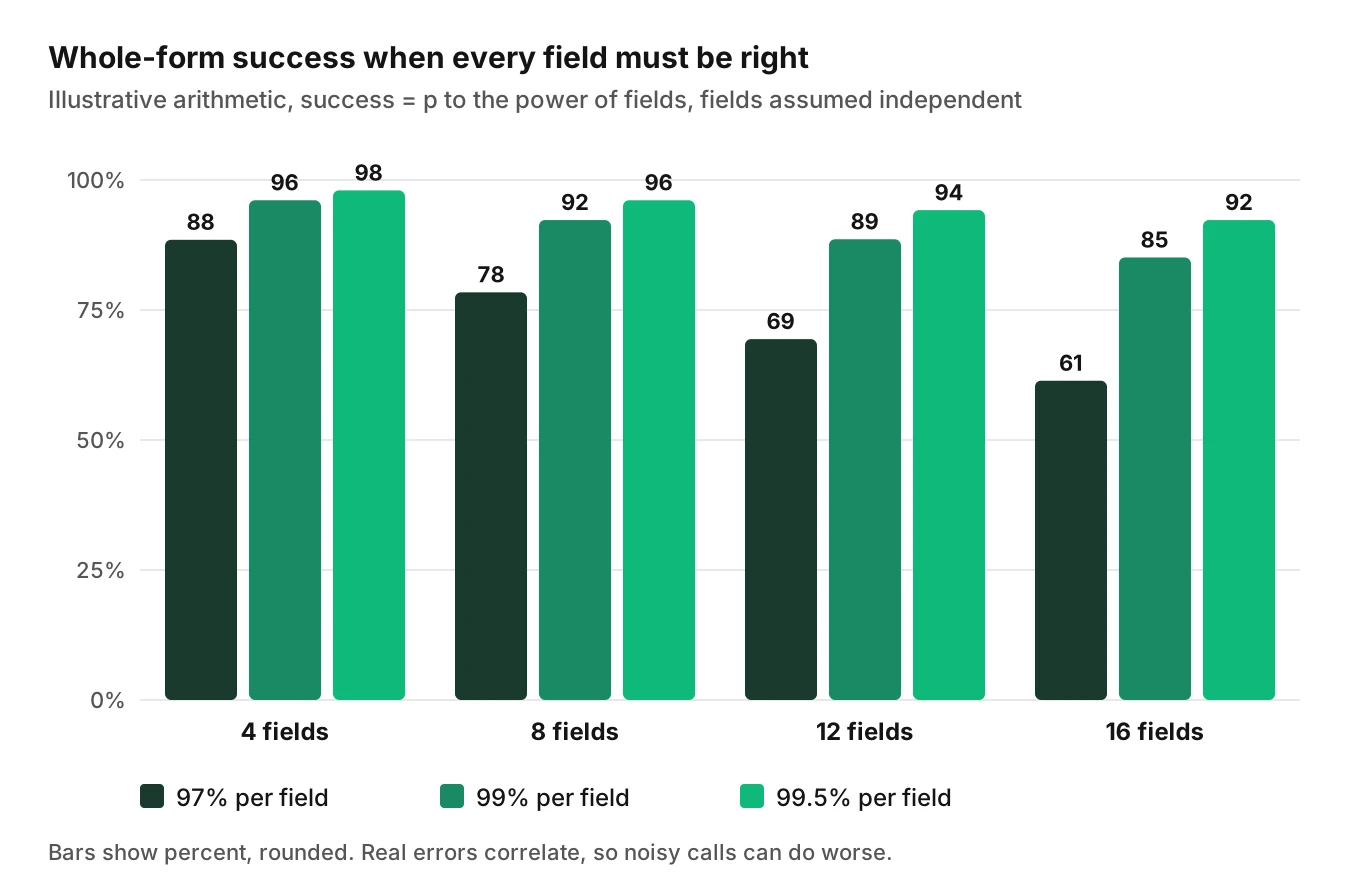
A field that is right 97% of the time sounds good. On an eight-field form, about one in five submissions has at least one wrong value. Real errors are not independent, since a noisy line hurts every field at once. Still, the formula shows where to aim. Phone, email and address need a higher bar than names, and read-back pays for itself there.
A field-level test matrix
Cross field types with the conditions that change them in voice agent web form filling. Start with the cells where a wrong value is expensive.
| Condition | Phone | Date | Address | Dropdown | Consent |
|---|---|---|---|---|---|
| Fast speech | Digit run-ons | Day and month swapped | Street number dropped | Early cut-off match | Partial yes |
| Accent or code-switch | "Oh" vs "zero" | Ordinal forms | Unit number | Phrase not in list | Hedged answer |
| Caller self-corrects | Old value stays | Both values stored | Mixed fragments | First choice stays | Changed mind ignored |
Run each cell several times, since speech and model output vary. State the pass rule in advance, for example: the stored value equals the intended value, with at most one correction turn. Track failures by field type, not as one blended score.
A YAML scenario set you can adapt
This is a plain format written for this post. It is not tied to any tool. Adapt the keys to your own harness.
# Illustrative scenario set for a booking form
form: booking_v3
fields:
  phone:      {autocomplete: tel-national, mask: "###-###-####"}
  visit_date: {type: date, stored_format: "yyyy-mm-dd"}
  service:    {type: select, options: [repair, repair_estimate, repair_followup]}
  consent_sms: {type: checkbox, default: false}

scenarios:
  - id: phone_oh_zero
    caller_says: "four one five five five five oh one nine two"
    expect: {phone: "415-555-0192"}
  - id: date_self_correct
    caller_says: "March third... no, March thirteenth"
    expect: {visit_date: "2027-03-13"}   # assumes the call happens in late 2026
  - id: dropdown_near_miss
    caller_says: "I need a repair"
    expect: {agent_asks_clarifying_question: true, service: null}
  - id: consent_polite_no_answer
    caller_says: "oh, thanks, that all sounds fine"
    expect: {consent_sms: false}
  - id: validation_reformat_once
    page_error: "Use the format 123-456-7890"
    caller_says: "four one five five five five oh one nine two"
    expect: {phone: "415-555-0192", submit_count: 2, max_retries: 1}
  - id: double_submit_after_timeout
    inject: {first_submit: "timeout_after_success"}
    expect: {records_created: 1}
  - id: captcha_challenge
    inject: {page: "captcha_challenge"}
    expect: {agent_stops: true, handoff: "sms_link_or_callback", submit_count: 0}
Each scenario asserts on the stored result, not on what the agent said. That distinction is the whole point of this post.
How to test a voice agent that fills web forms
1. Inventory the forms and fields. List each form the agent touches. For every field, record its type, mask, `autocomplete` token, required flag and option values.
2. Write the contract for each field. Fill the table above. Decide who normalises the value, the agent or your code. Prefer code.
3. Build near-miss and ambiguity sets. For every dropdown and radio group, list phrases that map to each option and phrases that should trigger a question.
4. Inject page and server failures. Add validation messages, slow responses, duplicate submits and a CAPTCHA page. Use a staging copy of the form, as described in our guide to a voice agent staging environment.
5. Place real calls against it. Use varied callers: pace, accent, interruption, noise and language. Calls that reach the agent over phone, SIP or WebRTC test the path your callers use.
6. Assert on the stored record. After each call, read the field values from the page and the saved record. Compare both to the intended values.
7. Gate changes on the matrix. Re-run the set on every prompt, model or form change, per safe prompt change practice.
Here is a simplified assertion helper. It assumes `page` is a Playwright page already open on the session under test. The calls use Playwright Python's `get_by_label` and `expect(...).to_have_value`; check them against the locator and assertion docs for your version.
from playwright.sync_api import expect

def assert_form_state(page, expected: dict[str, str]) -> None:
    """Compare what the agent typed with what the caller meant."""
    for label, value in expected.items():
        expect(page.get_by_label(label)).to_have_value(value)

# Simplified: fetch_record() is your own call to the system of record.
def assert_record(record: dict, expected: dict) -> None:
    for key, value in expected.items():
        assert record.get(key) == value, f"{key}: stored {record.get(key)!r}, wanted {value!r}"
Checking both page and record catches bugs that either alone misses.
Where an eval platform helps with form calls
Hand-built harnesses cover the browser side of voice agent web form filling well. The call side is harder. Evalgent generates test scenarios from your agent's prompt and flows, including branches, policies and coverage gaps. It then places simulated calls, each with a caller profile for accent, speech pace, interruption level, response delay, background noise and language, over phone, SIP or WebRTC. Its judge works from the audio and not only the transcript, and you can add custom metrics that run on every call. A metric such as "stored value equals intended value" fits that pattern.
In production, Evalgent's call monitoring takes your recordings, transcribes them, maps them to scenarios and flags tool-call failures, PII leakage and policy failures. A failed tool call or a policy miss is the kind of problem it flags. Evalgent works with teams to set up evals for a first agent, so expect a guided start, not self-serve signup.
For the systems behind the form, see integration testing. For how far one bad prompt change spreads across customers, see blast radius.
Frequently asked questions
How to test a voice agent that fills web forms?
Write a contract for each field, then place calls that vary pace, accent, noise and interruptions. After each call, compare the stored record with the value the caller intended. Add injected failures: validation errors, duplicate submits and a CAPTCHA page. Run the set again on every prompt, model or form change.
Why does my voice agent enter the wrong value in a form field?
Usually the value changed at one of six hops: speech recognition, slot choice, field formatting, validation, submit or server write. A well-formed wrong value passes format checks, so nothing complains. Compare the stored record with what the caller said, then trace which hop changed it.
Can a voice agent solve a CAPTCHA?
It should not try. A CAPTCHA is a control the site owner chose to stop automation, and the W3C notes how it can exclude people with disabilities. Treat it as a hard stop. Tell the caller, offer an alternate path such as a text link or callback, and log the stop.
How to stop a voice agent from submitting a form twice?
Make the server idempotent. A key sent with each submit lets the server return the first result for a replay. The IETF Idempotency-Key document is an Internet-Draft as of November 2026. On the agent side, when a submit's outcome is unclear, check the record before retrying.
How should a voice agent handle form validation errors?
Read the message from the page, reformat and retry once if the fix is mechanical, and ask the caller when new information is needed. Never bypass validation or call `form.submit()`. Set a retry cap per field and per call, then hand off to a person.
How to test dropdown selection in a voice agent?
Build the test set from the form's real option list. For each option, write phrases that should map to it. Add near-miss phrases that should trigger a clarifying question. Assert on the submitted option value, not the label, since a label can change while the value stays the same.
How do voice agents handle phone number and date formats in forms?
Good ones read the field's type, mask and `autocomplete` token, then write the stored format. A telephone input has no built-in format check, and a date input stores `yyyy-mm-dd` whatever the screen shows. Normalise in code, then read the value back to the caller.
Should a voice agent fill payment fields on a web form?
No. Card fields are usually hosted or in an iframe, and the agent should not handle card data in the page. Route the caller to an approved payment path and test that the agent stops at the payment step. Keep card numbers out of logs and transcripts.
The bottom line
Voice agent web form filling is only as accurate as its worst field, and format validation will not catch a wrong value that looks right. Test every field as a contract, compare the stored record with what the caller meant, and treat CAPTCHA and payment fields as places the agent must stop.
Related Articles
How to automate voice agent testing: synthetic callers vs manual QA
Learn how ai test automation replaces manual QA for voice agents. Compare synthetic callers vs human testers, with a 5-step framework to scale without hiring.
Read more
AI Agent Testing vs Voice Agent Testing: What General Tools Miss for Voice
AI agent testing measures text outputs. Voice agent testing measures behaviour through an acoustic pipeline. Five failure categories general tools miss.
Read more