HubSpot AI Voice Agent: Duplicates, Limits and Write-Back
On this page
Verified against HubSpot's developer and knowledge-base pages in November 2026. HubSpot changes these docs often, so re-check the pages linked below before you ship.
If you built a HubSpot AI voice agent inside your own product, HubSpot is probably where your customers keep their leads. The call ends, and your code writes a contact, a call record, a note and sometimes a deal. Every one of those writes trusts something a caller said out loud.
Any voice agent HubSpot CRM integration lives on the seam between speech and HubSpot's CRM API. It covers what HubSpot's own docs say about duplicates, phone formats, call logs, associations, workflows and limits. It also covers what the docs leave out, so you can test it yourself. For the general pattern across systems, start with our guide to AI voice agent integrations. For the Salesforce and real-estate-CRM versions, see the Salesforce AI voice agent and Follow Up Boss AI voice agent posts.
Why the write-back is where a HubSpot AI voice agent breaks
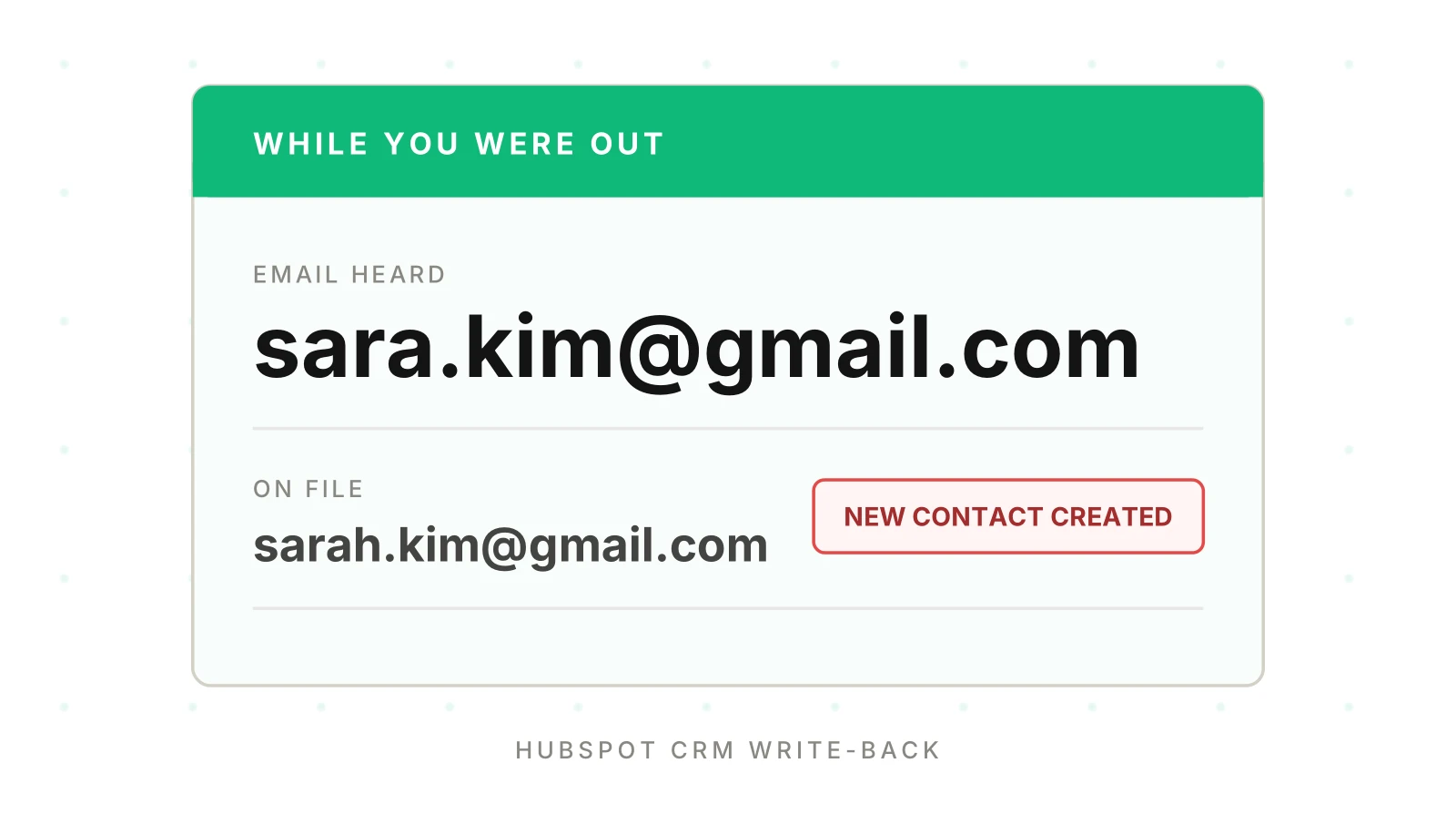
A web form gives you a typed email. A voice agent gives you a guess about a spoken email. Your speech recognizer hears "sarah dot kim at gmail" and returns text. Maybe it is right. Maybe it returns `sara.kim@gmail.com`.
HubSpot cannot tell those apart from a real new person. Its contacts guide recommends always including `email` and says "email address is the primary unique identifier to avoid duplicate contacts in HubSpot." So the email you send decides whether the caller is an existing record or a new one.
That makes every HubSpot AI voice agent failure silent. The call sounds fine and the transcript looks fine. The CRM now holds two Sarahs. One has the call log, the other has the rep's last note. Nobody gets an error.
Speech side: voice agent alphanumeric capture. Record-versus-call audit: post-call write-back testing. This post stays inside HubSpot.
What HubSpot documents about duplicates
Read these four facts before you design the write for your HubSpot AI voice agent. All are from pages I opened in November 2026.
1. Email is the dedupe key for contacts. HubSpot's deduplication article says it checks the Email property when a new contact is created. A manual create is blocked with an alert. A form submission is added to the existing contact. An import updates the matching contact rather than creating a new one.
2. A secondary email can overwrite the primary. The same article says a form submission using a secondary email overwrites the contact's existing email. If your agent captures a second address and submits it as a form, it can swap the primary.
3. No email means a new row. For imports, the article says that without Email or another unique identifier, "each row of your import file will be imported as a new contact record." The article does not describe the no-email case for API creates. Test it.
4. The API page is silent on duplicates. The create-contact reference documents a 201 success and a generic error schema. It has no 409 and no "already exists" text. The only 409 evidence I found was a HubSpot community thread, where users report a body like "Contact already exists. Existing ID: 31401" from a batch request. The last staff reply there is from 2021. It is user-reported and not documentation. Record the duplicate response on your own account.
Upsert contacts through the batch endpoint and you avoid the question. `POST /crm/v3/objects/contacts/batch/upsert` takes `inputs` with `id`, `idProperty` and `properties`. Per the contacts guide, existing contacts are updated and missing ones are created. The batch upsert has two limits that matter here. "Batch operations are limited to 100 records at a time." And "Partial upserts are not supported when using `email` as the `idProperty` for contacts."
Read that second line twice. If your idProperty is `email` and the upsert carries only the fields the caller gave, the docs say partial upserts are not supported for that key. Check what your account does with a sparse payload before you rely on it.
HubSpot also lets you create up to ten custom unique-value properties per object (properties guide, `hasUniqueValue`). The dedup article says they are enforced for manual edits and imports, but not for forms. A HubSpot duplicate contacts voice agent bug starts with the key, so a custom key is a candidate for a non-email identifier. A caller-ID-derived key is one example. You still have to confirm how it behaves through your own write path.
Phone numbers: match on caller ID, not on what was said
Callers read out a phone number slowly, with pauses and corrections. A HubSpot AI voice agent gets clean caller ID from the network. For lookup, caller ID is the better key.
HubSpot has format rules you should know. Its phone number validation article says that when validation is on, values must match E.164. That means a leading plus sign and country code, 4 to 15 digits, with only numbers after the leading plus sign. The saved value is unformatted: "+1 (888) 482-7768 would be saved as +18884827768." The example of an invalid value is `+1 (123) 456-7890`, because 123 is not a valid US area code.
Two gaps to test:
- The page does not say whether validation applies to values written through the API. It mentions the default country code only for imports.
- The search guide says HubSpot standardizes phone numbers into `hs_searchable_calculated_*` properties. It says only the area code and local number are used, so you should leave the country code out of search criteria. A lookup built from the E.164 string you stored may therefore miss. Send the national number to search.
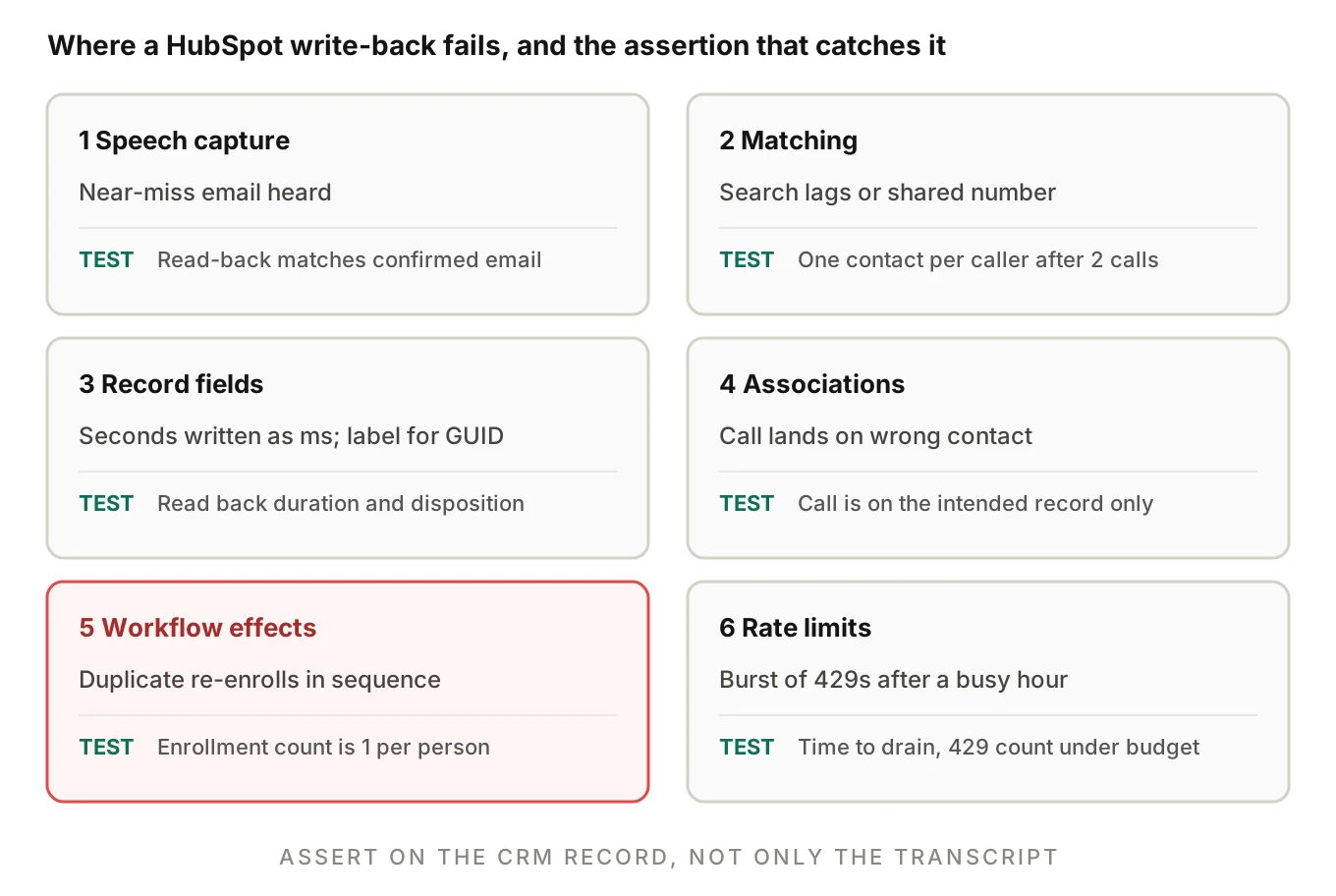
The search guide also warns: "It may take a few moments for newly created or updated CRM objects to appear in search results." Picture two calls from the same new number a minute apart. The first creates a contact. The second searches, finds nothing yet, and creates another. A short local cache keyed by caller ID closes that window.
Logging the call: fields that quietly go wrong
To log AI calls in HubSpot, you use the HubSpot call engagement API: `POST /crm/v3/objects/calls`, defined in the calls guide. A few fields carry most of the risk.
| Field | What the calls guide says | Typical voice-agent mistake |
|---|---|---|
| `hs_timestamp` | Required. Unix milliseconds or UTC. Sets timeline position | Sending call end time, or seconds instead of milliseconds |
| `hs_call_duration` | Milliseconds | Writing seconds, so a 4-minute call shows as 240 ms |
| `hs_call_direction` | `INBOUND` or `OUTBOUND`, from the HubSpot user's perspective | Mapping your agent's direction, not the doc's definition |
| `hs_call_disposition` | Needs the internal GUID of the outcome, not the label | Writing the label "Connected" |
| `hs_call_recording_url` | HTTPS URL only; `.mp3` or `.wav` play back on the record | Sending an internal or expiring non-HTTPS link |
| `hs_call_status` | One of BUSY, CALLING_CRM_USER, CANCELED, COMPLETED, CONNECTING, FAILED, IN_PROGRESS, NO_ANSWER, QUEUED, RINGING | Free-text such as "answered" |
| `hs_call_body` | Call description, including notes | Pasting a transcript with caller PII |
Direction needs thought. The docs define it from the HubSpot user's perspective, and no HubSpot user took your agent's call. Decide on a convention, document it, and test that reports built on it still make sense.
The notes guide says `hs_note_body` is "limited to 65,536 characters", and `hs_timestamp` is required there too. A long transcript pasted into a note can hit that cap.
Recording and consent rules also apply before you attach a recording URL to a customer's CRM. See AI voice agent recording consent. This is not legal advice.
Associations: the call has to land on the right record
A call from a HubSpot AI voice agent that is not associated with a contact is invisible on the contact timeline. You attach it, by association type, in the create request with an `associations` array. Each item has `to.id` and `types` with an `associationCategory` and an `associationTypeId`. The calls guide says the default type IDs are in the associations reference.
The associations guide documents version `2026-09` and calls v3 the previous version. From it:
- Contact to company, unlabeled, is type `279`. Contact to primary company is `1`.
- Deal to contact is `3`. Contact to deal is `4`.
- The guide warns that direction matters, so use the type ID for the direction you are writing.
- "If a record has more than one associated company, only one can be the primary company."
The contacts guide adds that "The batch endpoint cannot retrieve associations." If your agent needs to know the caller's open deal before it speaks, plan an extra request.
A call logged on the wrong contact, because two contacts share a phone number, shows up on someone else's timeline. For shared numbers, ask a confirming question. Do not pick the first search hit.
One inconsistency: the associations guide lists 500,000 daily requests and 150 per 10 seconds for Professional and Enterprise. The usage-guidelines page lists 625,000 and 190. HubSpot does not explain the difference. Read your own rate-limit headers.
Rate limits: the burst after a busy hour
HubSpot API rate limits voice agent teams hit depend on how the app is distributed, per the usage guidelines (as of November 2026).
| App type | Burst limit | Daily limit |
|---|---|---|
| Private, Free and Starter | 100 per 10 s per app | 250,000 per account |
| Private, Professional | 190 per 10 s per app | 625,000 per account |
| Private, Enterprise | 190 per 10 s per app | 1,000,000 per account |
| Public OAuth app | 110 per 10 s per installing account, search excluded | Not stated on the page I read |
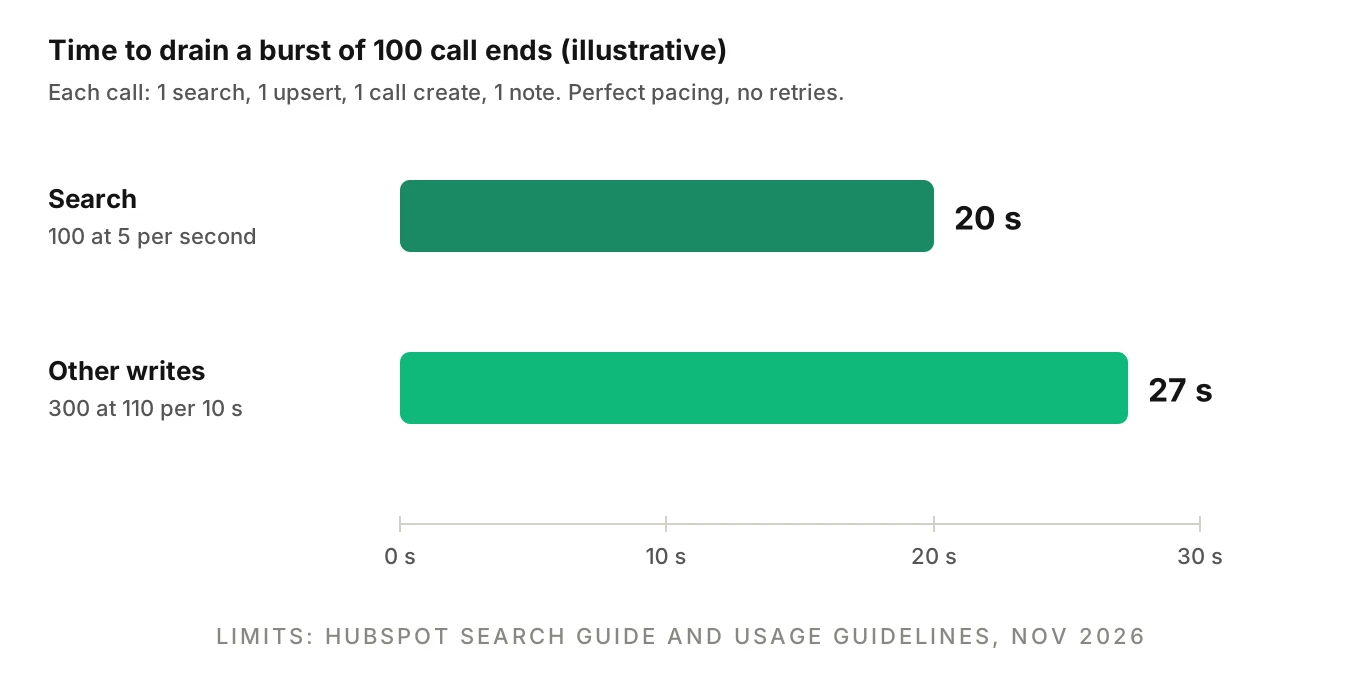
The page says the daily limit is shared across all apps in the account. Search is separate. For a private app and an OAuth app alike: "rate limited to five requests per second per account" (search guide).
If you ship one HubSpot AI voice agent to many customers, you likely run as a public OAuth app. The limit then applies per installing customer account. One busy customer cannot starve another. But one busy customer still gets throttled by its own bursts.
Here is the worked example, with illustrative numbers. A restaurant group's 100 calls end within the same few seconds after a lunch rush. Each call needs one phone search, one upsert, one call create and one note. That is 100 searches and 300 other requests.
- Search at 5 per second takes 100 / 5 = 20 seconds.
- The 300 others, at 110 per 10 seconds, take 300 / 110 x 10 = about 27 seconds.
Even with perfect pacing, the last record lands near 27 seconds after call end. With retries, it lands later. Without a queue, the first 429 responses arrive and your code retries into the same wall.
The 429 body includes `errorType: RATE_LIMIT` and a `policyName`. The page also says error responses should not exceed 5% of your daily requests. Read the `X-HubSpot-RateLimit-Remaining` and `X-HubSpot-RateLimit-Interval-Milliseconds` headers. Search responses do not include rate-limit headers, so pace that path by your own counter. The deprecated secondly headers are still returned, but HubSpot says that limit is no longer enforced. For the general version of this problem, see voice agent API rate limits.
Lifecycle stage and workflows: side effects you did not write
Your HubSpot AI voice agent writes a property. HubSpot then runs everything attached to it.
Lifecycle stage moves one way. The lifecycle article says the default property "can only be moved forward by HubSpot tools", a list that includes API, import and workflows. To set an earlier stage, the value must be cleared first. If your agent marks a returning customer as a "lead" because the caller sounded new, the write may do nothing, with no error to catch. Verify by reading the property back.
Workflows enroll once by default. The workflow article says records "are only enrolled in workflows the first time they meet the workflow enrollment triggers", unless re-enrollment is set. Event-based workflows can enroll "each time the event occurs." That has two voice-specific consequences:
- A duplicate contact is a new record, so it meets the trigger for the first time. The new Sarah gets the welcome sequence, even though the old Sarah got it last month.
- A retry after a timeout can fire an event-based trigger twice.
I found no HubSpot text saying one record runs one enrollment twice. The practical bug is two records or two events.
Where this shows up by trade
The failure differs by trade, but the cause is the same.
- Solar and roofing teams capture an address and a callback number on a storm-day spike. See solar installer AI receptionist errors and roofing AI receptionist lead loss.
- Movers write an estimate request, and a duplicate splits the quote history. See AI receptionist for moving companies.
- Real estate agents get leads where the lifecycle and owner assignment drive who calls back. See real estate AI agent accuracy.
- Law firms need the intake record to match the matter. See AI legal intake QA.
A matching and write policy you can copy
This is a simplified policy for a HubSpot AI voice agent, not HubSpot's behaviour. Tune the thresholds to your own error data.
| Step | Rule | Why |
|---|---|---|
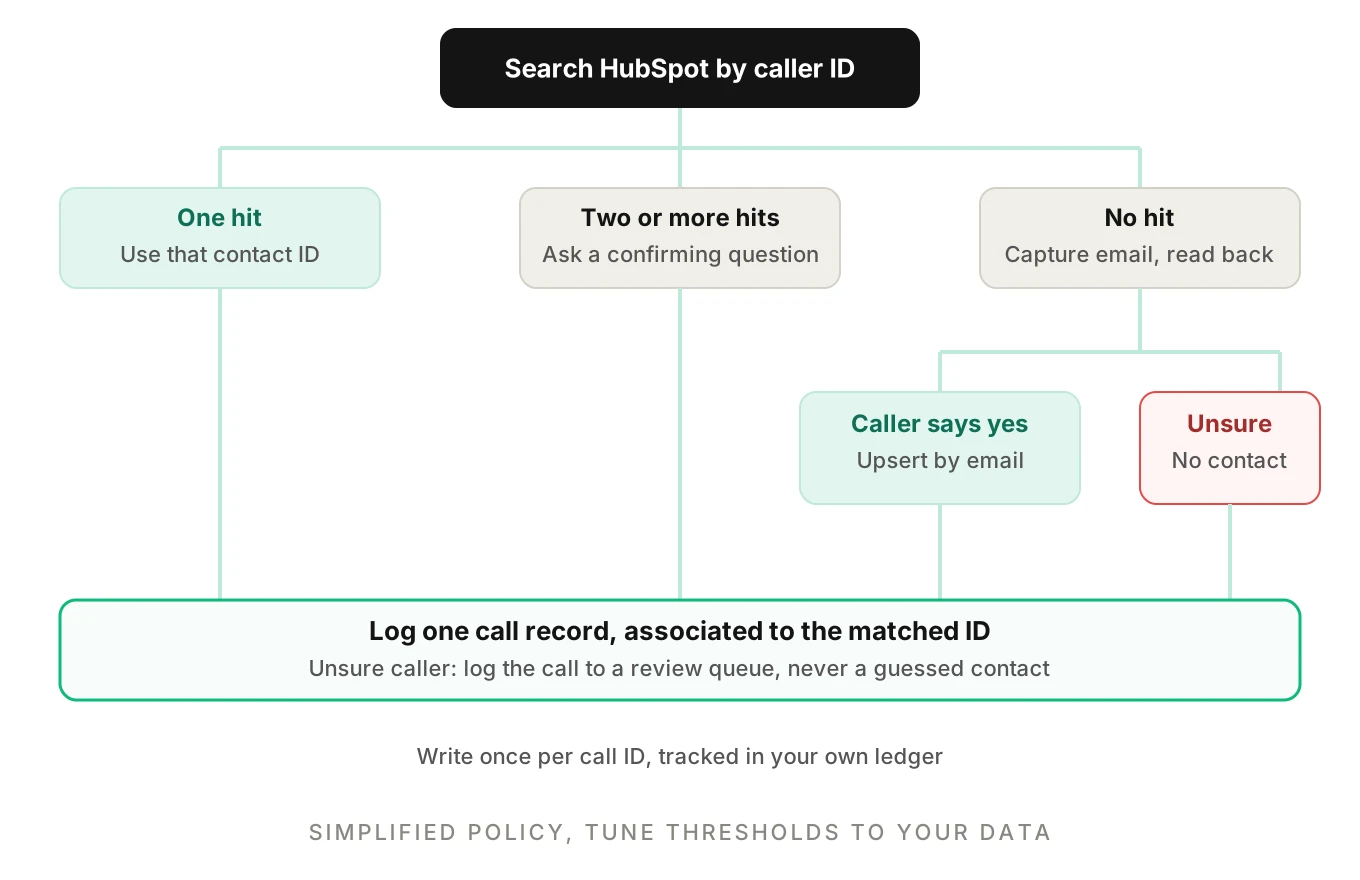
| 1 | Look up by caller ID (national number) in a local cache, then search | Network data beats spoken digits |
| 2 | Exactly one hit: use it. More than one: ask a confirming question | Shared numbers |
| 3 | No hit: capture email, read it back letter by letter, require a yes | Spoken emails are the weak point |
| 4 | Confirmed email: upsert by email. Unconfirmed: do not create a contact | A guessed email makes a duplicate |
| 5 | Always log the call against the matched ID, or to a review queue | Never lose the call itself |
| 6 | Write once per call ID, kept in your own ledger | Retries |
The sketch below shows steps 4 to 6. It is simplified. The base URL and auth header depend on your app type, so take them from HubSpot's API reference. Property names are the ones in the calls guide. `CALL_TO_CONTACT_TYPE_ID` is a placeholder for the default type ID you look up in the associations reference.
# Simplified: write-back with a ledger keyed by your own call_id
def write_back(call, ledger, hs):
    if call.id in ledger:                      # retry guard
        return ledger[call.id]

    contact_id = call.matched_contact_id       # from caller-ID lookup
    if not contact_id and call.email_confirmed:
        res = hs.post("/crm/v3/objects/contacts/batch/upsert", {
            "inputs": [{
                "idProperty": "email",
                "id": call.email,
                "properties": {"email": call.email,
                               "firstname": call.first_name,
                               "lastname": call.last_name},
            }]
        })
        contact_id = res["results"][0]["id"]

    if not contact_id:
        queue_for_review(call)                 # no guessed contacts
        ledger[call.id] = "review"
        return "review"

    hs.post("/crm/v3/objects/calls", {
        "properties": {
            "hs_timestamp": call.start_ms,             # milliseconds
            "hs_call_duration": call.duration_s * 1000,  # milliseconds
            "hs_call_direction": "INBOUND",
            "hs_call_status": "COMPLETED",
            "hs_call_from_number": call.from_e164,
            "hs_call_body": call.summary,
        },
        "associations": [{
            "to": {"id": contact_id},
            "types": [{"associationCategory": "HUBSPOT_DEFINED",
                       "associationTypeId": CALL_TO_CONTACT_TYPE_ID}],
        }],
    })
    ledger[call.id] = contact_id
    return contact_id
The upsert response shape is not documented on the page I opened, so the `results[0]["id"]` line is an assumption. Confirm it against a real response in your sandbox. Pace this function with a queue that respects the limits above, and see voice agent rollback actions for what to do when a wrong record is already written. Scope the app token to the minimum objects, as in voice agent permissions.
How to test a HubSpot voice agent integration before launch
Run these against a HubSpot test account, not a customer's. The general method is in voice agent integration testing and workflow testing.
1. Seed the account. Load contacts that include near-miss pairs such as `sarah.kim` and `sara.kim`, a shared office number, a contact with no email and a contact with two companies.
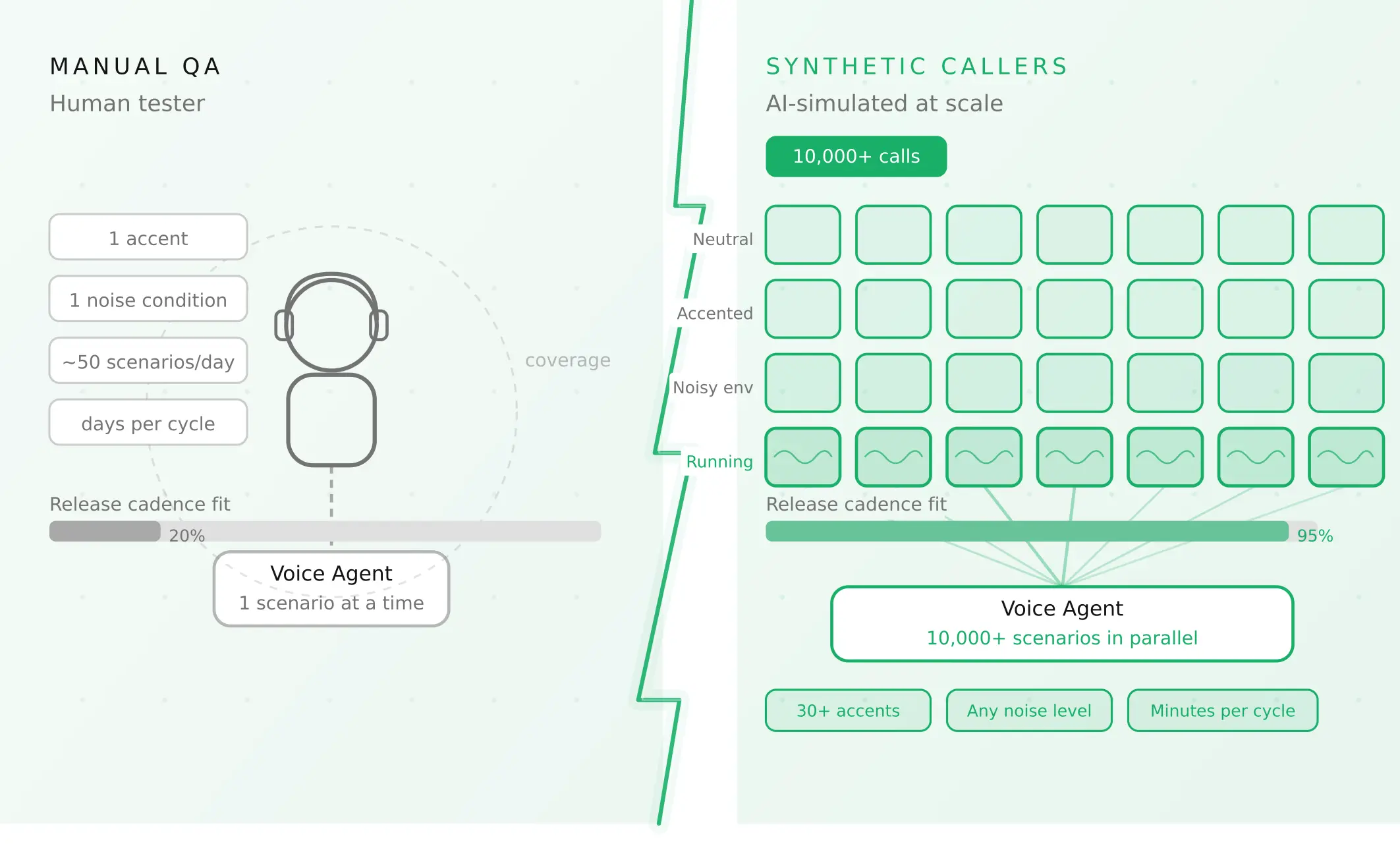
2. Build a caller matrix. Cross scenario (new caller, returning caller, shared number, wrong number) with accent, pace, background noise and interruptions. Evalgent generates scenarios from an agent's prompt and flows, and its caller profiles cover accent, speech pace, interruption level and background noise. Your own harness can do the same.
3. Place real calls. Evalgent's call simulator reaches the agent over PSTN, SIP or WebRTC, and it judges from the audio as well as the transcript. That catches a misheard email before you look at the CRM.
4. Assert on the record. After each call, query HubSpot for contact count, call count and associations. Pass means one contact, one call, correct association, correct owner.
5. Record the duplicate response. Send the same create twice and log exactly what your account returns. Do not assume a 409.
6. Replay a retry. Kill the response after the write and replay it. Expect one call record.
7. Burst test. Fire your expected peak of simultaneous call ends. Watch the 429 count and the time to drain.
8. Add a custom metric. Evalgent supports custom metrics that run on every call. A "record matches call" check fits there, and in production monitoring, where tool-call failures are flagged.
Score the matrix by failure type. An illustrative case: 1,000 calls a week, 30% from existing contacts, and a 6% email error rate gives about 18 duplicates a week, or 936 a year. Replace those inputs with your measured rates.
Frequently asked questions
How do I stop a voice agent from creating duplicate contacts in HubSpot?
Look up the caller by caller ID before you create anything. Create a contact only after a read-back confirmed email, using upsert by email. If the email is unconfirmed, log the call and queue it for review. HubSpot treats email as the primary unique identifier, so one mis-heard letter makes a new record.
Does HubSpot return a 409 when a contact with the same email already exists?
The create-contact reference I opened does not document a 409 or any duplicate response. A HubSpot community thread shows users reporting one on batch creates, but it is user-reported, and the last staff reply is from 2021. Do not assume it. Send the same create twice on your account and record the response your code must handle.
What phone number format should a voice agent write to HubSpot?
Write E.164, such as +18884827768. HubSpot's phone validation article says validated values need a plus sign, a country code and 4 to 15 digits. It does not say whether validation applies to API writes, so test that. For search, the search guide says to omit the country code.
How do I log an AI voice call as a call activity in HubSpot?
POST to `/crm/v3/objects/calls` with `hs_timestamp`, which is required, plus duration in milliseconds, direction, status and a body. Add an `associations` entry with the contact ID, `associationCategory` and `associationTypeId`. Look up the default type ID in the associations reference rather than hard-coding it from memory.
What are the HubSpot API rate limits for a voice agent?
As of November 2026, private apps get 100 to 190 requests per 10 seconds per app by tier, with daily caps from 250,000 to 1,000,000 per account. Public OAuth apps get 110 per 10 seconds per installing account, search excluded. Search is limited to five requests per second per account.
Can a voice agent change a contact's lifecycle stage in HubSpot?
Only forward. HubSpot says the default lifecycle stage property can only be moved forward by its tools, including the API. To set an earlier stage, the current value must be cleared first. Read the property back after every write, because a refused change may not look like a failure.
Why did my HubSpot workflow fire twice after an AI call?
Usually you made two records or two events. A duplicate contact meets the enrollment trigger for the first time, and event-based triggers can enroll each time the event occurs. HubSpot says records enroll only once by default. Fix the duplicate and make writes idempotent with a call-ID ledger.
How do I test a HubSpot voice agent integration before launch?
Use a HubSpot test account seeded with near-duplicate contacts and shared numbers. Place calls from varied accents and noise levels, then assert on contact count, call count and associations. Replay a retry, send the same create twice, and burst your peak call volume to see 429 behaviour.
The bottom line
A HubSpot AI voice agent usually fails in the write, where one misheard email becomes a second contact and a lost call history. Match on caller ID, write only confirmed emails, log each call once, and test duplicates, retries and bursts before every change ships.
Related Articles
How to automate voice agent testing: synthetic callers vs manual QA
Learn how ai test automation replaces manual QA for voice agents. Compare synthetic callers vs human testers, with a 5-step framework to scale without hiring.
Read more
AI Agent Testing vs Voice Agent Testing: What General Tools Miss for Voice
AI agent testing measures text outputs. Voice agent testing measures behaviour through an acoustic pipeline. Five failure categories general tools miss.
Read more