Bullhorn AI Voice Agent: Duplicates and Session Errors
On this page
Vendor behaviour here was read on Bullhorn's developer and knowledge-base pages in November 2026. It is scoped to the REST API as those pages describe it. Where pages disagree or stay silent, the post says so.
Say your product team built a Bullhorn AI voice agent for screening. It phones candidates for a staffing agency, confirms a name and an email, and writes the person into Bullhorn. The call sounds fine. The candidate record is what the recruiter opens on Monday. This post is one in our AI voice agent integrations series. It follows that record. Duplicates, mid-call session death and quiet write failures all show up there. So does the test plan that catches them before a prompt change reaches every customer.
What a Bullhorn AI voice agent actually writes
A screening call is the front door to a short workflow. The agent captures a name and contact details. Your code looks for an existing person. It then creates or updates a Candidate, links that person to a job, and logs what happened.
Bullhorn's REST API docs describe each step of this Bullhorn ATS integration. The REST API guide says "You can use HTTP PUT requests to create new entities." The submission tutorial uses `PUT .../entity/Candidate` to create the person. It then uses `PUT .../entity/JobSubmission` with the status "New Lead" to link them to a job. A later `POST` can promote that web response to a submission.
Every step is a place where speech can corrupt the record. The agent does not crash. It writes something plausible and wrong.
| Step | What the call supplies | What can go wrong silently |
|---|---|---|
| Find existing person (duplicate check) | Spoken first name, last name, email | Search misses, so a second record is created |
| Create Candidate | Same three values plus status and owner | A near-miss email is stored as the contact address |
| Link to job | A spoken job title or requisition | The wrong job order gets the "New Lead" |
| Log the call | A summary written by your model | The note attaches to the wrong person |
The generic version of this problem is in our post-call write-back testing guide. This post stays inside Bullhorn. For other record systems see the HubSpot and Follow Up Boss posts.
What Bullhorn's docs say about duplicate candidates
Three Bullhorn pages touch Bullhorn duplicate candidates, and the duplicate check differs on each. They do not say the same thing.
The submission tutorial. Bullhorn's "Use the REST API to create candidates and submit them for jobs" page lists a check for existing duplicate candidates as step one, before the create call. It shows a search call: `GET .../search/Candidate` with a Lucene-style query on `firstName`, `lastName` and `email`. It says to compare the first three characters of the first name, the last name and the email. It says the check can be skipped when the email or last name is blank.
The Public API. For `POST /apply/{jobId}`, the Public API page says "The email address of the candidate is used for duplicate checking." The response tells you whether a record was created or updated. That is a different endpoint from `PUT /entity/Candidate`. Do not assume the rule carries over.
The ATS knowledge base. Bullhorn's "Understanding Bullhorn Record Duplicate Checking" page describes the in-app warning. It compares last name, the first two letters of the first name, and Email 1. A warning appears when the last name and first two letters match, or when the primary email alone matches. It adds: "Bullhorn checks against archived records, but not against deleted records or records you don't have access to view."
Three things follow from these pages.
1. The tutorial says first three letters. The knowledge base says first two. Treat both as examples, not a contract.
2. The pages I opened do not say whether `PUT /entity/Candidate` runs the in-app duplicate rules. The tutorial tells you to search first, which suggests your code owns the check. Confirm in a sandbox.
3. Permissions limit the check. A service user that cannot see a recruiter's candidate may not see the duplicate either. See our voice agent permissions guide for scoping the API user.
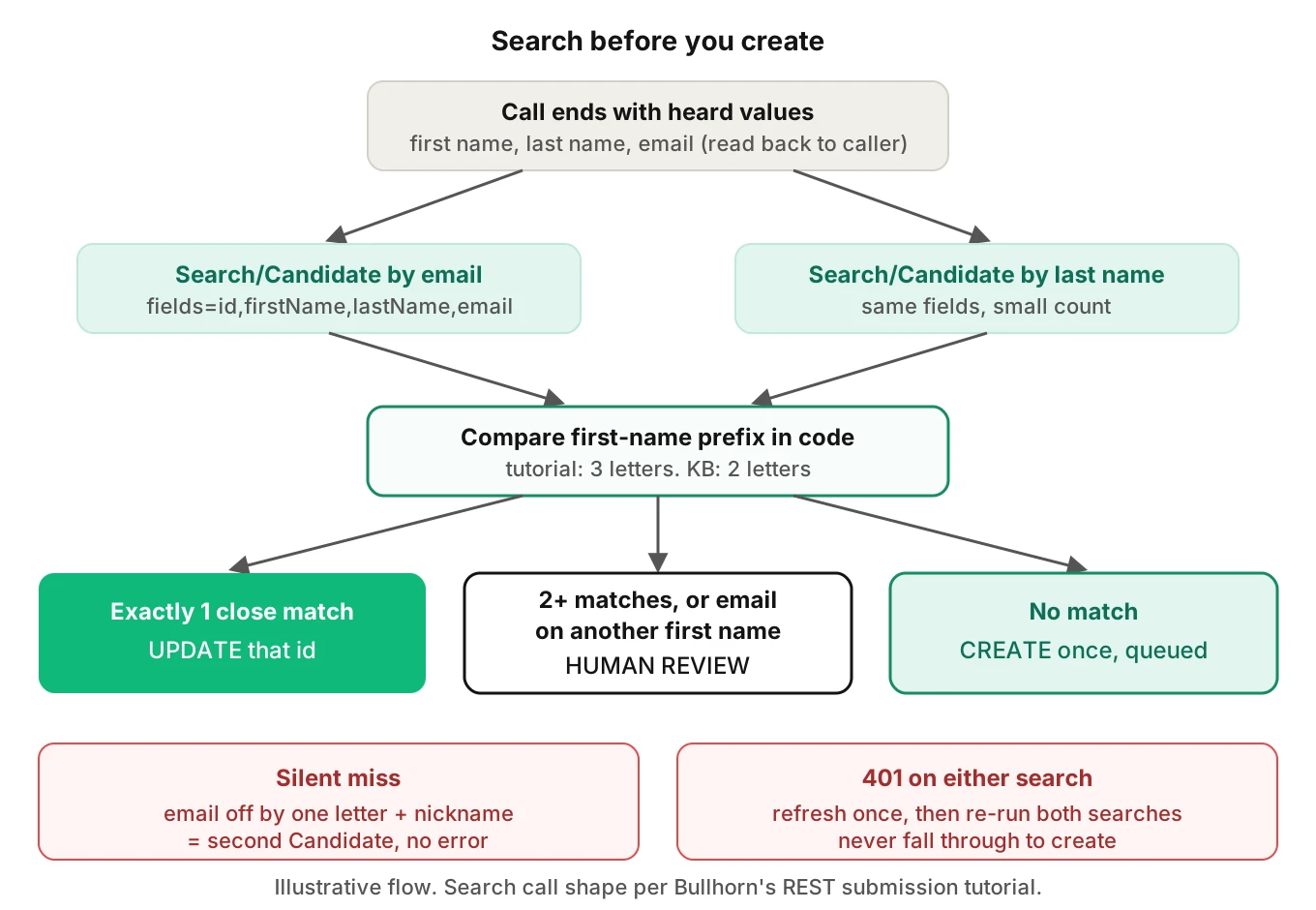
Here is a simplified version of the pre-create check. It follows the search call shape in Bullhorn's tutorial (`search/Candidate`, `query`, `fields`, `count`). Confirm how your integration passes the session key and which base URL your login returned.
import requests

def find_candidates(rest_url, bh_token, last_name, email):
    # Two documented-shape searches: by email, then by last name.
    out = {}
    for q in (f'email:"{email}"', f'lastName:"{last_name}"'):
        r = requests.get(
            f"{rest_url}search/Candidate",
            params={"BhRestToken": bh_token, "query": q,
                    "fields": "id,firstName,lastName,email", "count": 3},
            timeout=5,
        )
        if r.status_code == 401:
            raise PermissionError("session expired: refresh, then retry once")
        r.raise_for_status()
        for c in r.json().get("data", []):
            out[c["id"]] = c
    return list(out.values())

def decide(heard_first, heard_email, matches):
    prefix = heard_first[:3].lower()  # tutorial compares 3 letters; KB says 2
    close = [m for m in matches
             if (m.get("firstName") or "")[:3].lower() == prefix]
    email_hit = [m for m in matches
                 if (m.get("email") or "").lower() == heard_email.lower()]
    if len(close) == 1:
        return "update", close[0]["id"]
    if len(close) > 1 or email_hit:  # ambiguous, or email matches another name
        return "review", None
    return "create", None
Note the review outcome. Two close matches, or an email that matches a different first name, should never auto-update. Send them to a person.
Why spoken names and emails defeat a dedupe check
A text form hands you exact strings. A phone call hands you a transcription of sound. Every duplicate rule above assumes the strings are right.
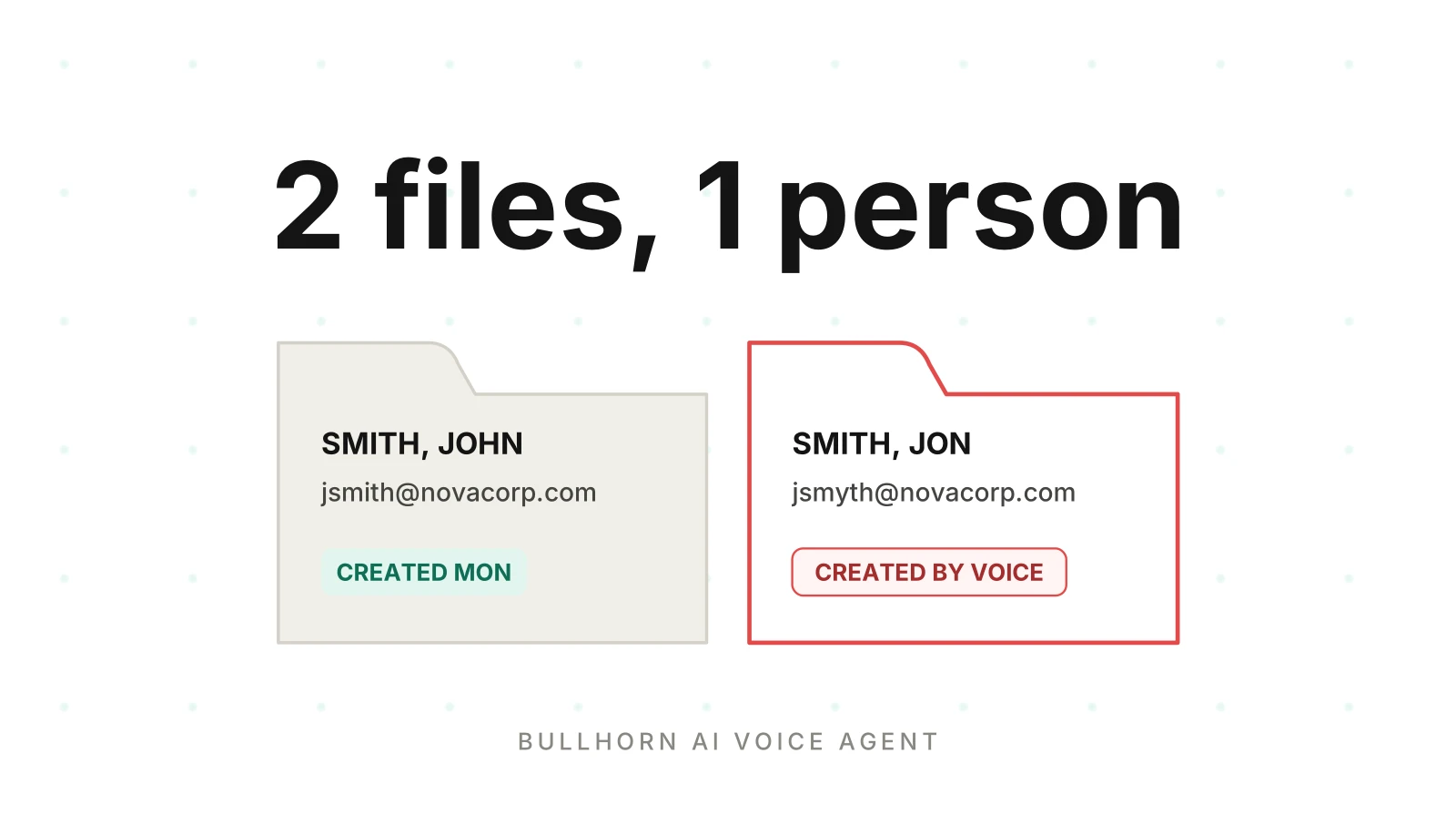
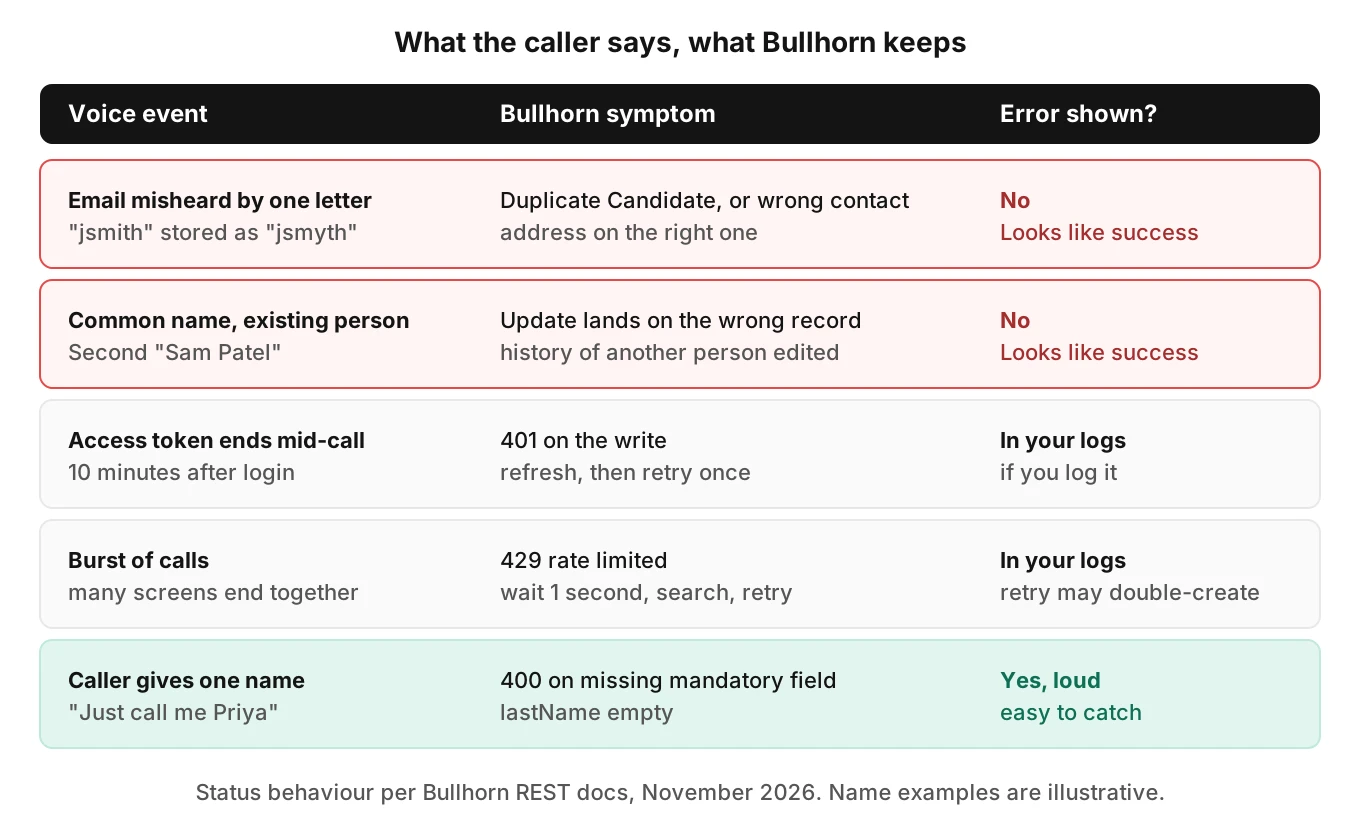
Take "Jon Smith, j-smith at novacorp dot com". The caller might be John or Jon. The transcript might say "Jonathan". The email might come back as `jsmith@novacorp.com`, `j.smith@novacorp.com` or `jsmyth@novacorp.com`. Your search uses what the speech model heard. If the email is off by one letter and the first name is a nickname, both checks can miss. The result is a second Candidate for the same human.
The reverse also happens. A caller says "Sam Patel" and a different "Sam Patel" already exists. If your code treats a last-name match as the same person, you update the wrong record. That one is harder to spot than a duplicate.
Names and emails are also where speech-to-text is weakest. Our entity accuracy guide and alphanumeric capture post cover the capture side. The fix there is to read the value back and confirm each part. For email, that means spelling the local part and domain separately.
Worked example: what a small miss rate costs
This is an illustrative assumption, not a measured rate. Suppose an agent screens 400 candidates a week. Suppose 6% of calls end with an email the caller would reject if they saw it.
- Wrong emails per week: 400 x 0.06 = 24.
- If your code searches by email only, all 24 miss any existing record. Some are returning candidates, so they become duplicates.
- If your code also checks last name plus a first-name prefix, the returning ones are caught. The rest are new people with a wrong contact address.
Over a quarter that is about 312 wrong contact records. A recruiter who emails one of them reaches nobody, or someone else. The numbers are made up. The shape is not: a small per-call miss rate times weekly volume gives a steady stream of bad records.
Sessions, tokens and what happens mid-call
The Bullhorn refresh token and the session key are two layers, and both can end a call's write.
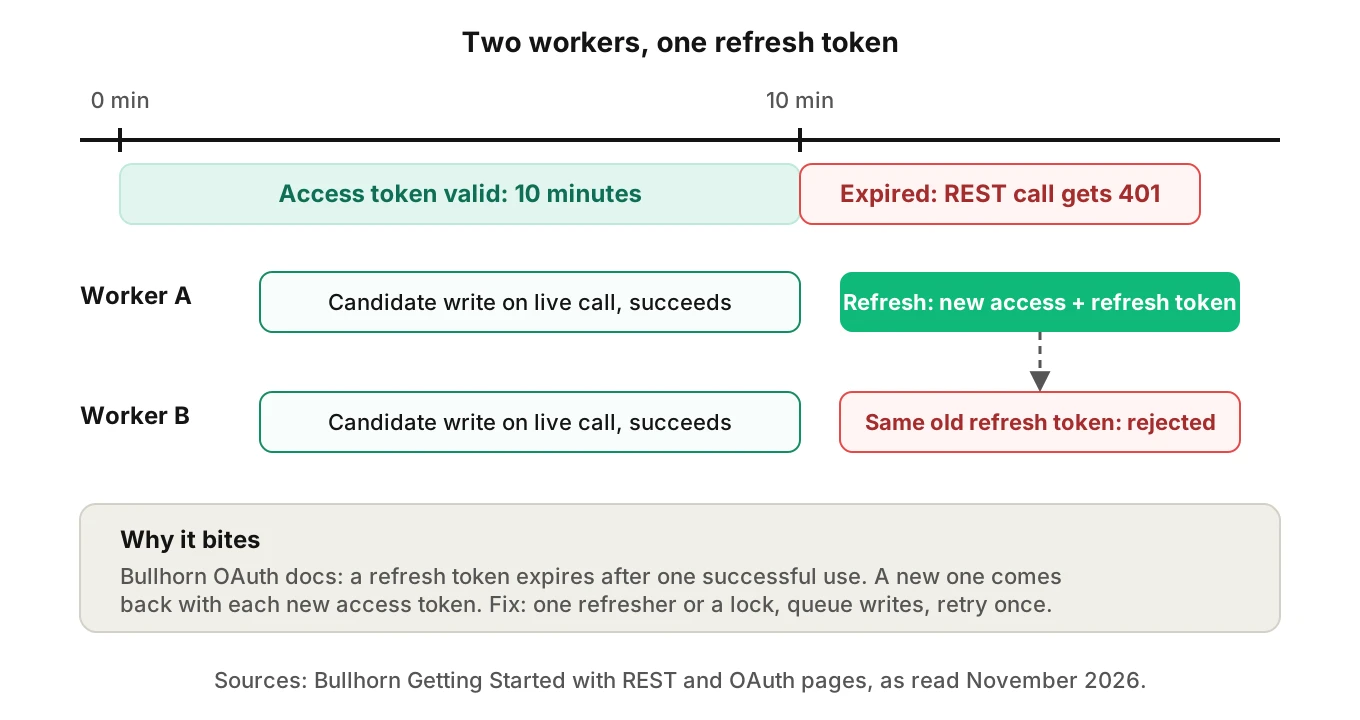
Per Bullhorn's "Getting Started with REST" page, the Bullhorn REST API login works like this. The app uses an authorization code to get an access token. The REST login then returns a session key named BhRestToken and a base URL. It states: "The access token is valid for 10 minutes." The page also says "When the current session key expires, your query will return a 401 response." Its advice: "On this response you should perform the OAuth refresh token flow to receive a new session token."
Two details matter for a phone agent.
Refresh tokens are single use. Bullhorn's OAuth page says "A refresh token expires after it is used once to successfully obtain a new access token and refresh token." The Getting Started page adds that a new refresh token comes back with every new access token. If two workers share one stored token and both refresh at once, expect the second call to fail. Your agent can then drop writes until someone re-authorizes. Use one refresher or a lock.
Logins are rate limited. The Getting Started page says "Bullhorn will apply strict limits to login rates, and may block login requests that occur too frequently." It says not to log in before every request. Reuse the session key until it expires. A voice agent that logs in per call is the pattern the page warns against.
I could not confirm a session lifetime in minutes. The pages I opened do not give one for `BhRestToken`. The OAuth page says only that a key can be configured to return long-lived refresh tokens. The Getting Started page says the refresh token has no expiry time but dies once replaced. Read those together carefully: "no expiry" does not mean "safe to share".
Rate limits on ordinary calls
The REST guide's error table lists 429 as "Rate Limited – Wait 1 second then retry request. Repeat until successful." It lists 401 as "Unauthorized – Your API key is wrong or expired". It gives no numeric per-minute quota on the pages I opened. The OAuth page links an "API Fair Use Policy" that I did not open, so I make no claim about it.
For a voice agent the retry rule has a catch. A caller will not wait through repeated one-second retries. Queue the write after the call, keep an idempotency key of your own, and search again before each retry. A retried `PUT` that succeeded the first time creates the duplicate you were trying to avoid. Our rate limits post covers backoff patterns in general.
Required fields and quiet partial writes
The REST guide says "Most entities in the Bullhorn data model contain mandatory fields." It also says "All mandatory fields without default values must have values specified in the JSON body". The error table lists 400 as a bad request, which is the likely response when they are missing.
On the entity reference page I opened, Candidate marks `firstName`, `lastName`, `name`, `status` and `owner`, among other fields, with an X in its field table. The table layout did not let me tell required fields from read-only ones. The page says `name` "does not populate automatically", and the tutorial's own create example omits `status` and `owner`. Your corporation's setup may add or change mandatory fields. Treat the reference as a starting point and check your own tenant.
Three consequences for a voice agent:
- A caller who gives one name. "Just call me Priya" leaves `lastName` empty. The create is likely to fail with a 400 and the screen is lost unless your code asks again.
- A missing owner. The agent has no recruiter to assign. Decide on a default owner and make it visible, so the record does not land in nobody's queue.
- Status. The tutorial's web response uses "New Lead". Choose that, not a later stage, until a human reviews the call. Promoting to "Submitted" on a transcript alone puts a candidate in front of a client contact.
Our AI phone screening QA guide covers how to score the screen itself. Staffing calls that follow placement are in the assignment and timesheet post, and scheduling mix-ups are in the recruiter scheduling post. For bias checks on the screen, see AI interviewer bias testing.
Notes and activity logging: what I could not verify
Most teams log the call as a note on the Candidate. I could not open the Note entity section of Bullhorn's reference in a readable form, so I will not name its fields, required values or association rules. Check them on Bullhorn's pages before you build.
What I can say is design advice, not vendor fact. Write the note in a separate step after the Candidate id is confirmed. Store your call id in the note text. Search for it before writing again. A note that lands on the wrong person is a privacy problem, not just a data problem. For that reason, link-then-log beats log-then-link. Our rollback actions post explains how to undo a bad write when the system has no undo.
A failure map for the voice-to-Bullhorn boundary
| Voice event | Bullhorn symptom | Visible to the caller? | Test it by |
|---|---|---|---|
| Email misheard by one letter | Duplicate Candidate or wrong contact address | No | Spoken-email variants with accents |
| Nickname given as first name | Search misses a known candidate | No | "Bill" vs "William" style calls |
| Common name, existing person | Update lands on the wrong record | No | Two seeded candidates with one last name |
| Access token ends mid-call | 401 on the write | Maybe, if the agent stalls | Force expiry before the write |
| Two workers refresh at once | Second refresh fails, writes stop | No | Parallel calls in staging |
| Call spike | 429 responses | Maybe | Load several calls at once |
| Caller gives one name | 400 on missing mandatory field | Yes, if the agent says so | One-name callers |
How to test a Bullhorn voice agent before it ships
Use a sandbox or a test corporation, never a customer's live data. Keep one JobSubmission web-response case in the set. Seed it on purpose. Each case should check a candidate record end to end.
1. Seed candidates. Create a returning candidate with a nickname, a shared last name, an archived record and a record your API user cannot see.
2. Write spoken-value cases. For each seeded person, script calls that give the name and email in different ways: spelled, fast, with an accent, with background noise, and with a correction mid-call.
3. Define the expected record. For each call, write the exact outcome: update id 123, create new, or send to human review. Do not score "the agent sounded right".
4. Read the record, not the transcript. After each call, query Bullhorn for the Candidate and compare fields to the expected values. Count duplicates created.
5. Break the session. Expire the access token before the write. Run two workers against one refresh token. Confirm the write is retried once and not lost or doubled.
6. Force the limits. Fire calls in parallel until you see a 429. Confirm the queue waits, searches again, and writes once.
7. Gate the change. Re-run the full set on every prompt, model or speech-provider change. A tool like Evalgent can generate and replay the caller variants, while your harness checks the Bullhorn record. Fail the release on any wrong-person update.
Our integration testing guide and workflow testing guide explain the harness side.
Metrics worth tracking
| Metric | Definition | Starting threshold (illustrative) |
|---|---|---|
| Wrong-person update rate | Updates applied to a different human | 0 in the test set |
| Duplicate creation rate | New Candidates when a match existed | Below 1% of seeded returns |
| Contact-field accuracy | Stored email and phone match the caller's intent | Above 98% on clean audio |
| Write completion | Calls with a confirmed Candidate id after retries | Above 99% |
These thresholds are starting points for your own review, not Bullhorn figures.
Where Evalgent fits in a Bullhorn AI voice agent project
Evalgent is a testing, evaluation and monitoring platform for voice agents. It does not connect to Bullhorn, and I am not claiming it does. A Bullhorn AI voice agent is yours to build and verify. It tests what your agent does on the phone.
Three parts matter for an AI recruiting voice agent. It generates test scenarios from your agent's prompt and flows, so a branch like "caller gives one name" gets a test. Its caller profiles vary accent, pace, interruptions and background noise, which is how spoken-email cases get stressed. It also judges from the audio, not only the transcript, because a transcript can hide the misheard letter that caused the duplicate. For live traffic, production monitoring takes pushed recordings, maps them to scenarios and flags tool-call failures. Verifying the Bullhorn record itself is still your harness's job.
Frequently asked questions
Does the Bullhorn API check for duplicate candidates automatically?
The pages I opened do not say so for `PUT /entity/Candidate`. Bullhorn's submission tutorial tells you to search for existing candidates before creating one. A separate Public API page says the email address is used for duplicate checking on `POST /apply/{jobId}`. Test your own endpoint in a sandbox before relying on either.
How do I stop a voice agent from creating duplicate candidates in Bullhorn?
Search before every create, using last name and email, and compare the first-name prefix in code. Read the email back to the caller during the call. If the search returns one close match, update it or route to human review. Never create on a failed search without a retry.
How long does a Bullhorn access token last?
Bullhorn's Getting Started with REST page says "The access token is valid for 10 minutes." Refresh tokens are single use per Bullhorn's OAuth page. Plan for a 401 mid-call, and refresh from one place so parallel workers do not invalidate each other.
What happens when a Bullhorn REST session expires during a call?
Per Bullhorn's guide, an expired session key returns a 401. The advice is to run the OAuth refresh token flow for a new session token. Queue the candidate write so a refresh does not delay the conversation, and confirm the write succeeded afterward.
What does a Bullhorn 429 mean and how should a voice agent handle it?
The REST guide's error table lists 429 as rate limited, with the instruction to wait one second and retry. For a voice agent, queue the write, search again before each retry, and attach your own idempotency key so a retried create does not duplicate the Candidate.
Which Candidate fields must a voice agent supply?
On the entity reference page I opened, `firstName`, `lastName`, `name`, `status` and `owner` are among the marked fields, and `name` does not populate automatically. The page does not make clear which marks mean required. Your tenant may differ. A missing mandatory field is likely to return a 400, so handle one-name callers and missing owners deliberately.
Can an AI voice agent log call notes to Bullhorn?
Bullhorn's REST docs mention a Note entity, but I could not read its field list, so check Bullhorn's reference. Design-wise, write the note only after the Candidate id is confirmed, include your call id, and search for it before retrying so notes do not duplicate or land on the wrong person.
How do I test a Bullhorn voice agent without touching customer data?
Use a sandbox or test corporation and seed returning candidates, shared last names and archived records. Script spoken-name and email variants, then query Bullhorn to compare stored fields with the expected outcome. Add forced token expiry and parallel-call tests, and re-run the set on every prompt change.
The bottom line
A Bullhorn AI voice agent is only as good as the record it leaves behind, and the riskiest step is the search that decides between update and create. Test spoken names, expiring sessions and retries against a seeded sandbox, and judge each call by what Bullhorn stored.
Related Articles
How to automate voice agent testing: synthetic callers vs manual QA
Learn how ai test automation replaces manual QA for voice agents. Compare synthetic callers vs human testers, with a 5-step framework to scale without hiring.
Read more
AI Agent Testing vs Voice Agent Testing: What General Tools Miss for Voice
AI agent testing measures text outputs. Voice agent testing measures behaviour through an acoustic pipeline. Five failure categories general tools miss.
Read more