Follow Up Boss AI Voice Agent: Duplicates and Action Plans
On this page
Verified against Follow Up Boss's own API reference and help center on November 5, 2026. Behaviour can change, so re-check the pages linked below before you ship.
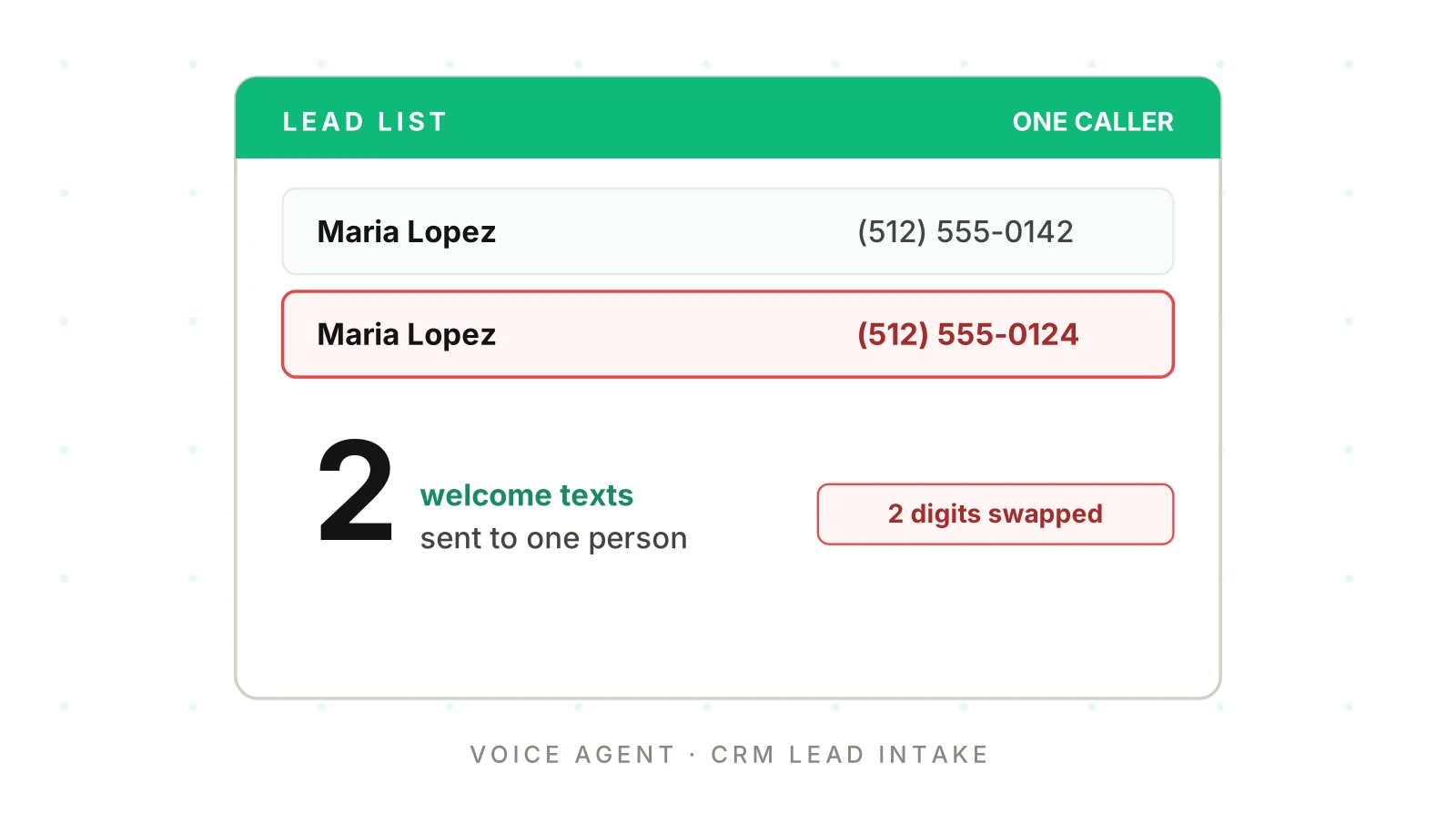
A Follow Up Boss AI voice agent starts with a messy input: a voice call is a poor way to enter a lead. The caller mumbles a number, the line drops a digit, and the agent writes what it heard. In most CRMs that is a typo. In Follow Up Boss it can also decide whether you get one person or two, and whether a welcome sequence runs once or twice.
This post is for teams that built their own Follow Up Boss AI voice agent, writing to their own account or their customers' accounts. It covers what the API docs actually say about matching, action plans, call logging, rate limits and webhooks. It then shows where speech errors turn into silent CRM errors, and how to test for them. For the series overview, start with AI voice agent integrations: what to connect and what breaks.
Where a Follow Up Boss AI voice agent writes
The agent has four write paths. Which one you pick decides whether automation runs.
| Path | What it does (per the docs) | Voice use |
|---|---|---|
| `POST /v1/events` | Sends in a lead or an event about a lead | New inquiry from a call |
| `POST /v1/people` | "Manually add a new person" | Avoid for intake |
| `POST /v1/calls` | "Add a call" | Log the call itself |
| `POST /v1/notes` | Adds a note (listed in the docs index) | Summary of the call |
Follow Up Boss is direct about the first choice. The POST /v1/events page calls the endpoint "the only correct option" for sending leads and their activity from outside sources. The POST /v1/people page warns: "This will only create the person and will not run any automations."
So a Follow Up Boss AI voice agent that creates the lead with `/people` skips the action plan, the lead-flow assignment and the agent notification. That fails quietly. The call completed, the person exists, and nobody follows up.
The Lead Provider Integration Guide adds that using the people endpoint for new leads "can cause duplicates and other adverse effects." Use events for intake. Use people only to update.
Identification headers
The Registration and Identification page says every request "should include the registered 'X-System' and 'X-System-Key' headers." It also says that if you provide services to a Follow Up Boss customer, you must register your system. The Authentication page describes API key auth as HTTP Basic over HTTPS, with the key as the username and a blank password. If your voice product writes into your customers' accounts, plan for that registration step early.
How Follow Up Boss matches people
This is the part that bites a Follow Up Boss AI voice agent, and it drives Follow Up Boss duplicate leads. The events page says Follow Up Boss "will automatically de-duplicate people based on their phone number or email address." If you pass a person ID, it matches that contact directly. If the ID is not found, you get a 404.
The response codes tell you what happened:
- 200: the event was created, and a person was updated if you sent new information.
- 201: a new person was created with the event.
- 204: no body. The page says this "indicates that the lead flow associated with this source has been archived and ignored."
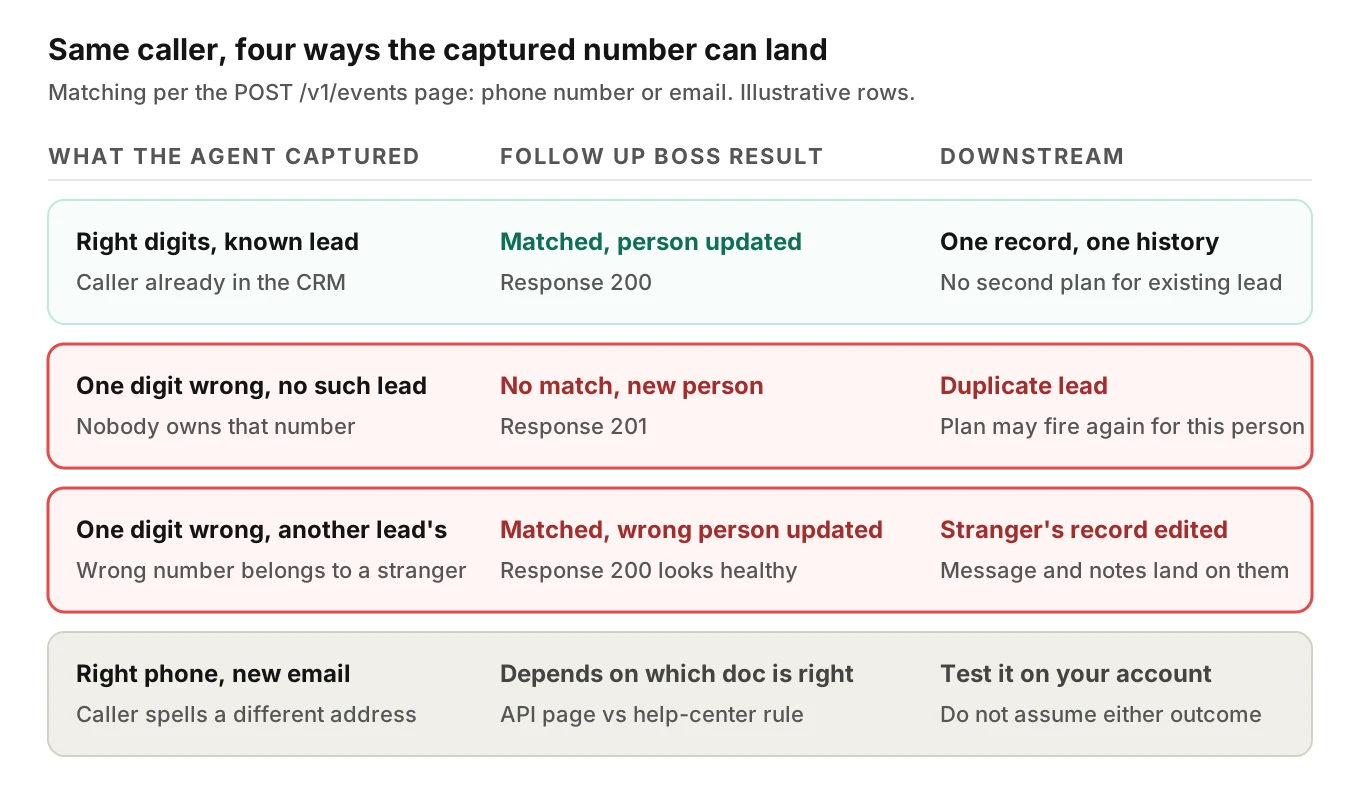
Read the matrix from the top. Matching works on the phone and email values you send, so a speech error lands in one of two bad outcomes.
1. No match, new person (201). The wrong number belongs to nobody. A second person appears next to the real one. If the event type is one that starts an action plan, the plan can run for the new record.
2. Wrong match (200). The wrong number belongs to someone else in the account. The update, message and notes land on a stranger. The status code looks healthy, so no alarm fires.
The second case is rarer and worse. A duplicate is visible in the list. A wrong match hides inside a different person's CRM record and history.
The two docs that do not agree
The API page says matching uses phone number or email. The help-center article on deduplication, How Follow Up Boss Deduplicates, describes a narrower rule as I read it. An email match is enough to flag a duplicate. A phone match counts together with both first and last name. The article does not say whether phone alone is enough.
I cannot tell you which one applies to your account's lead path. They may describe different features, since one is the API contract and the other is the product's duplicate detection. That is why the fourth row in the matrix says "test it." Seed a lead, call with the same phone and a different email, and see what the CRM does.
The same article says Follow Up Boss "automatically deduplicates leads and provides a merge function for one-off cases." Merging is a manual step in the app (select the duplicate contacts, then Mass Actions, then Merge People). The API index I opened lists no merge-people endpoint. So your agent cannot repair its own duplicates through the API, at least not through anything I found documented. Prevention has to happen before the write.
Updates overwrite
Updating is no safer. The PUT /v1/people/:id page says: "The `phones` argument will overwrite all existing phone numbers, including those associated with relationships." It also says that when you send tags, all existing tags for a person will be overwritten by the new list, unless you set `mergeTags=true`.
A voice agent that updates a caller's phone with only the number it just heard can wipe the other numbers on the record. Send the full existing set plus the new one, and read back before you save.
Action plans: the part that fires twice
Action plans are Follow Up Boss's scheduled sequences. The events page limits which new leads start one. Per that page, new leads created through the endpoint trigger action plans only for Registration, Seller Inquiry, Property Inquiry, General Inquiry or Visited Open House. Automations trigger for a slightly different list: Registration, Property Inquiry, Seller Inquiry and General Inquiry.
Three details matter for voice.
- "Inquiry" gets converted. The page says it becomes Property Inquiry if you include a property section, and General Inquiry otherwise. Whether your agent sends a property changes which path the lead takes.
- Incoming Call is an event type, but not a plan trigger. It appears in the type list. It is not on the plan-trigger list above. Choosing the type is a product decision, not a label.
- A duplicate is a new lead. The plan runs for the new person. Maria gets the welcome text twice, from two sequences, in two threads.
The plan can also be applied directly. The POST /v1/actionPlansPeople page takes `personId` and `actionPlanId`. It says nothing about what happens if the plan is already applied. It also carries a notice: "This endpoint is planned for deprecation as part of the Automations 2.0 rollout." Do not build a new dependency on it without checking the current status.
For texting rules on those sequences, see real estate speed-to-lead AI and TCPA checks. This post stays on the CRM side.
The 204 that looks like success
A 204 has no body and no error. The docs say it means the lead flow for that source was archived and ignored. Your agent sees a 2xx, tells the caller "an agent will call you shortly," and nothing happens. Treat 204 as a distinct outcome in your code and alert on it.
Capturing the identifiers
Leads depend on two strings: a phone and an email. Both are the hardest things to get right by voice. Our post on alphanumeric capture covers the mechanics of codes and spelled strings. Two Follow Up Boss specifics sit on top of it.
- The people page says "The first phone in the list will be the primary phone number," and the same for emails. If the agent puts the caller-ID number first and the spoken number second, the spoken number is not primary.
- Caller ID and the spoken number are two sources. The caller-ID number is machine-exact. The spoken one is a guess from audio. When they differ, store both with a clear order, and do not silently pick the guess.
A cheap guard is the GET /v1/people/checkDuplicate page. It takes `email` or `phone` and returns `found`, plus `matchedBy` and `assignedTo` on a match. Use it as a signal, not a script. If a caller says "I inquired last week" and the number they gave comes back `found: false`, a digit error is likely, so read the number back again. Never read `assignedTo` or any record detail to an unverified caller.
Follow Up Boss call logging
The POST /v1/calls page lists `personId`, `phone` and `isIncoming` as required. Optional fields include `outcome`, `duration` in seconds, `note`, `toNumber`, `fromNumber` and `recordingUrl`. The documented outcomes are `Interested`, `Not Interested`, `Left Message`, `No Answer`, `Busy` and `Bad Number`.
Two consequences follow.
1. You need a person first. The call log takes a `personId`. So the agent must create or match the person, then log. If the person step matched the wrong record, the call log lands there too.
2. The outcome list is closed. An agent that wants to record "wants a showing Saturday" has to map that into one of six values, and put the rest in `note`. If your agent invents a value, expect a 400. The page lists 200 and 400 but does not describe either.
Create, wait, then write
The Common Issues page describes a timing trap. After a person is created through events or people, there is a small window in which the person is not immediately accessible through other endpoints, until assigned to an agent. A note or call sent right away might fail. The page says: "To prevent this, you will need to create a delay between the creation of the person and the subsequent action." It adds that the right delay depends on the account's assignment type and lead routing rules.
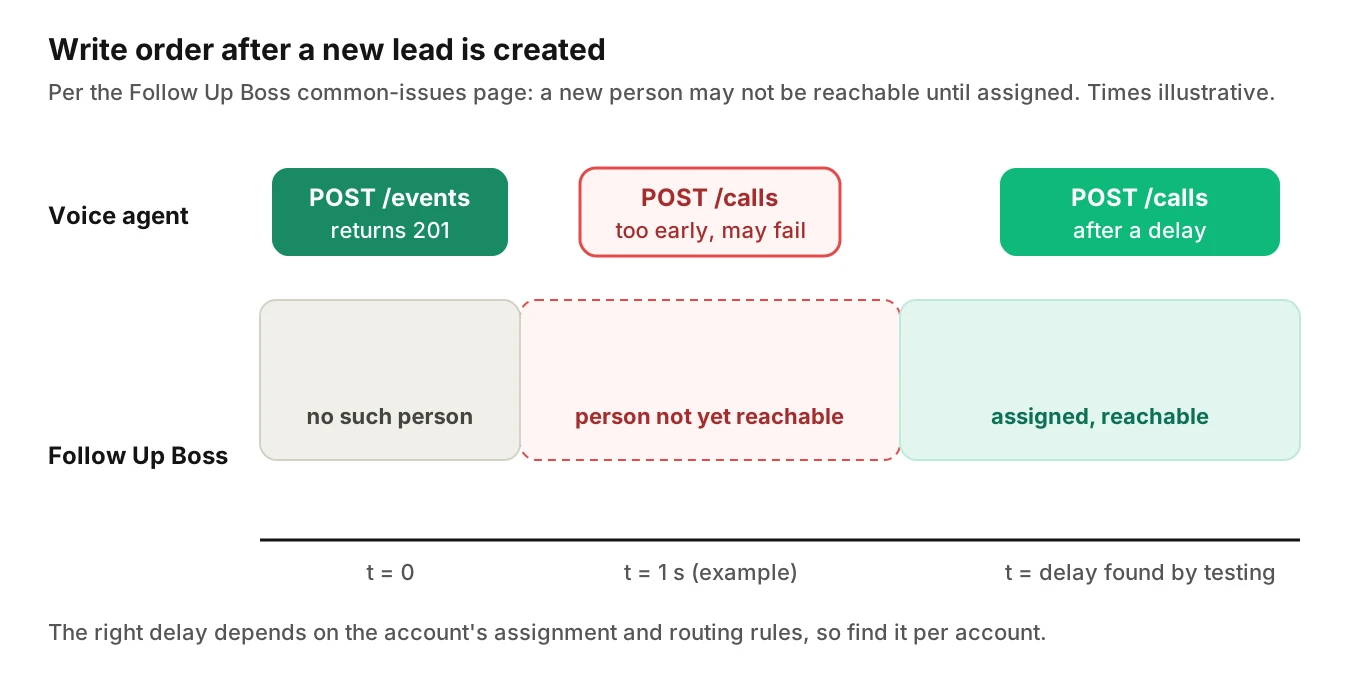
For a team writing into many customers' accounts, this is the real gotcha. Round robin at one brokerage and first-to-claim at another produce different delays. One fixed sleep in your code is wrong for somebody. Retry with backoff, and keep the call data queued until it lands.
Here is a simplified sketch. It uses the documented endpoints and headers, a placeholder retry, and no real keys.
import time, requests

BASE = "https://api.followupboss.com/v1"
AUTH = ("YOUR_API_KEY", "")            # key as username, blank password
HDRS = {"X-System": "YourSystem", "X-System-Key": "YOUR_SYSTEM_KEY"}

def post(path, body, tries=5):
    for i in range(tries):
        r = requests.post(f"{BASE}{path}", json=body, auth=AUTH, headers=HDRS, timeout=10)
        if r.status_code == 429:       # not processed: retry after the header says
            time.sleep(int(r.headers.get("Retry-After", 2)))
            continue
        if r.status_code in (400, 404) and i < tries - 1 and path != "/events":
            time.sleep(2 ** i)         # person may not be reachable yet
            continue
        return r
    return r

lead = post("/events", {
    "source": "yourdomain.com", "system": "YourSystem",
    "type": "General Inquiry", "message": "Asked about a 3-bed under 500k",
    "person": {"firstName": "Maria", "lastName": "Lopez",
               "phones": [{"value": "512-555-0142"}]},
})
if lead.status_code == 204:
    raise RuntimeError("lead flow archived: alert, do not tell the caller anyone will call")
person_id = lead.json()["id"]          # the response describes the lead, not the event
post("/calls", {"personId": person_id, "phone": "512-555-0142",
                "isIncoming": True, "outcome": "Interested", "duration": 214})
Treat it as a shape, not production code. The events page says the response is "representative of the lead, not the event itself," so read the person ID from the response body. Log what 200 versus 201 told you. A rising share of 201s on callers you expected to know is your duplicate alarm.
Follow Up Boss rate limits and webhooks
The Rate Limiting page says "Rate limiting is enforced by the API and is based on a sliding 10 second window." Every response carries headers with the limit, the remaining count, the window and the context. A system that exhausts a limit gets a 429 with a `Retry-After` header. The request is not processed, so you must resend it.
As of November 2026, the default tables on that page (which it says may change) show, for authenticated requests with a valid system key:
| Scope | Default per 10 s window |
|---|---|
| All endpoints (global) | 250 |
| `GET /v1/events` | 20 |
| `PUT /v1/people` | 25 |
| `/v1/notes` | 10 |
| `POST /v1/events` | Listed as unlimited |
Requests without a valid system key get tighter global limits (125 in the tables). The page also warns that a 429 can come even when requests remain: "Please make sure your system respects the 429 header even if X-RateLimit-Remaining shows you should have requests remaining."
Worked example (illustrative numbers)
Suppose a brokerage's agent ends 40 calls inside one 10-second window at a Monday-morning peak. Each call writes one note. The notes limit is 10 per window, so at most 10 notes land on the first pass. The other 30 get a 429. If your code drops them on error, 75% of call summaries vanish with no failed call to point at. A queue that honors `Retry-After` keeps all 40, just later. For the general pattern, see voice agent API rate limits.
The page does not say here whether the context is per key, per system or per account. Read `X-RateLimit-Context` on your own traffic before you size a queue. The docs index also lists `/rateLimit/usage` and `/rateLimit/limits` endpoints, which I did not open.
Follow Up Boss webhooks
If your agent reads state back, for example to confirm a stage change, the Webhooks guide sets the rules.
- Your endpoint should reply with a 2xx within 10 seconds. Any non-2xx triggers retries.
- The page gives two retry figures that conflict: up to 5 retries at set intervals, and retries for up to 8 hours. Plan for duplicates either way.
- Each system can register at most two webhooks per event, and callback URLs must be HTTPS.
- Only the account owner can create, update or delete webhooks. If you serve customers, each customer's owner has to authorise yours.
- Returning 406 or 410 deletes the webhook. A webhook with over 50% failures across 48 hours is disabled if it does not recover within a week.
- Requests carry a `FUB-Signature` header, an HMAC-SHA256 over the base64 of the raw JSON body using your system key.
Webhook payloads give an event ID and resource IDs, not the whole record. Fetch the resource, and make your handler idempotent on `eventId`. If your own writes trigger people-updated events, your handler will see them. That is design advice, not a documented guarantee, so check it in a sandbox.
How to test a Follow Up Boss AI voice agent
The call is the front door. The CRM record is the product. So the assertion belongs in the CRM, not in the transcript. For the generic method, see voice agent integration testing, workflow testing and post-call write-back testing. Here is the Follow Up Boss version.
1. Use a sandbox account with seeded leads. Seed a handful of people whose numbers differ by one or two digits, and one with a shared email. These make wrong matches visible.
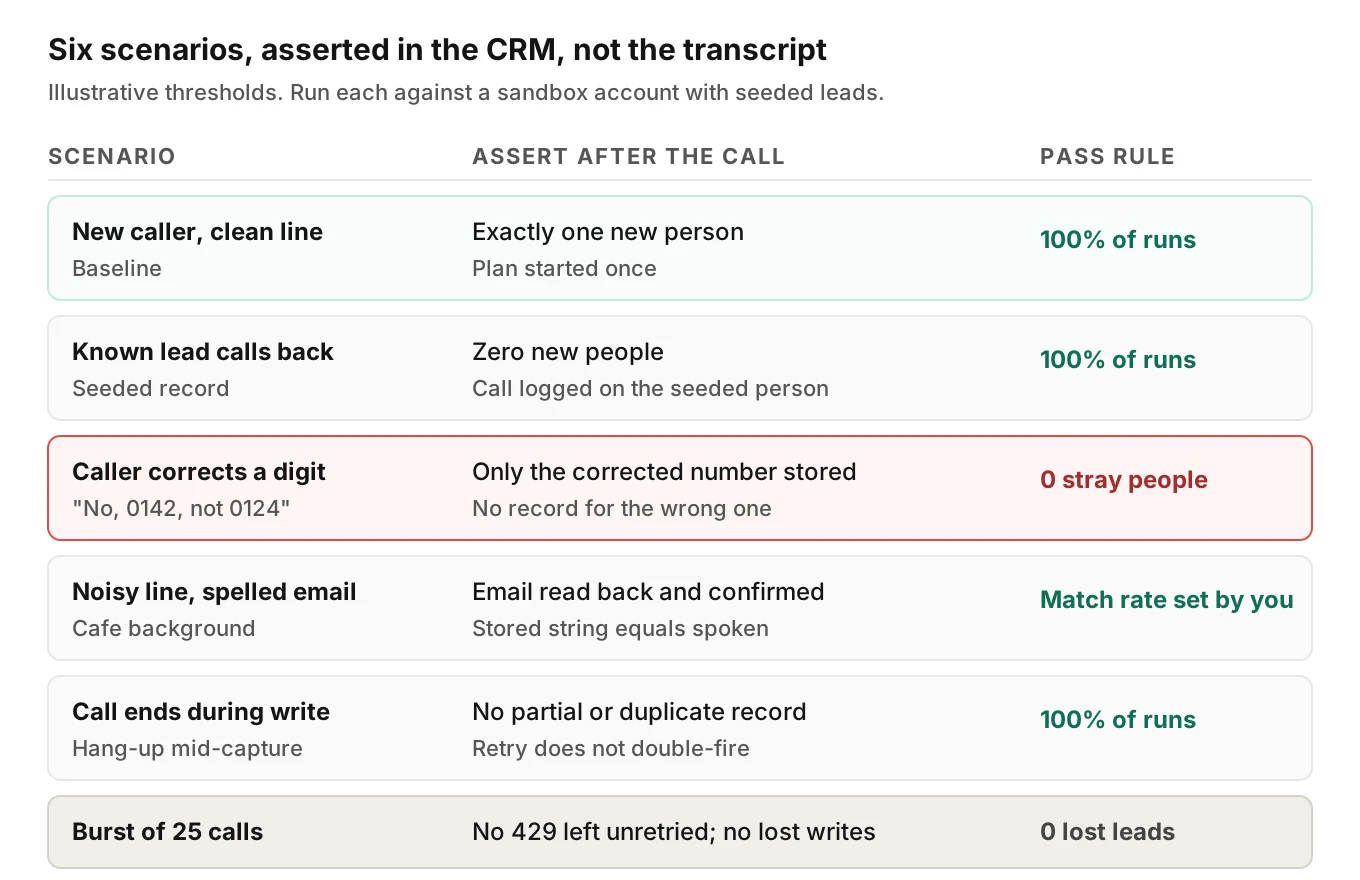
2. Write a scenario per row of the matrix. New caller, known caller, caller who corrects a digit, noisy line, mid-write hang-up, and a burst. The figure below lists six with illustrative pass rules.
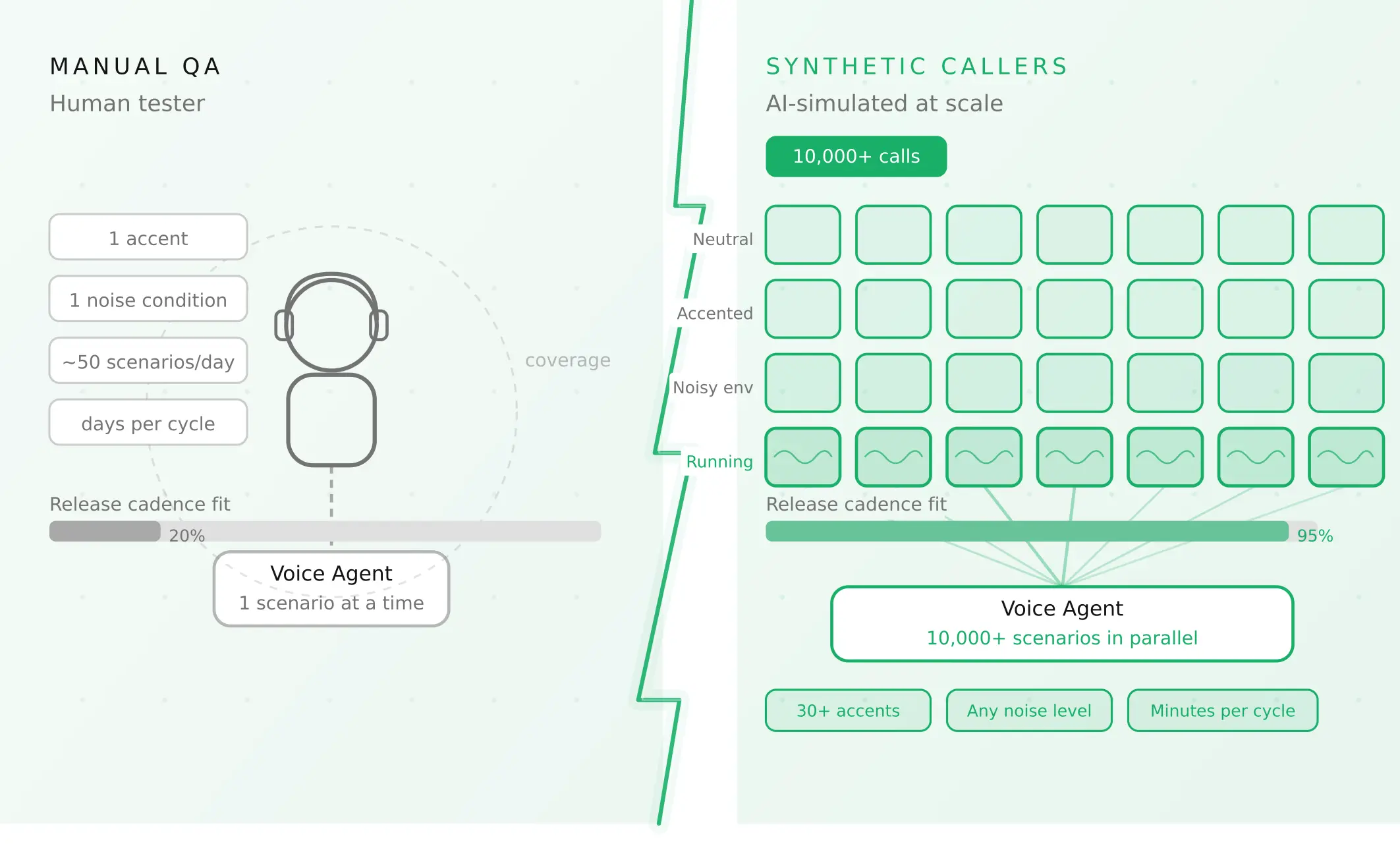
3. Vary the callers, not just the script. Accents, pace, interruptions, background noise and languages change how digits are heard. A clean-line test proves little.
4. Assert on the account after each call. Count new people. Check which person got the call log and note. Check how many plans started. Check the status code your code saw.
5. Replay the same call twice. A retry must not double-fire a plan or create a second person.
6. Run a burst. Fire enough simultaneous calls to cross the notes limit, then confirm every summary lands after retries.
7. Gate every prompt change on the set. A new greeting or a changed confirmation step can shift digit read-back behaviour.
This is where an audio-aware evaluation helps. Evalgent generates test scenarios from your agent's prompt and flows, and simulates callers with set accents, pace, interruptions and background noise over phone, SIP or WebRTC. It judges from the audio, not only the transcript, so a swallowed digit is not hidden behind a clean transcript. Custom metrics run on every call, which suits checks such as "phone read back and confirmed." Evalgent tests the agent's behaviour. It does not connect to Follow Up Boss, so the CRM assertions in step 4 run in your harness.
In production, Evalgent's call monitoring takes your recordings, maps calls to scenarios and flags tool-call failures and policy failures, which catches a drifting read-back step on real calls. Pair it with the CRM-side check: compare the number spoken on the recording with the number stored.
If the agent can change records, scope what it may do. See voice agent permissions, rollback actions and blast radius. For real estate qualification quality, see AI for real estate leads: the 2026 testing playbook. If you also write to other CRMs, compare the HubSpot and Salesforce posts. Call recording rules are in AI voice agent recording consent.
Frequently asked questions
Does Follow Up Boss have an API for AI voice agents?
Follow Up Boss has a general REST API with endpoints for events, people, calls, notes, action plans and webhooks. I found no voice-agent-specific endpoint in the docs index. A voice agent uses the same endpoints as any other lead source. Register your system, and send leads through POST /v1/events.
How does Follow Up Boss detect duplicate leads?
The events page says it de-duplicates people by phone number or email address. The help-center article describes an email match, or a phone match with first and last name. The two descriptions differ, so test your account. POST /v1/people does not de-duplicate unless you pass deduplicate=true.
Why is my AI voice agent creating duplicate contacts in Follow Up Boss?
The usual cause is a captured phone or email that does not match the existing record. One misheard digit produces a new string, so no match, and a 201 response. Other causes are sending leads through POST /v1/people, or retrying a write after a timeout. Read numbers back and check for 201s on known callers.
How do I send leads to the Follow Up Boss API?
Send POST /v1/events to api.followupboss.com with Basic auth, your X-System and X-System-Key headers, a source, a system, a type and a person object. The docs call this the only correct option for lead intake. Use a type such as General Inquiry so action plans and lead flow can run.
Does Follow Up Boss have API rate limits?
Yes. The Rate Limiting page describes a sliding 10-second window, a 429 response with a Retry-After header, and default per-endpoint limits. As of November 2026 the tables list 250 global requests and 10 for notes, with events POST unlimited. Read the response headers, because the page says values may change.
How do I log calls in the Follow Up Boss API?
Use POST /v1/calls with personId, phone and isIncoming, plus optional outcome, duration, note and recordingUrl. Outcome must be one of six listed values. Create or match the person first, and expect to wait or retry if the person is not yet reachable. The docs advise a delay after creation.
Do Follow Up Boss action plans trigger on API-created leads?
For leads created through POST /v1/events, only for certain types: Registration, Seller Inquiry, Property Inquiry, General Inquiry and Visited Open House. Leads created through POST /v1/people do not run automations. A duplicate person counts as a new lead, so its plan can start a second time.
How do I test a voice agent that writes to a CRM?
Test the record, not the transcript. Seed a sandbox with near-duplicate leads, simulate callers with different accents, noise and corrections, then assert the CRM state after each call: person count, which record got the call log, and plans started. Add retry and burst tests. Repeat after every prompt change.
The bottom line
A Follow Up Boss AI voice agent is only as accurate as the phone number and email it captures, because those strings decide whether a lead is matched, duplicated or attached to a stranger. Send leads through events, read back every identifier, retry writes with backoff, and verify the CRM state after every test call.
Related Articles
How to automate voice agent testing: synthetic callers vs manual QA
Learn how ai test automation replaces manual QA for voice agents. Compare synthetic callers vs human testers, with a 5-step framework to scale without hiring.
Read more
AI Agent Testing vs Voice Agent Testing: What General Tools Miss for Voice
AI agent testing measures text outputs. Voice agent testing measures behaviour through an acoustic pipeline. Five failure categories general tools miss.
Read more