Open door for builders.
Can You Use LiveKit and Pipecat Together? The Hybrid Voice Agent Stack
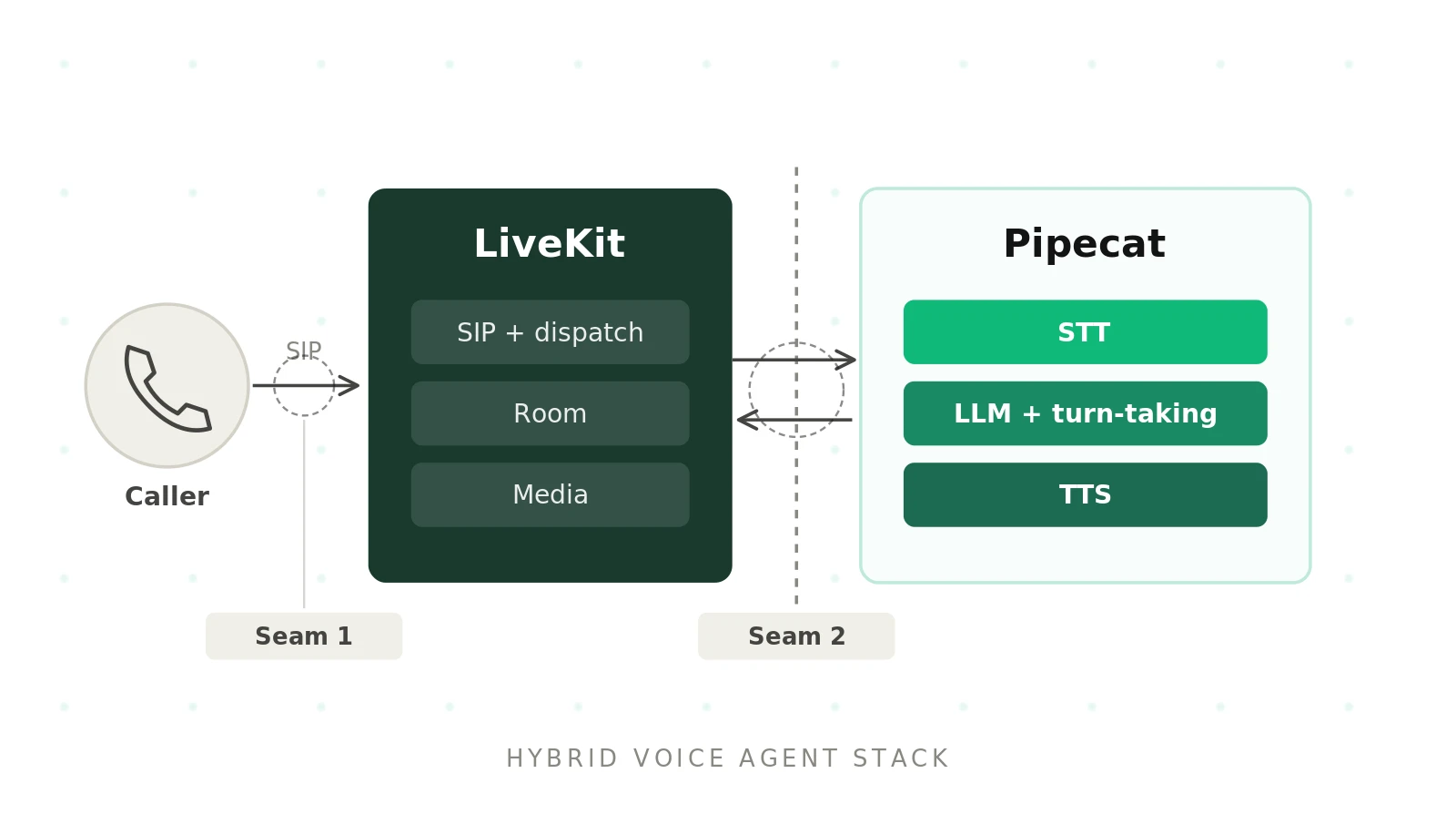
Most "LiveKit vs Pipecat" posts frame the two as rivals. That framing is half right. Both can run a full voice agent. But they sit at different layers, and one of Pipecat's official transports is LiveKit. So "which one?" has a third answer: both.
This guide is the hands-on version of that answer. You get the responsibility split, a call-flow walkthrough, and code checked against the current Pipecat LiveKit transport docs and the official example. You also get an outbound call sequence, a three-way comparison table and the failure modes that only the hybrid has. If you want the wider comparison first, start with our Pipecat vs LiveKit hub.
The first three figures come from the Pipecat source and the LiveKit docs, as cited below. The fourth is simply the number of systems in the hybrid. Figures later in the post marked "illustrative" are our own examples, not benchmarks.
Why LiveKit and Pipecat together is not a contradiction
The rivalry idea comes from LiveKit Agents. LiveKit ships its own agent framework, so it competes with Pipecat at the orchestration layer. But LiveKit is also a media platform. That part does not compete with Pipecat at all. Pipecat needs a transport, and LiveKit is one of the options.
LiveKit: an open-source WebRTC media platform built around rooms, participants and tracks. It also offers native SIP, phone numbers, recording through egress, client SDKs, a cloud service, and the separate LiveKit Agents framework.
Pipecat: an open-source Python framework that moves frames of audio, text and events through a pipeline of processors. It is transport-agnostic. Its transports include Daily, LiveKit, SmallWebRTC, WebSockets and telephony serializers.
Hybrid voice agent stack: a setup where LiveKit provides the media and telephony layer and a Pipecat pipeline provides the agent logic. The Pipecat bot is just another participant in a LiveKit room.
Why do teams do this? The most common pattern goes like this. A team picks Pipecat for orchestration. They like its frame model, its `ParallelPipeline` forks and its swap-anything services. Then they need phone calls from specific carriers. Pipecat does not terminate SIP itself. Its telephony overview lists Daily PSTN, Daily plus a SIP carrier, or carrier WebSocket media streams from Twilio, Telnyx, Plivo and Exotel. LiveKit, by contrast, has native SIP trunks, dispatch rules and a Phone Numbers product. So the team runs LiveKit as the transport. Calls arrive through LiveKit SIP, and Pipecat does the thinking.
The second pattern is simpler. A company already runs LiveKit rooms and wants an agent in them, but its voice team knows Pipecat. We cover the carrier side in depth in LiveKit vs Pipecat for telephony.
Who does what in a LiveKit plus Pipecat hybrid
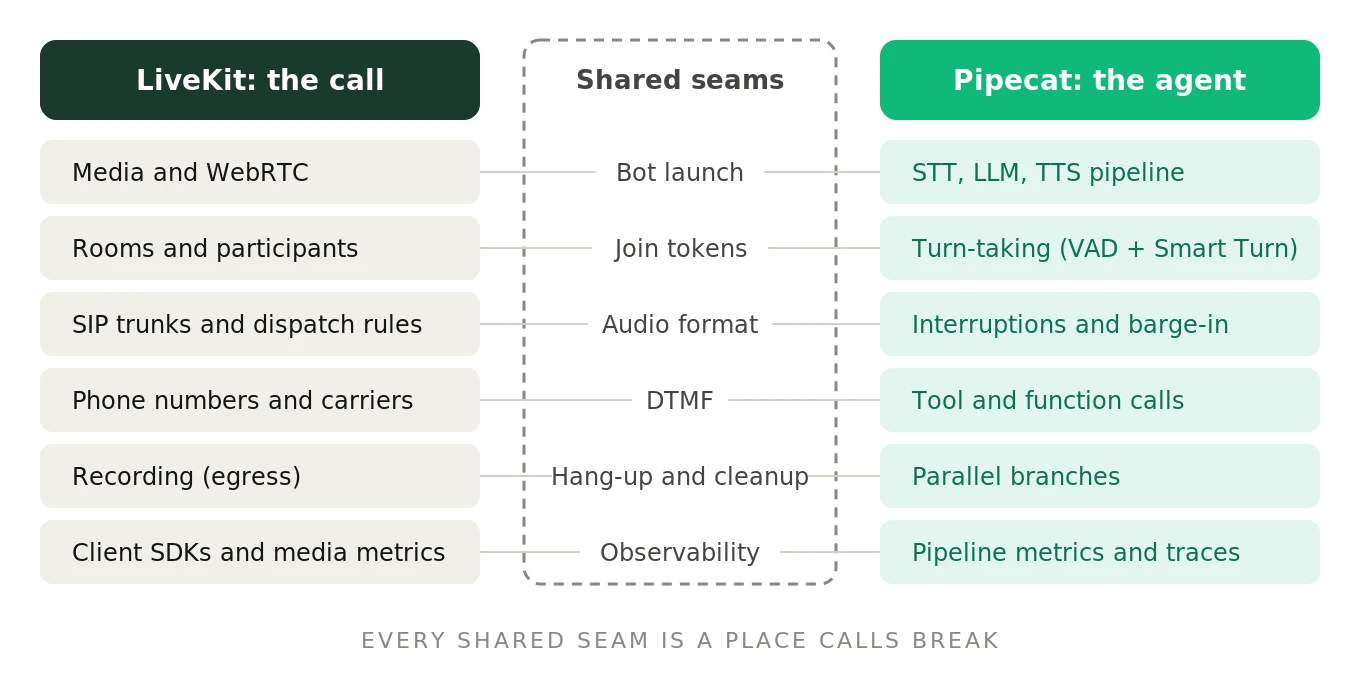
Draw a hard line between layers. LiveKit gets audio in and out. Pipecat decides what to say and when.
| Responsibility | Owner in the hybrid | Notes |
|---|---|---|
| WebRTC media, rooms, participants, tracks | LiveKit | Pipecat subscribes and publishes like any client |
| SIP trunks, inbound and outbound calls | LiveKit | Dispatch rules decide which room a caller lands in |
| Phone numbers and carriers | LiveKit plus your carrier | Twilio, Telnyx, Plivo, Wavix and others via SIP trunks |
| Recording and egress | LiveKit | Room or track recording, independent of Pipecat |
| Browser and mobile client SDKs | LiveKit | Pipecat also has a LiveKit transport in its JS client SDK |
| Tokens and room permissions | Your server, via LiveKit server SDK | The bot needs a join token like any participant |
| Launching the bot for each call | Your server | LiveKit Agents dispatch does not launch Pipecat bots |
| Speech-to-text, LLM, text-to-speech | Pipecat | Any service Pipecat supports, such as Deepgram or Cartesia |
| Turn detection and endpointing | Pipecat | Silero VAD plus Smart Turn by default |
| Interruptions and barge-in | Pipecat | Frames cancel TTS and flush the pipeline |
| Tool calls and parallel branches | Pipecat | Function calling, `ParallelPipeline` |
| DTMF | Shared | LiveKit delivers SIP DTMF; Pipecat turns it into `InputDTMFFrame` |
| Observability | Split | Media metrics in LiveKit; pipeline metrics and traces in Pipecat |
Two rows deserve attention. First, bot launch. With LiveKit Agents, a dispatch rule can name an agent, and LiveKit sends the job to a registered worker. A Pipecat bot is not a LiveKit Agents worker. So you must detect the new room yourself, usually with a webhook, and start the bot. Second, observability. It is split by design, and that split is the root of most debugging pain later.
How a phone call flows through the hybrid
Here is the inbound path, end to end. Every hop is a place where latency adds up and calls can fail.
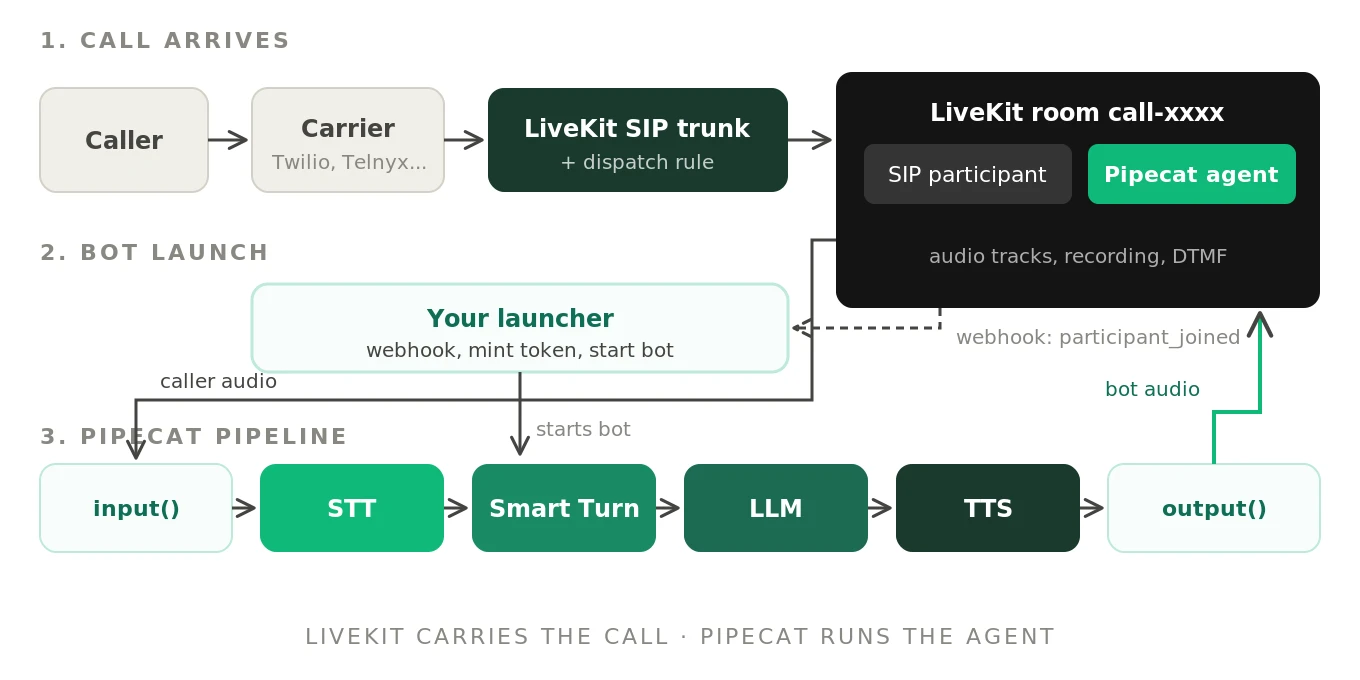
The caller dials a number owned by your carrier or by LiveKit Phone Numbers. The carrier sends a SIP INVITE to your LiveKit SIP endpoint through an inbound trunk. A dispatch rule matches the call and places the caller in a room as a SIP participant. LiveKit fires a `participant_joined` webhook to your server. Your server mints a token and starts a Pipecat bot for that room. The bot connects, subscribes to the caller's audio track, and publishes its own `pipecat-audio` track. From then on, audio flows caller to LiveKit to Pipecat and back.
The dispatch rule below comes from the LiveKit dispatch rule docs. An individual rule creates a new room per caller, here prefixed with `call-`. Note what is missing: the `roomConfig.agents` block. That block dispatches LiveKit Agents workers, which you are not using.
{
  "dispatch_rule": {
    "rule": {
      "dispatchRuleIndividual": {
        "roomPrefix": "call-"
      }
    },
    "name": "Inbound calls to Pipecat"
  }
}
One privacy detail matters here. The individual rule names the room after the caller's phone number plus a random suffix. LiveKit's token docs warn that room names and identities appear in logs and are not removed by PII redaction. If that is a problem for you, LiveKit's callee rule can name rooms after an opaque ID in the SIP destination instead. Check the dispatch rule docs for that setup.
The Pipecat LiveKit transport, verified
Install the extra with `uv add "pipecat-ai[livekit]"`. The transport needs three things: the server URL, a JWT token, and the room name. All three are required constructor arguments. Parameters go in `LiveKitParams`, which inherits every field of Pipecat's `TransportParams`.
The code below is adapted from Pipecat's official LiveKit example on the main branch. Class names follow current Pipecat. `PipelineTask` was deprecated in 1.3.0 in favor of `PipelineWorker`, so older tutorials will look different. The Smart Turn wiring follows the Smart Turn docs. Treat it as simplified and check the docs for your version.
# bot.py - Pipecat pipeline on LiveKit transport
# Adapted from pipecat/examples/transports/transports-livekit.py (simplified - check the docs)
import os

from pipecat.audio.turn.smart_turn.local_smart_turn_v3 import LocalSmartTurnAnalyzerV3
from pipecat.audio.vad.silero import SileroVADAnalyzer
from pipecat.frames.frames import TTSSpeakFrame
from pipecat.pipeline.pipeline import Pipeline
from pipecat.pipeline.worker import PipelineParams, PipelineWorker
from pipecat.processors.aggregators.llm_context import LLMContext
from pipecat.processors.aggregators.llm_response_universal import (
    LLMContextAggregatorPair,
    LLMUserAggregatorParams,
)
from pipecat.services.cartesia.tts import CartesiaTTSService
from pipecat.services.deepgram.stt import DeepgramSTTService
from pipecat.services.openai.llm import OpenAILLMService
from pipecat.transports.livekit.transport import LiveKitParams, LiveKitTransport
from pipecat.turns.user_stop import TurnAnalyzerUserTurnStopStrategy
from pipecat.turns.user_turn_strategies import UserTurnStrategies
from pipecat.workers.runner import WorkerRunner


async def run_bot(url: str, token: str, room_name: str, greet_first: bool = True):
    transport = LiveKitTransport(
        url=url,
        token=token,
        room_name=room_name,
        params=LiveKitParams(audio_in_enabled=True, audio_out_enabled=True),
    )

    stt = DeepgramSTTService(api_key=os.environ["DEEPGRAM_API_KEY"])
    llm = OpenAILLMService(
        api_key=os.environ["OPENAI_API_KEY"],
        settings=OpenAILLMService.Settings(
            system_instruction="You are a phone agent. Keep answers short and speakable.",
        ),
    )
    tts = CartesiaTTSService(
        api_key=os.environ["CARTESIA_API_KEY"],
        settings=CartesiaTTSService.Settings(voice=os.environ["CARTESIA_VOICE_ID"]),
    )

    context = LLMContext()
    user_agg, assistant_agg = LLMContextAggregatorPair(
        context,
        user_params=LLMUserAggregatorParams(
            vad_analyzer=SileroVADAnalyzer(),
            user_turn_strategies=UserTurnStrategies(
                stop=[TurnAnalyzerUserTurnStopStrategy(turn_analyzer=LocalSmartTurnAnalyzerV3())]
            ),
        ),
    )

    pipeline = Pipeline([
        transport.input(),   # caller audio from the LiveKit room
        stt,
        user_agg,
        llm,
        tts,
        transport.output(),  # bot audio published as the "pipecat-audio" track
        assistant_agg,
    ])

    worker = PipelineWorker(pipeline, params=PipelineParams(enable_metrics=True))

    @transport.event_handler("on_first_participant_joined")
    async def on_first_participant_joined(transport, participant_id):
        # participant_id is the LiveKit identity, e.g. the SIP participant
        if greet_first:
            await worker.queue_frame(TTSSpeakFrame("Thanks for calling. How can I help?"))

    @transport.event_handler("on_participant_left")
    async def on_participant_left(transport, participant_id, reason):
        await worker.cancel()  # caller hung up: end the pipeline, free the process

    runner = WorkerRunner()
    await runner.add_workers(worker)
    await runner.run()
A few verified details shape how this behaves on real calls:
- Identities, not session IDs. Participant IDs in the transport are LiveKit identities, the `identity` field set in the token. Events and methods such as `mute_participant()` use them.
- Late joins are handled. If the caller is already in the room when the bot connects, the transport fires `on_first_participant_joined` right after connect. That is the normal case for inbound calls.
- DTMF works. The `on_dtmf_event` handler fires for SIP DTMF. The transport also pushes an `InputDTMFFrame` downstream, so Pipecat's `DTMFAggregator` works on LiveKit calls.
- Resampling is automatic. The transport resamples incoming LiveKit audio to the pipeline's input rate. Pipecat's `PipelineParams` defaults to 16 kHz in and 24 kHz out.
The official example waits one second before greeting. Audio sent before the other side is subscribed can be lost, so the first second matters.
Joining a room with a server-generated token
The bot needs its own token. Pipecat's runner helper shows the recommended grants. It builds an `AccessToken` with `room_join=True`, the room name, and `agent=True`. Pipecat's source notes that the agent flag lets LiveKit clients know an agent has joined. The Python SDK's default token lifetime is six hours if you set no TTL.
The launcher below receives LiveKit's webhook, filters for SIP participants, mints a token and starts the bot. Webhook validation uses LiveKit's receiver, which checks the signed JWT in the `Authorization` header, per the LiveKit webhooks docs. This is simplified. Check the server SDK reference before shipping.
# launcher.py - start one Pipecat bot per inbound SIP call (simplified - check the docs)
import asyncio
import os
from datetime import timedelta

from fastapi import FastAPI, Request
from livekit import api
from livekit.protocol.models import ParticipantInfo

from bot import run_bot

app = FastAPI()
receiver = api.WebhookReceiver(api.TokenVerifier())  # reads LIVEKIT_API_KEY / SECRET


def bot_token(room_name: str) -> str:
    return (
        api.AccessToken(os.environ["LIVEKIT_API_KEY"], os.environ["LIVEKIT_API_SECRET"])
        .with_identity(f"agent-{room_name}")
        .with_name("Pipecat Agent")
        .with_ttl(timedelta(minutes=5))  # only needs to be valid at connect time
        .with_grants(api.VideoGrants(room_join=True, room=room_name, agent=True))
        .to_jwt()
    )


@app.post("/livekit/webhook")
async def livekit_webhook(request: Request):
    body = (await request.body()).decode()
    event = receiver.receive(body, request.headers.get("Authorization", ""))

    if event.event == "participant_joined" and event.participant.kind == ParticipantInfo.Kind.SIP:
        room = event.room.name
        # In production, hand this to a warm worker pool instead of the web process
        asyncio.create_task(run_bot(os.environ["LIVEKIT_URL"], bot_token(room), room))
    return {"ok": True}
Three design choices in that snippet are deliberate.
- Short TTL is fine. LiveKit token expiry only affects the initial connection, not reconnects. Once connected, the server issues refreshed tokens that last at least 10 minutes. So a five-minute token covers a 40-minute call. What it does not cover is a queue delay longer than five minutes before the bot connects.
- A unique bot identity per room. Two participants with the same identity in one room collide. Deriving the identity from the room name keeps retries idempotent.
- Webhooks are best effort. LiveKit retries failed deliveries but does not guarantee them. Make the handler idempotent and fast, and add a sweep for SIP rooms that have no agent after a few seconds.
Outbound calls with Pipecat and LiveKit SIP
Outbound flips the order. Your server creates the room, starts the bot, then asks LiveKit to dial. The dial uses `CreateSIPParticipant`, documented in LiveKit's outbound calls guide. With `wait_until_answered=True`, the call blocks until pickup and raises `SipCallError` on busy, no answer or trunk failure.
# dialer.py - outbound call into a room where the Pipecat bot is already waiting
# (simplified - check the docs)
import asyncio
import os
import uuid

from livekit import api
from livekit.protocol.sip import CreateSIPParticipantRequest

from bot import run_bot
from launcher import bot_token


async def place_call(phone_number: str):
    room = f"out-{uuid.uuid4().hex[:12]}"  # opaque name, no phone number in logs
    lkapi = api.LiveKitAPI()

    # 1. Bot joins first so it is warm before anyone answers
    bot = asyncio.create_task(
        run_bot(os.environ["LIVEKIT_URL"], bot_token(room), room, greet_first=False)
    )

    # 2. Dial. The SIP participant joins the room while the phone rings
    try:
        await lkapi.sip.create_sip_participant(
            CreateSIPParticipantRequest(
                sip_trunk_id=os.environ["LIVEKIT_SIP_OUTBOUND_TRUNK_ID"],
                sip_call_to=phone_number,
                room_name=room,
                participant_identity=f"callee-{uuid.uuid4().hex[:8]}",
                wait_until_answered=True,
            )
        )
    except api.SipCallError:
        bot.cancel()  # busy, declined, no answer, or trunk failure
        raise
    finally:
        await lkapi.aclose()
Why `greet_first=False`? LiveKit notes that SIP participants emit no audio while the call connects. The SIP participant can exist in the room before the callee picks up. If the bot greets on `on_first_participant_joined`, it may talk into a ringing line. Two fixes work. Let the callee speak first, since most people answer with "Hello?". Or signal the bot after `create_sip_participant` returns, then queue the greeting.
The outbound sequence, hop by hop:
| Step | Actor | What happens | What can go wrong |
|---|---|---|---|
| 1 | Your server | Create room name, mint bot token | Token TTL shorter than bot start time |
| 2 | Pipecat bot | Connects, publishes `pipecat-audio` | Cold start; connect retries add seconds |
| 3 | Your server | `CreateSIPParticipant` with trunk and number | Wrong trunk, caller ID rejected by carrier |
| 4 | LiveKit SIP | INVITE to carrier; SIP participant joins, ringing | Bot greets a ringtone |
| 5 | Callee | Answers; `sip.callStatus` becomes `active` | Voicemail also answers with 200 OK |
| 6 | Pipecat | Hears "Hello?", responds | First word clipped before subscription settles |
| 7 | Either side | Hang up; participant leaves | Bot process lingers and burns capacity |
Step 5 hides a trap. Voicemail answers at the SIP layer with `200 OK`, so it is not an error. LiveKit documents answering machine detection, but check whether the feature you rely on is exposed outside LiveKit Agents. In the hybrid, you may need your own detection step in the Pipecat pipeline.
Hybrid vs pure LiveKit Agents vs pure Pipecat
Three architectures can take a phone call. The hybrid trades simplicity for a specific mix of capabilities.
| Dimension | Hybrid (Pipecat on LiveKit) | Pure LiveKit Agents | Pure Pipecat (Daily or carrier WebSocket) |
|---|---|---|---|
| Media layer | LiveKit rooms and WebRTC | LiveKit rooms and WebRTC | Daily WebRTC, or carrier media streams |
| SIP termination | Native LiveKit SIP | Native LiveKit SIP | Daily SIP/PSTN, or carrier WebSocket |
| Agent launch per call | Your webhook and launcher | Built-in dispatch to workers | Daily dial-in webhook, or your server |
| Orchestration model | Pipecat frames and processors | LiveKit Agents sessions | Pipecat frames and processors |
| Turn detection | Pipecat Smart Turn plus VAD | LiveKit turn detector model | Pipecat Smart Turn plus VAD |
| Parallel branches | `ParallelPipeline` | Framework-specific patterns | `ParallelPipeline` |
| Dependency trees | Two (Pipecat and LiveKit SDKs) | One | One, plus the transport SDK |
| Observability | Split across two systems | Mostly one system | Mostly one system, plus carrier logs |
| Multi-party rooms | Strong (LiveKit rooms) | Strong | Good on Daily; limited on WebSocket |
| Main risk | Seams between the two | Lock-in to one framework's model | Carrier-specific media handling |
For the orchestration trade-offs alone, see how to choose between LiveKit and Pipecat. For hosted options, compare Pipecat Cloud vs LiveKit Cloud.
When the hybrid makes sense, and when it does not
The hybrid earns its complexity in a few clear cases.
- You need LiveKit SIP and Pipecat's pipeline. You want calls from a carrier that LiveKit trunks well, and your team is invested in Pipecat processors. This is the most common reason.
- You already run LiveKit. Your app, recording and client SDKs live on LiveKit. Adding a Pipecat participant is cheaper than moving media.
- You need multi-party rooms. Warm transfers, supervisor listen-in and agent assist all fit LiveKit's room model. The Pipecat bot is one participant among several.
- You want to swap orchestration later. Keeping media on LiveKit means you can move from Pipecat to LiveKit Agents, or back, without touching phone numbers.
It is the wrong choice in other cases.
- You are starting fresh with no carrier constraint. Pure LiveKit Agents or pure Pipecat on Daily gives one framework, one set of docs and one support channel.
- Your team is small. Two dependency trees means two upgrade cycles. A breaking change in either SDK can break calls.
- You would pay for features you disable. LiveKit Agents includes its own turn detector, session model and dispatch. In the hybrid you use none of them. If those features appeal to you, use LiveKit Agents directly.
We break down the orchestration layer in the best orchestration for voice agents in 2026. The transport question is covered in SIP vs WebRTC for voice agents.
How to run Pipecat on LiveKit transport for phone calls
This is the full build order. Each step lists what to verify before moving on.
1. Create a LiveKit project and credentials. Use LiveKit Cloud or a self-hosted server. Set `LIVEKIT_URL`, `LIVEKIT_API_KEY` and `LIVEKIT_API_SECRET`. Verify with a test token that a browser client can join a room.
2. Install Pipecat with the LiveKit extra. Run `uv add "pipecat-ai[livekit]"` and add your STT, LLM and TTS services. Verify the official LiveKit example talks to you in a browser room.
3. Set up SIP. Create an inbound trunk for your number from Twilio, Telnyx, Plivo, Wavix or LiveKit Phone Numbers. Point the carrier's SIP URI at LiveKit. Verify a test call creates a SIP participant.
4. Create a dispatch rule without an agents block. Use an individual rule with a prefix, or a callee rule with opaque IDs. Verify each call lands in its own room.
5. Configure the webhook. Point LiveKit webhooks at your launcher. Filter `participant_joined` events for SIP participants. Verify signature validation rejects a forged request.
6. Mint a bot token per room. Grant `room_join`, the room name and `agent=True`. Use a unique identity per room. Verify two concurrent calls get two distinct bots.
7. Launch bots from a warm pool. Keep pre-started worker processes with models loaded. Hand each room to a free worker. Verify time from ring to first bot word on 20 test calls.
8. Handle hang-up and cleanup. End the pipeline on `on_participant_left`. Verify no bot process survives its call.
9. Add outbound dialing. Start the bot first, then call `CreateSIPParticipant` with `wait_until_answered=True`. Gate the greeting on answer. Verify busy and no-answer paths end cleanly.
10. Join the logs. Tag Pipecat metrics and traces with the room name and SIP call attributes. Verify you can pull one call's full timeline from both systems.
11. Test the whole path on real calls. Run scripted calls over the PSTN with noise, accents and interruptions. Measure latency, barge-in and task success per call.
For the Pipecat side of step 11, our Pipecat voice agent testing guide covers pipeline tests. The LiveKit voice agent testing guide covers the room and SIP side.
Hybrid-specific failure modes
The hybrid adds failure modes at the seam between the two frameworks. These are the common ones.
| Failure mode | Symptom on the call | Root cause | Fix |
|---|---|---|---|
| Late bot join | Silence for seconds after pickup | Webhook delay plus process start plus model load | Warm pool; pre-join the bot for outbound |
| Connect retry stall | Long silence, then the bot appears | Transport retries connect 3 times with 4 to 10 second waits | Alert on first connect failure; check URL and token |
| Token rejected | Bot never joins; caller hears nothing | TTL expired in a queue, wrong room in grant | Mint at dispatch time; log the token's room and expiry |
| Duplicate agents | Two voices greet the caller | Old dispatch rule still sends a LiveKit Agents worker | Remove `roomConfig.agents` from SIP rules |
| Missed track subscription | Bot talks but never hears | Caller track not published or not subscribed | Log `on_audio_track_subscribed`; fail the call if absent |
| Sample-rate mismatch | Chipmunk or muffled audio, poor transcripts | Custom processors assuming a rate the pipeline does not use | Keep one declared rate; resample at the edges only |
| Clipped first word | Greeting starts mid-word | Audio sent before subscription settles | Short delay or wait for track subscription |
| Double turn detection | Bot talks over pauses or waits too long | STT endpointing and Smart Turn both deciding turns | Pick one owner for end-of-turn; tune the other off |
| Echo and false barge-in | Bot interrupts itself mid-sentence | Caller speakerphone feeds bot audio back on the PSTN leg | Noise and echo filtering; barge-in thresholds |
| Reconnect gap | Audio drops for a few seconds mid-call | Network change on the bot host | Monitor reconnect events; keep bots near LiveKit region |
| Orphaned bots | Capacity drains over hours | Hang-up not propagated to the pipeline | Cancel on participant left; add an idle timeout |
| Split observability | Nobody can explain a bad call | Media metrics in LiveKit, pipeline metrics in Pipecat | Shared call ID across both systems |
A few of these need more than a table row.
Cold start before the first word. Add up the inbound path. Webhook delivery, bot process start, model loading, room connect and track subscription all happen after the caller is already in the room. In one illustrative budget, that is 150 ms for the webhook, 800 ms to start a Python process, 400 ms to load VAD and Smart Turn, and 300 ms to connect. That is over 1.6 seconds of silence before the bot can speak. A warm pool removes most of it. Our LiveKit vs Pipecat latency guide breaks down the rest of the budget.
Double turn detection. In the hybrid, turn-taking lives in the Pipecat pipeline. You will not run LiveKit's turn detector, because it belongs to LiveKit Agents. But you can still get two deciders. Many STT services have their own endpointing, and Pipecat's aggregator has VAD plus Smart Turn. If both can end a turn, the bot answers early on some calls and late on others. Decide who owns end-of-turn. Our endpointing guide and VAD vs endpointing explainer cover the tuning.
Echo on phone calls. Browsers usually cancel echo. PSTN callers on speakerphone give no such guarantee. The bot's voice can return on the caller's track and trigger a barge-in. Test with speakerphone audio, and see our barge-in guide for thresholds.
Split observability. LiveKit knows about packet loss, SIP status and who was in the room. Pipecat knows about STT latency, LLM time to first byte and interruptions. Neither knows about the other. Put the room name and SIP call attributes on every Pipecat span. Our OpenTelemetry guide for voice agents shows the span layout.
Testing the seams of a hybrid voice agent
Here is the uncomfortable part. Neither framework tells you when call quality degrades. LiveKit will report a healthy room while the bot misses every other turn. Pipecat will report fast TTFB while the caller hears a clipped greeting. The hybrid adds a second seam, and seams are where calls break.
Pipeline unit tests miss late joins. Browser room tests miss PSTN echo and narrowband audio. Only a real call covers every seam: carrier, LiveKit SIP, the Pipecat bot, and back.
Measure what callers feel: pickup to first word, 95th percentile turn latency, barge-in success and task completion. Run it on many calls, with noise and accents, after every SDK upgrade. Our guides on stress testing voice AI and voice agent test automation show how to set that up.
Evalgent sells no transport or framework. We call your agent like a customer would and score the call end to end. That matters most when both vendors' logs say everything is fine. See independent voice AI evaluation.
Frequently asked questions
Can you use LiveKit and Pipecat together?
Yes. Pipecat ships an official `LiveKitTransport`, installed with the `pipecat-ai[livekit]` extra. Your Pipecat bot joins a LiveKit room as a participant using a URL, a JWT token and a room name. LiveKit handles media, rooms and SIP. Pipecat handles speech-to-text, the LLM, text-to-speech, turn-taking and interruptions. Many teams run exactly this setup for phone agents.
How do you connect Pipecat to LiveKit?
Create a `LiveKitTransport` with your LiveKit server URL, a token and the room name, plus `LiveKitParams` for audio settings. Place `transport.input()` at the start of your pipeline and `transport.output()` near the end. Mint the token server-side with `room_join`, the room name and `agent=True`. Then run the pipeline with Pipecat's worker and runner classes.
Does Pipecat support LiveKit SIP?
Indirectly. Pipecat does not terminate SIP itself, but LiveKit does. A SIP caller becomes a participant in a LiveKit room, and the Pipecat bot joins that room. The transport also handles SIP DTMF, firing `on_dtmf_event` and pushing `InputDTMFFrame` downstream. Pipecat's own telephony docs cover Daily and carrier WebSockets, so the LiveKit SIP path is yours to wire.
How does a phone call reach a Pipecat bot on LiveKit?
The carrier sends the call to LiveKit through an inbound SIP trunk. A dispatch rule places the caller in a room as a SIP participant. LiveKit fires a `participant_joined` webhook to your server. Your server mints a token and starts a Pipecat bot for that room. The bot connects, subscribes to the caller's audio and starts the conversation.
Should I use LiveKit Agents or Pipecat on LiveKit?
Use LiveKit Agents if you want one framework with built-in dispatch and LiveKit's turn detector. Use Pipecat on LiveKit if your team is invested in Pipecat's pipeline, or if you want to keep orchestration portable. Both use the same rooms and SIP. The hybrid costs you a second dependency tree and your own bot launcher.
How do you make outbound calls with Pipecat and LiveKit?
Create an opaque room name, start the Pipecat bot in it, then call `CreateSIPParticipant` with your outbound trunk, the number and `wait_until_answered=True`. Handle `SipCallError` for busy, declined and no-answer outcomes. Do not greet on participant join, because the SIP participant can appear while the phone is still ringing. Greet after answer instead.
Why does my Pipecat bot join the LiveKit room late?
Usually because everything starts after the caller arrives. Webhook delivery, Python process start, VAD and Smart Turn loading, and room connect all add up. Connect failures add more, since the transport retries three times with waits of four to ten seconds. Use a warm pool of started bots, and pre-join the bot on outbound calls.
How do you test a LiveKit and Pipecat hybrid?
Test the whole path on real phone calls, not just the pipeline. Place scripted calls over a carrier, through LiveKit SIP, into the bot. Measure pickup to first word, 95th percentile turn latency, barge-in success and task completion. Include noise, accents and speakerphone. Rerun after every upgrade of either framework, since both can change behavior.
The bottom line
LiveKit and Pipecat work together as a hybrid voice agent stack, with LiveKit carrying media and SIP and Pipecat running the agent. That split adds seams at bot launch, tokens, audio and observability, so the hybrid is only as good as your end-to-end tests on real calls.
Want to see where your hybrid breaks before callers do? Book a demo with Evalgent.
Related Articles

Why AI voice agents fail in production: 9 failure layers, how to detect each, and how to prevent them
Voice agents fail in production across 9 layers, from 8 kHz audio to silent tool errors. Symptoms, root causes, alerts, and fixes in one master table.
Read more
Voice agent regression testing: why LLM updates break production
LLM updates improve benchmarks but break voice agents in 5 predictable ways. How to detect and prevent regressions after every model or prompt change.
Read more