Open door for builders.
LiveKit vs Pipecat for Telephony: SIP, Phone Numbers, and Real Calls
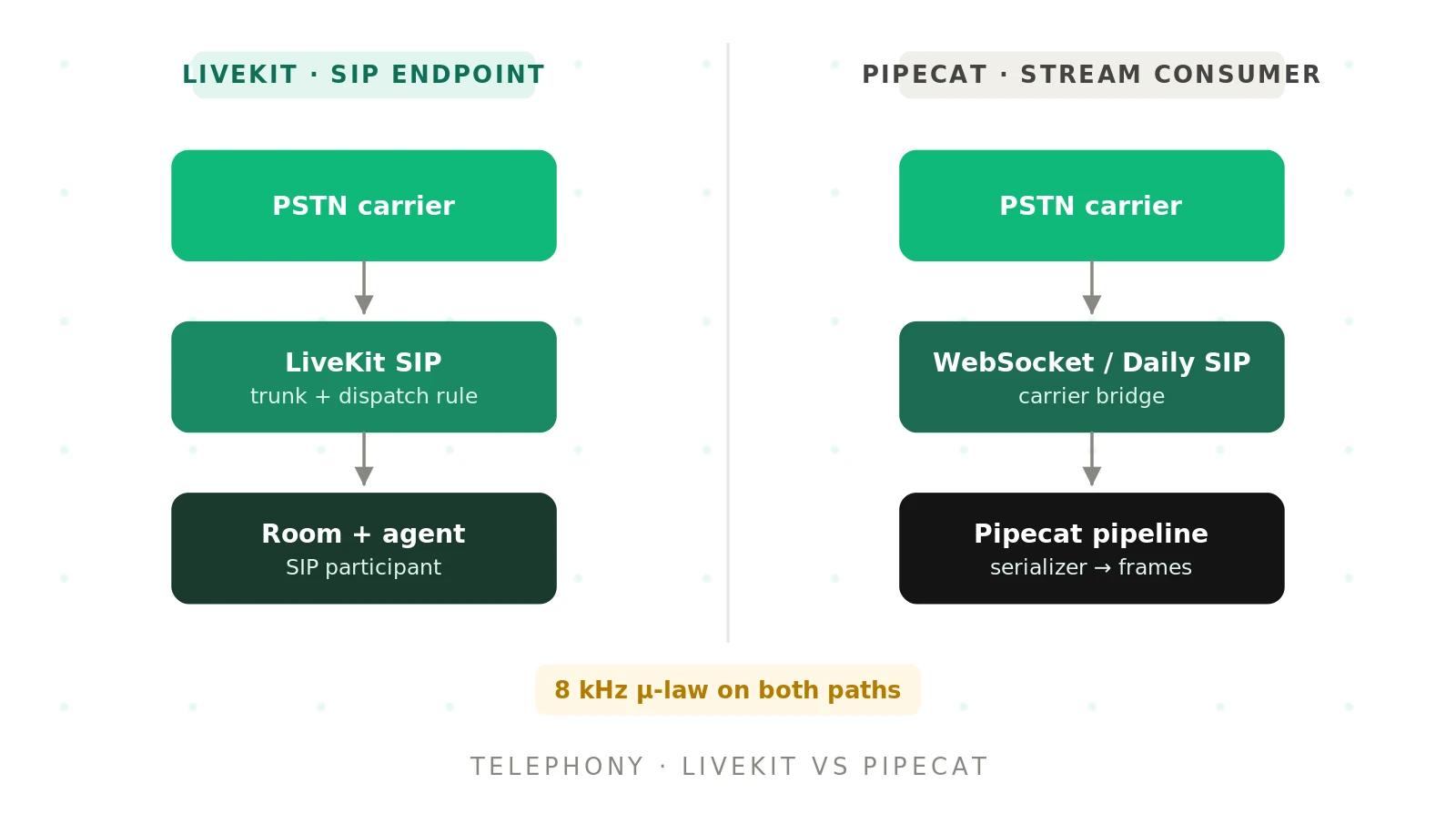
Most comparison posts treat telephony as a checkbox. "Supports phone calls: yes." That line hides the part that breaks.
A phone call is not a browser session. It arrives over a carrier network at 8 kHz. It carries keypad tones, transfers, and voicemail greetings. It fails in ways a WebRTC demo never shows you.
This post walks the real call path for each framework. You will see the config, the code, the codec math, and the failure modes. For the broader framework comparison, start with the Pipecat vs LiveKit hub.
How a phone call reaches each framework
The two frameworks sit at different layers. That fact shapes everything about telephony.
LiveKit: An open-source WebRTC media platform built around rooms, participants, and tracks. It ships a native SIP service and an Agents framework on top.
Pipecat: An open-source Python framework that moves frames through a pipeline of processors. It runs on whatever transport you give it, including telephony WebSockets, Daily, and LiveKit.
The LiveKit call path
A caller dials a number. The carrier routes the call over a SIP trunk to LiveKit SIP. LiveKit checks the call against an inbound trunk, then a dispatch rule. The dispatch rule creates a room and dispatches your agent into it.
The caller becomes a SIP participant. According to the LiveKit telephony docs, SIP participants "are the same as any other participant." Your agent code does not care that the audio came from a phone.
If you use LiveKit Cloud, the SIP service is already running. If you self-host, you deploy the SIP server separately.
The Pipecat call path
Pipecat offers three connection styles, per its telephony overview:
1. WebSocket media streams. Twilio, Telnyx, Plivo, or Exotel stream call audio to your FastAPI endpoint. A frame serializer converts their wire format into Pipecat frames.
2. Daily PSTN. Daily provisions numbers and delivers calls into a Daily room over WebRTC.
3. Daily SIP. Daily acts as the SIP endpoint for any SIP-capable carrier. The documented Twilio variant puts the caller on hold, then forwards the call to Daily's SIP URI.
In every case, something other than Pipecat terminates the phone call. Pipecat owns the conversation logic once audio arrives.
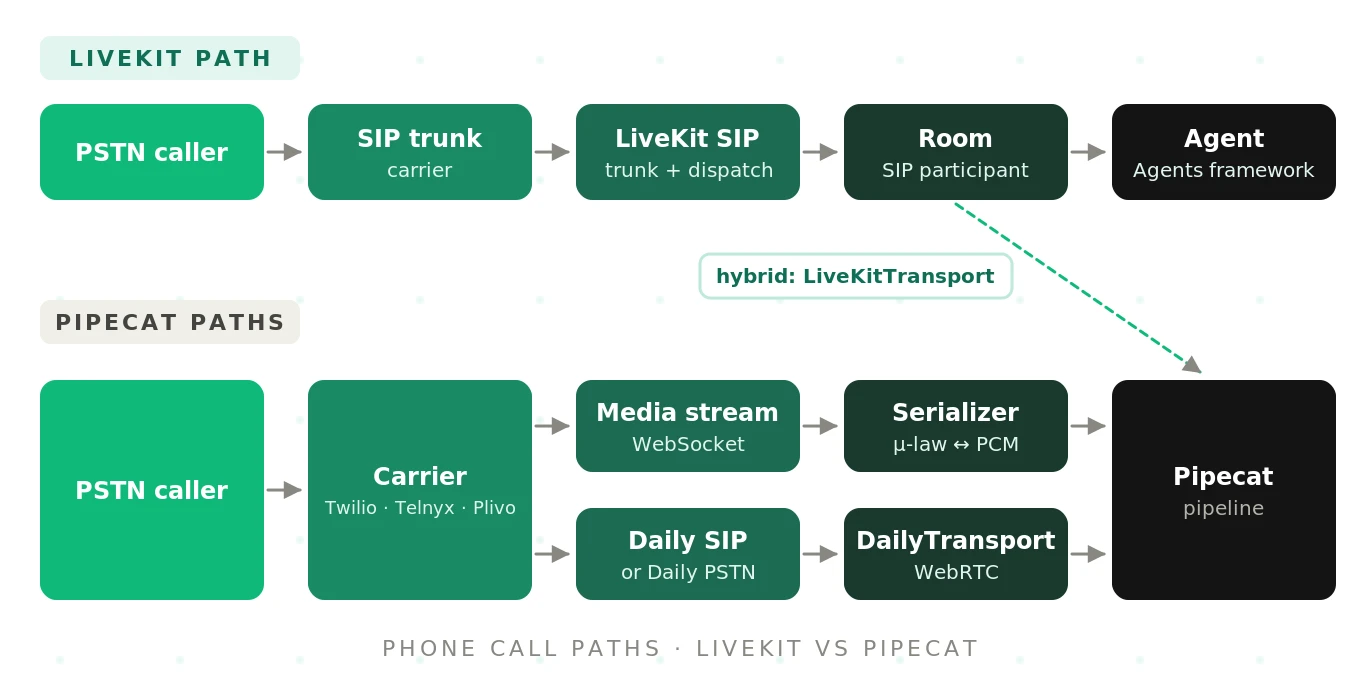
This is the core structural difference. LiveKit is a telephony endpoint. Pipecat is a telephony consumer. Our SIP vs WebRTC guide covers the protocol side in more depth.
Inbound calls on LiveKit: trunk plus dispatch rule
Inbound setup on LiveKit has two objects. The inbound trunk says which calls to accept. The dispatch rule says where they go.
Here is the inbound trunk from the LiveKit inbound trunk docs. It accepts calls to one number:
{
  "trunk": {
    "name": "My trunk",
    "numbers": ["+15105550100"],
    "krispEnabled": true
  }
}
lk sip inbound create inbound-trunk.jsonThe `krispEnabled` flag turns on Krisp noise cancellation for calls on that trunk. In the Cloud dashboard, that flag is only exposed in the JSON editor tab.
Next, the dispatch rule. This one, adapted from the dispatch rule docs, puts each caller in a new room and dispatches a named agent:
{
  "dispatch_rule": {
    "rule": {
      "dispatchRuleIndividual": { "roomPrefix": "call-" }
    },
    "name": "My dispatch rule",
    "roomConfig": {
      "agents": [{ "agentName": "inbound-agent", "metadata": "job dispatch metadata" }]
    }
  }
}
lk sip dispatch create dispatch-rule.jsonYour agent registers under the same name and reads the metadata:
@server.rtc_session(agent_name="inbound-agent")
async def my_agent(ctx: JobContext):
    metadata = json.loads(ctx.job.metadata)
    # route to a workflow or data store based on metadata
Two details from the docs matter in production. First, trunks and dispatch rules are long-lived objects. LiveKit warns that creating them per call "can degrade reliability at scale." Second, individual dispatch rules name rooms after the caller's phone number. That is PII, and it lands in logs that PII redaction does not scrub.
If you buy a number through LiveKit Phone Numbers, you skip the inbound trunk entirely. As of September 2026, the product offers US local and toll-free numbers in LiveKit Cloud.
Outbound calls on LiveKit: CreateSIPParticipant
Outbound calls need an outbound trunk and one API call. The trunk stores your carrier address and credentials. This Twilio example comes from the outbound trunk docs:
{
  "trunk": {
    "name": "My outbound trunk",
    "address": "<my-trunk>.pstn.twilio.com",
    "numbers": ["+15105550100"]
  }
}
lk sip outbound create outbound-trunk.json \
--auth-user "$SIP_AUTH_USERNAME" \
--auth-pass "$SIP_AUTH_PASSWORD"For Telnyx, the address becomes `sip.telnyx.com`. For Plivo, it becomes `
Then you place the call. This Python snippet follows the outbound calls guide:
from livekit import api
from livekit.protocol.sip import CreateSIPParticipantRequest

request = CreateSIPParticipantRequest(
    sip_trunk_id="<trunk_id>",
    sip_call_to="<phone_number>",
    room_name="my-sip-room",
    participant_identity="sip-test",
    wait_until_answered=True,
)
try:
    participant = await lkapi.sip.create_sip_participant(request)
except api.SipCallError as e:
    print(f"SIP call failed: {e.sip_status_code} {e.sip_status}")
That `SipCallError` is useful. It carries the upstream carrier's SIP status code. A 486 Busy and a 404 Not Found tell you very different things during a campaign.
Inbound and outbound calls on Pipecat
Twilio media streams over WebSocket
The simplest Pipecat phone path is Twilio Media Streams. You point a TwiML Bin at your WebSocket URL:
<Response>
  <Connect>
    <Stream url="wss://your-url.ngrok.io/ws" />
  </Connect>
</Response>
Your FastAPI endpoint accepts the socket and builds a transport with the Twilio serializer. The snippet below is simplified from the Pipecat Twilio guide and serializer reference:
# Simplified: see pipecat-examples/twilio-chatbot for the full server
from pipecat.serializers.twilio import TwilioFrameSerializer
from pipecat.transports.websocket.fastapi import (
    FastAPIWebsocketParams, FastAPIWebsocketTransport,
)

transport_type, call_data = await parse_telephony_websocket(websocket)

serializer = TwilioFrameSerializer(
    stream_sid=stream_sid,
    call_sid=call_sid,
    account_sid=os.getenv("TWILIO_ACCOUNT_SID"),
    auth_token=os.getenv("TWILIO_AUTH_TOKEN"),
)
transport = FastAPIWebsocketTransport(
    websocket=websocket,
    params=FastAPIWebsocketParams(
        audio_out_enabled=True,
        add_wav_header=False,
        serializer=serializer,
    ),
)
Locally, the development runner handles the webhook for you:
uv run bot.py -t twilio -x your-name.ngrok.ioThe same pattern works for Telnyx, Plivo, and Exotel with their matching serializers. Pipecat also lists serializers for Bandwidth, Vonage, Genesys AudioHook, Asterisk, and Wavix in its API reference.
For outbound, your server calls Twilio's REST API with inline TwiML. Twilio dials, then opens the WebSocket to your bot. You can pass custom `
The auto hang-up trap
The Twilio serializer ends the call when your pipeline ends. It defaults to `auto_hang_up=True` and raises a `ValueError` if credentials are missing.
That default bites during transfers. If you hand the caller to a human, you must set `auto_hang_up=False`. Then your TwiML controls the call's lifetime. The docs warn that if the TwiML "runs out of verbs, Twilio ends the call," including the human leg.
Daily plus Twilio SIP
The Daily + Twilio SIP guide has more moving parts. Your webhook creates a SIP-enabled Daily room and starts the bot. It answers Twilio with hold music. When the bot fires `on_dialin_ready`, it redirects the call:
@transport.event_handler("on_dialin_ready")
async def on_dialin_ready(transport, cdata):
    twilio_client.calls(call_sid).update(
        twiml=f"<Response><Dial><Sip>{sip_endpoint}</Sip></Dial></Response>"
    )
Two gotchas are documented. Use hold music, not `
For dial-out on this path, the bot calls `transport.start_dialout(sip_uri)`. Dialing a raw E.164 number through Daily requires dial-out approval on your Daily domain. A `sip:` URI does not.
Codecs, sample rates, and the 8 kHz reality
PSTN audio is narrow. Most US calls arrive as G.711 μ-law at 8 kHz. That is roughly telephone-quality speech, capped near 4 kHz of bandwidth.
On LiveKit, the SIP service negotiates codecs through SDP. Per the codec negotiation reference, defaults are PCMU, PCMA, and G.722. AMR-WB is supported but off by default. You enable it through the `media` config:
{
  "media": {
    "onlyListedCodecs": true,
    "codecs": [{ "name": "PCMU" }, { "name": "AMR-WB" }]
  }
}
The docs explain why every codec is not on by default. Each extra codec grows the INVITE. On UDP, large packets can fragment and vanish. That is an obscure cause of calls that never connect.
On Pipecat, the serializer converts at the boundary. The pipeline runs PCM internally. The Twilio guide recommends matching the pipeline rate to avoid resampling:
worker = PipelineWorker(
    pipeline,
    params=PipelineParams(
        audio_in_sample_rate=8000,
        audio_out_sample_rate=8000,
    ),
)
Pipecat's production telephony page is blunt about quality. It notes that 8 kHz is narrow, and models tuned for wider audio "can sound worse than they do on WebRTC." The Twilio serializer also has a `resampler_clear_after_secs` setting. It clears resampler history after silence to avoid audio artifacts.
The practical takeaway is framework-neutral. Your STT accuracy on a browser demo does not predict accuracy on a phone line. Test at 8 kHz, on real carriers, with real noise.
DTMF: keypad tones on each framework
Callers still press keys. IVRs still expect tones. Both frameworks handle DTMF, but differently.
LiveKit carries DTMF over RTP as `telephone-event/8000`, per RFC 4733. The LiveKit DTMF docs show both directions:
# receive
@room.on("sip_dtmf_received")
def dtmf_received(dtmf: rtc.SipDTMF):
    logging.info(f"DTMF from {dtmf.participant.identity}: {dtmf.digit}")

# send 1, then #
await local_participant.publish_dtmf(code=1, digit="1")
await local_participant.publish_dtmf(code=11, digit="#")
The Agents framework adds `ivr_detection=True` on `AgentSession`. It detects IVR menus and relays tones. A prebuilt `GetDtmfTask` collects digits, spoken or keyed.
Pipecat turns carrier DTMF events into `InputDTMFFrame` objects. The DTMFAggregator buffers them into one text frame for the LLM:
dtmf_aggregator = DTMFAggregator(
    timeout=2.0,
    termination_digit=KeypadEntry.POUND,
    prefix="DTMF: ",
)
pipeline = Pipeline([
    transport.input(), dtmf_aggregator, stt,
    context_aggregator.user(), llm, tts,
    transport.output(), context_aggregator.assistant(),
])
Pressing `1`, `2`, `3`, `#` yields `"DTMF: 123#"`. The LLM sees keypad input as text alongside speech. That is elegant. It also means your prompt must teach the model what the prefix means.
Transfers and hold
Transfers are where telephony paths diverge most.
Cold transfer: The caller is handed to another number and the agent drops off. In SIP this is usually a REFER.
Warm transfer: The agent stays on, briefs a human, then connects the caller. Context survives the handoff.
LiveKit supports both natively. Cold transfer uses `TransferSIPParticipant`, which sends a SIP REFER through your trunk. The call forwarding docs include an agent tool:
await job_ctx.api.sip.transfer_sip_participant(
    api.TransferSIPParticipantRequest(
        room_name=job_ctx.room.name,
        participant_identity=sip_participant.identity,
        transfer_to="tel:+15105550123",
    )
)
Watch the carrier side. Twilio Elastic SIP Trunking requires you to enable Call Transfer (SIP REFER) and PSTN transfer. Plivo supports REFER by default. If the destination rings past `ringing_timeout` (30 seconds by default), the transfer errors and the caller stays in the room. Your agent must handle that branch. LiveKit also documents an agent-assisted warm transfer flow.
Pipecat's options depend on transport. The telephony overview states WebSocket connections have "no advanced call center features like transfers." You can still redirect a Twilio call through its REST API with `auto_hang_up=False`. For true cold and warm transfers, Pipecat points you to Daily PSTN examples, `daily-pstn-cold-transfer` and `daily-pstn-warm-transfer`.
Hold is similar. Neither framework has a single "hold" primitive in the docs we reviewed. On LiveKit, hold is usually modeled by muting or playing audio into the room. On Pipecat's Twilio path, it is often TwiML. Treat hold behavior as something you build and test.
Voicemail and answering machine detection
Outbound campaigns live or die on voicemail handling. An agent that talks over a greeting sounds broken.
LiveKit ships answering machine detection in the Agents framework. It runs once, on the first utterance, and pauses agent speech meanwhile. It returns one of five categories: `human`, `machine-ivr`, `machine-vm`, `machine-unavailable`, or `uncertain`.
It combines a fast heuristic with an LLM classifier. Defaults include a 2.5-second `human_speech_threshold` and a 10-second `no_speech_threshold`. In Python, a `machine-ivr` result can hand off to IVR navigation. The Node.js SDK does not support that handoff.
Pipecat's VoicemailDetector takes a pipeline approach. A `detector()` sits after STT. A `gate()` sits after TTS and holds generated audio until classification finishes:
voicemail_detector = VoicemailDetector(llm=classifier_llm, voicemail_response_delay=2.0)

@voicemail_detector.event_handler("on_voicemail_detected")
async def handle_voicemail(processor):
    await processor.push_frame(TTSSpeakFrame("Hi, this is Jamie. Please call back."))
The gate is clever for latency. TTS is generated early, then released if a human answered. The classifier returns only CONVERSATION or VOICEMAIL, a coarser split than LiveKit's five categories.
Both use an LLM to classify. Both can be wrong. A regional voicemail greeting or a terse "yeah?" can fool either one. Measure the misclassification rate on your own call list.
Recording and noise on phone lines
Recording is a compliance question as much as a technical one.
On LiveKit, audio lives in the room, so room or track egress can record the call. Egress is a separate LiveKit service. On Pipecat, you record inside the pipeline, commonly with an audio buffer processor. On carrier WebSocket paths, the carrier's own recording features also remain available. Verify each option against your consent and retention rules.
Noise hits phone calls harder than browser calls. The mic is worse. The codec is narrower. The caller is often in a car.
LiveKit exposes Krisp noise cancellation as `krisp_enabled` on inbound trunks and `CreateSIPParticipant`. Pipecat integrates Krisp VIVA as a filter, a VAD, and a turn detector. Pipecat Cloud offers Krisp VIVA as a managed option. For turn-taking, Pipecat uses its Smart Turn model. LiveKit uses its open-weights turn detector plus VAD and false-interruption handling. Our noise robustness guide covers how to test this.
Provider and feature matrix
This table reflects the documentation as of September 2026. "Via" means the capability depends on a transport or partner, not the framework core.
| Capability | LiveKit | Pipecat |
|---|---|---|
| Native SIP termination | Yes, LiveKit SIP (Cloud or self-hosted) | No; via Daily SIP or carrier WebSockets |
| Tested carriers | Twilio, Telnyx, Plivo, Exotel, Wavix, Sinch, didlogic | Twilio, Telnyx, Plivo, Exotel (WebSocket); any SIP carrier via Daily SIP |
| Buy numbers in-platform | LiveKit Phone Numbers (US local and toll-free) | Daily phone numbers (Daily PSTN path) |
| Inbound setup | Inbound trunk + dispatch rule | Carrier webhook + WebSocket, or Daily dial-in |
| Outbound setup | Outbound trunk + `CreateSIPParticipant` | Carrier REST call, or Daily `start_dialout` |
| DTMF | RFC 4733 send and receive; IVR detection | `InputDTMFFrame` + `DTMFAggregator` |
| Cold transfer | SIP REFER via `TransferSIPParticipant` | Daily PSTN examples; carrier API on WebSocket path |
| Warm transfer | Documented agent-assisted flow | Daily PSTN warm-transfer example |
| Voicemail detection | AMD with five categories | `VoicemailDetector` with TTS gate |
| Wideband codecs | G.722 default; AMR-WB opt-in | Depends on carrier; WebSocket paths are 8 kHz |
| Managed hosting | LiveKit Cloud | Pipecat Cloud (Twilio, Telnyx, Plivo, Exotel, Daily PSTN) |
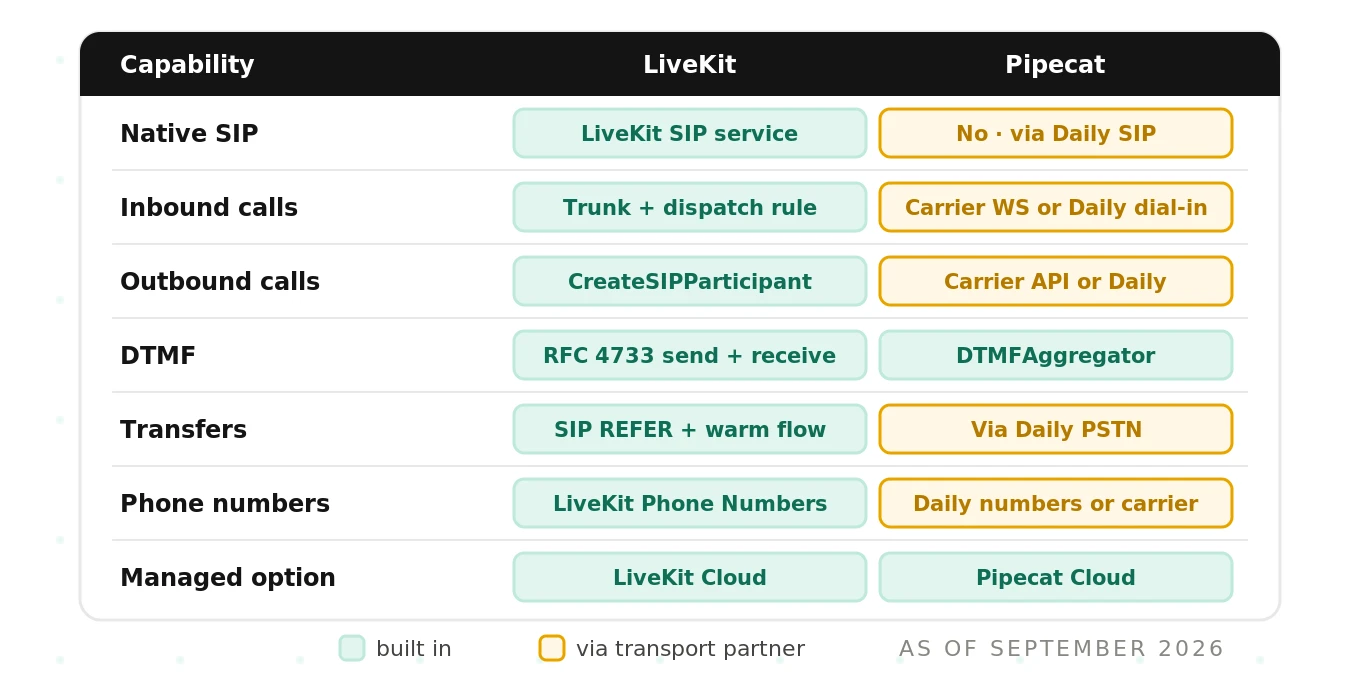
Note one crossover. LiveKit also has connectors, including one for Twilio calls over WebSockets. So LiveKit is not SIP-only either.
Telephony failure modes that demos hide
Every item below can pass a browser demo and fail on a real phone.
| Failure mode | What the caller hears | Likely cause | Where to look |
|---|---|---|---|
| One-way audio | Agent hears caller, caller hears silence (or reverse) | NAT or firewall blocking RTP; IP allowlists wrong | Carrier IP ranges, LiveKit static IPs, security groups |
| Codec mismatch | Call connects, no audio at all | No common codec in SDP | SDP offer and answer; `onlyListedCodecs` |
| Fragmented INVITE | Call never connects | Too many codecs over UDP | Codec list, TCP or TLS transport |
| Jitter and packet loss | Robotic or clipped speech | Network path, region distance | Region pinning, carrier edge, RTP stats |
| Dropped media stream | Line goes dead mid-call | WebSocket closed; carrier max duration | Carrier call-state events, reconnect logic |
| Cold start before first word | Two to five seconds of silence | Bot process not warm | Warm pools, hold audio, dispatch pattern |
| Auto hang-up during transfer | Human leg drops | `auto_hang_up=True` or TwiML out of verbs | Serializer params, TwiML flow |
| Wrong AMD verdict | Agent pitches a voicemail box | Unusual greeting, silent answer | AMD thresholds, classifier prompt |
Cold start deserves a callout. Pipecat's production docs say a caller "expects to hear something within a second or two." That often rules out spinning up a VM per call. LiveKit's agent workers face the same physics. Warm capacity matters on both.
Latency compounds on phone lines too. Third-party benchmarks put both frameworks at roughly 750 to 950 milliseconds end to end. Carrier hops add to that. See our LiveKit vs Pipecat latency deep dive for how to measure it honestly.
The hybrid option: Pipecat on LiveKit transport
You do not have to pick one. Pipecat ships a `LiveKitTransport` that runs a Pipecat pipeline inside a LiveKit room.
That means LiveKit SIP can terminate the call. The caller joins a room as a SIP participant. A Pipecat bot joins the same room and runs the conversation.
This pattern shows up in real teams. One common version: a team liked Pipecat's pipeline model for orchestration. But they needed SIP carriers beyond what their Pipecat setup supported. So they kept Pipecat for logic and ran LiveKit as transport.
The trade-off is operational. You now run two systems and debug across both. Transfers and DTMF go through LiveKit's SIP APIs, not Pipecat's telephony helpers. Our guide to using LiveKit and Pipecat together covers the wiring.
Which telephony path fits you
Use these criteria, not brand loyalty.
| If you need... | Lean toward |
|---|---|
| Bring-your-own SIP trunk with many carriers | LiveKit SIP |
| SIP REFER transfers and region pinning | LiveKit SIP |
| Fastest prototype on an existing Twilio number | Pipecat + Twilio WebSocket |
| Integration with Twilio Studio or Flex flows | Pipecat + Twilio WebSocket |
| Python-only team, pipeline-first design | Pipecat (WebSocket or Daily) |
| Transfers without running your own SIP | Pipecat + Daily PSTN |
| Contact center stack like Genesys | Pipecat Genesys AudioHook serializer, or LiveKit SIP |
| Pipecat logic with broad SIP coverage | Hybrid: Pipecat on LiveKit transport |
| Managed, no infra | LiveKit Cloud or Pipecat Cloud |
A few honest notes on each side.
LiveKit's strength is that telephony is first-class. SIP concepts map to real objects. The cost is learning SIP itself: trunks, SDP, REFER, and carrier quirks.
Pipecat's strength is simplicity on the WebSocket path. A TwiML Bin and a serializer get a call working quickly. The cost is fewer call-control features on that path. Advanced control moves you to Daily.
If you are still deciding at the framework level, read how to choose between LiveKit and Pipecat. For hosting, compare Pipecat Cloud vs LiveKit Cloud.
How to test telephony on either framework before launch
Telephony is where demos lie. A browser test uses a clean mic, wideband audio, and no carrier. Test the path callers will actually use.
1. Place real PSTN calls, not WebRTC calls. Dial your number from real phones. Cover mobile and landline. A browser client skips the carrier, the codec, and the jitter.
2. Test across carriers and regions. Run the same script through each trunk or media-stream provider you plan to use. Carrier framing and timing differ, as Pipecat's docs note.
3. Force the codec you will get. Confirm the negotiated codec in SDP or carrier logs. Run STT accuracy checks at 8 kHz, not at browser quality.
4. Vary accents, speaking pace, and noise. Use callers in cars, cafes, and speakerphone. Include background TV and cross-talk. Compare results with noise cancellation on and off.
5. Exercise DTMF end to end. Press digits during speech, after speech, and very fast. Confirm termination digits and timeouts behave as your prompt expects.
6. Break transfers on purpose. Transfer to a number that never answers. Transfer to a busy line. Confirm the caller hears something sensible and never gets dropped.
7. Run outbound against voicemail boxes. Build a list of real greetings, short and long. Measure how often the agent misclassifies and talks over a greeting.
8. Measure time to first word. Time from answer to first agent audio. Test after idle periods, so you catch cold starts.
9. Load test with concurrent calls. Ramp concurrency toward your peak. Watch for rising latency, dropped media streams, and carrier rate limits. Our stress-testing guide covers ramp design.
10. Score every call independently. Record, transcribe, and grade calls on turn-taking, interruptions, latency, and task success. Do not rely on the framework's own logs to judge quality.
Framework-specific testing guides go deeper. See the LiveKit voice agent testing guide and the Pipecat voice agent testing guide.
The shared blind spot: plumbing is not quality
Both frameworks move audio reliably. Neither tells you whether the call went well.
Neither alerts you when endpointing fires too early on a slow speaker. Neither flags that barge-in triggered on a cough. Neither notices latency creeping up at 4 p.m. on Tuesdays. Neither knows that your AMD misread a regional greeting.
The framework decides plumbing. It does not grade call quality. That is the gap independent evaluation fills. Evalgent places real calls over real carriers against your agent. It scores endpointing, barge-in, latency, and task outcomes, whichever framework you run.
That independence matters. A vendor grading its own calls has a conflict. Read more on why in independent voice AI evaluation. Once live, keep watching with production monitoring.
Frequently asked questions
Does Pipecat support SIP natively?
Pipecat does not include its own SIP server. It reaches SIP through Daily, which can act as the SIP endpoint for any SIP-capable carrier. It also reaches phones through carrier WebSocket media streams from Twilio, Telnyx, Plivo, and Exotel. You can also run Pipecat on LiveKit's transport and let LiveKit SIP terminate the call.
How do I connect Twilio to Pipecat?
The quickest route is Twilio Media Streams. Create a TwiML Bin with a Connect and Stream element pointing at your WebSocket URL. Assign it to your number. In your bot, build a FastAPIWebsocketTransport with a TwilioFrameSerializer. For advanced call control, use the Daily plus Twilio SIP path instead.
How do I set up a LiveKit SIP trunk?
Configure your carrier to send calls to LiveKit's SIP endpoint. Then create an inbound trunk listing your number with `lk sip inbound create`. Add a dispatch rule that creates rooms and dispatches your agent. For outbound, create an outbound trunk with the carrier address and credentials, then call CreateSIPParticipant.
Can LiveKit buy phone numbers?
LiveKit Phone Numbers lets you purchase and manage numbers directly in LiveKit Cloud. As of September 2026, it offers US local and toll-free numbers. Numbers bought this way do not need an inbound trunk. You can still bring numbers from Twilio, Telnyx, Plivo, and other SIP providers.
Which is better for call transfers, LiveKit or Pipecat?
LiveKit offers transfers natively through its SIP service. Cold transfers use SIP REFER via TransferSIPParticipant, and warm transfer has a documented flow. Pipecat supports cold and warm transfers on the Daily PSTN path. Its carrier WebSocket path lacks built-in transfer features, though carrier APIs can redirect calls.
How do LiveKit and Pipecat handle DTMF?
LiveKit sends and receives DTMF over RTP using RFC 4733 events. Agents can enable IVR detection and use a prebuilt digit-collection task. Pipecat converts carrier DTMF into InputDTMFFrame objects. Its DTMFAggregator buffers digits into one text frame, flushing on a termination digit or a two-second timeout by default.
Can I run Pipecat on LiveKit for telephony?
Pipecat ships a LiveKitTransport that runs a Pipecat pipeline inside a LiveKit room. LiveKit SIP terminates the phone call, and the caller joins as a SIP participant. Your Pipecat bot joins the same room. Teams use this hybrid when they want Pipecat orchestration with LiveKit's SIP carrier coverage.
How do I test voice agent phone calls before launch?
Test voice agent phone calls over real PSTN lines, not browser sessions. Cover multiple carriers, 8 kHz codecs, accents, and background noise. Exercise DTMF, failed transfers, and voicemail greetings. Measure time to first word and run concurrent load. Then score each call independently for turn-taking, latency, and task success.
The bottom line
LiveKit is a telephony endpoint with native SIP, while Pipecat is a pipeline that consumes phone audio through carrier streams, Daily, or LiveKit itself. Whichever path you choose, only real calls over real carriers prove your agent works on the phone.
Pick the path that matches your carriers, transfer needs, and team. Then test it where your callers live. Book a demo to see Evalgent run real-carrier tests on your agent.
Related Articles

Why AI voice agents fail in production: 9 failure layers, how to detect each, and how to prevent them
Voice agents fail in production across 9 layers, from 8 kHz audio to silent tool errors. Symptoms, root causes, alerts, and fixes in one master table.
Read more
Voice agent regression testing: why LLM updates break production
LLM updates improve benchmarks but break voice agents in 5 predictable ways. How to detect and prevent regressions after every model or prompt change.
Read more