Pipecat voice agent testing guide: frames, VAD, Smart Turn, and evals (2026)
On this page
Most Pipecat testing advice stops at "test your VAD and handle errors." That advice is not wrong, but it does not tell you where the failures come from, so you cannot design a test that would catch them. This guide works from the inside out. Every class name, default value, and behavior below was checked against the source of `pipecat-ai` 1.12.0, the current release on PyPI (published September 26, 2026), plus the GitHub issues where practitioners reported what broke.
Pipecat moved fast this year. Version 1.0.0 shipped on April 14, 2026. Version 1.3.0 (May 29) renamed `PipelineTask` to `PipelineWorker` and folded the separate Subagents project into a core `pipecat.workers` package. Version 1.4.0 (June 17) added Pipecat Evals, a built-in behavioral test harness. If your test suite was written in 2025, parts of it now exercise deprecated code paths.
What changed in Pipecat in 2026, and what your tests must catch
Start with the renames, because a test suite that imports deprecated names will break on the day 2.0.0 removes them. Every item below emits a `DeprecationWarning` in 1.12.0 and is marked for removal in 2.0.0.
| Old name or pattern | Current name or pattern | Deprecated since | Test impact |
|---|---|---|---|
| `PipelineTask` | `PipelineWorker` (`pipecat.pipeline.worker`) | 1.3.0 | Fixtures that build tasks still run but warn |
| `PipelineRunner` | `WorkerRunner` (`pipecat.workers.runner`) | 1.3.0 | Same; runner now manages a bus of workers |
| `PipelineTaskParams` | `WorkerParams` | 1.3.0 | Update custom worker setup |
| `ErrorFrame(fatal=True)`, `FatalErrorFrame` | `push_error(..., force_treat_as_permanent=True)` plus `ProcessorUnusablePolicy` | 1.8.0 | Fatal-error tests must assert the policy, not the flag |
| `UninterruptibleFrame` mixin | `interruptible` field on every `Frame` | 1.11.0 | Custom frames that must survive barge-in need the new field |
| `pipecat.evals.harness` | `pipecat.evals.session` and `pipecat.evals.script_session` | 1.9.0 | Programmatic eval scripts need new imports |
| Separate `pipecat-subagents` repo | `pipecat.workers` in core | 1.3.0 | Multi-agent message tests move into the main package |
Two practical moves follow. First, run CI with `python -W error::DeprecationWarning -m pytest` so a deprecated import fails the build now instead of breaking the build later. Second, pin the exact Pipecat version in your test environment and treat every upgrade as a regression event. Pipecat shipped ten minor versions, 1.3.0 through 1.12.0, between May 29 and September 26, 2026, including changes to error handling (1.8.0) and interruption semantics (1.11.0). Our guide to LLM update regression testing covers the gating pattern; it applies just as much to framework upgrades.
How Pipecat moves frames: the mechanism behind most bugs
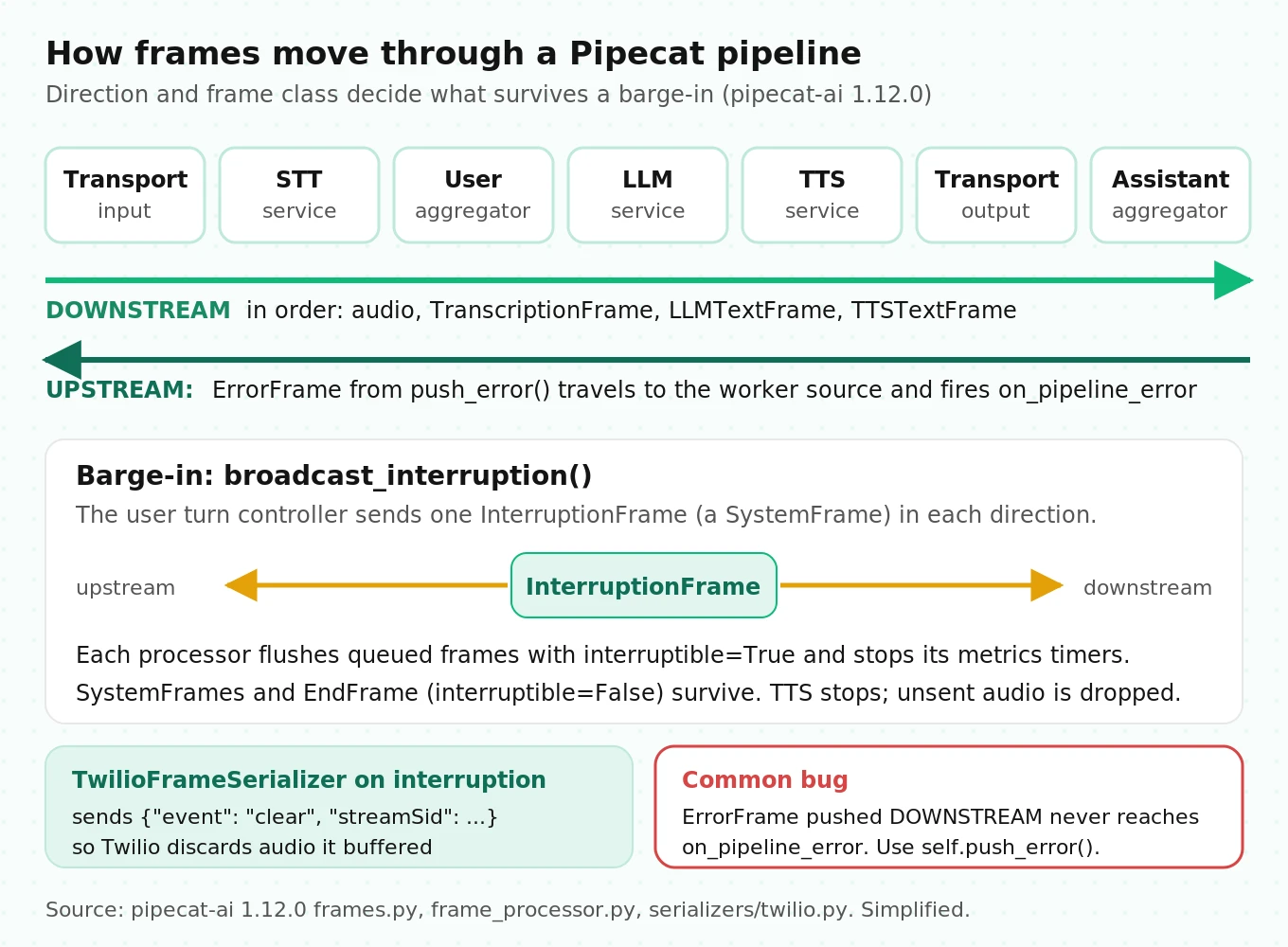
A Pipecat agent is a `Pipeline` of `FrameProcessor` objects run by a `PipelineWorker`. Everything that moves through it is a `Frame`. Three base classes decide how a frame behaves when a caller interrupts:
- `SystemFrame` is processed immediately, in its own queue, and is not cancelled by interruptions. `StartFrame`, `CancelFrame`, `ErrorFrame`, `InterruptionFrame`, `InputAudioRawFrame`, `UserStartedSpeakingFrame`, `BotStartedSpeakingFrame`, and `MetricsFrame` are all system frames.
- `DataFrame` is processed in order and is cancelled by interruptions. `LLMTextFrame`, `TTSTextFrame`, `TranscriptionFrame`, and `OutputAudioRawFrame` are data frames.
- `ControlFrame` is processed in order with data frames and is also cancelled by interruptions, unless marked otherwise. `EndFrame`, `LLMFullResponseStartFrame`, `TTSStartedFrame`, and `VADParamsUpdateFrame` are control frames. `EndFrame` sets `interruptible=False` so a barge-in cannot drop the shutdown signal.
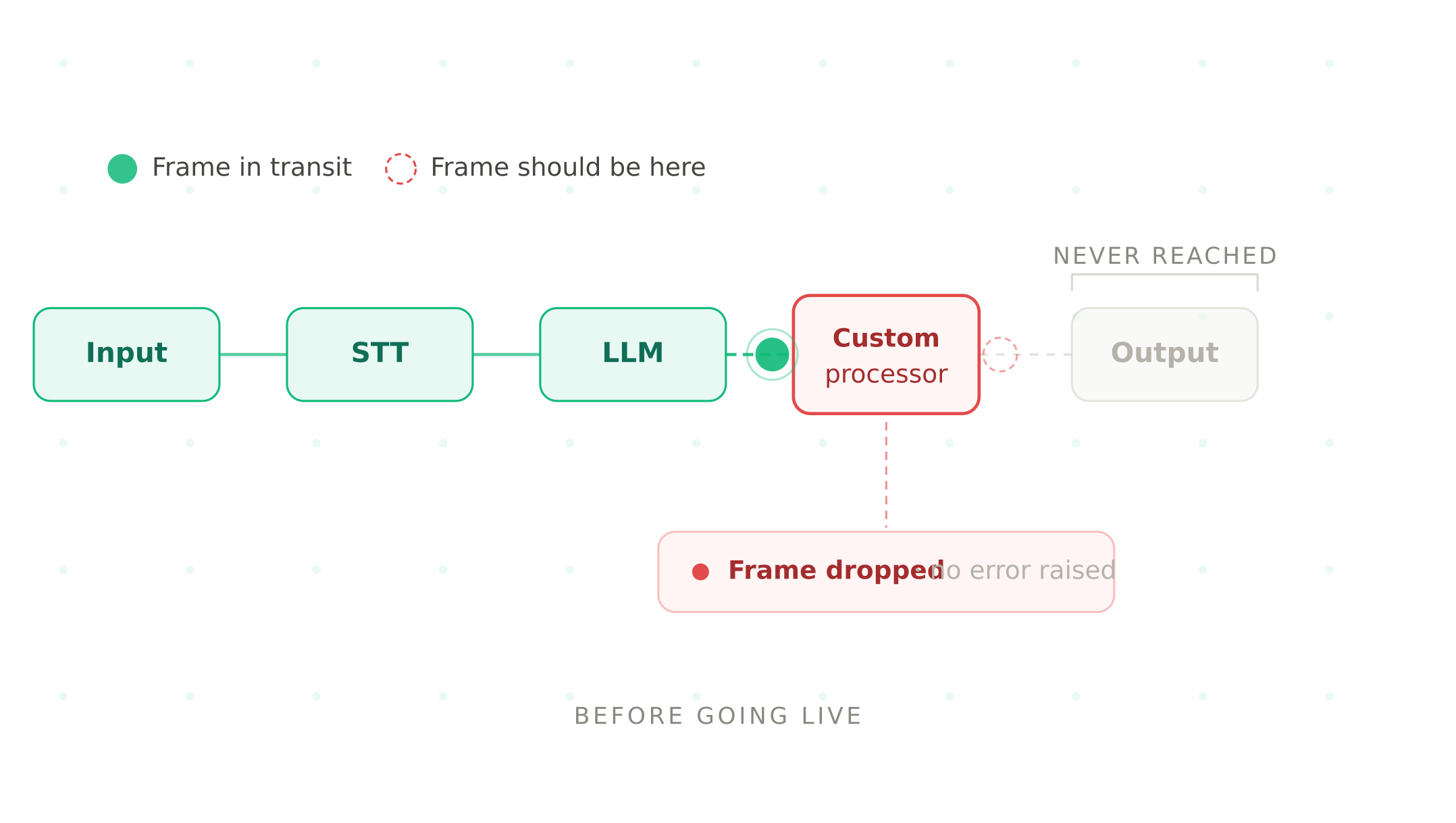
Frames travel in one of two directions, `FrameDirection.DOWNSTREAM` (input toward output) or `FrameDirection.UPSTREAM` (output back toward input). This matters for errors. In 1.12.0, `FrameProcessor.push_error()` builds an `ErrorFrame` and pushes it upstream, toward the worker's source, where the worker fires `on_pipeline_error`. A lot of older sample code, including the previous version of this guide, pushed `ErrorFrame` downstream from a custom processor. That frame never reaches the handler you wrote to catch it.
Interruptions work by broadcast. When the user turn controller decides the caller has barged in, it calls `broadcast_interruption()`, which sends an `InterruptionFrame` both upstream and downstream. Each processor that receives it flushes its queue of interruptible frames and stops its metrics timers. On telephony serializers, the output side converts the `InterruptionFrame` into a provider command. `TwilioFrameSerializer` sends `{"event": "clear", "streamSid": ...}`; `TelnyxFrameSerializer` sends `{"event": "clear"}`. Those commands flush audio the provider has buffered but not yet played.
Three worker-level settings decide what happens when something stalls. Defaults in 1.12.0:
| `PipelineWorker` setting | Default | What a test should check |
|---|---|---|
| `idle_timeout_secs` | 300 s, with `cancel_on_idle_timeout=True` | A call with no `BotSpeakingFrame`, `UserSpeakingFrame`, or transcription for 5 minutes is cancelled. Test a long hold or a slow tool call. |
| `setup_timeout_secs`, `start_timeout_secs`, `cancel_timeout_secs` | 20 s each | A processor that blocks on connect or never forwards `StartFrame` gets the worker torn down after 20 s. |
| `processor_unusable_policy` | `ProcessorUnusablePolicy.CONTINUE` | An STT service whose API key is rejected is marked unusable, but the pipeline keeps running. The agent is now deaf. Assert your `on_pipeline_error` handler checks `frame.processor.is_usable`. |
The `CONTINUE` default is the one that surprises teams. A permanent provider failure does not end the call; it produces a bot that talks but cannot hear, or hears but cannot talk. The other options are `END` and `CANCEL`. Pick one deliberately and write a test that injects the failure.
Unit-testing frame processors with run_test
Pipecat ships its test helpers inside the installed package at `pipecat.tests.utils` (source). `run_test()` wraps your processor between two capture processors, starts a real `PipelineWorker` under a `WorkerRunner`, sends the frames you list, sends `EndFrame`, and returns the frames that came out of each end. It asserts frame types if you pass `expected_down_frames` or `expected_up_frames`.
Here is a minimal processor and test. This code runs against pipecat-ai 1.12.0 with `pytest` and `pytest-asyncio`.
import pytest
from pipecat.frames.frames import Frame, InterruptionFrame, LLMTextFrame
from pipecat.processors.frame_processor import FrameDirection, FrameProcessor
from pipecat.tests.utils import SleepFrame, run_test


class PhoneNumberSpeller(FrameProcessor):
    """Spaces out digit runs so TTS reads them one digit at a time (simplified)."""

    async def process_frame(self, frame: Frame, direction: FrameDirection):
        await super().process_frame(frame, direction)  # handles Start/Cancel/Interruption
        if isinstance(frame, LLMTextFrame) and frame.text.isdigit():
            frame = LLMTextFrame(text=" ".join(frame.text))
        await self.push_frame(frame, direction)  # forward EVERYTHING, handled or not


@pytest.mark.asyncio
async def test_spells_digits_and_forwards_interruptions():
    down, up = await run_test(
        PhoneNumberSpeller(),
        frames_to_send=[LLMTextFrame("5551234"), SleepFrame(), InterruptionFrame()],
        expected_down_frames=[LLMTextFrame, InterruptionFrame],
    )
    assert down[0].text == "5 5 5 1 2 3 4"
    assert up == []  # no errors pushed upstream
Three things in this test are easy to get wrong.
The `SleepFrame` is not decoration. System frames skip the ordered data queue. Remove the `SleepFrame` and the sink receives `InterruptionFrame` before `LLMTextFrame`, so a type-order assertion fails for a reason that has nothing to do with your logic. `SleepFrame` (default 0.2 s) exists to separate system frames from data frames in tests.
Every processor must forward frames it does not handle. A processor that only pushes the frame types it cares about also swallows `StartFrame`. The pipeline never starts, and `run_test` raises `TimeoutError` after its 1-second `start_timeout`. In production the same bug shows up as a worker torn down after `start_timeout_secs`. Keep `await self.push_frame(frame, direction)` as the last line of `process_frame` unless you mean to drop the frame.
Call `super().process_frame()` first. The base class handles `StartFrame`, `InterruptionFrame`, `CancelFrame`, and pause or resume frames. Skip it and your processor ignores interruptions.
Add `pytest-timeout` to every Pipecat test run. A processor that swallows `EndFrame` or blocks on a provider socket can hang a test instead of failing it. A per-test limit of 30 seconds turns hangs into red builds.
What to unit-test, by processor type:
| Processor you wrote | Frames to send | Assert |
|---|---|---|
| Text rewriter between LLM and TTS | `LLMTextFrame` sequence, `LLMFullResponseEndFrame`, `InterruptionFrame` | Text transformed; end and interruption frames forwarded in order |
| Tool-result handler | `FunctionCallResultFrame` with a malformed payload | `ErrorFrame` arrives in `up`, not `down`; pipeline keeps running |
| Guardrail or redaction filter | `TranscriptionFrame` with PII | Redacted text downstream; original never reaches the LLM context |
| Custom STT or TTS wrapper | Audio frames at 8 kHz and 16 kHz | Output `sample_rate` field matches what the next processor expects |
| Anything with state | Two turns separated by `InterruptionFrame` | State reset or retained exactly as designed |
Silero VAD in Pipecat: what the four parameters actually do
The search query that brings many readers here is some version of "pipecat SileroVADAnalyzer VADParams confidence threshold background noise." The short answer is that `confidence` is often the wrong knob. To see why, look at how `VADAnalyzer._run_analyzer()` decides that someone is speaking (source).
Defaults in 1.12.0: `confidence=0.7`, `start_secs=0.2`, `stop_secs=0.2`, `min_volume=0.6`. Older tutorials, and the earlier version of this page, used `stop_secs=0.8`. Pipecat's own STT latency table notes that its numbers were measured with `stop_secs=0.2`, "the recommended default," because Smart Turn now decides end of turn and VAD only needs to detect the pause.
The analysis window is 32 ms. Silero runs on 512 samples at 16 kHz or 256 samples at 8 kHz, both 32 ms. `SileroVADAnalyzer` accepts only those two rates and raises `ValueError` on anything else, such as 24 kHz or 48 kHz input. If your transport delivers 48 kHz WebRTC audio, something must resample before the VAD sees it.
Speech is an AND gate. A 32 ms window counts as speech only if `confidence >= params.confidence` and `smoothed_volume >= params.min_volume`. Then `start_secs` and `stop_secs` are converted to window counts: `round(0.2 / 0.032) = 6` windows, so 192 ms of consecutive speech windows to start and 192 ms of non-speech windows to stop.
`min_volume` is loudness, not amplitude. Volume is ITU-R BS.1770 integrated loudness over a rolling 400 ms window, normalized linearly from -110 LUFS (0.0) to -10 LUFS (1.0), then smoothed with an exponential factor of 0.2 per window. So `min_volume=0.6` means about -50 LUFS. That is the number to compare against your callers.
This changes how you debug noise. Silero's confidence is high for any human voice, including a television or a coworker. Raising `confidence` from 0.7 to 0.85 does little against background speech and does make the agent miss soft-spoken callers. If background speech is quieter than the caller, raising `min_volume` separates them better. If it is just as loud, no VAD threshold will help; you need noise suppression ahead of the VAD (Pipecat ships Krisp Viva, RNNoise, Koala, and AIC filters) or a turn-start strategy that requires words, covered below.
Worked example: why quiet callers feel laggy. Smoothing makes the volume gate slow to open. Ignoring the 400 ms loudness window and starting from silence, the smoothed volume after n windows is `v × (1 − 0.8^n)`, where `v` is the caller's normalized loudness. The gate opens when that reaches 0.6.
| Caller loudness | Normalized `v` | Windows to cross 0.6 | Time before `start_secs` even begins counting |
|---|---|---|---|
| -35 LUFS | 0.75 | 8 | about 256 ms |
| -40 LUFS | 0.70 | 9 | about 288 ms |
| -45 LUFS | 0.65 | 12 | about 384 ms |
| -50 LUFS | 0.60 | never | the VAD never fires |
These figures are simplified, but the direction is right: a caller near the threshold adds hundreds of milliseconds before VAD reports speech, and a caller below it is never heard at all. Before you tune anything, compute the loudness distribution of 100 real call recordings with `pipecat.audio.utils.calculate_audio_volume()` and set `min_volume` below your 5th percentile. Our post on testing VAD misfires has a fuller misfire taxonomy.
One more detail from the source: `SileroVADAnalyzer` resets the model's internal state every 5 seconds of wall-clock time to bound memory. Long monologues therefore run across resets. If you see confidence dips at regular intervals in a VAD trace, that is the cause.
To make background speech less likely to trigger barge-in, replace the VAD start strategy with a word-count strategy. `MinWordsUserTurnStartStrategy(min_words=2)` requires two transcribed words before an interruption while the bot is speaking, and one word otherwise. The cost is STT latency added to every barge-in, so measure both false-interruption rate and barge-in reaction time before shipping it.
from pipecat.audio.turn.smart_turn.base_smart_turn import SmartTurnParams
from pipecat.audio.turn.smart_turn.local_smart_turn_v3 import LocalSmartTurnAnalyzerV3
from pipecat.audio.vad.silero import SileroVADAnalyzer
from pipecat.audio.vad.vad_analyzer import VADParams
from pipecat.processors.aggregators.llm_context import LLMContext
from pipecat.processors.aggregators.llm_response_universal import (
    LLMContextAggregatorPair,
    LLMUserAggregatorParams,
)
from pipecat.turns.user_start import MinWordsUserTurnStartStrategy
from pipecat.turns.user_stop import TurnAnalyzerUserTurnStopStrategy
from pipecat.turns.user_turn_strategies import UserTurnStrategies

# Illustrative: the values are the 1.12.0 defaults; sweep them, don't copy them.
vad = SileroVADAnalyzer(
    params=VADParams(confidence=0.7, start_secs=0.2, stop_secs=0.2, min_volume=0.6)
)
strategies = UserTurnStrategies(
    start=[MinWordsUserTurnStartStrategy(min_words=2)],
    stop=[TurnAnalyzerUserTurnStopStrategy(
        turn_analyzer=LocalSmartTurnAnalyzerV3(params=SmartTurnParams(stop_secs=3.0))
    )],
)
user_agg, assistant_agg = LLMContextAggregatorPair(
    LLMContext(),
    user_params=LLMUserAggregatorParams(vad_analyzer=vad, user_turn_strategies=strategies),
)
Smart Turn v3.2 and how it hands off with VAD
If you pass no strategies, Pipecat 1.12.0 uses `VADUserTurnStartStrategy` and `TranscriptionUserTurnStartStrategy` to start turns and `TurnAnalyzerUserTurnStopStrategy(LocalSmartTurnAnalyzerV3)` to end them. The bundled model file is `smart-turn-v3.2-cpu.onnx`. Per Daily's v3.2 release notes, v3.2 misclassifies short utterances such as "yes" and "okay" 40% less often than v3.1 and adds cafe and office noise to training. The weights, datasets, and training code are open at pipecat-ai/smart-turn.
The handoff, step by step, as implemented in 1.12.0:
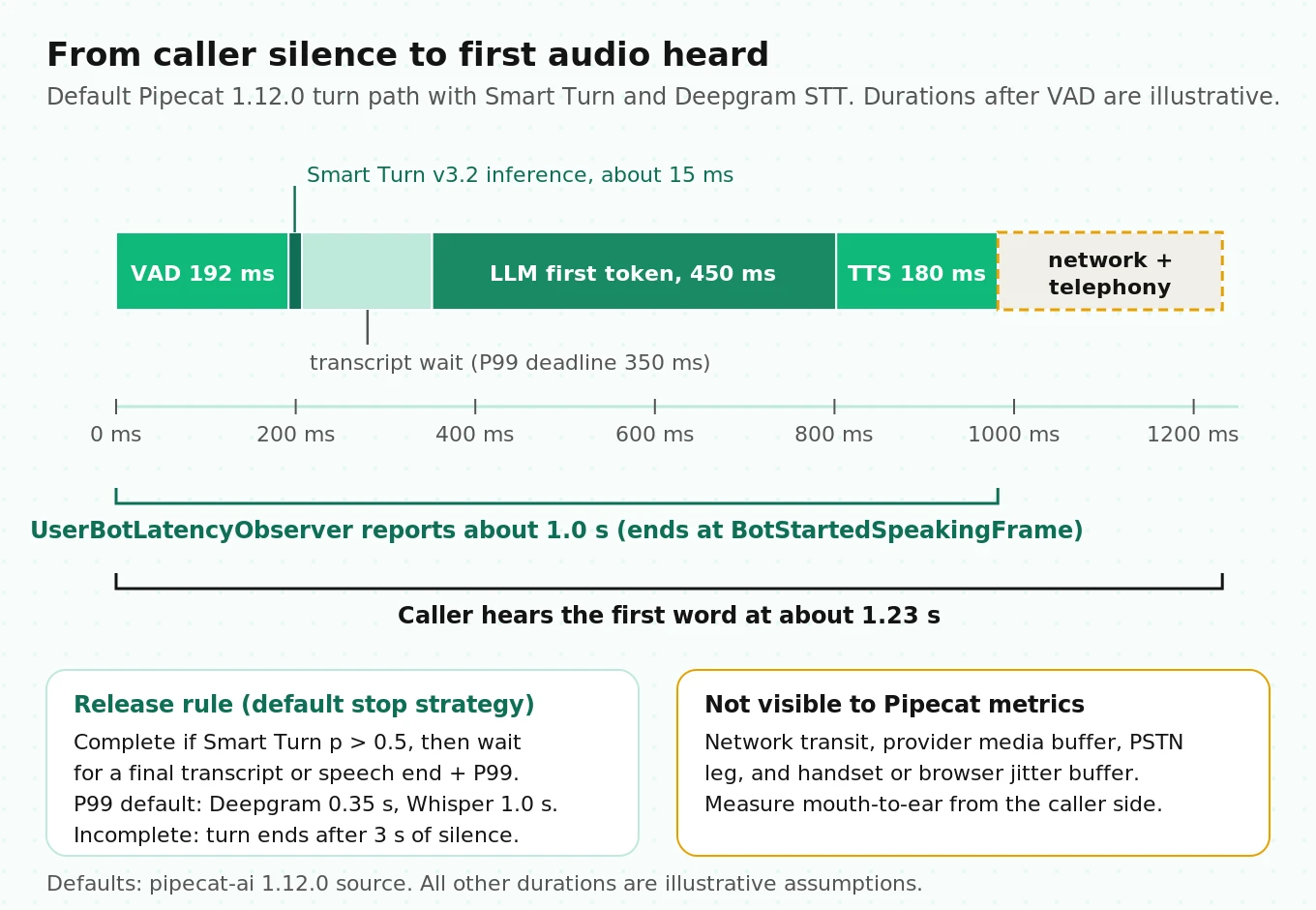
1. The caller stops talking. After `stop_secs` (192 ms of non-speech windows at the default), the VAD emits `VADUserStoppedSpeakingFrame`.
2. Smart Turn runs on the buffered audio: up to `max_duration_secs=8` seconds, including `pre_speech_ms=500` before speech began. It returns "complete" if its sigmoid probability is above 0.5.
3. If complete, the stop strategy waits for the final transcript. STT services that mark transcripts as finalized release the turn as soon as that transcript lands. For others, the strategy waits until `speech_end + ttfs_p99_latency`, where speech end is the VAD timestamp minus `stop_secs`.
4. If incomplete, the turn stays open. If the caller says nothing more, `SmartTurnParams.stop_secs` (default 3 seconds of silence) forces the turn to end.
5. The aggregator emits `UserStoppedSpeakingFrame`, and the LLM runs.
Step 3 hides a number most teams never look at. Each STT service publishes a P99 "time to final segment" through `STTMetadataFrame`, and the defaults live in `pipecat/services/stt_latency.py`. A selection from 1.12.0:
| STT service | Built-in `ttfs_p99_latency` |
|---|---|
| Deepgram, Soniox | 0.35 s |
| AssemblyAI | 0.42 s |
| ElevenLabs realtime | 0.41 s |
| Speechmatics | 0.74 s |
| Cartesia | 0.81 s |
| 1.57 s | |
| Azure | 1.80 s |
| AWS Transcribe | 1.90 s |
| OpenAI (non-realtime) | 2.01 s |
| Local Whisper, NVIDIA, or any service without a measured value | 1.00 s (conservative fallback) |
These are Pipecat's measurements of its own integrations, taken with `stop_secs=0.2` from Pipecat's test locations. They become wrong when you change `stop_secs`, run in a different region, or self-host. Too high, and every turn whose transcript is not marked final waits longer than needed. Too low, and the turn releases before the last words arrive, so the LLM answers a partial sentence. Measure your own value with pipecat-ai/stt-benchmark and pass it to the constructor, for example `DeepgramSTTService(api_key=..., ttfs_p99_latency=0.45)`. Turn-based services such as Deepgram Flux and Cartesia's turns service report no TTFS, because the provider defines the turn boundary itself.
What the research says about testing turn detection
Turn detection is a well-studied problem, and three findings change how you should test it.
Noise type matters more than noise level. Russell and Harte (2025) tested Voice Activity Projection turn-taking models, the research family introduced by Ekstedt and Skantze at Interspeech 2022, on the Candor conversation corpus with added noise. The audio-only model distinguished holds from shifts with 80% accuracy on clean speech. With music or a competing speaker mixed in at 10 dB SNR, accuracy fell to 51 to 52%, which is chance. Babble at the same SNR was far less damaging (76%). Training with noise lifted the music result to 61 to 65%. Smart Turn is a different model, but it is also an audio-only end-of-turn classifier. The practical lesson: a noise test that uses only white noise or crowd babble will pass while a caller with a TV on fails. Include competing single-speaker speech and music in your matrix.
Natural gaps vary by language. Stivers et al. (PNAS, 2009) measured turn-taking across 10 languages. All of them avoid overlap and minimize silence, but average gaps differ by language within a range of about 250 ms from the cross-language mean. A single `stop_secs` and Smart Turn threshold tuned on English callers will feel slightly rushed or slightly slow in other languages. If you serve several languages, measure early-cutoff rate per language, not in aggregate.
Measure pause handling as its own metric. Full-Duplex-Bench scores spoken dialogue systems on pause handling, backchanneling, smooth turn-taking, and user interruption. Its pause-handling metric is the takeover rate: how often the system takes the turn while the user is only pausing. That maps directly onto Pipecat. Build a set of utterances with mid-sentence pauses ("my account number is... hold on... 4471"), and count how often the bot speaks into the pause. Our endpointing comparison and pause-handling evaluation guide cover scoring in more detail.
Metrics and observers: what Pipecat measures, and what it misses
Metrics are off by default. Turn them on in `PipelineParams`:
from loguru import logger
from pipecat.observers.user_bot_latency_observer import UserBotLatencyObserver
from pipecat.pipeline.worker import PipelineParams, PipelineWorker

turn_latencies: list[float] = []
latency = UserBotLatencyObserver()

@latency.event_handler("on_latency_measured")
async def on_latency(observer, latency_seconds):
    turn_latencies.append(latency_seconds)

@latency.event_handler("on_latency_breakdown")
async def on_breakdown(observer, breakdown):
    for line in breakdown.turn_contribution_lines():
        logger.info(line)

worker = PipelineWorker(
    pipeline,
    params=PipelineParams(enable_metrics=True, enable_usage_metrics=True),
    observers=[latency],
)
With `enable_metrics=True`, services emit `MetricsFrame` objects carrying typed data (Pipecat metrics docs). The ones worth knowing:
| Metric class | What it measures | Gotcha |
|---|---|---|
| `TTFBMetricsData` | Request to first byte from a service | `report_only_initial_ttfb=True` hides every turn after the first |
| `TTFAMetricsData` | TTS request to first audible sample: `ttfb + leading_silence` | Do not add it to TTFB; it already contains it |
| `TTFATMetricsData` | LLM request to first answer token, including reasoning time | A tool-call turn reports twice; keep the first per user turn |
| `ProcessingMetricsData` | Time a processor spent on a unit of work | Useful for custom processors |
| `LLMUsageMetricsData`, `TTSUsageMetricsData`, `STTUsageMetricsData` | Tokens, characters, audio seconds | Per interaction, not running totals |
| `TurnMetricsData` | Turn prediction, probability, and `e2e_processing_time_ms` from VAD silence to turn decision | Replaces the deprecated `SmartTurnMetricsData`; watch it under CPU load |
`UserBotLatencyObserver` measures from when the user stopped speaking to `BotStartedSpeakingFrame`. It backs the VAD's `stop_secs` out of the start point, so the endpointing wait is included, and its breakdown names each slice: endpointing wait, transcription, LLM inference, speech synthesis. That is the most complete single latency number Pipecat gives you.
It still stops at the server. `BotStartedSpeakingFrame` fires when the output transport starts writing audio. The caller hears that audio later: after the network, the provider's media path, the PSTN leg, and the jitter buffer in a phone or browser. None of that is in the observer. A layered budget makes the gap concrete. The numbers below are illustrative assumptions for a Twilio call using Deepgram, a hosted LLM, and a streaming TTS.
| Slice | Assumed time | Source of the number |
|---|---|---|
| VAD stop window | 192 ms | Pipecat default (6 × 32 ms) |
| Smart Turn inference | 15 ms | Assumption; Daily's v3 announcement cites about 12 ms CPU inference |
| Wait for final transcript beyond VAD window | 160 ms | Assumption, bounded by the 350 ms Deepgram P99 measured from speech end |
| LLM time to first token | 450 ms | Assumption |
| TTS time to first audible audio | 180 ms | Assumption |
| Server-side total (what the observer reports) | about 1,000 ms | Sum |
| Network, Twilio media, PSTN, handset buffer | 150 to 300 ms | Assumption; Pipecat cannot see this |
| What the caller experiences | about 1,150 to 1,300 ms | Sum |
The lesson is not the specific total. It is that a dashboard built only from Pipecat metrics will under-report caller-perceived latency by the entire last row, and that row varies by carrier and region. Measure it from the outside: record both legs at the caller side and compute mouth-to-ear gaps. Our posts on time to first audio and LiveKit vs Pipecat latency walk through external measurement.
Transports, serializers, and audio resampling pitfalls
Pipecat's pipeline is transport-agnostic, which is a strength for development and a risk for testing. The same pipeline behaves differently on WebRTC and on a phone line, and most local testing happens on WebRTC or a laptop microphone.
| Transport | Typical audio | Interruption flush | Test focus |
|---|---|---|---|
| `DailyTransport` | WebRTC, Opus, wideband | Output queue flush in Pipecat; client jitter buffer is small | Client-side playout latency, reconnects |
| `SmallWebRTCTransport` | Peer-to-peer WebRTC | Same | NAT traversal, single-server scaling |
| `LiveKitTransport` | WebRTC via LiveKit rooms | Same | Room join timing |
| `FastAPIWebsocketTransport` + `TwilioFrameSerializer` | 8 kHz μ-law | Sends `clear` to Twilio | Resampling, buffered audio, context drift |
| WebSocket + `TelnyxFrameSerializer`, `PlivoFrameSerializer`, `VonageFrameSerializer`, `ExotelFrameSerializer`, `GenesysFrameSerializer` | Provider-specific narrowband | Provider-specific clear message | Same, plus gap handling |
Four mechanics matter for telephony tests.
Default sample rates assume wideband. `PipelineParams` defaults to `audio_in_sample_rate=16000` and `audio_out_sample_rate=24000`. With Twilio, the serializer decodes 8 kHz μ-law and resamples it up to 16 kHz with a SOXR stream resampler at "VHQ" quality. Upsampling cannot add back what the phone network removed above 4 kHz; it only changes the frame size. Your VAD, Smart Turn, and STT all see band-limited audio. Run your whole test matrix through the real 8 kHz path at least once. Testing over WebRTC and assuming the phone path behaves the same leaves the codec, the resampler, and the carrier untested. Our SIP vs WebRTC comparison explains why the two paths differ.
The resampler clears its history after 0.2 s of silence. Serializers expose `resampler_clear_after_secs`, default `0.2`, to avoid artifacts from stale filter state. The source recommends `None` for providers with irregular gaps between audio chunks, naming Genesys as an example. If you hear clicks at the start of bot utterances on a contact-center integration, test this setting first.
WebSocket output is paced at real time, so the provider holds only a small buffer. `FastAPIWebsocketOutputTransport` sends audio in 40 ms chunks (`audio_out_10ms_chunks=4`) and sleeps between them to emulate an audio device. The code divides the chunk duration by two, but `audio_chunk_size` is counted in bytes at 2 bytes per 16-bit sample, so the division cancels the sample width: one 40 ms chunk goes out every 40 ms. What sits at the provider is therefore a network and jitter buffer, not seconds of surplus. The `clear` command on interruption still matters, because that queued audio, plus anything in flight, would otherwise keep playing after the agent abandoned the reply. What Pipecat cannot do is confirm what played: the Twilio serializer never sends `mark` messages and drops incoming ones, so the bot has no carrier-side record of what the caller heard. Our Pipecat Twilio and Telnyx guide shows how to add marks.
Telephony audio is quieter and noisier. Combine the VAD math above with an 8 kHz codec and a speakerphone, and quiet callers fall below `min_volume`. Your acoustic test set must be recorded or rendered at telephony bandwidth, not studio 48 kHz. See testing STT under background noise for SNR mixing.
Interruption and context bugs: when the transcript lies
This is the failure class that standard testing misses, because every log looks normal. The agent's LLM context, which drives every later turn, can contain words the caller never heard, or lose words the caller did hear.
The mechanism, as of 1.12.0: the LLM's `LLMTextFrame`s pass through the TTS service with `append_to_context=False`. The assistant context is built from `TTSTextFrame`s instead, which the TTS service emits for text it has turned into audio. TTS services with word timestamps emit one `TTSTextFrame` per word, stamped with a presentation timestamp, and the output transport releases each word when its time arrives. TTS services without word timestamps emit one `TTSTextFrame` per sentence, after that sentence's audio is generated. When an `InterruptionFrame` arrives, the assistant aggregator commits whatever it has collected with `interrupted=True` and resets.
That design is sound, and the GitHub record shows where it slips:
- Unheard text committed. Issue #5305 documents a Cartesia WebSocket that died on a keepalive timeout while `send()` kept succeeding. After `stop_frame_timeout_s` (3.0 s by default), the sequencer force-completed the pending sentences as `TTSTextFrame`s, and the aggregator wrote them into the context. The reporter saw 66 seconds of dead air, and the dead socket was detected 19.5 seconds late. In a later 10-call scripted batch on 1.8.1 with a different TTS, the same reporter found 7 of 56 sentences produced no audio but still landed in the context.
- Heard text dropped. Issue #4466, reported on 1.1.0, described an interruption cancelling the output transport's clock queue, discarding word frames whose timestamps had already passed, so `on_assistant_turn_stopped` reported empty content for a turn the caller partly heard. The author later closed it, but it shows how small the margin is.
- Provider cannot report what played. Issue #5605 notes that the Deepgram Flux TTS integration sent its interrupt without a playback offset, so "only the words that were spoken" cannot work for that service.
There is also a structural risk on WebSocket telephony that follows from how context is built. With a sentence-level TTS, a sentence's `TTSTextFrame` passes the output transport once that sentence's audio has been sent, not once it has played. Because sending is paced at real time, the window between sent and heard is small: the provider's buffer plus network delay. If the caller barges in inside that window, `clear` discards the tail, but the full sentence is already in the context, so a few hundred milliseconds of words the caller never heard can stay there. Without marks, nothing in the pipeline records the gap. We have not seen this filed as its own issue. Treat it as a hypothesis to test in your stack, not a confirmed bug.
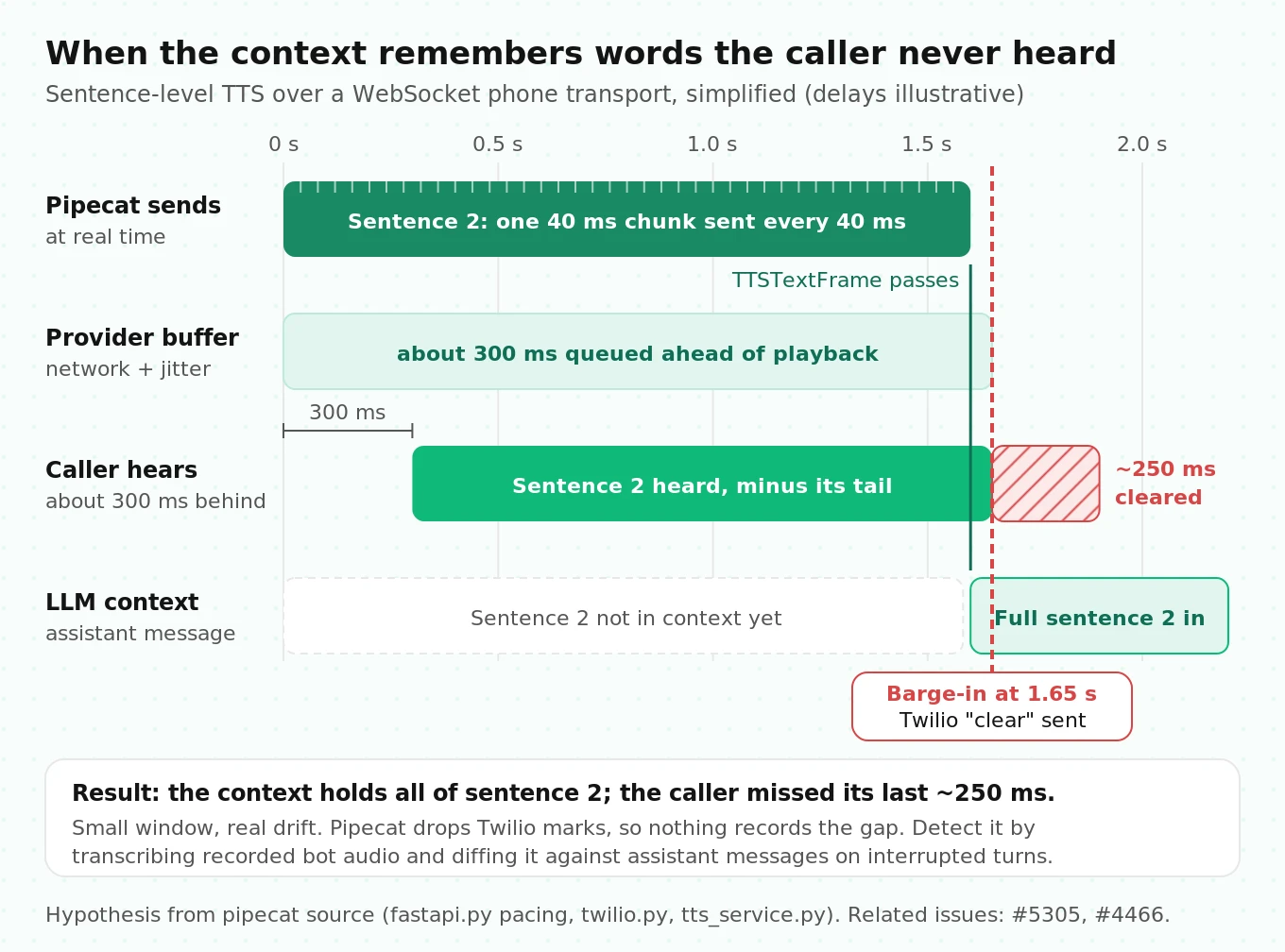
The consequence is subtle. The bot later says "as I mentioned, your payment is due Friday" when the caller never heard the due date. Or it repeats an offer the caller already heard and declined. The transcript you would review looks coherent, because the transcript is the context.
How to test for it: the context drift rate. Record the bot's actual output audio (Pipecat's `AudioBufferProcessor` can record each side), transcribe it with an independent STT, and align it word by word with the assistant messages in `LLMContext`. Define:
- Unheard-word rate = words in assistant context that do not appear in the transcribed bot audio ÷ words in assistant context.
- Missing-word rate = words in transcribed bot audio that do not appear in the context ÷ words in transcribed bot audio.
Run it on interrupted turns specifically, because uninterrupted turns hide the problem. A reasonable starting gate is an unheard-word rate under 2% on interrupted turns, allowing for STT noise; anything systematic above that is a bug, not noise. Pipecat Evals makes a cheap first pass possible. Its `response` event is the transcription of the bot's synthesized audio in audio mode, while `llm_response` is the LLM's text. A divergence between the two on a barge-in scenario is your signal. Our guide to what to log on every call lists the fields you need to compute this in production.
One related research note. Whisper-style STT models can invent text from non-speech audio. Koenecke et al. (FAccT 2024) found roughly 1% of Whisper transcriptions contained entire hallucinated phrases, concentrated in speakers with longer non-vocal stretches. If you use segmented STT such as Pipecat's local Whisper service, your VAD settings decide how much silence each segment carries. Long `stop_secs` values and loose `min_volume` thresholds feed the model more of the audio it hallucinates on.
How to test a Pipecat voice agent: a layered plan
Each layer catches failures the layer above cannot. Run the first three on every commit and the last three before each release.
1. Pin and lint the framework. Pin `pipecat-ai` to an exact version, run tests with `-W error::DeprecationWarning`, and add `pytest-timeout`. Treat every Pipecat upgrade like a model upgrade: rerun the full suite and diff the turn-latency distribution.
2. Unit-test every custom processor with `run_test`. Cover forwarding of unknown frames, interruption behavior with `SleepFrame` separation, upstream `ErrorFrame` on failure, and sample-rate fields. Aim for one test per frame type the processor handles plus one for frames it should ignore.
3. Script turn-level behavior with Pipecat Evals. Pipecat Evals reads YAML scenarios and runs them against your running bot with `pipecat eval run scenarios/ --bot-url ws://localhost:7860 -v` (Pipecat Evals docs). Scripted scenarios check events in order, with optional latency budgets:
# scenarios/booking.yaml (illustrative)
name: booking
scenarios:
  - name: books_and_answers_fast
    turns:
      - user: "I'd like a table for two at seven tonight."
        expect:
          - event: function_call
            calls:
              - name: check_availability
                args: { party_size: 2 }
          - event: bot_started_speaking
            within_ms: 1500
          - event: response
            eval: "confirms a table for two at 7 PM and asks for a name"
  - name: barge_in_mid_answer
    turns:
      - user: "What are your weekend opening hours?"
        expect:
          - event: llm_started
      - user: "Sorry, actually, do you have parking?"
        send_after: {event: llm_started, delay_ms: 1500}
        expect:
          - event: bot_interrupted
          - event: response
            eval: "answers the parking question instead of finishing the hours"
4. Run the same scenarios in audio modality. Set `user: {modality: audio, speech: ...}` so turns arrive as synthesized speech, and `judge: {modality: audio}` so the bot's speech is transcribed. Text mode skips VAD, Smart Turn, STT, and TTS entirely. If no `judge.eval` service is set, the judge defaults to a local Ollama model (`gemma4:12b` in 1.12.0); pin the judge model so verdicts are comparable across runs.
5. Add simulated callers and repeat them. A scenario with `persona`, `goal`, and `success` hands the caller's side to an LLM and judges the whole call. Per-reply `metrics` can be judged criteria or computed measures such as `latency`, `words`, and `function_calls`. Use `runs: 3` or `pipecat eval suite manifest.yaml --repeat 20` to measure flakiness, because a simulated caller never says the same thing twice.
# scenarios/reschedule.yaml (illustrative)
name: reschedule
scenarios:
  - name: impatient_caller
    persona: "Dana, in a hurry, gives the new date before being asked."
    goal: "Move Thursday's 3 PM appointment to Friday morning, then hang up."
    success: "the bot moved the appointment to a Friday morning slot and confirmed it"
    metrics:
      - name: one_question_at_a_time
        criterion: "each reply asks at most one question"
        min_score: 0.8
      - measure: latency
        max_value: 2.0
      - measure: function_calls
        calls:
          - name: reschedule_appointment
    max_turns: 12
    runs: 3
6. Cross the acoustic and codec matrix over the real transport. Pipecat Evals connects through its own WebSocket eval transport with clean synthesized audio, 16 kHz by default. It never touches your Twilio serializer, μ-law codec, SOXR resampling, or carrier network. That gap is where many production failures live, so the final pre-launch layer must call the agent the way customers will. This is the layer Evalgent runs as an independent audit, and you can also build it yourself. Our guide to synthetic callers covers the setup. A starting matrix of 12 core scenarios × 8 conditions gives 96 cells:
| Condition | Setting |
|---|---|
| Clean wideband | WebRTC, quiet room |
| Clean narrowband | 8 kHz μ-law via your telephony provider |
| Babble | 10 dB SNR |
| Competing speaker | Single TV-style voice at 10 dB SNR |
| Music | 10 dB SNR |
| Quiet caller | Speech rendered near -50 LUFS |
| Mid-sentence pauses | 600 to 1,200 ms pauses inside utterances |
| Packet loss | 2% on the media path |
7. Gate on numbers, with sample sizes that can detect change. For pass/fail on a single scenario, repeats give you a confidence interval. If a scenario passes 19 of 20 runs, the 95% Wilson interval for its true pass rate is about 76% to 99%. Twenty runs can tell a broken scenario from a working one, not a 95% one from a 99% one. For comparing two builds on task success, the per-arm sample size is `n = (z_α/2 + z_β)² × [p1(1−p1) + p2(1−p2)] / (p1 − p2)²`. To detect a drop from 90% to 85% at 95% confidence and 80% power: `(1.96 + 0.84)² × (0.09 + 0.1275) / 0.05² ≈ 682` calls per build. Plan simulated-call volume around that number, not around what fits in an afternoon.
8. Audit production continuously. Sample live calls, compute context drift on interrupted turns, track `on_latency_measured` at p50 and p95, and alert on `on_pipeline_error` events where `frame.processor.is_usable` is false. Feed every production failure back into steps 3 to 6 as a new scenario.
Suggested release gates, to adapt to your use case:
| Metric | Definition | Starting gate |
|---|---|---|
| Server-side turn latency, p95 | `UserBotLatencyObserver` | ≤ 1.5 s |
| Caller-perceived latency, p95 | External mouth-to-ear measurement | ≤ 1.8 s |
| Pause takeover rate | Bot speaks during a mid-utterance pause ÷ pause trials | ≤ 5% |
| False barge-in rate | Bot interrupted by non-caller audio ÷ noise trials | ≤ 3% |
| Unheard-word rate on interrupted turns | See context drift above | ≤ 2% |
| Simulated task success | Judge verdicts over at least 3 runs per scenario | ≥ 90%, no scenario below 2 of 3 |
Pipecat vs LiveKit, from a testing point of view
Many readers arrive here searching "pipecat vs livekit," so here is the testing angle only. Pipecat's unit of testing is the frame processor, and its built-in harness is Pipecat Evals over a WebSocket eval transport. LiveKit Agents organizes code around agent sessions on agent servers (its current name for workers), with endpointing configured under `turn_handling`, so the natural test seams are different. Neither framework's built-in tests exercise your phone carrier. For the broader decision, read Pipecat vs LiveKit, how to choose between them, the LiveKit testing guide, and the Pipecat Cloud vs LiveKit Cloud comparison.
Gotchas collected from the source and the issue tracker
| Gotcha | Where it bites | Test or fix |
|---|---|---|
| `ErrorFrame` pushed downstream never reaches `on_pipeline_error` | Custom processors | Use `push_error()`; assert errors in `up` |
| `ProcessorUnusablePolicy.CONTINUE` default | Rejected API keys, quota exhaustion | Inject the failure; choose `END` or `CANCEL` |
| Silero accepts only 8 kHz or 16 kHz | 24 kHz or 48 kHz input paths | `ValueError` at start; resample first |
| `min_volume=0.6` is about -50 LUFS | Quiet or speakerphone callers | Measure caller loudness; set below 5th percentile |
| `ttfs_p99_latency` defaults to 1.0 s for local STT | Self-hosted Whisper or NVIDIA | Benchmark and pass your own value |
| `report_only_initial_ttfb=True` | Dashboards | Leave it off in test runs |
| TTFA includes TTFB; TTFAT reports twice on tool turns | Latency rollups | Do not double count |
| `resampler_clear_after_secs=0.2` | Providers with irregular audio gaps | Try `None`; listen for clicks |
| Force-completed TTS text enters context | Dead TTS sockets (issue #5305) | Context drift test with a killed socket |
| Evals bypass your transport and codec | Pre-launch confidence | Add real-transport simulated calls |
Where independent evaluation fits
Pipecat now gives you good tools for the inside of the pipeline: `run_test` for processors, Pipecat Evals for behavior, and observers for server-side latency. What it cannot give you is the outside view, meaning how the agent sounds and behaves on a real carrier, with real codecs and noisy callers, scored by someone who did not build it. That is the job Evalgent does: a pre-launch audit across the acoustic and codec matrix above, regression runs when you upgrade Pipecat or swap a provider, and scoring of production calls for latency, turn-taking, and context drift.
Frequently asked questions
Is PipelineTask still supported in Pipecat?
Yes, but it is deprecated. Since 1.3.0, `PipelineTask` is a thin alias of `PipelineWorker`, and `PipelineRunner` is an alias of `WorkerRunner`. Both emit a `DeprecationWarning` and are scheduled for removal in 2.0.0. Update imports to `pipecat.pipeline.worker` and `pipecat.workers.runner`, and run CI with deprecation warnings treated as errors.
How do I unit test a Pipecat frame processor?
Use `run_test` from `pipecat.tests.utils`. Pass your processor, a list of frames, and optionally `expected_down_frames` and `expected_up_frames`. It runs a real `PipelineWorker`, returns frames from both ends, and asserts types. Insert `SleepFrame()` between data frames and system frames, because system frames skip the ordered queue and arrive first.
What are the default Silero VAD parameters in Pipecat?
In 1.12.0, `VADParams` defaults to `confidence=0.7`, `start_secs=0.2`, `stop_secs=0.2`, and `min_volume=0.6`. Silero analyzes 32 ms windows and accepts only 8 kHz or 16 kHz audio. A window counts as speech only when confidence and smoothed loudness both clear their thresholds; 0.6 corresponds to about -50 LUFS.
Why does background noise still trigger my Pipecat agent at high confidence?
Silero's confidence is high for any human voice, so a TV or nearby talker passes even at 0.85. Raise `min_volume` if background speech is quieter than callers, add noise suppression before the VAD, or use `MinWordsUserTurnStartStrategy` so barge-in requires transcribed words while the bot speaks. Test with competing speech, not only babble.
Which Smart Turn version does Pipecat use?
Pipecat 1.12.0 bundles `smart-turn-v3.2-cpu.onnx` and uses it through `LocalSmartTurnAnalyzerV3` as the default end-of-turn strategy. A turn is complete when the model's probability exceeds 0.5. If the model says incomplete and the caller stays silent, `SmartTurnParams.stop_secs` ends the turn after 3 seconds.
Does Pipecat measure end-to-end latency?
Partly. `UserBotLatencyObserver` measures from the user's actual speech end to `BotStartedSpeakingFrame`, with a per-stage breakdown when `enable_metrics=True`. It cannot see network transit, the telephony provider's buffer, the PSTN leg, or the caller's jitter buffer, so caller-perceived latency is higher. Measure that from outside the pipeline.
Can Pipecat Evals replace phone-based testing?
No. Pipecat Evals is excellent for scripted and simulated behavior checks, but it connects through a WebSocket eval transport with clean synthesized audio. It never exercises your Twilio or Telnyx serializer, 8 kHz μ-law audio, resampling, or carrier network. Keep a final layer of simulated calls over the real transport before each release.
Why does my agent mention things the caller never heard?
The assistant context is built from text the TTS reports as spoken, and edge cases break that link: dead TTS sockets whose text is force-completed, sentence-level TTS on fast WebSocket transports, and providers that cannot report playback offsets. Compare transcribed bot audio to context on interrupted turns to measure the unheard-word rate.
The bottom line
Pipecat 1.12.0 gives you real test seams at every layer, from `run_test` for frame processors to Pipecat Evals for simulated callers, but its defaults for VAD loudness, STT latency, and error policy were tuned for its own lab conditions rather than your callers. Test each layer with the mechanism in mind, then confirm the result over your real phone path, because that is the only place the caller's experience can be measured.
Related Articles
Conversational AI testing: the complete voice agent stress testing guide
Systematically stress-test voice agents to find breaking points across noise, accents, interruptions, and latency, before real users hit them.
Read more
ElevenLabs voice agent testing guide: what to check before going live
Test your ElevenLabs voice agent before launch: scenario gaps, real user behaviour, tool calls, concurrency limits, and voice-quality regression.
Read more