SIP vs WebRTC for Voice Agents: How to Choose
On this page
Every voice agent needs a way to carry audio between the caller and your models. That transport layer is a real decision. It shapes your latency budget, your reach, your security model, and your ops load.
Two options dominate the sip vs webrtc voice agents question. One is SIP, the signaling protocol behind phone calls. The other is WebRTC, the standard for real-time media in browsers and apps. This post explains the trade-off in plain terms.
We keep the scope narrow on purpose. This is about transport, not models or orchestration. The orchestration decision lives in our managed vs self-hosted orchestration guide. Here we stay on one layer: how the audio gets in and out.
What SIP and WebRTC actually do
Both carry live voice. They do it in different worlds, for different endpoints.
SIP is the language of telephony. It sets up, changes, and ends calls. It is how a voice agent reaches a phone number. Behind SIP sits the public switched telephone network, the global grid of carriers and phone lines.
SIP handles signaling only. The actual audio rides on the Real-time Transport Protocol, defined in RFC 3550. This is the classic VoIP pattern that powers most business phone systems today.
WebRTC is the language of the browser. It lets a web page or app open a live audio channel with no plugin. It bundles signaling flexibility, media transport, and encryption into one stack. The MDN WebRTC guide is the canonical reference.
WebRTC also rides on RTP under the hood. The difference is the endpoint and the packaging. SIP reaches a phone. WebRTC reaches a browser tab or a mobile screen.
Connectivity: phone network vs browser and app
Start with the simplest question. Where do your callers live?
If they dial a phone number, you need SIP. Inbound support lines, outbound reminders, and call-center overflow all live on the phone network. SIP is the bridge to that world. There is no browser involved, just a handset and a carrier.
If your callers tap a button in your app or website, you want WebRTC. The audio never touches a carrier. It flows over the open internet, straight from the device to your service. That fits in-app assistants, web widgets, and click-to-talk flows.
This split drives most of the decision. Phone reach means SIP. App and web reach means WebRTC. Some products need both, and that is fine.
Latency and the media path
Latency is where the two paths diverge in feel. Callers notice delay above roughly a quarter second. The telecom target for one-way mouth-to-ear delay, ITU-T G.114, sets 150 milliseconds as the comfortable ceiling.
SIP calls often add hops. Audio may pass through carrier gateways, session border controllers, and media servers. Each hop adds a little delay. The phone network is reliable, but it is not always the shortest path.
WebRTC is built for low latency. It aims for a direct, peer-style media path over UDP. It tolerates loss to stay fast, which suits live speech. When the path is clean, WebRTC often feels snappier.
Two network effects matter for both. Jitter, the variation in packet arrival, breaks up speech if the buffer is wrong. Packet loss drops words entirely. Both paths fight these, but they expose different failure modes.
The transport is only part of the delay budget. Turn detection, model inference, and speech synthesis all add time. We break the full budget down in our latency in voice agents guide. It also helps to separate raw latency from perceived latency vs response time.
Codecs: how the audio is compressed
A codec turns sound into packets and back. The choice affects clarity, bandwidth, and delay. It is a quiet but real part of the transport decision.
SIP and the phone network lean on legacy codecs. The most common is G.711, which is narrowband and uncompressed. It sounds like a normal phone call. It is universal, but it caps audio quality at telephone grade.
WebRTC mandates the Opus codec, specified in RFC 6716. Opus is wideband and adaptive. It delivers richer, clearer speech at low bitrates. That extra fidelity can help speech-to-text accuracy.
Here is the catch. When a WebRTC call crosses into the phone network, it gets transcoded down to G.711. You lose the wideband benefit at the boundary. Pure app-to-agent WebRTC keeps the quality. Mixed paths do not.
NAT and firewall traversal
Real networks hide devices behind routers and firewalls. Getting media through is a known headache. The two paths solve it differently.
SIP deployments handle this with session border controllers and carrier infrastructure. It is mature and well understood. But it can be rigid, and it usually assumes fixed, managed endpoints.
WebRTC was designed for messy consumer networks. It uses ICE to find a working path. It leans on STUN to discover public addresses and TURN to relay when direct paths fail. This NAT traversal machinery is built in.
The trade-off is operational. WebRTC needs STUN and TURN servers to work reliably at scale. TURN relays cost bandwidth and money. SIP shifts more of that burden onto carriers and border controllers instead.
Security and encryption
Encryption is not optional for voice agents. Calls carry names, account details, and sometimes health or payment data. Both paths can be secured, but the defaults differ.
WebRTC encrypts by default. Media is protected with SRTP, and keys are negotiated with DTLS. You cannot ship an unencrypted WebRTC call. That baseline is a real advantage for regulated work.
SIP can be just as secure, but you have to configure it. Signaling is protected with TLS, and media with SRTP. Many phone deployments still run unencrypted, especially across carrier links you do not control. Verify this on any regulated line.
For a broader view of transport risk in vendor reviews, our independent voice AI evaluation post covers what to demand and test.
Scalability and operations
Scale shapes the cost and the effort on each path. Neither is free at volume.
SIP scales through carrier capacity and trunk provisioning. You buy channels or minutes. The plumbing is a solved problem, so ops focus on routing, redundancy, and carrier contracts. Concurrency is a purchasing question as much as an engineering one.
WebRTC scales through your own media infrastructure. You run or rent selective forwarding units, TURN relays, and signaling servers. At high concurrency, that footprint grows. You own the uptime and the tuning, which is real work.
Both paths can bottleneck under load. The failure often shows up as rising jitter or dropped audio, not a clean error. This is exactly why load testing under concurrency matters, a theme we cover in benchmarking voice agents on your own data.
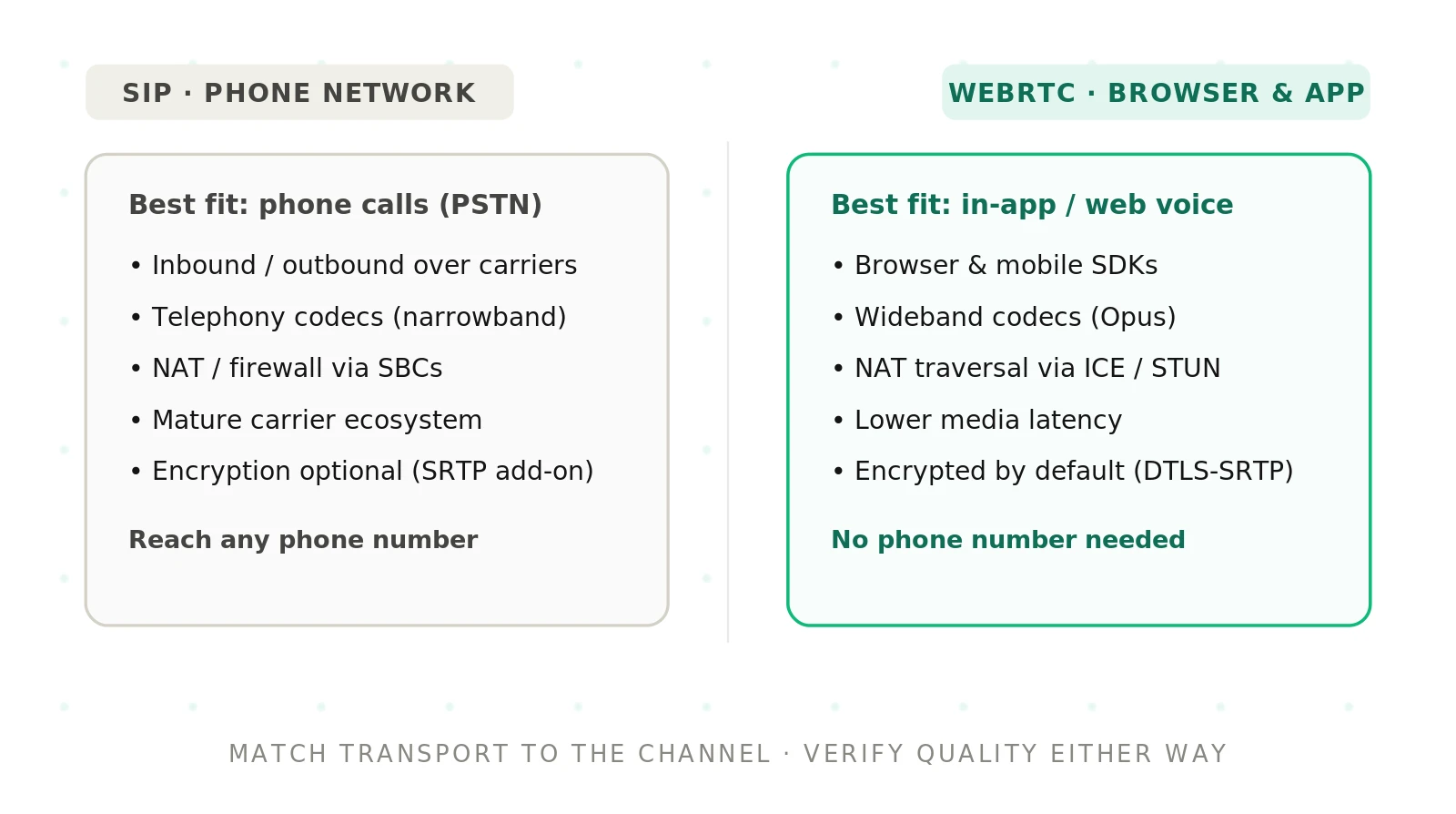
SIP vs WebRTC: a side-by-side
The trade-off is not about which is better. It is about which fits your callers, your data rules, and your team. Here is the contrast across the dimensions that decide it.
| Dimension | SIP / PSTN | WebRTC |
|---|---|---|
| Connectivity | Phone network, phone numbers, carriers | Browsers and mobile apps over the internet |
| Latency and media path | Reliable, but extra carrier hops add delay | Direct UDP path built for low latency |
| Codecs | Legacy narrowband, mostly G.711 | Wideband Opus by default, richer audio |
| Security | Optional TLS and SRTP; must be configured | SRTP and DTLS encryption on by default |
| Best-fit use case | Inbound phone support, outbound calling, contact centers | In-app, web, and click-to-talk voice |
How to choose SIP or WebRTC for your voice agent
Work through this in order. Each step narrows the choice before the next one.
1. Map where your callers are. If they dial a phone number, you need SIP. If they tap a button in your app or site, you want WebRTC.
2. Check for legacy phone requirements. Support lines, IVR replacement, and outbound campaigns all live on the phone network. That points to SIP.
3. Set your latency target. Write down a mouth-to-ear budget. WebRTC gives you a shorter, more controllable media path when latency is critical.
4. Weigh audio quality needs. If clean speech-to-text matters, wideband Opus over WebRTC helps. Phone-grade G.711 over SIP may be enough for simple flows.
5. Confirm your security and compliance rules. For regulated data, WebRTC's default encryption is a lower-effort baseline. On SIP, budget time to enforce TLS and SRTP.
6. Size your operations. WebRTC means you run STUN, TURN, and media servers. SIP shifts more plumbing to carriers. Match the path to your team's capacity.
7. Decide if you need both. Many products serve phone callers and app users. Running SIP and WebRTC side by side is a valid, common answer.
8. Evaluate before you commit. Test each transport on the same scenarios, at real concurrency, and score the calls the same way. Do not decide on a spec sheet alone.
The hybrid pattern most teams land on
You rarely have to pick just one. A single voice agent can accept SIP calls from the phone network and WebRTC calls from your app. The models and logic behind it stay shared.
This is the common shape for products with both a support line and an in-app assistant. Phone callers arrive over SIP. App users arrive over WebRTC. Your agent core does not care which door they used.
The value is reach without duplication. You build the agent once and expose it through two transports. The cost is more surface to test, because each path fails in its own way.
Why transport hides quality problems
Here is the trap. Transport bugs do not announce themselves. They show up as a caller repeating themselves or an agent talking over someone. The root cause hides in jitter, loss, or a bad transcode.
A demo on a clean office network hides all of this. Real calls run over cell connections, hotel Wi-Fi, and congested carrier links. The transport that looked perfect in the demo can wobble in production.
Endpointing is especially sensitive to transport. If packets arrive late, the agent misjudges when the caller stopped talking. Our endpointing in voice agents guide explains why that turn boundary is so fragile.
The lesson is simple. You cannot trust a transport choice until you have measured real call quality on it, under load, with real network noise.
Where Evalgent fits
The transport decision is only safe if you can measure both options on equal terms. Evalgent is an independent, third-party platform that measures real call quality regardless of transport. It does not care whether audio arrived over SIP or WebRTC.
Scenarios capture your real calls as a fixed, versioned suite you own. Profiles vary caller accent, pace, and line quality, so each transport faces the same range. Metrics score each run against pre-defined expected outcomes on one fixed definition. Evaluations replay the identical suite against a SIP path and a WebRTC path at concurrency. Reviews let your team hear the call behind any score.
Because the suite is yours and runs against any transport, you can compare SIP and WebRTC honestly. You can prove that a switch helped, hurt, or changed nothing. For the wider method, see our voice agent evaluation guide.
To put a neutral yardstick between you and every transport choice, book a demo.
Common mistakes on both paths
Teams repeat the same errors. Watch for these.
Choosing WebRTC and forgetting TURN. Direct paths fail on locked-down networks. Without a relay, some callers get silence.
Choosing SIP and assuming encryption. Many carrier links run in the clear. On regulated lines, verify TLS and SRTP end to end.
Testing only on clean networks. The demo lied. Test on lossy, high-jitter conditions before you trust a number.
Ignoring transcode loss. A WebRTC call that hits the phone network drops to narrowband. Speech-to-text accuracy can fall with it.
Frequently asked questions
What is the difference between SIP and WebRTC?
SIP is a signaling protocol for setting up phone calls over the carrier network. WebRTC is a browser and app standard for real-time media over the internet. SIP reaches phone numbers. WebRTC reaches browser tabs and mobile screens. Both carry live audio, but to different endpoints.
Is WebRTC lower latency than SIP?
Often, yes. WebRTC aims for a direct UDP media path built for low latency. SIP calls can add carrier hops, gateways, and media servers, each adding delay. But real numbers depend on your network. Measure mouth-to-ear delay on both before deciding, not just the protocol spec.
Do I need SIP for phone support?
Yes. Reaching a phone number means connecting to the public switched telephone network, and SIP is the standard bridge to it. Inbound support lines, IVR replacement, and outbound calling all require SIP. WebRTC alone cannot dial or receive a normal phone call without a gateway.
Which codec does WebRTC use for voice agents?
WebRTC mandates the Opus codec, a wideband, adaptive format that delivers clear speech at low bitrates. The phone network usually uses narrowband G.711. When a WebRTC call crosses into the phone network, it transcodes down to G.711, so the wideband quality advantage is lost at that boundary.
Is WebRTC more secure than SIP?
By default, yes. WebRTC encrypts all media with SRTP and negotiates keys with DTLS, and you cannot disable it. SIP can be equally secure with TLS and SRTP, but it must be configured, and many carrier links run unencrypted. For regulated data, verify encryption on either path.
Can one voice agent use both SIP and WebRTC?
Yes, and many do. A single agent can accept phone callers over SIP and app users over WebRTC while sharing the same models and logic. This hybrid pattern gives you full reach without building two agents. The cost is more surface to test, since each transport fails differently.
How does transport affect voice agent quality?
Transport shapes latency, jitter, and packet loss, which all affect how the agent hears and responds. Late packets confuse endpointing, so the agent misjudges when a caller finished talking. Loss drops words and hurts transcription. A clean demo can hide these issues that only appear on real, noisy networks.
How do I test SIP versus WebRTC fairly?
Run the identical scenario suite over each transport, at real concurrency, with realistic network noise. Score the calls with the same metrics and definitions. Do not compare a clean WebRTC demo to a congested SIP line. An independent evaluation platform lets you replay the same tests and read results on one scale.
The bottom line
Choose SIP for the phone network and WebRTC for browsers and apps, and run both when your callers span both worlds. The transport is only proven once you measure real call quality on it, under load, with an independent evaluation.
Related Articles

Why AI voice agents fail in production: 9 failure layers, how to detect each, and how to prevent them
Voice agents fail in production across 9 layers, from 8 kHz audio to silent tool errors. Symptoms, root causes, alerts, and fixes in one master table.
Read more
Voice agent regression testing: how to detect regressions from model updates you don't control
Voice agent regression testing for changes you don't control: pin each layer, run a nightly pinned-vs-latest canary, and use paired stats to detect drops.
Read more