Open door for builders.
How to Choose Between LiveKit and Pipecat (A Decision Framework)
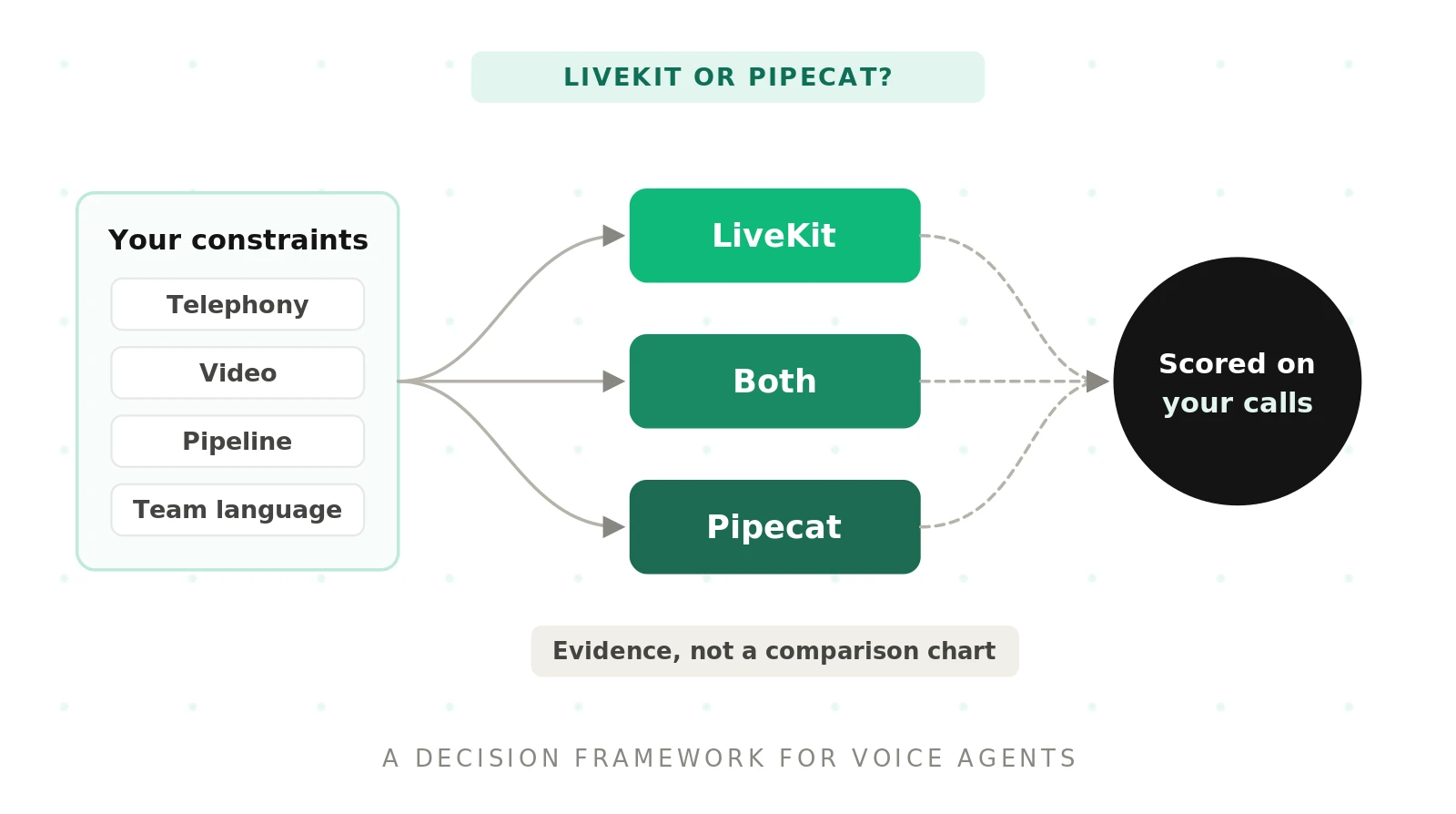
Search "LiveKit vs Pipecat which is better" and you get feature lists. Most teams want a winner. There isn't one. There is a better fit for your constraints, and a way to prove it.
This page is the decision layer of our LiveKit vs Pipecat hub. It helps you choose LiveKit vs Pipecat with ten criteria, a weighted worksheet, a decision tree, and a two-week plan.
The quick verdict by scenario
Each row is a starting point, not a final answer.
| Your scenario | Leaning | Why | What to verify in the POC |
|---|---|---|---|
| Inbound or outbound phone agent at contact-center scale | LiveKit | Native SIP trunks, dispatch rules, transfers, phone numbers | Transfer reliability and turn timing on real PSTN audio |
| In-app assistant with video, screen share, or avatars | LiveKit | Rooms, participants, and tracks are the core model | Client SDK fit for your web and mobile apps |
| Complex conversation logic with parallel branches | Pipecat | Frames flow through composable processors; ParallelPipeline forks work | Latency cost of each extra processor |
| Research or prototype team swapping models weekly | Pipecat | Python-first, transport-agnostic, very wide service catalog | How much glue you write for telephony later |
| Node.js or TypeScript backend team | LiveKit | Agents framework ships Python and Node.js SDKs | Feature parity between the two SDKs you use |
| Pipecat logic plus LiveKit media and SIP | Both | Pipecat has a first-party LiveKit transport | Where turn detection and interruptions live |
Scenario leaning: a starting hypothesis for the proof of concept. It is not a verdict, and a close worksheet score should overrule it only with evidence.
Why this is a layer decision, not a feature race
LiveKit and Pipecat solve overlapping problems from different layers. That is why feature checklists mislead.
LiveKit is an open-source WebRTC media platform. Its Agents framework adds Python or Node.js programs to "rooms" as realtime participants. Media, telephony, and agent dispatch all hang off the room model. The framework and server are Apache 2.0 licensed.
Pipecat is an open-source Python framework for pipeline orchestration. Audio, text, and control "frames" flow through a chain of frame processors. It is BSD-2 licensed, maintained by Daily, and runs on many transports. Its docs describe orchestration across 150+ AI services.
Transport: the layer that moves audio between the caller and your agent. Examples are WebRTC rooms, telephony WebSockets, and SIP trunks.
Orchestration: the layer that decides what happens to that audio. That means STT, LLM, TTS, tools, turn-taking, and state.
LiveKit owns the transport and adds orchestration. Pipecat owns orchestration and plugs into transports. That single difference drives most of the criteria below. For the gaps that surface after launch, read the deep gaps comparison posts miss.
Here is the minimal agent shape in each. Both snippets are simplified from the official quickstarts.
# LiveKit Agents (simplified from the Voice AI quickstart)
from livekit import agents
from livekit.agents import AgentServer, AgentSession, Agent, inference, TurnHandlingOptions

server = AgentServer()

@server.rtc_session(agent_name="my-agent")
async def my_agent(ctx: agents.JobContext):
    session = AgentSession(
        stt=inference.STT(model="assemblyai/universal-3-5-pro", language="en"),
        llm=inference.LLM(model="google/gemma-4-31b-it"),
        tts=inference.TTS(model="fishaudio/s2.1-pro"),
        turn_handling=TurnHandlingOptions(turn_detection=inference.TurnDetector()),
    )
    await session.start(room=ctx.room, agent=Agent(instructions="You are a helpful agent."))
# Pipecat (simplified from the Pipecat quickstart)
pipeline = Pipeline([
transport.input(), # audio in from any transport
stt, # e.g. DeepgramSTTService
user_aggregator, # adds the user turn to context
llm, # e.g. OpenAIResponsesLLMService
tts, # e.g. CartesiaTTSService
transport.output(), # audio back out
assistant_aggregator, # adds the bot turn to context
])The LiveKit agent assumes a room exists. The Pipecat pipeline assumes you picked a transport. The Pipecat vs LiveKit decision is mostly about which assumption fits your product.
The 10 decision criteria
Each criterion below has four parts. What to ask your team. How LiveKit answers. How Pipecat answers. And a red flag that should change your leaning.
1. Telephony and SIP depth
Ask: Is the phone network the primary channel? Do you need warm transfers, DTMF, or your own carrier?
LiveKit: LiveKit telephony extends rooms with SIP participants, SIP trunk objects for inbound and outbound calls, and dispatch rules. Its docs list cold transfer via SIP REFER, warm transfer, DTMF, SRTP, and region pinning. It has been tested with Twilio, Telnyx, Plivo, Exotel, Wavix, Sinch, and didlogic. LiveKit Phone Numbers sells US local and toll-free numbers inside LiveKit Cloud.
Pipecat: Pipecat telephony runs through transports and providers. WebSocket media streams cover Twilio, Telnyx, Plivo, and Exotel. The docs note those WebSocket paths lack advanced features like transfers. For richer control, you use Daily PSTN or Daily plus SIP forwarding from Twilio.
Red flag: you need SIP-level call control but plan a WebSocket-only Pipecat setup. That gap appears the first week a supervisor asks for warm transfer. For LiveKit vs Pipecat for phone agents, our telephony deep dive and SIP vs WebRTC primer cover the details.
2. Multi-party, video, avatars, and recording
Ask: Will more than two parties ever share the session? Will the agent see or show video?
LiveKit: multi-participant rooms are the default shape. Every human, phone caller, and agent is a participant publishing tracks. Video, screen share, and avatars use the same primitives.
Pipecat: the pipeline handles one conversation well. Multi-party, video routing, and recording depend on the transport you pick. On the LiveKit transport, Pipecat publishes one audio track and an optional single video track. Per-destination video routing is not yet implemented there, per the LiveKitTransport docs.
Red flag: your roadmap says "agent assist" or "three-way call" but your prototype is one-to-one. Add a multi-party test before you commit.
3. Team language and SDK surface
Ask: What language does your backend team ship in every day? Which client platforms must you support?
LiveKit: the Agents framework supports Python 3.10+ and Node.js 20+. LiveKit also ships client SDKs for web, mobile, and more.
Pipecat: the server framework is Python, 3.11 or later per the quickstart. Client SDKs exist for JavaScript, React, React Native, iOS, Android, and C++.
Red flag: a TypeScript-only team picking Pipecat because a Python demo looked good. You will maintain a Python service forever.
4. Pipeline complexity and parallelism
Ask: Does one turn trigger several things at once? Think a sentiment classifier, a compliance checker, and the main LLM.
LiveKit: you structure logic with agents, tasks, handoffs, and pipeline nodes you can override. Separate concurrent work is usually a separate agent or process coordinated through room events.
Pipecat: you compose processors directly. ParallelPipeline forks frames into branches and merges results. The docs show multi-agent, failover, and cross-branch patterns. Pipecat Flows, now inside the core package, handles structured conversation state.
# Pipecat ParallelPipeline failover pattern (from the docs, lightly trimmed)
pipeline = Pipeline([
    transport.input(),
    stt,
    ParallelPipeline(
        [gate_primary, primary_llm, error_detector],     # primary branch
        [gate_backup, backup_llm, fallback_processor],   # used if primary fails
    ),
    tts,
    transport.output(),
])
Red flag: you are drawing your conversation as a graph with forks. Forcing that into a single linear agent session costs you later.
5. Hosting, compliance, and data residency
Ask: Must media, compute, and logs stay in a region or inside your VPC?
LiveKit: you can self-host the open-source server, or use LiveKit Cloud. Cloud offers region pinning and EU data residency options. Pinning covers signaling and media, while SIP, inference, and agent compute need their own configuration. When self-hosting, the SIP service deploys separately. Enhanced noise cancellation is a Cloud feature.
Pipecat: the framework runs anywhere Python runs. Pipecat Cloud runs agents in Daily-hosted regions in the US, Europe, and India. Pipecat Enterprise runs agents in a Kubernetes cluster in your VPC. Daily still runs the control plane there.
Red flag: assuming "self-hosted" means every byte stays home. Map each layer separately: media, SIP, compute, inference, and logs.
6. Managed vs self-run operations
Ask: Who carries the pager at 2 a.m.? Do you have people who have run WebRTC in production?
LiveKit: LiveKit Cloud bundles media, SIP, agent deployment, and observability. Self-hosting means running SFUs, TURN, and SIP yourself.
Pipecat: Pipecat Cloud handles images, sessions, and scaling. Self-hosting means you build session orchestration and pick a transport vendor.
Red flag: choosing open source to "avoid lock-in," then discovering no one owns the media tier. See managed vs self-hosted voice orchestration and Pipecat Cloud vs LiveKit Cloud.
7. Ecosystem and plugins
Ask: Which STT, LLM, and TTS vendors do you need? Will you switch them often?
LiveKit: plugins cover most major providers. LiveKit Inference also lets you call models through LiveKit Cloud without separate API keys.
Pipecat: a very wide service catalog, and swapping a service is usually a one-line change. The quickstart pairs Deepgram, OpenAI, and Cartesia by default.
Red flag: a niche vendor your business requires with no plugin on either side. Price the custom integration before scoring.
8. Turn-detection and interruption behavior
Ask: How often do your callers pause mid-thought, read numbers, or say "uh-huh" while the agent talks?
LiveKit: the turns guide makes its turn detector model the default in `AgentSession`. It offers VAD-only, STT endpointing, realtime-model, and manual modes. Adaptive interruption handling separates real barge-in from backchanneling. False-interruption handling can resume speech after silence.
# LiveKit false-interruption tuning (from the turns docs)
turn_handling = {
    "interruption": {
        "false_interruption_timeout": 2.0,
        "resume_false_interruption": True,
    },
}
Pipecat: Smart Turn v3 runs locally via ONNX and is the default stop strategy since v0.0.102. It supports 23 languages and runs on CPU in under 100ms, per the docs. A silence fallback marks the turn complete after `stop_secs`.
Red flag: tuning either one on clean headset audio. Turn behavior on 8kHz phone audio is a different problem. Our guides on endpointing and barge-in explain what to measure.
9. Scaling model
Ask: Do you have spiky outbound campaigns or steady inbound volume? What is your concurrency ceiling?
LiveKit: agent servers register with the LiveKit server, then spawn a job subprocess per dispatched room. The framework includes load balancing and Kubernetes compatibility.
Pipecat: each session is a pipeline instance. Pipecat Cloud scales between `min_agents` and `max_agents`, including from zero. Self-hosted, you build that pool yourself.
Red flag: cold starts during a campaign spike. Keep warm capacity and load-test before launch. See LiveKit vs Pipecat scaling.
10. Lock-in and migration cost
Ask: If you had to switch in 18 months, what would you rewrite?
LiveKit: rooms, participants, and client SDKs spread into your frontend. Leaving means changing clients and telephony, not just the agent.
Pipecat: the pipeline is transport-agnostic, so moving transports is cheaper. Custom processors and frame logic are Pipecat-specific, though.
Red flag: believing "open source" means no vendor lock-in. The architectures differ enough that switching later can mean a rewrite. Read how to migrate a voice agent vendor before you sign.
The weighted scoring worksheet
Criteria only help if you weight them. A contact center and a research lab should not weigh telephony the same.
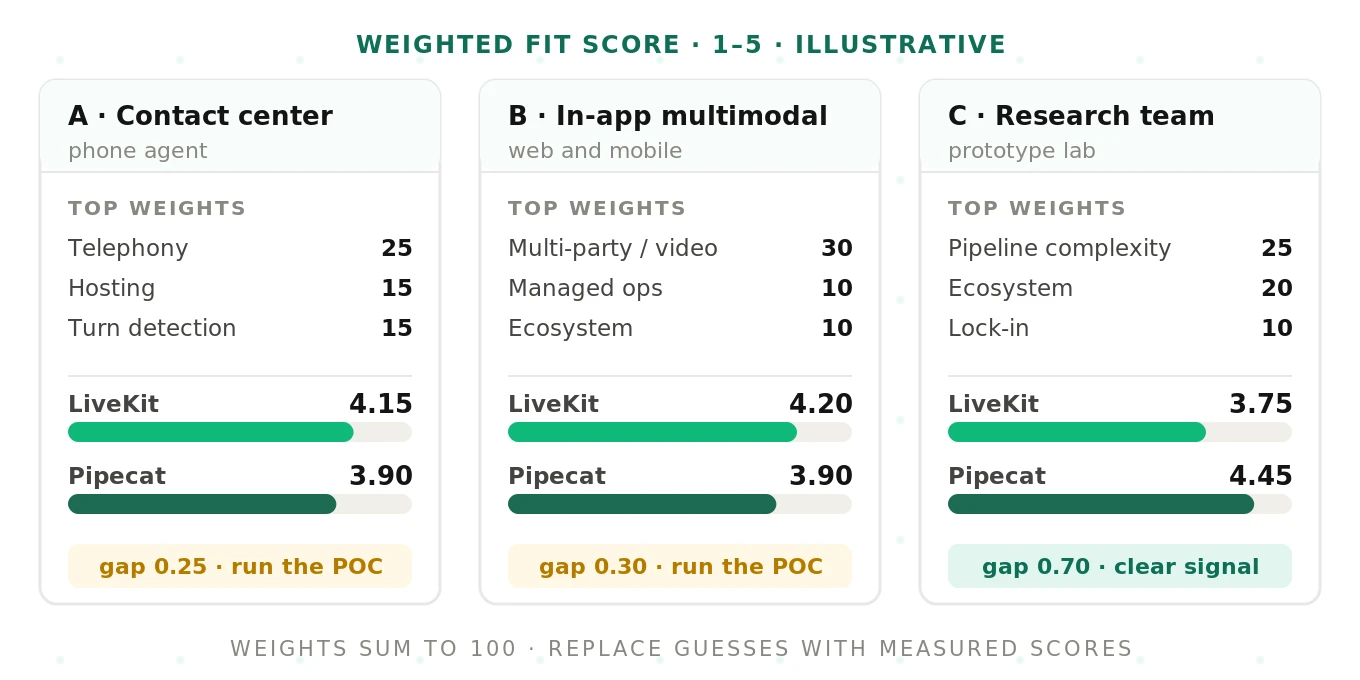
Score each framework's fit from 1 to 5 for your context. Assign weights that sum to 100. Multiply, add, and divide by 100.
Weighted fit score: the sum of weight times fit, divided by 100. The result sits on the same 1–5 scale as the fit scores.
The fit scores below are illustrative. They assume a Python-first team and reflect our reading of the docs. Replace them with your own.
| Criterion | LiveKit fit | Pipecat fit | A: contact center weight | B: in-app multimodal weight | C: research team weight |
|---|---|---|---|---|---|
| Telephony and SIP depth | 5 | 3 | 25 | 5 | 5 |
| Multi-party, video, avatars | 5 | 3 | 5 | 30 | 5 |
| Team language (Python team) | 4 | 5 | 5 | 5 | 10 |
| Pipeline complexity and parallelism | 3 | 5 | 10 | 10 | 25 |
| Hosting and compliance | 4 | 4 | 15 | 5 | 5 |
| Managed vs self-run | 4 | 4 | 5 | 10 | 5 |
| Ecosystem and plugins | 4 | 5 | 5 | 10 | 20 |
| Turn detection behavior | 4 | 4 | 15 | 10 | 10 |
| Scaling model | 4 | 4 | 10 | 10 | 5 |
| Lock-in and migration | 3 | 4 | 5 | 5 | 10 |
| Weighted score (LiveKit / Pipecat) | 4.15 / 3.90 | 4.20 / 3.90 | 3.75 / 4.45 |
Showing the math
Take archetype A, the contact-center phone agent. For LiveKit:
(25×5) + (5×5) + (5×4) + (10×3) + (15×4) + (5×4) + (5×4) + (15×4) + (10×4) + (5×3) = 415. Divide by 100 for 4.15.
For Pipecat on the same weights:
(25×3) + (5×3) + (5×5) + (10×5) + (15×4) + (5×4) + (5×5) + (15×4) + (10×4) + (5×4) = 390. That gives 3.90.
Archetype C, the research team, flips the result. Pipeline complexity and ecosystem carry 45 of the 100 points. Pipecat scores 445 and LiveKit 375.
What the worksheet actually tells you
Look at the gaps, not the winners. Archetypes A and B separate by 0.25 and 0.30. That is inside the error of anyone's fit guesses. Archetype C separates by 0.70, which is a real signal.
So a gap under about 0.5 means "run the proof of concept." A gap over about 0.5 means "start building, but still measure." These thresholds are our rule of thumb, not a standard.
The four neutral rows matter too. Hosting, managed ops, turn detection, and scaling score as ties on paper. They rarely tie in production. Those are exactly the rows your POC should test first.
The decision tree
Use the tree for a fast first answer. Use the worksheet when that answer feels wrong.
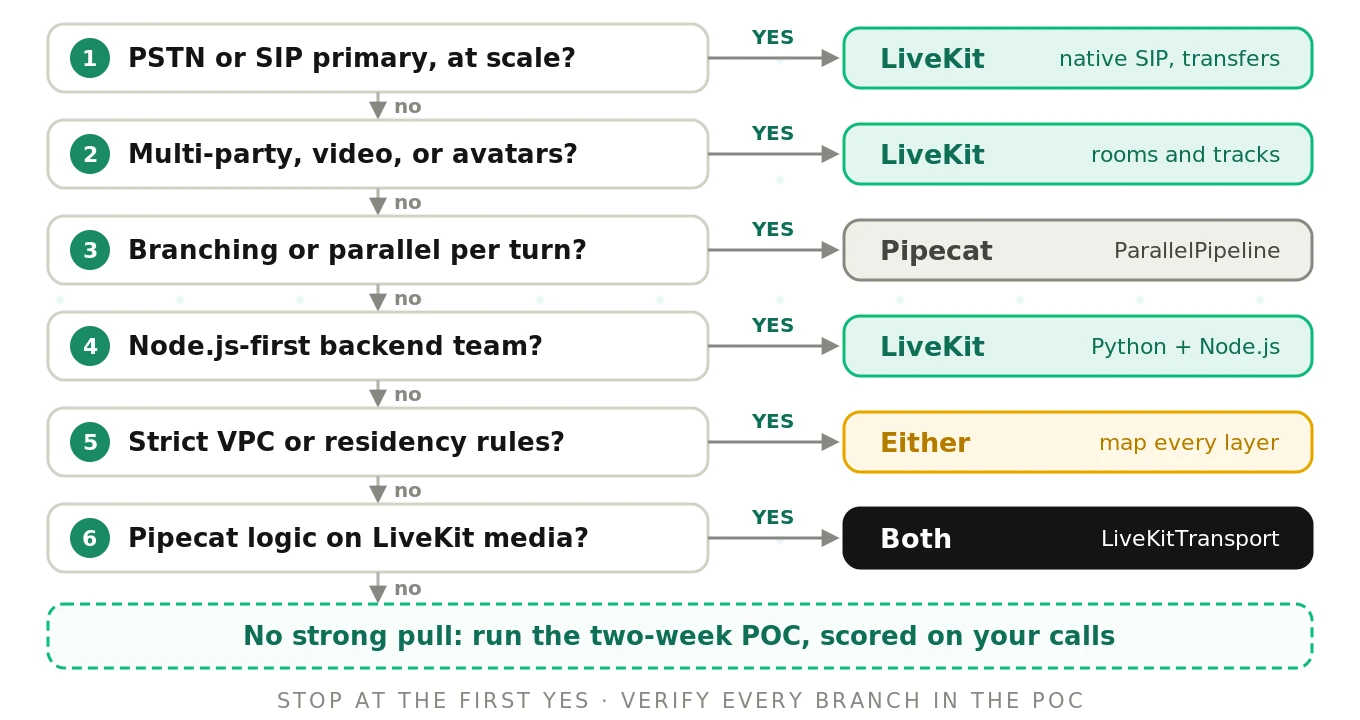
Walk it top to bottom. Stop at the first "yes."
1. Is PSTN or SIP your primary channel at scale? Yes leans LiveKit, unless you already run Daily telephony.
2. Do you need multi-party, video, or avatars? Yes leans LiveKit.
3. Does your logic branch or run in parallel per turn? Yes leans Pipecat.
4. Is your backend team Node.js-first? Yes leans LiveKit.
5. Do strict VPC or residency rules apply? Either can work. Map media, SIP, compute, inference, and logs per layer.
6. Do you need Pipecat logic and LiveKit media? Yes points to both.
If every answer is "no," you have no structural pull. Let the POC decide.
The "use both" option
You do not always have to choose. Pipecat ships a first-party `LiveKitTransport`. It joins LiveKit rooms, handles participant events, and receives SIP DTMF as frames.
# Pipecat pipeline on a LiveKit room (simplified from the LiveKitTransport docs)
from pipecat.transports.livekit.transport import LiveKitTransport, LiveKitParams

transport = LiveKitTransport(
    url=os.getenv("LIVEKIT_URL"),
    token=token,                 # JWT for the room
    room_name="support-call-123",
    params=LiveKitParams(audio_in_enabled=True, audio_out_enabled=True),
)

@transport.event_handler("on_first_participant_joined")
async def on_first_participant_joined(transport, participant_id):
    await worker.queue_frame(TTSSpeakFrame("Hi, how can I help today?"))
This hybrid gives you LiveKit rooms and SIP with Pipecat's processor graph. It also creates a new question: who owns turn-taking? Pick one layer to own VAD, turn detection, and interruptions. Two layers guessing at the same silence causes double responses and clipped speech.
Our guide on using LiveKit and Pipecat together walks through the ownership split.
Questions to answer in a two-week proof of concept
The worksheet narrows your options. The proof of concept decides. These are the questions a POC must answer with data, not opinions.
- Turn-taking: How often does each prototype cut callers off mid-sentence? How often does it wait too long?
- Interruptions: When a caller says "wait," does the agent stop within a beat? Does it resume after a cough?
- Latency: What is the p50 and p95 time from caller silence to first agent audio? Measure on phone audio, not Wi-Fi.
- Telephony: Do transfers, DTMF, and voicemail detection work end to end with your carrier?
- Noise: How do both behave with a TV, a car, or a second speaker in the background?
- Failure recovery: What happens when STT or the LLM times out mid-call?
- Operations: How long did deploy, logging, and rollback take to set up?
- Developer velocity: How many hours did the same feature take on each stack?
Keep a shared YAML scorecard (illustrative format) so both prototypes face the same bar.
# poc-scorecard.yaml (illustrative)
test_set: support_calls_v1        # same 60 scripted callers for both stacks
prototypes: [livekit_agent, pipecat_agent]
metrics:
  turn_cutoff_rate:      { target: "<= 3%" }
  late_response_rate:    { target: "<= 5%" }
  first_audio_p95_ms:    { target: "<= 1200" }
  false_barge_in_rate:   { target: "<= 2%" }
  transfer_success_rate: { target: ">= 98%" }
  task_completion_rate:  { target: ">= 85%" }
conditions: [clean, street_noise, speakerphone, accented_speech]
Benchmark on your own stack, not someone else's. Published numbers for either framework mostly reflect the STT, LLM, and TTS choices underneath. Our latency comparison and benchmarking method explain how to measure fairly.
How to make the LiveKit vs Pipecat decision in two weeks
1. Day 1: write your constraints. List channels, parties, languages, regions, and compliance rules. Anything non-negotiable goes first.
2. Day 1: score the worksheet. Assign weights as a team before anyone argues about frameworks. Fill fit scores independently, then average.
3. Day 2: walk the decision tree. If the tree and the worksheet disagree, note why. That disagreement is your first test case.
4. Day 2: freeze the test set. Script 40 to 80 realistic calls from your real intents. Include noise, interruptions, and edge cases.
5. Days 3–8: build two thin prototypes. Use the same STT, LLM, TTS, and prompt on both. Only the framework should differ.
6. Days 9–11: run the same calls through both. Use the same carrier path and the same audio conditions. Record every call.
7. Day 12: score both prototypes independently. Have an evaluator who did not build either one score the recordings. Use the same metrics for both.
8. Day 13: update the worksheet with evidence. Replace guessed fit scores with measured ones. Recompute the weighted totals.
9. Day 14: decide and write it down. Record the choice, the scores, and the risks you accepted. Revisit it after your first production month.
Step 7 is where most bake-offs go wrong: builders grade their own prototype generously. Our voice agent POC bake-off guide and same-test-case method cover how to keep scoring fair.
The shared blind spot
Neither framework tells you whether your calls are good. That is outside their job.
LiveKit emits events like `agent_false_interruption` and `user_interruption_detected`. Pipecat exposes metrics and observers on every frame. Both tell you what happened. Neither tells you whether it should have happened.
A false interruption fires. Was the caller coughing, or stopping the agent? A turn completes after 400ms. Did the caller finish, or pause mid-number?
The framework decides the plumbing. It does not decide the call quality.
That is where independent evaluation fits. Evalgent scores real and simulated calls on turn-taking, interruptions, latency, and task success, whichever framework you pick. During a POC, both prototypes face one neutral grader. In production, you catch drift before customers do. Read more on independent voice AI evaluation.
Frequently asked questions
Should I use LiveKit or Pipecat for a phone agent?
LiveKit is the stronger default for a phone agent at scale. It has native SIP trunks, dispatch rules, warm and cold transfers, and its own phone numbers. Pipecat handles telephony through Twilio, Telnyx, Plivo, or Exotel media streams, or Daily PSTN. Those WebSocket paths lack advanced transfer features. Test transfers on your carrier before deciding.
Is LiveKit or Pipecat better for video and multimodal agents?
LiveKit is usually the better fit for video and multimodal agents. Its room model treats every person, phone caller, and agent as a participant publishing tracks. Video, screen share, and avatars use the same primitives. Pipecat supports video through its transports, but multi-party routing depends on the transport you choose. Prototype your exact layout first.
Can you use Pipecat and LiveKit together?
Pipecat and LiveKit work together through Pipecat's first-party LiveKitTransport. The Pipecat pipeline joins a LiveKit room as a participant and handles room events and SIP DTMF. You get LiveKit media and telephony with Pipecat's processor graph. Pick one layer to own turn detection and interruptions. Otherwise, both may react to the same silence.
Which is easier to self-host, LiveKit or Pipecat?
Pipecat is lighter to self-host at the framework level, since it is a Python process. You still need a transport, and that is often a managed vendor. Self-hosting LiveKit means running the media server, TURN, and a separate SIP service. That is heavier, but you then own the whole stack. Staff experience matters more than the software.
Is Pipecat only for Python?
Pipecat's server framework is Python-only, and the quickstart requires Python 3.11 or later. Its client SDKs cover JavaScript, React, React Native, iOS, Android, and C++. So your frontends can use other languages. Your agent logic, processors, and pipelines will be Python. Teams standardized on Node.js often prefer LiveKit Agents, which ships Node.js support.
Which has better turn detection, LiveKit or Pipecat?
Neither has universally better turn detection. LiveKit defaults to its turn detector model with adaptive interruption and false-interruption handling. Pipecat defaults to Smart Turn v3, a local ONNX model covering 23 languages. Both behave differently on noisy 8kHz phone audio than on headsets. Measure cutoff and late-response rates on your own calls.
How long should a LiveKit vs Pipecat proof of concept take?
A LiveKit vs Pipecat proof of concept fits in about two weeks. Spend two days on constraints, scoring, and a frozen test set. Spend six days building two thin prototypes with identical models. Use the final days to run the same calls, score them independently, and decide. Longer POCs tend to drift into building the product.
How hard is it to switch from LiveKit to Pipecat later?
Switching from LiveKit to Pipecat later is usually a partial rewrite. LiveKit's room model spreads into client apps and telephony configuration. Pipecat's custom processors and frame logic do not port back either. Keep prompts, tools, and business logic in framework-neutral modules. That keeps the rewrite limited to the media and orchestration glue.
The bottom line
LiveKit fits phone-heavy, multi-party, and video agents, while Pipecat fits complex Python pipelines on any transport. When the weighted scores are close, a two-week proof of concept scored by an independent evaluator should make the call.
Want both prototypes graded on the same calls by a neutral evaluator? Book a demo.
Related Articles

Why AI voice agents fail in production: 9 failure layers, how to detect each, and how to prevent them
Voice agents fail in production across 9 layers, from 8 kHz audio to silent tool errors. Symptoms, root causes, alerts, and fixes in one master table.
Read more
Voice agent regression testing: why LLM updates break production
LLM updates improve benchmarks but break voice agents in 5 predictable ways. How to detect and prevent regressions after every model or prompt change.
Read more