LiveKit voice agent testing guide: unit tests, simulations, SIP and load (2026)
On this page
LiveKit now ships a full testing toolkit inside the framework: pytest helpers, eight built-in LLM judges, goal-driven simulations in text and audio modes, and a CLI load tester. Most teams wire up the first two and assume they are covered.
They are not. The layers that run on every commit exercise your LLM and tools. They do not run your VAD, your STT, your turn detector or your noise cancellation, and those cause most production complaints. Worse, several of those components behave differently in `dev` mode, on LiveKit Cloud and on a self-hosted agent server. So a green test run on a laptop can describe a different agent than the one answering calls.
This guide maps each LiveKit testing tool to the part of the pipeline it actually exercises. It breaks a LiveKit turn down hop by hop with a millisecond budget and explains what each metric field measures. Then it lays out a five-layer test plan with code and thresholds, plus the gotchas buried in docs footnotes and GitHub issues.
What LiveKit's built-in testing covers, and what it skips
LiveKit's Test and Evaluate docs describe a lifecycle: Agent Console for manual debugging, unit tests per commit, simulations for whole conversations, and observability after release. The table below shows which pipeline stages each tool actually runs.
| Tool | What runs | What does not run | Cost driver | Sensible cadence |
|---|---|---|---|---|
| Unit tests (`session.run()` + `judge()`) | LLM, tools, handoffs, chat context | Room connection, VAD, STT, turn detector, TTS, noise cancellation | LLM tokens | Every commit |
| `JudgeGroup` with built-in judges | LLM grading of full `session.history` | Anything audio | Judge tokens | Every commit |
| Agent Simulations, text mode | Your real entrypoint, LLM, tools, simulated user | STT, TTS, VAD and audio I/O are disabled automatically | Simulator, agent and judge tokens | Every commit |
| Agent Simulations, audio mode | Full STT-LLM-TTS pipeline over a real audio track, with optional noise, low-quality mic and packet loss | PSTN codecs, your SIP trunk | Real-time runs, STT/TTS billing, audio turns | Nightly or pre-release |
| `lk perf agent-load-test` | Dispatch, room join, agent greeting, echo audio | Realistic caller speech | Agent minutes, inference quotas | Pre-release, infra changes |
| Real SIP test calls | Trunk, dispatch rule, codec path, DTMF, hangups | Scale | Telephony minutes | Pre-release, trunk changes |
Two lines in LiveKit's own docs define the gap. The unit-testing page says tests make no LiveKit room connection. The simulations page says a text simulation turns off STT, TTS, VAD and audio input and output automatically.
So if your CI runs unit tests plus text simulations, nothing that runs on every merge touches turn-taking. That is a sensible cost trade-off. It just means audio-mode simulations and real calls carry the whole weight of turn detection, interruption handling and transcription accuracy.
Anatomy of a LiveKit turn, in milliseconds
To test turn-taking you need to know what happens between "the caller stops talking" and "the caller hears a reply." Here is the path through a cascaded LiveKit agent, with the parameter that governs each hop.
1. Audio arrives. A WebRTC caller sends Opus. A phone caller arrives as a SIP participant, usually on narrowband G.711 at 8 kHz. LiveKit's HD voice page notes that wideband G.722 needs a provider that supports it. Among third-party trunks that is currently Telnyx, and LiveKit Phone Numbers supports it out of the box.
2. Noise cancellation (optional). If you set `noise_cancellation` in `room_io.AudioInputOptions`, it runs before VAD, STT and the turn detector. Every downstream signal sees the processed audio.
3. VAD. The bundled inference VAD resamples input to 16 kHz and scores 512-sample windows, which is 32 ms of audio per window. In the current source, speech starts after `min_speech_duration` (0.05 s) above `activation_threshold` (0.5). It ends after `min_silence_duration` of silence: 0.25 s by default for the inference VAD and 0.55 s for the older Silero plugin. When END_OF_SPEECH fires, the framework back-dates the user's "stopped speaking" anchor by the silence duration plus inference time.
4. STT. Streaming STT emits interim and final transcripts. LiveKit's short-utterances guide is explicit: closing a turn requires both a final transcript and an end-of-speech signal. Interim transcripts never close a turn.
5. Turn detector. The default `inference.TurnDetector()` is an audio model that scores whether the turn is finished. If it doesn't return within about a second, the agent commits the turn anyway.
6. Endpointing wait. If the detector says "complete," the session waits `min_delay`. If it says "incomplete," it waits up to `max_delay`. Both are measured from the back-dated end of speech, so VAD silence counts toward the wait. With the audio turn detector the defaults are 0.3 s and 2.5 s.
7. Your hook, then the LLM. `on_user_turn_completed` runs (RAG lookups often live here), then the LLM streams tokens. Preemptive generation, on by default, can start the LLM when the final transcript lands, before the turn is confirmed.
8. TTS and playout. TTS starts on the first text, returns its first audio chunk, and the frames travel back to the caller.
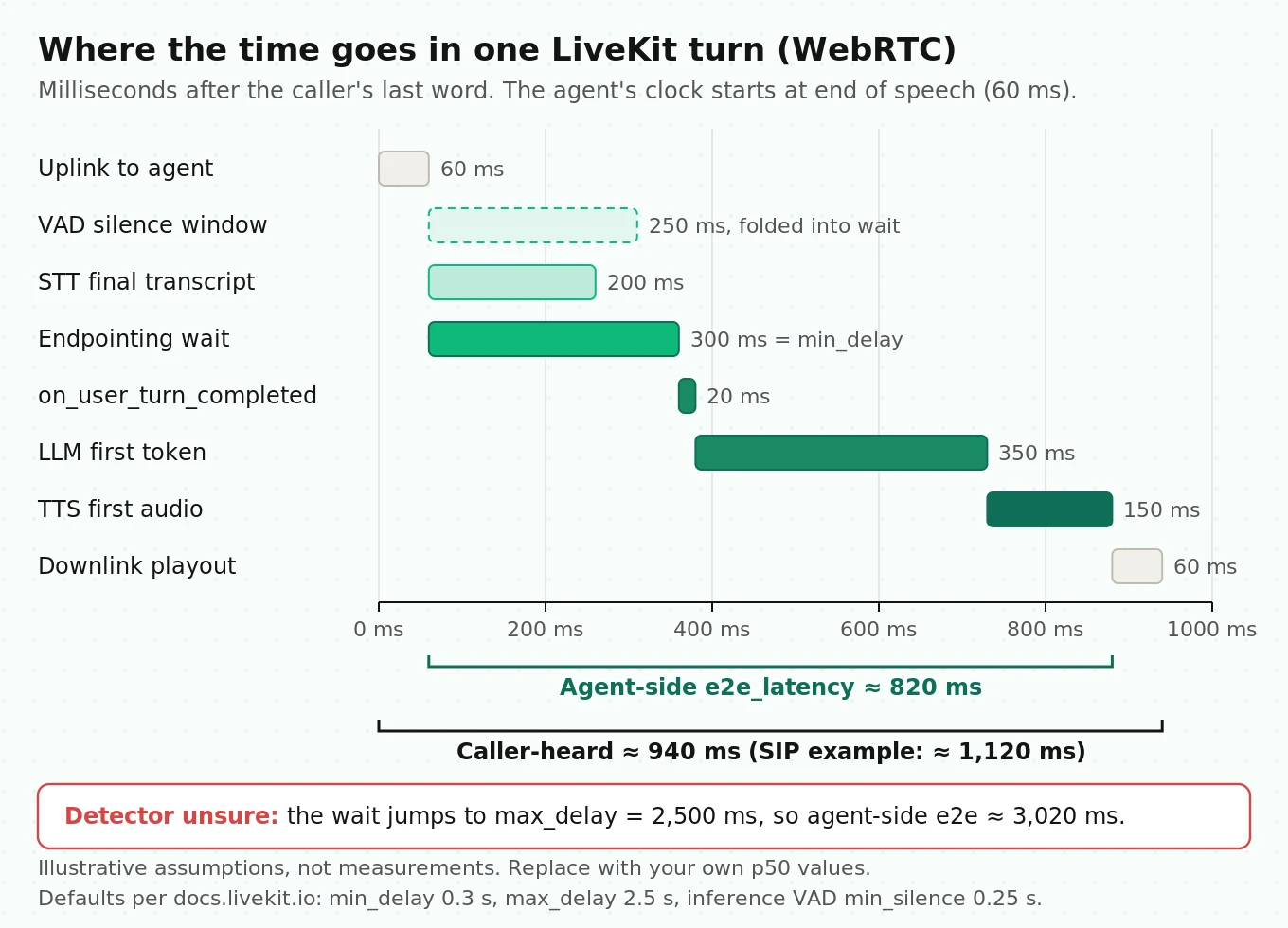
A worked latency budget
The numbers below are illustrative assumptions for a well-tuned agent co-located with its models. They are not measurements. Replace them with your own p50 values from `ChatMessage.metrics`.
| Hop | Governed by | WebRTC (assumed ms) | SIP/PSTN (assumed ms) | LiveKit field |
|---|---|---|---|---|
| Uplink to agent | Network, jitter buffer, SIP leg | 60 | 150 | Not measured by the agent |
| VAD end of speech | `min_silence_duration` | 250 (absorbed below) | 250 (absorbed below) | Back-dated into the anchor |
| Final transcript | STT provider endpointing | 200 | 250 | `transcription_delay` |
| Endpointing wait (detector says complete) | `min_delay` = 300 | 300 | 300 | `end_of_turn_delay` |
| Your hook | `on_user_turn_completed` | 20 | 20 | `on_user_turn_completed_delay` |
| LLM first token | Model, prompt size, region | 350 | 350 | `llm_node_ttft` |
| TTS first audio | Voice model, region | 150 | 150 | `tts_node_ttfb` |
| Downlink playout | Network, SIP leg | 60 | 150 | Not measured by the agent |
LiveKit's own approximation is `end_of_utterance_delay + llm.ttft + tts.ttfb`. Plugging in the assumptions:
- Agent-side e2e: 300 + 20 + 350 + 150 = 820 ms. This is roughly what `e2e_latency` reports.
- Caller-heard, WebRTC: 60 + 820 + 60 = 940 ms.
- Caller-heard, SIP: 150 + 820 + 150 = 1,120 ms.
- Same turn when the detector says "incomplete": the 300 ms wait becomes 2,500 ms. Agent-side e2e jumps to 3,020 ms.
Two lessons fall out of this arithmetic.
First, the end-of-turn delay is bimodal. Finished turns cluster near `min_delay` when the detector is confident and near `max_delay` when it is not. A healthy p50 can hide an ugly p90 made almost entirely of "detector unsure" turns. Track the max-delay rate: the share of committed user turns whose `end_of_turn_delay` is at least 80% of `max_delay`. That single number moves when a prompt change, a new STT model or a noise profile confuses the detector.
Second, `e2e_latency` is agent-side. LiveKit's simulation docs say it directly: the agent measures when it started producing audio, the caller measures when they heard it, and the difference is what the user perceives. On phone calls the uplink and downlink legs are invisible to the agent's own metrics. Audio simulations report caller-heard latency separately for this reason.
For context, human conversation sets a hard target. Stivers et al. (PNAS 2009) measured turn transitions in 10 languages. Every language showed a unimodal distribution with its mode between 0 and 200 ms. Means ranged from 7 ms in Japanese to 469 ms in Danish. A cascaded pipeline with a 300 ms minimum wait cannot match that, which is why preemptive generation and confident end-of-turn prediction matter more than shaving 20 ms off TTS.
What each LiveKit metric actually measures
LiveKit exposes four metric surfaces: per-plugin `metrics_collected` events, per-turn `ChatMessage.metrics`, live `session.usage`, and the end-of-session `SessionReport`. The session-level `metrics_collected` event is deprecated. The table maps fields to definitions from the data hooks docs.
| Field | Where | What it measures | Testing trap |
|---|---|---|---|
| `transcription_delay` | User message | End of speech to final transcript | Clamped at 0, so a transcript that arrives "before" the anchor reads as 0 |
| `end_of_turn_delay` | User message | End of speech to the decision to end the turn | Includes VAD silence and transcription wait; bimodal |
| `end_of_utterance_delay` | `EOUMetrics` | Same span, emitted per plugin event | Not emitted with server-side realtime turn detection |
| `on_user_turn_completed_delay` | User message | Time inside your hook | Your RAG latency hides here |
| `llm_node_ttft` | Assistant message | LLM first token | Empty for realtime models |
| `tts_node_ttfb` | Assistant message | First audio chunk after the first text token | Empty for realtime models |
| `playback_latency` | Assistant message | First frame forwarded to playback started | Near zero unless an avatar worker reports playback |
| `e2e_latency` | Assistant message | User stopped speaking to agent began responding | Agent-side only, excludes network legs |
| `detection_delay` | `InterruptionMetrics` | Overlap onset to the adaptive model's final prediction | Only exists when adaptive interruption is active |
| `inference_duration_total` / `inference_count` | `VADMetrics` | VAD compute per window | A rising average means CPU starvation |
The metric-anchor bug you should guard against
GitHub issue #6093, filed against livekit-agents 1.6.0, documents turns with `transcription_delay` and `end_of_turn_delay` above 200 seconds. Other turns in the same sessions had no values at all. The cause was a stale "stopped speaking" anchor: when the turn detector split one long utterance into consecutive user turns, the second turn inherited an anchor from minutes earlier. The issue links two older reports, #2361 and #4388.
The current source now refuses to compute these metrics when the anchor predates the turn's start, and returns `None` instead. But the trace span attribute is written as `metrics.end_of_turn_delay or 0`. Turns without a valid metric therefore show up as 0 in traces, which drags averages down.
Three rules follow for any latency test or dashboard built on LiveKit metrics:
- Track metric coverage. Coverage is committed user turns with a non-null `end_of_turn_delay` divided by all committed user turns. Treat a drop in coverage as a regression in its own right.
- Drop exact zeros and values above `max_delay` plus 5 seconds from latency percentiles. Count them separately rather than averaging them in.
- Correlate by `speech_id`. Greetings and `say()` calls have no `speech_id`, so exclude them from turn latency.
The environment trap: same code, different agent
The single most useful thing to know about LiveKit testing is that three components change with the environment, even if your code doesn't.
| Component | `dev` with LiveKit Cloud credentials | Deployed to LiveKit Cloud | Self-hosted with `start` |
|---|---|---|---|
| Turn detector default | `v1` full model, free monthly allowance, then falls back to `v1-mini` | `v1` full model | `v1-mini` on local CPU |
| Interruption mode default | Adaptive (40,000 free requests per month locally) | Adaptive | VAD-based |
| Prewarmed idle processes | 0 | Managed | `ceil(cpu_count)` in Python |
| Load function | n/a | Fixed, not configurable | Average CPU over 5 s, threshold 0.7 |
| SIGTERM handling | Not reliable (LiveKit load-test guide) | Graceful drain | Graceful drain, `drain_timeout` default 1 hour |
These come from the turn detector, adaptive interruption and server options pages. The turn detector page adds two details that matter for testing.
The fallback is sticky. If the full `v1` model times out or can't be reached, the session logs one warning and emits a default probability of 1.0 for the in-flight prediction. That means "turn complete," so the agent replies. It then runs `v1-mini` for the rest of the session. One network blip early in a call changes turn-taking for every remaining turn.
`v1-mini` shares your CPU. LiveKit recommends compute-optimized instances such as AWS c6i or c7i over burstable t3 or t4g, which can time out on CPU credits even when utilization looks low.
The practical rule is to pin what you test. Set `inference.TurnDetector(version=...)` explicitly and set `interruption.mode` explicitly. Then add a test that fails if those values drift. If you self-host on `v1-mini`, run your audio tests against `v1-mini`, not the `v1` model your laptop used in `dev`.
The audio simulation CLI already protects you here. The docs note that it uses the same turn detection and adaptive interruption defaults as a deployed agent, instead of falling back to local defaults.
A layered LiveKit test plan
The plan below is a framework you can copy. Each layer has a trigger, a tool, and a gate. The thresholds are suggested starting points, not industry standards. Tune them to your call types.
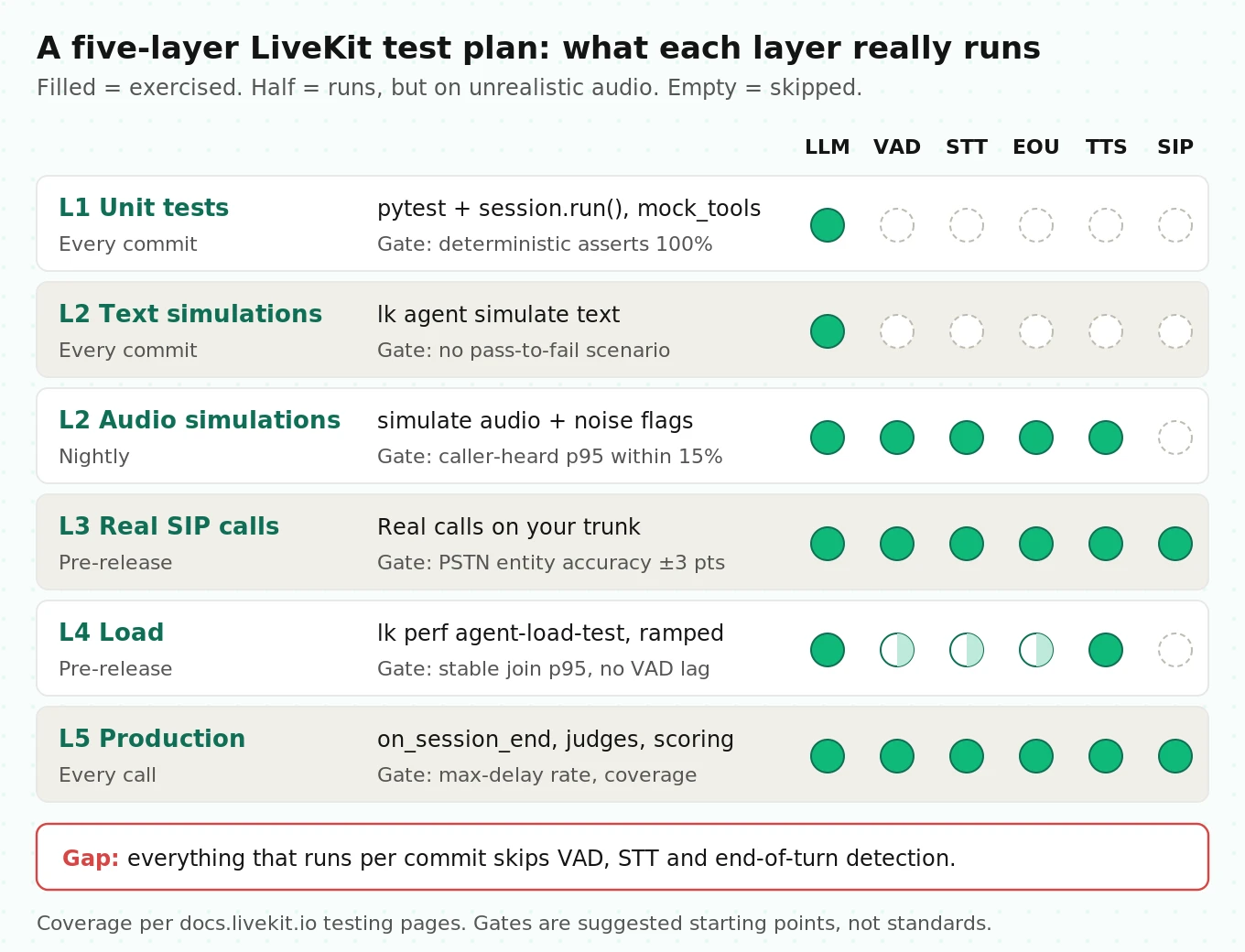
| Layer | Tool | Trigger | Covers | Suggested gate |
|---|---|---|---|---|
| L1 Unit | pytest + `session.run()`, `mock_tools`, `JudgeGroup` | Every commit | Tool arguments, error paths, handoffs, refusals | 100% of deterministic asserts; judge checks pass 3 of 3 runs |
| L2 Conversation | `lk agent simulate text`, then `audio` with degradation flags | Text per commit, audio nightly | Whole-call outcomes; in audio mode, turn-taking, interruptions, entity accuracy | No scenario regresses from pass to fail; audio p95 caller-heard latency within 15% of baseline |
| L3 Telephony | Real calls through your trunk or LiveKit Phone Numbers | Pre-release, trunk or codec change | Dispatch rule, codec, noise cancellation on SIP audio, DTMF, hangups | Every SIP check in the checklist passes; entity accuracy on PSTN within 3 points of WebRTC |
| L4 Load | `lk perf agent-load-test`, ramped | Pre-release, infra change | Dispatch, join delay, CPU headroom, VAD keeping pace | Join delay p95 stable across ramp steps; no persistent "slower than realtime" warnings |
| L5 Production | `on_session_end`, session reports, judges, external scoring | Every call | Real callers, drift, regressions after model updates | Alert on max-delay rate, metric coverage, task completion |
Layer 1: unit tests that hold up
The LiveKit test helpers are good. Use them for what they test well: deterministic checks on tool calls and text behavior. The example below is illustrative and simplified, but every class, method and parameter name comes from the current unit-testing docs.
# tests/test_booking.py  (illustrative; pytest + pytest-asyncio)
import json
import pytest
from livekit.agents import AgentSession, inference, mock_tools
from livekit.agents.evals import (
    Judge, JudgeGroup, JudgmentResult, task_completion_judge, tool_use_judge,
)
from agent import Assistant  # your Agent subclass

AGENT_MODEL = "openai/gpt-4.1-mini"     # the model you actually ship
JUDGE_MODEL = "google/gemma-4-31b-it"   # any LLM; need not match the agent's

@pytest.mark.asyncio
async def test_booking_extracts_normalized_arguments() -> None:
    async with (
        inference.LLM(model=AGENT_MODEL) as agent_llm,
        inference.LLM(model=JUDGE_MODEL) as judge_llm,
        AgentSession(llm=agent_llm) as session,
    ):
        await session.start(Assistant())
        result = await session.run(
            user_input="Book me Tuesday the 13th at three pm, customer ID 4471"
        )
        call = result.expect.next_event().is_function_call(name="book_appointment")
        args = json.loads(call.event().item.arguments)
        assert args["customer_id"] == "4471"   # assert normalized values,
        assert args["time"] in ("15:00", "3:00 PM", "3 pm")  # not one exact string
        result.expect.next_event().is_function_call_output()
        await result.expect.next_event().is_message(role="assistant").judge(
            judge_llm, intent="Confirms an appointment on Tuesday the 13th at 3 pm."
        )
        result.expect.no_more_events()

@pytest.mark.asyncio
async def test_booking_failure_is_not_confirmed() -> None:
    async with (
        inference.LLM(model=AGENT_MODEL) as agent_llm,
        inference.LLM(model=JUDGE_MODEL) as judge_llm,
        AgentSession(llm=agent_llm) as session,
    ):
        await session.start(Assistant())
        with mock_tools(
            Assistant, {"book_appointment": lambda: RuntimeError("booking API 503")}
        ):
            result = await session.run(user_input="Book me Tuesday at 3 pm, ID 4471")
            result.expect.next_event().is_function_call(name="book_appointment")
            out = result.expect.next_event().is_function_call_output()
            assert out.event().item.is_error
            await result.expect.next_event(type="message").judge(
                judge_llm,
                intent="Says the booking did not go through and offers a next step. "
                       "Does not claim the appointment is booked.",
            )

class NoConfirmationAfterToolError(Judge):
    """Deterministic: no 'confirmed' after a failed tool call."""
    def __init__(self) -> None:
        super().__init__(name="no_confirmation_after_tool_error")

    async def evaluate(self, *, chat_ctx, reference=None, llm=None) -> JudgmentResult:
        tool_failed = False
        for item in chat_ctx.items:
            if item.type == "function_call_output" and item.is_error:
                tool_failed = True
            elif tool_failed and item.type == "message" and item.role == "assistant":
                if "confirmed" in (item.text_content or "").lower():
                    return JudgmentResult(verdict="fail",
                                          reasoning="Claimed success after a tool error")
        return JudgmentResult(verdict="pass", reasoning="No false confirmation")

@pytest.mark.asyncio
async def test_whole_conversation() -> None:
    async with (
        inference.LLM(model=AGENT_MODEL) as agent_llm,
        AgentSession(llm=agent_llm) as session,
    ):
        await session.start(Assistant())
        await session.run(user_input="Hi, I need to move my appointment")
        await session.run(user_input="Make it Thursday at 10, ID 4471")
        verdict = await JudgeGroup(
            llm=JUDGE_MODEL,
            judges=[task_completion_judge(), tool_use_judge(),
                    NoConfirmationAfterToolError()],
        ).evaluate(session.history)
        assert verdict.all_passed, {k: v.reasoning for k, v in verdict.judgments.items()}
Add one cheap test that protects you from the environment trap and from unit mistakes. Python takes seconds and Node.js takes milliseconds. A `min_delay` of 500 copied from a Node.js config means 500 seconds in Python.
# tests/test_config.py  (illustrative; agent_config.py holds plain dicts you also pass to TurnHandlingOptions)
from agent_config import TURN_DETECTOR_VERSION, TURN_HANDLING

def test_turn_handling_is_pinned_and_sane() -> None:
    assert TURN_DETECTOR_VERSION in ("v1", "v1-mini")       # never left to auto-select
    ep = TURN_HANDLING["endpointing"]
    assert 0.1 <= ep["min_delay"] <= ep["max_delay"] <= 5.0  # seconds, not ms
    assert TURN_HANDLING["interruption"]["mode"] in ("adaptive", "vad")
    assert TURN_HANDLING["interruption"].get("min_words", 0) == 0  # see gotchas
Three unit-test traps from the docs
- `judge()` sees one message. The docs say the judge evaluates the message "without surrounding conversation context." Anything that depends on earlier turns belongs in a `JudgeGroup` run over `session.history`.
- `get_job_context()` raises `RuntimeError` in tests. Code paths that touch the job context need a mock, or they need to be tested elsewhere.
- Judges are probabilistic. Our post on LLM-as-judge limits covers why. Put the hard checks in deterministic asserts and custom `Judge` subclasses, and keep LLM judges for intent.
How many green runs prove anything?
A flaky judge-based test that passes 10 times in a row tells you less than it feels like. The rule of three gives a quick bound: with zero failures in n independent runs, the 95% upper confidence bound on the failure rate is about 3/n.
- 10 clean runs: the true failure rate could still be 30%.
- 60 clean runs: about 5%.
- 150 clean runs: about 2%.
Comparing two configurations needs more. To detect a scenario pass rate moving from 90% to 95% at 5% significance and 80% power, the standard two-proportion formula gives n = (1.96 + 0.84)² × (0.09 + 0.0475) / 0.05² = 7.84 × 0.1375 / 0.0025 ≈ 431 runs per arm. That is why A/B decisions on turn-taking belong in batched simulations and production data, not in CI. Our guide to A/B testing voice agents covers the design.
Layer 2: simulations, text first and audio second
Agent Simulations are in beta. They need CLI v2.16.4 or later for Python (v2.18.3 for audio), LiveKit Agents 1.6.6 or later, and a LiveKit Cloud project. A simulated user follows a scenario's `instructions`, your real agent runs locally under a temporary name, and a judge grades the transcript against `agent_expectations`.
The best feature is `on_simulation_end`. It lets you fail a run when the final state is wrong, even if the conversation read well. The final result is the logical AND of the judge verdict and your check, so a polished transcript that booked the wrong room still fails. Pair that with session-scoped `mock_tools(..., session=session)` seeded from `ctx.simulation_context()` userdata, and your tool flows become reproducible. We cover more patterns in detecting silent tool failures.
Write turn-taking scenarios on purpose. Most generated scenarios are clean transactions. The audio layer only earns its cost if the simulated caller does the things that break endpointing.
# scenarios_turn_taking.yaml  (illustrative; fields from LiveKit's scenario format)
name: Turn-taking regressions
scenarios:
  - label: Caller answers a yes/no question with a single word
    instructions: |
      PERSONA: Busy caller, answers in one word whenever possible.
      OPENING LINE: "Hi, I need to reschedule."
      DO, IN ORDER:
      1. When asked to confirm the existing appointment, say only "Yes."
      2. When offered Thursday at 10, say only "No."
      3. Accept the next slot offered. Do not hang up until it is confirmed.
    agent_expectations: >
      Responds to each one-word answer without the caller repeating it.
      Ends with exactly one rescheduled appointment. Any turn where the caller
      has to say "yes" or "no" twice is a fail.
    tags:
      feature: turn_taking
      pattern: short_utterance
Then run the same file in both modes, and add degradation in audio mode:
lk agent simulate text  --scenarios scenarios_turn_taking.yaml
lk agent simulate audio --scenarios scenarios_turn_taking.yaml --background-noise
lk agent simulate audio --scenarios scenarios_turn_taking.yaml --low-quality-microphone --packet-loss
lk agent simulate export <run-id> > run.json   # archive as a CI artifact
Audio runs report what text cannot: end-of-turn mispredictions, time to yield after a barge-in, false interruptions, unanswered caller turns, and word and entity error rates in both directions. Entity scoring separates "never recognized" from "recognized and later lost," which matters for confirmation codes. See STT entity accuracy for why entity error matters more than WER.
Plan wall-clock time. Audio runs execute in real time, with a default per-run concurrency of 15 and a per-project cap of 30. As a worked example, 120 audio scenarios averaging 2.5 minutes is 300 scenario-minutes. At 15 concurrent, the floor is 300 / 15 = 20 minutes, and it doubles if a second pipeline is using the project cap at the same time.
What the research says about noisy turn-taking
LiveKit's default turn detector is an audio model. It reads intonation and rhythm as well as words. That is a strength in clean audio and a test obligation in noisy audio.
- Ekstedt and Skantze (Interspeech 2022) introduced Voice Activity Projection. It is a self-supervised model that predicts upcoming voice activity, which lets it anticipate turn shifts and backchannels without labeled data. It is the research lineage behind acoustic end-of-turn prediction.
- Russell and Harte (Interspeech 2025) tested predictive turn-taking models in noise. Hold/shift accuracy fell from 84% in clean speech to 52% in 10 dB music noise, close to a coin flip. They also found that training relied on accurate transcription, which limited ASR-derived transcripts to clean conditions.
- Full-Duplex-Bench (Lin et al., 2025) defines metrics you can reuse for any agent. Takeover rate during user pauses measures how often the system grabs the floor when it shouldn't. It also scores backchannel timing against human behavior, response latency on smooth turn-taking, and behavior under user interruption.
In practice: run your turn-taking scenarios at more than one noise level, and report max-delay rate and premature-takeover rate per condition. A detector that is excellent in a quiet room can be near chance in a car with the radio on. Our guide to testing STT under background noise covers building SNR-controlled audio.
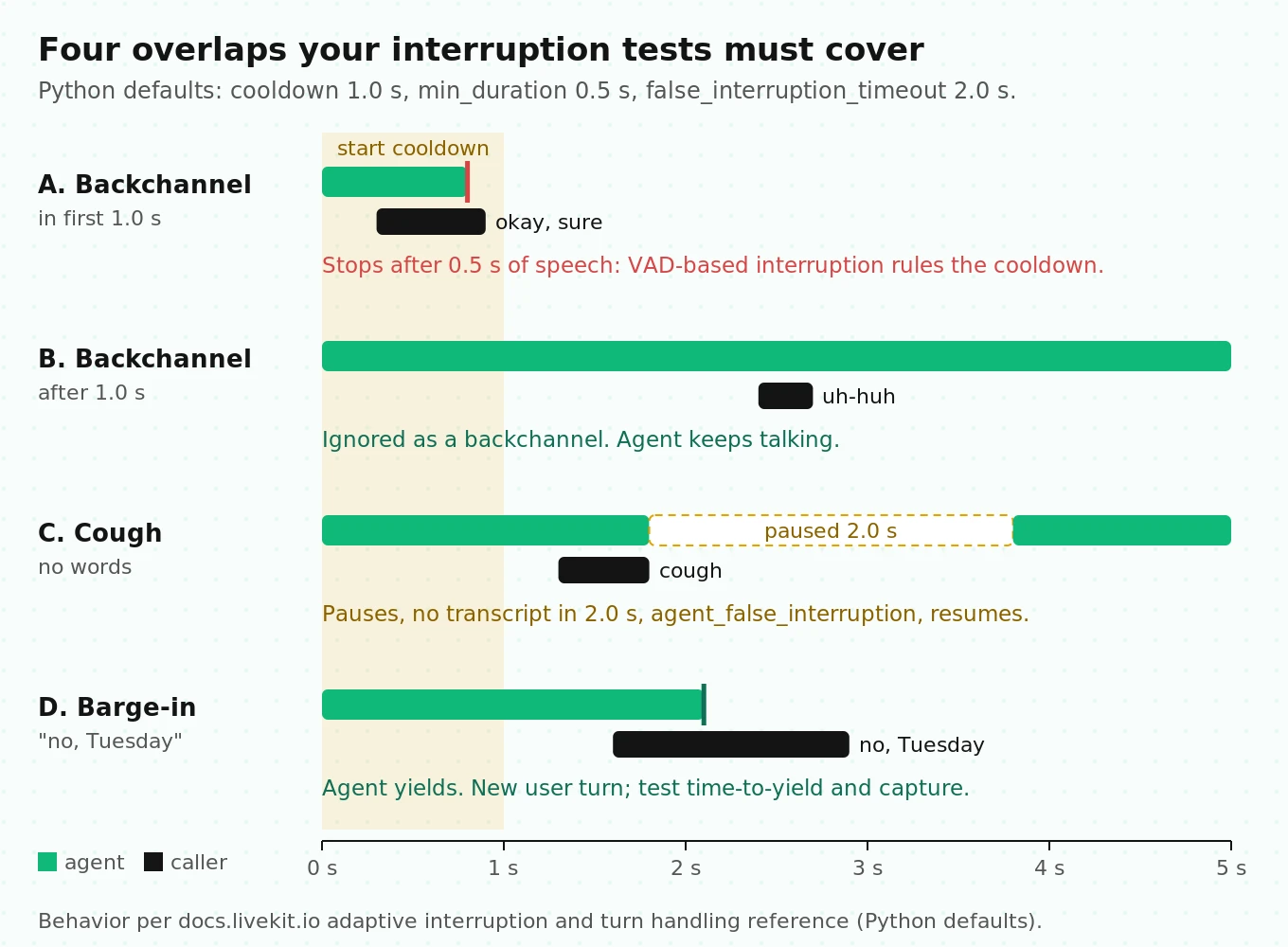
Interruption handling has a blind second
Adaptive interruption handling separates real barge-ins from backchannels such as "uh-huh." It needs LiveKit Cloud or `dev` mode, a VAD, and an STT that supports aligned transcripts. Check `stt.capabilities.aligned_transcript`. Otherwise the session falls back to VAD-based interruption.
The detail that changes your tests is `backchannel_boundary`, which defaults to `(1.0, 1.0)`. For the first second after the agent starts speaking, adaptive detection is suppressed and VAD-based interruption is used, so real corrections aren't swallowed. That means a backchannel such as "okay, sure" that lasts past `min_duration` (0.5 s) in the first second still interrupts the agent, while the same words three seconds in are ignored.
Test backchannels at two offsets, inside the first second of agent speech and well after it, and at two lengths, under and over 0.5 s. Also test the false-interruption path. With defaults, speech of at least 0.5 s (`min_duration`) pauses the agent. If no transcript arrives within `false_interruption_timeout` (2.0 s), `agent_false_interruption` fires and the agent resumes. A cough should produce one resume, not a restarted sentence. Our interruption detection guide has scoring definitions.
Layer 3: real SIP calls and phone audio
WebRTC tests flatter your agent. A phone caller reaches it through a trunk, a dispatch rule, a SIP participant and usually an 8 kHz codec. The inference VAD resamples that 8 kHz audio up to 16 kHz, but upsampling cannot restore the missing band above 4 kHz. Your STT and turn detector both work with less signal than they had in the browser. For the transport trade-offs, see SIP vs WebRTC for voice agents.
LiveKit's telephony testing page gives a checklist. Turned into tests, it looks like this:
| Check | How | Pass condition |
|---|---|---|
| Number and dispatch rule exist | `lk number list` or `lk sip inbound list`, `lk sip dispatch list` | Rule matches the trunk; `agent_name` matches your code |
| Agent is registered | Health check on port 8081 (production default) | HTTP 200, not 503 |
| Correct rule matched | `lk room list` | Room name has the rule's prefix |
| SIP participant attributes | `lk room participants get --room | `kind` is SIP; `sip.callID`, `sip.trunkID`, `sip.ruleID` as expected |
| Outbound failure paths | `CreateSIPParticipant` with `wait_until_answered=True` | `SipCallError` caught for `USER_REJECTED` and `USER_UNAVAILABLE` |
| Hangup mid-call | Caller hangs up | Disconnect reason `CLIENT_INITIATED`; session closes |
| DTMF | Keypad input in an IVR-style step | Digits captured (`GetDtmfTask` is the prebuilt option) |
| Codec and region | Provider logs, region pinning | Wideband where available; trunk region near the agent |
Two LiveKit facts limit what you can test with LiveKit Phone Numbers. They don't support outbound calling, so outbound tests need a third-party trunk. And LiveKit's April 2026 latency guide said they supported US numbers only at the time.
Noise cancellation can hurt STT
Noise cancellation is a test variable, not a free win. Three sources point the same way.
- Iwamoto et al. (Interspeech 2022) decomposed single-channel speech-enhancement errors into residual noise and artifacts. Artifacts, not leftover noise, were the main cause of ASR degradation. Simply mixing a scaled copy of the original signal back into the enhanced audio improved recognition.
- LiveKit's noise cancellation page shows WER on one demo clip transcribed by Deepgram Nova-3. The original scored 117.6% because of background speech. Krisp VIVA scored 11.8%, ai-coustics QUAIL_VF_S 7.1%, and QUAIL_VF_L 14.3%. It is a single clip, but the larger model did worse on it. Model size does not predict your result.
- LiveKit's short-utterances guide warns that noise cancellation can classify a short "yes" as noise, especially on SIP. It also says to remove stacked models, for example Krisp enabled on the trunk (`krisp_enabled`) plus an enhanced model in the agent. The noise cancellation docs add that models are trained on raw audio, so frontend and agent-side cancellation shouldn't both be on.
If your STT is Whisper-based, test silence and hold music too. Koenecke et al. (FAccT 2024) found that about 1% of Whisper transcriptions contained entire hallucinated phrases. Hallucinations were more frequent for speakers with longer non-vocal stretches. A hallucinated final transcript during hold music can open a phantom turn.
The protocol: run the same SIP audio set with noise cancellation off, with background suppression, and with the telephony-tuned voice isolation model. Score entity accuracy and short-utterance response rate for each. Keep whichever wins on your audio, even if it is "off."
Layer 4: load testing with the lk CLI
The agent-aware load tester is `lk perf agent-load-test`. It is separate from `lk load-test`, which tests WebRTC transport and isn't agent-aware. From LiveKit's load-testing guide:
lk perf agent-load-test \
  --rooms 10 \
  --agent-name my-agent \
  --echo-speech-delay 10s \
  --duration 5m
Know what this measures. Each room gets an echo participant that replays your agent's own audio after the delay. So your agent must greet first, or nothing happens. The STT is then transcribing your TTS voice, which is clean synthetic speech. This test measures dispatch, join delay, CPU headroom and pipeline behavior under concurrency. It does not measure accuracy on real callers.
The CLI ramps on its own: it creates a room, waits for the agent to join, then creates the next. LiveKit's guidance adds:
- Run agents in `start` mode, not `dev`.
- Test the deployed agent, so the Cloud dashboard records join latency percentiles.
- Run from cloud VMs, not office bandwidth.
- Raise file-descriptor and socket limits on the load generator.
- For custom scripts, ramp gradually, for example 10, 25, 50, 75, then 100 sessions a minute apart, and hold at 100 for at least five minutes.
Capacity math
Size the test from Little's law: concurrent calls = arrival rate × average handle time. The numbers below are a worked example, not a benchmark.
- Peak traffic of 900 calls per hour is 15 calls per minute.
- With a 4-minute handle time, that is 15 × 4 = 60 concurrent calls.
- Test at 2× peak: 120 concurrent sessions.
- On self-hosted servers, the default `load_fnc` averages CPU over 5 seconds and stops accepting jobs above 0.7. If one session costs a server 5% CPU, each server accepts 0.7 / 0.05 = 14 sessions. 120 / 14 ≈ 8.6, so plan 9 servers plus one spare.
Watch the VAD while you ramp. The warning "inference is slower than realtime" means the VAD in a job process has fallen behind live audio. The reported `delay` is how far behind, not how long inference took. LiveKit's explainer lists the symptoms: late end of speech, talking over callers, missed interruptions and clipped greetings. The usual cause is a blocked event loop, which can happen at low CPU. A brief burst in the first seconds of a session is harmless. A persistent warning under load is a failed test. See concurrency failures in voice agents for related patterns.
Layer 5: production scoring and correlation
Every call after launch is test data. LiveKit gives you the hooks: `on_session_end`, `ctx.make_session_report()`, and `JudgeGroup`. When a `JudgeGroup` runs inside a job context, it tags the session with `lk.judge.
One query sends people to this page every month: how do I correlate LiveKit room events with evaluation results? Capture join keys at the start of the call, then emit them with your scores at the end.
# agent.py  (illustrative)
import logging
from livekit.agents import AgentServer, JobContext
from livekit.agents.evals import JudgeGroup, task_completion_judge, tool_use_judge

logger = logging.getLogger("calls")
server = AgentServer()
CALL_KEYS: dict[str, dict] = {}

async def on_session_end(ctx: JobContext) -> None:
    session = ctx.primary_session
    report = ctx.make_session_report().to_dict()
    verdict = await JudgeGroup(
        llm="openai/gpt-4o-mini",
        judges=[task_completion_judge(), tool_use_judge()],
    ).evaluate(session.history)  # in a job context this also tags lk.judge.<name>
    logger.info("call_scored", extra={
        **CALL_KEYS.pop(ctx.job.id, {}),
        "score": verdict.score,
        "verdicts": {k: v.verdict for k, v in verdict.judgments.items()},
        "report": report,  # history, events, options: ship to your warehouse
    })

@server.rtc_session(agent_name="my-agent", on_session_end=on_session_end)
async def entrypoint(ctx: JobContext) -> None:
    await ctx.connect()
    caller = await ctx.wait_for_participant()
    CALL_KEYS[ctx.job.id] = {
        "room": ctx.room.name,
        "job_id": ctx.job.id,
        "sip_call_id": caller.attributes.get("sip.callID"),  # matches carrier logs
    }
    # ... build AgentSession and start it
The join keys, from coarse to fine:
| Key | Joins to |
|---|---|
| Room name and job ID | LiveKit Cloud sessions, agent logs, Agent Insights |
| `sip.callID` / `sip.callIDFull` | SIP provider CDRs and PCAPs |
| `sip.twilio.callSid` | Twilio console, on Twilio trunks |
| `speech_id` | Per-turn EOU, LLM and TTS metrics |
| `lk.judge. | LiveKit Cloud session filters |
Two notes. `on_session_end` is bounded by `session_end_timeout` (default 5 minutes), so push heavy scoring to a queue. And a session that went wrong can become a regression scenario through "Turn into a test" in the dashboard. That closes the loop back to Layer 2.
Where independent evaluation fits: LiveKit's judges are useful self-checks, but they run inside the stack you're grading. Evalgent scores calls from outside the stack, against your own scenarios and outcomes. It works the same way on a LiveKit agent as on a Vapi or Retell agent, which is what you need for a vendor bake-off or for checking regressions after a model update. For what to capture per call, see what to log on every voice agent call.
The LiveKit turn-taking test matrix
This is the artifact to copy into your test plan. Rows are caller behaviors that break turn-taking. Columns are conditions. Run every cell at least five times in audio mode. The thresholds are our suggested starting points, not published standards.
| Caller behavior | Conditions to run | Primary metric | Suggested pass gate |
|---|---|---|---|
| One-word answer ("yes", "42") | Clean, background noise, SIP G.711, noise cancellation on and off | Short-utterance response rate (agent replies without a re-prompt) | At least 98% |
| Mid-sentence pause ("from Dublin... to New York") | Clean, noise, slow speaker | Premature takeover rate | At most 3% |
| Backchannel inside the first second of agent speech | Clean, noise | Unwanted interruption rate | Record it; it will be higher by design |
| Backchannel after the first second | Clean, noise | Unwanted interruption rate | At most 5% |
| True barge-in correction ("no, Tuesday") | Clean, noise, packet loss | Time to yield; correction captured | Yield p95 under 500 ms; 100% captured |
| Spelled entity (email, code) | Low-quality mic, SIP | Entity accuracy | Within 3 points of clean WebRTC |
| Long monologue | `user_turn_limit` set and unset | Agent cuts in at the limit | 100% when set |
| Silence or hold music | Whisper-based STT, noise cancellation on | Phantom turns per minute | 0 |
Across all rows, report max-delay rate, metric coverage and caller-heard p95 latency per condition. Seven behaviors across four or five conditions gives about 30 cells, or around 150 audio runs at five each. That is a nightly budget, not a per-commit one.
LiveKit gotchas that cost teams a week
Each item below comes from LiveKit docs, source code, or GitHub issues.
1. A final transcript is mandatory. Some STTs drop very short speech and never send a final transcript, so the turn never closes and the agent stays silent. The opt-in `transcription_timeout` on `AgentSession` emits `user_transcription_timeout`, so you can ask the caller to repeat.
2. `min_words` can swallow answers. If the caller replies while the agent is still talking and the reply is shorter than `min_words`, the turn is not committed at all.
3. STT endpointing stacks. With `turn_detection="stt"`, `min_delay` is added after the provider's end-of-speech signal. LiveKit suggests setting it to 0.
4. VAD floor. The audio turn detector raises `ValueError` if VAD `min_silence_duration` is below 0.25 s. Moving from the Silero plugin (0.55 s default) to the bundled inference VAD (0.25 s) changes timing even if you changed nothing else.
5. Realtime models ignore most interruption options. With server-side turn detection, only `enabled` and `discard_audio_if_uninterruptible` apply, and `enabled=False` raises `ValueError` at session start.
6. `llm_node_ttft` and `tts_node_ttfb` are empty for realtime models. `RealtimeModelMetrics.ttft` can be -1 when no audio tokens were produced. Filter before averaging.
7. The `user_turn_limit` cut-in can't be interrupted. The default `on_user_turn_exceeded` reply uses `allow_interruptions=False`.
8. `max_delay` is not a cure for short utterances. LiveKit warns that cutting endpointing delays too far can attach a final transcript to the wrong turn.
9. Burstable instances time out the local turn detector. Use compute-optimized instances for `v1-mini`.
10. The free tier cold-starts. LiveKit's latency guide notes that Build-plan projects cold-start agents after all sessions end. Don't benchmark join latency on the free plan.
How to test a LiveKit voice agent before launch
1. Pin the environment. Set the turn detector `version`, `interruption.mode` and endpointing values explicitly, and add a config test that fails on drift or unit mix-ups.
2. Write L1 unit tests. Cover tool arguments, tool errors via `mock_tools`, handoffs and refusals. Use deterministic asserts first and `JudgeGroup` for whole-conversation intent.
3. Commit a scenario set. Use outcome-shaped `agent_expectations`, `on_simulation_end` state checks, and turn-taking scenarios for short answers, pauses, backchannels and corrections.
4. Run text simulations on every commit and audio simulations nightly. Add `--background-noise`, `--low-quality-microphone` and `--packet-loss`, and export runs as CI artifacts.
5. Measure the turn properly. Track max-delay rate, metric coverage, caller-heard p95 and `e2e_latency` separately, filtering anchor-bug values.
6. Place real SIP calls. Run the telephony checklist, compare entity accuracy on PSTN audio with WebRTC, and A/B noise cancellation settings on phone audio.
7. Load test in `start` mode. Use `lk perf agent-load-test` against the deployed agent, ramp to 2× peak from Little's law, and fail the run on persistent VAD "slower than realtime" warnings.
8. Wire production scoring before launch. Emit join keys and judge verdicts from `on_session_end`, route bad sessions back into the scenario set, and add independent scoring for every call.
Where LiveKit sits against Pipecat and Vapi for testing
If you're still choosing a framework, testability is a fair criterion. LiveKit's advantage is that the test helpers, simulations and observability are built in and share one data model. The cost is that several defaults depend on running on LiveKit Cloud. Our comparisons of Pipecat vs LiveKit, how to choose between them, latency differences and LiveKit vs Vapi go deeper. Whatever you pick, run the same scenarios against each candidate so the comparison is fair. That vendor bake-off is one of the places Evalgent is used most, because the scoring sits outside every stack being compared.
Frequently asked questions
Does LiveKit have built-in testing for voice agents?
Yes. LiveKit Agents includes pytest and Vitest helpers built on `AgentSession.run()`, with assertions for messages, tool calls and handoffs. It also ships eight built-in LLM judges via `JudgeGroup`, beta Agent Simulations in text and audio modes, and the `lk perf agent-load-test` CLI. Unit tests and text simulations skip the audio pipeline entirely.
Do LiveKit unit tests exercise turn detection?
No. LiveKit's docs state that testing doesn't make a room connection, and text simulations automatically disable STT, TTS, VAD and audio I/O. Turn detection, interruption handling and transcription accuracy are only exercised by audio-mode simulations, real WebRTC or SIP calls, and production traffic.
Why does my LiveKit agent behave differently in dev and production?
Defaults depend on environment. In `dev` with Cloud credentials, the turn detector uses the full `v1` model and adaptive interruption. A self-hosted agent started with `start` defaults to the local `v1-mini` model and VAD-based interruptions. Pin `TurnDetector(version=...)` and `interruption.mode` explicitly, and test the configuration you actually deploy.
What does e2e_latency measure in LiveKit?
It is the time from when the agent detected the user stopped speaking to when the agent began responding. It is agent-side, so it excludes the network legs to and from the caller, which can be large on SIP. LiveKit approximates it as end-of-utterance delay plus LLM time to first token plus TTS time to first byte.
What is a good end-of-turn delay for a LiveKit agent?
With the audio turn detector, defaults are 0.3 s minimum and 2.5 s maximum. Confident turns land near the minimum and unsure turns near the maximum, so the distribution is bimodal. Track the share of turns near `max_delay` rather than the average. For reference, human gaps cluster between 0 and 200 ms.
How do I load test a LiveKit voice agent?
Use `lk perf agent-load-test` with `--rooms`, `--agent-name`, `--echo-speech-delay` and `--duration` against a deployed agent running in `start` mode. The agent must greet first because the echo participant only replays what it hears. Ramp gradually, run from cloud VMs, and size the target with Little's law at 2× peak.
Should I enable noise cancellation for SIP callers?
Test it rather than assume it. Use one model, not stacked trunk and agent cancellation, and prefer the telephony-tuned variant for SIP audio. Research shows enhancement artifacts can raise ASR errors, and LiveKit warns that cancellation can suppress short replies. Compare entity accuracy and short-answer response rate with it on and off.
How do I correlate LiveKit room events with evaluation results?
Capture join keys when the call starts: room name, job ID, and the SIP participant's `sip.callID`. Emit them with judge verdicts and the session report from `on_session_end`. Use `speech_id` to join per-turn metrics. `JudgeGroup` running in a job context also tags sessions with `lk.judge.
The bottom line
LiveKit gives you strong tools for testing text and tool logic, but turn-taking, transcription and phone audio only get tested when you run audio simulations, real SIP calls and ramped load tests against the configuration you actually deploy. Pin your environment, measure the turn hop by hop, and score every production call, and your test results will finally describe the agent your callers hear.
Related Articles
Conversational AI testing: the complete voice agent stress testing guide
Systematically stress-test voice agents to find breaking points across noise, accents, interruptions, and latency, before real users hit them.
Read more
ElevenLabs voice agent testing guide: what to check before going live
Test your ElevenLabs voice agent before launch: scenario gaps, real user behaviour, tool calls, concurrency limits, and voice-quality regression.
Read more