Pipecat vs LiveKit (2026): Which to Choose, and How to Prove It
On this page
Most Pipecat vs LiveKit posts end with a feature list and a shrug. This one ends with a decision. It is the hub for our full LiveKit vs Pipecat series, updated for September 2026.
You get a verdict by scenario, an 18-row comparison table, and the same minimal agent written in both. Every topic links down to a deep dive. Those cover telephony, latency, scaling, benchmarks, managed clouds, and hybrids.
One thing stays constant across every section. A framework helps you build the agent. It does not tell you whether real callers get a good call. We close on that gap.
Quick verdict by scenario
Start here if you only have two minutes. Each row is a starting hypothesis, not a final answer.
| Your scenario | Leaning | Why | Deep dive |
|---|---|---|---|
| Inbound or outbound phone agent at contact-center scale | LiveKit | Native SIP trunks, dispatch rules, transfers, phone numbers | Telephony |
| In-app assistant with video, screen share, or avatars | LiveKit | Rooms, participants, and tracks are the core model | How to choose |
| Branching logic with parallel work per turn | Pipecat | Frames flow through composable processors; `ParallelPipeline` forks work | Hidden gaps |
| Research team swapping models every week | Pipecat | Python-first, transport-neutral, 150+ services | How to choose |
| Node.js or TypeScript backend team | LiveKit | Agents framework ships Python and Node.js SDKs | How to choose |
| Pipecat logic plus LiveKit rooms and SIP | Both | Pipecat ships a first-party `LiveKitTransport` | Use both together |
| Small team, no one wants the pager | Either, managed | Pipecat Cloud or LiveKit Cloud runs the fleet | Managed clouds |
| Spiky outbound campaigns | Either | Both scale; warm capacity and provider limits decide | Scaling |
Scenario leaning: a starting hypothesis for a proof of concept. Evidence from your own calls should overrule it.
Pipecat and LiveKit in one minute
The two projects start from opposite ends of the voice stack. That is the key to every other difference.
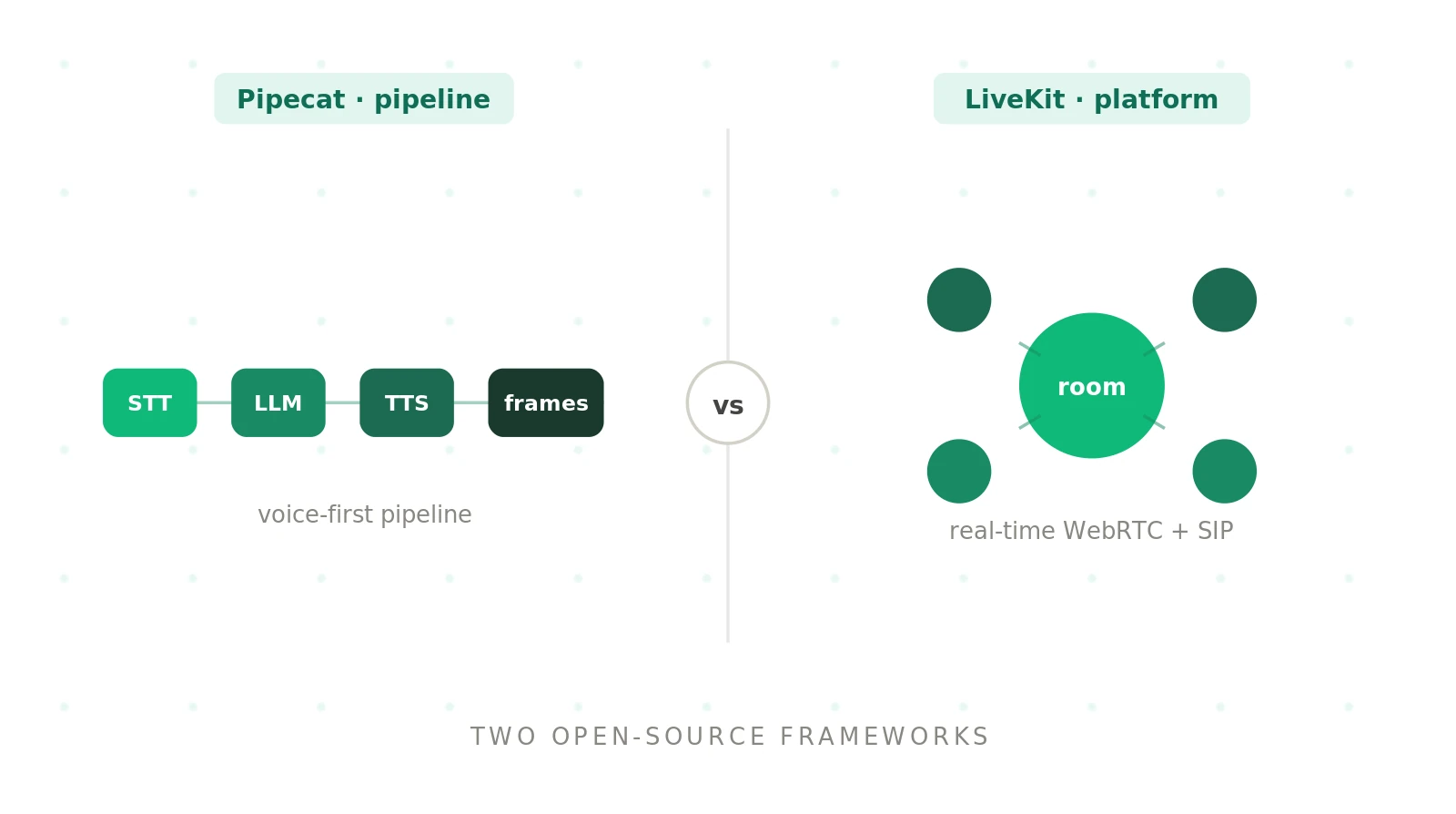
Pipecat: an open-source Python voice agent framework that also covers multimodal agents. Audio, text, and control frames flow through a pipeline of processors. It is BSD-2 licensed and maintained by Daily.
LiveKit: an open-source WebRTC media platform. Its Agents framework adds Python or Node.js programs to rooms as realtime participants. The server and framework are Apache 2.0 licensed.
Pipecat's docs describe orchestration across 150+ AI services. The framework works with any provider and any hosting environment. Client SDKs cover JavaScript, React, React Native, iOS, Android, and C++.
LiveKit's Agents docs describe a stateful bridge between AI models and users. Agents register as "agent servers" and wait for dispatch. Each dispatched job runs as a subprocess that joins a room. Telephony, recording, and client SDKs all hang off that room model.
So LiveKit owns the transport and adds orchestration. Pipecat owns orchestration and plugs into transports. The diagram shows where each one sits.
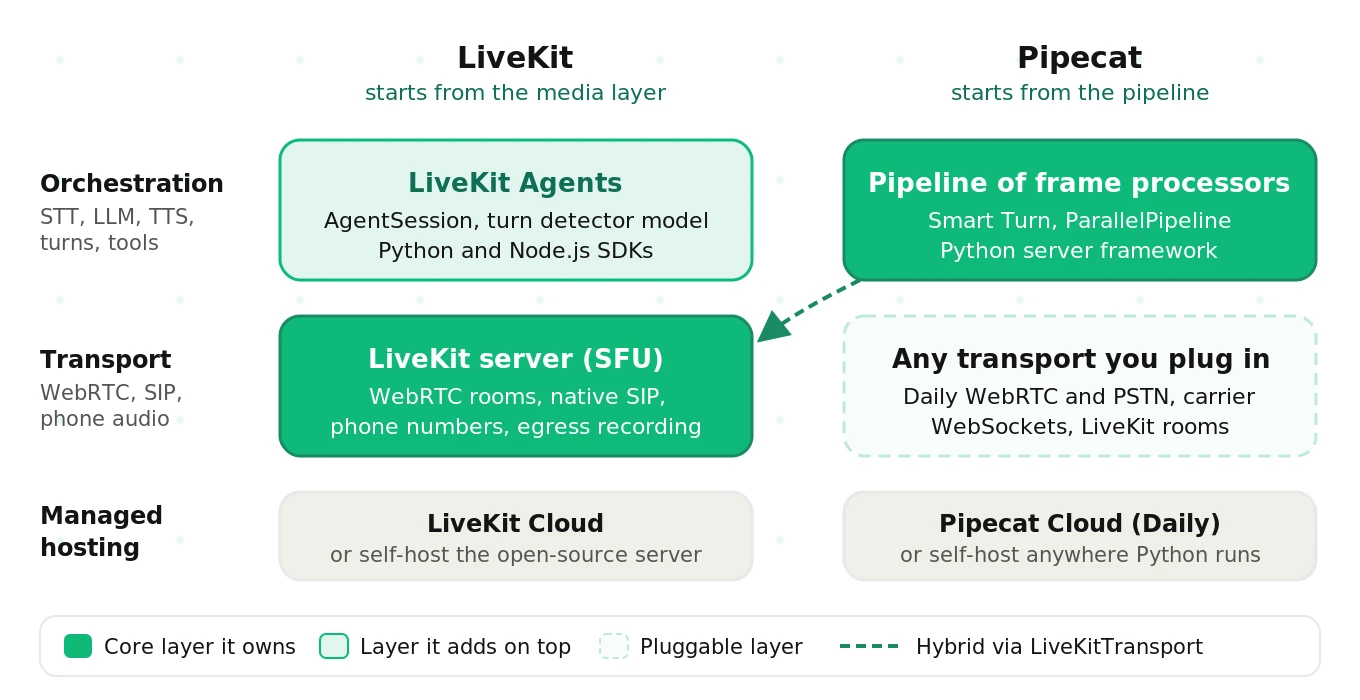
Transport: the layer that moves audio between caller and agent. Examples are WebRTC rooms, carrier WebSockets, and SIP trunks.
Orchestration: the layer that decides what happens to that audio. That covers STT, the LLM, TTS, tools, turn-taking, and state.
This is also why "Pipecat vs LiveKit agents" is the fairer comparison. LiveKit Agents is the part that competes with Pipecat. The LiveKit server is something Pipecat can even run on.
The master comparison table
Here is the whole Pipecat vs LiveKit picture in one place. Facts reflect official docs as of September 2026. Check versions before you rely on a specific row.
| Dimension | Pipecat | LiveKit |
|---|---|---|
| Layer | Orchestration framework | Media platform plus agents framework |
| Core abstraction | Pipeline of frame processors, run by a `PipelineWorker` | `AgentSession` inside a room, run by an agent server |
| License | BSD-2 | Apache 2.0 |
| Transport | Any: Daily WebRTC, SmallWebRTC, carrier WebSockets, LiveKit rooms | LiveKit WebRTC rooms (built in) |
| Telephony | Carrier WebSocket serializers, Daily PSTN and SIP | Native SIP trunks, dispatch rules, transfers, DTMF |
| Phone numbers | Through Daily or your carrier | LiveKit Phone Numbers (US) or your own trunk |
| Turn detection | Smart Turn v3, local ONNX model, default stop strategy | LiveKit turn detector model, default in `AgentSession` |
| Interruptions | User turn start strategies, such as minimum words | Adaptive interruption mode, false-interruption resume |
| Parallelism | `ParallelPipeline` forks and merges branches | Tasks, handoffs, and separate agents via room events |
| Multi-party and video | Depends on the transport you choose | Native rooms, tracks, screen share, avatars |
| Recording | `AudioBufferProcessor` in the pipeline | Egress at the room level |
| Server language | Python 3.11+ | Python 3.10+ and Node.js 20+ |
| Client SDKs | JS, React, React Native, iOS, Android, C++ | Web, mobile, and more |
| Self-hosting | Anywhere Python runs; you build the dispatcher | Open-source server, SIP service, agent servers |
| Managed cloud | Pipecat Cloud by Daily, or Pipecat Enterprise in your VPC | LiveKit Cloud |
| Scaling model | One pipeline process per session | Agent servers accept dispatched jobs, one subprocess each |
| Observability hooks | Metrics, observers, OpenTelemetry tracing | Session events, metrics, Cloud transcripts and traces |
| Ecosystem | Very wide service catalog; swaps are often one line | Plugins for major providers plus LiveKit Inference |
| Lock-in | Custom processors are Pipecat-specific | Room model spreads into clients and telephony |
Read the table by row, not by column count. Neither side "wins" more rows in a way that matters. Your top three rows decide it.
The same minimal agent in both
Code makes the layer difference concrete. Both snippets below are simplified from the official quickstarts. Imports, voice settings, and error handling are trimmed.
First, LiveKit Agents, from the Voice AI quickstart:
# LiveKit Agents (simplified from the Voice AI quickstart)
from livekit import agents
from livekit.agents import AgentServer, AgentSession, Agent, inference, TurnHandlingOptions

server = AgentServer()

@server.rtc_session(agent_name="my-agent")
async def my_agent(ctx: agents.JobContext):
    session = AgentSession(
        stt=inference.STT(model="assemblyai/universal-3-5-pro", language="en"),
        llm=inference.LLM(model="google/gemma-4-31b-it"),
        tts=inference.TTS(model="fishaudio/s2.1-pro"),
        turn_handling=TurnHandlingOptions(turn_detection=inference.TurnDetector()),
    )
    await session.start(room=ctx.room, agent=Agent(instructions="You are a helpful agent."))

if __name__ == "__main__":
    agents.cli.run_app(server)
Next, Pipecat, from the Pipecat quickstart:
# Pipecat (simplified from the Pipecat quickstart)
async def run_bot(transport, runner_args):
    stt = DeepgramSTTService(api_key=os.getenv("DEEPGRAM_API_KEY"))
    llm = OpenAIResponsesLLMService(api_key=os.getenv("OPENAI_API_KEY"))
    tts = CartesiaTTSService(api_key=os.getenv("CARTESIA_API_KEY"))

    context = LLMContext()
    user_agg, assistant_agg = LLMContextAggregatorPair(
        context,
        user_params=LLMUserAggregatorParams(vad_analyzer=SileroVADAnalyzer()),
    )
    pipeline = Pipeline([
        transport.input(), stt, user_agg, llm, tts,
        transport.output(), assistant_agg,
    ])
    worker = PipelineWorker(pipeline, params=PipelineParams(enable_metrics=True))
    runner = WorkerRunner(handle_sigint=runner_args.handle_sigint)
    await runner.add_workers(worker)
    await runner.run()
Three differences jump out.
- Where the caller comes from. The LiveKit agent assumes a room already exists. The Pipecat bot receives a transport you picked.
- How the flow is shaped. LiveKit hands components to a session. Pipecat lists processors in order, and frames flow through them.
- Who launches it. LiveKit's agent server waits for dispatch. Pipecat's runner starts one bot per session, locally or on Pipecat Cloud.
What changed since older comparisons
Both projects move fast. Many Pipecat vs LiveKit tutorials from 2025 now show outdated names. Check these before you copy code.
| Area | Older name or claim | Current as of September 2026 |
|---|---|---|
| Pipecat pipeline runner | `PipelineTask` and `PipelineRunner` | `PipelineWorker` and `WorkerRunner` |
| Pipecat turn ending | Silence timeout only | Smart Turn v3 is the default stop strategy |
| LiveKit agent process | "Workers" | "Agent servers" that accept dispatched jobs |
| LiveKit endpointing | `min_endpointing_delay` on `AgentSession` | `endpointing.min_delay` under `turn_handling` |
| LiveKit turn detection | VAD silence thresholds | Turn detector model by default, VAD as a mode |
| Pipecat telephony | "Twilio only via Pipecat Cloud" | Carrier WebSockets or Daily, self-hosted or on Cloud |
Pin versions in your proof of concept. Then read each project's changelog before you upgrade. A renamed parameter rarely fails loudly. It often just falls back to a default you never chose.
Telephony and SIP: LiveKit terminates calls, Pipecat bridges them
Telephony is where the Pipecat vs LiveKit gap shows first. LiveKit telephony terminates SIP itself. Each caller becomes a room participant. Trunks, dispatch rules, transfers, and DTMF are first-class.
Pipecat telephony runs through transports and serializers. Twilio, Telnyx, Plivo, and Exotel connect over media-stream WebSockets. Daily adds PSTN and SIP for richer call control. The WebSocket path is simple, but lacks features like transfers.
Both handle real calls well. Both also inherit the 8 kHz reality of phone audio. Our LiveKit vs Pipecat telephony guide covers call paths, DTMF, transfers, voicemail, and failure modes. For the protocol basics, see SIP vs WebRTC for voice agents.
Turn detection and interruptions: both use models now
Older comparisons, including an earlier version of this page, said Pipecat used an LLM for turns and LiveKit used only VAD thresholds. Neither is accurate today.
Pipecat's Smart Turn v3 is a small open-source audio model. It runs locally via ONNX and is the default stop strategy. Silero VAD feeds it, with a short `stop_secs` so the model can decide early.
LiveKit's turns guide makes its own turn detector model the default in `AgentSession`. You can switch to VAD-only, STT endpointing, realtime-model, or manual modes. Endpointing delays and interruption rules live under `turn_handling`.
Endpointing delay: the silence an agent waits for before deciding the caller has finished. It is the biggest latency slice you control directly.
Both frameworks also separate real barge-in from "mm-hmm." LiveKit uses an adaptive interruption mode with false-interruption resume. Pipecat uses start strategies, such as requiring a minimum number of words.
Noisy phone lines are the usual trouble spot. On Pipecat, `VADParams` exposes `confidence` (default 0.7) and `min_volume` (default 0.6), per the Silero VAD docs. Raising them ignores more background noise. It also misses more quiet callers. Test both directions on real line audio. Our VAD vs endpointing guide explains the difference between the two knobs.
Latency: usually a near tie
Which is faster, Pipecat or LiveKit? With the same STT, LLM, TTS, and region, they usually land close together. The framework itself adds tens of milliseconds. Endpointing, provider choice, streaming, region, and telephony hops decide the rest.
End-to-end figures of roughly 750 to 950ms are reported in public comparisons. Treat those as anecdotes, not benchmarks. Your stack will differ.
The knobs map almost one to one. LiveKit has `endpointing.min_delay`, `max_delay`, and preemptive generation. Pipecat has `stop_secs`, stop strategies, and eager turn strategies. Our LiveKit vs Pipecat latency breakdown walks each knob and its risk. The voice agent latency guide covers the full turn budget.
Benchmarking: hold everything constant except the framework
Published Pipecat vs LiveKit numbers rarely transfer to your stack. They mix different models, regions, and network paths. That makes any framework difference impossible to isolate.
A fair benchmark holds STT, LLM, TTS, prompts, tools, and region constant. Then it runs identical test calls through both. Compare p50, p95, and p99, plus barge-in, cut-offs, and task success. Treat differences inside the noise as a tie.
Our guide on how to benchmark LiveKit vs Pipecat includes instrumentation hooks, a shared turn schema, and sample sizes.
Scaling: dispatched jobs vs one process per session
The scaling unit is the real difference. LiveKit agent servers register with LiveKit and accept dispatched jobs. Each job gets its own subprocess. LiveKit ships the router, per its lifecycle docs, and balances load across servers.
Pipecat runs one pipeline process per session. Self-hosted, you build the dispatcher, the warm pool, and admission control. On Pipecat Cloud, each instance serves one session, scaled between `min_agents` and `max_agents`.
At high volume, provider rate limits usually bind before either framework does. Load-test with realistic calls before a traffic spike. Our LiveKit vs Pipecat scaling guide includes a capacity worksheet, cold-start tactics, and draining patterns. For a method, see stress testing voice AI.
Managed clouds and pricing: Pipecat Cloud vs LiveKit Cloud
Both frameworks are free. You pay for providers, compute, and optionally a managed host. The two managed hosts price differently.
As of September 2026, Pipecat Cloud pricing is pure usage. The smallest `agent-1x` profile is $0.01 per active minute, with no plan fee. LiveKit pricing combines plan tiers with included minutes. Build is free with 1,000 agent minutes. Ship starts at $50 per month, and overage is $0.01 per minute. Check both pages, since rates change.
In most cost models, STT, LLM, and TTS dominate the bill. A cheaper TTS voice moves the total more than switching hosts. Our Pipecat Cloud vs LiveKit Cloud comparison has a full cost worksheet, deploy commands, regions, and compliance notes. For the build-or-buy side, read managed vs self-hosted voice orchestration.
Using Pipecat and LiveKit together
You do not always have to choose. Pipecat ships a first-party LiveKitTransport. Your Pipecat bot joins a LiveKit room as a participant, with a token your server mints.
In that hybrid, LiveKit carries media, SIP, phone numbers, and recording. Pipecat runs STT, the LLM, TTS, turn-taking, and interruptions. You get LiveKit telephony with Pipecat pipelines.
The cost is two dependency trees and split observability. You also build the per-call launcher yourself. Our guide to using LiveKit and Pipecat together covers SIP dispatch, outbound calls, and the seams that break.
The gaps most comparisons miss
Surface comparisons stop at features. The expensive gaps show up months later. Examples include SIP glue on Pipecat, branching overhead on LiveKit, and a hard-to-reverse architecture on both.
Lock-in is the big one. LiveKit's room model spreads into client apps and telephony config. Pipecat's custom processors do not port back either. Keep prompts, tools, and business logic in framework-neutral modules. Our LiveKit vs Pipecat hidden gaps catalogs each gap and when it bites. If you ever need to switch, see how to migrate a voice agent vendor.
The decision in six questions
The full framework lives in how to choose between LiveKit and Pipecat. It scores ten criteria with weights that fit your team. Here is the short version.
1. Is PSTN or SIP your primary channel at scale? Yes leans LiveKit.
2. Do you need multi-party, video, or avatars? Yes leans LiveKit.
3. Does your logic branch or run in parallel each turn? Yes leans Pipecat.
4. Is your backend team Node.js-first? Yes leans LiveKit.
5. Must you swap transports or providers often? Yes leans Pipecat.
6. Do you want Pipecat logic on LiveKit media? Yes points to both.
If nothing pulls you either way, let a short proof of concept decide.
Where Vapi and other Pipecat alternatives fit
Some searches for Pipecat alternatives are really asking a different question. They are weighing a framework against a managed voice platform.
Vapi and similar platforms host the whole agent for you. You trade control for speed. LiveKit Agents is the main open-source alternative to Pipecat at the framework layer. If you are weighing a platform against a framework, read our LiveKit vs Vapi comparison. If you want a third open-source option, see LiveKit vs Pipecat vs Dograh. Our voice agent stack guide maps all the layers.
More LiveKit vs Pipecat deep dives
Use this map to jump straight to the question you have. Each guide goes deeper than this hub, with code and worksheets.
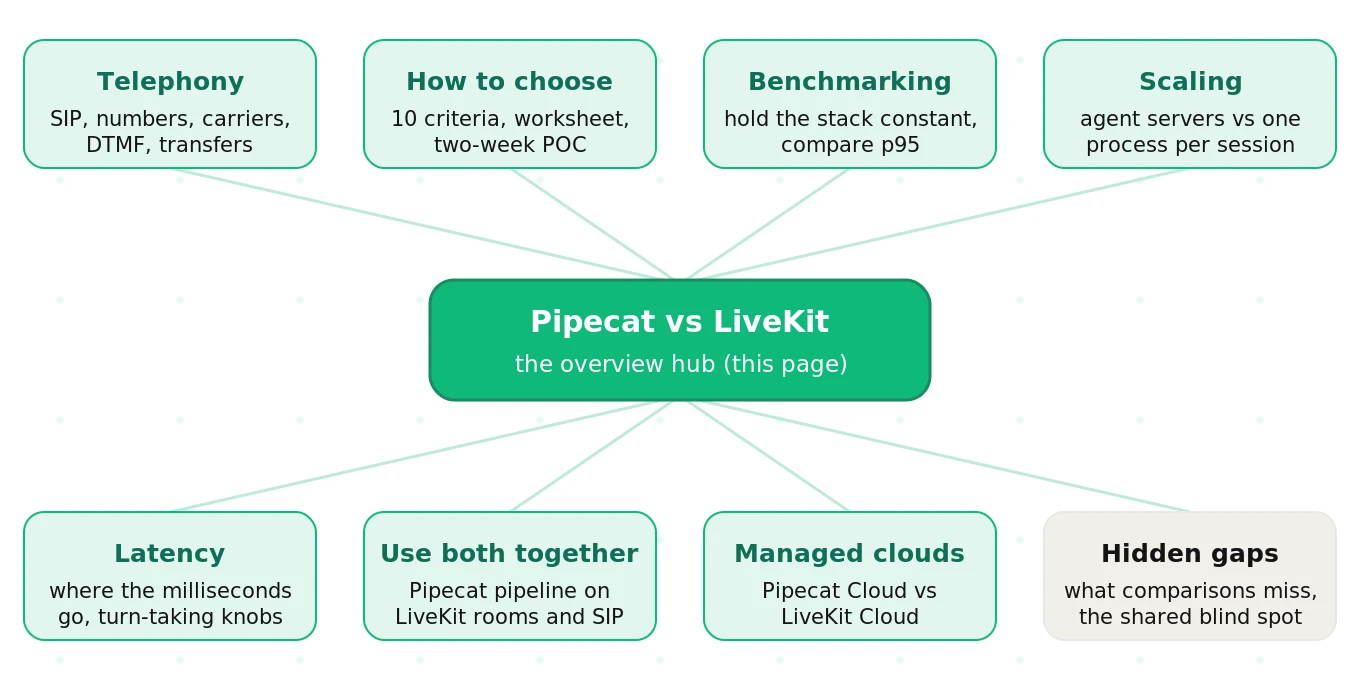
| Question | Guide |
|---|---|
| How does a phone call reach each framework? | Telephony: SIP, numbers, and real calls |
| Which one fits my team? | How to choose: a decision framework |
| How do I compare them fairly? | How to benchmark on your own workload |
| What happens at 1,000 concurrent calls? | Scaling: concurrency and production load |
| Where do the milliseconds go? | Latency: turn by turn |
| Can I run Pipecat on LiveKit? | Using LiveKit and Pipecat together |
| Which managed host should I use? | Pipecat Cloud vs LiveKit Cloud |
| What will bite me after launch? | The hidden gaps |
| How does Dograh compare to both? | LiveKit vs Pipecat vs Dograh |
What neither framework tells you
Both frameworks tell you what happened on a call. Neither tells you whether it should have happened.
LiveKit emits session events, such as interruptions and state changes. Pipecat exposes metrics, observers, and OpenTelemetry traces on every frame. Those signals are plumbing. They are not a judgment on the call.
A false interruption fires. Was the caller coughing, or trying to stop the agent? A turn ends after 300ms. Did the caller finish, or pause mid-number? A tool call succeeds. Did it book the right appointment?
Call-quality blind spot: the gap between framework telemetry and what the caller actually experienced. Every framework has it, because judging calls is not a framework's job.
Correlating framework events with call scores
Teams often ask how to line up LiveKit room events or Pipecat traces with evaluation results. The trick is a shared key and one clock.
Tag every call with one ID at the start. On LiveKit, the room name works. On Pipecat, use the session ID your runner or Pipecat Cloud assigns. Log each turn with that ID, a turn index, and timestamps. Then join framework telemetry and quality scores on call ID plus turn index.
# One normalized turn record (illustrative)
call_id: "room-7f3a"          # LiveKit room name or Pipecat session ID
turn_index: 4
user_stop_ms: 18420           # caller stopped speaking, referee clock
agent_start_ms: 19210         # first agent audio, same clock
framework_events: ["user_interruption_detected"]
scores:
  cut_off: false
  task_step_correct: true
Use the caller-side recording as the referee clock. Server logs miss network and telephony delay. Our benchmarking guide shows a full schema for both frameworks.
Where an independent evaluator fits
This is where Evalgent fits, as an independent third party. It scores real and simulated calls on turn-taking, interruptions, latency, and task success. It works on Pipecat, LiveKit, a hybrid, or anything else. You can map LiveKit room events or Pipecat traces to the same scored turns.
The platform uses five primitives:
- Scenarios define realistic test conversations.
- Profiles set caller personas, accents, and noise.
- Metrics measure what matters, with your own thresholds.
- Evaluations run batches of synthetic calls.
- Reviews let your team inspect failures with audio and transcript together.
During a proof of concept, both prototypes face one neutral grader. After launch, the same tests catch drift before customers do. For framework-specific walkthroughs, see our Pipecat testing guide and LiveKit testing guide. The method behind it is in synthetic callers for voice agent testing and independent voice AI evaluation.
How to prove your Pipecat vs LiveKit choice in two weeks
A short proof of concept beats a long debate. This plan fits in about two weeks.
1. Write down your constraints. List channels, languages, peak concurrency, residency rules, and team language.
2. Freeze a test set. Pick 30 to 50 scenarios from real transcripts. Include noise, accents, digits, and interruptions.
3. Hold the stack constant. Use the same STT, LLM, TTS, prompts, tools, and region in both prototypes.
4. Build two thin prototypes. Aim for the smallest agent that handles your top three intents on both.
5. Run identical calls through both. Use synthetic callers and a sample of real phone calls.
6. Score with one independent grader. Compare p95 latency, cut-offs, barge-in, and task success.
7. Price it at your real volume. Include providers, hosting, telephony, and the engineering time to run it.
8. Decide, then keep the test set. The same suite becomes your release gate after launch.
For a fuller plan with a scorecard, see how to run a voice agent bake-off. The broader discipline lives in our AI voice agent testing guide.
Frequently asked questions
Is Pipecat or LiveKit better for voice agents?
Neither is better in general. LiveKit fits phone-heavy, multi-party, and video agents, thanks to native SIP and rooms. Pipecat fits complex Python pipelines that must run on any transport. Many teams use both, with Pipecat on LiveKit rooms. Decide with a short proof of concept scored on your own calls, not on a feature list.
What is the difference between Pipecat and LiveKit Agents?
Pipecat is a Python orchestration framework where frames flow through processors on any transport. LiveKit Agents is the agent framework on top of LiveKit's WebRTC platform. It runs an `AgentSession` inside a room and ships Python and Node.js SDKs. LiveKit owns the media layer and adds orchestration. Pipecat owns orchestration and plugs into transports.
Can you use Pipecat with LiveKit?
Yes. Pipecat ships a first-party `LiveKitTransport`. Your Pipecat bot joins a LiveKit room as a participant, using a token your server mints. LiveKit then handles media, SIP, phone numbers, and recording. Pipecat handles STT, the LLM, TTS, and turn-taking. You build the per-call launcher yourself and watch two sets of logs.
Does Pipecat support SIP telephony?
Pipecat has no SIP server of its own. It reaches phones through carrier media-stream WebSockets, such as Twilio, Telnyx, Plivo, and Exotel. It also uses Daily PSTN and SIP for richer call control. The WebSocket path lacks features like transfers. LiveKit terminates SIP natively and sells US phone numbers through LiveKit Cloud.
Which is faster, Pipecat or LiveKit?
With the same STT, LLM, TTS, and region, latency is usually a near tie. The framework adds only tens of milliseconds. Endpointing delay, provider choice, streaming, region, and telephony hops decide most of what callers hear. Measure p95 latency on your own stack with identical test calls through both frameworks before trusting any published number.
How much do Pipecat Cloud and LiveKit Cloud cost?
As of September 2026, Pipecat Cloud bills usage only, starting at $0.01 per active minute for the smallest profile. LiveKit Cloud has a free Build tier with 1,000 agent minutes, then plans from $50 per month with $0.01 overage. STT, LLM, and TTS usually dominate total cost. Check both pricing pages for current rates.
How do I tune Pipecat VAD for background noise?
Adjust `VADParams` on `SileroVADAnalyzer`. Raise `confidence` above its 0.7 default, or `min_volume` above 0.6, to ignore more background noise. Both changes also miss more quiet speech. Keep `stop_secs` short, at 0.2, so Smart Turn decides turn ends. Test every change on real phone audio, not a clean headset.
Do you still need to test voice agents built on Pipecat or LiveKit?
Yes. Both frameworks help you build an agent, and both report what happened. Neither judges whether a call went well. Accents, noise, interruptions, and edge cases break agents on every framework. Independent testing with synthetic callers, such as Evalgent, scores call quality before real callers find the failures.
The bottom line
Pipecat vs LiveKit is a choice between an orchestration-first framework and a media-first platform, and many teams run both. The right pick is the one that wins on your own calls, scored by a neutral grader.
Want both prototypes scored on the same calls? Book a demo.
Related Articles

How to automate voice agent testing: synthetic callers vs manual QA
Learn how ai test automation replaces manual QA for voice agents. Compare synthetic callers vs human testers, with a 5-step framework to scale without hiring.
Read more
AI Agent Testing vs Voice Agent Testing: What General Tools Miss for Voice
AI agent testing measures text outputs. Voice agent testing measures behaviour through an acoustic pipeline. Five failure categories general tools miss.
Read more