Why AI voice agents fail in production: 9 failure layers, how to detect each, and how to prevent them

On this page
The demo went flawlessly. Stakeholders approved the launch. By the next morning, the tickets arrived.
"It kept asking me to repeat myself."
"It hung up on me after I said my account number."
"It told me my appointment was booked. It wasn't."
None of these came from a bad model. Each came from a layer nobody tested. This guide breaks down why voice agents fail in production, layer by layer. For each failure you get the symptom, the root cause, how to detect it, and how to prevent it. It ends with a pre-launch checklist, a monitoring config, and a worked incident.
Production failure (voice agent): Any call where the caller did not get the outcome they came for, or got it in a way that broke policy, trust, or time budgets. That includes "successful" calls that booked the wrong slot.
Those numbers frame the stakes. Gartner predicts over 40% of agentic AI projects will be canceled by the end of 2027. It cites escalating costs, unclear business value, and inadequate risk controls. Callers start skeptical, too. A Gartner survey of 5,728 customers found 64% would prefer companies didn't use AI for customer service. A voice agent gets very little benefit of the doubt. One bad call confirms the prejudice.
There is no credible public benchmark for a universal "voice agent failure rate." Anyone quoting one is guessing. Your failure rate depends on your callers, your stack, and your definition of success. The rest of this guide shows how to measure yours.
The demo vs production gap: why demos lie
A demo is built to show capability. It is not built to find breaking points. Every variable is controlled, so every weakness stays hidden.
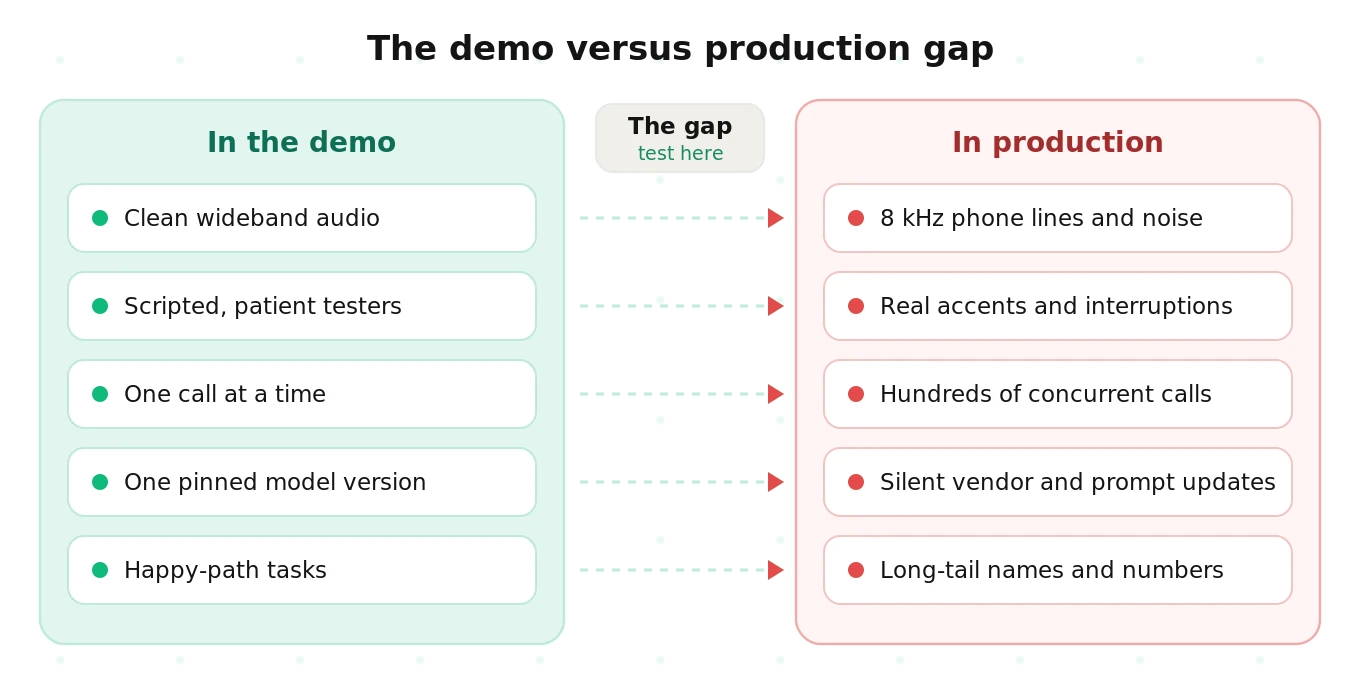
Here is what changes the moment real callers arrive.
| Dimension | In the demo | In production | Layer that breaks |
|---|---|---|---|
| Audio path | Browser WebRTC, wideband, laptop mic | PSTN or SIP, 8 kHz mu-law, cell networks, speakerphones | Telephony, ASR |
| Callers | Team members who know the script | Strangers with accents, kids in the background, impatience | ASR, turn-taking |
| Speaking style | Clean, complete sentences | Pauses, "um," self-corrections, reading digits slowly | Turn-taking, ASR |
| Conversation path | Happy path, one intent | Multi-intent, topic changes, off-topic questions | LLM reasoning |
| Backend | Mocked or warm APIs | Real CRMs, slow EHRs, expired tokens, rate limits | Tools, latency |
| Volume | One call at a time | Hundreds of concurrent calls at 9 a.m. Monday | Scale, latency |
| Versions | One model, one prompt, frozen | Vendor updates, prompt edits, new STT versions | Change |
| Evaluation | Someone listens and nods | A sample of transcripts, if anyone looks at all | Measurement |
Notice that the last row governs all the others. If you only review a handful of demo calls, you cannot see the other seven gaps. That is why so many teams say voice AI deployments break after the pilot. The pilot never measured the conditions that break them. Our guide on moving a voice AI pilot to production covers the organizational side of that transition.
The voice agent failure taxonomy: 9 layers
Most postmortems blame "the model." In practice, failures spread across the whole pipeline. Grouping them by layer tells you who owns the fix and which signal catches it.
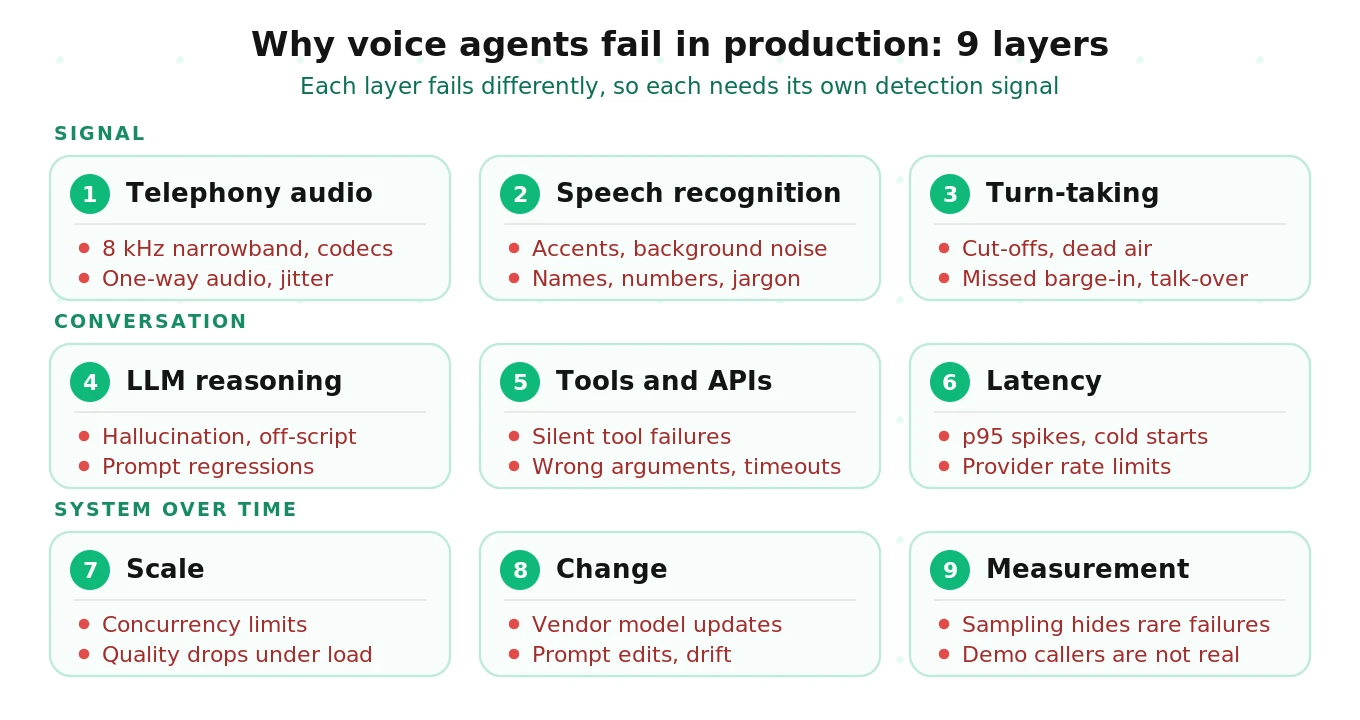
The layers stack. A telephony problem shows up as an ASR error. That becomes a wrong intent. That becomes a wrong tool call. So debug bottom-up, starting with the audio.
1. Telephony audio: the layer nobody tests
Symptom: The agent mishears callers on phones but works fine in the browser. Some callers hear nothing at all. Speech sounds choppy or robotic.
Root cause: Phone audio is narrowband. Twilio's Media Streams, for example, deliver audio as mu-law at 8,000 Hz, mono. An 8 kHz sample rate caps usable frequencies below 4 kHz. That is the narrowband range of the ITU-T G.711 codec behind most phone calls. Sounds like "s" and "f" lose the energy that separates them. An ASR model tuned on 16 kHz audio sees a different signal.
Three other telephony faults are common:
- Encoding mismatches. Send linear PCM where mu-law is expected and you get static or silence. There is often no error message.
- One-way audio. Twilio's support team notes that one-way audio usually traces to NAT or firewall issues blocking the media path. The agent "hears" nothing and waits.
- Jitter and packet loss. Cellular and VoIP links drop and reorder packets. Words vanish mid-utterance.
How to detect: Track the share of calls with zero caller speech detected. Track audio-level anomalies per carrier or SIP trunk. Compare ASR confidence on PSTN calls against WebRTC calls.
How to prevent: Test over the real phone path, not the browser. Resample deliberately and verify codecs end to end. Our SIP vs WebRTC guide explains where each path degrades audio.
2. Speech recognition: accents, noise, and entities
Symptom: The agent asks callers to repeat themselves. It captures the wrong name, date, or account number. Some caller groups fail far more than others.
Root cause: Word error rate is not uniform. It rises with background noise, far-field speakerphones, and accents underrepresented in training data. Entities are the worst case. A single wrong digit in a 10-digit number fails the whole task, even when overall WER looks fine.
How to detect: Segment WER and entity accuracy by accent group, noise level, and channel. Average WER hides the groups that fail. Watch repeat-request rate ("Sorry, could you say that again?") per call.
How to prevent: Test against the accents and noise profiles in your actual traffic. Add custom vocabulary or keyword boosting for product names. Confirm critical entities back to the caller. See our deep dives on noise robustness, accent handling, and STT entity accuracy.
3. Turn-taking: cut-offs, dead air, and talk-over
Symptom: The agent interrupts callers mid-sentence. Or it sits silent for seconds after they finish. Or it keeps talking when the caller tries to interject.
Root cause: Turn detection is a tradeoff between speed and patience. OpenAI's Realtime API documents a `silence_duration_ms` default of 500 ms for server VAD. It warns that shorter values respond faster but may jump in on short pauses. Callers reading a card number pause longer than that between digit groups. The agent takes the partial number and moves on.
Vendors now offer model-based alternatives. OpenAI's `semantic_vad` estimates whether the words so far form a complete thought. LiveKit's turn detector adds an audio model on top of VAD for the same reason, judging both the words and how they are said. Deepgram exposes both endpointing and a separate UtteranceEnd event based on word timings. None of these is right by default for every use case.
Update (October 4, 2026): LiveKit's turn detector is now an audio model. It reads the caller's audio directly, so it hears intonation and pauses as well as the words. An earlier version of this post described it as text-based, because LiveKit's original detector was a language model that read the STT transcript. LiveKit has deprecated that text model and plans to remove it in Agents SDK 2.0 (LiveKit turn detector docs). For how the methods compare, see end-of-turn detection with Flux, Silero and LiveKit's turn detector.
Barge-in fails the other way. The agent does not stop speaking when the caller interrupts. Or it stops on a cough, a "mm-hmm," or TV noise.
How to detect: Measure overlap time, response gap after end of speech, and turns where the caller repeats the tail of their last utterance. Flag calls with any silence over a few seconds.
How to prevent: Tune endpointing per task, with longer patience in digit-collection states. Test with callers who pause, hesitate, and self-correct. Read our guides on endpointing, dead air, and barge-in.
4. LLM reasoning: hallucination, drift off-script, and prompt regressions
Symptom: The agent states a policy that doesn't exist. It promises a refund it can't issue. It skips a required disclosure. It follows a caller off-topic and never returns.
Root cause: The model fills gaps with plausible text when grounding is missing. Long prompts compete with themselves, so one instruction wins and another is ignored. Small prompt edits shift behavior in flows nobody retested.
How to detect: Check each factual claim against the knowledge source. Check each required step against the flow definition. A transcript that sounds fluent can still be wrong, which is why LLM-as-judge scoring on transcripts has real limits.
How to prevent: Ground answers in retrieved content. Make required steps explicit and testable. Run a regression suite on every prompt change. Our guide to hallucinations in voice agents goes deeper on detection.
5. Tools and integrations: the silent failures
Symptom: The agent says "You're all set." Nothing was booked. Or it booked the wrong date, for the wrong person, in the wrong time zone.
Root cause: Tool failures are often silent. An API returns a 200 with an error body. A timeout fires and the model improvises a success message. The model passes "next Friday" as a literal string, or swaps day and month. The conversation sounds perfect while the system of record says otherwise.
How to detect: Log every tool call with arguments, status, latency, and response. Compare what the agent told the caller against what the backend recorded. A mismatch between spoken outcome and system state is the single most important alert you can build.
How to prevent: Validate arguments against a schema before calling. Make tool errors explicit to the model, with scripted recovery lines. Test with slow, failing, and malformed backends. See detecting silent tool failures and tool argument accuracy.
6. Latency: p95 spikes, cold starts, and rate limits
Symptom: Most turns feel snappy. Some take three or four seconds. Callers say "Hello?" and talk over the agent's late reply.
Root cause: A cascaded agent adds STT, LLM, and TTS time, plus network hops and tool calls. Averages hide the tail. Cold starts on serverless workers, long tool calls, and provider rate limits (HTTP 429 responses) all land in the p95 and p99. For reference, ITU-T G.114 treats one-way delay under 150 ms as essentially transparent and above 400 ms as unacceptable for network planning. An AI agent's full response time is far longer, so every extra hop is felt.
How to detect: Track time to first audio per turn at p50, p95, and p99. Break it down by component. Alert on 429s and retries from every provider.
How to prevent: Keep workers warm. Stream every stage. Add filler speech before slow tool calls. Load-test against your real provider quotas. Our voice agent latency guide breaks down the budget per component.
7. Scale: quality that degrades under load
Symptom: Everything works at 10 calls. At 200 concurrent calls, latency climbs, audio stutters, and some calls fail to connect.
Root cause: Concurrency limits exist at every layer. SIP trunks cap channels. STT and TTS providers cap concurrent streams. LLM providers cap tokens per minute. CPU-bound audio processing starves when workers are oversubscribed. Quality often degrades gradually rather than failing loudly.
How to detect: Plot quality metrics against concurrent call count. If task success drops as concurrency rises, you have a scale failure.
How to prevent: Run load tests at peak-hour concurrency plus headroom, with realistic conversations, not pings. See our concurrency failure guide and the stress-testing framework.
8. Change: vendor updates, prompt edits, and drift
Symptom: Nothing in your code changed. Metrics dropped anyway. Or a "small" prompt fix broke an unrelated flow.
Root cause: Your stack has many owners. Model aliases move to new versions. OpenAI's model pages note that snapshots let you lock a specific version so behavior stays consistent. Aliases don't offer that. Pinned versions don't last forever either. Anthropic's model deprecations page commits to at least 60 days' notice before retiring public models. You will migrate eventually. Separately, caller behavior drifts with seasons, promotions, and new products.
How to detect: Compare daily metrics against a fixed baseline. Annotate every deploy, prompt edit, and vendor version change on the same timeline.
How to prevent: Pin versions where you can. Rerun the full regression suite on every change, including vendor migrations. Read the regression problem and our guide to voice agent metric drift.
9. Measurement: the failures you never see
Symptom: Dashboards look healthy. Complaints keep arriving. Leadership asks why QA missed it.
Root cause: Most teams review a small sample of calls. Rare failures slip past sampling by definition. A failure hitting 1 in 200 calls may appear zero times in a 50-call review. Aggregate scores also blend groups. A strong majority can hide a minority that fails most of the time.
How to detect: Score every call automatically, then route only flagged calls to humans. Segment every metric by intent, caller group, and channel.
How to prevent: Replace demo-style checks with scenario coverage that mirrors real callers. Our guides on sampling live calls and scoring every call, not a sample explain the math.
Master table: symptom, root cause, detection, and prevention
Use this as a triage sheet. Start with the symptom a caller or dashboard reports. Then work across the row.
| Layer | Failure mode | Symptom | Root cause | How to detect | How to prevent |
|---|---|---|---|---|---|
| Telephony | Narrowband audio | Mishears on phones, fine in browser | 8 kHz mu-law, wideband-tuned ASR | Compare ASR confidence by channel | Test over PSTN/SIP; phone-tuned STT model |
| Telephony | Encoding mismatch | Static or silence, no error | Wrong codec or sample rate | Zero-speech call rate | End-to-end codec checks in CI |
| Telephony | One-way audio | Agent waits, caller hears nothing | NAT, firewall, SIP ALG | Calls with no inbound RTP | Network config review; carrier test calls |
| Telephony | Jitter, packet loss | Clipped words | Poor cellular or VoIP links | Packet loss per carrier | Jitter buffers; repeat-back for entities |
| ASR | Accent gaps | Some groups repeat themselves | Training data imbalance | WER by accent group | Accent-matched test callers |
| ASR | Noise | Wrong words in busy settings | Low signal-to-noise ratio | WER by noise bucket | Noise-injected tests; noise suppression |
| ASR | Entity errors | Wrong names, digits, dates | Rare tokens, digit strings | Entity accuracy vs ground truth | Custom vocabulary; confirm back |
| Turn-taking | Premature endpointing | Agent cuts callers off | Silence threshold too short | Caller repeats tail of utterance | Longer patience in digit states |
| Turn-taking | Dead air | Long silence after caller stops | Late end-of-turn, slow pipeline | Silence over threshold per turn | Semantic turn detection; filler speech |
| Turn-taking | Barge-in failure | Agent talks over caller | Interruption not handled or too sensitive | Overlap duration | Tune interruption thresholds; test backchannels |
| LLM | Hallucination | Invented policy or price | Missing grounding | Claim check vs knowledge base | Retrieval grounding; refusal paths |
| LLM | Off-script | Skips required steps | Prompt conflicts | Step-completion checks | Explicit, testable flow steps |
| LLM | Prompt regression | Old flows break after edit | Untested prompt change | Regression suite diff | Gate every prompt change |
| Tools | Silent failure | "Booked" but nothing booked | Error hidden behind 200 or timeout | Spoken outcome vs system state | Explicit error handling; verification |
| Tools | Wrong arguments | Wrong date, person, amount | Poor extraction or formatting | Argument vs caller intent | Schema validation; confirmation |
| Latency | p95 spikes | Occasional 3-4 s gaps | Tool calls, cold starts, queues | p95/p99 time to first audio | Warm pools; streaming; fillers |
| Latency | Rate limits | Sudden failures at peak | Provider quotas | 429 and retry counts | Quota planning; fallback providers |
| Scale | Load degradation | Quality falls at peak | Concurrency caps, CPU starvation | Metrics vs concurrent calls | Realistic load tests |
| Change | Vendor update | Drop with no code change | Moving model alias | Baseline comparison + change log | Pin snapshots; regression on migration |
| Change | Drift | Slow decline over weeks | New caller intents, seasonality | Rolling metric trend | Refresh test sets from production |
| Measurement | Sampling blind spot | Complaints, clean dashboards | Rare failures missed | Coverage of scored calls | Score every call |
| Measurement | Aggregate masking | Averages fine, groups failing | Unsegmented metrics | Per-segment metrics | Segment by intent, group, channel |
A hypothetical incident walkthrough
The following incident is illustrative. It is a composite built to show how layers interact. It does not describe any specific company.
Monday, 9:00 a.m. A dental group's scheduling agent handles its first busy Monday. Concurrency jumps from a dozen calls to about 150.
9:20 a.m. The practice management API slows under the new load. Booking calls now take several seconds. The agent's tool timeout fires.
9:21 a.m. The timeout returns an empty response. The prompt never says what to do with an empty response. The model tells callers, "You're all set for Thursday at 2."
9:40 a.m. Meanwhile, callers reading insurance member IDs pause between digit groups. The 500 ms silence threshold ends their turn early. The agent confirms a truncated ID.
11:00 a.m. Transcript sampling finds nothing. The 20 sampled calls sound polite and fluent. The average score is high.
Thursday. Patients arrive for appointments that don't exist. Front-desk staff escalate.
The postmortem finds four layers involved:
| Layer | What failed | Signal that would have caught it |
|---|---|---|
| Scale | Backend slowed under peak load | Tool latency vs concurrency plot |
| Tools | Timeout treated as success | Spoken outcome vs booking record mismatch |
| Turn-taking | Endpointing too eager for digit strings | Entity accuracy on member IDs |
| Measurement | 20-call sample missed a rare pattern | Every-call scoring with alerts |
No single fix would have prevented this incident. A layered test suite and a spoken-vs-system-state check would have caught it on Monday morning.
Production monitoring setup: what to alert on
Most teams ask the same question after launch: how do we catch tool failures and latency spikes early? Here is a compact alerting setup that covers all nine layers. Thresholds are illustrative starting points. Calibrate them against your own pre-launch baseline.
# Illustrative voice agent alert rules. Tune thresholds to your baseline.
alerts:
  telephony:
    zero_caller_speech_rate:  { window: 15m, warn: "> 2x baseline" }
    packet_loss_by_carrier:   { window: 15m, warn: "> 3%" }
  asr:
    repeat_request_rate:      { window: 1h,  warn: "> 1.5x baseline" }
    entity_confirm_failures:  { window: 1h,  warn: "> 1.5x baseline" }
  turn_taking:
    silence_over_3s_per_call: { window: 15m, warn: "> 1.5x baseline" }
    caller_overlap_ms_p95:    { window: 15m, warn: "> 1.5x baseline" }
  llm:
    ungrounded_claim_rate:    { window: 1h,  page: "> 0 on regulated intents" }
    required_step_skipped:    { window: 1h,  page: "> baseline + 2 sd" }
  tools:
    outcome_state_mismatch:   { window: 5m,  page: ">= 1" }
    tool_error_or_timeout:    { window: 5m,  warn: "> 2%", page: "> 5%" }
  latency:
    ttfa_p95_ms:              { window: 5m,  warn: "> 1.3x baseline" }
    provider_429_count:       { window: 5m,  page: "> 0 sustained 3 windows" }
  scale:
    task_success_vs_concurrency: { check: "slope < 0 at peak", warn: true }
  change:
    annotate_on: [deploy, prompt_edit, model_version, stt_version, tts_version]
    compare_to: "last_passing_regression_run"
A few design choices matter more than the exact numbers.
Alert on outcome-state mismatch first. It is the highest-value signal. It catches silent tool failures that every other metric misses.
Alert on ratios to baseline, not fixed numbers. Your baseline comes from pre-launch evaluation. Deviation from it means something changed.
Score every call, review few. Automated scoring flags calls. Humans review only the flagged ones. That answers the common question of how to monitor every call and only review what needs attention.
Tag every call with versions. Record model, prompt, STT, and TTS versions per call. Then any regression maps to a change in minutes. Tracing standards help here. Our guide on OpenTelemetry for voice agents shows the span layout.
Clustering production failures into root causes
Raw failure counts don't tell you what to fix. Clustering does. Tag each flagged call with a primary layer from the taxonomy above. Then add a failure mode and the conversation state where it happened.
{
  "call_id": "c_48213",
  "layer": "tools",
  "failure_mode": "silent_failure",
  "state": "confirm_booking",
  "evidence": "agent said booked; scheduling API returned timeout",
  "versions": { "prompt": "v41", "llm": "pinned-snapshot", "stt": "v3" }
}
Group by layer, then mode, then state. The largest cluster is your next fix. Convert each cluster's worst calls into regression tests. Our guide to the production feedback loop covers that workflow, and monitoring AI voice agents in production covers the wider dashboard.
How to prevent voice agent failures before launch
This checklist maps one test to each layer. Run it before launch and after every change. It turns the taxonomy into a release gate.
1. Profile your real traffic. List the channels, carriers, accents, noise settings, and top intents you expect. Use pilot recordings where you can.
2. Test over the real phone path. Route test calls through your actual SIP trunk or carrier at 8 kHz. Confirm codecs end to end.
3. Stress speech recognition. Run accent-matched and noise-injected callers. Measure WER and entity accuracy per segment, not just overall.
4. Stress turn-taking. Include callers who pause mid-number, hesitate, backchannel, and interrupt. Measure cut-offs, dead air, and overlap.
5. Probe reasoning. Ask out-of-scope and adversarial questions. Verify every factual claim and every required step.
6. Break your tools on purpose. Inject timeouts, 500s, empty bodies, and slow responses. Verify the agent never claims success it didn't get.
7. Load-test at peak plus headroom. Use realistic conversations at peak concurrency. Plot quality against load.
8. Pin and record versions. Pin model snapshots where available. Store every version in call metadata.
9. Set pass/fail thresholds from evidence. Derive thresholds from your baseline run, then gate releases on them.
10. Wire up production alerts before go-live. Deploy the monitoring rules above on day one, not after the first incident.
For a longer version, see our voice agent testing checklist and the production readiness bar. Synthetic callers make steps 3 to 7 feasible at scale, and automated evaluations make them repeatable on every change.
Voice agent failure patterns by industry
Failure layers are universal. Which layer hurts most depends on the domain.
| Industry | Riskiest layers | Typical failure | Evaluation focus |
|---|---|---|---|
| Healthcare | ASR, tools, LLM | Wrong member ID or medication name; unconfirmed bookings | Entity accuracy, outcome verification, escalation triggers |
| Financial services | ASR, turn-taking, LLM | Truncated account numbers; skipped disclosures | Digit capture, disclosure completeness, adversarial inputs |
| Retail and e-commerce | Tools, LLM | Wrong item or order state; invented return policy | Argument accuracy, grounding, order-state checks |
| Contact center (general) | Telephony, scale, latency | Peak-hour degradation; noisy callers | Load tests, noise robustness, transfer handling |
| Multilingual US markets | ASR, LLM | Code-switching between English and Spanish | Per-language WER, mixed-language intent handling |
The bottom line
Voice agents fail in production because real calls stress nine layers that a demo never touches. Teams that test and monitor each layer separately find those failures before their callers do.
Book a demo → /demo
Frequently asked questions
Why do voice AI deployments fail after demos work perfectly?
Demos run on clean browser audio with scripted testers, one call at a time, on one frozen model version. Production adds 8 kHz phone audio, accents, pauses, interruptions, slow backends, peak concurrency, and vendor updates. Each exposes a layer the demo never exercised. The model is rarely the only cause. Untested layers around it usually are.
What failure modes should companies test before deploying AI voice agents?
Test all nine layers: telephony audio, speech recognition, turn-taking, LLM reasoning, tools, latency, scale, change, and measurement. At minimum, cover phone-path audio, accent and noise segments, digit-string endpointing, hallucination and skipped steps, failing tools, p95 latency, peak-load quality, and regression after version changes. Each needs its own pass/fail threshold.
How do I monitor tool call failures and latency spikes in production voice agents?
Log every tool call with arguments, status, latency, and response. Alert when what the agent told the caller differs from what the backend recorded. Track time to first audio at p95 and p99 per component. Alert on provider 429s and retries. Compare everything to a pre-launch baseline, not fixed numbers.
What is a typical voice agent failure rate?
No credible public benchmark exists for a universal voice agent failure rate. It depends on your callers, tasks, stack, and definition of success. Measure your own: define success per intent, score every call automatically, and segment results by intent, channel, and caller group. Track the trend against your pre-launch baseline.
How do I cluster production voice agent failures into root causes?
Tag each flagged call with a layer, a failure mode, and the conversation state where it happened. Include the prompt, model, STT, and TTS versions. Group by layer, then mode, then state. The largest cluster is your next fix. Turn its worst calls into regression tests so the fix stays fixed.
Can synthetic voice agent tests avoid exposing production PII?
Yes. Synthetic callers can use generated names, account numbers, and addresses that follow real formats without belonging to real people. Build scenarios from redacted production patterns rather than raw recordings. Keep test data in a sandboxed backend. See our guide on PII handling in voice agents.
Why does voice AI deployment break after the pilot phase?
Pilots run at low volume with forgiving users and close supervision. Scaling adds concurrency limits, more accents and noise, new intents, and vendor updates. Review usually stays sample-based while volume grows, so rare failures go unseen. Deployments break when testing and monitoring don't scale with traffic.
How do I monitor every production voice agent call and only review the ones that need attention?
Score every call automatically against defined checks: task outcome, outcome-state match, required steps, grounding, latency, and turn-taking. Flag calls that fail any check or deviate from baseline. Route only flagged calls to human reviewers, grouped by root-cause cluster. This keeps coverage complete while keeping review workload small.
Related Articles

Voice agent regression testing: how to detect regressions from model updates you don't control
Voice agent regression testing for changes you don't control: pin each layer, run a nightly pinned-vs-latest canary, and use paired stats to detect drops.
Read more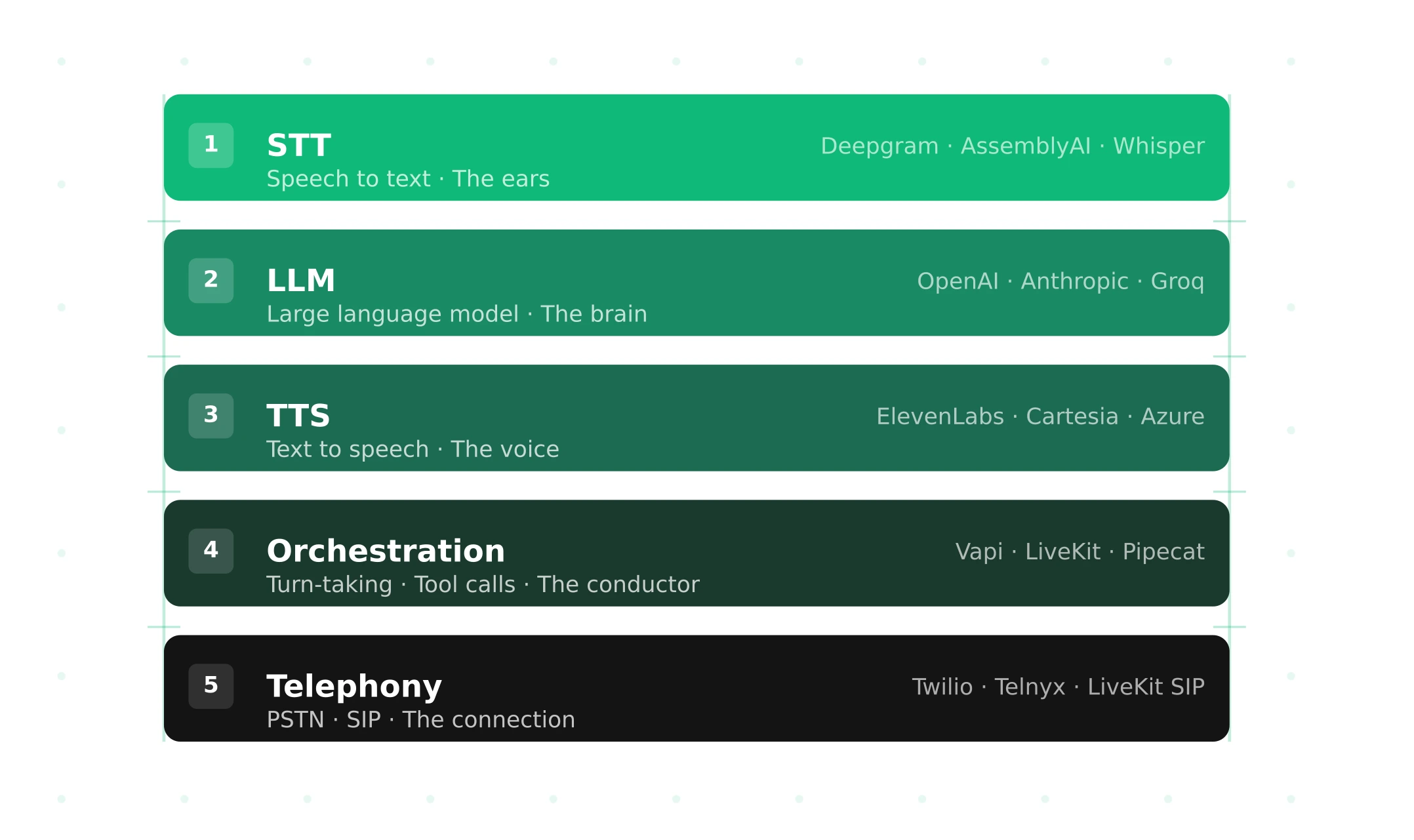
The Voice Agent Stack: Every Layer, the Latency Budget and the Real Cost (2026)
Every layer of a voice agent stack, from SIP and codecs to turn detection and evals, with an 800 ms latency budget and verified per-minute costs.
Read more