Open door for builders.
Pipecat Cloud vs LiveKit Cloud: Managed Voice Agent Hosting Compared
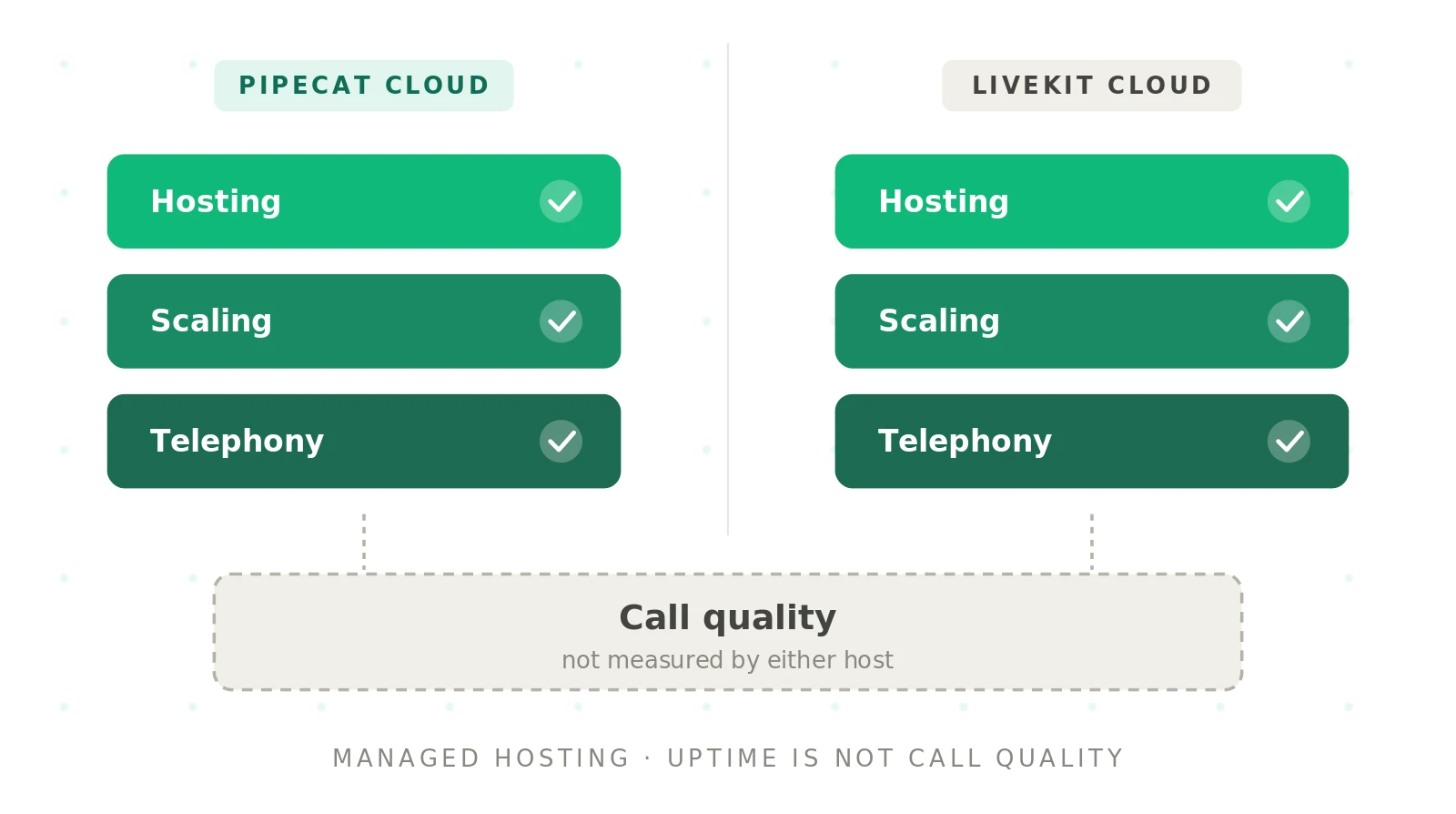
Most comparisons stop at the framework. This Pipecat Cloud vs LiveKit Cloud guide covers the hosting layer: deploys, cold starts, regions, phone lines, logs, compliance, cost, and the exit path. It is for engineers and technical buyers who have picked a framework, or are close. If you are still choosing the framework, start with our Pipecat vs LiveKit hub. Everything here was checked against vendor docs and pricing pages in September 2026. Prices change, so check current pricing before you commit.
Managed voice agent hosting: A service that runs your voice agent code in a vendor's infrastructure. It starts a process per call, scales capacity, stores secrets, and exposes logs. You still choose and pay for STT, LLM, and TTS.
What each cloud actually runs for you
The names suggest parity. The scope is different.
Pipecat Cloud is Daily's managed platform for Pipecat agents. You bring an agent image. It handles deploys, session starts, scaling, and observability. Agents run in Daily-hosted regions in the US, Europe, and India. A sibling product, Pipecat Enterprise, runs agents in a Kubernetes cluster in your own VPC. Daily still runs the control plane there.
LiveKit Cloud is LiveKit's managed realtime network plus agent hosting. You deploy LiveKit Agents code with one CLI command. LiveKit Cloud builds the container, load-balances sessions, and scales capacity up to your plan limits. The same cloud also carries WebRTC media, SIP calls, phone numbers, recordings, and agent observability.
So the core difference is this. Pipecat Cloud is a compute platform for a transport-neutral framework. LiveKit Cloud is a media network that also hosts compute.
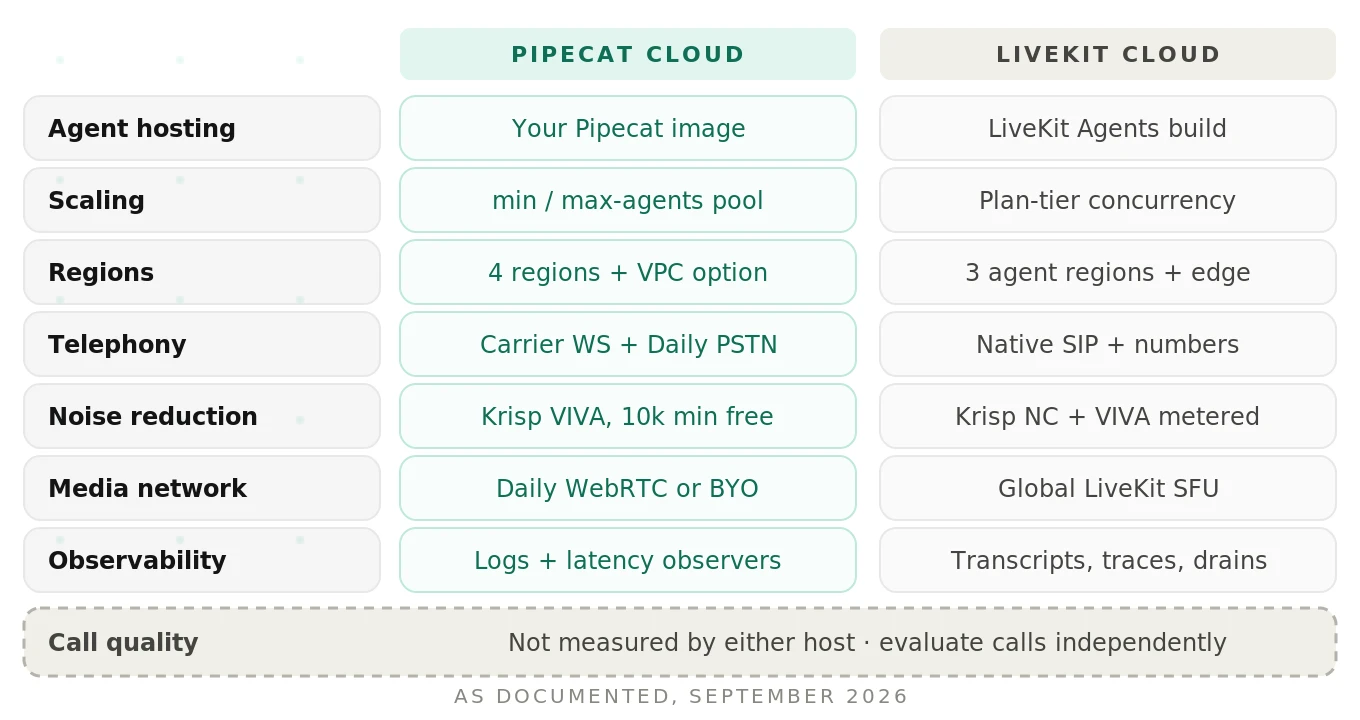
That difference shows up everywhere below. Pipecat Cloud lets you pick the transport per agent: Daily WebRTC, a WebSocket, or a carrier stream. LiveKit Cloud agents meet callers and SIP legs inside a LiveKit room.
Agent session: One live conversation between your agent and a user. Both clouds meter hosting by session time, not by requests or tokens.
The deploy workflow, command by command
Both clouds build your image from a Dockerfile and deploy with one command. The details differ in ways that matter for CI.
Pipecat Cloud deploy
Pipecat Cloud ships as a plugin to the Pipecat CLI. The commands below come from the deployment docs and secrets docs. Agent and secret names are placeholders.
# Install the Pipecat CLI with the Pipecat Cloud plugin
uv tool install "pipecat-ai[cli]" --with pipecatcloud

# Create a secret set in the same region as the agent
pipecat cloud secrets set support-bot-secrets \
  DEEPGRAM_API_KEY=... OPENAI_API_KEY=... CARTESIA_API_KEY=... \
  --region us-east

# Shareable deploy config, picked up automatically by the CLI
cat > pcc-deploy.toml <<'EOF'
agent_name = "support-bot-us-east"
secret_set = "support-bot-secrets"
agent_profile = "agent-1x"
region = "us-east"

[scaling]
    min_agents = 2
EOF

# Cloud build from your Dockerfile, then deploy
pipecat cloud deploy

# Check readiness and tail logs
pipecat cloud agent status support-bot-us-east
pipecat cloud agent logs support-bot-us-east -l ERROR
A few details are easy to miss. Agent names are globally unique across regions. Secret sets live in exactly one region, so a multi-region rollout needs one set per region. Secret provisioning is asynchronous, and a deploy against a `pending` set returns HTTP 409. In CI, poll the secret status before you deploy.
Sessions start through a REST call or the Python SDK. That call is the hook your app or phone webhook hits.
curl --request POST \
  --url https://api.pipecat.daily.co/v1/public/support-bot-us-east/start \
  --header 'Authorization: Bearer <public-api-key>' \
  --header 'Content-Type: application/json'
LiveKit Cloud deploy
LiveKit Cloud uses the `lk` CLI. These steps follow the agent deployment quickstart and the deployment management guide.
# Link the CLI to your LiveKit Cloud project
lk cloud auth

# Register the agent, write livekit.toml, build, and deploy
lk agent create --region us-east --secrets-file=.env.production

# livekit.toml is generated for you; it looks like this
cat livekit.toml
# [project]
#   subdomain = "<my-project-subdomain>"
# [agent]
#   id = "<agent-id>"

# Ship a new version with a rolling deploy
lk agent deploy

# Status, live logs, secrets, rollback
lk agent status
lk agent logs
lk agent update-secrets --secrets "OPENAI_API_KEY=..."
lk agent rollback
LiveKit uses a rolling deployment. New instances take new sessions once their health check passes. Old instances get up to one hour to finish active calls. Health checks get five minutes to pass, so a slow `prewarm` can stall a rollout. Updating secrets triggers a rolling restart. Instant rollback is available on paid plans only.
For CI, LiveKit publishes a `livekit/deploy-action` GitHub Action. Pipecat Cloud offers a GitHub integration, a GitHub Actions path, and deploys from your own registry.
Deploy semantics side by side
| Behavior | Pipecat Cloud | LiveKit Cloud |
|---|---|---|
| Config file | `pcc-deploy.toml` (optional) | `livekit.toml` (generated) |
| Build | Cloud build from Dockerfile, or bring your own image | Cloud build from Dockerfile |
| In-flight calls on deploy | Old instances finish their sessions, then get discarded | Old instances get up to 1 hour to drain |
| Failed deploy | Traffic stays on the prior ready deployment | Old instances serve until the new health check passes |
| Gotcha | Re-pushing the same image tag does not create a new version; use `--force` | Region is fixed at `lk agent create` |
| Rollback | Redeploy a prior image | `lk agent rollback` on paid plans |
Scaling and cold starts
Callers wait in silence during a cold start, so test it first.
Pipecat Cloud: pools, min-agents, and a free buffer
Pipecat Cloud creates a managed pool of instances per deployment. Its scaling docs spell out the rules.
- One session per instance. Concurrency equals running instances. A bigger profile gives one call more CPU, not more calls.
- `min-agents` keeps warm instances ready. It defaults to 0. Warm instances bill as reserved minutes around the clock.
- `max-agents` is a hard cap. Past it, `/start` returns HTTP 429.
- Pool ceiling. Each deployment in a Daily-hosted region allows up to 50 instances by default. You request more through a form.
- Cold start. Daily calls around 10 seconds the best case. Large images and heavy imports push it to 30 seconds or more.
- Auto-scaling buffer. Daily provisions extra idle instances for free when traffic rises. They arrive in about 30 seconds.
- Scale-to-zero. Idle instances linger for 5 minutes, then terminate.
The practical rule is simple. Set `min-agents` to cover baseline traffic. Let the buffer absorb normal ramps. Bake model and VAD weights into the image so startup stays short.
Your app must also handle a 429 gracefully. Here is a simplified pattern.
# Simplified: start a Pipecat Cloud session, back off on capacity errors
import time, requests

def start_session(agent: str, key: str, body: dict, tries: int = 4):
    url = f"https://api.pipecat.daily.co/v1/public/{agent}/start"
    for attempt in range(tries):
        r = requests.post(url, json=body,
                          headers={"Authorization": f"Bearer {key}"})
        if r.status_code != 429:
            r.raise_for_status()
            return r.json()
        time.sleep(0.5 * 2 ** attempt)  # pool at max-agents
    raise RuntimeError("No capacity: play a hold message or overflow")
LiveKit Cloud: plan tiers decide warmth
LiveKit ties warmth to the plan. Per its quotas and limits page, Build-plan agents may shut down after sessions end. A new call then waits 10 to 20 seconds for the agent to join. On paid plans, production agents stay warm. Non-production deployments always scale to zero, on every plan.
Concurrency is a plan quota, not a pool you size. As of September 2026, the pricing page lists 5 concurrent sessions for LiveKit Cloud agents on Build and 20 on Ship. Scale lists "up to 600," starting at 50 and raised on request. Enterprise is custom.
Neither model is strictly better. Pipecat Cloud gives you knobs and bills you for warm capacity. LiveKit Cloud bundles warmth into paid tiers and caps concurrency by plan. We break down scaling under load in LiveKit vs Pipecat scaling.
Regions and data residency
Agent compute regions are close to identical today. The media and data layers are not.
| Layer | Pipecat Cloud | LiveKit Cloud |
|---|---|---|
| Agent compute regions | `us-west` (default), `us-east`, `eu-central`, `ap-south` | `us-east`, `eu-central`, `ap-south` |
| Change region later | Deploy a new, uniquely named agent | Fixed at creation; create a new agent |
| Media network | Daily WebRTC, or your carrier's WebSocket | Global LiveKit network with regional groups |
| Region pinning | Choose agent region per deploy | Realtime region pinning on Scale; SIP regional endpoints |
| Your own infrastructure | Pipecat Enterprise self-hosted region (Kubernetes in your VPC) | Self-host open source; on-prem or private via sales |
Sources: Pipecat's `regions` CLI reference and LiveKit's regions and endpoints page.
EU residency on LiveKit needs more than an EU agent region. Per the agent deployment regions guide, the project data region holds recordings, transcripts, and traces. It is fixed at project creation. An `eu-central` agent in a US-data project still stores that data outside the EU.
Pipecat Cloud has its own residency detail. Secrets and logs live in Pipecat Cloud for Daily-hosted regions. In a Pipecat Enterprise region, secret values never leave your cluster, and log collection is off by default.
Telephony options
Phone calls are where most voice agents earn their keep. The two clouds took different routes to the phone network.
Pipecat Cloud telephony
Pipecat Cloud supports two broad telephony approaches:
1. Carrier WebSocket streams. Twilio, Telnyx, Plivo, and Exotel stream audio to dedicated Pipecat Cloud endpoints. Carrier minutes are billed by the carrier.
2. Daily PSTN and SIP. Daily sells dial-in and dial-out numbers and SIP transport. It bills them on your Pipecat Cloud invoice.
The WebSocket path is quick to set up but usually means 8 kHz audio. Daily PSTN keeps the call on Daily's infrastructure.
LiveKit Cloud telephony
LiveKit runs a native SIP service. You can connect any third-party SIP trunk for inbound and outbound calls. You can also rent numbers through LiveKit Phone Numbers with `lk number search` and `lk number purchase`. Connectors bridge Twilio Programmable Voice and WhatsApp Business calls into LiveKit rooms.
LiveKit Phone Numbers has documented limits as of September 2026. It covers US numbers only. It supports inbound calls only. Call forwarding through `TransferSIPParticipant` is not yet supported. For outbound campaigns, use a SIP trunk.
| Telephony need | Pipecat Cloud | LiveKit Cloud |
|---|---|---|
| Bring your carrier | Twilio, Telnyx, Plivo, Exotel via WebSocket | Any SIP trunk; Twilio and WhatsApp connectors |
| Buy numbers from the host | Daily PSTN dial-in and dial-out | LiveKit Phone Numbers (US, inbound only) |
| Transfers | Daily call transfers or SIP REFER | SIP transfer via trunk; not on LiveKit numbers yet |
| Regional call routing | Region chosen per agent | SIP regional endpoints and `destination_country` |
Telephony has its own failure modes, from codec mismatches to DTMF. We cover them in LiveKit vs Pipecat telephony and SIP vs WebRTC for voice agents.
Noise reduction and turn-taking extras
On Pipecat Cloud, Krisp VIVA noise and voice isolation is included free up to 10,000 active session minutes per month, as of September 2026. Above that, the Pipecat Cloud pricing page lists $0.0015 per minute.
On LiveKit Cloud, Krisp NC background noise suppression is included. Voice isolation covers Krisp VIVA and ai-coustics models. It includes 100 minutes on Build and 1,000 on Ship, then $0.0012 per minute. LiveKit also says its turn detector and adaptive interruption models are free for agents deployed to LiveKit Cloud.
Noise models change what your STT hears, and so change endpointing and false barge-ins. Test with your own noisy audio. Our noise robustness guide shows how.
Observability and logs
Both clouds give you logs. They differ in how much conversation data they keep.
Pipecat Cloud keeps agent logs for 30 days, per its logging docs. It tracks per-session CPU and memory. The base image adds startup and user-to-bot latency observers automatically. They log with a `[pcc-observability]` prefix and break latency down per service. To keep logs longer, forward them to Datadog or your own stack.
pipecat cloud agent logs support-bot-us-east --session-id <session-id>
pipecat cloud agent sessions support-bot-us-east --id <session-id>
LiveKit Cloud ships agent observability with turn-by-turn transcripts, trace spans, logs, and session recordings. Data is kept for 30 days. Runtime logs forward through log drains to Datadog, CloudWatch, Sentry, or New Relic. LiveKit notes that crashes and startup failures happen outside any session. You only see those through a log drain. Metrics export APIs require the Scale plan.
Here is the shared gap. Logs show a session ran, and observers show how long turns took. Neither shows whether the answer was right. We cover the full stack in voice agent observability.
Compliance posture, as documented
Only what the vendors publish is listed here. Confirm scope in writing before a regulated launch.
| Item | Pipecat Cloud (Daily) | LiveKit Cloud |
|---|---|---|
| SOC 2 | Daily states SOC 2 Type 2 (Security, Confidentiality) | SOC 2 Type II; reports on Scale and Enterprise |
| HIPAA | Daily signs a BAA; security page ties it to a Healthcare add-on | BAA for Scale and Enterprise customers |
| GDPR and transfers | GDPR policies; EU-US and Swiss-US DPF | GDPR with DPA; EU-US DPF; CCPA |
| Data isolation | Enterprise: secrets and logs stay in your cluster | Region pinning, EU data residency, E2EE option |
| In progress | Not stated | PCI DSS and ISO 27001, per LiveKit |
Sources: Daily security and LiveKit security. Daily's page describes the company overall. Ask Daily to confirm that each item covers Pipecat Cloud and your region.
Pipecat Cloud pricing vs LiveKit Cloud pricing: a cost worksheet
Both clouds bill hosting by the minute. The structures differ.
Pipecat Cloud pricing is pure usage, as of September 2026; check current pricing. The pricing page lists `agent-1x` (0.5 vCPU, 1 GB) at $0.01 per active minute and $0.0005 per reserved minute. Larger profiles cost $0.02 and $0.03. Daily WebRTC is free for 1:1 voice. Daily PSTN is $0.018 per minute. Carrier WebSocket minutes are billed by the carrier. Audio recording is $0.005 per minute plus storage.
LiveKit Cloud pricing combines a plan fee with included allowances, as of September 2026; check current pricing. Per livekit.com/pricing, Build is free with 1,000 agent session minutes as a hard cap. Ship starts at $50 per month with 5,000 minutes. Scale starts at $500 with 50,000. Overage is $0.01 per minute on both. Third-party SIP minutes cost $0.004 on Ship and $0.003 on Scale. A US local number is $1 per month.
Now put them in one model. Every number below is illustrative. The platform rates come from the pages above. The carrier and model rates are placeholders. Swap in your own contracts.
Assumptions (illustrative): 10,000 calls per month, 4 minutes each, so 40,000 agent minutes. All calls arrive by phone through your own carrier. Pipecat Cloud uses `agent-1x` with `min_agents = 2` and a carrier WebSocket. LiveKit Cloud uses the Ship plan with a third-party SIP trunk. Both use Krisp VIVA.
| Line item (illustrative) | Pipecat Cloud | LiveKit Cloud (Ship) |
|---|---|---|
| Plan fee | $0 | $50 |
| Agent minutes | 40,000 × $0.01 = $400 | (40,000 − 5,000) × $0.01 = $350 |
| Warm capacity | 2 × 43,200 reserved min × $0.0005 = $43 | Included on paid plans |
| Host telephony fee | $0 (carrier bills directly) | (40,000 − 5,000) × $0.004 = $140 |
| Krisp VIVA | (40,000 − 10,000) × $0.0015 = $45 | (40,000 − 1,000) × $0.0012 = $47 |
| Platform subtotal | ~$488 | ~$587 |
| Carrier minutes (placeholder $0.01/min) | $400 | $400 |
| STT (placeholder $0.0075/min) | $300 | $300 |
| LLM (placeholder $0.01/min) | $400 | $400 |
| TTS (placeholder $0.03/min) | $1,200 | $1,200 |
| Total | ~$2,788 | ~$2,887 |
| Platform share of total | ~18% | ~20% |
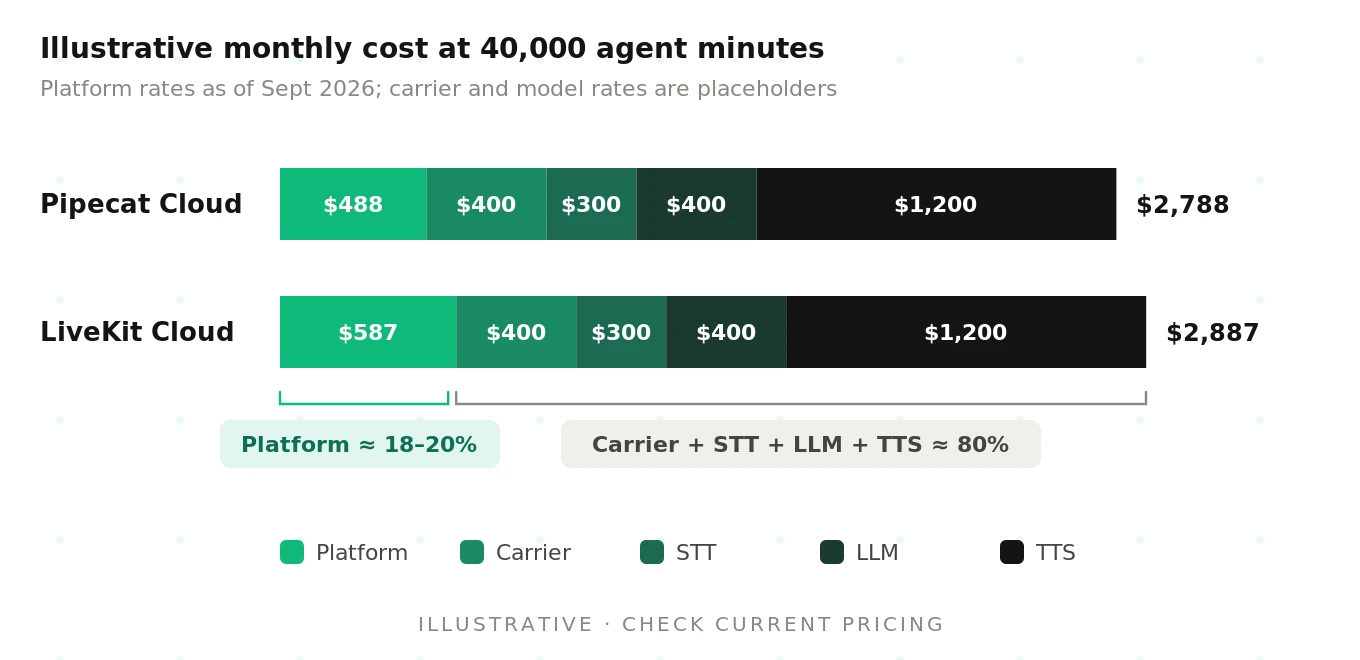
Three lessons fall out of the worksheet.
First, STT, LLM, and TTS usually dominate. In this illustrative case, carrier and model spend is about 80% of the bill. A cheaper TTS voice moves the total more than switching hosts.
Second, configuration swings the platform line more than the vendor does. Raise `min_agents` to 10 and Pipecat Cloud's reserved line rises to about $216. Use LiveKit Phone Numbers and inbound costs $0.01 instead of $0.004 per minute.
Third, the Ship plan caps you at 20 concurrent agent sessions. A Monday 9 a.m. spike can hit that even at this volume. Plan on Scale if your peak is higher.
The better unit is cost per resolved call, not cost per minute. A host that saves $0.002 per minute but adds a 12-second cold start can lose that saving in abandoned calls. We show the math in voice agent cost per resolution.
Lock-in and portability
Both frameworks are open source, which limits vendor lock-in. The clouds are not. Here is what moves and what stays when you leave.
| Asset | Leaving Pipecat Cloud | Leaving LiveKit Cloud |
|---|---|---|
| Agent pipeline code | Moves; Pipecat is BSD-licensed and runs anywhere | Moves; LiveKit Agents runs on self-hosted LiveKit |
| Container image | Moves; built from your Dockerfile | Moves; built from your Dockerfile |
| Deploy config | `pcc-deploy.toml` must be rewritten | `livekit.toml` must be rewritten |
| Session start | Rewrite calls to the `/start` API | Dispatch rules and tokens carry over to self-hosted LiveKit |
| Secrets | Re-create in your vault | Re-create in your vault |
| Phone numbers | Carrier numbers stay; Daily numbers need porting | SIP trunk numbers stay; LiveKit numbers need porting |
| Observability history | Export logs before the 30-day window | Export before the 30-day window |
| Bundled models | Krisp VIVA needs its own license | Cloud-free turn detector and interruption models become metered |
Two migration paths are cheap. Pipecat Cloud to Pipecat Enterprise keeps the same image and workflow in your VPC. LiveKit Cloud to self-hosted LiveKit keeps your agent code, but you operate the SFU and SIP service.
The expensive path is switching frameworks. That is a code migration, not a config change. See how to migrate a voice agent vendor for the test plan.
Self-host alternatives
Managed hosting is a separate decision from the framework. You can self-host either one.
- Pipecat, self-hosted. Run your bot container on your own Kubernetes, ECS, or VM fleet. You own session routing, scaling, and transport. Pipecat also ships a LiveKit transport, so a Pipecat pipeline can join LiveKit rooms.
- Pipecat Enterprise. A hybrid option. Your cluster runs the agents. Daily runs the control plane.
- LiveKit, self-hosted. Run the Apache 2.0 LiveKit server, SIP service, and agent workers. LiveKit documents self-hosted agent deployments.
Self-hosting trades the platform fee for on-call duty. See managed vs self-hosted voice orchestration. Mixing the two is covered in using LiveKit and Pipecat together.
Pipecat Cloud vs LiveKit Cloud: the full comparison matrix
| Capability | Pipecat Cloud | LiveKit Cloud | Notes |
|---|---|---|---|
| Framework hosted | Pipecat (Python) | LiveKit Agents (Python, Node.js) | Framework choice comes first |
| Deploy command | `pipecat cloud deploy` | `lk agent create`, then `lk agent deploy` | Both build from a Dockerfile |
| Compute sizing | `agent-1x`, `2x`, `3x` profiles | Managed by LiveKit | Pipecat bills by profile |
| Concurrency model | One session per instance; `max-agents` cap | Plan quota (5 / 20 / up to 600) | Pipecat pool default 50 |
| Warm capacity | `min-agents`, billed as reserved minutes | Warm on paid plans | Build plan scales to zero |
| Cold start | ~10 s best case | 10–20 s on Build | Test with your own image |
| Agent regions | us-west, us-east, eu-central, ap-south | us-east, eu-central, ap-south | Region set per agent |
| Transport | Daily WebRTC, WebSocket, telephony | LiveKit WebRTC rooms | Pipecat is transport-neutral |
| Telephony | Carrier WebSocket, Daily PSTN and SIP | Native SIP, Phone Numbers, connectors | LiveKit numbers US inbound only |
| Noise reduction | Krisp VIVA, 10k free min/mo | Krisp NC included; VIVA metered | Rates as of Sept 2026 |
| Observability | Logs, latency observers, CPU and memory | Transcripts, traces, recordings, log drains | Both retain 30 days |
| Compliance | Daily: SOC 2 Type 2, HIPAA BAA, GDPR | SOC 2 Type II, HIPAA BAA on Scale, GDPR | Confirm scope in writing |
| Pricing shape | Per-minute usage, no plan fee | Plan fee plus allowances plus overage | Providers usually dominate |
| Self-host path | Pipecat Enterprise or DIY | Open source server or private deploy | Code moves; config does not |
How to evaluate a managed voice agent host in a pilot
Vendor docs describe the happy path. A two-week pilot shows the real one. Run the same agent and providers on both hosts. Our voice agent POC bake-off guide covers the scoring. These are the host-specific steps.
1. Measure cold start on your real image. Deploy with no warm capacity. Wait past the idle window, then place 20 calls. Record time from call connect to first agent audio. Repeat with warm capacity on.
2. Measure regional latency from where callers live. Deploy to each candidate region. Place calls from real carrier numbers in each metro. Log p50 and p95 time-to-first-audio and per-turn response latency. Use our latency guide for the method.
3. Run a scaling test past your expected peak. Ramp from 0 to 1.5× peak concurrency in five minutes. Count 429s, plan-limit rejections, and calls that waited in silence. Then drop to zero and ramp again. See stress testing voice AI.
4. Test telephony end to end. Call in through the exact carrier path you will ship. Test DTMF, transfers, hold, and a noisy line. Confirm codecs and sample rates in logs, not in assumptions.
5. Check logs during a failure. Crash the agent on purpose mid-call. Time how long it takes to find the error, the session, and the caller. On LiveKit, confirm a log drain catches the crash.
6. Force a failover. Push a broken deploy and confirm traffic stays on the prior version. Roll back and time it. If you run two regions, kill one and watch where new calls land.
7. Compute cost per resolved call. Pull the platform invoice and provider bills for the pilot. Divide by calls that actually resolved the caller's need. Resolution has to be scored call by call, independently of either host.
Record every pilot call in one schema so the hosts are comparable.
{
  "host": "pipecat-cloud",
  "region": "us-east",
  "call_id": "pilot-0142",
  "cold_start": false,
  "time_to_first_audio_ms": 1180,
  "p95_turn_latency_ms": 1640,
  "capacity_rejected": false,
  "telephony_path": "twilio-websocket",
  "resolved": true,
  "quality_flags": ["talked_over_caller_once"],
  "platform_cost_usd": 0.046
}
Managed hosting guarantees uptime, not call quality
Both clouds promise infrastructure outcomes. Pipecat Cloud promises fast starts and automatic scaling. LiveKit Cloud publishes 99.99% uptime for its realtime network. Those are real guarantees, but the wrong unit for a voice agent.
A call can be up, fast, and wrong. The agent can mishear an account number, cut off a caller who paused, or invent a refund policy in 800 ms. Every host dashboard would show that call as healthy.
That is why call quality needs an independent check. The host that runs your agent should not be the only one grading it. Evalgent evaluates calls on either cloud with the same test cases and scoring. That lets you compare hosts on outcomes, not on marketing. Read more in independent voice AI evaluation and comparing voice agents on the same test cases.
Frequently asked questions
What is the difference between Pipecat Cloud and LiveKit Cloud?
Pipecat Cloud is Daily's managed host for Pipecat agent containers. It is transport-neutral and bills per active and reserved minute. LiveKit Cloud is LiveKit's realtime media network with agent hosting built in. It adds native SIP, phone numbers, and session recordings, and bills through plan tiers with included minutes. Both scale your agent. Neither scores call quality.
How much does Pipecat Cloud cost per minute?
As of September 2026, Pipecat Cloud's smallest profile, agent-1x, costs $0.01 per active minute. Warm reserved capacity costs $0.0005 per minute. Daily WebRTC is free for 1:1 voice. Daily PSTN adds $0.018 per minute. STT, LLM, and TTS are billed by your providers. Check the Pipecat Cloud pricing page for current rates.
Does LiveKit Cloud host voice agents?
LiveKit Cloud hosts agents built with the LiveKit Agents framework. You deploy with `lk agent create` and `lk agent deploy`. LiveKit builds the container, runs rolling deploys, and scales sessions up to your plan's concurrency limit. Agents run in us-east, eu-central, or ap-south. Observability includes transcripts, traces, logs, and recordings.
How long is a Pipecat Cloud cold start?
Daily's docs describe about 10 seconds as the best case for a Pipecat Cloud cold start. That assumes a small image and fast setup code. Large images or model downloads at startup can push it past 30 seconds. Setting `min-agents` to one or more keeps warm instances ready, at a reserved-minute cost.
Which regions does Pipecat Cloud support?
Pipecat Cloud lists four Daily-hosted regions: us-west in Oregon, us-east in Virginia, eu-central in Frankfurt, and ap-south in Mumbai. The default is us-west. Secrets must live in the same region as the agent. Pipecat Enterprise adds self-hosted regions running in your own Kubernetes cluster.
Can I move from Pipecat Cloud to self-hosted?
Moving from Pipecat Cloud to self-hosted is realistic because Pipecat is open source. Your pipeline code and container image move as-is. You must replace the session-start API, deploy config, secret sets, and scaling logic. Pipecat Enterprise is a middle path. It keeps the same workflow but runs agents in your VPC.
Does LiveKit Cloud support SIP telephony?
LiveKit Cloud supports SIP telephony natively. You can connect third-party SIP trunks for inbound and outbound calls. You can also use Twilio and WhatsApp connectors. LiveKit Phone Numbers sells US numbers, but as of September 2026 it supports inbound calls only. Region-based SIP endpoints keep calls in a chosen region.
Does managed hosting measure voice agent call quality?
Managed hosting does not measure voice agent call quality. Pipecat Cloud and LiveKit Cloud report sessions, logs, latency, and resource use. They do not judge whether the agent understood the caller, followed policy, or resolved the issue. That requires independent evaluation of real and simulated calls against your own test cases.
The bottom line
In Pipecat Cloud vs LiveKit Cloud, both hosts run production voice agents with managed scaling, regions, telephony, and logs. Pick the one that fits your framework, transport, and pricing shape, then prove call quality independently on whichever you choose.
Want to see how your agent actually performs on either host? Book a demo.
Related Articles

Why AI voice agents fail in production: 9 failure layers, how to detect each, and how to prevent them
Voice agents fail in production across 9 layers, from 8 kHz audio to silent tool errors. Symptoms, root causes, alerts, and fixes in one master table.
Read more
Voice agent regression testing: why LLM updates break production
LLM updates improve benchmarks but break voice agents in 5 predictable ways. How to detect and prevent regressions after every model or prompt change.
Read more