Open door for builders.
LiveKit vs Pipecat Latency: Where the Milliseconds Actually Go
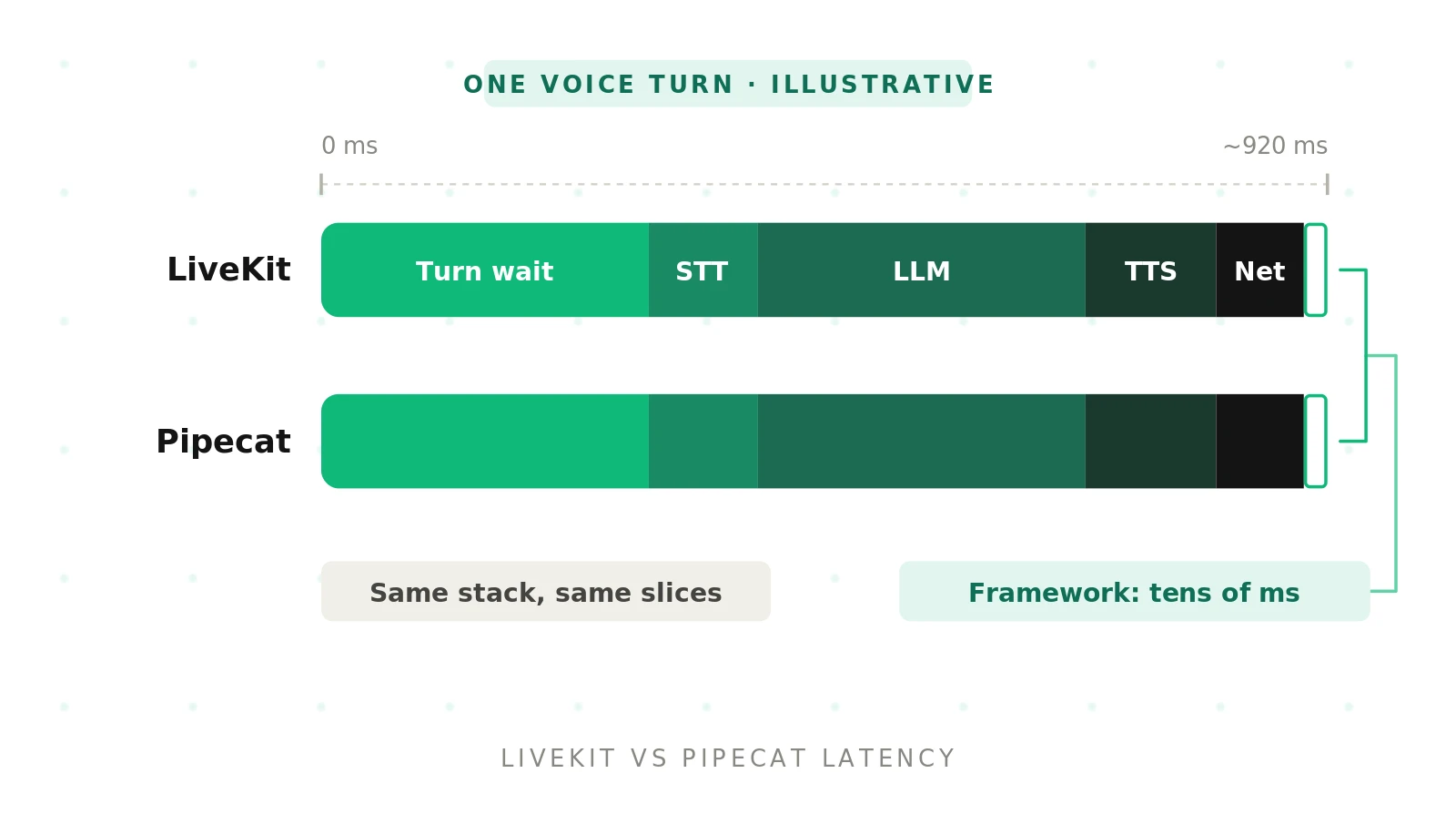
That answer disappoints people who want a winner. It should not. It means your latency is mostly in your hands, not in a framework choice.
This post takes one voice turn apart, millisecond by millisecond. It shows the real knobs in each framework, verified against current docs. It also shows the trap. Every cheap latency win on turn detection raises the odds of cutting a caller off.
If you want the broader framework comparison first, start with our Pipecat vs LiveKit hub. This post stays on latency.
Why "which is faster" is the wrong first question
Search for "livekit vs pipecat latency" and you find confident numbers. Treat them carefully.
Published comparisons that run a similar STT, LLM, and TTS stack on both report overlapping averages, roughly 750 to 950ms end to end. The gaps they report are tens of milliseconds, from single teams, on single stacks, as averages rather than p95s.
Other practitioners go further. A Fora Soft comparison argues that the same model stack lands "within a coin-flip" on either framework. It puts framework overhead in the tens of milliseconds. A practitioner read of both codebases warns against any benchmark that omits network, region, model versions, and codec.
So the honest framing is this. Framework choice sets your ceiling for control. Your stack and settings set your actual latency.
The ~200ms human gap comes from Stivers et al. in PNAS, a cross-language study of turn-taking. No cascaded STT, LLM, and TTS pipeline hits that today. The goal is to feel responsive without feeling rude.
The latency budget of one voice turn
Voice agent response latency: the time from the moment a caller stops speaking to the moment they hear the first audio of the agent's reply. It is measured at the caller's ear, not in a server log.
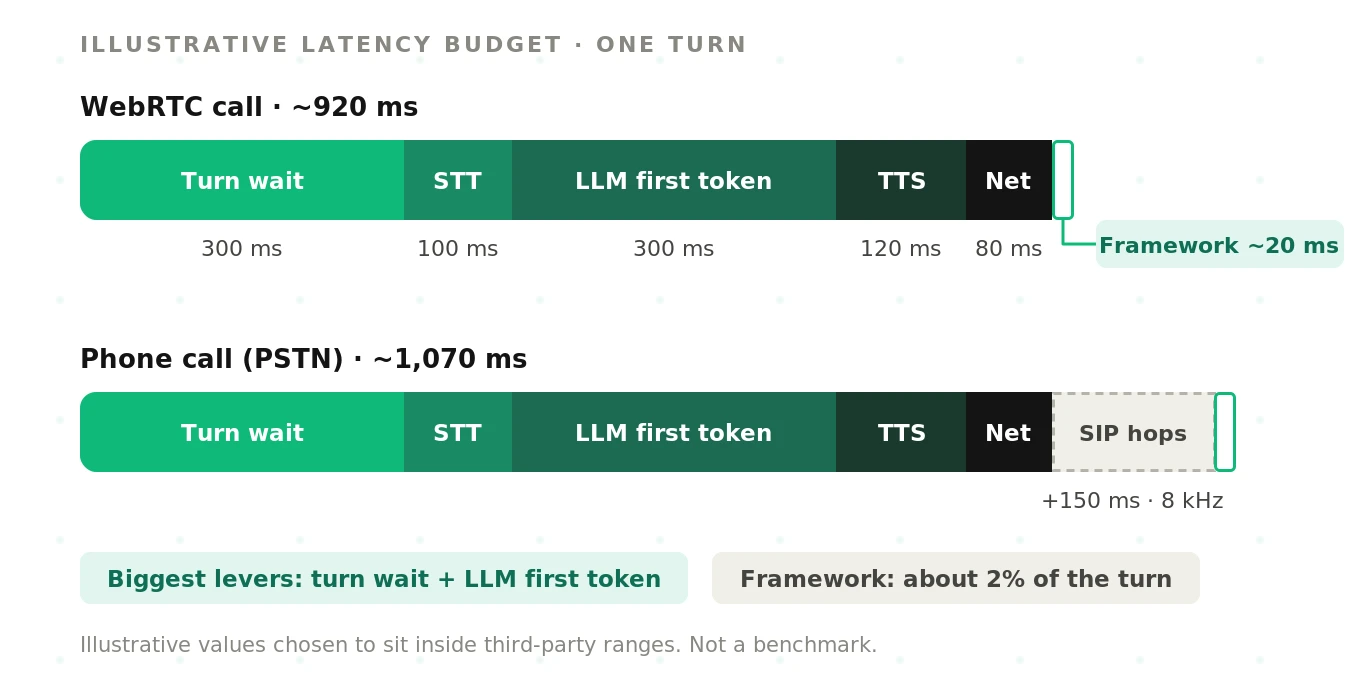
Every turn passes through the same stages, in the same order. Here is an illustrative budget for a well-tuned WebRTC call in a nearby region.
| Stage | What happens | Illustrative ms | Who controls it |
|---|---|---|---|
| Turn detection wait | VAD sees silence; a timer or model decides the turn is over | 300 | You, via framework settings |
| STT finalization | The STT returns a final transcript after speech ends | 100 | STT provider and model |
| LLM time to first token | The model starts streaming its answer | 300 | LLM provider, model, prompt size, region |
| TTS time to first byte | The voice engine returns the first audio chunk | 120 | TTS provider, model, streaming mode |
| Transport and playout | Network, jitter buffer, and device playback | 80 | Network path and transport |
| Framework overhead | Frame routing, event loops, serialization | 20 | Framework, plus your own code |
| Total | Caller hears the first syllable | ~920 | Mostly not the framework |
These numbers are illustrative, not measured. They are chosen to sit inside the ranges third parties report. Your stack will differ. The shape rarely does.
Look at the last data row. The framework slice is about 2% of the turn. The turn-detection wait and the LLM first token together are roughly two-thirds.
Two stages also overlap in practice. STT keeps transcribing while the turn detector waits. LiveKit's own `end_of_utterance_delay` metric includes the transcription delay for that reason. Budgets that add every stage in series overstate the total.
Where each framework spends its milliseconds
The two frameworks optimize different layers. That shapes where their small overhead lives.
LiveKit is a WebRTC media platform with an agents framework on top. Its latency work sits at the media layer. It owns the SFU, the jitter buffer path, codec negotiation, and native SIP. The agent joins a room as a participant. See the LiveKit Agents turns overview.
Pipecat is a Python pipeline framework. Its latency work sits in frame handling. Audio, text, and control frames flow through processors you arrange. Transport is a processor at each end: Daily, LiveKit, a WebSocket, or a telephony serializer. See the Pipecat repository.
This difference matters most under bad networks. A media-layer platform can absorb packet loss inside its own stack. A pipeline framework inherits whatever the chosen transport does. Pipecat on LiveKit transport is a real pattern for exactly this reason. Our guide to using both together covers it.
In calm conditions, both add little. Your own code is often the bigger risk. A synchronous database call inside a hook blocks the turn. A slow `on_user_turn_completed` in LiveKit shows up in its metrics. A blocking custom processor in Pipecat stalls every frame behind it.
LiveKit latency knobs, verified
LiveKit Agents now groups turn behavior under one `turn_handling` option. Older releases exposed `min_endpointing_delay` and `max_endpointing_delay` directly on `AgentSession`. Current docs move them to `endpointing.min_delay` and `endpointing.max_delay`. Check which version you run.
The knobs that move latency most, per the turn handling options reference:
- `endpointing.min_delay` sets the minimum wait after the last speech before the turn ends. Default 0.5s, or 0.3s with the audio turn detector.
- `endpointing.max_delay` caps the wait when the model thinks the user will continue. Default 3.0s, or 2.5s with the audio turn detector.
- `endpointing.mode` is `"fixed"` or `"dynamic"`. Dynamic adapts within the range using session pause statistics, weighted by `alpha`.
- `turn_detection` picks the strategy: the `TurnDetector` model, `"vad"`, `"stt"`, `"realtime_llm"`, or `"manual"`.
- `preemptive_generation` starts the LLM before the turn is confirmed. `preemptive_tts` also starts TTS early. It is off by default.
- `interruption` controls barge-in: `mode` (`"adaptive"` or `"vad"`), `min_duration`, `min_words`, `false_interruption_timeout`, and `resume_false_interruption`.
Here is a latency-leaning starting point. It is simplified, and you should tune it against real calls.
# LiveKit Agents (Python) - simplified, latency-leaning starting point
from livekit.agents import AgentSession, TurnHandlingOptions, inference

session = AgentSession(
    turn_handling=TurnHandlingOptions(
        # Audio turn detector: meaning + acoustics on top of VAD
        turn_detection=inference.TurnDetector(),
        endpointing={
            "mode": "dynamic",   # adapt to each caller's pause pattern
            "min_delay": 0.3,    # floor; lower = faster, riskier
            "max_delay": 2.0,    # ceiling when the model expects more speech
        },
        preemptive_generation={
            "enabled": True,     # LLM starts before the turn is confirmed
            "preemptive_tts": False,  # keep TTS off until you measure waste
        },
        interruption={
            "mode": "adaptive",  # separates real barge-in from "mm-hmm"
            "min_duration": 0.5,
            "false_interruption_timeout": 2.0,
            "resume_false_interruption": True,
        },
    ),
    # stt=..., llm=..., tts=...
)
Two constraints bite teams. First, the LiveKit turn detector docs require VAD `min_silence_duration` of at least 0.25s with the audio detector. Lower values raise an error at startup. Second, `v1-mini` runs on local CPU outside LiveKit Cloud. The docs recommend compute-optimized instances over burstable ones to avoid inference timeouts.
In `"stt"` mode, `min_delay` applies after the STT's own end-of-speech signal. That stacks two delays. Teams who switch to STT endpointing without lowering `min_delay` often get slower, not faster.
Pipecat latency knobs, verified
Pipecat configures turns through user turn strategies on the context aggregator. The default stop strategy is `TurnAnalyzerUserTurnStopStrategy` with `LocalSmartTurnAnalyzerV3`. That is the Smart Turn model, running locally. See the user turn strategies reference.
The knobs that move latency most:
- `VADParams.stop_secs` sets the silence needed before VAD flips to quiet. The Silero VAD docs list a 0.2s default. Smart Turn expects 0.2s because it mimics the training data.
- `VADParams.start_secs`, `confidence`, and `min_volume` control how easily speech starts. They matter for barge-in and noise.
- Stop strategies decide when the turn ends. `SpeechTimeoutUserTurnStopStrategy` uses a `user_speech_timeout` window, 0.6s by default. `TurnAnalyzerUserTurnStopStrategy` asks the Smart Turn model instead.
- Start strategies decide when a new user turn, and an interruption, begins. `MinWordsUserTurnStartStrategy(min_words=...)` requires real words before the bot yields.
- `EagerUserTurnStrategies` answers a service's early end-of-turn prediction while the turn is still open. The response is discarded if the caller keeps talking.
The Smart Turn on Pipecat Cloud guide shows the canonical wiring. Here it is with an interruption guard added. It is simplified.
# Pipecat (Python) - simplified; verify imports against your version
from pipecat.audio.turn.smart_turn.local_smart_turn_v3 import LocalSmartTurnAnalyzerV3
from pipecat.audio.vad.silero import SileroVADAnalyzer
from pipecat.audio.vad.vad_analyzer import VADParams
from pipecat.processors.aggregators.llm_response_universal import (
    LLMContextAggregatorPair,
    LLMUserAggregatorParams,
)
from pipecat.turns.user_start import MinWordsUserTurnStartStrategy
from pipecat.turns.user_stop import TurnAnalyzerUserTurnStopStrategy
from pipecat.turns.user_turn_strategies import UserTurnStrategies

user_aggregator, assistant_aggregator = LLMContextAggregatorPair(
    context,
    user_params=LLMUserAggregatorParams(
        vad_analyzer=SileroVADAnalyzer(
            params=VADParams(stop_secs=0.2)  # short: let Smart Turn decide
        ),
        user_turn_strategies=UserTurnStrategies(
            # Require two words before the bot yields (fewer false barge-ins)
            start=[MinWordsUserTurnStartStrategy(min_words=2)],
            stop=[TurnAnalyzerUserTurnStopStrategy(
                turn_analyzer=LocalSmartTurnAnalyzerV3()
            )],
        ),
    ),
)
Smart Turn v3 is open source, with weights on GitHub. Pipecat reports its inference at around 65ms on a standard Pipecat Cloud instance. Treat that as a vendor figure. Measure it on your own hardware, especially under concurrent load.
A common Pipecat mistake is raising `stop_secs` to stop cut-offs. That adds its full value to every turn. The model then gets less room to decide early. Keep `stop_secs` short and tune the stop strategy instead.
The turn-detection trade-off: fast or cut off
Endpointing delay: the silence the agent waits for before it decides the caller has finished. It is the single largest latency slice you control directly.
Every endpointing change moves two metrics at once. Shorter delays cut response latency. They also raise premature endpointing, where the agent answers a half-finished sentence. Longer delays avoid cut-offs. They add dead air to every turn.
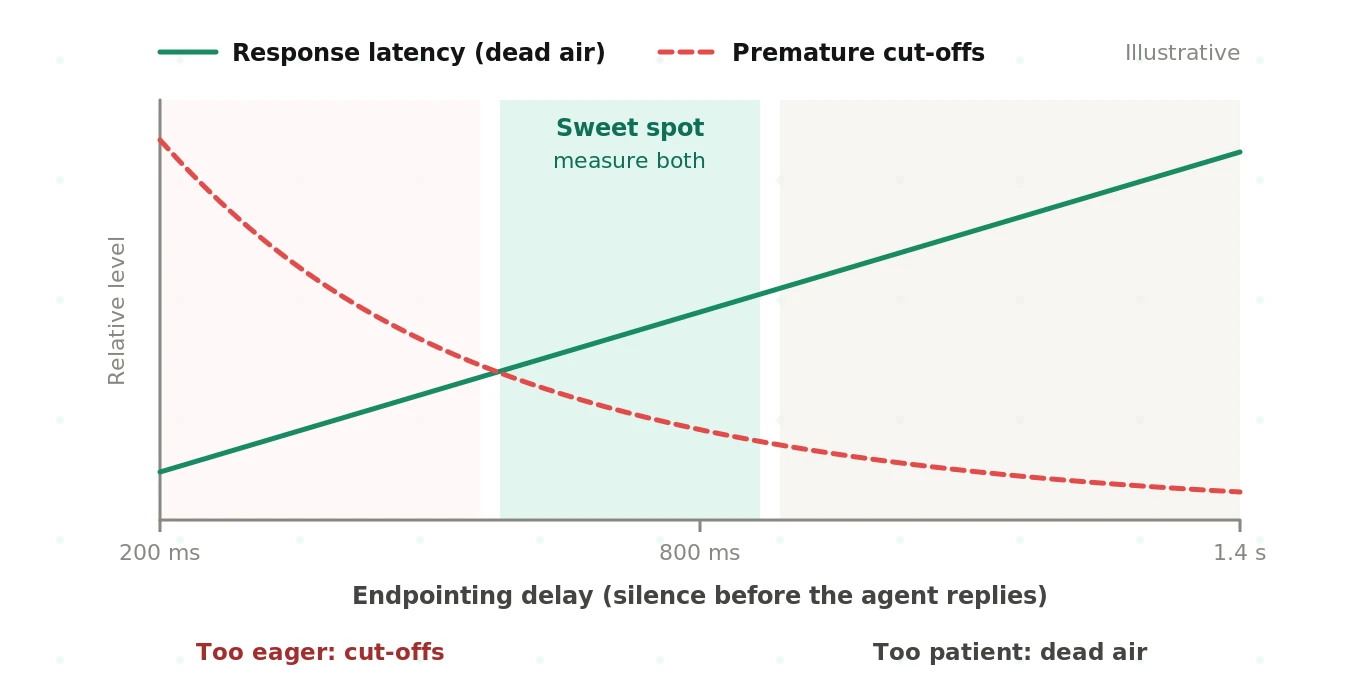
Semantic turn models bend this curve. They can end a turn quickly on "Yes, that's right." They can wait on "My account number is, um." Neither LiveKit's detector nor Smart Turn removes the trade-off. They move the sweet spot.
The failure modes look different on each side of it.
| Too eager | Too patient |
|---|---|
| Agent answers "I want to cancel" before "...my add-on, not my plan" | Two seconds of silence after every short answer |
| Callers reading digits get cut off mid-number | Callers say "Hello?" and trigger a fresh turn |
| Agent talks over thinking pauses, callers repeat themselves | Barge-in feels sluggish, agent keeps talking |
| Wrong intent routed, often with no error raised | Average handle time climbs across the queue |
The eager failures hide from latency dashboards. The agent looked fast. The call went wrong. That is why you need a separate cut-off metric. Our guides on endpointing and VAD vs endpointing go deeper.
Latency levers compared
This is the table to pin next to your config. Impacts are illustrative ranges, not benchmarks.
| Lever | Typical impact (illustrative) | LiveKit knob | Pipecat knob | Risk |
|---|---|---|---|---|
| Endpointing delay | 100–500ms per turn | `endpointing.min_delay`, `max_delay`, `mode` | `VADParams.stop_secs`, `user_speech_timeout` | Premature cut-offs |
| Semantic turn model | Lets you lower the silence floor | `inference.TurnDetector()`, `unlikely_threshold` | `TurnAnalyzerUserTurnStopStrategy` + `LocalSmartTurnAnalyzerV3` | CPU contention, language coverage |
| Preemptive generation | 100–300ms when the guess holds | `preemptive_generation`, `preemptive_tts` | `EagerUserTurnStrategies` | Wasted tokens, stale answers |
| STT endpointing | Varies by provider | `turn_detection="stt"` | `ExternalUserTurnStrategies` | Stacked delays |
| LLM model and region | 100–500ms TTFT swing | Your `llm=` choice | Your LLM service | Answer quality |
| TTS streaming | 50–300ms to first audio | Your `tts=` choice | TTS service; watch text aggregation | Choppy prosody |
| Region co-location | 50–150ms round trip | Agent and provider region | Deployment region | Data residency |
| Telephony path | +100–250ms, plus 8 kHz audio | Native SIP trunks | Twilio serializer, Daily SIP | Worse STT accuracy |
| Interruption tuning | Perceived snappiness | `interruption.mode`, `min_duration`, `min_words` | `MinWordsUserTurnStartStrategy` | Talking over callers |
Notice the pattern. The two columns map almost one to one. Neither framework has a secret latency lever the other lacks.
Averages lie: p95, p99, cold starts, and regions
An 800ms average can hide a 2.5s p99. Callers remember the long pauses, not the mean. Report p50, p95, and p99 per turn, always.
Tails come from a few places.
- LLM variance. Time to first token swings with provider load, prompt length, and tool calls. A tool call often means a second inference before speech.
- Turn-detector timeouts. LiveKit commits the turn anyway if the model does not answer within about a second. That second lands in your tail.
- Cold starts. The first turn pays for worker dispatch, model loads, and fresh TLS connections to every provider. Pipecat's `StartupTimingObserver` measures processor startup. In LiveKit, preload VAD and models before the call is answered.
- Geography. A caller in Dallas, an agent in Virginia, and an LLM endpoint in Oregon add up. Every hop is a round trip, and several happen per turn.
- Concurrency. Local turn models and VAD share CPU. At 50 concurrent calls, a detector that took 65ms alone may not. Our guide to stress-testing voice AI covers load patterns.
Scaling changes the tail more than the median. The LiveKit vs Pipecat scaling guide looks at this in depth.
WebRTC vs telephony: the hidden 8 kHz tax
The same agent is slower on a phone call. Callers hear it, and dashboards often miss it.
The PSTN path adds hops. Carrier to SIP trunk. Trunk to media server or media stream. Then into your pipeline. Each hop adds buffering. Twilio Media Streams deliver 8 kHz mu-law audio over a WebSocket. Narrowband audio also makes STT and turn detection work harder.
LiveKit terminates SIP natively and bridges callers into a room. Pipecat reaches phones through transports and serializers, or through Daily's SIP support. Both work. They put the hops in different places. Our telephony comparison and SIP vs WebRTC guide map those paths.
Two practical rules follow. Budget an extra 100 to 250ms for the phone path, as an illustrative starting estimate. And tune endpointing separately for phone traffic. Settings that feel crisp in a browser often cut off callers on noisy phone lines.
Measuring latency honestly: server logs vs the caller's ear
Framework metrics are necessary. They are not sufficient. They measure from the server's view of "user stopped speaking." The caller's ear sits one network path away.
Start with what each framework gives you. LiveKit exposes per-turn metrics on each chat message: `end_of_turn_delay`, `transcription_delay`, `llm_node_ttft`, `tts_node_ttfb`, and `e2e_latency`. See the LiveKit data hooks docs.
# LiveKit: log per-turn latency parts (simplified)
from livekit.agents import MetricsCollectedEvent
from livekit.agents.metrics import EOUMetrics, LLMMetrics, TTSMetrics

@session.on("metrics_collected")
def on_metrics(ev: MetricsCollectedEvent):
    m = ev.metrics
    if isinstance(m, EOUMetrics):
        log_part(m.speech_id, "eou_delay", m.end_of_utterance_delay)
    elif isinstance(m, LLMMetrics):
        log_part(m.speech_id, "llm_ttft", m.ttft)
    elif isinstance(m, TTSMetrics):
        log_part(m.speech_id, "tts_ttfb", m.ttfb)
Pipecat reports TTFB, time to first audio, and text aggregation time per service. It also ships a `UserBotLatencyObserver` for user-stop to bot-start timing. See the Pipecat metrics docs.
# Pipecat: user-to-bot latency plus per-service metrics (simplified)
from pipecat.observers.loggers.metrics_log_observer import MetricsLogObserver
from pipecat.observers.user_bot_latency_observer import UserBotLatencyObserver

latency_observer = UserBotLatencyObserver()

@latency_observer.event_handler("on_latency_measured")
async def on_latency(observer, seconds):
    record_turn_latency(seconds)

worker = PipelineWorker(
    pipeline,
    params=PipelineParams(enable_metrics=True, enable_usage_metrics=True),
    observers=[latency_observer, MetricsLogObserver()],
)
Then measure from audio. Record both channels of a real call, caller on one side and agent on the other. Find where caller speech ends and agent speech begins. That gap is what the caller lived through.
# User-perceived latency from a stereo call recording (simplified sketch)
import numpy as np
import soundfile as sf

audio, sr = sf.read("call.wav")          # ch0 = caller, ch1 = agent
frame = int(sr * 0.02)                   # 20 ms frames

def speaking(ch, thresh=0.02):
    n = len(ch) // frame
    rms = np.sqrt((ch[: n * frame].reshape(n, frame) ** 2).mean(axis=1))
    return rms > thresh

caller, agent = speaking(audio[:, 0]), speaking(audio[:, 1])
gaps, i = [], 0
while i < len(caller) - 1:
    if caller[i] and not caller[i + 1]:          # caller stopped
        j = i + 1
        while j < len(agent) and not agent[j] and not caller[j]:
            j += 1
        if j < len(agent) and agent[j]:
            gaps.append((j - i) * 0.02 * 1000)   # ms of dead air
        i = j
    i += 1

print(np.percentile(gaps, [50, 95, 99]))  # e.g. [ 910. 1640. 2380.]
A real version needs a proper VAD, echo handling, and rules for mid-sentence pauses. The principle holds. Latency is a property of the recording, not the log.
Server numbers and audio numbers often differ by 100 to 300ms, illustratively. The difference is transport, jitter buffer, and device playout. On phone calls, it is larger. Our OpenTelemetry guide for voice agents shows how to line traces up with recordings.
How to cut voice agent latency without breaking turn-taking
1. Measure a baseline from audio. Record 100 or more real or simulated calls. Compute p50, p95, and p99 gaps at the caller's ear.
2. Measure cut-offs at the same time. Count turns where the agent started speaking while the caller was mid-thought. Track it as a rate beside latency.
3. Break each turn into stages. Use LiveKit per-turn metrics or Pipecat observers. Find which stage owns the tail, not just the average.
4. Fix providers and regions first. Co-locate the agent with STT, LLM, and TTS endpoints. Try a faster LLM tier. This rarely hurts turn-taking.
5. Stream everything. Stream STT partials, LLM tokens, and TTS audio. Watch Pipecat's text aggregation time or LiveKit's TTS TTFB.
6. Add a semantic turn model before cutting silence. Use LiveKit's turn detector or Pipecat's Smart Turn. Then lower the silence floor in small steps.
7. Change one endpointing value at a time. Move `min_delay` or the stop strategy by 50 to 100ms. Re-run the same test set after each change.
8. Try preemptive generation last. Enable it, then watch discarded generations and token cost. Keep it only if p95 improves without new errors.
9. Tune phone traffic separately. Test over real SIP or PSTN paths with narrowband audio and noise.
10. Re-measure on live calls. Lab gains often shrink in production. Keep watching both latency and cut-off rate after launch.
For framework-specific test setups, see the LiveKit voice agent testing guide and the Pipecat voice agent testing guide.
The shared blind spot
Here is what neither framework does. It does not tell you when latency spikes mid-call in production. It does not tell you whether a faster setting started cutting callers off.
Both emit metrics. Neither judges them. A p99 creeping from 1.8s to 3.1s after a provider incident looks like normal logs. A 200ms endpointing cut that doubles premature cut-offs looks like a win on the latency chart.
That is the gap Evalgent fills. As an independent third party, Evalgent measures user-perceived latency from call audio. It scores premature endpointing and barge-in on the same calls, separately. You see whether you got faster or just got ruder. It works the same on LiveKit, Pipecat, or both, so framework choice never skews the result. For live traffic, see how we approach monitoring voice agents in production.
Frequently asked questions
Is LiveKit faster than Pipecat?
LiveKit is not reliably faster than Pipecat for most voice agents. With the same STT, LLM, and TTS stack, third-party reports put them within about 50 to 100ms of each other. LiveKit's media-layer control can help on lossy networks. Provider choice, region, and turn-detection settings usually matter far more than the framework.
What is a good latency for a voice agent?
A good voice agent response latency is under about one second at the caller's ear, measured at p95, not just the average. Human turn gaps average around 200ms, so faster feels more natural. Aim for a stable p95, and track premature cut-offs alongside it so speed does not come from interrupting callers.
How do I reduce Pipecat latency?
To reduce Pipecat latency, first co-locate services and stream STT, LLM, and TTS output. Keep VADParams stop_secs short, around 0.2s, and let Smart Turn decide turn ends. Check TTFB and text aggregation metrics to find the slow stage. Consider EagerUserTurnStrategies only after measuring discarded responses.
How do I reduce LiveKit Agents latency?
To reduce LiveKit Agents latency, use the audio turn detector, which lowers default endpointing to 0.3s minimum and 2.5s maximum. Try dynamic endpointing mode. Enable preemptive generation and measure wasted generations. Co-locate providers and use per-turn metrics like llm_node_ttft and e2e_latency to find which stage owns your tail.
What is min_delay in LiveKit?
In LiveKit Agents, min_delay is the minimum time the agent waits after the last detected speech before ending the user's turn. It defaults to 0.5s, or 0.3s with the audio turn detector. It lives under endpointing in turn handling options. Older releases called it min_endpointing_delay on AgentSession.
What does stop_secs do in Pipecat?
In Pipecat, stop_secs is a VADParams setting for the silence required before voice activity detection switches from speaking to quiet. The Silero VAD default is 0.2s. With Smart Turn, keep it at 0.2s so the model decides turn completion. Raising it adds that delay to every turn.
Why is my voice agent slower on phone calls?
A voice agent is slower on phone calls because the PSTN path adds carrier, SIP, and media-stream hops, each with buffering. Phone audio is usually 8 kHz, which makes STT and turn detection harder. Budget extra delay for the phone path, and tune endpointing separately for phone traffic.
How do I measure voice agent latency?
Measure voice agent latency from the call audio, as the gap between caller speech ending and agent audio starting. Use framework metrics to break that gap into stages. Report p50, p95, and p99 rather than averages. Server logs miss transport, jitter buffer, and playout time the caller actually hears.
The bottom line
LiveKit vs Pipecat latency is decided far more by turn detection, providers, region, and telephony than by the framework itself. Every latency win on endpointing must be checked against premature cut-offs on real calls, measured independently.
To see where your own milliseconds go, and whether a faster agent is also cutting callers off, Book a demo with Evalgent. For a head-to-head test method, read our LiveKit vs Pipecat benchmark guide, and for the underlying concepts see the voice agent latency guide.
Related Articles

Why AI voice agents fail in production: 9 failure layers, how to detect each, and how to prevent them
Voice agents fail in production across 9 layers, from 8 kHz audio to silent tool errors. Symptoms, root causes, alerts, and fixes in one master table.
Read more
Voice agent regression testing: why LLM updates break production
LLM updates improve benchmarks but break voice agents in 5 predictable ways. How to detect and prevent regressions after every model or prompt change.
Read more