Open door for builders.
OpenAI Realtime API SIP vs a Media-Stream Bridge: Putting OpenAI Realtime, GPT-Live, or Gemini Live on a Phone Line
On this page
You built a speech-to-speech agent that sounds great in the browser. Now it has to answer a phone number. That is where most realtime projects break. The phone leg adds an 8 kHz codec, a carrier-side playback buffer you cannot see, and call-control actions the model API never knew about.
This guide covers the wiring. If you are still choosing a model, start with our guide to evaluating realtime voice APIs. For GPT-Live specifics such as delegation and prompts, see building with GPT-Live. For the test strategy behind speech-to-speech models in general, read testing speech-to-speech voice agents.
Everything below was checked against the OpenAI, Google, Twilio, LiveKit, and Pipecat docs on October 4, 2026. Model names in use today are `gpt-realtime-2.1` and `gpt-live-1` on OpenAI and `gemini-3.8-live` on Google.
The three architectures, in one paragraph each
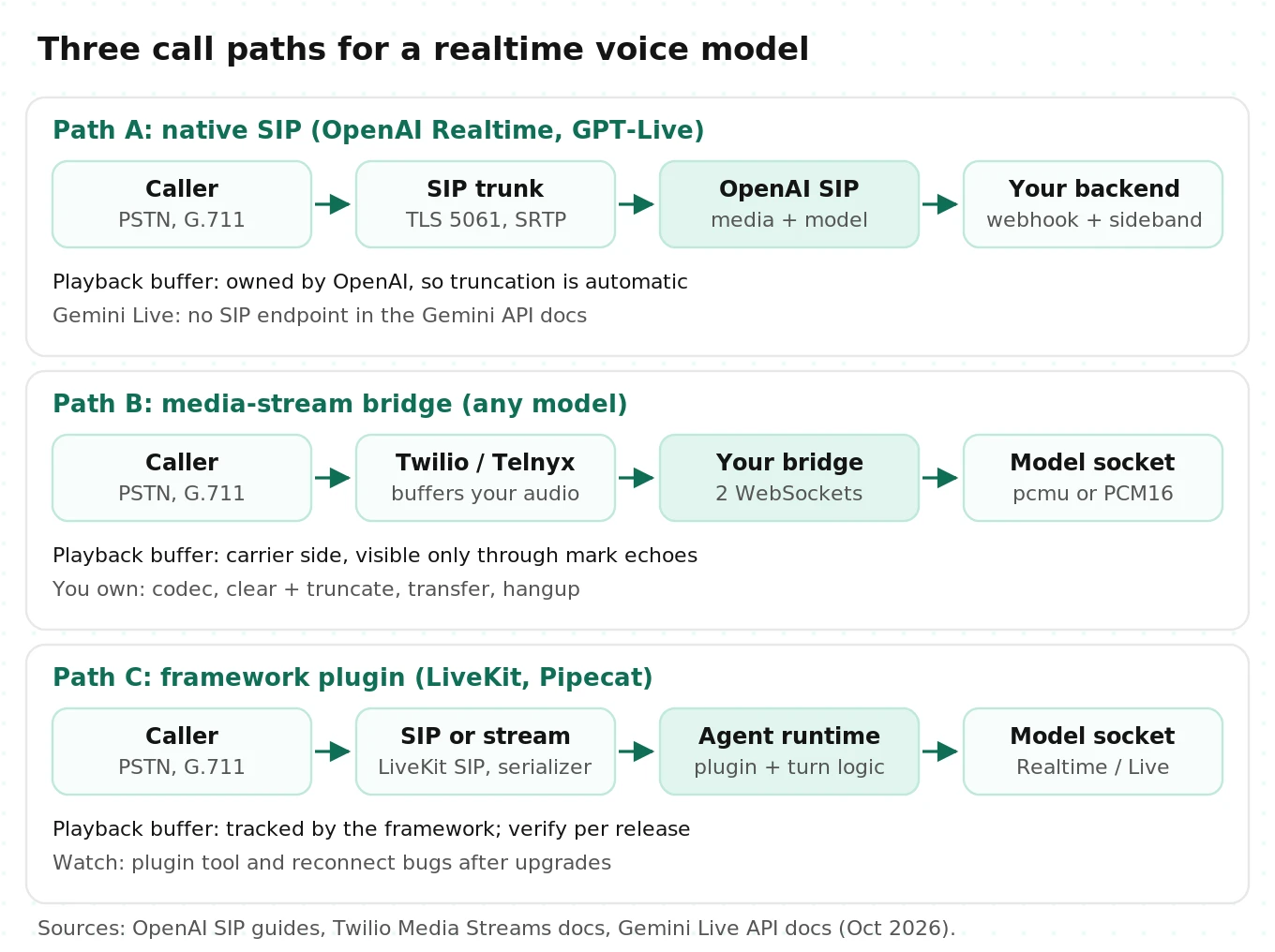
(a) Native SIP. Your SIP trunk sends the call straight to OpenAI. OpenAI fires a webhook, and you accept or reject it. Then you attach a "sideband" WebSocket to watch events, run tools, and send commands. Your server never touches audio. This works for the Realtime API and for GPT-Live. Google's Gemini API docs list no SIP endpoint as of this writing.
(b) Media-stream bridge. Twilio or Telnyx streams call audio to your WebSocket server as base64 JSON frames. Your server opens a second WebSocket to the model and relays audio both ways. You own every hard part: codec conversion, the carrier's playback buffer, barge-in, transfers, and hangups.
(c) Framework plugin. The call enters LiveKit SIP or a Pipecat transport. A plugin like LiveKit's `openai.realtime.RealtimeModel` or Pipecat's `GeminiLiveLLMService` talks to the model. The framework owns playout tracking and interruption logic. You get its fixes and you inherit its bugs.
Path A: OpenAI's native SIP endpoint, step by step
The Realtime SIP guide describes the flow. It is short, but each step hides a production decision.
1. Create a project webhook for incoming calls in the OpenAI platform settings.
2. Point your SIP trunk at `sip:$PROJECT_ID@sip.api.openai.com;transport=tls`.
3. Receive the `realtime.call.incoming` webhook. It carries a `call_id` and the SIP headers.
4. `POST /v1/realtime/calls/{call_id}/accept` with your session config (model, voice, tools, instructions). Or reject with a SIP status such as 486. The default is 603 Decline.
5. Open `wss://api.openai.com/v1/realtime?call_id={call_id}` to watch events and send commands.
6. Use `/refer` to transfer and `/hangup` to end the call.
Here is a minimal handler, simplified from OpenAI's Python example. It adds two things the example leaves out: webhook deduplication and a dedicated sideband task per call.
# Simplified, illustrative. Based on OpenAI's realtime-sip Python example (Oct 2026).
import asyncio, json, os
import httpx, websockets
from fastapi import FastAPI, Request, Response
from openai import OpenAI, InvalidWebhookSignatureError

app = FastAPI()
client = OpenAI(webhook_secret=os.environ["OPENAI_WEBHOOK_SECRET"])
AUTH = {"Authorization": f"Bearer {os.environ['OPENAI_API_KEY']}"}
seen_webhooks: set[str] = set()   # use Redis with a TTL in production

ACCEPT = {
    "type": "realtime",
    "model": "gpt-realtime-2.1",
    "instructions": "You answer inbound calls for Acme Dental. Be brief.",
    "audio": {"output": {"voice": "marin"}},
    "tools": [],  # function schemas go here
}

@app.post("/openai/webhook")
async def webhook(request: Request):
    body = await request.body()
    try:
        event = client.webhooks.unwrap(body, request.headers)
    except InvalidWebhookSignatureError:
        return Response(status_code=400)
    wid = request.headers.get("webhook-id")
    if wid in seen_webhooks:            # retries happen; never accept twice
        return Response(status_code=200)
    seen_webhooks.add(wid)
    if event.type == "realtime.call.incoming":
        call_id = event.data.call_id
        async with httpx.AsyncClient() as h:
            r = await h.post(f"https://api.openai.com/v1/realtime/calls/{call_id}/accept",
                             headers=AUTH, json=ACCEPT)
        if r.status_code == 200:
            asyncio.create_task(sideband(call_id))
    return Response(status_code=200)

async def sideband(call_id: str):
    url = f"wss://api.openai.com/v1/realtime?call_id={call_id}"
    async with websockets.connect(url, additional_headers=AUTH) as ws:
        await ws.send(json.dumps({"type": "response.create"}))  # speak first
        async for raw in ws:
            evt = json.loads(raw)
            if evt["type"] == "input_audio_buffer.dtmf_event_received":
                print("keypad", evt["event"])       # SIP-only event
            # route function calls, log usage from response.done, etc.
Four details matter on a real trunk:
- Network allowlists. `sip.api.openai.com` and `sip-eu.api.openai.com` are GeoIP-routed. Signaling uses TLS on port 5061. SRTP media comes from separate CIDRs listed in the docs. A firewall that allows signaling but not those media ranges produces a classic one-way-audio call.
- Accept fast. OpenAI returns 200 once the SIP leg is ringing and the session is being set up. Your webhook handler should not run slow lookups before accepting. Do caller lookups after accept, then inject context with `session.update`.
- Barge-in is handled for you. OpenAI owns the media, so it knows what was played. You do not compute truncation offsets on this path. That alone removes the most common bridge bug, covered below.
- DTMF is an event, not audio. Key presses arrive as `input_audio_buffer.dtmf_event_received` on the sideband.
GPT-Live on SIP is a different API
GPT-Live uses the same idea with different names. The GPT-Live telephony guide uses a `live.transport.incoming` webhook with `data.session_id`. You accept with `POST /v1/live/sessions/{session_id}/accept` and attach at `/v1/live/sessions/{session_id}/attach`. DTMF arrives as `transport.dtmf.received`.
Three GPT-Live rules are easy to miss:
- The first decision wins. A later competing accept or reject returns `decision_already_made`. The same pending call can also fire a Realtime webhook, so assign exactly one handler.
- Outbound SIP exists, but only on the Live API. It must be enabled for your organization. Ringing is capped at 3 minutes and a connected call at 2 hours.
- Never auto-retry an outbound create. The docs say `X-Client-Request-Id` does not deduplicate. A retry after a timeout can place a second call to the same person. For a collections or reminders agent, that is a compliance incident, not a bug.
Attach the sideband right away on outbound calls. It only replays the previous 3 seconds of events, so a late attach can miss `transport.ringing` or `transport.answered`.
Path B: the media-stream bridge, message by message
The bridge is the path most GitHub repos use, including Twilio's own OpenAI Realtime sample. Our Pipecat Twilio and Telnyx guide covers the carrier side in depth. Here is what changes when the far end is a speech-to-speech model.
Twilio's Media Streams protocol is fixed: `audio/x-mulaw`, 8000 Hz, mono, base64 in JSON. Twilio sends `connected`, `start`, `media`, `dtmf`, `mark`, and `stop`. You send `media`, `mark`, and `clear`. Twilio buffers your outbound media and plays it in order. You cannot see that buffer except through `mark` echoes.
Codec passthrough versus resampling
Each model accepts different audio. This table decides how much DSP your bridge does.
| Model | Input formats on a WebSocket | Output | Bridge work for Twilio |
|---|---|---|---|
| OpenAI Realtime (`gpt-realtime-2.1`) | `audio/pcm` at 24 kHz or `audio/pcmu` | Same choices | None. Set both sides to `audio/pcmu` and forward bytes |
| GPT-Live (`gpt-live-1`) | Raw G.711 mu-law or A-law at 8 kHz | Same | None if codec, rate, and channels match |
| Gemini Live (`gemini-3.8-live`) | 16-bit PCM; native 16 kHz, any rate accepted via `audio/pcm;rate=N` | 16-bit PCM, always 24 kHz | Decode mu-law in; downsample 24k to 8k and encode out |
Two points are not obvious.
First, upsampling phone audio adds no information. A G.711 call is band-limited to roughly 300 to 3,400 Hz before it reaches you. Converting it to 24 kHz PCM16 does not restore the missing band. It only adds CPU time and a filter delay. On OpenAI, `audio/pcmu` passthrough is the right default. On Gemini, the capabilities guide says the API resamples any input rate. So you can decode mu-law to 8 kHz PCM16 and send it with `audio/pcm;rate=8000`. Let Google resample instead of running your own upsampler.
Second, the output path needs a real low-pass filter. Gemini always returns 24 kHz. Going to 8 kHz is a clean factor of 3, but dropping two of every three samples aliases everything above 4 kHz back into the band. Sibilants turn into a metallic hiss. Use a polyphase resampler such as `scipy.signal.resample_poly(x, 1, 3)` and then mu-law-encode. Also note that Python's `audioop` module was removed in Python 3.13. Many bridges that used `audioop.lin2ulaw` break on upgrade. Pin `audioop-lts` or use a NumPy lookup table.
The bandwidth math
Bandwidth matters once you run dozens of concurrent calls on one bridge host.
- Twilio leg: 8,000 bytes per second of mu-law, about 10,700 bytes per second after base64. That is roughly 86 kbps per direction.
- Gemini output leg: 24,000 samples x 2 bytes = 48,000 bytes per second, or 64,000 after base64. That is about 512 kbps while the agent speaks.
- At 100 concurrent calls with the agent talking, Gemini output alone is 100 x 512 kbps, or about 51 Mbps into the bridge.
The OpenAI `audio/pcmu` path stays at telephone bitrates end to end. That is about six times less bridge traffic than a 24 kHz PCM16 output path.
Barge-in: the event mapping that breaks most bridges
Barge-in on a bridge is a three-party problem. The model generates audio faster than real time. Your bridge forwards it. Twilio buffers it and plays it at real time. When the caller interrupts, three clocks disagree about what the caller heard.
OpenAI Realtime: speech_started, clear, truncate
The correct sequence on the Realtime API is:
1. The server sends `input_audio_buffer.speech_started`. With `interrupt_response: true` (the default), the server also cancels the in-flight response.
2. Your bridge sends Twilio `{"event": "clear", "streamSid": ...}` to dump buffered audio.
3. Your bridge sends `conversation.item.truncate` with the assistant `item_id`, `content_index: 0`, and `audio_end_ms`.
`audio_end_ms` must equal the audio the caller actually heard. The client events reference says truncation also deletes the server-side transcript past that point. That keeps text the caller never heard out of the context. If `audio_end_ms` is larger than the item's audio, the server returns an error and nothing is truncated.
Twilio's sample computes `audio_end_ms` as the latest inbound media timestamp minus the timestamp when the first outbound delta was forwarded. That is wall-clock time since sending started, not played audio. A January 2026 OpenAI community thread describes the result. Truncation lands at the wrong point and the conversation state drifts.
Wall-clock estimates fail in three ways:
- Late start. Twilio's playout starts after network and jitter delay, so elapsed time overcounts.
- Generation gaps. If audio deltas pause mid-response, the clock keeps running while nothing plays. The estimate can exceed the audio sent, and the truncate errors out.
- Clear echoes. Twilio's docs say a `clear` makes Twilio "send back mark messages matching any remaining mark messages." Code that treats every mark echo as "played" counts cleared audio as heard.
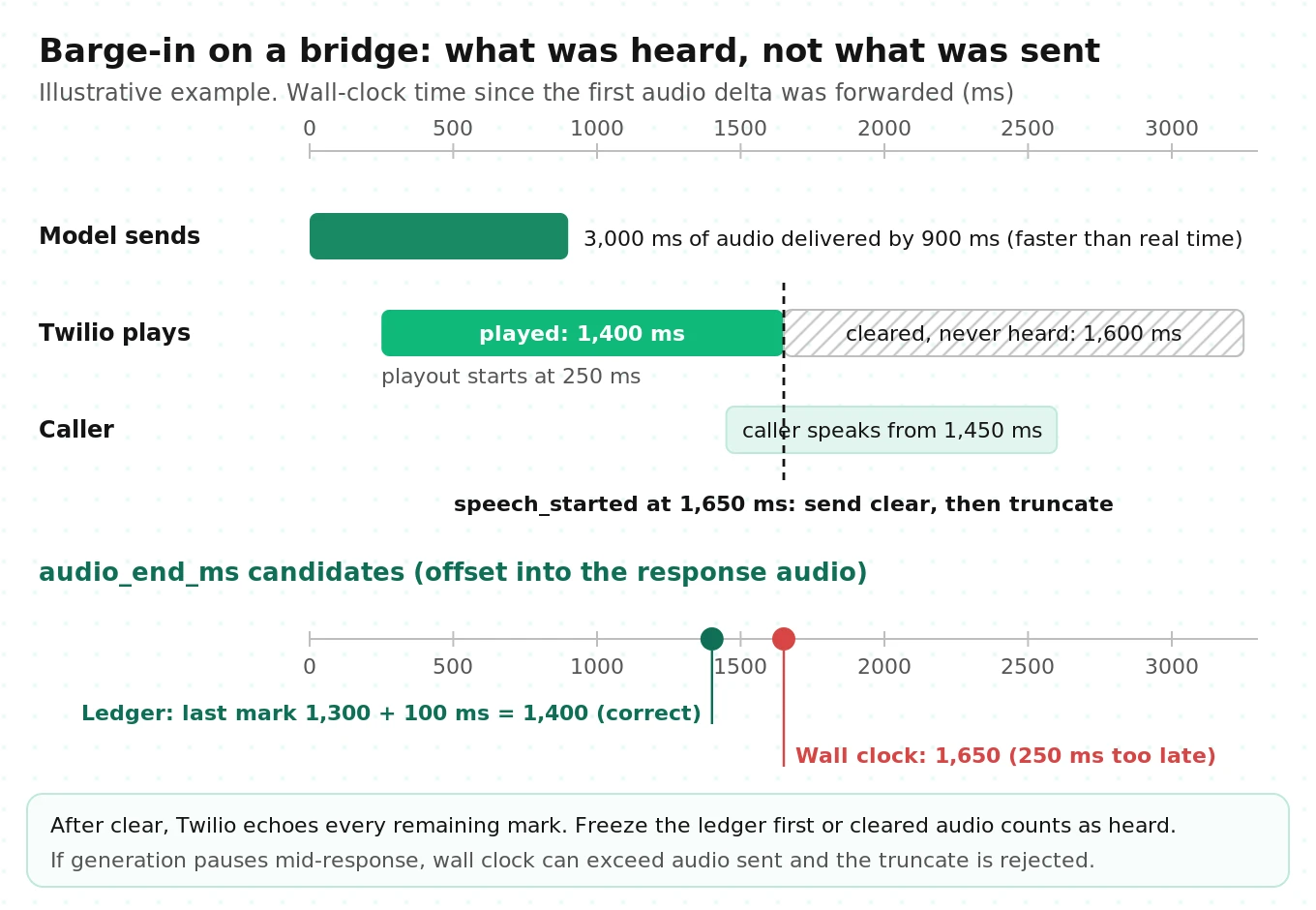
The fix is a played-audio ledger. Name each mark with the cumulative milliseconds of audio sent for that item. When Twilio echoes a mark, everything up to that offset has played. Freeze the ledger before you send `clear`, so cleared-audio echoes are ignored.
# Simplified, illustrative: played-audio ledger for a Twilio <-> OpenAI Realtime bridge.
import base64, json, time

MS_PER_BYTE = 1 / 8          # G.711 mu-law at 8 kHz: 8 bytes per ms

class PlaybackLedger:
    def __init__(self):
        self.reset(None)

    def reset(self, item_id):
        self.item_id, self.sent_ms, self.acked_ms = item_id, 0, 0
        self.acked_at, self.frozen = None, False

    def on_audio_delta(self, item_id: str, b64: str) -> str:
        if item_id != self.item_id:
            self.reset(item_id)
        self.sent_ms += int(len(base64.b64decode(b64)) * MS_PER_BYTE)
        return f"{item_id}|{self.sent_ms}"   # use as the mark name

    def on_mark(self, name: str):
        item_id, ms = name.rsplit("|", 1)
        if self.frozen or item_id != self.item_id:
            return                           # cleared-audio echo: not played
        self.acked_ms, self.acked_at = max(self.acked_ms, int(ms)), time.monotonic()

    def heard_ms(self) -> int:
        if self.acked_at is None:
            return 0                         # first chunk still playing
        since = int((time.monotonic() - self.acked_at) * 1000)
        return min(self.sent_ms, self.acked_ms + since)

async def on_speech_started(openai_ws, twilio_ws, stream_sid, ledger):
    heard = ledger.heard_ms()
    ledger.frozen = True                     # freeze BEFORE clear
    await twilio_ws.send_text(json.dumps({"event": "clear", "streamSid": stream_sid}))
    if ledger.item_id and ledger.sent_ms:
        await openai_ws.send(json.dumps({
            "type": "conversation.item.truncate",
            "item_id": ledger.item_id,
            "content_index": 0,
            "audio_end_ms": heard,
        }))
The session config for passthrough uses `audio/pcmu` both ways:
{
  "type": "session.update",
  "session": {
    "type": "realtime",
    "model": "gpt-realtime-2.1",
    "output_modalities": ["audio"],
    "audio": {
      "input":  {"format": {"type": "audio/pcmu"},
                 "turn_detection": {"type": "semantic_vad", "interrupt_response": true}},
      "output": {"format": {"type": "audio/pcmu"}, "voice": "marin"}
    }
  }
}
The ledger's error is bounded by one delta's duration, because the first mark of a response has not echoed yet. Smaller outbound chunks tighten it. You can split large deltas into 100 ms pieces before forwarding, which is 800 bytes of mu-law each.
Gemini Live: interrupted, with no truncate
Gemini works differently. The capabilities guide says that when VAD detects an interruption, "the ongoing generation is canceled and discarded. Only the information already sent to the client is retained in the session history." The server then sends `serverContent.interrupted` and the IDs of any canceled function calls.
On a phone bridge, "sent to the client" means sent to your bridge. Audio sitting in Twilio's buffer counts as delivered. So Gemini's history includes words the caller never heard, and there is no truncate event to fix it. That is the same drift the Realtime truncate exists to prevent.
You have two levers:
- Keep the carrier buffer shallow. Pace outbound audio to Twilio at real time plus a small lead, rather than dumping every chunk on arrival. Hold the rest in your own queue, which you can drop instantly on `interrupted`. This does not change Gemini's view, but it shrinks how much the caller misses after `clear`.
- Tell the model what was heard. `gemini-3.8-live` supports `send_client_content` throughout the session with explicit roles. Without `turn_complete`, the server waits instead of responding. After an interruption, you can send a short note that the caller heard only up to a given phrase. Use output transcription and your ledger to find that phrase. Treat this as a pattern to validate on your own calls, not a documented feature.
The echo self-interrupt
A May 2026 Google developer forum report describes a telephony-specific failure. Some carriers reflect the model's outbound audio back into the inbound stream. Gemini's VAD hears its own words, fires `interrupted`, and the transcript attributes the model's words to the caller. The reporter's workaround, `prefixPaddingMs: 200`, filtered short echoes but not longer phrases.
This is not Gemini-specific in principle. Any full-duplex model with server-side VAD can be tricked by line echo or speakerphone bleed. Detect it by comparing input transcripts to the agent's recent output transcript. Then fix it at the media layer: echo cancellation on the inbound leg, or a softer start-of-speech sensitivity. Our guide to noise and echo cancellation on self-hosted LiveKit covers the media-layer options.
GPT-Live on a bridge
GPT-Live does not support truncation, and it has no per-response done event. The migration guide says to drive the speaking indicator from your audio player. On a bridge, that player is Twilio's buffer, which you only observe through marks. Pacing matters even more here. When `session.input_transcript.delta` arrives while your ledger shows queued audio, send `clear` and drop your local queue.
The mapping table
| Event or action | OpenAI Realtime (bridge) | GPT-Live (bridge) | Gemini Live (bridge) | Native SIP (OpenAI) |
|---|---|---|---|---|
| Caller starts talking | `input_audio_buffer.speech_started` | Input transcript deltas during playback | `serverContent.interrupted` | Handled server-side |
| Stop generation | Automatic with `interrupt_response` | Model decides | Automatic, generation discarded | Automatic |
| Flush carrier audio | Twilio `clear` | Twilio `clear` | Twilio `clear` | Not needed |
| Fix context | `conversation.item.truncate` with heard ms | Not supported | Not supported; optional client note | Server knows playout |
| Pending tool calls | Your code decides | Backend task tracking | Canceled IDs sent by server | Your sideband decides |
Scoring this behavior is its own discipline. Our guide to evaluating interruption detection defines the metrics.
Session limits and reconnection
Phone calls are long-lived connections. Each provider caps them differently.
| Limit | OpenAI Realtime | GPT-Live | Gemini Live |
|---|---|---|---|
| Session cap | 60 minutes | 2 hours connected (outbound SIP) | 15 min audio-only without compression |
| Connection reset | Not documented | Not documented | About 10 minutes, with a `GoAway` warning |
| Extension | New session plus summarized context | New session | Context window compression plus session resumption |
| Resume token | Not applicable | Not applicable | Valid 2 hours after the last session ends |
Sources: the Realtime conversations guide, the GPT-Live telephony guide, and the Gemini session management guide.
The Gemini numbers change your architecture. Any call longer than about 10 minutes will cross at least one connection reset. A support call that runs 14 minutes is normal. Without resumption, the session dies mid-sentence and the caller hears silence.
The handling pattern looks like this:
# Simplified, illustrative: Gemini Live reconnect loop for a phone bridge.
import asyncio
from google import genai
from google.genai import types

client = genai.Client()

def live_config(handle):
    return types.LiveConnectConfig(
        response_modalities=["AUDIO"],
        session_resumption=types.SessionResumptionConfig(handle=handle),
        context_window_compression=types.ContextWindowCompressionConfig(
            sliding_window=types.SlidingWindow()),
        input_audio_transcription=types.AudioTranscriptionConfig(),
        output_audio_transcription=types.AudioTranscriptionConfig(),
    )

async def run_call(call):
    handle = None
    while call.active:
        async with client.aio.live.connect(model="gemini-3.8-live",
                                           config=live_config(handle)) as session:
            sender = asyncio.create_task(call.pump_caller_audio(session))  # replays buffered audio first
            try:
                async for msg in session.receive():
                    u = msg.session_resumption_update
                    if u and u.resumable and u.new_handle:
                        handle = u.new_handle            # always keep the latest
                    if msg.go_away is not None:
                        call.start_buffering_caller_audio()
                        break                            # reconnect with handle
                    if msg.server_content and msg.server_content.interrupted:
                        await call.flush_playback()      # Twilio clear + local queue
                    if msg.data:
                        await call.play_24k_pcm(msg.data)
            finally:
                sender.cancel()
Three rules make this reliable:
- Buffer caller audio during the handshake. Keep a short ring buffer while you reconnect and replay it on the new connection. Otherwise the first words after the reset are lost.
- Reconnect between turns when you can. `GoAway` carries `timeLeft`. If the model is mid-utterance, let it finish or reconnect while the caller talks.
- Turn compression on from the start. Without it, an audio-only session ends at 15 minutes no matter how well you resume.
On OpenAI Realtime, the 60-minute cap rarely matters for support calls. It does matter for long intake or dispatch calls. Plan a summarize-and-restart path for those.
Function calling on a live call
Tools behave differently on each model, and the differences surface under interruption.
OpenAI Realtime. The model emits a function call item. You run the function, send a `function_call_output` item with `conversation.item.create`, and then `response.create`. If the caller interrupts while your tool runs, the result still arrives later. Decide whether the call is still relevant before you trigger a new response.
Gemini Live. On `gemini-3.8-live`, asynchronous `NON_BLOCKING` calling is the default, per the model page. Set `behavior: BLOCKING` to restore the old pause-until-result mode. For non-blocking calls, each response sets `scheduling`: `INTERRUPT` speaks the result at once, `WHEN_IDLE` waits until the model finishes, and `SILENT` stores it for later. The Live API has no automatic tool handling, so you must answer every call with `send_tool_response`. The tools guide has the details. On interruption, the server discards pending calls and sends their IDs.
GPT-Live. Reasoning and tools are delegated to a backend. See our GPT-Live build guide for the delegation event flow.
The phone-specific rule is the same for all three. A canceled call is not a reverted side effect. If Gemini cancels a `book_appointment` call ID after your backend already wrote the booking, the booking stays. Make side-effecting tools idempotent with a key tied to the call and the confirmed slot. Treat "canceled" as "do not speak the result," not "undo."
Framework plugins have their own tool bugs. One example is LiveKit agents-js issue 2593, where Gemini `NON_BLOCKING` tool results were lost. Pipecat issue 5997 reports that `GeminiLiveLLMService` connection failures did not mark the service unusable. Pin versions and test tools under interruption after every upgrade. Our guide to tool call accuracy explains how to score these.
DTMF, transfer, and hangup from each path
Call control is where the model API ends and the phone network begins. The bidirectional Twilio stream has one hard rule. Twilio's docs say "the only way to stop a Stream is to end the call," or move the call to new TwiML.
| Action | Native SIP (Realtime) | Native SIP (GPT-Live) | Twilio media stream | LiveKit or Pipecat |
|---|---|---|---|---|
| Read keypad | `input_audio_buffer.dtmf_event_received` | `transport.dtmf.received` | `dtmf` message with `dtmf.digit` | Framework DTMF events |
| Transfer to a human | `POST /v1/realtime/calls/{id}/refer` | `POST /v1/live/sessions/{id}/refer` | Update the Call with new TwiML containing a Dial | SIP REFER or a room handoff |
| Hang up | `POST /v1/realtime/calls/{id}/hangup` | `POST /v1/live/sessions/{id}/hangup` | Update the Call status to `completed` | Delete the room or end the session |
| Goodbye clipping risk | Low if you wait for playout | Medium; no per-response done event | High; wait for the final mark echo | Depends on plugin |
Three practices prevent the common failures:
- Expose transfer and hangup as tools. Have the tool return immediately. Execute the REFER or Call update only after the final goodbye audio has played. On a bridge, "played" means the last mark came back.
- Do not trust the model to read digits from audio. Keypad tones on a G.711 stream may or may not survive. Use the out-of-band DTMF event and inject the digits as text. Our DTMF testing guide lists the cases to cover.
- REFER needs carrier support. OpenAI returns 200 once the REFER is relayed to your SIP provider. The provider still has to honor it. Test transfers against your actual trunk, not a softphone.
For a full treatment of ending and transferring calls inside frameworks, see ending and transferring calls in LiveKit and Pipecat.
Decision table: which path should you ship?
| Criterion | Native SIP | Media-stream bridge | LiveKit or Pipecat plugin |
|---|---|---|---|
| Models | OpenAI Realtime, GPT-Live | Any WebSocket model | Any supported plugin |
| Gemini Live | Not available | Yes, with resampling | Yes |
| Barge-in correctness | Provider handles playout | You build the ledger | Framework handles, verify |
| Audio inspection or recording in your code | No; audio bypasses you | Full access | Full access |
| Mixing in a separate TTS or STT | No | Yes | Yes |
| Extra network hops | None | Two WebSockets | SFU or transport plus model socket |
| Ops burden | Webhooks and sideband | Highest: you run DSP and state | Medium: framework upgrades |
| Best for | OpenAI-only, inbound, fast launch | Custom control, Gemini, multi-model | Teams already on a framework |
A short rule of thumb follows. If you are OpenAI-only and inbound-first, start with native SIP. If you need Gemini or must record and inspect audio in your own code, use a bridge or a framework. If you already run LiveKit or Pipecat for cascaded agents, use the plugin and keep one call path. Our LiveKit vs Pipecat telephony comparison helps with that choice.
Latency budget per architecture
Speech-to-speech models remove the STT and TTS hops, but the phone path adds its own. The table below is an illustrative budget, not a measurement. It assumes your bridge runs in the same cloud region as the carrier media edge and the model endpoint. Replace each row with your own numbers.
| Hop (one turn, caller stops to first audio heard) | Native SIP | Bridge | Framework |
|---|---|---|---|
| Carrier ingress and PSTN | 40 to 100 ms | 40 to 100 ms | 40 to 100 ms |
| Carrier to your server (WebSocket) | 0 | 10 to 40 ms | 10 to 40 ms (SIP to SFU) |
| Your server to model | 0 (carrier sends direct) | 20 to 60 ms | 20 to 60 ms |
| Turn detection wait | VAD silence setting | Same | Same, or framework turn model |
| Model time to first audio | Model-dependent | Model-dependent | Model-dependent |
| Return path and carrier playout | 40 to 100 ms | 70 to 200 ms | 70 to 200 ms |
| Resampling (polyphase) | 0 | 0 to 5 ms | 0 to 5 ms |
The turn-detection wait is usually the biggest controllable term. LiveKit's OpenAI plugin example sets `server_vad` with `silence_duration_ms` of 500 ms. That wait happens before the model even starts. Tuning it is a trade between speed and cutting callers off. That trade is the subject of our Pipecat latency measurement guide.
Measure the real number from a dual-channel call recording. Mark the end of caller speech on one channel and the first agent audio on the other. Never use the model's internal timestamps. They miss the carrier buffer, which is the part the caller feels.
What it costs per minute, including the carrier
Here are the published rates as of October 4, 2026.
| Item | Rate | Source |
|---|---|---|
| `gpt-realtime-2.1` audio input | $32 per 1M tokens ($0.40 cached) | Model page |
| `gpt-realtime-2.1` audio output | $64 per 1M tokens | Model page |
| Realtime audio tokenization | 1 token per 100 ms in, 1 per 50 ms out | Costs guide |
| `gpt-live-1` | $0.05 per minute, billed per second, plus backend | Model page |
| `gemini-3.8-live` audio | $0.005 per min in, $0.018 per min out | Gemini pricing |
| Twilio inbound, local number | $0.0085 per min | Twilio voice pricing |
| Twilio Media Streams | $0.0044 per min | Twilio voice pricing |
| Twilio Elastic SIP origination, local | $0.0034 per min | Twilio SIP pricing |
The Realtime math is the tricky one. Fresh caller audio costs 600 tokens per minute, or $0.0192. Agent audio costs 1,200 tokens per minute, or $0.0768. The costs guide also notes that "the entire conversation is sent to the model for each Response." Later turns re-read all earlier audio, at the cached rate when the cache hits and the full rate when it misses.
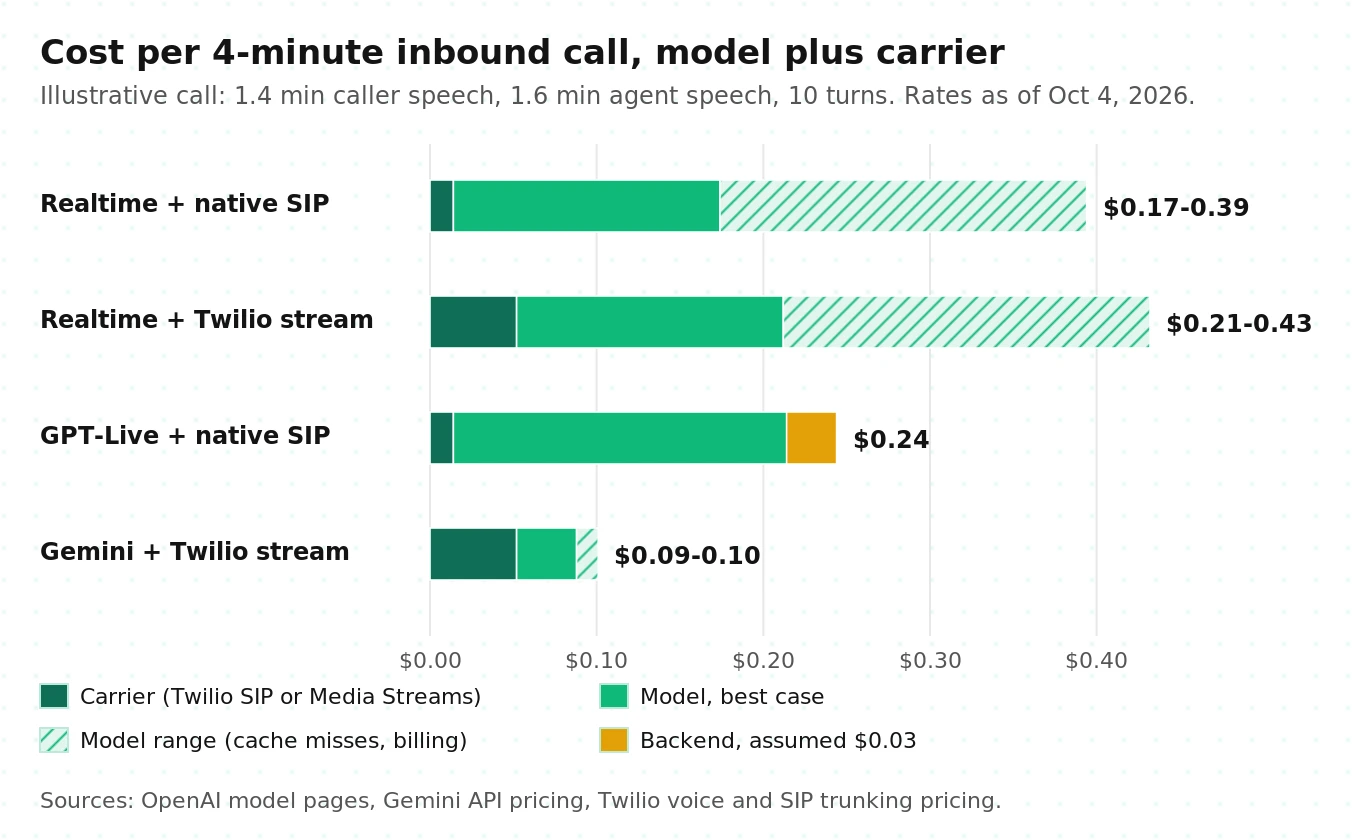
Worked example (illustrative assumptions). Take a 4-minute inbound call with 10 turns. The caller speaks for 1.4 minutes and the agent for 1.6 minutes. Instructions and tools add 1,200 text tokens per turn.
- Realtime model cost: about $0.16 per call with a perfect cache, and about $0.38 if half of the re-read history misses the cache. Output audio is $0.12 of that.
- Realtime via native SIP: add 4 x $0.0034 = $0.014 for SIP origination. Total is $0.17 to $0.39, or $0.04 to $0.10 per minute.
- Realtime via a Twilio media stream: add 4 x ($0.0085 + $0.0044) = $0.052. Total is $0.21 to $0.43.
- GPT-Live via SIP: 4 x $0.05 = $0.20, plus $0.014 carrier, plus backend tokens. With an assumed $0.03 backend, the total is about $0.24.
- Gemini 3.8 Live via a Twilio stream: input is $0.007 to $0.02, depending on whether only speech or all streamed audio bills. Output is 1.6 x $0.018 = $0.029. Twilio adds $0.052. The total is about $0.09, before bridge compute.
Two takeaways are not visible on any single pricing page. On Gemini, the carrier leg can cost more than the model, so a SIP trunk instead of Media Streams changes your unit economics. On Realtime, cache hit rate is the cost lever. Changing instructions or tools mid-call busts the cache from that point forward, which the costs guide warns about. Verify your own token counts from `response.done` usage on Realtime and from usage metadata on Gemini before you budget. Then convert to cost per resolved call, which is the number that matters.
What the research says about speech-to-speech models on calls
Vendor docs tell you how to connect. Three research results tell you what to test once you have.
Turn-taking needs its own benchmark. Full-Duplex-Bench (Lin et al., ASRU 2025) evaluates spoken dialogue models on four behaviors: pause handling, backchanneling, smooth turn-taking, and user interruption. It uses automatic metrics such as how often the model takes over the turn when it should not. The practical lesson is that "accuracy" on a transcript says nothing about these behaviors. Each one needs scripted audio with known timing.
Models interrupt too aggressively and rarely backchannel. The Talking Turns study (Arora et al., ICLR 2025) used a turn-taking model trained on human conversations as a judge. It found that spoken dialogue systems "sometimes do not understand when to speak up, can interrupt too aggressively and rarely backchannel." On the phone, aggressive interruption shows up as the agent talking over callers who pause to find an account number. Your test set should include mid-sentence pauses of one to three seconds.
Degraded audio produces confident, invented content. The WildASR benchmark (2026) simulated phone channels with G.711 mu-law and GSM codecs, among other conditions. It found severe, uneven degradation that "does not transfer across languages or conditions." Models also hallucinated "plausible but unspoken content under partial or degraded inputs." That study measured ASR systems, but speech-to-speech models face the same 8 kHz input. Test your agent on codec-degraded audio, not on clean recordings.
How to test a realtime model on a phone line before launch
This is the protocol we recommend for an in-house team without an eval group. It assumes one path is built and a second is a candidate. Our GPT-Live testing guide covers model-level checks. This one targets the phone path.
1. Record a golden corpus over the real path. Place scripted calls through your actual trunk or bridge. Record dual-channel at the carrier, not in your app, so the carrier buffer shows up.
2. Build 8 scenarios. Use a clean happy path, a mid-sentence barge-in, a barge-in during a tool call, a 2-second thinking pause, DTMF entry, a transfer request, a goodbye and hangup, and a 14-minute call.
3. Cross them with 4 conditions. Use clean audio, babble noise at 10 dB SNR, 2 percent packet loss with jitter, and speakerphone echo. That gives 32 cells per path.
4. Score each cell with fixed metrics. Use the thresholds in the matrix below. They are starting targets for you to adjust, not industry standards.
5. Check context against audio after every barge-in. Compare what the model later says it told the caller with what the recording shows the caller heard. Any reference to unheard content is a truncation failure.
6. Count side effects in your backend, not in transcripts. A booking that exists twice is a failure even if the call sounded fine.
7. Run enough calls to see rare failures. If you see zero failures in n calls, the 95 percent upper bound on the true rate is about 3/n. To claim duplicate tool execution under 1 percent, you need about 300 clean interruption calls.
8. Re-run the full matrix on every model, plugin, or carrier change. Model snapshots and framework releases change interruption behavior without changing your code.
| Metric | Definition | Starting pass threshold |
|---|---|---|
| Barge-in stop time | Caller speech onset to agent audio stopping, from the recording | p95 at or under 400 ms |
| Truncation fidelity | Share of barge-ins where later turns reference only heard content | 98 percent or more |
| Self-interrupt rate | Agent turns cut by its own echo, per 100 agent turns | Under 1 |
| False takeover rate | Agent starts talking during a caller pause under 2 s | Under 5 percent |
| Duplicate side effects | Tool writes executed twice per 100 tool calls | 0 |
| Long-call survival | 14-minute calls finishing without a silence over 2 s | 100 percent |
| DTMF capture | Keypresses delivered to the agent as digits | 100 percent |
| Goodbye completeness | Calls where the final sentence plays before hangup | 98 percent or more |
For a rate like truncation fidelity, size the sample with n = z^2 x p(1 - p) / E^2. To measure a 2 percent failure rate within plus or minus 2 points at 95 percent confidence, n = 3.84 x 0.02 x 0.98 / 0.0004, which is about 188 barge-in events. Scripted barge-ins make that affordable. Manual test calls do not. If you would rather have this matrix run by an outside team, as a pre-launch audit or a bake-off between Realtime, GPT-Live, and Gemini on your own scripts, that is the work Evalgent does.
The failure taxonomy
Use this table to label every failed call. Labels turn a pile of bad recordings into a ranked fix list.
| Layer | Failure | Typical cause | Path most exposed |
|---|---|---|---|
| Signaling | Call accepted twice or never | Webhook retries not deduplicated; competing accept handlers | Native SIP |
| Signaling | Duplicate outbound call | Auto-retry after ambiguous timeout | GPT-Live outbound SIP |
| Media | One-way audio | SRTP media CIDRs blocked by firewall | Native SIP |
| Media | Static or noise bursts | PCM16 sent where mu-law expected, or the reverse | Bridge |
| Media | Metallic sibilants | Decimating 24 kHz to 8 kHz without a low-pass filter | Bridge (Gemini) |
| Turn-taking | Agent talks over caller pauses | VAD silence too short; model behavior | All |
| Turn-taking | Agent interrupts itself | Line echo reflected into the inbound stream | Bridge, framework |
| Context | Agent references unheard words | Wrong `audio_end_ms`; Gemini keeps sent-but-unplayed audio | Bridge |
| Session | Silence at about 10 minutes | Gemini connection reset without resumption | Bridge, framework |
| Tools | Booking written twice | Non-idempotent tools under cancel or retry | All |
| Tools | Result never spoken | Lost non-blocking results in a plugin | Framework |
| Call control | Goodbye clipped | Hangup issued before final playout | All |
| Cost | Bill grows with call length | Context re-read each turn; cache busted | Realtime |
Where independent evaluation fits
Most failures in this taxonomy are invisible in the model vendor's dashboard. The model sees its own events, not the carrier buffer, the echo, or your backend's duplicate writes. They show up only when you test the whole phone path from the outside and score the recording, not the event log. That is the job of an independent evaluator such as Evalgent.
That helps at three points: before launch, when choosing between Realtime, GPT-Live, and Gemini on your own call scripts, and after every model or framework upgrade. If you want a structured outside review before go-live, see our third-party voice agent audit guide. For carrier choices, see the best telephony for voice agents and SIP vs WebRTC.
Frequently asked questions
Does the OpenAI Realtime API support SIP?
Yes. Point your SIP trunk at `sip:$PROJECT_ID@sip.api.openai.com;transport=tls`. OpenAI sends a `realtime.call.incoming` webhook. You accept with `POST /v1/realtime/calls/{call_id}/accept`, then attach a WebSocket using the `call_id` to handle events, tools, transfers via `/refer`, and hangups via `/hangup`. GPT-Live has a parallel flow under `/v1/live/sessions`.
Should I use OpenAI's SIP endpoint or Twilio Media Streams?
Use native SIP if you only need OpenAI models and don't need to process audio in your own code. OpenAI then handles playout and truncation. Use a Media Streams bridge if you need Gemini, recording, custom DSP, or several models on one number. The bridge costs more per minute on Twilio and you own barge-in correctness.
How do I compute audio_end_ms for conversation.item.truncate?
Use audio the caller actually heard, not wall-clock time. Name each Twilio mark with the cumulative milliseconds sent. When a mark echoes, that much audio has played. Freeze the count before sending `clear`, because Twilio echoes cleared marks too. Never exceed the audio sent, or the server rejects the truncate.
Does the Gemini Live API support SIP or Twilio?
Google's Gemini API docs list no SIP endpoint as of October 2026. Connect phone calls through a Twilio or Telnyx media-stream bridge, or through a framework like LiveKit or Pipecat. Decode mu-law and send PCM16 with the sample rate in the MIME type. Downsample Gemini's 24 kHz output to 8 kHz with a proper low-pass filter.
How long can a Gemini Live API session last on a phone call?
Audio-only sessions stop at 15 minutes unless you enable context window compression. Separately, connections reset after about 10 minutes, with a GoAway message first. Enable session resumption, store the latest handle, and reconnect. Handles stay valid for 2 hours. Buffer caller audio during the reconnect so no words are lost.
What happens to Gemini Live's context when a caller interrupts?
Gemini cancels and discards the ongoing generation and sends `serverContent.interrupted`. Everything already sent to your client stays in history. On a phone bridge, that includes audio still queued in the carrier's buffer, so the model may think the caller heard words they missed. Keep the carrier buffer shallow to limit this.
How do I transfer or hang up a call from a realtime voice agent?
On native SIP, call the `refer` or `hangup` endpoint for the call or session. On a Twilio bridge, update the Call with new TwiML containing a Dial to transfer, or set its status to `completed` to hang up. Wait for the final goodbye audio to finish playing first.
How much does an OpenAI Realtime phone call cost per minute?
It depends on talk ratio and cache hits. In our illustrative 4-minute example, `gpt-realtime-2.1` cost $0.16 to $0.38 per call. Native SIP added about $0.014 in Twilio origination, and a Media Streams bridge about $0.052. That works out to roughly $0.04 to $0.11 per minute. Check `response.done` usage on your own calls.
The bottom line
Pick native SIP when you are OpenAI-only and want the provider to own playout, and pick a bridge or a framework when you need Gemini, your own audio, or several models. Whichever path you choose, test barge-in, truncation, long calls, and side effects over the real phone line before callers find the bugs for you.
Related Articles

How to automate voice agent testing: synthetic callers vs manual QA
Learn how ai test automation replaces manual QA for voice agents. Compare synthetic callers vs human testers, with a 5-step framework to scale without hiring.
Read more
AI Agent Testing vs Voice Agent Testing: What General Tools Miss for Voice
AI agent testing measures text outputs. Voice agent testing measures behaviour through an acoustic pipeline. Five failure categories general tools miss.
Read more