How to Evaluate a Realtime Voice API: GPT-Live, Gemini Live, Grok, Deepgram, ElevenLabs Compared
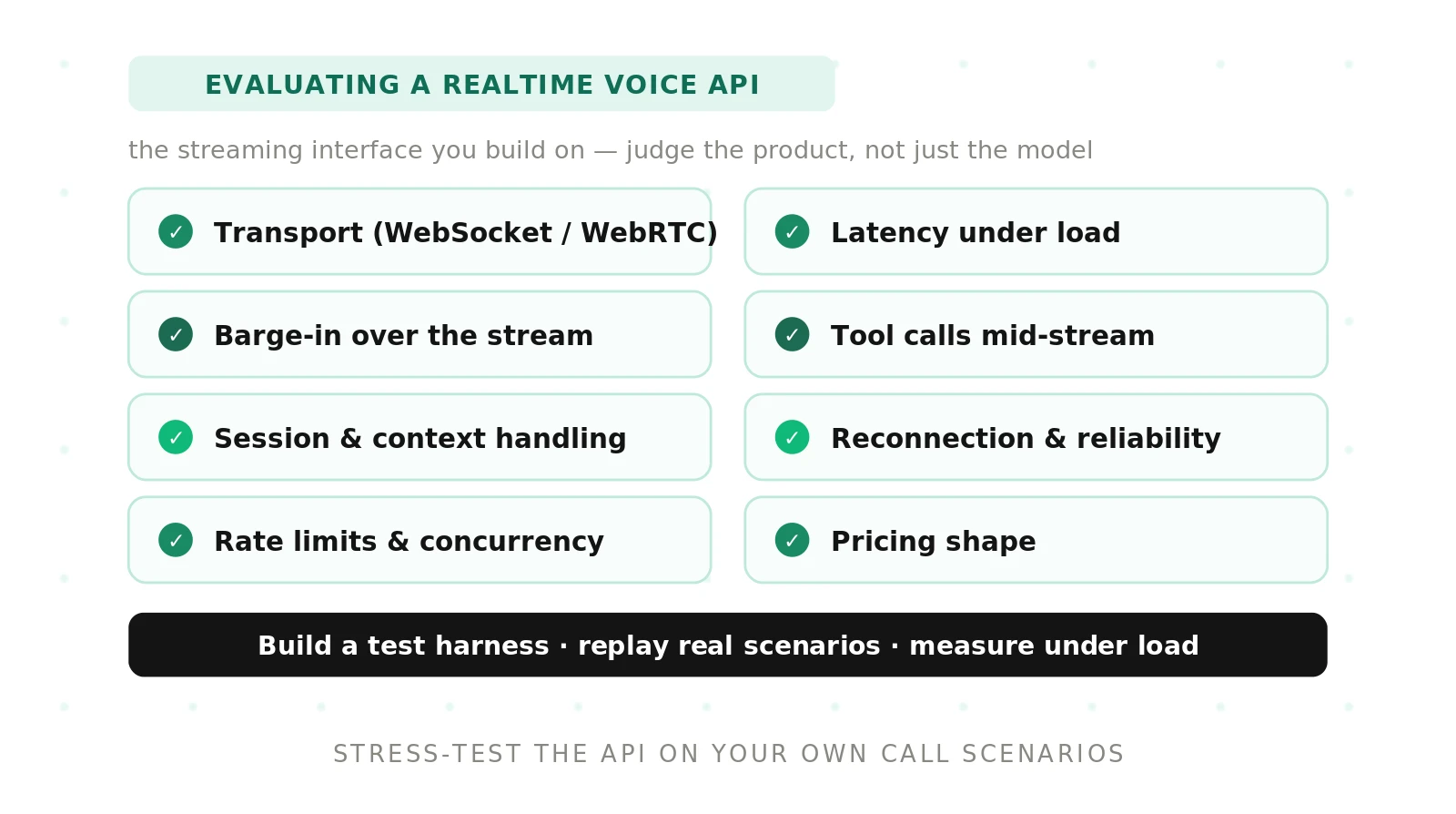
On this page
Most comparisons of realtime voice APIs grade the voice. This guide grades the plumbing. Two APIs can sit on equally good models and still behave very differently on a phone line, because one lets you tell the model which words the caller never heard and the other does not. One bills a flat rate per minute. The other re-bills the whole conversation on every turn, so minute nine costs more than minute one.
We read the current docs for five APIs as of October 2026: OpenAI GPT-Live (`gpt-live-1`) and the OpenAI Realtime API (`gpt-realtime-2.1`), Google's Gemini Live API (`gemini-3.8-live`), xAI's Grok Voice API (`grok-voice-think-fast-2.0`), Deepgram's Voice Agent API, and ElevenLabs Agents. Then we turned the findings into a checklist and a harness that measures each one the same way. For output quality, see our guide to evaluating a speech-to-speech model.
What evaluating a realtime voice API actually means
A realtime voice API is a long-lived, stateful connection that carries audio both ways and a stream of control events alongside it. You are not scoring a request and a response. You are scoring a session that has to survive pauses, interruptions, tool calls, network loss, and a context window that fills up.
In 2026 these APIs fall into four protocol families. The family decides what you can control and what you can measure.
| Family | APIs | Who decides when the agent speaks | What you control |
|---|---|---|---|
| Turn-based event protocol | OpenAI Realtime, xAI Grok Voice | Server VAD or your `response.create` | VAD thresholds, response creation, conversation items, truncation |
| Full-duplex with delegation | OpenAI GPT-Live | The voice model itself | Instructions, context appends, delegated backend work |
| Bidirectional generate stream | Gemini Live API | Server activity detection or your `activityStart` / `activityEnd` | VAD sensitivity, manual activity signals, compression, resumption |
| Managed pipeline agent | Deepgram Voice Agent, ElevenLabs Agents | The platform's turn detector | Listen, think, and speak providers, prompts, tools |
The family matters for testing. xAI says most OpenAI Realtime client libraries work against its API by changing the base URL, so one adapter covers both. GPT-Live looks similar but does not use Realtime's input-buffer commit and `response.create` turn loop. Moving a Realtime integration to GPT-Live means a rewrite, which our GPT-Live build guide walks through.
The mechanics matrix: five APIs side by side
Every cell comes from current vendor docs. Where a doc is silent, treat that as a test item, not a pass.
| Mechanic | GPT-Live (`gpt-live-1`) | OpenAI Realtime (`gpt-realtime-2.1`) | Gemini Live (`gemini-3.8-live`) | Grok Voice | Deepgram Voice Agent | ElevenLabs Agents |
|---|---|---|---|---|---|---|
| Transport | WebRTC, WebSocket, SIP, sideband WebSocket | WebRTC, WebSocket, SIP, sideband | WebSocket | WebSocket, WebRTC, SIP, LiveKit | WebSocket | WebSocket, WebRTC (via LiveKit), SIP trunk |
| Audio in | PCM16 24 kHz or 16 kHz, G.711 u-law or A-law | PCM16, G.711 | PCM16, natively 16 kHz, rate set in MIME type | PCM at 8 to 48 kHz, G.711, Opus | `linear16` and others, set in `Settings` | Format reported in `conversation_initiation_metadata` |
| Audio out | Same format as input, fixed at start | Configurable | PCM16 at 24 kHz, always | PCM at 8 to 48 kHz, G.711, Opus | Set in `Settings` | Example shows `pcm_44100` |
| Turn detection | Model-owned, no VAD knobs | `server_vad` or `semantic_vad` | Automatic with sensitivities, or manual | `server_vad` or `null` | Platform detector (Flux has built-in end of turn) | Platform detector, `vad_score` events |
| Remove unheard audio from context | Not supported; discarded speech stays in context | `conversation.item.truncate`, or `output_audio_buffer.clear` on WebRTC and SIP | No documented truncate event | `conversation.item.truncate` | Not documented | `agent_response_correction` reports truncated text |
| Non-blocking tools | Delegation; backend work continues across interruptions | Function calls inside responses | `NON_BLOCKING` with `INTERRUPT`, `WHEN_IDLE`, `SILENT` (not on 3.1 Flash Live) | Function calls; result after `response.done` | Function call request and response, cancel event | Client tools, webhook tools, tool interruption settings |
| Session limit | Ends with reason `expired`; number not in the docs we read | 60 minutes | 15 min audio-only, connection about 10 min | Resumption history dropped after 30 min idle | Billed per connection time | Billed per connection time |
| Billing unit | $0.05 per minute plus backend tokens | Tokens: audio in $32/M, out $64/M | Tokens: audio in $3/M, out $12/M | $0.08 per minute | $0.075 per minute (Standard, pay as you go) | $0.08 per minute example rate plus LLM |
| Concurrency | 25 (Tier 1) to 500 (Tier 5) sessions | RPM and TPM by tier | Per project, by tier | Not documented on the page we read | 45 pay as you go, 60 Growth | Plan limit, burst up to 3x or 300 |
Sources: OpenAI's GPT-Live model page, session guide, Realtime guide, and `gpt-realtime-2.1` page; Google's Live API capabilities, session management, and pricing; xAI's Speech to Speech guide and launch post; Deepgram's pricing and message flow; ElevenLabs' event reference. All as of October 2, 2026.
Transport: what changes between WebRTC, WebSocket, and SIP
Transport decides who knows what the caller heard, how audio survives packet loss, and how much bandwidth each call burns.
WebSocket runs over TCP. TCP delivers bytes in order. When a packet is lost, everything behind it waits for the retransmit. That is head-of-line blocking. On a clean server-to-server link it rarely matters. On a lossy last mile, one lost packet stalls a run of audio frames, and then they arrive in a burst. Most WebSocket voice APIs also wrap audio in JSON as base64, which inflates bytes by 4/3. So 24 kHz PCM16 (384 kbps raw) becomes about 512 kbps before JSON overhead. G.711 at 8 kHz is 64 kbps raw. Deepgram sends raw binary frames, and Grok Voice offers a `binary` transport option that does the same.
WebRTC runs media over UDP with a jitter buffer and usually Opus. A late packet gets concealed or dropped instead of blocking the rest. The bigger difference for evaluation is that the server owns the playback path. OpenAI's Realtime docs say that on WebRTC and SIP, `output_audio_buffer.clear` stops playback and truncates the conversation for you. On WebSocket, the server cannot know what your speaker played, so you must tell it.
SIP connects a phone call directly. Media is narrowband G.711 at 8 kHz. Every API that accepts 8 kHz input either works natively in it or resamples. Resampling 8 kHz up to 24 kHz adds no information. Deepgram's own guidance says 16 kHz is the sweet spot for its models and that upsampling band-limited 8 kHz telephony audio gives no benefit. So test phone traffic at 8 kHz, not with clean wideband files.
Benchmark the transport you will ship. Our SIP vs WebRTC guide covers the network side in more depth.
Event protocols: the same turn in five dialects
The cleanest way to compare protocols is to trace one turn: caller speaks, agent answers, caller barges in. Here are the event names each API documents for that sequence.
| Step | OpenAI Realtime and Grok Voice | GPT-Live | Gemini Live | Deepgram Voice Agent | ElevenLabs Agents |
|---|---|---|---|---|---|
| Configure | `session.update` | `session.start` (most fields fixed) | Setup config at connect | `Settings`, then wait for `SettingsApplied` | Agent config; `conversation_initiation_metadata` returned |
| Send audio | `input_audio_buffer.append` | `session.input_audio.append` | `send_realtime_input` with an audio blob | Binary frames | `user_audio_chunk` |
| Speech start | `input_audio_buffer.speech_started` | Transcript deltas only | Handled server-side | `UserStartedSpeaking` | `vad_score` stream |
| Agent audio | `response.output_audio.delta` | `session.output_audio.delta` | `server_content` audio parts | Binary frames | `audio` with character alignment |
| Turn or reply done | `response.done` | No per-reply done event | `turn_complete`, `generation_complete` | `AgentAudioDone` | `agent_response` |
| Barge-in signal | `speech_started` plus `response.cancel` | Model handles it; no signal | `server_content.interrupted` | `UserStartedSpeaking` | `agent_response_correction` |
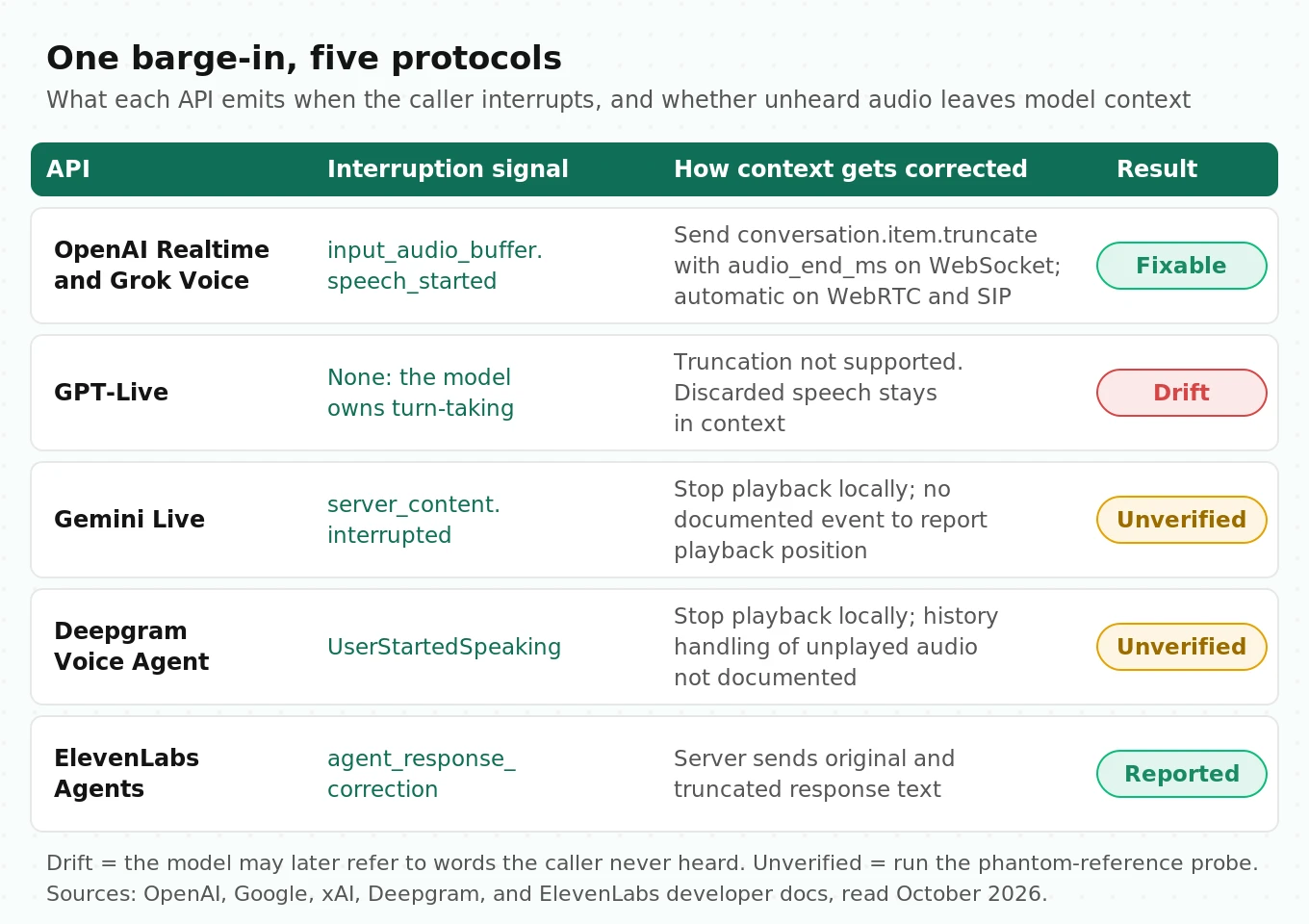
Three protocol details change how you build the harness.
First, GPT-Live has no reply boundary. Its WebSocket guide says output audio events carry no timing fields and there is no output-audio-done event. Transcript deltas carry `start_ms` and `end_ms`, but the docs say these do not mark playback completion. Your harness has to track playback itself.
Second, Deepgram's `AgentAudioDone` means the server finished sending audio, not that the caller finished hearing it. If the client buffers two seconds, the event fires two seconds before the last syllable plays.
Third, Grok Voice changes one transcription event. OpenAI's `conversation.item.input_audio_transcription.delta` becomes `conversation.item.input_audio_transcription.updated` in xAI's API, and it carries the full transcript so far, with corrections, instead of a delta. xAI also documents that `rate_limits.updated` is not emitted. A harness that reads rate-limit headroom from that event will log nothing on Grok.
Turn detection: what each API lets you tune
Turn detection decides two failure modes. Fire too early and the agent talks over a caller who paused to think. Fire too late and the caller waits in silence. Human conversation sets a hard bar. Stivers and colleagues measured turn transitions across 10 languages and found the most common gap fell between 0 and 200 ms in every one (PNAS, 2009). People plan their reply before the other speaker finishes. A pure silence timer cannot do that. It has to wait for the silence it is timing.
That is why the research moved toward prediction. Ekstedt and Skantze's Voice Activity Projection model predicts upcoming voice activity for both speakers from the raw audio stream, instead of waiting for silence. Semantic VAD and model-owned turn-taking are the commercial versions of that idea. Kyutai's Moshi paper goes further. It models the user's and the system's speech as parallel streams, with no explicit speaker turns, at a theoretical latency of 160 ms (200 ms in practice). That design is why full-duplex APIs like GPT-Live expose no VAD knobs at all.
Here is what each API exposes.
| API | Mode | Knobs and defaults |
|---|---|---|
| OpenAI Realtime | `server_vad` (default) | `threshold` 0 to 1 (example 0.5), `prefix_padding_ms` (example 300), `silence_duration_ms` (example 500), `create_response`, `interrupt_response` |
| OpenAI Realtime | `semantic_vad` | `eagerness`: `low`, `medium`, `high`, `auto` (`auto` equals `medium`) |
| Grok Voice | `server_vad` | `threshold` 0.1 to 0.9, default 0.85; `prefix_padding_ms` default 333; `silence_duration_ms` 0 to 10,000; `idle_timeout_ms` re-engages a silent caller |
| Gemini Live | Automatic | `start_of_speech_sensitivity`, `end_of_speech_sensitivity`, `prefix_padding_ms`, `silence_duration_ms` |
| Gemini Live | Manual or hybrid | Disable automatic detection and send `activityStart` and `activityEnd`, or keep it and send `audio_stream_end` from a client VAD |
| GPT-Live | Model-owned | No VAD settings; the model decides when to listen and speak |
| Deepgram Voice Agent | Platform | Flux emits `StartOfTurn` and `EndOfTurn` from the model; Deepgram recommends its model-level detection over an external VAD for barge-in |
| ElevenLabs Agents | Platform | Turn settings in agent config; `vad_score` events from 0 to 1 |
Sources: OpenAI's VAD guide, xAI's session parameters, Google's capabilities guide, and Deepgram's barge-in guide.
Two gotchas from these pages are worth testing directly.
A threshold number does not travel between vendors. Grok's default is 0.85 on a 0.1 to 0.9 scale. OpenAI's example is 0.5 on a 0 to 1 scale. They are different detectors, so calibrate each one by sweeping noise levels and logging false triggers.
Manual VAD on Gemini removes two safety nets. With automatic detection disabled, the server stops prepending pre-speech audio and acts on `activityEnd` at once, with no silence tolerance. In manual mode you are testing your VAD, not Google's.
Research confirms that these behaviors need direct measurement. Full-Duplex-Bench defines a Takeover Rate (TOR), the share of cases where the model takes the turn. Lower is better while the caller pauses. Higher is better once the caller has finished. In its turn-taking test on the Candor corpus, Gemini Live scored a TOR of only 0.655, so it failed to take the turn in about a third of cases. The Talking Turns study (ICLR 2025), using a judge model trained on human conversation, found that spoken dialogue systems sometimes miss when to speak, interrupt too aggressively, and rarely backchannel. Our turn-taking evaluation guide turns these into test cases.
Interruption and truncation: does the model know what the caller heard?
This is the mechanic most comparisons skip, and it causes the strangest production bugs.
The server generates audio faster than real time and streams it ahead into your playout buffer. When the caller barges in at second 1.5 of a 4-second reply, the server has already produced all 4 seconds, and its history says the agent said all of it. Unless something corrects that history, the model believes the caller heard words they never heard. Two turns later it says, "As I mentioned, the fee is waived," and the caller is lost. In this illustrative case, 2.5 s of unheard speech, about 62% of the reply, sits in context as if spoken.
Each API handles this differently.
- OpenAI Realtime gives you the fix, but only partly automatic. On WebSocket you send `conversation.item.truncate` with the item ID and `audio_end_ms`, the playback position. The server cuts the audio there and removes the unplayed transcript, but the docs say it cannot precisely align text and audio, so you get no truncated transcript back. On WebRTC and SIP, `output_audio_buffer.clear` stops playback and truncates for you.
- Grok Voice documents `conversation.item.truncate`. Its API reference says it removes audio and transcript content after the specified duration. `output_audio_buffer.clear` works only on WebRTC and SIP.
- GPT-Live does not support truncation. Its server-controls guide is explicit. If you withhold or cut audio, the discarded speech remains in the model's conversation context. You can stop playback at the client, but you cannot tell the model what was not heard.
- Gemini Live sends `server_content.interrupted` and tells you to stop playback and clear the queue. It also cancels pending function calls and sends their IDs. We found no client event to report the playback position.
- Deepgram tells you to stop playback the moment `UserStartedSpeaking` arrives. Its docs do not describe how the agent's history treats the unplayed part.
- ElevenLabs is the only API here that tells the client what it corrected. `agent_response_correction` carries both the original response and the corrected one, truncated after the interruption. Our ElevenLabs testing guide shows how to assert on it.
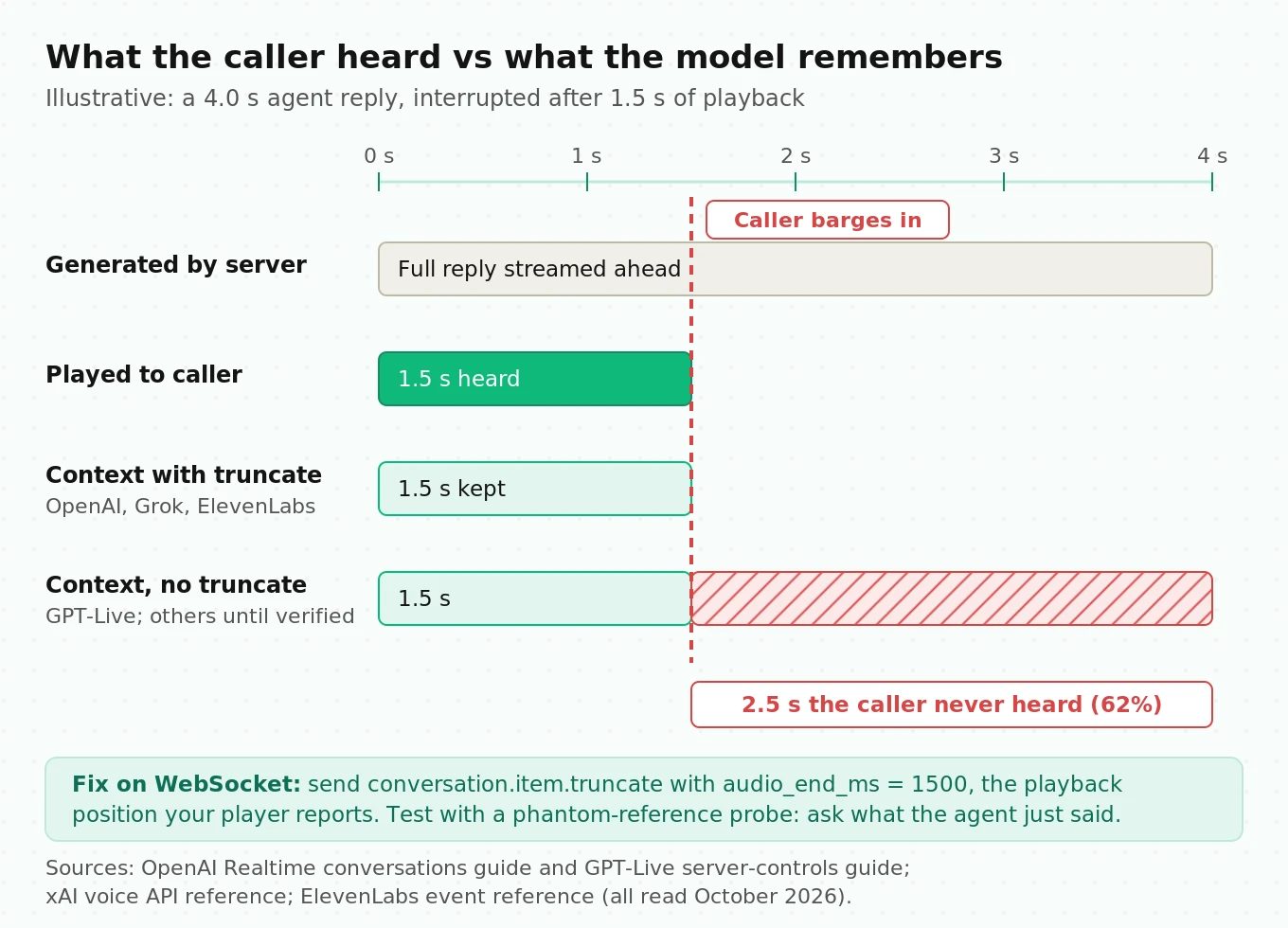
You can test this in a few minutes with what we call the phantom-reference probe. Script a reply that puts a unique fact at the end, such as "and your confirmation code is 4471." Interrupt during the first third of the sentence. Then ask, "What was the code you gave me?" A correct system says it did not finish giving one. A system with context drift recites 4471. Run it 50 times per vendor and transport. Report the phantom rate. Our interruption detection guide covers the detection side of the same event.
Function calling during audio: blocking vs non-blocking
The API question is what happens to the conversation while a tool runs, and when the caller interrupts.
- Gemini Live has the most explicit model. Functions block by default. Mark one `NON_BLOCKING` and the conversation continues, then choose how the result lands: `INTERRUPT` (speak it now), `WHEN_IDLE` (after the current utterance), or `SILENT` (keep it for later). One catch: Google's tools page says async calling is not yet supported on Gemini 3.1 Flash Live, where the agent stays silent until your tool responds.
- Grok Voice documents an ordering trap. During a spoken reply, the server sends all audio deltas first, then the function call events with `response.done`. Send the result and `response.create` at once and the next reply overlaps audio still playing. xAI's fix is to wait for playback to finish first. Our Grok Voice guide covers the rest of its setup.
- GPT-Live separates voice from work. The voice model delegates to a backend that OpenAI or you run. Backend work can continue when the caller interrupts, and your application decides whether to cancel it. Test that an interrupted "cancel my order" does not complete anyway.
- Deepgram exposes function call request and response messages and a Function Call Cancelled server event. ElevenLabs sends `client_tool_call` and expects `client_tool_result` with an `is_error` flag. It also documents tool interruption settings.
Test tools with injected delays of 0.5 s, 2 s, and 8 s, plus one that fails. Measure dead air, whether the agent fills it, and whether an interruption cancels the action. Our guide to silent tool failures lists the failure signatures.
Sessions, context limits, and what happens at minute 15
Long calls hit limits that differ in kind, not just size.
Gemini Live has the tightest documented ceilings: 15 minutes for audio-only sessions without compression, and about 10 minutes per connection. Context window compression (`contextWindowCompression` with a sliding window) extends the session. Session resumption sends `SessionResumptionUpdate` handles, valid for 2 hours, that you pass on the next connection. Before a connection drops, the server sends `GoAway` with `timeLeft`. Handle it, then measure the audio gap during reconnect.
OpenAI Realtime caps a session at 60 minutes. Inside that, `gpt-realtime-2.1` has a 128,000-token context window. When the conversation exceeds the input limit, the server drops the oldest messages. You can tune this with `truncation.retention_ratio` and `token_limits.post_instructions`, or set `truncation` to `"disabled"` and get an error instead.
GPT-Live manages context for you. The default window is 128,000 tokens, including audio tokens absent from the transcript. Past 90% usage, GPT-Live starts a replacement voice engine in the same session with your original instructions and up to 8,192 tokens of history, recent messages plus a summary. A fact from minute 3 may survive only as a summary line by minute 40, a case our GPT-Live testing guide builds tests for. `session.usage.updated` reports `context_window.usage_ratio`, so log when the swap happens. Sessions end with reason `expired` at a duration limit the docs we read do not publish. Measure it.
Grok Voice offers opt-in resumption. Set `resumption.enabled`, save the `conversation_id`, and pass it on reconnect. The server replays transcripts, tool calls, and your function results. History is dropped after 30 minutes of inactivity.
Deepgram and ElevenLabs bill on connection time, so a session left open after hangup costs money until your code closes it.
Test with a 45-minute scripted call that plants five facts in the first five minutes and asks for them at minutes 20, 30, and 40. Score recall per fact, and log every context event the API emits.
Pricing units converted to per-minute, with worked math
Three vendors bill per minute. Two bill per token. Per-token billing in a session API has a property per-minute billing does not: every new response re-reads the conversation so far.
OpenAI's cost guide states the rule. Audio tokens are 1 per 100 ms for user audio and 1 per 50 ms for assistant audio. The entire conversation is sent to the model for each response, so later turns cost more. Google's Agent Platform pricing page says the same for the Live API: past-turn tokens are re-processed and billed every turn, at 25 tokens per second of audio.
Here is one illustrative call, used for every vendor. It lasts 5 minutes and has 10 turns. Each turn has 12 s of caller speech and 15 s of agent speech. Instructions are 1,500 text tokens. LLM and telephony fees are excluded unless included in the vendor's rate.
OpenAI Realtime, `gpt-realtime-2.1`. Rates are $32 per million audio input tokens, $64 per million audio output tokens, $0.40 per million cached input, and $4 per million text input.
- Caller audio per turn: 12 s x 10 tokens/s = 120 tokens. Agent audio per turn: 15 s x 20 tokens/s = 300 tokens.
- Output: 10 turns x 300 x $64/M = $0.192.
- Input, nothing cached: each response re-reads all prior turns at $32/M. Summed over 10 turns, that comes to $0.703. Total: $0.895, or $0.179 per minute.
- Input, history fully cached: prior turns bill at $0.40/M and only new caller audio at $32/M. Input is $0.052. Total: $0.244, or $0.049 per minute.
The same call costs 3.7 times more when caching misses. OpenAI calls caching best-effort and says removing or changing conversation content busts the cache from that point on. So your interruption handling, which truncates items, directly affects cost. Read `cached_tokens` from each `response.done` in your harness.
Gemini Live, `gemini-3.8-live`. Audio is $3 per million input tokens and $12 per million output tokens, which Google lists as about $0.005 and $0.018 per minute. At 25 tokens per second with per-turn re-billing, the same call costs about $0.156, or $0.031 per minute. Without re-billing it would be $0.054. We found no Live API caching discount documented, so verify against the usage metadata the API returns.
Per-minute vendors on the same 5-minute call:
| API | Rate | 5-minute call | What is not included |
|---|---|---|---|
| GPT-Live | $0.05/min, billed per second | $0.25 | Backend model and tools |
| OpenAI Realtime 2.1 | Tokens | $0.24 to $0.90, depending on cache | Input transcription, reasoning tokens |
| Gemini 3.8 Live | Tokens | about $0.16 | Search grounding beyond free quota |
| Grok Voice | $0.08/min | $0.40 | Telephony is +$0.01/min on an xAI number |
| Deepgram Voice Agent, Standard | $0.075/min pay as you go | $0.375 | Tier-dependent; check which LLMs the tier includes |
| ElevenLabs Agents | $0.08/min example rate | $0.40 | LLM passed through separately |
Four billing footnotes change real bills:
- GPT-Live bills silence and backend waiting as active time. Each WebRTC session bills 15 seconds at creation, credited once it runs, so reconnect storms pay it repeatedly.
- ElevenLabs bills on connection duration, with a 95% discount on silences longer than 10 seconds. Deepgram also bills by connection time.
- Gemini's free tier is marked "used to improve our products." The paid tier is not. Keep customer audio off free-tier keys.
- A cheaper API that needs a second call to finish the task costs more per resolved call. Our hidden costs guide works through that math.
Rate limits and concurrency: what happens at the ceiling
Concurrency is where load tests mislead people, because each vendor fails differently at its limit.
- GPT-Live limits concurrent sessions by tier: 25 at Tier 1, 50 at Tier 2, 200 at Tier 3, 300 at Tier 4, 500 at Tier 5. The Free tier is not supported.
- OpenAI Realtime limits requests and tokens per minute. `gpt-realtime-2.1` lists 40,000 TPM at Tier 1. Because each response re-reads the conversation, a few long calls can exhaust a token budget sized for short ones. In our worked call, the last response alone reads about 3,900 audio tokens plus 1,500 instruction tokens.
- Deepgram lists Voice Agent concurrency of up to 45 on pay as you go and 60 on Growth. When you exceed your limit, new connections get throttled with 429 responses. Our Deepgram load-testing guide covers the ramp.
- ElevenLabs burst pricing lets an agent run up to 3 times its concurrency limit, capped at 300 for non-enterprise accounts, at double the rate. The docs add that burst calls get lower priority for speech-to-text and text-to-speech and may see higher latency. A load test above your plan limit measures that degraded tier. With call queueing on, a caller who times out gets a WebSocket close with code 4300.
- Gemini applies limits per project, not per key. Developers on Google's forum report Live sessions closing with error 1011, "Resource has been exhausted," while the dashboard showed usage under the cap. Log close codes, not just HTTP errors.
At the ceiling, record which of four behaviors you get: clean rejection, queue, silent latency climb, or dropped live session. The silent latency climb is the worst, because nothing alerts.
Regions, storage, and data retention
Data handling can block an evaluation outright. GPT-Live storage defaults to off (`store: false`). With it on, recordings stay available for 30 days as stereo WAV, caller on the left channel and agent on the right. Zero Data Retention forces `store` off and disables forking, which is how OpenAI suggests running repeatable trials from one reference conversation. Deepgram offers an EU endpoint, `api.eu.deepgram.com`. xAI documents regional endpoints. ElevenLabs documents audio retention controls and an Enterprise Zero Retention Mode. Settle region and retention before any real customer audio enters the harness.
The realtime voice API evaluation checklist
Here are 24 items, from transport to data policy, each with a test and a pass bar. The thresholds are starting points. Tune them to your use case and fix them before you test any vendor.
| # | Item | How to test | Pass bar (starting point) |
|---|---|---|---|
| 1 | Transport matches production | Run on the transport you ship | Same transport as production |
| 2 | Native telephony codec | Send G.711 at 8 kHz | Accepted without your own resampling |
| 3 | Audio format fixed or changeable | Try a mid-session format change | Documented behavior; rejection is fine |
| 4 | Reconnect audio gap | Kill the socket at 2 and 9 minutes | Under 2 s of lost caller audio |
| 5 | Client-side time to first audio, p50 | 200 or more turns, clean network | Your target (for example, under 800 ms) |
| 6 | Client-side time to first audio, p95 | Same turns | Under 1.5x your p50 target |
| 7 | Latency under 3% packet loss | Impairment layer | p95 rises under 30% |
| 8 | Early takeover on mid-sentence pauses | 60 pause scenarios | Under 10% |
| 9 | Missed turn end | 60 clear turn ends | Under 5% with no reply in 2 s |
| 10 | Barge-in stop time | Interrupt at a random point | p95 under 300 ms from caller onset to silence |
| 11 | Phantom-reference rate | Probe described above | Under 5% |
| 12 | False barge-in at 10 dB SNR | Babble noise, no speech | Under 5% of agent turns cut |
| 13 | Tool dead air at 2 s delay | Injected latency | Filler or acknowledgment within 1.2 s |
| 14 | Cancel on interrupt | Interrupt during a tool call | No side effect committed |
| 15 | Tool result ordering | Tool call mid-reply | No overlapping agent audio |
| 16 | Tool failure handling | Tool returns an error | Agent states the failure; no invented result |
| 17 | 45-minute call survives | Scripted long call | No drop; or resumes with history |
| 18 | Fact recall at minute 40 | Five planted facts | At least 4 of 5 recalled |
| 19 | Limit signaling | Run past documented limits | Warning event before close (`GoAway`, usage ratio) |
| 20 | Cost per call matches model | Compare billed usage with your estimate | Within 10% |
| 21 | Cache behavior (token APIs) | Log cached tokens per response | Documented and stable across runs |
| 22 | Behavior at the concurrency ceiling | Ramp past the limit | Clean rejection or queue, never a silent slowdown |
| 23 | Close codes and reasons logged | Force each failure | Every session ends with a reason |
| 24 | Region and retention fit | Review config | Meets your data policy before any real audio |
The test harness: measure every vendor from the client side
Vendor latency numbers are measured at the vendor. Deepgram's `LatencyReport` is an honest example. It splits a turn into `stt_latency`, `ttt_text_latency`, `tts_latency`, and `total_latency`, defined as user utterance end to first audio byte. That excludes the network path, your playout buffer, and any WebRTC jitter buffer. Callers hear the client's view, so the harness times everything on one monotonic clock at the client and uses vendor reports only to break the total down.
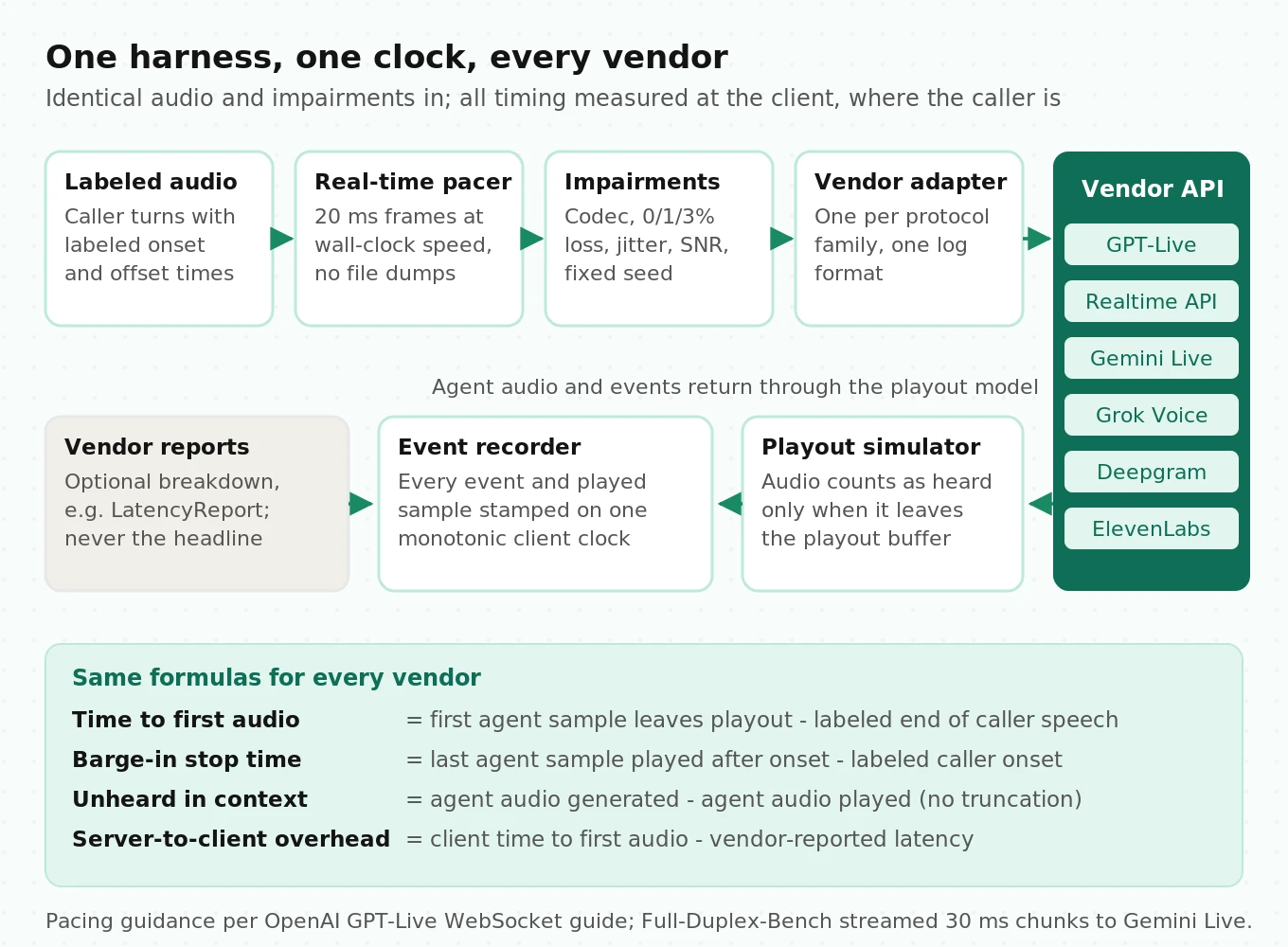
The harness has five parts.
1. Labeled audio source. Recorded caller turns with ground-truth speech onset and offset labels. Every latency timer starts from these labels, never from a vendor's `speech_stopped` event, which is part of what you are testing.
2. Real-time pacer. Send audio in fixed frames at wall-clock speed, such as 20 ms frames. GPT-Live's WebSocket guide warns that piping a file all at once does not simulate a live microphone. Full-Duplex-Bench streamed 30 ms chunks of 16 kHz PCM to Gemini Live for the same reason.
3. Impairment layer. Apply codec (G.711 or Opus), packet loss (0%, 1%, 3%), jitter, and noise at fixed SNR levels (clean, 20 dB, 10 dB), with a seeded random generator so every vendor gets the same impairments.
4. Vendor adapters. Each one turns one internal action, such as sending a frame, truncating at a playback position, or returning a tool result, into that vendor's events. One adapter covers OpenAI Realtime and Grok Voice.
5. Playout simulator and recorder. Model a real playout buffer. Count audio as heard only when it leaves the buffer. Timestamp every event and every played sample on the same clock.
From those timestamps, compute the metrics with the same formula for every vendor:
- Time to first audio (client) = time first agent sample leaves playout - ground-truth end of caller speech.
- Barge-in stop time = time of last agent sample played after caller onset - ground-truth caller onset.
- Unheard-in-context seconds = agent audio generated - agent audio played, per interrupted turn, kept only where the API cannot truncate.
- Server-to-client overhead = client time to first audio - vendor-reported latency, where the vendor reports one, such as Deepgram's `total_latency`.
Here is a simplified adapter for the shared OpenAI Realtime and Grok Voice protocol. Event names come from each vendor's docs. Error handling, auth refresh, and the tool loop are left out.
# Simplified harness adapter for the OpenAI Realtime protocol (also used by xAI Grok Voice).
# Illustrative: no retries, no tool loop. Event names per vendor docs, October 2026.
import asyncio, base64, json, time
import websockets

FRAME_MS = 20
RATE = 24000                                  # PCM16 mono
FRAME_BYTES = RATE * 2 * FRAME_MS // 1000     # 960 bytes per 20 ms frame

class RealtimeAdapter:
    def __init__(self, url, headers, clock=time.monotonic):
        self.url, self.headers, self.clock = url, headers, clock
        self.events = []          # (t, type, payload) on one client clock
        self.current_item = None  # assistant item id for truncation

    async def run_turn(self, pcm: bytes, player):
        async with websockets.connect(self.url, additional_headers=self.headers) as ws:
            await ws.send(json.dumps({
                "type": "session.update",
                "session": {"turn_detection": {"type": "server_vad"}},
            }))
            sender = asyncio.create_task(self._pace(ws, pcm))
            async for raw in ws:
                ev = json.loads(raw)
                t = self.clock()
                self.events.append((t, ev["type"], ev))
                if ev["type"] == "response.output_audio.delta":
                    self.current_item = ev.get("item_id")
                    player.enqueue(base64.b64decode(ev["delta"]), t)
                elif ev["type"] == "input_audio_buffer.speech_started":
                    # Barge-in: stop local playout, then tell the server what was heard.
                    played_ms = player.flush()
                    if self.current_item:
                        await ws.send(json.dumps({
                            "type": "conversation.item.truncate",
                            "item_id": self.current_item,
                            "content_index": 0,
                            "audio_end_ms": played_ms,
                        }))
                elif ev["type"] == "response.done":
                    usage = ev["response"].get("usage", {})
                    self.events.append((t, "usage", usage))  # cached_tokens lives here
            await sender

    async def _pace(self, ws, pcm):
        start = self.clock()
        for i in range(0, len(pcm), FRAME_BYTES):
            await ws.send(json.dumps({
                "type": "input_audio_buffer.append",
                "audio": base64.b64encode(pcm[i:i + FRAME_BYTES]).decode(),
            }))
            # Sleep to wall-clock position, not a fixed interval, so drift cannot build up.
            target = start + (i // FRAME_BYTES + 1) * FRAME_MS / 1000
            await asyncio.sleep(max(0, target - self.clock()))
The Gemini adapter sends `send_realtime_input` blobs with `mime_type="audio/pcm;rate=16000"` and watches `interrupted`, `go_away`, and `session_resumption_update`. The GPT-Live adapter streams `session.input_audio.append` and logs `session.usage.updated`. The Deepgram adapter waits for `SettingsApplied`, sends binary frames, and logs `LatencyReport`. All of them write the same event log, so one scoring script covers every vendor.
How many runs you need
Plan sample sizes up front.
- Percentiles. With 200 turns per condition, the 95% confidence interval for p95 spans the 184th to 196th ordered values. With 60 turns, it spans the 53rd value to the maximum, which tells you little.
- Rates. To detect a barge-in failure rate of 10% vs 5% at 80% power and two-sided alpha 0.05, you need about 435 trials per vendor. The formula is n = (z_a x sqrt(2 x p x (1 - p)) + z_b x sqrt(p1(1 - p1) + p2(1 - p2)))^2 / (p1 - p2)^2, with p1 = 0.10, p2 = 0.05, pooled p = 0.075, z_a = 1.96, and z_b = 0.84. Fewer trials can only find large differences.
- Repeat across days. Run the matrix at least three times on different days and hours. Shared infrastructure has daily load cycles.
A practical matrix is 12 scenarios (clean turn, mid-sentence pause, early and late barge-in, three tool delays, tool failure, long call, noise-only, digits, name spelling) x 4 network conditions x 3 runs. Every vendor gets the same 144 cells. Our time to first audio guide defines the latency metrics in more detail.
How to run a realtime voice API evaluation
1. Freeze the requirements. Write down transport, codec, call length, tool latency, data policy, and checklist pass bars before you open a vendor console.
2. Build the labeled audio set. Record the 12 scenarios with ground-truth speech onset and offset labels, plus 8 kHz versions for phone traffic.
3. Write one adapter per protocol family. OpenAI Realtime and Grok Voice share one. The others each need their own, all writing one event log format.
4. Calibrate turn detection per vendor. Sweep VAD settings on the pause and noise-only scenarios until each vendor meets your false-takeover bar.
5. Run the matrix. Run 12 scenarios x 4 network conditions x 3 runs, paced in real time with seeded impairments, plus the 45-minute call.
6. Run the probes. Run the phantom-reference probe, cancel-on-interrupt, and fact recall, logging every context and usage event.
7. Ramp concurrency. Go to your production peak, then past the documented limit, and record the ceiling behavior.
8. Reconcile cost. Compare billed usage with your per-call model, including the cache-miss case for token-billed APIs.
9. Score and decide. Fill in the checklist with measured values and confidence intervals, and reject any vendor that fails a must-pass item.
10. Rerun on every change. Pin model versions instead of aliases like `grok-voice-latest`, and rerun the matrix before any upgrade.
Steps 5 through 9 are where vendor-run benchmarks tend to pick the transport, network, and scenarios that suit them. Evalgent runs this harness against the APIs you shortlist and reports the numbers with no stake in which vendor wins. Our bake-off guide covers the commercial side.
Frequently asked questions
What is the best way to evaluate a realtime voice API?
Feed every API the same labeled audio, network impairments, and scenarios. Measure latency, barge-in, tools, and session limits on one client-side clock. Check whether interrupted speech is removed from model context, and convert pricing to cost per call on your traffic. Vendor dashboards measure the vendor's view, not your caller's.
Is the GPT-Live API available, and how is it priced?
Yes. OpenAI's `gpt-live-1` model page lists it on the `/v1/live/sessions` endpoint at $0.05 per minute of voice time, billed per second with no rounding up. Backend model and tool usage bill separately. Silence counts as active time. WebRTC sessions bill 15 seconds at creation, credited once the session runs. Concurrency ranges from 25 sessions at Tier 1 to 500 at Tier 5.
What is the difference between GPT-Live and the OpenAI Realtime API?
GPT-Live is full duplex. The voice model decides when to speak and delegates reasoning and tools to a backend, and it bills per minute. The Realtime API is turn-based, with `server_vad` or `semantic_vad`, and it bills per token. Realtime supports `conversation.item.truncate` for unheard audio. GPT-Live does not, so discarded speech stays in its context.
Does Gemini Live API have a session time limit?
Yes. Google's docs limit audio-only sessions to 15 minutes without context window compression, and audio-video sessions to 2 minutes. Each connection lasts about 10 minutes. Enable `contextWindowCompression` to extend sessions, and use session resumption handles, valid for 2 hours, to carry a session across connections. Watch for the `GoAway` message, which reports the time left.
Which realtime voice APIs remove unheard audio after an interruption?
OpenAI Realtime and Grok Voice support `conversation.item.truncate`. OpenAI also truncates automatically when you clear the output buffer on WebRTC or SIP. ElevenLabs reports a corrected, truncated response through `agent_response_correction`. GPT-Live does not support truncation. Gemini Live and Deepgram document stopping playback but no way to report the playback position. Test each with a phantom-reference probe.
How much does a realtime voice API cost per minute?
In our 5-minute worked example, costs ranged from about $0.03 per minute on Gemini 3.8 Live to $0.08 per minute on Grok Voice and ElevenLabs. OpenAI Realtime ranged from $0.05 to $0.18 per minute depending on cache hits. Token-billed APIs re-read the conversation every turn, so long calls cost more per minute. LLM inclusion differs by vendor.
How do I measure realtime voice API latency correctly?
Measure at the client. Start the timer at the labeled end of caller speech, not the vendor's speech-stopped event. Stop it when the first agent sample leaves a simulated playout buffer. Pace input in real time, report p50 and p95 over at least 200 turns per condition, and compare with vendor-reported latency.
Can I use the same code for OpenAI Realtime and Grok Voice?
Mostly. xAI documents compatibility with the OpenAI Realtime protocol. Change the base URL to `wss://api.x.ai/v1/realtime`, swap the API key, and choose a Grok model. Differences remain. Input transcription arrives as cumulative `updated` events. `rate_limits.updated` is not emitted. `output_audio_buffer.clear` works only on WebRTC and SIP. VAD defaults differ too, so recalibrate.
The bottom line
A realtime voice API is a protocol with limits, defaults, and billing rules that decide how your agent behaves at minute 15, on a lossy phone line, and right after a caller interrupts. Measure those mechanics from the client side with identical inputs for every vendor, and choose on the checklist results rather than the demo.
Related Articles

Why AI voice agents fail in production: 9 failure layers, how to detect each, and how to prevent them
Voice agents fail in production across 9 layers, from 8 kHz audio to silent tool errors. Symptoms, root causes, alerts, and fixes in one master table.
Read more
Voice agent regression testing: how to detect regressions from model updates you don't control
Voice agent regression testing for changes you don't control: pin each layer, run a nightly pinned-vs-latest canary, and use paired stats to detect drops.
Read more