Testing speech-to-speech voice agents: ground truth, audio-native failures and a test matrix
On this page
Most guides on this topic stop at "test outcomes, because there is no transcript." That advice is half right. There usually is a transcript. The problem is that it is not evidence of what the model heard or what it said.
This guide covers what vendor docs bury in footnotes and what research papers measured. You get a definition of ground truth for speech-to-speech (S2S) agents and a failure taxonomy that only exists in audio. You also get benchmark numbers to copy and a test matrix with cost and sample-size math. GPT-Live and xAI's Grok Voice are the worked examples.
Everything here is as of October 2, 2026. Model names, prices and event names change. Check the linked docs before you build.
Why speech-to-speech breaks cascaded testing
A cascaded agent has two text contracts. The speech-to-text (STT) output is exactly what the LLM reads. The LLM output is exactly what the text-to-speech (TTS) engine speaks. If the transcript says "fifteen," the LLM saw "fifteen." That is why per-stage testing works on cascades. Our cascading vs speech-to-speech comparison covers the architecture side.
An S2S model breaks both contracts. It consumes audio tokens directly and emits audio tokens directly. Any text you receive is produced alongside the real computation, not as part of it.
OpenAI says this plainly in the Realtime API reference. Input transcription "runs asynchronously" through a separate transcription endpoint, and it "should be treated as guidance of input audio content rather than precisely what the model heard." That line is in the Realtime client events reference. The transcript is produced by a different model (such as `gpt-4o-transcribe`) than the one deciding what to do.
OpenAI's own cookbook shows the gap with a real example. In its out-of-band transcription notebook, the separate ASR model wrote "I had otoo accident." The realtime model understood correctly and replied about an auto accident. The transcript was wrong. The agent was right. A transcript-based grader would have failed a correct call.
xAI's Grok Voice works the same way. Its input transcript events only fire when you set `audio.input.transcription.model` to `"grok-transcribe"`. The `conversation.item.input_audio_transcription.updated` event carries a cumulative transcript that "may include corrections to previous updates," per the xAI speech-to-speech docs. So the caller-side text can change after you have already scored it.
The output side has its own gap. xAI documents a `replace` map that swaps phrases before speech, so "only the spoken audio changes; the transcript the user sees keeps the original text." That is a documented, intentional case where the agent's transcript and the agent's audio disagree.
GPT-Live is the newest design. OpenAI's API launch post says GPT-Live-1 "natively provides ASR transcripts and response text." Even so, the GPT-Live conversations guide says transcript fragments carry "approximate fragment timing rather than exact word boundaries." It also says the context window includes "audio tokens that don't appear in the transcript." For a required disclosure, OpenAI tells you to "use the audio itself to check the wording."
Research models show why the text and audio streams are different objects. Kyutai's Moshi paper introduced "Inner Monologue." The model predicts time-aligned text tokens of its own speech as a prefix to its audio tokens. About 65% of those text tokens are padding. The text stream helps a lot: spoken QA on LlaMA Questions rose from 21.0 to 62.3 with it. But the user's stream is not transcribed at all, and nothing forces the audio to match the text word for word.
| Hop | Cascaded agent | Speech-to-speech agent |
|---|---|---|
| What the model heard | STT transcript, exactly | Audio tokens; transcript is a guess by a second model |
| What the model decided | LLM text and tool calls | Tool calls only; reasoning is not exposed as text |
| What the caller heard | TTS of the LLM text | Audio tokens; output transcript is a parallel stream |
| Where ground truth lives | Every stage boundary | Your script, your app state and the recorded audio |
Side-channel transcript: text that a speech-to-speech system emits alongside its audio. It is useful for search, captions and quick checks. It is not proof of what the model heard or said.
The transcript triangle: four texts that should agree
Once you treat transcripts as side-channels, testing gets more precise. Every call has four texts, and each disagreeing pair points at a different broken part.
1. Script (S). What your simulated caller actually said. In a test, you know this exactly.
2. Model input transcript (T-in). What the side-channel ASR thinks the caller said.
3. Model output transcript (T-out). What the model reports it said.
4. Spoken output (A-out). An independent STT pass over the agent's recorded audio.
Add the tool arguments and application state, and you can localize most failures without seeing inside the model.
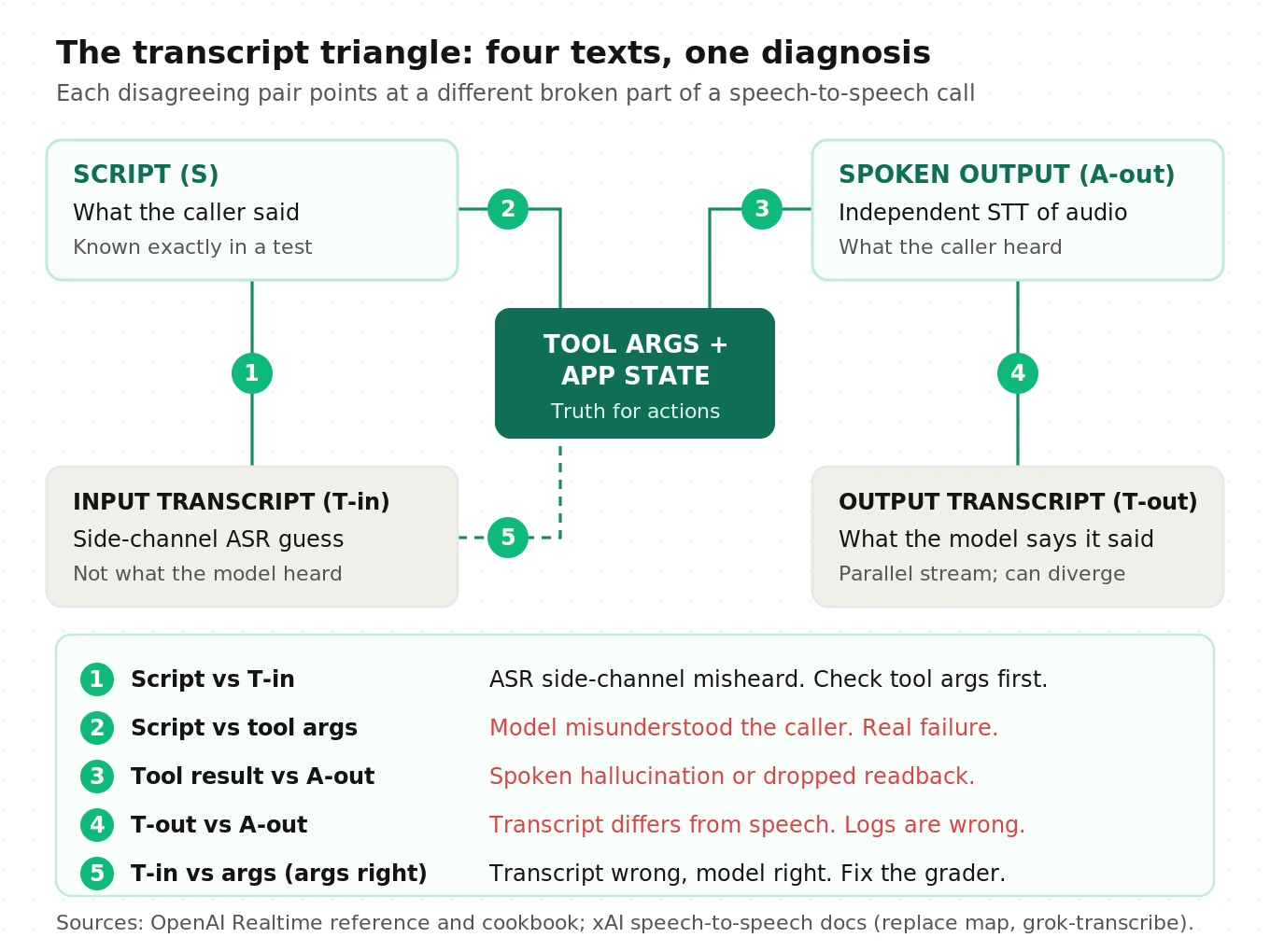
| Disagreement | What it usually means | Is it an agent failure? |
|---|---|---|
| Script vs T-in | Side-channel ASR misheard | Often no. Check tool args before failing the call |
| Script vs tool args | The model misunderstood the caller | Yes. This is the expensive one |
| Tool result vs A-out | Spoken hallucination or dropped readback | Yes. The caller heard wrong facts |
| T-out vs A-out | The transcript does not match the speech | Yes for compliance; it also corrupts your logs |
| T-in vs tool args, script agrees with args | Transcript wrong, model right | No. Fix your grader, not your prompt |
The last row matters most. Teams that grade on T-in log false failures like the "otoo accident" case, then "fix" prompts that were fine.
OpenAI's GPT-Live evaluation cookbook uses the same logic in its triage list. If the transcript is right but tool arguments are wrong, inspect the delegation. If the task succeeded but the user never heard the result, inspect result communication. It also asks you to classify each failure as an assistant failure, an infrastructure or evidence problem, or a grader issue.
Our post on transcript vs audio evaluation covers when a transcript-only grader is good enough. For S2S agents, the short answer is: for intent, sometimes; for anything the caller must hear exactly, never.
Audio-native failure modes
Some failures only exist because the model speaks audio tokens directly. A transcript-first harness misses them by design. Here is the taxonomy, with the mechanism behind each one.
| Failure mode | What the caller hears | Why it happens in S2S | How to detect it |
|---|---|---|---|
| Spoken hallucination | Wrong digits, amounts or names, while T-out may look right | Audio and text streams are generated in parallel, not one from the other | Independent STT of agent audio vs tool result |
| Truncation desync | After a barge-in, the agent acts as if you heard more, or less, than you did | Audio is generated faster than playback; truncation guesses the cut point | "Count to 50, interrupt at 5, ask where it stopped" probe |
| Voice drift | The agent's timbre shifts mid-call or toward the caller's voice | Voice is a learned output, not a fixed TTS voice | Speaker-embedding similarity to the reference voice per turn |
| Accent drift | Non-native accent in non-English output | Accent is sampled with the audio tokens | Native-speaker review on a sample; per-language scoring |
| Language switching | Agent answers in the wrong language after a code-switch | Auto language detection on short or mixed utterances | Code-switching scripts; language ID on agent audio |
| Non-speech artifacts | Laughs, breaths, filler or long hums where words should be | Model emits non-lexical audio tokens | Speech-duration vs word-count ratio on A-out |
| Long-session decay | Forgets early facts or instructions late in the call | Context summarization or engine replacement | Plant a fact early, probe it after 15+ minutes |
| Tool calls during speech | Two answers overlap, or a cancelled task still completes | Audio and tool events arrive on separate timelines | Slow tool fakes; interrupt during delegation |
| Safety transfer gap | Refusals that hold in text fail in speech | Safety tuning does not fully transfer across modalities | Run your red-team set as audio, not text |
A few of these deserve evidence.
Truncation desync. When a caller interrupts, the client tells the server how much audio actually played, using `conversation.item.truncate` with `audio_end_ms`. OpenAI's reference says this deletes the server-side transcript so there is no text in context "that hasn't been heard by the user." Developers on the OpenAI community forum have reported since late 2024 that it does not line up. One reproducible probe from that thread: ask the agent to count to 50, interrupt at 5, then ask where it stopped. The report says it answered "in the 20's or 30's." A March 2026 reply on gpt-realtime-1.5 reported the opposite: the whole turn seemed wiped. Either way, the model's belief about what the caller heard is wrong. That is a community report, not a benchmark, but the probe takes two minutes. Run it on every model you evaluate.
Voice drift and mimicry. OpenAI's GPT-4o system card reported "rare instances" where the model unintentionally emulated the user's voice. The mitigation was a streaming output classifier with precision 0.96 and recall 1.0 in English, and 0.95 and 1.0 in other languages. Red teamers also observed non-native accents in non-English audio output. Your vendor may run a similar classifier. You still want your own per-turn voice similarity score, because a classifier tuned to block extreme cases will not flag gradual drift.
Safety transfer gap. VoiceBench measured LLaMA-Omni refusing 98.46% of harmful requests in text but only 11.35% when the same requests were spoken. That is an open research model, not a commercial agent. The lesson still holds: a guardrail test set run as text proves little about a voice model.
Long sessions. GPT-Live's default context holds 128,000 tokens. When usage passes 90%, it starts a replacement voice engine that receives your instructions and up to 8,192 tokens of history, per the conversations guide. Older details "may be summarized or omitted." Full-Duplex-Bench-v2 found that systems lose track of entities across multi-turn dialogue. Test long calls on purpose. A 3-minute suite will never trigger the summarization path.
For the general version of this problem, see our guide on hallucination rate in voice agents.
What the research says, with numbers you can use
Public benchmarks will not tell you whether your agent works. They tell you where every system tends to fail, which is where to aim your tests.
Full-Duplex-Bench: fast is not the same as coherent
Full-Duplex-Bench tests four behaviors: pause handling, backchanneling, smooth turn-taking and user interruption. Its core metric is Takeover Rate (TOR): the share of samples where the model says something other than silence or a short backchannel.
On pause handling, where lower is better, Moshi took over 98.5% of the time on synthetic pauses. Gemini Live took over 25.5% of the time. On user interruption, Moshi stopped and responded every time (TOR 1.000) with 0.257 seconds of latency. But a GPT-4o judge rated the content of those responses 0.765 out of 5. Freeze-Omni was slower at 1.409 seconds and scored 3.615.
The production lesson: score interruption handling on two axes. Did the agent yield, and did what it said next make sense? A latency-only metric would rank the incoherent system first.
Full-Duplex-Bench-v3: self-correction breaks tool calls
Full-Duplex-Bench-v3 used 100 real human recordings from 12 speakers, annotated for fillers, pauses, hesitations, false starts and self-corrections. Six systems ran tool tasks across four domains through LiveKit.
| System | Pass@1 | Turn-take rate | Task latency | Interrupt rate |
|---|---|---|---|---|
| GPT-Realtime | 0.600 | 96.0% | 6.89 s | 13.5% |
| Gemini Live 3.1 | 0.540 | 78.0% | 4.25 s | 19.2% |
| Gemini Live 2.5 | 0.490 | 92.0% | 7.26 s | 14.1% |
| Cascaded (Whisper, GPT-4o, TTS) | 0.450 | 100.0% | 10.12 s | 33.0% |
| Grok | 0.430 | 94.0% | 6.65 s | 25.5% |
| Ultravox v0.7 | 0.410 | 96.0% | 8.40 s | 47.9% |
Self-correction Pass@1 ranged from 0.176 to 0.588. Hard-tier Pass@1 ranged from 0.200 (Grok) to 0.433 (GPT-Realtime). The authors call self-correction and multi-step reasoning the most consistent failures. If your callers read out account numbers and correct themselves, that is your highest-value test family.
tau-voice: voice keeps 30 to 45% of text capability
tau-voice extended tau-squared-bench to 278 tasks across retail, airline and telecom. It tested OpenAI gpt-realtime-1.5, Google gemini-live-2.5-flash-native-audio and xAI grok-voice-agent in two conditions. Clean used American accents and no noise. Realistic added diverse accents, indoor and outdoor noise, about one noise burst per minute, about 2% frame drops and turn-taking behaviors.
A GPT-5 reasoning baseline in text scored 85%. Voice agents scored 31 to 51% in Clean and 26 to 38% in Realistic. Accents alone cut xAI's retail score from 48% to 30%. The authors traced 79 to 90% of the failures they analyzed to agent behavior, not to the user simulator.
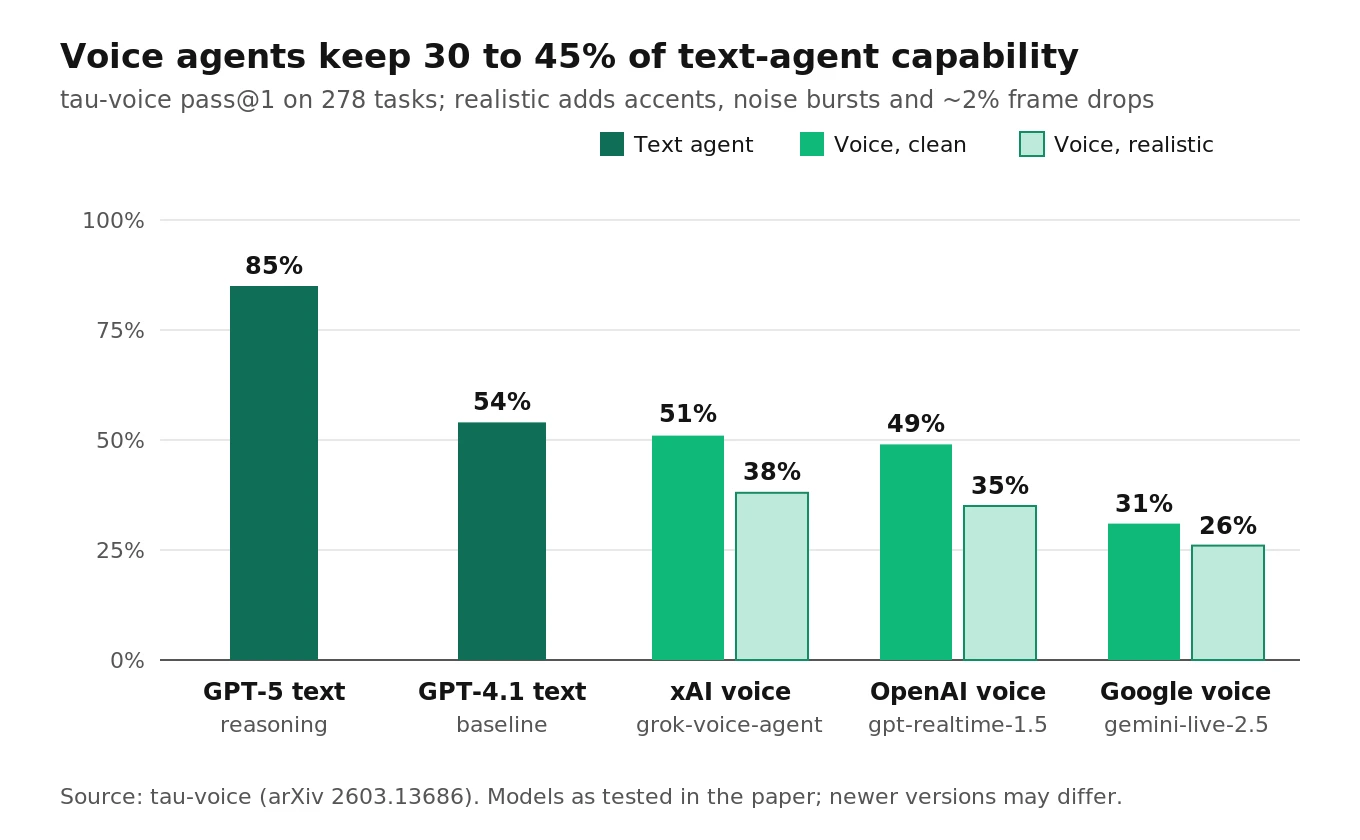
The interaction numbers matter too. OpenAI's agent had 0.90 seconds latency and 100% responsiveness, but only 6% selectivity: it rarely ignored speech it should have ignored. xAI's agent had 57% selectivity but an 84% interrupt rate. These are earlier model versions. The eager-versus-selective trade-off is the one you must tune and test.
VoiceBench: synthetic callers flatter your agent
VoiceBench tested voice assistants on about 6,000 spoken instructions, with speaker, environment and content variations. Three findings change how you build a test set.
- Every model scored higher on synthetic speech than on real recordings. One model scored about 50% higher on synthetic audio. A TTS-only caller suite overstates quality.
- Speaking rate has a cliff. End-to-end models degraded badly below 0.5x or above 1.5x speed. A Whisper-based pipeline stayed stable from 0.25x to 2.0x.
- Mispronunciation hurts most. Average degradation was 20.34% for mispronounced words, 12.55% for repair disfluencies and 2.68% for grammar errors.
Big Bench Audio: the speech reasoning gap
Artificial Analysis built Big Bench Audio from 1,000 Big Bench Hard questions, spoken in 23 synthetic voices. At launch in December 2024, GPT-4o scored 92% text-to-text, 74% text-to-speech and 66% speech-to-speech. Speech in and speech out each cost accuracy.
The field has closed much of that gap. Artificial Analysis's June 2026 Speech-to-Speech Index announcement listed Grok Voice Think Fast 1.0 at 97.1% on Big Bench Audio. The same post put every model below 53% on its tau-voice component. Reasoning on clean questions is close to solved. Agentic tasks over messy audio are not.
| Benchmark | What it measures | Copy this into your suite |
|---|---|---|
| Full-Duplex-Bench | Pauses, backchannels, turn-taking, interruptions | Score yield and coherence separately |
| Full-Duplex-Bench-v3 | Tool use under real disfluency | Self-correction scripts with exact-argument checks |
| tau-voice | End-to-end task success, clean vs realistic | Same tasks in clean and degraded audio, report both |
| VoiceBench | Robustness to speaker, noise, content | Real recordings plus speed and mispronunciation variants |
| Big Bench Audio | Reasoning over speech | A text-vs-speech control on the same questions |
For how these map onto vendor selection, see how to evaluate a speech-to-speech model and our full-duplex voice agents guide.
Building ground truth: verify what the agent actually said
Here is the core technique. You cannot trust the model's transcript of its own speech, so you make your own. Then you compare it to the facts the agent was supposed to say.
Step 1: record two channels on one clock
Record caller audio on the left channel and agent audio on the right. Place both on the session timeline, not on packet arrival time. The harness later in this post shows one way to do it. Stereo makes overlap visible and lets you run STT on each speaker separately.
Step 2: re-transcribe the agent channel independently
Run the agent channel through a different STT model than the one the vendor uses for its side-channel. A Deepgram Nova-3 pre-recorded request with `smart_format=true` returns word-level timestamps, per the Deepgram pre-recorded API reference. Any strong STT works. The point is independence.
Step 3: calibrate the verifier's own error floor
Your verifier makes mistakes too. Measure them before you trust it. Render 100 to 200 known sentences in the agent's voice, pass them through the same codec as production, and transcribe them. The word error rate you get is the verifier's noise floor on this voice and channel. Only flag disagreements above it. Our word error rate guide explains the formula.
Silence is a known hazard. The Careless Whisper study (FAccT 2024) found that roughly 1% of Whisper transcriptions contained entire hallucinated phrases, and 38% of those carried explicit harms. Trim long silences with a VAD before verification, so the verifier does not invent speech the agent never produced.
Step 4: diff on entities, not just words
Word-level disagreement is noisy. A paraphrase like "you're all set" versus "you are all set" is not a failure. What matters is the entities: digits, amounts, dates, names, confirmation codes. Normalize both texts, then check that every value in the tool result appears in the spoken output. Our guide to STT entity accuracy covers normalization rules in depth.
# Simplified ground-truth check for S2S agents. Illustrative, not production.
import os, re, requests, jiwer

DIGITS = {"zero": "0", "oh": "0", "one": "1", "two": "2", "three": "3", "four": "4",
          "five": "5", "six": "6", "seven": "7", "eight": "8", "nine": "9"}

def transcribe_agent_channel(wav_path):
    """Independent STT on the agent-only channel, exported as a mono WAV."""
    with open(wav_path, "rb") as f:
        r = requests.post(
            "https://api.deepgram.com/v1/listen",
            params={"model": "nova-3", "smart_format": "true"},
            headers={"Authorization": f"Token {os.environ['DEEPGRAM_API_KEY']}",
                     "Content-Type": "audio/wav"},
            data=f, timeout=60)
    r.raise_for_status()
    alt = r.json()["results"]["channels"][0]["alternatives"][0]
    return alt["transcript"], alt["words"]  # words carry start/end in seconds

def normalize(text):
    text = re.sub(r"[^\w\s]", " ", text.lower())
    out, run = [], ""
    for tok in (DIGITS.get(t, t) for t in text.split()):
        if tok.isdigit():
            run += tok            # "five five five" and "555" both become "555"
            continue
        if run:
            out.append(run); run = ""
        out.append(tok)
    if run:
        out.append(run)
    return " ".join(out)

def verify_turn(model_transcript, spoken_transcript, tool_values, floor=0.04):
    ref, hyp = normalize(model_transcript), normalize(spoken_transcript)
    disagreement = jiwer.wer(ref, hyp) if ref else 0.0
    not_spoken = [v for v in tool_values if normalize(str(v)) not in hyp]
    return {
        "transcript_vs_speech": round(disagreement, 3),
        "flag_transcript_mismatch": disagreement > floor,  # above verifier noise floor
        "tool_values_not_spoken": not_spoken,              # dropped or hallucinated readback
    }

# Example: tool returned confirmation 48213 for 7:30 p.m.
spoken, words = transcribe_agent_channel("run_017_agent.wav")
print(verify_turn("Your confirmation is 48213 for 7:30.", spoken, ["48213"]))
Step 5: send disagreements to a human ear
Automated checks find candidates. A reviewer listening to a 10-second clip confirms them. Each flagged mismatch is either a real spoken hallucination or a verifier error worth learning from.
Three metrics come out of this process:
- Spoken-transcript disagreement rate: share of agent turns where T-out and A-out differ beyond the verifier floor.
- Entity readback accuracy: share of tool-result entities that the agent spoke correctly.
- Tool-speech consistency: share of calls where the spoken confirmation matches the final application state.
Simulated-caller testing over real audio
Ground truth only helps if the calls look like production. VoiceBench showed that clean TTS callers overstate quality. Build callers that sound like your real ones and use the same audio path.
Pace audio at real time. Stream caller audio in 20 ms frames with a matching sleep. Sending a whole file at once does not simulate a microphone. Keep streaming silence after the caller finishes, because full-duplex models expect a continuous stream.
Use the production codec. Phone calls are 8 kHz G.711. The narrowband channel cuts high frequencies where many consonants live, which is why "fifteen" and "fifty" get confused on phone lines. Both GPT-Live's WebSocket and Grok Voice accept `audio/pcmu` at 8 kHz, so you can test the real format end to end. Convert recordings with ffmpeg rather than sending 24 kHz audio that never touched a phone line.
# Downsample a 24 kHz caller recording to 8 kHz mu-law, as a phone line would
ffmpeg -i caller_24k.wav -ar 8000 -ac 1 -c:a pcm_mulaw caller_8k_ulaw.wav
Mix noise at controlled SNR. Pick signal-to-noise ratio levels and mix them reproducibly. Scale the noise so that 10 times log10 of speech power over noise power equals your target.
import numpy as np

def mix_at_snr(speech, noise, snr_db, seed=0):
    """speech, noise: float32 arrays in [-1, 1] at the same sample rate."""
    rng = np.random.default_rng(seed)
    start = rng.integers(0, max(1, len(noise) - len(speech)))
    noise = np.resize(noise[start:], speech.shape)
    p_speech = np.mean(speech ** 2)
    p_noise = np.mean(noise ** 2) + 1e-12
    scale = np.sqrt(p_speech / (p_noise * 10 ** (snr_db / 10)))
    return np.clip(speech + scale * noise, -1.0, 1.0)

def drop_frames(pcm, rate=8000, frame_ms=20, loss=0.02, seed=0):
    """Zero out 2% of 20 ms frames, close to tau-voice's realistic condition."""
    rng = np.random.default_rng(seed)
    out, n = pcm.copy(), rate * frame_ms // 1000
    for i in range(0, len(out) - n, n):
        if rng.random() < loss:
            out[i:i + n] = 0
    return out
Fix the seed per scenario. If the noise changes between runs, you cannot tell a regression from bad luck.
Borrow the research conditions. tau-voice used about one noise burst per minute and about 2% frame drops. VoiceBench found end-to-end models stable between 0.5x and 1.5x speaking rate. Full-Duplex-Bench-v3 annotated five disfluency types. Those give you defensible starting levels instead of guesses.
Mix real and synthetic voices. Use real recordings for your highest-risk scenarios, and TTS voices for coverage across accents and ages. Report the two groups separately, so a synthetic-only pass rate never hides a real-voice failure. Our guide to synthetic callers for voice agent testing covers persona design, and testing STT under background noise has noise recipes.
Measuring latency from audio onset, not events
Event timestamps lie about latency in three ways.
1. Audio arrives in bursts. The server can send several seconds of audio in a fraction of a second. The arrival time of the first chunk is not when the caller hears it.
2. The first chunk may be silent. Many models start with a few hundred milliseconds of near-silence or breath. The caller experiences the first audible sound, not the first packet.
3. Turn events fire late. With server VAD, the end-of-speech event can only fire after the silence window has elapsed. A metric that starts the clock at that event skips the wait the caller actually sat through.
GPT-Live makes this explicit. On WebSocket, `session.output_audio.delta` has no timing fields and there is no output-audio-done event, per the conversations guide. OpenAI's evaluation harness builds a 400 ms playback reserve and notes that its reported latency "is not a model-only measurement." OpenAI defines response latency as time "from the end of audible caller speech to the first qualifying assistant audio."
So measure on the recording. Find the end of caller speech on the left channel. Find the first sustained audible energy on the right channel. Subtract.
import numpy as np

def first_onset_ms(pcm16: bytes, rate=24000, win_ms=10, thresh_dbfs=-40, hold_ms=30):
    """First point where agent audio stays above -40 dBFS for 30 ms."""
    x = np.frombuffer(pcm16, dtype=np.int16).astype(np.float32) / 32768.0
    win = rate * win_ms // 1000
    n = len(x) // win
    rms = np.sqrt((x[: n * win].reshape(n, win) ** 2).mean(axis=1) + 1e-12)
    db = 20 * np.log10(rms)
    need, run = hold_ms // win_ms, 0
    for i, level in enumerate(db):
        run = run + 1 if level > thresh_dbfs else 0
        if run >= need:
            return (i - need + 1) * win_ms
    return None
Tune the threshold once against a few hand-labeled calls, then freeze it. Changing it between runs moves every latency number.
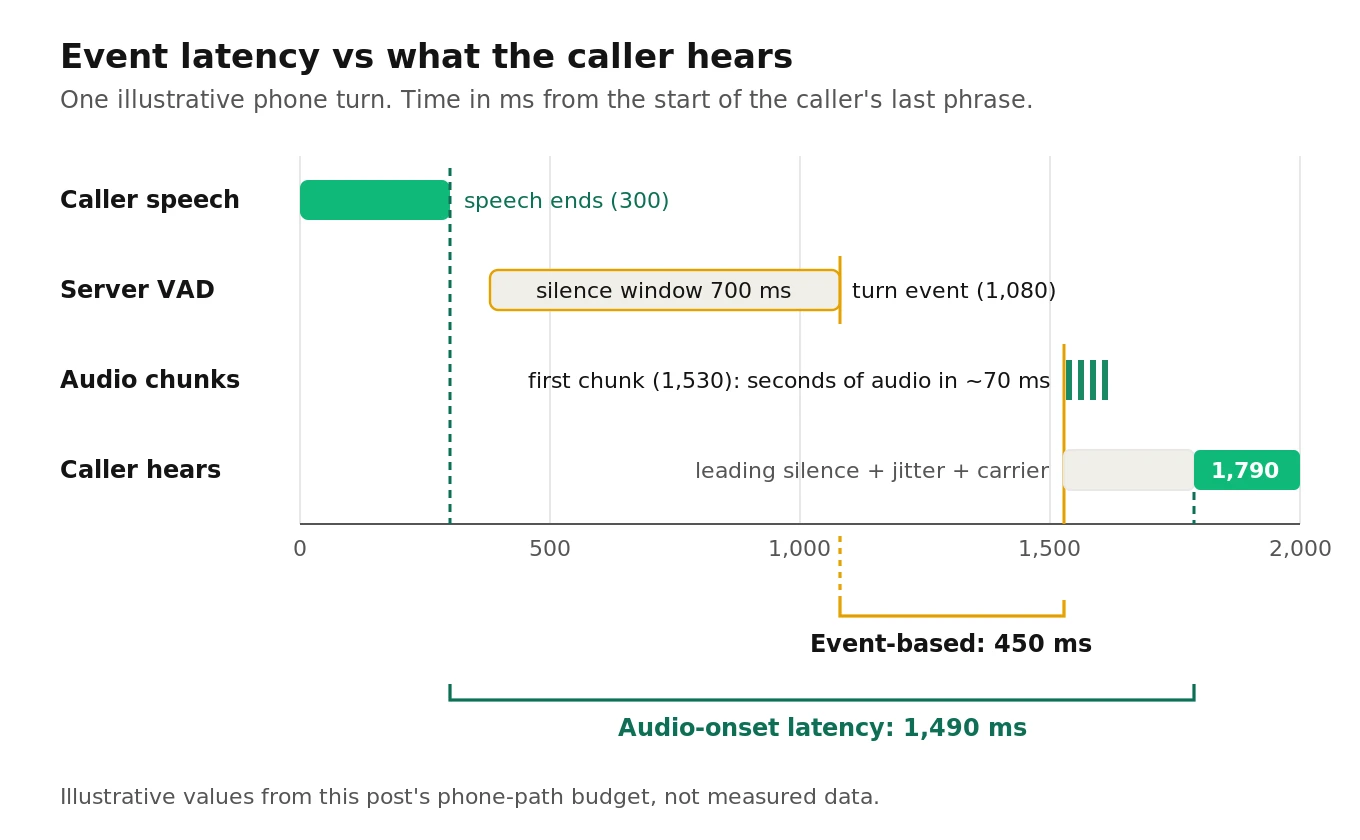
Here is an illustrative phone-path budget. Every number below is an assumption to replace with your own measurements, except the configured silence window.
| Hop | Illustrative assumption | Running total |
|---|---|---|
| Caller stops speaking | 0 ms | 0 ms |
| Carrier and SIP leg inbound | 80 ms | 80 ms |
| VAD silence window (configured `silence_duration_ms`) | 700 ms | 780 ms |
| Model time to first audio chunk | 450 ms | 1,230 ms |
| Leading near-silence in the first chunk | 120 ms | 1,350 ms |
| Client or bridge jitter buffer | 60 ms | 1,410 ms |
| Carrier leg outbound | 80 ms | 1,490 ms |
An event-based metric would report 450 ms, the time from the turn event to the first chunk. The caller waits roughly 1,490 ms. The biggest single line is the silence window you configured, which no model upgrade will fix. Our guide to time to first audio breaks down each stage, and turn-taking evaluation covers the cut-in side of the trade-off.
Report P50 and P90 across repeated runs, and report them per audio condition. Latency on clean wideband audio says little about latency on noisy 8 kHz calls.
A test matrix and scorecard you can copy
Put it together as a matrix: scenario families down the side, audio conditions across the top. Run every cell several times.
| Scenario family | Clean 24 kHz | 8 kHz G.711 | Babble 10 dB SNR | Street 5 dB SNR | 2% frame loss | Non-native accent |
|---|---|---|---|---|---|---|
| Entity readback (codes, amounts) | Required | Required | Required | Required | Required | Required |
| Self-correction mid-entity | Required | Required | Required | Optional | Required | Required |
| Barge-in during answer | Required | Required | Required | Required | Optional | Optional |
| Barge-in during tool call | Required | Required | Optional | Optional | Optional | Optional |
| Backchannel ("mm-hm") | Required | Required | Required | Optional | Optional | Optional |
| Side talk to another person | Required | Optional | Required | Optional | Optional | Optional |
| Long pause mid-sentence | Required | Required | Optional | Optional | Required | Optional |
| Code-switching caller | Required | Required | Optional | Optional | Optional | Required |
| Truncation probe (count, interrupt, ask) | Required | Required | Optional | Optional | Optional | Optional |
| Required disclosure wording | Required | Required | Optional | Optional | Optional | Optional |
| Spoken red-team prompts | Required | Required | Optional | Optional | Optional | Required |
| Long call (15+ minutes, planted fact) | Required | Required | Optional | Optional | Optional | Optional |
Worked cost and volume math
Assume all 12 families across all 6 conditions: 72 cells. Run each cell 5 times: 360 calls. At an assumed average of 2 minutes per call, that is 720 minutes.
- GPT-Live voice layer: 720 x $0.05 = $36, plus backend model and tool charges.
- Grok Voice: 720 x $0.08 = $57.60. On a free xAI number, add 720 x $0.01 = $7.20, for $64.80. Prices are from the xAI builder launch post and OpenAI's launch post.
Model cost is rarely the constraint. Review time and concurrency are.
How many runs are enough
Two formulas keep you honest.
Rule of three. If a scenario passes every time in n runs, the 95% upper bound on its true failure rate is about 3 divided by n. Zero failures in 5 runs only proves the failure rate is below about 60%. Zero in 60 runs gets you below 5%. Five repeats find flaky behavior. They do not certify a critical path.
Detecting a regression. To detect a task-success drop from 90% to 85% at 95% confidence and 80% power, you need about 686 calls per arm. The standard two-proportion formula is n = (1.96 x sqrt(2 x p-bar x (1 - p-bar)) + 0.84 x sqrt(p1(1 - p1) + p2(1 - p2)))^2 / (p1 - p2)^2, with p-bar = 0.875. For a drop from 95% to 90%, you need about 435 per arm. Small regressions need big suites, which is why you gate on critical-path cells with many repeats, not on the whole matrix.
The scorecard
The thresholds below are suggested starting points, not industry standards. Set your own from your baseline and business risk.
| Metric | Definition | Suggested starting bar |
|---|---|---|
| Task success | Final app state matches expected state | At or above your current baseline, per condition |
| Entity readback accuracy | Tool-result entities spoken correctly / entities spoken | 99% or higher on payment and booking flows |
| Spoken-transcript disagreement | Turns where T-out and A-out differ beyond the verifier floor | Under 2% of agent turns |
| Self-correction success | Tool args use the corrected value | 95% or higher on your scripts |
| Barge-in yield, coherent | Agent stops and the next reply uses the new information | 90% or higher |
| False yield on backchannel | Agent stops for "mm-hm" | Under 10% |
| Audio-onset latency P90 | End of caller speech to first audible agent sound | Set per channel; track drift release to release |
| Disclosure verified in audio | Required wording found in A-out, not just T-out | 100% |
| Voice similarity floor | Lowest per-turn speaker similarity to the reference voice | No turn below your calibrated floor |
| Language match | Agent language equals caller language per turn | 99% or higher |
Score each metric per condition column, then report the worst column, not the average. An agent that passes clean audio and fails at 5 dB SNR is failing your callers on busy streets.
GPT-Live and Grok Voice: what changes for each
Both are speech-to-speech systems with different testing surfaces.
| Testing surface | GPT-Live (`gpt-live-1`) | Grok Voice (`grok-voice-think-fast-2.0`) |
|---|---|---|
| Price | $0.05 per minute voice layer, backend billed separately | $0.08 per minute; free xAI number adds $0.01 |
| Reasoning | Delegated to a backend model you choose | Built in; `reasoning.effort` defaults to `"high"` |
| Turn detection controls | None exposed; the model decides | `server_vad` with `threshold` (default 0.85), `silence_duration_ms`, `prefix_padding_ms` (default 333) |
| Caller transcript | Native ASR transcript fragments with approximate timing | Only with `grok-transcribe`; cumulative updates that can revise earlier text |
| Known transcript divergence | Audio tokens not in transcript; check disclosures in audio | `replace` map changes speech, not transcript |
| Tool-call gotcha | Interrupting speech does not cancel backend work | Sending `response.create` too early overlaps audio |
| Versioning | One listed snapshot, `gpt-live-1` | Pin a version; `grok-voice-latest` moves |
GPT-Live. The split between voice layer and backend means two things to test: did the voice layer hear and delegate correctly, and did the backend act correctly? Session forking lets you replay the same conversation point across variants, which is the cleanest regression tool any S2S API offers today. Our GPT-Live voice agent testing guide has a full harness, and the build guide covers setup.
Grok Voice. xAI's docs describe a specific overlap bug pattern. When the model calls a tool mid-response, the server sends all audio first, then the function call events with `response.done`. If your client returns the tool result and sends `response.create` right away, the next answer starts while the previous one is still playing. xAI recommends waiting until playback is complete or nearly complete. Test this with a slow tool fake and a long spoken preamble.
Two more Grok details catch teams out. A `language_hint` for Spanish or Portuguese must be regional, like `es-MX` or `pt-BR`. Unrecognized codes are "silently ignored," falling back to auto-detection. And `idle_timeout_ms` re-prompts silent callers repeatedly until they speak, which keeps dead calls billing. For pricing and setup, see our Grok Voice agent guide.
Here is a simplified capture harness for Grok Voice, using event names from the xAI docs. It streams paced caller audio, places agent audio on a playback timeline, and keeps every transcript event for the triangle checks.
# Simplified Grok Voice capture harness. Illustrative, not production.
import asyncio, base64, json, os, time, wave
import websockets

MODEL = "grok-voice-think-fast-2.0"  # pin a version; grok-voice-latest moves
RATE, FRAME_MS = 24000, 20
FRAME_BYTES = RATE * 2 * FRAME_MS // 1000
JITTER_S = 0.06                      # assumed client playback buffer

SESSION = {"type": "session.update", "session": {
    "voice": "eve",
    "instructions": "You are Acme support. Read order numbers back digit by digit.",
    "turn_detection": {"type": "server_vad", "silence_duration_ms": 700},
    "audio": {
        "input": {"format": {"type": "audio/pcm", "rate": RATE},
                  "transcription": {"model": "grok-transcribe"}},
        "output": {"format": {"type": "audio/pcm", "rate": RATE}},
    },
}}

async def run(caller_wav, tail_s=10):
    t0 = time.monotonic()
    agent = bytearray()                      # agent audio on the session timeline
    log = {"t_out": [], "t_in": {}, "tools": [], "caller_end_s": None}

    def place(chunk, recv_s):
        cursor = len(agent) / (2 * RATE)
        start = max(cursor, recv_s + JITTER_S)  # play no earlier than arrival
        agent.extend(b"\x00" * (int((start - cursor) * RATE) * 2))
        agent.extend(chunk)

    url = f"wss://api.x.ai/v1/realtime?model={MODEL}"
    headers = {"Authorization": f"Bearer {os.environ['XAI_API_KEY']}"}
    async with websockets.connect(url, additional_headers=headers) as ws:
        await ws.send(json.dumps(SESSION))

        async def send_caller():
            with wave.open(caller_wav, "rb") as w:
                pcm = w.readframes(w.getnframes())
            frames = [pcm[i:i + FRAME_BYTES] for i in range(0, len(pcm), FRAME_BYTES)]
            frames += [b"\x00" * FRAME_BYTES] * (tail_s * 1000 // FRAME_MS)
            for i, f in enumerate(frames):
                if i * FRAME_BYTES >= len(pcm) and log["caller_end_s"] is None:
                    log["caller_end_s"] = time.monotonic() - t0
                await ws.send(json.dumps({"type": "input_audio_buffer.append",
                                          "audio": base64.b64encode(f).decode()}))
                await asyncio.sleep(FRAME_MS / 1000)
            await ws.close()

        sender = asyncio.create_task(send_caller())
        try:
            async for raw in ws:
                e, now = json.loads(raw), time.monotonic() - t0
                kind = e["type"]
                if kind == "response.output_audio.delta":
                    place(base64.b64decode(e["delta"]), now)
                elif kind == "response.output_audio_transcript.delta":
                    log["t_out"].append({"t": now, "text": e["delta"]})
                elif kind == "conversation.item.input_audio_transcription.updated":
                    log["t_in"][e.get("item_id")] = e   # cumulative; keep the latest
                elif kind == "response.function_call_arguments.done":
                    log["tools"].append({"t": now, "name": e["name"],
                                         "args": json.loads(e["arguments"])})
        except websockets.ConnectionClosed:
            pass
        sender.cancel()
    return bytes(agent), log
Write the agent bytes and caller audio into one stereo WAV. Then run `first_onset_ms` and the verification step on the agent channel. Tool results are omitted for brevity. In a real harness, return them with `conversation.item.create` and wait for playback before `response.create`. This client also never stops playback on barge-in, so use a fuller client for interruption tests.
How to test a speech-to-speech voice agent
Here is the full procedure in order. It works for GPT-Live, Grok Voice, OpenAI Realtime models and other S2S APIs.
1. Write scenarios with hidden expectations. For each one, define the caller script, the expected tool calls with exact arguments, the expected final state and any wording the caller must hear.
2. Build fake backends with resettable state. Every run starts from the same seeded data, so differences come from the agent, not the fixture.
3. Stream paced, production-shaped audio. Send 20 ms frames in real time, at your production codec and sample rate, with a continuous silent tail.
4. Record two channels on the session timeline. Caller left, agent right, with agent chunks placed at playback time rather than arrival time.
5. Log every side-channel text with timestamps. Keep input transcripts, output transcripts and tool events, including revisions to cumulative transcripts.
6. Calibrate an independent verifier. Measure its error floor on the agent's voice through your codec, then re-transcribe every agent turn.
7. Score the triangle. Check tool args against the script, spoken entities against tool results, and the output transcript against the spoken audio.
8. Measure latency from audio onset. Use the end of caller speech and the first sustained audible agent sound. Report P50 and P90 per condition.
9. Run the matrix with repeats. Use at least 5 runs per cell for discovery, and many more on critical-path cells you gate releases on.
10. Probe the audio-native failures directly. Run the truncation probe, code-switching, long calls with planted facts, spoken red-team prompts and slow-tool overlap tests.
11. Triage before you fix. Label each failure as agent, infrastructure or grader. Fix grader errors first, because they corrupt every other number.
12. Re-run on every change. Prompt edits, backend swaps, voice changes and silent model updates can all regress an S2S agent. Our guide to LLM update regressions explains why.
For the wider discipline behind this procedure, see our AI voice agent testing pillar.
Where independent evaluation helps
An S2S vendor's dashboard grades calls with that vendor's own transcripts. That is the side-channel this whole guide warns about. An independent evaluator brings its own verifier, its own callers and its own clock.
Evalgent is that independent layer. It runs simulated callers over real codecs and noise against any S2S provider, re-transcribes agent audio independently, and scores tool arguments, spoken entities, latency from audio onset and turn-taking against thresholds you set. Teams use it for pre-launch audits, for bake-offs between GPT-Live, Grok Voice and cascaded stacks on the same scenarios, and for regression runs whenever a model or prompt changes.
Frequently asked questions
How do you test a speech-to-speech voice agent?
Stream realistic caller audio at real-time pace, record both channels on one clock, and log every transcript and tool event. Then check tool arguments against your script, re-transcribe the agent's audio independently to confirm what it said, and measure latency from audible onset. Repeat each scenario across codecs, noise levels and accents, and report the worst condition.
Can you trust the transcript from a realtime voice model?
Not as ground truth. OpenAI's Realtime reference says input transcription runs asynchronously on a separate model and is guidance, not what the model heard. xAI's input transcripts can revise earlier text, and its replace map changes speech without changing the transcript. Use transcripts for search and quick checks, and verify anything critical against the audio.
How do you verify what a voice agent actually said?
Run the agent's audio channel through an independent STT model, normalize numbers and names, and compare it with the tool result and the model's own output transcript. Calibrate the verifier's error rate on the agent's voice first, trim long silences to avoid STT hallucinations, and send flagged mismatches to a human reviewer.
How do you measure speech-to-speech latency correctly?
Measure from the end of caller speech to the first sustained audible agent sound on the recording. Event timestamps mislead, because audio arrives in bursts, first chunks can be silent, and turn events fire after the silence window. Report P50 and P90 per audio condition, and track the configured silence window separately.
How do you test Grok speech to speech?
Connect to wss://api.x.ai/v1/realtime with a pinned model such as grok-voice-think-fast-2.0. Enable grok-transcribe if you need caller transcripts, and keep the latest cumulative update. Test server_vad settings, slow tool calls for audio overlap, regional language hints, and entity readback over 8 kHz audio. Budget $0.08 per minute plus telephony.
What failure modes are unique to speech-to-speech models?
Spoken hallucinations that the transcript hides, truncation desync after barge-in, voice and accent drift, wrong-language replies after code-switching, non-speech artifacts like laughs or hums, long-session memory loss, overlapping audio around tool calls, and safety refusals that hold in text but fail in speech. Each needs an audio-level check.
How many test calls do you need for a voice agent?
It depends on the claim. Zero failures in n runs bounds the true failure rate at about 3 divided by n, so 60 clean runs show under 5%. Detecting a drop from 90% to 85% task success needs about 686 calls per arm. Use small repeats for discovery and large repeats on critical paths.
Do research benchmarks predict production performance?
They predict where systems fail, not how your agent will score. tau-voice found voice agents keep only 30 to 45% of text-agent capability, and Full-Duplex-Bench-v3 found self-correction is a consistent weak spot. Use those findings to design scenarios, then measure on your own callers, tools and phone lines.
The bottom line
Speech-to-speech agents do have transcripts, but those transcripts are side-channels, so real testing means building your own ground truth from scripts, app state and independently verified audio. Test the audio-native failures directly, measure latency from what the caller hears, and gate releases on the worst audio condition, not the average.
Related Articles

How to automate voice agent testing: synthetic callers vs manual QA
Learn how ai test automation replaces manual QA for voice agents. Compare synthetic callers vs human testers, with a 5-step framework to scale without hiring.
Read more
AI Agent Testing vs Voice Agent Testing: What General Tools Miss for Voice
AI agent testing measures text outputs. Voice agent testing measures behaviour through an acoustic pipeline. Five failure categories general tools miss.
Read more