GPT-Live API architecture: build voice agents with gpt-live-1
On this page
This guide is the hands-on build. It covers the architecture, the session config, the event loop, tool calls, telephony, cost, and the failures we see in production. An earlier version of this post said the API had not shipped. That changed in September, so everything below reflects the live API.
If you already built on GPT-Live and want to verify it, read our companion piece on how to test GPT-Live voice agents. It covers the GPT-Live test plan. This post is about building.
GPT-Live: OpenAI's full-duplex voice model family. It listens and speaks at the same time, decides when to talk, and delegates reasoning and tool use to a separate backend model. In the API, the model ID is `gpt-live-1`.
What GPT-Live is, and what shipped in the API
GPT-Live first launched inside ChatGPT on July 8, 2026. OpenAI's launch post introduced two versions, GPT-Live-1 and GPT-Live-1 mini. ChatGPT users also got reasoning tiers named Instant, Medium, and High.
The API arrived two months later. OpenAI's API announcement, titled "Build more natural voice experiences with GPT-Live-1 in the API," lists interruption handling, delegation, custom voices, and telephony support. Two details trip people up. First, the API model page lists only one snapshot, `gpt-live-1`. We found no API model for GPT-Live-1 mini. Second, the Instant, Medium, and High tiers are a ChatGPT feature. In the API, you get the same effect by choosing a backend model and its `reasoning.effort`.
Here are the verified facts as of September 2026.
| Item | Detail | Source |
|---|---|---|
| Model ID | `gpt-live-1` (single snapshot) | Model page |
| Endpoint | `/v1/live/sessions` only; not the Realtime endpoint | Model page |
| Modalities | Audio and text in, audio and text out; no image or video | Model page |
| Voice price | $0.05 per minute, billed per second | Model page |
| Backend price | Normal rates for the backend model and tools | Model page |
| Rate limit | Concurrent sessions: 25 (Tier 1) to 500 (Tier 5) | Model page |
| Context | 128,000 tokens, with automatic summarization | Managing sessions |
| Connections | WebRTC, WebSocket, SIP, plus a sideband WebSocket | Getting started |
Pricing and limits are as of September 2026; check current pricing before you budget.
GPT-Live architecture: two models, one conversation
The core idea is a split. GPT-Live handles the spoken conversation. A backend handles the thinking. OpenAI calls the handoff delegation.
Delegation: GPT-Live's handoff of reasoning or tool work to a backend. The voice model keeps listening and talking while the backend works, then speaks the result.
This split is what searchers mean by "GPT-Live architecture." It changes where your logic lives. Your persona and delegation rules go in the voice prompt. Your business rules, tools, and procedures go in the backend. Your application still owns permissions, confirmations, and task state.
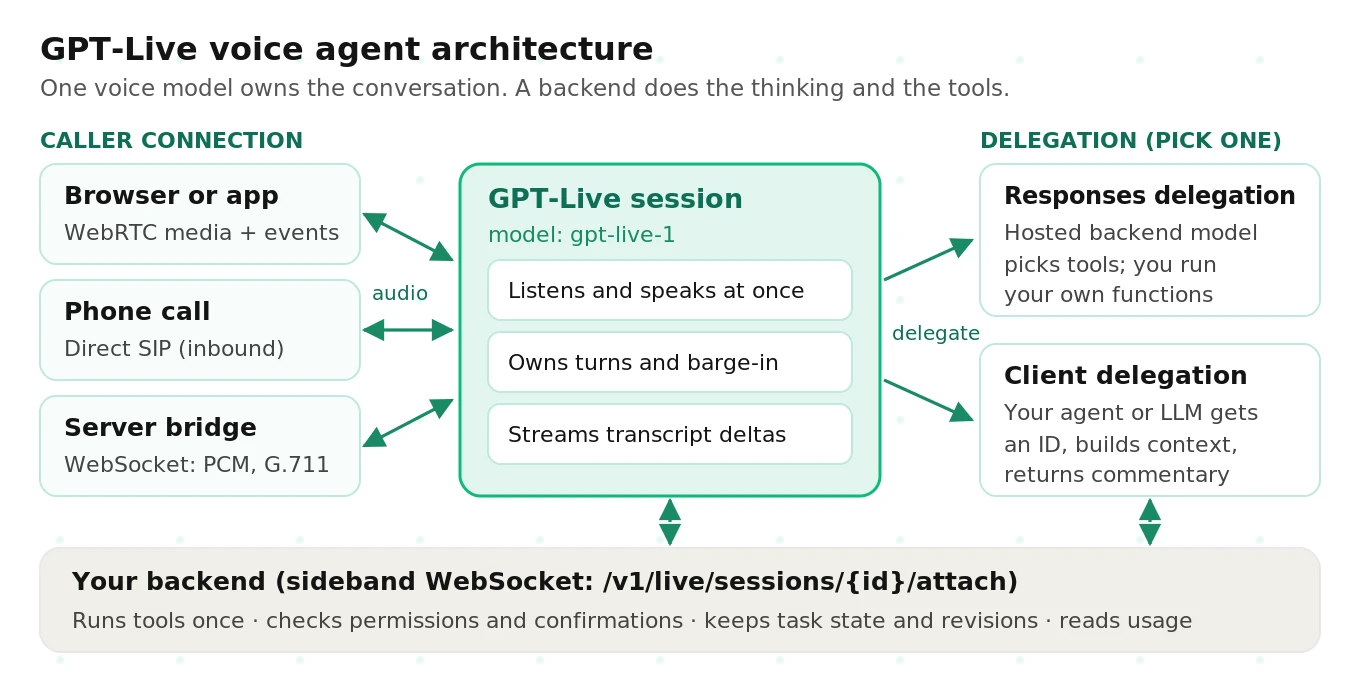
There are three places a call can enter. A browser or mobile app uses WebRTC. A phone call can arrive through direct SIP. A server can relay audio over a WebSocket, which is how most telephony bridges work.
There are two ways to run the backend. Both are set once, at session creation.
| Consideration | Responses delegation | Client delegation |
|---|---|---|
| Who runs the backend | OpenAI runs a Responses model you choose | Your code runs any model, agent, or service |
| Context | GPT-Live supplies conversation context | You build context from transcript events |
| Tool selection | Backend model picks your function tools | Your agent decides everything |
| Results path | Returned to GPT-Live automatically | You send `session.commentary.append` |
| Best for | New builds, Realtime migrations | Existing agents, strict review of results |
| Change later | Update model and tools mid-session | Fixed; start a new session to switch |
The delegation guide suggests starting with `gpt-6-luna` as the Responses backend. It suggests `gpt-6-sol` for more complex tasks. OpenAI's quickstarts also use `gpt-5.6-terra` and `gpt-5.6-luna`. Compare answer quality and latency on your own calls before you pick.
GPT-Live vs Realtime API vs a cascaded pipeline
You now have three OpenAI-flavored ways to ship voice. Our deeper comparison of cascading vs speech-to-speech covers the general tradeoff. Here is the short version for this decision.
| Factor | GPT-Live (`gpt-live-1`) | Realtime API (`gpt-realtime-2.1`) | Cascaded STT, LLM, TTS |
|---|---|---|---|
| Duplex | Full duplex | Turn-based | Turn-based |
| Turn detection | Model-owned; no VAD knobs | `server_vad` or `semantic_vad` | Your endpointer |
| Reasoning | Delegated backend | Inside the voice model | Your LLM |
| Exact scripted wording | Not guaranteed | Easier to steer | Full control via TTS |
| Truncate unheard audio | Not supported | Supported | Your player controls it |
| Pricing basis | Per minute plus backend tokens | Audio and text tokens | Per vendor, per stage |
| Images | Via backend only | Image input supported | Depends on LLM |
The Realtime model page lists audio input at $32 and audio output at $64 per million tokens, as of September 2026. GPT-Live's flat minute rate is easier to forecast. It is not automatically cheaper, because backend tokens bill on top.
Pick GPT-Live when natural turn-taking matters most. Language tutoring, open-ended support, and noisy callers are good fits. Pick Realtime when you need tight control of each response. Pick a cascade when you need a specific TTS voice, exact regulated wording, or a non-OpenAI LLM. Our best LLM for voice agents guide helps with that last choice.
How to build a GPT-Live voice agent, step by step
This is the build order we recommend. Each step maps to a section below with code.
1. Get API access and confirm your usage tier supports enough concurrent sessions.
2. Write two prompts: a short voice prompt and a detailed backend prompt.
3. Choose Responses or client delegation, since you cannot switch mid-session.
4. Create the session from your server and never expose the API key to the browser.
5. Connect the caller over WebRTC, WebSocket, or SIP, then wait for `session.started`.
6. Handle transcript, delegation, backend, usage, and error events in one loop.
7. Execute function calls once, with authorization checks and idempotency keys.
8. Track playback in your own player, because GPT-Live has no per-reply done event.
9. Close gracefully with `session.close` and wait for `session.closed` to read final usage.
10. Test on real call audio before launch, then monitor after every model change.
Step 1: write the voice prompt and the backend prompt
Do not paste your old prompt into both places. OpenAI's prompting guide asks for a short voice prompt with three named sections. They are `Backchannel policy`, `Interruption policy`, and `Delegation policy`.
The delegation policy lists backend capabilities. It also lists when to delegate and when not to. For example, delegate availability checks and booking changes. Do not delegate greetings or requests for a repeat.
The backend prompt holds the real procedure. It should say how to treat messy transcripts. It should say to ask for missing details instead of guessing. It should report an action as complete only after a tool confirms it.
Keep the voice instructions under the 16,384-token limit. In practice, shorter is better. LiveKit's plugin docs make a sharp point here. The voice model does not see the tools, so do not describe tools in the persona.
Step 2: create the session on your server
Session creation happens server-side. For WebRTC, the browser sends an SDP offer to your server. Your server posts it with the session config and returns the SDP answer. This example is simplified from OpenAI's WebRTC quickstart.
# Simplified from OpenAI's GPT-Live WebRTC quickstart (September 2026).
from openai import OpenAI

client = OpenAI(max_retries=0)

VOICE_PROMPT = """You are Ava, a calm voice assistant for Acme Dental.
Backchannel policy: Use moderate backchannels.
Interruption policy: Stop speaking when the user interrupts. Listen.
Delegation policy:
Backend tools:
- Appointments: check times; create, change, or cancel bookings.
Delegate to the backend when the user asks about availability or bookings.
Do not delegate greetings or requests to repeat a result.
Do not guess the result while waiting."""

def create_live_session(sdp_offer: str) -> dict:
    result = client.live.create(
        session={
            "model": "gpt-live-1",
            "instructions": VOICE_PROMPT,
            "audio": {"output": {"voice": "meridian"}},
            "delegation": {
                "type": "responses",
                "responses": {
                    "model": "gpt-6-luna",
                    "instructions": "Use appointment tools. Confirm the exact slot "
                                    "before booking. Report success only after the tool confirms.",
                    "tools": [CHECK_AVAILABILITY, BOOK_APPOINTMENT],  # schemas below
                    "tool_choice": "auto",
                    "parallel_tool_calls": False,
                    "reasoning": {"effort": "low"},  # use a value your backend model supports
                },
            },
        },
        transport={"type": "webrtc", "sdp": sdp_offer},
    )
    # Returns {"session": {"id": "live_..."}, "transport": {"sdp": "..."}}
    return result.model_dump()
Three details matter. Omit `audio.format` for WebRTC, because SDP negotiates it. Voice is fixed at startup, so pick it deliberately. Creating a WebRTC session bills 15 seconds up front, which is credited once the session runs.
The function tools use the Responses function schema. Here is one. Validate the arguments in code anyway.
{
  "type": "function",
  "name": "book_appointment",
  "description": "Book a slot the caller has explicitly confirmed.",
  "parameters": {
    "type": "object",
    "properties": {
      "slot_id": {"type": "string"},
      "patient_id": {"type": "string"},
      "task_revision": {"type": "integer"}
    },
    "required": ["slot_id", "patient_id", "task_revision"],
    "additionalProperties": false
  }
}
For voices, GPT-Live defaults to `marin`. The API adds 12 voices, including `gleam` and `meridian` with North American influence. It also adds `delta` and `cinder` with Southern U.S. influence, and Brazilian Portuguese voices `bossa` and `tempo`. Custom voices require contacting OpenAI sales.
Step 3: handle the event stream
GPT-Live's event model is different from the Realtime API. There is no `speech_started` event to react to. There is no `response.done` at the end of each reply. You get continuous transcript deltas, delegation events, nested backend events, and audio.
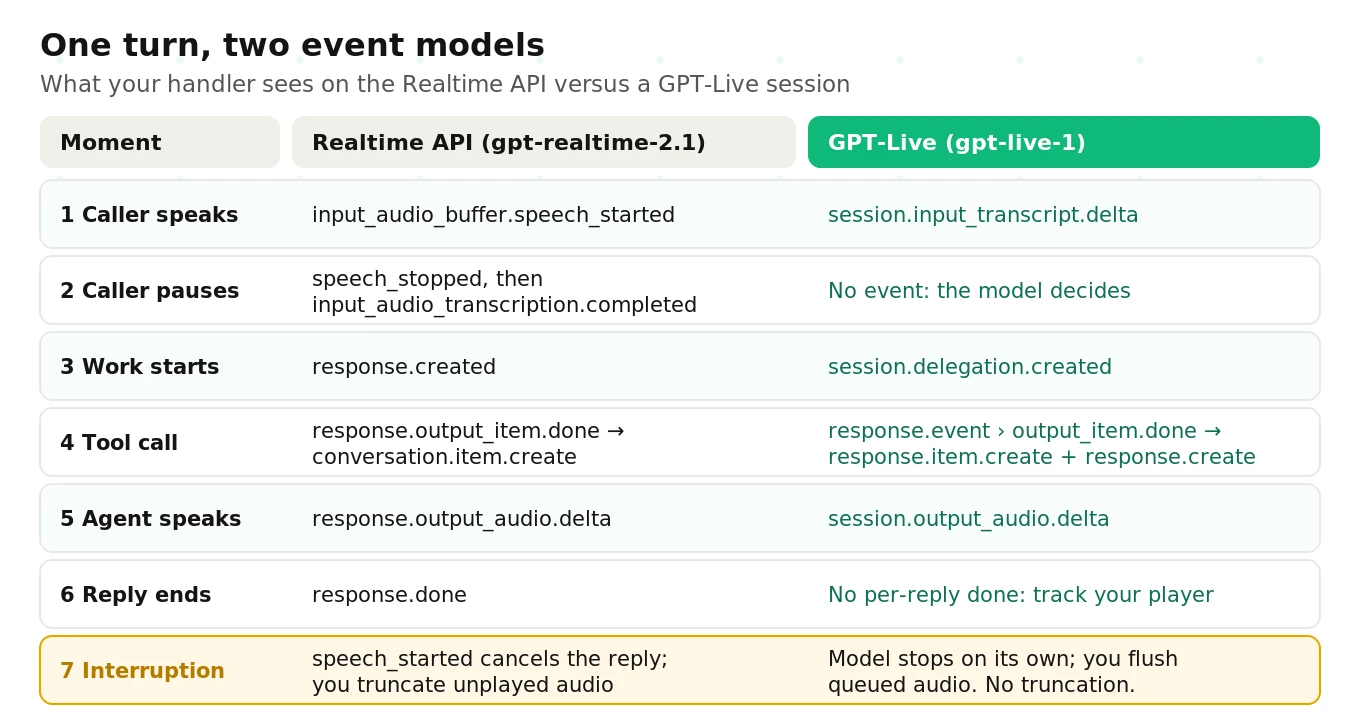
Here is a simplified server-side dispatcher. It works on a primary WebSocket or a sideband connection.
// Simplified dispatcher for GPT-Live events (WebSocket or sideband).
const pendingCalls = new Map(); // call_id -> {name, args, delegationId}

async function onEvent(event, conn, app) {
  switch (event.type) {
    case "session.started":
      app.sessionId = event.session.id;
      break;
    case "session.input_transcript.delta":
      app.transcript.add("caller", event.delta, event.start_ms, event.end_ms);
      break;
    case "session.output_transcript.delta":
      app.transcript.add("agent", event.delta, event.start_ms, event.end_ms);
      break;
    case "session.delegation.created":
      app.log("delegation", event.delegation.id, event.offset_ms);
      break;
    case "response.event":
      await onBackendEvent(event.event, event.delegation_id, conn, app);
      break;
    case "session.usage.updated":
      app.voiceSeconds = event.usage.seconds; // cumulative; do not sum
      break;
    case "error":
      app.handleError(event.error); // match error.client_event_id
      break;
    case "session.closed":
      app.finalize(event.reason, event.usage);
      break;
  }
}

async function onBackendEvent(inner, delegationId, conn, app) {
  if (inner.type === "response.output_item.done" && inner.item.type === "function_call") {
    pendingCalls.set(inner.item.call_id, { ...inner.item, delegationId });
  }
  if (inner.type === "response.completed") {
    app.recordBackendUsage(inner.response.id, inner.response.usage);
    for (const [callId, call] of pendingCalls) {
      const output = await app.runToolOnce(call); // auth + idempotency inside
      conn.send({ type: "response.item.create", event_id: `out_${callId}`,
        item: { type: "function_call_output", call_id: callId, output } });
      pendingCalls.delete(callId);
    }
    conn.send({ type: "response.create", event_id: `cont_${Date.now()}` });
  }
}
The docs are specific about one trap. Read function calls from the nested `response.output_item.done`. The arguments-done event lacks the function name and `call_id`. Forwarded `response.completed` events show `output: []` even when calls are pending. Collect calls as they finish, or you will miss them.
Every pending call needs a result before you send `response.create`. That includes calls you skip. If the caller changed the request, return a result that says the call was skipped.
Step 4: tool calls, results, and the three append channels
With Responses delegation, results go back as `function_call_output` items. With client delegation, you return text through one of three channels. Each takes up to 500 tokens.
| Channel | What GPT-Live does with it | Use it for |
|---|---|---|
| `session.thinking.append` | Uses it quietly in later replies | Progress, background facts, UI state |
| `session.commentary.append` | Paraphrases it aloud | Verified results the caller should hear |
| `session.instructions.append` | Treats it as a new instruction; can interrupt | Guardrail redirects, disclosures, greetings |
Here is a client delegation adapter, simplified from OpenAI's migration guide. The revision check is the important line.
// Simplified client-delegation adapter (from OpenAI's migration guide).
async function handleDelegation(event, app) {
  if (event.type !== "session.delegation.created") return;
  if (event.delegation.target !== "client") return;

  const ctx = app.readContext(); // transcripts + task state you stored
  if (!ctx) return; // request still unclear; keep the notice

  const summary = await app.runAgent(ctx); // your LLM, RAG, or workflow
  if (app.currentRevision() !== ctx.revision) return; // caller changed the ask

  app.send({
    type: "session.commentary.append",
    event_id: crypto.randomUUID(),
    delegation_id: event.delegation.id,
    content: summary, // verified facts only, 500 tokens max
  });
}
The delegation event carries an ID and a timestamp. It carries no task text and no arguments. Your application must work out the request from the transcripts and its own state.
Tool accuracy is where most voice agents fail quietly. Our guide to tool call accuracy in voice agents covers how to score it.
Step 5: interruptions, turn-taking, and what replaced VAD
On the Realtime API, you tune turn detection. You choose `server_vad` or `semantic_vad`. You set thresholds, silence durations, or eagerness. Here is the Realtime config from OpenAI's VAD guide, for comparison.
{
  "type": "session.update",
  "session": {
    "type": "realtime",
    "audio": {
      "input": {
        "turn_detection": {
          "type": "semantic_vad",
          "eagerness": "low",
          "create_response": true,
          "interrupt_response": true
        }
      }
    }
  }
}
GPT-Live has none of these knobs. The model decides when to speak, many times per second. Your levers are the prompt's backchannel and interruption policies. The optional "silence and background noise" instruction also helps.
Barge-in: The caller talking over the agent. In GPT-Live, the model decides when to stop. Your player decides what the caller hears.
That split causes real bugs. LiveKit's GPT-Live plugin docs spell out the consequence. You can stop playback, but the model keeps its full turn in context. GPT-Live does not support truncation. So the agent can later refer to words the caller never heard.
Three practical rules follow. First, flush your local audio queue on interruption. Second, drive the "speaking" indicator from your player, not from server events. Third, test a "stop talking" request separately from a "cancel my booking" request. The first yields the floor. The second is a backend action. For the underlying concepts, see our guide to barge-in in voice agents.
Step 6: the telephony path
Phone calls reach GPT-Live in two ways. Our SIP vs WebRTC guide explains the tradeoffs in general.
Direct SIP. Your carrier sends the call to OpenAI. A `live.transport.incoming` webhook fires with a `session_id`. Your server accepts or rejects the call, then attaches a sideband for events and tools. Signaling uses TLS and media uses SRTP. The SIP guide has the full flow.
# Accept an inbound SIP call (simplified from OpenAI's SIP guide).
curl -X POST "https://api.openai.com/v1/live/sessions/$SESSION_ID/accept" \
  -H "Authorization: Bearer $OPENAI_API_KEY" \
  -H "Content-Type: application/json" \
  -d '{"session": {"type": "live", "model": "gpt-live-1",
       "instructions": "You are answering an inbound support call.",
       "audio": {"output": {"voice": "marin"}},
       "delegation": {"type": "client"}}}'

# Then attach your backend over a sideband WebSocket:
# wss://api.openai.com/v1/live/sessions/$SESSION_ID/attach

# Transfer to a human, or hang up:
curl -X POST "https://api.openai.com/v1/live/sessions/$SESSION_ID/refer" \
  -H "Authorization: Bearer $OPENAI_API_KEY" \
  -d '{"target_uri": "sip:agent@example.com"}'
Direct SIP handles inbound calls. Outbound SIP through `POST /v1/live/sessions` is not supported. For outbound, use a partner integration. The sideband also reports DTMF keypresses.
Server audio bridge. Your server holds the carrier stream and a GPT-Live WebSocket. GPT-Live accepts raw G.711 μ-law and A-law at 8 kHz. If your carrier uses the same codec, you can forward bytes without converting to PCM. You own buffering, interruptions, and hangup.
Orchestrators. OpenAI lists four partner integrations: LiveKit, Twilio, Telnyx, and Daily/Pipecat. LiveKit exposes a `GPTLiveModel` in its OpenAI plugin. Pipecat has an OpenAI Live service. At the time of writing, LiveKit's page notes that the plugin requires GPT-Live alpha access, so confirm availability for your account. If you are choosing a framework, our LiveKit vs Pipecat decision guide helps.
An orchestrator is worth it when you need rooms, SIP trunking, recording, and handoffs in one place. Going direct is simpler when you have one channel and a strong backend team. Either way, a Realtime integration is not automatically compatible with GPT-Live. The event model changed.
Latency: what to expect and where it goes
OpenAI reports a 30-point gain on Full Duplex Bench over `gpt-realtime-2.1`. It cites large gains in turn-taking latency. It did not publish a single millisecond figure in the announcement. So measure your own.
In a GPT-Live agent, two latencies matter. One is how fast the voice responds, including backchannels. The other is how fast a delegated answer arrives. The second dominates on tool-heavy calls. The voice can fill the gap, but the caller still waits for the answer.
| Stage | Illustrative share of a delegated answer | Main lever |
|---|---|---|
| Voice decides to delegate | Small | Clear delegation policy |
| Backend model reasoning | Large | Smaller model, lower `reasoning.effort` |
| Your tool call | Often largest | Faster APIs, parallel lookups |
| Result injected and spoken | Small | Short, speakable results |
The numbers in that table are illustrative, not measured. The levers come from OpenAI's docs. You can set `service_tier: "priority"` for Fast mode where available. You can start a speculative lookup from transcript fragments before delegation arrives. You can keep backend prompts and tool definitions stable to benefit from caching.
For a full latency budget method, see our voice agent latency guide.
Cost model: how GPT-Live pricing works
GPT-Live bills two things. Voice time bills per second at $0.05 per minute. Backend work bills at the normal rates of the model and tools you use. OpenAI's cost guide gives the formula.
Total cost = (billable voice seconds / 60 x voice rate) + backend costs
Active time counts everything. Caller speech, agent speech, silence, and backend waiting all bill. Muting the microphone does not stop the clock. Only closing the session does.
Here is an illustrative example for a support call. The voice rate is the published rate as of September 2026. The backend figure is an assumption, not a quote.
| Component | Calculation | Illustrative cost |
|---|---|---|
| Voice session | 240 seconds / 60 x $0.05 | $0.200 |
| Backend model and tools | Assumed for a few lookups | $0.030 |
| Per call total | $0.200 + $0.030 | $0.230 |
| 10,000 calls per month | $0.230 x 10,000 | $2,300 |
Carrier minutes, orchestration, and your own infrastructure are extra. OpenAI makes a useful point: a larger backend model can lower total cost. If it finishes the task faster, voice minutes drop. Compare cost per successful task, not cost per minute. Our voice agent cost breakdown covers the other line items.
Rate limits are measured in concurrent sessions. Tier 1 allows 25, Tier 2 allows 50, Tier 3 allows 200, Tier 4 allows 300, and Tier 5 allows 500. The Free tier is not supported. Plan peak concurrency before a launch, not after.
Production pitfalls we see on GPT-Live agents
The API is new, and most failures are not in the model. They sit in the seams between voice, backend, and your app. Here are the ones to design for.
Stale results after a correction. The caller says "Thursday," then "actually, Friday." The Thursday lookup finishes and gets spoken. Fix it with task revisions. Discard any result whose revision is out of date.
Duplicate actions. A tool response gets lost and the backend retries. Now there are two bookings. Give every action an operation ID. Check whether it already succeeded before retrying.
Hallucinated or incomplete tool arguments. Voice transcripts mangle names, dates, and alphanumerics. Use tight schemas and validate every argument in code. Ask for a spelled confirmation when a value is uncertain.
Speaking about audio the caller never heard. Playback stops on barge-in, but the model's context does not. Test follow-up questions after an interruption.
Announcing success too early. A completed backend response does not mean the caller heard it. The spoken reply can be cut off. Verify the booking record and the played audio separately.
Context compaction. At 90% context usage, GPT-Live starts a replacement engine. That engine gets your original instructions and up to 8,192 tokens of history. Older details can vanish. Keep confirmed facts in your application, not in the conversation.
Exact wording. GPT-Live paraphrases. For legal disclosures, use `session.instructions.append` and check the audio. For guaranteed wording, play a pre-recorded clip and control playback.
Model updates and drift. The voice model is one snapshot today, `gpt-live-1`. Your backend model will change more often. A new backend version can shift tool choice and tone without any code change. Treat every model change as a release. Our guide to LLM update regressions covers the playbook.
Moderation cutoffs. Some moderation events end the session. Others cut off the current speech and emit an `error`. Handle both, and never mark a message delivered without checking playback.
Migrating from the Realtime API
If you run on `gpt-realtime-2.1` today, the migration is real work. It is not a model-name swap. OpenAI's migration guide maps the changes.
| Realtime API | GPT-Live |
|---|---|
| `input_audio_buffer.append` | `session.input_audio.append` |
| `response.output_audio.delta` | `session.output_audio.delta` |
| Manual commit and `response.create` per turn | Stream continuously; the model decides |
| `response.done` ends each reply | No equivalent; track your player |
| `conversation.item.create` for tool output | `response.item.create`, then `response.create` |
| Tools in `session.tools` | Tools in `delegation.responses.tools` |
| One combined prompt | Voice prompt plus backend prompt |
Start with `parallel_tool_calls: false`. Save representative calls from your current agent first. Then run the same scenarios on both and compare task success, not just how it sounds.
If you need a decision framework for Realtime-style APIs, see how to evaluate a realtime voice API.
Testing what you built
Full-duplex agents fail in ways transcript tests miss. The public research agrees. The Full-Duplex-Bench-v3 paper tested six configurations on real human audio with disfluencies. The best Pass@1 was 0.600, from GPT-Realtime. The cascaded baseline had the highest latency, at 10.12 seconds. Self-correction handling was among the most consistent failures across all systems. That benchmark predates GPT-Live in the API, so treat it as context.
GPT-Live gives you useful testing hooks. With `store: true`, you can fork a finished session. That lets you replay the same caller turn many times. You can also download a stereo WAV recording, with caller on the left channel and agent on the right. Stored recordings are available for 30 days, and forking is unavailable under Zero Data Retention.
What those hooks cannot give you is independence. You still need someone to score real calls against your own success criteria. That means turn-taking evaluation under noise and tool accuracy. It also means checking that the spoken answer matches the backend record. Start with our AI voice agent testing guide and the full-duplex architecture explainer. Then go deeper with testing GPT-Live voice agents.
This is the work Evalgent does. We run independent evaluations on your own call audio. We report where the agent fails before your callers find out.
The bottom line
GPT-Live moves turn-taking into the model and moves reasoning into a backend you choose. Build the seams carefully, with revisions, idempotent tools, and playback tracking, and then prove it on real calls.
Frequently asked questions
What is GPT-Live?
GPT-Live is OpenAI's full-duplex voice model family. It listens and speaks at the same time and decides when to talk. For search, reasoning, or tools, it delegates to a separate backend model and speaks the result. It launched in ChatGPT on July 8, 2026. The developer model, `gpt-live-1`, reached the API on September 10, 2026.
Is the GPT-Live API available?
Yes. OpenAI released `gpt-live-1` in the API on September 10, 2026. You create sessions at `/v1/live/sessions` over WebRTC, WebSocket, or SIP. It is not supported on the Free usage tier. Concurrent session limits range from 25 at Tier 1 to 500 at Tier 5, as of September 2026.
Is GPT-Live-1 mini available in the API?
Not as of September 2026. GPT-Live-1 mini powers ChatGPT Voice for free users. The API model page lists a single snapshot, `gpt-live-1`. To control cost or speed in the API, you choose the backend model and its reasoning effort instead. Check the model catalog, since OpenAI may add models later.
How does the GPT-Live architecture work?
Two models split the job. GPT-Live runs the spoken conversation, including turn-taking, backchannels, and interruptions. A backend handles reasoning and tools. With Responses delegation, OpenAI runs a backend model you choose. With client delegation, your own agent does the work. Your application still owns permissions, confirmations, tool execution, and task state.
How much does the GPT-Live API cost?
Voice time costs $0.05 per minute, billed per second, as of September 2026. Backend model and tool usage bills separately at normal rates. Silence and backend waiting count as active time. WebRTC session creation bills 15 seconds up front, credited once the session runs. Check OpenAI's pricing page before budgeting.
What voices does GPT-Live support?
The default voice is `marin`. The API adds 12 voices: quartz, ripple, vesper, willow, stone, gleam, meridian, bossa, tempo, beacon, delta, and cinder. They span Australian, British, Irish, North American, Southern U.S., and Filipino English, plus Brazilian Portuguese. Voice is fixed at session start. Custom voices require contacting OpenAI sales.
How is GPT-Live different from the Realtime API?
GPT-Live is full duplex and delegates reasoning to a backend. The Realtime API is turn-based, with configurable server or semantic VAD and reasoning inside the voice model. GPT-Live bills per minute; Realtime bills per token. GPT-Live has no per-reply done event and no truncation. Migrating requires rewriting your event handling and splitting your prompt.
How do you test a GPT-Live voice agent?
Test turn-taking, interruptions, corrections, and tool outcomes on real call audio. Verify the backend record and the played audio separately. Use stored sessions and forks to replay the same caller turn many times. Rerun your suite after backend model changes. Independent evaluation on your own calls catches failures transcript-only tests miss.
Want an independent read on your GPT-Live agent before launch? Book a demo.
Related Articles

Why AI voice agents fail in production: 9 failure layers, how to detect each, and how to prevent them
Voice agents fail in production across 9 layers, from 8 kHz audio to silent tool errors. Symptoms, root causes, alerts, and fixes in one master table.
Read more
Voice agent regression testing: how to detect regressions from model updates you don't control
Voice agent regression testing for changes you don't control: pin each layer, run a nightly pinned-vs-latest canary, and use paired stats to detect drops.
Read more