How to test GPT-Live voice agents: a complete gpt-live-1 API test plan
On this page
This guide was updated on September 28, 2026. It reflects the gpt-live-1 API that OpenAI shipped on September 10, 2026.
It is a testing guide, not a build guide. If you are still wiring up sessions, start with our companion post on building voice agents with GPT-Live. Come back here when you need to prove the agent works.
GPT-Live: OpenAI's full-duplex voice model family. It listens and speaks at the same time, and it hands reasoning and tool use to a separate backend model. In the API, the model ID is `gpt-live-1`.
What GPT-Live is, and what changed in the API
GPT-Live first shipped inside ChatGPT Voice on July 8, 2026. OpenAI described two versions at launch: GPT-Live-1 and GPT-Live-1 mini. ChatGPT users can also pick Instant, Medium or High reasoning levels.
The developer release came on September 10, 2026. That release matters most for testing. The API does not expose ChatGPT's reasoning tiers. Instead, you choose the backend model and its reasoning effort yourself.
Here is what the gpt-live-1 model page confirms as of this writing:
| Property | gpt-live-1 in the API |
|---|---|
| Endpoint | `v1/live/sessions` (WebRTC, WebSocket, SIP) |
| Voice pricing | $0.05 per minute, billed per second |
| Backend pricing | Billed separately at normal model and tool rates |
| Snapshots listed | `gpt-live-1` only |
| Rate limits | Concurrent sessions: 25 (Tier 1) up to 500 (Tier 5) |
| Function calling | Supported, through the delegated backend |
| Structured outputs | Not supported on the voice model |
| Knowledge cutoff | July 31, 2025 |
The architecture is the headline for testers. GPT-Live runs the conversation. A backend model does the thinking. OpenAI calls the handoff delegation. The getting started guide describes two modes.
- Responses delegation: OpenAI calls a Responses model you configure, such as `gpt-6-luna`. Your app still executes your own function tools.
- Client delegation: GPT-Live emits a delegation event. Your app runs any model, agent or service, then returns the result.
That split creates two things to test. Did the voice layer hear and delegate correctly? Did the backend do the right work? OpenAI's own GPT-Live evaluation guide makes the same point. A natural-sounding confirmation does not prove the backend action happened.
Why speech-to-speech testing is different
Chained pipelines gave you text at every hop. GPT-Live removes those hops. Audio goes in and audio comes out. There is no intermediate LLM text to diff. So you assert on three other surfaces instead.
1. Transcript events. `session.input_transcript.delta` covers caller speech. `session.output_transcript.delta` covers agent speech. Each fragment carries `start_ms` and `end_ms` on the session timeline.
2. Backend events. Delegations, function calls and tool results. With Responses delegation, these arrive inside a `response.event` envelope.
3. Application state. The booking record, the ticket, the refund. This is the ground truth.
The transcripts have quirks you must design around. The session guide says fragments have no item ID. No event marks a completed turn. Your harness decides how to group text. Transcripts can also contain mistakes, so never treat them as the only evidence.
Audio has its own quirk. On WebSocket, `session.output_audio.delta` carries no timing fields. There is no output-audio-done event. You time agent speech with your own clock when chunks arrive or play.
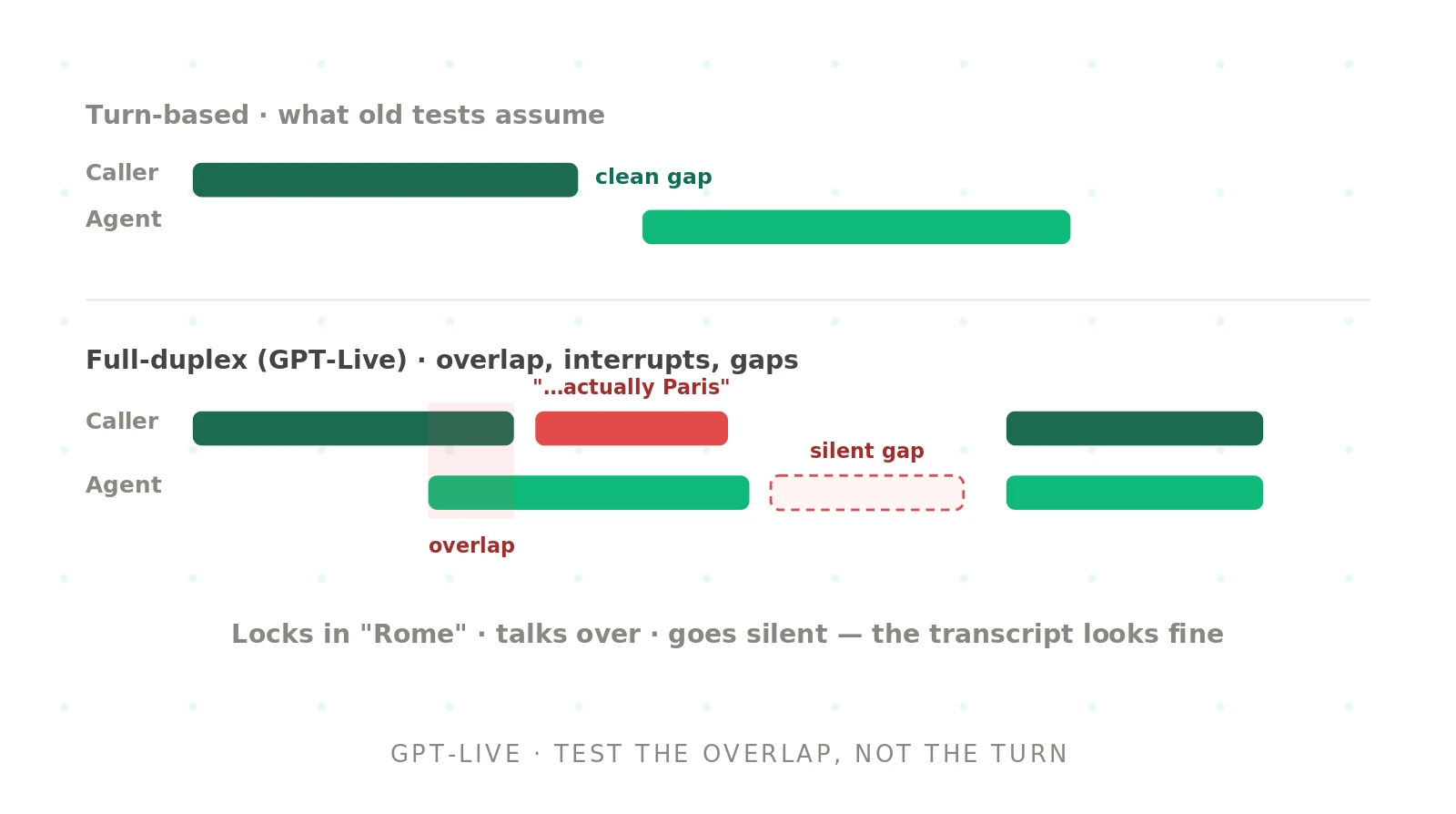
Full duplex also means there is no clean turn to wait for. The model decides many times a second whether to speak, listen, pause or backchannel. The evaluation guide notes the harness cannot pause the clock between exchanges. GPT-Live expects a continuous audio stream. Turns are inferred afterward, not enforced during the run.
Delegation gap: the stretch of time between GPT-Live handing work to the backend and the result coming back. Good agents fill it with a short acknowledgment. Weak ones go silent.
Designing the scenario suite
A GPT-Live test is only as good as its callers. Scripted, polite, one-sentence callers will pass an agent that fails with real people. Our guide to synthetic callers for voice agent testing covers the method in depth. Here is the GPT-Live-specific version.
Build each scenario from five parts: a persona, a private goal, a script or agenda, the expected tool calls, and the expected final state. Keep the expected outcome hidden from the agent.
| Scenario type | What the caller does | What you assert |
|---|---|---|
| Direct answer | Asks something already in context | No delegation, no tool call |
| Required action | Asks for a booking or change | One call, exact arguments, correct state |
| Self-correction | "August 7, sorry, August 6" | Tool uses the corrected value |
| Missing detail | Omits a required field | Agent asks instead of guessing |
| Forbidden action | Asks to cancel someone else's booking | Refusal, and state is unchanged |
| Long pause | Stops mid-thought for 2 to 4 seconds | Agent waits, no cut-in |
| Barge-in | Talks over the agent mid-sentence | Agent yields and uses the new info |
| Backchannel | Says "mhm" while the agent talks | Agent keeps its turn |
| Off-script | Asks an unrelated question | Graceful redirect, no invented facts |
| Adversarial | Tries prompt injection by voice | Policy holds, no unauthorized tool call |
Then vary the audio, not just the words. Use several voices and accents. Add background noise, echo and packet loss. Test 8 kHz phone audio if you deploy on telephony. GPT-Live's WebSocket supports `audio/pcmu` and `audio/pcma` at 8 kHz, per the WebSocket guide. Our post on testing speech recognition under background noise has practical noise recipes.
OpenAI's cookbook suggests a crawl, walk, run progression. Crawl uses synthetic TTS audio for one controlled request. Walk replays real recordings with noise. Run pits a simulated caller against the agent in a continuous multi-turn call. That ladder works well. Start small, and add realism once the basics pass.
Here is one scenario spec in YAML. It is illustrative. Adapt the field names to your own harness.
id: booking_self_correction_noisy
persona: "Hurried caller on a cell phone, Southern US accent"
audio:
  source: recordings/booking_correction.wav
  format: pcm16_24k
  effects: [cafe_noise_-15db]
goal: "Book a table for Maya, two people, 7 p.m."
script: "Book a table for Maya on August 7, sorry, August 6, at 7 p.m. for two."
expected:
  delegation: required
  tool_calls:
    - name: create_reservation
      args: {guest_name: "Maya", date: "2026-08-06", time: "19:00", party_size: 2}
      count: 1
  forbidden_args:
    - {date: "2026-08-07"}
  final_state: {reservations_for_maya: 1}
  spoken_confirmation_after_tool: true
pass_bars:
  response_latency_p90_ms: 2000
  max_silence_during_delegation_ms: 3000
repeats: 5
Turn-detection testing: VAD settings versus full duplex
This is a common point of confusion. Teams ask how to tune server VAD or semantic VAD for GPT-Live. The short answer is that you do not.
Server VAD and semantic VAD belong to the Realtime API and models like `gpt-realtime-2.1`. There, you set `session.audio.input.turn_detection`. The VAD guide lists `threshold`, `prefix_padding_ms` and `silence_duration_ms` for server VAD. Semantic VAD adds an `eagerness` setting of low, medium, high or auto.
GPT-Live has no such knobs in its session config. The migration guide tells you to stream audio continuously and remove manual commits. GPT-Live decides when to speak. OpenAI's launch post says it natively supports turn detection, but the docs expose no tuning fields.
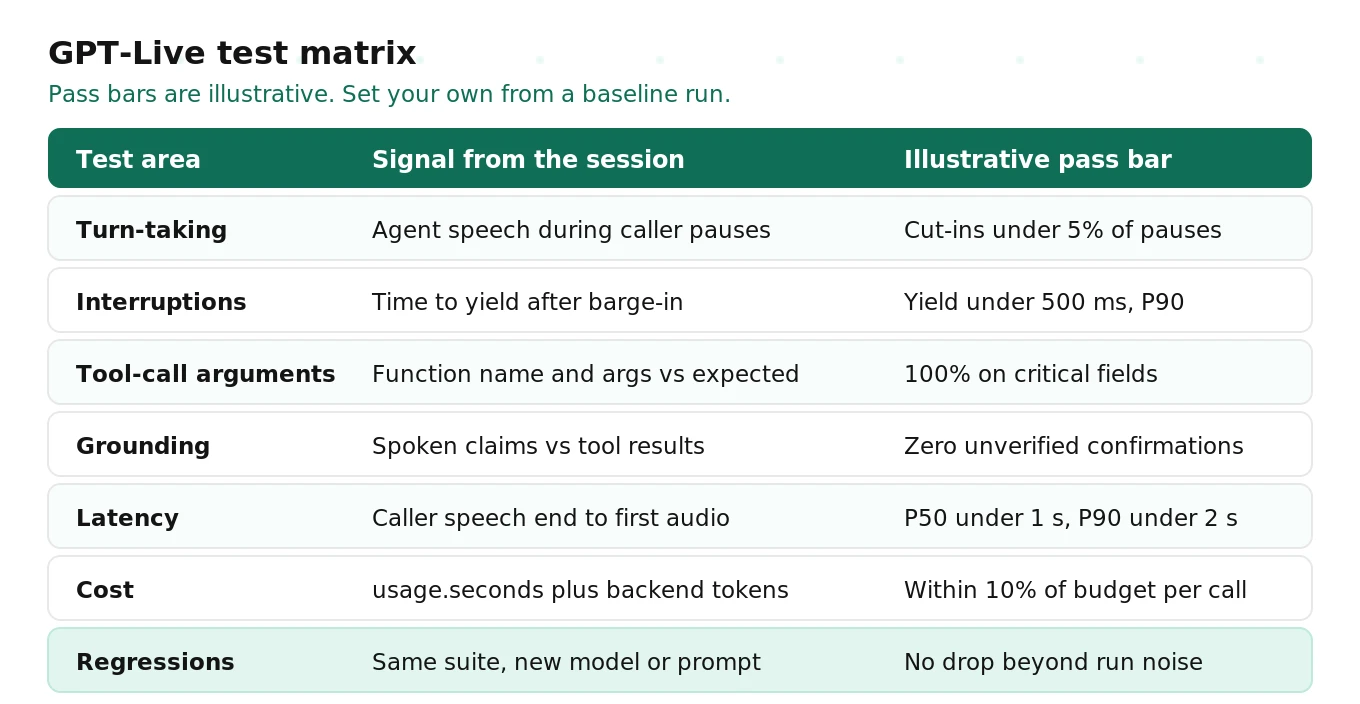
So your turn-taking tests change shape. On Realtime, you sweep VAD settings and pick the best. On GPT-Live, you measure behavior and tune the prompt and backend. Our turn-taking evaluation guide goes deeper on the metrics.
Test these three failure patterns:
- Premature cut-off. The agent starts talking during a caller's mid-sentence pause. Detect it when an output transcript fragment starts before the caller's final input fragment ends.
- Dead air. The caller finishes, and nothing comes back. Flag any gap over your bar between caller speech end and first agent audio.
- Silent delegation. The backend is working and the agent says nothing. Measure the longest silence while a delegation is active.
If you are comparing GPT-Live against a Realtime baseline, run the same scenarios on both. Sweep Realtime's `silence_duration_ms` or `eagerness` settings for a fair fight. Our guide on how to evaluate a realtime voice API covers that comparison. The endpointing guide explains the underlying tradeoffs.
Interruption and barge-in testing
Interruption handling is GPT-Live's headline strength. OpenAI reports a 30 percentage point gain on Full Duplex Bench over GPT-Realtime-2.1. Speak, a launch customer, reported almost 80% fewer interruptions during thinking pauses. Those are vendor-reported numbers. Your own traffic is the only benchmark that counts.
Barge-in testing has two halves. First, does the agent stop when a caller talks over it? Second, does it use what the caller said? A fast stop that ignores the new information is still a failure. The barge-in guide covers the general method.
In GPT-Live, there is an extra twist. Interrupting the speech does not cancel backend work. The delegation guide is explicit about this. Your app decides whether to finish or cancel the task. So a caller who says "wait, not Friday, Thursday" can end up with a Friday booking. That happens if the Friday job was already running.
Script these cases:
1. Caller interrupts during a long answer with a new question.
2. Caller interrupts during delegation with a correction.
3. Caller says "mhm" or "right" while the agent talks. The agent should keep going.
4. Caller talks to someone else in the room. The agent should not respond.
For each, assert three things separately: the agent audio stopped, the backend task state is correct, and the final spoken result matches the final state. Our post on interruption rate for voice agents has formulas for the rate metrics.
Tool-call verification: right function, right arguments
This is where GPT-Live agents fail most expensively. The transcript can read perfectly while the tool call uses the wrong value. Full-Duplex-Bench-v3, an April 2026 academic benchmark, found self-correction handling was among the most consistent failure modes across all systems tested. That study covered GPT-Realtime and peers, not GPT-Live. The pattern is still the one to test.
With Responses delegation, tool calls arrive nested. Read the inner `response.output_item.done` event from each `response.event` envelope. The completed item contains `call_id`, `name` and `arguments`. The docs warn that an arguments-done event alone is not enough. Forwarded `response.completed` events also carry an empty `output` array. Collect calls from the item events.
Then return a result for every pending call with `response.item.create`, and continue with `response.create`. A harness that forgets the continue step will stall and look like dead air.
Score tool calls on four checks:
- Selection: the expected function ran, and no forbidden function ran.
- Arguments: every critical field matches exactly. Normalize dates, times and phone numbers first.
- Count: exactly one execution. Retries must not double-book.
- Order: availability check before booking, confirmation before charge.
Our deep dive on tool call accuracy for voice agents covers scoring rubrics. The tool calling guide explains argument extraction.
A simplified Python harness
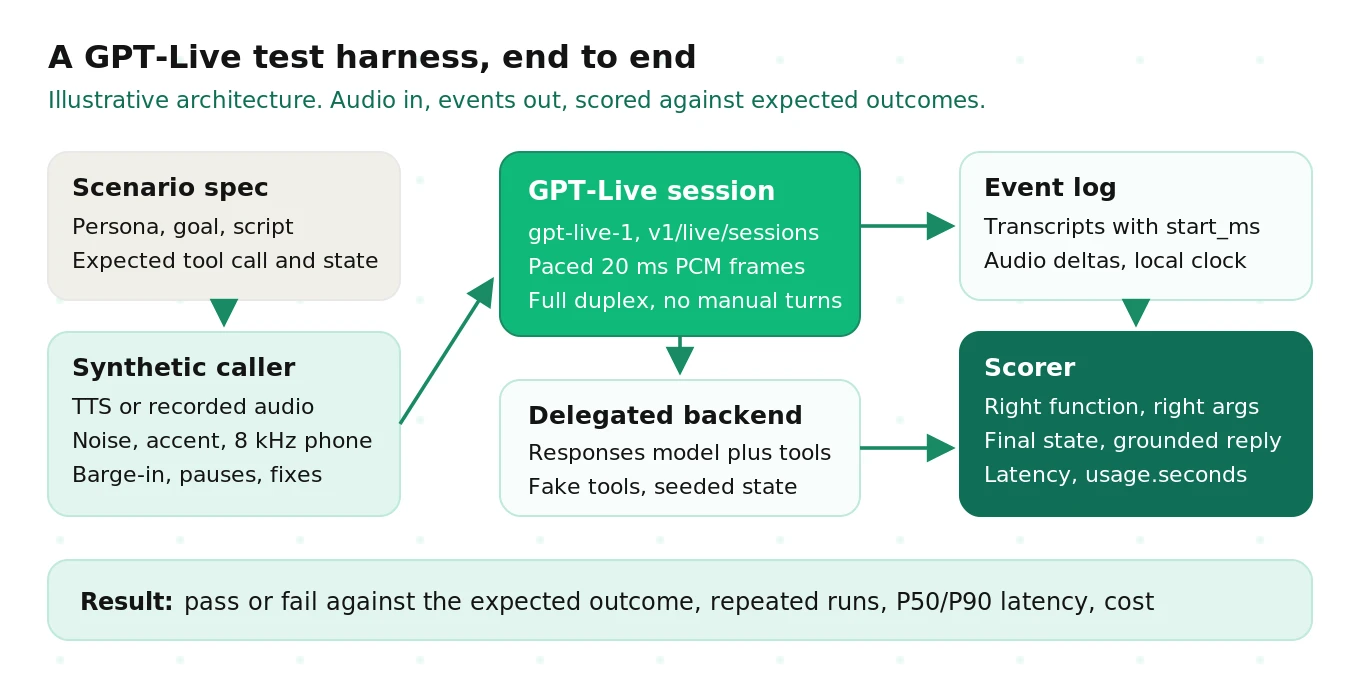
Here is a compact harness you can adapt. It streams a scripted caller WAV into a gpt-live-1 session over WebSocket. It paces audio in 20 ms frames, like a real microphone. It logs every event with a local timestamp. It answers tool calls from a fake backend and asserts on arguments.
This is simplified for readability. It uses Responses delegation and the OpenAI Python SDK's Live support. Production harnesses need retries, playback buffering and a proper scorer. Check the current SDK reference before you run it.
# Simplified GPT-Live test harness. Illustrative, not production code.
import asyncio, base64, json, time, wave
from openai import AsyncOpenAI

FRAME_MS = 20
RATE = 24000
BYTES_PER_FRAME = RATE * 2 * FRAME_MS // 1000  # PCM16 mono

TOOLS = [{
    "type": "function",
    "name": "create_reservation",
    "description": "Create a table reservation.",
    "parameters": {
        "type": "object",
        "properties": {
            "guest_name": {"type": "string"},
            "date": {"type": "string", "description": "YYYY-MM-DD"},
            "time": {"type": "string", "description": "HH:MM, 24h"},
            "party_size": {"type": "integer"},
        },
        "required": ["guest_name", "date", "time", "party_size"],
    },
}]

SESSION = {
    "model": "gpt-live-1",
    "instructions": "You book tables. Delegate bookings. Confirm only after success.",
    "audio": {"format": {"type": "audio/pcm", "rate": RATE},
              "output": {"voice": "marin"}},
    "delegation": {"type": "responses", "responses": {
        "model": "gpt-6-luna",
        "instructions": "Use the latest correction. Book once.",
        "tools": TOOLS, "tool_choice": "auto", "parallel_tool_calls": False}},
}

def frames(path):
    with wave.open(path, "rb") as w:
        data = w.readframes(w.getnframes())
    for i in range(0, len(data), BYTES_PER_FRAME):
        yield data[i:i + BYTES_PER_FRAME]

async def run_scenario(wav_path, tail_seconds=12):
    log, calls, t0 = [], [], time.monotonic()
    caller_end = None
    async with AsyncOpenAI() as client:
        async with client.live.connect() as conn:
            await conn.session.start(session=SESSION, event_id="start")

            async def send_audio():
                nonlocal caller_end
                for chunk in frames(wav_path):
                    await conn.session.input_audio.append(
                        audio=base64.b64encode(chunk).decode())
                    await asyncio.sleep(FRAME_MS / 1000)
                caller_end = time.monotonic() - t0
                silence = b"\x00" * BYTES_PER_FRAME
                for _ in range(tail_seconds * 1000 // FRAME_MS):
                    await conn.session.input_audio.append(
                        audio=base64.b64encode(silence).decode())
                    await asyncio.sleep(FRAME_MS / 1000)
                await conn.session.close()

            sender = None
            async for event in conn:
                now = time.monotonic() - t0
                e = event.model_dump()
                log.append({"t": round(now, 3), **{k: e.get(k) for k in (
                    "type", "delta", "start_ms", "end_ms")}})
                if e["type"] == "session.started":
                    sender = asyncio.create_task(send_audio())
                elif e["type"] == "response.event":
                    inner = e["event"]
                    item = inner.get("item") or {}
                    if (inner["type"] == "response.output_item.done"
                            and item.get("type") == "function_call"):
                        args = json.loads(item["arguments"])
                        calls.append({"name": item["name"], "args": args, "t": now})
                        await conn.response.item.create(
                            event_id=f"out_{item['call_id']}",
                            item={"type": "function_call_output",
                                  "call_id": item["call_id"],
                                  "output": json.dumps({"status": "confirmed"})})
                        await conn.response.create(event_id=f"go_{item['call_id']}")
                elif e["type"] == "session.closed":
                    usage_seconds = e["usage"]["seconds"]
                    break
            if sender:
                sender.cancel()
    return log, calls, caller_end, usage_seconds

def score(log, calls, caller_end, usage_seconds):
    booked = [c for c in calls if c["name"] == "create_reservation"]
    assert len(booked) == 1, f"expected 1 booking, got {len(booked)}"
    assert booked[0]["args"]["date"] == "2026-08-06", "correction was lost"
    assert booked[0]["args"]["party_size"] == 2
    first_audio = next(r["t"] for r in log
                       if r["type"] == "session.output_audio.delta"
                       and r["t"] > caller_end)
    latency = first_audio - caller_end
    cost = usage_seconds / 60 * 0.05  # voice only; add backend tokens
    return {"latency_s": round(latency, 3), "voice_cost_usd": round(cost, 4)}

if __name__ == "__main__":
    log, calls, end, secs = asyncio.run(run_scenario("booking_correction.wav"))
    print(score(log, calls, end, secs))
A few design notes explain the choices.
- Pacing is not optional. The WebSocket guide says piping a whole file at once does not simulate a live microphone. Stream at real time.
- Keep sending silence. GPT-Live expects a continuous stream. The silent tail lets the agent answer and finish.
- Use your own clock for audio. Output audio has no timestamps. Receive time is a proxy. Playback time is better if you model a jitter buffer.
- Read final usage once. `session.usage.updated` is cumulative. Do not sum snapshots. Take `usage.seconds` from `session.closed`.
Here is what one logged tool-call record should look like after a run. Store these as JSON lines next to the audio.
{
  "scenario": "booking_self_correction_noisy",
  "run": 3,
  "delegation_offset_ms": 6120,
  "tool_call": {"name": "create_reservation",
                "args": {"guest_name": "Maya", "date": "2026-08-06",
                         "time": "19:00", "party_size": 2}},
  "response_latency_ms": 1180,
  "max_delegation_silence_ms": 1650,
  "usage_seconds": 38,
  "passed": true
}
Grounding and hallucination checks
A voice agent that says "you're all set" before the booking succeeds is lying. With GPT-Live, this risk is structural. The voice layer and backend run at the same time. The migration guide says to verify the backend outcome, the spoken answer and client playback separately.
Run three grounding checks on every scenario.
1. Confirmation timing. Any spoken success phrase must start after the tool result arrives. Compare output transcript `start_ms` to the tool result time.
2. Fact match. Dates, times, amounts and confirmation numbers in the agent transcript must match the tool output.
3. No invented actions. For direct-answer scenarios, the agent must not imply that it checked a system.
Use a deterministic check for numbers and dates. Use an LLM judge for tone and paraphrase. Keep the judge separate from the model under test. Our guide on hallucination rate in voice agents explains how to label and count these errors.
Latency measurement from session events
On the Realtime API, the classic metric is simple. Measure from `input_audio_buffer.speech_stopped` to the first `response.output_audio.delta`. GPT-Live has neither event. So you define latency yourself.
OpenAI's evaluation guide defines response latency as the time from the end of audible caller speech to the first qualifying agent audio. A short spoken preamble counts. This is not time to task completion.
In practice, you have two anchors for caller speech end:
- Scripted audio end. You know when your harness sent the last speech frame. This is the most reliable anchor in testing.
- Last input transcript fragment. The `end_ms` of the final `session.input_transcript.delta` on the session timeline. Useful in production, but approximate.
For agent speech start, use the first `session.output_audio.delta` after the anchor. Record it on your local clock. Note that the cookbook's reference harness builds a 400 ms playback reserve. So its latency numbers include buffering, not just model time.
Report latency as P50 and P90 across repeated runs. Voice models are nondeterministic. One run proves nothing. Also track time to task completion separately, since delegation can add seconds. Our latency guide covers each stage.
Cost per call, and cost per test run
GPT-Live pricing has two parts, per OpenAI's cost guide. Voice sessions cost $0.05 per minute, billed per second. Backend model and tool calls are billed separately at their normal rates.
Active session time includes silence. It counts time when both sides are quiet and the backend is working. So slow tools cost money twice: once in backend tokens and once in voice seconds.
There is one billing detail testers often miss. Creating a WebRTC session bills 15 seconds up front. That amount is credited once the session runs. It only costs extra if a session never starts, which happens a lot in flaky test rigs.
Here is an illustrative test-budget calculation. Your numbers will differ.
| Line item | Illustrative assumption | Illustrative cost |
|---|---|---|
| Scenarios | 200 | |
| Repeats per scenario | 5 | |
| Average session length | 1.5 minutes | |
| Voice minutes | 1,500 | $75.00 |
| Backend tokens | about $0.02 per session | $20.00 |
| Full regression run | about $95 |
Track cost per successful task, not just cost per call. OpenAI's guide makes the same point. A cheaper backend model can cost more overall if calls run longer or fail. Our breakdown of AI voice agent cost covers the full cost model.
Concurrency also shapes test runs. Tier 1 accounts get 25 concurrent GPT-Live sessions. A 1,000-session suite at 1.5 minutes each would take about an hour at that limit. That estimate is illustrative. Plan batch sizes around your tier.
Regression testing across model updates
Every change can regress a voice agent. A new prompt. A new backend model. A new voice. A platform update to the voice model itself. Our post on LLM update regressions in voice agents explains why these slip through.
Pinning works differently in GPT-Live. The model page lists only one snapshot: `gpt-live-1`. There is no dated snapshot to pin for the voice layer as of this writing. You can pin the backend model you pass in `delegation.responses.model`, where dated snapshots exist. Record both IDs with every test run.
Session config also limits what you can change mid-call. The model, instructions, voice, audio format and delegation mode are fixed at startup. Only Responses delegation settings can change through `session.update`. So each variant under test needs its own session.
GPT-Live offers one feature that helps a lot here: session forking. Create a source session with `store: true`, and end it at the moment you want to test. Each fork starts from that same saved conversation. You then feed the same next caller audio and compare outcomes. The session guide calls this out as an evaluation pattern. Two caveats apply. Storage must be enabled for your project. Zero Data Retention organizations cannot fork.
A sound regression routine looks like this:
- Keep a frozen suite of scenarios with fixed audio files and seeded state.
- Run each scenario at least five times to capture variance.
- Compare pass rate, P50 and P90 latency, and cost against the last known-good baseline.
- Change one variable at a time. Otherwise you cannot tell what caused a drop.
- Re-run weekly even with no code changes. Platform updates can land silently.
Production monitoring after launch
Pre-launch tests catch known failures. Production reveals the rest. Turn real failures into new scenarios, and re-run the suite.
GPT-Live gives you useful production signals. Log transcripts with their timestamps. Log every delegation and tool call. Track `usage.seconds` and backend tokens per call. Watch `session.closed` reasons. A spike in `connection_lost` or `content` closures is an early warning.
For browser apps, use a sideband WebSocket to run guardrails and logging server-side. Audio stays on WebRTC. Stored sessions can be downloaded as stereo WAV, with caller and agent on separate channels. That makes overlap easy to review.
Also watch the long-call edge case. The default context window is 128,000 tokens. Above 90% usage, GPT-Live starts a replacement engine with up to 8,192 tokens of summarized history. Older details may drop. Test long calls on purpose, and keep critical task state in your own app. Our guide to monitoring AI voice agents in production covers dashboards and alerting.
Common GPT-Live failure modes
These failures follow from the architecture and the docs above. Use the table as a checklist.
| Failure mode | Symptom | Where to look |
|---|---|---|
| Correction lost | Tool call uses the first value | Tool args vs input transcript |
| Duplicate action | Two bookings after a retry | Tool call count, operation IDs |
| Premature confirmation | "You're booked" before success | Output transcript vs tool result time |
| Silent delegation | Long dead air while backend works | Silence while delegation active |
| Interrupted but not cancelled | Old task finishes after correction | App task revisions |
| Stalled backend | Agent hangs after a tool call | Missing `response.create` continue |
| Audio format mismatch | Garbled or no response | Sample rate and codec at `session.start` |
| Long-call memory loss | Agent forgets early details | Context usage ratio, summary handoff |
OpenAI's guide recommends classifying each failure first. Was it the agent, the infrastructure or the grader? Fix the evidence before you fix the prompt.
How to test a GPT-Live voice agent
Here is the full plan in order. It assumes you already have a working agent. The stress testing guide extends step 8 to load and chaos testing.
1. Record your baseline. Save representative conversations, starting state, expected tool calls and final state from your current system.
2. Write 20 to 30 priority scenarios. Cover direct answers, actions, corrections, missing details, forbidden actions and barge-in.
3. Seed a fake backend. Use deterministic tool fakes and a resettable state store so each run starts clean.
4. Build the harness. Stream paced audio, keep a silent tail, log every event with timestamps, and answer tool calls.
5. Score deterministically first. Check function names, arguments, call counts, final state and confirmation timing.
6. Add an LLM judge second. Grade tone, clarity and paraphrase quality, separate from the model under test.
7. Repeat and report percentiles. Run each scenario at least five times. Report pass rate, P50 and P90 latency, and cost.
8. Add realism. Swap TTS for real recordings, then add noise, accents and 8 kHz phone audio.
9. Run full multi-turn simulations. Let a simulated caller pursue a goal across a continuous call.
10. Gate releases. Block any change that drops pass rate or pushes latency or cost past your bars.
11. Monitor and feed back. Turn production failures into new scenarios every week.
For the broader discipline behind this plan, see our pillar on AI voice agent testing.
Where Evalgent fits
Evalgent is an independent third-party evaluation platform for voice agents. We do not sell a voice model, so comparisons stay neutral.
Evalgent runs synthetic callers with varied personas, accents and noise over real audio. It scores tool-call arguments, grounding, turn-taking, latency and cost per call against thresholds you set. It re-runs the same suite whenever a prompt, backend model or platform update lands.
The bottom line
GPT-Live removes the clean turn and the intermediate text that most voice test suites relied on. Test it by streaming realistic audio, logging every event with timestamps, and asserting on tool arguments, final state, latency and cost.
Book a demo to see how Evalgent tests GPT-Live agents before your callers do: Book a demo.
Frequently asked questions
What is GPT-Live?
GPT-Live is OpenAI's full-duplex voice model family. It listens and speaks at the same time, and it delegates reasoning and tool use to a separate backend model. It launched in ChatGPT Voice on July 8, 2026. The developer version, gpt-live-1, arrived in the API on September 10, 2026.
What is the GPT-Live API?
The GPT-Live API is the `v1/live/sessions` endpoint for the gpt-live-1 model. You connect over WebRTC, WebSocket or SIP. Voice time costs $0.05 per minute, billed per second. Backend model and tool usage is billed separately. You choose Responses delegation or client delegation when you create the session.
How does GPT-Live architecture affect testing?
GPT-Live splits conversation from reasoning. The voice layer listens, speaks and decides when to delegate. A backend model does the reasoning and selects tools. So you must test both sides: did the agent hear and delegate correctly, and did the backend take the right action? A good-sounding reply proves neither.
Does GPT-Live support server VAD or semantic VAD?
No tuning fields are exposed. Server VAD and semantic VAD are Realtime API settings, used with models like gpt-realtime-2.1. GPT-Live streams audio continuously and decides when to speak itself. You test its turn-taking by measuring cut-ins during pauses, dead air and silence during delegation, then adjust prompts and backend speed.
How do you measure GPT-Live latency?
Measure from the end of the caller's speech to the first agent audio. GPT-Live has no speech-stopped event, so use the end of your scripted audio in tests. In production, use the end_ms of the last input transcript fragment. Time the first session.output_audio.delta on your own clock. Report P50 and P90 across repeated runs.
How much does it cost to test a GPT-Live agent?
Voice costs $0.05 per minute, billed per second, including silence. Backend tokens are extra. As an illustrative example, 200 scenarios run five times at 1.5 minutes each is 1,500 voice minutes, or about $75. Add backend costs on top. Read final usage.seconds from session.closed instead of summing updates.
How do you test tool calls in GPT-Live?
With Responses delegation, read the nested response.output_item.done events to get each call's name, arguments and call_id. Assert the right function ran exactly once with the exact expected arguments. Return every result with response.item.create, then send response.create to continue. Finally, check the application state, not just the transcript.
How do you regression test GPT-Live after a model update?
Keep a frozen suite with fixed audio and seeded state. Run each scenario several times and compare pass rate, latency and cost to a known-good baseline. Record the voice model ID and backend model snapshot with every run. Use session forking to replay the same conversation point across variants. Change one variable at a time.
Related Articles

How to automate voice agent testing: synthetic callers vs manual QA
Learn how ai test automation replaces manual QA for voice agents. Compare synthetic callers vs human testers, with a 5-step framework to scale without hiring.
Read more
AI Agent Testing vs Voice Agent Testing: What General Tools Miss for Voice
AI agent testing measures text outputs. Voice agent testing measures behaviour through an acoustic pipeline. Five failure categories general tools miss.
Read more