Open door for builders.
LiveKit Transfer Call and Pipecat Handoff Guide: Ending Calls, Warm vs Cold Transfer, SIP REFER vs Bridge
On this page
The handoff is the last thing your agent does on a call, and it is where callers form their opinion of the whole call. A caller who spent four minutes explaining a billing dispute and then hears dead air, a dropped line, or a human asking "how can I help you?" will rate the call as a failure, however well the agent did before.
Most in-house teams on LiveKit or Pipecat wire the transfer once, test it with one call to a teammate's cell phone, and ship. Then production finds the gaps: the trunk rejects REFER, the transfer lands in a rep's voicemail, the goodbye is cut off mid-word, the bot keeps answering after the human joins, and the recording stops at the moment the interesting part starts.
This guide covers how each path works at the SIP and frame level, what it costs per minute after the handoff, what breaks, and how to test it. It does not repeat when to escalate. That decision is covered in escalation accuracy for voice agent handoffs, and loop-style failures are covered in testing the handoff loop. This post is about the mechanics once the decision is made.
The four ways a voice agent call ends
Every call ends in one of four ways. Your code should name the one that happened, because each needs different handling and each fails differently.
1. Agent hangs up. The task is done, the agent says goodbye, and the agent side tears down the call.
2. Caller hangs up. The caller's carrier sends a SIP BYE (or Twilio closes the media stream). The agent should stop speaking, stop billing and write the outcome.
3. Cold transfer. The caller is handed to another number and the agent leaves. Nobody briefs the person who answers.
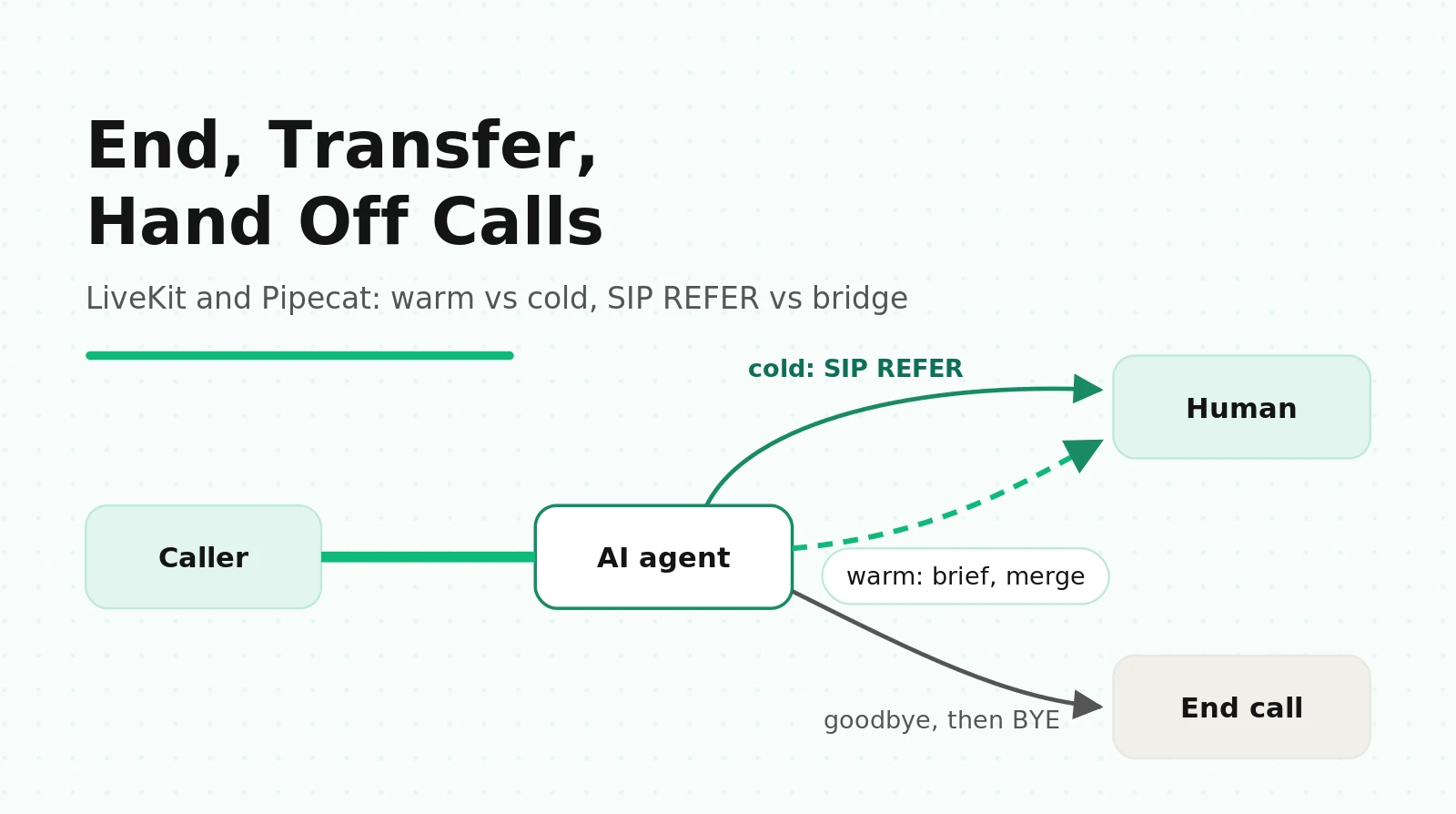
4. Warm transfer. The agent (or a second agent) briefs a human first, then connects the caller and leaves, or stays as an audio bridge.
A fifth outcome looks like the second but is not: the network drops. RTP stops, a websocket closes without a stop message, or a worker crashes. If you log a drop as "caller hung up," your abandonment numbers mix customer choices with infrastructure failures. See what to log on every voice agent call for the field layout.
How SIP REFER, consult-and-merge and bridging work
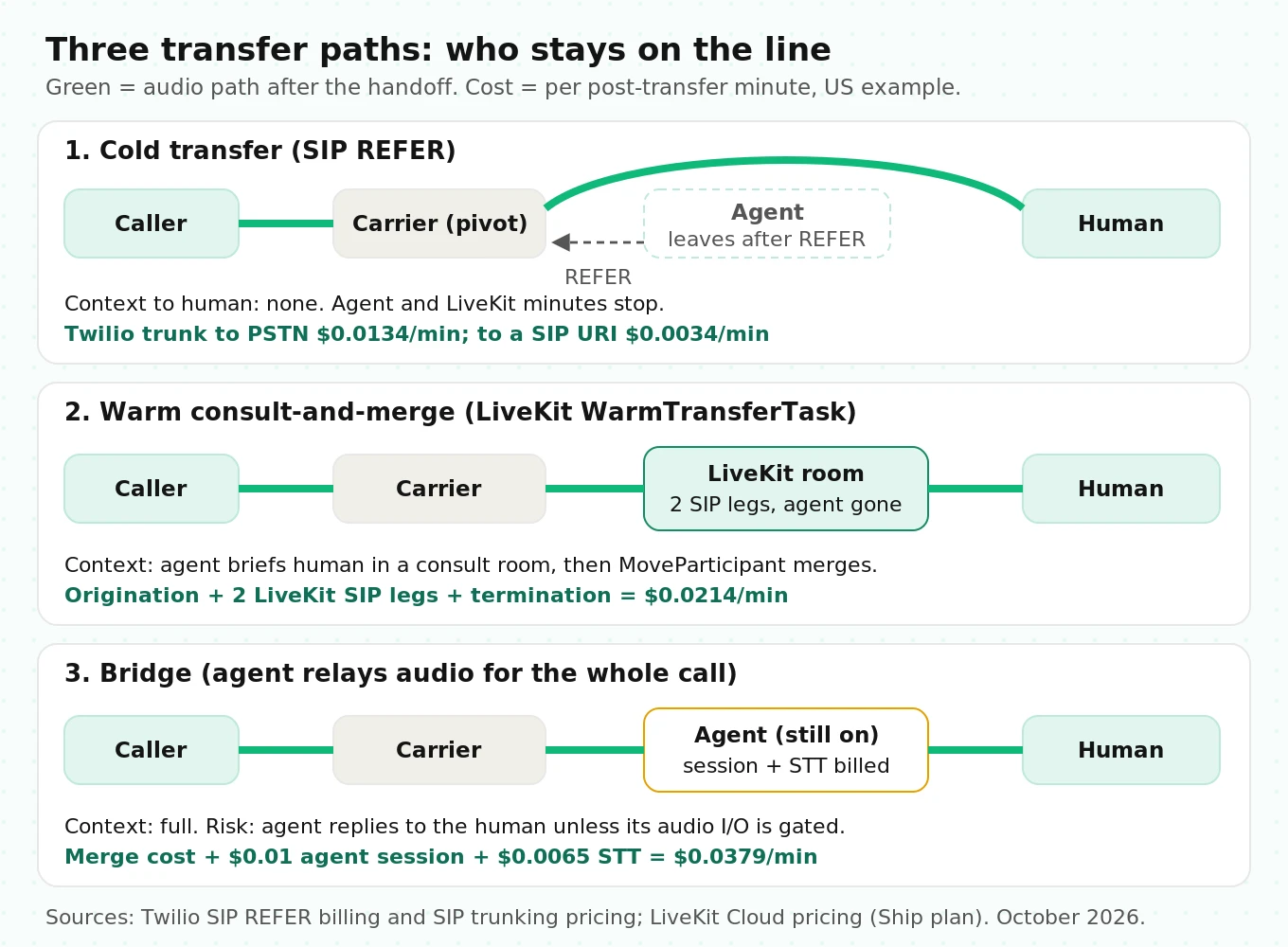
There are three transfer mechanisms under all the framework APIs. Learn these and every vendor guide reads the same.
Cold transfer with SIP REFER
REFER is a SIP method, defined in RFC 3515, that asks the other side of a call to place a new call to a target and move the session there. The full transfer call flows, including attended transfer, are in RFC 5589.
The sequence on a Twilio Elastic SIP trunk, per Twilio's REFER documentation:
1. Your SIP stack (LiveKit SIP, in a LiveKit deployment) sends `REFER` with a `Refer-To` header naming the target, for example `tel:+15105550123`.
2. Twilio answers `202 Accepted`. This means "willing to try," not "connected."
3. Twilio holds the original call and sends an INVITE to the target.
4. Twilio reports progress back with `NOTIFY` messages (100 Trying, then 200 OK).
5. When the target answers, the transferor drops its leg. Your agent is out of the media path.
Three details from Twilio's page matter in practice. Twilio supports blind transfers only. Early media is not supported during the transfer. And transfers to 911 or 933 are not supported.
LiveKit wraps this in the `TransferSIPParticipant` API. The REFER does not complete until the destination answers. Because SIP sets no ringing limit, LiveKit caps the wait with `ringing_timeout`, which defaults to 30 seconds. If the target doesn't answer in time, the request returns an error and the caller stays in the room. That is your recovery window: the agent can apologize and offer a callback.
Warm transfer with a consult room and a merge
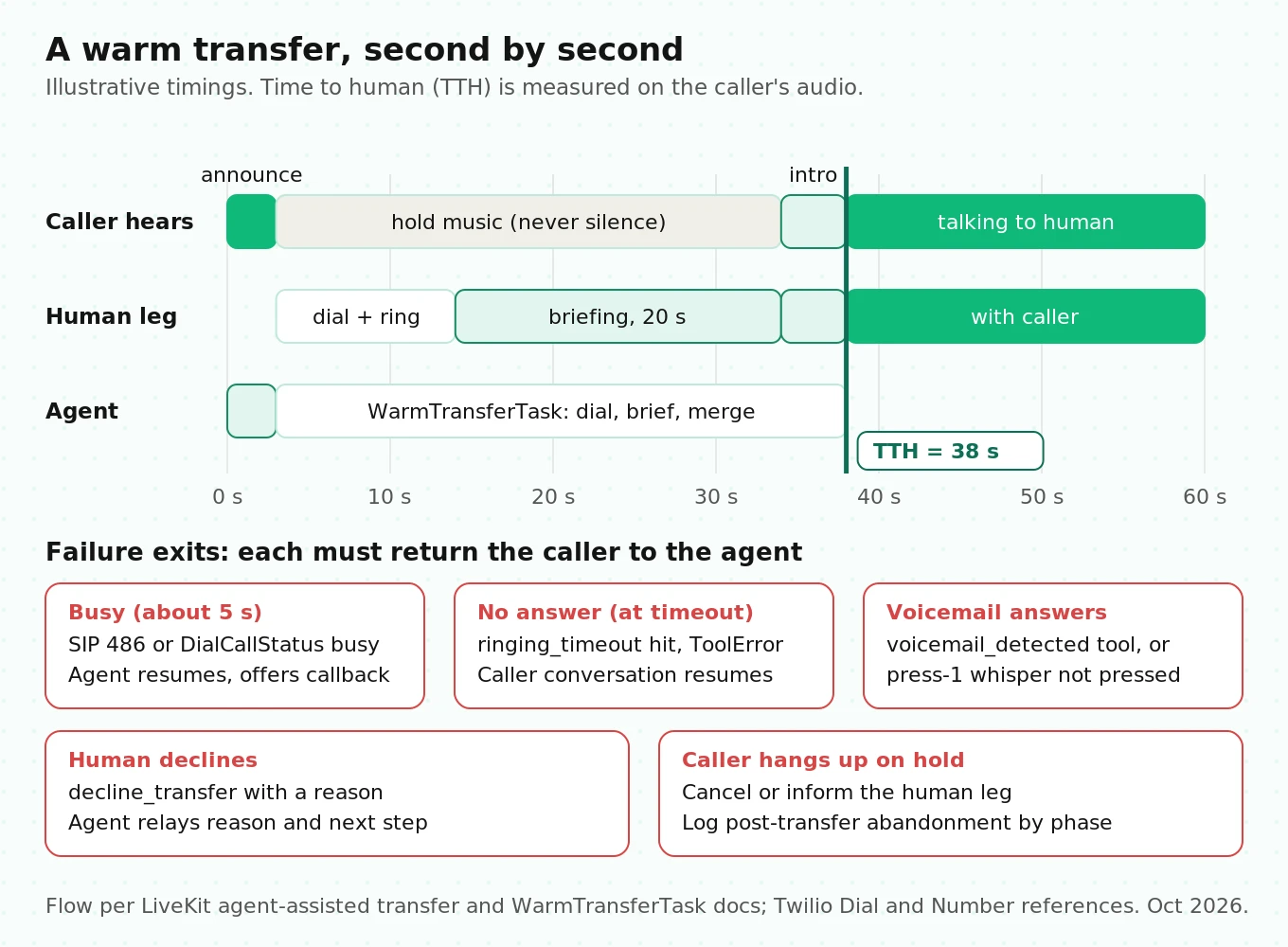
A warm transfer is two calls joined later. LiveKit's agent-assisted transfer guide lays out the steps:
1. Put the caller on hold: disable the caller session's audio input and output, and optionally play hold music.
2. Create a private consult room and connect a transfer agent to it.
3. Dial the human into the consult room with `CreateSIPParticipant` and `wait_until_answered=True`.
4. The transfer agent briefs the human from the conversation history.
5. Move the human into the caller's room with `MoveParticipant`.
6. The agents leave. Caller and human keep talking in the LiveKit room.
Note what step 6 means for media and billing: the call never leaves LiveKit. Both SIP legs (caller inbound, human outbound) stay in the room until someone hangs up. That is different from REFER, where LiveKit is out of the path.
Bridge: the agent stays as a relay
In a bridge, the agent's process stays connected and relays audio between the caller and the human for the whole call. Pipecat's Daily warm transfer example works this way. The Daily PSTN docs are explicit: the bot owns the room, so when it leaves, the Daily room ends and any remaining PSTN legs drop. To keep caller and human together on Daily, the bot stays as the bridge. To drop the bot completely, you cold-transfer off Daily with SIP REFER.
A bridge gives you the most control (you can record, transcribe and even coach), but you pay for agent compute and media on every minute the human talks.
LiveKit: ending calls and transferring
End the call without clipping the goodbye
LiveKit ships a prebuilt `EndCallTool` (beta, Python and Node.js). When the LLM calls it, the agent generates a final response from `end_instructions`, the session shuts down after the response completes, the room is deleted if `delete_room=True` (the default), and the job process exits. Deleting the room disconnects every participant, including the SIP caller, which is how the phone call actually ends.
# LiveKit Agents (Python) - simplified
from livekit.agents import Agent
from livekit.agents.beta.tools import EndCallTool

class SchedulingAgent(Agent):
    def __init__(self) -> None:
        end_call = EndCallTool(
            extra_description=(
                "Only end the call after the caller confirms they need nothing else. "
                "Never end the call while the caller is mid-sentence."
            ),
            delete_room=True,  # default; disconnects the SIP caller
            end_instructions="Say one short goodbye sentence. Do not ask a question.",
        )
        super().__init__(
            instructions="You book and reschedule appointments for Lakeside Dental.",
            tools=end_call.tools,
        )
If you end calls from your own code instead, the job lifecycle docs describe the two shutdown calls. `session.shutdown(drain=True)` is non-blocking and drains pending speech before closing. `await session.aclose()` closes immediately. After either, `await ctx.delete_room()` ends the call for everyone. Shutdown callbacks get 10 seconds by default before the process is killed (`shutdown_process_timeout`), so keep post-call writes short or push them to a queue.
The `end_instructions` line "do not ask a question" is there for a reason. If the final line ends in "anything else?", the caller answers into a deleted room.
Cold transfer with TransferSIPParticipant
This is LiveKit's documented pattern with three production changes: an explicit ringing timeout, a structured result returned to the LLM, and a log line you can count.
# LiveKit Agents (Python) - illustrative, based on docs.livekit.io cold transfer example
import logging
from google.protobuf.duration_pb2 import Duration
from livekit import api, rtc
from livekit.agents import Agent, RunContext, function_tool, get_job_context

log = logging.getLogger("transfer")
BILLING_DESK = "+15105550123"

class SupportAgent(Agent):
    @function_tool()
    async def transfer_to_billing(self, ctx: RunContext):
        """Transfer the caller to the billing desk. Call only after the caller agrees."""
        job_ctx = get_job_context()
        caller = next(
            (p for p in job_ctx.room.remote_participants.values()
             if p.kind == rtc.ParticipantKind.PARTICIPANT_KIND_SIP),
            None,
        )
        if caller is None:
            return "No active phone caller to transfer."

        # Let the announcement finish before the REFER goes out
        await ctx.session.generate_reply(
            instructions="Tell the caller you are connecting them to billing now."
        )
        try:
            await job_ctx.api.sip.transfer_sip_participant(
                api.TransferSIPParticipantRequest(
                    room_name=job_ctx.room.name,
                    participant_identity=caller.identity,
                    transfer_to=f"tel:{BILLING_DESK}",
                    play_dialtone=False,
                    ringing_timeout=Duration(seconds=25),  # default is 30 s
                )
            )
            log.info("transfer_result=refer_ok target=%s", BILLING_DESK)
        except api.SipCallError as e:
            log.warning("transfer_result=refer_failed sip=%s %s", e.sip_status_code, e.sip_status)
            return ("Transfer failed: billing did not answer. Apologize, offer a "
                    "callback within one business day, and collect a good time.")
Two notes. First, `participant_identity` is assigned at dispatch and may not equal the phone number, so look it up by `ParticipantKind.SIP`, as LiveKit's docs advise. Second, caller ID on a REFER is a trunk setting, not a per-transfer field. On Twilio, the "Caller ID for Transfer Target" setting chooses between the transferee (your customer's number) and the transferor (your trunk number). Pick transferee if your reps look callers up by phone number.
Warm transfer with WarmTransferTask
`WarmTransferTask` (Python under `beta.workflows`, stable in Node.js 1.5+) automates the consult-and-merge flow. It creates the consult room, dials the human over SIP, plays hold music (default `BuiltinAudioClip.HOLD_MUSIC`), disables the caller's I/O, briefs the human from `chat_ctx`, and gives the transfer agent three tools: `connect_to_caller`, `decline_transfer` and `voicemail_detected`. If `ringing_timeout` elapses, the task completes with a `ToolError` and the caller conversation resumes.
# LiveKit Agents (Python) - illustrative
import os
from livekit.agents import Agent, RunContext, ToolError, function_tool
from livekit.agents.beta.workflows import WarmTransferTask

BRIEF_RULES = (
    "Brief in under 20 seconds. Order: caller name, account ID, the one-sentence issue, "
    "what was already tried, what the caller wants. Say 'unverified' for anything the "
    "caller did not confirm. Do not guess amounts or dates."
)

class SupportAgent(Agent):
    @function_tool()
    async def warm_transfer_to_billing(self, ctx: RunContext):
        """Connect the caller to a billing specialist after briefing them."""
        try:
            result = await WarmTransferTask(
                sip_call_to=os.environ["BILLING_DESK"],
                sip_trunk_id=os.environ["LIVEKIT_SIP_OUTBOUND_TRUNK"],
                chat_ctx=self.chat_ctx,
                ringing_timeout=25.0,
                extra_instructions=BRIEF_RULES,
            )
        except ToolError as e:
            return f"Transfer did not complete ({e}). Apologize and offer a callback."
        return f"Connected to {result.human_agent_identity}."
The `voicemail_detected` tool deserves attention. A warm transfer to a desk phone that rolls to voicemail after four rings will "answer." Without that tool, your transfer agent briefs a voicemail box and then drops your caller into it. The same detection problem shows up on outbound calls; our AMD guide covers how to measure it.
Detect caller hang-up versus drop
LiveKit sets a `disconnect_reason` on SIP participants. Per the SIP participant reference, `CLIENT_INITIATED` means either side hung up cleanly after connect (an inbound BYE maps here), and `ROOM_DELETED` means your code or `EndCallTool` ended it. `USER_UNAVAILABLE` and `SIP_TRUNK_FAILURE` are pre-connection outbound failures that do not auto-close the session, so your code must call `ctx.shutdown()`.
# Simplified: tag every SIP disconnect with a reason you can count
@ctx.room.on("participant_disconnected")
def on_left(p: rtc.RemoteParticipant):
    if p.kind != rtc.ParticipantKind.PARTICIPANT_KIND_SIP:
        return
    reason = str(p.disconnect_reason)
    if "CLIENT_INITIATED" in reason:
        outcome = "caller_or_remote_hangup"
    elif "ROOM_DELETED" in reason:
        outcome = "agent_ended"
    else:
        outcome = "abnormal_disconnect"  # reconcile with the carrier record later
    record_outcome(ctx.room.name, outcome, p.attributes.get("sip.callStatus"))
`CLIENT_INITIATED` covers both sides, so it can't tell you on its own who hung up. Pair it with your agent's state at the moment (was it speaking, had it called a tool) and with the carrier record, which for Twilio trunks you can join on the `sip.twilio.callSid` attribute.
Pipecat: ending calls and transferring per transport
Pipecat has no transfer API of its own. It ends pipelines; your carrier moves calls. That split explains most Pipecat transfer bugs.
End the call with EndWorkerFrame
The pipeline termination docs define two paths. `EndFrame` (or `EndWorkerFrame` pushed from inside the pipeline) is queued behind pending frames, so a goodbye in the queue plays before shutdown. `CancelFrame` (`worker.cancel()`) is a system frame that jumps the queue and discards pending audio. Note the rename: `EndTaskFrame`, `CancelTaskFrame` and `PipelineTask` are deprecated aliases of `EndWorkerFrame`, `CancelWorkerFrame` and `PipelineWorker` and will be removed in 2.0.0.
# Pipecat - simplified, based on docs.pipecat.ai pipeline termination
from pipecat.frames.frames import EndWorkerFrame, TTSSpeakFrame
from pipecat.processors.frame_processor import FrameDirection
from pipecat.services.llm_service import FunctionCallParams

async def end_call(params: FunctionCallParams):
    """End the call after the caller confirms they need nothing else."""
    await params.llm.push_frame(TTSSpeakFrame("Thanks for calling Lakeside Dental. Goodbye."))
    await params.result_callback(None)  # resolve the call; None means no LLM reply
    await params.llm.push_frame(EndWorkerFrame(), FrameDirection.DOWNSTREAM)
Call `result_callback` before pushing the end frame; skipping it can leave the function call unresolved. Use `on_client_disconnected` to tag why the call ended and `on_pipeline_finished` to persist the record once, because the latter fires for both graceful and cancelled shutdowns.
Twilio Media Streams: hang-up and transfer
`TwilioFrameSerializer` hangs up the call when the pipeline ends. `auto_hang_up=True` is the default, and on an `EndFrame` or `CancelFrame` the serializer calls Twilio's hangup API for the call. That is correct for "agent hangs up" and wrong for every transfer, because your bot's pipeline ending would kill the call it just transferred.
The Pipecat Twilio docs add a warning most teams miss. With `auto_hang_up=False`, your TwiML document now owns the call. When the websocket closes, `
The reliable Twilio pattern is to replace the call's TwiML through the REST API. That ends the `
# Pipecat + Twilio Media Streams - illustrative
import asyncio, os
from twilio.rest import Client
from pipecat.frames.frames import EndWorkerFrame, TTSSpeakFrame
from pipecat.processors.frame_processor import FrameDirection
from pipecat.services.llm_service import FunctionCallParams

twilio = Client(os.environ["TWILIO_ACCOUNT_SID"], os.environ["TWILIO_AUTH_TOKEN"])

def transfer_twiml(call_sid: str) -> str:
    return f"""<Response>
  <Dial timeout="20" answerOnBridge="true"
        action="https://voice.example.com/transfer-result?sid={call_sid}">
    <Number url="https://voice.example.com/whisper?sid={call_sid}">+15105550123</Number>
  </Dial>
</Response>"""

def make_transfer_tool(call_sid: str):
    async def transfer_to_human(params: FunctionCallParams):
        """Transfer the caller to a human specialist. Call only after the caller agrees."""
        await save_handoff_summary(call_sid, params.context)   # your store, keyed by CallSid
        await params.llm.push_frame(TTSSpeakFrame("Connecting you to a specialist now."))
        await params.result_callback(None)
        await asyncio.sleep(2.0)  # crude playout wait; see the clipping section
        await asyncio.to_thread(twilio.calls(call_sid).update, twiml=transfer_twiml(call_sid))
        await params.llm.push_frame(EndWorkerFrame(), FrameDirection.DOWNSTREAM)
    return transfer_to_human

# The serializer must not hang up when the bot exits:
# TwilioFrameSerializer(stream_sid=..., call_sid=...,
#     params=TwilioFrameSerializer.InputParams(auto_hang_up=False))
Three parts make this production-shaped:
- `timeout="20"`. `
` rings for 30 seconds by default (minimum 5, maximum 600), per the Dial reference. Twenty seconds of hold is long for a caller who was mid-conversation. - `action` URL. Twilio posts a `DialCallStatus` (`completed`, `busy`, `no-answer`, `failed`, `canceled`) to it. On anything but success, return TwiML that reconnects the caller to a new bot session with `
` and a parameter like `resume=transfer_failed`. The old pipeline is gone, which is why the summary is saved externally by CallSid first. - `
` whisper . Per the Number reference, the `url` TwiML runs on the called party's end after they answer and before the parties connect. It allows ``, ` `, ` ` and ` `. With `answerOnBridge`, the caller keeps hearing ringing meanwhile.
The whisper turns a cold `
<!-- /whisper?sid=CA... : runs on the human's leg before bridging -->
<Response>
  <Gather numDigits="1" timeout="6" action="/whisper-accept">
    <Say>Transferred caller: Maria Lopez, account ending 4417, disputing a late fee. Already verified. Press 1 to accept.</Say>
  </Gather>
  <Hangup/>
</Response>
The "press 1" gate does a second job: a voicemail box can't press 1, so a rep's voicemail never swallows your caller. The `
Telnyx and Daily
`TelnyxFrameSerializer` behaves the same way, per the Pipecat Telnyx docs: `auto_hang_up=True` by default, a hangup action on `EndFrame` or `CancelFrame`, and with `auto_hang_up=False` the TeXML document owns the call. For carrier-side transfer, the Telnyx Call Control transfer command (`/v2/calls/{call_control_id}/actions/transfer`) takes `timeout_secs` (default 30, range 5 to 600). On timeout, Telnyx hangs up and sends a `call.hangup` webhook with a `timeout` hangup cause. Handle that webhook, or a missed transfer becomes a dead line instead of a callback offer.
On Daily, cold transfer is `await transport.sip_call_transfer({"toEndPoint": number})`, followed by `EndFrame` in the `on_dialout_answered` handler. Warm transfer uses the bridge pattern: hold music via `SoundfileMixer`, a mute strategy that gates the caller's audio during the briefing, and an `EndWorkerFrame` when the specialist hangs up.
For the transport setup these snippets assume, see Pipecat with Twilio and Telnyx. For LiveKit trunks, see LiveKit and Twilio outbound calling.
Goodbye clipping and other timing bugs
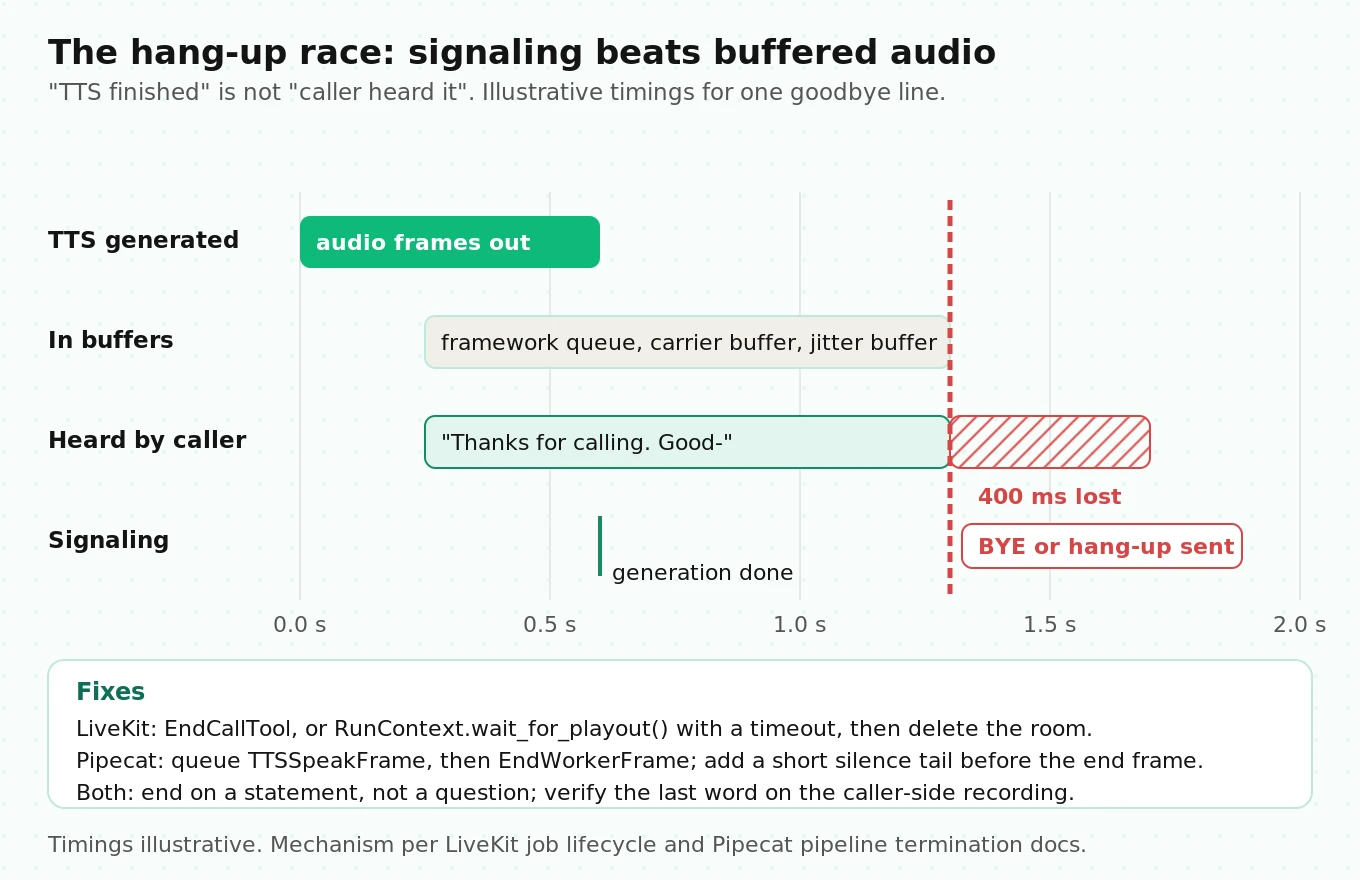
The most reported "small" bug in voice agents is a goodbye cut off mid-word. It comes from a race between two channels.
TTS produces audio faster than real time. Your transport pushes it toward the carrier ahead of playback, and some of it sits in buffers: the framework's output queue, the carrier's media buffer, the far end's jitter buffer. The hang-up is a signaling message (a SIP BYE, a room delete, a REST call). It doesn't wait for media buffers to drain. Whatever audio is still queued when the hang-up lands is never played.
"TTS finished generating" is the wrong moment to hang up. You want "the last sample has played on the caller's side," and no API reports that across a phone network. So you approximate it:
- LiveKit. `EndCallTool` shuts down only after the final response completes, which handles the framework queue. In custom tools, use `RunContext.wait_for_playout()`, not the `SpeechHandle` of the tool's own turn; awaiting your own turn's handle from inside the tool is a circular wait. An open issue (#5359) describes `wait_for_playout()` hanging for about 5 seconds when the speech is interrupted, so put a timeout around it.
- Pipecat. `EndWorkerFrame` queues behind the `TTSSpeakFrame`, so ordering is right inside the pipeline. The serializer's hang-up still races the carrier's buffer. A tail pad of a few hundred milliseconds of silence before the end frame is a cheap fix. Measure it rather than guess: record the caller leg and check whether the last phoneme is present.
- Both. End the goodbye on a falling sentence with no question. A question invites a reply that lands after the BYE.
The opposite bug is talking after the end. The caller says "bye" while the agent is mid-sentence, hangs up, and your agent keeps generating to an empty room, billing STT, LLM and TTS until idle detection kicks in. Pipecat's idle detection defaults to 300 seconds. Handle the disconnect event and cancel right away; don't wait for a timeout.
What breaks in production: a transfer failure taxonomy
These are the failures that turn up after launch, grouped by where they start. Each row includes the symptom you'll see in logs, so you can search for it.
| Failure | Where it comes from | Symptom in logs | Fix |
|---|---|---|---|
| REFER rejected | Trunk transfers disabled, or PSTN transfer not enabled on Twilio | `SipCallError` right after the tool call; caller hears the agent go quiet | Twilio: enable Call Transfer and "Enable PSTN Transfer"; Plivo allows REFER by default |
| Transfer to busy line | Destination returns busy | `DialCallStatus=busy` or SIP 486 | Fall back to the agent with a callback offer; never end the call |
| Ring-no-answer | Queue unstaffed, rep away | Error at `ringing_timeout` or `no-answer` | Cap rings at 20 to 25 s; route to an overflow number |
| Lands in voicemail | Desk phone forwards to voicemail and "answers" | Transfer "succeeds"; human leg lasts about 30 to 90 s with no reply | `voicemail_detected` tool (LiveKit) or a press-1 whisper gate (Twilio) |
| Context lost | Cold transfer has no briefing; or the summary is wrong | Human asks for name and account again | Warm transfer, or push structured fields to the rep's screen keyed by call ID |
| Fabricated context | LLM summary invents an amount or date | Rep repeats a wrong figure to the caller | Structured fields only from confirmed turns and tool results; mark "unverified" |
| Dead air during dial | No hold audio while the human leg rings | Long silence on the caller leg; hang-ups at 8 to 15 s | Hold music or a spoken progress line; hold audio is on by default in `WarmTransferTask` |
| Agent still listening | Bridge mode or a session left open after the merge | Bot replies to the human or the caller after handoff | Disable the agent's audio I/O at merge; end the session explicitly |
| Wrong caller ID | Trunk setting shows your number, not the customer's | Reps can't screen-pop the account | Set the transferee caller ID on the trunk; pass the account ID in a header or whisper |
| Recording split | REFER moves the call off your media path; carrier logs a child call | Recording ends at "connecting you now" | Record at the carrier or keep the call in-room (merge); join parent and child call IDs |
| Pipeline kills the transfer | `auto_hang_up=True` left on | Human answers, line drops within a second | `auto_hang_up=False` plus TwiML or TeXML that keeps the call alive |
| TwiML runs out | `auto_hang_up=False` but no verb after ` | Transferred call ends when the bot exits | Replace the call's TwiML with REST before closing the stream |
Recording is the one teams discover last. On a Twilio trunk transfer, the Twilio docs show the original call with a child call for the transferred leg. Your LiveKit room recording ends when the caller leaves the room. If compliance or QA needs the human portion, record at the carrier or use the merge pattern so the conversation stays in a room you control. Call recording metrics for LiveKit and Pipecat covers where to tap each leg.
What the research says about handoffs
Three findings apply directly to transfer design.
Transfer timing is a tolerance problem, not a yes/no. Liu et al., Time to Transfer (AAAI 2021), frame machine-to-human handoff as labeling each utterance as normal or transferable. They argue exact-match scoring is wrong for this task and propose Golden Transfer within Tolerance (GT-T), which credits a handoff that lands within a tolerance window of the gold point. For your evals: score "transfer within N turns of the moment a human was needed," and track early and late transfers separately. An early transfer wastes a human; a late one burns the caller's patience.
LLM summaries are often unfaithful. Wang et al., Analyzing and Evaluating Faithfulness in Dialogue Summarization (EMNLP 2022), ran fine-grained human analysis and found over 35% of generated dialogue summaries contained faithfulness errors against the source dialogue. Those were older summarization models, not today's LLMs, so don't take 35% as your rate. Take the lesson: a free-text summary read to a human is a claim to verify. Brief from structured fields filled from confirmed turns and tool results, and test the briefing against the transcript.
Hold audio changes how long a wait feels. Guéguen and Jacob, The Influence of Music on Temporal Perceptions in an on-hold Waiting Situation (Psychology of Music, 2002), had callers wait on hold with or without music. With music, people underestimated the time spent and overestimated how long they would wait before hanging up. Silence during a transfer dial is the worst choice: the caller can't tell a ringing transfer from a dead line.
For measuring abandonment during the transfer, borrow from queueing science. Brown et al., Statistical Analysis of a Telephone Call Center (JASA, 2005), analyzed a year of call-by-call data and treated customer patience as censored data: a caller who reached an agent before giving up tells you only that their patience was longer than their wait. If you average "seconds before hang-up" over abandoned transfers only, you will understate patience and draw the wrong ring-timeout. Use a survival estimate (Kaplan-Meier) over all transfers, with connected calls as censored observations.
Choosing a transfer path: the decision matrix
| Criterion | Cold REFER | Warm consult-and-merge (LiveKit) | Carrier Dial plus whisper (Twilio, Pipecat) | Bridge (agent relays) |
|---|---|---|---|---|
| Human gets context | No | Yes, spoken by the agent | Yes, short TTS whisper | Yes, spoken by the agent |
| Agent can recover on failure | Yes if the error returns before answer (LiveKit) | Yes (`ToolError` resumes) | Yes, through the `action` URL and a new session | Yes |
| Voicemail protection | None | `voicemail_detected` tool | Press-1 gate | Your own detection |
| Carrier requirement | REFER allowed (Twilio: PSTN transfer enabled) | Outbound trunk | Programmable Voice | Outbound trunk or Daily dial-out |
| Agent cost after handoff | None | None (agent leaves); both SIP legs stay in the room | None (stream ends) | Agent session plus STT for the whole call |
| Recording of human portion | Carrier only | In-room | Carrier | In-room |
| Time to human | Lowest | Highest (briefing) | Low (whisper is seconds) | High |
| Best for | Known department, simple routing | Complex cases, high-value callers | Pipecat on Twilio, rep screen-pop | Coaching, live QA, regulated scripts |
A practical default for mid-size teams: cold REFER for "connect me to pharmacy"-style routing, warm transfer for anything where the caller already gave the agent three or more facts, and no bridge unless you need the agent to keep listening.
The cost math after the handoff
The surprise in transfer costs is that a "cold" transfer on Twilio doesn't drop your bill to zero. Twilio stays the pivot point and keeps billing the transferred leg.
From Twilio's REFER billing tables: on an inbound (origination) call transferred to the PSTN, the child call is billed origination A to B plus termination B to C for its full duration. Transferred to a public SIP URI, the child is billed origination A to C only.
Verified unit prices (US, October 2026): Twilio trunk origination to a local number $0.0034/min, termination to the 48 states $0.0100/min (SIP trunking pricing). Twilio Programmable Voice inbound local $0.0085/min, outbound $0.0140/min (voice pricing). LiveKit Cloud third-party SIP minutes $0.004/min on Ship ($0.003 on Scale), agent session minutes $0.01/min, Deepgram Flux through LiveKit Inference $0.0065/min (LiveKit pricing).
Worked example (illustrative volumes). A scheduling and billing line takes 20,000 calls a month. Assume 15% transfer (3,000 transfers) and the human talks 7 minutes on average after the handoff: 21,000 post-transfer minutes.
| Path | Per post-transfer minute | Monthly (21,000 min) |
|---|---|---|
| REFER to your contact center's SIP URI (Twilio trunk) | $0.0034 | $71.40 |
| REFER to a PSTN number (Twilio trunk) | $0.0034 + $0.0100 = $0.0134 | $281.40 |
| Twilio ` | $0.0085 + $0.0140 = $0.0225 | $472.50 |
| LiveKit merge (agent gone, both SIP legs in room) | $0.0034 + 2 x $0.004 + $0.0100 = $0.0214 | $449.40 |
| LiveKit bridge (agent stays, STT running) | $0.0214 + $0.01 + $0.0065 = $0.0379 | $795.90 |
Warm transfers add the consult time on top. If each briefing keeps the human leg, the hold and the transfer agent busy for 40 seconds, that is 2,000 extra leg-minutes a month plus LLM and TTS for the briefing.
The biggest lever isn't the framework. Transferring to a SIP endpoint instead of a phone number cuts the post-transfer telephony line from $0.0134 to $0.0034 per minute in this example, because Twilio no longer terminates to the PSTN. If your contact center platform has a SIP URI, use it. The other lever is the bridge: at 21,000 minutes, keeping the agent on the line roughly doubles the merge cost in exchange for in-room recording and live transcription. Pay that only if you use them.
Transfer quality metrics with formulas
Dashboards often show "transfers" as a count. A count can't tell you if transfers work. These six metrics can. Compute them per destination and per transfer path, and log the timestamps they need on every call.
| Metric | Formula | Suggested threshold (starting point) |
|---|---|---|
| Transfer success rate (TSR) | transfers where the human was connected to the caller for at least 10 s / transfers attempted | at least 95% in staffed hours |
| Time to human (TTH) | t(first human speech audible to caller) - t(transfer tool call); report p50 and p90 | p90 at most 45 s warm, 25 s cold |
| Transfer dead air | longest silence on the caller leg between tool call and human speech, excluding hold audio | at most 2 s |
| Context carryover accuracy (CCA) | required fields correct in the briefing / required fields (name, account, issue, steps tried) | at least 98% field-level; 0 fabricated values |
| Repeat-ask rate | transferred calls where the human asks again for a field the agent collected / transferred calls | at most 10% |
| Post-transfer abandonment (PTA) | callers who hang up after the tool call and before the human connects / transfers attempted; also a Kaplan-Meier curve | at most 5% |
| Goodbye clip rate | agent-ended calls where the final utterance is cut off on the caller recording / agent-ended calls | 0 in the test suite |
The thresholds are starting points to tune against your own baseline, not industry benchmarks. Two notes on measurement. TTH must be measured on the caller's audio, not from your logs: a log line saying "human answered" can come seconds before the caller hears them, if the briefing is still running. And PTA should be split by phase (announcement, dial and ring, briefing), because each phase has a different fix. The abandonment rate guide covers the general metric.
How many transfers to measure. To tell a 95% TSR from 90% with 80% power at a one-sided 5% level, the normal approximation gives n = (1.645 x sqrt(0.95 x 0.05) + 0.842 x sqrt(0.90 x 0.10))^2 / 0.05^2 = (0.358 + 0.253)^2 / 0.0025, or about 150 transfers per path. That is too many for hand-placed test calls, which is the argument for replacing manual test calls with scripted ones.
How to test call ending and transfers before every release
Transfers fail at the edges between your code, the framework and the carrier, so test the whole path with real phone legs. A unit test with a mocked SIP client won't find a trunk that rejects REFER.
1. List your transfer paths. For each destination, write down the mechanism (REFER, merge, `
2. Stand up controllable destinations. Use test numbers you can set to answer, ring out, return busy, roll to voicemail, or answer and decline. A small Twilio or Telnyx app with a status flag works.
3. Script synthetic callers. Each scenario states facts the agent must collect (name, account ID, issue), when to ask for a human, and how to behave on hold (wait, barge in, hang up at second N).
4. Record both legs. Capture caller-side and human-side audio. Timing metrics come from audio, not logs.
5. Run the matrix below on every release that touches prompts, tools, models or telephony config. A prompt change can move transfer timing, which is why shipping prompt changes safely applies here too.
6. Score each run for TSR, TTH, dead air, CCA, PTA and goodbye clipping. Fail the release on any red cell.
7. Recheck in production weekly. Sample real transfers, join parent and child call records, and compare live TTH and PTA with the test baseline.
| Scenario | Condition | Pass criteria |
|---|---|---|
| Cold transfer, human answers | Normal | Caller hears announcement in full; human connected; agent leaves within 2 s |
| Warm transfer, human answers | Normal | Briefing at most 20 s; all required fields correct; no fabricated values; agent silent after merge |
| Destination busy | 486 or `busy` | Agent back within 3 s; callback offered; call not ended |
| No answer | Ring past timeout | Recovery at the configured timeout (plus or minus 2 s); hold audio throughout |
| Voicemail answers | Desk phone rolls over | Caller never connected to voicemail; agent recovers |
| Human declines | Press-1 not pressed, or `decline_transfer` | Caller told a reason; next step offered |
| Caller hangs up on hold | At 5 s and 25 s | Human leg cancelled or told; PTA logged with phase |
| Caller barges in during announcement | Speech over the agent's line | Transfer still happens once; no double dial |
| REFER disabled on trunk | Config fault injected | Error caught; caller not dropped |
| Agent-initiated goodbye | Normal and noisy line | Last word present on the caller recording |
| Caller says bye mid-sentence | Hang-up during TTS | Agent stops within 1 s; outcome is `caller_hangup` |
| Network drop | Kill websocket or RTP | Outcome is `abnormal_disconnect`, not caller hang-up |
| Repeat request | Caller asks for a human twice | One transfer, no loop |
Run each scenario at least 10 times per release; timing races show up as intermittent failures, and a single pass hides them. For framework-specific harnesses, see the LiveKit testing guide and the Pipecat testing guide. If you're choosing between SIP and WebRTC paths, SIP vs WebRTC for voice agents explains how transport affects where you can transfer from.
This is also where an outside check pays off. Evalgent runs these scenarios as an independent evaluator against your live number, before launch and after each change, and scores both legs of every transfer. The team that wrote the transfer code isn't the best one to judge whether it holds up under a busy queue.
Frequently asked questions
How do I transfer a call in LiveKit Agents?
For a cold transfer, call `TransferSIPParticipant` from a function tool with the SIP caller's identity and a `tel:` or `sip:` target. LiveKit sends a SIP REFER through your trunk. For a warm transfer, run `WarmTransferTask` with the human's number and trunk. It dials them into a consult room, briefs them, then merges the caller.
Why does my LiveKit transfer fail with a SIP error?
Most often the trunk doesn't allow REFER. On Twilio Elastic SIP Trunking, enable Call Transfer and also "Enable PSTN Transfer" for phone-number targets. Other causes are a target that doesn't answer before `ringing_timeout` (30 seconds by default) and a malformed target URI. Plivo trunks allow REFER by default.
How do I end a call in LiveKit without cutting off the goodbye?
Use `EndCallTool`. It waits for the final response to finish before shutting down the session and deleting the room. In custom tools, wait with `RunContext.wait_for_playout()` and a timeout before calling `ctx.delete_room()`. End the goodbye with a statement, not a question, so the caller doesn't reply into a closed call.
How do I end a call in Pipecat?
Push an `EndWorkerFrame` downstream from a function handler after queuing the goodbye with `TTSSpeakFrame`. Call `params.result_callback` first. With Twilio or Telnyx serializers and `auto_hang_up=True`, the serializer then hangs up the carrier leg. Use `worker.cancel()` only when the caller is already gone.
Why does my Pipecat transfer drop the call?
Either `auto_hang_up` is still `True`, so the serializer hangs up when the bot exits, or it's `False` but your TwiML or TeXML has no verb after `
What is the difference between a warm and cold transfer for an AI voice agent?
A cold transfer sends the caller to a new number and the agent leaves; nobody briefs the human. A warm transfer has the agent brief the human first, with the caller on hold, and then connects them. Warm transfers cost more time and minutes but prevent the caller from repeating everything.
Does a cold transfer stop telephony charges?
Not on Twilio. When a Twilio trunk carries out a REFER to a phone number, the transferred leg is billed origination plus termination for its whole duration, $0.0134 per minute in our US example. Transferring to a SIP URI is billed origination only. Your agent and LiveKit minutes stop when the caller leaves the room.
How do I stop transfers going to voicemail?
Add a human-acceptance gate. In LiveKit's `WarmTransferTask`, the transfer agent has a `voicemail_detected` tool. On Twilio, use a `
The bottom line
Ending and transferring calls is telephony work as much as AI work: the REFER, the TwiML, the ring timeout and the hang-up race decide what the caller hears, not the prompt. Pick the path per destination, measure time to human, dead air, briefing accuracy and post-transfer abandonment from both audio legs, and test every failure branch on every release.
Related Articles

How to automate voice agent testing: synthetic callers vs manual QA
Learn how ai test automation replaces manual QA for voice agents. Compare synthetic callers vs human testers, with a 5-step framework to scale without hiring.
Read more
AI Agent Testing vs Voice Agent Testing: What General Tools Miss for Voice
AI agent testing measures text outputs. Voice agent testing measures behaviour through an acoustic pipeline. Five failure categories general tools miss.
Read more