Open door for builders.
Pipecat Twilio Integration (and Telnyx): Media Streams vs SIP, Audio Formats, and the Failures to Test
On this page
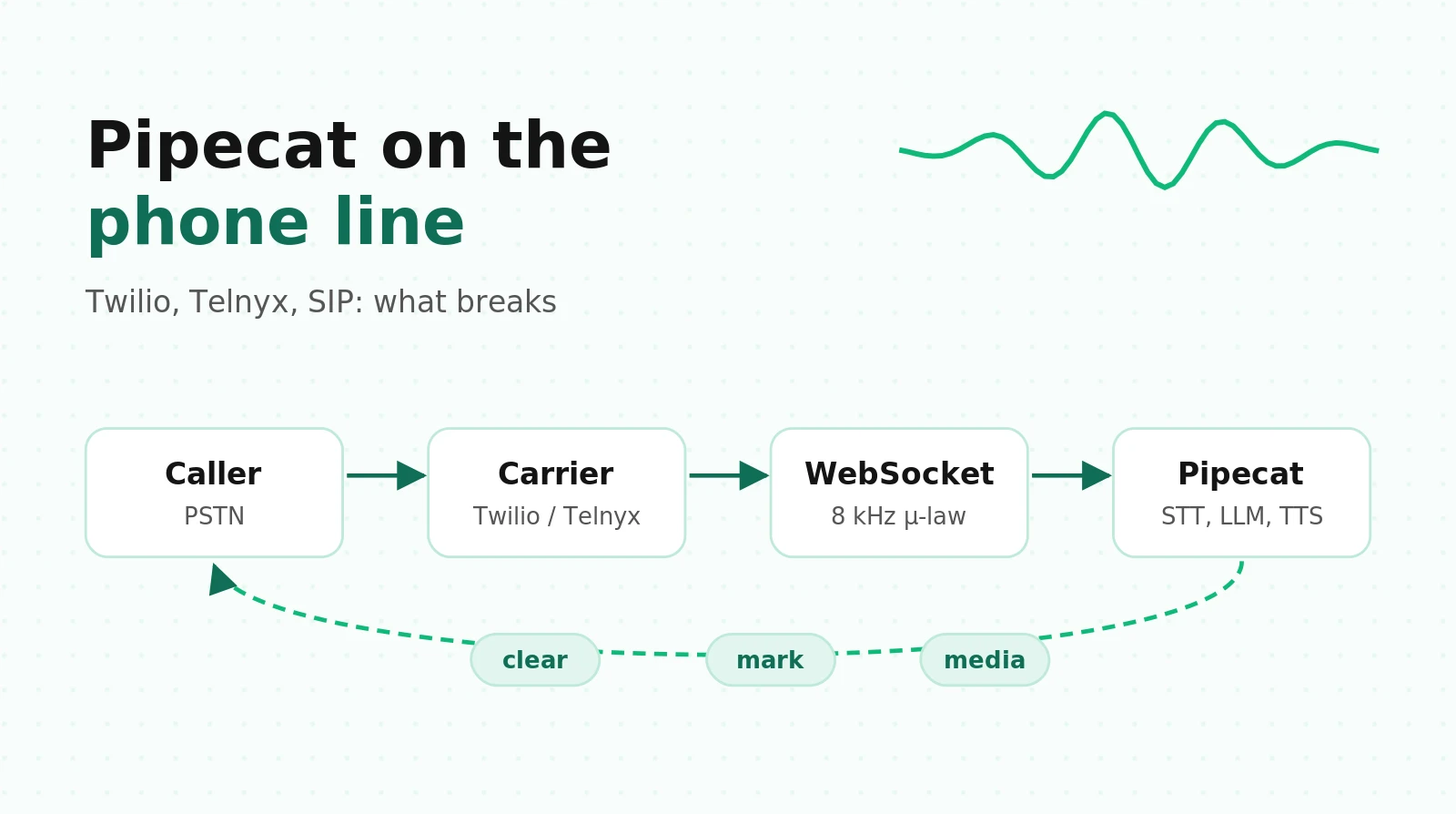
Most Pipecat phone tutorials end when the bot says hello. The hard part starts on the second turn, when the caller interrupts, spells a number, or asks for a human.
This guide reads the serializer and transport source, the Twilio and Telnyx wire protocols, and the issue tracker. It turns them into a decision table, a latency budget, cost math, a failure taxonomy, and a test matrix.
If you want the framework-level comparison first, read LiveKit vs Pipecat for telephony. If you want to test the pipeline itself, the Pipecat voice agent testing guide covers VAD, Smart Turn, and context bugs. This post stays on the phone line.
Three ways to put a Pipecat bot on the phone
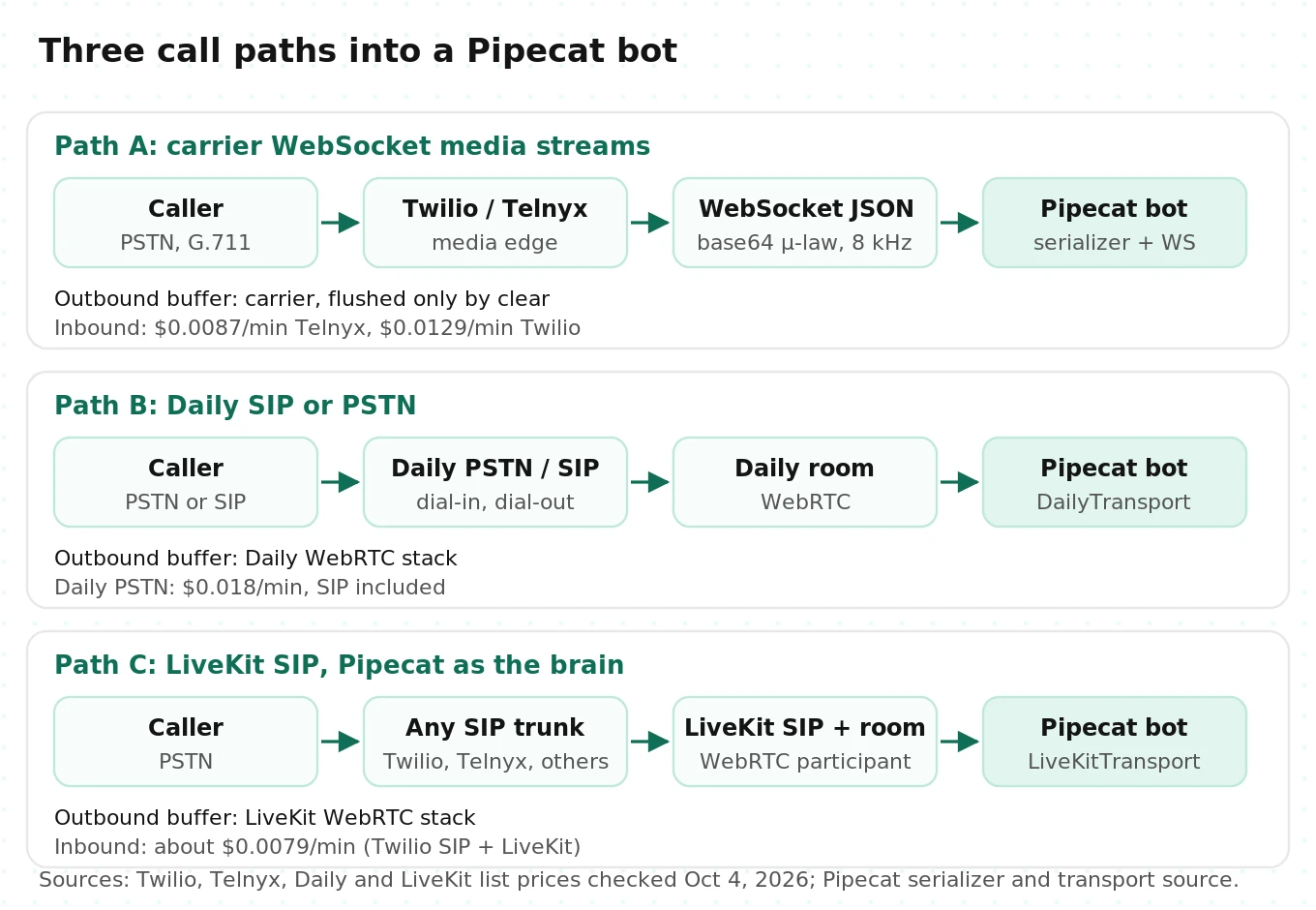
Pipecat has no SIP stack of its own. Every phone call reaches it through something else. There are three practical paths.
Path A: carrier WebSocket media streams. Twilio, Telnyx, Plivo, Exotel and others open a WebSocket to your server and send base64 audio inside JSON. Pipecat's `FastAPIWebsocketTransport` accepts the socket, and a provider serializer (`TwilioFrameSerializer`, `TelnyxFrameSerializer`, and so on) converts between that JSON and Pipecat frames. The Twilio guide and Telnyx guide both use this path.
Path B: SIP or PSTN through Daily. The bot joins a Daily room with `DailyTransport`. Daily terminates the phone leg, either from its own numbers (Daily PSTN dial-in and dial-out) or from your carrier over SIP (for example, Twilio forwards the call to a Daily SIP URI after `on_dialin_ready` fires). Audio reaches the bot as WebRTC, and Daily handles the carrier side.
Path C: SIP through LiveKit, with Pipecat as the brain. LiveKit's SIP service terminates a trunk from Twilio, Telnyx or another carrier. The caller becomes a room participant. Your Pipecat bot joins the same room with `LiveKitTransport`. This is the setup we run ourselves. Pipecat's native SIP story was tied to Daily, and LiveKit accepts trunks from more SIP providers, so we keep Pipecat for orchestration and LiveKit for transport. The LiveKit plus Pipecat hybrid guide walks through the token, room, and dispatch details.
Decision table
| Question | Path A: WebSocket media streams | Path B: Daily SIP/PSTN | Path C: LiveKit SIP + Pipecat |
|---|---|---|---|
| Time to first working call | Hours. A TwiML Bin or TeXML app and one endpoint | A day. Room creation, webhook, dial-in settings | A day or two. Trunk, dispatch rule, token, room join |
| Who buffers outbound audio | The carrier, until you send `clear` | Daily (WebRTC jitter buffer, small) | LiveKit (WebRTC, small) |
| Audio into your pipeline | 8 kHz μ-law, decoded and resampled by the serializer | WebRTC PCM after Daily decodes the phone codec | WebRTC PCM after LiveKit decodes the phone codec |
| Transfers | Carrier REST API from your code | Daily SIP REFER or transfer API | LiveKit SIP transfer APIs |
| Carrier choice | Any carrier with a Pipecat serializer | Daily numbers, or your carrier via SIP | Any SIP trunk LiveKit accepts |
| Extra moving parts | One public WebSocket server | Daily rooms and Daily billing | LiveKit server or Cloud, rooms, dispatch |
| Best fit | Single carrier, phone-only, small team, fast launch | Already on Daily or Pipecat Cloud | Multi-carrier, phone plus web, warm transfers |
A rule of thumb from the mechanics below. Path A puts a third-party audio buffer between your bot and the caller that you control only through `clear` messages. Paths B and C replace that buffer with a WebRTC stack whose interruption behavior matches what you tested in the browser. If barge-in quality is your top risk, that difference matters more than any feature row. Our SIP vs WebRTC explainer covers the protocol background.
The rest of this post focuses on Path A, because it is what most teams ship first and where most phone-specific bugs live.
How Twilio Media Streams works, message by message
Twilio's WebSocket messages reference and `
1. TwiML opens the stream. `
2. `connected`, then `start`. The first message is `{"event": "connected", "protocol": "Call", "version": "1.0.0"}`. The second is `start`, which carries `streamSid`, `callSid`, `accountSid`, `tracks`, `customParameters`, and `mediaFormat`. Twilio's docs state that `mediaFormat.encoding` is always `audio/x-mulaw`, `sampleRate` is always `8000`, and `channels` is always `1`.
3. `media`, repeated. Each inbound `media` message carries `track`, `chunk`, `timestamp` (milliseconds from stream start), and a base64 `payload`. μ-law uses one byte per sample, so at 8 kHz each byte is 0.125 ms of audio. A 160-byte payload is 20 ms. Log decoded payload lengths in development so you know your actual frame size rather than assuming it.
4. `dtmf`. Keypad presses arrive as `{"event": "dtmf", "dtmf": {"track": "inbound_track", "digit": "1"}}`. Twilio only sends these on bidirectional streams. Pipecat turns them into `InputDTMFFrame`. Our DTMF testing guide covers the scenarios worth scripting.
5. `mark`. If your server sends a `mark` after some `media`, Twilio echoes a `mark` with the same name when that audio finishes playing. If you send `clear`, Twilio empties its buffer and immediately echoes every pending mark. So an echoed mark means "played or discarded," and you need to know whether a `clear` came in between.
6. `stop`. Sent when the call ends. Twilio's docs add a detail that changes how you design transfers: the only way to stop a bidirectional stream is to end the call, or to update the call with new TwiML through the REST API.
Your server can send three message types back:
{"event": "media", "streamSid": "MZ...", "media": {"payload": "<base64 mulaw/8000>"}}
{"event": "mark",  "streamSid": "MZ...", "mark": {"name": "utt-7"}}
{"event": "clear", "streamSid": "MZ..."}
Outbound audio must be raw `mulaw/8000`, base64-encoded, with no file header. Twilio warns that header bytes make the media stream incorrectly. Twilio buffers outbound `media` and plays it in the order received, in chunks of any size.
Three smaller rules catch people:
- No query strings. The `
` attribute does not support query string parameters. Pass data with nested ` ` elements instead. Each name plus value must be under 500 characters. They arrive in `start.customParameters`. - Inbound track only. On a bidirectional stream you receive only `inbound_track`, the caller's audio. You never get Twilio's own copy of what it played, so you cannot record "what the caller heard" from the stream.
- Status callbacks exist. `statusCallback` on `
` posts `stream-started`, `stream-stopped`, and `stream-error` events with an error message. Wire it up. It is the only place some failures show up.
The bandwidth math
8,000 bytes per second of μ-law is 64 kbps. Base64 adds a third, so roughly 85 kbps per direction before JSON and TLS overhead. At 100 concurrent calls you move about 8.5 Mbps each way through Python's JSON and base64 code. That is fine for a modern server, but it is CPU work on the same event loop that runs your pipeline. Load tests that skip the real serializer path miss it.
Telnyx: the same shape, with different traps
Telnyx's media streaming docs look familiar. You get `connected`, `start`, `media`, `dtmf`, `mark`, `clear`, and `stop`. Pipecat's `TelnyxFrameSerializer` mirrors the Twilio one. The differences are where the bugs are.
Bidirectional mode must be RTP. Telnyx supports two ways to send audio back. With `stream_bidirectional_mode` set to `rtp` (or `bidirectionalMode="rtp"` on the TeXML `
More codecs on the wire, fewer in Pipecat. Telnyx bidirectional streaming supports PCMU and PCMA at 8 kHz, G722, OPUS at 8 or 16 kHz, AMR-WB at 8 or 16 kHz, and L16 at 16 kHz. Telnyx notes that sending a codec different from the call's codec causes transcoding and possible quality loss. Pipecat's Telnyx serializer accepts only `PCMU` and `PCMA` and raises `ValueError` on anything else.
The encoding parameter names are inverted. In the serializer, `inbound_encoding` is the encoding of audio sent to Telnyx and `outbound_encoding` is the encoding of audio received from Telnyx. The names follow Telnyx's point of view, not yours. The development runner reads the received encoding from `start.media_format.encoding` but hard-codes `inbound_encoding="PCMU"` for audio you send. If your Telnyx connection is set to PCMA, as is common outside North America, your bot transmits μ-law into an A-law call. The result is loud, harsh, distorted audio, not silence. Set both encodings explicitly.
Chunk order is not guaranteed. Telnyx's docs say media event order is not guaranteed and that `chunk` numbers can be used to reorder. Pipecat's serializer decodes each `media` message as it arrives and ignores `chunk`. On a healthy network you will not notice. On a congested path, out-of-order chunks become small clicks and smeared syllables that look like an STT accuracy problem.
Errors are dropped. Telnyx sends an `error` event with codes such as `100004 invalid_media` and `100005 rate_limit_reached`. Pipecat's serializer returns `None` for unknown events, so these never reach your logs unless you subclass it.
One stream per call. Telnyx allows one streaming or forking operation per call. Starting a media fork replaces your WebSocket stream with an RTP connection. If your compliance team adds call forking for recording, your bot can drop off the call.
What Pipecat does with the audio: the resampling chain
Here is what happens to one inbound 20 ms frame on Path A, from the serializer and audio utils source.
1. JSON parse, then base64 decode to 160 bytes of μ-law.
2. `audioop.ulaw2lin` expands it to 16-bit PCM at 8 kHz (320 bytes).
3. A `SOXRStreamAudioResampler` at its default "VHQ" quality converts 8 kHz to the pipeline input rate, 16 kHz by default.
4. The result becomes an `InputAudioRawFrame` for VAD, Smart Turn, and STT.
Outbound runs the other way. TTS produces PCM at the pipeline output rate (24 kHz by default). The output transport cuts it into 40 ms chunks (`audio_out_10ms_chunks=4`). The serializer resamples each chunk to 8 kHz with a second SOXR stream resampler, compresses it with `audioop.lin2ulaw`, base64-encodes it, and sends a `media` message.
Four consequences follow.
Upsampling adds samples, not information. The phone network already removed everything above roughly 4 kHz. Resampling to 16 kHz only gives models the frame size they expect. Models trained mostly on wideband speech still see a band-limited signal. Speech research has treated this as a distinct condition for years. For example, Gaur et al. trained a single acoustic model with explicit bandwidth embeddings and reported a 13% relative improvement on narrowband speech with no loss on wideband. The lesson for builders: a model's accuracy on wideband audio does not carry over to 8 kHz. Test STT on real phone audio.
Turn detection is sample-rate sensitive. Pipecat's docs recommend setting `audio_in_sample_rate=8000` and `audio_out_sample_rate=8000` with Twilio to avoid resampling. Issue #3844 showed what that did to Smart Turn v3, which expects 16 kHz input. The analyzer read 8 kHz audio as if it were 16 kHz. In the reporter's tests, 6 of 20 utterances flipped classification, and mean turn duration in production dropped 51% (2.33 s to 1.14 s). Phone numbers were split across turns. A follow-up benchmark on 100 samples measured 59% accuracy before the fix and 94% after. The merged fix resamples to 16 kHz inside Smart Turn with linear interpolation. Our recommendation is simpler: leave `audio_in_sample_rate` at 16000 so the serializer's VHQ resampler does the upsampling once, and set only `audio_out_sample_rate=8000`.
Pin the output rate to 8 kHz. With `audio_out_sample_rate=8000`, TTS services that support it produce 8 kHz audio directly and the serializer's output resampler short-circuits (`if in_rate == out_rate: return audio`). This saves CPU. It also avoided a real pacing bug, covered next.
The resampler forgets after 200 ms of silence. `resampler_clear_after_secs` defaults to 0.2. After that much inactivity, the stream resampler clears its filter history to avoid artifacts from stale state. Pipecat's own docstring recommends `None` for providers with irregular gaps between chunks. If you hear a click at the start of each bot turn, test this setting before you blame TTS.
| Setting | Default | Phone recommendation | Why |
|---|---|---|---|
| `PipelineParams.audio_in_sample_rate` | 16000 | Leave at 16000 | Smart Turn and Silero get 16 kHz from one high-quality resample |
| `PipelineParams.audio_out_sample_rate` | 24000 | 8000 | Skips the output resampler and avoids rate-mismatch pacing bugs |
| `resampler_clear_after_secs` | 0.2 | 0.2, or `None` if you hear onset clicks | Stale filter state vs irregular chunk gaps |
| `TwilioFrameSerializer.InputParams.auto_hang_up` | True | True, except for transfers | Ends the carrier call when the pipeline ends |
| `FastAPIWebsocketParams.add_wav_header` | False | False | Twilio rejects header bytes in payloads |
Pacing, buffering, and why `clear` matters
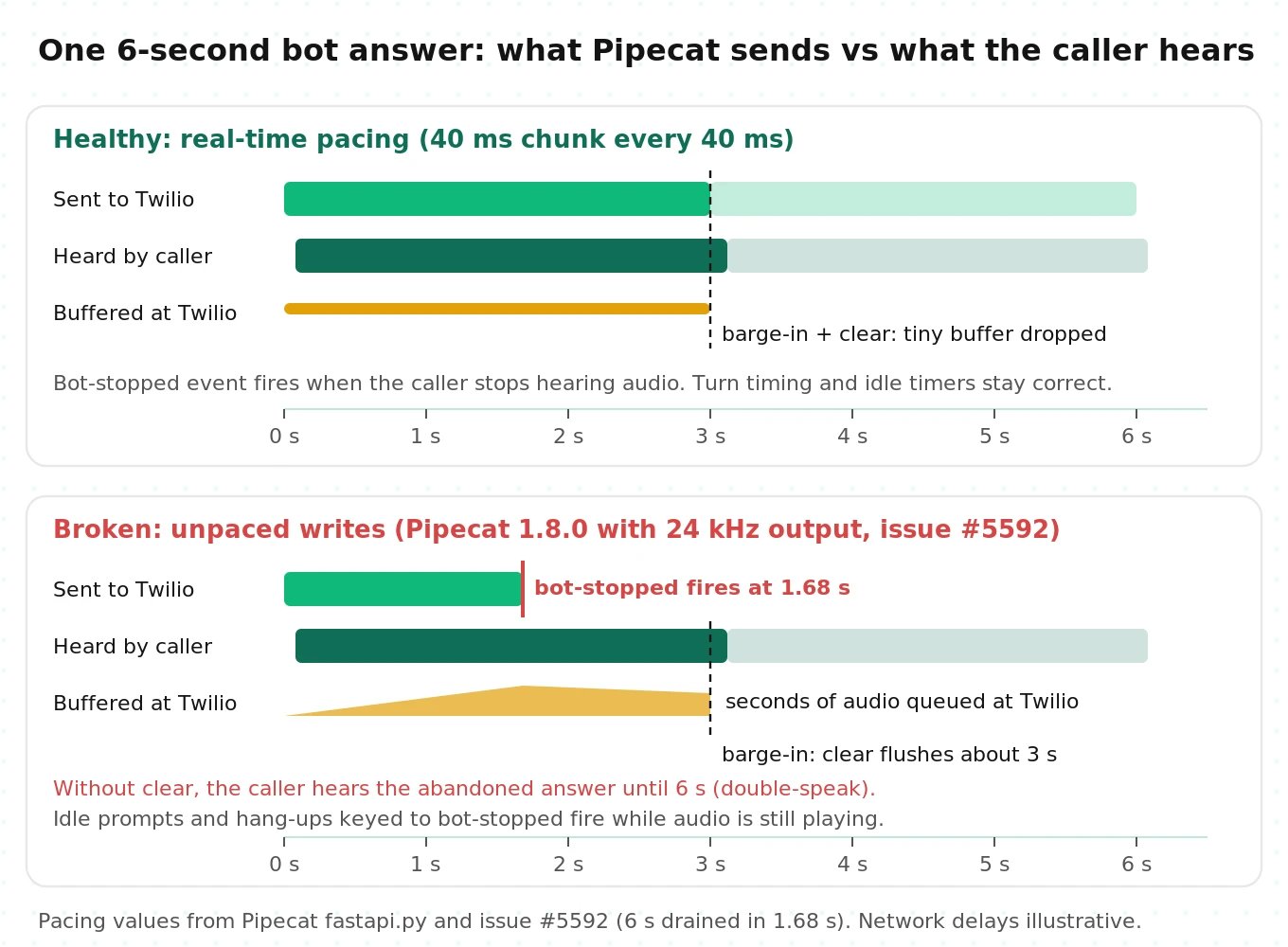
The output transport cannot let TTS dump audio into the socket as fast as it arrives. In `fastapi.py`, `write_audio_frame` sends a chunk and then sleeps to emulate a sound card. The interval is `(audio_chunk_size / sample_rate) / 2`. Because `audio_chunk_size` is in bytes and each sample is 2 bytes, the division by 2 cancels out. The interval equals the chunk duration: 40 ms per 40 ms chunk. In normal operation Pipecat sends audio at real time, and the carrier holds only what is in flight.
That pacing is load-bearing. It keeps the carrier's buffer small, so interruptions take effect fast, and it keeps `BotStoppedSpeakingFrame` aligned with what the caller hears.
Issue #5592 shows what happens when pacing breaks. In Pipecat 1.8.0, `write_audio_frame` skipped the sleep whenever the serializer returned no payload. The SOXR stream resampler returns nothing for some chunks while it accumulates, so when the pipeline output rate differed from Twilio's 8 kHz, roughly two of every three writes went unpaced. The reporter measured a 6-second utterance draining in 1.68 seconds, 3.57 times faster than real time. `BotStoppedSpeakingFrame` fired after 3.2 seconds of an 11-second greeting on a live call. A 10-second idle prompt then talked over the caller. A recorder placed after the output transport received 43 of 150 audio frames. All the audio still reached Twilio. Only Pipecat's view of time was wrong. With the output rate pinned to 8000, the bug disappeared. The `main` branch we read for this post paces every write again, but check the version you deploy.
Now the interruption path. When the caller barges in, Pipecat emits an `InterruptionFrame`. The output transport drops its queue, and the Twilio serializer converts the frame to `{"event": "clear", "streamSid": ...}`. Telnyx gets `{"event": "clear"}`. With pacing intact, Twilio's buffer holds tens of milliseconds, and `clear` trims the tail. With pacing broken, the buffer can hold seconds of audio, and `clear` is the only thing that stops it. The #5592 reporter notes that Twilio's `clear` limited the audible damage. Serializers without an equivalent message have no backstop.
So `clear` is your safety net. If you write a custom serializer for a carrier Pipecat does not cover, handle `InterruptionFrame` first. Without it, every barge-in turns into double-speak: the caller hears the rest of the old answer, then the new one.
Barge-in reaction budget
How long does the caller keep hearing the bot after they start talking? Add the hops. The numbers below are illustrative assumptions, except the VAD figure, which follows from Pipecat's defaults (`start_secs=0.2` over 32 ms windows is 6 windows, or 192 ms).
| Hop | Assumed time |
|---|---|
| Caller audio across PSTN to Twilio | 40 to 80 ms |
| Twilio to your WebSocket server (same region) | 5 to 20 ms |
| Silero VAD start confirmation (default) | 192 ms |
| `clear` back to Twilio | 5 to 20 ms |
| Audio already past Twilio's buffer, in the PSTN leg | 40 to 80 ms |
| Total heard after barge-in | about 280 to 390 ms |
If you replace the VAD start strategy with a word-count strategy to reduce false interruptions, add STT time to that row. Measure barge-in reaction time and false interruption rate together, because tuning one moves the other. Our guide to evaluating interruption detection defines both.
Using `mark` events to learn what the caller heard
Pipecat builds the assistant's context from text the TTS service turned into audio and the output transport released. It does not ask the carrier what played. The Twilio and Telnyx serializers never send `mark` messages, and `deserialize` returns `None` for incoming marks, so they are dropped.
That is fine while pacing holds and the network is healthy. It is not ground truth. Marks give you ground truth from the carrier's side, for three uses:
- Context accuracy. After a barge-in, you can check which sentences actually finished playing and compare them with the assistant messages in the context.
- Regression detection. If marks come back seconds after Pipecat reported `BotStoppedSpeakingFrame`, your pacing is broken. That is exactly the #5592 symptom.
- Safe hang-ups. Hang up after the goodbye's mark returns, not when the pipeline thinks it is done.
The serializer already passes any `OutputTransportMessageFrame` through as raw JSON. A non-urgent `OutputTransportMessageFrame` travels through the output transport's audio queue, so it is sent after the audio queued before it. That ordering is what makes a mark meaningful. On the input side, a small serializer subclass can surface marks as `InputTransportMessageFrame`s. The sketch below is illustrative. It is shaped against the current source but has not been tested against every Pipecat release.
# Illustrative: carrier-side playout tracking for Twilio Media Streams.
import json
from pipecat.frames.frames import (
    InputTransportMessageFrame, InterruptionFrame,
    OutputTransportMessageFrame, TTSStoppedFrame,
)
from pipecat.processors.frame_processor import FrameDirection, FrameProcessor
from pipecat.serializers.twilio import TwilioFrameSerializer


class MarkAwareTwilioSerializer(TwilioFrameSerializer):
    """Surface Twilio 'mark' echoes instead of dropping them."""

    async def deserialize(self, data):
        try:
            message = json.loads(data)
        except (json.JSONDecodeError, TypeError):
            return None
        if message.get("event") == "mark":
            return InputTransportMessageFrame(message=message)
        return await super().deserialize(data)


class PlayoutLedger:
    def __init__(self):
        self.seq = 0             # last mark sent
        self.cleared_upto = 0    # marks <= this were flushed by a clear
        self.played = []         # mark names Twilio confirmed as played


class MarkEmitter(FrameProcessor):
    """Place between TTS and transport.output(). Sends a mark after each TTS turn."""

    def __init__(self, ledger: PlayoutLedger, stream_sid: str):
        super().__init__()
        self._ledger, self._sid = ledger, stream_sid

    async def process_frame(self, frame, direction):
        await super().process_frame(frame, direction)
        if isinstance(frame, InterruptionFrame):
            self._ledger.cleared_upto = self._ledger.seq   # echoes up to here = discarded
        await self.push_frame(frame, direction)
        if isinstance(frame, TTSStoppedFrame) and direction == FrameDirection.DOWNSTREAM:
            self._ledger.seq += 1
            await self.push_frame(OutputTransportMessageFrame(message={
                "event": "mark", "streamSid": self._sid,
                "mark": {"name": f"utt-{self._ledger.seq}"},
            }))


class MarkListener(FrameProcessor):
    """Place right after transport.input(). Records which turns really played."""

    def __init__(self, ledger: PlayoutLedger):
        super().__init__()
        self._ledger = ledger

    async def process_frame(self, frame, direction):
        await super().process_frame(frame, direction)
        if isinstance(frame, InputTransportMessageFrame) and frame.message.get("event") == "mark":
            n = int(frame.message["mark"]["name"].split("-")[1])
            if n > self._ledger.cleared_upto:
                self._ledger.played.append(n)
        await self.push_frame(frame, direction)
Two caveats. First, the ledger logic is simplified: a mark echoed by a `clear` and a mark echoed by normal playback look identical on the wire, so the code relies on ordering. Second, this tracks turns, not words. For word-level accuracy you still need Pipecat's TTS word timestamps, plus the context-drift checks in the Pipecat testing guide.
Ending the call without clipping the goodbye
The serializers end calls through the carrier's REST API, not through the socket. On an `EndFrame` or `CancelFrame`, with `auto_hang_up=True` (the default), `TwilioFrameSerializer` POSTs `Status=completed` to `/2010-04-01/Accounts/{AccountSid}/Calls/{CallSid}.json`. A 404 with Twilio error 20404 means the call was already gone, and the serializer logs that at debug level. `TelnyxFrameSerializer` POSTs to `/v2/calls/{call_control_id}/actions/hangup` and treats a 422 with error `90018` the same way. Both constructors raise `ValueError` if credentials are missing while `auto_hang_up` is on. That is a crash at call setup, not a silent failure.
Four details from the source matter in production.
The hang-up only fires if the socket is still open. `_write_frame` returns early when the client is closing or disconnected, before it calls `serialize`. If the carrier dropped the socket first, Pipecat never sends the REST hang-up. On Twilio, the call then continues to the next TwiML verb after ``, or ends if there is none. Put a short fallback after ``, such as an apology and `
Regional accounts need both `region` and `edge`. For Twilio's IE1 or AU1 regions, the serializer builds `api.{edge}.{region}.twilio.com` and raises `ValueError` if you set one without the other. A wrong pair sends hang-ups to the wrong API host, and calls stay up.
End-of-call silence does not buy time. On `EndFrame`, the output transport writes `audio_out_end_silence_secs` (default 2) of silence as a single frame, then sleeps for one chunk interval. The REST hang-up follows almost immediately. Anything still in the carrier's buffer at that moment is cut.
Graceful shutdown has had bugs. Issue #4647 reported `worker.end()` cutting a closing line two seconds into playback on Pipecat 1.3.0. Maintainers closed it with 1.8.0, where `PipelineWorker.end()` waits for in-flight frames. Combine an older shutdown bug, or the #5592 pacing bug, with `auto_hang_up`, and the goodbye gets clipped by your own hang-up.
The robust pattern: when the LLM calls your end-call tool, let it speak the closing line, wait for that turn's mark to come back as played, then call `await worker.end()`. Add a timeout of a few seconds in case the mark never arrives.
Transfers and hand-offs from inside the bot
A transfer on Path A is a REST call to the carrier while the stream is live.
On Twilio, update the call with new TwiML: `client.calls(call_sid).update(twiml="
On Telnyx, call `POST /v2/calls/{call_control_id}/actions/transfer` with a `to` number or SIP URI. Telnyx defaults to a 30-second answer timeout.
Either way, set `auto_hang_up=False` for calls that may transfer. The Pipecat docs warn that once you disable it, your TwiML or TeXML controls the call's lifetime. If the document runs out of verbs, the carrier ends the call, including the leg you transferred to a human.
Price the transfer step too. Twilio's US price list shows `$0.10` per SIP refer. Telnyx lists `$0.10` per call transfer invocation. Daily's Pipecat Cloud page lists `$0.20` per SIP REFER event. For loops and dead ends in hand-off logic, see our handoff loop testing guide.
Lifecycle and timeout gotchas
These come from the transport and runner source and catch teams in their first week of real traffic.
- `session_timeout` is a hard cap, not an idle timer. In `FastAPIWebsocketParams`, `session_timeout` starts one timer when the transport starts. After that many seconds, `on_session_timeout` fires, whether the caller is mid-sentence or not. If you meant "end after N seconds of silence," use the worker's idle settings or your own silence logic.
- Origin checks can reject carriers. `allowed_origins` defaults to the `PIPECAT_ALLOWED_ORIGINS` environment variable. When set, connections with a missing or unlisted `Origin` header are rejected with a `ValueError`. If you set it for browser clients and share the process with telephony, a carrier socket without a matching Origin is refused. The symptom is a call that rings and then drops.
- The handshake is consumed once. `parse_telephony_websocket` reads the first two messages (`connected` and `start`) to detect the provider and extract IDs. It caches the result on the websocket so calling it twice is safe. If you write your own receive loop before calling it, you steal the `start` message and detection fails.
- Close handshakes are bounded. `ws_close_timeout` defaults to 0.5 seconds, so a half-closed carrier socket cannot stall shutdown. `audio_out_write_timeout_secs` defaults to 10 seconds, after which a peer that stopped reading counts as gone.
A minimal Twilio server you can run
This is a self-contained FastAPI app for inbound calls on Path A, without the development runner. It is simplified from the twilio-chatbot example and uses its service classes and imports. Swap in your own STT, LLM, and TTS services.
# Simplified: inbound Twilio Media Streams -> Pipecat. Not production-hardened.
import os
from fastapi import FastAPI, Request, WebSocket
from fastapi.responses import Response
from pipecat.audio.vad.silero import SileroVADAnalyzer
from pipecat.frames.frames import LLMRunFrame
from pipecat.pipeline.pipeline import Pipeline
from pipecat.pipeline.worker import PipelineParams, PipelineWorker
from pipecat.processors.aggregators.llm_context import LLMContext
from pipecat.processors.aggregators.llm_response_universal import (
    LLMContextAggregatorPair, LLMUserAggregatorParams,
)
from pipecat.runner.utils import parse_telephony_websocket
from pipecat.serializers.twilio import TwilioFrameSerializer
from pipecat.services.cartesia.tts import CartesiaTTSService
from pipecat.services.deepgram.stt import DeepgramSTTService
from pipecat.services.google.llm import GoogleLLMService
from pipecat.transports.websocket.fastapi import (
    FastAPIWebsocketParams, FastAPIWebsocketTransport,
)
from pipecat.workers.runner import WorkerRunner

app = FastAPI()
PUBLIC_HOST = os.environ["PUBLIC_HOST"]  # e.g. bot.example.com


@app.post("/voice")
async def voice(request: Request):
    # Validate X-Twilio-Signature here in production.
    twiml = f"""<?xml version="1.0" encoding="UTF-8"?>
<Response>
  <Connect>
    <Stream url="wss://{PUBLIC_HOST}/ws">
      <Parameter name="route" value="support"/>
    </Stream>
  </Connect>
  <Say>Sorry, we are having trouble. Please call again.</Say>
  <Hangup/>
</Response>"""
    return Response(content=twiml, media_type="application/xml")


@app.websocket("/ws")
async def ws(websocket: WebSocket):
    await websocket.accept()
    _, call = await parse_telephony_websocket(websocket)

    serializer = TwilioFrameSerializer(
        stream_sid=call["stream_id"],
        call_sid=call["call_id"],
        account_sid=os.environ["TWILIO_ACCOUNT_SID"],
        auth_token=os.environ["TWILIO_AUTH_TOKEN"],
        params=TwilioFrameSerializer.InputParams(auto_hang_up=True),
    )
    transport = FastAPIWebsocketTransport(
        websocket=websocket,
        params=FastAPIWebsocketParams(
            audio_in_enabled=True, audio_out_enabled=True,
            add_wav_header=False, serializer=serializer,
        ),
    )

    stt = DeepgramSTTService(api_key=os.environ["DEEPGRAM_API_KEY"])
    llm = GoogleLLMService(
        api_key=os.environ["GOOGLE_API_KEY"],
        settings=GoogleLLMService.Settings(
            system_instruction="You are a phone agent. Keep replies to one or two short sentences.",
        ),
    )
    tts = CartesiaTTSService(
        api_key=os.environ["CARTESIA_API_KEY"],
        settings=CartesiaTTSService.Settings(voice="71a7ad14-091c-4e8e-a314-022ece01c121"),
    )

    context = LLMContext()
    user_agg, assistant_agg = LLMContextAggregatorPair(
        context, user_params=LLMUserAggregatorParams(vad_analyzer=SileroVADAnalyzer()),
    )
    pipeline = Pipeline([
        transport.input(), stt, user_agg, llm, tts, transport.output(), assistant_agg,
    ])
    worker = PipelineWorker(
        pipeline,
        # Input stays at the 16 kHz default for Smart Turn and Silero; output matches Twilio.
        params=PipelineParams(audio_out_sample_rate=8000, enable_metrics=True),
    )

    @transport.event_handler("on_client_connected")
    async def on_connected(transport, client):
        context.add_message({"role": "developer", "content": "Greet the caller briefly."})
        await worker.queue_frames([LLMRunFrame()])

    @transport.event_handler("on_client_disconnected")
    async def on_disconnected(transport, client):
        await worker.cancel()

    runner = WorkerRunner(handle_sigint=False)
    await runner.add_workers(worker)
    await runner.run()
Point your Twilio number's "A call comes in" webhook at `https://PUBLIC_HOST/voice`. Two choices here differ from the official example on purpose: the input rate stays at 16 kHz, and a fallback `
The latency budget, hop by hop
Humans leave short gaps between turns. Stivers et al. (PNAS, 2009) measured turn transitions across 10 languages. The cross-language mean response offset was 208 ms, with language means within about 250 ms of it. No phone bot hits 208 ms. The useful question is where your milliseconds go, and which ones the phone path adds.
The table is a worked example. Values marked "assumed" are planning assumptions to replace with your own measurements. The VAD figure follows from Pipecat's defaults. The STT figure is Pipecat's published P99 time-to-final for Deepgram, from its `stt_latency.py` defaults.
| Hop (caller stops talking to caller hears audio) | Example | Source |
|---|---|---|
| Caller audio across PSTN to Twilio media edge | 60 ms | assumed |
| Twilio to your server, same region | 10 ms | assumed |
| Decode, μ-law expand, SOXR resample | under 1 ms | assumed (CPU only) |
| VAD stop window (`stop_secs=0.2`, 32 ms windows) | 192 ms | Pipecat default |
| Smart Turn inference | 30 ms | assumed |
| STT final transcript (Deepgram P99 default) | 350 ms | Pipecat `stt_latency.py` |
| LLM time to first token | 400 ms | assumed |
| TTS time to first audio byte | 150 ms | assumed |
| Server to Twilio, plus Twilio buffer | 20 ms | assumed |
| PSTN back to caller | 60 ms | assumed |
| Total | about 1,270 ms |
The phone-specific rows add up to about 150 ms in this example. ITU-T Recommendation G.114 treats about 150 ms of one-way mouth-to-ear delay as acceptable for most interactive voice, so the network legs alone use a large share of what a normal phone call allows. Everything else is your pipeline.
Two placement rules follow.
Host the bot next to the carrier's media region. Twilio's default region is US1, and Media Streams also runs in IE1 and AU1. Every millisecond between the carrier's media servers and your bot is paid twice per turn, once inbound and once outbound. A bot on the opposite coast from the carrier's media servers can add a cross-country round trip to every turn.
Then put STT, LLM, and TTS endpoints near the bot. Region mistakes compound. A bot in the right region that calls models in another region gains nothing. Our LiveKit vs Pipecat latency analysis covers where each framework measures time, and what to log on every call lists the timestamps you need to build this table from production data.
What the phone leg costs per minute
These are US list prices checked on October 4, 2026, before volume discounts and taxes.
| Path | Inbound local, per minute | Outbound, per minute | Sources |
|---|---|---|---|
| A: Twilio Media Streams | $0.0085 voice + $0.0044 streams = $0.0129 | $0.0140 + $0.0044 = $0.0184 | Twilio voice pricing |
| A: Telnyx media streaming | $0.002 API + $0.0032 trunk + $0.0035 streaming = $0.0087 | $0.002 + $0.005 + $0.0035 = $0.0105 | Telnyx Voice API pricing |
| B: Daily PSTN dial-in/out | $0.018 (SIP included) | $0.018 | Pipecat Cloud pricing |
| C: Twilio Elastic SIP + LiveKit Cloud | $0.0034 origination + $0.004 LiveKit SIP + $0.0005 WebRTC for the bot = $0.0079 | from $0.0011 + $0.004 + $0.0005 = from $0.0056 | Twilio SIP trunking, LiveKit pricing |
Notes on the rows. Telnyx's trunk rates come from the worked example on its pricing page. Daily's SIP-only dial-in ranges from $0.003 to $0.02 per minute, and Daily notes transcoding adds charges. LiveKit's $0.004 is the Ship-plan overage after 5,000 included SIP minutes ($0.003 on Scale), and the Pipecat bot joining a room is billed as a WebRTC participant. Number rental, recording ($0.0025 per minute on Twilio), and answering machine detection ($0.0075 per call on Twilio) are extra. If you host on Pipecat Cloud, add agent time, which starts at $0.01 per active minute.
Worked example at 50,000 inbound minutes a month: Twilio Media Streams costs about $645, Telnyx about $435, Daily PSTN about $900, and Twilio SIP into LiveKit about $395 before plan fees. The spread is a few hundred dollars a month. One failed call that should have resolved usually costs more than the telephony on a hundred calls that worked. That is why the cost per resolution is the number to optimize, not the carrier rate. For a broader carrier comparison, see best telephony for voice agents.
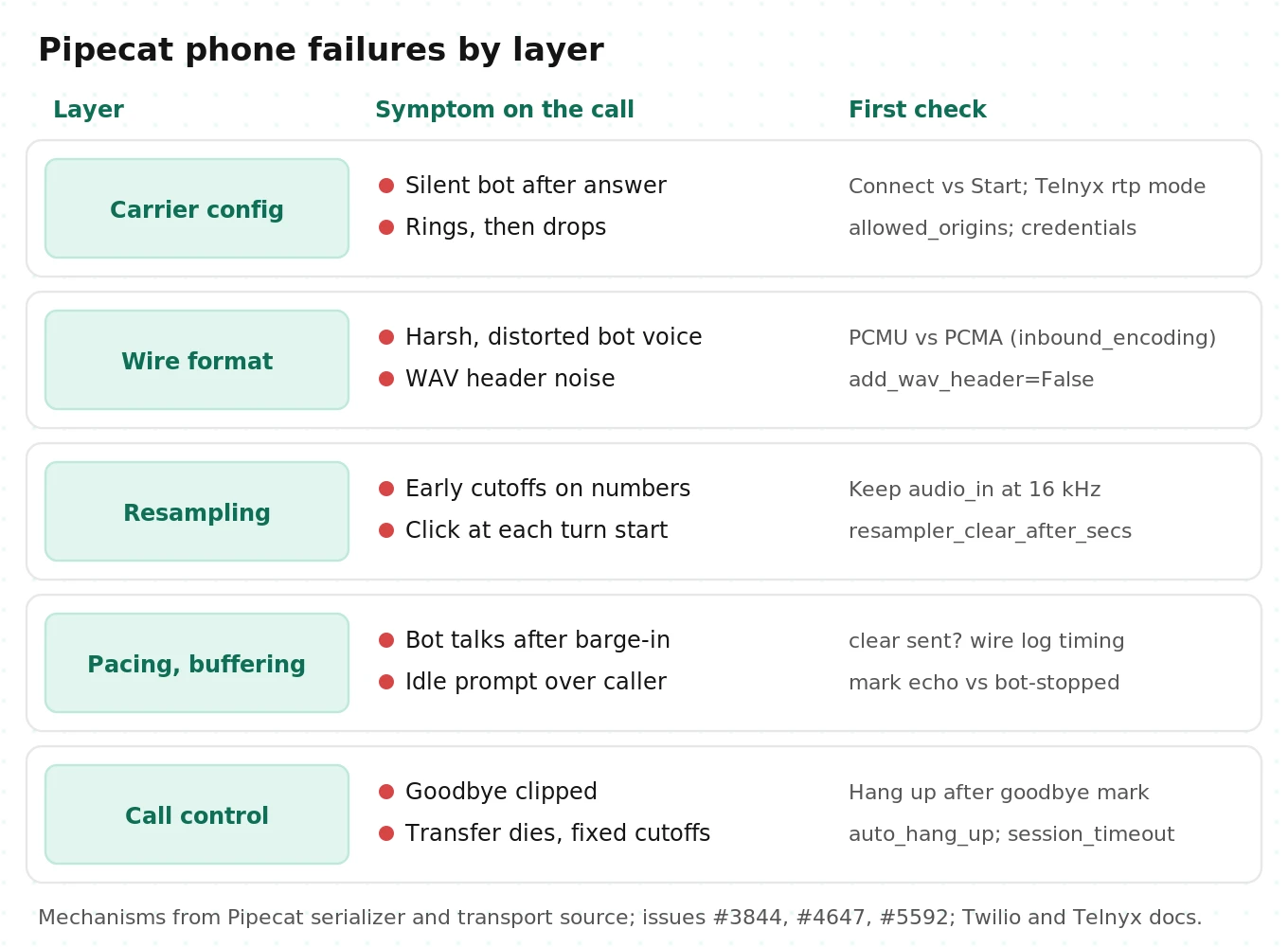
Failure taxonomy for Pipecat phone calls
Every failure below has a mechanism in the source or a public report. Use the "first check" column during an incident.
| Symptom | Likely mechanism | First check |
|---|---|---|
| Call connects, total silence from bot | ` | TwiML/TeXML, first outbound `media` message |
| Call rings, then drops | `allowed_origins` rejected the carrier socket; serializer `ValueError` on missing credentials; TLS or URL error | Server logs at socket accept; `statusCallback` `stream-error` |
| Harsh, distorted bot audio | μ-law sent into an A-law call (Telnyx `inbound_encoding` mismatch); WAV header in payload | Encoding params; `add_wav_header` |
| Chipmunk or slowed audio, early turn cutoffs | Sample-rate label mismatch, as in Smart Turn at 8 kHz (#3844) | `audio_in_sample_rate`; Pipecat version |
| Choppy or broken audio | Event loop starved by CPU work; out-of-order Telnyx chunks; reports such as #2551 | Loop lag metrics; CPU per call |
| Click at each bot turn start | Resampler history cleared after 200 ms silence | `resampler_clear_after_secs` |
| Bot keeps talking after barge-in | No `clear` sent (custom serializer); pacing broken so the carrier buffer is large | Wire log of `clear` timing vs caller speech |
| Idle prompt talks over caller | `BotStoppedSpeakingFrame` fired early because pacing broke (#5592) | Compare mark echo time vs bot-stopped time |
| Goodbye clipped | Hang-up REST call fired before playout finished (#4647, #5592) | Caller-side recording of the last turn |
| Transferred call dies | `auto_hang_up=True`, or TwiML ran out of verbs after transfer | Serializer params; post-`` TwiML |
| Call cut at fixed duration | `session_timeout` used as an idle timer | Transport params |
| Slow replies only on phone | Bot or models far from carrier media region | Per-hop timestamps by region |
How to test a Pipecat Twilio or Telnyx integration before launch
Calling the number a few times catches the silent bot and little else. This protocol takes about two days the first time and an hour per release after that.
1. Turn on wire logging in staging. Log every inbound and outbound event type with a monotonic timestamp: `start`, `media` counts and payload sizes, `mark`, `clear`, `dtmf`, `stop`, and Telnyx `error`. Add the mark emitter and listener from earlier. Without wire logs, half the failures in the taxonomy look identical.
2. Record both sides at the carrier. Enable dual-channel call recording on Twilio or Telnyx for test calls. This is the only recording that shows what the caller actually heard, including tails cut by hang-ups. A recorder inside Pipecat cannot show that.
3. Build a scenario set of at least 30 scripted calls. Include 10 normal task flows, 5 barge-ins at different points in long answers, 5 calls with mid-sentence pauses while giving numbers, 3 DTMF entries, 3 transfers, 2 caller hang-ups mid-answer, and 2 bot-initiated hang-ups.
4. Run each scenario under four conditions. Use a clean line, a mobile caller with background noise, the same scenarios through a second carrier or region, and 50 concurrent calls to load the serializer and event loop. That is 30 scenarios times 4 conditions, or 120 calls per full run.
5. Score against fixed pass criteria. Use the test matrix below. Repeat each failing cell three times before you call it a real failure, because single phone calls are noisy.
6. Gate every release on the matrix. Pipecat upgrades changed pacing behavior and shutdown behavior during 2026. Rerun the full matrix on every Pipecat version bump, serializer change, or carrier configuration change.
Test matrix with pass criteria
| Check | How to measure | Pass criterion (starting point) |
|---|---|---|
| First audio after answer | Carrier recording: answer to first bot audio | Under 1.5 s on 95% of calls |
| Turn latency | Caller end of speech to bot first audio, from recordings | P50 under 1.3 s, P95 under 2.0 s |
| Barge-in reaction | Caller speech onset to bot audio stop, from recordings | Under 400 ms on 95% of barge-ins |
| Double-speak | Bot audio of the old answer heard after `clear` | Zero occurrences |
| Pacing sanity | Mark echo time minus `BotStoppedSpeakingFrame` time | Within 250 ms on every turn |
| Early cutoff on numbers | Turns split while caller pauses inside a phone or account number | Under 5% of pause scenarios |
| Goodbye intact | Last bot sentence complete in caller-side recording | 100% of bot hang-ups |
| Transfer survives | Human leg stays up 60 s after transfer | 100% of transfer scenarios |
| DTMF | Digits received and acted on | 100% |
| Load stability | Audio dropouts and loop lag at 50 concurrent calls | No dropouts over 100 ms; same latency P95 as single-call runs plus under 10% |
These thresholds are starting points, not industry standards. Write them down before the run so a release cannot pass by moving the goalposts.
Where independent evaluation fits
Everything above checks the phone path, not whether the agent resolves calls. A bot can pass every wire check and still misread account numbers on 8 kHz audio.
Evalgent places scripted and synthetic calls through your real carrier path and scores them on audio. Use it for a pre-launch third-party audit, to compare Twilio with Telnyx or Path A with Path C on identical scenarios, and as a regression check when you upgrade Pipecat.
Frequently asked questions
How do I connect Twilio to Pipecat?
Point your Twilio number at TwiML containing `
What audio format does Twilio Media Streams use?
Twilio sends mono μ-law (`audio/x-mulaw`) at 8,000 Hz, base64-encoded inside JSON `media` messages. Audio you send back must use the same format with no file headers. One μ-law byte is 0.125 ms of audio, so 160 bytes is 20 ms. Pipecat's serializer converts to and from 16-bit PCM and resamples to your pipeline rate.
Does Pipecat support SIP trunking?
Not directly. Pipecat has no SIP stack. You reach SIP through Daily, which terminates SIP and PSTN and delivers WebRTC to `DailyTransport`, or through LiveKit, whose SIP service accepts trunks from many carriers while Pipecat joins the room with `LiveKitTransport`. Carrier WebSocket streams are the non-SIP alternative.
How do I connect Telnyx to Pipecat?
Use a TeXML app with `
Why does my Pipecat bot keep talking after I interrupt it?
Either no `clear` reached the carrier, or the carrier was holding seconds of buffered audio. Twilio plays queued audio until it receives `clear`. Pipecat's stock serializers send it on every interruption. Custom serializers often forget. Also check for broken output pacing, which a Pipecat 1.8.0 bug caused when output rates differed from 8 kHz.
Why is my Pipecat Twilio call silent?
The usual causes are `
How do I transfer a Pipecat call to a human?
On Twilio, update the live call through the REST API with TwiML containing `
How much does a Pipecat phone call cost per minute?
For telephony alone, at US list prices in October 2026: about $0.0129 per inbound minute on Twilio Media Streams, $0.0087 on Telnyx streaming, $0.018 on Daily PSTN, and about $0.0079 for Twilio SIP into LiveKit Cloud. STT, LLM, TTS, and hosting are separate and usually cost more than the phone leg.
The bottom line
The Pipecat Twilio integration works in an afternoon, but its real behavior lives in 8 kHz resampling, output pacing, `clear` and `mark` messages, and REST hang-ups that no demo exercises. Pick the path that fits your carriers and team, then test barge-in, goodbyes, transfers, and load on real phone calls before every release.
Related Articles

How to automate voice agent testing: synthetic callers vs manual QA
Learn how ai test automation replaces manual QA for voice agents. Compare synthetic callers vs human testers, with a 5-step framework to scale without hiring.
Read more
AI Agent Testing vs Voice Agent Testing: What General Tools Miss for Voice
AI agent testing measures text outputs. Voice agent testing measures behaviour through an acoustic pipeline. Five failure categories general tools miss.
Read more