Open door for builders.
LiveKit Noise Cancellation Self-Hosted: Krisp, BVC, AEC and How to Test Them
On this page
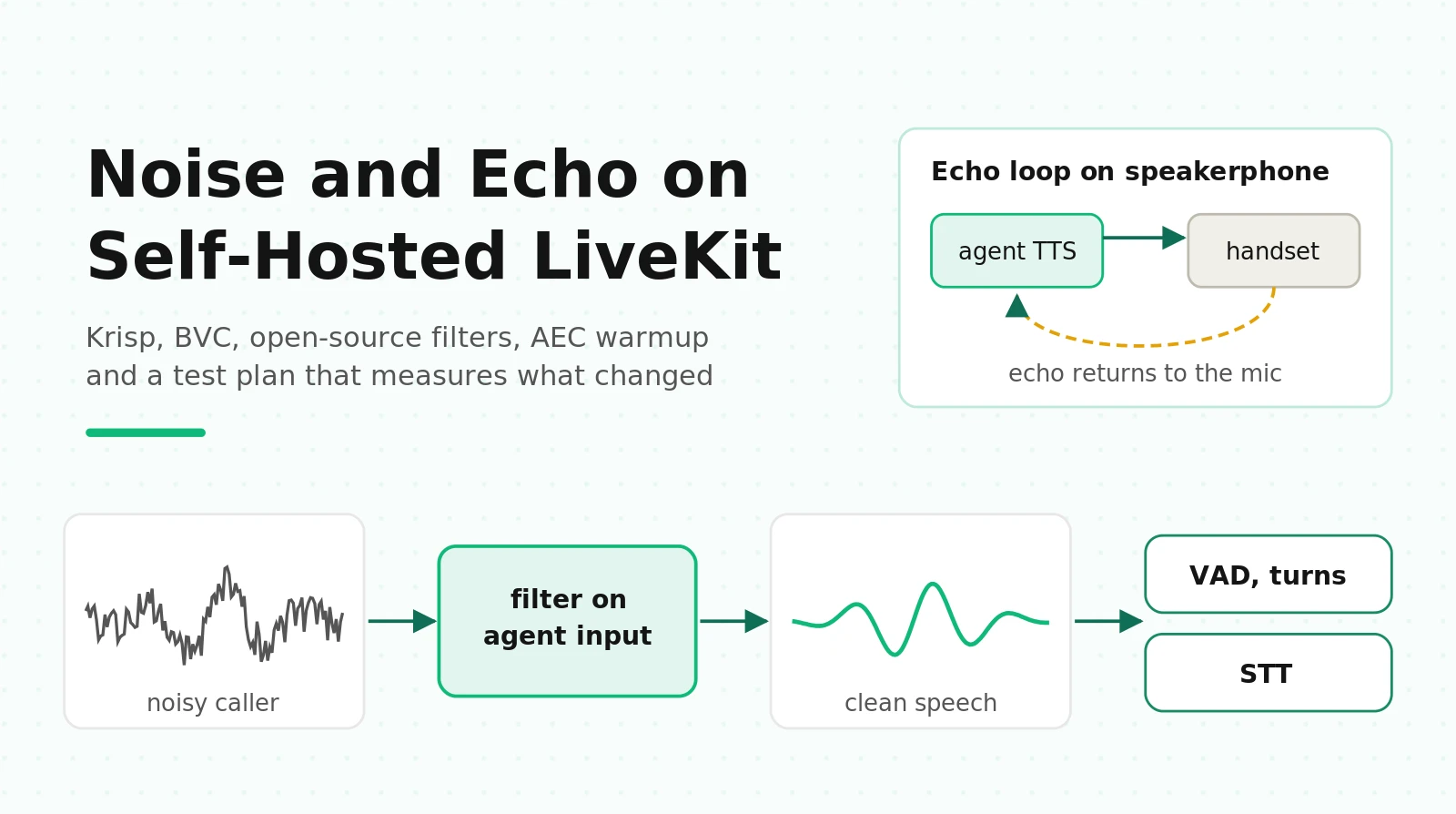
Most teams search "livekit noise cancellation self hosted" after one specific bad week. The agent worked fine in the office. Then real callers phoned in from cars, kitchens and warehouses. The agent started talking over people, cutting itself off mid-sentence, or confirming an appointment for "Tuesday" when the caller said "Thursday" over a running dishwasher.
This guide is for the engineer who owns that agent. It covers what LiveKit's noise and echo features do, which ones need LiveKit Cloud, what you can run yourself, and where echo cancellation actually happens on a phone call. It also explains why adding a noise filter can make transcription worse. It ends with a test plan you can run this week.
Everything below was checked against the LiveKit docs, the published plugin packages (`livekit-agents` 1.8.4, `livekit` 1.1.20, `livekit-plugins-noise-cancellation` 0.3.2, `livekit-plugins-krisp` 0.4.4) and the papers linked inline, as of October 4, 2026.
Where noise and echo get handled in a LiveKit call
There are three places audio can be cleaned before your agent's STT sees it. Each one has different rules for self-hosting.
1. The client. A browser or mobile app captures the microphone. WebRTC's built-in `echoCancellation` and `noiseSuppression` run here, and LiveKit's frontend Krisp filters can run here too. This only exists when there is a LiveKit client. A phone caller has no LiveKit client.
2. The SIP trunk. For phone calls, LiveKit can apply Krisp NC to the SIP participant's audio by setting `krisp_enabled: true` on the inbound trunk or in the `CreateSIPParticipant` request. The LiveKit noise and echo cancellation docs say only the standard NC model is available at the trunk.
3. The agent's audio input. Inside your agent, `room_io.AudioInputOptions(noise_cancellation=...)` attaches a filter to every inbound audio stream. Frames are cleaned before they reach VAD, the turn detector and STT. This is where most voice agent teams should put noise handling, and LiveKit's own docs recommend it over the trunk.
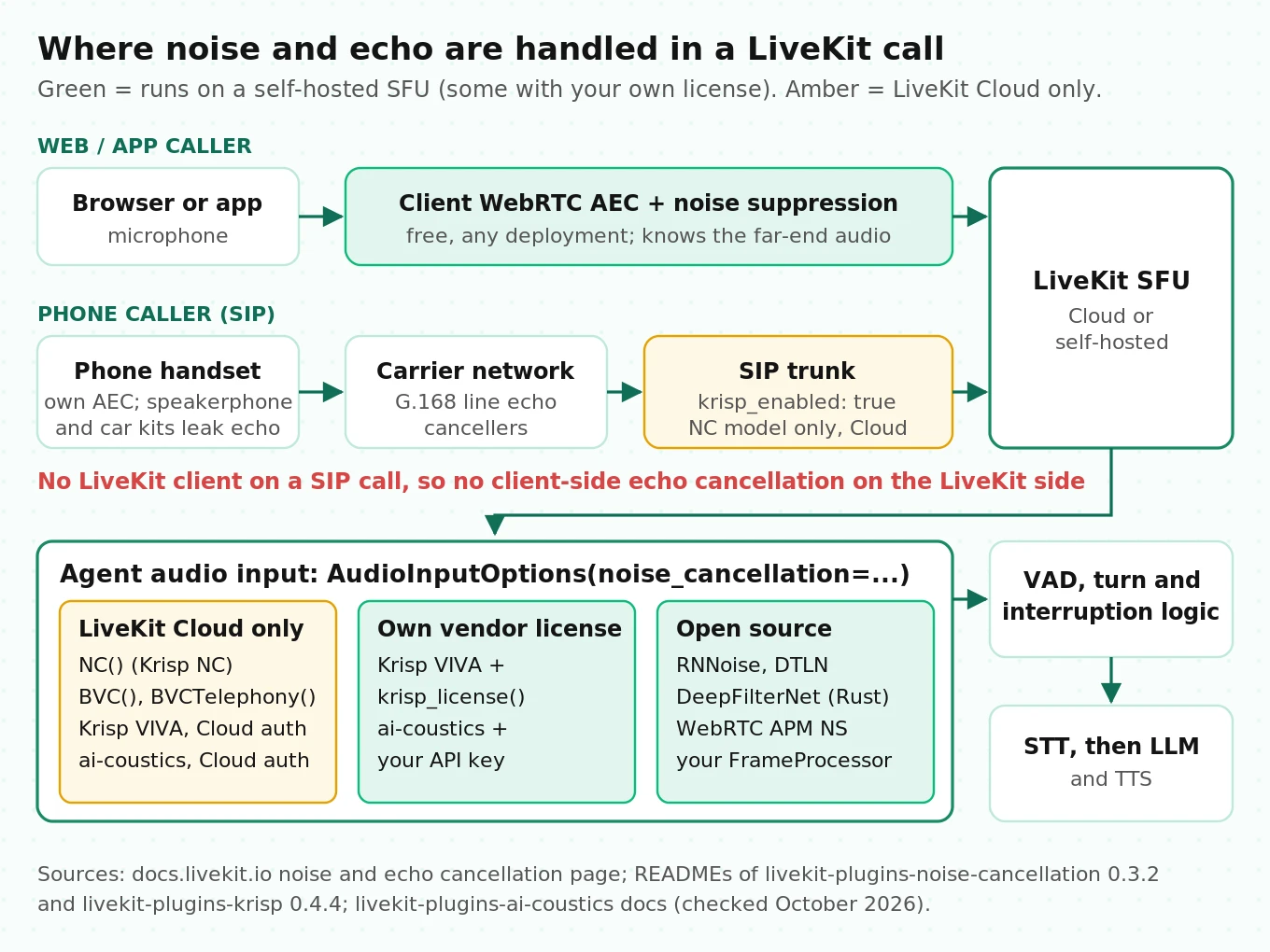
The important line in LiveKit's docs: "WebRTC cancellation runs in the client only, so it applies to conferencing. For agents and telephony (where there is no browser frontend), use the LiveKit Cloud models." That sentence is the whole problem for self-hosters. The free option lives in the client. The server-side option is tied to LiveKit Cloud.
What is Cloud-only and what runs self-hosted
"Self-hosted" means two different things in LiveKit discussions, and the answer changes with each.
- Self-hosted agent, LiveKit Cloud transport. Your agent server runs on your own Kubernetes or VMs (see running LiveKit agents on Kubernetes), but rooms live on LiveKit Cloud. LiveKit's docs say audio sent through LiveKit Cloud "can use these models regardless of where your agent runs." Every bundled model works.
- Self-hosted SFU. You run the open-source `livekit-server` and `livekit/sip` yourselves. The bundled models do not authenticate. You need your own vendor license or an open-source filter.
Here is what each package does on a self-hosted SFU, based on the package metadata and source, not just the marketing page.
| Option | Package | What it does | Self-hosted SFU | Cost on LiveKit Cloud |
|---|---|---|---|---|
| Krisp NC | `livekit-plugins-noise-cancellation` `NC()` | Removes non-speech noise, keeps all voices | No ("Requires LiveKit Cloud" in README) | Included |
| Krisp BVC / BVCTelephony | same package, `BVC()`, `BVCTelephony()` | NC plus removal of non-primary voices | No | Billed since May 1, 2026, per docs quoted in issue #5507 |
| Krisp VIVA voice isolation | `livekit-plugins-krisp` `voice_isolation()`, `voice_isolation_telephony()` | Primary-speaker isolation | Yes, with `krisp.auth.krisp_license(...)` and your own Krisp SDK, key and `.kef` model | $0.0012/min after included minutes |
| ai-coustics QUAIL_L | `livekit-plugins-ai-coustics` | Enhancement tuned for agents | Yes, with `Auth.ai_coustics_api(license_key=...)`, billed by ai-coustics | Included |
| ai-coustics Voice Focus 2.1 S/L | same | Enhancement plus speaker isolation | Yes, same auth path | $0.0012/min after included minutes |
| Krisp at SIP trunk | `krisp_enabled: true` | Standard NC on the SIP leg | Not documented for self-hosted `livekit/sip` | Included |
Prices come from the LiveKit pricing page: the Ship plan includes 1,000 voice isolation minutes and Scale includes 10,000, then $0.0012 per minute. Background noise suppression (Krisp NC and ai-coustics QUAIL_L) is included.
Two details are missing from most forum answers.
First, Krisp now has a self-hosted path. The livekit-plugins-krisp README describes `krisp.auth.krisp_license(license_key=..., model_path=...)` "for example, when using Livekit OSS server." It needs the proprietary `krisp-audio` wheel from Krisp's developer program (not on public PyPI), a license key, and a `.kef` model file. This covers VIVA voice isolation only. The `NC()`, `BVC()` and `BVCTelephony()` models in `livekit-plugins-noise-cancellation` are separate, ship under LiveKit's terms of service, and have no license-key path.
Second, the docs renamed things. Current LiveKit docs talk about "voice isolation" (Krisp VIVA) and "background noise suppression" (Krisp NC). BVC no longer appears on the main page, but version 0.3.2 of the noise-cancellation package still exports `BVC()` and `BVCTelephony()`. Older tutorials that use `noise_cancellation.BVCTelephony()` still run on LiveKit Cloud. If you are on a self-hosted SFU, they will not work and need replacing.
Open-source filters and how to plug them in
The agent framework accepts any object that subclasses `rtc.FrameProcessor[rtc.AudioFrame]` as `noise_cancellation`. That is the same interface the Krisp VIVA plugin uses internally. You implement two things: an `enabled` property and a synchronous `_process(frame) -> frame` method. Everything below can be wrapped that way.
| Filter | Native rate / frame | Algorithmic delay | Published compute | License | Python route |
|---|---|---|---|---|---|
| RNNoise | 48 kHz, 10 ms frames (480 samples), 20 ms window | About one 10 ms hop | ~40 Mflops; 1.3% of one Haswell core, 14% of a Raspberry Pi 3 core (paper) | BSD | pyrnnoise ctypes wrapper |
| DTLN | 16 kHz, 32 ms block, 8 ms shift | Up to one 32 ms block; plugin README claims ~8 ms | Under 1M parameters; plugin README reports RTF ~0.05 on an Apple M3 Pro | MIT | livekit-plugins-dtln |
| DeepFilterNet3 | 48 kHz only | STFT plus model lookahead (binary has a `--compensate-delay` flag) | RTF 0.19 on one notebook CPU thread (paper) | MIT / Apache-2.0 | `deepfilternet` Python `enhance()` is file-level; real-time path is the Rust `libDF` |
| WebRTC APM noise suppression | 10 ms frames | Small (frame-based) | Not published per stream | BSD (via LiveKit SDK) | `rtc.AudioProcessingModule(noise_suppression=True)` |
| SpeexDSP preprocessor | Frame-based | Small | Not published | BSD | Third-party bindings |
Three practical notes on this table.
WebRTC APM is already installed. The LiveKit Python SDK ships `rtc.AudioProcessingModule` with `echo_cancellation`, `noise_suppression`, `high_pass_filter` and `auto_gain_control` flags. Its `process_stream()` requires frames of exactly 10 ms. The agent framework already uses this class for automatic gain control on every input stream. Turning on its noise suppressor costs one constructor flag and no new dependency. It is a classic DSP suppressor, so expect it to handle steady hum and fan noise better than babble.
DeepFilterNet's easy Python API is not streaming. `from df import enhance, init_df` processes a whole array. For a live call you need the Rust real-time implementation or the LADSPA plugin described in the DeepFilterNet repo. Running PyTorch inference per 50 ms frame inside the agent's event loop is the fastest way to create latency spikes.
DTLN downsamples to 16 kHz. That is fine for phone audio, which is 8 kHz G.711 on the carrier side anyway. RNNoise and DeepFilterNet expect 48 kHz, so on a phone call they process upsampled narrowband audio. The models were trained on full-band speech, so measure whether they behave the same on 8 kHz content before trusting them.
A minimal RNNoise FrameProcessor (illustrative)
This wraps RNNoise via `pyrnnoise`'s low-level functions. It asks the agent to deliver 48 kHz mono, so every 50 ms input frame splits into exactly five 480-sample RNNoise frames with no carry-over buffer.
# illustrative: verify against your installed versions before production use
import numpy as np
from livekit import rtc
from livekit.agents import room_io
from pyrnnoise.rnnoise import create, destroy, process_mono_frame, FRAME_SIZE  # 480 @ 48 kHz


class RNNoiseProcessor(rtc.FrameProcessor[rtc.AudioFrame]):
    """RNNoise on 48 kHz mono frames. One instance per session: RNNoise is stateful."""

    def __init__(self, mix: float = 1.0) -> None:
        self._state = create()
        self._enabled = True
        self._mix = mix  # 1.0 = fully denoised; 0.7 = add back 30% of the original

    @property
    def enabled(self) -> bool:
        return self._enabled

    @enabled.setter
    def enabled(self, value: bool) -> None:
        self._enabled = value

    def _process(self, frame: rtc.AudioFrame) -> rtc.AudioFrame:
        if frame.sample_rate != 48000 or frame.num_channels != 1:
            return frame  # pass through; log this in real code
        x = np.frombuffer(frame.data, dtype=np.int16)
        if len(x) % FRAME_SIZE:
            return frame
        out = np.empty_like(x)
        for i in range(0, len(x), FRAME_SIZE):
            chunk = x[i : i + FRAME_SIZE]
            den, _speech_prob = process_mono_frame(self._state, chunk)
            mixed = self._mix * den.astype(np.float32) + (1 - self._mix) * chunk
            out[i : i + FRAME_SIZE] = np.clip(mixed, -32768, 32767).astype(np.int16)
        return rtc.AudioFrame(
            data=out.tobytes(),
            sample_rate=48000,
            num_channels=1,
            samples_per_channel=len(out),
        )

    def _close(self) -> None:
        destroy(self._state)


# in your rtc_session entrypoint
room_options = room_io.RoomOptions(
    audio_input=room_io.AudioInputOptions(
        sample_rate=48000,          # default is 24000
        noise_cancellation=RNNoiseProcessor(mix=0.8),
        auto_gain_control=True,     # set explicitly; see gotcha below
    ),
)
The `mix` parameter is not decoration. It implements the "observation adding" fix from the speech enhancement research covered below. The DTLN plugin exposes the same idea as `strength`, which defaults to 0.5 (an equal blend of denoised and original audio).
Gotchas from the source code
These come from reading `livekit-agents` 1.8.4, not from the docs.
- Adding a filter silently turns off AGC. `AudioInputOptions.auto_gain_control` defaults to "not given." In that case, the framework enables WebRTC AGC only when `noise_cancellation` is `None` or a selector function. Pass a filter directly and AGC switches off. If you A/B "no filter" against "RNNoise," you are also testing "AGC on" against "AGC off." Set `auto_gain_control` explicitly in both arms.
- The default input is 24 kHz in 50 ms frames. `AudioInputOptions` defaults to `sample_rate=24000` and `frame_size_ms=50`. Your processor receives whatever those are set to, after LiveKit's resampler. Set the rate your filter wants instead of resampling twice.
- `_process` is synchronous and runs in the stream's read loop. A slow filter blocks the asyncio event loop that also runs VAD, STT websockets and TTS. Use native code (C, Rust, ONNX Runtime) and keep per-frame work well under the 50 ms frame budget. The DTLN plugin warms up ONNX Runtime in `__init__` because the first inference took about 500 ms in its author's benchmark.
- One instance per session. RNNoise, DTLN and Krisp keep recurrent state. Sharing one instance across concurrent calls mixes callers' noise estimates.
- Never chain two denoisers. LiveKit's docs and the DTLN README both warn that these models are trained on raw audio. If your web client runs Krisp, do not also run a filter in the agent.
- AMD CPUs and OpenBLAS. The noise-cancellation package README notes crashes on some AMD CPUs from OpenBLAS CPU detection, with `OPENBLAS_CORETYPE=Haswell` as a workaround. Worth knowing before you pick instance types.
Echo: where AEC happens, and why phone calls are different
Acoustic echo is the agent's own voice coming back through the caller's microphone. If it is not removed, VAD hears speech while the agent talks, and the agent interrupts itself. We covered the symptom side in LiveKit false interruptions. Here is the mechanism.
In a browser or app, WebRTC's acoustic echo canceller runs on the client. It knows exactly what the speaker played (the far-end reference) and subtracts its echo from the mic signal. LiveKit's docs recommend leaving it on whenever you are not using enhanced noise cancellation, and say echo cancellation can stay on even when you are.
On a phone call, the LiveKit side has no client-side echo canceller. The SIP participant is a gateway, not a device. Echo removal depends on two things outside your control:
- The caller's handset. Mobile phones run their own acoustic echo cancellation. Speakerphone mode, cheap Bluetooth car kits and desk phones with loud speakers are where it fails most often, because the speaker-to-mic coupling is strongest.
- The telephone network. Line echo from 2-wire to 4-wire conversion is handled by network echo cancellers specified in ITU-T G.168. That is mostly invisible to you, but it means echo behavior can vary by carrier and route.
What makes echo hard is double-talk: the moment the caller speaks while the agent is still speaking. That is exactly when barge-in matters. The ICASSP 2023 Acoustic Echo Cancellation Challenge notes that echo in double-talk is difficult to suppress without significant distortion or attenuation of the near-end speech. It ranked entries on MOS and on word accuracy, because an AEC that cleans echo by erasing the caller's words is useless to a speech recognizer.
How LiveKit's aec_warmup_duration works
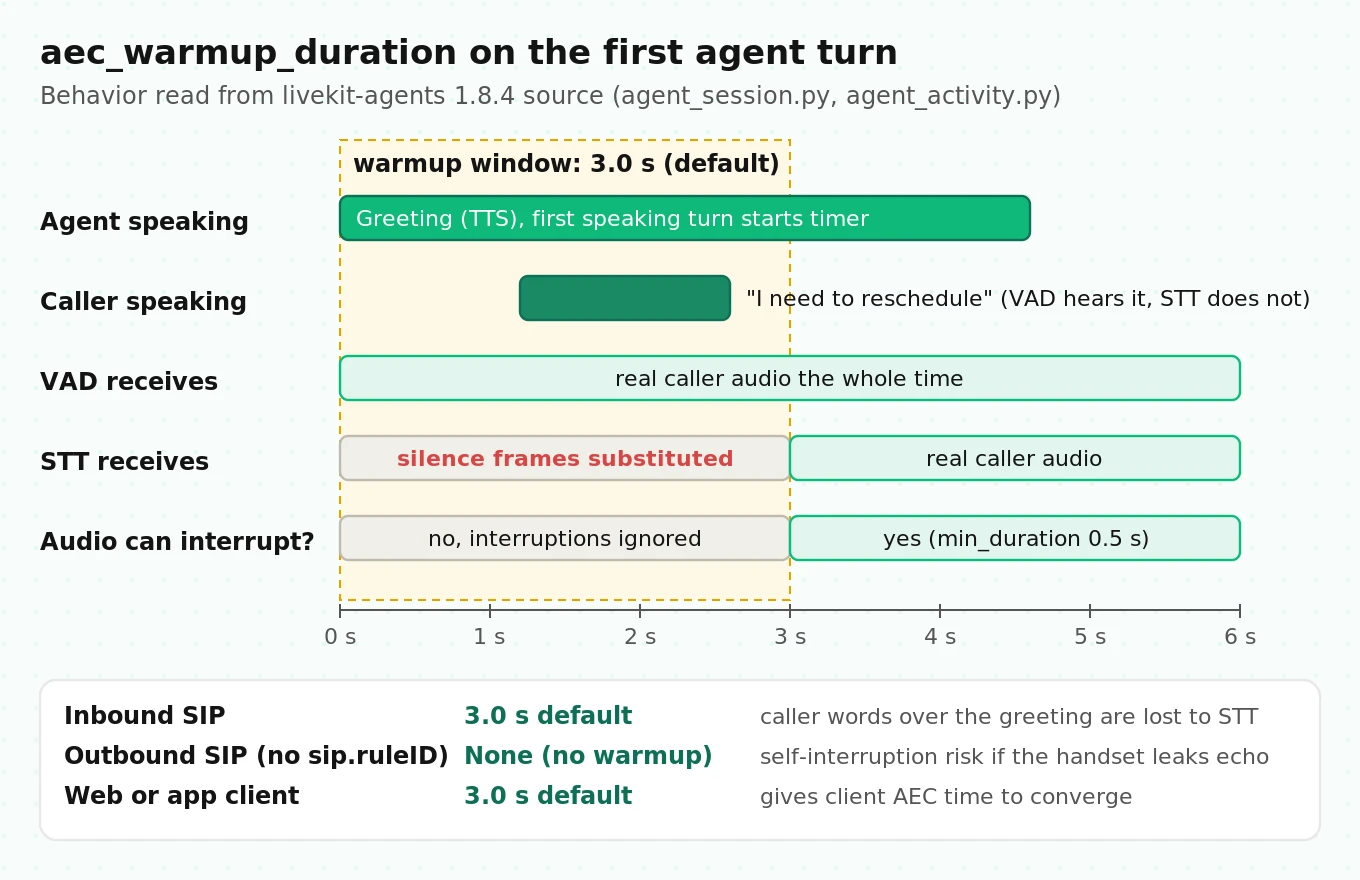
LiveKit Agents adds a guard called `aec_warmup_duration`. Reading `agent_session.py` and `agent_activity.py` in 1.8.4 shows exactly what it does:
1. The default is `3.0` seconds (`_DEFAULT_AEC_WARMUP_DURATION = 3.0`).
2. A one-shot wall-clock timer starts the first time the agent enters the `speaking` state. It does not restart on later turns.
3. While it runs, interruptions from audio activity are ignored.
4. While it runs, STT (and a realtime model, if you use one) receives silence frames in place of the caller's audio. VAD, answering machine detection and the interruption detector still get the real frames.
5. If the linked participant is a SIP participant without a `sip.ruleID` attribute (an outbound call), warmup is set to `None`. Inbound SIP calls keep the 3-second default unless you override it.
Two consequences follow, and neither is in the docs.
Inbound phone callers who talk over the greeting lose words. If a caller says "I need to reschedule" during the first three seconds of your greeting, STT gets silence for that span. The session's `transcription_timeout` option exists for this case: it emits a `user_transcription_timeout` event when VAD heard speech but no final transcript arrived, and the docstring names "AEC warmup" as one cause. Use it to have the agent ask the caller to repeat.
The warmup is for client AEC convergence, which phone calls do not have. On inbound SIP you are paying the lost-words cost for a canceller that is not on the LiveKit side. Whether to set `aec_warmup_duration=None` on inbound SIP is a test question, not a default. Callers on speakerphone may then trigger self-interruption on the greeting.
Can you run AEC on the server?
In principle, yes. `rtc.AudioProcessingModule(echo_cancellation=True)` exposes `process_reverse_stream()` for the far-end reference (your agent's TTS output) and `set_stream_delay_ms()` for the echo path delay. LiveKit's console mode (in the legacy CLI code) uses this pair to cancel echo from your laptop speakers. On a phone call, the echo path runs through your SIP provider, the carrier, the handset and back, and that delay is longer and varies by call. Treat server-side AEC on SIP as an experiment that needs its own test arm, not a setting to switch on.
How noise suppression changes STT, VAD and turn detection
Noise suppression is sold on how audio sounds to humans. Your agent does not listen like a human. Three downstream consumers react differently.
STT: enhancement can raise WER
Two papers are worth reading before you add any filter in front of STT.
Iwamoto et al. (Interspeech 2022) split speech enhancement errors into a residual noise component and an "artifact" component, meaning distortion that is neither speech nor noise. They found the artifact component is the main cause of ASR degradation, not leftover noise. Their fix is simple: "observation adding," mixing a scaled copy of the original noisy signal back into the enhanced output. They showed it improves the signal-to-artifact ratio and improved ASR on both simulated and real recordings.
Chondhekar et al. (2025) tested MetricGAN+ denoising in front of four modern ASR systems (OpenAI Whisper, NVIDIA Parakeet, Gemini Flash 2.0 and Parrotlet-a) on 500 medical recordings across noise conditions. Raw noisy audio beat enhanced audio in all 40 configurations, with degradations from 1.1 to 46.6 absolute points of semantic WER. Their reading: large ASR models trained on noisy data already handle noise internally, and enhancement removes cues they rely on.
What this means in production:
- A filter tuned to sound clean to people can raise your STT error rate. Your STT vendor's model was probably trained on noisy audio already.
- Start with a partial blend (the `mix` or `strength` knob) rather than full suppression.
- Measure entity accuracy, not only WER. A filter that clips the onset of "fifteen" into "fifty" is worse than its WER delta suggests. See STT entity accuracy for voice agents.
LiveKit's own docs page shows the other side. On one gym-membership sample with background chatter, Deepgram Nova-3 WER was 117.6% on the original, 11.8% with Krisp VIVA and 7.1% with ai-coustics Voice Focus 2.1 S. That is one vendor-chosen clip, so it proves the effect can be large, not that it will be large on your calls. The same page shows Krisp NC leaving fragments of the background conversation ("That's an off time show?") in the transcript, because NC is designed to keep all speech.
VAD: fewer noise triggers, but watch the onsets
Silero VAD in LiveKit fires speech when the model's probability crosses `activation_threshold` (default 0.5) for at least `min_speech_duration` (default 0.05 s). It ends speech after probability falls below `deactivation_threshold` (default `max(activation_threshold - 0.15, 0.01)`) for `min_silence_duration`. Note the two VAD classes ship different silence defaults: the `livekit-plugins-silero` `VAD.load()` uses 0.55 s, while the newer `inference.VAD` uses 0.25 s. Switching classes changes endpointing behavior even if you change nothing else.
A good noise filter cuts VAD triggers from clatter, horns and hum. A bad one does two things. It attenuates soft word onsets, which delays speech start and clips the first syllable. And its own artifacts, such as musical noise or pumping, can push the speech probability up. Test both directions. Our guide to testing VAD misfires has the scenario list.
Interruptions: self-hosted production defaults to VAD
This detail is easy to miss. In `agent_activity.py`, if you do not set `interruption_detection` explicitly, and the agent is neither hosted on LiveKit Cloud (`LIVEKIT_REMOTE_EOT_URL` unset) nor running in dev mode (`LIVEKIT_DEV_MODE` unset), the framework logs "adaptive interruption is disabled by default in production mode" and falls back to VAD-based interruptions.
So a self-hosted agent can behave differently in `dev` on your laptop (adaptive, model-based interruption filtering) than in production (any VAD speech of at least `min_duration`, default 0.5 s, interrupts). In production, every noise burst that survives your filter and lasts half a second can stop the agent mid-sentence. Then `false_interruption_timeout` (default 2.0 s) and `resume_false_interruption` (default `True`) decide whether it resumes. Noise handling and interruption settings are one system; tune them together, and see end-of-turn detection with Flux, Silero and the turn detector for the endpointing half.
The background-speaker problem
TV audio, a coworker on another call, a child in the back seat: this is speech, so noise suppression keeps it by design. RNNoise, DTLN, DeepFilterNet and WebRTC APM are all noise suppressors. None of them knows which voice is the caller. That is the job of BVC and voice isolation models (Krisp VIVA, ai-coustics Voice Focus), and it is the hardest gap to close on a self-hosted SFU without a commercial license.
Without one, your levers are behavioral: a higher `activation_threshold`, a `min_words` interruption setting (it needs STT, and counts words before allowing barge-in), and prompts that confirm critical values. Measure the background-speaker case separately in your tests, because it fails differently from noise.
CPU cost and added latency per stream
Vendors do not publish per-stream CPU for Krisp or ai-coustics. For the open-source filters, here is what the primary sources report, turned into a capacity estimate.
Worked example (illustrative): a 16-vCPU agent server where you allow 10% of CPU, so 1.6 cores, for noise suppression.
| Filter | Source figure | Cores per stream | Streams in 1.6 cores |
|---|---|---|---|
| RNNoise (C, non-vectorized) | 1.3% of one Haswell core | 0.013 | about 123 |
| DTLN (ONNX Runtime) | RTF ~0.05 on M3 Pro (plugin README) | 0.05 | about 32 |
| DeepFilterNet3 | RTF 0.19 on one notebook thread (paper) | 0.19 | about 8 |
The hardware differs across sources, so treat these as order-of-magnitude, then measure on your instance type. Python call overhead (ctypes per 10 ms frame, numpy copies) adds cost the papers do not count.
Latency is smaller than most people fear. The filter's algorithmic delay is roughly one hop to one window: around 10 ms for RNNoise and up to 32 ms for DTLN. Compare that with endpointing: LiveKit's default `min_delay` is 0.5 s. A 10 to 30 ms filter is rarely what makes your agent feel slow. A filter that blocks the event loop is a different story. Check for event-loop stalls with the approach in debugging LiveKit agent latency.
Decision matrix: what to run where
Use this as a starting point, then confirm with the tests in the next section.
| Your setup | Main problem | First choice | Fallback | Also do |
|---|---|---|---|---|
| LiveKit Cloud transport, phone calls | Steady noise (cars, fans) | Krisp NC in agent (included) | `noise_cancellation.NC()` at trunk | Keep inbound `aec_warmup_duration` under test |
| LiveKit Cloud transport, phone calls | TV, other voices | `krisp.voice_isolation_telephony()` | `BVCTelephony()` | Budget $0.0012/min after included minutes |
| LiveKit Cloud transport, web app | Any noise | Client WebRTC AEC + NC on, one enhanced model in agent | Frontend Krisp (BVC on web only) | Never enable enhanced NC in both places |
| Self-hosted SFU, phone calls | Steady noise | WebRTC APM noise suppression or RNNoise at `mix` 0.7 to 0.9 | DTLN at `strength` 0.5 | Set `auto_gain_control` explicitly |
| Self-hosted SFU, phone calls | TV, other voices | Krisp VIVA with your own Krisp license, or ai-coustics with your own key | No open-source equivalent; tune `activation_threshold` and `min_words` | Test background-speaker scenarios separately |
| Self-hosted SFU, any | Self-interruption on greeting | Keep warmup, add `transcription_timeout` handling | Server-side APM AEC experiment | Track false-interruption rate per call |
| Any | STT accuracy is the only issue | No filter; try STT keyterms and a phone-tuned model first | Light blend | Read improving WER |
The last row is the one most teams skip. If your STT already handles your noise well, the best filter is none.
How to test noise and echo handling on a self-hosted LiveKit agent
Manual test calls from a quiet office cannot answer "did the filter help." You need the same audio, played many times, through each configuration. This is the protocol. It extends the general approach in the LiveKit voice agent testing guide.
1. Record clean caller utterances from your domain. Use 200 to 400 short utterances that match your real calls: dates, names, phone numbers, addresses, "no, Thursday." Write exact reference transcripts. Keep a separate set of 30 or more two-to-five-second barge-in phrases ("wait," "stop, that's wrong").
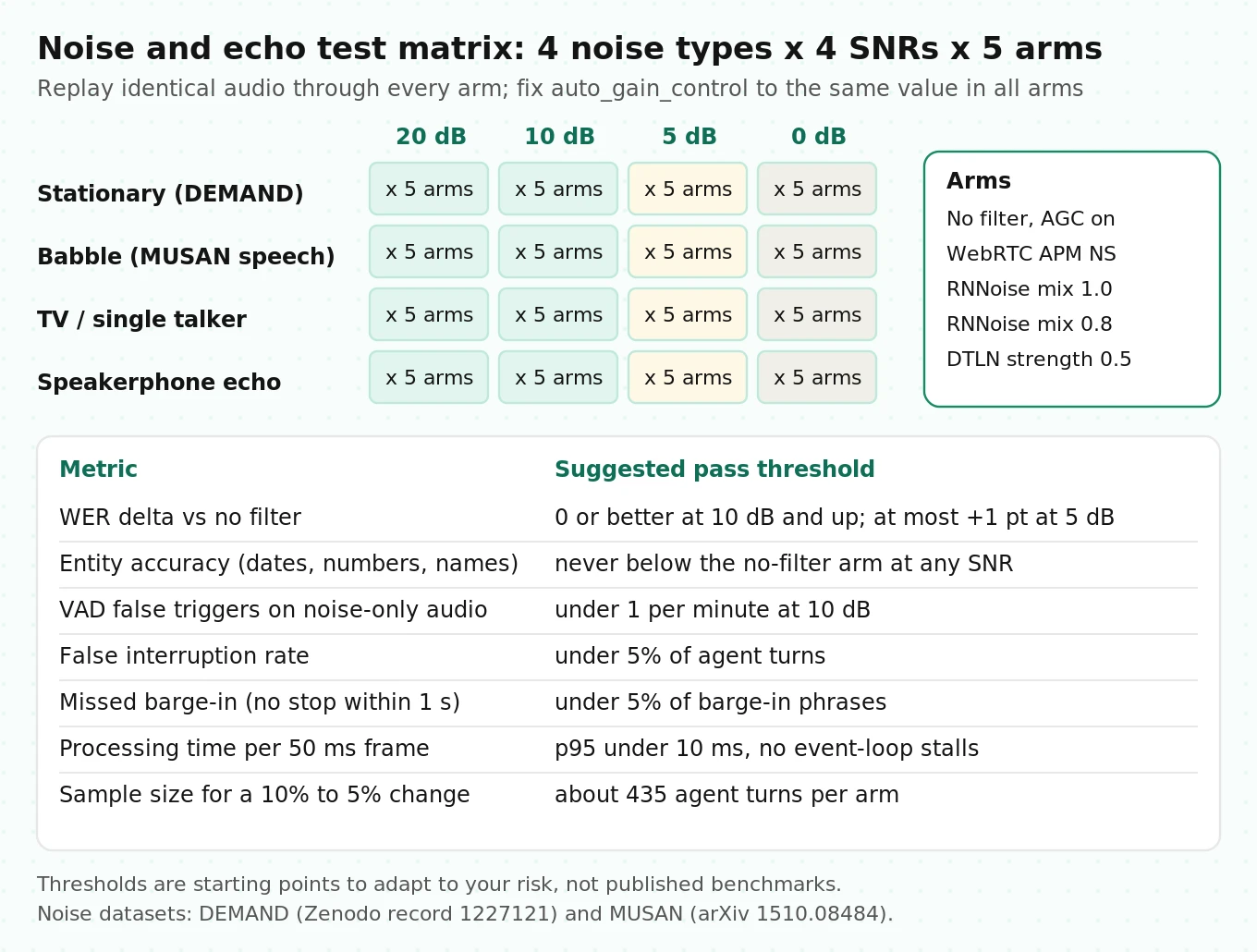
2. Build noise beds. Use DEMAND for real environments (six categories: domestic, office, public, transportation, street, nature; three recordings each, at 48 kHz and 16 kHz). Use MUSAN noise for transients and its speech portion to make babble by summing four to eight talkers. Add a TV-style bed: a single talker plus music, because that is the background-speaker case.
3. Mix at fixed SNRs. Use 20, 10, 5 and 0 dB. 20 dB is a quiet room, 0 dB means noise as loud as the caller. Compute SNR on active speech, not the whole file, or your "10 dB" mix will be harder than labeled. Then pass every mix through a phone channel: resample to 8 kHz and apply G.711 mu-law, since that is what your agent receives on SIP.
4. Make an echo set. Play your agent's real TTS greeting through a phone on speakerphone and record the far end, or simulate it by adding a delayed, attenuated, filtered copy of the TTS to the caller's mic track. Include double-talk clips where the caller says a barge-in phrase over the agent.
5. Define the arms. At minimum: no filter with AGC on; WebRTC APM noise suppression; RNNoise at `mix` 1.0 and 0.8; DTLN at `strength` 0.5; and any commercial model you are licensing. Fix `auto_gain_control` to the same value in every arm.
6. Run offline first. Push each file through each processor's `_process()` in 50 ms frames, then through your production STT and the same VAD class and settings you run in production. This isolates the filter from network variance. The code below does this.
7. Then run end-to-end. Inject the same mixes as a SIP or room participant against a staging agent so warmup, interruption and endpointing logic run for real. Log `agent_state_changed`, `user_state_changed` and interruption events per call.
8. Compute the metrics.
- WER delta: WER(arm) minus WER(no filter), per SNR and noise type.
- Entity accuracy: share of utterances where the date, number or name is exactly right.
- VAD false triggers per minute on noise-only audio (no caller speech).
- False interruption rate: share of agent turns stopped by audio with no caller speech in it.
- Missed barge-in rate: share of real barge-in phrases that did not stop the agent within 1 s.
- Added latency: p95 processor time per frame and any event-loop stall events.
9. Apply pass thresholds. Suggested starting points, to adapt to your risk: WER delta of 0 or better at 10 dB and above; no worse than +1 point at 5 dB; entity accuracy not lower than the no-filter arm at any SNR; VAD false triggers under 1 per minute at 10 dB; false interruption rate under 5% of agent turns; missed barge-in under 5%; p95 processing under 10 ms per 50 ms frame.
10. Re-run on every change. A new STT model, a new VAD class, a LiveKit Agents upgrade or a new carrier can flip the result. Keep the corpus and re-run it as a regression gate.
Code: mix noise at a target SNR through a phone channel
# illustrative: mix clean speech and noise at a target SNR, then simulate G.711 mu-law
import numpy as np
import soundfile as sf
from scipy.signal import resample_poly


def active_rms(x: np.ndarray, sr: int, frame_ms: int = 20, floor_db: float = -40.0) -> float:
    """RMS over frames within floor_db of the loudest frame (a rough active-speech level)."""
    n = int(sr * frame_ms / 1000)
    frames = x[: len(x) // n * n].reshape(-1, n)
    rms = np.sqrt((frames ** 2).mean(axis=1) + 1e-12)
    keep = rms > rms.max() * 10 ** (floor_db / 20)
    return float(np.sqrt((frames[keep] ** 2).mean()))


def mix_at_snr(speech: np.ndarray, noise: np.ndarray, snr_db: float, sr: int) -> np.ndarray:
    if len(noise) < len(speech):
        noise = np.tile(noise, int(np.ceil(len(speech) / len(noise))))
    start = np.random.randint(0, len(noise) - len(speech) + 1)
    noise = noise[start : start + len(speech)]
    noise_rms = np.sqrt((noise ** 2).mean() + 1e-12)
    gain = active_rms(speech, sr) / (noise_rms * 10 ** (snr_db / 20))
    mix = speech + gain * noise
    return mix / max(1.0, np.abs(mix).max())  # avoid clipping without changing SNR


def mulaw_roundtrip(x16k: np.ndarray, mu: float = 255.0) -> np.ndarray:
    """16 kHz float in, 8 kHz G.711-style companding, back to 16 kHz."""
    x8 = resample_poly(x16k, 1, 2)
    y = np.sign(x8) * np.log1p(mu * np.abs(x8)) / np.log1p(mu)
    y = np.round(y * 127) / 127  # 8-bit quantization
    x8_hat = np.sign(y) * ((1 + mu) ** np.abs(y) - 1) / mu
    return resample_poly(x8_hat, 2, 1)


speech, sr = sf.read("utt_0001.wav")        # 16 kHz mono float
noise, _ = sf.read("demand_STRAFFIC.wav")   # resampled to 16 kHz mono
for snr in (20, 10, 5, 0):
    sf.write(f"utt_0001_traffic_{snr}dB.wav", mulaw_roundtrip(mix_at_snr(speech, noise, snr, sr)), sr)
Code: offline A/B harness for filter arms
# illustrative: run each arm's FrameProcessor offline, then score STT and VAD
import numpy as np
import jiwer
import torch
from livekit import rtc
from scipy.signal import resample_poly
from silero_vad import load_silero_vad, get_speech_timestamps

vad_model = load_silero_vad()


def run_processor(x16k: np.ndarray, proc, rate: int = 48000, frame_ms: int = 50) -> np.ndarray:
    """Feed 50 ms int16 frames through a FrameProcessor, the way RoomIO does."""
    x = resample_poly(x16k, rate // 16000, 1) if rate != 16000 else x16k
    pcm = (np.clip(x, -1, 1) * 32767).astype(np.int16)
    n = rate * frame_ms // 1000
    out = []
    for i in range(0, len(pcm) - n + 1, n):
        f = rtc.AudioFrame(pcm[i : i + n].tobytes(), rate, 1, n)
        g = proc._process(f) if proc is not None else f
        out.append(np.frombuffer(g.data, dtype=np.int16))
    y = np.concatenate(out).astype(np.float32) / 32768
    return resample_poly(y, 1, rate // 16000) if rate != 16000 else y


def vad_triggers(y16k: np.ndarray) -> int:
    # match your production VAD settings, e.g. threshold 0.5, min speech 50 ms, min silence 550 ms
    ts = get_speech_timestamps(torch.from_numpy(y16k), vad_model, threshold=0.5,
                               min_speech_duration_ms=50, min_silence_duration_ms=550,
                               sampling_rate=16000)
    return len(ts)


def score_arm(arm_name, make_proc, items, transcribe):
    """items: list of (noisy_16k_array, reference_text or None for noise-only)."""
    refs, hyps, noise_only_triggers, noise_only_minutes = [], [], 0, 0.0
    for audio, ref in items:
        proc = make_proc()                      # fresh state per "call"
        y = run_processor(audio, proc)
        if ref is None:
            noise_only_triggers += vad_triggers(y)
            noise_only_minutes += len(y) / 16000 / 60
        else:
            refs.append(ref)
            hyps.append(transcribe(y))          # your production STT, batch mode
    return {
        "arm": arm_name,
        "wer": jiwer.wer(refs, hyps),
        "vad_false_triggers_per_min": noise_only_triggers / max(noise_only_minutes, 1e-9),
    }
`transcribe` is whatever your production STT is, called in batch mode so results are repeatable. Streaming STT can give slightly different results on the same audio, so run end-to-end tests at least twice and report the spread.
How many calls you need
For rates like false interruptions, the standard two-proportion sample size formula applies:
n per arm = (z_alpha/2 x sqrt(2 x p_bar x (1 - p_bar)) + z_beta x sqrt(p1(1 - p1) + p2(1 - p2)))^2 / (p1 - p2)^2
Worked example (illustrative): to detect a drop in false interruption rate from 10% to 5% at 95% confidence and 80% power, with p_bar = 0.075:
- First term: 1.96 x sqrt(2 x 0.075 x 0.925) = 1.96 x 0.3725 = 0.730
- Second term: 0.8416 x sqrt(0.09 + 0.0475) = 0.8416 x 0.3708 = 0.312
- n = (1.042)^2 / 0.0025 = about 435 agent turns per arm
Because you replay the same audio through both arms, you can use a paired test (McNemar's test on turns where the arms disagree), which usually needs fewer turns. Either way, 20 test calls is not enough to see a 5-point change. That is the core reason manual testing cannot settle noise questions.
How this fits with the rest of your test suite
Noise testing is one slice of the audio robustness layer. Pair it with testing STT under background noise for transcription-only experiments, STT evaluation for voice agents for picking the model itself, and interruption detection evaluation for the barge-in metrics. A filter decision made without those baselines tends to fix one number and quietly move another.
Evalgent runs this kind of matrix as an independent evaluator: the same noise beds, SNRs and barge-in clips replayed against each configuration of your agent, with WER, entity accuracy and false-interruption rates reported per arm. Teams use it before turning on a filter in production and again as a regression check when they upgrade LiveKit, change STT, or switch carriers.
Frequently asked questions
Does LiveKit Krisp noise cancellation work on a self-hosted LiveKit server?
The bundled Krisp NC, BVC and BVCTelephony models in `livekit-plugins-noise-cancellation` require LiveKit Cloud. Krisp VIVA voice isolation in `livekit-plugins-krisp` can run against a self-hosted server if you buy a Krisp license and use `krisp.auth.krisp_license()` with Krisp's own SDK and model file.
Can I use BVCTelephony without LiveKit Cloud?
No. `BVCTelephony()` loads a model bundled in LiveKit's closed-source noise-cancellation package, and the package README states it requires LiveKit Cloud. A self-hosted agent connected to LiveKit Cloud rooms can use it. A self-hosted SFU cannot. The license-key alternatives are Krisp VIVA telephony with your own Krisp license, or ai-coustics.
What is the best open-source noise cancellation for LiveKit agents?
There is no single best one. RNNoise is tiny and cheap at 48 kHz. DTLN has an existing LiveKit plugin and runs at 16 kHz. DeepFilterNet3 is stronger but heavier and needs its Rust runtime for streaming. WebRTC APM is already in the SDK. Pick by testing WER and false interruptions on your own call audio.
Does LiveKit do echo cancellation on SIP phone calls?
Not on the LiveKit side. WebRTC echo cancellation runs in LiveKit clients, and a SIP participant has no client. Echo is handled by the caller's handset and by network echo cancellers. LiveKit Agents adds `aec_warmup_duration`, which ignores audio interruptions for the first 3 seconds of agent speech on inbound calls.
What does aec_warmup_duration do in LiveKit Agents?
It starts a one-shot timer, 3.0 seconds by default, the first time the agent speaks. During that window, audio cannot interrupt the agent and STT receives silence in place of caller audio, while VAD still hears it. Outbound SIP calls default to no warmup. Set it explicitly if you want different behavior.
Will noise suppression improve my STT accuracy?
Not reliably. Research shows enhancement artifacts are the main cause of ASR errors after denoising, and a 2025 study found raw noisy audio beat denoised audio in all 40 tested configurations across four modern ASR systems. Blending some original audio back in helps. Measure WER and entity accuracy with and without the filter.
How do I stop a TV or other people in the room from interrupting my voice agent?
Noise suppressors keep all speech, so they do not remove TV voices. Use a voice isolation model such as Krisp VIVA or ai-coustics Voice Focus. Without one, raise the VAD `activation_threshold`, require a minimum word count before barge-in with `min_words`, and test background-speaker scenarios separately from noise.
What VAD settings should I use for noisy phone calls?
Start from the defaults: `activation_threshold` 0.5, `min_speech_duration` 0.05 s, and interruption `min_duration` 0.5 s. Raise the threshold in small steps while measuring both false triggers on noise-only audio and missed barge-ins. Note that `silero.VAD.load()` defaults to 0.55 s minimum silence and `inference.VAD` to 0.25 s.
The bottom line
On a self-hosted LiveKit server, noise and echo handling is something you assemble yourself: a licensed or open-source filter on the agent input, deliberate AGC and warmup settings, and VAD and interruption settings tuned with the filter in place. Whatever you pick, prove it on replayed noisy audio, measured for WER, entity accuracy, VAD misfires and false barge-ins, because a filter that sounds cleaner can still make your agent understand callers worse.
Related Articles

How to automate voice agent testing: synthetic callers vs manual QA
Learn how ai test automation replaces manual QA for voice agents. Compare synthetic callers vs human testers, with a 5-step framework to scale without hiring.
Read more
AI Agent Testing vs Voice Agent Testing: What General Tools Miss for Voice
AI agent testing measures text outputs. Voice agent testing measures behaviour through an acoustic pipeline. Five failure categories general tools miss.
Read more