How to test noise robustness in AI voice agents
On this page
Real callers are rarely in a quiet room. They call from cars, streets, and busy offices, and that noise is exactly what a demo never tests. An agent that only works on clean audio fails in the field. Evalgent tests under noise. Here is how noise breaks agents and how to test it.
Noise robustness: a voice agent's ability to keep understanding the caller and completing tasks when the audio carries background noise.
What poor noise robustness looks like
These are the symptoms on a real call:
- Accuracy that is fine in a quiet demo and poor on real lines.
- The agent mishears intents when there is background noise.
- It asks callers on noisy lines to repeat constantly.
- Background sound falsely ends the caller's turn.
- Crosstalk or a second voice derails the conversation.
The failure appears in the field, not the demo. Clean-audio testing never surfaces it.
Why noise breaks voice agents
Noise degrades the signal the whole pipeline depends on, starting with speech-to-text. Without noise in testing, none of it shows up. The table maps each cause to what you hear and how to fix it.
| Cause | How it shows on a call | Fix |
|---|---|---|
| No noise in the test set | Field failures never seen in testing | Inject realistic noise at several levels |
| No noise suppression | Accuracy drops on noisy lines | Add noise suppression ahead of speech-to-text |
| VAD tripped by noise | Turn ends on background sound | Tune voice-activity detection for the line's noise |
| Fragile speech-to-text | Error rate spikes with noise | Choose noise-robust STT; test on real audio |
| Telephony codec loss | Narrowband plus noise compounds | Test on real call audio, not studio samples |
| No recovery path | Repeated mishearing with no fallback | Add confirmation and graceful re-prompts |
How to test noise robustness in AI voice agents
1. Collect noise types — Gather realistic backgrounds: traffic, office, cafe, and crosstalk.
2. Set noise levels — Define a few signal-to-noise levels, from light to heavy.
3. Inject into scenarios — Run the same tasks with each noise type and level layered in.
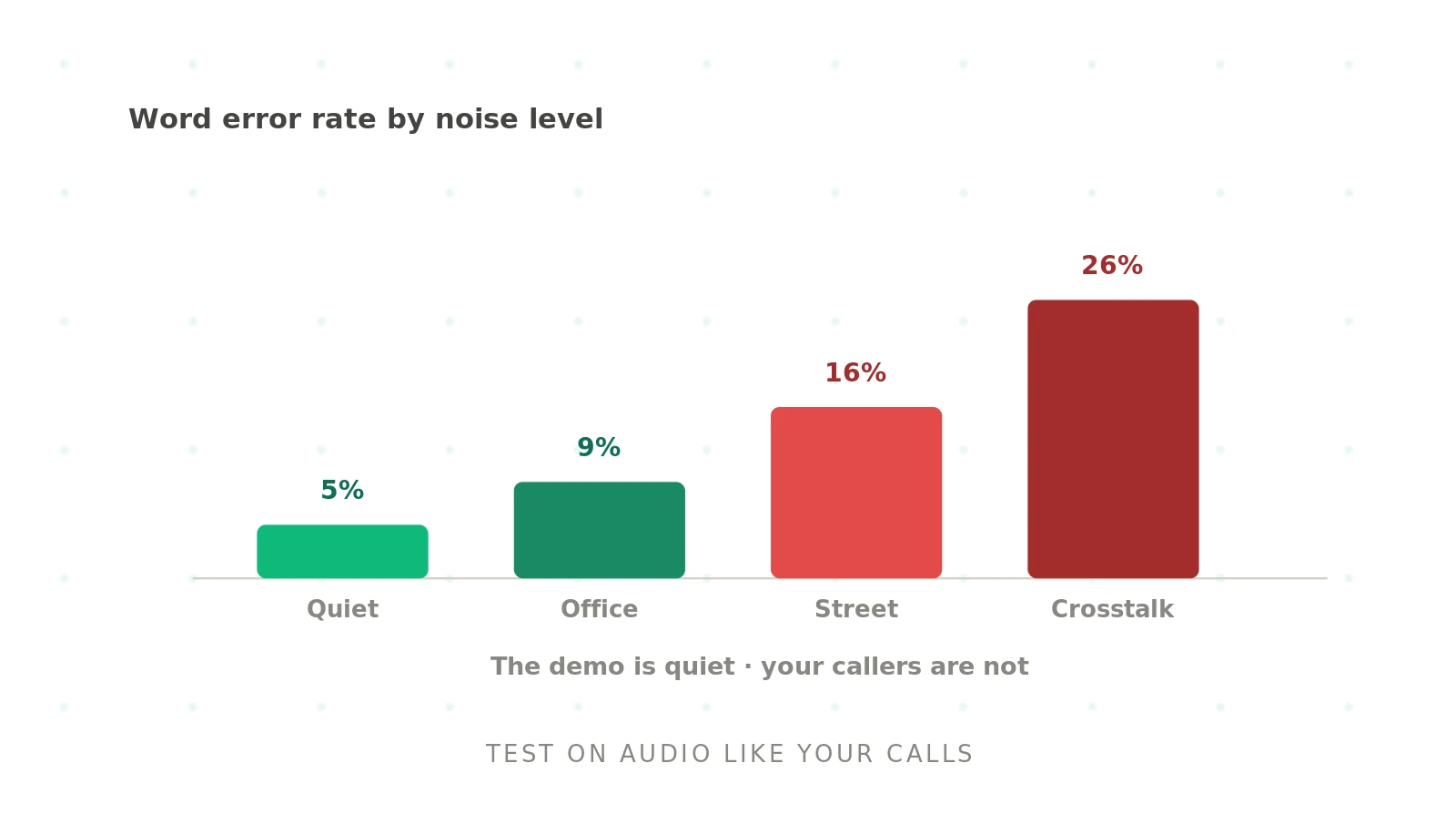
4. Measure by level — Report word error rate and task completion at each noise level.
5. Test endpointing under noise — Assert background sound does not falsely end the turn.
6. Fix and re-run — Add suppression or change speech-to-text, then re-test across all levels.
A worked example
An ordering agent tested flawlessly in the office and failed in the field. Split by condition, it held up in quiet audio but its error rate more than doubled on street noise, and traffic sounds were tripping its turn detection, cutting callers off. Clean-audio testing had shown none of this. Adding noise suppression and tuning voice-activity detection for noisy lines recovered most of the accuracy, verified by re-testing at each noise level.
Testing noise robustness with Evalgent
Evalgent tests under the conditions real callers create. Scenarios layer realistic noise — traffic, office, cafe, crosstalk — at several levels onto your tasks, so field failures surface before launch. Profiles vary caller voice and line quality alongside the noise. Metrics report word error rate and task completion at each noise level, and flag false turn-endings, with thresholds you set. Evaluations run the full noise matrix as batches of synthetic callers. Reviews let you replay a noisy call and hear exactly where it broke. This extends word error rate testing and the STT evaluation guide.
The bottom line
Noise robustness is what separates a demo that works from an agent that works in the field, and clean-audio testing never reveals it. Inject realistic noise at several levels, measure accuracy by level, and check that background sound never falsely ends a turn.
Frequently asked questions
What is noise robustness in a voice agent?
Noise robustness is a voice agent's ability to keep understanding callers and completing tasks when the audio carries background noise — traffic, an office, or crosstalk. It depends heavily on the speech-to-text layer and on noise suppression. An agent with poor noise robustness works in a quiet demo but mishears callers on real, noisy lines.
Why does background noise break my voice agent?
Because noise degrades the audio signal the whole pipeline relies on, starting with speech-to-text, which raises the error rate and produces wrong intents. Noise can also trip voice-activity detection, falsely ending the caller's turn. Without noise in your testing, none of this appears until real callers phone in from noisy environments.
How do you test a voice agent under noise?
Collect realistic background noise types, define several signal-to-noise levels, and layer them onto your normal scenarios. Run the same tasks at each level and measure word error rate and task completion per level. Also assert that background noise does not falsely end the caller's turn, and re-test after any change.
What is a good way to add noise to voice agent tests?
Use realistic backgrounds — traffic, office, cafe, crosstalk — layered onto call audio at controlled signal-to-noise levels, rather than a single clean or single noisy sample. Test a range from light to heavy noise so you can see where accuracy starts to degrade. Real telephony audio is more revealing than clean studio recordings.
How do you improve noise robustness?
Add noise suppression ahead of speech-to-text, choose a speech-to-text model that is robust to noise on your own audio, and tune voice-activity detection so background sound does not end turns. Add confirmation and re-prompts for misses. Then re-test across every noise level, since a fix can help one condition and not another.
Does noise affect endpointing?
Yes. Background noise can trip voice-activity detection into thinking the caller finished, ending the turn early, or keep it open when the caller has stopped. Both hurt the conversation. Test endpointing specifically under noise, asserting that traffic or office sound does not falsely end a turn, and tune the detection thresholds for noisy lines.
Why does my agent work in a demo but fail on real calls?
Because demos use clean, quiet audio and real calls do not. Callers phone from cars, streets, and offices, and that noise raises the error rate in ways clean-audio testing never shows. The gap between demo and production is usually noise and telephony. Testing under realistic noise closes it before launch.
What metrics measure noise robustness?
Track word error rate and task completion at each noise level, plus a false turn-ending rate that captures endpointing tripped by noise. The key is reporting per level, so you can see the point where accuracy degrades. Set a threshold for the noise conditions your callers actually face, and gate releases on it.
Related guides
How to test tool calling in AI voice agents
Tool calling fails when a voice agent picks the wrong function, fills bad arguments, or acts silently. Learn how to test tool calling and catch it.
How to reduce latency in AI voice agents
Voice agent latency is the pause before the agent replies. Learn what drives it, what a good target is, and how to reduce latency without losing quality.