Early Hangups and Abandonment: The Voice Agent Monitoring Signal Most Teams Miss
On this page
Most teams log how calls end. Few treat a caller hanging up as evidence about the agent. Every caller can give that reaction, and recording it is free. Read it as a signal, not as one percentage.
This post is for the team that built and runs its own agent. It covers monitoring the voice agent hangup rate live: segmentation by timing and cause, baselines, alerts and triage. For the metric definition, read how to measure abandonment rate. We link to it and do not repeat it.
Worked-example numbers are illustrative. Sources are dated as of November 23, 2026.
Why a hangup is a signal, not just a rate
One rate hides three events. The caller finished and left. The caller gave up. The caller never wanted this call. Each needs a different response, and the raw count cannot separate them.
Google's SRE book says monitoring should answer what is broken, and why. A moving hangup rate tells you "what." Timing, attribution and the agent's last action supply the "why."
A hangup needs no scorer, only a timestamp and an end event, so you can compute it on every call. Upstream signals include silence rate and going silent. This post starts at the hangup and works backward.
Who hung up: caller, agent or system
A call can end because the caller hung up, the agent ended it, or the system dropped it. A timeout, trunk fault or crash is the third kind. The three have different owners, so mixing them corrupts every later step.
What exists is whatever your telephony provider records. Take Twilio. Its Call resource defines "completed" as "The call was answered and has ended normally." That says the call finished. It does not say who ended it.
Twilio's call summary documentation describes "disconnected_by" as the "Direction of the SIP BYE received at Twilio signaling gateway." That is a direction on the signalling path, not a person's decision. The same page says "q850_cause" is "Not available for all edge types or all calls."
In the overview of RFC 3261, the party that hangs up first sends a BYE and the other side confirms it. I did not confirm that a BYE carries a reason, so treat the reason as unknown unless your provider documents one.
What stays undetermined:
- Agent-initiated ends. Log your own hangup action. I did not verify how a provider records an end triggered through its API.
- Carrier and network drops. These can look like caller hangups. Cross-check provider error and quality data.
- Blank or inconsistent fields. Count them. A share of calls with an unknown end party is itself a finding.
Keep an explicit "undetermined" value. Never fold it into "caller." The timestamp alignment guide explains why end times from two systems may disagree.
Hangup timing buckets: a worked distribution
Timing is the most useful cut. Six buckets fit most agents: before the greeting starts, during the greeting, first turn, mid-task, right after a failure, and after resolution.
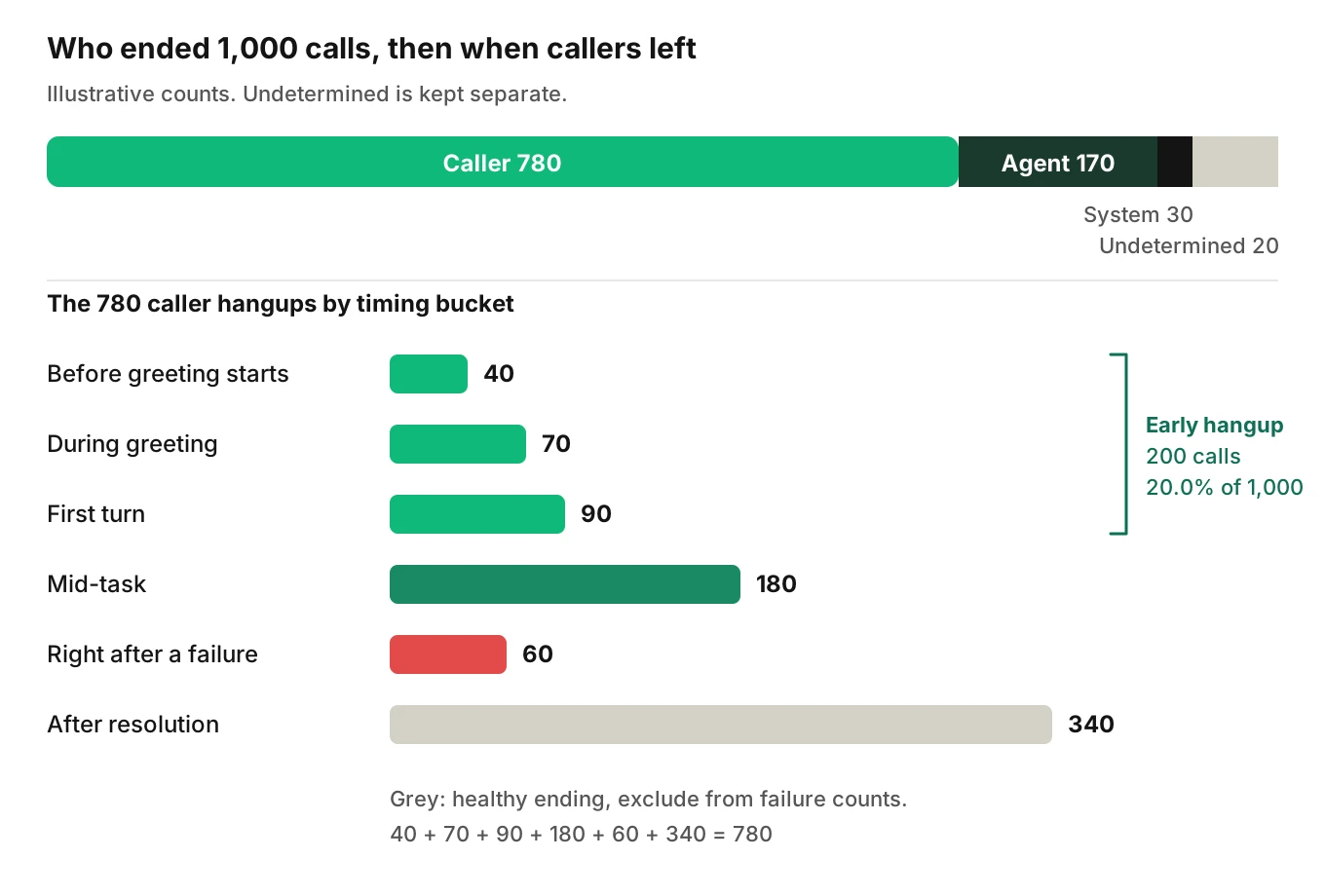
The table uses 1,000 answered calls, all illustrative. Who ended them: 780 callers, 170 the agent, 30 the system, 20 undetermined. That sums to 1,000. The 780 caller hangups split by timing as follows.
| Hangup timing bucket | Calls | Share of all 1,000 | Share of 780 caller hangups |
|---|---|---|---|
| Before the greeting starts | 40 | 4.0% | 5.1% |
| During the greeting | 70 | 7.0% | 9.0% |
| First turn | 90 | 9.0% | 11.5% |
| Mid-task | 180 | 18.0% | 23.1% |
| Right after a failure | 60 | 6.0% | 7.7% |
| After resolution | 340 | 34.0% | 43.6% |
| Total caller hangups | 780 | 78.0% | 100.0% |
The largest bucket is after resolution, a healthy ending. Lumping it with the rest overstates the problem.
Early hangup is a definition your team chooses
No universal threshold exists. The right cutoff depends on your greeting length, call type and callers. Write the definition down and keep it fixed, or trends mean nothing.
Here the team defines an early hangup as a caller ending the call before the first turn finishes. That is the first three buckets: 40 + 70 + 90 = 200 calls. It is 20.0% of all 1,000 calls and 25.6% of the 780 caller hangups.
A stricter team might count only calls ending before the greeting finishes. That is 110 calls, or 11.0%. Same calls, different number. Both are valid. Mixing them across weeks is not.
State when the clock starts, what event closes the window, and which end parties count. Store that with the metric.
Table: bucket, likely causes, first thing to check
Use this when a bucket grows. Causes are hypotheses, not conclusions.
| Hangup timing bucket | Likely causes | First thing to check |
|---|---|---|
| Before the greeting starts | Silent start; slow connect; wrong number; call unwanted | Gap from answer to first agent audio; rate by number and carrier |
| During the greeting | Greeting too long; caller expected a person; voicemail or screener | Greeting length against hangup point; split by entry channel |
| First turn | Slow reply; caller talked over; first question misunderstood | Response gap after first words; interruption events |
| Mid-task | Repeated question; long tool wait; too many steps; stalled transfer | Repeated prompts per call; tool wait before the hangup |
| Right after a failure | Failed step; tool error; apology loop; dead air after an error | The failing step in the trace; what the agent said next |
| After resolution | Normal end; caller leaves before the closing line | Confirm resolution is recorded; exclude from failure counts |
Hangups right after a specific agent behaviour
Buckets show when. A second cut shows what the agent just did. Find moments of a specific behaviour in traces and call data, then ask how often the caller left within a short window. Ten seconds is a starting point. Choose your own.
Tag a long silence, a repeated question, a transfer start, a required disclosure and a tool wait. The table is illustrative. The control row is ordinary turns with none of these.
| Agent behaviour | Events | Hangups within 10 s | Rate | 95% interval |
|---|---|---|---|---|
| Long silence | 70 | 21 | 30.0% | 20.5% to 41.5% |
| Repeated question | 90 | 18 | 20.0% | 13.0% to 29.4% |
| Tool wait | 150 | 27 | 18.0% | 12.7% to 24.9% |
| Transfer start | 60 | 9 | 15.0% | 8.1% to 26.1% |
| Disclosure line | 400 | 12 | 3.0% | 1.7% to 5.2% |
| Control: other turns | 6,000 | 120 | 2.0% | 1.7% to 2.4% |
Long silence and repeated questions stand well above the control. The disclosure line sits near it, so on this data it is not driving hangups. Rows overlap, so they are not additive.
Association is not cause. Treat rows as leads, then open traces. The turn-taking observability guide shows how to capture the events behind them.
Normal and abnormal hangups
Some hangups are not failures, and alerts should know it.
- Voicemail or screener. Twilio's answering machine detection docs list "machine_start," "human," "fax" and "unknown" results, and say "it's possible that AMD will not always return the right answer." Hanging up on a machine is expected. Hanging up on a person classed as a machine is not. See answering machine detection.
- Wrong number. The caller leaves in seconds. The agent did nothing wrong.
- Caller changes their mind. They heard the price or hours and left.
Tag these from captured intent. In the 200 early calls above, a review might find 90 likely benign, 60 near an agent behaviour, and 50 undetermined. That sums to 200. Calls you cannot classify are not benign by default. A shared tag list keeps these labels consistent between reviewers; see the call tagging taxonomy.
A spike of benign hangups should not page anyone. A spike near a behaviour should.
Baselines by hour, campaign, carrier and entry channel
An overall voice agent hangup rate moves for reasons unrelated to the agent. Baseline by what changes who is calling: hour and weekday, campaign or call purpose, carrier, and entry channel such as inbound, outbound, web or transfer-in.
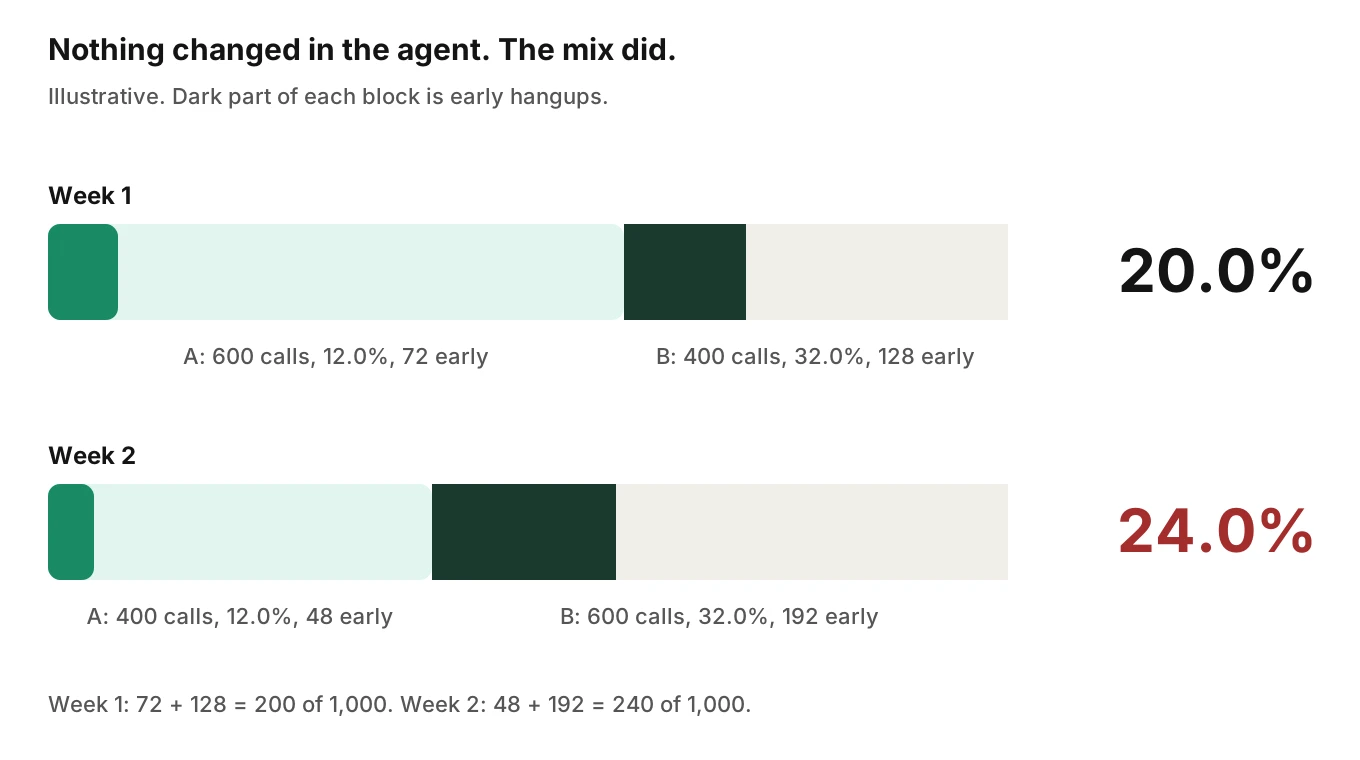
The mix effect bites hardest. Campaign A has a 12.0% early rate and campaign B has 32.0%. A week of 600 A calls and 400 B calls gives (600 x 0.12 + 400 x 0.32) / 1,000 = 20.0%. Next week the volumes flip to 400 and 600, each campaign unchanged. The overall rate becomes (400 x 0.12 + 600 x 0.32) / 1,000 = 24.0%.
The agent did not change, yet the rate rose four points. Per-campaign baselines stay flat. For control limits and persistence rules, see detecting metric drift.
Outbound-specific cases
Answer detection. The system must decide whether a person or a machine answered. Twilio says shorter timeouts produce more "unknown" results. A slow or wrong verdict shows up as a silent start, then a hangup before the greeting.
Recorded or synthetic voice. Some people may hang up on hearing one. Call data cannot show the reaction. It can show hangups bunched just after the greeting starts. Compare greeting variants.
Spam labels. This is a hypothesis, not a finding. If a number shows a warning on the callee's phone, more calls may end before the greeting. Call data cannot show the screen. Compare the before-greeting rate across numbers and carriers.
This is not legal advice, and this post makes no claim about what any rule requires for outbound calls. Take disclosure and calling-hours questions to counsel. See compliance monitoring for the event-level view.
Alert design for the voice agent hangup rate
Alert on change in the voice agent hangup rate against a slice baseline, never on a fixed number. A 20.0% early rate may be normal for one campaign and a crisis for another. Every alert needs four parts:
- A baseline for the slice. Hour, campaign or carrier.
- The sample size. "35.0% of 60 calls" is not "35.0% of 600."
- An interval. A 95% interval shows how much of the change could be chance.
- An owner. A person or team with a first check.
A practical interval is the Wilson score interval. The NIST handbook says that when failures or the sample are very small, normal-approximation limits "may not be accurate enough for some applications." The statsmodels documentation lists a Wilson method.
An example. This hour's baseline early rate is 20.0%. Now 21 of 60 calls ended early: 35.0%, with a Wilson interval of 24.2% to 47.6%. The interval sits above baseline, so look. Take 3 of 10 instead: 30.0%, interval 10.8% to 60.3%. That includes 20.0%, so the jump is not yet evidence. This example treats the baseline as fixed. A real one has its own error.
Add a minimum count. The SRE Workbook warns that "single requests can fail for a large number of ephemeral and uninteresting reasons" in low-traffic services. It also defines precision as the proportion of detected events that were significant, and recall as the proportion of significant events detected. Tune for both.
A failure-bucket spike may page. Drift after the greeting is usually a ticket. The alerting guide covers tiers and review loops.
Triage: from a spike to a cause
When the voice agent hangup rate spikes, work from cheap checks to costly ones.
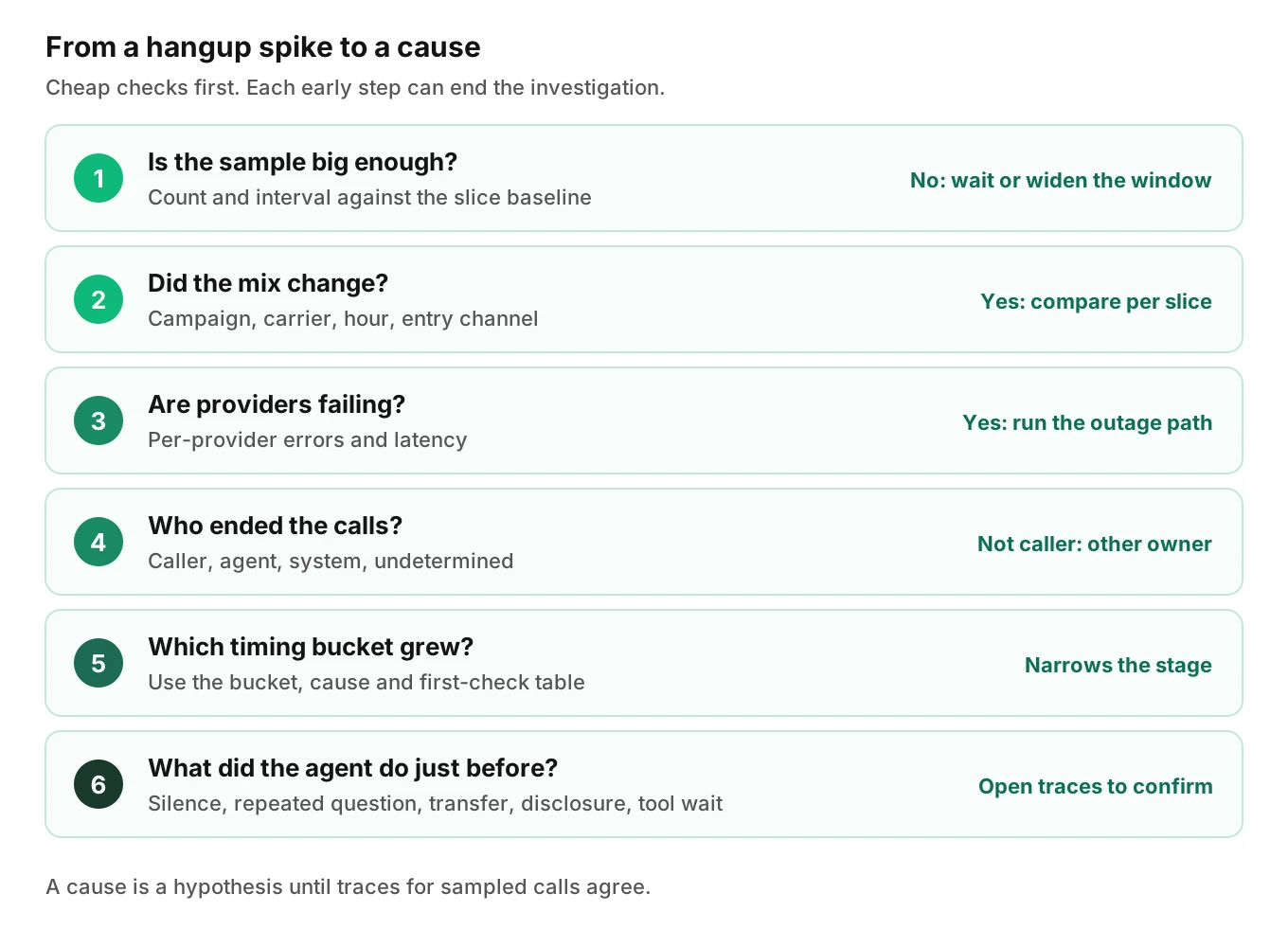
Check the sample and interval first. Check whether campaign, carrier or hour mix changed. Check provider errors next. Then check who ended the calls, which bucket grew, and which agent action came just before. Open a handful of traces to confirm.
Once confirmed, group related calls rather than fixing one at a time. Clustering failures into root causes covers that. If the spike becomes an incident, use the first 15 minutes runbook.
Avoiding false confidence
Small counts. A swing from 2 hangups to 4 is a doubling and also noise. Show counts, use intervals and set a minimum.
A provider outage that looks like a hangup spike. When speech or model providers fail, callers hear silence and leave. The hangup chart rises while the cause sits elsewhere. Check provider errors before touching a prompt. The provider outage detection guide shows what to compare.
One campaign skewing the mix. The earlier example moved the rate four points with no behaviour change. Report per slice and show the mix beside it.
How to monitor hangups as a live signal
1. Define the event - Write when the clock starts, which end parties count, and the window. Store the definition with the metric.
2. Record who ended the call - Capture caller, agent, system and undetermined as separate values from provider fields and your own hangup action.
3. Stamp the timing bucket - Assign each ended call to one of six buckets from your own timestamps.
4. Tag the preceding behaviour - Mark the last agent action before the end.
5. Baseline by slice - Compute the usual rate by hour, campaign, carrier and entry channel, with counts.
6. Alert on change with context - Include the count, interval, bucket and an owner.
7. Review outcomes - Each week, mark alerts as acted on, noise or missed, and adjust.
Where Evalgent fits
Hangup timing and end attribution come from your telephony and event data. Evalgent does not supply them. Monitor, which is live, flags problems with fix recommendations from traces and call data. Its findings include dead air, the agent interrupting the caller, the agent being slow to stop, unanswered callers, repeated tool calls and failed steps. Read them beside a bucket that grew.
Evalgent shows coverage gaps and marks calls undetermined where data cannot support a verdict. It never sits in the media path. Observe, which is launching, traces each failure to the step that caused it. To try this on your own call data, book a demo.
Frequently asked questions
What is a good voice agent hangup rate?
No universal rate exists, because it depends on call type, greeting, campaign and caller mix. Healthy endings such as a hangup after resolution count too. Track your own rate by timing bucket and slice, and judge change against your baseline, not another team's number.
How do I tell who hung up, the caller or the agent?
Keep your telephony provider's end fields and your own agent's hangup event. Twilio's disconnected_by records the direction of the SIP BYE at its gateway, not a person's decision. Where fields are blank or inconsistent, mark the call undetermined.
What counts as an early hangup?
That is your team's choice. One starting point is a caller ending the call before the first turn finishes. Another is before the greeting finishes. Pick one, write it down and keep it fixed, because changing the cutoff changes the rate without changing the agent.
Is every hangup a failure?
No. A caller who got an answer and left succeeded. A voicemail, a wrong number and a changed mind are not agent failures either. Segment by timing and intent so alerts focus on hangups after a failure or a poor agent behaviour.
How many calls do I need before alerting on a hangup spike?
There is no single number. Set a minimum count per slice and show an interval. A jump from 20.0% to 30.0% on 10 calls has a wide interval that includes the baseline. The same jump on several hundred calls is stronger evidence.
Can a provider outage look like a hangup spike?
Yes. When speech, model or voice providers fail, callers hear silence and hang up. Check per-provider errors and latency before changing prompts. If the rise lines up with provider errors across every campaign, suspect the outage first.
Why do callers hang up on outbound calls before the greeting?
Possible causes are a slow or wrong answer-detection verdict, a silent start, a wrong number, or an unwanted call. Spam labelling is a hypothesis you can test by comparing rates across numbers and carriers. Call data cannot show the callee's screen.
Does Evalgent measure hangup rate?
Hangup timing and end attribution come from your own telephony and event data. Evalgent's Monitor flags findings from traces and call data, such as dead air or failed steps, which help explain a bucket that grew. It does not detect hangups from audio.
The bottom line
The voice agent hangup rate is useful only when split by who ended the call, when it ended and what the agent did just before. Define early hangup yourself, baseline by slice, alert on change with counts and intervals, and keep the unknown labelled unknown.
Related Articles
How to automate voice agent testing: synthetic callers vs manual QA
Learn how ai test automation replaces manual QA for voice agents. Compare synthetic callers vs human testers, with a 5-step framework to scale without hiring.
Read more
AI Agent Testing vs Voice Agent Testing: What General Tools Miss for Voice
AI agent testing measures text outputs. Voice agent testing measures behaviour through an acoustic pipeline. Five failure categories general tools miss.
Read more