Turn-Taking Observability: VAD, Endpointing and Barge-In Events
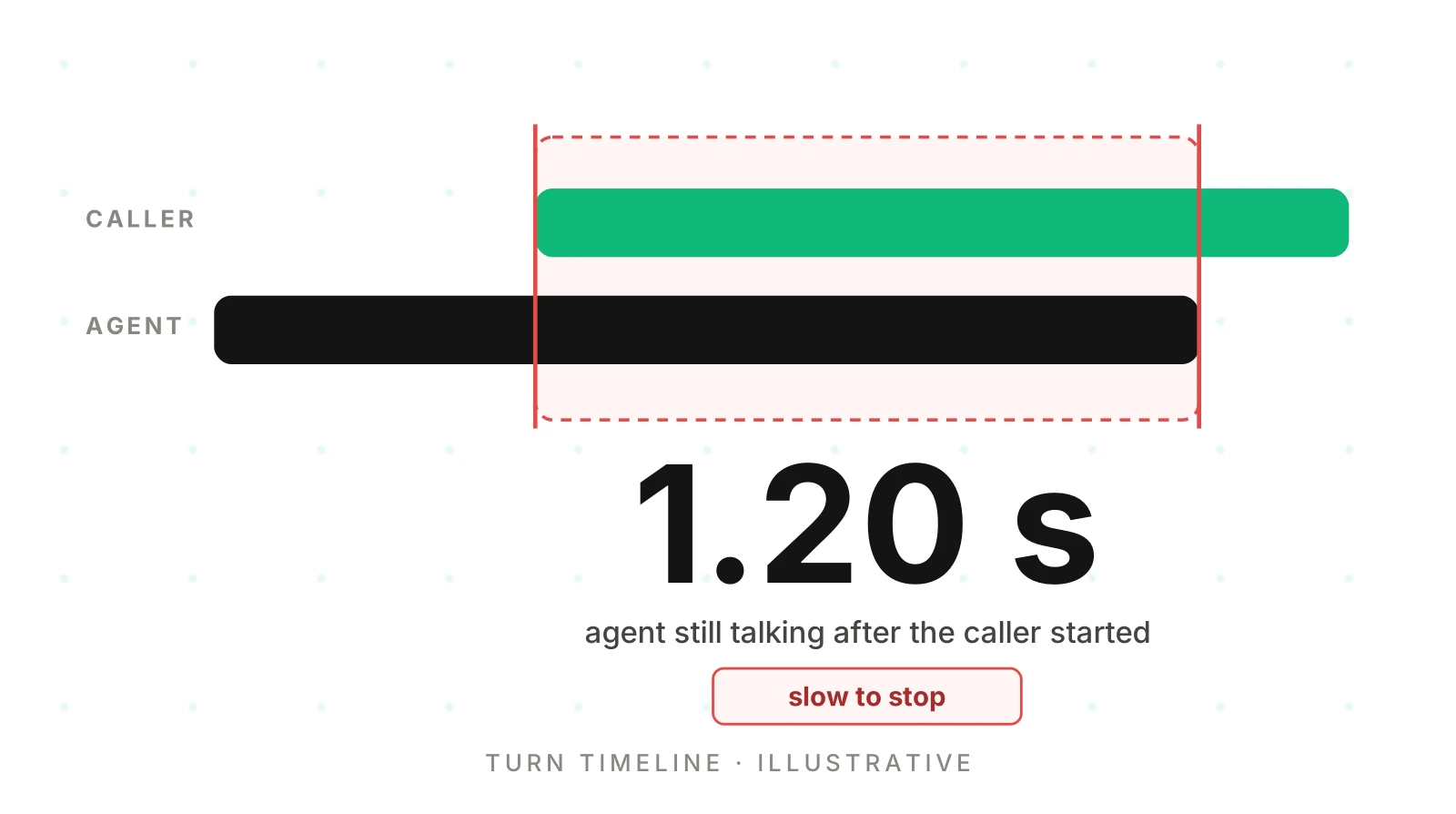
On this page
A caller says the agent "talks over me" or "goes quiet after I answer." You open the trace. It shows an LLM span, a TTS span and a transcript. It does not show who held the floor.
Turn taking observability starts from one fact: turn-taking is a chain of decisions made in milliseconds. If you do not record each one, you cannot tell a rude agent from a slow one. This is the observability view, as of November 21, 2026. It names framework events only where the docs list them.
What turn taking observability covers
This post is about recording and reading events. It is not about scoring a model or tuning a threshold.
Scoring models with stereo recordings is covered in voice model turn-taking evaluation. Labelled-audio tests are in VAD misfire and interruption detection. Rates are in interruption rate.
The angle here is different. Those posts judge turn-taking from audio you collect on purpose. This one asks what your live system should write down on every call, so a trace can answer "who spoke when" after the fact. Where the trace cannot answer, the label is "undetermined."
The eight things to capture for every turn
A turn is one stretch where one party holds the floor. Capture these eight items for each. Seven are events. One, the endpointing wait, is an interval you derive from two events.
| # | Capture | Type | What it tells you |
|---|---|---|---|
| 1 | Voice activity start (caller) | Event | When speech was first confirmed |
| 2 | Voice activity stop (caller) | Event | When silence was confirmed |
| 3 | End-of-turn decision | Event | When the system decided the turn was over |
| 4 | Endpointing wait | Interval | Stop (2) to decision (3). Time spent waiting to be sure |
| 5 | Agent speech start | Event | When the agent began to talk |
| 6 | Agent speech stop | Event | When the agent stopped, finished or cut off |
| 7 | Barge-in or interruption event | Event | Caller speech detected while the agent was speaking |
| 8 | TTS cancel or truncate | Event | The agent's output was cancelled and the record trimmed |
"Endpointing" is used for several things. Here, endpointing wait means the time from voice activity stop to the end-of-turn decision. Write that definition down once.
Items 1 and 2 are not item 3. VAD events only say sound started or stopped. The decision adds a judgement: is this pause a hold or a finish? Silero VAD's README describes chunks of 30 ms or more at 8,000 and 16,000 Hz. It says nothing about meaning.
Event names by framework
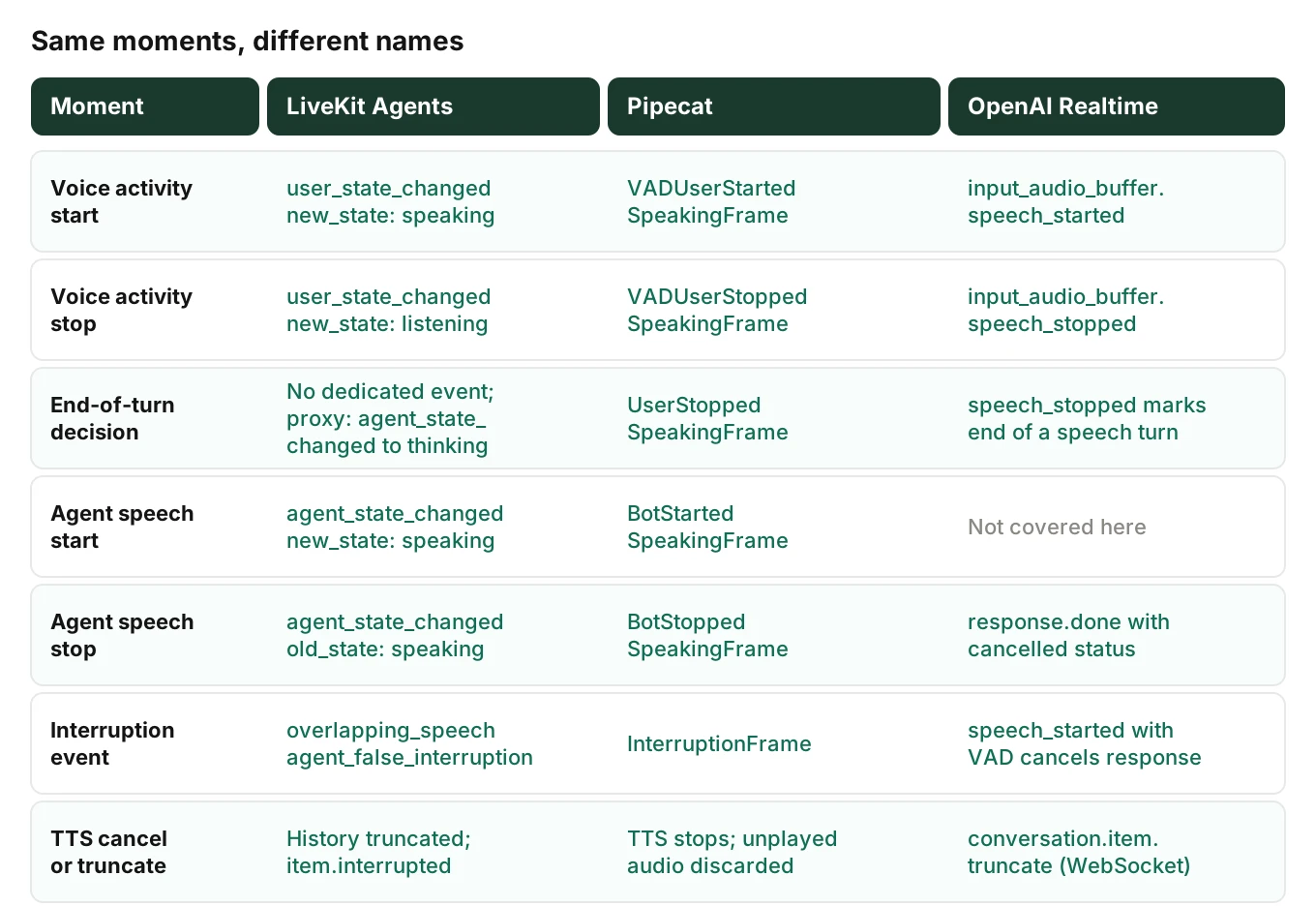
Event names are framework-specific. The moments are not. This map uses names from the docs I opened on November 21, 2026.
LiveKit Agents
The events reference lists user_state_changed with states "speaking", "listening" and "away". It says the change is driven by the VAD module on the user's audio. It lists agent_state_changed with "initializing", "idle", "listening", "thinking" and "speaking."
Three more events matter. overlapping_speech carries is_interruption, detected_at, overlap_started_at and detection_delay. agent_false_interruption carries resumed. conversation_item_added carries an item with an interrupted field.
There is no dedicated end-of-turn event on that page. The closest signal is the agent moving to "thinking." Treat it as a proxy and label it so. speech_created is not described as playout start, so do not use it as agent speech start.
The turns page says an interrupted agent stops and truncates its conversation history. It names user_interruption_detected as an interruption event, where the events reference names overlapping_speech. The two pages disagree. Check your installed version before you wire a logger.
The turn handling options list defaults that shape the timeline: min_delay 0.5 s (0.3 s with the audio turn detector), interruption min_duration 0.5 s, and false_interruption_timeout 2.0 s. For more, see LiveKit Agents observability and false interruptions in LiveKit.
Pipecat
Pipecat reports turn-taking as frames. The system frames reference lists VADUserStartedSpeakingFrame ("VAD confirmed that speech has started") and VADUserStoppedSpeakingFrame. It lists UserStartedSpeakingFrame ("Indicates that a user turn has begun") and UserStoppedSpeakingFrame ("Marks the end of a user turn"). The output transport emits BotStartedSpeakingFrame and BotStoppedSpeakingFrame.
The speech input guide explains the layering. VAD frames are "inputs to the turn strategies, not the final turn decisions." The turn strategies then emit the user frames.
The user turn strategies page names stop strategies such as SpeechTimeoutUserTurnStopStrategy and TurnAnalyzerUserTurnStopStrategy. Record which one ran, because it changes what an endpointing wait means.
When interruptions are on, the interruptions guide says the user aggregator sends an InterruptionFrame upstream and downstream. The LLM completion is cancelled. TTS synthesis stops. The output transport discards audio not yet played. Only spoken text stays in context. That is your TTS cancel and truncate event. See Pipecat interruption strategy for settings, and Pipecat observability for tracing.
OpenAI Realtime
The VAD guide describes server_vad, which chunks audio by silence, and semantic_vad, which uses a classifier on the user's words. It lists input_audio_buffer.speech_started and input_audio_buffer.speech_stopped as the start and end of a speech turn. Server VAD takes silence_duration_ms. Semantic VAD takes eagerness.
The conversations guide covers truncation. Over WebRTC or SIP, "the server will automatically truncate unplayed audio when there's a user interruption." Over WebSockets, the client must stop playback and send conversation.item.truncate with the played duration as audio_end_ms. The server then sends response.done with a cancelled status.
On a WebSocket, truncation is your code. With no truncate event in the trace, you cannot say what the model believes it said.
Some STT services emit turn events. Deepgram's Flux configuration page covers EndOfTurn, EagerEndOfTurn and TurnResumed. If you use it, log those as the decision source.
Stamp events on one turn span, then derive intervals
Store moments as span events and durations as derived values. Barge-in events and voice activity events are all moments. The OpenTelemetry traces documentation defines a span event as "a structured log message (or annotation) on a Span," used for "a meaningful, singular point in time." It advises using an event when the timestamp is meaningful. Use attributes when it is not.
Each capture has a meaningful timestamp, so each is an event. Intervals come from subtraction, so you can change a definition later without losing data. For the span layout, see the OpenTelemetry trace and span model for voice agents. For fields beyond turn-taking, see what to log on every call.
Derive these per turn:
| Interval | Computed as |
|---|---|
| Caller speech | Stop (2) minus start (1) |
| Endpointing wait | Decision (3) minus stop (2) |
| Decision to speech | Agent start (5) minus decision (3) |
| Response gap | Agent start (5) minus stop (2) |
| Detection delay | Interruption (7) minus caller start during agent speech |
| Stop lag | Agent stop (6) minus caller start during agent speech |
Tag every turn with the detector or strategy that ran, the config in force and the stack version. Without them, timelines cannot be compared across releases. The root cause analysis post explains why.
A worked turn timeline (illustrative)
This timeline is invented to show the arithmetic. It is not a real call and not a measurement. Times are seconds from call start.
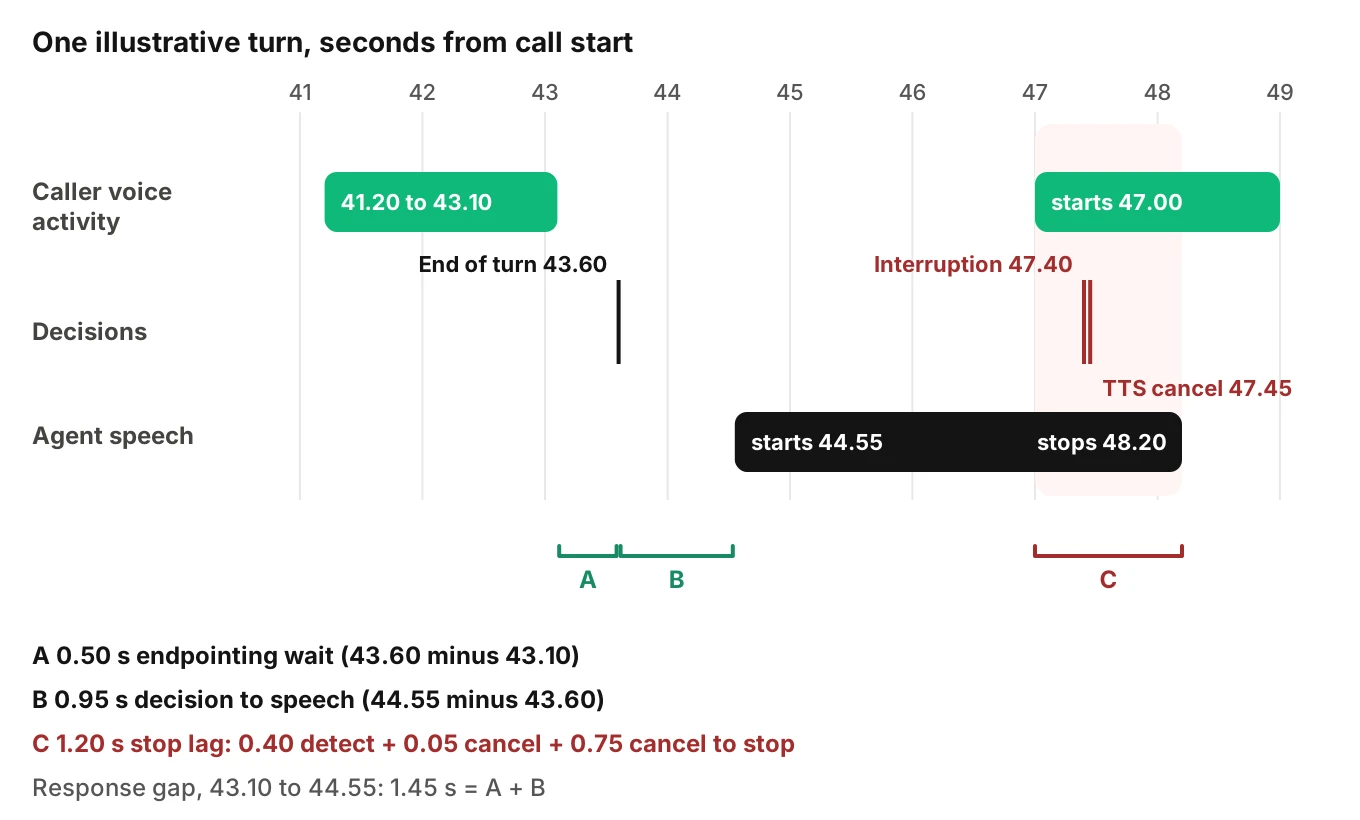
| Time (s) | Event | Capture |
|---|---|---|
| 41.20 | Caller voice activity start | 1 |
| 43.10 | Caller voice activity stop | 2 |
| 43.60 | End-of-turn decision | 3 |
| 44.55 | Agent speech start | 5 |
| 47.00 | Caller voice activity start, agent still speaking | 1 |
| 47.40 | Interruption event | 7 |
| 47.45 | TTS cancel issued | 8 |
| 48.20 | Agent speech stop | 6 |
The arithmetic:
- Caller speech: 43.10 minus 41.20 is 1.90 s.
- Endpointing wait: 43.60 minus 43.10 is 0.50 s.
- Decision to speech: 44.55 minus 43.60 is 0.95 s.
- Response gap: 44.55 minus 43.10 is 1.45 s, which is 0.50 plus 0.95.
- Detection delay: 47.40 minus 47.00 is 0.40 s.
- Stop lag: 48.20 minus 47.00 is 1.20 s.
The stop lag splits into three parts: 0.40 s to detect, 0.05 s to issue the cancel, and 0.75 s from cancel to stop. Those add to 1.20 s. The 0.75 s is the part to look at. It is the time between "cancel issued" and "agent speech stop."
The response gap is what a caller feels, but only the 0.50 s wait is turn-taking logic. The other 0.95 s is generation. One blended latency hides that split.
How to read a turn timeline in a trace
Follow this order on any call.
1. Line up the lanes - Put caller activity, decision events and agent speech on one time axis. Confirm all events share one clock before you compare them.
2. Mark each floor change - For every turn, note who spoke, who spoke next, and the gap or overlap between them.
3. Split the response gap - Separate the endpointing wait from decision-to-speech. A long gap in one points to a different cause than a long gap in the other.
4. Find the overlaps - Look for places where caller and agent lanes are both active. Ask which one started first.
5. Follow each interruption to its cancel - From the interruption event, trace the TTS cancel, the agent stop and the history update. Note any step that is missing.
6. Label what the trace cannot settle - Write "undetermined" next to any call where the data is blind, instead of picking the likeliest cause.
For a longer routine, see how to root-cause a bad voice agent call.
Three findings a turn timeline shows
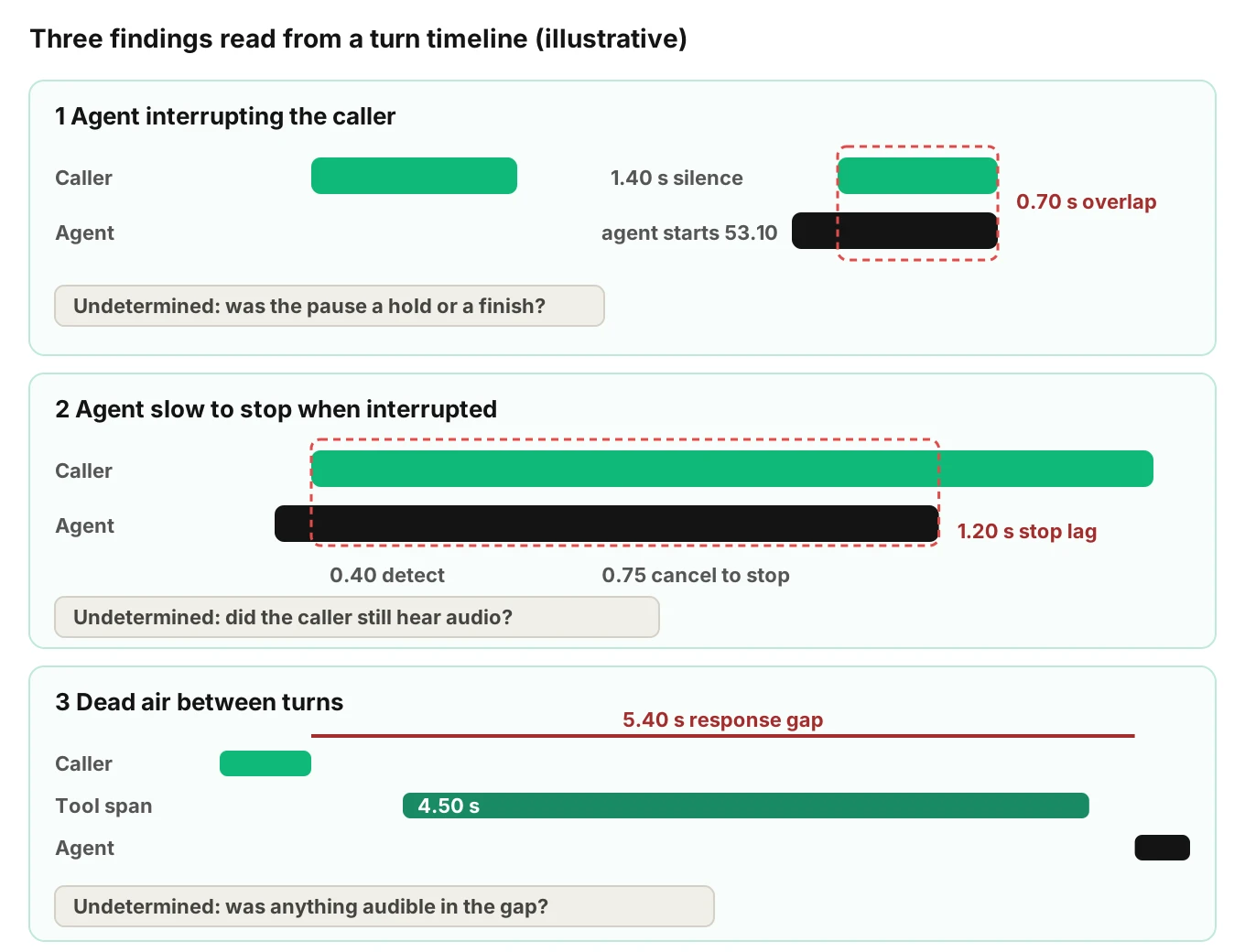
Each finding is read from traces and call data, with a fix to try in your own stack. The numbers are illustrative.
The agent interrupting the caller
What the trace shows. The agent speech start falls between two bursts of caller activity. The second burst starts shortly after the agent began. In an illustrative case, the caller speaks 51.00 to 51.90, the decision lands at 52.40, the agent starts at 53.10, and the caller resumes at 53.30. The caller was silent for 1.40 s, then talked over a 0.70 s overlap that ended with the agent stopping at 54.00.
What to check. Was the endpointing wait short for this turn? Which detector decided? Did a speculative response start early? See pause handling for hold versus finish.
Fix to try. Lengthen the wait for the turn types that failed, or move to a model-based end-of-turn method.
The agent slow to stop when interrupted
What the trace shows. The stop lag is long. In the worked example it is 1.20 s, and 0.75 s of it sits between cancel issued and agent stop. The detection step was quick. The stop was not.
What to check. Does your logged agent stop come from the framework or from the telephony edge? On OpenAI over WebSockets, your client must stop playback itself. A gap between cancel and stop often points at a buffer you control. Also check whether a minimum-speech setting delayed detection.
Fix to try. Find the buffer between your TTS output and the line, and clear it on interruption.
Dead air between turns
What the trace shows. A long response gap, with the agent in a non-speaking state throughout. In the illustration, the caller stops at 58.00, the decision lands at 58.50, and the agent starts at 63.40. The gap is 5.40 s. Of it, 0.50 s is the wait. The rest is 0.10 s of handoff, a 4.50 s tool span from 58.60 to 63.10, and 0.30 s before speech: 0.10 plus 4.50 plus 0.30 is 4.90 s, and 4.90 plus 0.50 is 5.40.
What to check. The span breakdown shows where the time went. Here it was a tool call. If the wait were long, look at the detector. For stalls, see going silent and silence rate.
Fix to try. Add a spoken holding line before slow tool calls, and set a timeout on the tool. If callers interrupt during the tool call, read interrupted tool calls first, because a barge-in during a write leaves the outcome unknown.
What a trace cannot settle: undetermined
In turn taking observability, timestamps give order and spacing, not what was in the audio. Mark these "undetermined" unless another source settles them.
| Question | Why the events cannot settle it |
|---|---|
| Did the caller hear the agent stop when the log says it stopped? | The log records a server-side moment. Audio can still be queued at the telephony edge. |
| Was a voice activity start real speech, or echo or noise? | VAD fires on sound. It does not say whose sound. See echo and self-interruption. |
| Was a pause a hold or a finished turn? | Timing alone does not show intent. The words and the audio do. |
| Did the agent play a filler during the gap? | Only if an output event records it. |
| Do event times match the recording? | Only if the clocks were aligned. See timestamps and clock sync. |
A recording is a separate source, and linking recordings to traces is a general engineering task. The trace says what the system believed. The recording says what happened on the line.
Gotchas that distort turn taking observability
- Confirmation windows shift the event time. Pipecat's
start_secsis "how long a user must speak before VAD confirms speech has started." The frame arrives after confirmation, so true onset is earlier. The frame field is a duration, not a timestamp. - Chunk size sets resolution. Silero VAD's README gives chunks of 30 ms or more. By my reasoning, VAD timestamps cannot be finer than your analyzer's chunk.
- Event time is not receipt time. If you stamp events when your logger receives them, queues add error. Prefer the event's own timestamp where the docs list one, as LiveKit does with
created_at. LiveKit's events page gives no latency for thespeakingtransition, and names can change between versions, so pin and log yours.
Where Evalgent fits
Evalgent is a testing, evaluation and monitoring platform for voice agents. Evalgent Observe, which is launching, ingests OpenTelemetry data from any stack. It traces each failure to the step or handoff that caused it and clusters failures into root causes. For turn taking observability, it reports findings such as the agent interrupting the caller, the agent being slow to stop, and dead air, each found from traces and call data with a fix suggestion. Where the data cannot settle a verdict, it says "undetermined" and shows the coverage gap. Evalgent never sits in the media path.
Testing is the other half. To produce these events on purpose, Evalgent test callers carry a profile with seven parameters, including interruption level and response delay. Evalgent measures call timestamps such as endpointing and first audio on test calls, and Reviews replay a test call with audio and transcript together. You can book a demo to see it on your agent.
Frequently asked questions
What is turn taking observability?
Turn taking observability is recording the timestamped events that show who held the floor on a call. That means voice activity start and stop, the end-of-turn decision, agent speech start and stop, and barge-in with its cancel. With them, a trace can show interruptions, slow stops and dead air.
Which events should I capture for each turn?
Capture caller voice activity start and stop, the end-of-turn decision, agent speech start and stop, any interruption event, and the TTS cancel or truncate. Derive endpointing wait and stop lag by subtraction. Record the detector, config and version too.
What is the difference between VAD events and end-of-turn events?
VAD events say sound started or stopped. An end-of-turn event says the system judged the caller finished. A pause can end VAD speech without ending the turn. Pipecat shows this layering: VAD frames feed turn strategies, which then emit the user turn frames. Log both so you can see the wait between them.
How can a trace show the agent interrupted the caller?
Look for agent speech start between two bursts of caller activity, with the second burst starting soon after. The overlap and the gap before it are in the timestamps. Whether the caller had finished their thought is undetermined from timing alone. The words or the audio would settle it.
How do I see that an agent was slow to stop after a barge-in?
Subtract the caller's voice activity start from the agent speech stop. Split that lag into detection delay, cancel time and cancel-to-stop time. A long last part often points to buffered audio. Whether the caller heard it needs the recording, so the trace alone leaves it undetermined.
What does dead air between turns look like in a trace?
It shows as a long gap between the caller's voice activity stop and the agent speech start, with the agent not speaking. Split it into endpointing wait and decision-to-speech. The span breakdown shows whether a slow tool, model or TTS step caused it.
What can a trace not tell me about turn-taking?
A trace cannot say whether the caller heard the agent stop, whether a voice activity start was speech or echo, or whether a pause was a hold. It also cannot say whether log times match the recording unless clocks were aligned. Label those cases undetermined rather than guessing.
Do LiveKit, Pipecat and OpenAI Realtime use the same event names?
No. LiveKit uses user_state_changed and agent_state_changed. Pipecat uses frames such as VADUserStartedSpeakingFrame and InterruptionFrame. OpenAI Realtime uses input_audio_buffer.speech_started and conversation.item.truncate. The moments match across them, but names and layers differ, so map your own capture list to each.
The bottom line
Turn taking observability comes down to recording eight moments per turn and reading them on one timeline, so interruptions, slow stops and dead air show up as intervals you can subtract. Where the timestamps cannot say whether the caller heard it or meant it, write "undetermined" and bring in the recording.
Related Articles
How to automate voice agent testing: synthetic callers vs manual QA
Learn how ai test automation replaces manual QA for voice agents. Compare synthetic callers vs human testers, with a 5-step framework to scale without hiring.
Read more
AI Agent Testing vs Voice Agent Testing: What General Tools Miss for Voice
AI agent testing measures text outputs. Voice agent testing measures behaviour through an acoustic pipeline. Five failure categories general tools miss.
Read more