How to Link Call Recordings to Traces: Audio Offsets and Stereo Channels
On this page
A reviewer opens a trace. One span says the order lookup took 1.7 seconds. They want to hear what the caller said just before it. The trace holds no audio, and the recording holds no spans.
This post is the join between the two. It is vendor-neutral and written for engineers who already keep recordings. Capture is covered elsewhere. See call recording metrics for LiveKit and Pipecat for where to record and which metrics to compute. See call ID correlation for joining provider IDs, and how to trace a call end to end for context across hops.
To link call recording to trace data reliably, you need four things: stored IDs, a start time per leg, a channel map and safe storage. Provider docs were checked on November 21, 2026. Worked-example numbers are illustrative.
Recording offset: the number of seconds from the first sample of a recording file to a moment on the wall clock.
What you are joining: a trace and an audio file
OpenTelemetry's trace documentation lists start and end timestamps among the data a span carries. Its span context carries the trace ID. The trace API specification says time values can go up to nanosecond precision. So a span knows exactly when it ran, on the clock of the host that made it.
A recording file knows none of that. It starts at its own zero. Its provider gives it a separate ID and a start time of its own. Three things are missing between the two: a shared ID, a shared clock and a shared zero.
| Item | What it has | What it lacks |
|---|---|---|
| Trace | Trace ID, span start and end times, attributes | Any audio |
| Recording file | Audio samples, a duration | Your trace ID, your wall clock |
| Provider recording record | Provider recording ID, a start time, a channel count | Your call ID, a precise start time |
The provider fields differ, so read them closely.
- Twilio. The Recording resource gives
start_time"in GMT and in RFC 2822 format". The recording'scall_sid"will always refer to the parent leg of a two-leg call". The status callback addsRecordingStartTime,RecordingChannelsandRecordingTrack. - LiveKit. The Egress API reference lists
egress_idandroom_nameon the egress, andstarted_at("When the file recording started") on each file. The page types it asint64and does not state a unit. Test it before you trust it. - Pipecat. The AudioBufferProcessor fires
on_recording_started. The docs list no start timestamp, so take your own clock reading in that handler.
RFC 2822 gives the clock time as hour, minute and optional second, and its grammar has no fractional seconds. A start time in that format is good to the second, not the millisecond. That matters in step two below.
Store the recording with the call ID and trace ID
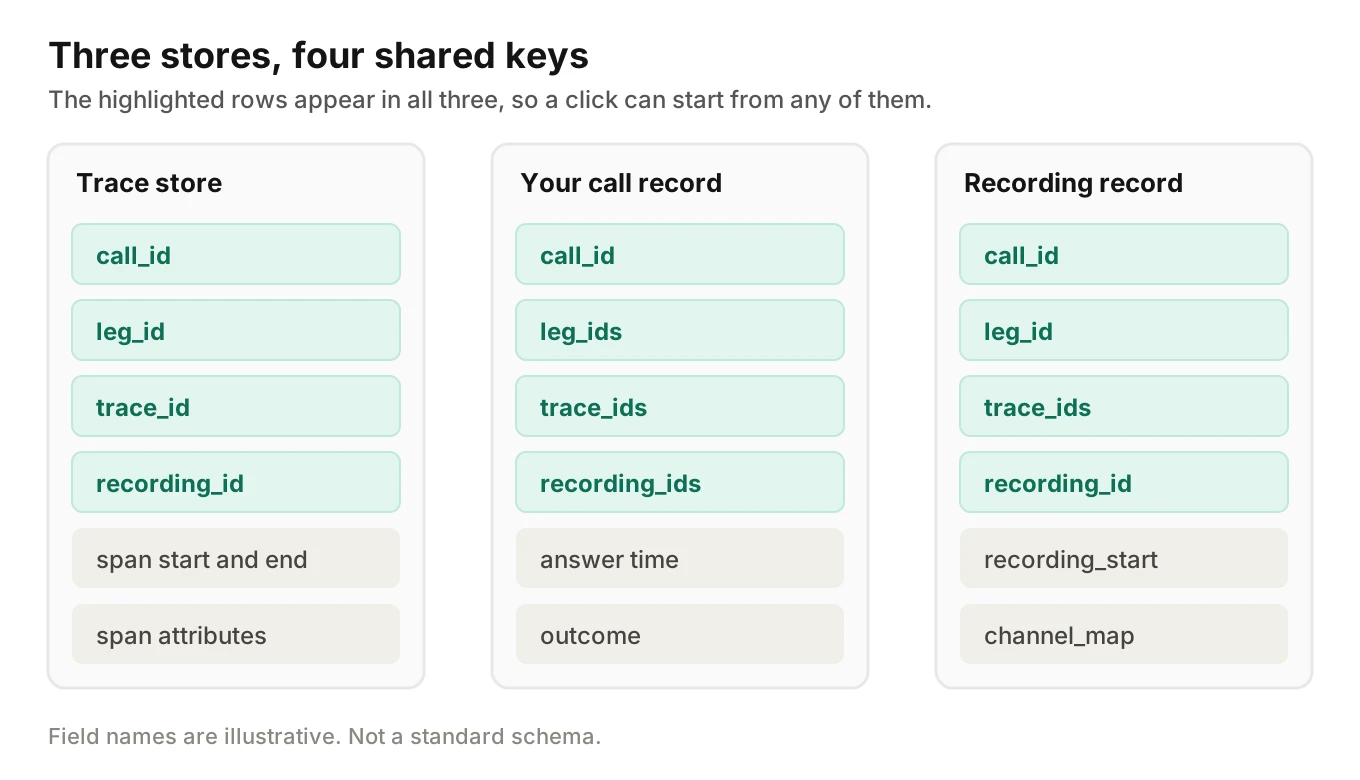
Make one record per recording file, in your own database beside the call record. Your call logging schema may have an artifacts table already. Add a call recording trace ID pair and these fields.
recording_id:       rec_8f2a            // your own ID
call_id:            call_01h9           // your canonical call ID
leg_id:             leg_2               // one per call leg
trace_ids:          [4bf92f35...]       // every trace for this call
provider:           twilio
provider_ref:       RE...               // provider's recording ID
recording_start:    2026-11-20T14:02:03.200Z   // best known UTC start
start_source:       own_clock           // or provider_reported
channel_map:        {"1": "caller", "2": "agent"}
codec:              pcmu
sample_rate_hz:     8000
object_key:         calls/call_01h9/leg_2.wav
Field names here are ours, not a standard.
Link in both directions
Some reviewers start from a bad call in a trace view and need audio. Others start from a complaint with a file and need the trace. So write the link both ways.
- Record to trace. Keep
trace_idson the recording record. Use a list. A transfer or retry can create more than one trace for a call. - Trace to record. Set the recording ID and leg ID as attributes on the root span. The OpenTelemetry docs describe attributes as "key-value pairs that contain metadata" that annotate a span.
Do not use a span link here. The same docs say links associate one span with others, "implying a causal relationship". A recording is not a span. Links are for joining traces, as in the end-to-end tracing post. For the span vocabulary, see our span model for voice agents.
Keep names opaque
Build the object key from your own opaque IDs, as above. Never put a phone number, name or account number in a file name or span attribute. Names leak into logs, dashboards and URLs.
Turn a span time into a position in the audio
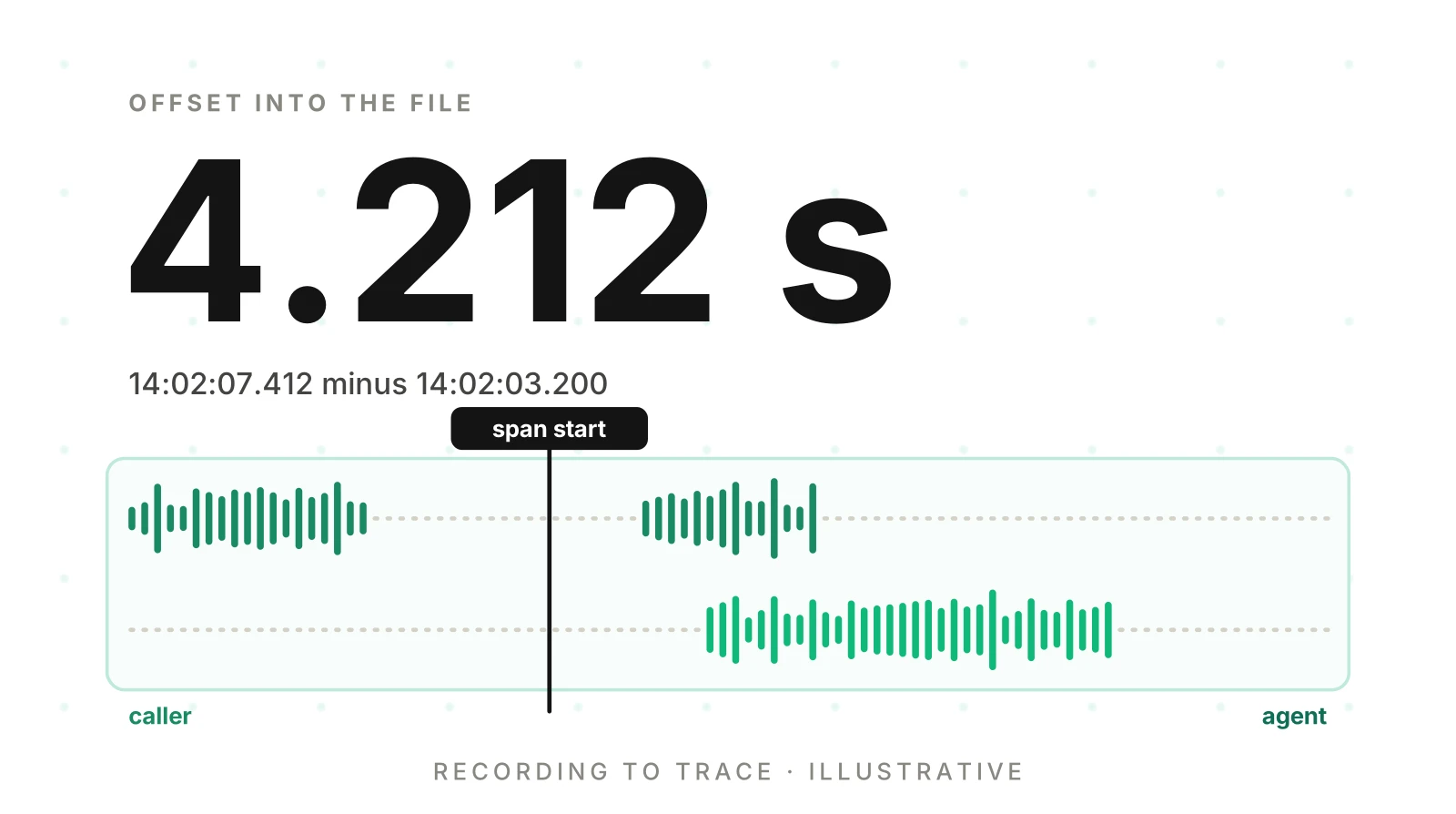
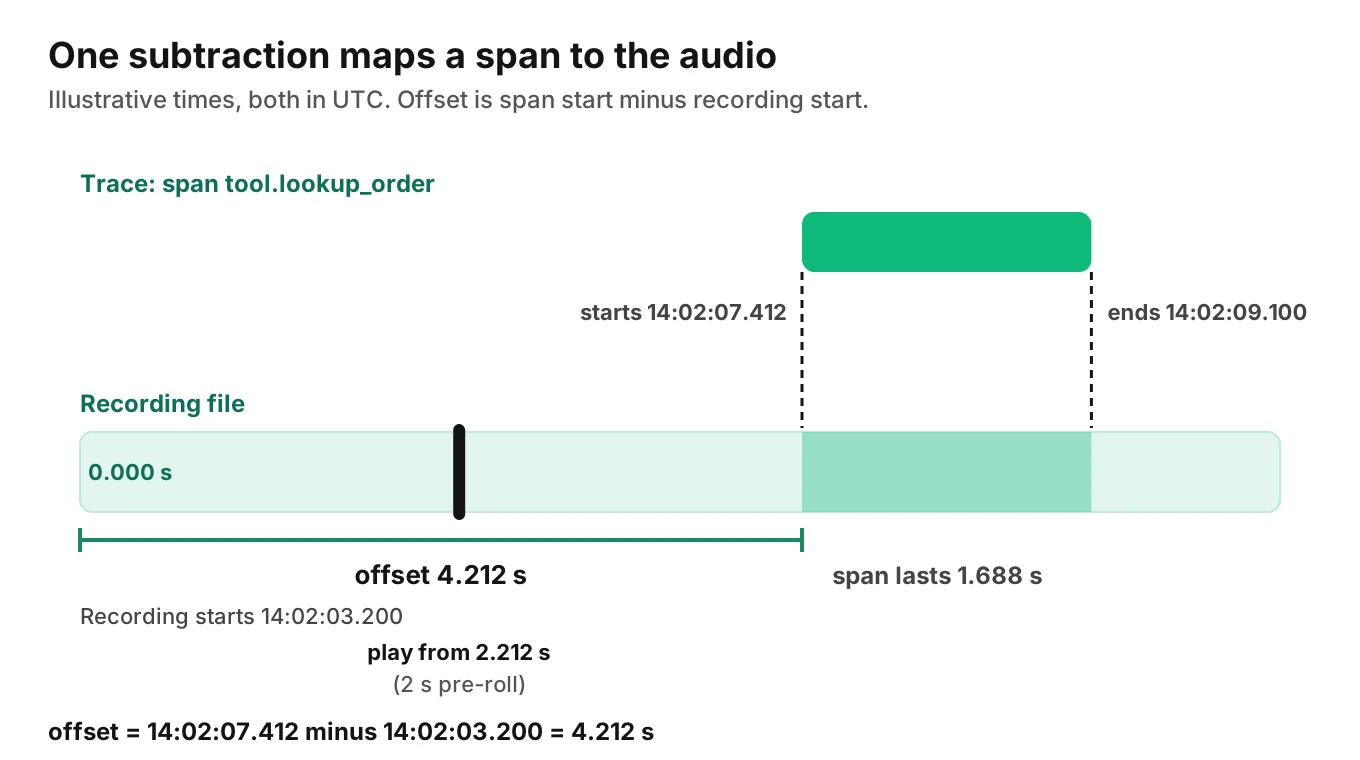
The audio offset is one subtraction.
offset = span start time - recording start time
Use UTC for both, with milliseconds. Here is an illustrative example. A recording file starts at 14:02:03.200. A span named tool.lookup_order starts at 14:02:07.412 and ends at 14:02:09.100.
| Moment | Wall clock (UTC) | Offset in the file |
|---|---|---|
| Recording starts | 14:02:03.200 | 0.000 s |
| Span starts | 14:02:07.412 | 4.212 s |
| Span ends | 14:02:09.100 | 5.900 s |
| Span duration | 1.688 s |
The span sits 4.212 seconds into the file. At an 8,000 Hz sample rate that is sample 33,696 (4.212 x 8,000). At 16,000 Hz it is sample 67,392. Store offsets in milliseconds and convert to samples only when you know the file's rate.
Start playback a little early. A reviewer needs the caller's last sentence, not the span's first microsecond. Two seconds of pre-roll is a sensible default. Clamp the start at zero.
from datetime import datetime

def audio_offset_ms(span_start_iso: str, recording_start_iso: str) -> int:
    span = datetime.fromisoformat(span_start_iso)
    start = datetime.fromisoformat(recording_start_iso)
    return round((span - start).total_seconds() * 1000)

def sample_index(offset_ms: int, sample_rate_hz: int) -> int:
    return round(offset_ms * sample_rate_hz / 1000)

print(audio_offset_ms("2026-11-20T14:02:07.412+00:00",
                      "2026-11-20T14:02:03.200+00:00"))
The call prints 4212, the offset in milliseconds from the table above.
One offset per leg
A call with a transfer has more than one recording. Each file has its own zero. Use the offset for the leg the span belongs to, not the first file.
Illustrative numbers: leg one starts recording at 14:02:03.200. Leg two starts at 14:03:41.750. A span on leg two starts at 14:03:45.000. The per-leg offset against leg two is 3.250 seconds. Against leg one it would be 101.800 seconds. The click lands in the wrong place and nobody knows why.
Twilio's docs say a recording's call_sid points at the parent leg of a two-leg call. So do not rely on it to name the leg. Keep your own leg_id on the record, and put the same leg ID on each span. The call ID post explains how to carry it.
How wrong can the offset be?
Four things move it: coarse start times (up to a second in RFC 2822 format), clock skew between hosts, recorders that join late, and drift over a long call. You can measure the first three with one test. Log the moment your code sends its first agent audio, on your own clock. Open the file and note where the first agent sound appears. Then:
implied start = logged first-audio time - heard position
Illustrative: the log says first audio at 14:02:04.350. You hear it at 1.450 seconds. The implied start is 14:02:02.900. The stored start was 14:02:03.200, so the file starts 300 ms earlier than recorded. Store the implied start. The result is good to tens of milliseconds, because your log marks when audio was sent, not when it played.
For drift, check the first and last minutes of a long call separately. The call recording metrics post shows a cross-correlation method for that. Keep NTP or chrony running on every host you control.
Mono or stereo: one channel per party
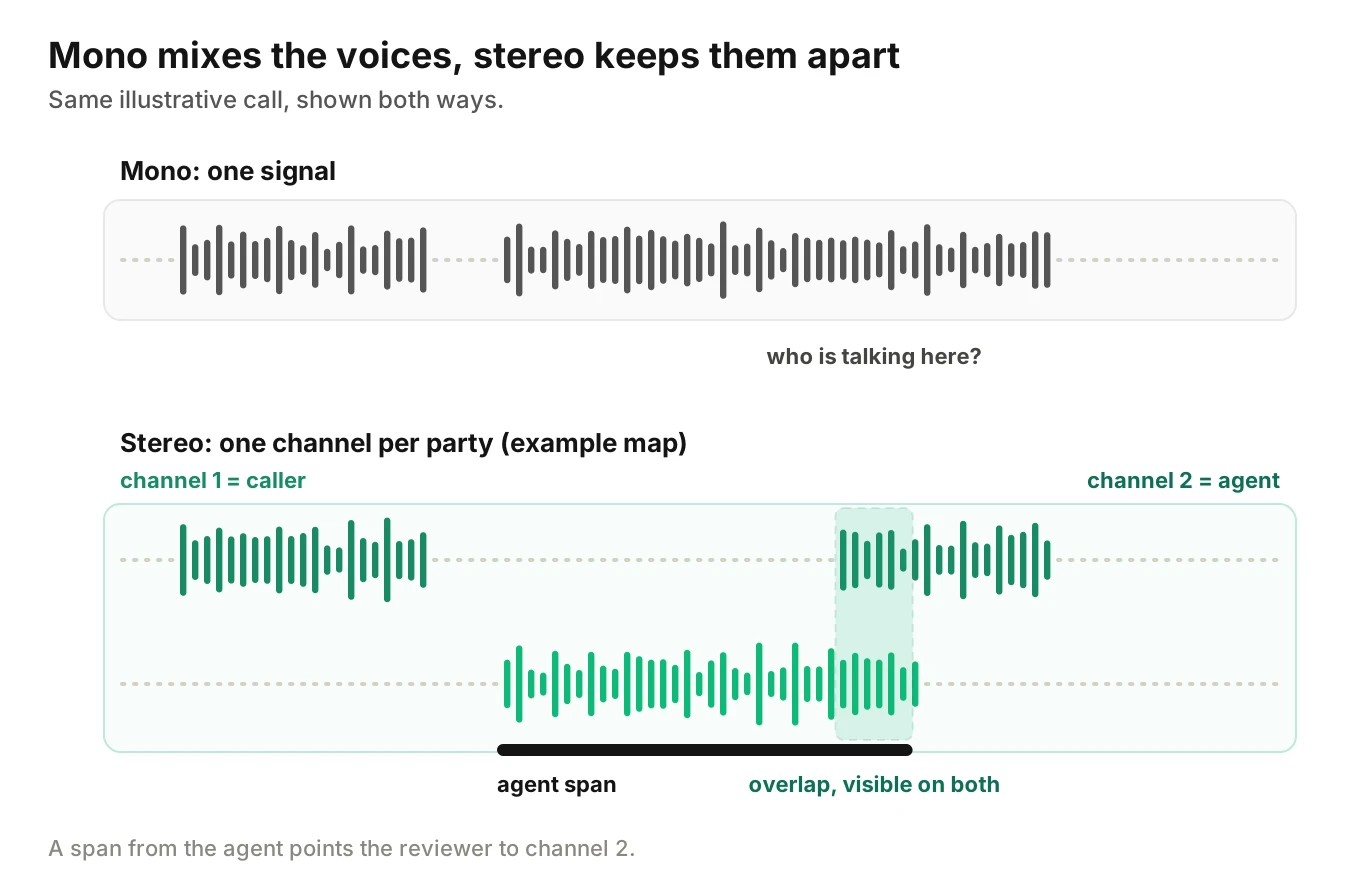
A mono file mixes everyone into one signal. A stereo file keeps two. In a stereo call recording of two parties, each party gets a channel. The mono vs stereo call recording choice changes what a reviewer can do.
| Mono | Stereo, one party per channel | |
|---|---|---|
| Who said it | Guess from the voice | Read from the channel |
| Overlapping speech | Blurred into one signal | Visible and audible on both sides |
| Mute one side | Not possible | Easy |
| Raw size before compression | 1x | 2x |
| Parties supported | Any number, mixed | Two cleanly |
Why stereo helps people reviewing a call
- Hear one side clearly. Mute the agent to hear exactly what the caller said, or the reverse.
- See who is talking. In a waveform view, two lanes show who spoke when at a glance.
- Match the span to the side. An agent span points at the agent channel. A caller-side span points at the caller channel. The reviewer knows where to listen.
- Hear overlap. When both sides talk at once, stereo keeps both voices separate. Mono blurs them.
Stereo has limits. If a caller is on speakerphone, the agent's voice can leak into the caller channel as echo. For measuring gaps and overlaps from stereo, see the metrics post. For what a transcript hides, see transcript versus audio evaluation.
What the docs say about channel layout
Each provider documents something different.
- Twilio. Per the Recording docs, call recordings "are stored at Twilio in dual-channel format by default". For a two-party call the file "contains the audio from each call leg in separate channels". In a conference, the first participant with recording enabled goes on the first channel and the rest are mixed into the second. The docs do not say which party sits on which channel. A
RequestedChannelsparameter lets you ask for a downmix. A dual-channel request can return400 Bad Requestfor recordings made with<Record>. - LiveKit. The Egress overview names "recording an agent and a caller on separate channels" as a use case. In the API reference, an
AudioRouteassigns matched audio toAUDIO_CHANNEL_LEFT,AUDIO_CHANNEL_RIGHTor both. Routes are evaluated in order and the first match wins. - Pipecat. The docs say
num_channels=2gives "user audio on left channel, bot audio on right channel".
Left and right are only a convention. RFC 3551 numbers channels left to right, starting at one. It does not say which party goes where. Because the docs differ, never infer the map. Place a test call where only the agent speaks, see which channel moves, and write the result into channel_map.
Formats and sample rates, in general
RFC 3551 lists PCMU (G.711 mu-law) with a clock rate of 8,000 and one channel. It says audio data is "encoded as eight bits per sample". That is 64 kbps per channel, so stereo PCMU runs at 128 kbps.
Wideband paths use higher rates. Opus, defined in RFC 6716, scales "from 6 kbit/s narrowband mono speech to 510 kbit/s fullband stereo music". Its table gives effective sample rates of 8, 12, 16, 24 and 48 kHz. The size math is plain arithmetic.
| Stereo format | Bitrate | MB per minute |
|---|---|---|
| PCMU, 8 kHz | 128 kbps | 0.96 |
| PCM16, 8 kHz | 256 kbps | 1.92 |
| PCM16, 16 kHz | 512 kbps | 3.84 |
| PCM16, 24 kHz | 768 kbps | 5.76 |
| Opus at 32 kbps | 32 kbps | 0.24 |
Uncompressed size is sample rate x 2 bytes x channels x 60 seconds. Compressed size is bitrate / 8 x 60. Values use decimal megabytes. The Opus row is a chosen bitrate, not a default.
Three rules keep offsets honest.
- Store the format with the file. Keep codec, sample rate and channel count on the record. A player cannot always guess them.
- Do not upsample a phone call. A phone leg at 8 kHz gains size, not detail, when stored at 16 kHz.
- Never trim silence. Any step that cuts silence or drops frames shifts every later offset. If you must trim, store how many seconds you removed from the start.
Storage and access basics
- Keep it private. No public URLs. Give reviewers time-limited links from your app, issued after a permission check.
- Log access. Record who opened which recording and when.
- Copy and verify. If a carrier holds the original, copy it to your bucket on its completion callback. Twilio's docs define
durationas "The length of the recording in seconds". Compare it with the file you stored. - Set retention per tier. Raw audio shortest, metrics longest. Use bucket lifecycle rules, and delete the database row and every copy together.
- Handle text and audio separately. Redacting a transcript does not change the recording. The redaction post covers where to mask text.
Consent comes first. Under 18 U.S.C. 2511(2)(d), it is not unlawful for a person to intercept a call where that person is a party, or where one party gave prior consent, unless the purpose is a criminal or tortious act. States differ, and some require every party to consent. Our post on recording consent goes deeper. This is engineering guidance, not legal advice.
If you start recording after a disclosure plays, the file starts later than the call. That is fine. The stored start time absorbs it.
How to link call recording to trace in seven steps
1. Mint the call ID first - Create one opaque call ID at the first touchpoint. Add a leg ID for each leg. Carry both on every span and log line.
2. Take your own start reading - When the recorder starts, log UTC time with milliseconds from your own clock. Keep the provider's value too, and mark which one you use.
3. Write the recording record - Store recording ID, call ID, leg ID, trace IDs, start time, start source, codec, sample rate and object key.
4. Stamp the trace - Set the recording ID and leg ID on the root span. Put every trace ID on the recording record.
5. Verify the channel map - Place a test call where only the agent talks. Note which channel moves and store it.
6. Compute offsets when you read - Store start times, not per-span offsets. Compute span start minus recording start for the span's own leg, with a pre-roll.
7. Test the link - Run the seeded call below, and rerun it after every change to recording or tracing.
Test the link with a seeded call
A broken link fails quietly. The click still plays audio, only the wrong second. Script a seeded test call: the caller says a fixed phrase, waits exactly three seconds, then says a second phrase. Add one transfer. Then check each of these.
- The span for the second phrase maps to within one second of where you hear it.
- Both legs open their own file at the right offset.
- The channel map matches what you hear.
- The stored duration matches the provider's duration within a second.
- Only authorised users can open the file, and the open is logged.
Run the same call again after a framework upgrade or a trunk change.
Where Evalgent fits
Evalgent Observe, which is launching, traces each failure to the step or handoff that caused it. It ingests OpenTelemetry data from any stack, plus call details you send, and clusters failures into root causes. It is never in the media path. Where the data you supply cannot show a cause, it says "undetermined" and shows the coverage gap. See what voice agent observability is and the root cause post.
On the testing side, Reviews in Evalgent replay test calls with audio and transcript together and show exact tool payloads. The click-from-span-to-audio habit in this post is what you want on your own production calls too. If you want help setting up evals for your first agent, you can book a demo.
Frequently asked questions
How do I link a call recording to a trace?
To link call recording to trace data, store the trace ID on the recording record and the recording ID on the trace's root span. Add the recording start time, the leg ID and a channel map. To open a span in the audio, subtract the recording start from the span start, using the span's own leg.
How do I find a span's position in a recording?
Compute the audio offset: subtract the recording start time from the span start time, both in UTC with milliseconds. A span starting at 14:02:07.412 in a recording that began at 14:02:03.200 sits 4.212 seconds in. Start playback a couple of seconds earlier so the reviewer hears the lead-up.
Should call recordings be mono or stereo?
Use stereo for two-party calls. Each party gets its own channel, so reviewers can mute one side, see who spoke and hear overlap. Mono mixes everyone and forces guessing. Stereo doubles the raw size and covers only two parties cleanly. Store a channel map either way.
Which channel is the caller on in a Twilio dual-channel recording?
Twilio's docs say a two-party call's dual-channel file holds each leg's audio in separate channels. As of November 21, 2026, they do not say which party is on which channel. Place a test call where only your agent speaks, see which channel moves and store that result as your channel map.
What sample rate should I record phone calls at?
Record at the rate the call arrives. RFC 3551 lists PCMU at 8,000 Hz, so a plain phone leg is 8 kHz. Storing it at 16 kHz adds size, not detail. Keep the codec, rate and channel count with every file so offsets convert to samples correctly.
Why does my span time not match the audio?
Usually the recording start is wrong. A start time in RFC 2822 format is only good to the second. Clocks on different hosts can disagree, and recorders can join late. Check the offset against a sound you can hear, such as the first agent audio, and store the implied start.
Should I store audio inside the trace?
No. Audio is large and holds personal data, and trace backends are built for small records. Store the file in a private bucket and keep a reference to it. The trace carries the recording ID and leg ID. The record carries the key, format and start time.
How should I secure stored call recordings?
Keep the bucket private and give reviewers time-limited links after a permission check. Log every open. Use opaque names, set retention per tier, and delete every copy together. Redacting a transcript does not redact the audio. Recording laws vary by state, so ask counsel. This is not legal advice.
The bottom line
To link call recording to trace data, store the call ID, trace ID, leg ID, start time and channel map with every file, and compute each span's offset from its own leg's start. Record each party on its own channel, then prove the link with a seeded test call.
Related Articles
How to automate voice agent testing: synthetic callers vs manual QA
Learn how ai test automation replaces manual QA for voice agents. Compare synthetic callers vs human testers, with a 5-step framework to scale without hiring.
Read more
AI Agent Testing vs Voice Agent Testing: What General Tools Miss for Voice
AI agent testing measures text outputs. Voice agent testing measures behaviour through an acoustic pipeline. Five failure categories general tools miss.
Read more