How to Root-Cause a Bad Voice Agent Call in 10 Minutes
On this page
Someone forwards a call with one line: "Why did the agent say that?" You have a call ID, a transcript and a hunch. There is no alert and no obvious owner. You can read the transcript three times and guess. Or you can follow a fixed order and stop when the evidence runs out.
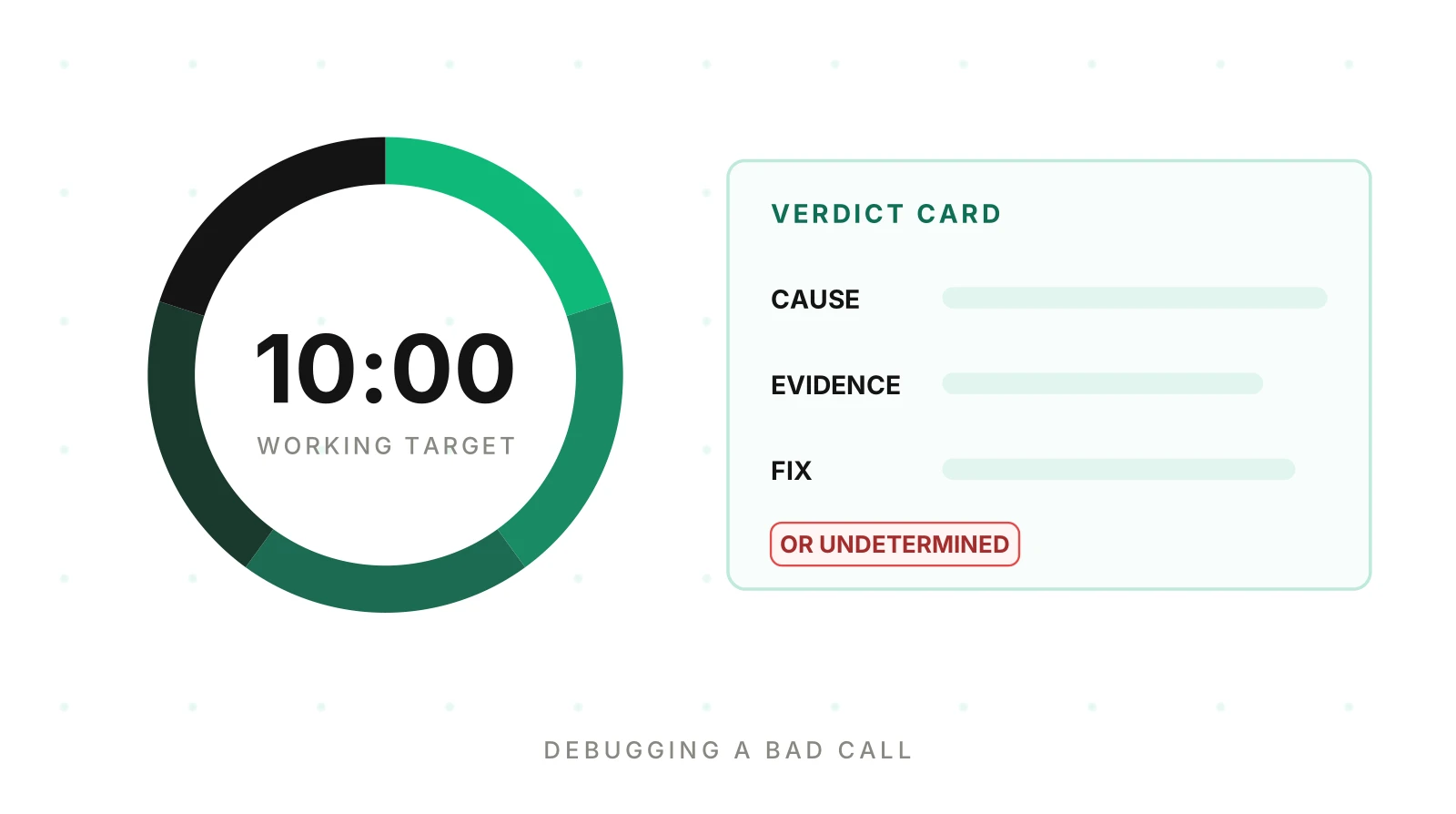
This post is the second way. It is a time-boxed runbook for voice agent call troubleshooting, from first look to written verdict. The ten minutes is a working target, not a measured claim. We timed no one, and thin logging makes it longer. The box forces a decision: name a cause with evidence, or say what data is missing.
It is the practical companion to our root cause analysis post, which argues why a trace needs context and clustering. This post is the routine for one call, with a different illustrative call. It makes no benchmark claims.
What this runbook assumes you have
Have these on hand. A call ID that links systems. The transcript with turn timestamps. A trace or event log with step timings. Telephony records. A way to see what changed. If one is missing, the runbook still works. Your verdict will more often be "undetermined."
OpenTelemetry's trace documentation defines a trace as a group of spans. Each span carries a name, a parent span ID, start and end timestamps, attributes, events, links and a status. That is enough for a turn timeline. That is enough for a turn timeline. For logging advice, see what to log on every call. For the schema, see the trace and span model.
The illustrative call used in this post
Everything below uses one made-up call. It is not a real customer and every number is an assumption.
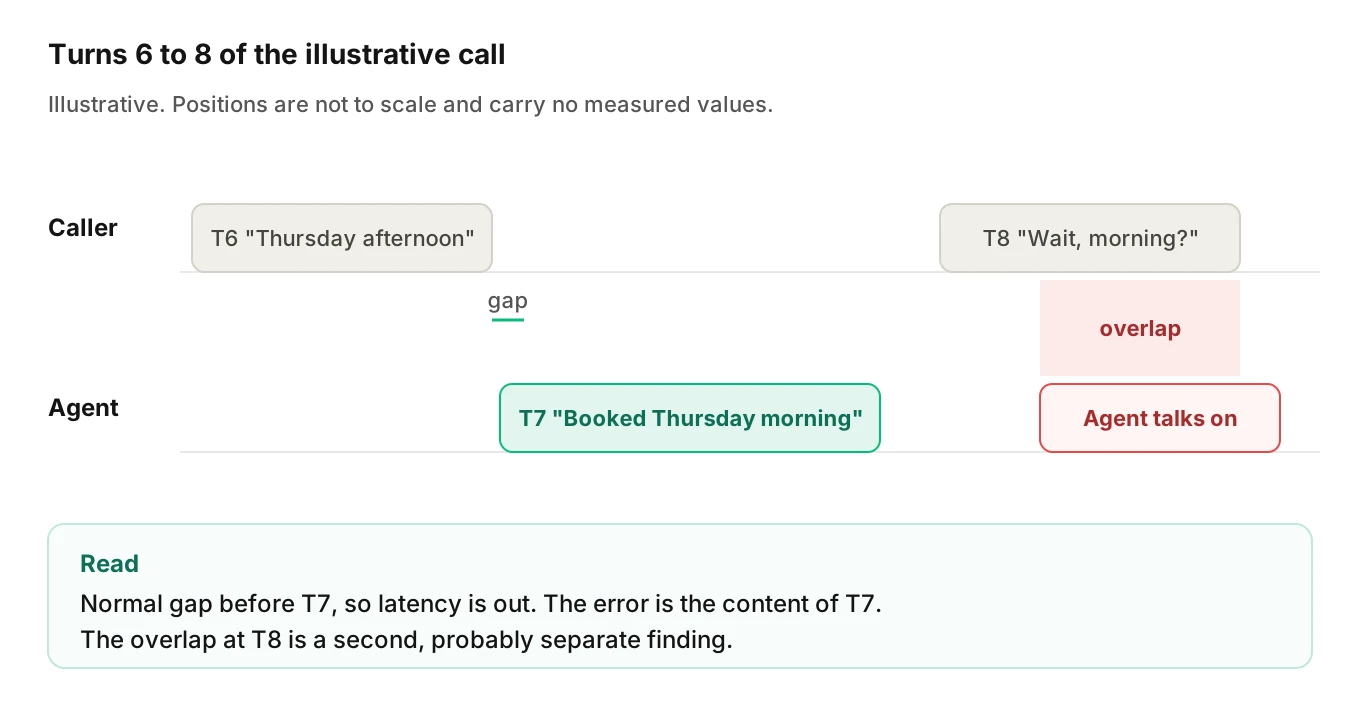
A delivery-window agent lets customers rebook a delivery. The caller says, "Thursday afternoon works." The agent answers, "Done. You are booked for Thursday morning." The caller says "Wait, morning?" and the agent talks over the question. The caller hangs up.
The question is simple: why did my voice agent say that? Here is the clock.
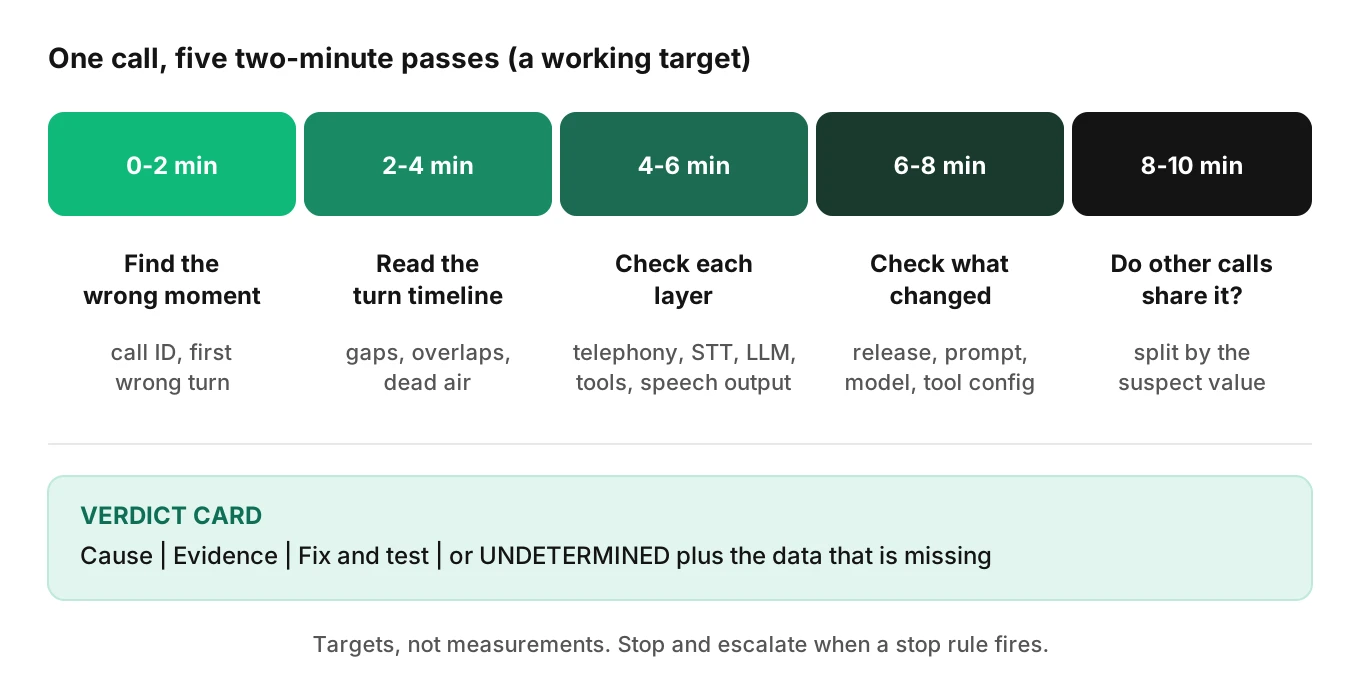
Minutes 0 to 2: find the call and the exact moment it went wrong
Do not start with the whole call. Start with one turn.
Get the right call
Confirm the call ID, start time and caller number before you read anything. If the call just ended, some telephony summaries are partial. Twilio's Voice Insights call summary is partial while a call runs. It typically completes within a few minutes after it ends.
Mark the first wrong turn
Read the transcript with timestamps. Mark the first turn that went wrong, not the angriest moment. In the illustrative call the complaint is at turn 8. But the first wrong turn is turn 7: the agent confirmed "morning" after the caller said "afternoon."
Write the moment as one sentence you can query later. For example: "Agent confirmed a different time window than the caller asked for." "The agent was dumb" cannot be queried.
If you cannot find the call or the turn in two minutes, that is your first finding. Write "undetermined: call not traceable across systems" and name the missing ID.
Minutes 2 to 4: read the turn timeline
Now line the turns up on a time axis. You are looking for gaps, overlaps and odd durations. Everything in this pass comes from traces, transcript timestamps and call data.
Five patterns to look for
| Pattern | What it looks like in the timeline | Where it points first |
|---|---|---|
| Long gap before a reply | Caller turn ends, agent turn starts much later | A slow step: speech-to-text final, model, tool, or speech output start |
| Dead air | A long stretch with no agent output and no caller speech | A stalled step or a step with no timeout |
| Unanswered caller | Caller turn with no agent turn after it | A failed step or a turn that never closed |
| Agent interrupted the caller | Agent turn starts before the caller turn ends | Turn-taking settings, endpointing, or a premature end-of-turn |
| Slow to stop | Caller starts speaking, agent output continues for a while | Interruption handling, or output already queued downstream |
Each row is a hypothesis, not a verdict. A gap says time passed. It does not say which step spent it.
Frameworks differ in what they record. LiveKit Agents documents per-turn metrics such as end-of-utterance delay, LLM time to first token, text-to-speech time to first byte, and end-to-end latency. If your stack records similar numbers, compare the bad turn with the calm ones in the same call. Your own baseline beats any number from a blog post. See what to measure for voice agent latency. If the agent froze and never returned, read going silent in voice agents.
In the illustrative call
Turn 7 shows no long gap. The overlap is at turn 8, where the agent talked while the caller was still asking "morning?" That gives two findings. One is a wrong confirmation. The other is a probably separate talk-over. Chase the first.
Timing is fine, so a latency theory is out. The SRE book says negative results should not be ignored or discounted. Write it down.
Minutes 4 to 6: check each layer
Go down the stack in the order the audio travels. At each layer, ask one question: did this layer receive and pass on the right thing? Stop at the first layer that did not.
| Layer | First question | Evidence to open |
|---|---|---|
| Telephony | Did the call connect and carry audio cleanly? | Call status, who hung up, last SIP response, quality flags |
| Speech-to-text | Did the transcript match what the caller said? | Final transcript for the bad turn, partials, confidence if logged |
| Model | Given that transcript, was the reply sensible? | Prompt version, messages sent, the model's output |
| Tools | Did the model call the right tool with the right arguments? | Tool name, arguments, result, status |
| Speech output | Did the spoken text match the text the model produced? | Text sent to synthesis, output timing |
Telephony
Check the call record first, because a bad line explains many bad turns. Twilio's call summary includes call state, who hung up, the last SIP response and a silence-detected flag. It also reports jitter and packet loss, which the docs tie to noisy, robotic or choppy audio. If the line was clean, move on. If not, say so in the verdict. Our post on bad call quality and telephony covers the carrier side.
Speech-to-text
Compare the transcript for the bad turn with what the caller said, as you would in any voice agent call investigation checklist. A wrong word here poisons everything downstream. Also check endpointing. Deepgram's documentation says endpointing is on by default at 10 milliseconds of silence (as of November 19, 2026). A short default can split one utterance in two. Check your own setting rather than assuming.
Model
Ask whether the reply was reasonable given the transcript. Open the exact prompt version used on this call. If the transcript was right and the reply was wrong, look at the prompt, the context passed in, or the model.
Tools
Wrong answers often hide here. A tool can return a value that is valid but not what the caller asked for. Check the arguments sent, the result, the status and any fallback reply the model used when the tool failed. A finished span is not proof of a correct result. In OpenTelemetry, an Unset status means only that the operation completed without an error. See silent tool failures.
Speech output
Last, compare the text sent to synthesis with the reply text. This is the cheapest layer to rule out. If they match, the fault is upstream.
In the illustrative call
Telephony was clean. The transcript for turn 7 reads "Thursday afternoon." Good. The model's booking tool call carries a window argument of "AM." The tool accepted it and returned success. The model then read the result aloud: "booked for Thursday morning."
So the transcript was right and the tool argument was wrong. The fault is at the model-to-tool boundary. That is a location, not yet a cause. Why did the model send "AM"?
Minutes 6 to 8: check what changed
The SRE book says recent changes to a system can be a productive place to start. For a voice agent, "the system" is wider than your code. List every change that could touch the failing step.
| Change type | What to check | Easy to miss |
|---|---|---|
| Release | Release notes and deploy time versus the call time | Config shipped in the same release |
| Prompt | Prompt version on this call versus the previous one | Edits made in a dashboard, not in code |
| Model | Model name, provider version, any provider-side update | Provider changes with no release on your side |
| Tool configuration | Schemas, defaults, timeouts, retries, endpoints | A default value added to a tool schema |
| Upstream data | Knowledge base, catalog, slot lists | A data refresh that changed available windows |
| Speech settings | Endpointing, interruption and voice settings | Provider default changes |
Write each candidate as a hypothesis with a prediction. For example: if the prompt change caused this, calls on the new version send AM more often than calls on the old one. A hypothesis that predicts nothing cannot be tested next.
Prefer the simplest explanation first. The SRE book advises it, and also says to take clear notes of ideas, tests and results. A scribbled list of "tried, ruled out, why" beats a clean story you cannot defend.
In the illustrative call
The call ran on prompt version 31, live since the day before. Its change notes add a line to the booking instructions: "If no window is given, use the earliest window." The caller did give a window. Still, the line may have biased the model toward "AM." The prediction: calls on version 31 send "AM" more often, even when the caller said afternoon.
It is only a hypothesis. Correlation is not causation, and one call cannot confirm it.
Minutes 8 to 10: check whether other calls share it, then write the verdict
One call is one sample. Now test the hypothesis against the others.
Run the share check
Query for calls with the same symptom as your one-sentence moment. Split them by the attribute your hypothesis names: prompt version, model, tool, release, region, call type. A cause shows as one value holding most of the failures. A spread across versions points elsewhere.
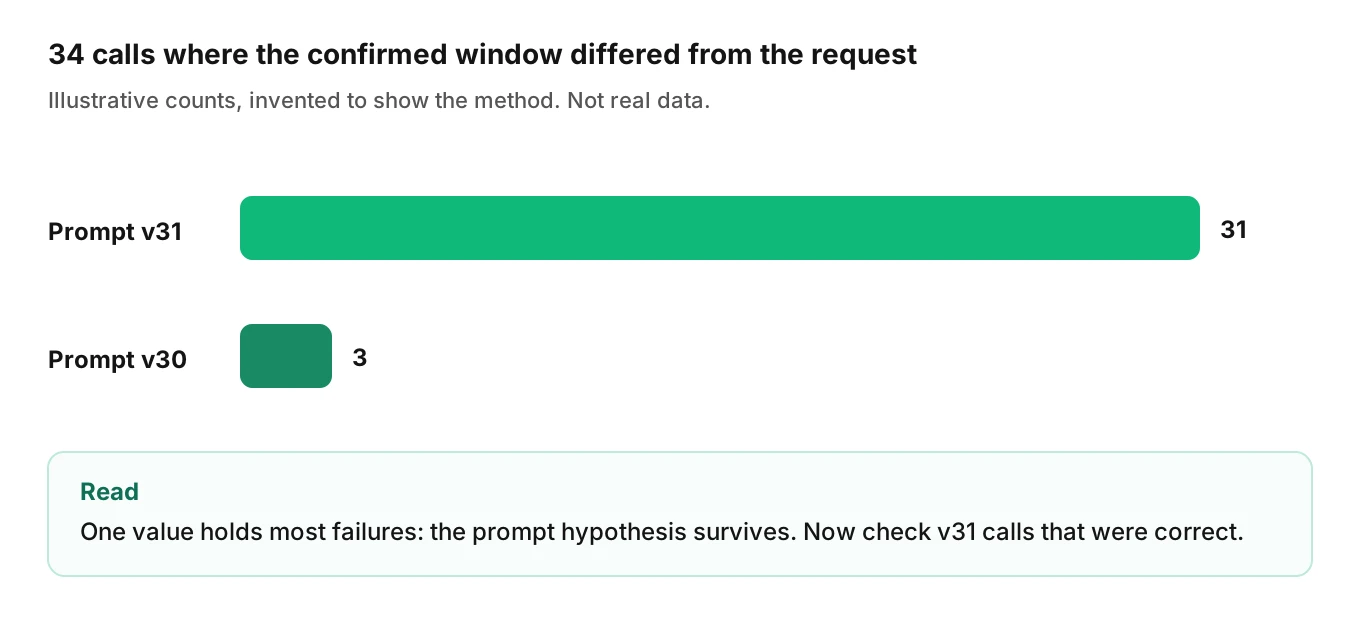
In the illustrative data, 34 calls had a confirmed window that differed from the caller's request. Thirty-one ran on prompt version 31. Three ran on version 30. These counts are invented to show the method. The pattern supports the prompt hypothesis, and the three older calls become a separate, minor item.
Also ask the reverse. Among version 31 calls where the caller named a window, how many were confirmed correctly? If most were fine, the prompt line alone does not explain it.
Write the verdict card
Stop investigating and write the verdict. This card is the debug voice agent call template.
VERDICT CARD
Call:       <call ID, date, the one-sentence wrong moment>
Cause:      <one sentence, or UNDETERMINED>
Evidence:   <the 2-3 facts that support it, with where each came from>
Fix:        <the change, owner, and the test that will catch it>
Missing:    <for UNDETERMINED only: the data that would settle it>
Confidence: <high / medium / low, and why>
Here is the filled card for the illustrative call.
VERDICT CARD
Call:       c-illustrative-01, Nov 18. Agent confirmed "morning" after caller said "afternoon" (turn 7).
Cause:      Booking tool called with window=AM; likely biased by the default-window line added in prompt v31.
Evidence:   Transcript turn 7 reads "afternoon" (STT log). Tool arguments show window=AM (trace). 31 of 34 mismatches ran on v31 (call query).
Fix:        Remove or reword the default-window line; add a test where the caller names an afternoon window. Owner: prompt owner.
Missing:    n/a
Confidence: medium. Not yet reproduced in a controlled replay.
The fix names a test on purpose. A fix without a test returns with the next prompt edit. See the production feedback loop.
The honest alternative: undetermined
Now the same call, but your logs did not store tool arguments. You see the transcript, the spoken reply and a tool span with no error. You cannot see what the model sent.
VERDICT CARD
Call:       c-illustrative-02, Nov 18. Agent confirmed "morning" after caller said "afternoon" (turn 7).
Cause:      UNDETERMINED
Evidence:   Telephony clean. Transcript correct. Reply text matches spoken output. Tool span ended with status unset.
Fix:        Interim: log tool arguments and results on every call.
Missing:    Tool arguments and the tool result for turn 7.
Confidence: low.
That card is not a failure. It is a precise request for data. It stops a team shipping a fix for a cause nobody has shown.
Symptom to first place to look
A report often arrives as a symptom. Use this table to debug bad voice agent call reports from the right layer first. Confirm with the timeline.
| What the caller or reviewer reported | First place to look | Then check |
|---|---|---|
| Agent said something wrong or made up | Model input and prompt version for that turn | Tool results and retrieved context |
| Agent confirmed the wrong detail | Tool arguments and results | Transcript for that turn |
| Long pause before a reply | Timeline gap, then the slowest span in that turn | Tool timeouts, model latency, speech output start |
| Agent went silent mid call | Last span that finished and the first that did not | Step timeouts and error handling |
| Agent talked over the caller | Turn-taking and endpointing settings | Transcript timing, interruption events |
| Agent kept talking after caller spoke | Interruption handling | Audio already queued for output |
| Agent read out a variable or URL | Prompt template and rendered text | Tool output formatting |
LiveKit's turn-taking tuning guide is one example of symptom-to-setting mapping for a single framework. It lists "Agent cuts users off mid-thought" and "Agent feels too slow to respond" as symptoms with different settings to adjust. If you run another framework, find its equivalent page before you change anything.
For agents that hear themselves, see self-interruption and echo. For the wider failure map, see why voice agents fail in production.
When to stop and escalate
Ten minutes is a short box. Some bad calls do not fit it. Stop and hand off when any of these is true.
| Signal | Why escalate | To whom |
|---|---|---|
| You need a second team to fix it | Your ten minutes cannot change their system | The tool, platform or telephony owner |
| Many callers are affected right now | It is an incident, not a call review | On-call, using your alerting and paging routine |
| A compliance or safety boundary was crossed | A single occurrence may matter | Whoever owns that risk |
| The verdict is undetermined and the data does not exist | More time will not create it | The owner of logging |
| You hit the box with no leading hypothesis | Fresh eyes beat a longer solo search | A second engineer |
Google's SRE book gives similar guidance. Its team treats an event as an incident if you need a second team, the outage is visible to customers, or the issue is unsolved after an hour's concentrated analysis. Those are one team's guidelines, and an hour is its box. Ten minutes suits a single-call review. Pick your own limits and write them down.
When you escalate, hand over the verdict card as it stands, including what you ruled out.
How to debug a bad voice agent call in 10 minutes
1. Find the call and the wrong moment (minutes 0 to 2) — To debug voice agent call issues, confirm the call ID, then mark the first turn that went wrong. Write it as one searchable sentence.
2. Read the turn timeline (minutes 2 to 4) — Look for gaps, overlaps, dead air, interruptions and slow stops. Use trace timings and transcript timestamps.
3. Check each layer (minutes 4 to 6) — Go through telephony, speech-to-text, model, tools and speech output. Stop at the first layer that passed on the wrong thing.
4. Check what changed (minutes 6 to 8) — List releases, prompt versions, model changes and tool configuration. Write each as a hypothesis with a prediction.
5. Check whether other calls share it (minutes 8 to 10) — Query calls with the same symptom and split them by the suspect attribute. Keep the hypothesis that holds up.
6. Write the verdict card — Record cause, evidence, fix and test, or "undetermined" with the missing data. Escalate if a stop rule fired.
Where Evalgent fits
Evalgent is a testing, evaluation and monitoring platform for voice agents. Its production call monitoring flags problems such as tool-call failures and latency spikes, with fix recommendations. That covers the "something is wrong somewhere" part of the work.
Evalgent Observe, which is launching, is aimed at the explanation step in this runbook. It traces each failure to the step or handoff that caused it and groups failures into root causes, so a team fixes causes, not single calls. It gives a verdict only with evidence from the data you supply. Where that data is blind, it says "undetermined" and shows the coverage gap, the same way the verdict card above does. It works with any stack through OpenTelemetry, plus an upload path for call details. Native ElevenLabs, Vapi and Retell connectors are planned. Evalgent does not sit in the media path, so nothing touches live audio or slows a call.
You can debug bad voice agent call reports with no tool at all. It needs logs with the call ID, timings, versions and tool arguments. For the foundations, see what is voice agent observability and testing, monitoring and observability. For a buyer's view, see voice agent observability.
Frequently asked questions
How do I debug a voice agent call that went wrong?
Find the first wrong turn, not the last thing the caller heard. Read the turn timeline for gaps and overlaps. Check telephony, speech-to-text, the model, tools and speech output in order. Then check recent changes, and test your suspect against other calls with the same symptom. Write a verdict with evidence.
Why did my voice agent say that?
Look at what the model received and what it sent to tools for that turn. Check the transcript, the prompt version, retrieved context and tool results. A wrong statement often traces to a wrong tool argument or a changed prompt, not a wrong transcript. If those fields are not logged, the honest answer is undetermined.
How long should a voice agent call investigation take?
Ten minutes is a working target in this runbook, not a measured figure. It forces a decision: a cause with evidence, or a list of missing data. Calls with thin logging, or causes that span teams, will run over. When that happens, escalate with your notes instead of searching alone.
What should a voice agent call investigation checklist include?
It should cover the call ID, the first wrong turn, the turn timeline, each layer from telephony to speech output, recent changes, and a check of other calls. End with a written verdict: cause, evidence, fix and test, or undetermined with the data you lack.
How do I find the exact moment a call went wrong?
Read the transcript with turn timestamps and mark the first turn where the call left its intended path. Write it as one query-able sentence, such as "agent confirmed a different time window than the caller asked for." Later turns are usually consequences, so do not start from the caller's complaint.
What do dead air and talk-over look like in a trace?
Dead air is a long stretch with no agent output and no caller speech between turns. Talk-over is an agent turn that starts before the caller's turn ends. Both show up in turn timestamps and span timings. They point to a slow step or to turn-taking settings.
When should I stop and escalate a bad call?
Escalate when you need a second team, when many callers are affected now, when a compliance boundary was crossed, or when the data needed does not exist. Also escalate if you reach the time box with no leading hypothesis. Hand over your verdict card, including what you ruled out.
Can I debug a voice agent call without tracing?
Yes, but expect more undetermined verdicts. Transcript timestamps, telephony records, prompt and release versions, and tool arguments still support most of the runbook. Tracing adds step timings and a link between systems. Start by logging the call ID everywhere so the evidence can be joined.
The bottom line
To debug bad voice agent call problems quickly, find the first wrong turn, check each layer in order, and test your suspect against other calls. End with a verdict card that names a cause with evidence, or says undetermined and lists the data you need.
Related Articles
How to automate voice agent testing: synthetic callers vs manual QA
Learn how ai test automation replaces manual QA for voice agents. Compare synthetic callers vs human testers, with a 5-step framework to scale without hiring.
Read more
AI Agent Testing vs Voice Agent Testing: What General Tools Miss for Voice
AI agent testing measures text outputs. Voice agent testing measures behaviour through an acoustic pipeline. Five failure categories general tools miss.
Read more