Voice Agent Echo: Why Your Agent Hears Itself and How to Test for It
On this page
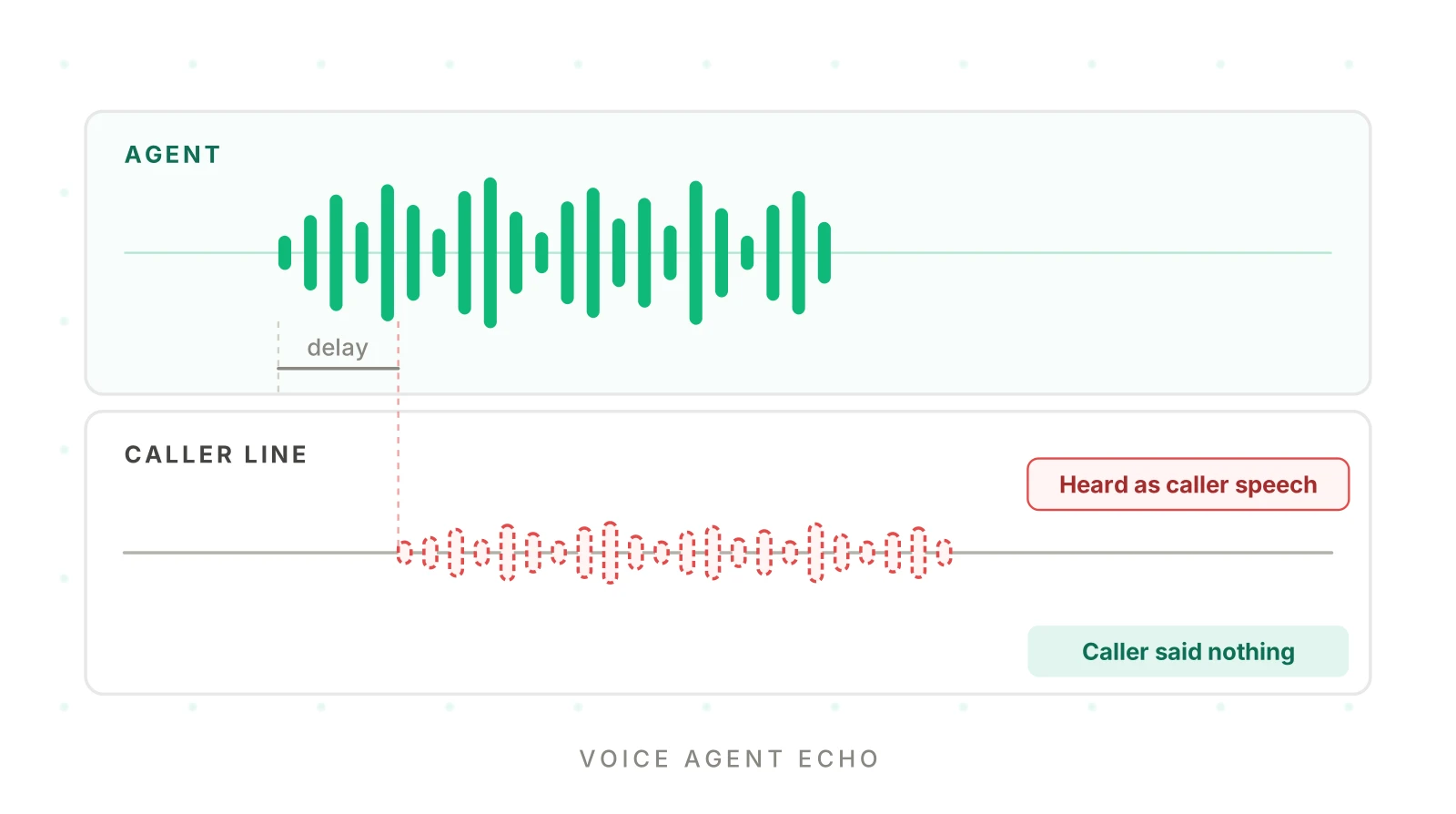
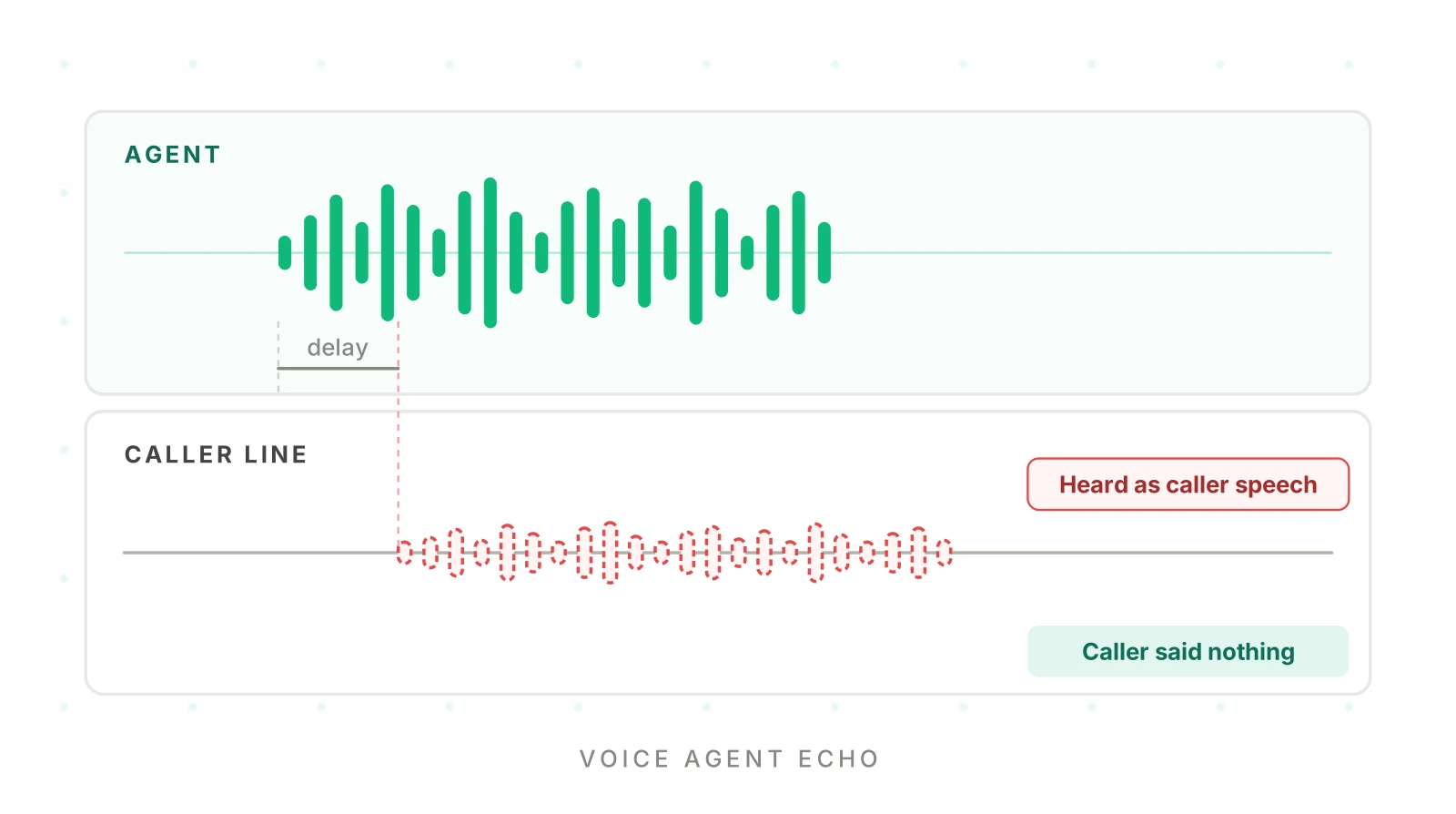
Here is a call that looks fine in the dashboard. The agent reads a 20-second disclosure. Four seconds in, it stops. It starts the disclosure again. It stops again. The caller, a person on speakerphone in a kitchen, never said a word.
The agent heard itself. This is voice agent echo, and it is one of the few failures where the caller did nothing wrong and the transcript points at the wrong culprit. This post covers the mechanism, the four ways it shows up, the layers that fix it, and a test plan that does not depend on any one framework.
We do not cover LiveKit or Pipecat setup here. Those are in LiveKit noise and echo cancellation and Pipecat interruption strategy. This post is about the failure mode itself.
What it means when a voice agent hears itself
A voice agent hears itself when its text-to-speech audio plays out of the caller's speaker, leaks into the caller's microphone, and comes back up the line. The agent's input stack cannot tell that audio from a person talking. It then acts on it.
Two sources describe the same root cause in nearly the same words. The AAIF article Where voice agents fail in production, part 1 (Steve Kearns, October 27, 2026) says "the system may interpret its own output as new user input." Picovoice's failure-mode guide lists "Agent interrupts itself" as the symptom of self-barge-in. Its stated cause is "The agent's own playback is detected as user speech." That makes a self-barge-in voice agent easy to spot on a call and hard to spot in text.
Self-barge-in: the agent's own playback triggers voice activity detection, and the agent stops or pauses its own speech as if the caller had interrupted.
Self-barge-in is only one half. The same leaked audio also reaches speech-to-text. That is the second failure, and it is the one that damages data.
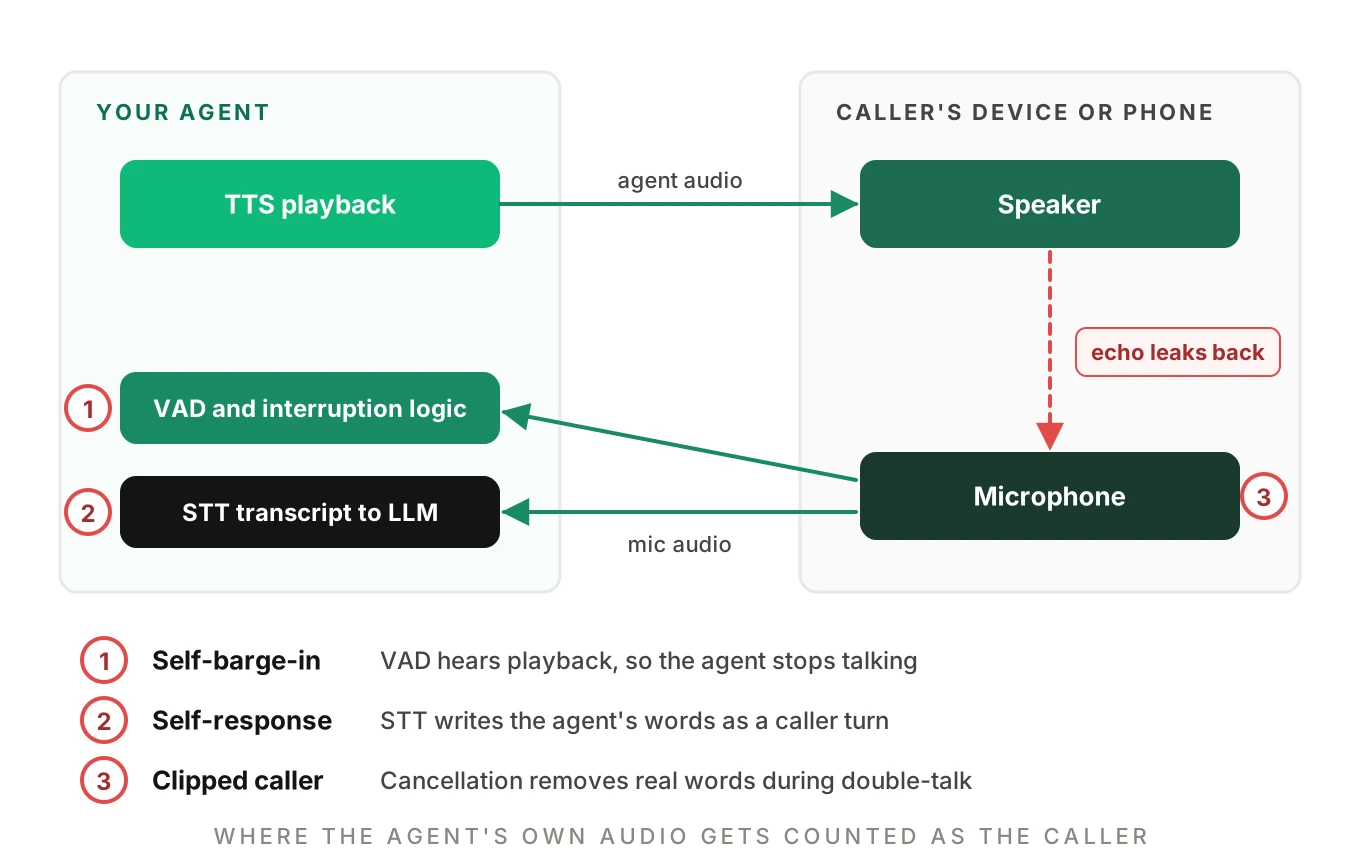
The same leak breaks three things
The leaked audio takes two paths on the agent side, and one more problem appears when the caller really speaks. Number them as in the diagram above.
Point 1: VAD and interruption logic. VAD fires while the agent is talking. The interruption logic reads that as barge-in and stops playback. This is the agent that interrupts itself.
Point 2: the transcript. STT transcribes the leaked audio. A caller turn appears that contains the agent's own words. The LLM then answers it. Here a voice agent responds to its own words.
Point 3: double-talk. The caller does speak while the agent is talking. The echo canceller tries to remove the agent's voice and can clip the caller's real words with it.
The ICASSP 2023 Acoustic Echo Cancellation Challenge built datasets for both single talk and double talk, because the two are different problems. It ranked entries on mean opinion score and on word accuracy. Word accuracy is the point for us. A canceller that sounds clean but erases the caller's "no, Thursday" fails the call.
Four ways it shows up on calls
The same root cause produces four different symptoms. Each has a different tell and a different test.
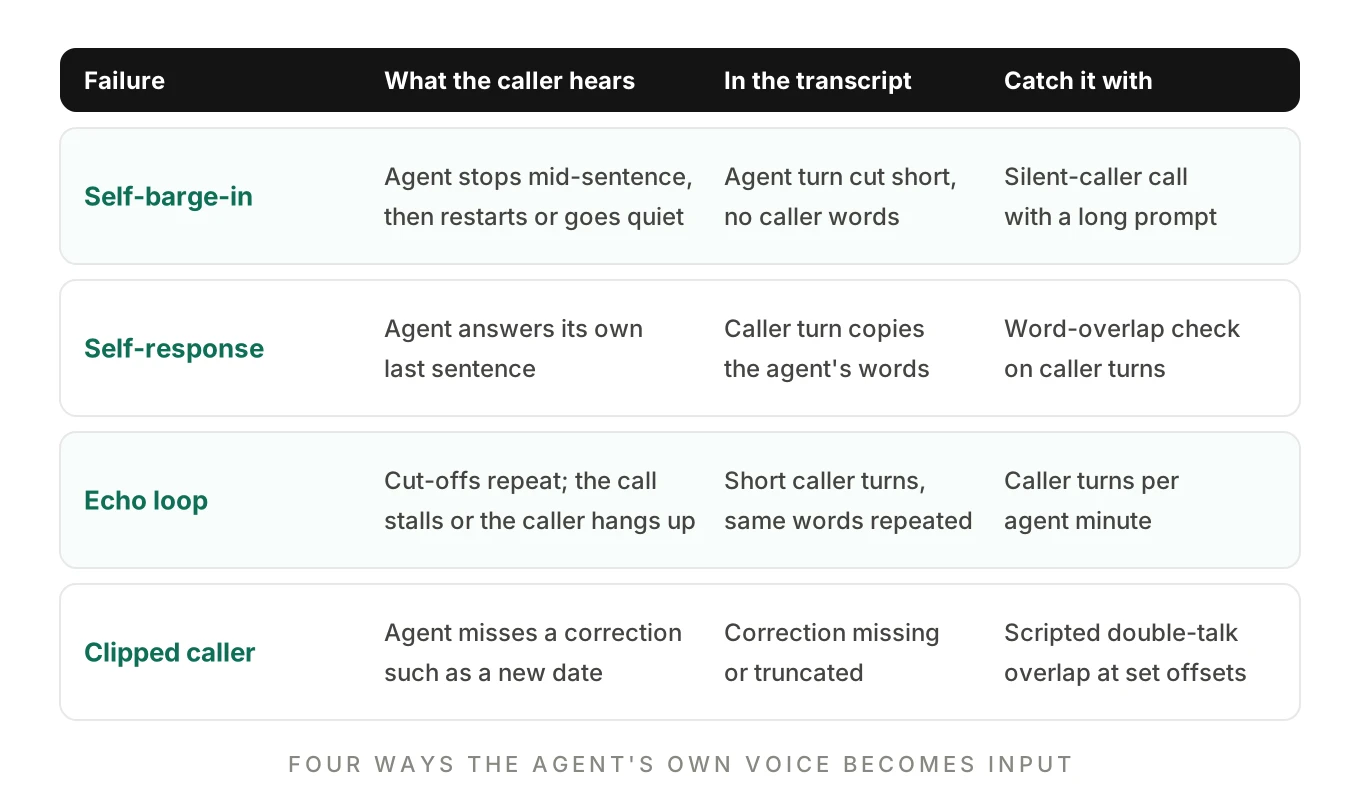
Self-barge-in. The agent stops mid-sentence, then goes quiet or restarts. The transcript shows a truncated agent turn and often no caller words at all. If your STT drops the echo, there is nothing to find in the text. This is why it hides.
Self-response. The agent answers its own last sentence. The transcript has a caller turn that copies the agent's words. Reviewers often misread it as the caller repeating the question.
Echo loop. Cut-off, restart, cut-off. Each restart replays the same audio, which leaks again. That is a feedback loop. You see many short caller turns with the same words. Callers hang up, or the call times out.
Clipped caller. The caller corrects the agent while it talks. The canceller or the overlap handling drops the correction. The agent books the wrong date. We cover that class of bug in full-duplex voice agents.
How self-response corrupts the record
Self-response is the dangerous one, because the agent keeps going and writes data. Here is an illustrative call. The numbers and names are made up for the example.
AGENT   I have you down for Tuesday at 3 PM. Is that right?
CALLER  (silent; echo of the agent's voice reaches STT)
STT     "Tuesday at 3 PM is that right"
AGENT   Great, you are booked. A confirmation text is on its way.
CRM     appointment = Tuesday 15:00, confirmed_by_caller = true
The caller never confirmed. The calendar write succeeded. Nothing errored. A transcript-only review sees a plausible confirmation and passes the call. This is the same blind spot we describe in transcript vs audio evaluation.
Why voice agent echo is worse on some calls
Echo is a coupling problem. Playback leakage rises with every bit of speaker output that reaches the mic, and the more leaks, the more likely the agent hears itself. Three conditions raise it.
- Speakerphone. Speakerphone echo is the classic case. The speaker sits next to the mic and runs loud. The phone's own canceller has the hardest job here.
- Car and Bluetooth kits. The cabin adds reflections. Cheap kits add delay.
- Loud or long playback. A 20-second disclosure gives the leak 20 seconds to trip VAD. A short "Got it" gives it one.
LiveKit false interruptions covers one framework-specific version, a warm-up window. The general lesson holds on any stack. Echo is worst at the start of a call, before cancellers adapt, and during the longest agent turns. Your greeting is both.
Where echo gets removed: four places
An acoustic echo cancellation voice agent setup has more than one layer. Each layer sees a different signal and fixes a different symptom.
Layer 1: the device or browser
On a web call, the browser runs echo cancellation before audio leaves the device. A canceller works from the far-end reference, which is the audio the device just played. MDN describes the echoCancellation setting as one that "might apply a filter that negates the sound produced by the speakers from being included in the microphone's generated input track." MDN also notes that tracks tied to an RTCPeerConnection may not report the setting at all, so do not assume it is on. Check what the browser actually applied.
On a phone call, you have no control over the handset. Deepgram's echo cancellation page says most browsers and communication apps enable it by default, and that phones have built-in echo cancellation. That helps until a speakerphone, a car kit or a desk phone overwhelms it.
Layer 2: the telephone network
Network echo cancellers on the carrier side are specified in ITU-T G.168, Digital network echo cancellers. You cannot tune them. Echo path delay and behavior can still differ by carrier and route, so test on the routes you actually use. Our voice call quality metrics post covers the rest of the codec chain.
Layer 3: VAD that ignores your own playback
Picovoice gives the cleanest rule of thumb. Its fix for self-barge-in is "run VAD against the caller channel with playback suppressed." The idea is simple. If you know when your TTS is audible, do not let energy in that window alone count as an interruption. Require more evidence: longer speech, enough words, or an adaptive interruption model. The settings differ by framework, and we cover them in LiveKit false interruptions and Pipecat interruption strategy.
Layer 4: filtering the transcript
Some platforms filter the transcript, not the audio. Two documented examples as of November 18, 2026:
| Platform | Setting | Default | What it does |
|---|---|---|---|
| Twilio ConversationRelay | echoPromptFiltering | false | Drops words from the caller's transcript that match what the agent just said |
| Vapi with a Deepgram transcriber | feedbackFilterEnabled | On | Drops the part of the transcript where the caller repeats what the assistant just said |
Twilio's ConversationRelay TwiML reference says the STT provider still receives all audio, and that filtering relies on word timings from the TTS provider. Its best practices guide says you can also change the setting mid-call with a config message. The guide recommends ElevenLabs when you use this option, because "ElevenLabs provides word-level timing, which improves filtering accuracy compared to other providers." The reference points to echo prompt filtering as the way to stop the agent's own speech, picked up by the caller's microphone, from triggering false interruptions.
Vapi's Deepgram transcriber page calls the filter on by default. It says setting transcriber.feedbackFilterEnabled to false keeps the repeated speech and sends it to the model. The setting appears in Vapi's November 2026 changelog.
The two defaults point in opposite directions. Twilio's is off, Vapi's is on. If you move a flow between stacks, you can lose a filter you never knew you had.
A gotcha worth a test: filters can eat real confirmations
A transcript filter removes words that match what the agent just said. Now think about a read-back. The agent says "Your number is 415 555 0123, is that right?" The caller says "Yes, 415 555 0123." Some of the caller's real words match the agent's. Neither doc discusses what happens to those words. That is our inference, not a documented behavior, so test it. A filter that fixes echo and drops genuine read-back confirmations has traded one bug for another.
Matching the fix to the symptom
Voice agent echo has no single fix, because each layer catches a different symptom. Use the table to pick where to look first.
| What you see | Likely layer | First thing to try |
|---|---|---|
| Agent stops mid-sentence, caller silent | VAD and interruption logic | Raise the evidence needed to interrupt; confirm echo cancellation is applied |
| Caller turn repeats the agent's words | Transcript | Enable transcript filtering; check word timings from TTS |
| Only speakerphone and car calls fail | Device coupling | Test the matrix below; check handset echo cancellation on that device class |
| Only the first seconds of calls fail | Canceller convergence | Test the greeting with a silent caller; review warm-up settings |
| Real corrections go missing | Double-talk handling | Run scripted overlaps; check what the canceller removes |
| Fix works, confirmations now vanish | Filter over-matching | Test read-backs on both filter settings |
A tuning change that fixes one row can break another. Raising the interruption threshold stops self-barge-in and also makes real barge-in harder. The AAIF article says a minimum-word setting "so that tradeoff needs testing." Use interruption rate and interruption detection metrics to keep both sides in view.
How to test a voice agent for echo and self-barge-in
The AAIF article gives the right instruction: echo "performance should be tested with the devices and audio environments users are likely to have." Here is a procedure that does that. It is vendor neutral. It works on a browser agent, a SIP agent and a PSTN agent.
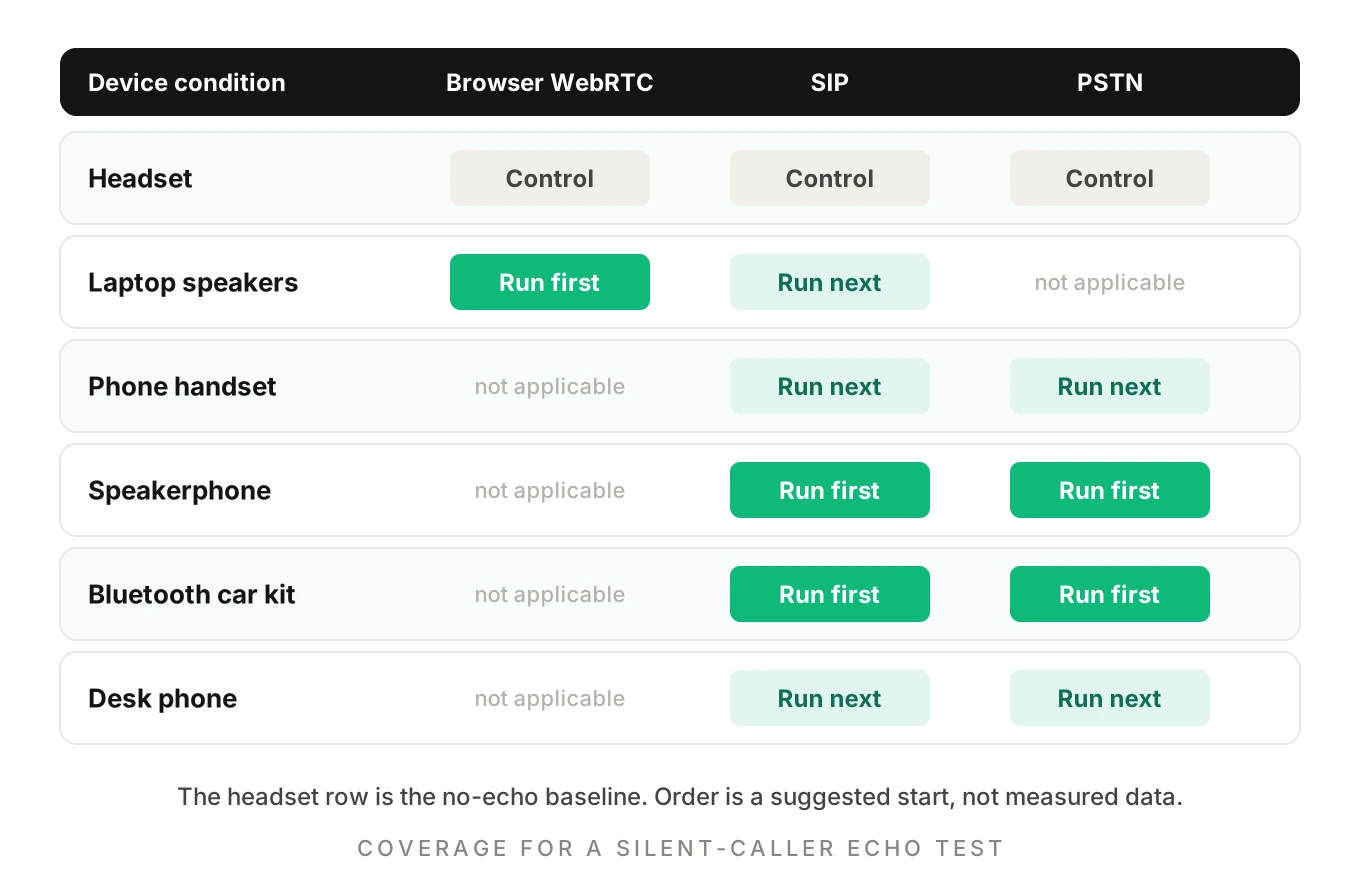
1. List your call paths. Write down every way audio reaches the agent: browser WebRTC, SIP trunk, PSTN number, any platform relay. Echo behavior changes per path, so each is its own test target. See SIP vs WebRTC for how the legs differ.
2. Pick the coupling conditions. Use the matrix below. Always include a headset as a no-echo control, so you can tell a real echo failure from a general audio problem.
3. Choose long, quotable agent turns. Echo needs playback to leak. Use the greeting, any legal disclosure, a long read-back of an address or order, and a hold message. Short turns hide the problem.
4. Run the silent caller test. Place the call. The caller says nothing for the full length of each long turn. Any caller-attributed speech, VAD event or interruption during that time is echo by definition. No judgment call is needed.
5. Run the double-talk test. Now the caller speaks over the agent at set offsets, for example one second, three seconds and eight seconds into a long turn. Say a short correction such as "No, Thursday." Check whether the agent stops, keeps the words and acts on them.
6. Record both channels separately. Agent and caller go on separate tracks, ideally as one stereo recording with the agent left and the caller right. Without separate tracks you cannot tell leaked audio from speech. See call recording metrics.
7. Score with a fixed rule. For each run, count caller-attributed events during agent playback on the silent test, agent turns truncated, and corrections lost on the double-talk test. Treat any silent-caller event as a fail.
8. Repeat on every change. Switching STT or TTS providers, changing a voice, toggling a filter, changing codecs or moving carriers can all change echo behavior. Re-run the matrix each time.
How many runs per condition
Echo is intermittent, so one clean call proves little. Use the rule of three. If you see zero events in n independent runs, the 95% upper bound on the true event rate is about 3 divided by n.
| Clean runs per condition | Upper bound on event rate (95%) |
|---|---|
| 10 | about 30% |
| 30 | about 10% |
| 100 | about 3% |
Run the speakerphone and car rows more often than the headset row. The headset row is a control, so a handful of runs is enough. Set your own bar. We know of no public standard for acceptable self-interruption rates.
Detecting echo after the fact
You will not catch everything in a lab. Production calls hold the voice agent echo cases you did not think of, so add detectors that run on recordings and transcripts.
Check 1: transcript overlap
A caller turn that starts while the agent is speaking and mostly repeats the agent's words is a strong echo suspect. This simplified function flags those turns.
import re
from dataclasses import dataclass

@dataclass
class Turn:
    role: str      # "agent" or "caller"
    start: float   # seconds
    end: float
    text: str

def words(text):
    return re.findall(r"[a-z0-9']+", text.lower())

def echo_suspects(turns, min_overlap=0.6, min_words=3):
    """Flag caller turns that start while the agent is speaking
    and mostly repeat the agent's current words."""
    flagged = []
    for t in turns:
        if t.role != "caller":
            continue
        playing = [a for a in turns
                   if a.role == "agent" and a.start <= t.start <= a.end + 1.0]
        if not playing:
            continue
        agent_words = set(words(" ".join(a.text for a in playing)))
        caller_words = words(t.text)
        if len(caller_words) < min_words:
            continue
        overlap = sum(w in agent_words for w in caller_words) / len(caller_words)
        if overlap >= min_overlap:
            flagged.append((t, round(overlap, 2)))
    return flagged
This catches self-response. It misses self-barge-in when your STT already dropped the echo. It also flags a caller who truly repeats the agent's words, so route flags to review instead of failing the call automatically.
Check 2: channel cross-correlation
If you record the agent and caller on separate tracks, test whether the caller track holds a delayed copy of the agent track. The sketch below estimates the lag at which they correlate best.
import numpy as np

def echo_lag(agent, caller, sr=8000, max_lag_s=0.6, win_s=2.0):
    """Return (peak_correlation, lag_ms) over the first win_s seconds.
    Inputs are mono float arrays on the same time base."""
    n = int(win_s * sr)
    a = agent[:n] - np.mean(agent[:n])
    c = caller[:n] - np.mean(caller[:n])
    if np.std(a) < 1e-6 or np.std(c) < 1e-6:
        return 0.0, None
    denom = np.std(a) * np.std(c) * n
    best, best_lag = 0.0, 0
    for lag in range(0, int(max_lag_s * sr), 8):    # 1 ms steps at 8 kHz
        r = float(np.dot(a[: n - lag], c[lag:n]) / denom)
        if r > best:
            best, best_lag = r, lag
    return best, round(1000 * best_lag / sr)
We ran both functions on synthetic data as a code check, not a benchmark. The cross-correlation function recovered a planted 120 ms delay, and returned a near-zero peak on a clean line. Real echo is weaker and distorted by the handset and codec, so calibrate the threshold on your own recordings before you alert on it. Treat it as a detector for review, not a verdict.
Metrics to watch in production
- Caller turns that overlap agent playback, split by device type where you know it.
- Agent turns truncated before their last sentence, per 100 calls.
- Caller turns above your overlap threshold with the preceding agent turn.
Tag calls by route and device. A spike on one carrier route is a routing question, not a prompt question.
Worked example: what one echo loop costs
This is an illustration with made-up timings, not data from any system. Say a disclosure is 20 seconds long. Echo trips VAD 4 seconds in. The agent pauses for 1.2 seconds, then restarts the disclosure from the top. The restart leaks again.
| Pass | Audio played | Pause before restart | Time used |
|---|---|---|---|
| 1 | 4.0 s | 1.2 s | 5.2 s |
| 2 | 4.0 s | 1.2 s | 5.2 s |
| 3 | 20.0 s | none | 20.0 s |
The caller waits 30.4 seconds to hear a disclosure that should take 20, and hears the first 4 seconds three times. The time cost is the visible damage. A self-response turn that reaches the LLM is the invisible damage.
Test the agent the way a caller reaches it
Manual testing misses voice agent echo because the tester sits at a desk with a headset and a good line. Echo needs a messy room, a speakerphone and a long agent turn.
Evalgent is a testing, evaluation and monitoring platform for voice agents. It supports caller profiles. Each caller profile can set background noise and speakerphone-like conditions, along with accent, speech pace and interruption level. Its call simulator reaches your agent over PSTN, SIP or WebRTC, so the same scenario can run on each path in the matrix above. Scenarios can include the long agent turns that provoke echo, such as disclosures and read-backs.
The judging happens on the audio, not only the transcript. Metrics such as interruptions and talk share, plus checks for an agent responding to its own words, sit beside the transcript. That matters here, because the transcript alone can look clean. A human reviewer can then confirm or overturn the verdicts. Evalgent also scores recorded production calls, which is where the device and carrier mix you never simulated shows up. Real handset coupling still needs a physical pass, so keep a few devices in your own rotation.
Related reading for the rest of the turn-taking stack: VAD misfire testing and testing STT against background noise.
Frequently asked questions
Why does my voice agent interrupt itself?
Its own playback is reaching the caller's microphone and being detected as speech. VAD treats that as barge-in and stops the agent. Picovoice describes the cause as the agent's own playback being detected as user speech. Check echo cancellation on the device, require more evidence before interrupting, and test with a silent caller.
What is self-barge-in in a voice agent?
Self-barge-in is when the agent's own audio triggers its interruption logic, so it cuts off its own speech. The caller said nothing. It shows up as truncated agent turns, restarts and sometimes a caller turn that copies the agent's words. It is distinct from a real interruption, where the caller speaks.
How do I stop a voice agent from responding to its own words?
Filter at more than one layer. Use device echo cancellation, make VAD ignore playback-only energy, and drop transcript words that match what the agent just said. Then test read-backs, because a filter can also remove genuine confirmations. Verify the fix with a silent-caller call and a transcript overlap check.
Does acoustic echo cancellation work on phone calls?
Partly. Phones run their own echo cancellation, and carriers run network cancellers under ITU-T G.168. Your agent usually has no control over either. Speakerphones, car kits and desk phones can still leak. Test those conditions on your own call paths instead of assuming the handset handles it.
What does Twilio echoPromptFiltering do?
In ConversationRelay, echoPromptFiltering drops words from the caller's transcript that match what the agent just said. It defaults to false. Twilio says the STT provider still receives all audio and that filtering relies on TTS word timings. Twilio recommends ElevenLabs for word-level timing. You can change it mid-call with a config message.
What does Vapi feedbackFilterEnabled do?
On a Deepgram transcriber, feedbackFilterEnabled drops the part of the transcript where the caller repeats what the assistant just said. Vapi says it is on by default. Setting it to false keeps that repeated speech and sends it to the model. Test read-backs with it on, since a match could remove real confirmations.
How do I test for echo in a voice agent?
Run a silent caller test. Place calls on each path and device condition, let the agent play long turns, and say nothing. Any caller-attributed speech or interruption is echo. Add scripted double-talk, record both channels separately, and repeat after every STT, TTS, codec or filter change.
Can I find voice agent echo from transcripts alone?
Only some of it. Self-response leaves caller turns that copy the agent's words, so a word-overlap check finds it. Self-barge-in can leave no caller text at all, only a truncated agent turn. Audio with separate channels is the reliable source, which is why echo review needs more than the transcript.
The bottom line
Voice agent echo is an input problem disguised as a conversation problem: the agent's own voice comes back as the caller. Fix it in layers, then prove it with a silent caller, long prompts and the devices your callers really use.
Related Articles
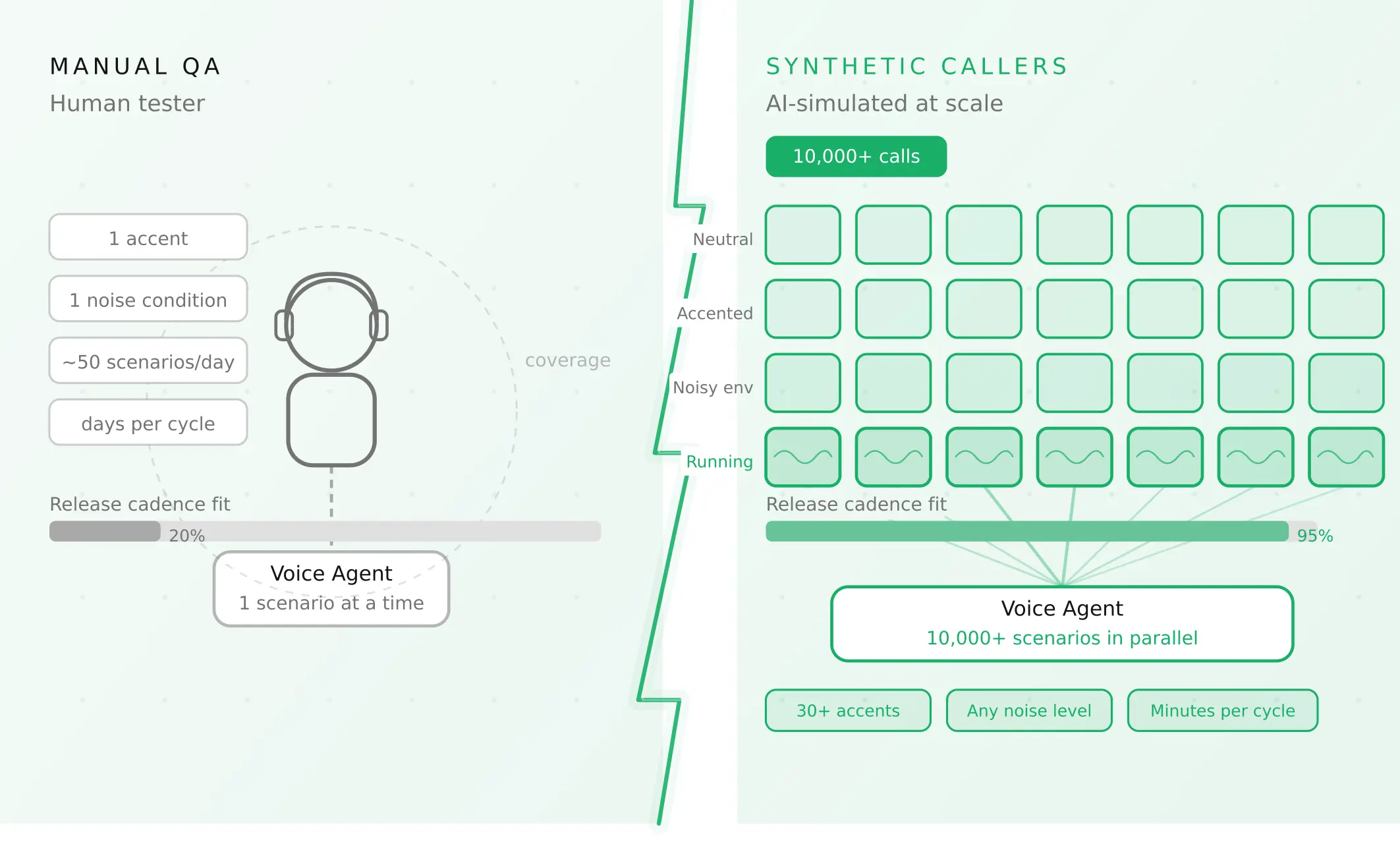
How to automate voice agent testing: synthetic callers vs manual QA
Learn how ai test automation replaces manual QA for voice agents. Compare synthetic callers vs human testers, with a 5-step framework to scale without hiring.
Read more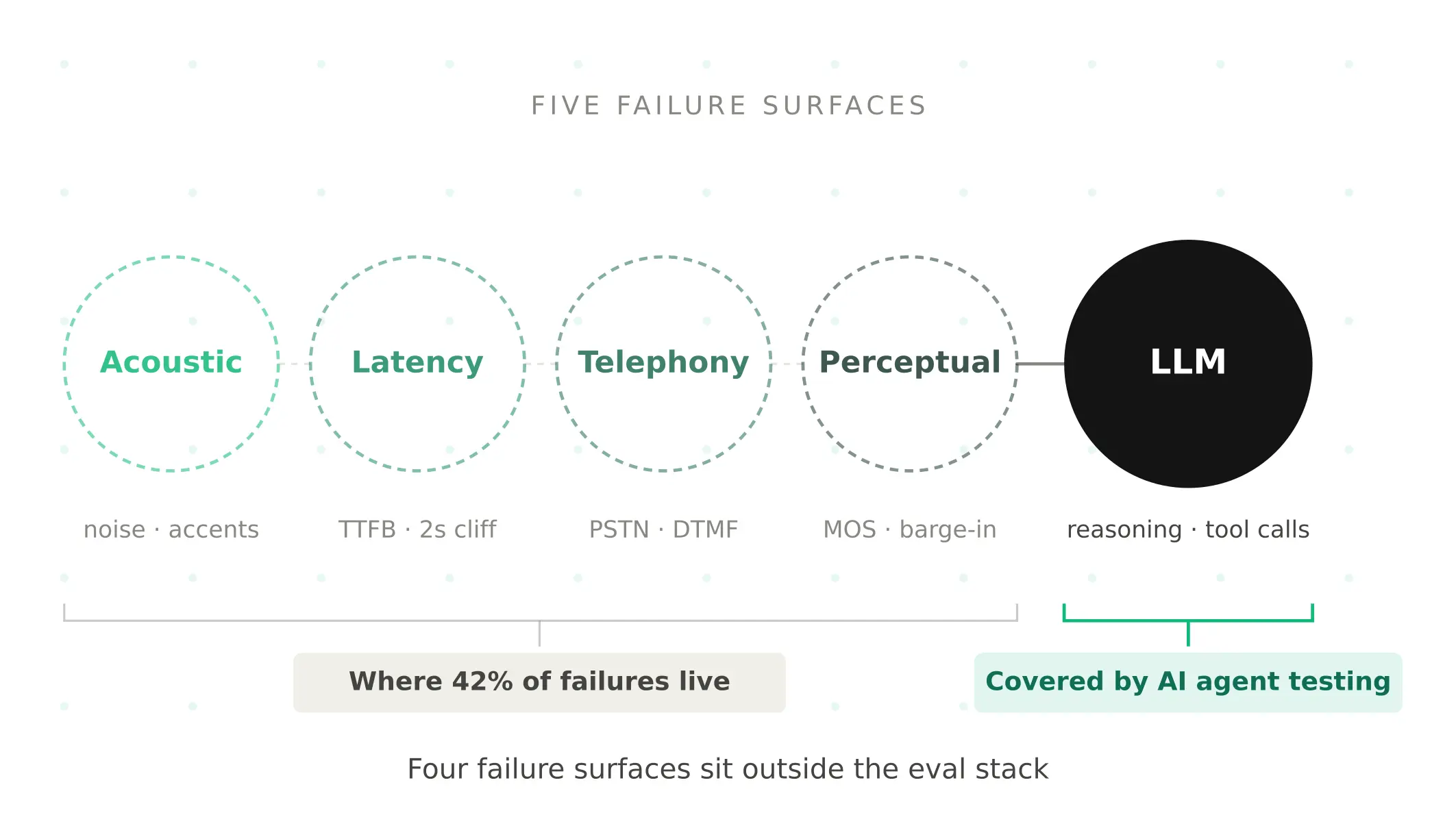
AI Agent Testing vs Voice Agent Testing: What General Tools Miss for Voice
AI agent testing measures text outputs. Voice agent testing measures behaviour through an acoustic pipeline. Five failure categories general tools miss.
Read more