Open door for builders.
LiveKit Call Recording and Pipecat Audio Recording: Stereo Recordings, Egress and Per-Call Metrics
On this page
A customer says your agent "kept talking over me." You pull the recording. It is a mono MP3 where both voices sit on top of each other. You can hear that something went wrong. You cannot measure how long the agent kept talking, whether the caller or the agent started the overlap, or how long the caller waited before the agent answered.
That is the gap this post closes. Most teams turn recording on because compliance or support asked for it. Then they try to use those files for evaluation and find they were recorded in the wrong place, in the wrong format, on the wrong clock.
This guide is the how-to for recordings. Our voice agent call logging schema covers which fields to log and where they go. Here we cover how to capture stereo audio on LiveKit and Pipecat, what each capture point hears and misses, how to line recordings up with your event logs, what storage really costs, and how to compute per-call metrics from two channels with code you can run. Every API name below was checked against current LiveKit, Pipecat and Twilio docs in October 2026. Code is labeled simplified where it is.
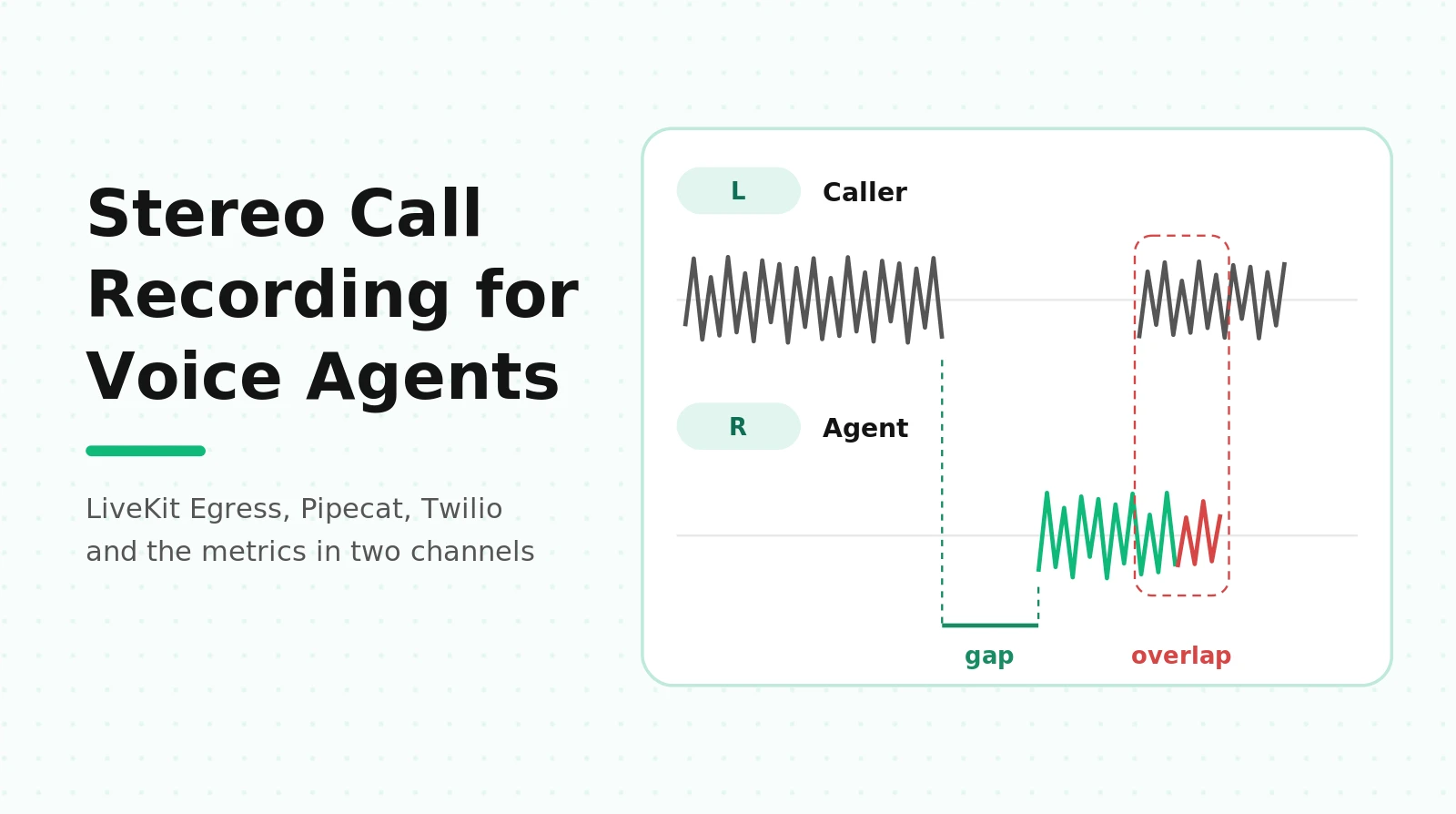
Stereo call recording: a two-channel audio file where the caller is on one channel and the agent on the other, sample-aligned, so each speaker's activity can be measured on its own without diarization.
Why stereo recordings matter for evaluation
Mono recordings answer one question: what words were said. Stereo recordings answer the questions that decide whether a voice agent feels broken.
Who talked when. With each party on its own channel, you can run voice activity detection on each channel separately. That gives you a speech/silence label for the caller and for the agent at every 10 ms. Every timing metric falls out of those two labels.
Overlap and talk-over. Overlap is not rare. Heldner and Edlund measured pauses, gaps and overlaps across three conversation corpora and found that overlaps made up about 40 percent of all between-speaker intervals. Their method depended on channel-separated recordings. In mono, overlapped speech is exactly where automatic tools struggle.
No diarization step. If you record mono, you have to diarize, which means asking a model to guess who spoke when. Overlap is the hardest part of that guess. Bullock, Bredin and Garcia-Perera showed that handling overlapped speech explicitly cut diarization error by 20 percent relative on the AMI corpus. That is a measure of how much error overlap causes. Stereo removes the problem: the channel is the speaker label.
Latency you can see. The time from the caller's last syllable to the agent's first syllable is visible on a stereo waveform. On mono it is buried whenever the two overlap or noise fills the gap.
Barge-in you can time. When the caller interrupts, the question is how long the agent keeps talking. On stereo, that is the time from caller onset to agent offset. On mono, it is a guess.
If you only evaluate transcripts, you lose all of this. Our post on transcript versus audio evaluation shows which failures disappear when audio becomes text.
Four places you can record a call, and what each one hears
A phone call to a LiveKit or Pipecat agent passes through several systems. Each can record. Each records something slightly different.
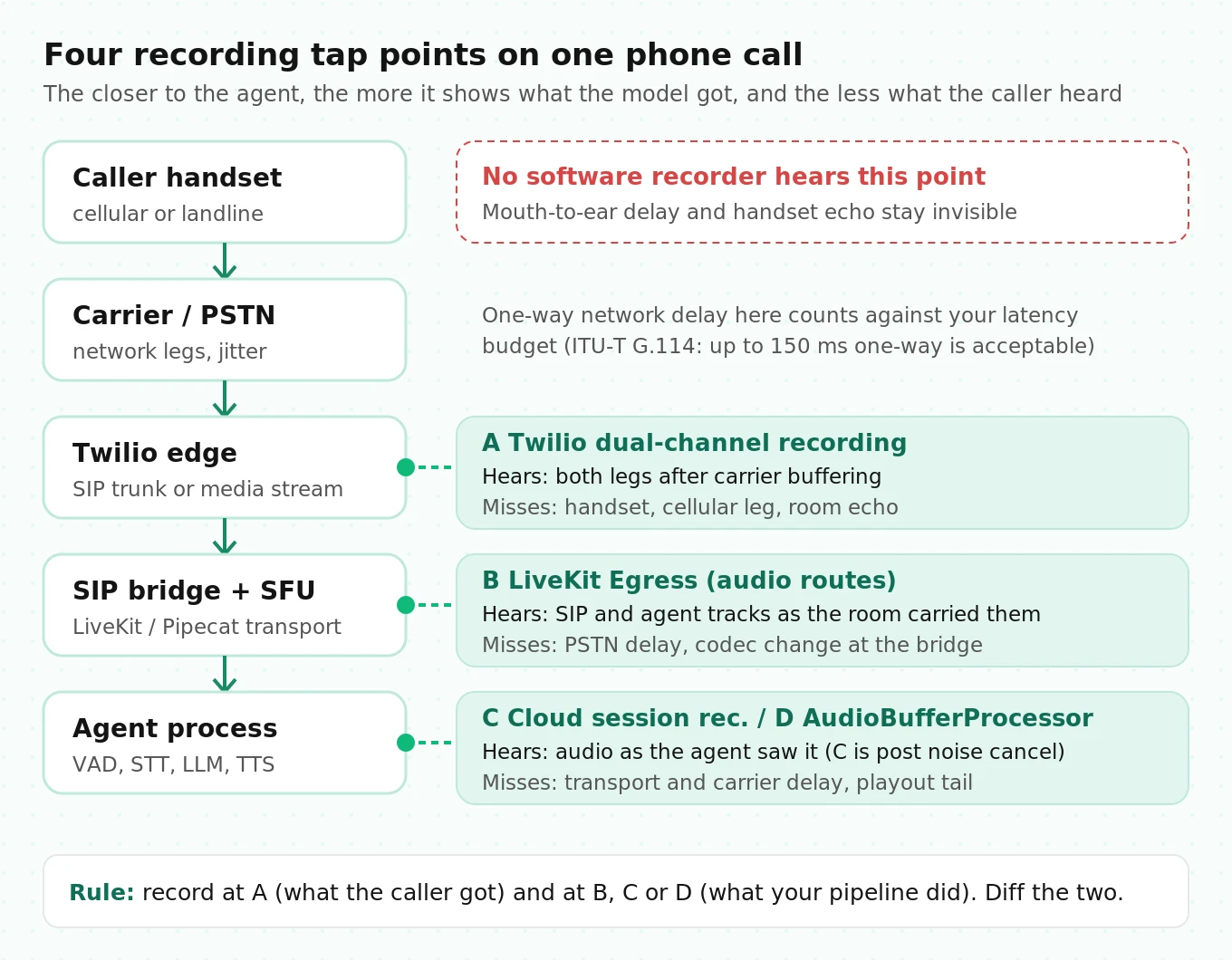
| Tap point | How you record | What it captures | What it misses |
|---|---|---|---|
| Carrier edge (Twilio, Telnyx) | Twilio Recordings API with `RecordingChannels=dual`, or trunk dual recording | Both legs as the carrier saw them, after the carrier's own buffering | The caller's handset, cellular network and acoustic echo |
| Media server (LiveKit SFU) | LiveKit Egress | The SIP participant's track and the agent's published track as the room carried them | The PSTN leg delay; codec conversion at the SIP bridge |
| Agent process, managed | LiveKit Cloud session recording (`record` option) | Agent and user audio as the agent saw them, with user audio after noise cancellation | What the caller heard; raw caller audio before cancellation |
| Agent process, in-pipeline | Pipecat `AudioBufferProcessor` | User input frames and bot output frames inside your pipeline | Transport and carrier delay; anything the transport buffers after output |
Notice the pattern. The closer the tap is to the agent, the more it shows what the model received and the less it shows what the caller experienced. LiveKit's own docs say this about Cloud recordings: when noise cancellation is on, user audio is recorded after cancellation, so it reflects what the STT or realtime model heard. That is great for debugging transcription. It is the wrong file for judging what the caller said in a noisy car.
No tap records what reached the caller's ear. Mouth-to-ear delay on the PSTN side is out of view for every software recorder. ITU-T Recommendation G.114 treats up to 150 ms one-way as acceptable for most applications, which tells you the network leg alone can eat a meaningful share of your latency budget before your agent does anything.
The practical rule: record at two points. One agent-side recording tells you what your pipeline did. One carrier-side recording tells you what the caller got. The difference between them is a measurement in its own right, as we show later.
LiveKit call recording: three options
LiveKit gives you three ways to record an agent session. They differ in where audio is captured, who stores it and what it costs.
Option 1: LiveKit Cloud session recordings
If your agent connects to LiveKit Cloud, session audio is recorded by default. The `record` parameter on `AgentSession.start()` controls it. You can turn everything off, keep the default, or toggle `audio`, `transcript`, `traces` and `logs` individually. Recording is on unless you say otherwise.
# Record audio and transcript, skip traces and logs (LiveKit Agents, Python)
await session.start(agent, record={"audio": True, "transcript": True,
                                    "traces": False, "logs": False})
Three facts from the Agent insights docs matter for evaluation:
- Recordings upload after the session ends and are kept for a 30-day retention window on every plan. If you need them longer, you must copy them out.
- User audio is captured after noise cancellation when cancellation is enabled.
- If PII redaction is on, turning off `transcript` while keeping `audio` raises an error, because audio redaction uses the transcript to find spoken PII.
On pricing, the LiveKit pricing page lists agent session recordings with 5,000 minutes included on Ship and 50,000 on Scale, then $0.005 per minute. Export to your own cloud storage was listed as "coming soon" at the time of writing.
Use this option for debugging, not as your system of record: the retention window is short and the audio reflects the agent's view of the call.
Option 2: Egress with the agent and caller on separate channels
Egress writes recordings to your own S3, GCS or Azure bucket. LiveKit now starts every egress with `StartEgress`, which takes one source and one or more outputs. The older source-specific APIs such as `StartRoomCompositeEgress` and `StartTrackEgress` still work but are deprecated.
For stereo voice agent recordings, the source you want is `MediaSource` with an `AudioConfig`. Each `AudioRoute` matches tracks by `track_id`, `participant_identity` or `participant_kind`, and assigns them to `AUDIO_CHANNEL_LEFT`, `AUDIO_CHANNEL_RIGHT` or both. The Egress overview names "recording an agent and a caller on separate channels" as a use case. Routes are evaluated in order and the first match wins.
Here is a request body that puts the agent on the left and the phone caller on the right. It uses the Twirp JSON endpoint from the Egress API page. Illustrative.
# Simplified: start a stereo audio-only egress for a LiveKit room via Twirp JSON.
import os, httpx
from livekit import api

def start_stereo_egress(room_name: str) -> dict:
    token = (api.AccessToken(os.environ["LIVEKIT_API_KEY"], os.environ["LIVEKIT_API_SECRET"])
             .with_grants(api.VideoGrants(room_record=True))
             .to_jwt())
    body = {
        "room_name": room_name,
        "media": {"audio": {"routes": [
            {"participant_kind": "AGENT", "channel": "AUDIO_CHANNEL_LEFT"},
            {"participant_kind": "SIP",   "channel": "AUDIO_CHANNEL_RIGHT"},
        ]}},
        "outputs": [{"file": {"file_type": "OGG",
                              "filepath": "calls/{room_name}-{time}.ogg"}}],
        "storage": {"s3": {"bucket": os.environ["REC_BUCKET"],
                           "region": os.environ["AWS_REGION"],
                           "access_key": os.environ["AWS_ACCESS_KEY_ID"],
                           "secret": os.environ["AWS_SECRET_ACCESS_KEY"]}},
    }
    host = os.environ["LIVEKIT_URL"].replace("wss://", "https://")
    r = httpx.post(f"{host}/twirp/livekit.Egress/StartEgress",
                   headers={"Authorization": f"Bearer {token}"}, json=body, timeout=10)
    r.raise_for_status()
    return r.json()   # contains egress_id; keep it on your call record
The Egress API needs the `roomRecord` grant on the token. Self-hosted servers need LiveKit server v1.13.5 or later for `StartEgress`.
If you are on an older server or SDK, the documented fallback is the deprecated room composite request with `audio_only=True` and `audio_mixing` set to `DUAL_CHANNEL_AGENT`, which puts agent audio on the left and everything else on the right. LiveKit's recording page shows the base pattern of starting a room composite recorder inside your entrypoint:
# Deprecated path, still documented: room composite, audio only, agent on left.
req = api.RoomCompositeEgressRequest(
    room_name=ctx.room.name,
    audio_only=True,
    audio_mixing=api.AudioMixing.DUAL_CHANNEL_AGENT,
    file_outputs=[api.EncodedFileOutput(
        file_type=api.EncodedFileType.OGG,
        filepath="calls/{room_name}-{time}.ogg",
        s3=api.S3Upload(bucket=BUCKET, region=REGION,
                        access_key=KEY, secret=SECRET))],
)
lkapi = api.LiveKitAPI()
info = await lkapi.egress.start_room_composite_egress(req)
await lkapi.aclose()
For the audio-only billing rate, leave `layout` and `custom_base_url` empty. The docs say setting either forces the recording through the browser-based video pipeline.
Option 3: Track egress, one file per track
You can also export each audio track without transcoding by using a `MediaSource` that selects a single track with the `PASSTHROUGH` preset. It writes the track in its native container. This is the cheapest path: track egress is listed at $0.001 per minute after included minutes, against $0.004 to $0.005 per minute for audio-only transcode.
The catch: you get two files, one per speaker, with independent start times. You must align them yourself before computing any cross-channel metric. If you go this way, read the alignment section below first.
LiveKit gotchas that cost teams a week
- Egress default encoding is built for music, not phone calls. The `EncodingOptions` defaults are Opus at 128 kbps and 44,100 Hz. A phone caller arrives as 8 kHz narrowband audio. At 128 kbps you pay roughly four times the bytes of a 32 kbps Opus file for no information gain. Set `advanced` encoding options with a lower `audio_bitrate`, then listen to a sample to confirm quality before rolling out.
- Egress starts after the room does. Egress joins as a participant of kind `EGRESS` and subscribes to the tracks it needs. The first fraction of a second can be missing, and the file's zero point is not the call's answer time. Use the `started_at` on the `FileInfo` result, not your request time.
- Subscription managers can hijack egress. If your own code calls `UpdateSubscriptions` for every participant, it can override what egress records. LiveKit's docs tell you to skip participants of kind `EGRESS`.
- Agent recordings are not raw. If you enabled noise or echo cancellation, LiveKit Cloud's recording reflects processed audio. Our guide to LiveKit noise and echo cancellation covers what those filters remove.
- Join to the carrier record. For Twilio trunks, LiveKit's SIP participant carries a `sip.twilio.callSid` attribute. Store it with the egress ID so you can fetch the Twilio recording for the same call later.
For latency debugging on LiveKit specifically, the event-side view lives in our LiveKit agent latency guide. Recordings are the ground truth you check those numbers against.
Pipecat audio recording with AudioBufferProcessor
Pipecat records inside the pipeline. `AudioBufferProcessor` collects input (user) frames and output (bot) frames and hands you buffers through event handlers. The AudioBufferProcessor reference documents these constructor parameters:
| Parameter | Default | What it does |
|---|---|---|
| `sample_rate` | `None` | Output rate. `None` uses the transport rate from pipeline params |
| `num_channels` | `1` | `1` mixes user and bot. `2` puts user on the left, bot on the right |
| `buffer_size` | `0` | Bytes that trigger a data event. `0` fires only when recording stops |
| `enable_turn_audio` | `False` | Enables per-turn audio events |
| `auto_start_recording` | `False` | Starts recording when the pipeline starts |
Two handlers matter. `on_audio_data` gives you the merged buffer in the channel layout you chose. `on_track_audio_data` gives you `user_audio` and `bot_audio` as separate mono byte strings. Both fire when `buffer_size` is reached or when recording stops.
Here is a stereo setup for a Twilio phone pipeline. Simplified; the transport, STT, LLM and TTS are whatever you already run.
import time, uuid
from pipecat.audio.utils import pcm_to_wav
from pipecat.processors.audio.audio_buffer_processor import AudioBufferProcessor

audiobuffer = AudioBufferProcessor(num_channels=2)   # user left, bot right
call_meta = {"call_id": str(uuid.uuid4())}

@audiobuffer.event_handler("on_recording_started")
async def on_started(buffer):
    # Wall-clock anchor for aligning this file with event logs later.
    call_meta["rec_started_unix"] = time.time()

@audiobuffer.event_handler("on_audio_data")
async def on_audio(buffer, audio: bytes, sample_rate: int, num_channels: int):
    wav = pcm_to_wav(audio, sample_rate, num_channels)
    await upload(f"calls/{call_meta['call_id']}.wav", wav,
                 metadata={**call_meta, "channel_map": "L=caller,R=agent",
                           "sample_rate": sample_rate})

pipeline = Pipeline([
    transport.input(),
    stt,
    user_aggregator,
    llm,
    tts,
    transport.output(),
    audiobuffer,            # after output, so bot audio is paced like playback
    assistant_aggregator,
])
# Set audio_in_sample_rate / audio_out_sample_rate once, in PipelineParams on your
# PipelineWorker (formerly PipelineTask). Call await audiobuffer.start_recording()
# when the caller connects, and stop_recording() on disconnect.
Why placement after transport.output() matters
TTS services produce audio faster than real time. The output transport paces frames as they are played out. A Pipecat maintainer explained in issue 4543 that the processor must sit after `transport.output()` for this reason. Place it before, and bot audio lands in the buffer in bursts, which compresses every agent turn and corrupts your gap measurements.
The same thread carries a second warning worth repeating: set sample rates only in the pipeline params, not on each service, because mismatched rates are a classic source of empty or garbled recordings.
Pipecat gotchas
- The timeline is reconstructed, not captured. The docs say the processor inserts silence to fill gaps and keep the streams aligned. That silence is computed from wall-clock time between frames. Anything that stalls the event loop distorts it. In issue 2851, several teams on websocket transports reported user audio drifting seconds late versus an external recording. One found a blocking `time.sleep()` in startup code. A maintainer noted a possible per-turn drift on websocket transports and recommended giving each bot its own process with about 0.5 vCPU. The thread also lists a fix in a later release. Whatever version you run, verify alignment against a carrier recording before trusting gap metrics.
- User audio is processed audio. The processor sees `InputAudioRawFrame` after any filters upstream of it. If you run noise suppression, your "caller" channel is the filtered caller.
- `buffer_size` above zero gives you chunks, not calls. Chunked mode is useful for streaming uploads on long calls. You must reassemble chunks in order and keep the channel layout consistent. Earlier releases had a bug where user and bot chunks overlapped when `buffer_size` was set; check your version's changelog.
- Channel conventions differ across tools. Pipecat puts the user on the left. LiveKit's docs suggest putting the agent on the left. Twilio splits by call leg. Store an explicit channel map with every file. Never infer it.
For Pipecat latency from the event side, see how to measure Pipecat latency. For the telephony wiring behind these pipelines, see our guide to Pipecat with Twilio and Telnyx.
Twilio dual-channel recording as the carrier-side reference
Whichever framework you use, a carrier-side recording gives you a second, independent view of the call. On Twilio, you can start one on a live call through the Recordings API with `RecordingChannels=dual`. The Recording resource docs say `dual` records each party of a two-party call into separate channels.
# Start a dual-channel recording on a live call (twilio-python). Illustrative.
from twilio.rest import Client
client = Client(ACCOUNT_SID, AUTH_TOKEN)

rec = client.calls(call_sid).recordings.create(
    recording_channels="dual",
    recording_status_callback="https://example.com/twilio/recording",
    recording_status_callback_event=["completed"],
)
# Later: GET .../Recordings/{rec.sid}.wav?RequestedChannels=2
What the docs say that most teams miss:
- Ask for two channels on download. Append `.wav?RequestedChannels=2` or `.mp3?RequestedChannels=2`. If a dual file is not available, the request returns `400 Bad Request`. Recordings made with the TwiML Record verb are always mono.
- Conference recordings are different. In a conference, the first participant that joined with recording enabled goes on the first channel and everyone else is mixed on the second. Downloads default to mono unless you request two channels, and dual-channel conference recording must be enabled in your recording settings.
- WAV is 128 kbps, MP3 is 32 kbps. That is about 0.96 MB and 0.24 MB per minute.
- `start_time` is to the second. The Recording resource's `start_time` is an RFC 2822 date with one-second resolution. That is too coarse for millisecond alignment, so you will need the cross-correlation method below.
- Pausing can delete time. You can pause a recording, for example during card capture. `PauseBehavior=skip` removes the paused period from the file. `silence` replaces it with silence and is the default. Use `silence`. With `skip`, every timestamp after the pause shifts, and your metrics will be wrong for the rest of the call.
On pricing, Twilio's US voice pricing page lists recording at $0.0025 per minute and storage at $0.0005 per minute per month for the first 5 million minutes. That storage rate is priced per minute of audio, not per gigabyte. We will see why that matters in the storage math.
What the agent-side recording misses
Put an agent-side recording and a carrier-side recording of the same call next to each other and they disagree. The disagreements are informative.
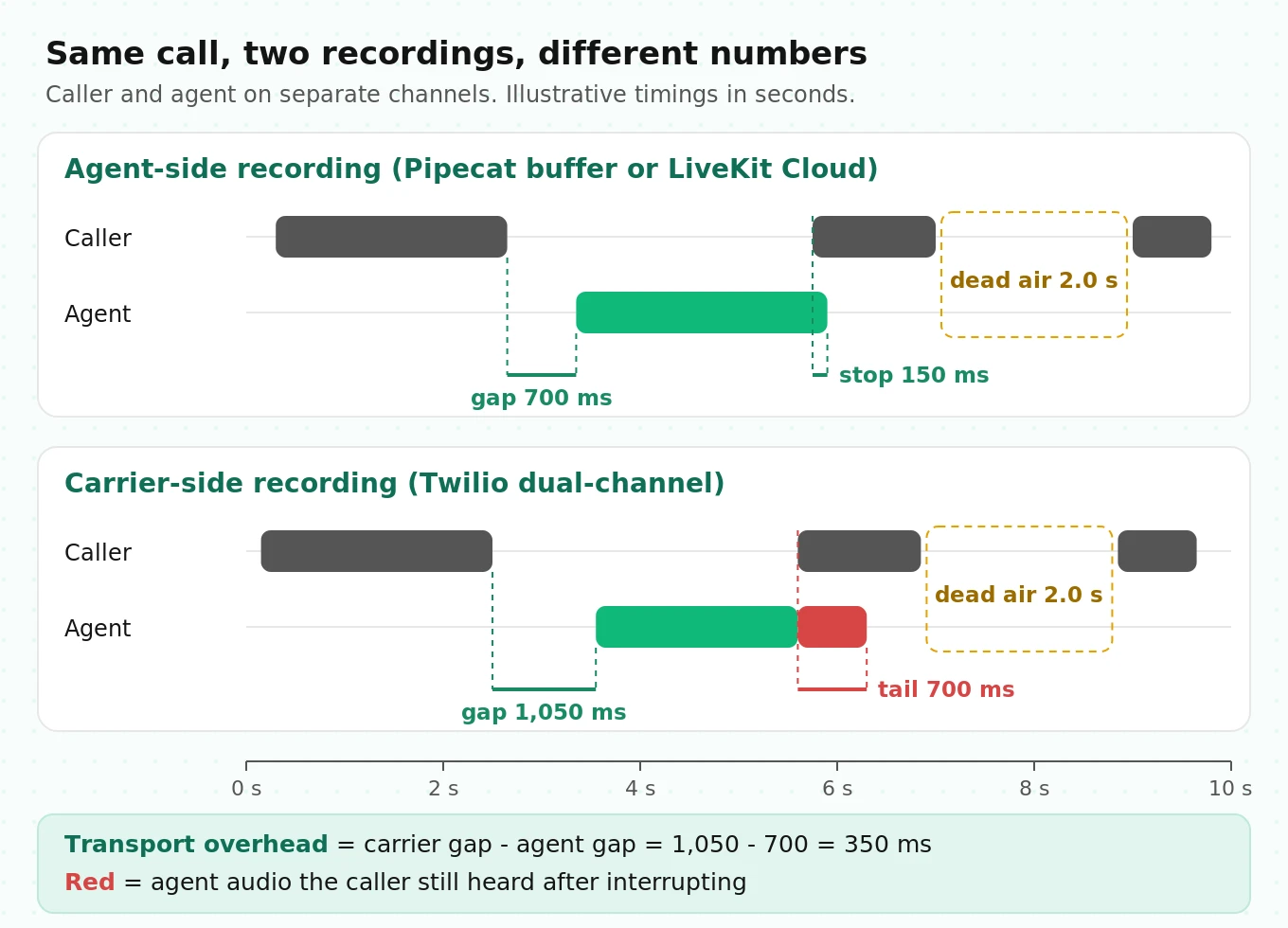
Response gaps are shorter agent-side. The agent sees the caller's speech after the inbound network leg, and its reply leaves before the outbound leg and the carrier's buffering. So the gap between caller offset and agent onset is smaller in your pipeline's recording than in the carrier's. The caller lives with the carrier's number.
Barge-in looks instant agent-side. When the caller interrupts, your agent stops producing audio. But audio already sent toward the carrier may still play. The agent-side file shows a clean stop. The carrier file shows a tail of agent speech after the caller started. That tail is what callers describe as "it kept talking over me." Our post on interruption rate covers how to count these events. Stereo carrier audio is how you time them.
Noise and echo look different. Agent-side audio may be cleaned. Carrier-side audio contains whatever the caller's phone sent, including acoustic echo of your agent's own voice from a speakerphone. Echo shows up as agent speech on the caller channel. That causes false overlaps unless you check for it.
Here is the measurement this enables. For every caller-to-agent transition that appears in both recordings, compute:
`transport_overhead_ms = gap_carrier_ms - gap_agent_ms`
Worked example, illustrative numbers: the agent-side recording shows a 700 ms gap. The carrier-side recording shows 1,050 ms for the same turn. The 350 ms difference is the time spent outside your pipeline: network legs, SIP bridging, jitter buffers and carrier playout. If that number jumps after a region change or a trunk change, you know the regression is not in your prompt or your models.
The same logic applies to barge-in:
`barge_tail_ms = agent_offset_carrier - caller_onset_carrier`
Measure it carrier-side only. The agent-side version will flatter you.
Aligning recordings with your event logs
Your event log says the LLM returned its first token at 14:02:07.412. Your recording says the agent started speaking 3.9 seconds into the file. To join them, both need to be on one clock. Three things get in the way.
Clocks on different machines disagree. The egress worker, the agent server and your log pipeline may run on different hosts. Keep NTP or chrony running on every host you control. Even then, expect small offsets between systems you do not control.
Recorders start late and report coarse start times. LiveKit's `FileInfo.started_at` is an `int64` timestamp. Twilio's `start_time` is to the second. Pipecat's processor reports nothing, so record your own anchor in `on_recording_started`, as in the code above.
Files can drift. If a recorder's sample clock and the wall clock disagree, the offset at minute five differs from the offset at minute one. Pipecat's silence insertion can also drift if the event loop stalls.
The fix is a three-step procedure:
1. Coarse anchor. Use the recorder's start timestamp to place the file on the wall clock, within a second or so.
2. Fine alignment by cross-correlation. Correlate the energy envelope of one channel against a reference that shares the same audio. The agent channel is the best reference, because you know exactly what your TTS produced and when. Two recordings of the same call can also be aligned against each other on their agent channels.
3. Drift check. Run the correlation on the first two minutes and on the last two minutes separately. If the two offsets differ by more than a few tens of milliseconds, the file is drifting. Fix it before computing any metric.
Here is the correlation step. It compares 10 ms energy envelopes, so it works across codecs and sample rates. Simplified; tested on synthetic audio.
import numpy as np

def envelope(x, sr, frame_ms=10):
    hop = int(sr * frame_ms / 1000)
    n = len(x) // hop
    e = np.sqrt((x[: n * hop].reshape(n, hop) ** 2).mean(axis=1))
    return (e - e.mean()) / (e.std() + 1e-9)

def offset_ms(ref, ref_sr, other, other_sr, max_shift_s=5.0, frame_ms=10):
    """Milliseconds to add to `other` timestamps to line them up with `ref`."""
    a, b = envelope(ref, ref_sr, frame_ms), envelope(other, other_sr, frame_ms)
    n = len(a) + len(b)
    corr = np.fft.irfft(np.fft.rfft(a, n) * np.conj(np.fft.rfft(b, n)), n)
    max_lag = int(max_shift_s * 1000 / frame_ms)
    lags = np.concatenate([np.arange(0, max_lag + 1), np.arange(-max_lag, 0)])
    vals = np.concatenate([corr[: max_lag + 1], corr[-max_lag:]])
    return int(lags[np.argmax(vals)] * frame_ms)
Once aligned, store one number per file: `offset_to_wallclock_ms`. Every event in your log can then be mapped to a position in the audio and back. That is what lets a reviewer click on a slow turn in your dashboard and hear it.
Computing per-call metrics from stereo audio
With aligned stereo audio, metric extraction is mechanical. The method below follows the one Heldner and Edlund used. They ran voice activity detection on each speaker's channel separately and labeled every 10 ms frame as speech or silence. Silences shorter than 180 ms inside one speaker's speech were bridged, so stop consonants are not counted as pauses. They reported that 99.2 percent of the stop closures they measured were shorter than 180 ms. Talkspurts shorter than 90 ms were dropped as noise. Combining the two channels gives four states for every frame: only caller, only agent, neither, or both.
Everything else is counting:
| Metric | Definition | Why it matters |
|---|---|---|
| Agent talk ratio | Agent speech time divided by total speech time | High values flag monologues and over-long answers |
| Response gap | Caller offset to next agent onset, when the agent was silent at caller offset | The latency the caller experiences, measured from audio |
| Overlap time | Frames where both channels are active | Total talk-over, before classifying who caused it |
| Barge-in stop time | Caller onset during agent speech to agent offset | How fast the agent yields when interrupted |
| Agent takeover | Agent onset while the caller is still speaking | The agent cutting the caller off |
| Dead air | Both channels silent for 2 s or more, mid-call | Stalls, tool waits, lost turns |
| First-word latency | Answer time to first agent onset (or caller onset, for outbound) | The first impression of every call |
Agent takeover is the audio version of the takeover rate in Full-Duplex-Bench. That benchmark scores a model's response to a user pause as a takeover when the model produces non-silent speech that is not a backchannel, and averages that over samples. In production you do not have the benchmark's curated pauses, but the logic is the same: count how often your agent starts a full turn while the caller is mid-sentence.
Here is the extraction code. It uses a simple energy detector so it runs anywhere with NumPy and soundfile. For real phone audio, swap in Silero VAD, which supports 8 kHz and 16 kHz input. Simplified; tested on a synthetic stereo file.
import numpy as np
import soundfile as sf

FRAME_MS, BRIDGE_MS, MIN_SPEECH_MS = 10, 180, 90   # Heldner and Edlund (2010)

def energy_vad(x, sr, thresh_db=-35.0):
    hop = int(sr * FRAME_MS / 1000)
    n = len(x) // hop
    rms = np.sqrt((x[: n * hop].reshape(n, hop) ** 2).mean(axis=1) + 1e-12)
    return 20 * np.log10(rms / (np.percentile(rms, 99) + 1e-12)) > thresh_db

def segments(mask):
    edges = np.diff(np.concatenate([[0], mask.astype(int), [0]]))
    return list(zip(np.where(edges == 1)[0], np.where(edges == -1)[0]))

def smooth(active):
    a = active.copy()
    for s, e in segments(~a):                      # bridge short pauses
        if s > 0 and e < len(a) and (e - s) * FRAME_MS < BRIDGE_MS:
            a[s:e] = True
    for s, e in segments(a):                       # drop short talkspurts
        if (e - s) * FRAME_MS < MIN_SPEECH_MS:
            a[s:e] = False
    return a

def call_metrics(path, caller_ch=0, agent_ch=1, vad=energy_vad):
    audio, sr = sf.read(path, always_2d=True)
    c = smooth(vad(audio[:, caller_ch], sr))
    a = smooth(vad(audio[:, agent_ch], sr))
    n = min(len(c), len(a)); c, a = c[:n], a[:n]
    ms = FRAME_MS
    a_segs, c_segs = segments(a), segments(c)
    gaps, barge_stops, takeovers = [], [], 0
    for cs, ce in c_segs:
        nxt = [s for s, _ in a_segs if s >= ce]
        if nxt and not a[ce - 1]:
            gaps.append((nxt[0] - ce) * ms)        # response gap
        if a[cs]:                                  # caller started over the agent
            end = next(e for s, e in a_segs if s <= cs < e)
            barge_stops.append((end - cs) * ms)
    takeovers = sum(1 for s, _ in a_segs if c[s])  # agent started over the caller
    dead = [(e - s) * ms for s, e in segments(~c & ~a)
            if s > 0 and e < n and (e - s) * ms >= 2000]
    pct = lambda v, q: float(np.percentile(v, q)) if v else None
    return {
        "agent_talk_ratio": round(a.sum() / max(1, a.sum() + c.sum()), 3),
        "overlap_s": (c & a).sum() * ms / 1000,
        "gap_p50_ms": pct(gaps, 50), "gap_p90_ms": pct(gaps, 90),
        "barge_ins": len(barge_stops), "barge_stop_p90_ms": pct(barge_stops, 90),
        "agent_takeovers": takeovers,
        "dead_air_events": len(dead), "dead_air_s": sum(dead) / 1000,
    }
On a synthetic 20-second test call with known timings, this returns the gaps, the 500 ms barge-in stop, the single takeover and the 3-second dead-air stretch we planted. Run the same check on your own data with a hand-labeled call before you trust it on production calls.
Three refinements matter on real phone audio:
- Echo check. Before counting an overlap, compare the caller channel's energy in that window to the agent channel's. If the caller channel is a quiet, delayed copy of the agent channel, it is echo, not speech. Cross-correlating the two channels inside the overlap window catches most of it.
- Backchannels. Short caller sounds like "mm-hm" during agent speech are not interruptions. Treat caller talkspurts under roughly 500 ms during agent speech as backchannels, and check that number against labeled calls. Full-Duplex-Bench also separates backchannels from takeovers for this reason.
- Turn obligation. Dead air after the agent asks a question is the caller's silence. Dead air after the caller asks a question is the agent's. Use your transcript or event log to tell them apart. Our post on silence rate goes deeper on that split.
A starting scorecard
These thresholds are illustrative starting points, not standards. Calibrate them on a few hundred of your own labeled calls. Evalgent applies a carrier-side scorecard like this in pre-launch audits and vendor bake-offs, so both stacks are measured from the same audio.
| Metric | Healthy starting target | Investigate when |
|---|---|---|
| Response gap p50, carrier-side | Under 1,000 ms | Over 1,500 ms |
| Response gap p90, carrier-side | Under 1,800 ms | Over 2,500 ms |
| Barge-in stop p90, carrier-side | Under 600 ms | Over 1,000 ms |
| Agent takeovers per 10 caller turns | Under 0.5 | Over 1 |
| Mid-call dead air of 3 s or more, agent's turn | 0 per call | Any |
| Transport overhead (carrier gap minus agent gap) | Stable week over week | Shift of more than 150 ms |
For context on why even a one-second gap feels slow: Stivers and colleagues compared turn timing across ten languages and found that every language showed a general avoidance of overlapping talk and a minimization of silence between turns, with language averages within 250 ms of the cross-language mean. Human gaps are short. A one-second agent gap is long by that standard, even if it is good for a cascaded pipeline. For first-turn timing specifically, see our guide to time to first audio. For how end-of-turn models shift the response gap, see end-of-turn detection with Flux, Silero and LiveKit's turn detector.
Storage math: what recordings really cost
Storage is cheap per gigabyte. Format choice and where you store the file decide whether recordings cost tens of dollars a month or thousands.
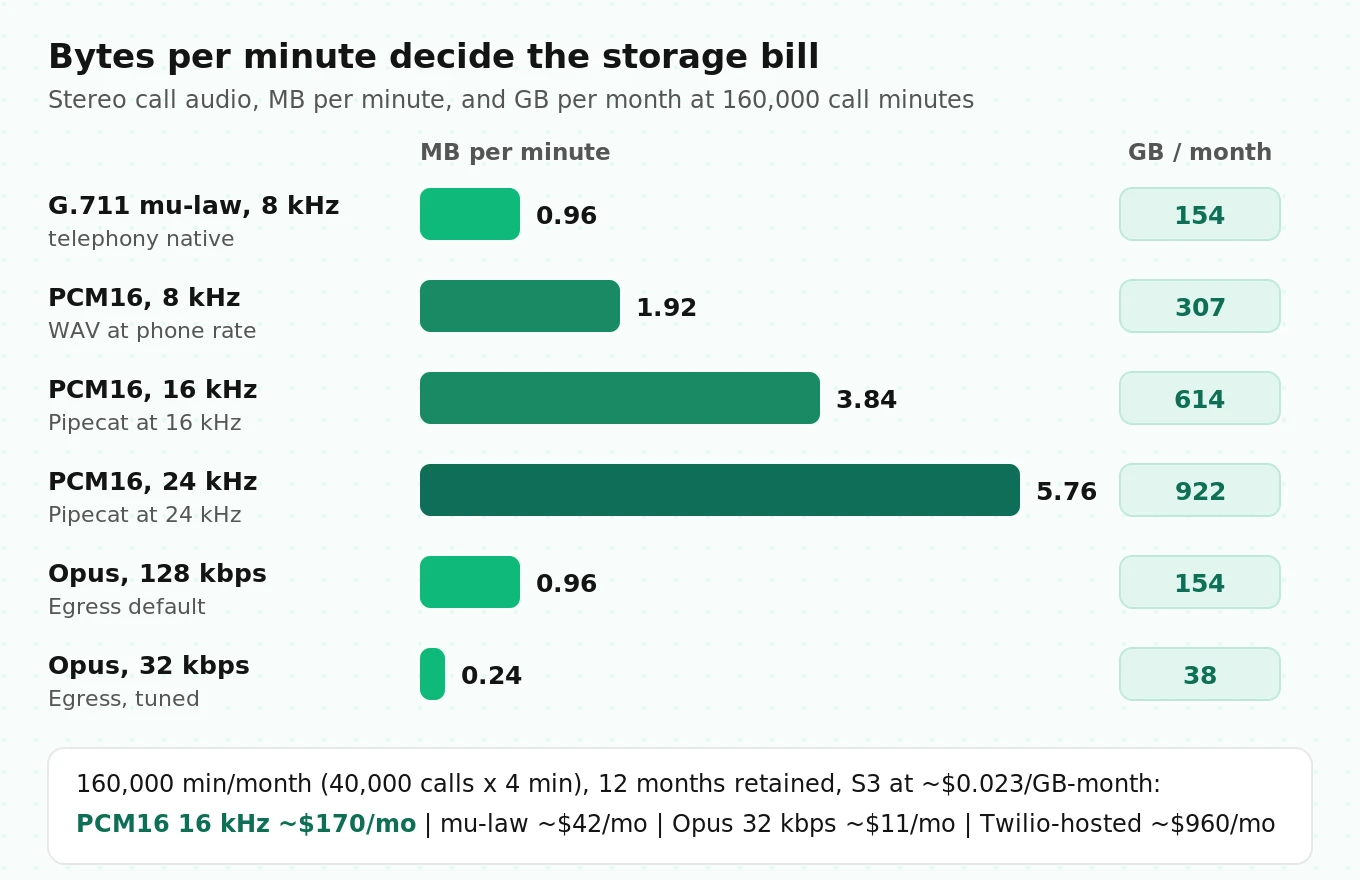
The bytes per minute come straight from the format:
`bytes_per_min = sample_rate × bytes_per_sample × channels × 60` for uncompressed audio, and `bitrate_kbps × 1000 / 8 × 60` for compressed audio.
| Format, stereo | Bitrate | MB per minute | Typical source |
|---|---|---|---|
| G.711 mu-law, 8 kHz | 128 kbps | 0.96 | Telephony native |
| PCM16, 8 kHz | 256 kbps | 1.92 | Phone audio as WAV |
| PCM16, 16 kHz | 512 kbps | 3.84 | Pipecat at a 16 kHz pipeline rate |
| PCM16, 24 kHz | 768 kbps | 5.76 | Pipecat at a 24 kHz output rate |
| Opus, Egress default | 128 kbps | 0.96 | LiveKit Egress defaults |
| Opus, tuned | 32 kbps | 0.24 | LiveKit Egress with lower bitrate |
Now a worked example. Assume 40,000 calls a month at an average of 4 minutes, so 160,000 call minutes, and a 12-month retention policy. Assume S3 Standard at about $0.023 per GB-month; check your own region and tier.
- PCM16 at 16 kHz stereo: 160,000 × 3.84 MB = 614 GB per month. At steady state you hold 12 months, about 7.4 TB, or roughly $170 per month.
- Mu-law stereo: 154 GB per month, about 1.8 TB held, roughly $42 per month.
- Opus at 32 kbps: 38 GB per month, about 461 GB held, roughly $11 per month.
Now compare recording fees, which apply per minute recorded, at the list prices quoted above:
- LiveKit audio-only Egress transcode at $0.005 per minute: about $800 per month. At the Scale rate of $0.004: about $640.
- Twilio recording at $0.0025 per minute: about $400 per month.
- Pipecat's in-process recorder: no per-minute fee, but CPU on your bots and your own upload path.
The surprise is vendor storage. Twilio storage is $0.0005 per minute per month. Keep 12 months of recordings at Twilio and you hold 1.92 million minutes, about $960 per month. The same audio as mu-law stereo in S3 is about 0.00096 GB per minute, or about $0.000022 per minute-month. That is roughly 23 times cheaper. Copy carrier recordings to your bucket on the completion callback, verify the copy, then delete the vendor copy.
Two more cost rules:
- Do not store WAV at the transport rate by default. Transcode to Opus or FLAC in a background job after metrics are computed. Keep the lossless file only for calls flagged for review.
- Sample, but never sample failures. Keep every call with an error, escalation, long gap or compliance flag. Our post on scoring every call instead of a sample explains why the long tail is where the failures live.
Consent, retention and redaction
Recording phone calls is regulated. This is engineering guidance, not legal advice.
Consent. Federal law and most US states allow recording with one party's consent. A minority require every party's consent. The Digital Media Law Project's guide to recording calls lists California, Connecticut, Florida, Illinois, Maryland, Massachusetts, Montana, New Hampshire, Pennsylvania and Washington among all-party states, with notes on Illinois and Massachusetts. The guide also says it is no longer updated, so confirm with counsel. Because callers can be anywhere, most teams play a disclosure at the start of every call. Record the disclosure itself. It is your proof.
Start time matters. If you start recording at answer and play the disclosure a few seconds later, those seconds were recorded before disclosure. Start the recorder after the disclosure, or use a pause in `silence` mode until it plays.
Retention. Set it per tier: raw audio shortest, redacted audio longer, metrics forever. LiveKit Cloud deletes session recordings after 30 days. Your bucket keeps whatever you tell it to, so set lifecycle rules on day one.
Redaction. Pause recording during card or account number capture. On Twilio, use pause with `PauseBehavior=silence` so the timeline stays intact. If you redact after the fact, replace audio with silence of the same length. Never cut it out, or every later timestamp breaks. For an audit-ready view of these controls, see our voice agent compliance audit guide.
How to set up stereo call recording and per-call metrics
1. Pick two tap points. One agent-side recorder (Egress with audio routes, or Pipecat's `AudioBufferProcessor` with `num_channels=2`) and one carrier-side recorder (Twilio dual-channel or your trunk's dual recording).
2. Write a channel map with every file. Store `caller` and `agent` channel indexes, sample rate, codec, recorder type and the provider IDs (`egress_id`, `CallSid`, `sip.twilio.callSid`).
3. Fix the encoding. For Egress, lower the default 128 kbps Opus bitrate. For Pipecat, set sample rates once in pipeline params.
4. Capture anchors. Save the recorder start timestamp: `FileInfo.started_at`, Twilio `start_time`, or your own time from `on_recording_started`.
5. Copy to your bucket. On the egress-complete webhook or Twilio's recording status callback, copy the file, verify its size and duration, then apply lifecycle rules.
6. Align. Run envelope cross-correlation on the agent channel against your TTS log or the other recording. Store `offset_to_wallclock_ms`. Run the drift check.
7. Extract metrics. Run per-channel VAD, build the four-state frame labels, and compute gaps, overlaps, barge-in stop time, takeovers and dead air. Write one row per call.
8. Diff the two recordings. Compute transport overhead and barge-in tail per call. Alert on week-over-week shifts.
9. Link audio to logs. Make every slow turn in your dashboard clickable to the exact second of audio.
Testing your recording pipeline: a checklist
A recording pipeline fails quietly. Files go missing, channels swap, timelines drift. None of that throws an error. Test it like any other production system.
Scripted test calls. Place calls where the timing is known. Have a test caller say a fixed phrase, wait exactly 2 seconds, interrupt the agent at a fixed point, then stay silent for 5 seconds. Your metrics should recover those numbers within one or two frames. Run these after every framework upgrade. If you still place these calls by hand, our post on replacing manual test calls shows how to automate them.
The checklist:
- Channel map correct: caller speech appears only on the caller channel in a call where the agent is silent
- Both channels present: no file has a silent or missing channel
- Duration within 1 second of the carrier's call duration
- Agent-side and carrier-side offsets stable from the first to the last two minutes (no drift)
- Recorder starts after the consent disclosure, or the pre-disclosure segment is silent
- Pauses for sensitive data leave silence of the right length, not a gap in the file
- Echo check passes on a speakerphone test call: no false overlaps
- Upload success rate is 100 percent over a day of traffic, with alerts on failures
- Metric job outputs match hand labels on at least 20 reviewed calls
- Retention rules delete raw audio on schedule; deletion by call ID works across every copy
Under load. Run 20 to 50 concurrent test calls. Pipecat users in the issue thread above saw recording overlap get worse under heavy concurrency on shared resources. Your recordings should look the same at peak as at idle.
Independent checks. A team that built the agent and the recorder will read its own numbers generously. An outside evaluator listening to carrier-side audio gives you a second opinion on latency, interruptions and dead air. Evalgent runs pre-launch audits and ongoing call scoring for teams on LiveKit and Pipecat, using the caller-side audio as the source of truth.
Frequently asked questions
Does LiveKit record agent calls automatically?
On LiveKit Cloud, yes. Agent sessions record audio, transcripts, traces and logs by default, controlled by the `record` option on `AgentSession.start()`. The files stay in LiveKit Cloud for 30 days. User audio is recorded after noise cancellation. For long-term storage in your own bucket, or raw audio, use Egress.
How do I get the agent and the caller on separate channels in LiveKit?
Use `StartEgress` with a `MediaSource` and an `AudioConfig`. Add one `AudioRoute` matching `participant_kind` `AGENT` to the left channel and one matching `SIP` to the right. On older setups, the deprecated room composite request with `audio_only` and `DUAL_CHANNEL_AGENT` does the same.
How much does LiveKit call recording cost?
At the time of writing, LiveKit's pricing page lists audio-only transcode at $0.005 per minute on Build and Ship and $0.004 on Scale, after included minutes. Track egress without transcoding is $0.001 per minute. Cloud agent session recordings are $0.005 per minute beyond the included minutes. Check the page before budgeting.
Which channel is the user in Pipecat's AudioBufferProcessor?
With `num_channels=2`, the user is on the left channel and the bot is on the right. With `num_channels=1`, both are mixed. The `on_track_audio_data` handler also gives you separate mono user and bot buffers. Place the processor after `transport.output()` so bot audio is paced like playback.
Why are my Pipecat recordings out of sync?
The processor rebuilds the timeline by inserting silence based on wall-clock time. Event-loop stalls, blocking calls, CPU contention and placement before the output transport can all skew it. Check your version against the fixes in the GitHub issues, give each bot enough CPU, and verify against a Twilio recording.
Is a Twilio recording better than an agent-side recording?
Neither is better. They answer different questions. The Twilio recording shows what the carrier carried, which is closer to what the caller heard. The agent-side recording shows what your pipeline received and produced. Keep both. The difference between them measures transport overhead and barge-in tails.
How much storage do voice agent recordings need?
Stereo mu-law at 8 kHz uses about 0.96 MB per minute. PCM16 at 16 kHz stereo uses 3.84 MB. Opus at 32 kbps uses 0.24 MB. At 160,000 call minutes a month, that is about 154 GB, 614 GB and 38 GB per month respectively, before retention multiplies it.
Do I need consent to record voice agent calls?
US law varies by state. Some states require every party's consent, including California, Florida, Maryland, Massachusetts, Pennsylvania and Washington. Since callers can be anywhere, most teams play a recording disclosure at the start of every call and record it as proof. Confirm your obligations with counsel.
The bottom line
Record every call in stereo at two points, one inside your agent and one at the carrier, and store an explicit channel map and clock anchor with each file. Once the two recordings are aligned, gaps, overlaps, barge-in tails and dead air become numbers you can track per call instead of complaints you cannot reproduce.
Related Articles

How to automate voice agent testing: synthetic callers vs manual QA
Learn how ai test automation replaces manual QA for voice agents. Compare synthetic callers vs human testers, with a 5-step framework to scale without hiring.
Read more
AI Agent Testing vs Voice Agent Testing: What General Tools Miss for Voice
AI agent testing measures text outputs. Voice agent testing measures behaviour through an acoustic pipeline. Five failure categories general tools miss.
Read more