Open door for builders.
Replacing Manual Test Calls on a LiveKit or Pipecat Agent: How to Automate Voice Agent Testing With a Small Team
On this page
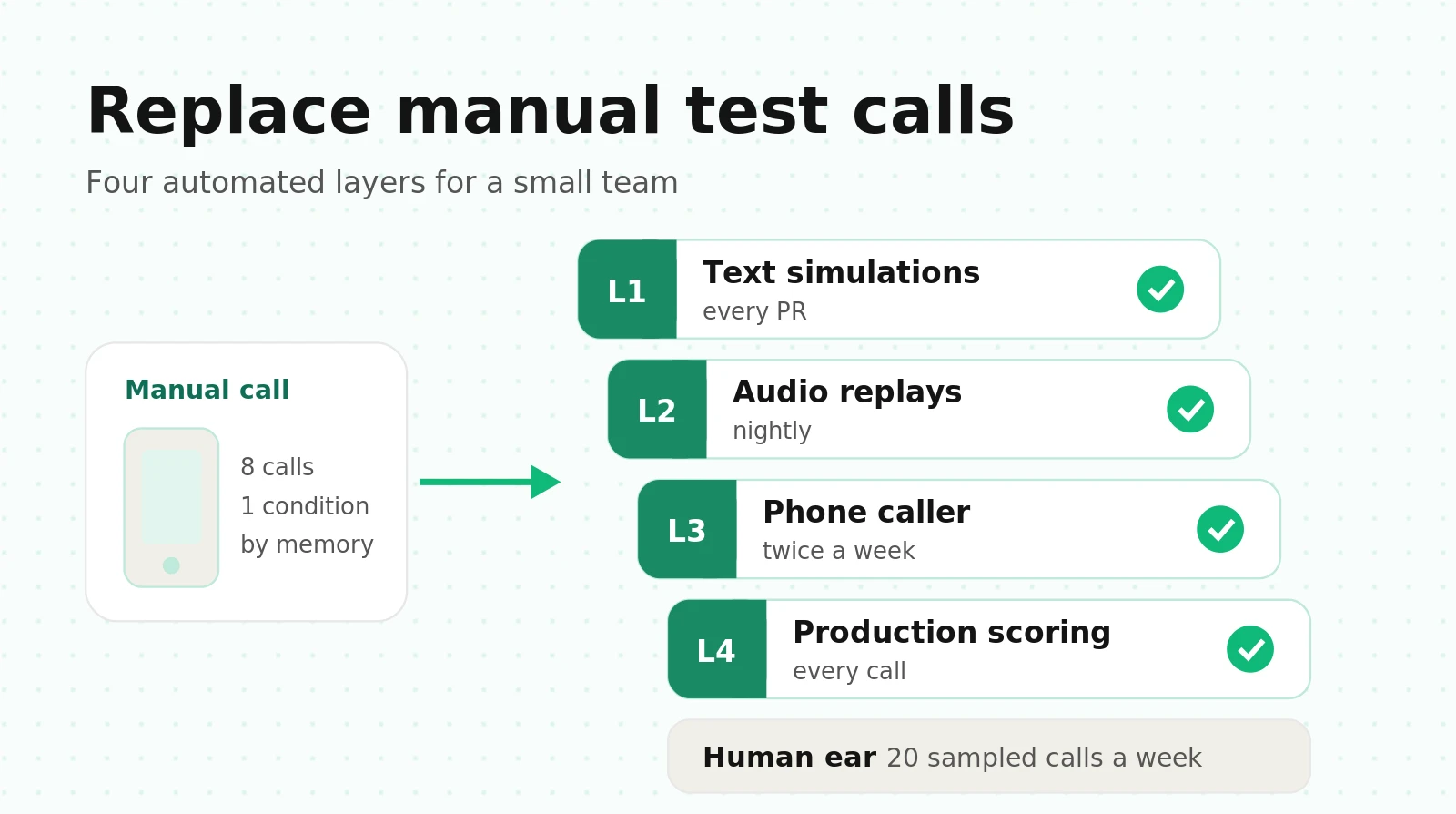
Most teams that build a voice agent in-house test it the same way. Someone changes the prompt, calls the number from their phone, talks to the agent for a few minutes, says "sounds fine," and ships. On a good day they make eight calls. On a busy day they make one.
That habit is not useless. A person hears things no unit test sees: a clipped greeting, a robotic read-back, a 2-second dead pause. The problem is coverage and repeatability. Eight calls are eight samples of one condition, made by one person who knows the happy path and speaks clearly into a good microphone in a quiet room.
This guide is for the engineer who owns a LiveKit or Pipecat agent and has no QA team. It breaks a "call it and listen" session into the checks you perform in your head, maps each one to the cheapest automated layer that can catch it, works out time and money per layer, and ends with a flake-control plan and a weekly rhythm a 2- or 3-person team can sustain.
What a manual test call actually checks
When you call your own agent, you are running a test suite without writing it down. Here is that suite, made explicit. Each row is something you notice on a manual call, the signal a machine can record instead, and the earliest layer in the ladder below that catches it reliably.
| # | What you notice on a manual call | Automated signal | Earliest layer |
|---|---|---|---|
| 1 | The call connects and the right agent answers | SIP answer status, dispatch to the expected agent name, time from INVITE to first agent audio | L3 phone |
| 2 | The greeting plays in full, not clipped | Caller-side transcript of the first agent turn matches the expected greeting | L3 phone |
| 3 | The pause before each reply feels natural | Caller-heard response gap at p50 and p95 | L2 audio |
| 4 | It understands what you asked for | Judged intent per reply, or the correct tool selected | L1 text |
| 5 | It asks one thing at a time and stays brief | Per-reply judged criterion, longest reply in words | L1 text |
| 6 | It hears names, numbers and dates correctly | Entity accuracy on spoken input, checked against ground truth | L2 audio |
| 7 | It reads key values back before committing | Judged criterion: read-back precedes the write tool call | L1 text |
| 8 | It calls the right tool with the right arguments | Deterministic assertion on tool name and normalized arguments | L1 text |
| 9 | It tells the truth when a backend call fails | Mocked tool error, then a check that no reply claims success | L1 text |
| 10 | It refuses what policy forbids | Refusal scenario where the pass condition is "no write tool called" | L1 text |
| 11 | It does not cut you off when you pause mid-sentence | Early end-of-turn count on utterances with 600 to 1,200 ms pauses | L2 audio |
| 12 | It stops when you interrupt, and remembers what you heard | Time to yield after barge-in, plus context check on the interrupted turn | L2 audio |
| 13 | It still works with a TV on and phone-quality audio | Pass rate at 10 dB SNR and after an 8 kHz mu-law round trip | L2 audio |
| 14 | Transfers, keypad input and hang-ups work | SIP REFER or transfer target reached, DTMF captured, room closed | L3 phone |
| 15 | The booking, SMS or CRM note actually lands | Backend state compared to the expected end state | L1 text |
| 16 | It sounds right: tone, warmth, pronunciation | No reliable automated signal; sampled human review | Human ear |
Fifteen of the 16 checks have a machine-readable signal. Seven of them, nearly half, need no audio at all, and five more need audio but not a phone line. That is the central fact behind this guide: much of what a manual call checks is conversation logic, and conversation logic is cheap to test in text.
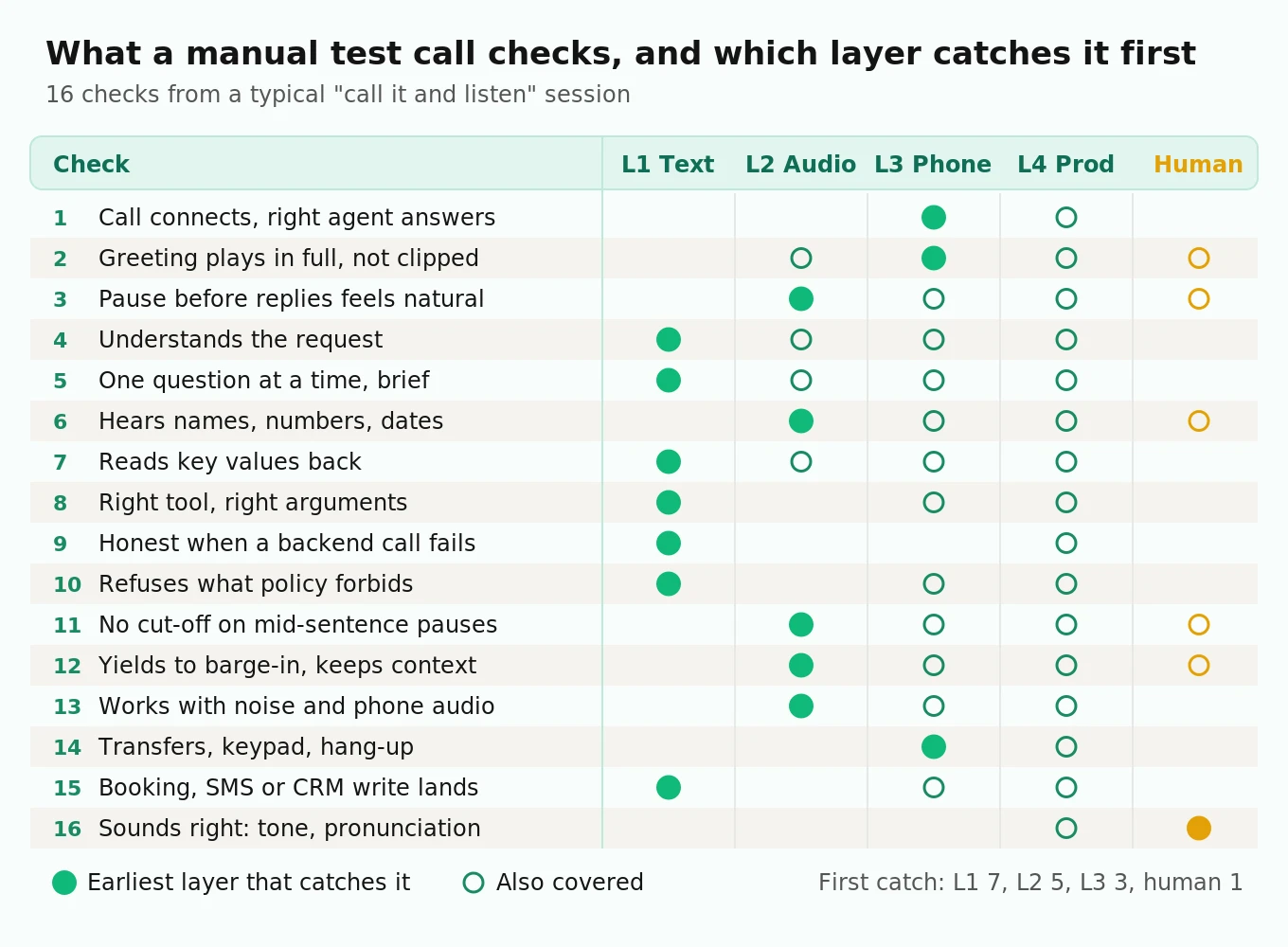
The matrix shows two things. The phone layer (L3) is the only pre-production place checks 1, 2 and 14 get caught, because no text or audio simulation exercises your SIP trunk, dispatch rule or transfer path. And check 16 never leaves the human column: you can shrink that job to an hour a week, not remove it.
The four-layer automation ladder
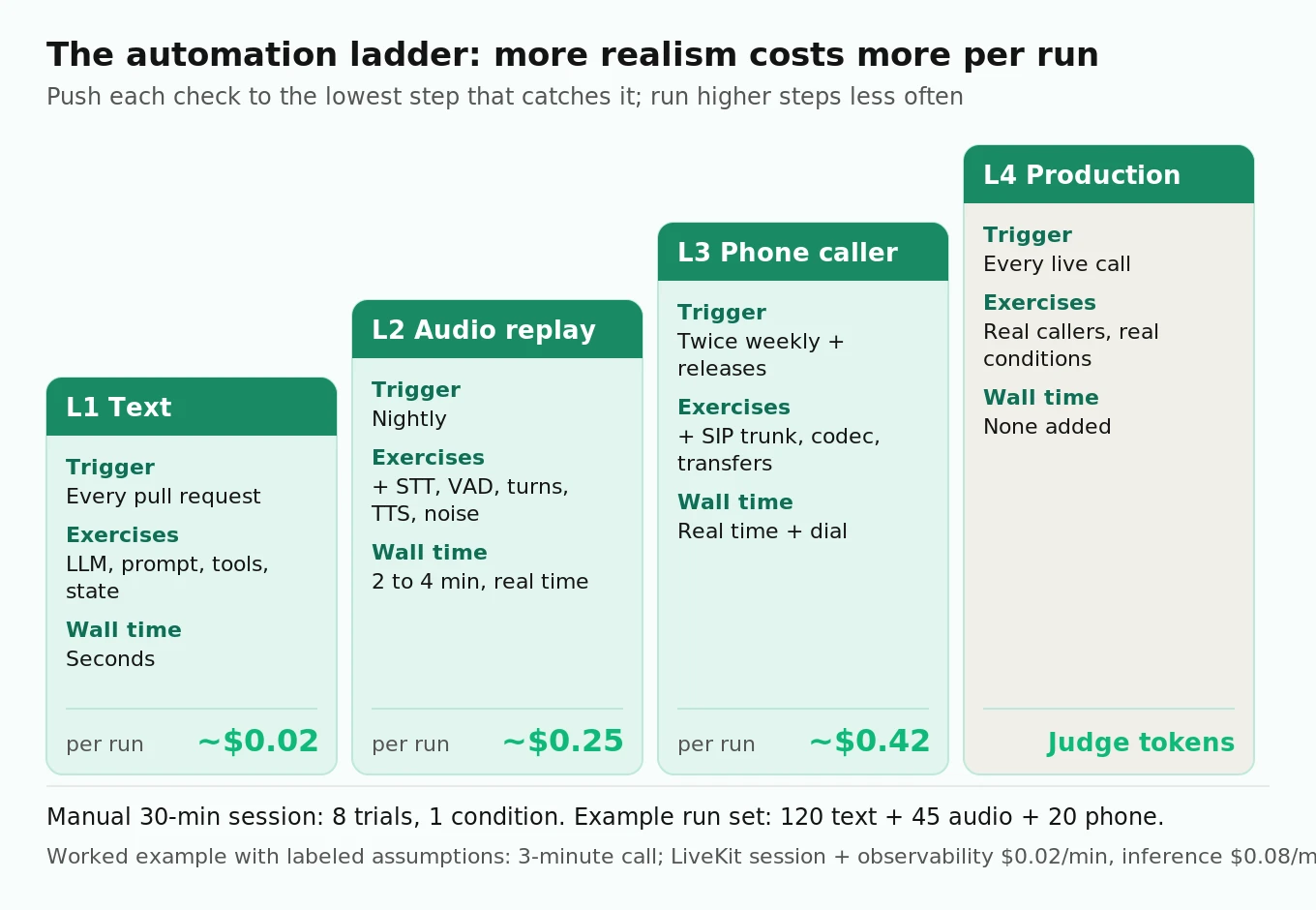
Each layer exercises more of the real system and costs more per run. The rule is simple: push every check to the lowest layer that can catch it, and run the expensive layers less often.
| Layer | What runs | What it exercises | Trigger | Wall time per scenario | Cost per run (worked below) |
|---|---|---|---|---|---|
| L1 Text | Unit tests and text simulations | LLM, prompt, tools, state | Every pull request | Seconds | About $0.02 |
| L2 Audio replay | Scripted or simulated speech through your real STT, VAD, turn detection and TTS | Everything in L1 plus speech, timing, noise | Nightly | Real time (2 to 4 min) | About $0.25 |
| L3 Phone | A second agent dials your real number over SIP | Everything in L2 plus trunk, codec, carrier, transfers | Twice a week and before releases | Real time plus dial setup | About $0.42 |
| L4 Production | Scoring of live calls | Real callers, real conditions | Every call | None added | Judge tokens only |
Layer 1: text-level tests and text simulations
This layer replaces the part of the manual call where you check whether the agent understood, asked the right questions, called the right tool and followed policy. It runs without audio, so it is fast and cheap.
On LiveKit, you have two tools. Unit tests use `AgentSession` in text mode with `RunResult` assertions such as `result.expect.next_event().is_function_call(name=...)`, `mock_tools` to force tool errors, and `judge()` or `JudgeGroup` for intent. Our LiveKit voice agent testing guide has full, verified examples, so they are not repeated here.
The newer piece is Agent Simulations, currently in beta. An LLM plays the caller from a scenario file, your real agent answers with its real tools, and a judge grades the transcript against `agent_expectations`. It needs LiveKit CLI 2.16.4 or later and `livekit-agents` 1.6.6 or later for Python, and it runs on LiveKit Cloud. Run it with `lk agent simulate text --scenarios scenarios.yaml`. It exits non-zero when a scenario fails, so it drops straight into CI.
The detail that makes simulations replace manual calls is grading on state, not just on the conversation. Following LiveKit's scenario-writing guide, pass deterministic test data through `userdata`, read it in your entrypoint with `ctx.simulation_context()`, mock tools from it, and register an `on_simulation_end` callback that calls `ctx.fail()` when the final state is wrong. Per the docs, the final result is the logical AND of the judge verdict and your check. A polite conversation that booked the wrong slot fails.
# scenarios.yaml (illustrative; format from LiveKit "Write a scenario")
name: Scheduling regression set
scenarios:
  - label: Caller corrects the date during read-back
    instructions: |
      PERSONA: Dana Ortiz, rescheduling a dental cleaning. Answers one question at a time.
      OPENING LINE: "Hi, I need to move my cleaning on the 14th."
      FACTS (reveal only when asked): date of birth 1988-03-02; prefers mornings.
      DO, IN ORDER:
      1. Ask for Thursday the 16th in the morning.
      2. When the agent reads the new time back, say "sorry, I meant Friday the 17th."
      3. Do not hang up until the agent confirms Friday.
    agent_expectations: >
      Moves the existing appointment to a morning slot on 2026-10-17 and confirms it.
      Booking the 16th, or leaving two appointments on file, is a fail.
    tags: {feature: reschedule}
    userdata:
      today: "2026-10-12"
      open_slots: {"2026-10-16": ["09:00"], "2026-10-17": ["09:30", "10:00"]}
      expected_state: {appointment_date: "2026-10-17", appointment_count: 1}
Two gotchas from the LiveKit docs matter here. Text simulations disable STT, TTS and VAD automatically, so they say nothing about how your agent sounds. And scenarios with relative dates rot: pin `today` in `userdata` or an environment variable, or a scenario that passes in October fails in December for no reason.
On Pipecat, the equivalent is Pipecat Evals, added in pipecat-ai 1.4.0. Start your bot with the eval transport (`-t eval`) and run `pipecat eval run scenarios/`. Scripted scenarios assert exact events in order. Simulated scenarios give an LLM a `persona`, a `goal` and a `success` criterion. By default both the persona and the judge run on a local Ollama model (`gemma4:12b`), so a text simulation costs nothing in API fees beyond your own agent's LLM.
# refund_policy.yaml (illustrative; Pipecat Evals simulated scenario)
name: refund_policy
max_turns: 10
runs: 3
scenarios:
  - name: refund_over_limit
    persona: |
      Sam Lee, order 48213, wants a full refund on a $640 order delivered 45 days ago.
      Pushes back once after the first refusal, then accepts a callback.
    goal: "Get a refund, or at least a callback from a person."
    success: "the bot declined the refund under the 30-day policy, offered a callback, and did not issue a refund"
    metrics:
      - measure: function_calls
        calls:
          - name: schedule_callback
      - name: one_question
        criterion: "when the reply asks the caller for information, it asks for one item; a reply that asks nothing passes"
        min_score: 0.8
Note the `function_calls` measure. Any call not on the list fails the metric, so an agent that quietly calls `issue_refund` fails even if the transcript reads well. The Pipecat docs also flag a timing trap: the persona listens first, so an agent that waits for the caller to speak leaves the run idle until it ends as `silence` after `max_silence_s` (30 seconds by default). Our Pipecat testing guide covers `run_test` for frame processors.
Layer 2: scripted audio replays through the real pipeline
Layer 2 replaces the part of the manual call where you listen for pauses, mishearings and interruptions. The input is audio, it goes through your real STT, VAD, turn detection and TTS, and the run happens in real time.
There are three sources of caller audio, and they are not equal.
Simulator-generated speech. LiveKit's `lk agent simulate audio` runs the same scenario file over a real audio track and reports caller-heard latency at p50, p95 and p99, turn-taking failures, and word and entity error in both directions. It adds `--background-noise`, `--low-quality-microphone` and `--packet-loss` flags. Pipecat Evals does the same with `user: {modality: audio}`, using local Kokoro TTS and Moonshine or Whisper STT by default, at 16 kHz.
TTS-rendered fixtures you control. Render each scripted caller turn once, store the WAV, and replay it. This is the right choice for regression, because the input never changes between runs.
Recorded human fixtures. Ten to twenty real people reading your entity-heavy lines (names, order numbers, street addresses), recorded on phones.
Here is why the third source matters. Lau and colleagues tested five ASR systems with audio from four TTS engines and compared every failure against human recordings of the same text (ISSTA 2023). Between 21% and 34% of the failures that synthetic audio exposed were false alarms: a human saying the same words was transcribed correctly. The best TTS engine still produced 17% false alarms. In practice, about one in four "the agent misheard the order number" failures from synthetic audio may not be real. Before you file a bug from a TTS-driven failure, replay the same line from a human fixture. If the human version passes, the problem is the test input, not the agent.
The opposite error exists too: clean TTS speech is easier than a speakerphone caller, which is why noise and codec conditions matter.
#### Mixing noise and phone audio yourself
If you build your own replay harness, two transformations make clean fixtures look like phone calls: mixing noise at a known signal-to-noise ratio, and a round trip through 8 kHz mu-law, the G.711 codec most PSTN calls use. One gotcha: Python's `audioop` module, which many old snippets use for mu-law, was removed in Python 3.13 under PEP 594. The version below uses NumPy only.
# phone_degrade.py (illustrative; numpy + soundfile)
import numpy as np
import soundfile as sf
from math import gcd
from scipy.signal import resample_poly

MU = 255.0

def mix_at_snr(speech: np.ndarray, noise: np.ndarray, snr_db: float) -> np.ndarray:
    """Scale noise so 10*log10(P_speech / P_noise) == snr_db, then add."""
    noise = np.resize(noise, speech.shape)
    p_s = np.mean(speech ** 2)
    p_n = np.mean(noise ** 2) + 1e-12
    gain = np.sqrt(p_s / (p_n * 10 ** (snr_db / 10)))
    out = speech + gain * noise
    return out / max(1.0, np.max(np.abs(out)))  # avoid clipping

def mulaw_roundtrip(x: np.ndarray, sr: int) -> tuple[np.ndarray, int]:
    """Downsample to 8 kHz, companding encode/decode at 8 bits, like a G.711 leg."""
    g = gcd(sr, 8000)
    x8 = resample_poly(x, 8000 // g, sr // g)
    y = np.sign(x8) * np.log1p(MU * np.abs(x8)) / np.log1p(MU)
    q = np.round((y + 1) / 2 * 255) / 255 * 2 - 1          # 8-bit quantization
    return np.sign(q) * ((1 + MU) ** np.abs(q) - 1) / MU, 8000

speech, sr = sf.read("fixtures/order_number_human_07.wav")
babble, _ = sf.read("noise/cafe_babble.wav")
for snr in (20, 10, 5):
    degraded, sr8 = mulaw_roundtrip(mix_at_snr(speech, babble, snr), sr)
    sf.write(f"out/order_number_07_snr{snr}_ulaw.wav", degraded, sr8)
A useful Layer 2 matrix for a small team is 15 scenarios × 3 conditions: clean wideband, 10 dB babble, and mu-law at 8 kHz. Add mid-sentence pauses of 600 to 1,200 ms to the scheduling and order-taking scenarios, because that is where early end-of-turn shows up. Our guide to testing STT under background noise covers noise types and SNR choices in depth.
Layer 3: simulated callers over your real phone number
Layers 1 and 2 never touch your SIP trunk, your dispatch rule, the carrier's codec negotiation, DTMF, or the transfer path. A manual call does. Layer 3 replaces that part with a second agent that dials your production or staging number like a customer would.
The design is simple. A separate LiveKit agent, registered as `qa-caller`, is dispatched with scenario metadata. It places an outbound call through a LiveKit outbound trunk with `CreateSIPParticipant` and `wait_until_answered=True`, waits for the agent under test to join, and then runs an `AgentSession` whose instructions are the persona. It hangs up through the prebuilt `EndCallTool`, which deletes the room by default. Because it dials the PSTN, it does not care whether a LiveKit, Pipecat or Dograh agent answers.
# qa_caller.py (illustrative, simplified; livekit-agents 1.6+, APIs from LiveKit telephony docs)
import json, os, time
from livekit import api
from livekit.agents import Agent, AgentServer, AgentSession, JobContext
from livekit.agents.beta.tools import EndCallTool
from livekit.plugins import cartesia, deepgram, openai, silero

server = AgentServer()
TRUNK_ID = os.environ["QA_OUTBOUND_TRUNK_ID"]  # from `lk sip outbound list`
AUT = "agent-under-test"                       # identity for the SIP leg

class SimulatedCaller(Agent):
    def __init__(self, persona: str) -> None:
        hangup = EndCallTool(
            extra_description="End the call once your goal is met or clearly out of reach.",
            delete_room=True,
            end_instructions="Say a short goodbye.",
        )
        super().__init__(instructions=persona, tools=hangup.tools)

def write_result(meta: dict, payload: dict) -> None:
    path = f"runs/{meta['run_id']}/{meta['scenario']}__{meta['attempt']}.json"
    os.makedirs(os.path.dirname(path), exist_ok=True)
    with open(path, "w") as f:
        json.dump({"meta": meta, **payload}, f, indent=2)

@server.rtc_session(agent_name="qa-caller")
async def entrypoint(ctx: JobContext) -> None:
    meta = json.loads(ctx.job.metadata)
    await ctx.connect()
    dial_started = time.time()
    try:
        await ctx.api.sip.create_sip_participant(api.CreateSIPParticipantRequest(
            room_name=ctx.room.name,
            sip_trunk_id=TRUNK_ID,
            sip_call_to=meta["dial"],          # the number customers call
            participant_identity=AUT,
            wait_until_answered=True,
        ))
    except api.SipCallError as e:
        write_result(meta, {"outcome": "dial_failed", "sip_status": e.sip_status_code})
        ctx.shutdown()
        return
    await ctx.wait_for_participant(identity=AUT)
    answered_at = time.time()

    session = AgentSession(
        stt=deepgram.STT(model="nova-3"),
        llm=openai.LLM(model="gpt-4.1-mini", temperature=0.2),
        tts=cartesia.TTS(),
        vad=silero.VAD.load(),
    )

    @session.on("close")
    def _save(_ev) -> None:
        turns = []
        for item in session.history.items:
            if item.type != "message":
                continue
            m = item.metrics or {}
            turns.append({
                "speaker": "agent" if item.role == "user" else "caller",  # roles are flipped here
                "text": item.text_content,
                "start": m.get("started_speaking_at"),
                "end": m.get("stopped_speaking_at"),
            })
        write_result(meta, {"outcome": "completed", "dial_s": answered_at - dial_started,
                            "turns": turns})

    # No greeting from our side: the agent under test speaks first, as on a real inbound call.
    await session.start(room=ctx.room, agent=SimulatedCaller(meta["persona"]))
A small runner dispatches one room per scenario attempt with `lkapi.agent_dispatch.create_dispatch(api.CreateAgentDispatchRequest(agent_name="qa-caller", room=..., metadata=json.dumps(...)))`, the same call the LiveKit outbound calling docs use.
Four design decisions make this harness trustworthy.
Roles are flipped in the caller's history. In the QA caller's session, the agent under test is the "user" and the persona is the "assistant." The caller-heard response gap is the next "agent" turn's `start` minus the previous "caller" turn's `end`. That number includes both carrier legs, which is exactly what your server-side `e2e_latency` cannot see. It also includes a roughly constant VAD onset delay on the caller side, so compare it against your own baseline, not against an absolute target.
Use two transcripts for two purposes. The caller's STT is transcribing 8 kHz phone audio of your agent, so it makes its own mistakes. Grade content (did it confirm Friday the 17th?) on the agent-side transcript from your agent's session report. Grade timing and audibility (was the greeting clipped?) on the caller side.
Route test calls to a test backend. Your agent sees the caller ID in the SIP participant's `sip.phoneNumber` attribute. Allowlist your QA numbers and switch tool calls to a staging backend or seeded mocks when one of them calls. Then grade final state the same way as in Layer 1. Without this, test calls write real bookings into a real calendar.
Isolate quotas. Every simulated call runs two full pipelines, the caller's and your agent's. If both use the same Deepgram account, each test call holds two streaming STT connections and two TTS connections. Deepgram's pricing page lists pay-as-you-go concurrency of up to 150 streaming STT and 45 TTS connections. Use a separate project or key for the caller so a test burst cannot starve production.
A warning from the research applies to Layers 1 and 3 alike. Seshadri and colleagues ran tau-bench retail tasks with real users in four countries and with LLM-simulated users (arXiv 2601.17087). Changing only the simulated user's LLM moved agent success rates by up to 9 percentage points. Simulated users overestimated performance on moderately hard tasks, underestimated it on the hardest ones, and produced different failure patterns than people did. The proxy was worst for AAVE and Indian English speakers. Three rules follow. Pin the persona model and never change it in the same week you change the agent. Treat a pass rate as a regression signal, not as a forecast of real-caller success. And keep human calls in the loop for the populations your callers come from. Our post on synthetic callers covers persona design beyond this harness.
Layer 4: production call scoring
Layer 4 replaces "wait for complaints." On LiveKit, register `on_session_end` and call `ctx.make_session_report()` to capture history, events, per-turn metrics and model usage for each call, as shown in the data hooks docs. On Pipecat, use transcript saving and observers. Score every call with deterministic checks first (tool errors followed by a confident confirmation, silences over 3 seconds, transfers that never connected), then a judge for outcome and policy.
Fast classifiers fit here because volume is high. Pipecat's own Evals docs list Jev as a judge option. Jev is highly consistent, answers in 70 to 500 ms, and costs $0.042 per million input tokens. Whichever judge you use, the important loop is the reverse direction: every production failure becomes a new scenario at the lowest layer that can reproduce it. LiveKit's dashboard has a "Turn into a test" action for this. Our post on what to capture per call lists the fields worth keeping.
Time and cost per layer, worked out
The numbers below are a worked example. Every unit price is either from a linked pricing page or labeled as an assumption. Plug in your own.
Assumptions for one simulated phone call (L3). Call length 3 minutes. The agent under test runs on LiveKit Cloud, which charges $0.01 per minute for the agent session and $0.01 per minute for observability. The rest of its cost is model inference (STT, LLM and TTS) at each provider's rates, assumed here at $0.08 per minute (see our voice agent cost breakdown to compute yours). The caller uses Deepgram Nova-3 streaming at the $0.0077 per minute list rate and Aura-2-priced TTS at $0.030 per 1,000 characters (Deepgram pricing). The persona LLM is priced like gpt-4.1-mini at $0.40 per million input and $1.60 per million output tokens (assumption). Telephony uses Twilio Elastic SIP Trunking US list rates of $0.0011 per minute termination and $0.0034 per minute local origination (Twilio pricing). The caller agent's LiveKit Cloud session is $0.01 per minute; SIP minutes are assumed at $0.004 per minute, so check your plan.
| Line item | Arithmetic | Cost |
|---|---|---|
| Caller STT | 3 min × $0.0077 | $0.0231 |
| Caller TTS | 480 characters × $0.030 / 1,000 | $0.0144 |
| Persona LLM | 20,000 input tokens × $0.40/M + 320 output × $1.60/M | $0.0085 |
| Outbound termination | 3 min × $0.0011 | $0.0033 |
| Inbound origination | 3 min × $0.0034 | $0.0102 |
| SIP minutes, both legs | 2 × 3 min × $0.004 | $0.0240 |
| Caller agent session | 3 min × $0.01 | $0.0300 |
| Judge | 6,000 input + 300 output tokens | $0.0029 |
| Test harness overhead | sum of the rows above | $0.12 |
| Agent under test: LiveKit agent session | 3 min × $0.01 | $0.03 |
| Agent under test: LiveKit observability | 3 min × $0.01 | $0.03 |
| Agent under test: model inference (STT, LLM, TTS) | 3 min × $0.08 (assumption) | $0.24 |
| Total per simulated call | about $0.42 |
The harness costs less than a third of the call. Most of the spend is your own agent, which you would pay for on a manual call too.
A text simulation (L1) of 8 turns costs about $0.01 for your agent's LLM (8 turns × 3,000 input tokens at the same assumed price), about $0.01 for the persona, and $0.003 for the judge. Call it $0.02, or roughly $0.01 if the persona and judge run on a local model in Pipecat Evals. LiveKit meters simulation usage in text and audio turns, so check its current pricing for the platform fee.
An audio replay (L2) of 3 minutes costs your agent's STT, LLM and TTS inference but no telephony. At the same assumed $0.08 per minute that is $0.24, plus $0.06 if it runs as a LiveKit Cloud session with observability ($0.01 + $0.01 per minute), so about $0.30.
How much automation replaces one 30-minute manual session?
A 30-minute manual session is about 8 calls: 8 scenarios, 1 run each, 1 acoustic condition, 1 caller voice. That is 8 trials. Here is a schedule that covers the same 16 checks with far more trials.
| Run | Scenarios × conditions × repeats | Trials | Cost per run | Wall time |
|---|---|---|---|---|
| Per pull request, L1 text | 40 × 1 × 3 | 120 | about $2.60 | 5 to 10 min at 15 concurrent |
| Nightly, L2 audio | 15 × 3 × 1 | 45 | about $11 | about 27 min at 5 concurrent |
| Twice weekly, L3 phone | 10 × 1 × 2 | 20 | about $8.40 | about 15 min at 4 concurrent |
At 40 pull requests a month, 30 nightly runs and 8 phone runs, the monthly bill is roughly $104 + $330 + $67 = about $500. In exchange, every change gets 120 trials in text before merge, every night adds 45 audio trials, and the phone path is checked twice a week. The manual session gave you 8 trials and depended on someone having a free half hour.
Concurrency sets wall time. LiveKit Agent Simulations run up to 15 at once per run by default, with a per-project cap of 30, and real-time audio cannot run faster than the conversation.
Flakiness control: making repeated runs mean something
Voice agent tests are non-deterministic in at least five places: your agent's LLM sampling, the persona's LLM, the judge, TTS rendering, and network timing. If you do not control flakiness, the team will learn to ignore red builds within two weeks.
Use pass^k, not "it passed once"
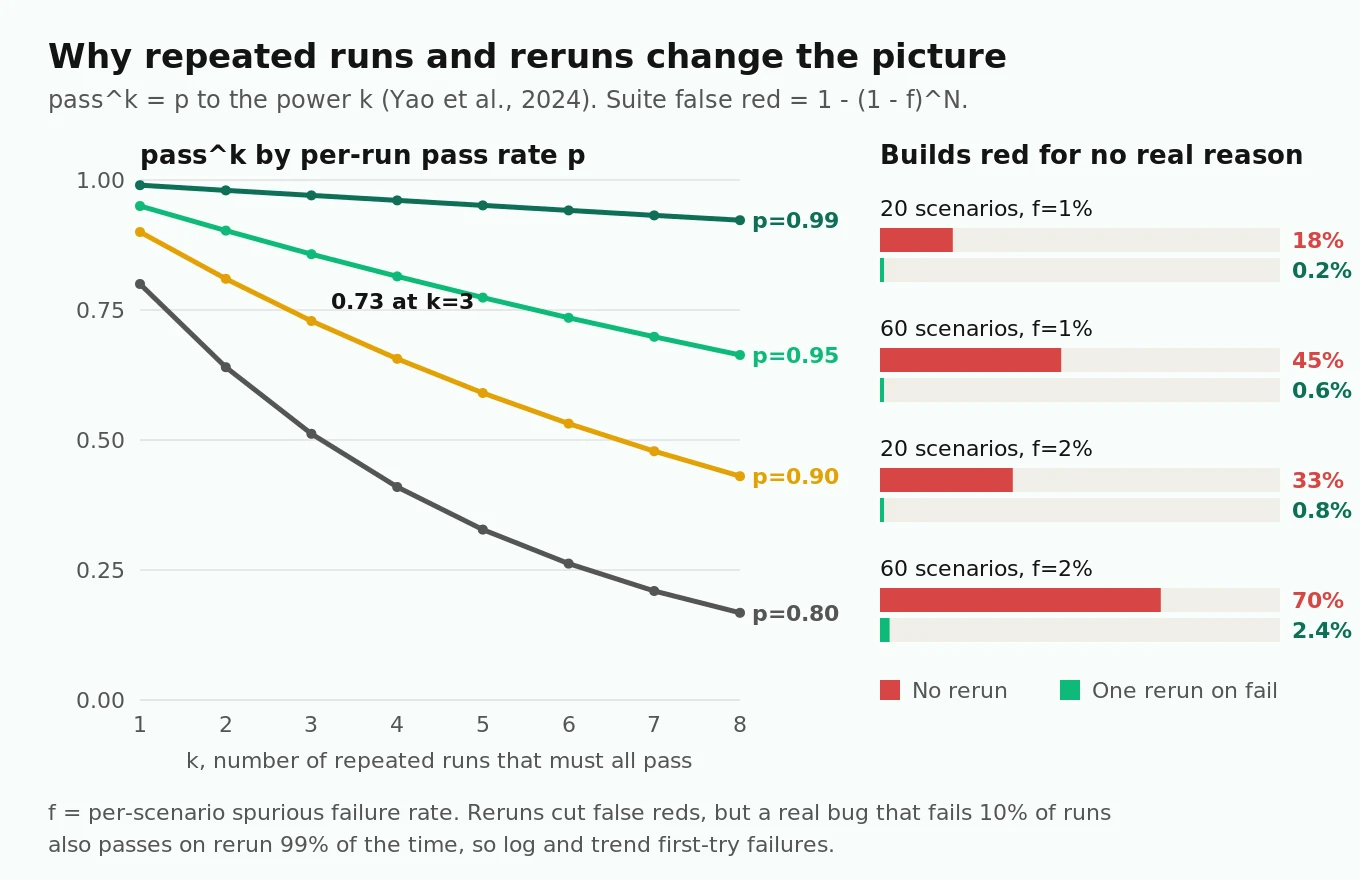
The tau-bench paper (Yao et al., 2024) introduced pass^k: the probability that an agent succeeds on all k independent attempts at the same task. A gpt-4o function-calling agent succeeded on fewer than half of retail tasks, and its pass^8 fell below 25%. Small differences in how the simulated user phrased the same request were enough to break an agent that solved the task on another attempt.
The arithmetic is unforgiving. If a scenario passes independently with probability p, pass^k is p to the power k.
| Per-run pass rate p | pass^1 | pass^3 | pass^5 | pass^8 |
|---|---|---|---|---|
| 0.99 | 0.99 | 0.97 | 0.95 | 0.92 |
| 0.95 | 0.95 | 0.86 | 0.77 | 0.66 |
| 0.90 | 0.90 | 0.73 | 0.59 | 0.43 |
| 0.80 | 0.80 | 0.51 | 0.33 | 0.17 |
A scenario that "usually works" at 90% passes three runs in a row only 73% of the time. That gap is the point. Your callers do not get three tries.
The suite-level false-red problem
Now flip it around. Suppose each scenario has a 1% chance of failing for reasons unrelated to the agent: a judge misread, a persona that wandered. With N independent scenarios, the chance that at least one goes red is 1 − (1 − f)^N.
- 20 scenarios at f = 1%: 18% of builds go red for nothing.
- 60 scenarios at f = 1%: 45%.
- 60 scenarios at f = 2%: 70%.
This is why a growing suite starts to feel broken even when every individual test looks fine. Re-running failures once cuts the false-red rate sharply, because a spurious failure now has to happen twice (f² per scenario). At 60 scenarios and f = 2%, rerun-on-fail drops false reds from 70% to about 2.4%.
But reruns have a cost. A real bug that fails 10% of the time passes on rerun 99% of the time. So log every first-try failure, even when the rerun passes, and track each scenario's first-try failure rate over a rolling 2-week window. A scenario whose first-try failure rate climbs from 1% to 8% is telling you something, even if CI stays green.
Controls that work
1. Fix the opening line and the facts. LiveKit's scenario guide recommends a quoted `OPENING LINE` and facts revealed one per turn. This removes most persona variance at the start of the call, where it compounds.
2. Lower temperature for the persona and the judge, not the agent. Test the agent at the temperature you ship. Run the persona at 0.2 to 0.3 and the judge at 0. Provider seed parameters, where they exist, are best-effort, so do not rely on them alone.
3. Mock tools from scenario data. Seed availability, order history and account state from `userdata` (LiveKit) or deterministic mocks (Pipecat). A test that depends on a live calendar will flake when the calendar changes.
4. Grade outcomes on state, intent on the judge. Anything that can be checked in code (tool called, arguments normalized, final record) should be. LLM judges agree with humans around 80% of the time on open-ended preferences per Zheng et al., about the same as two humans agree. That is good for "was this reply courteous," not for "was the order total $42.17." Our post on LLM judge limits goes deeper.
5. Use tolerance bands for latency, not fixed thresholds. Run the baseline build 20 times, take each scenario's p95 caller-heard gap, and alert when a new build's p95 exceeds baseline by more than 15% on two consecutive nights. A single noisy night should not page anyone.
6. Gate by risk tier. Critical scenarios (payments, refunds, medical scheduling, policy refusals) must pass 3 of 3. Others must pass 2 of 3. Quarantine any scenario that flips state three times in a week until someone rewrites it. LiveKit's CI guide makes the same point: a vague `agent_expectations` grades unreliably however the agent behaves, so rewriting the scenario is often the fix.
Our CI/CD test automation guide covers pipeline wiring, and shipping prompt changes safely covers the release-gate side.
What still needs a human ear
Automation removes the need to listen to everything, not the need to listen. A person still catches these better than any current signal:
- Prosody and tone. A correct sentence read with flat or rushed delivery. A cheerful tone when the caller just said their claim was denied.
- Pronunciation of your words. Brand names, drug names, street names, and the way numbers are grouped ("four-eight-two-one-three" versus "forty-eight thousand"). Entity scores check whether the caller heard the right value, not whether it sounded natural.
- Awkward but legal timing. A 900 ms pause that passes your latency band but lands at an odd moment, or a filler phrase that repeats every turn.
- Emotional fit. Whether the agent sounds like it is listening when a caller is frustrated.
- Things you have not thought to test. The reason to keep humans listening is to find the next scenario.
How many calls to sample, and which ones
If a problem shows up in a fraction p of calls, the number of randomly sampled calls you need to see it at least once with 95% confidence is n = ln(0.05) / ln(1 − p).
| Problem frequency | Calls to sample for 95% chance of seeing it |
|---|---|
| 10% of calls | 29 |
| 5% | 59 |
| 2% | 149 |
| 1% | 299 |
A 2- or 3-person team cannot listen to 149 calls a week. So do not sample at random alone. A practical weekly sample of 20 calls:
- 8 random calls, to keep an unbiased view and find unknown problems.
- 6 lowest-scoring calls from Layer 4, to confirm or reject the judge's worst verdicts.
- 6 timing outliers: the longest silences, the most barge-ins, the slowest p95 turns.
At 1.25× playback speed and about 2 minutes of notes per call, that is roughly an hour. Every finding becomes a Layer 1 or Layer 2 scenario, or a rubric fix. Once a month, have two people label the same 30 calls and compare their labels with the judge's. Where the humans agree with each other but not with the judge, fix the rubric. Our guide to human-in-the-loop evaluation has a labeling template.
A starter scenario set for support, scheduling and order-taking
Start with 18 scenarios, 6 per use case. Each one targets a single complication, as LiveKit's scenario guide recommends, so a failure points at one behavior. Expand from production failures, not from imagination. A golden dataset grows out of this set over time.
| Use case | Scenario | Pass condition | Lowest layer |
|---|---|---|---|
| Support | Order status for a valid order number | Correct status read back; lookup tool called once | L1 |
| Support | Order number spoken with a digit correction ("4-8-2, no, 4-8-3") | Corrected value used in the lookup | L2 |
| Support | Refund request outside policy, caller pushes back once | Refusal held; callback offered; no refund tool call | L1 |
| Support | Lookup API returns an error | Agent says it cannot check right now; no invented status | L1 |
| Support | Caller asks for a human | Transfer completes to the right queue | L3 |
| Support | Caller on speakerphone with TV noise at 10 dB SNR | Same outcome as clean condition | L2 |
| Scheduling | Book the first available slot | Booking in state matches the offered slot | L1 |
| Scheduling | Correct the date during read-back | Final booking uses the corrected date; one booking only | L1 |
| Scheduling | Caller pauses 1 second mid-sentence while checking a calendar | No early end-of-turn; full date captured | L2 |
| Scheduling | No slots in the requested window | Alternatives offered; nothing booked without consent | L1 |
| Scheduling | Caller interrupts the list of times | Agent stops within 1 s and answers the interruption | L2 |
| Scheduling | Caller hangs up mid-booking | No half-written booking left in state | L3 |
| Order-taking | Simple two-item order | Items, quantities and total match state | L1 |
| Order-taking | Modifier change after read-back ("no onions on the second one") | Change applied to the right item only | L1 |
| Order-taking | Item not on the menu | Says it is unavailable; suggests a close match; no invented item | L1 |
| Order-taking | Address with an unusual street name | Address in state matches ground truth | L2, with human fixtures |
| Order-taking | Payment by keypad (DTMF) | Digits captured; never spoken back in full | L3 |
| Order-taking | Caller changes their mind and cancels | No order written | L1 |
For phone-specific setup, see our guides to LiveKit outbound calling with Twilio and Pipecat on Twilio and Telnyx.
A weekly operating rhythm for a 2- or 3-person team
The ladder only works if it runs without heroics. Here is a rhythm that fits next to feature work.
| When | What runs | Who looks | Time cost |
|---|---|---|---|
| Every pull request | Unit tests plus 40 text scenarios × 3 runs | Author reads failures before review | 0 to 15 min per PR |
| Every night | 15 audio scenarios × 3 conditions; latency bands | On-call engineer skims the summary | 5 min per morning |
| Tuesday and Friday | 10 phone scenarios × 2 runs through the real number | Owner of telephony | 10 min |
| Daily, automatic | Layer 4 scoring on all production calls | Alerts only | 0 |
| Thursday, 1 hour | Listen to the 20-call sample; file new scenarios | Rotating engineer | 60 min |
| Monday, 30 min | Review first-try failure rates, quarantine list, new scenarios | Whole team | 30 min |
| Before any model or provider swap | Full ladder, plus 3× repeats on critical scenarios | Change owner | 1 to 2 hours |
| Monthly | Two-person label audit of 30 calls against the judge | Two engineers | 2 hours total |
The total human time is about 2.5 hours a week for the team, plus a few minutes per pull request. Compare that with 30 minutes of manual calls per change at 10 changes a week: 5 hours, for 80 trials in one condition.
How to replace manual test calls on a LiveKit or Pipecat agent
1. Write down your manual session. For one week, have whoever makes test calls write one line per thing they listen for. Map each line to the 16 checks above. Anything that does not fit is a candidate for a new row.
2. Build Layer 1 first. Add unit tests for tool calls and failures, then a text simulation file with 10 scenarios. On LiveKit, use `lk agent simulate text --scenarios scenarios.yaml`. On Pipecat, use `pipecat eval run`. Seed state through `userdata` or mocks and grade the final state.
3. Gate pull requests on it. Run each scenario 3 times. Require 3 of 3 for critical scenarios and 2 of 3 for the rest. Log first-try failures even when reruns pass.
4. Add Layer 2 nightly. Start with 15 scenarios in clean, 10 dB babble and 8 kHz mu-law conditions. Record 10 human fixtures for entity-heavy lines and use them to confirm any failure found with synthetic audio.
5. Stand up the phone caller. Deploy the `qa-caller` agent, a dedicated outbound trunk and a QA number allowlisted to a staging backend. Run 10 phone scenarios twice a week and before every release.
6. Score production calls. Capture a session report per call, run deterministic checks plus a judge, and alert on failures and latency bands.
7. Start the human sample. Twenty calls a week, chosen as 8 random, 6 lowest-scored and 6 timing outliers. Turn every finding into a scenario.
8. Retire the ad hoc calls. Once the ladder has caught at least one real regression that a manual call would have missed, stop requiring manual calls before merge. Keep them for exploratory testing only.
Where independent evaluation fits
Everything above can be built in-house, and the per-commit layers should be. Two parts benefit from an outside party: a pre-launch baseline, because people who wrote the prompt tend to write personas that follow the paths they expect, and regression testing over the real phone path across accents, noise and devices, at a scale a small team rarely maintains. Evalgent runs that kind of independent audit and production scoring for in-house teams on LiveKit, Pipecat and Dograh, and hands back scenarios you can add to your own suite.
Frequently asked questions
Can I fully automate voice agent testing and stop making test calls?
You can automate 15 of the 16 checks a manual call performs. The remaining one, whether the agent sounds right, still needs a person. Replace ad hoc pre-merge calls with layered automation, then keep about 20 sampled calls a week for tone, pronunciation and finding new scenarios.
Does LiveKit have built-in simulated callers?
Yes. LiveKit Agent Simulations, in beta, run an LLM-driven caller from a scenarios.yaml file against your real agent in text or audio mode. Audio mode can add background noise, low-quality microphone and packet loss. It runs on LiveKit Cloud and needs CLI 2.16.4 or later and livekit-agents 1.6.6 or later for Python.
What is the difference between Pipecat Evals scripted and simulated scenarios?
A scripted scenario fixes the caller's words and asserts exact events, such as a function call with specific arguments. A simulated scenario gives an LLM a persona, goal and success criterion and lets it hold the conversation. Use scripts for precise checks and simulations for whole-flow outcomes, run several times.
How many times should I run each simulated scenario?
Run each scenario 3 times per build. Require 3 of 3 for critical flows such as payments, refunds and policy refusals, and 2 of 3 for the rest. A scenario that passes 90% of the time passes three straight runs only 73% of the time, which is the reliability your callers experience.
Why do my synthetic-audio tests flag transcription errors that real callers never hit?
TTS audio is a different distribution from human speech. One study found that 21% to 34% of ASR failures exposed by TTS-generated test audio were false alarms, because human recordings of the same text were transcribed correctly. Confirm entity failures with a recorded human fixture before filing a bug.
How much does a simulated phone call cost?
In our worked example, a 3-minute simulated call costs about $0.42. About $0.12 is the test harness: caller STT, TTS, persona LLM, SIP minutes and judge. The rest is your own agent's per-minute cost, which a manual test call also incurs. Your numbers depend on your providers and plan.
Will test calls pollute my production data?
They will unless you route them. Allowlist your QA caller numbers, read the caller ID from the SIP participant's attributes, and switch tools to a staging backend or seeded mocks for those numbers. Then grade the staging state after each call, the same way text simulations grade final state.
What should a small team listen to every week?
About 20 calls: 8 random, 6 with the lowest automated scores, and 6 timing outliers such as long silences or many barge-ins. That takes roughly an hour. Turn every issue you hear into a new scenario at the lowest layer that can reproduce it.
The bottom line
A manual test call is 16 checks run by memory, and 15 of them can move to text simulations, audio replays, a simulated phone caller and production scoring at a cost of a few hundred dollars a month. Keep one hour a week of human listening for the check no machine can make, and let every finding become the next automated scenario.
Related Articles

How to automate voice agent testing: synthetic callers vs manual QA
Learn how ai test automation replaces manual QA for voice agents. Compare synthetic callers vs human testers, with a 5-step framework to scale without hiring.
Read more
AI Agent Testing vs Voice Agent Testing: What General Tools Miss for Voice
AI agent testing measures text outputs. Voice agent testing measures behaviour through an acoustic pipeline. Five failure categories general tools miss.
Read more