Open door for builders.
Answering Machine Detection for Outbound Voice Agents in LiveKit and Pipecat (and How to Measure It)
On this page
An outbound voice agent makes its most expensive decision before it says a word. If a person picked up, the agent has about a second to speak. If a voicemail box picked up, it must stay quiet through the greeting, wait for the recording, and leave a message that names the business first. Get the first case wrong and you voicemail or hang up on a customer. Get the second wrong and the agent chats with a recording for 30 to 60 seconds.
LiveKit shipped built-in answering machine detection (AMD) in May 2026, Pipecat rebuilt its `VoicemailDetector` around classifiers, and Twilio AMD has been around for years. The docs show how to turn each on. None shows how to tell whether it works on your call list, or what each mistake costs. This guide covers that, down to a test corpus and a scoring script.
What answering machine detection actually has to decide
AMD is two questions, and the second causes more bugs than the first.
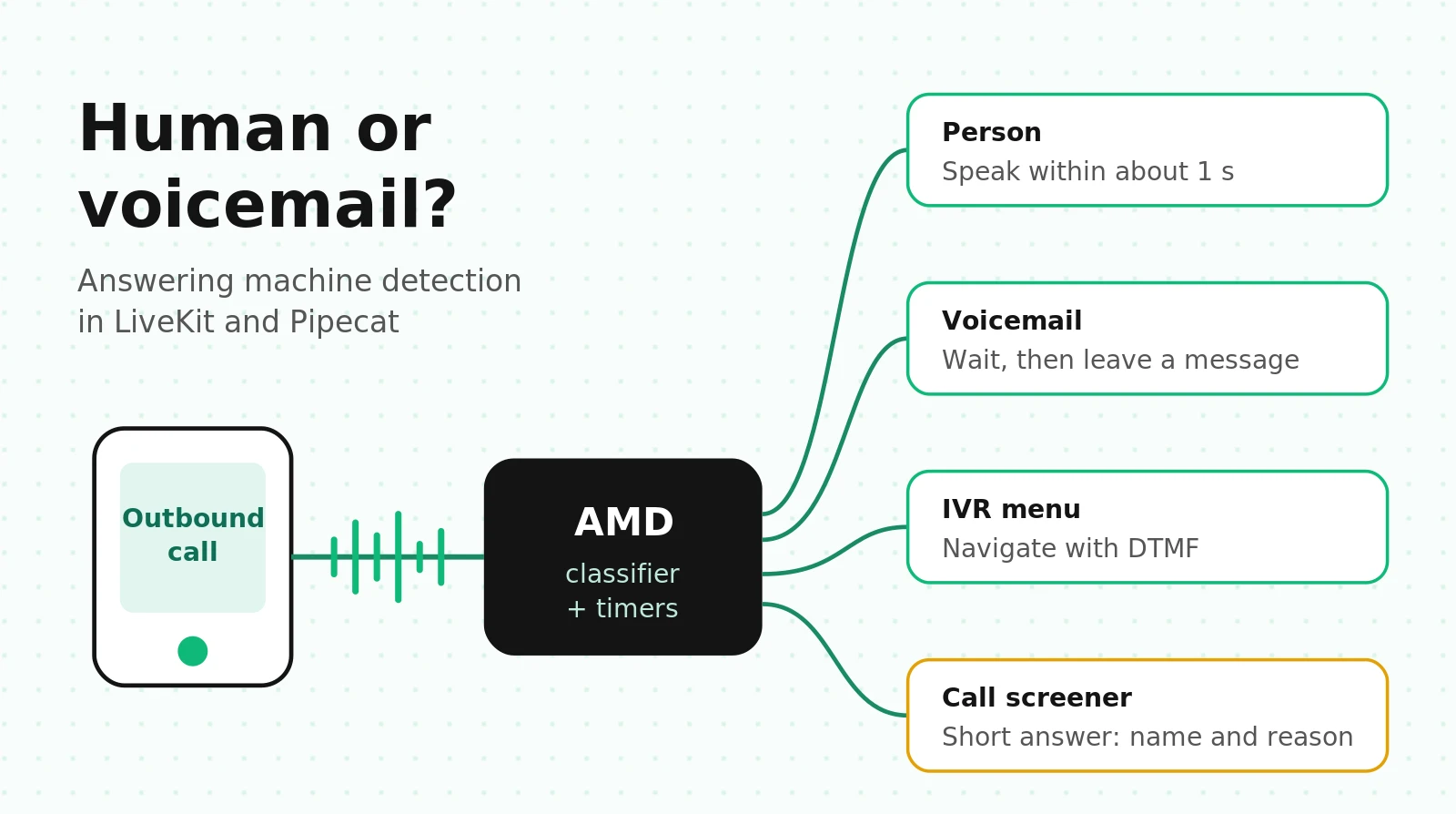
Question 1: who answered? For a US outbound list in 2026:
| Who picked up | What it sounds like | Right agent behavior |
|---|---|---|
| Person, personal phone | "Hello?" then expectant silence | Speak within about 1 s |
| Person, business line | "Thanks for calling Acme, this is Dana" (2 to 3 s) | Speak, do not treat as machine |
| Carrier default voicemail | "The person you are trying to reach is not available..." | Wait, then leave message |
| Custom voicemail greeting | 2 to 25 s, sometimes music, sometimes no beep | Wait for recording, then leave message |
| Mailbox full or not set up | Carrier announcement, no recording | Hang up, retry later |
| IVR or auto attendant | "Press 1 for..." | Navigate with DTMF or speak to menu |
| Call screener (iOS, Pixel) | Assistant asks your name and reason | Answer the screener briefly, then wait |
| Silent pickup | Nothing, or line noise | Probe with a short prompt |
Question 2: when should the agent act? For a person, immediately. For a voicemail, only after the mailbox starts recording. A correct verdict handed back 0.5 s early still clips the opening words, which is where the business name belongs. So every AMD system is a classifier plus timers, and the timers decide whether customers hear dead air.
How classic AMD works: speech, silence and beeps
Classic AMD still runs inside Twilio and most dialers. It combines tone detection (beeps, fax, busy, DTMF) with voice activity detection, then looks at "the timing, pattern, and frequency information" of both. The core heuristic is greeting length. Twilio's FAQ gives the reference durations it tunes against:
- Personal and mobile human greetings are "typically pretty short and less than 1800 ms."
- Business greetings run about 1,800 to 3,000 ms.
- Machine greetings are "typically longer, >3000 ms."
A human says something short and waits. A machine keeps talking. Classic AMD measures the first speech block, waits for enough silence to call it finished, and decides.
Twilio's four tuning parameters
Twilio AMD exposes these timers on the Calls API:
| Parameter | Range | Default | What it does |
|---|---|---|---|
| `MachineDetectionTimeout` | 3 to 59 s | 30 s | Total time before returning `unknown` |
| `MachineDetectionSpeechThreshold` | 1,000 to 6,000 ms | 2,400 ms | Speech shorter than this leans human, longer leans machine |
| `MachineDetectionSpeechEndThreshold` | 500 to 5,000 ms | 1,200 ms | Silence that marks the end of a speech block |
| `MachineDetectionSilenceTimeout` | 2,000 to 10,000 ms | 5,000 ms | Initial silence before returning `unknown` |
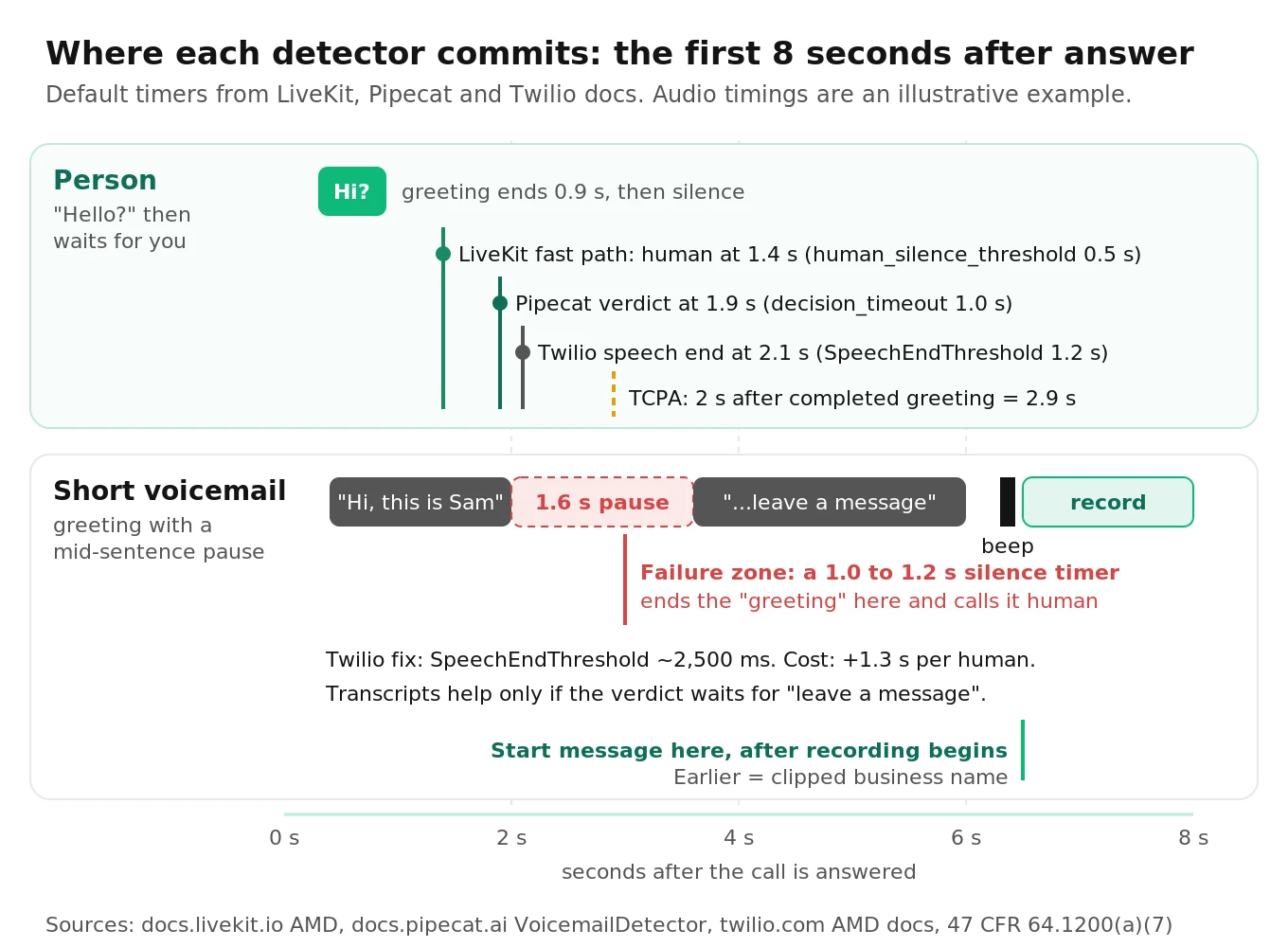
The docs include the most useful sentence anyone has written about short voicemails: they "typically [have] 1000-2000 ms of audio followed by 1200-2400 ms of silence and then additional audio before the beep." With the default 1,200 ms end threshold, that pause looks like the end of a short human greeting, so a short voicemail gets labeled `human`. Raising `MachineDetectionSpeechEndThreshold` to about 2,500 ms fixes it, and Twilio spells out the price: human detection gets 1,300 ms slower, and a person who says "Hello," waits two seconds, and says "Hello?" again now looks like a machine.
That trade-off is the whole problem in miniature. Every timer that catches more machines makes people wait longer or misclassifies the people who pause.
Enable vs DetectMessageEnd, sync vs async
`MachineDetection=Enable` returns `AnsweredBy` as soon as it decides: `human`, `machine_start`, `fax` or `unknown`. Use it when you hang up on machines or route humans to an agent.
`MachineDetection=DetectMessageEnd` returns `human` immediately but, for machines, waits until the greeting ends, then returns `machine_end_beep`, `machine_end_silence` or `machine_end_other`. Use it for voicemail drop. Twilio says this mode is "close to 100% accurate in US destinations with default settings." Treat that as a vendor statement without a published test set, not a benchmark.
By default AMD is synchronous: the callee hears silence until detection finishes, which Twilio puts at about 4 seconds on average. Twilio's own FAQ says this "often leads to hung up calls." `AsyncAmd=true` connects the call immediately and posts the result to `AsyncAmdStatusCallback`, along with `MachineDetectionDuration` in milliseconds.
How LLM and audio-model AMD works
Timing heuristics struggle with short voicemails that pause and long human greetings. Newer detectors add what was said, or a learned model of speech timing.
The transcript approach (LiveKit and Pipecat)
Both frameworks transcribe the greeting and ask a model to label it. "You've reached the voicemail of" is unambiguous even when the timing looks human. The cost is STT plus a model call while a person waits. Both hide it by generating the first reply in parallel and holding the audio: LiveKit with `preemptive_generation`, Pipecat with a `TTSGate`.
The temporal-feature approach (research)
Two recent papers attack AMD without transcripts, and both carry findings you can use directly.
Saurav (2026), arXiv 2604.09675 runs a neural VAD on the callee channel, extracts 15 timing features from the speech segments in a 3 or 5 second window, and classifies them with a shallow boosted tree ensemble (50 trees, depth 2). Results across 764 labeled telephony recordings: 96.1% accuracy (99.3% on a 140-call expert-labeled set, 95.4% on 624 held-out production calls), 46 ms inference on a dual-core CPU, and a 0.3% false positive rate and 1.3% false negative rate over 77,000 production calls. Three features carried 85.6% of model importance: how evenly speech is spread across the window, the length of the first speech segment, and the delay before speech starts.
Four findings from that paper matter more than the headline accuracy:
1. Beep detection alone was close to useless. A DESA-2 frequency-domain beep detector scored 50.7% on the expert set with a 23.2% false positive rate, mostly from background noise. The beep comes after the greeting, many modern voicemail systems do not emit a standard beep, and in their stereo recordings only 0.3% of voicemails had a detectable beep on the callee channel.
2. Adding features made it worse. A 46-feature engineered set scored 8.6 points below the 15-feature set. Adding beep features to timing features changed nothing.
3. Curated accuracy did not survive production. The same model that scored 99.3% on the curated set scored about 88% during load testing on a broader production mix. The authors attribute the gap to "AI screening services, carrier pre-announcements, very short greetings, and international call routing variations."
4. AI call screeners look human. Screening services "produce interactive, human-like speech patterns," so timing features label them as people. The authors call this correct behavior, since the screener expects a reply.
An earlier paper, arXiv 2410.08235, fed YAMNet embeddings to a recurrent classifier on streaming audio: over 96% test accuracy, over 98% after adding FFmpeg silence detection. Common lesson: silence structure carries most of the signal; transcripts help on the hard tail.
LiveKit answering machine detection: API, timers and gotchas
LiveKit's AMD ships in the core framework (`livekit-agents` 1.5.9 for Python, 1.4.2 for Node.js). No plugin is required. It runs once, on the first user utterance, and pauses agent speech while it decides.
It returns one of five categories: `human`, `machine-ivr`, `machine-vm`, `machine-unavailable` and `uncertain`. The docs tell you to treat `uncertain` as human, and that is the right default.
Internally it runs two paths in parallel. A fast-path heuristic handles short speech followed by silence. An LLM classifier handles anything with a transcript. The first path to reach a conclusion wins. LiveKit's blog states the design intent plainly: "Misclassifying a human as a machine is the worst-case failure mode," so a one-word "hello?" goes straight back to the agent.
Minimal wiring (simplified from LiveKit's example)
# Simplified from livekit/agents examples/telephony/amd.py
from livekit import api
from livekit.agents import AMD, NOT_GIVEN

async with AMD(
    session,
    participant_identity=participant_identity or NOT_GIVEN,
    detection_options={
        "human_speech_threshold": 2.5,   # s, max length of a "short greeting"
        "human_silence_threshold": 0.5,  # s, silence before settling as human
        "machine_silence_threshold": 1.5,
        "no_speech_threshold": 10.0,     # s, clock starts at answer
    },
) as detector:
    # Start AMD BEFORE the SIP participant exists so no audio is missed
    await ctx.api.sip.create_sip_participant(
        api.CreateSIPParticipantRequest(
            room_name=ctx.room.name,
            sip_trunk_id=outbound_trunk_id,
            sip_call_to=phone_number,
            participant_identity=participant_identity,
            wait_until_answered=True,
        ),
        timeout=45,  # must outlast the ring window
    )
    result = await detector.execute()
    log_amd(result.category, result.transcript)   # keep both for labeling later

    if result.category in ("human", "uncertain"):
        pass  # normal conversation; preemptive generation makes the reply ready
    elif result.category == "machine-vm":
        handle = session.generate_reply(instructions=VOICEMAIL_INSTRUCTIONS)
        await handle.wait_for_playout()
        ctx.shutdown("voicemail")
    elif result.category == "machine-unavailable":
        ctx.shutdown("mailbox unavailable")
    # machine-ivr: Python starts IVR navigation automatically (ivr_detection=True)
The timers, translated
| Option | Default | What it controls | Turn it up when | Cost of turning it up |
|---|---|---|---|---|
| `human_speech_threshold` | 2.5 s | Longest greeting that takes the fast human path | Business lines get labeled machine | Short voicemails reach the LLM later |
| `human_silence_threshold` | 0.5 s | Silence after a short greeting before "human" | Short voicemails with pauses slip through | Every human waits longer |
| `machine_silence_threshold` | 1.5 s | Silence after machine-like speech before a verdict | Long greetings with pauses get cut | Slower voicemail verdicts |
| `no_speech_threshold` | 10 s | Wait for any speech before `uncertain` | Slow answerers | Silent pickups wait longer |
| `max_endpointing_delay` | 3.0 s | Fallback end-of-greeting when the turn detector never fires | Message starts mid-greeting | Later messages |
| `wait_until_finished` | `True` | Wait for greeting end before emitting | Rarely set to `False` | With `True`, long greetings run past `timeout` |
Gotchas buried in the docs
- Start order matters. Open the `AMD` context before `create_sip_participant`. If you create the participant first, the opening "Hello?" can arrive before detection is listening.
- The `timeout` ceiling is closer to 2x. The 20 s `timeout` resets when the participant's audio track is subscribed, so the docs warn the effective ceiling "can reach roughly twice this value." It only applies at all when `wait_until_finished=False`.
- Default models depend on LiveKit Inference. Without `llm` or `stt` set, AMD uses `google/gemini-3.1-flash-lite` and `cartesia/ink-whisper` through LiveKit Inference when available, and falls back to your session's LLM and STT otherwise. A self-hosted agent server and a Cloud deployment can therefore run different classifiers from the same code. Pass explicit models.
- Unevaluated models log a warning, not an error. LiveKit lists the LLMs and STTs it tested. Anything else works but has not been validated. Validate it yourself before setting `suppress_compatibility_warning=True`.
- Node.js has no IVR navigation. Treat `machine-ivr` like `human` in Node and let the main agent respond.
- It runs once. A carrier pre-announcement ("Please wait while your call is connected") followed by a voicemail greeting is the kind of first utterance that can mislead a one-shot detector. Put it in your test corpus.
- Ignore unofficial API shapes. Some third-party posts show `AgentSession` AMD options and an `amd_complete` event. The documented API is `AMD(session, ...)` plus `detector.execute()`.
LiveKit's internal benchmark reports macro F1 of 97.0%, accuracy of 94.7%, and human-class F1 of 95.7% (Gemini Flash Lite plus Ink Whisper). It does not report the number you need most: the share of real people treated as machines. Human-class F1 blends that with the reverse error, the class mix is unpublished, and 94.7% accuracy still means about 1 call in 19 misfiled. Measure on your own traffic.
For the rest of the outbound setup (trunks, caller ID, early media), see our LiveKit and Twilio outbound calling guide. For how AMD fits into a broader test plan, see the LiveKit voice agent testing guide.
Pipecat voicemail detection: VoicemailDetector and TTSGate
Pipecat's `VoicemailDetector` is binary: `conversation` or `voicemail`. Since version 1.12.0 it takes a `classifier` instead of an `llm`, and its parallel-pipeline internals (`ClassifierGate`, `ConversationGate` and others) were removed. Code written against older versions should migrate. The `llm` and `custom_system_prompt` arguments are deprecated and will be removed in 2.0.0.
It is two processors:
- `detector()`, placed after STT and before the user context aggregator. After each transcription it asks the classifier about the whole transcript so far.
- `gate()`, placed right after TTS. While the verdict is pending it buffers `TTSStartedFrame`, `TTSTextFrame`, `TTSAudioRawFrame` and `TTSStoppedFrame`. A conversation verdict releases them in order. A voicemail verdict drops them.
# Simplified from Pipecat's voicemail guide (pipecat-ai >= 1.12)
from pipecat.classifiers.llm.classifier import LLMClassifier
from pipecat.extensions.voicemail.voicemail_detector import VoicemailDetector
from pipecat.frames.frames import EndWorkerFrame, TTSSpeakFrame

voicemail_detector = VoicemailDetector(
    classifier=LLMClassifier(llm=classifier_llm),  # small, fast model
    decision_timeout=1.0,          # s of caller silence before the latest answer decides
    voicemail_response_delay=2.0,  # s of silence after a VM verdict before the event fires
)

pipeline = Pipeline([
    transport.input(), stt,
    voicemail_detector.detector(),
    context_aggregator.user(), llm, tts,
    voicemail_detector.gate(),
    transport.output(), context_aggregator.assistant(),
])

@voicemail_detector.event_handler("on_conversation_detected")
async def on_conversation(detector):
    mark_amd("conversation")

@voicemail_detector.event_handler("on_voicemail_detected")
async def on_voicemail(detector):
    mark_amd("voicemail")
    await detector.push_frame(TTSSpeakFrame(VOICEMAIL_TEXT))
    await detector.push_frame(EndWorkerFrame())  # queued behind the message
How the decision timing works
The latest classifier answer becomes final only after the caller has been silent for `decision_timeout` and no question is in flight. That handles "Hi, this is Sam": a person stops there, a greeting keeps going. It also sets a dead-air floor. Every "Hello?" waits at least `decision_timeout` (1.0 s default) even with a 100 ms classifier. Drop it to 0.6 s and greetings with a 0.8 s pause start getting conversation verdicts. Tune it on recorded greetings.
Gotchas
- Cascaded pipelines only. The detector reads STT transcriptions and holds TTS output. An `LLMClassifier` needs a service with `run_inference()`, so a speech-to-speech realtime model cannot back it. LiveKit's AMD runs its own STT and works alongside realtime models; Pipecat's does not.
- Failure means "conversation". If every classifier call fails or times out, the detector assumes a person. That protects humans, but a classifier outage turns into voicemail conversations. Alert on the classifier's error rate, not only on call outcomes.
- Verdicts are final. There is no second look once the verdict fires.
- There is no IVR, unavailable or screener class. You need your own handling for mailbox-full announcements and screeners.
- Classifier speed is dead air. The docs put `JevClassifier` (TypeSafe's Jev, a highly consistent classifier at $0.042 per million input tokens, 70 to 500 ms) at about a tenth of a second. A general `LLMClassifier` is slower, and that time "adds to the silence a person hears."
The Pipecat voice agent testing guide covers how to run this pipeline against scripted audio. For how the two frameworks differ on SIP and PSTN plumbing, see LiveKit vs Pipecat for telephony.
Twilio AMD inside a LiveKit or Pipecat stack
Whether you can lean on Twilio AMD depends on how audio reaches your agent.
LiveKit over a Twilio Elastic SIP trunk: no Twilio AMD. Twilio's FAQ is explicit: "Elastic SIP trunking calls cannot utilize AMD because they bypass the Programmable Voice infrastructure." The common LiveKit outbound setup places calls through an Elastic SIP trunk, so detection has to happen in the agent with LiveKit's `AMD`. (Twilio AMD does work on Programmable Voice calls that use `
Pipecat over Twilio Media Streams: Twilio AMD works. If you place calls with the Calls API and connect audio with `
# Illustrative: Twilio Calls API with async AMD feeding a Pipecat bot
from twilio.rest import Client

client = Client(api_key, api_secret, account_sid)
call = client.calls.create(
    to=lead_number,
    from_=caller_id,
    twiml=f'<Response><Connect><Stream url="wss://{BOT_HOST}/ws"/></Connect></Response>',
    machine_detection="DetectMessageEnd",
    async_amd="true",
    async_amd_status_callback=f"https://{API_HOST}/amd",
    async_amd_status_callback_method="POST",
    machine_detection_timeout=45,                # business greetings can exceed 30 s
    machine_detection_speech_end_threshold=1200, # default; test 1500 for residential lists
)

# POST /amd receives: CallSid, AnsweredBy, MachineDetectionDuration
# human            -> tell the bot to proceed (it was already listening)
# machine_end_*    -> tell the bot to speak the voicemail now, then hang up
# unknown          -> treat as human
Two cautions:
1. Forked stream limit. Async AMD uses one of four forked audio streams per call, shared with Media Streams, SIPREC and real-time transcription. Start extra forks after the AMD callback.
2. Two detectors disagree. If Pipecat's detector also runs, pick one authority per class, for example Twilio `machine_end_*` for voicemail timing and the in-agent classifier for humans.
Cost check: Twilio AMD is $0.0075 per answered call and US outbound is $0.014 per minute (pricing). At 5,000 answered calls per 10,000 dials, AMD adds $37.50, small next to either error.
| LiveKit `AMD` | Pipecat `VoicemailDetector` | Twilio AMD | |
|---|---|---|---|
| Classes | human, machine-vm, machine-ivr, machine-unavailable, uncertain | conversation, voicemail | human, machine_start or machine_end_*, fax, unknown |
| Signal | Fast-path timing heuristic plus LLM on transcript | Classifier on transcript plus silence gate | Speech and silence timing, tone detection |
| Holds agent speech | Yes, pauses agent speech | Yes, `TTSGate` buffers TTS frames | Sync mode holds the whole call; async does not |
| Message timing | Waits for greeting end (`wait_until_finished`) | `voicemail_response_delay` silence | `DetectMessageEnd` returns at beep, silence or other |
| Works with realtime S2S | Yes, runs its own STT | No, cascaded only | Yes, it is carrier-side |
| Main tuning knobs | `detection_options` timers, `prompt` | `decision_timeout`, classifier choice | Four `MachineDetection*` parameters |
| Blind spot to test | One-shot on first utterance | Fixed silence floor on every human | Short voicemails, long human greetings |
The cost of being wrong in each direction
AMD has two errors, and they are not equally expensive. Define "machine" as the positive class:
- False machine (FM): a person is labeled machine. The agent plays a voicemail script at them or hangs up. You lose the contact and you sound like spam.
- False human (FH): a machine is labeled human. The agent talks to a recording, wastes time, and usually leaves a broken or missing message.
The threshold math most teams skip
If a detector gives you a probability that the answerer is a machine, the cost-minimizing rule is: act as machine only when
`P(machine | audio) > C_FM / (C_FM + C_FH)`
Plug in labeled assumptions for a collections or appointment workflow:
- `C_FM` = $10 (assumption: value of a reached right party, plus complaint risk).
- `C_FH` = $0.60 (assumption: about 40 s of wasted agent time at an all-in $0.10 per minute, about $0.07, plus about $0.50 of value from a voicemail you failed to leave).
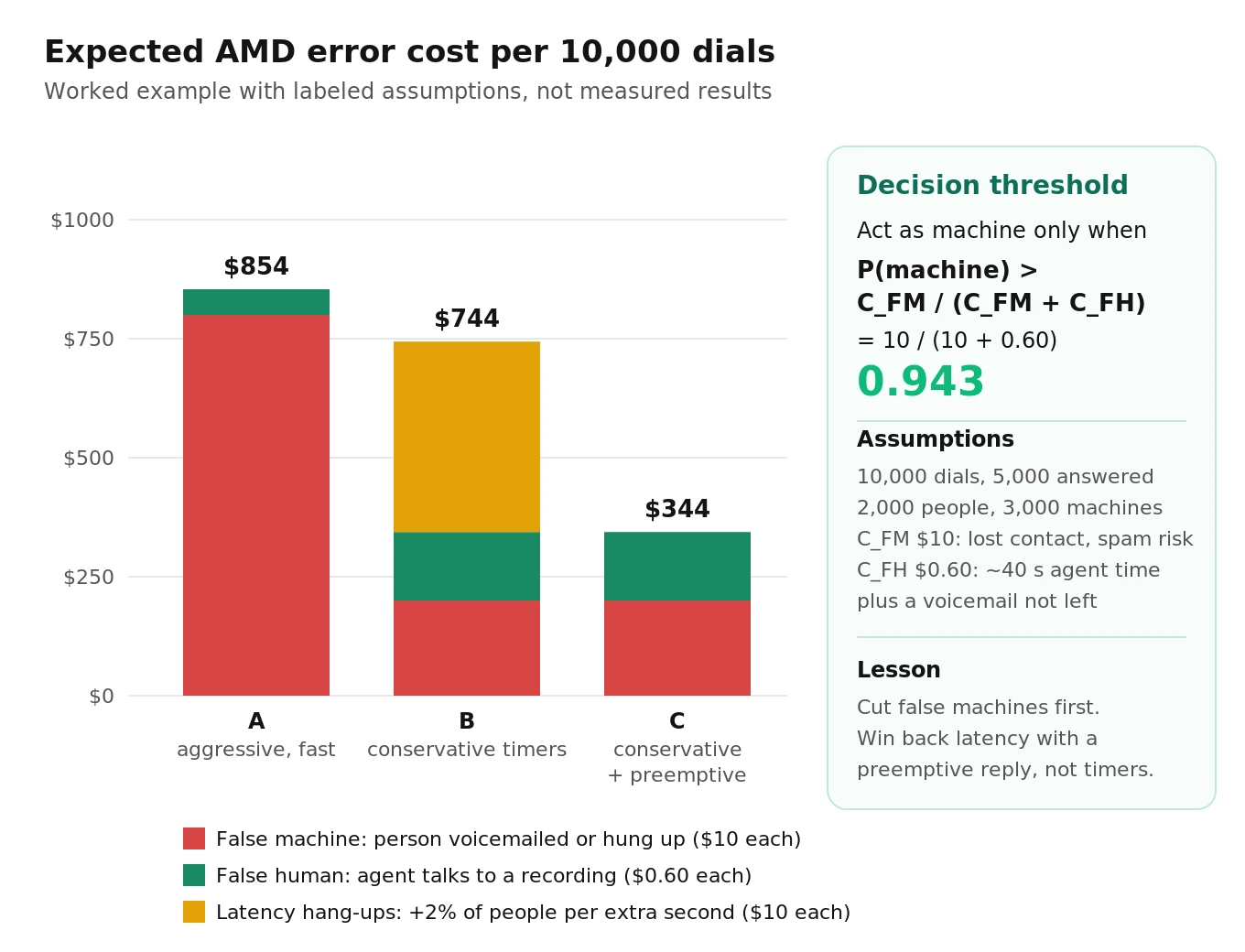
The threshold is 10 / 10.6 = 0.943. With these costs, you should call a machine only when you are about 94% sure. Anything less certain should take the human path. This is why LiveKit routes `uncertain` to human and why Pipecat assumes conversation when its classifier fails. The math says those defaults are right for most businesses, and it tells you how far to push them.
Expected cost per 10,000 dials
Illustrative assumptions: 10,000 dials, 5,000 answered, of which 2,000 are people and 3,000 are machines. Compare three configurations with made-up but plausible error rates:
| Config | False machine rate | False human rate | Extra dead air on humans | Cost of FM | Cost of FH | Latency hang-ups | Total |
|---|---|---|---|---|---|---|---|
| A: aggressive, fast | 4% (80 people) | 3% (90 machines) | 0 s | $800 | $54 | $0 | $854 |
| B: conservative timers | 1% (20 people) | 8% (240 machines) | +1.0 s | $200 | $144 | $400 | $744 |
| C: conservative + preemptive reply | 1% (20 people) | 8% (240 machines) | +0.1 s | $200 | $144 | $0 | $344 |
The latency hang-up column assumes 1 extra second of silence makes an extra 2% of people (40) hang up, each costing $10 like a false machine. Swap in your own numbers. The structure of the result holds over a wide range of inputs:
1. Cutting false machines matters more than cutting false humans whenever `C_FM` is more than about 5 times `C_FH`.
2. Conservative timers give back much of that gain if they add dead air.
3. You recover it by generating the reply in parallel (LiveKit `preemptive_generation`, Pipecat's `TTSGate`), not by shortening thresholds.
For outbound sales and collections KPIs that sit downstream of this choice, see outbound sales voice agent metrics and collections voice agent metrics.
Voicemail drop: leaving the message in the right window
Detecting a voicemail is half the job. The message has to start after the mailbox begins recording and before the box gives up.
Where each stack hands you the moment
- Twilio `DetectMessageEnd` returns at the end of the greeting: `machine_end_beep`, `machine_end_silence` or `machine_end_other`. Twilio notes that beeps vary by destination and sometimes overlap with call progress tones, which is why `machine_end_other` exists. Give it enough time: the FAQ says 30 s "is frequently not enough time" for business voicemail. `machine_end_other` is also what you get when the timeout hits mid-greeting, so a high `machine_end_other` share is a sign your timeout is too short.
- LiveKit waits for the greeting to finish when `wait_until_finished=True`: post-speech silence plus either a confirmed end of turn or `max_endpointing_delay` (3.0 s). It does not document a separate beep detector.
- Pipecat fires `on_voicemail_detected` after `voicemail_response_delay` (2.0 s) of silence following the verdict. Any further speech, such as the rest of the greeting, restarts the wait.
Silence-based timing handles no-beep greetings but fails when a 2 s mid-greeting pause looks like the end.
Clipped messages are a compliance bug, not only a UX bug
If your message starts before the recording does, the first words are lost. Federal rules require artificial or prerecorded messages to "state clearly the identity of the business" at the beginning of the message (47 CFR 64.1200(b)(1)). A message clipped by 1.5 s typically loses exactly that sentence. Measure it:
- Message start offset = `t_message_start − t_recording_start`. Target a small positive value, roughly 0.3 to 1.5 s (our suggested starting band).
- Clipped message rate = messages where `t_message_start < t_recording_start`, divided by voicemail drops.
Measure both on test numbers whose greeting ends in a TwiML `
Writing the message
- Business name first, callback number included. Those are the parts the rules require.
- Keep it under about 30 seconds; mailbox limits vary and you will not know them in advance.
- Write it to be read. Live Voicemail and visual voicemail turn it into a transcript on a lock screen.
- Use a fixed template per campaign, not open-ended `generate_reply`. A generated voicemail can drift, run long, or skip the number.
Call screening breaks naive AMD
Two features now answer a large share of unknown-number calls on behalf of the user:
- iPhone call screening. With "Ask Reason for Calling," iOS answers calls from unknown numbers and asks the caller for their name and reason before the phone rings (Apple Support).
- Pixel Call Screen. Google's assistant answers, asks who is calling and why, and can do this automatically for some callers. Automatic screening is available in English in the US on Pixel phones with Android 10 and up (Google Phone app Help).
A timing detector sees a screener as a long machine greeting. A transcript classifier can read "please say your name and why you're calling" as voicemail. Either way the agent leaves a message into a live screener or hangs up, and the phone never rings. The right behavior is a third path: a short answer, then silence. "This is Maya from Acme Dental, calling about your appointment tomorrow."
Neither framework has a screener class. Options that work today:
1. In LiveKit, use the `prompt` key in `detection_options` to tell the classifier how to label screeners, then route that category to a short-answer flow. Test how your override maps screeners before you rely on it.
2. In Pipecat, add screener guidance to the `LLMClassifier` `instructions` (keep `DEFAULT_INSTRUCTIONS` for the reply format) so screeners come back as `conversation`, and make the first turn of the conversation prompt handle "please state your name and reason."
3. In both, record real screener audio from your own test iPhones and Pixels and add it to the corpus as its own stratum. The research paper found screeners among the main reasons production accuracy fell below curated accuracy.
Compliance notes for outbound voicemail
This summarizes primary sources so engineers know which timers carry legal weight. It is not legal advice.
- AI voices are "artificial" voices under the TCPA. The FCC's February 2024 declaratory ruling (FCC 24-17) confirmed that the TCPA's restrictions on "artificial or prerecorded voice" calls cover AI-generated voices, so those calls need the called party's prior express consent (FCC). Your voice agent's voicemail falls under the same rules as a recorded robocall.
- Identification and callback number. Every artificial or prerecorded message must identify the responsible business at the beginning and state a callback telephone number during or after the message (47 CFR 64.1200(b)(1) and (b)(2)).
- Opt-out on telemarketing voicemails. For telemarketing messages left on an answering machine or voicemail service, the message must also include a toll-free number that connects to an automated opt-out mechanism (64.1200(b)(3)).
- The 2-second abandonment rule. For telemarketing, a call is "abandoned" if not connected to a live sales representative within 2 seconds of the completed greeting, capped at 3% of live-answered calls per campaign per 30 days (64.1200(a)(7)). Ask counsel whether an AI agent counts as a "live sales representative." Either way, P95 dead air becomes a compliance metric, and Twilio's roughly 4 s synchronous AMD is well past 2 s.
- Ring time. Do not disconnect an unanswered telemarketing call before 15 seconds or four rings (64.1200(a)(6)). Set your `create_sip_participant` timeout and ring timeouts accordingly.
Our voice agent compliance audit guide covers the broader consent and disclosure checks. For how abandonment shows up in operational metrics, see abandonment rate for voice agents.
The AMD metric set: formulas and thresholds
Report the confusion matrix and its timing, not one accuracy number. Machine is positive; FP is a person called machine. Count screeners and IVRs on the human side.
| Metric | Formula | Why it matters | Suggested starting threshold |
|---|---|---|---|
| False machine rate (false hang-up rate) | FP / (FP + TN) | People you hung up on or voicemailed | Upper 95% bound at or below 1% |
| False human rate | FN / (TP + FN) | Conversations with recordings, missed voicemails | At or below 5% |
| Machine precision | TP / (TP + FP) | How trustworthy a "machine" verdict is | At or above 98% |
| Machine recall | TP / (TP + FN) | Share of machines caught | At or above 95% |
| Uncertain rate | uncertain / answered | Calls pushed to the human fallback | Track the trend; investigate jumps |
| Decision latency | t_decision − t_answer, P50 and P95 | Speed of the verdict | Report per class |
| Dead air on humans | t_first_agent_audio − t_greeting_end, P50 and P95 | What a person hears | P95 at or below 1.5 s; below 2 s for telemarketing |
| Human hang-up before agent speaks | hang-ups / human answers | The real cost of latency | Compare across configs |
| Clipped message rate | messages started before recording / VM drops | Lost identification | At or below 1% |
| Screener handling rate | screeners given a short answer / screeners | The new failure mode | At or above 90% |
These thresholds are our suggested starting points for a business with `C_FM` much larger than `C_FH`. Derive your own from the cost math above. Always report false machine rate with a confidence interval. "0 errors in 80 calls" sounds perfect and still allows a true rate near 4.5%.
Building a labeled test corpus
Twilio's FAQ names the classic mistake: hyper-tuning "for a single device or a handful of devices." The paper's drop from 99.3% to about 88% is that mistake at scale.
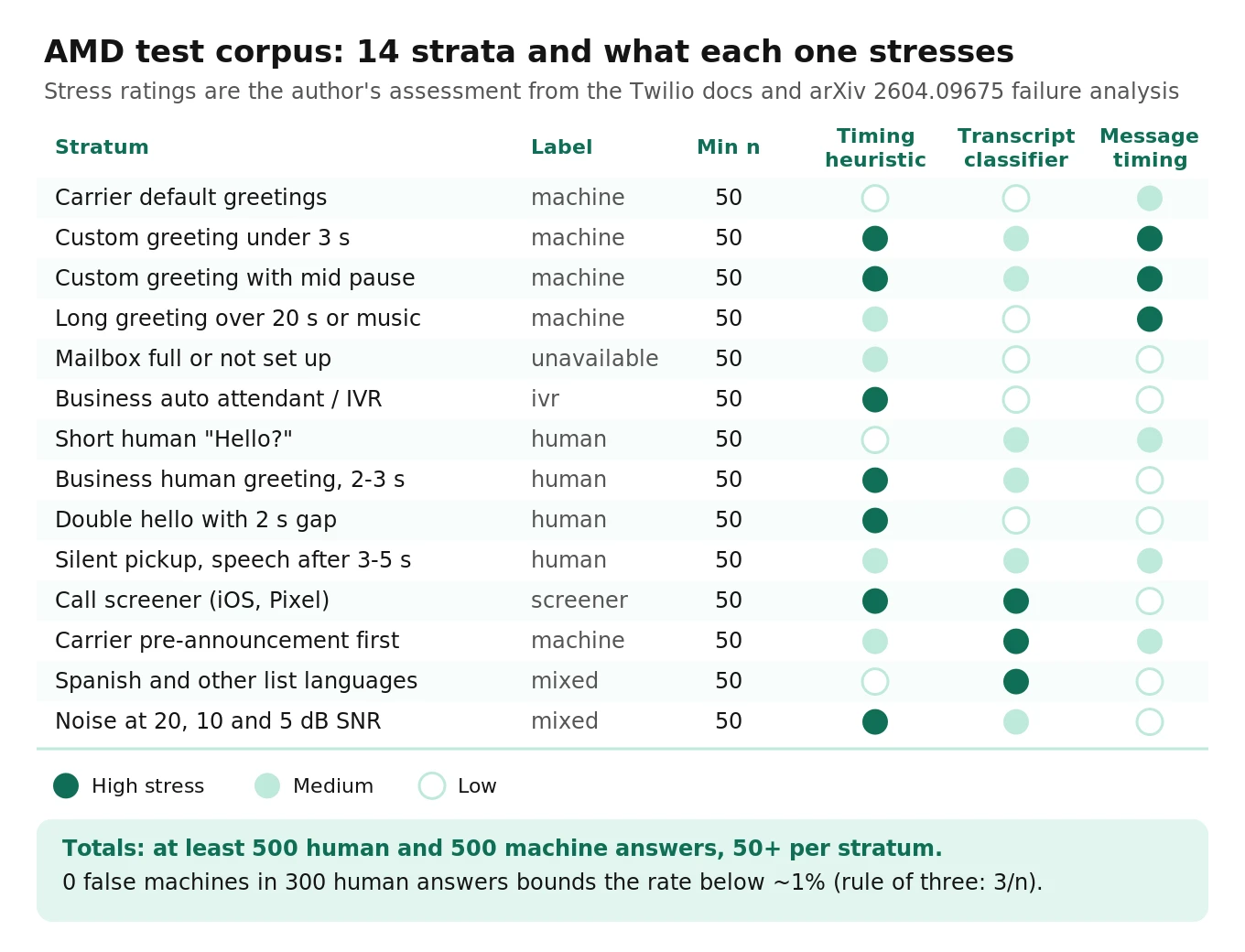
Strata to include
| Stratum | Label | Why it is hard |
|---|---|---|
| Carrier default greetings (major US carriers) | machine | Mostly easy; the regression baseline |
| Custom greeting under 3 s ("Leave a message") | machine | Too short for timing features |
| Custom greeting with mid-greeting pause | machine | Looks like a human "Hi, this is Sam" |
| Long custom greeting over 20 s, or with music | machine | Hits timeouts; music confuses VAD |
| Mailbox full or not set up | unavailable | Must not get a message |
| Business auto attendant or IVR | ivr | Long speech that is not voicemail |
| Short human "Hello?" | human | Must be fast |
| Business human greeting, 2 to 3 s | human | Crosses the speech threshold |
| Double hello with a 2 s gap | human | Twilio's documented false machine case |
| Silent pickup, then speech after 3 to 5 s | human | Tests `no_speech_threshold` and probes |
| Call screener (iOS, Pixel) | screener | Looks like machine, needs a reply |
| Carrier pre-announcement, then greeting | machine | One-shot detectors commit early |
| Spanish and other list languages | mixed | Prompts and STT trained on English |
| Noise: street, car, TV at 20, 10 and 5 dB SNR | mixed | VAD splits or merges segments |
How many calls you need
To estimate a proportion `p` within a margin `E` at 95% confidence:
`n = 1.96² × p(1 − p) / E²`
- Accuracy around 95%, margin ±2%: 3.8416 × 0.0475 / 0.0004 = 457 calls per class you want to report.
- Worst case (p = 50%), ±2%: 2,401 calls.
- Accuracy around 98%, ±2%: 189 calls.
For rare errors, ±2% is the wrong tool. If your false machine rate is about 1%, a ±2% interval cannot tell 0% from 3%. Use the rule of three instead: zero errors in `n` trials gives a 95% upper bound of about `3/n`. To claim a false machine rate below 1% with zero observed errors you need 300 human answers. To claim below 0.5%, you need 600.
A practical corpus for a mid-size team: 500 human answers across the human strata, 500 machine answers across the machine strata, and at least 50 per stratum so each one gives a directional read. Report Wilson intervals per class and flag any stratum whose error rate is more than twice the class average.
Where the audio comes from
- A greeting bank. Ten to twenty numbers you control, each playing a recorded greeting (TwiML `
`) then ` ` with a beep. You get exact recording start times, so you can measure clipping. - Synthetic humans. A synthetic caller that answers briefly and responds, at several SNRs.
- Real screeners. Test iPhones and Pixels with screening on; re-record after OS updates.
- Production samples. Record from answer (with consent and notice) and label a stratified weekly sample, as in our guide to sampling live calls.
The labeled set becomes your AMD golden dataset; version it and rerun it on every change.
An evaluation script you can run
Log one row per answered call with the verdict and five timestamps, then score it. The script below needs only the Python standard library. Column names are ours; map your LiveKit `result.category` and Pipecat event times into them. Our guide on what to log on every voice agent call covers capturing the timestamps.
# amd_eval.py - score an AMD run against human labels (simplified)
# CSV columns: call_id, stratum, truth, predicted, t_answer, t_greeting_end,
#   t_decision, t_first_agent_audio, t_record_start, t_message_start,
#   caller_hung_up_before_agent
import csv, math, sys
from collections import Counter, defaultdict

MACHINE = {"machine", "unavailable"}         # ground-truth positives
HUMANLIKE = {"human", "screener", "ivr"}       # should get the live path
ACT_AS_MACHINE = {"machine", "unavailable"}    # verdicts that trigger VM drop or hangup

def wilson(k, n, z=1.96):
    if n == 0: return (float("nan"), float("nan"))
    p, d = k / n, 1 + z * z / n
    c = p + z * z / (2 * n)
    m = z * math.sqrt(p * (1 - p) / n + z * z / (4 * n * n))
    return ((c - m) / d, (c + m) / d)

def pct(xs, q):
    xs = sorted(xs)
    return xs[min(len(xs) - 1, max(0, math.ceil(q * len(xs)) - 1))] if xs else None

def t(row, k):
    v = (row.get(k) or "").strip()
    return float(v) if v else None

def score(rows, c_fm=10.0, c_fh=0.60):
    tp = fp = fn = tn = clipped = drops = hangups = humans = 0
    dead_air, latency, strata = [], [], defaultdict(Counter)
    for r in rows:
        truth, pred = r["truth"].strip(), r["predicted"].strip()
        is_m, says_m = truth in MACHINE, pred in ACT_AS_MACHINE
        strata[r["stratum"]]["n"] += 1
        strata[r["stratum"]]["wrong"] += int(is_m != says_m)
        tp += is_m and says_m; fp += (not is_m) and says_m
        fn += is_m and not says_m; tn += (not is_m) and not says_m
        if t(r, "t_decision") is not None:
            latency.append(t(r, "t_decision") - t(r, "t_answer"))
        if truth in HUMANLIKE:
            humans += 1
            hangups += r.get("caller_hung_up_before_agent", "0").strip() in ("1", "true")
            if t(r, "t_first_agent_audio") is not None and t(r, "t_greeting_end") is not None:
                dead_air.append(t(r, "t_first_agent_audio") - t(r, "t_greeting_end"))
        if is_m and says_m and t(r, "t_message_start") is not None:
            drops += 1
            rec = t(r, "t_record_start")
            clipped += rec is None or t(r, "t_message_start") < rec
    return {
        "false_machine_rate": (fp / max(fp + tn, 1), wilson(fp, fp + tn)),
        "false_human_rate": (fn / max(tp + fn, 1), wilson(fn, tp + fn)),
        "machine_precision": tp / max(tp + fp, 1),
        "decision_latency_p50_p95": (pct(latency, .5), pct(latency, .95)),
        "dead_air_humans_p50_p95": (pct(dead_air, .5), pct(dead_air, .95)),
        "human_hangup_rate": (hangups / max(humans, 1), wilson(hangups, humans)),
        "clipped_message_rate": (clipped / max(drops, 1), wilson(clipped, drops)),
        "expected_error_cost": fp * c_fm + fn * c_fh,
        "worst_strata": sorted(((k, v["wrong"] / v["n"], v["n"]) for k, v in strata.items()),
                               key=lambda x: -x[1])[:5],
    }

if __name__ == "__main__":
    with open(sys.argv[1], newline="") as fh:
        for k, v in score(list(csv.DictReader(fh))).items():
            print(f"{k:28s} {v}")
Run it per configuration on the same corpus. Read the false machine rate's upper bound first, P95 dead air second, worst strata third. Call a config better only when intervals do not overlap.
How to test answering machine detection before and after launch
1. Write down your costs. Put numbers on `C_FM` and `C_FH`, compute the probability threshold `C_FM / (C_FM + C_FH)`, and decide which error you will trade for the other.
2. Instrument every call. Log answer time, greeting end, AMD verdict, verdict time, transcript, first agent audio, recording start (for voicemail drops) and whether the person hung up before the agent spoke. Without these timestamps you cannot measure dead air or clipping.
3. Build the greeting bank and corpus. Cover the 14 strata above, with at least 300 human answers so you can bound the false machine rate near 1%, and at least 50 calls per stratum.
4. Run each candidate configuration over the same corpus. Vary one thing at a time: a timer, the classifier model, the prompt, Twilio's `MachineDetectionSpeechEndThreshold`. Score with the script and keep the outputs under version control.
5. Check the compliance timers. Confirm P95 dead air on humans, clipped message rate, and that every voicemail opens with the business name and includes the callback number.
6. Shadow in production. Run the new configuration alongside the old one on 5 to 10% of traffic, log both verdicts, and have a person label the disagreements. Disagreements are where the errors are.
7. Rerun on every change. STT model upgrades, LLM swaps, prompt edits, carrier changes and phone OS updates (screeners) all move AMD. Treat the corpus as a regression suite, as covered in testing DTMF and IVR navigation for the IVR branch.
8. Get an independent read before you scale. If the same team that tuned the timers also labels the results, ambiguous calls tend to get graded generously. Evalgent can run the corpus against your live number as an outside evaluator and report false machine rate, dead air and clipping per stratum, so a launch decision rests on numbers nobody on the build team graded.
For how fast your agent speaks once AMD hands control back, see time to first audio for voice agents.
Frequently asked questions
What is answering machine detection in a voice agent?
Answering machine detection is the step at the start of an outbound call that decides whether a person, a voicemail box, an IVR or a call screener answered. The agent uses the result to start talking, wait and leave a message, navigate a menu, or hang up. It runs in the first few seconds, before the agent speaks.
Does LiveKit have built-in answering machine detection?
Yes. Since `livekit-agents` 1.5.9 (Python) and 1.4.2 (Node.js), the core framework includes `AMD`. You open it as a context manager before creating the SIP participant and call `detector.execute()`. It returns human, machine-vm, machine-ivr, machine-unavailable or uncertain, using a timing heuristic plus an LLM classifier on the transcript.
How does Pipecat detect voicemail?
Pipecat's `VoicemailDetector` places a detector after STT and a `TTSGate` after TTS. A classifier labels the transcript as conversation or voicemail, and the latest answer becomes final once the caller has been silent for `decision_timeout`. The gate holds the bot's reply until then. Since 1.12.0 it takes a `classifier` argument instead of an `llm`.
How accurate is Twilio AMD?
Twilio says `DetectMessageEnd` is close to 100% accurate in US destinations with default settings, and that `Enable` accuracy depends more on configuration. Twilio does not publish a test set, so measure it on your own calls. Its documented weak spots are short voicemails with pauses and humans who pause between two hellos.
Can I use Twilio AMD with LiveKit?
Not over a Twilio Elastic SIP trunk. Twilio states that Elastic SIP trunking calls cannot use AMD because they bypass Programmable Voice. Most LiveKit outbound setups use Elastic SIP trunks, so run LiveKit's built-in `AMD` in the agent instead. Twilio AMD does work on Programmable Voice calls, including `
Why does my agent talk over voicemail greetings?
Usually the detector called a short greeting human, or it handed control back before the recording started. Short voicemails often pause for 1.2 to 2.4 seconds mid-greeting, which looks like a finished human hello. Lengthen the end-of-speech silence threshold, check that agent speech is held until the verdict, and measure message start offset against the recording start.
How many test calls do I need to measure AMD accuracy?
About 457 calls per class to estimate a 95% accuracy within plus or minus 2% at 95% confidence. For rare errors, use the rule of three: zero false machines in 300 human answers bounds the false machine rate below about 1%. Include at least 50 calls per stratum so each greeting type gets a directional read.
Do call screening features break answering machine detection?
Often, yes. iPhone call screening and Pixel Call Screen answer for the user and ask for your name and reason. Timing detectors read that as a machine, and transcript classifiers can read it as voicemail. The agent then leaves a message or hangs up instead of answering briefly. Add screener audio to your test corpus and give screeners their own short-answer path.
The bottom line
Answering machine detection is a cost-weighted classifier plus a set of timers, and in LiveKit, Pipecat and Twilio the timers decide most of what customers hear. Put a dollar value on each error, build a labeled corpus that includes short voicemails, double hellos and call screeners, and track false machine rate, dead air and clipped messages with confidence intervals on every change.
Related Articles

How to automate voice agent testing: synthetic callers vs manual QA
Learn how ai test automation replaces manual QA for voice agents. Compare synthetic callers vs human testers, with a 5-step framework to scale without hiring.
Read more
AI Agent Testing vs Voice Agent Testing: What General Tools Miss for Voice
AI agent testing measures text outputs. Voice agent testing measures behaviour through an acoustic pipeline. Five failure categories general tools miss.
Read more