Open door for builders.
LiveKit + Twilio Outbound Calling: SIP Trunk Setup and What to Test Before Go-Live
On this page
Getting the first outbound call working takes about an hour. You create a Twilio trunk, paste the termination URI into a LiveKit outbound trunk, call `CreateSIPParticipant`, and your phone rings. The trouble starts in week two. Calls show up as "Spam Likely." Your agent talks over voicemail greetings. Unanswered calls leave agent jobs running. Twilio throttles you at one call per second, and you find out from your error logs.
This guide follows the call one leg at a time. It covers the SIP code each leg can return, what LiveKit does with that code, and what it costs. It ends with a go-live test matrix and pass criteria. For how LiveKit telephony compares with Pipecat, see our LiveKit vs Pipecat telephony comparison. This post covers outbound calling only, in more depth.
The outbound call path, leg by leg
An outbound call is not one connection. It is five hops, run by three companies. Each hop can fail in its own way.
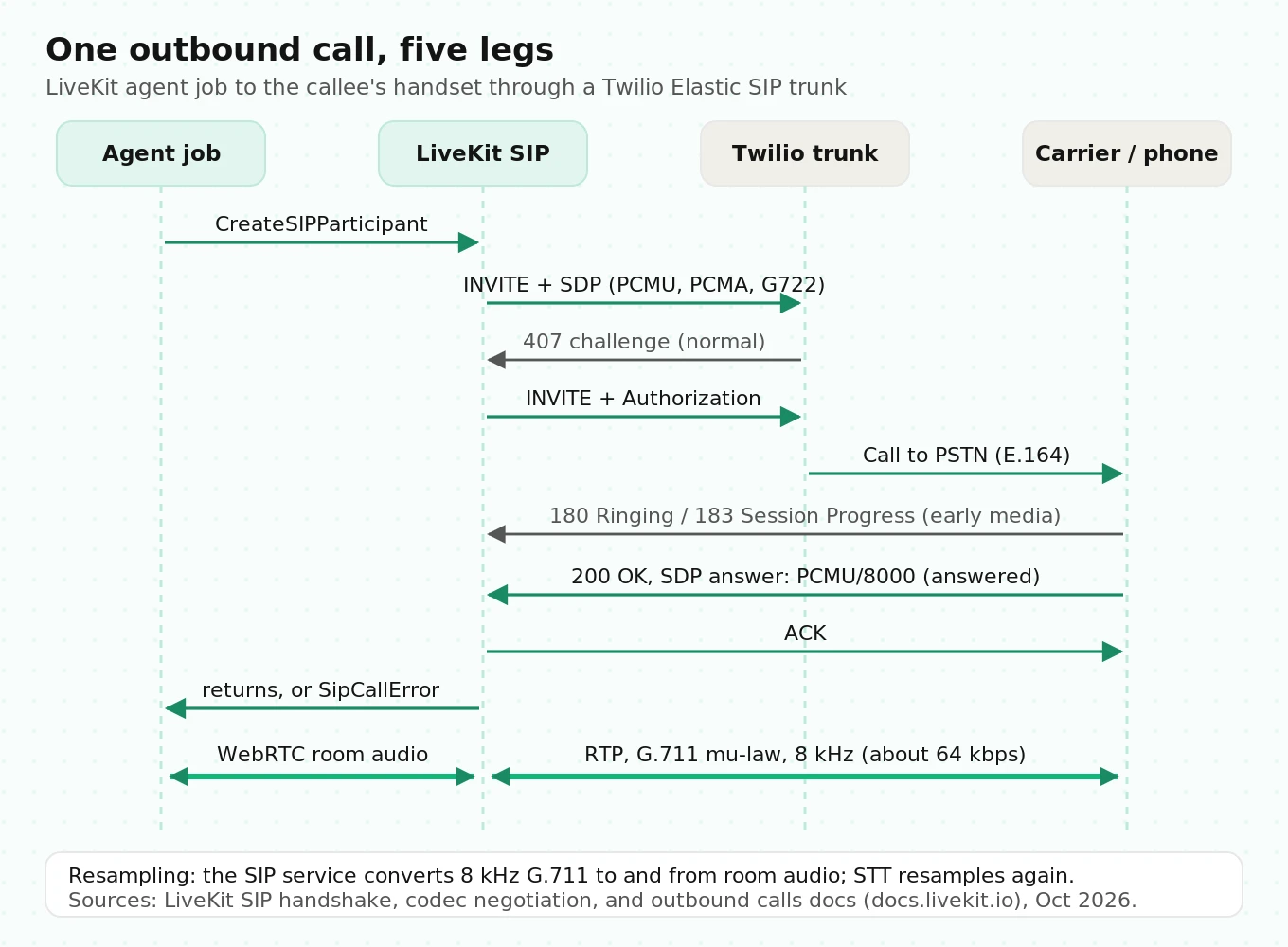
Leg 1: your backend to LiveKit (dispatch). Your scheduler calls the Agent Dispatch API with an `agent_name` and JSON metadata holding the phone number. The agent dispatch docs say LiveKit targets a max dispatch time under 150 ms. The room is created if it doesn't exist. An agent server process accepts the job.
Leg 2: the agent job to the LiveKit SIP service. Inside the job, your code calls `CreateSIPParticipant`. This request needs the SIP `call` grant. LiveKit validates it and picks a SIP node. Per the region pinning docs, outbound calls start in the region where the API call was made. If you set `destination_country`, they start from a server in that country instead.
Leg 3: LiveKit SIP to Twilio's termination URI. LiveKit sends an `INVITE` to `
Leg 4: Twilio to the PSTN and the callee's carrier. Twilio routes the call onward. Provisional responses come back: `100 Trying`, then `180 Ringing` or `183 Session Progress`. When a mobile user answers, their carrier sends an SS7 Answer Message, which turns into a `200 OK` by the time it reaches LiveKit.
Leg 5: media. After `200 OK` and `ACK`, RTP flows. On a US PSTN call this is almost always G.711 μ-law (PCMU) at 8 kHz, about 64 kbps before overhead.
Where the audio gets resampled
People lose quality here without noticing. The phone network carries 8 kHz narrowband audio. Inside the LiveKit room, the callee is a normal participant with a WebRTC audio track. The SIP service converts between the two. Your agent's STT plugin then resamples room audio to whatever rate the STT model expects, often 16 kHz. Upsampling does not bring back the missing frequencies, though. The STT still hears a band that tops out near 4 kHz.
The return path does the same in reverse. Your TTS may render at 24 kHz, the room carries it, and the SIP service squeezes it back into 8 kHz PCMU. Sibilants and plosives that sounded crisp in the browser get dull.
How much does narrowband hurt recognition? The best controlled number we found is older. Bauer et al. (EUSIPCO 2014) trained matched recognizers on about 70 hours of German speech. The wideband system beat the narrowband one by 6.9% relative WER (36.83% vs 39.58%). The paper also cites a 20% relative WER reduction from doubling the sample rate from 8 to 16 kHz in earlier work. Those were HMM-era systems, so read the numbers as direction, not as a prediction for your model. Either way, a browser demo tells you little about phone accuracy. Test at 8 kHz. Our SIP vs WebRTC comparison covers why the two transports behave so differently.
You can offer wideband. LiveKit supports G.722 by default and AMR-WB as an opt-in. Whether you get it depends on every hop to the handset. Most PSTN calls to US mobiles still settle on PCMU. Plan for that.
| Leg | Protocol | Typical failure | Where you see it |
|---|---|---|---|
| Backend to LiveKit | Agent Dispatch API | `agent_name` mismatch, no agent server running | Job never starts, no SIP call logged |
| Agent to SIP service | Twirp `CreateSIPParticipant` | Wrong trunk ID (404 "object cannot be found") | `SipCallError` or Twirp error in agent logs |
| SIP to Twilio | SIP over UDP/TCP/TLS | 403 bad credentials, 400 non-E.164, 503 wrong address | LiveKit Telephony dashboard, Twilio debugger |
| Twilio to PSTN | SIP to SS7 | 486 busy, 480/408 no answer, 404 bad number | `sip_status_code` on `SipCallError` |
| Media | RTP, G.711 | One-way audio, media timeout, garbled audio | PCAP, RTP stream analysis |
Setting up the Twilio side: Elastic SIP termination
On Twilio, outbound is called termination. Inbound is origination. Mixing the two up is the most common setup mistake.
1. Create an Elastic SIP trunk. The domain name must end in `pstn.twilio.com`, per the LiveKit Twilio quickstart.
2. On the Termination tab, set a termination SIP URI such as `acme-outbound.pstn.twilio.com`.
3. Attach authentication.
4. Associate at least one Twilio number with the trunk. It becomes your caller ID.
twilio api trunking v1 trunks create \
  --friendly-name "Acme outbound" \
  --domain-name "acme-outbound.pstn.twilio.com"

twilio api trunking v1 trunks phone-numbers create \
  --trunk-sid <twilio_trunk_sid> \
  --phone-number-sid <twilio_phone_number_sid>
Credentials vs IP access control
The Twilio SIP trunking docs say: "You must configure a minimum of either an ACL or credential authentication. If you configure both, then both ACLs and credentials are enforced."
- Credential list. Pick a username and password in Twilio. Use the same pair on your LiveKit outbound trunk. This works from any LiveKit region, which is why LiveKit's quickstart uses it.
- IP access control list. Allow only LiveKit's IPs. According to the outbound trunk docs, LiveKit Cloud publishes static IP ranges for Canada, the EU, India, Japan, and the US. Outside those regions there are no static ranges, so use credentials.
Using both is the strictest option. If you do, check that every region your agents dial from is on the ACL. When Twilio rejects you, its debugger logs error 32201 ("Source IP address not in ACL") or 32202 ("Bad user credentials"). LiveKit's troubleshooting guide maps these to a `403 Forbidden`.
Number format and caller ID rules
Twilio is strict about format. Numbers must be E.164 with the leading `+`. Otherwise "the call will be rejected with a SIP `400 Bad Request` response." Normalize numbers when you import contacts, not when you dial. A CSV with `(415) 555-0100` will fail at runtime and nowhere else.
Caller ID has a rule too. You must use "a Caller ID Number that either corresponds to a Twilio DID on your account or a Caller ID Number that has been verified." If you dial from a number Twilio doesn't recognize, the call fails before any phone rings.
International destinations are controlled by Twilio's Geo Permissions, which apply to Elastic SIP Trunking. Blocked calls log error 32205, "Geo Permission configuration is not permitting call." Trial accounts can only reach low-risk destinations.
Creating the LiveKit outbound trunk
The LiveKit outbound trunk holds the Twilio address, credentials, and caller ID numbers. Create it once and reuse it. The docs warn that "creating a new trunk for each call bypasses this caching and can degrade reliability at scale."
# Simplified. Field names match the LiveKit SIP API reference.
import asyncio, os
from livekit import api
from livekit.protocol.sip import CreateSIPOutboundTrunkRequest, SIPOutboundTrunkInfo

async def main():
    lkapi = api.LiveKitAPI()  # reads LIVEKIT_URL / API_KEY / API_SECRET
    trunk = SIPOutboundTrunkInfo(
        name="acme-twilio-outbound",
        address="acme-outbound.pstn.twilio.com",  # hostname only, no "sip:"
        numbers=["+15105550100"],                  # E.164, owned by Twilio account
        auth_username=os.environ["SIP_AUTH_USERNAME"],
        auth_password=os.environ["SIP_AUTH_PASSWORD"],
        destination_country="US",                  # region pinning for outbound
    )
    info = await lkapi.sip.create_sip_outbound_trunk(
        CreateSIPOutboundTrunkRequest(trunk=trunk)
    )
    print(info.sip_trunk_id)  # ST_xxxx, store it in config
    await lkapi.aclose()

asyncio.run(main())
Three details matter in production:
- `address` is a hostname, not a URI. The SIP API reference says it "shouldn't contain the `sip:` protocol."
- One trunk, many caller IDs. Set `numbers` to `["*"]` and pass `sip_number` on each `CreateSIPParticipant` call. Use this to rotate local-presence numbers without creating new trunks.
- Inline config for multi-tenant apps. If each customer brings their own Twilio account, pass a `SIPOutboundConfig` inline on each call with `sip_number` set. This is the documented pattern for "a separate SIP provider per customer."
Dispatching the agent and placing the call
LiveKit supports two outbound patterns. Your backend can create the SIP participant and dispatch the agent to that room. Or the agent can dial from inside its own job. Most teams use the second. The agent owns the call from the first ring, so error handling stays in one place.
Explicit dispatch is required. Per the dispatch docs, "with `agent_name` set, the agent is only assigned to rooms when explicitly dispatched." Here is the trigger from your scheduler:
# Illustrative scheduler-side dispatch
import json, uuid
from livekit import api

async def place_outbound(phone_e164: str, contact_id: str):
    async with api.LiveKitAPI() as lkapi:
        await lkapi.agent_dispatch.create_dispatch(
            api.CreateAgentDispatchRequest(
                agent_name="outbound-reminder-agent",
                room=f"ob-{contact_id}-{uuid.uuid4().hex[:8]}",  # unique per attempt
                metadata=json.dumps({"phone_number": phone_e164, "contact_id": contact_id}),
            )
        )
Use a unique room per attempt. If you reuse a room name across retries, a late `participant_disconnected` event from attempt one can tear down attempt two.
Now the agent entrypoint. This version adds what the quickstart leaves out: a ring timeout, a duration cap, outcome mapping, and explicit shutdown.
# Simplified agent entrypoint. Verify against your livekit-agents version.
import json
from google.protobuf.duration_pb2 import Duration
from livekit import agents, api

TRUNK_ID = "ST_xxxx"

@server.rtc_session(agent_name="outbound-reminder-agent")
async def entrypoint(ctx: agents.JobContext):
    info = json.loads(ctx.job.metadata)
    phone = info["phone_number"]
    try:
        await ctx.api.sip.create_sip_participant(api.CreateSIPParticipantRequest(
            room_name=ctx.room.name,
            sip_trunk_id=TRUNK_ID,
            sip_call_to=phone,
            participant_identity=phone,
            wait_until_answered=True,                 # block until 200 OK or failure
            ringing_timeout=Duration(seconds=30),     # documented max is 80 s
            max_call_duration=Duration(seconds=600),  # hard cap on runaway calls
        ))
    except api.SipCallError as e:
        # 486/603 -> rejected, 408/480 -> no answer, 5xx -> trunk failure
        record_attempt(info["contact_id"], e.sip_status_code, e.sip_status)
        ctx.shutdown()   # required: some failure reasons do NOT auto-close the job
        return

    participant = await ctx.wait_for_participant(identity=phone)
    # Start the AgentSession here, AFTER answer. Do not greet first on outbound.
The docs are clear about when to start the session: "Call `session.start()` after the callee picks up. If the session starts while the call is still ringing, the initial greeting plays before the callee joins the room." A recurring GitHub complaint, the bot starting to talk before pickup, comes down to this mistake.
Answer vs ringing vs busy vs no-answer
`wait_until_answered=True` turns the SIP outcome into a Python result. A `200 OK` returns. Anything final and non-2xx raises `SipCallError`, which carries the carrier's code. This is how each code maps, based on LiveKit's outbound calls guide and SIP participant reference:
| SIP response | Meaning | LiveKit result | `disconnect_reason` | Auto-closes session? | What your code should do |
|---|---|---|---|---|---|
| `180 Ringing` | Phone is ringing, no media | Still waiting, `sip.callStatus = dialing` | n/a | n/a | Nothing. Ring clock runs |
| `183 Session Progress` | Ringing with early media | Still waiting | n/a | n/a | Don't treat carrier audio as the callee |
| `200 OK` | Answered (human or machine) | Returns, `sip.callStatus = active` | n/a | n/a | Run AMD before speaking |
| `486 Busy Here` / `603 Decline` | Busy or rejected | `SipCallError` | `USER_REJECTED` | Yes | Retry later with backoff |
| `408 Request Timeout` / `480 Temporarily Unavailable` | No answer or unreachable | `SipCallError` | `USER_UNAVAILABLE` | No | Call `ctx.shutdown()`, schedule retry |
| `404 Not Found` | Bad number or bad trunk ID | `SipCallError` | varies | Check | Mark number invalid, stop retrying |
| `5xx` | Trunk or protocol failure | `SipCallError` | `SIP_TRUNK_FAILURE` | No | Call `ctx.shutdown()`, alert on rate |
Look at the "Auto-closes" column. LiveKit's docs say `AgentSession` "automatically closes the session when a SIP participant disconnects with `USER_REJECTED`. If the disconnect reason is `USER_UNAVAILABLE` or `SIP_TRUNK_FAILURE`, you must explicitly call `ctx.shutdown()` to release the job." No-answer is your most common outcome. Skip the shutdown and every no-answer leaves a job running. That job holds a slot on an agent server that should be dialing the next number.
Voicemail is the other trap. Voicemail systems answer with `200 OK`. To LiveKit, that is a successful call. The docs put it plainly: "Voicemail is not a failure." Telling a person from a machine is a separate step.
Answering machine detection and the first-word timer
LiveKit's answering machine detection runs once, on the first thing the callee says. It returns one of five categories: `human`, `machine-ivr`, `machine-vm`, `machine-unavailable`, or `uncertain`. Agent speech stays paused until the result arrives. Two paths run at once: a fast heuristic for short greetings and an LLM classifier for longer ones.
The defaults matter for timing:
- `human_speech_threshold`: 2.5 s. Speech shorter than this takes the fast "human" path.
- `human_silence_threshold`: 0.5 s. Silence needed after a short greeting before AMD decides `human`.
- `machine_silence_threshold`: 1.5 s. Silence after machine-like speech before a verdict.
- `no_speech_threshold`: 10 s. With no speech at all, AMD settles on `uncertain`.
- `wait_until_finished`: `True`. AMD waits for the greeting to end, so a long greeting can run past `timeout`.
For comparison, Altwlkany et al. (arXiv 2024) built a small streaming GRU classifier on about 4,200 real call recordings. It reached 96.67% test accuracy, and 98.10% with a silence detector added. Inference took 31.63 ms per frame on CPU. The paper also cites vendor AMD running about 4 seconds on average with "above 90% accuracy in the US." Those vendor figures are claims the authors quote, not measurements they made. The useful point: AMD always trades accuracy against time, and every second of silence after "Hello?" is a second the callee spends deciding whether to hang up.
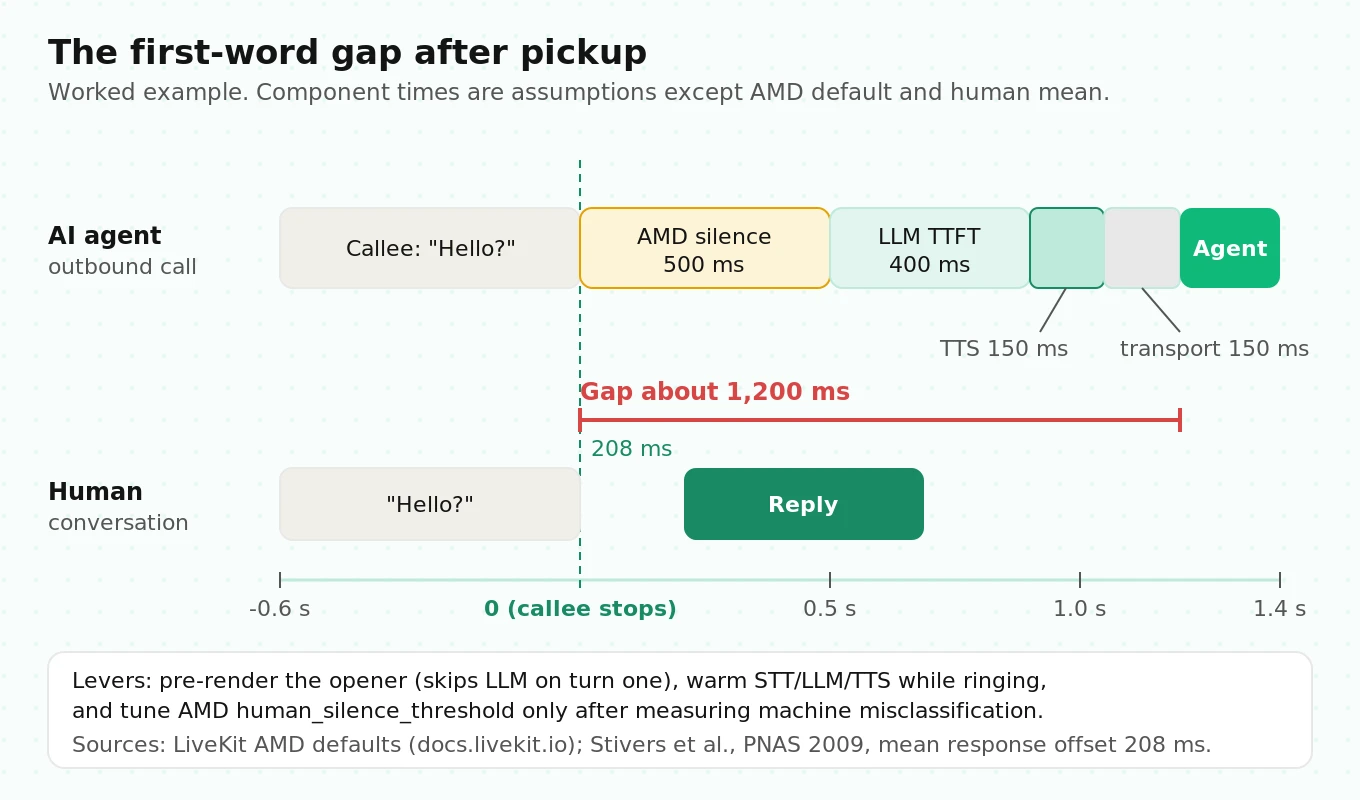
Here is a worked example of the first-word gap on a human pickup. Every component time below is an assumption, not a measurement.
| Step | Assumed time | Running gap after callee stops talking |
|---|---|---|
| Callee says "Hello?" | 0.6 s of speech | 0 ms |
| AMD `human_silence_threshold` | 500 ms | 500 ms |
| LLM time to first token (assume) | 400 ms | 900 ms |
| TTS first audio byte (assume) | 150 ms | 1,050 ms |
| Room, SIP bridge, carrier to handset (assume) | 150 ms | 1,200 ms |
Compare that 1.2 s gap with ordinary conversation. Stivers et al. (PNAS 2009) measured question-response pairs in 10 languages. The mean response offset was 208 ms, and every language averaged within 500 ms. Your first turn is the one that most often decides whether someone hangs up, and it is roughly five times slower than a human reply.
Ways to shorten it:
- Pre-render the opener. The first line ("Hi, this is Maya from Acme Dental about your appointment") rarely changes. Generate it ahead of time and play it with `session.say`, so there is no LLM wait on turn one.
- Warm the pipeline before dialing. Open STT, LLM, and TTS connections while the phone rings. LiveKit's AMD example builds the detector around the session before `create_sip_participant`, so this fits the documented flow. Just don't generate speech until you get the AMD verdict.
- Tune `human_silence_threshold` with data. Lowering it from 500 ms saves time but sends more machines down the human path. Measure both sides on recorded greetings before you change it.
For latency measurement in general, see our guide to time to first audio.
Ending the call: EndCallTool and hangup semantics
Outbound calls need a clean exit. The prebuilt EndCallTool is in beta for Python and Node.js. When the LLM calls `end_call`, four things happen in order. The agent says a final line (from `end_instructions`). The session shuts down after that line plays. The room is deleted if `delete_room` is `True` (the default). Then the job process exits.
from livekit.agents import Agent
from livekit.agents.beta.tools import EndCallTool

class ReminderAgent(Agent):
    def __init__(self):
        end_call = EndCallTool(
            extra_description="Only end the call after the appointment is confirmed, "
                              "rescheduled, or the person asks to stop.",
            delete_room=True,
            end_instructions="Thank them and say goodbye in one short sentence.",
        )
        super().__init__(instructions="You confirm dental appointments.",
                         tools=end_call.tools)
Keep `delete_room=True`. The outbound guide warns: "If the agent session ends but the room is not deleted, the user continues to hear silence until they hang up." Silence is billable. Twilio charges for connected minutes until someone sends a `BYE`.
Deleting the room shows up as `ROOM_DELETED` in `disconnect_reason`. When the callee hangs up, a clean `BYE` shows up as `CLIENT_INITIATED`. Log both. If you see many calls where the callee hangs up within 10 seconds of answering, look at your opener and your caller ID reputation, not at your prompt.
Set `max_call_duration` as a backstop. If an LLM loop never calls `end_call`, or the callee leaves the phone off the hook, the cap ends the call. Ten minutes is a sensible ceiling for most reminder and qualification flows. For call transfers rather than hangups, see our post on DTMF and IVR navigation testing.
Caller ID, STIR/SHAKEN, and spam labels
Outbound has a problem inbound doesn't. The callee decides whether to pick up based on what their screen shows. That screen depends on STIR/SHAKEN attestation and on carrier analytics.
Twilio's SHAKEN/STIR docs define the levels:
- A: "the caller is known and has the right to use the phone number as the caller ID."
- B: "the customer is known, it is unknown if they have the right to use the caller ID."
- C: everything else, "including international calls."
To get A, your Twilio account needs an approved Business Profile and an approved SHAKEN/STIR Trust Product, with the number assigned to both. Per Twilio's onboarding docs, B is "the highest level of attestation possible if a customer is using non-Twilio phone numbers." If you bring numbers ported from elsewhere and send them through a Twilio trunk without porting them in, you are capped at B. On Elastic SIP Trunking, Twilio passes the result in the `X-Twilio-VerStat` and `Identity` headers. Check those headers in your test calls rather than assuming you got A.
Why it matters: Sherman et al. (NDSS 2020) ran a lab study with 34 participants and five incoming-call screen designs. With no warning, participants answered 35% of calls from unknown numbers. With a spam warning, that fell to 5% and 3%, depending on the design. An authenticated caller ID notice raised it to 42%. A spam label even suppressed answers from known numbers: 100% with no warning, 34% to 65% with one. The sample is small and the setting is a lab. Still, the direction is hard to miss. Your answer rate can drop by an order of magnitude before your agent says a word.
Attestation is only part of it. Carrier analytics engines label numbers based on behavior: volume per number, short call durations, and complaint rates. Twilio's Voice Integrity registers numbers with the analytics engines for T-Mobile, Verizon, and AT&T to "remediate spam labels." It requires an approved Business Profile with an EIN or DUNS number. Do this before launch. Removing a label after the fact is slower.
One more data point for your campaign design. Prasad et al. (USENIX Security 2020) ran a honeypot of up to 66,606 lines for 11 months. They found that most robocall campaigns "rarely reuse phone numbers." Carriers see number churn as a robocall signal. Rotating through dozens of fresh numbers to avoid labels can make your traffic look more like the campaigns carriers are trying to block.
Telnyx as the alternative trunk
LiveKit supports Twilio, Telnyx, Plivo, Wavix, Sinch, and didlogic with provider quickstarts. For a full carrier comparison, see our telephony provider roundup. For outbound specifically, these Telnyx differences are documented:
| Item | Twilio Elastic SIP | Telnyx |
|---|---|---|
| Outbound trunk `address` | ` | `sip.telnyx.com` or a regional signaling address |
| Common address mistake | Using the origination URI | Adding a subdomain, which returns `503` (LiveKit troubleshooting) |
| Number format | E.164 with `+`, else `400` | Leading `+` assumes "Destination Number Format" is `+E.164` |
| SIP REFER transfers | Supported | Must be enabled on your account (LiveKit troubleshooting) |
| US outbound price (listed) | $0.0100/min, 48 states | "Starting at $0.005 per minute" local |
| Toll-free outbound | $0.0011/min | Listed as free |
Prices are from the Twilio US SIP pricing page (marked current as of August 2026) and the Telnyx Elastic SIP pricing page. Telnyx's "starting at" price is a floor. Get a quote for your actual traffic. We didn't find Telnyx's billing increment on the pricing page, so ask for it.
Switching trunks in LiveKit means changing the `address`, credentials, and numbers. Your agent code doesn't change. That makes it practical to run a small share of calls through a second carrier and compare answer rates, SIP code distributions, and audio quality on the same scripts.
What an outbound minute costs
You pay three meters. Here are the list prices, verified October 2026:
- Twilio termination: $0.0100/min to the 48 states. Partial minutes round up. Twilio's support article says calls "under 60 seconds are rounded up to the next full minute" on Elastic SIP Trunking. That article is on a legacy support site, so confirm against your own invoice.
- LiveKit third-party SIP minutes: "Inbound and outbound minutes using a third-party SIP trunk." On the Ship plan, 5,000 are included, then $0.004/min. On Scale, 50,000 are included, then $0.003/min (LiveKit pricing).
- LiveKit agent session minutes: $0.01/min after the plan's included minutes, on Ship and Scale.
On Ship overage, that is $0.024 per connected minute before STT, LLM, and TTS. The per-minute rate isn't the hard part. Rounding, ringing, and short calls are.
Worked example: 10,000 attempts
Assumed mix (illustrative, not measured): 30% human answers averaging 2.5 minutes. 25% voicemail, handled in 25 seconds. 45% no answer or busy. Average ring time: 12 s before a human answers, 15 s before voicemail, 25 s for no-answer (with `ringing_timeout` at 30 s). We assume Twilio doesn't charge for unanswered attempts. Check your own invoice.
| Line item | Calculation | Result |
|---|---|---|
| Connected minutes | 3,000 x 2.5 + 2,500 x 0.417 | 8,542 min |
| Twilio billed minutes (round up) | 3,000 x 3 + 2,500 x 1 | 11,500 min |
| Twilio cost | 11,500 x $0.0100 | $115.00 |
| LiveKit SIP minutes (no included minutes) | 8,542 x $0.004 | $34.17 |
| Agent job time if billed from dispatch | 10,000 x 69.85 s / 60 | 11,642 min |
| Agent session cost (upper bound) | 11,642 x $0.01 | $116.42 |
| Total before models | $265.59 | |
| Per human conversation | $265.59 / 3,000 | $0.089 |
Two results surprise people. First, rounding adds 35% to Twilio billed minutes in this mix (11,500 vs 8,542). Every 25-second voicemail is billed as a full minute. Second, the agent job is alive during ringing. With the agent-dials pattern, the job starts at dispatch, not at answer. We couldn't confirm from LiveKit's docs whether agent session minutes accrue during ringing. Check your usage dashboard after a test batch. The table uses the worst case.
Calls per second and concurrency
Twilio's CPS docs set the default at "1 CPS per Trunk per Region." You can raise it to 5 in the console. Higher limits go through sales. Going over logs errors 32001 and 32012. At 1 CPS, the ceiling is 3,600 attempts per hour, per trunk, per region.
Little's law gives you agent concurrency: L = λ x W, where λ is the attempt rate and W is how long each attempt holds a job.
- W = 0.45 x 25 s + 0.25 x (15 + 25) s + 0.30 x (12 + 150) s = 11.25 + 10 + 48.6 = 69.85 s
- At λ = 1 attempt per second, L = about 70 concurrent agent jobs
- Ringing seconds = 0.45 x 25 + 0.25 x 15 + 0.30 x 12 = 18.6 s, so 27% of agent capacity is spent waiting on ringing
Size your agent servers for that 70, plus headroom, before you raise CPS. Raising CPS to 5 without adding capacity is how teams see the concurrency failures that never appear in single-call tests.
Twilio's CPS page also lists conditions for getting higher limits. Average call duration must be over 30 s. No more than 10% of calls can be 12 s or shorter. Answer-seizure ratio must be over 70%. Outbound AI campaigns break these by design. AMD hangs up on full mailboxes in a few seconds. Cold lists rarely hit 70% answered. In the example mix, 55% of attempts are answered. Before you ask Twilio for more throughput, find out whether your traffic qualifies. And log short calls as their own metric.
Failure taxonomy for LiveKit + Twilio outbound calls
Each failure below either has its own SIP code or has a specific signature in the media or in agent logs. Group them by layer so you know which dashboard to open first.
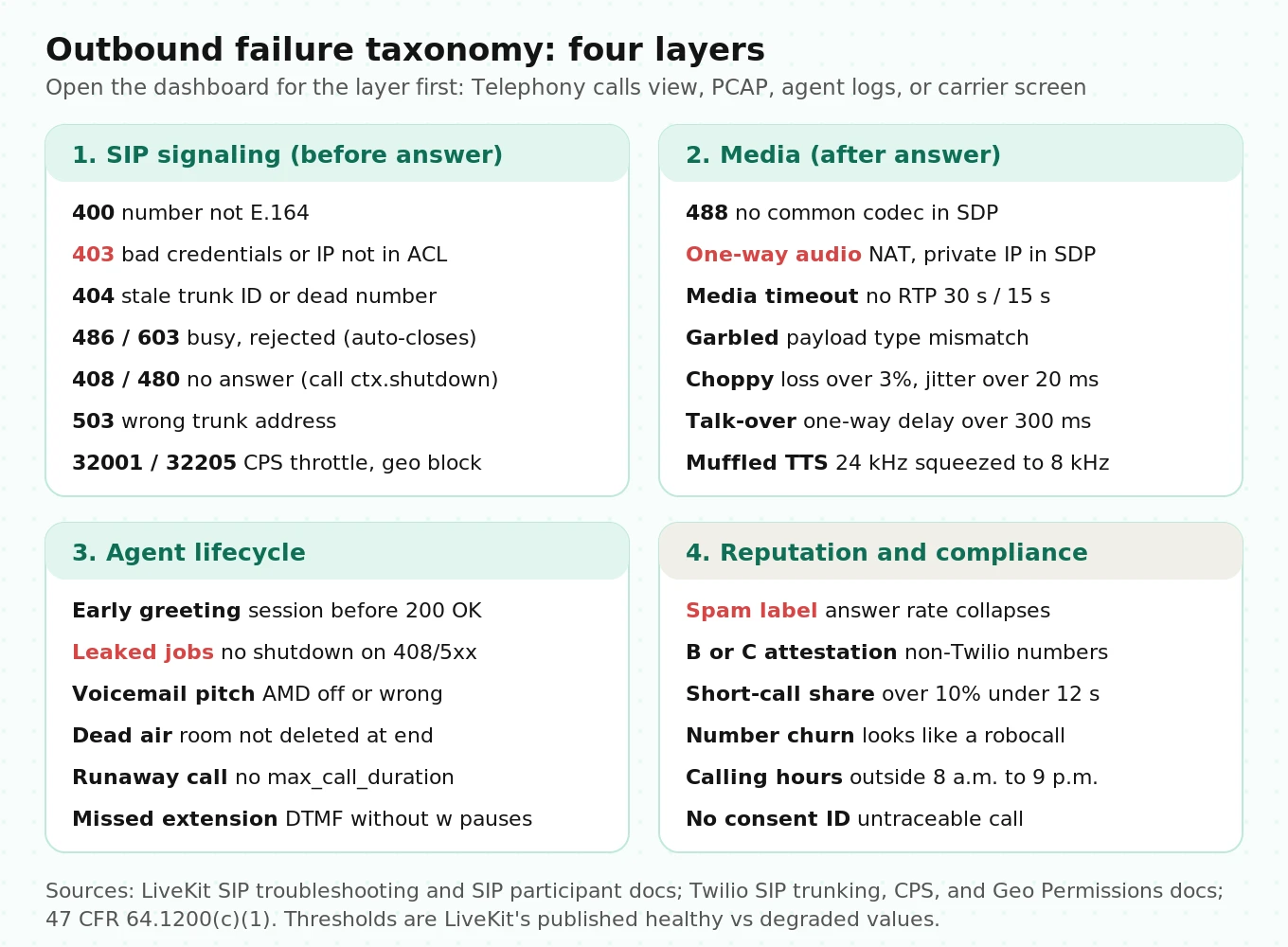
| Failure | Code or signal | Likely cause | Fix |
|---|---|---|---|
| Digest challenge | `401` / `407` | Normal auth handshake | None. Not a failure |
| Bad number format | `400 Bad Request` | Not E.164, missing `+` | Normalize when you ingest contacts |
| Auth rejected | `403`, Twilio 32201/32202 | Credential mismatch, IP not in ACL | Match the credential list. Add LiveKit static IPs |
| Wrong region | `403 Domestic Anchored Terms Not Met` | Call left the required country | Set `destination_country` |
| Trunk not found | `404` "object cannot be found" | Stale `ST_` ID in config | Load the trunk ID from config, check at startup |
| Number not in service | `404` from destination | Disconnected number | Mark invalid, suppress retries |
| Codec mismatch | `488 Not Acceptable Here` | No common codec in SDP | Keep PCMU in the offer. Avoid `only_listed_codecs` without it |
| Wrong trunk address | `503` | Subdomain on Telnyx address, typo | Use the provider's exact signaling host |
| Geo blocked | Twilio 32205 | Destination country not allowed | Enable it in Geo Permissions, or block it in your app first |
| Throttled | Twilio 32001/32012 | Over the CPS limit | Pace dials in your scheduler |
| One-way audio | RTP only one direction | NAT. Self-hosted SIP advertising a private IP | Set `use_external_ip: true` when self-hosting |
| Media timeout | Call drops, "media timeout" | No RTP for 30 s at start or 15 s mid-call | Raise `media_timeout` (max 10 minutes) |
| Garbled audio | Static, robotic voice | RTP payload type mismatch, loss over 3%, jitter over 20 ms | PCAP, Wireshark RTP stream analysis |
| Greeting before pickup | Callee hears half a sentence | Session started before `200 OK` | Start the session after `wait_until_answered` |
| Talking to voicemail | Agent pitches a mailbox | No AMD, or AMD misclassified | AMD, and test misclassifications on recorded greetings |
| Leaked jobs | Agent servers fill up | No `ctx.shutdown()` on 408/480/5xx | Shut down in every `SipCallError` branch |
| Dead air at hangup | Callee hears silence | Session ended, room not deleted | `EndCallTool(delete_room=True)` |
| Extension never dialed | Stuck at company IVR | `dtmf` timing too fast | Add `w` pauses (0.5 s each) to the `dtmf` string |
The quality thresholds come from LiveKit's troubleshooting guide. Packet loss under 1% is healthy, and over 3% "causes audible breakup." Mean jitter under 5 ms is healthy, and over 20 ms "causes choppy audio." One-way latency under 150 ms is healthy, and over 300 ms makes people talk over each other. That 150 ms figure matches ITU-T G.114. It says delays under 150 ms give "essentially transparent interactivity" and recommends staying under 400 ms for network planning.
When a call fails, LiveKit's guide suggests three questions before you download a PCAP. Did an INVITE get recorded? What SIP response came back? Did media flow after the handshake? Record all three for every call. Our post on what to log on every voice agent call covers the full field list, including `sip.callID`, `sip.twilio.callSid`, and `disconnect_reason`.
Outbound compliance, briefly
This isn't legal advice. These are the primary sources your counsel will ask about.
- AI voices count as "artificial" under the TCPA. In FCC 24-17 (February 2024), the FCC ruled that the TCPA restriction on "artificial or prerecorded voice" covers "current AI technologies that generate human voices." Callers need prior express consent. Telemarketing calls need prior express written consent.
- Calling hours. Under 47 CFR 64.1200(c)(1), telephone solicitations to residential subscribers can't be made "before the hour of 8 a.m. or after 9 p.m. (local time at the called party's location)." Enforce this in your scheduler using the callee's time zone, not your server's.
- One-to-one consent. The FCC's one-to-one consent rule was vacated by the Eleventh Circuit in January 2025, before it took effect. The current eCFR text doesn't include it.
Store the consent record ID in the dispatch metadata. Then every call in your logs can be traced back to the consent behind it. For a full review, see our voice agent compliance audit guide.
How to test LiveKit + Twilio outbound calling before go-live
Telephony bugs only show up on real phone networks. Test on real numbers, on real carriers, at real volume. Here is a protocol you can run in two to three days.
1. Build a test number bank. Get at least one line on each of AT&T, Verizon, and T-Mobile, plus one landline or VoIP line. Add a number set to always-busy, one that never answers, one that goes straight to a full voicemail box, one disconnected number, and one IVR with an extension.
2. Check the signaling paths first. Make one call per scenario with `wait_until_answered=True`. Confirm the `sip_status_code` and `disconnect_reason` match the outcome table above. Confirm every failure branch calls `ctx.shutdown()` by checking active job counts after the batch.
3. Check caller ID and attestation on every carrier. Look at the callee's screen on each test line. Record what shows up: number, name, or a spam label. Capture `X-Twilio-VerStat` from the call. If you see anything other than A, fix the Trust Hub setup before launch.
4. Run AMD against recorded greetings. Collect at least 50 real voicemail greetings (carrier default, custom, short, long, non-English) and 50 human pickups ("Hello?", "Yeah?", silence, background noise). Score `human` vs `machine-vm` accuracy and the time from answer to verdict.
5. Measure the first-word gap. For human pickups, measure the time from the end of the callee's first utterance to the agent's first audio. Do this in the call recording, not the agent logs. Log p50 and p95.
6. Test the endings. Trigger `end_call` from the conversation, hang up from the callee side, and let `max_call_duration` expire. Each one should end the Twilio leg within a few seconds. Check the Twilio call duration against the LiveKit call record.
7. Load test at your target CPS. Run a batch at your planned dial rate for 30 minutes. Watch Twilio errors 32001/32012, agent server CPU, job counts, and the share of calls that drop into media timeout.
8. Re-run after every change. Prompt edits, model swaps, and SDK upgrades all change the first-word gap and AMD behavior. Treat this matrix as a regression suite, not a one-time launch checklist. Our LiveKit voice agent testing guide covers the conversation-level tests that sit on top of these telephony checks.
Go-live test matrix with pass criteria
| Scenario | Expected signal | Calls per carrier | Pass criteria |
|---|---|---|---|
| Human answers, mobile | `200 OK`, AMD `human` | 10 | 30/30 connect. First-word gap p95 under your target (example: 1.5 s) |
| Human answers, landline | `200 OK`, AMD `human` | 10 | 10/10 connect. Two-way audio confirmed |
| Busy | `486` -> `USER_REJECTED` | 5 | Correct code. Job closes. Retry scheduled |
| No answer | `408`/`480` -> `USER_UNAVAILABLE` | 5 | Job closes within ringing timeout + 5 s |
| Voicemail, room for a message | `200 OK`, AMD `machine-vm` | 10 | Agent waits for the beep. Message under 20 s. Hangs up |
| Full mailbox | AMD `machine-unavailable` | 5 | Hangs up without speaking |
| Disconnected number | `404` | 3 | Number marked invalid. No retry |
| International, blocked | Twilio 32205 or app-level block | 2 | Blocked before dialing, or refused cleanly |
| IVR with extension | `sip.callStatus = automation` then `active` | 5 | Correct extension reached |
| Agent ends call | `ROOM_DELETED` | 10 | Twilio leg ends within 3 s of goodbye |
| Callee hangs up mid-sentence | `CLIENT_INITIATED` | 10 | Session closes. No orphaned job |
| Load at target CPS | No 32001/32012 errors | 1 batch | Zero throttling. Job count matches Little's law estimate ±20% |
How many calls are enough? Use the rule of three. If you see zero failures in n independent trials, the 95% upper bound on the true failure rate is about 3/n. Thirty clean calls to mobile lines tells you the failure rate is probably under 10%, not that it's zero. To claim under 1%, you need about 300 clean calls. Plan the batch size around the risk you're willing to launch with.
Where independent evaluation fits
Most of this matrix is plumbing. Your team can script it with the LiveKit CLI and a few test lines. Three parts are harder to do from the inside.
The first is AMD and first-turn quality across greeting types. That takes a large, varied set of greetings and pickups, not the five your team recorded on their own phones. The second is scoring every production call, not a sample. Outbound failure modes like rising short-call rates, spam labels on one carrier, or AMD drift after a model change show up as trends across thousands of calls. The third is vendor bake-offs: Twilio vs Telnyx answer rates, or one TTS vs another at 8 kHz, scored by someone who doesn't sell either.
That is the work Evalgent does as an independent evaluator. We run pre-launch audits and regression checks for in-house LiveKit agents, and score production calls against your own pass criteria. For outbound-specific metrics, see our guide to outbound sales voice agent metrics.
Frequently asked questions
How do I make an outbound call with LiveKit and Twilio?
Create a Twilio Elastic SIP trunk with a termination URI and a credential list. Create a LiveKit outbound trunk with that address, the same credentials, and your Twilio number. Then dispatch an agent with the phone number in metadata and call `CreateSIPParticipant` with `wait_until_answered=True` from the agent's entrypoint.
Why does my LiveKit agent start talking before the callee picks up?
Your session starts and greets before the call is answered. Call `session.start()` only after `create_sip_participant` returns with `wait_until_answered=True`. On outbound calls, don't greet first. Let AMD classify the pickup, then play your opener. LiveKit's docs warn that early greetings get cut off or play into silence.
What does a SipCallError with code 486 or 480 mean?
486 Busy Here and 603 Decline mean the callee rejected the call. LiveKit maps them to `USER_REJECTED` and closes the session automatically. 408 and 480 mean no answer or unreachable, mapped to `USER_UNAVAILABLE`. That one does not auto-close. Call `ctx.shutdown()` yourself, or the job stays alive.
Does wait_until_answered detect voicemail?
No. Voicemail systems answer with `200 OK`, so `wait_until_answered` returns successfully. Use LiveKit's answering machine detection to classify the pickup as `human`, `machine-vm`, `machine-unavailable`, `machine-ivr`, or `uncertain`. Start AMD before you create the SIP participant, and branch on the result.
How do I hang up a LiveKit outbound call from the agent?
Add the prebuilt `EndCallTool` to your agent's tools and keep `delete_room=True`. When the LLM calls `end_call`, the agent says goodbye, the session shuts down, and the room is deleted, which ends the SIP leg. If the room isn't deleted, the callee hears silence and the carrier keeps billing.
Should I use Telnyx or Twilio with LiveKit for outbound calls?
Both work through the same outbound trunk API. Telnyx lists a lower starting outbound price. Twilio has documented SHAKEN/STIR attestation onboarding and Voice Integrity for spam label remediation. Since switching only changes the trunk address and credentials, route a small share of calls through each and compare answer rates on identical scripts.
How much does a LiveKit Twilio outbound call cost per minute?
At October 2026 list prices: Twilio termination is $0.0100/min to the 48 states. LiveKit third-party SIP minutes are $0.004/min on Ship after included minutes. Agent session minutes are $0.01/min. That totals about $0.024 per connected minute before STT, LLM, and TTS. Twilio rounds partial minutes up.
Why are my outbound calls showing as spam likely?
Usually low attestation, number behavior, or both. Get A-level attestation through a Twilio Business Profile and SHAKEN/STIR Trust Product. Register numbers through Voice Integrity. Avoid patterns carriers treat as robocalls: high volume per number, many very short calls, and constant number rotation. Check the label on each major carrier before launch.
The bottom line
A LiveKit Twilio outbound call is five legs, and most production failures come from three things the quickstart skips: SIP outcomes that don't auto-close the job, voicemail that looks like a successful answer, and caller ID reputation that decides whether anyone picks up. Build the outcome table, the cost math, and the go-live matrix into your launch checklist, and re-run them after every change.
Related Articles

How to automate voice agent testing: synthetic callers vs manual QA
Learn how ai test automation replaces manual QA for voice agents. Compare synthetic callers vs human testers, with a 5-step framework to scale without hiring.
Read more
AI Agent Testing vs Voice Agent Testing: What General Tools Miss for Voice
AI agent testing measures text outputs. Voice agent testing measures behaviour through an acoustic pipeline. Five failure categories general tools miss.
Read more