Open door for builders.
LiveKit vs Pipecat: The Deep Gaps the Comparison Posts Miss
# LiveKit vs Pipecat: the deep gaps the comparison posts miss
Quick answer
Quick answer: The livekit vs pipecat choice is not one framework versus another. LiveKit is a WebRTC media platform with native SIP telephony. Pipecat is a Python pipeline framework that runs on any transport. They sit at different layers, and neither one tells you whether your calls actually sound good in production.
Most "livekit vs pipecat" posts compare the same five things. Latency. Language support. Open source. A feature checklist. A verdict.
That comparison is fine. It is also shallow. It flattens the decisions that actually hurt you six months into production.
These are field notes on the gaps those posts skip. The ones that force rewrites. The ones that change how a call feels. And the one blind spot both frameworks share, no matter which you pick.
LiveKit vs Pipecat: same goal, different layers
Start here, because the layer confusion causes half the bad decisions.
LiveKit: a real-time media platform built on WebRTC, with a built-in Agents framework and native phone support. See the LiveKit Agents docs.
Pipecat: a Python framework for orchestrating a voice pipeline, which runs on top of a transport you choose. See the Pipecat docs.
Read those two definitions again. They describe different jobs. LiveKit moves audio and manages rooms. Pipecat wires your STT, LLM, and TTS into a flow. You can run a Pipecat pipeline on a LiveKit transport. They are not strictly rivals.
Generic posts treat them as head-to-head products. In practice, the question is often "which layer owns my transport," not "which framework wins." That framing changes everything below.
Telephony and transport: the gap that shows first
Here is a common real-world example. A team picked Pipecat for orchestration. They loved the pipeline model. Then they needed inbound phone calls at volume.
They hit a wall. Pipecat has no native SIP. It bridges phone calls through a transport, usually Daily WebRTC, plus a Twilio SIP bridge. You cannot natively terminate SIP trunks into Pipecat. The Daily plus Twilio SIP guide shows the stitching involved.
Their carrier was not Daily-friendly. LiveKit supported the SIP providers they needed out of the box. So they ended up running LiveKit for transport and Pipecat for orchestration. The framework choice did not remove the transport decision. It just moved it.
> SIP: the Session Initiation Protocol sets up and tears down phone calls. Native SIP means you can terminate carrier trunks directly, without a WebRTC bridge in the middle.
LiveKit ships native SIP trunking and its own phone-numbers product. It supports most SIP providers out of the box, including Twilio, Telnyx, Plivo, and Wavix. See LiveKit Phone Numbers. If you run a high-volume inbound or outbound call center, that is far less stitching.
The upshot is simple. For heavy telephony, LiveKit means less glue code. For pipeline flexibility, Pipecat is strong. A common middle path is Pipecat orchestration on LiveKit transport. If transport is your risk, read our SIP vs WebRTC guide before you commit.
Conversation behavior: how the call actually feels
This is where generic posts really fall short. They write "both handle interruptions" and move on. But the way each one handles turns changes how the call feels to a human.
Turn detection and interruptions
Pipecat uses its own SmartTurnDetection classifier. It decides when the caller has finished speaking.
LiveKit uses an open-weights turn-detection model. It pairs that with configurable VAD silence thresholds. It also adds false-interruption resume controls. Settings like resume_false_interruption and false_interruption_timeout let the agent resume after a false trigger. The LiveKit turn-detection writeup covers the approach.
Why does this matter? Because these knobs decide whether your agent talks over people or freezes awkwardly. A caller coughs. Does the agent stop? A caller pauses to think. Does the agent barge in? The defaults will not match your use case. You have to tune them. To go deeper, see our guide on endpointing for voice agents.
Parallel work and branching
Pipecat forks the pipeline. Parallel tasks are natural. Want sentiment analysis running alongside the main flow? Easy. Want multiple branches for different intents? Also easy. This is a real Pipecat advantage.
LiveKit takes a heavier path here. You spin up a separate agent process. Then you coordinate through room events. For parallel or branching work, that is more moving parts.
So the trade cuts both ways. Pipecat wins on branching flexibility. LiveKit wins on bundled infrastructure. Neither is strictly better.
Architecture and ops: the decisions that lock you in
The last group of gaps shows up late. Usually after launch. Usually when changing course is expensive.
Multi-participant, video, and recording
LiveKit is built on a rooms model. Group calls, video, avatars, screen share, and recording are native. So are egress and ingress. If you need any of that, it is already there.
Pipecat treats these as bolt-on or DIY. You can build them. You will own more of the plumbing. For a one-to-one phone bot, that is fine. For a multi-party or video product, it is real work.
Infrastructure and deployment
Pipecat gives you two paths. Self-host the pipeline and own the transport. Or use Pipecat Cloud, now generally available. Pipecat Cloud is managed, vendor-neutral, and multi-region. It includes Twilio telephony and Krisp noise reduction.
LiveKit bundles media infrastructure, telephony, and agent logic from one source. You run LiveKit Cloud or self-host. One vendor owns more of the stack.
Pick based on how much you want to own. Bundled is simpler to start. Vendor-neutral is easier to move.
Lock-in and migration
This is the expensive one. The two architectures differ enough that picking wrong can mean a full rewrite months later.
The choice is not trivially reversible. Your transport assumptions leak into your code. Your branching logic assumes one model. Switching is not a config flag. Plan for lock-in on day one, not after. Our independent voice AI evaluation thinking applies to frameworks too.
Language and SDK
Pipecat is Python-first. If your team lives in Python, that is a natural fit.
LiveKit is polyglot. It ships multiple SDKs across languages. If you need client SDKs for web and mobile, that breadth helps.
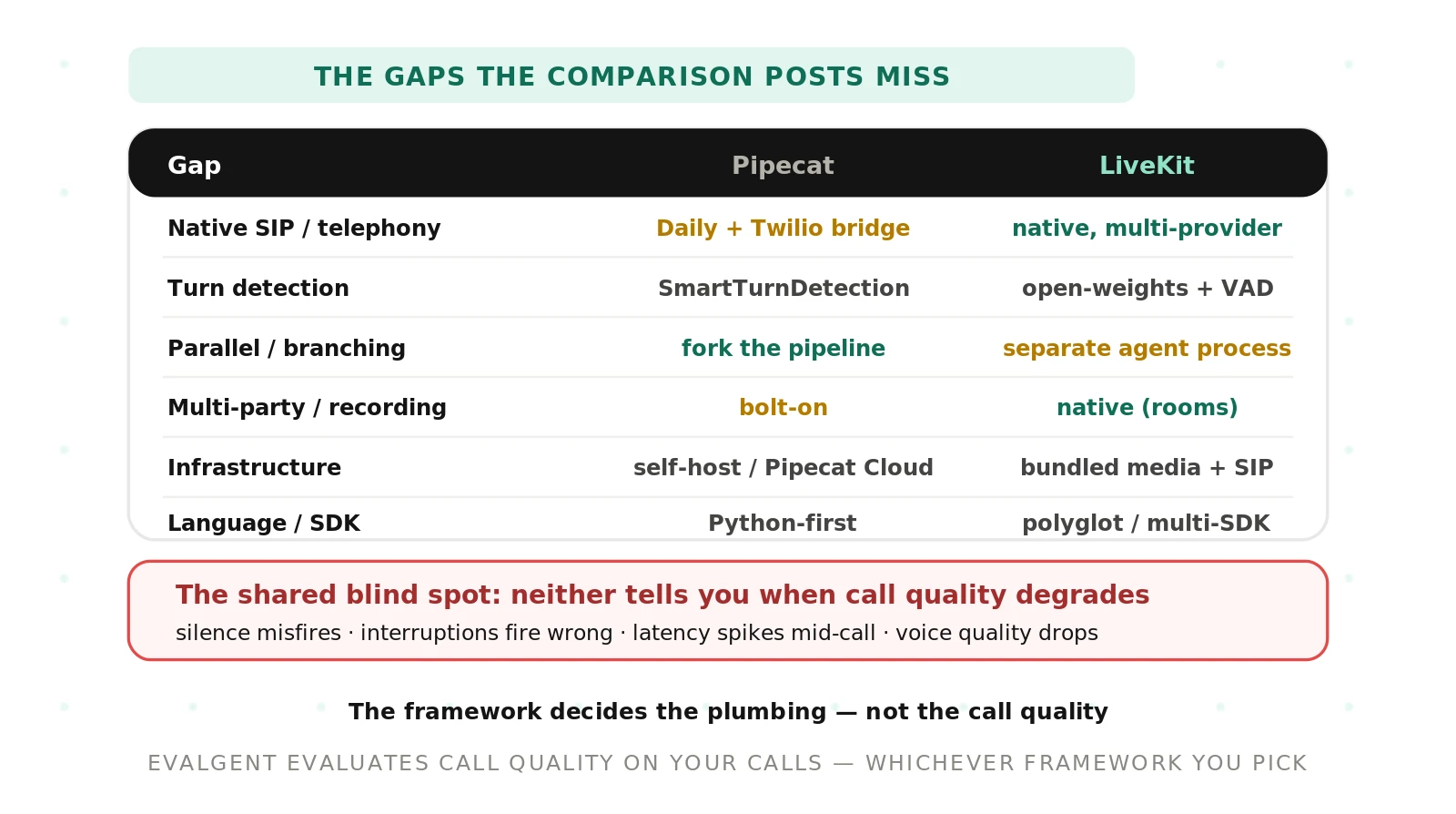
The gap catalog: LiveKit vs Pipecat side by side
Here is the whole picture in one table. Each row is a gap the surface comparisons skip. Read the last column first. That is where each choice bites.
| Gap | Pipecat reality | LiveKit reality | Why it bites in production |
|---|---|---|---|
| Native SIP / telephony | No native SIP; bridges via Daily plus a Twilio SIP bridge | Native SIP trunking plus its own phone-numbers product | Heavy call volume means glue code and extra failure points on Pipecat |
| Transport model | Runs on any transport you choose and own | WebRTC media layer is built in | Pipecat gives freedom; LiveKit gives less to assemble |
| Turn detection | SmartTurnDetection classifier | Open-weights model plus configurable VAD thresholds | Defaults rarely match your callers; tuning is on you either way |
| Interruption handling | Pipeline-level interruption logic | False-interruption resume controls (resume, timeout) | Wrong settings make the agent talk over people or freeze |
| Parallel / branching | Fork the pipeline; parallel tasks are natural | Separate agent process plus room-event coordination | Complex flows are lighter on Pipecat, heavier on LiveKit |
| Multi-participant and recording | Bolt-on or DIY | Native rooms: group, video, avatars, egress, recording | Group or video products need real build work on Pipecat |
| Infra / deployment | Self-host, or Pipecat Cloud (managed, vendor-neutral, multi-region) | Bundled media, telephony, and agent logic from one source | Bundled starts faster; vendor-neutral moves easier |
| Migration / lock-in | Distinct architecture; hard to reverse | Distinct architecture; hard to reverse | Picking wrong can force a rewrite months later |
| Latency source | Optimizes at the frame-handling layer | Optimizes at the media layer | Third-party benchmarks land close; test on your own stack |
| Language / SDK | Python-first | Polyglot, multiple SDKs | Team skills and client platforms decide the fit |
| Call-quality observability | None built in | None built in | Neither framework tells you when a call goes wrong |
The shared blind spot: call quality
Now the part no comparison post mentions. It is the same for both frameworks. Neither one evaluates your call quality.
Read the last row of that table again. Neither Pipecat nor LiveKit tells you when silence detection misfires. Neither flags an interruption that fired at the wrong moment. Neither warns you when latency spikes mid-call. Neither notices when voice quality degrades. Neither gives you cost or business-level observability.
That is the point that reframes the whole decision. The framework decides your plumbing. It does not decide your call quality.
On latency, treat this the same way. Third-party benchmarks put both frameworks roughly 750 to 950 milliseconds end-to-end. Both target around 300 milliseconds for conversational feel. LiveKit optimizes at the media layer. Pipecat optimizes at frame handling. The near-tie is the lesson. Do not trust a generic chart. Benchmark on your own stack, on your own calls. Our latency for voice agents guide shows how.
This is where independent evaluation earns its place. Evalgent is a neutral, third-party auditor for voice agents. It is framework-agnostic. It scores real calls for silence, interruption timing, latency, and voice quality, whichever framework carries the audio. You get call-quality and cost observability that neither LiveKit nor Pipecat provides. See how we approach voice agent evaluation across any stack.
If you have already picked a side, the testing work still applies. Start with our LiveKit voice agent testing guide or the Pipecat voice agent testing guide. For the full head-to-head overview, the Pipecat vs LiveKit hub is the place to start.
How to choose the right one (and de-risk the decision)
Do not start from the framework. Start from your requirements. Then prove the risky parts before you commit.
1. Map your must-haves. Write them down. Do you need phone calls at volume? Multi-party or video? A Python-only team? Complex branching? Each answer pushes you toward a layer, not a brand.
2. Prototype the risky path on both. Build the scariest flow twice. Terminate a SIP call. Handle a hard barge-in. If telephony is your risk, prove it on LiveKit and on Pipecat plus a bridge.
3. Measure latency and quality on your own calls. Ignore generic benchmarks. Run your stack, your prompts, your carrier. Record real conversations. Compare end-to-end numbers you measured yourself.
4. Check your parallel and branching needs. If you need sentiment analysis or multi-branch flows, Pipecat's fork model may save weeks. If you need rooms and recording, LiveKit ships them.
5. Plan for lock-in now. Assume a rewrite is expensive. Keep prompts, data, and eval sets portable. Document your transport assumptions so a future switch is scoped, not scary.
6. Evaluate call quality independently, whichever you pick. The framework is the plumbing. Score silence, interruptions, latency, and voice quality on live calls with a neutral auditor. That is the check both frameworks leave to you.
Frequently asked questions
What is the difference between LiveKit and Pipecat?
LiveKit is a WebRTC media platform with a built-in Agents framework and native SIP telephony. Pipecat is a Python framework that orchestrates a voice pipeline and runs on any transport you choose. They sit at different layers. You can even run a Pipecat pipeline on a LiveKit transport, so they are not strictly rivals.
Does Pipecat support SIP telephony natively?
Pipecat does not support SIP natively. It bridges phone calls through a transport, commonly Daily WebRTC, plus a Twilio SIP bridge. You cannot terminate SIP trunks directly into Pipecat. LiveKit, by contrast, ships native SIP trunking and supports most SIP providers out of the box, including Twilio, Telnyx, Plivo, and Wavix.
Can you use Pipecat and LiveKit together?
Yes. Because they sit at different layers, you can run a Pipecat pipeline on a LiveKit transport. A common real-world pattern uses Pipecat for orchestration and LiveKit for native SIP and media. Teams pick this path when they want Pipecat's pipeline model but need the SIP providers LiveKit supports out of the box.
Is LiveKit or Pipecat better for a call center?
For high-volume inbound or outbound calling, LiveKit usually means less stitching, thanks to native SIP trunking and its own phone-numbers product. Pipecat needs a transport plus a SIP bridge for the same job. Many teams run Pipecat orchestration on LiveKit transport to get both. Test the telephony path on your own carrier first.
How do LiveKit and Pipecat handle interruptions differently?
Pipecat uses its SmartTurnDetection classifier to decide when a caller has finished. LiveKit uses an open-weights turn-detection model plus configurable VAD silence thresholds, and adds false-interruption resume controls so the agent recovers after a false trigger. These settings change how the call feels, and defaults rarely match your callers, so tuning is required either way.
Which is faster, LiveKit or Pipecat?
Third-party benchmarks put both frameworks close, roughly 750 to 950 milliseconds end-to-end, and both target around 300 milliseconds conversationally. LiveKit optimizes at the media layer; Pipecat optimizes at frame handling. Treat the near-tie as the takeaway. Do not trust a generic chart. Benchmark on your own stack, prompts, and carrier before you decide.
What are the limitations of LiveKit vs Pipecat in production?
Both share one big limitation: neither evaluates call quality. Pipecat's limits show in native telephony and bundled recording, which are DIY. LiveKit's show in parallel and branching flows, which need a separate process and room events. And both make migration costly, since their architectures differ enough that a wrong pick can force a rewrite later.
Do LiveKit or Pipecat evaluate call quality?
No. Neither framework tells you when silence detection misfires, an interruption fires wrong, latency spikes, or voice quality drops. Neither provides call-quality or cost observability. The framework decides your plumbing, not your call quality. That gap is why independent, framework-agnostic evaluation matters, and it is exactly what Evalgent provides across any stack.
The bottom line
LiveKit and Pipecat sit at different layers, so the real question is which layer owns your transport, not which brand wins. Whichever you pick, it decides your plumbing and not your call quality, so you still have to evaluate silence, interruptions, latency, and voice on real calls.
Ready to see how your voice agent actually performs on live calls, no matter which framework carries them? Book a demo and let Evalgent audit it independently.
Related Articles

Why AI voice agents fail in production (and how to prevent it)
AI voice agents that ace demos still break in production. Learn the 5 root causes, how to test for each, and what production readiness actually means.
Read more
Voice agent regression testing: why LLM updates break production
LLM updates improve benchmarks but break voice agents in 5 predictable ways. How to detect and prevent regressions after every model or prompt change.
Read more