Observing Voice Agent State: Flow Nodes, Slots Filled and Policy Checks
On this page
A caller says the agent booked the wrong time. You open the trace. It shows an LLM span, a tool span and a transcript. It does not show which step the agent was in, which value it held, or whether anyone confirmed it.
Voice agent state observability fills that gap. This is the observability view of conversation state, as of November 21, 2026. It names framework features only where I opened the docs. Every example call is invented.
What voice agent state observability covers
State is what the agent carries between turns. It answers four questions: where are we, what do we know, which rules have we checked, and what are we trying to do?
Neighbouring posts cover design and tests. Graph-based and SOP-based agents explain why control flow leaves the prompt. Graph testing, SOP testing, policy adherence and memory tests check behaviour before launch. Workflow testing and multi-agent orchestration cover failure shapes.
Conversation state tracing is the angle here, and it is different. Those posts judge state from scenarios you design. This one asks what a live call should leave behind. Where the trace cannot answer, the label is "undetermined."
For the generic field list on every span, see voice agent span attributes. For the wider picture, see what is voice agent observability.
The four kinds of state to record
Record one kind per question. Not every agent has all four.
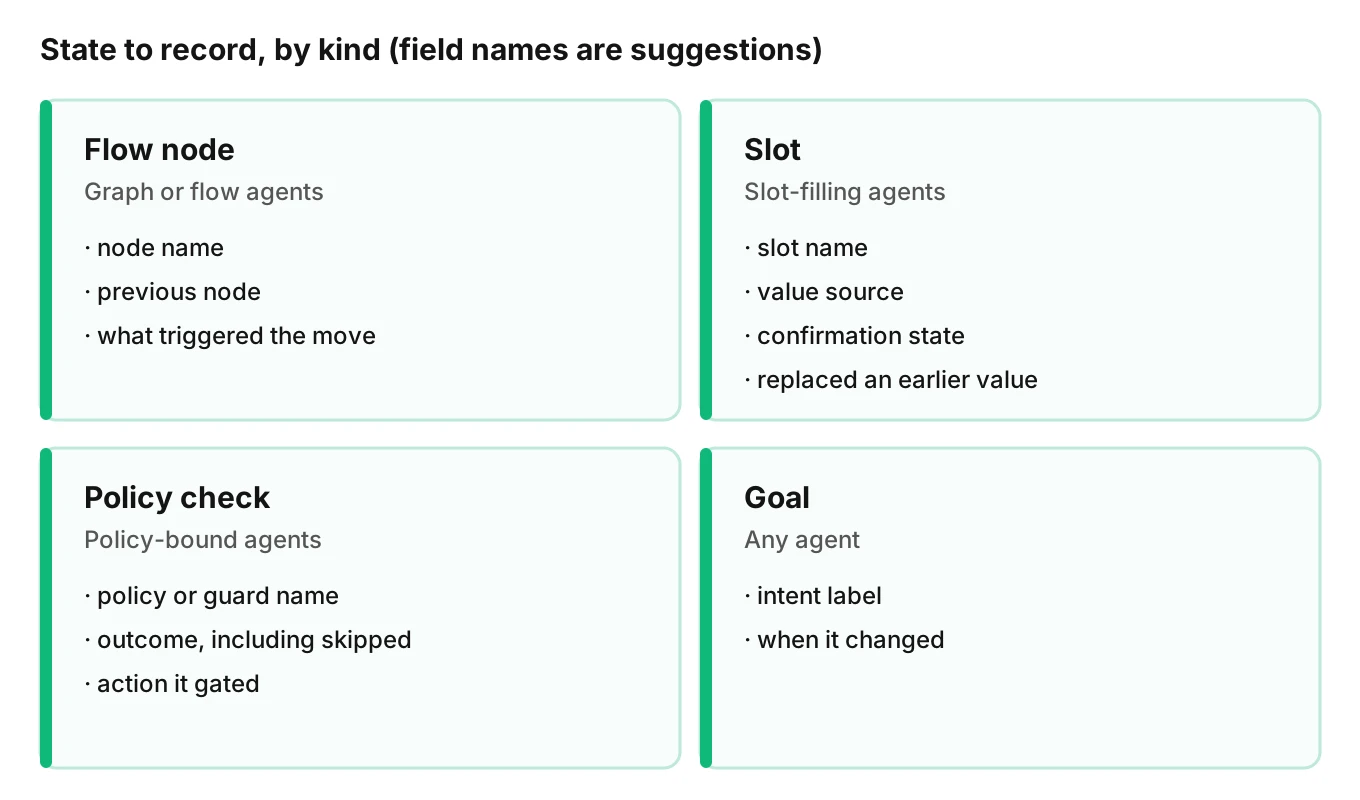
| Kind | Applies to | Record | Question it answers |
|---|---|---|---|
| Flow node | Graph or flow agents | Node name, previous node, what triggered the move | Where was the agent, and why did it move? |
| Slot | Slot-filling agents | Slot name, value source, confirmation state, whether it replaced an older value | What does the agent think it knows, and how sure is it? |
| Policy check | Policy-bound agents | Policy guard name, outcome, which action it gated | Did the rule run, and what did it decide? |
| Goal | Any agent | The intent the agent believes it is pursuing, and when that changed | What is the agent trying to finish? |
Flow nodes and transitions
Record each node on entry and the reason for leaving, so flow node transitions can be traced. A move caused by a function the model called differs from a move caused by a fixed rule.
Pipecat Flows gives you hooks. Its flow manager reference lists a current_node property, which "Returns None before initialization or if no node has been set." It says the node name comes from the config's name field, "or a UUID is generated if not provided." Unnamed nodes become random IDs in your trace. Name every node.
The functions guide says a handler returns a result and the next node. If the next node is None, the agent stays where it is. A function that runs but does not move is a state event too.
LiveKit Agents models work as agents, tools, tasks and task groups. Its workflows page says agents "can transfer control to another agent," and that context must be passed explicitly. Log each handoff and its context. Handoff tracing covers the cross-agent view.
Slots, with source and confirmation
In voice agent slot filling, a slot is a named value the agent needs, such as a date or a service type. Recording the value alone is not enough. Record three more things.
- Value source - the caller's turn, a tool result, a default, or a model inference. A value the caller never said is a different risk.
- Confirmation state - not asked, read back, confirmed or rejected. This is what separates a heard value from a verified one.
- Replacement - whether this write replaced an earlier value, and from which turn.
Pipecat Flows keeps cross-node data in flow_manager.state, "a shared state dictionary that persists across node transitions," per the state management guide. A write to that dictionary is your slot event. The dictionary shows the latest value only, so emit an event at each write or the history is gone.
LiveKit tasks "return a typed result" and finish when you call complete, per the tasks page. A task group takes an on_task_completed callback with a TaskCompletedEvent. The page marks TaskGroup as experimental. Use that callback as a slot-event hook, and check your version.
Policy checks and their outcomes
Voice agent policy checks are rules the agent must pass before an action, such as identity verified before account details. Record the policy name, the outcome and the action it gated. Include "skipped" as an outcome, because a check that never ran is the finding. Log the name, not the rule text.
The goal the agent believes it holds
Record the intent label when the agent sets it and each time it changes. A call that starts as "cancel" and ends as "reschedule" needs both on the record. Without the goal, a node sequence has no meaning.
Record state as events, not attributes
State changes happen at a moment. The OpenTelemetry traces concepts page defines a span event as "a structured log message (or annotation) on a Span," typically marking "a meaningful, singular point in time." It says to use an event when the timestamp is meaningful and an attribute when it is not.
A slot write has a meaningful time. So does a transition. Make each an event on the turn span.
Use attributes for facts that hold across the whole span, such as the flow version. The OpenTelemetry common specification sets a default AttributeCountLimit of 128 per record and says the SDK must discard attributes beyond it. One giant "state snapshot" attribute is the wrong shape. Many small events are the right one.
Here is a simplified Python helper in the Pipecat Flows style. It records a slot write without storing the value.
from opentelemetry import trace
from pipecat.flows import FlowManager


def state_event(name: str, **attrs) -> None:
    trace.get_current_span().add_event(name, attributes=attrs)


async def choose_time(flow_manager: FlowManager, time_slot: str):
    """Record the time the caller asked for."""
    replaced = "time" in flow_manager.state
    flow_manager.state["time"] = time_slot
    state_event(
        "slot.set",
        slot="time",
        source="caller_turn",
        confirmation="none",
        replaced_earlier_value=replaced,
    )
    return {"time": time_slot}, create_book_node()
create_book_node is your own function that builds the next node. add_event takes a name, optional attributes and an optional timestamp, per the OpenTelemetry Python API docs. The field names are suggestions for your own code. They are not a standard.
A worked state timeline (illustrative)
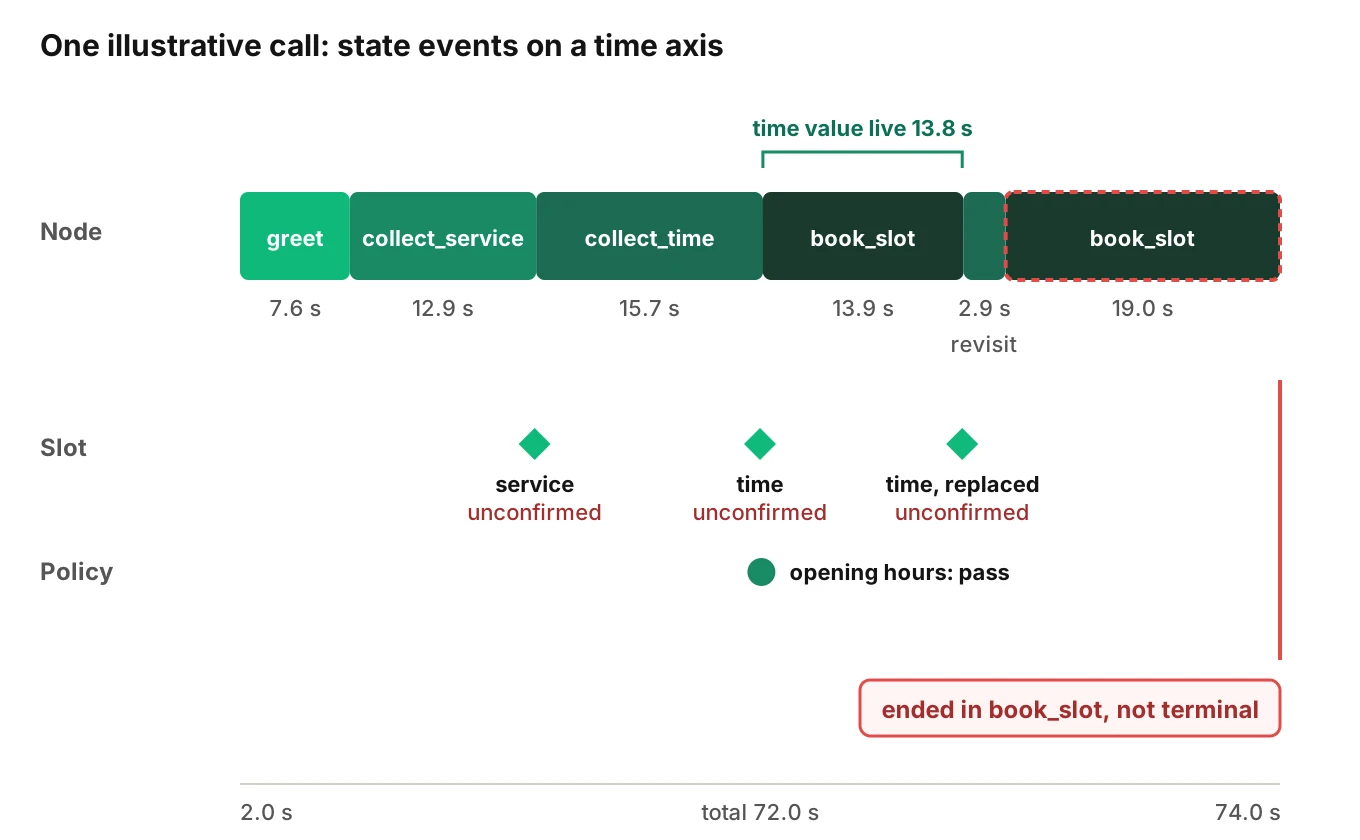
This call is invented to show the arithmetic. It is not a real call and not a measurement. Times are seconds from call start. The agent is a booking flow with two terminal nodes: a confirmed ending and a transfer.
| Time (s) | Turn | Event | Detail |
|---|---|---|---|
| 2.0 | 0 | Node entered | greet |
| 9.5 | 1 | Goal set | book appointment |
| 9.6 | 1 | Transition | greet to collect_service |
| 22.4 | 2 | Slot set | service, source caller, confirmation none |
| 22.5 | 2 | Transition | collect_service to collect_time |
| 38.0 | 3 | Slot set | time, source caller, confirmation none, low recognition confidence |
| 38.1 | 3 | Policy check | opening hours, pass |
| 38.2 | 3 | Transition | collect_time to book_slot |
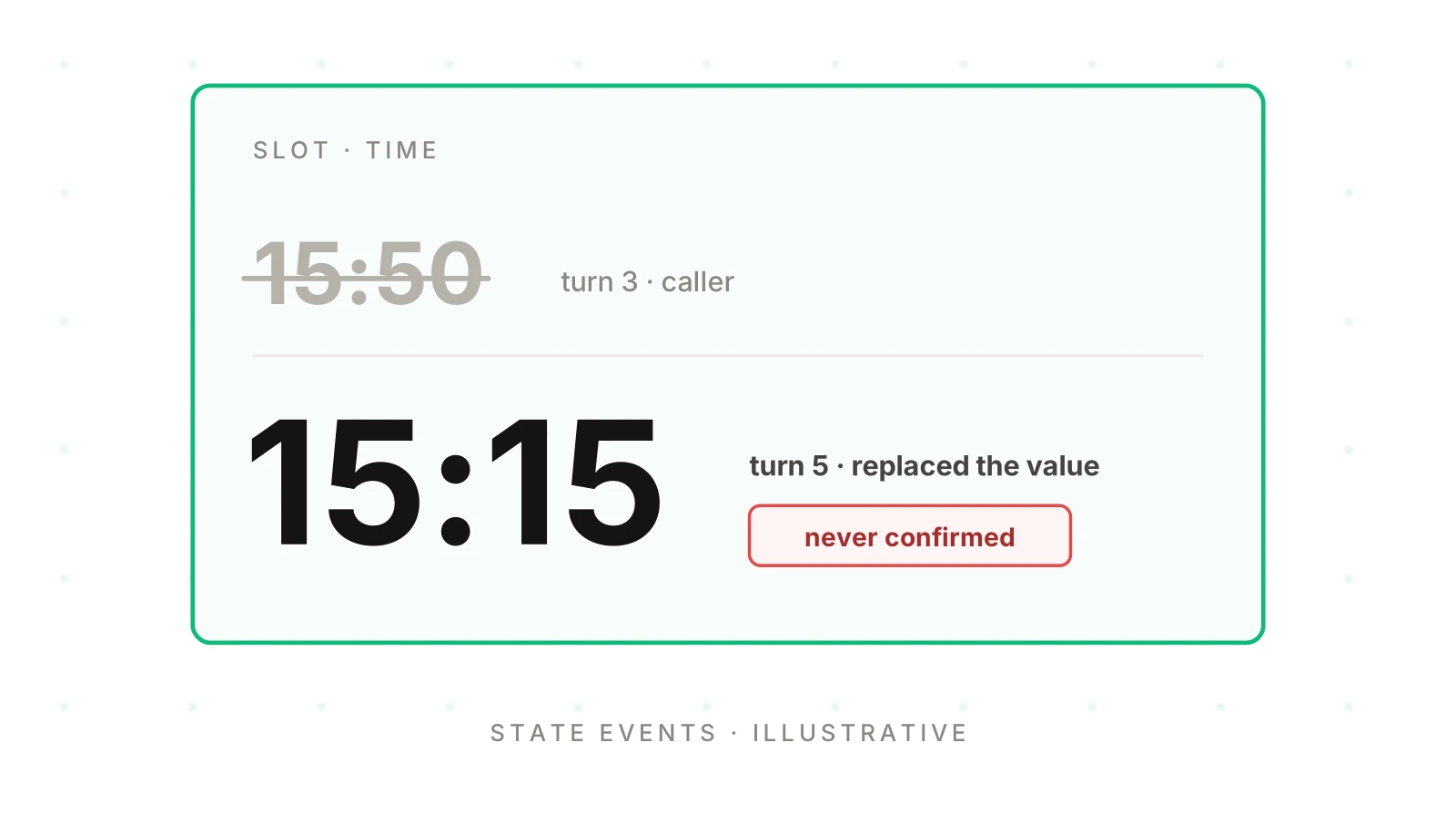
| 52.0 | 5 | Slot set | time, replaced the turn 3 value, confirmation none |
| 52.1 | 5 | Transition | book_slot to collect_time |
| 55.0 | 5 | Transition | collect_time to book_slot |
| 74.0 | 6 | Call ended | in book_slot, not terminal, caller hung up |
The arithmetic:
- Time in each node: greet 7.6 s, collect_service 12.9 s, collect_time 15.7 s, book_slot 13.9 s, collect_time again 2.9 s, book_slot again 19.0 s.
- Those add to 72.0 s, which is 74.0 minus 2.0.
- Transitions: five. Node entries: six, across four distinct nodes.
- The time value from turn 3 was live in book_slot from 38.2 s to 52.0 s, which is 13.8 s.
- Slots written: two. Confirmed: none. Overwritten: one of two.
What a trace of state changes reveals
Each finding is read from the events alone. Set thresholds from your own call history.
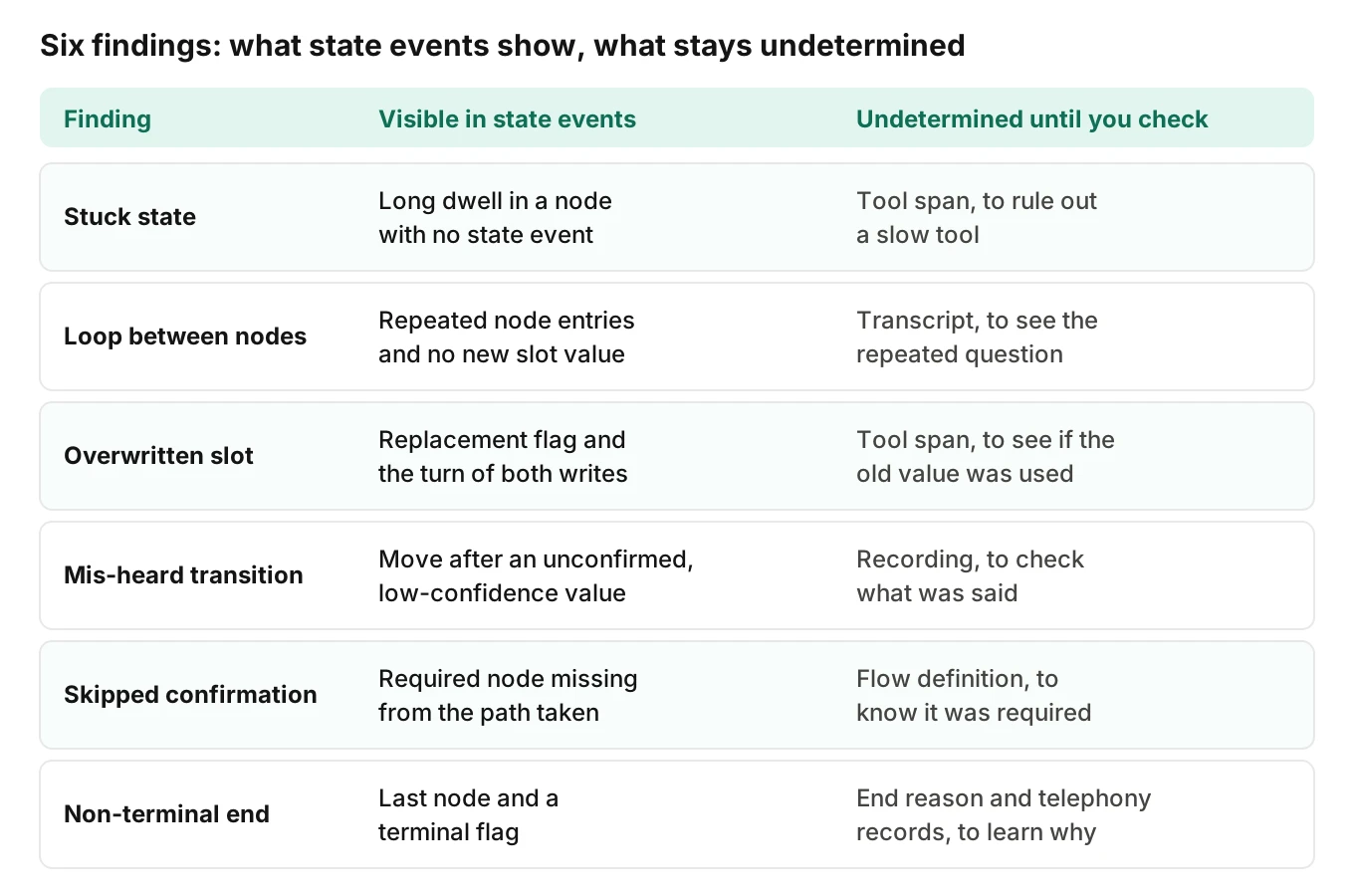
A stuck state
Look at dwell time per node and the events inside it. In the timeline, the final 19.0 s in book_slot had no slot write and no transition. A long dwell with no state event is a candidate stuck state, measured against that node's own history. It could be a slow tool, so check the tool span.
A loop between nodes
Count node entries per call. This call entered collect_time and book_slot twice each. Between the two entries there was no new slot value except one overwrite. A loop returns to a node without new information. For the transcript side, see repetition loops. For loops across agents, see handoff loops.
A slot overwritten by a later turn
An overwritten slot, meaning a write with the replacement flag set, tells you the agent changed its mind. Check what ran in between. Here, book_slot held the turn 3 value for 13.8 s. Whether a booking was written with it is undetermined from state events. The tool span settles it. For late-call context problems, see long calls.
A transition on a mis-heard value
The move at 38.2 s followed a slot write with low recognition confidence and no confirmation. Later, the caller corrected it. The pattern to flag is a transition triggered by an unconfirmed value. Recognition confidence exists only if your speech-to-text service returns it. See STT observability and alphanumeric capture.
A skipped confirmation step
Compare the expected path with the path taken. The flow was meant to pass a confirm step before booking. The trace shows collect_time going straight to book_slot. Each state transition leaves a trace, so a skipped confirmation is a missing node on a path that required it. You only see it if you wrote down the node sequence.
A call that ended in a non-terminal state
Define your terminal nodes. Then record the node and a terminal flag at call end. This call ended in book_slot, which is not terminal. That means the caller left, or the agent dropped the call, before the flow finished.
This borrows from state-machine practice, so treat your voice agent state machine like any other. The W3C SCXML specification says a state machine that reaches a top-level final state "MUST terminate." It also defines the state configuration as "the set of currently active states." If your agent runs nested or parallel flows, log the whole active set, not one node name.
What not to put in state events
State events are cheap to write and easy to leak. Keep them small.
- Raw personal data - names, phone numbers, addresses, dates of birth, account numbers. Log the slot name, the source and the confirmation state. If you need to compare two values, log whether they differ, or a type and length. See PII redaction in logs and traces for where to mask.
- Whole prompts, policy text and transcripts - log the policy name and outcome. Full text belongs in the call record.
- Tool payloads - link to the tool span instead of copying the payload.
Test: would the event expose a person if pasted into a public ticket? Then remove it.
What stays undetermined
A missing event means the thing did not happen or was not instrumented. Declare which nodes, slots and policies are instrumented.
When state lives only in the model's prompt, most of this goes dark. There is no node, so no transition. There is no slot write, so no source or confirmation. There is no check event, so you cannot show a rule ran. You can read what the agent said. You cannot read what it believed.
| Question | Why state events cannot settle it | What can |
|---|---|---|
| What did the caller actually say? | The event shows what the agent stored | The recording or a human listen |
| Was a booking written with the old value? | State shows the value was live, not that it was used | The tool span and the downstream record |
| Why did the model pick this transition? | The event shows the move, not the reasoning | The model input and output for that turn |
| Did a rule run when no event exists? | No event means not run or not instrumented | The coverage declaration |
How to add state observability to your voice agent
1. Name your states - give every node, slot and policy a stable name. Unnamed nodes become random IDs.
2. Mark terminal nodes - list the nodes that count as a finished call.
3. Emit one event per change - write a node entry, a slot write, a policy outcome or a goal change as a span event on the turn span.
4. Add source and confirmation to slots - record who supplied the value and whether it was confirmed. Never record the value itself if it is personal.
5. Record the trigger on every transition - note whether a function, a rule or the model caused the move.
6. Write call end state and coverage - at hangup, record the last node, the terminal flag and the call end reason. Publish which nodes and slots are instrumented, so gaps read as gaps.
Then run three scripted calls: one corrects a slot, one skips confirmation, one hangs up mid-flow. Check each shows in the trace. Debugging a bad call shows how to read it.
Where Evalgent fits
Evalgent is a testing, evaluation and monitoring platform for voice agents. Evalgent Observe, which is launching, ingests OpenTelemetry data from any stack. It traces each failure to the step or handoff that caused it, and clusters failures into root causes. It gives no verdict without evidence in the data you send. Where state events are missing, it says "undetermined" and shows the coverage gap. Evalgent never sits in the media path.
Evalgent Monitor is live. It flags problems in production calls, such as policy failures and tool-call failures, with fix recommendations. See testing vs monitoring vs observability for how they fit.
Testing is the other half. Evalgent generates test scenarios from your agent's prompt and flows, covering states, branches, policies and hard constraints. Callers carry a profile with seven parameters, including interruption level and response delay. Reviews replay a test call with audio and transcript together and show exact tool payloads. You can book a demo to see it on your agent.
Frequently asked questions
What is voice agent state observability?
It is recording what a voice agent believes at each step: its flow node, its slots with value source and confirmation state, the policy checks it ran and its goal. A trace of those changes shows why a call went wrong.
Which state should I record for a slot-filling agent?
Record the slot name, the value source, the confirmation state and whether the write replaced an earlier value. Add the turn number. Do not record the value if it is personal data. A flag that says whether it changed is usually enough.
Should state be a span event or a span attribute?
Use a span event when the time of the change matters, such as a slot write or a transition. Use an attribute for facts that hold across the span. OpenTelemetry advises events when the timestamp is meaningful, and attributes when it is not.
How do I detect a loop between flow nodes?
Count node entries per call and flag a return to a node with no new slot value in between. Set the limit from your own call history. Then read the transcript for the repeated question.
How do I know a call ended in a non-terminal state?
List the nodes that count as finished. At hangup, record the last node, a terminal flag and the end reason. A call that ends with the flag false left the flow unfinished. Pair it with the end reason to tell a caller hangup from an agent drop.
What should I never put in state events?
Never put raw personal data, whole prompts, full transcripts or tool payloads in them. Log names, sources, outcomes and flags instead. If an event pasted into a public ticket would expose a person, remove the field.
What if my agent keeps state only in the prompt?
Then the trace cannot show the current step, the filled slots or whether a rule ran. You can read the words only. Add explicit state outside the prompt, such as named nodes and slot writes, so the agent's beliefs leave a record.
Does a missing state event mean the step did not happen?
No. It means the step did not happen or was not instrumented. Keep a list of the nodes, slots and policies you instrument. Without it, a quiet trace looks clean when it is only blind.
The bottom line
Voice agent state observability turns a transcript into a record of where the agent was, what it held and which rules it checked, so loops, overwrites and non-terminal endings show up as events you can count. Where the events cannot say what the caller said or why the model moved, write "undetermined" and go to the recording or the tool span.
Related Articles
How to automate voice agent testing: synthetic callers vs manual QA
Learn how ai test automation replaces manual QA for voice agents. Compare synthetic callers vs human testers, with a 5-step framework to scale without hiring.
Read more
AI Agent Testing vs Voice Agent Testing: What General Tools Miss for Voice
AI agent testing measures text outputs. Voice agent testing measures behaviour through an acoustic pipeline. Five failure categories general tools miss.
Read more